1
Additional functions
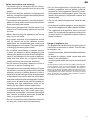
Labels
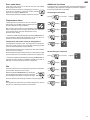
Adjusting the display brightness
Press
for 5 seconds. Display =
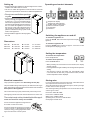
The appliance is supplied with a label holder with labels for each
shelf. Use these to label the type of wine stored on each shelf.
Additional labels can be obtained from your dealer.
Version 1
Display =
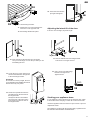
Click the label holder into place
and slide the label in from the
top.
Display =
Use buttons
and
to select the desired setting.
h1 = minimum brightness
h5 = maximum brightness
Version 2
Click the label holder into place
and slide the label in from the
side.
Display =
Display =
The adjusted brightness will be activated after one minute.
Note
If a button is pressed, the display lights up for one minute at
maximum brightness.
When commissioning the appliance, the adjusted brightness will
only be active once the set interior temperature of the appliance
has been reached.
Air exchange with activated charcoal filter
Demo mode
The way in which wines continue to mature depends on the
ambient conditions. The quality of the air is therefore decisive
for preserving the wine.
When in this mode, the cooling circuit is switched off!
We recommend that you replace
the filter once a year. Filters can
be obtained from your dealer.
Demo mode can be activated for presenting the appliance at
exhibitions or in salesrooms as though in normal operating mode.
If this mode is activated by accident, it can be deactivated as
detailed below.
+
Press
for 5 seconds.
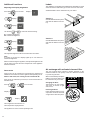
Inserting the filter:
Insert with the handle in a vertical position. Turn it 90° to the left
or right until it clicks into place.
Display =
Display =
The refrigeration unit switches on.
The temperature display flashes.
The appliance is now in normal operating mode.
14
Changing the filter:
Take the filter by the handle.
Turn it 90° to the left or right
and remove.