1
Data Sheet FUJITSU Server PRIMERGY TX200 S7 Dual socket Intel® Xeon® processor tower server
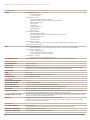
Onboard or integrated Controller
SATA controller type notes
Remote Management Controller
Trusted Platform Module (TPM)
On board SATA controller supports RAID levels 0, 1, 10
Integrated Remote Management Controller (iRMC S3, 32 MB attached memory incl. graphics controller)
IPMI 2.0 compatible
Infineon / separate module; TCG V1.2 compliant (option)
Slots
PCI-Express 3.0 x4 (mech. x8)
PCI-Express 3.0 x16
PCI-Express 2.0 x4 (mech. x8)
PCI-slots
Slot Notes
2 x Full height 280 mm length
2 x Full height first slot: 280 mm length, second slot: 170 mm length (only available with second CPU)
1 x Full height 230 mm length; preferred RAID slot
1 x PCI 32/33 MHz, 1x long, 5V
in SAS configuration 1x PCI-Express occupied by modular RAID controller
Drive bays
Storage drive bays
Accessible drive bays
Notes accessible drives
3.5-inch or 2.5-inch hot-plug SAS/SATA
3 x 5.25/1.6-inch
All possible options described in relevant system configurator.
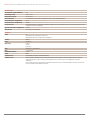
Number of fans
Fan configuration
Fan notes
Operating panel
Operating buttons
Status LEDs
Service display
Page 4 / 10
Max 16 (8 + 8) x 2.5-inch
3 x 5.25/1.6-inch for 8 x 2.5-inch HDD/SSD + backup drive/
ODD, or 8 x 2.5-inch HDD/SSD + slim ODD + local service
display
4
3 + 1 redundant
redundant fan configuration depends on base unit and is only available in combination with redundant PSU
3
4
3 + 1 redundant
redundant / non hot-plug
non redundant / non hotplug

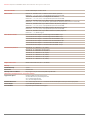
Fan Configuration
Number of fans
Fan configuration
Fan notes
Max 8 (4 + 4) x 3.5-inch
3 x 5.25/1.6-inch for 4 x 3.5-inch HDD/SSD, or 2 x 3.5-inch
HDD/SSD + 1 x backup drive + local service display
1 x 5.25/0.5-inch for slimline ODD
3

Storage drive bays
Accessible drive bays
non redundant / non hotplug
4
3 + 1 redundant
redundant / non hot-plug
On/off switch
NMI button
Reset button
System status (orange / yellow)
Identification (blue)
Hard disks access (green)
Power (amber / green)
CPU status
Fan status
Hard disk error
Temperature
CSS (yellow)
Memory status
PSU status (green/ amber)
At system rear side:
System status (orange / yellow)
Identification (blue)
LAN connection (green)
LAN speed (green / yellow)
Optional:
ServerView Local Service Display (LSD)
www.fujitsu.com/fts