1
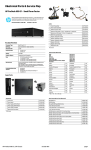
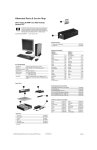
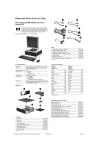
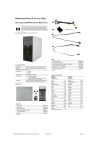
Illustrated Parts & Service Map
HP ProDesk 400 G1 Small Form Factor
© 2013 Hewlett-Packard Development Company, L.P. The information contained herein is subject to change without notice. HP shall not be liable for
technical or editorial errors or omissions contained herein.
Document Number 742427-001. 1st Edition July 2013.
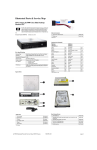
Cables
1
Front I/O assembly
2
Power switch assembly
745037-001
745038-001
*
SATA drive power cable
745040-001
*
SATA data cable, 14 inch, 1 straight end, 1 angled end
745045-001
*
SATA data cable, 19.5 inch, 2 straight ends
745044-001
*
DMS-59 to dual VGA cable
463023-001
*
DMS-59 to dual DVI cable
463024-001
*
Adapter, DisplayPort to VGA
632484-001
*
Adapter, DisplayPort to DVI
662723-001
*
Adapter, DisplayPort to HDMI
617450-001
*
Adapter, DVI to VGA
657401-001
*
Adapter, DVI-I to VGA (BFR/PVC free)
720216-001
*
Adapter, DVI-I to VGA (standard)
202997-001
*
DisplayPort cable
487562-001
*Not shown
Key Specifications
Processor Type
Intel® 4th Generation Pentium®, Core™ i3, i5, i7
Keyboards (not illustrated)
RAM Type
1600 MHz DDR3 SDRAM
Maximum RAM
16 GB
Expansion Slots
•
•
Chipset
Intel H81 Express
Graphics Adapter
Integrated Intel HD Graphics; optional discrete graphics
PS/2
USB
USB, unbranded, Katydid*
Wireless, HP Elite (includes USB dongle)**
Smart card, CCID
Wireless kit (keyboard, mouse, dongle)
Washable***
724718-xx1
724720-xx1
729339-xx1
724722-xx1
701671-001
730323-xx1
700510-xx1
Removable Storage
•
•
•
•
Arabic
-17x
LA Spanish
Belgian
-18x
Norwegian
-09x
Brazilian Portuguese
-20x
People’s Republic of China
-AAx
Bulgaria
-26x
Portuguese
-13x
Czech
-22x
Romanian
-27x
Danish
-08x
Russian
-25x
Finnish
-35x
Saudi Arabia
-DEx
French
-05x
Slovakia
-23x
French Canadian
-12x
South Korea
-KDx
German
-04x
Spanish
-07x
Greek
-15x
Swedish
-10x
Hebrew
-BBx
Swiss
-11x
I/O Interfaces
Preinstalled Operating
Systems
(1) PCI Express x16 graphics connectors; one wired as a x4
(3) PCI Express x1 accessory connectors
Slim DVD-ROM drive
Slim SuperMulti DVD drive
Slim BDXL Blu-ray Writer drive
Media Card Reader
Front: (2) USB 2.0 ports; (2) USB 3.0 ports; microphone, headphone
Rear: 4) USB 2.0 ports (1) VGA video port; (1) DVI-D video port;
(1) RJ-45 network connector; (1) RS-232 serial port; (1) RS232 serial port (optional 2nd port); 3.5mm audio in/out jacks;
PS/2 keyboard and mouse ports
•
•
•
•
Windows 8.1
Windows 7
Novell SUSE Linux Enterprise Desktop 11
FreeDOS 2.0
Spare Parts
-16x
Hungarian
-21x
Taiwanese
-ABx
International
-37x
Thai
-28x
International English
-L3x
Turkish
-14x
Italian
-06x
U.S.
-00x
Japanese
-29x
U.K.
-03x
*-001, -161, -201, -281, -291, -AA1, -AB1 only
**-201 only
***-001, -121, -161, -201 only
Mass Storage Devices (not illustrated)
System Unit
DVD-ROM drive
608394-001
DVD±RW drive
657958-001
Blu-ray BD-RW SuperMulti XL Drive
719157-001
2 TB, 7200 rpm hard drive, 3.5 inch
747993-001
1 TB, hybrid SSD, 2.5-inch hard drive
724937-001
1
Front bezel
745039-001
1 TB, 7200 rpm hard drive, 3.5 inch
747992-001
2
Access panel
745042-001
500 GB hard drive, hybrid SSD, 2.5-inch hard drive
724938-001
3
Power supply, 240W, 85% efficient
722536-001
500 GB, 7200 rpm hard drive, 3.5-inch
747991-001
*
Power supply, 240W, standard
702457-001
256 GB Solid State Drive (SSD), self-encrypting (SED)
680020-001
*
Optical drive bezel blank
732769-001
128 GB Solid State Drive (SSD)
665961-001
20 GB Solid State Drive (SSD)
683305-001
* Not shown
HP ProDesk 400 G1, SFF Chassis
742427-001
page 1
Standard and Optional Boards (not illustrated)
System board (includes replacement thermal material)
System board for use in models without Windows 8
718414-001
System board for use in models with Windows 8 Standard
718414-501
System board for use in models with Windows 8 Professional
718414-601
System board for use in models with NetClone (the People’s Republic of
China only)
745239-001
Memory modules (PC3-12800, CL11)
8-GB
689375-001
4-GB
671613-001
2-GB
671612-001
Other boards
Miscellaneous Parts
1
Fan sink
745661-001
2
Speaker
727149-001
3
Printer port, PCI card
638817-001
4
Fan duct
727145-001
5
Serial port, PCI card, low profile
638815-001
*
Card reader, 14-in-1, USB 3.0, 3.5-inch
716390-001
*
Adapter, USB 3.0 to 2.0
736835-001
*
HP Ultraslim Keyed Cable Lock
703372-001
*
Rubber foot
583654-001
*
Chassis stand
688952-001
*
Hard drive carrier, 2.5-inch to 3.5-inch
703597-001
*
Hard drive adapter bracket, 2.5-in or 3.5-in hard drive in 5.25-in bay
397117-001
*
WLAN antennas
583345-001
*
Mouse, PS2, optical
674315-001
*
Mouse, USB, HP Elite
674318-001
*
Mouse, washable
724795-001
*
Mouse, wireless, HP Elite (Brazil only)
674317-001
*
Mouse, USB, optical
674316-001
*
Mouse, USB, Portia
719901-001
Nvidia NVS315 PCIe x16 graphics card, 1 GB
720837-001
Nvidia NVS310 PCIe x16 graphics card, 512 MB
707252-001
AMD Radeon HD8490 DP PCIe x16 graphics card, 1 GB
717219-001
AMD Radeon HD8350 DH PCIe x16 graphics card, 1 GB DDR3
717220-001
Intel PRO/1000 single port GbE NIC, includes bracket
728562-001
Intel Dual Band Wireless-N 7260 802.11 a/b/g/n (2x2) Wireless NIC
745668-001
Intel Core i7 processors (include thermal material)
4771 3.5 GHz, 8-MB L3 cache, 84W
742563-001
4770, 3.4 GHz, 8-MB L3 cache, 84W
727373-001
4770s, 3.1 GHz, 8-MB L3 cache, 65W
732507-001
Intel Core i5 processors (include thermal material)
4670, 3.4 GHz, 6-MB L3 cache, 84W
727381-001
4670s, 3.1 GHz, 6-MB L3 cache, 65W
732506-001
4570, 3.2 GHz, 6-MB L3 cache, 84W
727380-001
4570s, 2.9 GHz, 6-MB L3 cache, 65W
732505-001
4430, 3.0 GHz, 6-MB L3 cache, 84W
745033-001
4430s, 2.7 GHz, 6-MB L3 cache, 65W
745034-001
Intel Core i3 processors (include thermal material)
4340, 3.6 GHz, 4-MB L3 cache, 54W
742562-001
4330, 3.5 GHz, 4-MB L3 cache, 54W
742561-001
4130, 3.4 GHz, 3-MB L3 cache, 54W
742560-001
Intel Pentium processors (include thermal material)
G3430, 3.3 GHz, 3-MB L3 cache, 54W
742566-001
G3420, 3.2 GHz, 3-MB L3 cache, 54W
742565-001
G3220, 3.0 GHz, 3-MB L3 cache, 54W
742564-001
*Not shown
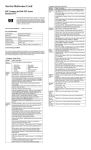
Common POST Error Messages
Diagnostic LEDs
LED
Color
LED Activity
State/Message
Power
White
On
Computer on
Power
White
1 blink every 2 seconds
Normal Suspend Mode
Power
Red
1 blink every second followed
by a 2 second pause
CPU thermal shutdown
Power
Red
3 blinks, 1 blink every second
followed by a 2 second pause
Processor not installed
Power
Red
4 blinks, 1 blink every second
followed by a 2 second pause
Power failure (power supply overload)
Power
Red
5 blinks, 1 blink every second
followed by a 2 second pause
Pre-video memory error
Power
Red
6 blinks, 1 blink every second
followed by a 2 second pause
Pre-video graphics error
Power
Red
7 blinks, 1 blink every second
followed by a 2 second pause
System board failure (ROM
Power
Red
8 blinks, 1 blink every second
followed by a 2 second pause
Power
Red
Power
Screen Message
Probable Cause
Recommended Action
101-Option ROM Error
1. System ROM checksum
error.
1. Verify ROM, reflash if required
2. Remove suspected card,
reboot
3. Clear CMOS memory, reboot
4. Replace system board
2. Expansion board option
ROM checksum
103-System Board
Failure
DMA, timers
1. Clear CMOS memory.
2. Remove expansion boards.
3. Replace system board.
164-Memory Size Error
and
201-Memory Error
Incorrect memory configuration
1. Run Setup (F10).
2. Check DIMMs for proper
seating, type, and HP
compatibility.
3. Remove DIMMs singularly and
reboot to isolate faulty DIMM.
4. Replace system board.
Invalid ROM based on Checksum
214-DIMM Configuration
Warning
Populated DIMM configuration is not optimized
Rearrange the DIMMs so that
each channel has the same
amount of memory.
9 blinks, 1 blink every second
followed by a 2 second pause
System powers on but is unable to
boot
301-, 304-Keyboard
error
Keyboard failure.
Red
10 blinks, 1 blink every second
followed by a 2 second pause
Bad option card
Power
Red
11 blinks, 1 blink every second
followed by a 2 second pause
Current processor does not support a
feature previously enabled.
Check keyboard connection or
keys. Check connector for bent or
missing pins. Replace keyboard.
If 304, possible system board
problem.
none
System does not power on
and LEDs are not flashing
System unable to power on
501-Display Adapter
Failure
Graphics display controller.
none
1. Reseat graphics card.
2. Clear CMOS.
3. Check monitor connection.
4. Replace graphics card.
1720-SMART Hard Drive Hard drive is about to fail.
Detects Imminent Failure
HP ProDesk 400 G1, SFF Chassis
742427-001
1. Determine if hard drive is giving
correct error message. Use F2
Diagnostics to run DPS Selftest.
2. Apply hard drive firmware
patch if applicable.
3. Back up contents and replace
hard drive.
page 2
System Setup and Boot
Access the Setup Utility during computer boot by pressing the F10 key. If you do not press F10
at the appropriate time, you must restart the computer and again press F10 when the monitor
light turns green. NOTE: Not all settings are available for all models.
Advanced
(continued)
Computer Setup Menu
Heading
File
Option/Description
System Information - Lists the following main system specifications:
•
•
•
•
•
Product name
Manufacturer
SKU number (some models)
Processor type/speed/stepping
Cache size (L1/L2/L3)
•
•
•
•
•
Installed memory size/speed/ch
Integrated MAC Address
Chassis serial number
Asset tracking number
System BIOS
VGA Configuration - Allows you to specify which VGA controller is the “boot”/
primary. Displayed only if add-in video card installed.
Option ROM Launch Policy - lets you set the launch policy for option ROMs.
AMT Configuration - Allows you to set:
• AMT (enable/disable)
• Unconfigure AMT/ME (enable/disable)
• Hide Unconfigure ME Confirmation Prompt (enable/disable)
• Watchdog Timer (enable/disable)
About - Displays copyright notice.
Set Time and Date - Allows you to set system time and date.
Replicated Setup - Allows you to save or restore system configuration to/
from a USB flash drive.
Default Setup - Allows you to save current settings as default or restore factory settings as default.
Apply Defaults and Exit - Applies the selected default settings and clears any
established passwords.
Ignore Changes and Exit - Exits Computer setup without saving changes.
Save Changes and Exit - Saves changes to system configuration or default
settings and exits Computer Setup.
Storage
Device Configuration - Lists all installed BIOS-controlled storage devices. The
following options may display depending on configuration:
•
•
CD-ROM
Hard Disk
•
•
SMART (ATA disks only)
Diskette
Storage Options - Allows you to set:
• SATA Emulation - Choose how the SATA controller and devices are accessed
by the OS. SATA Emulation choices are AHCI, RAID, or IDE.
• Removable Media Boot - Enables/disables ability to boot the system from
removable media.
Boot Order - Specify boot order for UEFI and legacy boot sources. Also specify
hard drive boot order.
• Shortcut to Temporarily Override Boot Order
Security
Setup Password - Set and enable the setup (Admin) password.
Device Options - Allows you to set:
• Printer mode (Bi-Directional, EPP + ECP, Output Only)
• Num Lock State at Power-on (off/on)
• Integrated Video (enable/disable)
• Integrated Graphics (Auto/Disable/Force)
• Internal Speaker (enable/disable)
• NIC PXE Option ROM Download (enable/disable)
• SATA RAID Option ROM Download (enable/disable)
• Multi-Processor (enable/disable)
• Hyper-threading (enable/disable)
• Turbo Mode (enable/disable)
Password Security
Establishing a Setup or Power-On password:
1. Turn on or restart the computer.
2. As soon as the computer turns on, press the Esc key while “Press the ESC key for Startup
Menu” message is displayed at the bottom of the screen.
3. Press the F10 key to enter Computer Setup.
4. To establish Setup password, select Security > Setup Password and follow the
instructions.
- or To establish a Power-On password, select Security > Power-On Password and follow the
instructions on the screen
5. Before exiting, click File > Save Changes and Exit.
Changing a Setup or Power-On password:
1. Turn on or restart the computer.
To change the Setup password, go to step 2.
To change the Power-on password, go to step 3.
2. To change the Setup password, as soon as the computer turns on:
- Press the Esc key while “Press the ESC key for Startup Menu” message is displayed.
- Press the F10 key to enter Computer Setup.
Power-On Password - Set and enable power-on password.
Password Options - Allows to you enable/disable:
• Lock Legacy Resources
• Setup Browse Mode
• Password prompt on F9 & F12
• Network Server Mode
Smart Cover - Allows you to lock/unlock the smart cover and set the cover
removal sensor to disable/notify user/setup password.
Device Security - Set Device Available/Device Hidden for: embedded security device,
system audio, network controller, USB controller, serial/parallel ports, and SATA
ports.
USB Security - Set Device Available/Device Hidden for front USB ports, rear USB
ports, accessory USB ports.
Slot Security - Disable the PCI, PCIe, and Mini Card slots.
3. When the key icon appears, type your current password, a slash (/) or alternate delimiter
character, your new password, another slash (/) or alternate delimiter character, and your
new password again as shown:
current password/new password/new password.
NOTE: Type the new password carefully since the characters do not appear on the screen.
4. Press Enter.
The new password will take effect the next time the computer is restarted.
Deleting a Power-On or Setup password
1. Turn on or restart the computer.
To delete the Setup password, go to step 2.
To delete the Power-On password, go to step 3.
Network Boot - Enables/disables boot from OS (NIC models only).
System IDs - Allows you to update asset tag, ownership tag, UUID, keyboard
locale setting.
Master Boot Record Security - enables/disables MBR.
2. To change the Setup password, as soon as the computer turns on:
- Press the Esc key while “Press the ESC key for Startup Menu” message is displayed.
- Press the F10 key to enter Computer Setup.
3. When the key icon appears, type your current password followed by a slash (/) or alternate
delimiter character as shown. Example: currentpassword/
System Security - Allows you to set:
• Data Execution Prevention (enable/disable)
• SVM CPU Virtualization (enable/disable).
• Virtualization Technology (VTx) (enable/disable)
• Virtualization Technology/Directed IO (VTd) (enable/disable)
• Trusted Execution Technology (enable/disable)
• Embedded Security Device (enable/disable)
• Reset to Factory Settings (Do not reset/Reset)
• Measure boot variables/devices to PCR1 (enable/disable)
• OS management of Embedded Security Device (enable/disable)
• Reset of Embedded Security Device through OS (enable/disable)
• No PPI provisioning (Windows 8 only; enable/disable)
• Allow PPI policy to be changed by OS (enable/disable)
4. Press Enter.
Clearing CMOS
1. Turn off the computer and disconnect the power cord from the power outlet.
2. Remove the access panel.
3. On the system board, press and hold the CMOS button for 5 seconds.
4. Replace the chassis access panel and reconnect the power cord.
5. Turn on the computer and allow it to start.
DriveLock Security - Allows you to assign or modify a master or user password
for hard drives.
Secure Boot Configuration (Windows 8 only)
• Legacy Support (enable/disable)
• Secure Boot (enable/disable).
• Key Management (enable/disable)
• Fast Boot (enable/disable)
Power
OS Power Management - Allows you to enable/disable Runtime Power Management, Idle Power Savings, Unique Sleep State Blink Rates.
Hardware Power Management - Enable/disable SATA power management, S5 maximum power savings., PCI express power management, network controller, USB 3.0
controller
Thermal - Control minimum fan speed.
Advanced
Power-On Options - Allows you to set:
• POST mode (QuickBoot, Clear Memory, FullBoot, or FullBoot Every x Days)
• POST messages (enable/disable)
• Press the ESC key for Startup Menu (enable/disable)
• Option ROM Prompt (enable/disable)
• After Power Loss (off/on/previous state)
• POST Delay (none, 5, 10, 15, 20, or 60 seconds)
• Remote Wakeup Boot Source (remote server/local hard drive)
• Factory Recovery Boot Support (enable/disable)
• Bypass F1 Prompt on Configuration Changes (enable/disable)
BIOS Power-On - Set the computer to turn on at a preset time.
Bus Options - Allows you to enable/disable PCI SERR# Generation and PCI VGA
palette snooping.
Onboard Devices - Allows you to set resources for or disable on-board system
devices.
HP ProDesk 400 G1, SFF Chassis
742427-001
page 3
System Board
System Board Connectors and Jumpers (component location may vary)
PS2
PS/2 keyboard/mouse connectors
MEDIA
PWRCPU
CPU power connector
PSWD
Media card reader connector
Password header
BAT
RTC battery socket
CMOS
CMOS header
CPUFAN
Processor fan connector
FRNT AUD
Front panel connector
DIMM3
Memory socket - Channel A
X1PCIEXP3
PCI Express x1 slot
DIMM1
Memory socket - Channel B
X1PCIEXP2
PCI Express x1 slot
PB/LED
Power switch connector
X!PCIEXP1
PCI Express x1 slot
PWR CMD
Power connector
X16PCIEXP
PCI Express x16 slot
SATA PWR0
Optical drive power connector
PAR
Parallel port connector
PWR
Main power connector
IN//OUT
Audio connectors
FRONT USB 3.0
Front USB 3.0 port connector
COMB
Serial port
SPKR
Speaker connector
USB
USB connectors
SATA5
Any SATA Device other than the primary hard drive
VGA/COMA
Monitor connector/serial port
SATA0
Primary hard drive
DVI
DVI connector
SATA1
Any SATA Device other than the primary hard drive
RJ45
Network connector
FRONT_USB
1st USB connector
PS2
Keyboard/mouse connector
HP ProDesk 400 G1, SFF Chassis
742427-001
page 4