1
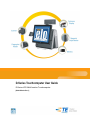
D-Series Touchcomputer User Guide
D-Series LCD Multi-function Touchcomputer
[Model D-Series Rev.C]
TE Touch Solutions
D-Series Touchcomputer User Guide
Multi-function Touchcomputer
Revision A
SW 601864
Elo TouchSystems
1-800-ELOTOUCH (1-800-356-8682)
www.elotouch.com
Copyright © 2011 Tyco Electronics Corporation, a TE Connectivity Ltd. Company.
All Rights Reserved.
No part of this publication may be reproduced, transmitted, transcribed, stored in a
retrieval system, or translated into any language or computer language, in any form or by
any means, including, but not limited to, electronic, magnetic, optical, chemical, manual, or
otherwise without prior written permission of Tyco Electronics Corporation.
Disclaimer
The information in this document is subject to change without notice. Tyco Electronics
Corporation and its Afffiliates in the TE Touch Solutions business unit in the TE
Connectivity Ltd. family of companies (collectively "TE") makes no representations or
warranties with respect to the contents herein, and specifically disclaims any implied
warranties of merchantability or fitness for a particular purpose. TE reserves the right to
revise this publication and to make changes from time to time in the content hereof without
obligation of TE to notify any person of such revisions or changes.
Trademark Acknowledgments
AccuTouch, Elo TouchSystems, Elo TouchSystems (logo), Elo, IntelliTouch, iTouch, TE
Connectivity, TE connectivity (logo) and TE (logo) are trademarks. Windows is a
trademark of Microsoft Corporation. Other product names mentioned herein may be
trademarks or registered trademarks of their respective companies. TE claims no interest
in trademarks other than its own.
15D1 TOUCHCOMPUTER USER GUIDE
iii
Table of Contents
Chapter 1: Setup...................................................................................... 1
Unpacking Your Touchcomputer ....................................................................................................1
Adjusting the Display ......................................................................................................................2
Setting Up the Operating System.....................................................................................................2
Calibrating the Touchscreen ............................................................................................................9
Securing the Base...........................................................................................................................11
Advertising Brackets......................................................................................................................11
Chapter 2: Operation ............................................................................. 13
On-Screen Display (OSD) .............................................................................................................14
LED Functionality .........................................................................................................................15
Using the Input/Output Panel.........................................................................................................17
Chapter 3: Options and Upgrades ....................................................... 20
Adding Optional Peripherals..........................................................................................................20
Magnetic Stripe Reader (MSR) .....................................................................................................21
Customer Display...........................................................................................................................23
Fingerprint Reader (FPR) ..............................................................................................................24
Barcode Scanner ............................................................................................................................25
USB Wireless Adapter...................................................................................................................30
Rear-facing LCD Monitor Bracket Kit ..........................................................................................31
Second Hard Drive.........................................................................................................................31
Solid State Drive ............................................................................................................................31
Second HDD/SSD Mounting Kit (No drive) .................................................................................31
Third-Party Peripherals..................................................................................................................31
Chapter 4: Safety and Maintenance ..................................................... 33
Safety .............................................................................................................................................33
Care and Handling .........................................................................................................................34
Recovering the Operating System .................................................................................................36
Reassigning COM Ports after System Recovery ...........................................................................42
Chapter 5: Technical Support............................................................... 48
Technical Assistance......................................................................................................................48
15D1 TOUCHCOMPUTER USER GUIDE
iv
Regulatory Information............................................................................50
Warranty ...................................................................................................53
15D1 TOUCHCOMPUTER USER GUIDE
v
C H A P T E R
1
SETUP
This chapter discusses how to set up and test your touchcomputer. For information
on peripheral options, refer to Chapter 3, “Options and Upgrades.”
Unpacking Your Touchcomputer
Check that the following items are present and in good condition:
Power cable US/Canada
Power cable Europe
Touchcomputer
Quick Install Guide
Advertising
brackets
Optional
security screw
15D1 TOUCHCOMPUTER USER GUIDE
1
Adjusting the Display
The display screen can be adjusted from 0 to 60 degrees, as shown below.
CAUTION: To prevent tipping or dropping, be sure to hold the base when adjusting
the display.
Setting Up the Operating System
If configured with an operating system, the initial setup of the operating system
takes approximately 5-10 minutes. Additional time may be needed depending on
touchcomputer hardware configurations and connected devices.
To set up the Microsoft® Windows® Operating System for the touchcomputer, turn
on the touchcomputer by pressing the power button, and then follow the
instructions on the screen.
Selecting the Language (For Windows XP and POSReady 2009 Only)
Microsoft Windows® uses English as the default language in menus and dialog
boxes. You can change this language to suit your preferences at the screen below.
Note: If you choose to change the language after initial setup, you can follow steps
1-2 to arrive at the same screen below:
1. From the desktop, click Start > Control Panel
2. In the Control Panel screen, select Regional and Language Options.
15D1 TOUCHCOMPUTER USER GUIDE
2
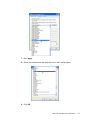
3. Click Customize. The Regional and Language Options window appears.
Select the Languages tab.
4. If required, check the boxes for “Install files for complex script and right-to-left
languages” and “Install files for East Asian languages.”
5. Select the Regional Options tab.
6. Select your preferred language from the drop-down list in the Standards and
formats pane.
15D1 TOUCHCOMPUTER USER GUIDE
3
7. Click Apply.
8. Select your location from the drop-down list in the Locations pane.
9. Click OK.
15D1 TOUCHCOMPUTER USER GUIDE
4
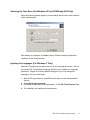
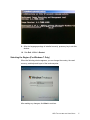
Selecting the Time Zone (For Windows XP and POSReady 2009 Only)
When the following window appears, you can change the time zone, date, and time
of the touchcomputer.
After making any changes, click Next to finish. Windows Setup completes the
installation of the touchcomputer.
Injecting the Languages (For Windows 7 Only)
Windows 7 Professional only allows the use of one language at one time. But you
can use the Elo TouchSystems language injection tool to update your language
preference. English is set as the default language, but you can change this
language to suit your preferences.
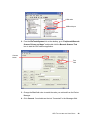
1. After the TE logo shows up, press F8 several times to enter Advanced Boot
Options.
2. Select Repair your computer.
3. Click Next Æ OK (Shall not have password) Æ Click Elo Touch System Tool.
4. The following User Interface will be presented:
15D1 TOUCHCOMPUTER USER GUIDE
5
5. Click Inject, and the following window will pop out.
6. Click the drop-down list and select the preference language.
7. Click Inject Selected Language
8. The following window will be presented:
15D1 TOUCHCOMPUTER USER GUIDE
6
9. After the language package is installed correctly, press any key to exit this
window.
10. Click Exit Æ Exit Æ Restart
Selecting the Region (For Windows 7 Only)
When the following window appears, you can change the country, time and
currency, and keyboard layout of the touchcomputer.
After making any changes, click Next to continue.
15D1 TOUCHCOMPUTER USER GUIDE
7
Choosing the Computer Name (For Windows 7 Only)
When the following window appears, you can choose a computer name of the
touchcomputer.
After making any changes, click Next to continue.
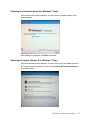
Selecting the Update Options (For Windows 7 Only)
When the following window appears, you can select one of the update options of
the touchcomputer. In general, you can choose Use recommended settings as
your default option.
15D1 TOUCHCOMPUTER USER GUIDE
8
After making any changes, click Next to continue.
Reviewing the Time and Date Settings (For Windows 7 Only)
When the following window appears, you can set up the time and date of the
touchcomputer.
After making any changes, click Next to finish. Windows Setup completes the
installation of the touchcomputer.
Calibrating the Touchscreen
The touchscreen is pre-calibrated for accurate touch response.
If for any reason the touchscreen needs to be recalibrated, right-click the Elo icon
in the Taskbar and then click “Properties.” The following window opens.
NOTE:
Calibration is not applicable to APR models.
15D1 TOUCHCOMPUTER USER GUIDE
9
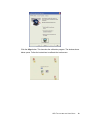
Click the Align button. This launches the calibration program. The window shown
below opens. Follow the instructions to calibrate the touchscreen.
15D1 TOUCHCOMPUTER USER GUIDE
10
Securing the Base
There are two mounting options for the D-Series touchcomputer. In both cases, the
base must be mounted on a horizontal surface.
Option 1: Secure from below. Use the four pretapped holes to secure the touchcomputer from
below the mounting surface. The holes are designed to work with ISO metric m6 screws. These
screws are not contained in the package, but should be readily available at any hardware store.
Option 2: Secure from top. Use the two through holes to secure the base to the surface.
NOTE:
Mounting screws are not provided with the shipment.
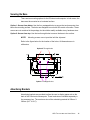
Refer to the figure below for the location of the holes. All dimensions are in
millimeters.
Option 2 Through holes
Option 1 Pretapped holes
Advertising Brackets
Advertising brackets are provided to allow the user to display paper ads on the
back of the D-Series touchcomputer. These brackets are included separately in
the accessory box. The maximum size of the advertising material is 220mm X
320mm (8.6” X 12.6”).
15D1 TOUCHCOMPUTER USER GUIDE
11
To install these brackets, simply push them onto the sides of the back door of the
D-Series touchcomputer, as shown in the figure below.
Then insert the advertising material as shown below.
15D1 TOUCHCOMPUTER USER GUIDE
12
C H A P T E R
2
OPERATION
This chapter describes how to control the On-Screen Display (OSD), power
buttons, and I/O panel.
All adjustments made to the OSD and power controls are automatically saved.
User settings remain unchanged after powering off/on or in the case of a power
failure.
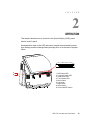
34 5 6 7 8 9
1
2
1. HDD status LED
2. Computer power LED
3. Head power LED
4. Touch power LED
5. Menu button
6. Left button
7. Right button
8. Select button
9. Power ON/OFF button
15D1 TOUCHCOMPUTER USER GUIDE
13
On-Screen Display (OSD)
OSD Menu
1. To display the OSD Menu, press the Menu button.
Press the RIGHT button or LEFT button to toggle and the SELECT button to
select from the different OSD sub-menus and functions.
2. When the function you want to change is shown, press the SELECT button.
3. To adjust the value of the function:
4. Pressing the RIGHT button increases the value of the selected OSD control
option.
5. Pressing the LEFT button decreases the value of the selected OSD control
option.
The OSD provides the following settings.
Feature
Description
Auto adjust
Automatically adjusts system clock.
Brightness
Adjust brightness and contrast.
Image setting
•
Brightness: Adjusts the backlight of the monitor.
•
Contrast: Adjusts the maximum luminance level of the
monitor.
Adjusts H position, V position, clock, and phase.
•
H position: Moves the screen horizontally right and left (1 pixel
pitch increment).
•
V position: Moves the screen vertically up and down (1 line
increment).
•
Clock: Adjusts the ratio of dividing frequency of the dot clock.
•
Phase: Adjusts the phase of the dot clock.
Color
Sets color temperature (9300K, 7500K, 6500K, 5500K, or User
Preset).
OSD
Adjusts H position, V position, and OSD timeout.
•
H position: Adjusts the OSD menu screen position left or right.
•
V position: Adjusts the OSD menu screen position up or down.
•
Timeout: Adjusts the amount of time that the OSD menu is
displayed.
15D1 TOUCHCOMPUTER USER GUIDE
14
Feature
Description
Language
Changes language to English, French, Italian, German, Spanish,
Japanese, Simplified Chinese, or Traditional Chinese.
Recall
Sets color recall and recall defaults. Restores original factory
settings.
Miscellaneous
Adjusts sharpness, enables/disables DDCCI function.
•
Exit
Sharpness: Adjusts sharpness of video.
Exits the OSD.
OSD and Power Button Control
The OSD menu and power button are enabled by default.
To enable or disable the OSD function:
1. Simultaneously press Menu/Exit and the Left (<-) key for two seconds. A
window appears displaying OSD ENABLE or OSD DISABLE.
2. When the OSD is disabled, the OSD menu is not visible.
To enable or disable the power button (PWR) lock function:
1. Simultaneously press Menu/Exit and the Right (->) key for two seconds. A
window appears displaying PWR ENABLE or PWR DISABLE.
2. When the power button lock feature is activated, the power button is disabled.
LED Functionality
Base Power Status LED
The D-Series base has two LEDs that indicate the power status and hard drive
status. See the figure on page 13, item 2 for the location of this LED. The light can
be green, flashing green, red, or off. The table below shows LED state and
corresponding color.
LED Color to Observer
State
Off
No input power — Off mode
Red
Input power present, power switch off — Off mode
Flashes green
Input power present — Sleep mode
Green
Input power present — On mode
15D1 TOUCHCOMPUTER USER GUIDE
15
Head Power Status LED
The head power status is indicated by a different LED, which is located at the lower
edge of the head (#3 in figure on page 13).
LED Color to Observer
State
Off
No input power to head — Off mode
Red
Input power present, power switch off — Off mode
Amber
Input power present — Sleep mode
Green
Input power present — On mode
Touch Power Status LED
The touch power status is indicated by a separate LED located at the lower edge of
the head and to the right of the Head Power Status LED (#4 in figure on page 13).
This feature is available for AT and APR 7010.
LED Color to Observer
State
Off
No input power — Off mode
Red
Input power present, power switch off — Off mode
Amber
Input power present — Sleep mode
Green
Input power present — On mode
HDD Activity LED
Hard disk drive activity is indicated by a flashing LED on the base, just under the
computer power LED (#1 in the figure on page 13). Reading from and writing to the
disk causes the LED to flash.
LED Color to Observer
State
Off
No activity
Flashes green
Activity
15D1 TOUCHCOMPUTER USER GUIDE
16
Using the Input/Output Panel
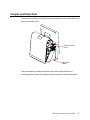
To access the input/output (I/O) ports, open the cable cover door on the left side of
the unit, as shown below.
Optional security
screw
Opening for
cables
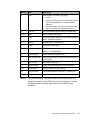
The touchcomputer provides a number of input and output interfaces for
connecting a wide variety of compliant devices as shown in the following figure.
15D1 TOUCHCOMPUTER USER GUIDE
17
1
9
2
10
3
11
4
12
13
5
6
7
8
14
15
15D1 TOUCHCOMPUTER USER GUIDE
18
Number
Port
Description
1
Audio
Audio in (left), out (center), mic (right)
•
Audio In
•
Audio Out: One 3.5mm stereo audio output jack for
connecting headphones or external powered
speakers
•
Microphone Input: One 3.5mm microphone input
jack for connecting an external microphone
2
Ethernet
One RJ45 Ethernet port providing LAN capabilities
3, 9, 10
USB
Seven USB 2.0 type A ports
4
VGA
One D-SUB VGA output port for connecting the display
head – SYSTEM USE ONLY
5
Parallel
Standard 25-pin connector port
6
Serial
Two USB-to-Serial ports
7
DVI-D
One DVI-D output port for connecting the second
display – CUSTOMER USE
8
PS/2 universal
Mouse (left) and keyboard (right)
9
24V powered USB
24V powered USB port; the max loading on this port is
24VDC @ 2A
11
Native serial
One “native” serial port
12
Speaker power
Power switch for disabling the internal speakers
13
Cash drawer
RJ11, 6 position (12V/24V default)
14
Powered serial
Two powered USB-to-Serial ports, 5V default/12V
15
Main power
AC power
NOTE:
The customer display, fingerprint reader, and barcode scanner are
designed to connect to the USB 2.0 ports on the I/O panel. If all three
peripherals were connected, there would be four USB 2.0 ports
remaining.
15D1 TOUCHCOMPUTER USER GUIDE
19
C H A P T E R
3
OPTIONS AND UPGRADES
Adding Optional Peripherals
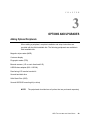
When adding a peripheral, complete installation and setup instructions are
provided with the field-installable kits. The following peripherals are available in
field-installable kits:
Magnetic stripe reader (MSR)
Customer display
Fingerprint reader (FPR)
Barcode scanner (1-D or omni-directional/2-D)
USB Wireless adapter (802.11 B/G/N)
Rear-facing LCD monitor bracket kit
Second hard disk drive
Solid State Drive (SSD)
Second HDD/SSD mounting kit (no drive)
NOTE:
The peripherals described are all options that are purchased separately.
15D1 TOUCHCOMPUTER USER GUIDE
20
Magnetic stripe
reader (MSR)
Barcode
scanner
Fingerprint
reader (FPR)
Magnetic Stripe Reader (MSR)
You can add a magnetic stripe reader (MSR) to the D-Series touchcomputer using
a USB port located on the display head.
The MSR is a USB 2.0 device that reads all three data stripes on standard credit
cards or driver’s licenses conforming to ISO/ANSI standards. The MSR has foreign
language capability. The credit card is read by sliding the credit card forward or
backward through the MSR, stripe side toward the display. The MSR is powered
from the USB port; no external power is needed. The MSR features are:
•
Reads up to 3 tracks of information
•
Bidirectional swipe reading
•
Superior reading of high jitter, scratched, and worn MagStripe cards
•
Reliable for over 1,000,000 card swipes
•
Reads ISO7811, AAMVA, and most other card data formats
•
PC software makes configuration changes easy
•
Swipe speeds from 3 to 60 inches per second
•
Interfaces: USB-KB and USB-HID
15D1 TOUCHCOMPUTER USER GUIDE
21
•
Fully supports USB 2.0
•
Part number: E145919
Testing the MSR
Testing in USB MSR Keyboard (KB) Emulation Mode
1. Open the Notepad application (click Start > Accessories > Notepad).
2. Slide the card through the MSR and verify that the data is displayed in the
application window.
Testing in USB MSR Human Interface Device (HID) Mode
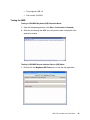
1. Double-click the MagSwipe HID Demo icon to start the test application.
15D1 TOUCHCOMPUTER USER GUIDE
22
2. Slide a card through the MSR and verify that the data is displayed in the
application window.
3. If the card ID appears in the Reader Output window, the reader is functioning.
Customer Display
You can optionally add a customer display to the D-Series touchcomputer. Each
display has two lines of 20 characters (2x20 VFD). Software application and
drivers can be found at the following location www.elotouch.com
The customer display can be adjusted to a 30-degree range up and down and
swivels 30 degrees side to side.
Customer
display
Display rotates 30° up
and down, and swivels
30° left to right
15D1 TOUCHCOMPUTER USER GUIDE
23
Feature
Description
Display type
Vacuum fluorescent display
Display color
Green
Display pattern
5 x 7 dot matrix
Brightness
350-600 cd/m2
Characters available
95 alphanumeric & 32 international characters
Dot size (X x Y)
0.86 x 1.2 mm
Font size
5.5(W) x 10.5(H)
Character number
20 characters by 2 lines, for a 5 x 7 dot matrix font
Interface
USB
Part number
E632206
Fingerprint Reader (FPR)
The fingerprint reader is powered by the USB bus. The reader optically scans the
fingerprint when the user touches the glowing window. Optical technology gives
the highest quality fingerprint scans and reliability.
Fingerprint reader specifications are shown in the table below.
Feature
Specification
Fingerprint reader
DigitalPersona U.are.U 4000B
Power supply
5.0VDC +/- 0.25V
Current draw – scanning mode
190 mA (typical)
Current draw – idle mode
140 mA (typical)
Current draw – suspend mode
1.5 mA (typical)
Image resolution
512 dpi
Image color
8-bit gray level
Scan capture size
14.6mm (nominal width) x 18.1mm (nominal length)
Image capture speed
100 ms
USB type
1.0, 1.1, or 2.0
Operating temperature
0 to 40°C
Electrostatic discharge (ESD)
Up to 15kV mounted in case
Part number
E373639
15D1 TOUCHCOMPUTER USER GUIDE
24
Testing the FPR
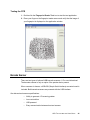
1. Double-click the Fingerprint Reader Test icon to start the test application.
2. Place your finger on the fingerprint reader sensor and verify that the image of
your fingerprint is displayed on the application window.
Barcode Scanner
There are two types of optional USB barcode scanners: 1-D or omni-directional.
The barcode scanner is only an option if the speaker bar is present.
When a scanner is chosen, a USB-SSI (Simple Serial Interface) converter board is
included. Both barcode scanners are powered with the USB interface.
One-dimensional scanner specifications:
•
Ability to generate 1-D scanning pattern
•
Low-cost solution
•
USB powered
•
Easy communication between host and scanner
15D1 TOUCHCOMPUTER USER GUIDE
25
•
Visible laser diode operating at 650nm
•
100+ scans/sec.
•
RoHS-compliant
•
Part number: E946856
Omni-directional scanner specifications:
•
Ability to generate omni-directional scanning pattern
•
Maximum performance
•
2-D scanning ability (PDF417, MicroPDF)
•
USB powered
•
Easy communication between host and scanner
•
Visible laser diode operating at 650nm
•
600+ scans/sec.
•
RoHS compliant
•
Part number: E449881
USB-SSI converter board specifications:
•
Ability to convert from serial interface to USB interface and vice versa.
•
Compact size
•
Input voltage: 5V
•
BuzzerWireless card
•
Part number: E580321
Enabling 2-D Scanning
The scanner default settings do not enable 2-D barcode reading ability. To enable
this option, follow these steps:
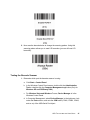
1. Scan the barcodes below to activate PDF417 and MicroPDF417. These are
both types of 2-D barcodes.
15D1 TOUCHCOMPUTER USER GUIDE
26
2. Now scan the barcode below to change the scanning pattern. Using this
scanning pattern allows you to read 2-D barcodes (you can still read 1-D
barcodes).
Testing the Barcode Scanner
1. Determine which port the barcode scanner is using:
a. Click Start > Control Panel
b. In the Windows Control Panel screen, double-click the Administrative
Tools -> double-click the Computer Management application (Only for
Windows XP and POSReady 2009.)
c. For Windows Vista and Windows 7 users, Device Manager is in the
Windows Control Panel.
d. In Computer Management, select Device Manager. In the right pane, look
under the Ports section, and note the COM value (COM1, COM2, COM3,
and so on) of the USB-Serial Port object.
15D1 TOUCHCOMPUTER USER GUIDE
27
COM value
USB serial port
2. From the EloTouchSystems link on the desktop, go to “Peripherals\Barcode
Scanner Drivers and Apps” and double-click the Barcode Scanner Test
icon to start the SSIContainer application.
Connect
button
Port
field
3. Change the Port field value to match the value you retrieved from the Device
Manager.
4. Click Connect. You should see the text “Connected” in the Messages field.
15D1 TOUCHCOMPUTER USER GUIDE
28
Param Number
Permanent
Param Change
New Value
5. In the box labeled Param Number, enter the value 238.
6. In the box labeled New Value, enter the value 1.
7. Check the box labeled Permanent Param Change.
8. Scan a barcode (sample given below). The scanned data should appear in the
“Messages” section of SSIContainer screen.
The barcode scanner also has the ability to run in USB-KB emulation mode. To
enable this option, please install the required drivers. To find the drivers:
1. Click the 1xDx Setup Files folder on the desktop.
2. Then click the Barcode Scanner folder.
3. Finally, click the Keyboard Emulation Setup Files folder, where you can find
setup instructions to complete the installation process.
15D1 TOUCHCOMPUTER USER GUIDE
29
USB Wireless Adapter
A wireless USB adapter can be installed as an option in the D-Series
touchcomputer to provide wireless LAN capabilities.
Typical specifications for the wireless card are:
•
USB 2.0 interface
•
802.11 B/G/N compliant
•
Support for Windows XP, Windows Vista 32, Windows POSReady 2009
and Windows 7
•
RoHS compliant
•
Part number: E249774
Testing the Wireless Adapter
To test the wireless adapter:
1. From the desktop, click Start > Control Panel > Network Connections
2. Double-click the Wireless Network Connections icon to display available
networks and verify that the wireless network is detected.
NOTE:
If a wireless network needs to be initialized, please see your system
administrator.
15D1 TOUCHCOMPUTER USER GUIDE
30
Rear-facing LCD Monitor Bracket Kit
A rear-facing LCD monitor mounting bracket kit can be installed as an option on
the D-Series touchcomputer to provide the second display through DVI-D display
interface. The compatibility requirements for the rear-facing monitor bracket are as
below:
Maximum weight: 3.3lbs (1.5Kg)
Mounting Holes: 75mm x 75mm per VESA MIS-D 75
Part number: E835074
Second Hard Drive
A second hard drive can be added to (or used to replace) the original hard disk
drive. This addition provides additional capacity for D-Series touchcomputer data
storage.
Part number: E828965
Solid State Drive
A solid state drive can be added to (or used to replace) the original hard disk drive.
This addition provides additional performance and more mechanically reliability in
harsh environments.
Part number: E536242
Second HDD/SSD Mounting Kit (No drive)
A second HDD/SSD mounting kit can be purchased from Elo in order to install any
second 2.5” HDD/SDD in the D-Series touchcomputer.
Part number: E349653
Third-Party Peripherals
The D-Series touchcomputer includes one pre-configured port for a cash drawer.
The peripheral is not available from Elo TouchSystems.
15D1 TOUCHCOMPUTER USER GUIDE
31
Cash Drawer Port
We provide a standard RJ11 port to attach a cash drawer.
Testing the Cash Drawer Port
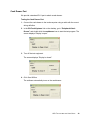
1. Connect the cash drawer to the touchcomputer using a cable with the correct
wiring definition.
2. In the EloTouchSystems link on the desktop, go to “Peripherals\Cash
Drawer” and double-click the cashdrawer icon to start the test program. The
screen displays “Display is open.”
3. Turn off the test equipment.
The screen displays “Display is closed.”
4. Click Send 200ms.
The software automatically turns on the cash drawer.
15D1 TOUCHCOMPUTER USER GUIDE
32
C H A P T E R
4
SAFETY AND MAINTENANCE
Safety
Here is some important information on the proper setup and maintenance of your
touchcomputer.
To reduce the risk of electric shock, follow all safety notices and never open the touchcomputer
case.
Turn off the product before cleaning (refer to “Care and Handling” on page 30 for proper cleaning
methods).
Your touchcomputer is equipped with a 3-wire, grounding power cord. The power cord plug only
fits into a grounded outlet. Do not attempt to fit the plug into an outlet that has not been configured
for this purpose. Do not use a damaged power cord. Only use the power cord that comes with
your Elo TouchSystems touchcomputer. Use of an unauthorized power cord might invalidate your
warranty.
The slots located on the sides and top of the touchcomputer case are for ventilation. Do not block
or insert anything inside the ventilation slots.
It is important that your touchcomputer remains dry. Do not pour liquid into or onto your
touchcomputer. If your touchcomputer becomes wet, do not attempt to repair it yourself.
15D1 TOUCHCOMPUTER USER GUIDE
33
Care and Handling
The following tips help keep your touchcomputer functioning at the optimal level.
To avoid risk of electric shock, do not disassemble the power adapter or display unit cabinet. The
unit is not user serviceable. Remember to unplug the display unit from the power outlet before
cleaning.
Do not use alcohol (methyl, ethyl, or isopropyl) or any strong solvent. Do not use thinner or
benzene, abrasive cleaners, or compressed air.
To clean the display unit cabinet, use a cloth lightly dampened with a mild detergent.
Avoid getting liquids inside your touchcomputer. If liquid does get inside, have a qualified service
technician check it before you power it on again.
Do not wipe the screen with a cloth or sponge that could scratch the surface.
To clean the touchscreen, use window or glass cleaner. Put the cleaner on the rag and wipe the
touchscreen. Never apply the cleaner directly on the touchscreen.
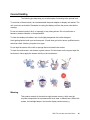
Warning
This product consists of devices that might contain mercury, which must be
recycled or disposed of in accordance with local, state, or federal laws. (Within this
system, the backlight lamps in the monitor display contain mercury.)
15D1 TOUCHCOMPUTER USER GUIDE
34
WEEE Directive
In the European Union, the Waste Electrical and Electronic Equipment (WEEE)
directive label shown to the left indicates that this product should not be disposed
of with household waste. It should be deposited at an appropriate facility for
recovery and recycling.
UL Directive
The touchcomputer has included a lithium battery on the motherboard. There is a
risk of explosion if battery is replaced by an incorrect type. Please dispose of used batteries
according the region instructions.
China RoHS
15D1 TOUCHCOMPUTER USER GUIDE
35
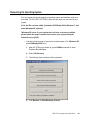
Recovering the Operating System
If for any reason the touchcomputer’s operating system and software need to be
recovered TO FACTORY SETTINGS, there are two ways you can recover your
system:
I) Use the Elo recovery utility (included in POSReady 2009, Windows 7, and
some Windows XP systems)
*Windows XP users: If your system does not have a recovery partition,
please follow the steps in section II to recover your system using the
included recovery DVD.
i. Use the included image to recover the touchcomputer (For *Windows XP
and POSReady 2009 Only.)
1. After the TE/Elo logo shows up, press DOWN repeatedly to enter
Windows Boot Manager.
2. Select OS Recovery
3. The following User Interface will be presented:
4. Click Recover Æ Start Recovery Process
15D1 TOUCHCOMPUTER USER GUIDE
36
5. Once completed, click Exit Recovery Process Æ Exit. The system will
restart automatically.
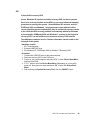
ii. Use the included image to recover the touchcomputer (For Windows 7
Only.)
1. After the TE/Elo logo shows up, press F8 repeatedly to enter Advanced
Boot Options.
2. Select Repair your computer
3. Click Next Æ OK (Default is no password but once you create the new
account or password, please use new account or password to log in
recovery environment) Æ Elo Touch System Tool
4. The following User Interface will be presented:
15D1 TOUCHCOMPUTER USER GUIDE
37
5. Click Recover Æ Start Recovery Process
6. Once completed, click Exit Recovery Process Æ Exit. The system will
restart automatically.
15D1 TOUCHCOMPUTER USER GUIDE
38
OR
II) Use the Elo recovery DVD
(Some Windows XP versions include a recovery DVD; for these systems
there is no recovery partition on the HDD, so you must follow the following
procedure to recovery the system. Some Windows XP versions, and ALL
POSReady 2009 and Windows 7 touchcomputers come with the built-in
recovery partition on the installed HDD; they do not include recovery media.
In the event the HDD recovery partition is accidentally deleted or becomes
or inaccessible, POSReady 2009 and Windows 7 systems do not include a
recovery DVD. You will need to must request a recovery DVD from Elo
TouchSystems customer service. Contact information can be found on the
last page of this guide.)
Hardware needed:
1. Elo Touchcomputer
2. External USB DVD Drive
3. Elo Windows XP, POSReady 2009 or Windows 7 Recovery DVD
Procedure
1. Connect the USB DVD drive to the touchcomputer.
2. Place the recovery DVD in the DVD drive.
3. Power on your touchcomputer and press “F11” to enter Device Boot Menu
and boot from DVD.
4. If “F11” doesn’t open the Device Boot Menu (depending on your model),
power off, then power on again and press “F8” to enter the Device Boot
Menu.
5. After entering the System Recovery Tool, click the “WINPE” button.
15D1 TOUCHCOMPUTER USER GUIDE
39
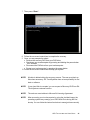
6. Once you see the “Command Prompt” window to start the recovery process
type:
• “pos9” to start the recovery process for POSReady 2009/Windows XP.
* Note: If your system came with Windows XP, it will automatically be
re-installed; if your system came with POSReady 2009, it will automatically be
re-installed; you cannot recovery a different operating system than what
originally shipped with your system.
OR
• “win7” to start the recovery process for Windows 7
15D1 TOUCHCOMPUTER USER GUIDE
40
7. Then press “Enter”.
8. Follow the on-screen instructions to complete the recovery.
9. Once you are prompted to reboot:
• Remove the recovery DVD from your DVD drive
• Shut down your touchcomputer by pressing and holding the power button
for 5 seconds
• Disconnect the DVD drive from your touchcomputer
• Restart your touchcomputer by pressing the power button
10. Follow the on-screen instructions to setup your system.
NOTE:
All data is deleted during the recovery process. The user must back up
files when necessary. Elo TouchSystems does not accept liability for lost
data or software.
NOTE:
If your hard disk is corrupted, you can request a Recovery DVD from Elo
TouchSystems customer service.
NOTE:
The end user must adhere to Microsoft's Licensing Agreement.
NOTE:
After recovering your touchcomputer by using the included image, the
operating system may reassign your USB Serial Ports during the first
bootup. You can follow the instructions below to reassign them manually.
15D1 TOUCHCOMPUTER USER GUIDE
41
Reassigning COM Ports after System Recovery
(The section is required once you recovered your system either from recovery partition or
DVD)
• Instructions to reassign the USB Serial Port(s)
1. For POSReady 2009, right click on the “Computer”icon on the desktop Æ
Left click “Properties” Æ Then “Hardware” Æ Then “Device Manager”.
For Windows 7, right click on the “Computer” icon on the desktop Æ Left
click “Properties” Æ Then “Device Manager”.
15D1 TOUCHCOMPUTER USER GUIDE
42
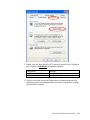
2. Double click the “Ports (COM & LPT)” and verify that all of the “USB Serial
Port” settings are IDENTICAL to the following table:
Description
USB Serial Port (COM3)
USB Serial Port (COM4)
Location
On USB Serial Converter A
On USB Serial Converter B
3. If they are not, and you see the assignments as shown below, then the
operating system has reassigned these serial ports. You need to re‐assign
(correct) them manually.
15D1 TOUCHCOMPUTER USER GUIDE
43
Normally, even if the operating system reassigns these serial ports, they
are still in order. In this case, you should re‐assign them as shown in the
following table.
Original one
USB Serial Port (COM5)
USB Serial Port (COM6)
Change to
USB Serial Port (COM3)
USB Serial Port (COM4)
Thus, the settings for these USB Serial Ports should begin at COM3 and
end at COM4 in order.
4. To re‐assign them, please follow the instructions below:
Double click the port you need to change. In this case, it is COM5.
15D1 TOUCHCOMPUTER USER GUIDE
44
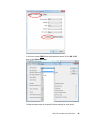
COM5 is the 1st port of these USB serial ports so the “Location:” should
be “on USB Serial Converter A”. Please assign this serial port to COM3.
(COM4 for the USB Serial Converter B).
Change to COM3
Location Information
Select “Port Settings” Æ Click “Advanced…”
15D1 TOUCHCOMPUTER USER GUIDE
45
In this case, select COM3 from the drop‐down menu Æ click OK Æ OK
back to the Device Manager.
Follow the same steps to accomplish these settings for other ports.
15D1 TOUCHCOMPUTER USER GUIDE
46
After completing the above steps, right click on “Ports (COM & LPT)” and
click Scan for hardware changes.
5. This should result in the following assignments:
COM3 location: USB Serial Converter A
COM4 location: USB Serial Converter B
•
If not, please repeat steps 1‐5.
15D1 TOUCHCOMPUTER USER GUIDE
47
C H A P T E R
5
TECHNICAL SUPPORT
Technical Assistance
There are three methods to obtain contact information for technical assistance on
the touchcomputer:
The touchcomputer
The web
The phone
Using the Touchcomputer
You can access support information in System Properties by clicking the Support
Information button. You can get to System Properties by either of the following
methods:
Right-click My Computer and choose Properties.
OR
Click the Start button, select Control Panel, and double-click the System icon.
Using the Web
For online self-help, go to www.elotouch.com/go/websupport
For technical support, go to www.elotouch.com/go/contactsupport
For current Elo news, product updates, and announcements, or to register to
receive our Touchcomputer newsletter, go to www.elotouch.com/go/news
15D1 TOUCHCOMPUTER USER GUIDE
48
Using the Phone
For technical support, see the table at the end of the user guide for contact
information.
15D1 TOUCHCOMPUTER USER GUIDE
49
REGULATORY INFORMATION
I. Electrical Safety Information
A) Compliance is required with respect to the voltage, frequency, and current
requirements indicated on the manufacturer’s label. Connection to a different
power source than those specified herein may result in improper operation,
damage to the equipment, invalidation of warranty, or a fire hazard if the
requirements are not followed.
B) There are no operator-serviceable parts inside this equipment. There are
hazardous voltages generated by this equipment which constitute a safety hazard.
Service should be provided only by a qualified service technician.
C) This equipment is provided with a detachable power cord which has an integral
safety ground wire intended for connection to a grounded safety outlet.
1) Do not substitute the cord with other than the provided approved type. Under
no circumstances should you use an adapter plug to connect to a 2-wire outlet
as this defeats the continuity of the grounding wire.
2) The equipment requires the use of the ground wire as a part of the safety
certification. Modification or misuse can provide a shock hazard that can result
in serious injury or death.
3) Contact a qualified electrician or the manufacturer if there are questions
about the installation prior to connecting the equipment to main power.
II. Emissions and Immunity Information
A) Notice to Users in the United States: This equipment has been tested and found
to comply with the limits for a Class B digital device, pursuant to Part 15 of FCC
Rules. These limits are designed to provide reasonable protection against harmful
interference in a residential or commercial installation. This equipment generates,
uses, and can radiate radio frequency energy, and if not installed and used in
accordance with the instructions, may cause harmful interference to radio
communications.
B) Notice to Users in Canada: This equipment complies with the Class B limits for
radio noise emissions from digital apparatus as established by the Radio
Interference Regulations of Industry Canada.
15D1 TOUCHCOMPUTER USER GUIDE
50
C) Notice to Users in the European Union: Use only the provided power cords and
interconnecting cabling provided with the equipment. Substitution of provided
cords and cabling may compromise electrical safety or CE Mark Certification for
emissions or immunity as required by the following standards: This Information
Technology Equipment (ITE) is required to have a CE Mark on the manufacturer’s
label which means that the equipment has been tested to the following Directives
and Standards:
This equipment has been tested to the requirements for the CE Mark as required
by EMC Directive 89/336/EEC indicated in European Standard EN 55022 Class B
and the Low Voltage Directive 73/23/EEC as indicated in European Standard EN
60950.
D) General Information to all Users: This equipment generates, uses, and can
radiate radio frequency energy. If not installed and used according to this manual,
the equipment may cause interference with radio and television communications.
There is, however, no guarantee that interference will not occur in any particular
installation due to site-specific factors.
1) In order to meet emission and immunity requirements, the user must
observe the following:
a) Use only the provided I/O cables to connect this digital device with any
computer.
b) To ensure compliance, use only the provided manufacturer’s approved
power cord.
c) The user is cautioned that changes or modifications to the equipment not
expressly approved by the party responsible for compliance could void the
user’s authority to operate the equipment.
2) If this equipment appears to cause interference with radio or television
reception, or any other device:
a) Verify as an emission source by turning the equipment off and on.
b) If you determine that this equipment is causing the interference, try to
correct the interference by using one or more of the following measures:
i) Move the digital device away from the affected receiver.
ii) Reposition (turn) the digital device with respect to the affected
receiver.
iii) Reorient the affected receiver’s antenna.
15D1 TOUCHCOMPUTER USER GUIDE
51
iv) Plug the digital device into a different AC outlet so the digital device
and the receiver are on different branch circuits.
v) Disconnect and remove any I/O cables that the digital device does
not use. (Unterminated I/O cables are a potential source of high RF
emission levels.)
vi) Plug the digital device into only a grounded outlet receptacle. Do not
use AC adapter plugs. (Removing or cutting the line cord ground may
increase RF emission levels and may also present a lethal shock
hazard to the user.)
vii) If you need additional help, consult your dealer, manufacturer, or an
experienced radio or television technician.
III. Agency Certifications
The following certifications have been issued for the touchcomputer:
•
UL/cUL
•
FCC
•
TUV
•
CE
•
CB
•
Argentina S-mark
•
Russia GOST-R
•
Australia C-Tick
•
Japan VCCI
•
China CCC
•
Taiwan BSMI
•
Korea KC
•
Mexico COC
•
•
15D1 TOUCHCOMPUTER USER GUIDE
52
WARRANTY
Except as otherwise stated herein or in an order acknowledgment delivered to
Buyer, Seller warrants to Buyer that the Product shall be free of defects in
materials and workmanship. With the exception of the negotiated warranty
periods; the warranty for the touchcomputer and components of the product is 3
years.
Seller makes no warranty regarding the model life of components. Seller’s
suppliers may at any time and from time to time make changes in the components
delivered as Products or components. Buyer shall notify Seller in writing promptly
(and in no case later than thirty (30) days after discovery) of the failure of any
Product to conform to the warranty set forth above; shall describe in commercially
reasonable detail in such notice the symptoms associated with such failure; and
shall provide to Seller the opportunity to inspect such Products as installed, if
possible. The notice must be received by Seller during the Warranty Period for
such product, unless otherwise directed in writing by the Seller. Within thirty (30)
days after submitting such notice, Buyer shall package the allegedly defective
Product in its original shipping carton(s) or a functional equivalent and shall ship to
Seller at Buyer’s expense and risk.
Within a reasonable time after receipt of the allegedly defective Product and
verification by Seller that the Product fails to meet the warranty set forth above,
Seller shall correct such failure by, at Seller’s options, either (i) modifying or
repairing the Product or (ii) replacing the Product. Such modification, repair, or
replacement and the return shipment of the Product with minimum insurance to
Buyer shall be at Seller’s expense. Buyer shall bear the risk of loss or damage in
transit, and may insure the Product. Buyer shall reimburse Seller for transportation
cost incurred for Product returned but not found by Seller to be defective.
Modification or repair, of Products may, at Seller’s option, take place either at
Seller’s facilities or at Buyer’s premises. If Seller is unable to modify, repair, or
replace a Product to conform to the warranty set forth above, then Seller shall, at
Seller’s option, either refund to Buyer or credit to Buyer’s account the purchase
price of the Product less depreciation calculated on a straight-line basis over
Seller’s stated Warranty Period.
15D1 TOUCHCOMPUTER USER GUIDE
53
THESE REMEDIES SHALL BE THE BUYER’S EXCLUSIVE REMEDIES FOR
BREACH OF WARRANTY. EXCEPT FOR THE EXPRESS WARRANTY SET
FORTH ABOVE, SELLER GRANTS NO OTHER WARRANTIES, EXPRESS OR
IMPLIED BY STATUTE OR OTHERWISE, REGARDING THE PRODUCTS,
THEIR FITNESS FOR ANY PURPOSE, THEIR QUALITY, THEIR
MERCHANTABILITY, THEIR NONINFRINGEMENT, OR OTHERWISE. NO
EMPLOYEE OF SELLER OR ANY OTHER PARTY IS AUTHORIZED TO MAKE
ANY WARRANTY FOR THE GOODS OTHER THAN THE WARRANTY SET
FORTH HEREIN. SELLER’S LIABILITY UNDER THE WARRANTY SHALL BE
LIMITED TO A REFUND OF THE PURCHASE PRICE OF THE PRODUCT. IN NO
EVENT SHALL SELLER BE LIABLE FOR THE COST OF PROCUREMENT OR
INSTALLATION OF SUBSTITUTE GOODS BY BUYER OR FOR ANY SPECIAL,
CONSEQUENTIAL, INDIRECT, OR INCIDENTAL DAMAGES.
Buyer assumes the risk and agrees to indemnify Seller against and hold Seller
harmless from all liability relating to (i) assessing the suitability for Buyer’s intended
use of the Products and of any system design or drawing and (ii) determining the
compliance of Buyer’s use of the Products with applicable laws, regulations, codes,
and standards. Buyer retains and accepts full responsibility for all warranty and
other claims relating to or arising from Buyer’s products, which include or
incorporate Products or components manufactured or supplied by Seller. Buyer is
solely responsible for any and all representations and warranties regarding the
Products made or authorized by Buyer. Buyer will indemnify Seller and hold Seller
harmless from any liability, claims, loss, cost, or expenses (including reasonable
attorney’s fees) attributable to Buyer’s products or representations or warranties
concerning same.
15D1 TOUCHCOMPUTER USER GUIDE
54
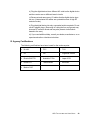
www.elotouch.com
Get the latest...
•
Product information
•
Specifications
•
News on upcoming events
•
Press release
•
Software drivers
•
Touchcomputer Newsletter
Getting in Touch with Elo
To find out more about Elo’s extensive range of touch solutions, visit our Website at www.elotouch.com or
simply call the office nearest you:
Europe
Asia-Pacific
Tyco Electronics Corporation
(TE Touch Solutions Division)
Tyco Electronics Raychem
B.V.B.A.
Sun Hamada Bldg. 2F
301 Constitution Drive
(Elo TouchSystems Division)
1-19-20
ShinYokohama
Menlo Park, CA 94025
Diestsesteenweg 692
Kanagawa 222-0033
USA
B-3010 Kessel-Lo
Japan
Belgium
(800) ELO-TOUCH
Tel +32(0)(16)35 21 00
Tel +81(45)478-2161
(800) 356-8682
Fax +32(0)(16)35 21 01
Fax +81(45)478-2180
Tel 650-361-4800
[email protected]
www.tps.co.jp
Fax 650-361-4747
© 2011 Tyco Electronics Printed in USA
North America
[email protected]
15D1 TOUCHCOMPUTER USER GUIDE
55