1
Product Specification
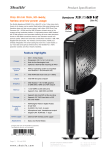
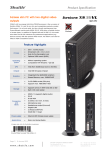
Shuttle Barebone XS35GTA V2 – Connectors
1
2
3
4
5
4-in-1 card reader
USB connector
Power button with
power and hard disk LED
Bay for optical slim drive *)
Stand
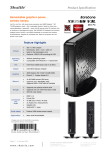
Back Panel
A
B
C
D
E
F
G
H
I
Microphone input
Head phone output (line out)
Network connector (RJ45)
4x USB connectors
VGA connector
HDMI connector
Hole for the Kensington lock
Connector for power adapter
Stand
Notes: The right D-sub port will not be functional and be covered with a cap.
*) The optical drive is not included.
Warning:
Please make sure the system is always
placed upright using either its stand or
the optional VESA mount. Ventilation
holes must not be blocked to ensure
sufficient cooling.
Page 7 | 19 April 2012
www.shuttle.com
Shu t tl e Computer Han dels GmbH
Fritz- Strassmann-S t r. 5
25337 Elmshorn | Germany
Tel. +49 (0) 4121-47 68 60
Fax +49 (0) 4121-47 69 00
[email protected]
©2012 by Shuttle Computer Handels GmbH (Germany). All information subject to change without notice. Pictures for illustration purposes only.
Front Panel