1
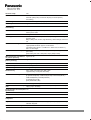
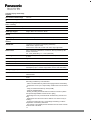
Calendar Display / Dual-Image
Playback
Set Favorites / Rotate Image
Yes / No
DPOF Print Setting / Set Protecti-Yes / Yes
on
Resize / Cropping / Aspect
Conv. / Leveling
Yes / Yes / No / No
Copy / Title Edit / Text Stamp
Yes / No / Yes
Video Divide
Yes
PictBridge Support
Single / Multi / All / Favorites / DPOF
Setup
OSD language
Japanese, English, German, French, Italian, Spanish
Others
LCD Monitor
7.5cm(3.0") TFT Screen LCD Display (230K dots)
Field of View : approx. 100%
AUTO Power LCD mode, Power LCD mode, High Angle Mode
Built-in-Flash
Auto, Auto/Red-eye Reduction, Forced On, Slow Sync./Red-eye Reduction, Forced Off,
0.6 - 5.6m (Wide/i ISO), 1.5 - 2.9m (Tele/i ISO)
Recording Media
Built-in Memory, SD Memory Card, SDHC Memory Card, SDXC Memory Card
Built-in-Memory
Approx.70MB
Microphone / Speaker
Mono / Mono
Interface
AV Output (NTSC/PAL), USB2.0 High speed
Power
Li-ion Battery Pack (3.6V, Minimum: 680mAh) (Included)
AC Adaptor (Input: 110-240V AC)(Included, connect with USB cable)
Battery life (approx.)
250 pictures (CIPA Standard)*1
Included Software
PHOTOfunSTUDIO 8.0 Standard Edition
Adobe Reader
Standard Accessories
Battery Pack, AC Adapter, AV Cable, USB Cable, Hand Strap, CDROM
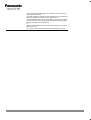
NOTE
*1
Recording conditions by CIPA standard
- CIPA is an abbreviation of [Camera & Imaging Products Association].
- Temperature: 23 oC (73.4 oF)/Humidity: 50%RH when LCD monitor is
on.
- Using a Panasonic SD Memory Card (32 MB).
- Using the supplied battery.
- Starting recording 30 seconds after the camera is turned on. (When
the optical image stabilizer function is set to [ON].)
- Recording once every 30 seconds with full flash every second recording.
- Rotating the zoom lever from Tele to Wide or vice versa in every recording.
- Turning the camera off every 10 recordings and leaving it until the
temperature of the battery decreases.
- The number of recordable pictures decreases in Auto Power LCD Mode and Power LCD Mode.
*2