1
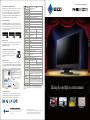
23” Home Entertainment Monitor
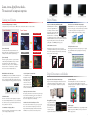
Preset Modes for Optimum Viewing
PC Input
Panel Size
In addition to Game, Cinema, and Paper modes, User modes for
user-determined settings as well as an sRGB mode are also
included. Toggling between modes is done manually with the
remote control or automatically by assigning a mode to a
particular application with the bundled ScreenManager Pro for
LCD software (Windows 7 and Vista compatible).
AV Input
23" / 58 cm (584 mm diagonal)
Active Display Size (H × V) 509.8 × 286.7 mm
Panel Type
VA (with overdrive circuit)
Viewing Angles (H, V)
178°, 178° (at contrast ratio of 10:1)
Brightness
300 cd/m2
Contrast
3000:1 (10000:1 with ContrastEnhancer)
Response Time (Typical)
Gray-to-gray: 7 ms, black-white-black: 25 ms
Native Resolution
1920 × 1080 (16: 9 aspect ratio)
Pixel Pitch
0.2655 × 0.2655 mm
Display Colors
16.77 million from a palette of 1.06 billion
Look-Up Table
10 bits per color
Cabinet Color
Black
Dot Clock
Analog: 148.5 MHz, Digital: 148.5 MHz
Analog Scanning
Frequency (H, V)
31 – 81 kHz, 55 – 76 Hz
–
Digital Scanning
Frequency (H, V)
31 – 68 kHz, 59 – 61 Hz (VGA Text
69 – 71 Hz)
15 – 68 kHz, 49 – 68 Hz
Video Input Terminals
D-Sub mini 15 pin, DVI-D 24 pin
(with HDCP), HDMI × 2
HDMI × 2
Audio Input Terminals
3.5 mm stereo jack × 1, HDMI × 2
HDMI × 2
Audio Output Terminals
3.5 mm headphone jack
Speakers:
0.5 W + 0.5 W (stereo)
Plug & Play
VESA DDC 2B
Power Requirements
AC 100 – 120 V / 200 – 240 V, 50 / 60 Hz
Power Consumption
24 W (typical)
45 W (maximum)
Power Save Mode
Less than 1 W
Tilt / Swivel / Pivot
20° Up, 5° Down / – / –
Dimensions (W × H × D)
With Stand 549 × 403 × 212 mm
Without Stand 549 × 393 × 58 mm
Net Weight
With Stand 6.9 kg
Without Stand 6.1 kg
Preset Modes
User1, User2, sRGB, Paper, Game, Cinema, Auto Fine Contrast1
EcoView Settings
Auto EcoView, EcoView Index
EIZO Screen Slicer
Screen Adjustment
Clock, Phase, Position, Resolution, –
Screen (Auto), Range (Auto)
This is a free software utility that lets you more effectively use
your screen through partitioning. Simply drop your windows into
configurable partitioned areas and they will be aligned instantly.
Screen Size
Normal, Enlarge, Full Screen
Color Adjustment
Brightness, Black Level, Contrast, Gamma, Temperature, Saturation,
Hue, Gain, ContrastEnhancer, Power Resolution, Overdrive, Reset
Power Management
Power Save (VESA DPM and DVI DMPM), Off Timer
Sound
Volume, Mute, Sound Level, Power Save, Source (HDMI)
Other Settings
Product Information (name, serial number, resolution, operating time,
etc.), OSD Menu Settings, HDMI Color Space, Adjustment Lock, DDC/CI
Lock, Languages (English, French, German, Italian, Japanese, Simplified
and Traditional Chinese, Spanish, Swedish), Power Indicator, Reset
Certifications
and Standards
TCO Displays 5.1, EPEAT Silver (US) ,TÜV/Ergonomics (including ISO
9241-307), TÜV/GS, c-Tick, CE, CB, cTÜVus, FCC-B, Canadian
ICES-003-B, TÜV/S, VCCI-B, EPA Energy Star, RoHS, WEEE
Supplied Accessories
AC power cord, signal cable (DVI-D – DVI-D), audio cable, EIZO LCD Utility
Disk (PDF user's manual, ScreenManager Pro for LCD [DDC/CI]2, EIZO
ScreenSlicer software), color sheets (red, blue, and gray), setup guide, 4
screws for mount option, remote control with battery, warranty card
Warranty
Five Years3
New Cabinet Design
The FORIS FS2331 debuts a new cabinet design that features a
long, narrow imprint that runs from side to side across the lower
front bezel. The imprint is for affixing a red, blue, or gray color
stripe so you can personalize the appearance of the monitor. The
color stripes are included.
Red
Blue
Gray
Remote Control
A card-style remote control which offers full control of the OSD
menu plus one-touch access to screen size, volume, and
PC/HDMI input selection.
Internal Speakers and Headphone Jack
Headphone Jack
E-mail
Dual internal 0.5-watt speakers give the
FS2331 audio capability. A headphone jack is
conveniently positioned on the side of the
monitor.
Auto, Normal, Letterbox, Enlarge,
Full Screen, OverScan On / Off
1
Browser
Word Processor
Bundled ScreenManager Pro for LCD is necessary to activate Auto Fine Contrast. Support for those functions varies with
the graphics board used. 2 ScreenManager Pro for LCD is compatible with the Microsoft Windows 7 and Vista operating
systems only. 3 The usage time is limited to 30,000 hours or less, and the warranty period of the LCD panel is limited to
three years from the date of purchase.With current LCD technology, a panel may contain a limited number of missing or
flickering pixels.
Shining the spotlight on entertainment
Customer Assurance
A five-year warranty offers a long service life, and compliance
with leading industry standards such as TCO Display 5.1 and
TUV Ergonomics ensures a better working environment.
Games
153 Shimokashiwano, Hakusan, Ishikawa 924-8566 Japan
Phone +81-76-277-6792
www.eizo.com
Fax: +81-76-277-6793
© 2010 Eizo Nanao Corporation
All product names are trademarks or registered trademarks of their respective
companies. FORIS and EIZO are registered trademarks of Eizo Nanao
Corporation. Specifications are subject to change without notice.
Cinema
Digital Photos
Documents
and eBooks