1
Quick Start Guide
Charging your headset
Make sure that your Jabra HALO is fully charged before you start using it for the first time. While charging the indicator lights are solid,
changing from red to yellow then green when fully charged. Charging
time is approximately 2 hours. You can use the Jabra HALO during
recharge.
3
3
6
Turning your headset on and off
4
5
Unfolding the headset will turn it on
Folding the headset will turn it off
Pairing the headset to a phone or other device
First time pairing
Unfold the headset and the Jabra HALO will automatically enter pairing mode and search for a device.
Later pairing
Press and hold the Answer/End button (1) until the indicator light (5)
is solid blue (approximately 4 seconds). Activate Bluetooth on your
phone or other device and search for Bluetooth devices and select
Jabra HALO. Press “OK” on the phone or device and confirm with PIN
code 0000 (4 zeros)
Using your headset
Answer or end a call
Tap the Answer/End button (1) to receive / end calls
Adjust sound and volume*
Use the touch control (2) for turning volume up or down
Play or pause music
Tap the Answer/End button (1) to play / pause music
Change between music tracks*
Use the touch control (2) for next track (double tap on +) or previous
track (double tap on -)
Using your Jabra HALO with the 3.5mm music cable (not Bluetooth)
Insert the 3.5mm music cable to the micro-USB socket and connect
the 3.5mm jack into the device. Please note that the Bluetooth
features (including receiving calls) are disabled when using the Jabra
HALO with the cable. Using your Jabra HALO with the 3.5mm music
cable is not possible if the battery is completely discharged, so make
sure that it is at least partly charged.
Wearing style
Please note the left/right wearing indicators inside the headband.
Adjust the size of your Jabra HALO by extending the length of the
headband.
2
1
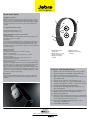
1)Answer/End or Play/
Pause button
2)Volume Control or Track
Change touch sensor
3)Hinges for folding of
headset
4)Battery indicator
5)Bluetooth connectivity
indicator
Features and Specifications
1.
2.
3.
4.
5.
6.
7.
8.
9.
10.
11.
12.
13.
14.
15.
Wireless music and calls OR corded music from your Mp3
Great sound experience with A2DP and DSP technology
Remote control your music via touch sensors
Easy to use – Answer/end and volume touch control on one
side of the headset.
Intuitive on/off – Fold to turn off, unfold to turn on.
Ideal for all day usage – Up to 6 hours wireless music time
Convenient carrying style – Folded in a soft protective pouch
Discreet wearing style without flashing lights
Noise Blackout™ technology with dual microphones – For
clear communication
Discreet display for instant battery and connectivity status
MultiUse™, for connection to two Bluetooth devices
Weighs approximately 3 oz.
Dimensions; Folded (off) D 45mm x W 132mm x H 78mm (D
0.2 x W 0.5 x H 0.3 in); Unfolded (on) D 45mm x W 136mm x
H 165-190mm (D 0.2 x W 0.5 x H 0.6-0.7 in)
Bluetooth 2.0 with EDR & eSCO technology – for clear
conversations with Bluetooth
Standard Micro USB charger
Jabra® is a registered trademark of GN Netcom A/S
www.jabra.com
L