1
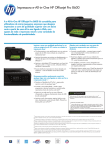
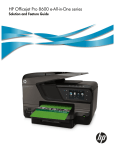
OFFICEJET PRO 8600
e-All-in-One
Produce professional color for up to 50% lower cost per page than lasers1 and
accelerate productivity with apps on the large touchscreen, networking options and
versatile e-all-in-one performance.11 Easily print from a mobile device with HP ePrint.6
ISO Speed5: Up to 18 ppm black, Up to 13 ppm color
Maximum Print Speed5: Up to 32 ppm black, Up to 32 ppm color
Scan Resolution: Up to 4800 dpi
Copy Resolution: Up to 1200 x 600 dpi
Copy Speed: Up to 32 cpm black, Up to 32 cpm color
Display: 2.65" CGD (color graphics), touchscreen
Standard Connectivity: 1 USB 2.0,1 Host USB, 1 Ethernet, 1 Wireless 802.11b/g/n,
2 RJ-11 modem ports, memory card slots
Paper Handling: 250-sheet input tray, 35 sheet automatic document feeder, optional 250-sheet
input tray, 150-sheet output tray
Professional color for up to 50% lower cost per
page than lasers1
• Print professional color for up to 50% lower cost per page
than lasers,1 and get a better value for frequent printing.4
• Print documents that resist fading, water and
highlighter-pen smears, using HP Officejet inks.2, 3
• Achieve ISO print speeds up to 18 ppm black and
13 ppm color, using affordable, individual inks.5
• Depend on a printer with a 25,000-page monthly duty
cycle—the perfect fit for reliable color printing.
Exceptional energy and resource savings
• Use up to 50% less energy than lasers with this ENERGY
STAR® qualified printer,8 and preset On or Off times.
• Easily recycle cartridges, and use up to 70% less supplies
and packaging by weight compared with lasers.9
• Consume up to 50% less paper while printing, using automatic
two-sided printing.
• Use Original HP ink cartridges for quality, reliability and
rewards.10
Efficient Web connectivity—even print on the go6
• Print from a variety of mobile devices on the go. With
HP ePrint—now you can print from virtually anywhere.6
• Use the intuitive touchscreen to access business apps,11 plus
quickly print and store files.
• Easily view and print photos from a USB drive and
memory cards.
• Stay connected—share on a wireless or wired network.7
Standout versatility with copy and scan solutions
• Create and print a one-sided copy of a two-sided ID, and use
the CopyCrop tool to modify copies at the touchscreen.
• Automatically print two-sided documents, and decrease
intervention with the 250-sheet paper tray.
• Improve workflow—send quick faxes, scan documents to a
PC or e-mail, and more.
• Create borderless, double-sided flyers and brochures, plus
print impressive business photos.
ECOHIGHLIGHTS
HP OFFICEJET PRO 8600 e-ALL-IN-ONE
• Use up to 50% less energy than with color lasers1.
• Reduce paper use up to 50% using automatic two-sided
printing.
• Use up to 70% less supplies and packaging by weight
compared with color laser2.
ENERGY STAR® qualified
Majority of color laser AiOs <US$600, March 2011, OJ Pro with highest-capacity cartridges.
Energy use based on HP testing. For details, see http://www.hp.com/go/officejet.
1
2
Compared with the majority of color laser printers < US$600, March 2011. Calculation
compares weight of supplies and cartridge packaging needed for
the same amount of pages based on ISO yield and continuous printing.
www.hp.com/ecosolution
Please recycle your computing hardware and printing
supplies. Find out how at our website.
1
Majority of color laser AiOs < US$600, March 2011. For details: http://www.hp.com/go/officejet. OJ Pro ISO yield with highest-capacity cartridges based on continuous printing; see
http://www.hp.com/go/learnaboutsupplies. 2 Fade resistance based on paper-industry predictions for acid-free papers and Original HP inks; colorant stability data at room temperature based on similar
systems tested per ISO 11798 and ISO 18909. 3 Water resistance based on HP internal testing, using paper with the ColorLok® logo. 4Compared with the HP Officejet 950/951 Black and color ink cartridges.
For more information, see http://www.hp.com/go/learnaboutsupplies. High-capacity cartridges not included; please purchase separately. 5After Either after first page or after first set of ISO test pages. For details
see http://www.hp.com/go/printerclaims. 6Requires an Internet connection to the printer. Feature works with any connected Internet- and e-mail-capable device. Print times may vary. Some HP LaserJets may
require a firmware upgrade. For a list of supported documents, and image types, see http://www.hp.com/go/eprintcenter. And for additional solutions see http://www.hp.com/go/mobile-printing-solutions.
7
Wireless performance is dependent upon physical environment and distance from access point. Wireless operations compatible with 2.4 GHz routers only. 8Majority of color laser AiOs < US$600, March 2011,
OJ Pro with highest-capacity cartridges. Energy use based on HP testing using the ENERGY STAR® program's TEC test method criteria. For details, see http://www.hp.com/go/officejet. 9Compared with the
majority of color laser printers < US$300, March 2011. Calculation compares weight of supplies and cartridge packaging needed for the same amount of pages based on ISO yield and continuous printing.
10
Availability of rewards varies by country. For more information, see http://www.hp.com/go/learnaboutsupplies. 11Requires a wireless access point and an Internet connection to the printer. Services may
require registration. App availability varies by country, language and agreements. For details, http://www.hp.com/go/eprintcenter.
OFFICEJET PRO 8600
e-All-in-One
TECHNICAL SPECIFICATIONS
AIO FUNCTIONS
Print, fax, scan, copy, web
DUTY CYCLE
Up to 25,000 pages
PRINT SPEED1
ISO Speed: Up to 18 ppm black, Up to 13 ppm color
Maximum Print Speed: Up to 32 ppm black, Up to 32 ppm color
RECOMMENDED
MONTHLY PAGE VOLUME2
Up to 250 to 1,250 pages
PRINT RESOLUTION
Black (best): Up to 1200 x 600 dpi; Color (best): Up to 4800 x 1200 optimized dpi on HP
Advanced Photo paper, 1200 x 1200 input dpi
COMPATIBLE OPERATING
SYSTEMS
Microsoft® Windows® 7, Windows Vista®, Windows® XP (SP3)* or higher (32-bit only): *Supports
32-bit only, Mac OS X v 10.5, v 10.6 or v 10.7 (Support information available from
www.hp.com/support), Linux (For more information, see
http://hplipopensource.com/hplip-web/index.html)
MINIMUM SYSTEM
REQUIREMENTS
PC: Microsoft® Windows® 7: 1 GHz 32-bit (x86) or 64-bit (x64) processor, 2 GB hard disk space,
CD-ROM/DVD drive or Internet connection, USB port, Internet Explorer, Windows Vista®: 800 MHz
32-bit (x86) or 64-bit (x64) processor, 2 GB hard disk space, CD-ROM/DVD drive or Internet
connection, USB port, Internet Explorer, Windows® XP (SP3)* or higher (32-bit only): any Intel®
Pentium® II, Celeron® or compatible processor, 233 MHz or higher, 750 MB hard disk space,
CD-ROM/DVD drive or Internet connection, USB port, Internet Explorer 6 or higher. *Supports 32-bit only.
Linux (For more information, see http://hplipopensource.com/hplip-web/index.html);
Mac: Mac OS X v 10.5 or v 10.6: PowerPC G4, G5 or Intel® Core™ Processor, 500 MB available hard
disk space, CD-ROM/DVD drive or Internet connection, USB port
OPERATING
ENVIRONMENT
Recommended Operating Temperature: 59 to 90º F (15 to 32º C)
Operating Temperature Range: 41 to 104º F (5 to 40° C);
Temperature Storage Range: -40 to 140° F (-40 to 60º C)
Operating Humidity Range: 20 to 80% RH
Humidity Recommended Operating Range: 25 to 75% RH
PRINT CAPABILITIES
SureSupply Supported: Yes Direct Print Supported: Yes (memory cards)
PRINT LANGUAGES
STANDARD
HP PCL 3 GUI, HP PCL 3 Enhanced
PRINT TECHNOLOGY
HP Thermal Inkjet
PRINT CARTRIDGES,
NUMBER
4 (1 each black, cyan, magenta, yellow)
MOBILE PRINTING
CAPABILITY
HP ePrint, Apple AirPrint™
DUPLEX PRINT OPTIONS
Automatic (standard)
BORDERLESS PRINTING
Yes, up to 8.5 x 11 in (US letter), 210 x 297 mm (A4)
PROCESSOR SPEED
360 MHz
COMPATIBLE INK TYPES
Pigment-based (black and color)
COPY RESOLUTION
Black Text/Graphics: Up to 1200 x 600 dpi; Color Text/Graphics: Up to 1200 x 600 dpi
COPIER SPEED
Laser Comparable Speeds: Up to 12 cpm black, Up to 11 cpm color
Black (Draft, letter): Up to 32 cpm; Color (Draft, letter): Up to 32 cpm
MAX NUMBER OF COPIES
Up to 99 copies
COPIER SMART
SOFTWARE FEATURES
Easy ID Copy
COPIER SETTINGS
Poster, clone, mirror copy, auto-enlarge
FAX SPEED (LETTER)
4 sec per page
FAX FEATURES
Junk Barrier Supported: Yes, requires Caller ID; PC Interface Supported: Yes, HP Software support
FAX RESOLUTION
Black: 203 x 98 dpi; Color: 200 x 200 dpi; Photo: 203 x 196 dpi
provided; Fax Auto-redialing: Yes; Fax Delayed Sending: Yes; Fax Forwarding Supported: Yes
FAXING OPTIONS (ADF)
Single-sided
FAX MEMORY
Up to 100 pages
FAX SMART SOFTWARE
FEATURES
Digital Fax - Fax to Mac/Fax to PC is available with Windows and Macintosh (Please use: Visit
http://www.hp.com/support to download the latest software.)
SCAN SPEED
ADF (Letter): Up to 5.6 ppm (200 ppi, b&w), Up to 5.6 ppm (200 ppi, color)
Color (4 x 6 photo): < 10 sec
SCAN TECHNOLOGY
Contact Image Sensor (CIS)
SCAN TYPE
Flatbed, ADF
SCAN RESOLUTION
Up to 4800 dpi
SCAN FILE FORMAT
Scan File Type supported by Software: Bitmap (.bmp), JPEG (.jpg), PDF (.pdf), PNG (.png), Rich Text
(.rtf), Searchable PDF (.pdf), Text (.txt), TIFF (.tif)
SCAN INPUT MODES
Front-panel scan, copy, fax, or from software
SCAN SIZE MAXIMUM
8.5 x 11.7 in (216 x 297 mm)
BIT DEPTH/GRAYSCALE
LEVELS
24-bit/256
TWAIN VERSION
Version 1.9
STANDARD
CONNECTIVITY
1 USB 2.0, 1 Host USB, 1 Ethernet, 1 Wireless 802.11b/g/n, 2 RJ-11 modem ports, memory
card slots
NETWORK READY
Standard (built-in Ethernet, WiFi 802.11n)
WIRELESS CAPABILITY
Yes
MEMORY
Maximum/Standard: 128 MB
SEND TO EMAIL
CAPABILITY
Yes, PC required
DISPLAY
2.65" CGD (color graphics), touchscreen
OUTPUT FILE FORMAT
PDF, TIFF, JPEG
DIGITAL SENDING
STANDARD FEATURES
Scan-to Folder, Fax Archive to Folder
MEDIA SIZES SUPPORTED
Tray 1: Letter, legal, statement, executive, 3 x 5 in, 4 x 6 in, 5 x 7 in, 5 x 8 in, 4 x 10 in, 4 x 11 in,
4 x 12 in, 8 x 10 in, envelopes (No. 10, Monarch, DL)
MEDIA WEIGHT
SUPPORTED
Tray 1: 16 to 28 lb (plain paper), 60 to 75 lb (photo), 20 to 24 lb (envelope), 90 to 110 lb (card)
ADF CAPACITY
Standard, 35 sheets
PAPER HANDLING
Input Capacity: Up to 250 sheets letter/legal, Up to 80 cards, Up to 100 sheets 4 x 6 photos,
Up to 100 sheets photo paper, Up to 30 envelopes, Up to 100 sheets label;
Output Capacity: Up to 150 sheets letter/legal, Up to 60 cards, Up to 25 envelopes, Up to 60 sheets
label
CUSTOM MEDIA SIZES
Windows does not support custom paper size; Tray 1: 3.5 x 8 to 8.5 x 14 in (Mac only)
Non-Operating Humidity Range: Up to 90% RH (non-condensing) at a temperature of 60ºC (140ºF)
ACOUSTICS
Acoustic Power Emissions: 6.4 B(A); Acoustic Pressure Emissions: 57 dB(A)
POWER
Power Supply Type: Internal (Built-in) Universal Power Supply
Power Supply Required: Input voltage: 100 to 240 VAC (+/- 10%), 50/60 Hz (+/- 3 Hz)
Power Consumption3: 28 watts, 0.22 watts (manual-off), 1.95 watts (sleep), 5.81 watts (standby)
PRODUCT DIMENSIONS
W x D x H: 19.4 x 18.1 x 11.8 in (494 x 460 x 300 mm)
PRODUCT WEIGHT
25.34 Ib (11.52 kg)
WARRANTY FEATURES
One-year limited hardware warranty, 24-hour, 7 days a week Web support, business hour phone
support within warranty period
WHAT´S IN THE BOX
HP Officejet Pro 8600 e-All-in-One Printer, automatic two-sided printing accessory, HP 950 Setup
Black Officejet Ink Cartridge (~ 1,000 pages), HP 951 Setup Cyan Officejet Ink Cartridge, HP 951 Setup
Magenta Officejet Ink Cartridge, HP 951 Setup Yellow Officejet Ink Cartridge: composite yield (~ 700
pages), power cord, phone cord, setup poster, Getting Started Guide, CD-ROMs (for
software, Windows and Mac printer drivers, and User's Guide). [Average based on ISO/IEC 24711 or
HP testing methodology and continuous printing. Actual yield varies considerably based on
content of printed pages and other factors. Some ink from included cartridge is used to start up the
printer. For details see http://www.hp.com/go/learnaboutsupplies]
HP CARE PACKS
HP 1 year Post Warranty Care Pack w/Return to Depot Support for Officejet Pro, UG753PE
HP 2 year Care Pack w/Return to Depot Support for Officejet Pro, UG309E
HP 3 year Care Pack w/Return to Depot Support for Officejet Pro, UG279E
ACCESSORIES
HP Officejet Pro 8600 250-sheet Paper Tray, CN548A
HP Hi-Speed USB cable (6 ft/1.8m), Q6264A
REPLACEMENT INK
CARTRIDGES4
HP 950 Black Officejet Ink Cartridge (~ 1,000 pages)
HP 951 Cyan Officejet Ink Cartridge (~ 700 pages)
HP 951 Magenta Officejet Ink Cartridge (~ 700 pages)
HP 951 Yellow Officejet Ink Cartridge (~ 700 pages)
HP 950XL Black Officejet Ink Cartridge (~ 2,300 pages)
HP 951XL Cyan Officejet Ink Cartridge (~ 1,500 pages)
HP 951XL Magenta Officejet Ink Cartridge (~ 1,500 pages)
HP 951XL Yellow Officejet Ink Cartridge (~ 1,500 pages)
FOR MORE INFORMATION VISIT OUR WEBSITE AT WWW.HP.COM
HP OFFICEJET PRO 8600 e-All-in-One Product Number: CM749A
ENERGY STAR® qualified models; see http://www.hp.com/go/energystar
Either after first page or after first set of ISO test pages. For details see http://www.hp.com/go/printerclaims.
2
HP recommends that the number of pages per month of imaged output be within the stated range for optimum device performance, based on factors including supplies replacement intervals and device life over an extended warranty period. 3Power
measurements are based on ENERGY STAR® OM test procedure with 230 VAC, 50 Hz input.
4
Average based on ISO/IEC 24711 or HP testing methodology and continuous printing. Actual yield varies considerably based on content of printed pages and other factors. Some ink from included cartridge is used to start up the printer. For details see
http://www.hp.com/go/learnaboutsupplies
1
©2011-2012 Hewlett-Packard Development Company, L.P. HP is a registered trademark of the Hewlett Packard Company. ENERGY STAR and the ENERGY STAR logo are registered U.S. marks. All other trademarks are the property of their respective owners. Microsoft and
Windows are registered trademarks of Microsoft Corporation. This listing of non HP products does not constitute an endorsement by Hewlett Packard Company. The information contained herein is subject to change without notice and is provides "as is" without warranty of any kind.
HP shall not be liable for technical or editorial errors or omissions contained herein.
4AA3-5706ENL, March 2012, Ver.7