1
A Series
Windows®. Life without Walls™.
Lenovo® recommends Windows®7.
ENHANCED
EXPERIENCE
AN ELEGANT, COMPACT AND ENERGY-EFFICIENT
PC FOR A SMALL-BUDGET BUSINESS
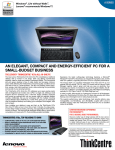
The Lenovo® ThinkCentre® A70z All-in-One PC
WHAT WE OFFER
When to sell
Space-saving Features
Designed for Small and Medium Businesses
•
•
•
•
•
•
•
Optimum space savings
Mess-free cable management
Multiple mounting options
Easy and fast installation
Efficient power savings
Superior performance capability
Affordable portable desktops
Wh0 to sell TO
Target Segment
The ThinkCentre A70z All-in-One PC is designed for small and medium
businesses that require space-saving, energy-efficient and easy-tosetup all-in-one PCs that are free of cable clutter. It is also a great fit to
educational and healthcare customers.
ThinkCentre A70z, top reasons to own
• Comfortably save up to 70% of your
desktop space1
• Neatly organize your workspace with
clutter-free cable management
• Boot up in under 35 seconds with Windows®7
• Easily access and upgrade the hard disk
and memory
• Save $65 on your Power Bill per year2
• Flexibly mount PCs with multiple VESA
mounts (optional)
• Conveniently move your PC using an ergonomic handle
• Consolidated desktop and monitor in a
single unit
• Slim form factor—62-mm thickness
• Up to 70% space saving over a traditional
desktop with a monitor
• 3 mount options—VESA mount
• Neat cable design
Convenience Features
• Boot up in under 35 seconds with
Windows®7
• Easy access, upgrade and service of hard
disk and memory
• Handle for easy portability
• Kensington lock secures chassis—
provides extra physical security
• Software security—USB BIOS disable,
Computrace BIOS support, Online Backup
and Norton AntiVirus
• Legacy software compatible
Green Eco-friendly Features
•
•
•
•
Energy Star® 5.0 compliant
Save $65 on your Power Bill per year2
Reusable shopping bag
Reduced packaging equivalent to 250
Paper Cups & 139 Plastic Bags per box3
• Power Manager
Lenovo Enhanced Experience
for Windows®7.
Fast. Secure. Built for Business.
Discover a better way of doing business with the new Lenovo
Enhanced Experience for Windows®7 on Think PCs. Faster, more
durable and greener Think PCs are optimized for Windows®7
to deliver improved ease of use. It enhances productivity and
foolproof security that your business cannot do without.
1 Compared to ThinkCentre A58 Tower plus 19” Wide LCD monitor.
2. Compared to your 3 year old replacement PC (ThinkCentre A52) + monitor
(ThinkVision E74) without Power Manager. Idle with Screen on. Energy price:
$0.103/kWh, Energy Information Administration, Annual Energy Outlook 2009
(Early Release) edition
3 Compared to Tower + 19” Wide LCD Packaging.
A Series
Windows®. Life without Walls™.
Lenovo® recommends Windows®7.
ENHANCED
EXPERIENCE
SERVICE OFFERINGS
Support
Protection
• Base Warranty Support: Provides the Lenovo standard award-winning service and support
• Warranty Upgrades and Extensions: Protects investment, time and money with the
enhanced service-level upgrade (e.g. NBD onsite) and term extension
• Priority Support for Business: Provides technical support for the business—expands
existing IT capabilities with fast access to 24x7 advanced level technical support
• Keep your Hard Drive: Allows the end-user to retain the hard drive if it fails and hence
protects data from falling into the wrong hands
• Lenovo Online Backup: Provides secure, encrypted and offsite storage of customer’s data
AN ELEGANT, COMPACT AND ENERGY-EFFICIENT PC FOR
A SMALL-BUDGET BUSINESS
The Lenovo® ThinkCentre® A70z All-in-One PC
KEY DIFFERENTIATORS
SALIENT FEATURES AND BENEFITS
Comparison with competitors
ThinkCentre A70z All-in-One PC offers:
•
•
•
•
•
•
•
•
•
•
•
•
•
•
•
Supports up to Intel Core™2 Duo processor
Genuine Windows®7 Home or
Genuine Windows®7 Professional preloaded
2 DIMM slots with 4GB maximum memory
Supports up to 500GB SATA HDD
Supports SATA slim DVD-ROM and Rambo
6 USB ports (3 side and 3 rear) and a serial port
Integrated DX10 graphics card
Space saving PC with a slim form factor of 62-mm thickness
Green Energy Star® 5.0 compliant PC
Easy mobility with the ergonomic handle
Ergonomically designed front-positioned Power button and speaker
Anti-theft Kensington lock
1.3 MP Webcam and integrated microphone (optional)
WIFI (optional)
®
•
•
•
•
•
Better space-saving options—slimmer All-in-One PCs and more mounting options
Faster serviceability—easy-to-open chassis
More convenience—fast, easy setup and ergonomically located power button
Greener features—reusable shopping bag and minimal packaging
Greater security with the Kensington lock and the Computrace support
Comparison with the IdeaCentre™ C300 All-in-One desktop
ThinkCentre A70z All-in-One PC offers:
•
•
•
•
•
Improved graphics experience
Widescreen LCD display
ThinkCentre A preloads (System Update and Product Recovery)
Physical security with a Kensington lock (also locks Chassis)
VESA mount options
Comparison with the ThinkCentre A62 and A58e desktops
ThinkCentre A70z All-in-One PC offers:
• A slim, space-saving design
• All-in-One PC
A SERIE S
Windows®. Life without Walls™.
Lenovo® recommends Windows®7.
ENHANCED
EXPERIENCE
CUSTOMER NEEDS AND OUR SOLUTIONS
Customers need a space-saving All-in-One PC with clutter-free
cable management
The ThinkCentre® A70z All-in-One PC offers an integrated LCD
monitor with a CPU, in a small form factor (62-mm thickness). Neatly
managed cables and multiple mounting options save space and give
the workspace an elegant, neat, and compact look.
Customers need easy serviceability and upgrading of hard
disks and memory
The ThinkCentre A70z All-in-One PC offers easy-to-service features
with only two screws to open the chassis and the end user’s access
to the hard disk and memory allows easy upgrades.
CUSTOMER CHALLENGES AND OUR SOLUTIONS
Customers require easily serviceable All-in-One PCs
The ThinkCentre A70z All-in-One PC is easier to service than the
Dell Vostro 320 All-in-One PC, as the chassis can be opened by
removing two screws.
Customers require more expandability options for their
All-in-One PC
Although, All-in-One PCs have limited expandability options as
compared to traditional desktops, the ThinkCentre A70z All-in-One
PC offers easy access and upgrade of the hard disk and memory.
Customers need an elegant and modern-looking workspace
The ThinkCentre A70z All-in-One PC offers a stylish and elegant
PC with multiple mounting options that give a modern look to the
workspace. The clutter-free cable design maximizes the workspace
giving more convenience without compromising on serviceability and
productivity.
Customers need an energy-efficient All-in-One PC
The ThinkCentre A70z All-in-One PC is now greener with a 19” W
LCD monitor (16:10 ratio) and a Lenovo Power Manager that helps
save on electricity. Lenovo offers the All-in-One PC in a reusable
shopping bag with less packaging.
Customers need an affordable All-in-One PC
The ThinkCentre A70z All-in-One PC suites the limited budget SMB,
without compromising neither the PC’s performance nor employee
productivity.
Customers need a dynamic working environment
The ThinkCentre A70z All-in-One PC is easy and fast to setup as
compared to a traditional desktop and the ergonomic handle allows
easy PC portability giving the end-user the advantage of a mobile
workspace.
www.lenovopartnernetwork.com
©2009 Lenovo. All rights reserved
Produced in the USA October 2006 - All Rights Reserved
Availability: All offers subject to availability. Lenovo reserves the right to alter product offerings and specifications at any time, without notice. Lenovo is not responsible for photographic or typographic errors. Warranty Information: For a copy
of applicable product warranties, write to: Warranty Information, P.O. Box 12195, RTP, NC 27709, Attn: Dept. ZPYA. Lenovo makes no representation or warranty regarding third-party products or services. Footnotes: [1] Thinness: may vary at
certain points on the system. [2] Travel weight: Includes battery and optional travel bezel instead of standard optical drive in Ultrabay, if applicable; weight may vary due to vendor components, manufacturing process and options. [3] Keyboard: As
defined by ISO/IEC 15412. [4] WWAN Service Providers: Requires separate agreement with select third par ty ser vice provider, and is subject to credit approval and applicable ser vice agreement/terms, rate plan and coverage maps of the provider.
Service is available in select metropolitan markets, not available in all areas. Service provider, not Lenovo, is solely responsible for service. Lenovo customers may be contacted after purchase to activate service. Special credit and tenure restrictions
and additional charges may apply to international roaming. A network connection, third-party software, additional hardware, and/or subscription to a third-party service may be required for certain solutions/applications. Additional restrictions apply.
Offer subject to change. [5] Battery Life: These model numbers achieved Battery Rundown Time of at least the time shown during testing. A description of the testing is available at lenovo.com/pc/ww/thinkpad/batterylife. Battery life (and recharge
times) will vary based on many factors including screen brightness, applications, features, power management, battery conditioning and other customer preferences. [6] Wireless Network Access: required and not included; access may require
subscription and fees may apply. May require compatible wireless-enabled options, sold separately. [7] Wireless range/speed: Actual device range and data transfer speed depend upon many factors and are often less than the maximum possible.
The following are trademarks of Lenovo: ThinkVantage Access Connections, ThinkVantage ImageUltra, ThinkVantage Rescue and Recovery, ThinkVantage Secure Data Disposal, ThinkVantage System Migration Assistant, Think, ThinkCentre,
ThinkPad, ThinkVantage. IBM and the IBM logo are registered trademarks of IBM and are used under license. Other company, product and service names may be trademarks or service marks of others. The Verizon name and logo and all related product
and service names, design marks and slogans are trademarks, service marks or registered trademarks of Verizon and may not be used in any manner without the prior written consent of Verizon. All other product and service marks are trademarks
of their respective owners. This publication was developed for products and services offered in the United States. Lenovo may not offer the products, services or features discussed in this document in other countries. Information is subject to change
without notice. Consult your local Lenovo representative for information on offerings available in your area.
Visit www.lenovo.com/safecomputing periodically for the latest information on safe and effective computing.