1
MUX - 120
Intel Socket LGA1156
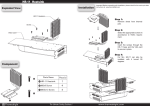
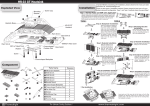
Exploded View
Component
Important! Before proceeding with installation, please check
for the most up-to-date instructions at www.thermalright.com
2
1
3
MUX-120 Heatsink
120mm Fan clip
5
4
8
7
6
9
10
Anti-vibration strip
Mounting Plate
Parts Name
Piece(s)
Parts Name
Piece(s)
Spring Loaded Screw
M3x0.5 Screw
1 MUX-120 Heatsink
1
2 1156 Backplate
1
3 1156 Bracket Mount
2
4 Mounting Plate
1
5 M3x0.5 Screw
4
6 Spring Loaded Screw
2
7 Anti-vibration strip
4
8 120mm Fan clip
4
Chill Factor 2
Thermal Paste
1
10 X-Silent 120mm Fan
1
1156 Bracket Mount
1156 Backplate
9
The Ultimate Cooling Solutions!
1.
Step 1:Accessory Installation
Apply the anti-vibration strips to each side of
heatsink. Insert each end of the fan wire into
the designated holes on the heatsink.
Step 2:Bracket Mount Installation
Use the four M3x0.5 screws to secure the
1156 bracket mount to the 1156 backplate
with the motherboard in between.
Step 3:Thermal Paste Application
Apply a thin evenly spread out layer of
thermal paste to the CPU and to the bottom
of the heatsink base.
Step 6:
Step 5:Place the heatsink on top of CPU and
secure in place by tightening on the spring loaded
screws.
Step 6:Fan Installation
Place the 12 cm fan next to the heatsink. Pull on fan wire clips
to hook into fan mounting holes. Plug in fan for power.
Installation completed.
Step 4:Slide the mounting plate through
between the heatpipes and place it in the
dimple on top of the heatsink base.
Single Fan
Double Fan
Double-fan Installation:
To install a second fan, simply follow the fan installation guide on
the other side of the cooler to make for a push-pull airflow.