1
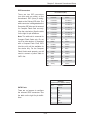
SUPER
®
SuperWorkstation 7045A-WT
USER’S MANUAL
1.0b
The information in this User’s Manual has been carefully reviewed and is believed to be accurate.
The vendor assumes no responsibility for any inaccuracies that may be contained in this document,
makes no commitment to update or to keep current the information in this manual, or to notify any
person or organization of the updates. Please Note: For the most up-to-date version of this
manual, please see our web site at www.supermicro.com.
Super Micro Computer, Inc. ("Supermicro") reserves the right to make changes to the product
described in this manual at any time and without notice. This product, including software, if any,
and documentation may not, in whole or in part, be copied, photocopied, reproduced, translated or
reduced to any medium or machine without prior written consent.
IN NO EVENT WILL SUPERMICRO BE LIABLE FOR DIRECT, INDIRECT, SPECIAL, INCIDENTAL,
SPECULATIVE OR CONSEQUENTIAL DAMAGES ARISING FROM THE USE OR INABILITY TO
USE THIS PRODUCT OR DOCUMENTATION, EVEN IF ADVISED OF THE POSSIBILITY OF
SUCH DAMAGES. IN PARTICULAR, SUPERMICRO SHALL NOT HAVE LIABILITY FOR ANY
HARDWARE, SOFTWARE, OR DATA STORED OR USED WITH THE PRODUCT, INCLUDING THE
COSTS OF REPAIRING, REPLACING, INTEGRATING, INSTALLING OR RECOVERING SUCH
HARDWARE, SOFTWARE, OR DATA.
Any disputes arising between manufacturer and customer shall be governed by the laws of Santa
Clara County in the State of California, USA. The State of California, County of Santa Clara shall
be the exclusive venue for the resolution of any such disputes. Super Micro's total liability for
all claims will not exceed the price paid for the hardware product.
This equipment has been tested and found to comply with the limits for a Class B digital device
pursuant to Part 15 of the FCC Rules. These limits are designed to provide reasonable protection
against harmful interference in a residential installation. This equipment generates, uses, and can
radiate radio frequency energy and, if not installed and used in accordance with the manufacturer’s
instruction manual, may cause interference with radio communications. However, there is no
guarantee that interference will not occur in a particular installation. If this equipment does cause
harmful interference to radio or television reception, which can be determined by turning the
equipment off and on, you are encouraged to try to correct the interference by one or more of the
following measures: Reorient or relocate the receiving antenna. Increase the separation between
the equipment and the receiver. Connect the equipment into an outlet on a circuit different from
that to which the receiver is connected. Consult the dealer or an experienced radio/television
technician for help.
WARNING: Handling of lead solder materials used in this
product may expose you to lead, a chemical known to
the State of California to cause birth defects and other
reproductive harm.
Manual Revision 1.0b
Release Date: August 5, 2008
Unless you request and receive written permission from Super Micro Computer, Inc., you may not
copy any part of this document.
Information in this document is subject to change without notice. Other products and companies
referred to herein are trademarks or registered trademarks of their respective companies or mark
holders.
Copyright © 2008 by Super Micro Computer, Inc.
All rights reserved.
Printed in the United States of America
Preface
Preface
About This Manual
This manual is written for professional system integrators and PC technicians. It
provides information for the installation and use of the SuperWorkstation 7045AWT. Installation and maintenance should be performed by experienced technicians
only.
The SuperWorkstation 7045A-WT is a high-end server based on the SC743SQ-865
tower/4U rackmount chassis and the X7DWA-N, a dual processor serverboard that
supports dual Intel® Xeon® LGA771 processors at a FSB speed of 1600/1333/1066
MHz.
Manual Organization
Chapter 1: Introduction
The first chapter provides a checklist of the main components included with the
server system and describes the main features of the X7DWA-N serverboard and
the SC743SQ-865 chassis, which comprise the SuperWorkstation 7045A-WT.
Chapter 2: Server Installation
This chapter describes the steps necessary to install the SuperWorkstation 7045AWT into a rack and check out the server configuration prior to powering up the
system. If your server was ordered without processor and memory components,
this chapter will refer you to the appropriate sections of the manual for their installation.
Chapter 3: System Interface
Refer here for details on the system interface, which includes the functions and
information provided by the control panel on the chassis as well as other LEDs
located throughout the system.
iii
SuperWorkstation 7045A-WT User's Manual
Chapter 4: System Safety
You should thoroughly familiarize yourself with this chapter for a general overview
of safety precautions that should be followed when installing and servicing the
SuperWorkstation 7045A-WT.
Chapter 5: Advanced Serverboard Setup
Chapter 5 provides detailed information on the X7DWA-N serverboard, including the
locations and functions of connections, headers and jumpers. Refer to this chapter
when adding or removing processors or main memory and when reconfiguring the
serverboard.
Chapter 6: Advanced Chassis Setup
Refer to Chapter 6 for detailed information on the SC743SQ-865 server chassis.
You should follow the procedures given in this chapter when installing, removing or
reconfiguring SATA or peripheral drives and when replacing system power supply
units and cooling fans.
Chapter 7: BIOS
The BIOS chapter includes an introduction to BIOS and provides detailed information on running the CMOS Setup Utility.
Appendix A: BIOS POST Messages
Appendix B: BIOS POST Codes
Appendix C: Intel HostRaid Setup Guidelines
Appendix D: Adaptec HostRaid Setup Guidelines
Appendix E: System Specifications
iv
Preface
Notes
v
SuperWorkstation 7045A-WT User's Manual
Table of Contents
Chapter 1 Introduction
1-1
Overview ......................................................................................................... 1-1
1-2
Serverboard Features ..................................................................................... 1-2
Processors ...................................................................................................... 1-2
Memory ........................................................................................................... 1-2
Serial ATA ....................................................................................................... 1-2
PCI Expansion Slots ....................................................................................... 1-2
UIO .................................................................................................................. 1-2
Onboard Controllers/Ports .............................................................................. 1-3
Other Features ................................................................................................ 1-3
1-3
Server Chassis Features ................................................................................ 1-4
System Power ................................................................................................. 1-4
Serial ATA Subsystem ..................................................................................... 1-4
Front Control Panel ......................................................................................... 1-4
I/O Backplane.................................................................................................. 1-4
Cooling System ............................................................................................... 1-4
1-4
Contacting Supermicro .................................................................................... 1-6
Chapter 2 Server Installation
2-1
Overview ......................................................................................................... 2-1
2-2
Unpacking the System .................................................................................... 2-1
2-3
Preparing for Setup ......................................................................................... 2-1
Choosing a Setup Location ............................................................................. 2-2
Rack Precautions ............................................................................................ 2-2
Server Precautions.......................................................................................... 2-2
Rack Mounting Considerations ....................................................................... 2-3
Ambient Operating Temperature ................................................................ 2-3
Reduced Airflow ......................................................................................... 2-3
Mechanical Loading ................................................................................... 2-3
Circuit Overloading ..................................................................................... 2-3
Reliable Ground ......................................................................................... 2-3
2-4
Installing the System into a Rack ................................................................... 2-4
Identifying the Sections of the Rack Rails ...................................................... 2-4
Installing the Chassis Rails ............................................................................. 2-5
Installing the Rack Rails ................................................................................. 2-6
vi
Table of Contents
Installing the Server into the Rack .................................................................. 2-7
2-5
Checking the Serverboard Setup .................................................................... 2-8
2-6
Checking the Drive Bay Setup ...................................................................... 2-10
Chapter 3 System Interface
3-1
Overview ......................................................................................................... 3-1
3-2
Control Panel Buttons ..................................................................................... 3-1
Power .............................................................................................................. 3-1
Reset ............................................................................................................... 3-1
3-3
Control Panel LEDs ........................................................................................ 3-2
Power .............................................................................................................. 3-2
HDD................................................................................................................. 3-2
NIC1 ................................................................................................................ 3-2
NIC2 ................................................................................................................ 3-2
Overheat/Fan Fail ........................................................................................... 3-2
3-4
Drive Carrier LEDs .......................................................................................... 3-3
SATA Drives .................................................................................................... 3-3
Chapter 4 System Safety
4-1
Electrical Safety Precautions .......................................................................... 4-1
4-2
General Safety Precautions ............................................................................ 4-2
4-3
ESD Precautions ............................................................................................. 4-3
4-4
Operating Precautions .................................................................................... 4-4
Chapter 5 Advanced Serverboard Setup
5-1
Handling the Serverboard ............................................................................... 5-1
Precautions ..................................................................................................... 5-1
Unpacking ....................................................................................................... 5-2
5-2
Serverboard Installation .................................................................................. 5-2
5-3
Connecting Cables .......................................................................................... 5-3
Connecting Data Cables ................................................................................. 5-3
Connecting Power Cables .............................................................................. 5-3
Connecting the Control Panel ......................................................................... 5-3
5-4
I/O Ports .......................................................................................................... 5-4
5-5
Installing the Processor and Heat Sink .......................................................... 5-5
5-6
Installing Memory ............................................................................................ 5-9
5-7
Adding PCI Cards ..........................................................................................5-11
5-8
Serverboard Details ...................................................................................... 5-12
X7DWA-N Quick Reference .......................................................................... 5-13
5-9
Connector Definitions ................................................................................... 5-14
5-10
Jumper Settings ............................................................................................ 5-21
vii
SuperWorkstation 7045A-WT User's Manual
5-11
Onboard Indicators........................................................................................ 5-25
5-12
Parallel, Floppy, IDE, and SATA Ports .......................................................... 5-26
Chapter 6 Advanced Chassis Setup
6-1
Static-Sensitive Devices .................................................................................. 6-1
Precautions ..................................................................................................... 6-1
Unpacking ....................................................................................................... 6-1
6-2
Front Control Panel ......................................................................................... 6-3
6-3
System Fans ................................................................................................... 6-4
Fan Failure ...................................................................................................... 6-4
Replacing Chassis Cooling Fans .................................................................... 6-4
6-4
Drive Bay Installation ...................................................................................... 6-6
SATA Backplane .............................................................................................. 6-7
Installing Components in the 5.25" Drive Bays .............................................. 6-8
6-5
Power Supply .................................................................................................. 6-9
Power Supply Failure ...................................................................................... 6-9
Chapter 7 BIOS
7-1
Introduction...................................................................................................... 7-1
7-2
Running Setup ................................................................................................ 7-2
7-3
Main BIOS Setup ............................................................................................ 7-2
7-4
Advanced Setup .............................................................................................. 7-7
7-5
Security ......................................................................................................... 7-24
7-6
Boot ............................................................................................................... 7-26
7-7
Exit ................................................................................................................ 7-27
Appendix A BIOS POST Messages
Appendix B BIOS POST Codes
Appendix C Intel HostRAID Setup Guidelines
Appendix D Adaptec HostRAID Setup Guidelines
Appendix E System Specifications
viii
Chapter 1: Introduction
Chapter 1
Introduction
1-1
Overview
The 7045A-WT is a high-end workstation comprised of two main subsystems:
the SC743SQ-865 tower/4U server chassis and the X7DWA-N dual Intel Xeon
processor serverboard. Please refer to our web site for information on operating
systems that have been certified for use with the SuperWorkstation 7045A-WT
(www.supermicro.com).
In addition to the serverboard and chassis, various hardware components have been
included with the SuperWorkstation 7045A-WT, as listed below:
Two (2) 8-cm hot-swap chassis fans (FAN-0104L4)
One (1) 9-cm rear exhaust fan (FAN-0103L4)
Two (2) CPU heat sinks (SNK-P0034AP4)
One (1) 3.5" floppy drive (FPD-PNSC-01)
Two (2) 5.25" dummy drive trays
One (1) cable for DVD drive (CBL-0139L)
One (1) floppy cable (CBL-040L)
One (1) IEEE 1394 (Firewire) cable (CBL-0173L)
SATA Accessories
One (1) SATA backplane (CSE-SAS-743TQ)
Six (6) SATA cables (CBL-0061L)
Two (2) SGPIO cables (CBL-0157L)
Eight (8) SATA hot-swap drive carriers [CSE-PT17(B)]
1-1
SuperWorkstation 7045A-WT User's Manual
1-2
Serverboard Features
At the heart of the SuperWorkstation 7045A-WT lies the X7DWA-N, a dual processor serverboard based on the Intel 5400 chipset and designed to provide maximum
performance. Below are the main features of the X7DWA-N. (See Figure 1-1 for a
block diagram of the 5400 chipset).
Processors
The X7DWA-N supports single or dual LGA771 type Intel Xeon 5400/5300/5200/5100
Series processors at a FSB speed of 1600/1333/1066 MHz. Please refer to the
serverboard description pages on our web site for a complete listing of supported
processors (www.supermicro.com).
Memory
The X7DWA-N has eight 240-pin DIMM slots that can support up to 64 GB of FBD
(Fully Buffered DIMM) ECC DDR2-800/667/533 SDRAM. The memory operates in
an interleaved configuration and requires requires modules of the same size and
speed to be installed two at a time. See Chapter 5 Section 5 for details.
Serial ATA
A SATA controller is integrated into the ESB2 (South Bridge) portion of the 5400
chipset to provide a six-port 3 Gb/s Serial ATA subsystem, which is RAID 0, 1, 10
and 5 supported. The Serial ATA drives are hot-swappable units.
Note: The operating system you use must have RAID support to enable the hotswap capability and RAID function of the Serial ATA drives.
PCI Expansion Slots
The X7DWA-N has two PCI-Express x16 Gen 2 slots, two 64-bit 133/100 MHz PCI-X
slots, one PCI 33 MHz slot, an IPMI slot and a UIO slot (see below).
UIO
The X7DWA-N is a specially-designed serverboard that features Supermicro's
UIO (Universal I/O) technology. UIO serverboards have a PCI-Express x8 connector that can support any one of several types of UIO card types to add SAS
ports, additional LAN ports, etc. to the serverboard. This allows the user to tailor
the serverboard to their own needs. Note: the 7045A-WT does not come with a
UIO card installed.
1-2
Chapter 1: Introduction
Onboard Controllers/Ports
One floppy drive connector and two onboard ATA/100 connectors (one reserved
for the use of a compact flash card) are provided to support IDE hard drives or
ATAPI devices. The color-coded I/O ports include one COM port (an additional COM
header is located on the serverboard), one parallel port, two USB 2.0 ports, PS/2
mouse and keyboard ports and two gigabit Ethernet ports.
Other Features
Other onboard features that promote system health include onboard voltage monitors, a chassis intrusion header, auto-switching voltage regulators, chassis and CPU
overheat sensors, virus protection and BIOS rescue.
1-3
SuperWorkstation 7045A-WT User's Manual
1-3
Server Chassis Features
The SuperWorkstation 7045A-WT is a scaleable server platform designed with
today's most state-of-the-art features. The following is a general outline of the main
features of the SC743SQ-865 server chassis.
System Power
The 7045A-WT features a single 865W power supply. This power supply unit has
been designed to operate at a low noise level to make it ideal for use in a workstation environment.
Serial ATA Subsystem
The SC743SQ-865 supports up to six 3 Gb/s Serial ATA drives. The SATA drives
are hot-swappable units and are connected to a backplane that provides power
and control.
Note: The operating system you use must have RAID support to enable the hotswap capability of the Serial ATA drives.
Front Control Panel
The control panel on the SuperWorkstation 7045A-WT provides you with system
monitoring and control. LEDs indicate system power, HDD activity, network activity,
overheat condition and power supply failure. A main power button and a system
reset button are also included.
Note: the power supply fail LED is intended for use with redundant power supply
systems and so is not needed for the 7045A-WT.
I/O Backplane
The SC743SQ-865 is an ATX form factor chassis that can be used as a tower
or mounted in a 4U rackmount configuration. The I/O backplane provides seven
expansion slots, two COM ports, a parallel port, four USB 2.0 ports, PS/2 mouse
and keyboard ports, one or two (depending on the serverboard) Gigabit Ethernet
port(s) and Line-In, Line-Out and Microphone jacks.
Cooling System
The SC743SQ-865 chassis has an innovative "Whisper-Quiet" cooling design that
includes two 8-cm hot-plug PWM (Pulse Width Modulation) system cooling fans and
a 9-cm chassis exhaust fan. The low noise level (~28 dB) makes the 7045A-WT
ideal for a workstation environment.
1-4
Chapter 1: Introduction
Figure 1-1. Intel 5400 Chipset:
System Block Diagram
Note: This is a general block diagram. Please see Chapter 5 for details.
1-5
SuperWorkstation 7045A-WT User's Manual
1-4
Contacting Supermicro
Headquarters
Address:
Super Micro Computer, Inc.
980 Rock Ave.
San Jose, CA 95131 U.S.A.
Tel:
+1 (408) 503-8000
Fax:
+1 (408) 503-8008
Email:
[email protected] (General Information)
[email protected] (Technical Support)
Web Site:
www.supermicro.com
Europe
Address:
Super Micro Computer B.V.
Het Sterrenbeeld 28, 5215 ML
's-Hertogenbosch, The Netherlands
Tel:
+31 (0) 73-6400390
Fax:
+31 (0) 73-6416525
Email:
[email protected] (General Information)
[email protected] (Technical Support)
[email protected] (Customer Support)
Asia-Pacific
Address:
Super Micro Computer, Inc.
4F, No. 232-1, Liancheng Rd.
Chung-Ho 235, Taipei County
Taiwan, R.O.C.
Tel:
+886-(2) 8226-3990
Fax:
+886-(2) 8226-3991
Web Site:
www.supermicro.com.tw
Technical Support:
Email:
[email protected]
Tel:
886-2-8228-1366, ext.132 or 139
1-6
Chapter 2: Server Installation
Chapter 2
Server Installation
2-1
Overview
This chapter provides a quick setup checklist to get your SuperWorkstation 7045AWT up and running. Following these steps in the order given should enable you to
have the system operational within a minimum amount of time. This quick setup
assumes that your system has come to you with the processors and memory preinstalled. If your system is not already fully integrated with a serverboard, processors,
system memory etc., please turn to the chapter or section noted in each step for
details on installing specific components.
The 7045A-WT may be employed either as a tower or mounted in a rack as a 4U
rackmount chassis. If using it as a tower unit, please read the Server Precautions
in the next section and then skip ahead to Section 2-5.
2-2
Unpacking the System
You should inspect the box the system was shipped in and note if it was damaged
in any way. If the server itself shows damage you should file a damage claim with
the carrier who delivered it.
Decide on a suitable location for the SuperWorkstation 7045A-WT. It should be
situated in a clean, dust-free area that is well ventilated. Avoid areas where heat,
electrical noise and electromagnetic fields are generated. You will also need it placed
near a grounded power outlet. Be sure to read the Rack and Server Precautions
in the next section.
2-3
Preparing for Setup
The box the system was shipped in may include two sets of rail assemblies, two
rail mounting brackets and mounting screws needed for installing the system into
a rack (optional kit). Follow the steps in the order given to complete the installation
process in a minimum amount of time. Please read this section in its entirety before
you begin the installation procedure outlined in the sections that follow.
2-1
SuperWorkstation 7045A-WT User's Manual
Choosing a Setup Location
•
Leave enough clearance in front of the rack to enable you to open the front door
completely (~25 inches) and approximately 30 inches of clearance in the back
of the rack to allow for sufficient airflow and ease in servicing.
•
•
This product is for installation only in a Restricted Access Location (dedicated
equipment rooms, service closets and the like).
This product is not suitable for use with visual display work place devices
acccording to §2 of the the German Ordinance for Work with Visual Display
Units.
!
Warnings and Precautions!
!
Rack Precautions
•
•
•
•
Ensure that the leveling jacks on the bottom of the rack are fully extended to
the floor with the full weight of the rack resting on them.
In single rack installation, stabilizers should be attached to the rack. In multiple
rack installations, the racks should be coupled together.
Always make sure the rack is stable before extending a component from the
rack.
You should extend only one component at a time - extending two or more simultaneously may cause the rack to become unstable.
Server Precautions
•
•
•
•
Review the electrical and general safety precautions in Chapter 4.
Determine the placement of each component in the rack before you install the
rails.
Install the heaviest server components on the bottom of the rack first, and then
work up.
Use a regulating uninterruptible power supply (UPS) to protect the server from
power surges, voltage spikes and to keep your system operating in case of a
power failure.
2-2
Chapter 2: Server Installation
•
Allow the hot plug SATA drives and power supply modules to cool before touching them.
•
Always keep the rack's front door and all panels and components on the servers
closed when not servicing to maintain proper cooling.
Rack Mounting Considerations
Ambient Operating Temperature
If installed in a closed or multi-unit rack assembly, the ambient operating temperature of the rack environment may be greater than the ambient temperature of the
room. Therefore, consideration should be given to installing the equipment in an
environment compatible with the manufacturer’s maximum rated ambient temperature (Tmra).
Reduced Airflow
Equipment should be mounted into a rack so that the amount of airflow required
for safe operation is not compromised.
Mechanical Loading
Equipment should be mounted into a rack so that a hazardous condition does not
arise due to uneven mechanical loading.
Circuit Overloading
Consideration should be given to the connection of the equipment to the power
supply circuitry and the effect that any possible overloading of circuits might have
on overcurrent protection and power supply wiring. Appropriate consideration of
equipment nameplate ratings should be used when addressing this concern.
Reliable Ground
A reliable ground must be maintained at all times. To ensure this, the rack itself
should be grounded. Particular attention should be given to power supply connections other than the direct connections to the branch circuit (i.e. the use of power
strips, etc.).
2-3
SuperWorkstation 7045A-WT User's Manual
2-4
Installing the System into a Rack
This section provides information on installing the system into a rack unit. Rack
installation requires the use of the optional rackmount kit. If the system has already
been mounted into a rack or if you are using it as a tower, you can skip ahead to
Sections 2-5 and 2-6.
There are a variety of rack units on the market, which may mean the assembly
procedure will differ slightly. The following is a guideline for installing the server into
a rack with the rack rails provided in the rackmount kit. You should also refer to the
installation instructions that came with the rack unit you are using.
Identifying the Sections of the Rack Rails
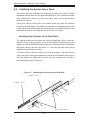
The optional rackmount kit includes two rack rail assemblies. Each of these assemblies consist of three sections: an inner fixed chassis rail that secures to the
chassis, an outer rack rail that secures directly to the rack itself and two rail brackets,
which also attack to the rack (see Figure 2-1.) The inner and outer rails must be
detached from each other to install.
To remove the inner chassis rail, pull it out as far as possible - you should hear a
"click" sound as a locking tab emerges from inside the rail assembly and locks the
inner rail. Depress the locking tab to pull the inner rail completely out. Do this for
both assemblies (one for each side).
Figure 2-1. Identifying the Sections of the Rack Rails
Outer rail
Inner rail
Rail brackets
2-4
Chapter 2: Server Installation
Installing the Chassis Rails
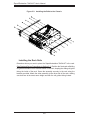
You will need to remove the top cover and the feet to add rack rails to the chassis.
First, remove the top and right covers (top and left covers when standing as a tower
chassis) by first removing the screws that secure them to the chassis. Depress the
button on the top (side if tower) of the chassis to release the cover and then pull
the cover off. Then unscrew the four feet and remove them from the chassis (see
Figure 2-2).
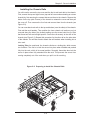
You can now attach rack rails to the top and bottom (now the sides) of the chassis.
First add the rack handles. Then position the inner chassis rail sections you just
removed along the side of the chassis making sure the screw holes line up. Note
that these two rails are left/right specific. Screw the rail securely to the side of the
chassis (see Figure 2-3). Repeat this procedure for the other rail on the other side
of the chassis. You will also need to attach the rail brackets when installing into a
telco rack.
Locking Tabs: As mentioned, the chassis rails have a locking tab, which serves
two functions. The first is to lock the server into place when installed and pushed
fully into the rack, which is its normal position. Secondly, these tabs also lock the
server in place when fully extended from the rack. This prevents the server from
coming completely out of the rack when you pull it out for servicing.
Figure 2-2. Preparing to Install the Chassis Rails
2-5
SuperWorkstation 7045A-WT User's Manual
Figure 2-3. Installing the Rails to the Chassis
Installing the Rack Rails
Determine where you want to place the SuperWorkstation 7045A-WT in the rack.
(See Rack and Server Precautions in Section 2-3.) Position the fixed rack rail/sliding
rail guide assemblies at the desired location in the rack, keeping the sliding rail guide
facing the inside of the rack. Screw the assembly securely to the rack using the
brackets provided. Attach the other assembly to the other side of the rack, making
sure both are at the exact same height and with the rail guides facing inward.
2-6
Chapter 2: Server Installation
Installing the Server into the Rack
You should now have rails attached to both the chassis and the rack unit. The next
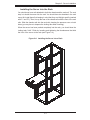
step is to install the server into the rack. You should have two brackets in the rack
mount kit. Install these first keeping in mind that they are left/right specific (marked
with "L" and "R"). Then, line up the rear of the chassis rails with the front of the rack
rails. Slide the chassis rails into the rack rails, keeping the pressure even on both
sides (you may have to depress the locking tabs when inserting).
When the server has been pushed completely into the rack, you should hear the
locking tabs "click". Finish by inserting and tightening the thumbscrews that hold
the front of the server to the rack (see Figure 2-4).
Figure 2-4. Installing the Server into a Rack
2-7
SuperWorkstation 7045A-WT User's Manual
2-5
Checking the Serverboard Setup
After setting up the the system, you will need to open the unit to make sure the
serverboard is properly installed and all the connections have been made.
Accessing the Inside of the System
1. If rack mounted, first release the retention screws that secure the unit to the
rack. Then grasp the two handles on either side and pull the unit straight out
until it locks (you will hear a "click").
2. There are two screws that secure the cover to the chassis - remove these
first. Locate the latch on the top (side if tower) of the chassis - depress where
it says "push" then lift the latch to release the cover. You can then lift the
cover from the chassis to gain full access to the inside of the server. See
Figure 2-5.
Checking the Components and Setup
1. You may have one or two processors already installed into the serverboard.
Each processor should have its own heatsink attached. See Chapter 5 for
instructions on processor installation.
2. Your server may have come with system memory already installed. Make
sure all DIMMs are fully seated in their slots. For details on adding system
memory, refer to Chapter 5.
3. If desired, you can install add-on cards to the system. See Chapter 5 for
details on installing PCI add-on cards.
4. Make sure all power and data cables are properly connected and not blocking
the chassis airflow. See Chapter 5 for details on cable connections.
2-8
Chapter 2: Server Installation
Figure 2-5. Accessing the Inside of the System
(Rack Configuration shown)
2-9
SuperWorkstation 7045A-WT User's Manual
2-6
Checking the Drive Bay Setup
Next, you should check to make sure the peripheral drives and the SATA drives and
backplane have been properly installed and all connections have been made.
Checking the Drives
1. All drives can be accessed from the front of the server. For servicing the CDROM, IDE hard drives and floppy drives, you will need to remove the top/left
chassis cover. The SATA disk drives can be installed and removed from the
front of the chassis without removing any chassis covers.
2. To install components into the 5.25" drive bays, you must first remove the
top/left chassis cover as described in the previous section. Refer to Chapter 6
for details.
3. Refer to Chapter 6 if you need to reinstall a CD-ROM and/or floppy disk drive
to the system.
4. Depending upon your system's configuration, your system may have one or
more drives already installed. If you need to install SATA drives, please refer
to Chapter 6.
Checking the Airflow
1. Airflow is provided by two hot-swap 8-cm chassis fans. One 9-cm exhaust fan
is also mounted at the rear of the chassis. The system component layout was
carefully designed to promote sufficient airflow through the chassis.
2. Note that all power and data cables have been routed in such a way that they
do not block the airflow generated by the fans. Keep this in mind when you
reroute them after working on the system.
Providing Power
1. Plug the power cords from the power supplies unit into a high-quality power
strip that offers protection from electrical noise and power surges. It is recommended that you use an uninterruptible power supply (UPS).
2. Depress the power on button on the front of the chassis.
2-10
Chapter 3: System Interface
Chapter 3
System Interface
3-1
Overview
The control panel on the 7045A-WT has several LEDs and two buttons. There
are also two LEDs on each SATA drive carrier. These LEDs keep you constantly
informed of the overall status of the system and the activity and health of specific
components.
3-2
Control Panel Buttons
There are two push-buttons located on the front of the chassis: a power on/off
button and a reset button.
Power
This is the main power button, which is used to apply or turn off the main system
power. Turning off system power with this button removes the main power but keeps
standby power supplied to the system.
Reset
Use the reset button to reboot the system.
3-1
SuperWorkstation 7045A-WT User's Manual
3-3
Control Panel LEDs
The control panel located on the front of the SC743SQ-865 chassis has six LEDs
that provide you with critical information related to different parts of the system.
This section explains what each LED indicates when illuminated and any corrective
action you may need to take.
Power
Indicates power is being supplied to the system's power supply. This LED should
normally be on when the system is operating.
HDD
Indicates IDE channel activity. On the 7045A-WT, this LED indicates SATA drive
activity when flashing.
1
NIC1
Indicates network activity on LAN1 when flashing.
2
NIC2
Indicates network activity on LAN2 when flashing.
Overheat/Fan Fail
When this LED flashes, it indicates a fan failure. When on continuously it indicates
an overheat condition, which may be caused by cables obstructing the airflow in
3-2
Chapter 3: System Interface
the system or the ambient room temperature being too warm. Check the routing of
the cables and make sure all fans are present and operating normally. You should
also check to make sure that the chassis covers are installed. Finally, verify that
the heatsinks are installed properly (see Chapter 5). This LED will remain flashing
or on as long as the indicated condition exists.
3-4
Drive Carrier LEDs
SATA Drives
•
Green: Each Serial ATA drive carrier has a green LED. When illuminated, this
green LED (on the front of the SATA drive carrier) indicates drive activity. A
connection to the SATA backplane enables this LED to blink on and off when
that particular drive is being accessed. Please refer to Chapter 6 for instructions
on replacing failed SATA drives.
•
Red: The red LED to indicate an SATA drive failure. If one of the SATA drives
fail, you should be notified by your system management software. Please refer
to Chapter 6 for instructions on replacing failed SATA drives.
3-3
SuperWorkstation 7045A-WT User's Manual
Notes
3-4
Chapter 4: System Safety
Chapter 4
System Safety
4-1
Electrical Safety Precautions
!
Basic electrical safety precautions should be followed to protect yourself from
harm and the SuperWorkstation 7045A-WT from damage:
•
•
•
•
•
•
•
Be aware of the locations of the power on/off switch on the chassis as well
as the room's emergency power-off switch, disconnection switch or electrical
outlet. If an electrical accident occurs, you can then quickly remove power from
the system.
Do not work alone when working with high voltage components.
Power should always be disconnected from the system when removing or installing main system components, such as the serverboard, memory modules
and the CD-ROM and floppy drives. When disconnecting power, you should first
power down the system with the operating system and then unplug the power
cords of all the power supply units in the system.
When working around exposed electrical circuits, another person who is familiar
with the power-off controls should be nearby to switch off the power if necessary.
Use only one hand when working with powered-on electrical equipment. This
is to avoid making a complete circuit, which will cause electrical shock. Use
extreme caution when using metal tools, which can easily damage any electrical
components or circuit boards they come into contact with.
Do not use mats designed to decrease electrostatic discharge as protection from
electrical shock. Instead, use rubber mats that have been specifically designed
as electrical insulators.
The power supply power cord must include a grounding plug and must be
plugged into grounded electrical outlets.
4-1
SuperWorkstation 7045A-WT User's Manual
•
Serverboard Battery: CAUTION - There is a danger of explosion if the onboard
battery is installed upside down, which will reverse its polarities (see Figure
4-1). This battery must be replaced only with the same or an equivalent type
recommended by the manufacturer. Dispose of used batteries according to the
manufacturer's instructions.
•
DVD-ROM Laser: CAUTION - this server may have come equipped with a
DVD-ROM drive. To prevent direct exposure to the laser beam and hazardous
radiation exposure, do not open the enclosure or use the unit in any unconventional way.
•
4-2
Mainboard replaceable soldered-in fuses: Self-resetting PTC (Positive Temperature Coefficient) fuses on the mainboard must be replaced by trained service
technicians only. The new fuse must be the same or equivalent as the one
replaced. Contact technical support for details and support.
General Safety Precautions
!
Follow these rules to ensure general safety:
•
•
•
•
•
Keep the area around the SuperWorkstation 7045A-WT clean and free of clutter.
The 7045A-WT weighs approximately 64 lbs (29.1 kg.) when fully loaded. When
lifting the system, two people at either end should lift slowly with their feet spread
out to distribute the weight. Always keep your back straight and lift with your
legs. Don't use the handles (if installed) to lift the chassis; the handles should
only be used to pull the server out of the rack.
Place the chassis top cover and any system components that have been removed away from the system or on a table so that they won't accidentally be
stepped on.
While working on the system, do not wear loose clothing such as neckties and
unbuttoned shirt sleeves, which can come into contact with electrical circuits or
be pulled into a cooling fan.
Remove any jewelry or metal objects from your body, which are excellent metal
conductors that can create short circuits and harm you if they come into contact
with printed circuit boards or areas where power is present.
4-2
Chapter 4: System Safety
•
After accessing the inside of the system, close the system back up and secure
it to the rack unit with the retention screws after ensuring that all connections
have been made.
4-3
ESD Precautions
!
Electrostatic discharge (ESD) is generated by two objects with different electrical
charges coming into contact with each other. An electrical discharge is created to
neutralize this difference, which can damage electronic components and printed
circuit boards. The following measures are generally sufficient to neutralize this
difference before contact is made to protect your equipment from ESD:
•
•
•
•
•
•
•
•
Use a grounded wrist strap designed to prevent static discharge.
Keep all components and printed circuit boards (PCBs) in their antistatic bags
until ready for use.
Touch a grounded metal object before removing the board from the antistatic
bag.
Do not let components or PCBs come into contact with your clothing, which may
retain a charge even if you are wearing a wrist strap.
Handle a board by its edges only; do not touch its components, peripheral chips,
memory modules or contacts.
When handling chips or modules, avoid touching their pins.
Put the serverboard and peripherals back into their antistatic bags when not
in use.
For grounding purposes, make sure your computer chassis provides excellent
conductivity between the power supply, the case, the mounting fasteners and
the serverboard.
4-3
SuperWorkstation 7045A-WT User's Manual
4-4
Operating Precautions
!
Care must be taken to assure that the chassis cover is in place when the 7045A-WT
is operating to assure proper cooling. Out of warranty damage to the 7045A-WT
system can occur if this practice is not strictly followed.
Figure 4-1. Installing the Onboard Battery
LITHIUM BATTERY
LITHIUM BATTERY
OR
BATTERY HOLDER
BATTERY HOLDER
4-4
Chapter 5: Advanced Serverboard Setup
Chapter 5
Advanced Serverboard Setup
This chapter covers the steps required to install the X7DWA-N serverboard into the
chassis, connect the data and power cables and install add-on cards. All serverboard
jumpers and connections are also described. A layout and quick reference chart
are included in this chapter for your reference. Remember to completely close the
chassis when you have finished working with the serverboard to better cool and
protect the system.
5-1
Handling the Serverboard
Electrostatic discharge (ESD) can damage electronic components. To prevent damage to any printed circuit boards (PCBs), it is important to handle them very carefully
(see previous chapter). To prevent the serverboard from bending, keep one hand
under the center of the board to support it when handling. The following measures
are generally sufficient to protect your equipment from electric static discharge.
Precautions
•
•
•
•
•
•
Use a grounded wrist strap designed to prevent electrostatic discharge (ESD).
Touch a grounded metal object before removing any board from its antistatic
bag.
Handle a board by its edges only; do not touch its components, peripheral chips,
memory modules or gold contacts.
When handling chips or modules, avoid touching their pins.
Put the serverboard, add-on cards and peripherals back into their antistatic
bags when not in use.
For grounding purposes, make sure your computer chassis provides excellent
conductivity between the power supply, the case, the mounting fasteners and
the serverboard.
5-1
SuperWorkstation 7045A-WT User's Manual
Unpacking
The serverboard is shipped in antistatic packaging to avoid electrical static discharge. When unpacking the board, make sure the person handling it is static
protected.
5-2
Serverboard Installation
This section explains the first step of physically mounting the X7DWA-N into the
SC743SQ-865 chassis. Following the steps in the order given will eliminate the most
common problems encountered in such an installation. To remove the serverboard,
follow the procedure in reverse order.
Installing to the Chassis
1. Access the inside of the system by removing the screws from the back lip of
the side cover of the chassis, then pull the cover off.
2. The X7DWA-N requires a chassis big enough to support a 12" x 13"
serverboard, such as Supermicro's SC743SQ-865.
3. Make sure that the I/O ports on the serverboard align properly with their
respective holes in the I/O shield at the back of the chassis.
4. Carefully mount the serverboard to the serverboard tray by aligning the board
holes with the raised metal standoffs that are visible in the chassis.
5. Insert screws into all the mounting holes on your serverboard that line up
with the standoffs and tighten until snug (if you screw them in too tight, you
might strip the threads). Metal screws provide an electrical contact to the
serverboard ground to provide a continuous ground for the system.
6. Finish by replacing the chassis cover.
5-2
Chapter 5: Advanced Serverboard Setup
5-3
Connecting Cables
Now that the serverboard is installed, the next step is to connect the cables to the
board. These include the data cables for the peripherals and control panel and the
power cables.
Connecting Data Cables
The cables used to transfer data from the peripheral devices have been carefully
routed to prevent them from blocking the flow of cooling air that moves through
the system from front to back. If you need to disconnect any of these cables, you
should take care to keep them routed as they were originally after reconnecting
them (make sure the red wires connect to the pin 1 locations). The following data
cables (with their locations noted) should be connected. (See the layout on page
5-12 for connector locations.)
•
SATA drive data cable (I-SATA0 ~ I-SATA5)
•
Control Panel cable (JF1)
•
Floppy drive cable (Floppy)
Important! Make sure the the cables do not come into contact with the fans.
Connecting Power Cables
The X7DWA-N has a 24-pin primary power supply connector (JPW1) for connection
to the ATX power supply. In addition, there is a 4-pin secondary power connector
(JPW2) as well as an 8-pin processor power connector (JPW3) that must be connected to your power supply. See Section 5-9 for power connector pin definitions.
Connecting the Control Panel
JF1 contains header pins for various front control panel connectors. See Figure 5-1
for the pin locations of the various front control panel buttons and LED indicators.
All JF1 wires have been bundled into a single cable to simplify this connection. Make
sure the red wire plugs into pin 1 as marked on the board. The other end connects
to the Control Panel PCB board, located just behind the system status LEDs on
the chassis. See Chapter 5 for details and pin descriptions.
5-3
SuperWorkstation 7045A-WT User's Manual
Figure 5-1. Control Panel Header Pins
20
19
Ground
NMI
x (Key)
x (Key)
Power On LED
Vcc
HDD LED
Vcc
NIC1 LED
Vcc
NIC2 LED
Vcc
OH/Fan Fail LED
Vcc
Power Fail LED
Vcc
Ground
Reset (Button)
Ground
Power (Button)
2
5-4
1
I/O Ports
The I/O ports are color coded in conformance with the PC 99 specification. See
Figure 5-2 below for the colors and locations of the various I/O ports.
Figure 5-2. I/O Ports
6
2
5
8
13 16
10
1
4
7
9
12 15
3
11 14
I/O Port Definitions
1
PS/2 Keyboard
9
Gigabit LAN2 Port
2
PS/2 Mouse
10
Gigabit LAN1 Port
3
Back Panel USB Port 0
11
Side Speaker (Gray)
4
Back Panel USB Port 1
13
Rear Speaker (Black)
5
Back Panel USB Port 2
13
Center/Subwoofer (Orange)
6
Back Panel USB Port 3
14
Mic In (Pink)
7
COM1 Port
15
Front Speaker (Lime)
8
Parallel (Printer) Port
16
Line In (Light Blue)
5-4
Chapter 5: Advanced Serverboard Setup
5-5
Installing the Processor and Heat Sink
Avoid placing direct pressure to the top of the processor package. Always
!
remove the power cord first before adding, removing or changing any
hardware components.
Notes: Always connect the power cord last and remove it before adding, removing or changing any components. Make sure to install the processor into the CPU
socket before you install the CPU heat sink.
Intel's boxed Xeon CPU package contains the CPU fan and heat sink assembly. If
you buy the CPUs separately, use only Intel-certified heat sinks and fans.
Make sure to install the heat sink backplate and the serverboard into the chassis
before you install the CPU heat sink and fan (see below).
Inspect the CPU socket and make sure that the CPU plastic cap is in place and
none of the socket pins are bent. Otherwise, contact the retailer immediately.
All graphics shown in this manual are for reference only. The components that
came with your serverboard may or may not look exactly the same as the pictures
shown in this manual.
Installation Procedure
For proper system setup, please follow the procedure below:
Heat sink
1. Install the heat sink backplate
into the chassis if needed
CPU
2. Install the serverboard into the
chassis.
CPU Socket
Serverboard
3. Install the CPU(s).
4. Install the heat sink or/and cooling fans (if any).
5. Connect fan and power cables.
Retention Bracket
(pre-installed)
Backplate
5-5
SuperWorkstation 7045A-WT User's Manual
CPU Installation
1. A black PnP cap is attached to
the load plate to protect the CPU
socket. Press the load lever down
and away from the retention clasp
Load lever
to release the load plate from its
locked position.
PnP cap
2. Gently lift the load lever to open
the load plate.
3. Use your thumb and your index
finger to hold the CPU at opposite
sides.
4. Align pin1 of the CPU (the corner
marked with a triangle) with the
notched corner of the CPU socket.
Load plate released
5. Find the corner of the CPU that
has a semi-circle cutout below a
gold dot (CPU key). This corner
should be aligned with the cutout
on the socket (socket key).
6. Once aligned, carefully lower
the CPU straight down into the
socket. Do not drop the CPU on
the socket, do not move the CPU
horizontally or vertically and do not
rub the CPU against any surface
or any of the contacts, which may
damage the CPU and/or contacts.
5-6
Chapter 5: Advanced Serverboard Setup
7. With the CPU in the socket, in-
Gold dot
spect the four corners of the CPU
Socket key
to make sure that it is properly
installed.
CPU key
8. Use your thumb to gently push the
load lever down until it snaps into
the retention clasp.
Notched corner
9. If the CPU is properly installed
CPU pin 1
into the socket, the PnP cap will
be automatically released from the
load plate when the lever locks.
Remove the cap. Repeat steps to
install a second CPU if desired.
Warning! Keep the plastic PnP cap.
The serverboard must be shipped with
the PnP cap properly installed to protect
the CPU socket. Shipment without the
PnP cap properly installed will void the
warranty.
Load lever
CPU installed in socket
PnP cap released
from load plate
5-7
SuperWorkstation 7045A-WT User's Manual
Installation and Removal of the Heat Sink
Installing the Heat Sink Installation
1. Do not apply any thermal grease to the
heat sink or the CPU die; the required
amount has already been applied.
2. Place the heatsink on top of the CPU so
Screw #1
that the four mounting holes are aligned
with those on the retention mechanism.
3. Screw in two diagonal screws (i.e. the #1
and the #2 screws) until just snug (do not
over-tighten the screws, which may damage the CPU.)
Screw #2
4. Finish the installation by fully tightening all
four screws.
Uninstalling the Heat Sink
!
Warning: We do not recommend removing the CPU or the heat sink.
However, if you do need to uninstall the heat sink, please follow these
instructions to avoid damaging the CPU or the CPU socket.
1. Unscrew and remove the heat sink
screws in the sequence shown in the
picture on the right.
2. Hold the heat sink as shown in the picture
on the right and gently wriggle to loosen
it from the CPU. (Do not use excessive
force when doing this!)
Screw #1
Screw #3
Screw #4
Screw #2
3. Once the heat sink is loosened, remove it
from the CPU socket.
4. Clean the surface of the CPU and the
heat sink to get rid of the old thermal
grease. Reapply the proper amount of
thermal grease before you re-install the
heat sink.
5-8
Chapter 5: Advanced Serverboard Setup
5-6
Installing Memory
CAUTION! Exercise extreme care when installing or removing DIMM
!
modules to prevent any possible damage.
Installing Memory Modules
1. Insert the desired number of DIMMs into the memory slots, starting with Bank
1. Refer to the Memory Configuration Table below for more details.
2. Insert each DIMM vertically into its slot. Pay attention to the notch along the
bottom of the module to prevent inserting the DIMM incorrectly.
3. Gently press down on the DIMM module until it snaps into place in the slot.
Repeat for all modules (see step 1 above).
Memory Support
The X7DWA-N supports up to 64 GB of FBD ECC DDR2-800/667/533 in 8 slots.
Populating slots with a pair (or pairs) of DIMMs of the same type and size will
result in interleaved memory. For best performance, please install pair(s) of DIMM
modules of the same type in both Branch 0 and Branch 1.
Memory Configuration Table
Branch1
Branch0
Number of
DIMMs
2 DIMMs
4 DIMMs
6 DIMMs
8 DIMMs
Bank 1
(Channel 0)
1A
1A
1A
1A
----------1B
1B
Bank 2
(Channel 1)
2A
2A
2A
2A
----------2B
2B
Bank 3
(Channel 2)
-----3A
3A
3A
---------------3B
Bank 4
(Channel 3)
-----4A
4A
4A
---------------4B
Notes: i. DIMM slot# specified = DIMM slot to be populated; “---“ = DIMM slot not to
be populated. ii. FBD 533 MHz, 667MHz and 800 MHz DIMMs are supported,
however we recommend that you use memory modules of the same speed and type.
Note: Different types of memory modules are supported by processors with different
front side bus speeds. Refer to the Memory Support Table below.
Memory Support Table
FSB:
1600 MHz
FSB:
1333 MHz
FSB:
1066 MHz
800 MHz
Supported
Supported*
Supported*
667 MHz
Supported
Supported
Supported
533 MHz
Not Supported
Supported
Supported
CPU
DIMM
*DDR2 FBD 800 MHz memory is supported by 1333 MHz and 1066 MHz FSB
processors, but will run at 667 MHz.
5-9
SuperWorkstation 7045A-WT User's Manual
Notes: Due to OS limitations, some operating systems may not show more than
4 GB of memory.
Due to memory allocation to system devices, memory remaining available for operational use will be reduced when 4 GB of RAM is used. The reduction in memory
availability is disproportional. Refer to the table below for details.
Possible System Memory Allocation & Availability
System Device
Size
Physical Memory
Remaining (-Available)
(4 GB Total System Memory)
Firmware Hub flash memory (System
BIOS)
1 MB
3.99
Local APIC
4 KB
3.99
Area Reserved for the chipset
2 MB
3.99
I/O APIC (4 Kbytes)
4 KB
3.99
PCI Enumeration Area 1
256 MB
3.76
PCI Express (256 MB)
256 MB
3.51
PCI Enumeration Area 2 (if needed)
-Aligned on 256-MB boundary-
512 MB
3.01
VGA Memory
16 MB
2.85
TSEG
1 MB
2.84
Memory available to OS and other applications
2.84
Figure 5-3. DIMM Installation
DDR2 FBD DIMM
To Install: Insert module vertically and press down until it snaps into place. Pay attention to the bottom
notches.
To Remove: Use your thumbs to gently push each release tab outward to free the DIMM from the
slot.
5-10
Chapter 5: Advanced Serverboard Setup
5-7
Adding PCI Cards
The X7DWA-N has two PCI-Express x16 Gen 2 slots, two 64-bit 133/100 MHz PCI-X
slots and one PCI 33 MHz slot. The SC743SQ-865 chassis can accommodate up
to seven PCI expansion cards. PCI cards are installed directly to the serverboard.
Installing an Add-on Card
Before installing a PCI add-on card, make sure you install it into a slot that supports
the speed of the card (see step 1, above).
1. Begin by removing the PCI slot shield for the slot you wish to populate.
2. Fully seat the card into the riser card slot, pushing down with your thumbs
evenly on both sides of the card.
3. Finish by using a screw to secure the top of the card shield to the chassis.
The PCI slot shields protect the serverboard and its components from EMI
and aid in proper ventilation, so make sure there is always a shield covering
each unused slot.
5-11
SuperWorkstation 7045A-WT User's Manual
Serverboard Details
1
Figure 5-4. X7DWA-N Layout
(not drawn to scale)
+
5-8
5-12
Chapter 5: Advanced Serverboard Setup
X7DWA-N Quick Reference
Jumper
Description
Default Setting
J3P
3rd Power Fail Detect
Open (Disabled)
JBT1
CMOS Clear
(See Section 5-10)
JCF1
Compact Flash Card Master/Slave
Open (Slave)
JI2C1/JI2C2
I2C to PCI-X Slots
Pins 1-2 (Enabled)
JI2C3/JI2C4
I2C to PCI-E Slots
Pins 1-2 (Enabled)
JPL1
LAN1/2 Enable/Disable
Pins 1-2 (Enabled)
JPT1
TPM Support
Pins 1-2 (Enabled)
JWD
Watch Dog
Pins 1-2 (Reset)
Connector
Description
1394-1/1394-2
FireWire Connectors
CD1
CD-In Header
COM1/COM2
COM1 Serial Port/Header
FAN 1-8
Chassis/CPU Fan Headers
Floppy
Floppy Disk Drive Connector
IDE1/IDE2
IDE Drive/Compact Flash Card Connector
I-SATA0 ~ I-SATA5
SATA Ports
J17
Power System Management (I2C) Header
JAR
Alarm Rest Header
JD1
Onboard Speaker/Power LED
JF1
Front Panel Connector
JL1
Chassis Intrusion Header
JOH1
Overheat Warning Header
JPW1
24-pin ATX Power Connector
JPW2/JPW4
+12V 4-Pin Power Connectors
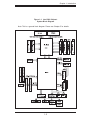
JPW3
+12V 8-pin Power Connector
JWF1
Compact Flash Card Power Header
JWOL/JWOR
Wake-On-LAN Header/Wake-On-Ring Header
LAN1/2
Gigabit Ethernet (RJ45) Ports
PSF
Power Supply Fail Header
SIMLP
IPMI Slot
T-SGPIO-1/T-SGPIO-2
Serial General Purpose Input/Output Headers
USB0/1/2/3, USB4/5
Universal Serial Bus (USB) Ports, Headers
5-13
SuperWorkstation 7045A-WT User's Manual
5-9
Connector Definitions
ATX Power 24-pin Connector
Pin Definitions (JPW1)
Pin#
Definition
Main ATX Power Supply
Connector
13
+3.3V
1
+3.3V
14
-12V
2
+3.3V
The primary power supply connector
15
COM
3
COM
(JPW1) meets the SSI (Superset ATX)
16
PS_ON
4
+5V
24-pin specification. Refer to the table
17
COM
5
COM
on the right for the pin definitions of
the ATX 24-pin power connector. You
18
COM
6
+5V
19
COM
7
COM
20
Res (NC)
8
PWR_OK
21
+5V
9
5VSB
22
+5V
10
+12V
23
+5V
11
+12V
24
COM
12
+3.3V
must also connect the 4-pin (JPW2/
JPW4) secondary power connectors
to your power supply (see below).
Pin #
Definition
+12V 4-pin Power
Pin Definitions (JPW2)
Secondary Power Connectors
Pins
Definition
1-2
Ground
3-4
+12V
Required Connection
JPW2 and JPW4 must also be connected to the power supply. See the
table on the right for pin definitions.
+12V 4-pin Power
Pin Definitions (JPW4)
Pins
Definition
1
+12V
2
and 3
GND
4
+5V
Required Connection
Processor Power Connector
In addition to the Main ATX power
connector (above), the 12V 8-pin
processor power connector at JPW3
must also be connected to your power
supply. See the table on the right for
pin definitions.
5-14
+12V 8-pin Power
Pin Definitions (JPW3)
Pins
Definition
1-4
Ground
5-8
+12V
Required Connection
Chapter 5: Advanced Serverboard Setup
PW_ON Connector
Power Button
Pin Definitions (JF1)
The PW_ON connector is on pins 1
and 2 of JF1. This header should be
connected to the chassis power button. See the table on the right for pin
Pin#
Definition
1
PW_ON
2
Ground
definitions.
Reset Connector
Reset Button
Pin Definitions (JF1)
The reset connector is located on pins
3 and 4 of JF1 and attaches to the
Pin#
Definition
reset switch on the computer chas-
3
Reset
4
Ground
sis. See the table on the right for pin
definitions.
Power Fail LED
PWR Fail LED
Pin Definitions (JF1)
The Power Fail LED connection is
located on pins 5 and 6 of JF1. Refer to the table on the right for pin
definitions.
Overheat/Fan Fail LED (OH)
Connect an LED to the OH connection
on pins 7 and 8 of JF1 to provide advanced warning of chassis overheating. Refer to the table on the right for
pin definitions.
Pin#
Definition
5
Vcc
6
Ground
OH/Fan Fail LED
Pin Definitions (JF1)
OH/Fan Fail Indicator
Status
Pin#
Definition
State
Definition
7
Vcc
Off
Normal
8
Ground
On
Overheat
Flashing
Fan Fail
NIC2 (JLAN2) LED
The LED connections for JLAN2 are
on pins 9 and 10 of JF1. Attach an
LED cable to display network activity. See the table on the right for pin
definitions.
NIC2 LED
Pin Definitions (JF1)
Pin#
Definition
9
Vcc
10
Ground
NIC1 (JLAN1) LED
The LED connections for JLAN1 are
on pins 11 and 12 of JF1. Attach an
LED cable to display network activity. See the table on the right for pin
definitions.
5-15
NIC1 LED
Pin Definitions (JF1)
Pin#
Definition
11
Vcc
12
Ground
SuperWorkstation 7045A-WT User's Manual
HDD LED
HDD LED
Pin Definitions (JF1)
The HDD LED connection is located
on pins 13 and 14 of JF1. This LED
Pin#
Definition
is used to display all IDE and SATA
13
Vcc
activity. See the table on the right for
14
HD Active
pin definitions.
Power On LED
The Power On LED connector is located on pins 15 and 16 of JF1 (use
JLED for a 3-pin connector). This
connection is used to provide LED
indication of power being supplied to
the system. See the table on the right
for pin definitions.
NMI Button
The non-maskable interrupt button
header is located on pins 19 and 20
of JF1. Refer to the table on the right
for pin definitions.
Power LED
Pin Definitions (JF1)
Pin#
Definition
15
5V Stby
16
Control
NMI Button
Pin Definitions (JF1)
Pin#
Definition
19
Control
20
Ground
Fan Headers
There are eight fan headers on the
serverboard, all of which are 4-pin
fans. (Pins 1-3 of the fan headers
are backward compatible with the
traditional 3-pin fans.) See the table
on the right for pin definitions. The
onboard fan speeds are controlled
by Thermal Management (via Hardware Monitoring) under the Advanced
Section in the BIOS. The default is
disabled. When using Thermal Management setting, please use all 3-pin
fans or all 4-pin fans.
5-16
Fan Header
Pin Definitions
(FAN1-8)
Pin#
Definition
1
Ground (Black)
2
+12V (Red)
3
Tachometer
4
PWM Control
Note: Fan 7 is for the CPU1
and Fan8 is for the CPU2
heat sink.
Chapter 5: Advanced Serverboard Setup
Chassis Intrusion
Chassis Intrusion
Pin Definitions (JL1)
The Chassis Intrusion header is designated JL1. Attach an appropriate
Pin#
Definition
cable from the chassis to inform you
1
Intrusion Input
of a chassis intrusion when the chas-
2
Ground
sis is opened
Wake-On-LAN
Wake-On-LAN
Pin Definitions
(JWOL)
The Wake-On-LAN header is designated JWOL on the serverboard. See
Pin#
Definition
the table on the right for pin defini-
1
+5V Standby
tions. You must also have a LAN card
with a Wake-On-LAN connector and
cable to use this feature.
2
Ground
3
Wake-up
Wake-On-Ring
Wake-On-Ring
Pin Definitions
(JWOR)
The Wake-On-Ring header is designated JWOR. This function allows
your computer to receive and be
"awakened" by an incoming call when
in the suspend state. See the table on
the right for pin definitions. You must
also have a WOR card and cable to
use this feature.
Power Supply Fail LED
Pin#
Definition
1
Ground (Black)
2
Wake-up
PWR Supply Fail LED
Pin Definitions (PSF)
Connect a cable from your power
supply to the PSF header to provide
warning of power supply failure. This
warning signal is passed through the
PWR_LED pin to indicate of a power
failure on the chassis. See the table on
the right for pin definitions.
Pin#
Definition
1
PWR 1: Fail
2
PWR 2: Fail
3
PWR 3: Fail
4
Signal: Alarm Reset
Note: This feature is only available when using Supermicro redundant power supplies.
LAN1/2 (Ethernet Ports)
Two Ethernet ports (designated LAN1
and LAN2) are located beside the parallel port on the I/O backplane. These
ports accept RJ45 type cables.
5-17
SuperWorkstation 7045A-WT User's Manual
Serial Ports
Serial Port Pin Definitions
(COM1/COM2)
Two serial ports are included on the
serverboard. COM1 is a backpanel
Pin #
Definition
Pin #
Definition
port and COM2 is a header located
1
DCD
6
DSR
near the SATA4 port. See the table on
2
RXD
7
RTS
the right for pin definitions.
3
TXD
8
CTS
4
DTR
9
RI
5
Ground
10
NC
Power LED/Speaker
On JD1 header, pins 1-3 are for a
power LED and pins 4-7 are for the
speaker. Close pins 4-7 with a jumper
to use an external speaker. If you wish
to use the onboard speaker, please
close pins 6-7. See the table on the
right for speaker pin definitions.
Power LED/Speaker
Connector (JD1)
Pin Setting
Pins 6-7
Internal Speaker
Pins 4-7
External Speaker
Universal Serial Bus (USB)
Universal Serial Bus
Pin Definitions (USB)
There are four Universal Serial Bus
ports located on the I/O panel and two
additional USB headers located on
the serverboard. The headers can be
used to provide front side USB access
(cables not included). See the table on
the right for pin definitions.
USB0/1/2/3
Pin #
Definition
SGPIO Headers
The SGPIO (Serial General Purpose
Input/Output) headers are used to
communicate with a system-monitoring chip on the backplane. See the
table on the right for pin definitions.
Definition
Pin #
USB4/5
Definition
1
+5V
1
+5V
2
PO-
2
PO-
3
PO+
3
PO+
4
Ground
4
Ground
5
N/A
5
Key
SGPIO Header
Pin Definitions (T-SGPIO-1/T-SGPIO-2)
Pin#
Definition
Pin
Definition
1
NC
2
NC
3
Ground
4
DATA Out
5
Load
6
Ground
7
Clock
8
*NC
NC = No Connection
5-18
Chapter 5: Advanced Serverboard Setup
Alarm Reset
If three power supplies are installed,
the system can notify you when any of
Alarm Reset Header
Pin Definitions (JAR)
the three power modules fail. Connect
JAR to a micro-switch to enable you
Pin Setting
Definition
to turn off the alarm that is activated
when a power module fails. See the
Pin 1
Ground
Pin 2
+5V
table on the right for pin definitions.
PWR SMB Header
Pin Definitions (J17)
Power SMB (I2C) Connector
The power SMB (I2C) connector is
used to monitor the status of the
power supply, fan and system temperature. See the table on the right
for pin definitions.
Pin#
Definition
1
Clock
2
Data
3
PWR Fail (Input from PS to MB)
4
Ground
5
+3.3V
Overheat LED/Fan Fail (JOH1)
The JOH1 header is used to connect
an LED to provide warning of chassis
overheating. This LED will blink to indicate a fan failure. Refer to the table
on right for pin definitions.
OH/Fan Fail LED
States
Overheat LED
Pin Definitions (JOH1)
State
Message
Pin#
Definition
Solid
Overheat
1
5vDC
Blinking
Fan Fail
2
OH Active
PS/2 Keyboard and
Mouse Port Pin
Definitions (J28)
ATX PS/2 Keyboard and PS/2
Mouse Ports
The ATX PS/2 keyboard and the PS/2
mouse are located beside the USB0/1
ports. The mouse port is above the
keyboard port. See the table on the
right for pin definitions.
5-19
Pin#
Definition
1
Data
2
NC
3
Ground
4
VCC
5
Clock
6
NC
SuperWorkstation 7045A-WT User's Manual
Compact Flash Card PWR
Connector
Compact Flash Card PWR
Connector (JWF1)
A Compact Flash Card Power Connector is located at JWF1. For the
Compact Flash Card to work properly,
you will need to enable with JCF1 and
Jumper Definition
On
Compact Flash
Power On
Off
Compact Flash
Power Off
connect a Compact Flash Card power
cable to JWF1 first.
CD Header
A 4-pin CD header (CD1) and a Front Panel
Audio header (Audio FP) are included on the
serverboard. These headers allow you to use
the onboard sound for audio CD playback.
Connect an audio cable from your CD drive to
the CD header that fits your cable's connector.
Only one CD header can be used at any time.
See the tables at right for pin definitions. (See
below for the Audio FP header.)
CD1 Pin Definitions
Pin#
Definition
1
Left
2
Ground
3
Ground
4
Right
Front Panel Audio Control
When front panel headphones are
plugged in, the back panel audio output
is disabled. This is done through the FP
Audio header (Audio FP). If the front
panel interface card is not connected to
the front panel audio header, jumpers
should be installed on pin pairs 1-2,
5-6, and 9-10 of the Audio FP header.
If these jumpers are not installed, the
back panel line out connector will be
disabled, and pin 1 of the microphone
in will be left floating, which can lead to
excessive back panel microphone noise
and crosstalk. See the table at right for
pin definitions.
5-20
Front Panel Audio Pin
Definitions (Audio FP)
Pin#
Definition
1
MIC_L
2
Audio Ground
3
MIC_R
4
FP Audio Detect
5
Line_2_R
6
Ground
7
FP_Jack Detect
8
Key
9
Line_2_L
10
Ground
Chapter 5: Advanced Serverboard Setup
1394-1/1394-2 Headers
1394-1
Pin Definitions
The 1394-1 and 1394-2 headers provide IEEE 1394 FireWire connectivity.
Pin# Definition
Pin#
Definition
1
PTPA0+
2
PTPA0-
See the tables on the right for pin
3
GND
4
GND
definitions.
5
PTPB0+
6
PTPB0-
7
PWR 1394
8
PWR 1394
9
Key
10
ZX
1394-2
Pin Definitions
Pin#
Definition
Pin#
Definition
1
PTPA1+
2
PTPA1-
3
GND
4
GND
5
PTPB1+
6
PTPB1-
7
PWR 1394
8
PWR 1394
9
Key
10
ZY
5-10 Jumper Settings
Explanation of Jumpers
To modify the operation of the
serverboard, jumpers can be used
to choose between optional settings.
Jumpers create shorts between two
pins to change the function of the connector. Pin 1 is identified with a square
solder pad on the printed circuit board.
See the serverboard layout pages for
jumper locations.
5-21
2
1
3
2
1
Jumper
Setting
Note: On a two-pin jumper, "Closed"
means the jumper is on both pins and
"Open" means the jumper is either on
only one pin or completely removed.
3
Connector
Pins
SuperWorkstation 7045A-WT User's Manual
CMOS Clear
JBT1 is used to clear CMOS (which will also clear any passwords). Instead of pins,
this jumper consists of contact pads to prevent accidentally clearing the contents
of CMOS.
To clear CMOS,
1. First power down the system and unplug the power cord(s).
2. With the power disconnected, short the CMOS pads with a metal object such
as a small screwdriver.
3. Remove the screwdriver (or shorting device).
4. Reconnect the power cord(s) and power on the system.
Note: Do not use the PW_ON connector to clear CMOS.
LAN1/2 Enable/Disable
LAN1/2 Enable/Disable
Jumper Settings (JPL1)
Change the setting of jumper JPL1 to
enable or disable the LAN1/LAN2 Ethernets port on the serverboard. See the
table on the right for jumper settings.
The default setting is enabled.
Jumper Setting
Definition
Pins 1-2
Enabled
Pins 2-3
Disabled
3rd Power Fail Detect
The system can notify you in the event
of a power supply failure. This feature
is available when three power supply
units are installed in the chassis with
one acting as a backup. If you only have
one or two power supply units installed,
you should disable this detection feature
(the default setting) with J3P to prevent
false alarms.
5-22
3rd Power Fail Detect
Jumper Settings (J3P)
Jumper Setting
Definition
Closed
Enabled
Open
Disabled
Chapter 5: Advanced Serverboard Setup
Watch Dog Enable/Disable
Watch Dog
Jumper Settings (JWD)
JWD controls the Watch Dog function.
Watch Dog is a system monitor that
Jumper Setting
can reboot the system when a software
Pins 1-2
Reset
application hangs. Jumping pins 1-2
Pins 2-3
NMI
will cause WD to reset the system if an
application hangs. Jumping pins 2-3
Open
Disabled
Definition
will generate a non-maskable interrupt
signal for the application that hangs.
See the table on the right for jumper
settings. Watch Dog must also be enabled in BIOS.
Note: When enabled, the user needs to
write their own application software in
order to disable the Watch Dog Timer.
Compact Flash Master/Slave Select
A Compact Flash Master (Primary)/Slave
(Secondary) Select Jumper is located at
JCF1. Close this jumper to enable Compact Flash Card. For the Compact Flash
Card or the Compact Flash Jumper
(JCF1) to work properly, you will need to
connect the Compact Flash Card power
cable to JWF1 first. Refer to the board
layout below for the location.
Compact Flash Card Master/
Slave Select (JCF1)
Jumper Definition
Open
Slave (Secondary)
Closed
Master (Primary)
I2C Bus to PCI-X/ Slots
2
2
Jumpers JI C1 and JI C2 allow you to
connect the System Management Bus
(I2C) to the PCI-X slots. The default setting is Disabled. Both jumpers must be
set to the same setting See the table on
the right for jumper settings.
5-23
I2C to PCI-X Slots
Jumper Settings (JI2C1/JI2C2)
Jumper Setting
Definition
Pins 1-2
Enabled
Pins 2-3
Disabled
SuperWorkstation 7045A-WT User's Manual
I2C Bus to PCI-Exp. Slots
Jumpers JI2C3 and JI2C4 allow you to
connect the System Management Bus
I2C to PCI-E Slots
Jumper Settings (JI2C3/JI2C4)
(I2C) to the PCI-E slots. The default set-
Jumper Setting
Definition
ting is Disabled. Both jumpers must be
Pins 1-2
Enabled
set to the same setting See the table on
the right for jumper settings.
Pins 2-3
Disabled
TPM
Jumper JPT1 allows you to enable TPM
(Trusted Platform Module) if a processors that supports TPM is used in the
system. The default setting is Enabled.
See the table on the right for jumper settings. Note: You must enable TPM Support in the BIOS to use this feature.
5-24
TPM Enable/Disable
Jumper Settings (JPT1)
Pin#
Definition
1-2
Enabled
2-3
Disabled
Chapter 5: Advanced Serverboard Setup
5-11 Onboard Indicators
GLAN1/2 LED
(Connection Speed Indicator)
LAN1/2 LEDs
The Ethernet ports have two LEDs. On
each port, one LED indicates activity
while the other LED may be green,
LED Color
Definition
Off
10 MHz
Green
100 MHz
Amber
1 GHz
amber or off to indicate the speed of
the connection. See the table on the
right for the functions associated with
the connection speed LED.
Onboard Power LED (LE1)
An Onboard Power LED is located at
LE1. This LED Indicator is lit when
the system is on. Be sure to unplug
the power cable before removing or
adding any components. See the table
on the right for more details.
5-25
Onboard PWR LED Indicator (LE1)
Pin Definitions
LED Color
Definition
Off
System Off
Blinking
Standby
On
System On
SuperWorkstation 7045A-WT User's Manual
5-12 Parallel, Floppy, IDE, and SATA Ports
Use the following information to connect the IDE hard disk drive cables.
•
A red mark on a wire typically designates the location of pin 1.
•
The 80-wire ATA100/66 IDE hard disk drive cable that came with your system
has two connectors to support two drives. This special cable should be used
to take advantage of the speed this new technology offers. The blue connector
connects to the onboard IDE connector interface and the other connector(s) to
your hard drive(s). Consult the documentation that came with your disk drive for
details on actual jumper locations and settings for the hard disk drive.
Parallel (Printer) Port
Pin Definitions
Parallel (Printer) Port Connector
The parallel (printer) port is located
above the COM1 port. See the table
on the right for pin definitions.
5-26
Pin#
Definition
Pin #
Definition
1
Strobe-
2
Auto Feed-
3
Data Bit 0
4
Error-
5
Data Bit 1
6
Init-
7
Data Bit 2
8
SLCT IN-
9
Data Bit 3
10
GND
11
Data Bit 4
12
GND
13
Data Bit 5
14
GND
15
Data Bit 6
16
GND
17
Data Bit 7
18
GND
19
ACK
20
GND
21
BUSY
22
Write Data
23
PE
24
Write Gate
25
SLCT
26
NC
Chapter 5: Advanced Serverboard Setup
IDE Connectors
There are two IDE connectors
(one blue and one white) on the
serverboard. IDE1 (blue) is designated as the Primary IDE drive. The
white connector is designated as the
Secondary IDE drive and is reserved
for Compact Flash Card use only.
(See the note below.) See the table
on the right for pin definitions.
Note: The white slot is reserved for
Compact Flash Cards only. Do not
use it for other devices. If populated
with a Compact Flash Card, IDE1
(the blue slot) will be available for
one device only. For the Compact
Flash Card to work properly, you will
need to connect a power cable to
JWF1 first.
IDE Drive Connector
Pin Definitions (IDE1)
Pin#
Definition
Pin #
Definition
1
Reset IDE
2
Ground
3
Host Data 7
4
Host Data 8
5
Host Data 6
6
Host Data 9
7
Host Data 5
8
Host Data 10
9
Host Data 4
10
Host Data 11
11
Host Data 3
12
Host Data 12
13
Host Data 2
14
Host Data 13
15
Host Data 1
16
Host Data 14
17
Host Data 0
18
Host Data 15
19
Ground
20
Key
21
DRQ3
22
Ground
23
I/O Write
24
Ground
25
I/O Read
26
Ground
27
IOCHRDY
28
BALE
29
DACK3
30
Ground
31
IRQ14
32
IOCS16
33
Addr1
34
Ground
35
Addr0
36
Addr2
37
Chip Select 0
38
Chip Select 1
39
Activity
40
Ground
SATA Port
Pin Definitions (I-SATA0~I-SATA5)
SATA Ports
There are no jumpers to configure
the onboard SATA connectors. See
the table on the right for pin definitions.
5-27
Pin #
Definition
1
Ground
2
TXP
3
TXN
4
Ground
5
RXN
6
RXP
7
Ground
SuperWorkstation 7045A-WT User's Manual
Floppy Drive Connector
Pin Definitions (Floppy)
Floppy Drive Connector
The floppy connector is designated
Pin#
Definition
"Floppy". See the table below for pin
1
Ground
2
FDHDIN
definitions.
3
Ground
4
Reserved
5
Key
6
FDEDIN
7
Ground
8
Index
9
Ground
10
Motor Enable
11
Ground
12
Drive Select B
13
Ground
14
Drive Select B
15
Ground
16
Motor Enable
17
Ground
18
DIR
19
Ground
20
STEP
21
Ground
22
Write Data
23
Ground
24
Write Gate
25
Ground
26
Track 00
27
Ground
28
Write Protect
29
Ground
30
Read Data
31
Ground
32
Side 1 Select
33
Ground
34
Diskette
5-28
Pin #
Definition
Chapter 6: Advanced Chassis Setup
Chapter 6
Advanced Chassis Setup
This chapter covers the steps required to install components and perform simple
maintenance on the SC743SQ-865 chassis. Following the component installation
steps in the order given will eliminate most common problems. If some steps are
unnecessary, skip ahead to the step that follows. Refer to Chapter 2 for instructions
on installing the system as a 4U rackmount.
Tools Required: The only tool you will need is a Philips screwdriver.
6-1
Static-Sensitive Devices
Static electrical discharge can damage electronic components. To prevent damage
to any printed circuit boards (PCBs), it is important to handle them very carefully.
The following measures are generally sufficient to protect your equipment from
static discharge.
Precautions
•
•
•
•
•
•
Use a grounded wrist strap designed to prevent static discharge.
Touch a grounded metal object before removing any board from its antistatic
bag.
Handle a board by its edges only; do not touch its components, peripheral chips,
memory modules or gold contacts.
When handling chips or modules, avoid touching their pins.
Put the serverboard, add-on cards and peripherals back into their antistatic
bags when not in use.
For grounding purposes, make sure your computer chassis provides excellent
conductivity between the power supply, the case, the mounting fasteners and
the serverboard.
Unpacking
The serverboard is shipped in antistatic packaging. When unpacking the board,
make sure the person handling it is static protected.
6-1
SuperWorkstation 7045A-WT User's Manual
Figure 6-1. Chassis Front View
Main Power
System Reset
USB Ports
5.25" Drive Bays (2)
Floppy Drive
8 SATA Drive Bays (behind
locking bezel)
6-2
Chapter 6: Advanced Chassis Setup
6-2
Front Control Panel
The front control panel must be connected to the JF1 connector on the serverboard
to provide you with system status and alarm indications. A ribbon cable has bundled
these wires together to simplify this connection.
Connect the cable from JF1 on the serverboard (making sure the red wire plugs
into pin 1) to the appropriate comnnector on the front control panel PCB (printed
circuit board). Pull all excess cabling over to the control panel side of the chassis.
The LEDs on the control panel inform you of system status - see Figure 6-2 for
details. See Chapter 5 for details on JF1.
Figure 6-2. Front Control Panel LEDs
Indicates power is being supplied to the system.
Power
HDD
Indicates IDE device and hard drive activity. On the
SC743SQ-865, this LED indicates SATA hard drive activity when flashing.
NIC1
1
Indicates network activity on LAN port 1.
NIC2
2
Indicates network activity on LAN port 2
Overheat/Fan Fail
When this LED flashes, it indicates a fan failure. When on
continuously it indicates an overheat condition (see Chapter
3 for details).
6-3
SuperWorkstation 7045A-WT User's Manual
6-3
System Fans
Two 8-cm PWM chassis cooling fans (located in the center of the chassis) provide
cooling airflow while one 9-cm exhaust fan expels hot air from the chassis.
The fans should all be connected to headers on the serverboard (see Chapter 5).
Each power supply module also has a cooling fan.
Fan Failure
Under normal operation, the chassis fans, the exhaust fan and the power supply fans
run continuously. The chassis fans are located in the two middle housings. They are
hot-swappable and can be replaced without powering down the system.
Replacing Chassis Cooling Fans
Removing a Fan
1. First locate the failed chassis fan by removing the top/left chassis cover (see
Chapter 2 for details). Locate the fan that has stopped working.
2. Depress the locking tab on the failed fan: on a chassis fan, push the tab on
the side of the housing inward, on the exhaust fan push down on the colored
tab.
3. With the tab depressed, pull the unit straight out (see Figure 6-3). The wiring
for these fans has been designed to detach automatically.
Installing a New Fan
1. Replace the failed fan with an identical one (available from Supermicro)
2. Install it in the same position and orientation as the one you removed; it
should click into place when fully inserted.
3. Check that the fan is working then replace the top/left side chassis panel.
6-4
Chapter 6: Advanced Chassis Setup
Figure 6-3. Removing a Chassis Fan
6-5
SuperWorkstation 7045A-WT User's Manual
6-4
Drive Bay Installation
A total of six SATA drives may be housed in the SC743SQ-865 chassis. The drive
IDs are preconfigured as 0 through 5 in order from bottom to top (or from left to
right if rackmounted).
A bezel covers the drive area but does not need to be removed to access the drives;
simply swing open the bezel. If you wish to remove the bezel piece, push on the
three tabs on the inside of the left lip of the front chassis cover. Then slightly swing
out the same (left) side of the cover - about ½ inch only. Remove by pushing on
the open side of the cover to remove it from the chassis (do not try to swing or pull
it straight out after opening the left side).
!
Regardless of how many SATA drives are installed, all drive carriers
must remain in the drive bays to promote proper airflow.
Installing/Removing SATA Drives
The SATA drive carriers are all easily accessible at the front of the chassis. These
drives are hot-swappable, meaning they can be removed and installed without
powering down the system.
1. Open the front bezel then push the release button located beside the drive
LEDs.
2. Swing the handle fully out and then use it to pull the unit straight out.
Note: Your operating system must have RAID support to enable the hot-swap
capability of the SATA drives.
Mounting a SATA drive in a Drive Carrier
The SATA drive carriers help to promote proper airflow for the system. For this
reason, even carriers without SATA drives must remain in the server.
1. Insert the drive into the carrier with the printed circuit board side facing down
so that the mounting holes align with those in the carrier.
2. Secure the drive to the carrier with four screws (see Figure 6-5).
6-6
Chapter 6: Advanced Chassis Setup
Figure 6-4. Removing a SATA Drive Carrier
Figure 6-5. Mounting a SATA Drive in a Carrier
Important! Use extreme caution when working around the SATA
!
backplane. Do not touch the backplane with any metal objects
and make sure no ribbon cables touch the backplane or obstruct
the airflow holes.
SATA Backplane
The SATA drives plug into a SATA backplane. Six data cables (CBL-061L) and two
SATA LED cables (CBL-0157L) need to be connected from the serverboard to the
appropriate connectors on the backplane to support SATA six drives. You cannot
cascade the SATA backplane.
6-7
SuperWorkstation 7045A-WT User's Manual
Installing Components in the 5.25" Drive Bays
The 7045A-WT has two 5.25" drive bays. Components such as an extra floppy drive,
IDE hard drives or DVD-ROM drives can be installed into these 5.25" drive bays.
Removing the Empty Drive Bay
1. First power down the system.
2. Remove the top/left chassis cover to access the drive components.
3. With the cover off, remove the screws that secure the drive carrier to the
chassis (one side only) then push the entire empty drive carrier out from the
back.
Adding a DVD/CD-ROM Drive
1. Remove the guide plates (one on each side) from the empty drive carrier
and screw them into both sides of the DVD/CD-ROM drive using the holes
provided.
2. Slide the DVD/CD-ROM into the bay and secure it to the chassis with the
drive carrier screws you first removed.
3. Attach the power and data cables to the drive.
4. Replace the top/left chassis cover and restore power to the system.
Adding an IDE or Floppy Drive
1. Install an IDE or floppy into one of the removed empty drive carriers with the
printed circuit board side toward the carrier so that the drive's mounting holes
align with those in the carrier.
2. Secure the drive to the carrier with screws then slide the assembly into
the bay and secure it to the chassis with the drive carrier screws you first
removed.
3. Attach the power and data cables to the drive.
4. Replace the top/left chassis cover and restore power to the system.
Note: A red wire typically designates the location of pin 1. Drive carriers should
remain in any empty drive bays to maintain proper airflow within the chassis.
6-8
Chapter 6: Advanced Chassis Setup
6-5
Power Supply
The SuperWorkstation 7045A-WT has a single 865 watt power supply. This power
unit is equipped with low-noise technology, making the system ideal for workstation
environments.
The power supply has an auto-switching capability that enable it to automatically
sense and operate with 100 or 240 volt inputs.
Power Supply Failure
If the power supply unit fails, the system will shut down and you will need to replace
the power supply unit. Replace with the same model - PWS-865-PQ, which can be
ordered directly from Supermicro (see Contact Information in the Preface). As there
is only one power supply unit, the server must be powered down before removing
and/or replacing the power supply for whatever reason.
Replacing the Power Supply
1. First power down the server.
2. Unplug the power cord from the power supply module.
3. Remove the screws that secure the module to the chassis then pull it completely out.
4. Replace the failed unit with another unit of the exact same part number
(PWS-865-PQ).
5. Gently but firmly push the new unit all the way into the open bay.
6. Secure it to the chassis using the screws you previously removed.
7. Finish by replacing the chassis left/top cover and then plugging the power
cord back into the new module you just added.
8. Push the power button to restart the system.
6-9
SuperWorkstation 7045A-WT User's Manual
Notes
6-10
Chapter 7: BIOS
Chapter 7
BIOS
7-1
Introduction
This chapter describes the Phoenix BIOS™ Setup utility for the X7DWA-N. The
Phoenix ROM BIOS is stored in a flash chip and can be easily upgraded using a
floppy disk-based program.
Note: Due to periodic changes to the BIOS, some settings may have been added or
deleted and might not yet be recorded in this manual. Please refer to the Manual
Download area of the Supermicro web site <http://www.supermicro.com> for any
changes to the BIOS that may not be reflected in this manual.
System BIOS
The BIOS is the Basic Input Output System used in all IBM® PC, XT™, AT®, and
PS/2® compatible computers. The Phoenix BIOS stores the system parameters,
types of disk drives, video displays, etc. in the CMOS. The CMOS memory requires
very little electrical power. When the computer is turned off, a backup battery provides power to the CMOS Logic, enabling it to retain system parameters. When the
computer is powered on, the computer is configured with the values stored in the
CMOS Logic by the system BIOS, which gains control at boot up.
How To Change the Configuration Data
The CMOS information that determines the system parameters may be changed
by entering the BIOS Setup utility. This Setup utility can be accessed by pressing
the <Delete> key at the appropriate time during system boot.
Starting the Setup Utility
Normally, the only visible POST (Power On Self Test) routine is the memory test. As
the memory is being tested, press the <Delete> key to enter the main menu of the
BIOS Setup utility. From the main menu, you can access the other setup screens,
such as the Security and Power menus. Beginning with Section 4-3, detailed descriptions are given for each parameter setting in the Setup utility.
Warning: Do not shut down or reset the system while updating BIOS
to prevent possible boot failure.
7-1
SuperWorkstation 7045A-WT User's Manual
7-2
Running Setup
*Default settings are in bold text unless otherwise Noted.
The BIOS setup options described in this section are selected by choosing the
appropriate text from the main BIOS Setup screen. All displayed text is described
in this section, although the screen display is often all you need to understand how
to set the options as shown on the following page.
When you first power on the computer, the Phoenix BIOS™ is immediately activated.
While the BIOS is in control, the Setup program can be activated in one of two
ways:
1.
By pressing <Delete> immediately after turning the system on, or
2. When the message shown below appears briefly at the bottom of the screen
during the POST (Power On Self-Test), press the <Delete> key to activate the main
Setup menu:
Press the <Delete> key to enter Setup
7-3
Main BIOS Setup
All main Setup options are described in this section. The main BIOS Setup screen
is displayed below.
Use the Up/Down arrow keys to move among the different settings in each menu.
Use the Left/Right arrow keys to change the options for each setting.
Press the <Esc> key to exit the CMOS Setup Menu. The next section describes in
detail how to navigate through the menus.
Items that use submenus are indicated with the icon. With the item highlighted,
press the <Enter> key to access the submenu.
7-2
Chapter 7: BIOS
Main BIOS Setup Menu
Main Setup Features
System Time
To set the system date and time, key in the correct information in the appropriate
fields. Then press the <Enter> key to save the data.
System Date
Using the arrow keys, highlight the month, day and year fields, and enter the
correct data. Press the <Enter> key to save the data.
BIOS Date
This field displays the date when this version of BIOS was built.
Legacy Diskette A
This setting allows the user to set the type of fl oppy disk drive installed as
diskette A. The options are Disabled, 360Kb 5.25 in, 1.2MB 5.25 in, 720Kb 3.5
in, 1.44/1.25MB, 3.5 in and 2.88MB 3.5 in.
7-3
SuperWorkstation 7045A-WT User's Manual
IDE Channel 0 Master/Slave, IDE Channel 1 Master/Slave, SATA
Port 3 and SATA Port 4
These settings allow the user to set the parameters of IDE Channel 0 Master/Slave,
IDE Channel 1 Master/Slave, SATA Port 3 , SATA Port 4 slots. Hit <Enter> to
activate the following sub-menu screen for detailed options of these items. Set the
correct configurations accordingly. The items included in the sub-menu are:
Type
This option allows the user to select the type of IDE hard drive. The option
Auto will allow the BIOS to automatically confi gure the parameters of the
HDD installed at the connection. Enter a number between 1 to 39 to select a
predetermined HDD type. Select User to allow the user to enter the parameters
of the HDD installed. Select CDROM if a CDROM drive is installed. Select
ATAPI if a removable disk drive is installed.
CHS Format
The following items will be displayed by the BIOS:
TYPE: This item displays the type of IDE or SATA Device.
Cylinders: This item indicates the status of Cylinders.
Headers: This item indicates the number of headers.
Sectors: This item displays the number of sectors.
Maximum Capacity: This item displays the maximum storage capacity of
the system.
7-4
Chapter 7: BIOS
LBA Format
The following items will be displayed by the BIOS:
Total Sectors: This item displays the number of total sectors available in the
LBA Format.
Maximum Capacity: This item displays the maximum capacity in the LBA
Format.
Multi-Sector Transfers
This item allows the user to specify the number of sectors per block to be
used in multi-sector transfer. The options are Disabled, 4 Sectors, 8 Sectors,
and 16 Sectors.
LBA Mode Control
This item determines whether the Phoenix BIOS will access the IDE Channel 0
Master Device via the LBA mode. The options are Enabled and Disabled.
32 Bit I/O
This option allows the user to enable or disable the function of 32-bit data
transfer. The options are Enabled and Disabled.
Transfer Mode
This option allows the user to set the transfer mode. The options are Standard, Fast
PIO1, Fast PIO2, Fast PIO3, Fast PIO4, FPIO3/DMA1 and FPIO4/DMA2.
Ultra DMA Mode
This option allows the user to select Ultra DMA Mode. The options are Disabled,
Mode 0, Mode 1, Mode 2, Mode 3, Mode 4, and Mode 5.
Parallel ATA
This setting allows the user to enable or disable the function of Parallel ATA. The
options are Disabled, Channel 0, Channel 1, and Both.
Serial ATA
This setting allows the user to enable or disable the function of Serial ATA. The
options are Disabled and Enabled.
Native Mode Operation
Select the native mode for ATA. The options are: Serial ATA and Auto.
7-5
SuperWorkstation 7045A-WT User's Manual
SATA Controller Mode Option
Select Compatible to allow the SATA and PATA drives to be automatically-detected
and be placed in the Legacy Mode by the BIOS. Select Enhanced to allow the
SATA and PATA drives to be to be automatically-detected and be placed in the
Native IDE Mode. (Note: The Enhanced mode is supported by the Windows
2000 OS or a later version.)
When the SATA Controller Mode is set to "Enhanced", the following items will
display:
Serial ATA (SATA) RAID Enable
Select Enable to enable Serial ATA RAID Functions. (*For the Windows OS
environment, use the RAID driver if this feature is set to Enabled. When this item
is set to Enabled, the item: "ICH RAID Code Base" will be available for you to
select either Intel or Adaptec Host RAID firmware to be activated. If SATA RAID
is set to Disabled, the item-SATA AHCI Enable will be available.) The options
are Enabled and Disabled.
ICH RAID Code Base
Select Intel to enable Intel's SATA RAID firmware. Select Adaptec to use Adaptec's
HostRAID firmware. The options are Intel and Adaptec.
SATA AHCI Enable
Select Enable to enable the function of Serial ATA Advanced Host Interface. (*Take
caution when using this function. This feature is for advanced programmers only.
The options are Enabled and Disabled.)
System Memory
This display informs you how much system memory is recognized as being present
in the system.
Extended Memory
This display informs you how much extended memory is recognized as being
present in the system.
7-6
Chapter 7: BIOS
7-4
Advanced Setup
Choose Advanced from the Phoenix BIOS Setup Utility main menu with the arrow keys.
You should see the following display. The items with a triangle beside them have sub
menus that can be accessed by highlighting the item and pressing <Enter>.
Boot Features
Access the submenu to make changes to the following settings.
QuickBoot Mode
If enabled, this feature will speed up the POST (Power On Self Test) routine by
skipping certain tests after the computer is turned on. The settings are Enabled
and Disabled. If Disabled, the POST routine will run at normal speed.
QuietBoot Mode
This setting allows you to Enable or Disable the graphic logo screen during
boot-up.
POST Errors
Set to Enabled to display POST Error Messages if an error occurs during bootup.
If set to Disabled, the system will continue to boot without displaying any error
message even when a boot error occurs.
ACPI Mode
Use the setting to determine if you want to employ ACPI (Advanced Configuration
and Power Interface) power management on your system. The options are Yes
and No.
7-7
SuperWorkstation 7045A-WT User's Manual
ACPI Sleep Mode
This feature allows you to decide which ACPI (Advanced Configuration and
Power Interface) power management mode to use when in the sleep mode.
The options are S1, S3 and S1S3.
Power Button Behavior
If set to Instant-Off, the system will power off immediately as soon as the user
hits the power button. If set to 4-sec., the system will power off when the user
presses the power button for 4 seconds or longer. The options are instant-off
and 4-sec override.
Resume On Modem Ring
Select On to “wake your system up” when an incoming call is received by
your modem. The options are On and Off.
EFI OS Boot
If enabled, this feature provides support for EFI OS booting. The options are
Enabled and Disabled.
Keyboard On Now Function
This feature allows the user to determine how to use the keyboard to power
on the system from S3~S5 States. Select Space to allow the user to power
on the system by pressing the space bar. Select Password to allow the user
to enter the password to power on the system. Select Disabled to disable
this function.
Set Power On Password
When Password is selected on the item above, the user will be prompted to
key in a password of 5-letter long to be used to power on the system.
Power Loss Control
This setting allows you to choose how the system will react when power returns
after an unexpected loss of power. The options are Stay Off, Power On, and
Last State.
Watch Dog
If enabled, this option will automatically reset the system if the system is not
active for more than a predefined time period. The options are Enabled and
Disabled.
Summary Screen
This setting allows you to Enable or Disable the summary screen which displays
the system configuration during bootup.
7-8
Chapter 7: BIOS
Memory Cache
Cache System BIOS Area
This setting allows you to designate a reserve area in the system memory to be
used as a System BIOS buffer to allow the BIOS to write (cache) data into this
reserved memory area. Select Write Protect to enable the function and reserve
this area for the Video BIOS ROM access only. Select Uncached to disable this
function and make this area available for other devices.
Cache Video BIOS Area
This setting allows you to designate a reserve area in the system memory to be
used as a Video BIOS buffer to allow the BIOS to write (cache) data into this
reserved memory area. Select Write Protect to enable the function and reserve
this area for the Video BIOS ROM access only. Select Uncached to disable this
function and make this area available for other devices.
Cache Base 0-512K
If enabled, this feature will allow the data stored in the base memory area: block
0-512K to be cached (written) into a buffer, a storage area in the Static DROM
(SDROM) or to be written into L1, L2 cache inside the CPU to speed up CPU
operations. Select Uncached to disable this function. Select Write Through to allow
data to be cached into the buffer and written into the system memory at the
same time. Select Write Protect to prevent data from being written into the base
memory area of Block 0-512K. Select Write Back to allow the CPU to write data
back directly from the buffer without writing data to the System Memory for fast
CPU data processing and operation. The options are Uncached, Write Through,
Write Protect, and Write Back.
Cache Base 512K-640K
If enabled, this feature will allow the data stored in the memory area: 512K-640K
to be cached (written) into a buffer, a storage area in the Static DROM (SDROM)
or written into L1, L2 or L3 cache inside the CPU to speed up CPU operations.
Select Uncached to disable this function. Select Write Through to allow data to
be cached into the buffer and written into the system memory at the same time.
Select Write Protect to prevent data from being written into the base memory
area of Block 512-640K. Select Write Back to allow the CPU to write data back
directly from the buffer without writing data to the system memory to speed up
CPU's operation. The options are Uncached, Write Through, Write Protect, and
Write Back.
7-9
SuperWorkstation 7045A-WT User's Manual
Cache Extended Memory
If enabled, this feature will allow the data stored in the extended memory area to
be cached (written) into a buffer, a storage area in the Static DROM (SDROM) or
written into L1, L2, L3 cache inside the CPU to speed up CPU operations. Select
Uncached to disable this function. Select Write Through to allow data to be cached
into the buffer and written into the system memory at the same time. Select Write
Protect to prevent data from being written into the extended memory area above
1 MB. Select Write Back to allow the CPU to write data back directly from the
buffer without writing data to the System Memory for fast CPU data processing
and operation. The options are Uncached, Write Through, Write Protect, and Write
Back.
Discrete MTRR Allocation
If enabled, MTRRs (-Memory Type Range Registers) are configured as distinct,
separate units and cannot be overlapped. If enabled, the user can achieve better
graphic effects when using a Linux graphic driver that requires the write-combining
configuration with 4GB or more memory. The options are Enabled and Disabled.
PCI Configuration
Access the submenu to make changes to the following settings for PCI devices.
Onboard GLAN1/Onboard GLAN2 (Gigabit- LAN) OPROM Configure
Select Enabled to allow the system to boot from the GLAN1 connection or the
GLAN 2 connection. The options are Disabled and Enabled.
IPMI 3rd-LAN OPROM Configure (Available only for the IPMI with
Data LAN)
Select Enabled to allow the system to boot from the IPMI 3rd-LAN connection.
The options are Disabled and Enabled.
Option ROM Replacement
Set to Enabled to use the Option ROM Replacement feature. If enabled and
the system hangs, reboot the system and change the setting. The options are
Enabled and Disabled.
Default Primary Video Adapter
This feature allows the user to specify which video adapter to be used as the
default primary video adapter--the onboard video adapter or others. The default
setting is PCI-Exp Slot#6.
PCI Parity Error Forwarding
Enable this item to forward SERR and PERR errors detected in PCI slots to be
7-10
Chapter 7: BIOS
sent (forwarded) to the BIOS DMI Event Log for user review. The options are
Enabled and Disabled.
PCI Fast Delayed Transaction
Enable this function to improve the DMA data transfer rate for a PCI 32-bit
multimedia card. The options are Enable and Disabled.
Reset Configuration Data
If set to Yes, this setting clears the Extended System Configuration Data- (ESCD)
area. The options are Yes and No.
Frequency for PCI-X#1~PCI-X#2
This option allows the user to change the bus frequency for the devices installed
in the slot indicated. The options are Auto, PCI 33 MHz, PCI 66 MHz, PCI-X 66
MHz, PCI-X 100 MHz, and PCI-X 133 MHz.
Slot0 PCI-Exp. x8, Slot1 PCI-X 100/133 MHz, Slot2 PCI-X 100/133MHz,
Slot3 PCI 33 MHz, Slot4 PCI-Exp x16, Slot5 PCI 33 MHz, and Slot6
PCI-Exp x16
Access the submenu for each of the settings above to make changes to the
following:
Option ROM Scan
When enabled, this setting will initialize the device expansion ROM. The options
are Enabled and Disabled.
Enable Master
This setting allows you to enable the selected device as the PCI bus master.
The options are Enabled and Disabled.
Latency Timer
This setting allows you to set the clock rate for Bus Master. A high-priority,
high-throughout device may benefit from a greater clock rate. The options are
Default, 0020h, 0040h, 0060h, 0080h, 00A0h, 00C0h, and 00E0h. For Unix,
Novell and other Operating Systems, please select the option: other. If a drive
fails after the installation of a new software, you might want to change this setting
and try again. A different OS requires a different Bus Master clock rate.
Large Disk Access Mode
This setting determines how large hard drives are to be accessed. The options are
DOS or Other (for Unix, Novelle NetWare and other operating systems).
7-11
SuperWorkstation 7045A-WT User's Manual
Advanced Chipset Control
Access the submenu to make changes to the following settings.
Warning: Take caution when changing the Advanced settings. An Incorrect value, a very high DRAM frequency or an incorrect DRAM timing may
cause system to become unstable. When this occurs, reset the setting to
the default setting.
SERR Signal Condition
This setting specifies the ECC Error conditions that an SERR# is to be asserted.
The options are None, Single Bit, Multiple Bit, and Both.
Clock Spectrum Feature
If Enabled, the BIOS will monitor the level of Electromagnetic Interference caused
by the components and will attempt to decrease the interference whenever needed.
The options are Enabled and Disabled.
Intel VT for Directed I/O
Select Enabled to bring up the following Intel VT for Directed I/O (VT-d) Configuration
submenu. The options are Enabled and Disabled.
VT-d for Port 0 (ESI)/VT-d for Port 1/VT-d for Port 5/VT-d for Port
9/VT-d for DMI Port
Select Enabled to enable VT-d support for the port specified through DRHD
Structures in the ACPI Tables. The options are Disabled and Enabled.
4GB PCI Hole Granularity
This feature allows you to select the granularity of PCI hole for PCI slots. If MTRRs
are not enough, this option may be used to reduce MTRR occupation. The options
are: 256 MB, 512 MB, 1GB and 2GB.
Memory Branch Mode
This option determines how the two memory branches operate. System address
space can either be interleaved between the two branches or Sequential from
one branch to another. Mirror mode allows data correction by maintaining two
copies of data in two branches. Single Channel 0 allows a single DIMM population
during system manufacturing. The options are Interleave, Sequential, Mirroring,
and Single Channel 0.
Branch 0 Rank Sparing/Branch 1 Rank Sparing
Select Enable to enable the function of memory sparing for Memory Bus Branch
0 or Branch 1. The options are Enabled and Disabled.
7-12
Chapter 7: BIOS
Branch 0 Rank Interleaving/Branch 1 Rank Interleaving
Select enable to enable Interleaved Memory for Memory Bus Branch 0 Rank or
Branch 1 Rank. The options for Memory Interleaving are 1:1, 2:1 and 4:1.
Enhanced x8 Detection
Select Enabled to enable Enhanced x8 DRAM UC Error Detection. The options
are Disabled and Enabled.
Patrol Scrubbing
Scrubbing is a process that allows the North Bridge to correct correctable memory
errors found on FBD memory modules. Select Enabled to use Patrol Scrubbing,
a background ECC memory correction activity initiated by the North Bridge to find
and correct memory errors by scanning all memory modules doing simulated
"READs" while checking for ECC errors. When an ECC error is detected during
this process, it is logged as a Patrol error. A correctable error is corrected and
written back into memory. The options are Enabled and Disabled.
Demand Scrubbing
Scrubbing is a process that allows the North Bridge to correct correctable memory
errors found on an FBD memory module. When the CPU or I/O issues a demandread command, and the read data from memory turns out to be a correctable
ECC, it is corrected and sent to the original source. Memory is updated as well.
Select Enabled to use Demand Scrubbing for ECC memory correction. The
options are Enabled and Disabled.
High Bandwidth FSB
Select Enabled to enable high bandwidth Front Side Bus (FSB). The options are
Enabled and Disabled.
High Temperature DRAM Operation
When set to Enabled, the BIOS will refer to the SPD table to set the maximum
DRAM temperature. If disabled, the BIOS will set the maximum DRAM temperature
based on a predefined value. The options are Enabled and Disabled.
AMB Thermal Sensor
Select Enabled to enable the thermal sensor embedded in the Advanced Memory
Buffer on a fully buffered memory module for thermal monitoring. The options
are Disabled and Enabled.
Thermal Throttle
Select Enabled to enable closed-loop thermal throttling on a fully buffered (FBD)
memory module. In the closed-loop thermal environment, thermal throttling will be
activated when the temperature of the FBD DIMM module exceeds a predefined
threshold. The options are Enabled and Disabled.
7-13
SuperWorkstation 7045A-WT User's Manual
Global Activation Throttle
Select Enabled to enable the function of open-loop global thermal throttling on
the fully buffered (FBD) memory modules and allow global thermal throttling to
become active when the number of activate control exceeds a predefined number.
The options are Enabled and Disabled.
Force ITK Configuration Clocking
Select Enabled to configure FBD clock settings to support ITK testing. The options
are Disabled and Enabled.
Reserved Branch for ITK Test
This feature allows the user to specify the memory branch number to be reserved
for ITK testing. The default setting is Branch 1.
Snoop Filter
Select Enabled to eliminate snoop traffic to the graphics port to greatly improve
system performance when running graphics intensive applications. The options
are Enabled and Disabled.
Crystal Beach Features
Select Enabled to use the Intel I/O AT (Acceleration Technology) to accelerate
the performance of TOE devices. (Note: A TOE device is a specialized, dedicated
processor that is installed on an add-on card or a network card to handle some
or all packet processing of this add-on card. For this motherboard, the TOE
device is built inside the ESB 2 South Bridge chip.) The options are Enabled
and Disabled.
H. D. Audio Control
Select Enable to enable High-Definition Audio Control support. The options are
Disabled, Enabled, and Auto.
Route Port 80h Cycles to
This feature allows the user to decide which bus to send debug information to. The
options are Disabled, PCI and LPC.
Advanced Processor Options
Access the submenu to make changes to the following settings.
CPU Speed
This is a display that indicates the speed of the installed processor.
Frequency Ratio (*Available if supported by the CPU.)
The feature allows the user to set the internal frequency multiplier for the CPU.
The options are: Default, x12, x13, x14, x15, x16, x17 and x18.
7-14
Chapter 7: BIOS
Core-Multi-Processing
Set to Enabled to use a processor's Second Core and beyond. (Please refer to
Intel's web site for more information.) The options are Disabled and Enabled.
Machine Checking (*Available if supported by the CPU.)
Set to Enabled to activate the function of Machine Checking and allow the CPU to
detect and report hardware (machine) errors via a set of model-specific registers
(MSRs). The options are Disabled and Enabled.
Fast String Operations (*Available if supported by the CPU.)
Set to Enabled to enable the fast string operations for special CPU instructions.
The options are Disabled and Enabled.
Thermal Management 2 (*Available if supported by the CPU.)
Set to Enabled to use Thermal Management 2 (TM2) which will lower CPU voltage
and frequency when the CPU temperature reaches a predefined overheat threshold.
Set to Disabled to use Thermal Manager 1 (TM1), allowing CPU clocking to be
regulated via CPU Internal Clock modulation when the CPU temperature reaches
the overheat threshold.
C1/C2 Enhanced Mode (*Available if supported by the CPU.)
Set to Enabled to enable Enhanced Halt State to lower CPU voltage/frequency to
prevent overheat. The options are Enabled and Disabled. (Note: please refer
to Intel’s web site for detailed information.)
Execute Disable Bit (*Available if supported by the CPU and the OS.)
Set to Enabled to enable Execute Disable Bit and allow the processor to classify
areas in memory where an application code can execute and where it cannot, and
thus preventing a worm or a virus from inserting and creating a flood of codes
to overwhelm the processor or damage the system during an attack. Note: this
feature is available when your OS and your CPU support the function of Execute
Disable Bit. The options are Disabled and Enabled. For more information, please
refer to Intel's and Microsoft's web sites.
Adjacent Cache Line Prefetch (*Available if supported by the CPU.)
The CPU fetches the cache line for 64 bytes if this option is set to Disabled. The
CPU fetches both cache lines for 128 bytes as comprised if Enabled. The options
are Disabled and Enabled.
Hardware Prefetch (*Available if supported by the CPU.)
Set to this option to Enabled to enable the hardware components that are used
in conjunction with software programs to prefetch data in order to speed up data
processing. The options are Disabled and Enabled.
7-15
SuperWorkstation 7045A-WT User's Manual
Set Maximum Ext. CPUID=3
When set to Enabled, the Maximum Extended CPUID will be set to 3. The options
are Disabled and Enabled.
Way Hint
Select Enabled to use a keylogger, a USB device intsalled between the keyboard
and the host controller, to capture all key strokes. The options are Disabled and
Enabled.
Direct Cache Access (*Available when supported by the CPU.)
Set to Enable to route inbound network IO traffic directly into processor caches
to reduce memory latency and improve network performance. The options are
Disabled and Enabled.
DCA Delay Clocks (*Available if supported by the CPU.)
This feature allows the user to set the clock delay setting from snoop to prefetch
for Direct Cache Access. Select a setting from 8 (bus cycles) to 120 (bus cycles)
(in 8-cycle increment). The default setting is 32 (bus cycles).
Intel <R> Virtualization Technology (*Available if supported by the
CPU.)
Select Enabled to use the feature of Virtualization Technology to allow one platform
to run multiple operating systems and applications in independent partitions, creating
multiple "virtual" systems in one physical computer. The options are Enabled and
Disabled. (Note: If there is any change to this setting, you will need to power off
and restart the system for the change to take effect.) Please refer to Intel’s web
site for detailed information.
Intel EIST Support (*Available if supported by the CPU.)
Select Enabled to use the Enhanced Intel SpeedStep Technology and allows the
system to automatically adjust processor voltage and core frequency in an effort
to reduce power consumption and heat dissipation. The options are Enabled and
Disabled. Please refer to Intel’s web site for detailed information.
I/O Device Configuration
Access the submenu to make changes to the following settings.
KBC Clock Input
This setting allows you to select clock frequency for KBC. The options are 6MHz,
8MHz, 12MHz, and 16MHz.
7-16
Chapter 7: BIOS
Serial Port A
This setting allows you to assign control of serial port A. The options are Enabled
(user defined), Disabled, and Auto (BIOS- or OS- controlled).
Base I/O Address
This setting allows you to select the base I/O address for serial port A. The options
are 3F8, 2F8, 3E8, and 2E8.
Interrupt
This setting allows you to select the IRQ (interrupt request) for serial port A. The
options are IRQ3 and IRQ4.
Serial Port B
This setting allows you to assign control of serial port B. The options are Enabled
(user defined), Disabled, Auto (BIOS- and OS- Controlled).
Mode
This setting allows you to set the type of device that will be connected to serial
port B. The options are Normal and IR (for an infrared device).
Base I/O Address
This setting allows you to select the base I/O address for serial port B. The options
are 3F8, 2F8, 3E8 and 2E8.
Interrupt
This setting allows you to select the IRQ (interrupt request) for serial port B. The
options are IRQ3 and IRQ4.
Parallel Port
This setting allows you to assign control of the parallel port. The options are
Enabled (user defined), Disabled and Auto (BIOS-or OS- controlled).
Base I/O Address
Select the base I/O address for the parallel port. The options are 378, 278 and
3BC.
Interrupt
This setting allows you to select the IRQ (interrupt request) for the parallel port.
The options are IRQ5 and IRQ7.
Mode
This feature allows you to specify the parallel port mode. The options are Output
only, Bi-Directional, EPP and ECP.
7-17
SuperWorkstation 7045A-WT User's Manual
DMA Channel
This item allows you to specify the DMA channel for the parallel port. The options
are DMA1 and DMA3.
Floppy Disk Controller
This setting allows you to assign control of the floppy disk controller. The options
are Enabled (user defined), Disabled, and Auto (BIOS- and OS- controlled).
Base I/O Address
This setting allows you to select the base I/O address for the Floppy port. The
options are Primary and Secondary.
DMI Event Logging
Access the submenu to make changes to the following settings.
Event Log Validity
This is a display to inform you of the event log validity. It is not a setting.
Event Log Capacity
This is a display to inform you of the event log capacity. It is not a setting.
View DMI Event Log
Highlight this item and press <Enter> to view the contents of the event log.
Event Logging
This setting allows you to Enable or Disable event logging.
ECC Event Logging
This setting allows you to Enable or Disable ECC event logging.
Mark DMI Events as Read
Highlight this item and press <Enter> to mark the DMI events as read.
Clear All DMI Event Logs
Select Yes and press <Enter> to clear all DMI event logs. The options are Yes
and No.
7-18
Chapter 7: BIOS
Console Redirection
Access the submenu to make changes to the following settings.
COM Port Address
This item allows you to specify which COM port to direct the remote console to:
Onboard COM A or Onboard COM B. This setting can also be Disabled.
BAUD Rate
This item allows you to set the BAUD rate for console redirection. The options are
300, 1200, 2400, 9600, 19.2K, 38.4K, 57.6K, and 115.2K.
Console Type
This item allows you to set console redirection type. The options are VT100,
VT100,8bit, PC-ANSI, 7bit, PC ANSI, VT100+, VT-UTF8 and ASCII.
Flow Control
This item allows you to select the flow control option for the console. The options
are: None, XON/XOFF, and CTS/RTS.
Console Connection
This item allows you to decide how console redirection is to be connected: either
Direct or Via Modem.
Continue CR after POST
Select on to continue with console redirection after the POST routine. The options
are On and Off.
7-19
SuperWorkstation 7045A-WT User's Manual
Hardware Monitor Logic
CPU Temperature Threshold
This feature displays a predefined CPU overheating temperature threshold that will
activate the alarm when the CPU temperature reaches this overheating threshold.
The options are 70 oC, 75oC, 80 oC and 85oC.
Highlight this and hit <Enter> to see monitor data for the following items:
CPU1 Temperature/CPU1 Second Core
CPU2 Temperature/CPU2 Second Core
System Temperature
Fan1-Fan8 Speeds: If the feature of Auto Fan Control is enabled, the BIOS will
automatically display the status of the fans indicated in this item.
Fan Speed Control Modes
This feature allows the user to decide how the system controls the speeds of the
onboard fans. The CPU temperature and the fan speed are correlative. When
the CPU on-die temperature increases, the fan speed will also increase, and
vice versa. Select Workstation if your system is used as a Workstation. Select
Server if your system is used as a Server. Select 3-pin if your chassis uses 3pin fans. Select 4-pin if your chassis uses 4-pin fans. Select “Disable” to disable
the fan speed control function and allow the onboard fans to constantly run at the
full speed (12V). The Options are: 1. Disable, 2. Optimized Server w/3-pin, 3.
Optimized Workstation w/3-pin, 4. Optimized Server w/4-pin, and 5. Optimized
Workstation w/4-pin.
Voltage Monitoring
The following items will be monitored and displayed:
VcoreA/VcoreB
+12V/-12V
+5Vsb/+5VDD
+3.3V
P1V5/P_VTT/Vbat
Note: In the Windows OS environment, the Supero Doctor III settings take precedence over the BIOS settings. When first installed, Supero Doctor III adopts
the temperature threshold settings previously set in the BIOS. Any subsequent
changes to these thresholds must be made within Supero Doctor, since the SD
III settings override the BIOS settings. For the Windows OS to adopt the BIOS
temperature threshold settings, please change the SDIII settings to be the same
as those set in the BIOS.
7-20
Chapter 7: BIOS
IPMI (The option is available only when an IPMI card is installed
in the system.)
IPMI Specification Version: This item displays the current IPMI Version.
Firmware Version: This item displays the current Firmware Version.
System Event Logging
Select Enabled to enable IPMI Event Logging. When this function is set to Disabled,
the system will continue to log events received via system interface. The options
are Enabled and Disabled.
Clear System Event Logging
Enabling this function to force the BIOS to clear the system event logs during the
next cold boot. The options are Enabled and Disabled.
Existing Event Log Number
This item displays the number of the existing event log.
Event Log Control
System Firmware Progress
Enabling this function to log POST progress. The options are Enabled and
Disabled.
BIOS POST Errors
Enabling this function to log POST errors. The options are Enabled and
Disabled.
BIOS POST Watch Dog
Set to Enabled to enable POST Watch Dog. The options are Enabled and
Disabled.
7-21
SuperWorkstation 7045A-WT User's Manual
OS Boot Watch Dog
Set to Enabled to enable OS Boot Watch Dog. The options are Enabled and
Disabled.
Timer for Loading OS (Minutes)
This feature allows the user to set the time value (in minutes) for the previous
item: OS Boot Watch Dog by keying-in a desired number in the blank. The default
setting is 10 (minutes.) (Please ignore this option when OS Boot Watch Dog is
set to "Disabled".)
Time Out Option
This feature allows the user to determine what action to take in an event of a system
boot failure. The options are No Action, Reset, Power Off and Power Cycles.
System Event Log/System Event Log (List Mode)
These options display the System Event (SEL) Log and System Event (SEL) Log in
List Mode. Items include: SEL (System Event Log) Entry Number, SEL Record ID,
SEL Record Type, Time Stamp, Generator ID, SEL Message Revision, Sensor Type,
Sensor Number, SEL Event Type, Event Description, and SEL Event Data.
7-22
Chapter 7: BIOS
Realtime Sensor Data
This feature display information from motherboard sensors, such as temperatures,
fan speeds and voltages of various components.
7-23
SuperWorkstation 7045A-WT User's Manual
7-5
Security
Choose Security from the Phoenix BIOS Setup Utility main menu with the arrow
keys. You should see the following display. Security setting options are displayed
by highlighting the setting using the arrow keys and pressing <Enter>. All Security
BIOS settings are described in this section.
Supervisor Password Is:
This feature indicates if a supervisor password has been entered to the system.
Clear means such a password has not been used, and Set means a supervisor
password has been entered.
User Password Is:
This feature indicates if a user password has been entered to the system. Clear
means such a password has not been used, and Set means a user password
has been entered.
Set Supervisor Password
When the item Set "Supervisor Password" is highlighted, hit the <Enter> key.
When prompted, type the Supervisor's password in the dialogue box to set or to
change supervisor's password, which allows access to the BIOS.
Set User Password
When the item "Set User Password" is highlighted, hit the <Enter> key. When
prompted, type the user's password in the dialogue box to set or to change the
user's password, which allows access to the system at boot-up.
7-24
Chapter 7: BIOS
Password on Boot
This setting allows you to determine if a password is required for a user to enter
the system at system boot. The options are Enabled (password required) and
Disabled (password not required)
TPM Support
Select Enabled to enable TPM (Trusted Platform Module) support to enhance
system security. The options are Enabled and Disabled. (*Configure the settings
below when TPM support is Enabled.)
TPM Support
Current TPM State
This feature displays the current TPM state.
Change TPM State
This feature allows the user to change TPM State. Please read the warning message
on the screen before changing TPM support status.
Reject
Select this item and hit <Enter> to discard (cancel) any changes you've made to
the TPM State and keep the current TPM State.
Execute
Select this item and hit <Enter> to execute (carry out) the changes you've made
to the TPM State. The current TPM state will be changed.
7-25
SuperWorkstation 7045A-WT User's Manual
7-6
Boot
Choose Boot from the Phoenix BIOS Setup Utility main menu with the arrow keys.
You should see the following display. See details on how to change the order and
specs of boot devices in the Item Specific Help window. All Boot BIOS settings
are described in this section.
Boot List
Candidate
List
Boot Priority Order/Excluded from Boot Orders
The devices included in the boot list section (above) are bootable devices listed
in the sequence of boot order as specified. The boot functions for the devices
included in the candidate list (above) are currently disabled. Use a <+> key or a
<-> key to move the device up or down. Use the <f> key or the <r> key to specify
the type of an USB device, either fixed or removable. You can select one item from
the boot list and hit the <x> key to remove it from the list of bootable devices (to
make its resource available for other bootable devices). Subsequently, you can
select an item from the candidate list and hit the <x> key to remove it from the
candidate list and put it in the boot list. This item will then become a bootable
device. See details on how to change the priority of boot order of devices in the
"Item Specific Help" window.
7-26
Chapter 7: BIOS
7-7
Exit
Choose Exit from the Phoenix BIOS Setup Utility main menu with the arrow keys.
You should see the following display. All Exit BIOS settings are described in this
section.
Exit Saving Changes
Highlight this item and hit <Enter> to save any changes you made and to exit the
BIOS Setup utility.
Exit Discarding Changes
Highlight this item and hit <Enter> to exit the BIOS Setup utility without saving
any changes you may have made.
Load Setup Defaults
Highlight this item and hit <Enter> to load the default settings for all items in the
BIOS Setup. These are the safest settings to use.
Discard Changes
Highlight this item and hit <Enter> to discard (cancel) any changes you've made.
You will remain in the Setup utility.
Save Changes
Highlight this item and hit <Enter> to save any changes you made. You will remain
in the Setup utility.
7-27
SuperWorkstation 7045A-WT User's Manual
Notes
7-28
Appendix A: BIOS POST Messages
Appendix A
BIOS POST Messages
During the Power-On Self-Test (POST), the BIOS will check for problems. If a
problem is found, the BIOS will activate an alarm or display a message. The following is a list of such BIOS messages.
Failure Fixed Disk
Fixed disk is not working or not configured properly. Check to see if fixed disk is attached properly. Run Setup. Find out if the fixed-disk type is correctly identified.
Stuck key
Stuck key on keyboard.
Keyboard error
Keyboard not working.
Keyboard Controller Failed
Keyboard controller failed test. May require replacing keyboard controller.
Keyboard locked - Unlock key switch
Unlock the system to proceed.
Monitor type does not match CMOS - Run SETUP
Monitor type not correctly identified in Setup
Shadow Ram Failed at offset: nnnn
Shadow RAM failed at offset nnnn of the 64k block at which the error was detected.
System RAM Failed at offset: nnnn
System RAM failed at offset nnnn of in the 64k block at which the error was detected.
Extended RAM Failed at offset: nnnn
Extended memory notworking or not configured properly at offset nnnn.
System battery is dead - Replace and run SETUP
The CMOS clock battery indicator shows the battery is dead. Replace the battery
and run Setup to reconfigure the system.
A-1
SuperWorkstation 7045A-WT User's Manual
System CMOS checksum bad - Default configuration used
System CMOS has been corrupted or modified incorrectly, perhaps by an application program that changes data stored in CMOS. The BIOS installed Default Setup
Values. If you do not want these values, enter Setup and enter your own values. If
the error persists, check the system battery or contact your dealer.
System timer error
The timer test failed. Requires repair of system board.
Real time clock error
Real-Time Clock fails BIOS hardware test. May require board repair.
Check date and time settings
BIOS found date or time out of range and reset the Real-Time Clock. May require
setting legal date (1991-2099).
Previous boot incomplete - Default configuration used
Previous POST did not complete successfully. POST loads default values and offers
to run Setup. If the failure was caused by incorrect values and they are not corrected,
the next boot will likely fail. On systems with control of wait states, improper Setup
settings can also terminate POST and cause this error on the next boot. Run Setup
and verify that the waitstate configuration is correct. This error is cleared the next
time the system is booted.
Memory Size found by POST differed from CMOS
Memory size found by POST differed from CMOS.
Diskette drive A error
Diskette drive B error
Drive A: or B: is present but fails the BIOS POST diskette tests. Check to see that
the drive is defined with the proper diskette type in Setup and that the diskette drive
is attached correctly.
Incorrect Drive A type - run SETUP
Type of floppy drive A: not correctly identified in Setup.
Incorrect Drive B type - run SETUP
Type of floppy drive B: not correctly identified in Setup.
System cache error - Cache disabled
RAM cache failed and BIOS disabled the cache. On older boards, check the cache
jumpers. You may have to replace the cache. See your dealer. A disabled cache
A-2
Appendix A: BIOS POST Messages
slows system performance considerably.
CPU ID:
CPU socket number for Multi-Processor error.
EISA CMOS not writeable
ServerBIOS2 test error: Cannot write to EISA CMOS.
DMA Test Failed
ServerBIOS2 test error: Cannot write to extended DMA (Direct Memory Access)
registers.
Software NMI Failed
ServerBIOS2 test error: Cannot generate software NMI (Non-Maskable Interrupt).
Fail-Safe Timer NMI Failed
ServerBIOS2 test error: Fail-Safe Timer takes too long.
device Address Conflict
Address conflict for specified device.
Allocation Error for: device
Run ISA or EISA Configuration Utility to resolve resource conflict for the specified
device.
CD ROM Drive
CD ROM Drive identified.
Entering SETUP ...
Starting Setup program
Failing Bits: nnnn
The hex number nnnn is a map of the bits at the RAM address which failed the memory
test. Each 1 (one) in the map indicates a failed bit. See errors 230, 231, or 232 above
for offset address of the failure in System, Extended, or Shadow memory.
Fixed Disk n
Fixed disk n (0-3) identified.
Invalid System Configuration Data
Problem with NVRAM (CMOS) data.
A-3
SuperWorkstation 7045A-WT User's Manual
I/O device IRQ conflict
I/O device IRQ conflict error.
PS/2 Mouse Boot Summary Screen:
PS/2 Mouse installed.
nnnn kB Extended RAM Passed
Where nnnn is the amount of RAM in kilobytes successfully tested.
nnnn Cache SRAM Passed
Where nnnn is the amount of system cache in kilobytes successfully tested.
nnnn kB Shadow RAM Passed
Where nnnn is the amount of shadow RAM in kilobytes successfully tested.
nnnn kB System RAM Passed
Where nnnn is the amount of system RAM in kilobytes successfully tested.
One or more I2O Block Storage Devices were excluded from the Setup Boot
Menu
There was not enough room in the IPL table to display all installed I2O block-storage devices.
Operating system not found
Operating system cannot be located on either drive A: or drive C:. Enter Setup and
see if fixed disk and drive A: are properly identified.
Parity Check 1 nnnn
Parity error found in the system bus. BIOS attempts to locate the address and
display it on the screen. If it cannot locate the address, it displays ????. Parity is a
method for checking errors in binary data. A parity error indicates that some data
has been corrupted.
Parity Check 2 nnnn
Parity error found in the I/O bus. BIOS attempts to locate the address and display it
on the screen. If it cannot locate the address, it displays ????.
Press <F1> to resume, <F2> to Setup, <F3> for previous
Displayed after any recoverable error message. Press <F1> to start the boot process
or <F2> to enter Setup and change the settings. Press <F3> to display the previous
A-4
Appendix A: BIOS POST Messages
screen (usually an initialization error of an Option ROM, i.e., an add-on card). Write
down and follow the information shown on the screen.
Press <F2> to enter Setup
Optional message displayed during POST. Can be turned off in Setup.
PS/2 Mouse:
PS/2 mouse identified.
Run the I2O Configuration Utility
One or more unclaimed block storage devices have the Configuration Request bit
set in the LCT. Run an I2O Configuration Utility (e.g. the SAC utility).
System BIOS shadowed
System BIOS copied to shadow RAM.
UMB upper limit segment address: nnnn
Displays the address nnnn of the upper limit of Upper Memory Blocks, indicating released segments of the BIOS which can be reclaimed by a virtual memory
manager.
Video BIOS shadowed
Video BIOS successfully copied to shadow RAM.
A-5
SuperWorkstation 7045A-WT User's Manual
Notes
A-6
Appendix B: BIOS POST Codes
Appendix B
BIOS POST Codes
This section lists the POST (Power On Self Test) codes for the PhoenixBIOS. POST
codes are divided into two categories: recoverable and terminal.
Recoverable POST Errors
When a recoverable type of error occurs during POST, the BIOS will display an
POST code that describes the problem.
BIOS may also issue one of the follow-
ing beep codes:
1 long and two short beeps - video configuration error
1 repetitive long beep - no memory detected
Terminal POST Errors
If a terminal type of error occurs, BIOS will shut down the system. Before doing so, BIOS
will write the error to port 80h, attempt to initialize video and write the error in the top
left corner of the screen. The following is a list of codes that may be written to port 80h.
POST Code Description
01h
02h
03h
04h
06h
07h
08h
09h
0Ah
0Bh
0Ch
0Eh
0Fh
10h
11h
12h
13h
14h
16h
17h
IPMI Initialization
Verify Real Mode
Disable Non-Maskable Interrupt (NMI)
Get CPU type
Initialize system hardware
Disable shadow and execute code from the ROM.
Initialize chipset with initial POST values
Set IN POST flag
Initialize CPU registers
Enable CPU cache
Initialize caches to initial POST values
Initialize I/O component
Initialize the local bus IDE
Initialize Power Management
Load alternate registers with initial POST values
Restore CPU control word during warm boot
Reset PCI Bus Mastering devices
Initialize keyboard controller
1-2-2-3 BIOS ROM checksum
Initialize cache before memory Auto size
B-1
SuperWorkstation 7045A-WT User's Manual
POST Code Description
18h
8254 timer initialization
1Ah
8237 DMA controller initialization
1Ch
20h
Reset Programmable Interrupt Controller
1-3-1-1 Test DRAM refresh
22h
1-3-1-3 Test 8742 Keyboard Controller
24h
Set ES segment register to 4 GB
28h
29h
Auto size DRAM
Initialize POST Memory Manager
2Ah
Clear 512 kB base RAM
2Ch
1-3-4-1 RAM failure on address line xxxx*
2Eh
1-3-4-3 RAM failure on data bits xxxx* of low byte of
memory bus
Enable cache before system BIOS shadow
Test CPU bus-clock frequency
Initialize Phoenix Dispatch Manager
Warm start shut down
Shadow system BIOS ROM
Auto size cache
Advanced configuration of chipset registers
Load alternate registers with CMOS values
Initialize extended memory for RomPilot (optional)
Initialize interrupt vectors
POST device initialization
2-1-2-3 Check ROM copyright notice
Check video configuration against CMOS
Initialize PCI bus and devices
Initialize all video adapters in system
QuietBoot start (optional)
Shadow video BIOS ROM
Display BIOS copyright notice
Initialize MultiBoot
Display CPU type and speed
Initialize EISA board (optional)
Test keyboard
Set key click if enabled
Enable USB devices
2-2-3-1 Test for unexpected interrupts
Initialize POST display service
Display prompt “Press <ESC> to enter SETUP”
Disable CPU cache
2Fh
32h
33h
36h
38h
3Ah
3Ch
3Dh
41h
42h
45h
46h
48h
49h
4Ah
4Bh
4Ch
4Eh
4Fh
50h
51h
52h
54h
55h
58h
59h
5Ah
5Bh
B-2
Appendix B: BIOS POST Codes
POST Code Description
5Ch
Test RAM between 512 and 640 kB
60h
Test extended memory
62h
64h
Test extended memory address lines
Jump to UserPatch1
66h
Configure advanced cache registers
67h
Initialize Multi Processor APIC
68h
69h
Enable external and CPU caches
Setup System Management Mode (SMM) area
6Ah
Display external L2 cache size
6Bh
Load custom defaults (optional)
6Ch
70h
72h
76h
7Ch
7Dh
7Eh
80h
81h
82h
83h
84h
85h
86h
87h
88h
89h
8Ah
8Bh
8Ch
8Fh
90h
91h
92h
93h
95h
96h
97h
98h
Display shadow-area message
Display error messages
Check for configuration errors
Check for keyboard errors
Set up hardware interrupt vectors
Initialize Intelligent System Monitoring (optional)
Initialize coprocessor if present
Disable onboard Super I/O ports and IRQs (optional)
Late POST device initialization
Detect and install external RS232 ports
Configure non-MCD IDE controllers
Detect and install external parallel ports
Initialize PC-compatible PnP ISA devices
Re-initialize onboard I/O ports.
Configure Motherboard Configurable Devices (optional)
Initialize BIOS Data Area
Enable Non-Maskable Interrupts (NMIs)
Initialize Extended BIOS Data Area
Test and initialize PS/2 mouse
Initialize floppy controller
Determine number of ATA drives (optional)
Initialize hard-disk controllers
Initialize local-bus hard-disk controllers
Jump to UserPatch2
Build MPTABLE for multi-processor boards
Install CD ROM for boot
Clear huge ES segment register
Fix up Multi Processor table
1-2 Search for option ROMs and shadow if successful. One
long, two short beeps on checksum failure
B-3
SuperWorkstation 7045A-WT User's Manual
POST Code Description
99h
Check for SMART Drive (optional)
9Ch
Set up Power Management
9Dh
9Eh
Initialize security engine (optional)
Enable hardware interrupts
9Fh
Determine number of ATA and SCSI drives
A0h
Set time of day
A2h
A4h
Check key lock
Initialize typematic rate
A8h
Erase <ESC> prompt
AAh
Scan for <ESC> key stroke
ACh
AEh
B0h
B1h
B2h
B4h
B5h
B6h
B7h
B9h
BAh
BCh
BDh
BEh
BFh
C0h
C1h
C2h
C3h
C4h
C6h
C7h
C8h
C9h
CDh
D2h
D4h
D8h
D9h
DEh
Enter SETUP
Clear Boot flag
Check for errors
Inform RomPilot about the end of POST (optional)
POST done - prepare to boot operating system
1 One short beep before boot
Terminate QuietBoot (optional)
Check password (optional)
Initialize ACPI BIOS and PPM Structures
Prepare Boot
Initialize SMBIOS
Clear parity checkers
Display MultiBoot menu
Clear screen (optional)
Check virus and backup reminders
Try to boot with INT 19
Initialize POST Error Manager (PEM)
Initialize error logging
Initialize error display function
Initialize system error flags
Console redirection init.
Unhook INT 10h if console redirection enabled
Force check (optional)
Extended ROM checksum (optional)
Reclaim console redirection vector
Unknown interrupt
Check Intel Branding string
Alert Standard Format initialization
Late init for IPMI
Log error if micro-code not updated properly
B-4
Appendix B: BIOS POST Codes
The following are for boot block in Flash ROM
POST Code Description
E0h
Initialize the chipset
E1h
Initialize the bridge
E2h
E3h
Initialize the CPU
Initialize system timer
E4h
Initialize system I/O
E5h
Check force recovery boot
E6h
E7h
Checksum BIOS ROM
Go to BIOS
E8h
E9h
EAh
EBh
ECh
EDh
EEh
EFh
F0h
F1h
F2h
F3h
F4h
F5h
F6h
F7h
Set Huge Segment
Initialize Multi Processor
Initialize OEM special code
Initialize PIC and DMA
Initialize Memory type
Initialize Memory size
Shadow Boot Block
System memory test
Initialize interrupt vectors
Initialize Run Time Clock
Initialize video
Initialize System Management Manager
Output one beep
Clear Huge Segment
Boot to Mini DOS
Boot to Full DOS
If the BIOS detects errors on 2C, 2E, or 30 (base 512K RAM errors), it displays
an additional word-bitmap (xxxx) to indicate the address line or bits that have
failed. For example, “2C 0002” means address line 1 (bit one set) has failed. “2E
1020" means data bits 12 and 5 (bits 12 and 5 set) have failed in the lower 16 bits.
The BIOS also sends the bitmap to the port-80 LED display. It first displays the
checkpoint code, followed by a delay, the high-order byte, another delay, and then
the loworder byte of the error. It repeats this sequence continuously.
B-5
SuperWorkstation 7045A-WT User's Manual
Notes
B-6
Appendix C: Intel HostRAID Setup Guidelines
Appendix C
Intel HostRAID Setup Guidelines
After all the hardware has been installed, you must first configure the Intel ESB2
SATA RAID before you install the Windows Operating System and other software
drivers.
Important Notes
If you do not wish to configure onboard SATA RAID functions, please go directly to
Section C-2, Appendix D and Appendix E for Operating System & Other Software
Installation.
This chapter describes RAID Configuration Instructions for the Intel ESB2 RAID
Controller designed for the Windows OS.
C-1
Introduction to Serial ATA and Parallel ATA
To configure the SATA RAID functions, you must first use the Intel ESB2 SATA
RAID Utility program to configure the RAID Level that you desire before installing
the Windows XP/2000/2003 operating system and other software drivers. (The
necessary drivers are all included on the Supermicro CD that came packaged
with your motherboard.) Note: the current version of the ESB2 SATA RAID Utility
can only support Windows XP/2000/2003 Operating Systems.
Serial ATA (SATA)
Serial ATA (SATA) is a physical storage interface that uses a single cable with a
minimum of four wires to create a point-to-point connection between devices. It
is a serial link, which supports transfer rates up to 3.0 Gbps. Because the serial
cables used in SATA are thinner than the traditional cables used in Parallel ATA
(PATA), SATA systems have better airflow and can be installed in smaller chassis.
In addition, the cables used in PATA are limited to a length of 40cm, while Serial ATA cables can be up to one meter in length. Overall, SATA provides better
functionality than PATA.
Introduction to the Intel ESB2 Serial RAID
Located in the South Bridge of the 5400 chipset, the I/O Controller Hub (ESB2)
provides the I/O subsystem with access to the rest of the system. It supports 1channel UltraATA/100 Bus Master IDE controller (PATA) and six Serial ATA (SATA)
ports. The ESB2 supports the following PATA and SATA device configurations:
Legacy mode and Native mode.
C-1
SuperWorkstation 7045A-WT User's Manual
The Intel HostRAID Configurations
The following types of Intel's HostRAID configurations are supported:
RAID 0 (Data Striping): this function allows data to be written (copied) into parallel,
interleaved ("striped") sections of two hard drives, achieving double data-transfer
rate than using a single disk.
RAID1 (Data Mirroring): an identical data image from one drive is copied to another
drive. The second drive must be the same size or larger than the first drive.
RAID 10 (Striping & Mirroring): RAID 0 and 1 schemes are combined (without
parity) to get the benefits of both.
RAID 5: both data and parity information are striped and mirrored across three
or more hard drives.
The Intel Matrix Storage
The Intel Matrix Storage, supported by the ESB2, allows the user to create RAID
0, RAID 1, RAID 10 and RAID 5 sets by using only six identical hard disk drives.
The Intel Matrix Storage Technology creates two partitions on each hard disk drive
to generate virtual RAID 0, RAID 1, RAID 10 and RAID 5 sets. It also allows you
the change the HDD partition size without any data being added or deleted.
Configuring BIOS settings for SATA RAID Functions (Native Mode)
1. Press the <Del> key during system bootup to enter the BIOS Setup Utility.
Note: If it is the first time powering on the system, we recommend you load the
Optimized Default Settings. If you have already done so, please skip to Step 3.
2. Use the arrow keys to select Exit Settings. Once in the Exit settings, Scroll
down to select Load Optimized Default Settings and press the <Enter> key. Select
OK to confirm the selection. Press the <Enter> key to load the default settings
for the BIOS.
3. Use the arrow keys to select the Main Menu in BIOS.
4. Scroll down to SATA Controller Mode and press the <Enter> key to select
Enhanced.
5. Scroll down to SATA RAID Enabled and press <Enter>. Then, select Enabled.
6. Go to Exit. Select Exit Saving Changes from the Exit menu. Press <Enter> to
save the changes and exit the BIOS.
7. Once you've exited the BIOS Utility, the system will re-boot.
C-2
Appendix C: Intel HostRAID Setup Guidelines
8. During the system boot-up, press the <Ctrl> and <I> keys simultaneously to
run the Intel RAID Configuration Utility when prompted by the following message:
Press <Ctrl> <I> for the Intel RAID Configuration Utility.
Note: The Intel RAID Configuration Utility is only available for systems with two
or more drives installed. The Intel RAID Utility screen will not display in systems
with one drive installed.
Using the Intel ESB2 SATA RAID Utility Program
1. Creating, Deleting and Resetting RAID Volumes:
a. After the system exits from the BIOS Setup Utility, the system will automatically
reboot. The following screen appears after Power-On Self Test.
b. When you see the above screen, press the <Ctrl> and the <I> keys simultaneously to have the main menu of the SATA RAID Utility appear:
Note: All graphics and screen shots shown in the manual are for reference only.
The screen shots shown in the manual do not imply Supermicro's endorsement or
non-endorsement on any 3rd party's product. Your screens may or many not look
exactly the same as the graphics shown in this manual.
C-3
SuperWorkstation 7045A-WT User's Manual
Creating a RAID 0 Volume
a. Select Create RAID Volume from the main menu and press <Enter>. The following screen will appear:
b. Specify a name for the RAID 0 set and press the <Tab> key or the <Enter> key to
go to the next field. (You can use the <Esc> key to select the previous menu.)
c. When the RAID Level item is highlighted, press the <Up Arrow>, <Down Arrow>
keys to select RAID 0 (Stripe) and hit <Enter>.
d. When the Disks item is highlighted, press <Enter> to select the HDD to configure
as RAID. The following pop-up screen (*See the note on Page C-3) displays:
e. Use the <Up Arrow>, <Down Arrow> keys to highlight a drive and press
<Space> to select it. A triangle appears to confirm the selection of the drive.
f. Use the <Up Arrow>, <Down Arrow> keys to select the stripe size, ranging
from 4 KB to 128 KB for the RAID 0 array, and hit <Enter>. (Note: For a server,
please use a lower stripe size, and for a multimedia system, use a higher stripe
size. The default stripe size is 128 KB.)
g. Press <Enter> when the Create Volume item is highlighted. A warning message
when display.
h. When asked "Are you sure you want to create this volume (Y/N)?", press Y to
create the RAID volume, or type N to go back to the Create Volume menu.
C-4
Appendix C: Intel HostRAID Setup Guidelines
Creating a RAID 1 Volume
a. Select Create RAID Volume from the main menu and press the <Enter> key. The
following screen will appear:
b. Specify a name for the RAID 1 set and press the <Tab> key or the <Enter> key to
go to the next field. (You can use the <Esc> key to select the previous menu.)
c. When the RAID Level item is highlighted, press the <Up Arrow>, and <Down
Arrow> keys to select RAID 1 (Mirror) and hit <Enter>.
d. When the Capacity item is highlighted, enter your RAID volume capacity and
hit <Enter>. The default setting is the maximum capacity allowed.
e. Press <Enter> when the Create Volume item is highlighted. A warning message will display.
f. When asked "Are you sure you want to create this volume (Y/N)?", press Y to
create the RAID volume, or type N to go back to the Create Volume menu.
C-5
SuperWorkstation 7045A-WT User's Manual
Creating a RAID 10 (RAID 1+ RAID 0)
a. Select Create RAID Volume from the main menu and press the <Enter> key.
The following screen will appear:
b. Specify a name for the RAID 10 set and press <Enter>.
c. When the RAID Level item is highlighted, use the <Up Arrow> and the <Down
Arrow> keys to select RAID 10 (RAID1 + RAID0) and hit <Enter>.
d. When the Stripe Size is highlighted, use the <Up Arrow>, <Down Arrow> keys
to select the stripe size from 4 KB to 128 KB for your RAID 10 and hit <Enter>.
The default setting is 64 KB. (Note: For a server, please use a lower stripe size,
and for a multimedia system, use a higher stripe size.)
e. When the RAID Volume Capacity item is highlighted, enter your RAID volume
capacity and hit <Enter>. The default setting is the maximum capacity allowed.
f. Press <Enter> when the Create Volume item is highlighted. A warning message
will display.
g. When asked "Are you sure you want to create this volume (Y/N)," press Y to
create the RAID volume, or type N to go back to the Create Volume menu.
C-6
Appendix C: Intel HostRAID Setup Guidelines
Creating a RAID 5 Set (Parity)
a. Select Create RAID Volume from the main menu and press the <Enter> key. The
following screen will appear:
b. Specify a name for the RAID 5 set and press <Enter>.
c. When the Raid Level is highlighted, use the <Up Arrow>, <Down Arrow> keys
to select RAID 5 (Parity) and hit <Enter>.
d. When the Disk item is highlighted, press <Enter> to select the HDD to configure
as RAID. The following pop-up screen (*See the note on Page C-3) displays:
e. Use the <Up Arrow>, <Down Arrow> keys to highlight a drive and press <the
Space> to select it. A triangle appears to confirm the selection of the drive.
f. Use the <Up Arrow>, <Down Arrow> keys to select the stripe size, ranging
from 4 KB to 128 KB for the RAID 5 array, and hit <Enter>. (Note: For a server,
please use a lower stripe size, and for a multimedia system, use a higher stripe
size. The default stripe size is 128 KB.)
g. Enter your desired RAID volume capacity and press <Enter> when the capacity
item is highlighted. The default setting is the maximum capacity allowed.
h Press Enter when the Create Volume item is highlighted. A warning message
displays.
i. When asked "Are you sure you want to create this volume (Y/N)?", press Y to
create the RAID volume, or type N to go back to the Create Volume menu.
C-7
SuperWorkstation 7045A-WT User's Manual
Deleting RAID Volume:
Warning: Be sure to back up your data before deleting a RAID set. You
will lose all data on the disk drives when deleting a RAID set.)
a. From the main menu, select item2-Delete RAID Volume, and press <Enter>.
b. Use the <Up Arrow>, <Down Arrow> keys to select the RAID set you want to
delete and press <Del>. A Warning message displays.
c. When asked "Are you sure you want to delete this volume (Y/N)?", press Y to
delete the RAID volume, or type N to go back to the Delete Volume menu.
C-8
Appendix C: Intel HostRAID Setup Guidelines
Resetting to Non-RAID and Resetting a RAID HDD
Warning: Be cautious when doing this procedure. Resetting a RAID
volume HDD or Resetting a RAID HDD will reformat the HDD and
delete the internal RAID structure on the drive.
a. From the main menu, select item3-Reset Disks to Non- RAID, and press <Enter>. The following screen will appear:
b. Use the <Up Arrow>, <Down Arrow> keys to highlight the RAID set drive for
resetting and press <Space> to select.
c. Press <Enter> to reset the RAID set drive. A Warning message displays.
d. Press Y to reset the drive, or type N to go back to the main menu.
Exiting the Intel Matrix Storage Manager Utility
a. From the main menu, select item4-Exit, and press <Enter>. A warning message will appear.
b. Press Y to reset the drive, or type N to go back to the main menu.
C-9
SuperWorkstation 7045A-WT User's Manual
C-2 Installing Windows XP/2000/2003 on RAID Systems
Installing a New Operating System-the Windows XP/2000/2003 OS
a. Insert Microsoft Windows XP/2000/2003 Setup CD in the CD Driver, and the
system will start booting up from CD.
b. Press the <F6> key when the message-Press F6 if you need to install a third
party SCSI or RAID driver displays.
c. When the Windows XP/2000/2003 Setup screen appears, press S to specify
additional device(s).
d. Insert the driver diskette-Intel AA RAID XP/2000/2003 Driver for ESB2 into
Drive A: and press the <Enter> key.
e. Choose the Intel(R) ESB2 SATA RAID Controller from the list indicated in the
XP/2000/2003 Setup Screen, and press the <Enter> key.
f. Press the <Enter> key to continue the installation process. (If you need to
specify any additional devices to be installed, do it at this time.) Once all devices
are specified, press the <Enter> key to continue with the installation.
g. From the Windows XP/2000/2003 Setup screen, press the <Enter> key. The
XP/2000/2003 Setup will automatically load all device files and then, continue the
Windows XP/2000/2003 installation.
h. After Windows XP/2000/2003 Installation is completed, the system will automatically reboot.
Note: the current version of the ESB2 SATA RAID Utility can only support the
Windows XP/2000/2003 Operating System.
C-10
Appendix D: Adaptec HostRAID Setup Guidelines
Appendix D
Adaptec HostRAID Setup Guidelines
After all the hardware has been installed, you must first configure the RAID before
you install the Windows operating system. The necessary drivers are all included
on the Supermicro bootable CDs that came packaged with your motherboard.
Note: The following section provides information on the Adaptec SATA RAID Driver
based on the Intel Enterprise South Bridge 2 (ESB2) Controller.
D-1
Introduction to the Adaptec SATA RAID Controller
Serial ATA (SATA)
Serial ATA(SATA) is a physical storage interface. It uses a single cable with a
minimum of four wires to create a point-to-point connection between devices. It
is a serial link which supports SATA Transfer rates up to 3.0 Gbps. Because the
serial cables used in SATA are thinner than the traditional cables used in Parallel ATA (PATA), SATA systems have better airflow and can be installed in smaller
chassis than PATA. In addition, the cables used in PATA can only extend to 40cm
long, while SATA cables can extend up to one meter. Overall, SATA provides better
functionality than PATA.
Introduction to the Intel ESB2 I/O Controller Hub
Located in the South Bridge of the Intel 5400 Chipset, the ESB2 I/O Controller
Hub provides the I/O subsystem with access to the rest of the system. It supports
1-channel Ultra ATA/100 Bus Master IDE controller (PATA) and one Adaptec SATA
Host Controller, which support up to six Serial ATA drives, up to two RAID volumes
and up to four drives in RAID configurations. See the table below for details.
* Adaptec’s SATA HostRAID Controller Firmware supports:
Drives supported
Six
Number of RAID Volumes supported
Two
Total Drives in RAID Configurations
Four
Examples of Valid RAID Configurations:
Two drives of RAID 1 + two drives of RAID 0
Two drives of RAID 1 + two drives of RAID 1
Three drives of RAID 0
Four drives of RAID 0
Examples of Invalid RAID Configurations:
Three drives of RAID 0 + two drives of RAID 1
(*Note: this table is applicable to Adaptec’s HostRAID Controller
Firmware only.)
D-1
SuperWorkstation 7045A-WT User's Manual
Configuring Adaptec SATA RAID
1. Press the <Del> key during system bootup to enter the BIOS Setup Utility.
Note: If it is the first time powering on the system, we recommend you load the
Optimized Default Settings. If you have already done so, please skip to Step 3.
2. Use the arrow keys to select the "Exit" Settings. Once in the "Exit" settings,
Scroll down to select "Load Optimized Default Settings" and press the <Enter>
key. Select "OK" to confirm the selection. Press the <Enter> key to load the default
settings for the BIOS.
3. Use the arrow keys to select the "Main" section in BIOS.
4. Scroll down to "SATA Control Mode" and press the <Enter> key to select
"Enhanced"
5. Scroll down to "SATA RAID Enabled" and press <Enter>. Then, select "Enabled."
6. Scroll down to "ICH RAID Codebase" and select "Adaptec". Then press <Enter>. (For ICH RAID Codebase: Change the setting from Intel to Adaptec.)
7. Go to "Exit". Select "Exit Saving Changes" from the "Exit" menu. Press the
<Enter> key to save the changes and exit the BIOS.
8. Once you've exited the BIOS Utility, the system will re-boot.
9. During the system boot-up, press the <Ctrl> and <A> keys simultaneously to run
the Adaptec RAID Configuration Utility when prompted by the following message:
Press <Ctrl> <A> for the Adaptec RAID Configuration Utility.
D-2
Appendix D: Adaptec HostRAID Setup Guidelines
Adaptec SATA Controller Driver
The Adaptec Embedded Serial ATA RAID Controller adds SATA/RAID functionality and performance enhancements to a motherboard. RAID striping (RAID 0)
allows data to be written across multiple drives, greatly improving hard disk I/O
performance. RAID mirroring (RAID 1) allows data to be simultaneously written
to two drives, improving data security even if a single hard disk fails. A Stripe of
Mirrors (RAID 10) provides multiple RAID 1 mirrors and a RAID 0 stripe, maximizing data security and system efficiency. By incorporating the Adaptec Embedded
Serial ATA into the motherboard design, Supermicro's X7DWA-N offers the user
the benefits of SATARAID without the high costs associated with hardware RAID
applications.
Using the Adaptec RAID Configuration Utility (ARC)
The Adaptec RAID Configuration Utility, an embedded BIOS Utility, includes the
following:
Array Configuration Utility: Use this utility to create, configure and manage arrays.
Disk Utilities: Use this option to format or verify disks.
To run the Adaptec RAID Configuration Utility, you will need to do the following:
1. Enable RAID functions in the system BIOS (refer to Chapter 4 for System BIOS
Configurations).
2. Press the <Ctrl> and <A> keys simultaneously when prompted to do so during
system boot. (Refer to the previous page for detailed instructions.)
Using the Array Configuration Utility (ACU)
When you press <Ctrl> and <A> keys simultaneously at the prompt during system
bootup, the main menu will appear.
(Note: To select an option, use the arrow keys to highlight the item and then press
the <Enter> key to select it. To return to the previous menu, press the <ESC> key.
Press the <Insert> key to select a drive. When a drive is highlighted (selected),
press the <Delete> key to de-select it.)
D-3
SuperWorkstation 7045A-WT User's Manual
Managing Arrays
Select this option to view array properties, and configure array settings.
Using the arrow keys and the <enter> key, select "Managing Arrays" from the
main menu as shown above.
D-4
Appendix D: Adaptec HostRAID Setup Guidelines
Configuring Disk Drives
Note: You may need to configure a disk drive before you can use it.
Caution: Configuring a disk may overwrite the partition table on the disk and may
make any data on the disk inaccessible. If the drive is used in an array, you may
not be able to use the array again.
Do not configure a disk that is part of a boot array. To determine which disks
are associated with a particular array, please refer to the Viewing Array Properties section.
To configure a disk drive:
1. From the main menu (shown on Page D-4), select Configure Drives and hit
<Enter> (as shown below.)
D-5
SuperWorkstation 7045A-WT User's Manual
2. From the Select Drives for Configuring List (shown below), select the drives
you want to configure and press <Insert>.
3. The drive you've selected will appear in the Selected Drives Dialog Box on the
right (as shown below.) Repeat the same steps until all drives that you want to
configure appear in the selected drives box.
4. Once all drives display in the selected drive box, press <Enter.>
D-6
Appendix D: Adaptec HostRAID Setup Guidelines
5. Read the warning message as shown in the screen below.
6. Make sure that you have selected the correct disk drives to configure. If correct, type Y to continue.
D-7
SuperWorkstation 7045A-WT User's Manual
Creating Arrays
Before you create arrays, make sure that the disks for the array are connected
and installed in your system. Note that disks with no usable space, or disks that
are un-initialized or not formatted are shown in gray and cannot be used. (Note:
It is recommended that you configure devices before you create arrays.)
To create an array
1. From the main menu (shown on page D-4), select Create Array.
2. Select the disks for the new array and press <Insert> (as the screen shown
below).
Note: To de-select any disk, highlight the disk and press <Delete>.
3. The arrays you have selected will appear on the Selected Drives dialog box on
the right (as shown below.)
4. Press Enter when both disks for the new array are selected. The Array Properties menu displays.
D-8
Appendix D: Adaptec HostRAID Setup Guidelines
Assigning Array Properties
Once a new array is completed, you can assign properties to the array.
Caution: Once the array is created and its properties are assigned, and you cannot change the array properties using this utility.
To assign properties to the new array
1. In the Array Properties menu (as shown in the screen below), select an array
type and press <Enter>. Only the available array types will be displayed on the
screen. (RAID 0 or RAID 1 requires two drives.)
2. Under the item Arrays Label, type in a label and press <Enter>. (Note: The
label shall not be more than 15 characters long.)
3. For RAID 0, select the desired stripe size. (Note: Available stripe sizes are 16,
32, and 64 KB. 64K is default. Please do not change the default setting.)
4. The item-Create RAID via allows you to select between the different ways of
creating methods for RAID 0 and RAID 1.
The following table gives examples of what is appropriate.
Raid Level
RAID 0
RAID 0
Create Via
Quick Init
Migrate*
RAID 1
Build*
RAID 1,
RAID 10
Clear
RAID 1,
RAID 10
Quick Init
When Appropriate
Creating a RAID 0 on new drives
Creating a RAID 0 from one new drive and
one drive with data you wish to preserve
Any time you wish to create a RAID 1, but especially if
you have data on one drive that you wish to preserve
Creating a RAID 1 or RAID 10 on new drives, or when
you want to ensure that the array contains no data after
creation.
Fastest way to create a RAID 1 or RAID 10
Appropriate when using new drives
Note: If you select Migrate for RAID 0, or Build for RAID 1, you will be asked to
select the source drive. The contents of the source drive will be preserved. However,
the data on the new drive will be lost.
D-9
SuperWorkstation 7045A-WT User's Manual
5. When you are finished, press <Done> (as the screen shown below).
Notes:
1. Before adding a new drive to an array, be sure to back up any data stored on
the new drive; otherwise, all data will be lost.
2. If you stop the Build or Clear process on a RAID 1, you can restart it by pressing <Ctrl> and <R>.
3. If you've used the Quick Init option to create a RAID1, it may return some data
mis-matched when you run a consistency check at a later time. This is normal.
4. The Adaptec Host RAID allows you to use drives of different sizes in a RAID
setting. However, you can only select a smaller drive as the source or first drive
during a building operation.
5. When migrating from a single volume to RAID 0, migrating from a larger drive
to a smaller drive is allowed. However, the destination drive must be at least half
the capacity of the source drive.
6. It is not recommended that you migrate or build an array on Windows dynamic
disks (volumes) because it will result in data loss.
Warning: Do not interrupt the process when you create a RAID 0 using the Migrate
option. If you do, you will not be able to restart the system, or to recover the data
that was on the source drive.
D-10
Appendix D: Adaptec HostRAID Setup Guidelines
Adding a Bootable Array
To make an array bootable
1. From the Main menu, select Manage Arrays.
2. From the List of Arrays, select the array you want to make bootable, and press
<Ctrl> and <B>.
3. Enter Y to create a bootable array when the following message is displayed:
"This will make all other existing bootable array non-bootable. Do you want to make
this array bootable? (Yes/No):" Then, a bootable array will be created. An asterisk
() will appear next to the bootable array (as shown in the picture below.)
Deleting a Bootable Array
To delete a bootable array
1. From the Main menu, select Manage Arrays.
2. From the List of Arrays, select the bootable array you want to delete, and press
<Ctrl> and <B>. (Note: a bootable array is the array marked with an asterisk as
shown in the picture above.)
3. When the following message is displayed: "The array is already marked
bootable. Do you want to make this array as not bootable? (Yes/No)," Enter Y to
delete a bootable array. The bootable array will be deleted and the asterisk will
disappear.
Note: Do not use the delete key to delete the bootable array.
D-11
SuperWorkstation 7045A-WT User's Manual
Adding/Deleting Hotspares
To add a Hotspare
Note: In order to rebuild a RAID (RAID 0 or RAID 1), you would need to add a
new HDD as a hotspare.
1. From the main menu (shown on Page D-4), select Add/Delete Hotspares.
2. Use the up and down arrow keys to highlight and select the disk you want to
designate as a hotspare, and press <Insert>, and press <Enter>.
3. Press Yes when the following prompt is displayed: "Do you want to create
spare?" (Yes/No?)
The spare you have selected will appear in the Selected drives Menu.
To delete a Hotspare
1. From the main menu (shown on Page D-4), select Add/Delete Hotspares.
2. Use the up and down arrow keys to highlight and select the Hotspare you want
to delete, and press <delete>, and then, press <Enter>.
3. When the following warning is displayed: "Do you want to delete the hot spare?"
(Yes/No?), press Yes to delete the hotspare you have selected.
D-12
Appendix D: Adaptec HostRAID Setup Guidelines
Viewing Array Properties
To view the properties of an existing array, follow the steps below:
1. From the main menu, select Manage Arrays and hit <Enter> (as shown on the
previous page.)
2. From the List of Arrays dialog box (shown below), select the array you want to
view and press Enter.
The Array Properties dialog box appears (as shown below), showing detailed
information on the array. The physical disks associated with the array are displayed here.
3. Press <Esc> to return to the previous menu.
D-13
SuperWorkstation 7045A-WT User's Manual
Rebuilding Arrays
Note 1: Rebuilding applies to a Fault Tolerant array (RAID 1) only.
If an array Build process is interrupted or when one critical member is missing, you
must perform a Rebuild to restore its functionality. For a critical array rebuilding
operation, the optimal drive is the source drive.
Note 2: If no spare array exists and a hard disk drive fails, you need to create a
spare before you can rebuild an array.
To Rebuild an array
1 From the Main Menu, select Manage Arrays (as shown in the screen below).
From the List of Arrays, select the array you want to rebuild.
2 Press <Ctrl> and <R> to rebuild.
D-14
Appendix D: Adaptec HostRAID Setup Guidelines
Deleting Array
Warning: Back up the data on an array before you delete it to prevent data loss.
Deleted arrays cannot be restored.
1. From the main menu (shown on Page D-4), select Manage Arrays.
2. Select the array you wish to delete and press <delete>.
3. In the Array Properties dialog box, select Delete and press <Enter>. The following prompt is displayed:
Warning!! Deleting the array will render array unusable. Do you want to delete
the array? (Yes/No):
RAID 1 only—the following prompt is also displayed:
Deleting the partition will result in data loss! Do you also want to delete the partition? (Yes/No):
4. Press Yes to delete the array and partition or No to return to the previous
menu.
5. Press Esc to return to the previous menu.
D-15
SuperWorkstation 7045A-WT User's Manual
Using the Disk Utilities
The Disk Utilities enable you to format or verify the media of your Serial ATA
hard disks.
To access the disk utilities
1. From the Adaptec RAID Configuration Utility Menu, select Disk Utilities (as
shown above) and press <Enter>. The following screen appears.
2. Select the desired disk and press <Enter>. The following screen appears:
D-16
Appendix D: Adaptec HostRAID Setup Guidelines
To format a disk
Note: The operation of Formatting Disk allows you to perform a low-level formatting of a hard drive by writing zeros to the entire disk. Serial ATA drives are low-level
formatted at the factory and do not need to be low-level formatted again.
3 When the screen shown below displays, select Format Disk and press <Enter>.
The following screen appears:
4 Read the warning message when it appears in the screen as shown below. To
continue with disk formatting, select Yes and hit <Enter>. Otherwise, select No
and press <Enter>.
Warning: Formatting a disk destroys all data on the drive. Be sure to back up
your data before formatting a disk.
D-17
SuperWorkstation 7045A-WT User's Manual
To verify disk media
3 When the screen shown above displays, select Verify Disk Media and press
<Enter>.
4 A message will display, indicating that the selected drive will be scanned for media defects. Select Yes and hit <Enter> to proceed with disk verifying; otherwise,
select No and hit <Enter>.
D-18
Appendix D: Adaptec HostRAID Setup Guidelines
To Exit the Adaptec RAID Configuration Utility
1. Once you have completed RAID array configurations, press ESC to exit. The
following screen will appear.
2. Press Yes to exit the Utility.
D-19
SuperWorkstation 7045A-WT User's Manual
D-2 Installing Intel's ESB2 Driver and Installing the OS
a. Insert Supermicro's bootable CD that came with the package into the CD Drive
during the system reboot, and the screen- Super Micro Driver Diskette Maker will
appear.
b. Choose from the list the item-Intel ESB2 Driver by 3rd Party (Adaptec) and
press <Enter>.
c. From the next screen displayed, choose the OS driver you want to install and
press <Enter>.
d. Insert a formatted diskette into drive A: and press <Enter> as prompted.
e. Exit the program after the process is completed. Then, reboot the system.
f. Insert the Microsoft Windows OS Setup CD in the CD Driver, and the system
will start to boot up from CD.
g. Press the <F6> key when the message-Press F6 if you need to install a third
party SCSI or RAID driver displays.
h. When the Windows OS Setup screen appears, press S to specify additional
device(s).
i. Insert the driver diskette-Adaptec Embedded Serial ATA Raid Controller Driver
into Drive A: and press the <Enter> key.
j. Choose Adaptec Embedded Host Serial ATA Raid Controller from the list indicated in the Windows OS Setup Screen, and press the <Enter> key.
k. Press the <Enter> key to continue the installation process. (If you need to
specify any additional devices to be installed, do it at this time.) Once all devices
are specified, press the <Enter> key to continue with the installation.
l. From the Windows OS Setup screen, press <Enter>. The OS Setup will automatically load all device files, and, then, continue with the Windows OS installation.
m. After the Windows OS Installation is completed, the system will automatically
reboot.
D-20
Appendix E: System Specifications
Appendix E
System Specifications
Processors
Single or dual Intel® dual-core Xeon® 5400/5300/5200/5100 Sequence type
processors at a front side (system) bus speed of 1600/1333/1066 MHz
Note: Please refer to our web site for a complete listing of supported processors.
Chipset
Intel 5400/ESB2 chipset
BIOS
8 Mb Phoenix® Flash ROM
Memory Capacity
Eight 240-pin DIMM slots that support up to 64 GB of FBD (Fully Buffered DIMM)
ECC DDR2-800/667/533 SDRAM (both 1.5V and 1.8V DIMMs are supported)
Note: 2-way interleaved memory - requires memory to be installed two modules at a time. See
the memory section in Chapter 5 for details.
SATA Controller
On-chip (ESB2) SATA controller for 6-port SATA (RAID 0, 1, 5 and 10
supported)
SATA Drive Bays
Eight (8) hot-swap drive bays to house six (6) SATA drives
Peripheral Drive Bays
One (1) 3.5" floppy drive
Two (2) 5.25" drive bays
Expansion Slots
Two PCI-Express x16 Gen 2 slots, two 64-bit 133/100 MHz PCI-X slots, one
PCI 33 MHz slot, an IPMI slot and a UIO slot
E-1
SuperWorkstation 7045A-WT User's Manual
Motherboard
Model: X7DWA-N (Extended ATX form factor)
Dimensions: 12 x 13 in (305 x 330 mm)
Chassis
SC743SQ-865 Form Factor: tower/4U rackmount
Dimensions (as tower): (WxHxD) 7 x 17.2 x 25.5 in. (178 x 437 x 648 mm)
Weight
Gross (Bare Bone): 64 lbs. (29.1 kg.)
System Cooling
Two (2) 8-cm system cooling fans
One (1) 9-cm exhaust fan
System Input Requirements
AC Input Voltage: 100-240V AC auto-range
Rated Input Current: 100 (12A) - 240V (6A)
Rated Input Frequency: 50 to 60 Hz
PFC Power Supply
Rated Output Power: 865W (Part# PWS-865-PQ)
Rated Output Voltages: +3.3V (30A), +5V (30A), +12VALL (70A), +5Vsb (6.5A)
Operating Environment
Operating Temperature: 10º to 35º C (50º to 95º F)
Non-operating Temperature: -40º to 70º C (-40º to 158º F)
Operating Relative Humidity: 8% to 90% (non-condensing)
Non-operating Relative Humidity: 5 to 95% (non-condensing)
Regulatory Compliance
Electromagnetic Emissions:
FCC Class B, EN 55022 Class B, EN 61000-3-2/-3-3, CISPR 22 Class B
Electromagnetic Immunity:
EN 55024/CISPR 24, (EN 61000-4-2, EN 61000-4-3, EN 61000-4-4,
EN 61000-4-5, EN 61000-4-6, EN 61000-4-8, EN 61000-4-11)
E-2
Appendix E: System Specifications
Safety:
EN 60950/IEC 60950-Compliant, UL Listed (USA), CUL Listed (Canada), TUV
Certified (Germany), CE Marking (Europe)
California Best Management Practices Regulations for Perchlorate Materials:
This Perchlorate warning applies only to products containing CR (Manganese
Dioxide) Lithium coin cells. “Perchlorate Material-special handling may apply.
See www.dtsc.ca.gov/hazardouswaste/perchlorate”
(continued from front)
The products sold by Supermicro are not intended for and will not be used in life support systems,
medical equipment, nuclear facilities or systems, aircraft, aircraft devices, aircraft/emergency communication devices or other critical systems whose failure to perform be reasonably expected to
result in significant injury or loss of life or catastrophic property damage. Accordingly, Supermicro disclaims any and all liability, and should buyer use or sell such products for use in such ultra-hazardous
applications, it does so entirely at its own risk. Furthermore, buyer agrees to fully indemnify, defend
and hold Supermicro harmless for and against any and all claims, demands, actions, litigation, and
proceedings of any kind arising out of or related to such ultra-hazardous use or sale.
E-3
SuperWorkstation 7045A-WT User's Manual
Notes
E-4