1
Basic adjustment
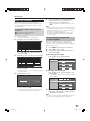
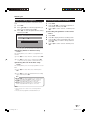
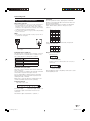
Picture Settings
Picture
Advanced
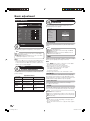
MENU [Picture]
Picture
Audio
This TV provides various advanced functions for
optimising the picture quality.
DYNAMIC
OPC
[Off]
Colour Temp.
Backlight
[+14]
–16
+16
100Hz
Contrast
[+30]
0
+40
Film Mode
+30
Active Contrast
[0]
Brightness
–30
Colour
[0]
–30
+30
Tint
[0]
–30
+30
Sharpness
[0]
–10
+10
3D-Y/C
High
Mid-High
Middle
Monochrome
Range of OPC
Mid-Low
Low
Advanced
Reset
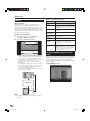
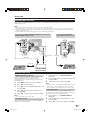
Colour Temp.
Adjust the colour temperature to give the best white
image.
Picture
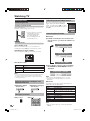
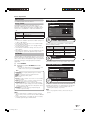
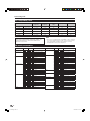
OPC
Automatically adjust the brightness of the screen.
Item
Off: The brightness is fixed at the value set in Backlight.
On: Automatically adjusts
On:Display: Displays the OPC effect on the screen while
adjusting the brightness of the screen.
NOTE
• When set to “On”, the TV senses the surrounding light and
automatically adjusts the backlight brightness. Make sure
no object obstructs the OPC sensor, which could affect its
ability to sense surrounding light.
Picture
Picture adjustments
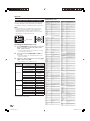
Adjust the picture to your preference with the following
picture settings.
Adjustment items
Selectable
items
c button
d button
Item
High: White with bluish tone
Mid-High: Intermediate tone between High and Middle
Middle: Natural tone
Mid-Low: Intermediate tone between Middle and Low
Low: White with reddish tone
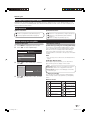
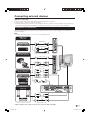
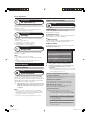
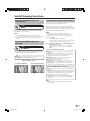
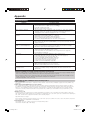
100Hz
100Hz technology provides superior solutions for digital
display picture quality removing motion blur.
NOTE
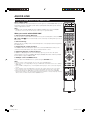
• Press DEMO on the remote control unit to show 100Hz
demonstration in a dual screen format.
• This effect is greater on fast moving images.
• 100 Hz will have no effect in the following cases;
1) The type of signal received is a PC signal.
2) An OSD is being displayed.
3) Teletext is activated.
• If images appear blurred, set the “Film Mode” to “Off”.
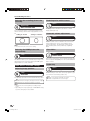
Film Mode
Automatically detects a film-based source (originally
encoded at 24/25 frames/second, depending on the
vertical frequency), analyses it and then recreates each
still film frame for high-definition picture quality.
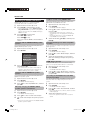
Backlight
The screen dims
The screen brightens
Contrast
For less contrast
For more contrast
Brightness
For less brightness
For more brightness
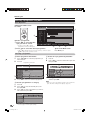
Colour
For less colour intensity
For more colour
intensity
Tint
Skin tones become
purplish
Skin tones become
greenish
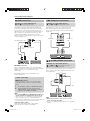
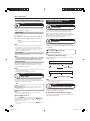
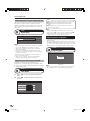
Provide high quality images with minimal dot crawl and
cross colour noise by detecting changes in the image.
Sharpness
For less sharpness
For more sharpness
Item
Standard: Normal adjustment
Fast: Set the optimum image quality for fast-moving images.
Slow: Set the optimum image quality for slow-moving images.
Off: No detecting
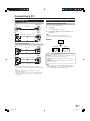
Active Contrast
Automatically adjusts the contrast of an image
according to the scene.
3D-Y/C
NOTE
• 3D-Y/C may not operate depending on the input signal
type or noisy input signal.
• 3D-Y/C has even more effect on composite video signals
(CVBS).
24
LC-42XL2E-gb.indd 24
2007/09/04 15:57:29