1
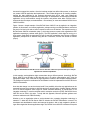
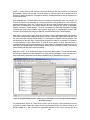
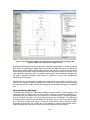
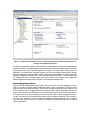
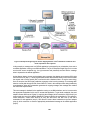
Figure 9: The BizTalk Administration console's Group Hub page lets an administrator monitor and
manage running BizTalk applications.
The BizTalk Administration console, which uses BizTalk Server 2006 R2’s Configuration database, also
provides other services. An administrator can dynamically add machines and specify what hosts should
be assigned to them while a BizTalk application is running, for example, without shutting down the
application. The Administration console’s functions can also be accessed programmatically through
Windows Management Instrumentation (WMI), which allows administrators to create scripts that
automate management functions. And as with other Microsoft server products, a BizTalk Server 2006
R2 management pack is available, allowing the product itself to be monitored and managed with
Microsoft Operations Manager 2005 or System Center Operations Manager 2007
Examining Application History
While the BizTalk Administration console can be used to keep track of current applications, it’s also
useful to be able to examine historical information about groups of applications. Doing this is the
primary purpose of the Health and Activity Tracking (HAT) component of BizTalk Server 2006 R2. The
HAT tool provides access to aggregated historical information about BizTalk applications running on a
system. This information can include when an orchestration starts and ends, when each shape within it
is executed, when each of its messages is sent and received, what’s in those messages, and more.
The HAT tool can be used to examine archived data, looking for patterns and trends in the execution of
a process. This information is useful for debugging, answering business questions (such as verifying
that a message really was sent to a customer), and keeping ongoing statistics that can be used to
improve performance.
18