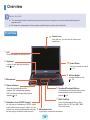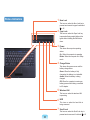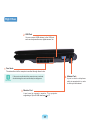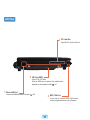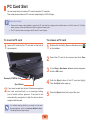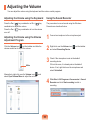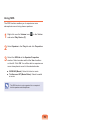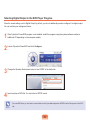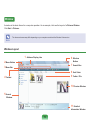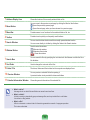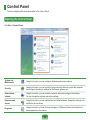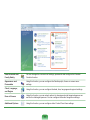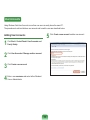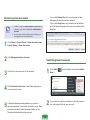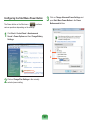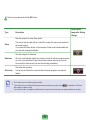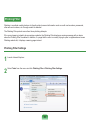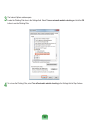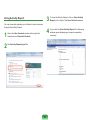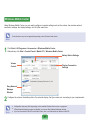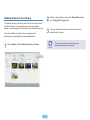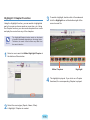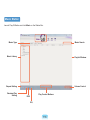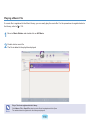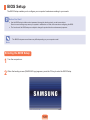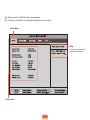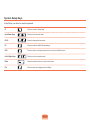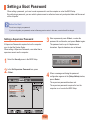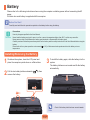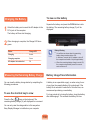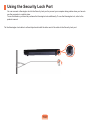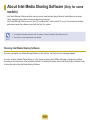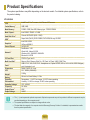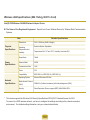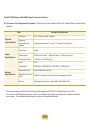
1
Q45/Q46 User Guide Chapter 1. Getting Started Product Features 2 Before You Start 3 Contents 5 Safety Precautions 6 Proper Posture During Computer Use 15 Important Safety Information 18 Replacement Parts and Accessories 20 Regulatory Compliance Statements 22 WEEE SYMBOL INFORMATION 32 Overview 33 Front View Status Indicators Right View Left View 6 Back View 7 Bottom View 8 Turning the Computer On and Off 39 Turning the computer on 9 Turning the computer off 9 Product Features High Performance Notebook Computer ■ Intel Core™2 Duo Processor*. DDR II Memory ■ Wireless LAN*, Bluetooth* Easy-to-Use AV ■ Play AVStation and AVStation Now* are provided to easily play various multimedia files. ■ Camera Module Installed (1.3M Pixels or Higher)* Sophisticated Design for Increased Usability ■ AV Now and various shortcut keys on the keyboard ■ Multi card slot* ■ Luxurious design with increased usability * Note The items marked with this symbol are optional items that are supported depending on the computer model. Before You Start Before reading the User Guide, first check the following information. User Guide Information Utilizating the User Guide This product is supplied with an Installation Guide, and a User Guide. You can even more easily and conveniently use the computer by using any of the guides depending on your needs. Be sure to read the Safety Precautions before using the computer. Refer to the separately supplied Installation Guide when installing your computer. Refer to the User Guide for the procedures to use the computer. Installation Guide Using the Index of the User Guide, you can easily find This guide is provided so that you can conveniently refer to this guide when using the computer for the first time after purchasing it. This document includes the computer components and the connection procedures. any information you are looking for. Using the Glossary of the User Guide, you can easily find meanings for technical terms. If a problem occurs, refer to the Q & A included in the User Guide. User Guide The document you are currently reading is the User Guide. You can read it by double-clicking the icon on the Desktop. This document includes the computer functions, how to use the functions, and how to use the program. Note ■ Some devices and software referred to in the User Guide may not be provided and/or changed by upgrade. Note that the computer environment referred in the User Guide may not be the same as your own environment. ■ Images used in this User Guide may differ from actual product. ■ This guide describes procedures for using both the mouse and the touchpad. ■ The User guide supplied with this computer may vary depending on your model. ■ The User guide supplied with computer may be varied depending on model. Safety Precaution Notations Icon Notation Description Warning Failing to follow instructions marked with this symbol, may cause personal injury and or fatality. Caution Failing to follow instructions marked with this symbol, may cause slight injury to yourself or damage your property. Copyright © 2007 Samsung Electronics Co., Ltd. Samsung Electronics Co., Ltd. owns the copyright of this manual. No part of this manual may be reproduced or transmitted in any form or by any means, electronic or mechanical, without the consent of Samsung Electronics Co., Ltd. The information in this document is subject to change without notice due to improving the performance of the product. Samsung Electronics shall not be liable for any data loss. Please take care to avoid losing any important data and backup your data to prevent any such data loss. Text Notations Icon Precautions for Operating System Support Notation Description Before You Start Content included in this section includes information required before using a function. Caution Content included in this section includes information required about the function. Note Content included in this section includes helpful information to use the function. Page XX This notation represents the page number you can refer to for information about related functions or as a reference. Start > All Programs > Samsung > User Guide > User Guide The operating system (OS) installed on this product is the latest version of Windows Vista. You cannot install an operating system other than Windows Vista as well as any unauthorized copy of Windows Vista. Example) When trying to install Windows Vista Home Premium when Windows Vista Home Basic is already installed. Other operating systems (Windows 98, Windows ME, Windows 2000, Windows 2003 server, UNIX and LINUX, other Windows Vista versions, etc.) other than the operating system already installed on this computer are not supported. If a problem occurs because of the installation of another operating system, the company will not provide technical support, a replacement or refund, and if our service engineer visits you due to this problem, a service charge will be applied. In addition, installing a program that does not support Windows Vista, may cause the program to not work properly. This represents a menu path to run a program. Click the Start button and then select All Programs > Samsung > User Guide > User Guide in this order from the menu. In this case, ask the corresponding software manufacturer about the problem. If you request our services to resolve a problem caused by incompatible software, a service charge will be applied. Contents Chapter 1. Getting Started Product Features 2 Before You Start 3 Contents 5 Safety Precautions 6 Proper Posture During Computer Use 15 Important Safety Information 18 Replacement Parts and Accessories 20 Regulatory Compliance Statements 22 WEEE SYMBOL INFORMATION 32 Overview 33 Front View33 Status Indicators34 Right View35 Left View36 Back View37 Bottom View38 Turning the Computer On and Off 39 Turning the computer on39 Turning the computer off39 Chapter 2. Using the Computer Keyboard Touchpad CD Drive Inserting and Ejecting a CD Burning a CD HD DVD Blu-ray Multi Card Slot PC Card Slot Connecting a Monitor Connecting a Monitor Viewing Through a Monitor Adjusting the Volume Using Digital Output (S/PDIF) 41 44 47 47 48 49 51 53 56 57 57 57 58 60 Chapter 3. Using Microsoft Windows Vista About Microsoft Windows Vista Welcome Center Help and Support 64 64 65 Windows Vista Screen Layout Desktop Start Menu Sidebar / Gadget Window Control Panel Opening the Control Panel User Accounts Phishing Filter User control function Windows Mobile Center 66 66 68 70 73 76 76 78 83 85 87 Chapter 4. Using the Network Wired Network Wireless Network Connecting to a Wireless LAN Using the Easy Network Manager Network Settings Using in Another Location Diagnosing the Network Status Connecting with a Modem Bluetooth Bluetooth Function Using Bluetooth 89 92 93 94 94 96 97 98 99 99 100 Chapter 5. Using Applications Introducing Programs CyberLink PowerDVD Samsung Update Plus Play AVStation Launching and Screen Layouts Movie Station Music Station Photo Station AVStation Now Start Exit Screen Layout Play Camera 104 107 109 111 111 112 116 120 124 124 124 124 125 Chapter 6. Settings and Upgrade LCD Brightness Control BIOS Setup Entering the BIOS Setup The BIOS Setup Screen 127 128 128 130 Setting a Boot Password Changing the Boot Priority Upgrading Memory Battery Installing/Removing the Battery Charging the Battery Measuring the Remaining Battery Charge Extending the Battery Usage Time Using the Security Lock Port 132 134 135 137 137 138 138 139 142 Chapter 7. Windows Media Center About Package Contents and the Program Guide Connecting and Setting Up Media Center Optional Devices Using Media Center Start Screen Layout Pictures + Videos Music TV + Movies 144 145 145 149 149 150 154 158 Chapter 8. Appendix Using McAfee SecurityCenter Using Samsung Magic Doctor Reinstalling Software Q & A Display Related Modem Related Wired Network (LAN) Related Wireless Network (WLAN) Related Game and Program Related Bluetooth HD DVD Blu-ray Other 162 163 165 167 167 168 170 171 175 176 177 178 179 About Intel Media Sharing Software (Only for some models) Product Specifications Glossary Index Contact SAMSUNG WORLD WIDE 180 181 187 191 192 Safety Precautions For your security and to prevent damage, please read the following safety instructions carefully. Since this is commonly applied to Samsung Computers, some figures may differ from actual ones. Warning Failing to follow instructions marked with this symbol may cause personal injury and even fatality. Installation Related Power Related The power plug and wall outlet figures may differ depending on the country specifications and the product model. Do not install the product in places exposed to humidity such as a bathrooms. There is a danger of electric shock. Use the product within the operating conditions specified in the Manufacturers User Guide. Keep the plastic bags out of the reach of children. There is a danger of suffocation. Keep a distance of 15cm or more between the computer and the wall and do not place any objects between them. This may increase the internal temperature of the computer and may cause an injury. Do not install the computer on a slant or a place prone to vibrations, or avoid using the computer in that location for a long time. This increases the risk that a malfunction or damage to the product will occur. Do not touch the mains plug or power cord with wet hands. There is a danger of electric shock. Do not exceed the standard capacity (voltage/current) of a multi-plug or power outlet extension when using it for the product. There is a danger of electric shock or fire hazard. If the power cord or power outlet makes a noise, disconnect the power cord from the wall outlet and contact a service center. There is a danger of electric shock or fire hazard. Plug the power cord firmly into the power outlet and AC adapter. Failing to do so may cause fire hazard. Do not bend the power cord excessively or do not place a heavy object over the power cord. It is especially important to keep the power cord out of reach of infants and pets. If the cord is damaged, it may cause electric shock or fire. Use a wall outlet or multi-plug with a grounding part. Do not use a damaged or loose mains plug or power cord or power outlet. Do not unplug the power cord out by pulling the cable only. If the cord is damaged, it may cause electric shock. There is a danger of electric shock or fire hazard. Failing to do so may cause electric shock hazard. Battery Usage Related If water or another substance enters the power input jack, AC adapter or the computer, disconnect the power cord and contact the service center. Damage to the device within the computer may cause electric shock or fire hazard. Usage Related Keep the battery out of the reach of infants and pets, as they could put the battery into their mouths. Disconnect all cables connected to the computer before cleaning it. If you are using a notebook computer, remove the battery. There is a danger of electric shock or choking. There is a danger of electric shock or damage to the product. Do not connect a phone line connected to a digital phone to the modem. There is a danger of a electric shock, fire or damage to the product. Upgrade Related Do not place any container filled with water or chemicals over or near the computer. If water or chemicals enter the computer, this may cause fire or electric shock. If the computer is broken or dropped, disconnect the power cord and contact a service center for a safety check. Using a broken computer may cause electric shock or fire hazard. Avoid direct sunlight when the computer is in an airtight location such as inside a vehicle. There is a danger of a fire hazard. The computer may overheat and also present opportunity to thieves. Never disassemble the power supply or AC adapter. There is a danger of electric shock. When removing the RTC (Real Time Clock) battery, keep it out of the reach of children as they could touch and/or swallow it. There is a danger of choking. If a child has swallowed it, contact a doctor immediately. Use only authorized parts (multi-plug, battery and memory) and never disassemble parts. There is a danger of damaging the product, electric shock or fire hazard. Shut down the computer and disconnect all cables before disassembling the computer. If there is a modem, disconnect the phone line. If you are using a notebook computer, make sure to remove the battery. Failing to do so, may cause electric shock. Custody and Movement Related Follow the instructions for the relevant location (e.g. airplane, hospital, etc.) when using a wireless communication device (wireless LAN, Bluetooth, etc.). 10 Caution Failing to follow instructions marked with this symbol may cause slight injury or damage to the product. Installation Related Battery Usage Related Do not block the ports (holes), vents, etc. of the product and do not insert objects. Dispose of worn-out batteries properly. Damage to a component within the computer may cause electric shock or fire. When using the computer with it lying on its side, place it so that the vents face upwards. Failing to do so, may cause the internal temperature of the computer to rise and the computer to malfunction or halt. - There is a danger of fire or explosion. - The battery disposal method may differ depending on your country and region. Dispose of the used battery in an appropriate way. Do not throw or disassemble the battery and do not put it into water. This may cause an injury, fire or explosion. Do not place a heavy object over the product. Use only a battery authorized by Samsung Electronics. This may cause a problem with the computer. In addition, the object may fall and cause injury, or damage the computer. Failing to do so may cause an explosion. Avoid contact with metal objects such as car keys or clips when keeping or carrying a battery. 11 Contact with a metal may cause excessive current and a high temperature and may damage the battery or cause a fire. Charge the battery according to the instructions in the manual. Failing to do so, may cause and explosion or fire from damage to the product. Do not heat the battery or expose it to heat (e.g. inside a vehicle during the summer). There is a danger of explosion or fire. Usage Related Do not place a candle, lighted cigar, etc. over or on the product. There is a danger of fire. Make sure to have the product tested by a safety service engineer after repairing the product. Authorised Samsung Repair Centers will carry out safety checks after a repair. Using a repaired product without testing it for safety might cause electric shock or fire. Close the LCD panel only after checking if the notebook computer is turned off. Failing to do so, may cause damage to the product. The temperature may rise and it may cause overheating and deformation of the product. If the computer emits smoke, or there is a burning smell, disconnect the power plug from the wall outlet and contact a service center. If your computer is a notebook computer, make sure to remove the battery. Do not press the Eject Button while the Floppy Disk/CD-ROM drive is in operation. You might lose data and the disk might be suddenly ejected and could cause an injury. There is a danger of fire. Do not use a damaged or modified CD/Floppy Disk. In case of lightning, immediately turn the system off, disconnect the power cord from the wall outlet and line do not use a modem or phone. Take care not to drop the product while using it. There is a danger of electric shock or fire. Do not contact the antenna with electricity facility such as the power outlet. There is a danger of injury or electric shock. There is a danger of electric shock. Use recommended computer cleansing solution when cleaning the product and only use the computer when it is completed dried. Connect only permitted devices to the connectors or ports of the computer. Failing to do so, may cause electric shock and fire. This may cause personal injury or loss of data. When handling computer parts, follow the instructions on the manual supplied with the parts. 12 There is a danger of damaging the product or personal injury. Do not insert your fingers into the PC Card Slot. Upgrade Related Failing to do so may cause electric shock or fire. Emergency disk eject method using paperclip should not be used while the disk is in mothion. Make sure to use the emergency disk eject method only when the Optical Disk Drive is stopped. There is a danger of injury. Do not place your face close to the Optical Disk Drive tray when it is operating. There is a danger of injury due to an abrupt ejection. Check CDs for cracks and damage prior to use. It may damage the disc and cause disorder of device and injury of user. Take care when touching the product or parts. Never disassemble or repair the product by yourself. The device may be damaged or you may be injured. There is a danger of electric shock or file. Take care not to throw or drop a computer part or device. To connect a device that is not manufactured or authorized by Samsung Electronics, enquire at your service center before connecting the device. This may cause injury or damage to the product. Make sure to close the computer cover before connecting the power after a reassembly. There is a danger of electric shock if your body touches an internal part. Use parts authorized by Samsung Electronics only. Failing to do so, may cause fire or damage the product. 13 There is a danger of damaging the product. Custody and Movement Related Cautions on Preventing Data Loss (Hard Disk Management) When moving the product, turn the power off and separate all connected cables first. Take care not to damage the data on a hard disk drive. The product might be damaged or users may trip over the cables. For long periods of not using the notebook computer, discharge the battery and preserve as it is detached. The battery will be preserved at its best condition. Do not operate or watch the computer while driving a vehicle. This may cause a traffic accident. Concentrate on driving. ■ A hard disk drive is so sensitive to external impact that an external impact may cause loss of data on the surface of the disk. ■ Take extra care, because moving the computer or an impact on the computer when it is turned on may damage the data of the hard disk drive. ■ The company is not liable for the loss of any data caused by customer such as the carelessness usage or bad environmental condition. Causes that may damage the data of a hard disk drive and the hard disk drive itself. ■ The data may be lost when an external impact is applied to the disk while disassembling or assembling the computer. ■ The data may be lost when the computer is turned off or reset by a power failure while the hard disk drive is operating. ■ The data may be lost and irrecoverable due to a computer virus infection. ■ The data may be lost if the power is turned off while running a program. ■ Moving or causing an impact to the computer while the hard disk drive is operating, may cause files to be corrupted or bad sectors on the hard disk. To prevent data loss due to damage to the hard disk drive, please backup your data frequently. 14 Proper Posture During Computer Use Maintaining a proper posture during computer use is very important to prevent physical harm. The following instructions are about maintaining a proper posture during computer use developed through human engineering. Please read and follow them carefully when using the computer. Otherwise, the probability of (RSI: Repetitive Strain Injury) from repeated operations may increase and serious physical harm may be caused. The instructions in this manual have been prepared so that they can be applied within the coverage of general users. If the user is not included in the coverage, the recommendation is to be applied according to the user’s needs. Note Since this is commonly applied to Samsung Computers, some figures may differ from actual ones. Proper Posture ■ To use the computer while talking over the telephone, use a headset. Using the computer with the phone on your shoulder is bad for posture. Adjust the heights of desks and chairs appropriate to your height. The heights are to be adjusted so that your arm forms a right angle when you place your hand over the keyboard while sitting down on a chair. ■ Keep frequently used items within a comfortable work range (where you can reach them with your hands). Adjust the height of chair so that your heel is comfortably placed on the floor. ■ Do not use the computer while you are lying down, but only while you are sitting down. ■ Do not use the computer on your lap. If the computer temperature increases, there is a danger of burning yourself. ■ Work while keeping your wrist straight. ■ Use a chair with a comfortable back. ■ Keep the center of your leg weight not on the chair but on your feet when you are sitting on a chair. 15 Eye Position Hand Position Keep the monitor or LCD away from your eyes by at least 50cm. Keep your arm at a right angle as shown by the figure. m 50c ■ Adjust the height of the monitor and the LCD screen so that its top height is equal to or lower than your eyes. ■ Keep the line from your elbow to your hand straight. ■ Avoid setting the monitor and LCD excessively bright. ■ Do not hold the mouse with excessive force. ■ Keep the monitor and LCD screen clean. ■ Do not press the keyboard, touchpad or mouse with excessive force. ■ Do not place your palm over the keyboard while typing. ■ If you wear glasses, clean them before using the computer. ■ It is recommended connecting an external keyboard and mouse when using the computer for long periods of time. ■ When entering contents printed on a paper into the computer, use a static paper holder so that the height of the paper is almost equal to that of the monitor. 16 Volume Control (Headphones and Speakers) Illumination ■ Do not use the computer in dark locations. The illumination level for computer use must be as bright so for reading a book. Check your volume first to listen to music. ■ Indirect illumination is recommended. Use a curtain to prevent reflection on the LCD screen. Operation Condition Check your volume!! ■ Do not use the computer in hot and humid locations. ■ Use the computer within the allowed temperature and humidity range specified in the User Guide. ■ Check if the volume is too loud before using headphones. ■ It is not recommended using headphones for long periods of time. Use Time (Break Time) ■ Take a break for 10 minutes or more after a 50-minute period when working for more than one hour. 17 Important Safety Information Safety instructions Your system is designed and tested to meet the latest standards for safety of information technology equipment. However, to ensure safe use of this product, it is important that the safety instructions marked on the product and in the documentation are followed. Caution ■ Openings in the computer case are provided for ventilation. Do not block or cover these openings. Make sure you provide adequate space, at least 6 inches (15 cm), around the system for ventilation when you set up your work area. Never insert objects of any kind into the computer ventilation openings. Always follow these instructions to help guard against personal injury and damage to your system. ■ Ensure that the fan vents on the bottom of the casing are clear at all times. Do not place the computer on a soft surface, doing so will block the bottom vents. ■ If you use an extension cord with this system, make sure that the total power rating on the products plugged into the extension cord does not exceed the extension cord power rating. Setting Up your System ■ Read and follow all instructions marked on the product and in the documentation before you operate your system. Retain all safety and operating instructions for future use. ■ Do not use this product near water or a heat source such as a radiator. ■ Set up the system on a stable work surface. ■ The product should be operated only with the type of power source indicated on the rating label. ■ Ensure that the electrical outlet you are using to power your equipment is easily accessible in case of fire or short circuit. ■ If your computer has a voltage selector switch, make sure that the switch is in the proper position for your area. 18 Care During Use The Instruction On Safety Operation of computer ■ Do not walk on the power cord or allow anything to rest on it. 1 ■ Do not spill anything on the system. The best way to avoid spills is to not eat or drink near your system. 2 ■ Some products have a replaceable CMOS battery on the system board. There is a danger of explosion if the CMOS battery is replaced incorrectly. Replace the battery with the same or equivalent type recommended by the manufacturer. Dispose of batteries according to the manufacturers instructions. If the CMOS battery requires replacement insure that a qualified technician performs the task. 3 ■ When the computer is turned off, a small amount of electrical current still flows through the computer. To avoid electrical shock, always unplug all power cables, remove the battery and modem cables from the wall outlets before cleaning the system. 4 ■ Unplug the system from the wall outlet and refer servicing to qualified personnel if: – The power cord or plug is damaged. – Liquid has been spilled into the system. – The system does not operate properly when the operating instructions are followed. – The system was dropped or the casing is damaged. – The system performance changes. 19 When installing and operating devices please refer to safety requirements in the user guide. Devices can be used only with the equipment specified in the technical specifications of the devices. If any smell of burning or smoke from the computer the unit should be switched off and battery removed. The unit should be checked by a qualified technician before reuse. Service and repair of devices should be carried out by authorized service centers. Replacement Parts and Accessories Use only replacement parts and accessories recommended by manufacturer. Caution Note To reduce the risk of fire, use only No. 26 AWG or larger telecommunications line cord. Do not use this product in areas classified as hazardous. Such areas include patient care areas of medical and dental facilities, oxygen rich environments, or industrial areas. Battery Disposal Caution Laser Safety All systems equipped with CD or DVD drives comply with the appropriate safety standards, including IEC 60825-1. The laser devices in these components are classified as “Class 1 Laser Products” under a US Department of Health and Human Services (DHHS) Radiation Performance Standard. Should the unit ever need servicing, contact an authorized service location. Do not put rechargeable batteries or products powered by non-removable rechargeable batteries in the garbage. Contact the Samsung Helpline for information on how to dispose of batteries that you cannot use or recharge any longer. Follow all local regulations when disposing of old batteries. ■ THERE IS A RISK OF EXPLOSION IF BATTERY IS REPLACED BY AN INCORRECT TYPE. Caution Use of controls or adjustments or performance of procedures other than those specified in this manual may result in hazardous radiation exposure. To prevent exposure to laser beams, do not try to open the enclosure of a CD or DVD drive. Caution DISPOSE OF USED BATTERIES ACCORDING TO THE INSTRUCTIONS 20 Laser Safety Note: ■ Class 1M laser radiation when operating part is open. Do not view directly with optical instruments. ■ Class 3B invisible laser radiation when open. Avoid exposure to the beam. General Requirements Connect and Disconnect the AC adapter The requirements listed below are applicable to all countries: The socket-outlet shall be installed near the equipment and shall be easily accessible. ■ The length of the power cord set must be at least 6.00 feet (1.8m) and a maximum of 9.75 feet (3.0m). Do not unplug the power cord out by pulling the cable only. ■ All power cord sets must be approved by an acceptable accredited agency responsible for evaluation in the country where the power cord set will be used. ■ The power cord set must have a minimum current capacity of 7 A and a nominal voltage rating of 125 or 250 volts AC, as required by each country’s power system. Power Cord Requirements ■ The appliance coupler must meet the mechanical configuration of an EN 60 320/IEC 320 Standard Sheet C7 connector, for mating with appliance inlet on the computer. The power cord set (wall plug, cable and AC adapter plug) you received with your computer meets the requirements for use in the country where you purchased your equipment. Power cord sets for use in other countries must meet the requirements of the country where you use the computer. For more information on power cord set requirements, contact your authorized dealer, reseller, or service provider. 21 Regulatory Compliance Statements Wireless Guidance Low power, Radio LAN type devices (radio frequency (RF) wireless communication devices), operating in the 2.4 GHz Band, may be present (embedded) in your notebook system. The following section is a general overview of considerations while operating a wireless device. Additional limitations, cautions, and concerns for specific countries are listed in the specific country sections (or country group sections). The wireless devices in your system are only qualified for use in the countries identified by the Radio Approval Marks on the system rating label. If the country you will be using the wireless device in, is not listed, please contact your local Radio Approval agency for requirements. Wireless devices are closely regulated and use may not be allowed. The RF field strength of the wireless device or devices that may be embedded in your notebook are well below all international RF exposure limits as known at this time. Because the wireless devices (which may be embedded into your notebook) emit less energy than is allowed in radio frequency safety standards and recommendations, manufacturer believes these devices are safe for use. Regardless of the power levels, care should be taken to minimize human contact during normal operation. As a general guideline, a separation of 20 cm (8 inches) between the wireless device and the body, for use of a wireless device near the body (this does not include extremities) is typical. This device should be used more than 20 cm (8 inches) from the body when wireless devices are on and transmitting. (This Statement is not applicable to UMPC(Ultra Mobile PC) such as PDA, Portable PC.) This transmitter must not be collocated or operate in conjunction with any other antenna or transmitter except the installed Bluetooth transmitter. Some circumstances require restrictions on wireless devices. Examples of common restrictions are listed below: 22 ■ Radio frequency wireless communication can interfere with equipment on commercial aircraft. Current aviation regulations require wireless devices to be turned off while traveling in an airplane. 802.11B (also known as wireless Ethernet or Wifi) and Bluetooth communication devices are examples of devices that provide wireless communication. ■ In environments where the risk of interference to other devices or services is harmful or perceived as harmful, the option to use a wireless device may be restricted or eliminated. Airports, Hospitals, and Oxygen or flammable gas laden atmospheres are limited examples where use of wireless devices may be restricted or eliminated. When in environments where you are uncertain of the sanction to use wireless devices, ask the applicable authority for authorization prior to use or turning on the wireless device. ■ Every country has different restrictions on the use of wireless devices. Since your system is equipped with a wireless device, when traveling between countries with your system, check with the local Radio Approval authorities prior to any move or trip for any restrictions on the use of a wireless device in the destination country. ■ If your system came equipped with an internal embedded wireless device, do not operate the wireless device unless all covers and shields are in place and the system is fully assembled. ■ Wireless devices are not user serviceable. Do not modify them in any way. Modification to a wireless device will void the authorization to use it. Please contact manufacturer for service. ■ Only use drivers approved for the country in which the device will be used. See the manufacturer System Restoration Kit, or contact manufacturer Technical Support for additional information. Caution 23 United States of America USA and Canada Safety Requirements and Notices Other Wireless Devices Safety Notices for Other Devices in the Wireless Network: Refer to the documentation supplied with wireless Ethernet adapters or other devices in the wireless network. Do not touch or move antenna while the unit is transmitting or receiving. Do not hold any component containing the radio such that the antenna is very close or touching any exposed parts of the body, especially the face or eyes, while transmitting. Caution Do not operate the radio or attempt to transmit data unless the antenna is connected; if not, the radio may be damaged. Unintentional Emitter per FCC Part 15 Use in specific environments: The use of wireless devices in hazardous locations is limited by the constraints posed by the safety directors of such environments. This device complies with Part 15 of the FCC Rules. Operation is subject to the following two conditions:(1) this device may not cause harmful interference, and (2) this device must accept any interference received, including interference that may cause undesired operation. The use of wireless devices on airplanes is governed by the Federal Aviation Administration (FAA). The use of wireless devices in hospitals is restricted to the limits set forth by each hospital. Explosive Device Proximity Warning Caution Do not operate a portable transmitter (such as a wireless network device) near unshielded blasting caps or in an explosive environment unless the device has been modified to be qualified for such use. Use On Aircraft Caution Caution The Part 15 radio device operates on a noninterference basis with other devices operating at this frequency. Any changes or modification to said product not expressly approved by Intel could void the user’s authority to operate this device. Regulations of the FCC and FAA prohibit airborne operation of radio-frequency wireless devices because their signals could interfere with critical aircraft instruments. 24 Caution Intentional emitter per FCC Part 15 This equipment has been tested and found to comply with the limits for a Class B digital device pursuant to Part 15 of the FCC Rules. These limits are designed to provide reasonable protection against harmful interference in a residential installation. This equipment generate uses and can radiate radio frequency energy and if not installed and used in accordance with the instructions may cause harmful interference will not occur in a particular installation. If this equipment does cause harmful interference to radio or television reception, which can be determined by turning the equipment off and on, the user is encouraged to try to correct the interference by one or more of the following measures: ■ Reorient or relocate the receiving antenna. ■ Increase the separation between the equipment and receiver. ■ Connect the equipment into an outlet on a circuit different from that to which the receiver is connected. ■ Consult the dealer or an experienced radio/TV technician for help. Low power, Radio LAN type devices (radio frequency (RF) wireless communication devices), operating in the 2.4 GHz Band, may be present (embedded) in your notebook system. This section is only applicable if these devices are present. Refer to the system label to verify the presence of wireless devices. Wireless devices that may be in your system are only qualified for use in the United States of America if an FCC ID number is on the system label. The FCC has set a general guideline of 20 cm (8 inches) separation between the device and the body, for use of a wireless device near the body (this does not include extremities). This device should be used more than 20 cm (8 inches) from the body when wireless devices are on. The power output of the wireless device (or devices), which may be embedded in your notebook, is well below the RF exposure limits as set by the FCC. (This Statement is not applicable to UMPC(Ultra Mobile PC) such as PDA, Portable PC.) This transmitter must not be collocated or operate in conjunction with any other antenna or transmitter except the installed Bluetooth transmitter. If necessary, the user should consult the dealer or an experienced radio/television technician for additional suggestions. The user may find the following booklet helpful: “Something About Interference.” Operation of this device is subject to the following two conditions: (1) This device may not cause harmful interference, and (2) this device must accept any interference received, including interference that may cause undesired operation of the device. This is available at FCC local regional offices. Our company is not responsible for any radio or television interference caused by unauthorized modifications of this equipment or the substitution or attachment of connecting cables and equipment other than those specified by our company. The correction will be the responsibility of the user. Use only shielded data cables with this system. 25 The REN is used to determine the quantity of devices which may be connected to telephone line. Excessive RENs on the telephone line may result in the devices not ringing in response to an incoming call. In most, but not all areas, the sum of RENs should not exceed five (5.0). To be certain of the number of devices that may be connected to a line, as determined by total RENs, contact the local telephone company to determine the maximum REN for the calling area. Wireless devices are not user serviceable. Do not modify them in any way. Caution Modification to a wireless device will void the authorization to use it. Contact manufacturer for service. FCC Statement for Wireless LAN use: Caution “While installing and operating this transmitter and antenna combination the radio frequency exposure limit of 1mW/cm2 may be exceeded at distances close to the antenna installed. Therefore, the user must maintain a minimum distance of 20cm from the antenna at all times. If the terminal equipment causes harm to the telephone network, the Telephone Company will notify you in advance that temporary discontinuance of service may be required. But if advance notice is not practical, the telephone company will notify the customer as soon as possible. Also, you will be advised of your right to file a complaint with the FCC if you believe it is necessary. This device can not be colocated with another transmitter and transmitting antenna.” (This Statement is not applicable to UMPC(Ultra Mobile PC) such as PDA, Portable PC.) The telephone company may make changes in its facilities, equipment, operations, or procedures that could affect the operation of the equipment. If this happens, the telephone company will provide advanced notice in order for you to make necessary modifications to maintain uninterrupted service. FCC Part 68 (If fitted with a modem device.) This equipment compiles with part of the FCC rules. On the back of this equipment is a label that contains, among other information, the FCC registration number and ringer equivalence number (REN) for this equipment. If requested, this information must be provided to the telephone company. If trouble is experienced with this equipment (Modem) for repair or warranty information, please contact your local distributor. If the equipment is causing harm to the telephone network, the telephone company may request that you disconnect the equipment until the problem is resolved. This equipment uses the following USOC jacks : RJ11C An FCC compliant telephone cord and modular plug is provided with this equipment. This equipment is designed to be connected to the telephone network or promises wiring using a compatible modular jack which is Part 68 compliant. See Installation Instructions for details. The user must use the accessories and cables supplied by the manufacturer to get optimum performance from the product. No repairs may be done by the customer. 26 Canada Unintentional Emitter per ICES-003 This equipment cannot be used on public coin phone service provided by the telephone company. Connection to party line service is subject to state tariffs. This digital apparatus does not exceed the Class B limits for radio noise emissions from digital apparatus as set out in the radio interference regulations of Industry Canada. The Telephone Consumer Protection Act of 1991 makes it unlawful for any person to use a computer or other electronic device, including fax machines, to send any message unless such message clearly contains in a margin at the top or bottom of each transmitted page or on the first page of the transmission, the date and time it is sent and an identification of the business or other entity, or other individual sending the message and the telephone number of the sending machine or such business, other entity, or individual. (The telephone number provided may not be any number for which charges exceed local or long-distance transmission charges.) Le présent appareil numérique n’émet pas de bruits radioélectriques dépassant les limitesapplicables aux appareils numériques de Classe B prescrites dans le règlement sur le brouillage radioélectrique édicté par Industrie Canada. Intentional Emitter per RSS 210 Low power, Radio LAN type devices (radio frequency (RF) wireless communication devices), operating in the 2.4 GHz Band, may be present (embedded) in your notebook system. This section is only applicable if these devices are present. Refer to the system label to verify the presence of wireless devices. In order to program this information into your fax machine, refer to your communications software user manual. Wireless devices that may be in your system are only qualified for use in Canada if an Industry Canada ID number is on the system label. As a general guideline, a separation of 20 cm (8 inches) between the wireless device and the body, for use of a wireless device near the body (this does not include extremities) is typical. This device should be used more than 20 cm (8 inches) from the body when wireless devices are on. The power output of the wireless device (or devices), which may be embedded in your notebook, is well below the RF exposure limits as set by Industry Canada. 27 This transmitter must not be collocated or operate in conjunction with any other antenna or transmitter except the installed Bluetooth transmitter. with a single-line individual service may be extended by means of a certified connector assembly. The customer should be aware that compliance with the above conditions may not prevent degradation of service in some situations. Operation of this device is subject to the following two conditions: (1) This device may not cause harmful interference, and (2) this device must accept any interference received, including interference that may cause undesired operation of the device. Caution Caution Repairs to certified equipment should be made by an authorized Canadian maintenance facility designated by the supplier. Any repairs or alterations made by the user to this equipment, or equipment malfunctions, may give the telecommunications company cause to request the user to disconnect the equipment. To prevent radio interference to licensed service, this device is intended to be operated indoors and away from windows to provide maximum shielding. Equipment (or its transmit antenna) that is installed outdoors is subject to licensing. Users should make sure, for their own protection, that the electrical ground connections of the power utility, telephone lines, and internal metallic water pipe system, if present, are connected together. This precaution may be particularly important in rural areas. Wireless devices are not user serviceable. Do not modify them in any way. Modification to a wireless device will void the authorization to use it. Contact manufacturer for service. Caution Telecommunications per DOC notice (for products fitted with an IC-compliant modem) To avoid electrical shock or equipment malfunction do not attempt to make electrical ground connections by yourself. Contact the appropriate inspection authority or an electrician, as appropriate. The Ringer Equivalence Number (REN) assigned to each terminal device provides an indication of the maximum number of terminals allowed to be connected to a telephone interface. The termination on an interface may consist of any combination of devices subject only to the requirement that the sum of the Ringer Equivalence Numbers of all the devices does not exceed 5. The Industry Canada label identifies certified equipment. This certification means that the equipment meets certain telecommunications network protective, operation, and safety requirements. The Department does not guarantee the equipment will operate to the users’ satisfaction. Before installing this equipment, users should make sure that it is permissible to be connected to the facilities of the local telecommunications company. The equipment must also be installed using an acceptable method of connection. In some cases, the inside wiring associated 28 European Union European Union CE Marking and Compliance Notices European Radio Approval Information (for products fitted with EU-approved radio devices) Products intended for sale within the European Union are marked with the Conformité Européene (CE) Marking, which indicates compliance with the applicable Directives and European standards and amendments identified below. This equipment also carries the Class 2 identifier. The following information is only applicable to systems labeled with the CE mark . This Product is a Notebook computer; low power, Radio LAN type devices (radio frequency (RF) wireless communication devices), operating in the 2.4 GHz band, may be present (embedded) in your notebook system which is intended for home or office use. This section is only applicable if these devices are present. Refer to the system label to verify the presence of wireless devices. Wireless devices that may be in your system are only qualified for use in the European Union or associated areas if a CE mark with a Notified Body Registration Number and the Alert Symbol is on the system label. European Directives This Information Technology Equipment has been tested and found to comply with the following European directives: The power output of the wireless device or devices that may be embedded in you notebook is well below the RF exposure limits as set by the European Commission through the R&TTE directive. ■ EMC Directive 89/336/EEC with amending directives 92/31/EEC & 93/68/EEC as per – – – – EN 55022 Class B EN 61000-3-2 EN 61000-3-3 EN 55024 Caution ■ Low Voltage Directive (Safety) 73/23/EEC as per EN 60950(A1/A2/A3/A4/A11) ■ Radio and Telecom Terminal Equipment Directive 199/5/EC as per – CTR21 (if fitted with a modem device) – ETS 300 328 (if fitted with a 2.4 GHz band embedded wireless device) – ETS 301 489-1 (if fitted with a 2.4 GHz band embedded wireless device) – ETS 301 489-17 (if fitted with a 2.4 GHz band embedded wireless device) 29 See 802.11b and 802.11g restrictions for specific countries or regions within countries under the heading “European Economic Area Restrictions” below. Translated Statements of Compliance [Spanish] Este producto cumple con las normas del Directivo Europeo 1999/5/EC. [Swedish] Denna produkt har tillverkats i enlighet med EG-direktiv 1999/5/EC. [English] This product follows the provisions of the European Directive 1999/5/EC. [Danish] Dette produkt er i overensstemmelse med det europæiske direktiv 1999/5/EC [Dutch] Dit product is in navolging van de bepalingen van Europees Directief 1999/5/EC. [Finnish] Tämä tuote noudattaa EU-direktiivin 1999/5/EC määräyksiä. [French] Ce produit est conforme aux exigences de la Directive Européenne 1999/5/EC. [German] Dieses Produkt entspricht den Bestimmungen der Europäischen Richtlinie 1999/5/EC [Greek] Το προϊόν αυτό πληροί τις προβλέψεις της Ευρωπαϊκής Οδηγίας 1999/5/ΕC. [Icelandic] Þessi vara stenst reglugerð Evrópska Efnahags Bandalagsins númer 1999/5/EC [Italian] Questo prodotto è conforme alla Direttiva Europea 1999/5/EC. [Norwegian] Dette produktet er i henhold til bestemmelsene i det europeiske direktivet 1999/5/EC. [Portuguese] Este produto cumpre com as normas da Diretiva Européia 1999/5/EC. European Economic Area Restrictions Local Restriction of 802.11b/802.11g Radio Usage [Note to integrator: The following statements on local restrictions must be published in all end-user documentation provided with the system or product incorporating the Intel PRO/Wireless 2200BG Network Connection product.] Caution Due to the fact that the frequencies used by 802.11b/802.11g wireless LAN devices may not yet be harmonized in all countries, 802.11b/802.11g products are designed for use only in specific countries or regions, and are not allowed to be operated in countries or regions other than those of designated use. As a user of these products, you are responsible for ensuring that the products are used only in the countries or regions for which they were intended and for verifying that they are configured with the correct selection of frequency and channel for the country or region of use. Any deviation from permissible settings and restrictions in the country or region of use could be an infringement of local law and may be punished as such. The European variant is intended for use throughout the European Economic Area. However, authorization for use is further restricted in particular countries or regions within countries, as follows: 30 European Telecommunication Information (for products fitted with EU-approved modems) General European standards dictate maximum radiated transmit power of 100 mW effective isotropic radiated power (EIRP) and the frequency range 2400 – 2483.5 MHz. Marking by the symbol indicates compliance of this equipment to the Radio and Telecom Terminal Equipment Directive 1999/5/EC. Such marking is indicative that this equipment meets or exceeds the following technical standards: Belgium The product may be used outdoors, but for outdoor transmissions over a distance of 300m or more, a license from the BIPT is required. This restriction should be indicated in the manual as follows: CTR 21 - Attachment requirements for pan-European approval for connection to the analogue Public Switched Telephone Networks (PSTNs) of TE (excluding TE supporting voice telephony services) in which network addressing, if provided, is by means of Dual Tone MultiFrequency (DTMF) signaling. Dans le cas d’une utilisation privée, à l’extérieur d’un bâtiment, au-dessus d’un espace public, aucun enregistrement n’est nécessaire pour une distance de moins de 300m. Pour une distance supérieure à 300m un enregistrement auprès de l’IBPT est requise. Pour une utilisation publique à l’extérieur de bâtiments, une licence de l’IBPT est requise. Pour les enregistrements et licences, veuillez contacter l’IBPT. Caution Although this equipment can use either loop disconnect (pulse) or DTMF (tone) signaling, only the performance of the DTMF signaling is subject to regulatory requirements for correct operation. It is therefore strongly recommended that the equipment is set to use DTMF signaling for access to public or private emergency services. DTMF signaling also provides faster call setup. France For Metropolitan departments: 2.400 - 2.4835 GHz for indoor use. 2.400 - 2.454 GHz (channels 1 to 7) for outdoor use. This equipment has been approved to Council Decision 98/482/EEC - “CTR 21” for Pan-European single terminal connection to the Public Switched Telephone Network (PSTN). For Guadeloupe, Martinique, St Pierre et Miquelon, Mayotte: 2.400 - 2.4835 GHz for indoor and outdoor use. However, due to differences between the individual PSTNs provided in different countries, the approval does not, of itself, give an unconditional assurance of successful operation on every PSTN termination point. In the event of problems, you should contact manufacturer Technical Support. For Reunion, Guyane: 2.400 - 2.4835 GHz for indoor use. 2.420 - 2.4835 GHz for outdoor use (channels 5 to 13) 31 WEEE SYMBOL INFORMATION Correct Disposal of This Product (Waste Electrical & Electronic Equipment) (Applicable in the European Union and other European countries with separate collection systems) This marking shown on the product or its literature, indicates that it should not be disposed with other household wastes at the end of its working life. To prevent possible harm to the environment or human health from uncontrolled waste disposal, please separate this from other types of wastes and recycle it responsibly to promote the sustainable reuse of material resources. Household users should contact either the retailer where they purchased this product, or their local government office, for details of where and how they can take this item for environmentally safe recycling. Business users should contact their supplier and check the terms and conditions of the purchase contract. This product should not be mixed with other commercial wastes for disposal. USA ONLY This Perchlorate warning applies only to primary CR (Maganese Dioxide) Lithium coin cells in the product sold or distributed ONLY in California USA. “Perchlorate Material- special handling may apply, See www.dtsc.ca.gov/hazardouswaste/perchlorate.” LAMP(S) INSIDE THIS PRODUCT CONTAIN MERCURY AND MUST BE RECYCLED OR DISPOSED OF ACCORDING TO LOCAL, STATE OR FEDERAL LAWS. For details see lamprecycle.org, eise.org, or call 1-800-Samsung. 32 Overview Before You Start! ■ * The items marked with this symbol are optional items which may be changed or may not be provided depending on the computer model. ■ The actual color and appearance of the computer may differ from the pictures used in this guide. Front View 11 Camera Lens* Using this lens, you can take still pictures and record video. 1 LCD The screen images are displayed here. 2 Keyboard 10 Power Button A device to enter data by pressing the keys. p. 41 Turns the computer on and off. p. 39 9 AV Now Button Launches AVStation Now. p. 124 3 Microphone* 4 Status Indicators 8 Touchpad/Touchpad Buttons Shows the operating status of the computer. The corresponding operating LED is lit when the corresponding function operates. p. 34 The touchpad and touchpad buttons provide functions similar to the mouse ball and buttons. p. 44 7 Multi Card Slot* 5 Headphone Jack (S/PDIF Support) You can connect a headphone or S/PDIF (digital output, optical cable support) cable. You can connect to an external digital amplifier using this port and enjoy multi-channel surround sound. 6 Microphone Jack A card slot that supports Memory Stick, Memory Stick Pro, SD Card, MMC, MMC Plus and xD cards. A jack used to connect the microphone. 33 Status Indicators 1 Num Lock This turns on when the Num Lock key is pressed and numeric keypad is activated. p. 42 2 Caps Lock This turns on when the Caps Lock key is pressed allowing capital letters to be typed without holding the Shift button down. 3 Power This shows the computer operating status. On : When the computer is operating Blinks: When the computer is in Sleep mode. 4 Charge Status This shows the power source and the battery charge status. Green: When the battery is fully charged or the battery is not installed. Amber: When the battery is being charged. Off: When the computer is running on battery power without being connected to AC adapter. 5 Wireless LAN This turns on when the wireless LAN is operating. 6 HDD This turns on when the hard disk is being accessed. 7 Scroll Lock 34 This turns on when the Scroll Lock key is pressed and screen scroll is locked. p. 42 Right View 2 USB Port You can connect USB devices to the USB port such as a keyboard/mouse, digital camera, etc. 1 Fan Vents The internal heat of the computer is emitted through these holes. Caution 4 Modem Port* If the vents are blocked the computer may overheat. Avoid blocking the vents as this may be dangerous. A port to which a telephone cable is connected to in order to dial up to the Internet. 3 Monitor Port A port used to connect a monitor, TV or projector supporting a 15pin D-SUB interface. p. 57 35 Left View 3 PC Card Slot* Install the PC card into this slot. 2 CD Drive(ODD)* Plays CD or DVD titles. Since an ODD drive is optional, the installed drive depends on the computer model. p. 47 1 Wired LAN Port* Connect the Ethernet cable to this port. p. 89 4 IEEE 1394 Port A port used to connect IEEE 1394 devices such as a digital camcorder. (4-pin Support) 36 Back View 1 DC Jack A jack to connect the AC adapter that supplies power to the computer. 4 Security Lock Port You can connect a Kensington lock to the Security Lock Port to prevent the computer from being stolen. 2 Battery This is a Lithium-Ion rechargeable battery that supplies power to the computer. p. 137 37 3 USB Port You can connect USB devices to the USB port such as a keyboard/mouse, digital camera, etc. Bottom View 1 Battery Latches The latch used to remove or install the battery. 2 Hard Disk Drive Compartment Cover The hard disk drive is installed inside the cover. 3 Memory Compartment Cover The main memory is installed inside the cover. You will be charged to replace the hard disk at service centers. Caution 38 p. 135 p. 137 Turning the Computer On and Off Turning the computer on 1 2 3 Turning the computer off 1 Install the battery and connect the AC adapter. (Refer to the Installation Guide.). 2 Lift the LCD panel up. Click the Start ( ) button on the taskbar. Click the ( ) and click on Shut down. The computer will shut down. Press the Power button to turn the computer on. 1 Power Button 2 3 Before Using the Power Button Note Note ■ If you press and release the Power button on the computer when it is on, the computer enters Sleep mode. ■ When running the computer on battery power, the LCD brightness is dimmed automatically to save battery power. To shut down the computer by clicking this icon, refer to the descriptions for Setting up Start menu power button of the Control Panel. p. 81 ) key to increase the LCD Press the Fn+ ( brightness. p. 43 ■ Since the Power Icon is set to power saving mode, ), will cause selecting Start > Power Button ( the computer to enter Sleep mode. Caution When turning the computer on for the first time, the Register Windows screen appears. You can use the computer after registering your user information. 39 When the system cannot be shut down due to a system error, turn it off by pressing and holding the Power Button for longer than 4 seconds. However, turning the computer off by this method may cause a system problem. Thereafter, when turning the computer back on, the disk checking program may launch to check for and correct any disk errors. Chapter 2. Using the computer Keyboard 41 Touchpad 44 CD Drive 47 InsertingandEjectingaCD 47 BurningaCD 48 HDDVD 49 Blu-ray 51 Multi Card Slot 53 PC Card Slot 56 Connecting a Monitor 57 ConnectingaMonitor 57 ViewingThroughaMonitor 57 Adjusting the Volume 58 Using Digital Output (S/PDIF) 60 Keyboard The keyboard is supplied according to the corresponding country. Refer to the keyboard figure for the corresponding country. United Kingdom United States 41 Shortcut Keys You can use the following functions by pressing the keys below with the Fn key. Fn+ Name REST (Sleep Mode) Gauge Euro CRT/LCD Backlit Mute Function Switches to Sleep mode. To wake the computer up, press the Power button. Shows the remaining battery charge. You can only use this function when the Easy Display Manager program is installed. Enters the Euro monetary unit symbol. This key may not be provided depending on the keyboard type. Switches the screen output to the LCD or external monitor when an external monitor (or TV) is connected to the computer. p. 57 Turns the LCD backlight on or off. Mutes or cancels mute. Samsung Magic System diagnosis, recovery and Internet consultation program, Samsung Magic Doctor, will be launched. Doctor Easy SpeedUp Manager You can select operation mode when you need maximum system performance or low-noise/low power consumption with one-click. ■ Silent: Low-noise and low power consumption mode ■ Normal: Normal Mode ■ Speed: Maximum performance mode. The system operates in its maximum performance, and system resources are allocated to the currently active program with priority for maximum performance. Wireless LAN Turns the wireless LAN function on or off in models with wireless LAN capability. Touchpad Turns the Touchpad function on or off. When using an external mouse only, you can turn the Touchpad off. Num Lock Turns the numeric keyboard on or off. Scroll Lock If you turn the Scroll Lock on, you can scroll the screen up or down without changing the cursor location in some applications. 42 Screen Brightness Control Other Function Keys To adjust the LCD brightness press the Fn + ( ) key combination or the Fn + ( ) key combination. The changed screen brightness is displayed at the center of the screen for a moment. ■ Application Key ( ) Performs the right-click mouse function (touchpad). Volume Control To control the volume, press the Fn + ( ) key combination or the Fn + ( ) key combination. You can mute the sound or cancel the mute function by clicking the Fn + ( ) key combination. Numeric Key The numbers are printed in blue on the numeric keys. If Num Lock is turned on by pressing the Fn + ( ) key combination, you can use the numeric keys to enter digits. 43 Touchpad The touchpad provides the same function as a mouse and the left and right buttons of the touchpad plays the role of the left and right buttons of a mouse. Before You Start! ■ Use the Touchpad with your fingers. Using a sharp object may damage the Touchpad. ■ If you touch the Touchpad or press the Touchpad buttons while booting up, the Windows boot time may be extended. Touchpad Use to move the cursor. Scroll Area Touchpad Left Button Touchpad Right Button Plays the role of the mouse wheel. You can scroll up and down using the Scroll Area. Plays the role of the right mouse button. You can select or run a program using this button, 44 Moving the cursor on the screen Double-Click Function Place your finger on the touchpad slightly and move your finger. The mouse cursor will move accordingly. Move your finger in the direction you wish to move the cursor. Put your finger on the touchpad and quickly tap twice with your finger on an item you want. Alternatively, press the left touchpad button twice quickly. TapTap ClickClick or Click Function Right Button Function Place your finger on the touchpad and tap your finger once over an item you want. Alternatively, press the left touchpad button once. This corresponds to clicking the right mouse button. Press the right touchpad button once. The corresponding pop-up menu appears. Tap Click Click or 45 Drag Function Touchpad On/Off Function Dragging refers to moving an item to another place after selecting it. If you want to use the mouse only without using the touchpad, you can turn the touchpad off. To lock the touchpad function, press the Fn + ( ) keys. Press and hold down the left touchpad button over an item you want to drag and move the item to the new location. Move Note Holding down the left touchpad button Touchpad Scroll Function The touchpad scroll area provides the mouse wheel function (scroll function). Place your finger on the touchpad’s right edge for vertical scrolling or the bottom edge for horizontal scrolling and then move your finger along the edge to scroll the screen vertically or horizontally. 46 You can set the touchpad and touchpad button settings in the tabs that appear when clicking Start > Control Panel > Hardware and Sound > Mouse. CD Drive An optical disk drive is optional and may differ depending on your computer model. For detailed specifications, refer to the catalog. Before You Start! One of the following optical disk drives is installed on this computer. Drive Type Function RW-Combo You can read CDs and DVDs, and burn a CD. DVD Super Multi You can read CDs and DVDs, and burn CDs and DVDs. Supported DVD recording types include DVD±R, DVD±RW, DVD-RAM. HD-DVD You can read HD DVD-ROM, HD DVD-R and HD DVD-RW disks and burn data to HD DVD-R and HD DVD-RW disks. Blu-ray You can read BD-ROM, BD-R and BD-RE disks and burn data to BD-R and BDRE disks. Caution ■ Do not insert a cracked or scratched CD. Otherwise, the CD may break and damage the optical disk drive when the CD rotates at a high speed. ■ When you clean a CD or DVD title, wipe with a soft cloth from inside to outside. ■ Do not eject a CD when the CD operating LED is on. ■ HD-DVD and Blu-ray drives are provided for some models only. Inserting and Ejecting a CD 1 Click the Eject button of the optical disk drive at the side of the computer. Status Indicator Emergency Hole Eject Button 47 2 When the CD tray pops out, insert a CD or DVD until it clicks. Burning a CD If your computer has a writable CD drive, you can write data onto a CD or DVD or burn an audio CD. CyberLink DVD Suite is supplied with the System Software Media (or an additional CD) so that you can burn a CD using the program. Install the provided software and use the software functions referring to the software help. 3 Push the CD tray inward until it clicks. The CD drive status indicator is turned on. Note ■ A CD drive’s reading and writing speed may differ depending on the condition and type of the media. ■ To eject a CD when the CD drive does not work or the computer is off, place the end of a paper clip ( ) into the Emergency Hole until the CD tray is ejected. 48 HD DVD HD-DVD is a next generation storage media that can save more data then the existing DVD format. You can record and play better quality HD movies than the existing SD-grade DVD format. Type HD DVD DVD CD Storage Capacity 15 GB / 30 GB 4.7 GB / 8.5 GB 0.65 GB Data Rate 36.55 Mbps 11.08 Mbps 7.8 Mbps Supported Resolution 1920 X 1080(i) 720 X 480 320 X 240 Logo * Date Rate: The amount of data that can be read or written onto a storage media per second. Supported Disk Types HD DVD supports the following disk types. Type HD DVD-ROM HD DVD-R HD DVD-RW Function Reads HD DVD disks. Reads HD DVD disks and writes data onto HD DVD disks once. Reads HD DVD disks and writes data onto HD DVD disks repeatedly. 49 About HD DVD The CyberLink HD DVD Solution program is provided so that users can conveniently and easily record multimedia files and other data onto HD DVD disks. For a more detailed description of the functions, refer to the help section of the corresponding program. 1 Select Start > All Programs > CyberLink HD DVD Solution > CyberLink HD DVD Solution. Alternatively, double-click the CyberLink HD DVD Solution ( 2 Favorites You can save functions for frequently used menus. Movie Player You can play DVD/HD DVD video files. Data You can format or write data onto CD/DVD disks. Music You can burn an audio CD or a data CD/DVD with MP3 and WMA files, and you can rip an audio CD. Video&Photo You can burn a VCD, SVCD and DVD title, edit videos and photos, create a Slide Show, and burn a DVD folder. Copy&Backup You can copy DVD or CD data. Utility You can extract, burn or delete disk images, and print labels. ) icon on the Desktop. A user registration screen appears. Enter information such as your name, surname, e-mail address, etc. and click the Register Now button. The CyberLink HD DVD Solution screen appears. Menu Menu Functions 50 Blu-ray Blu-ray is a next generation storage media that can save approximately 5 to 10 times more data then the existing DVD format. You can record and play better quality HD movies than the existing SD-grade DVD format. Type Blu-ray DVD CD Storage Capacity 25 GB / 50 GB 4.7 GB / 8.5 GB 0.65 GB Data Rate 36 Mbps 11.08 Mbps 7.8 Mbps Supported Resolution 1920 X 1080(i) 720 X 480 320 X 240 Logo * Date Rate: The amount of data that can be read or written onto a storage media per second. Supported Disk Types Blu-ray supports the following disk types. Type BD-ROM BD-R BD-RE Function Reads Blu-ray disks. Reads Blu-ray disks and writes data onto Blu-ray disks once. Reads Blu-ray disks and writes data onto Blu-ray disks repeatedly. This only supports BD-R Ver 1.1 and BD-RE Ver 2.1 or later. 51 About Blu-ray The CyberLink BD Solution (hereafter CBDS) program is provided so that users can conveniently and easily record multimedia files and other data onto Blu-ray disks. For a more detailed description of the functions, refer to the help section of the corresponding program. 1 2 Favorites You can save functions for frequently used menus. Movie Player You can play DVD video files. Data You can format or write data onto CD/DVD Blu-ray disks. Music You can burn an audio CD or a data CD/DVD with MP3 and WMA files, and you can rip an audio CD. Video&Photo You can burn a VCD, SVCD and DVD title, edit videos and photos, create a Slide Show, and burn a DVD folder. Copy&Backup You can copy Blu-ray DVD or CD data. Utility You can extract, burn or delete disk images, and print labels. Select Start > All Programs > CyberLink BD Solution > CyberLink BD Solution. Alternatively, double-click the CyberLink BD Solution ( on the Desktop. ) icon A user registration screen appears. Enter information such as your name, surname, e-mail address, etc. and click the Register Now button. The CyberLink BD Solution screen appears. Menu Menu Functions 52 Multi Card Slot Using the multi card slot, you can read and write data to a Memory Stick, Memory Stick Pro, SD card, MMC, MMC Plus, and xD card. You can use a card as a removable disk and conveniently exchange data with digital devices such as a digital camera, digital camcorder, MP3, etc. Before You Start! ■ A multi card slot is optional and is provided for some models only. ■ You have to additionally purchase a multi card with the necessary capacity depending on your requirements. ■ You can use a multi card just like any data storage device. A copyright protection function is not supported. ■ Since you can lose a card when moving the computer, keep the card separately. Supported Cards Memory Stick MMC Memory Stick Pro MMC plus 53 SD Card xD Card 3 To Insert and Use a Memory Card 1 Insert a card into the slot according to the directions printed on the slot. You can save, move and delete data by doubleclicking the corresponding drive. Example) SD Card 2 Since you can only use the card after formatting it, if it is not formatted, format the card referring to the descriptions of “Formatting a card”. p. 55 The card drive appears. Click Open folder and view files. If the window does not appear, click Start > Computer. Using a Memory Stick Duo, Mini SD and RS-MMC Note Since the above cards are too small, you cannot insert the cards into the slot directly. Insert the card into the dedicated adapter and then insert the adapter into the multi card slot. However, the Memory Stick Duo may not be recognized properly depending on the adapter status. Note If a window asking to scan and change appears, click Continue Without Scanning. This will proceed to Step 2 above. 54 To remove a memory card 1 2 Push the tip of the card lightly. Caution If the card pops up with a clicking sound, remove the card. To format a memory card You have to format a card first to use it. Caution 1 2 3 Formatting a card deletes all data saved on the card. If the card includes data, backup the data before formatting it. Click Start > Computer. Right-click over a card drive with the touchpad and select Format. Click Start to the formatting. 55 To use a card to exchange data with a digital device such as a digital camera, formatting the data using the digital device is recommended. When you try to use a card, which is formatted in the computer, in another digital device, you may have to format the card again in the device. PC Card Slot You can insert and use various PC cards using the PC card slot. This computer provides one PC card slot supporting the 16/32 bit type. Before You Start! ■ Remove the dummy card installed to protect the PC card slot first. Lightly push the Eject button of the PC card slot. The Eject button pops up. Press the Eject button fully to eject the dummy card. ■ The PC card slot does not support the ZV and PC card III types. To insert a PC card To remove a PC card 1 1 Insert a PC card into the PC card slot on the side of the computer. 2 Example) PCMCIA Card 2 Eject Button If you insert a card into the slot, Windows recognizes the card automatically or a message telling you to install a driver appears. If the card is not automatically recognized, install the device driver supplied with the card. Note 56 ) Select the PC card to be removed and click Stop. 3 If the Stop a Hardware device window appears, click the OK button. 4 Push the Eject button of the PC card slot lightly. Then the Eject button pops up. 5 If a window asking whether you want to scan and change appears, click on Continue Without Scan. This will proceed to Step 2 above. Double-click the Safely Remove Hardware icon ( on the taskbar. Press the Eject button fully to eject the card. Connecting a Monitor Using an external display device is useful when you are giving a presentation or watching a video or movie through your monitor. Before You Start! You have to buy a connection cable additionally. Connecting a Monitor Viewing Through a Monitor Connect the monitor to the Monitor port. You can switch the display device using the shortcut key. Switching the Display Device using the Shortcut Key Press the Fn + ( ) key combination once. Then the Easy Display Manager screen appears in which you can select a display device. ) key while holding down the Whenever you press the ( Fn key, the selected option is changed. Example) Selecting LCD+CRT Dual View Note LCD: Notebook Screen You can also connect a TV or projector supporting a monitor port (15-pin, D-Sub). CRT: External Monitor Screen Note LCD+CRT Clone : Notebook+ External Monitor Screen LCD+CRT DualView: Notebook+ External Monitor Screen in Dual View What is Dual View? Dual View is a function that enables you to view a computer screen over two display devices. It is convenient when you need a wide screen. 57 Adjusting the Volume You can adjust the volume using the keyboard and the volume control program. Adjusting the Volume using the Keyboard Using the Sound Recorder Press the Fn + ( ) key combination or Fn + ( combination to adjust the volume. The procedures to record sound using the Windows Recorder are described below. Press the Fn + ( on or off. ) key ) key combination to turn the volume 1 Adjusting the Volume using the Volume Adjustment Program 2 Click the Volume icon ( ) on the taskbar and slide the volume control bar to adjust the volume. 3 Mute Alternatively, right-click over the Volume icon ( ) and select Open Volume Mixer to adjust the volume. 4 58 Connect a microphone to the microphone jack. Right-click over the Volume icon ( and select Recording Device. ) on the taskbar Check if the microphone is set as the default recording device. If this is the case, it is already set as the default device. If not, right-click over the microphone and select Set default. Click Start > All Programs > Accessories > Sound Recorder and click Start recording to start a recording. Using SRS The SRS function enables you to experience more stereophonic sound using stereo speakers. 1 2 3 Right-click over the Volume icon ( and select Play Device (P). ) in the Taskbar Select Speaker in the Play tab and click Properties. Select the SRS tab in the Speaker Properties window. Select a mode and tick the Use checkbox on the left. Click OK. You will be able to experience a more stereophonic sound in the selected mode. ■ WOW HD (Music): Select to listen to music. ■ TruSurround XT (Movie/Video): Select to watch a movie. Note The SRS function is only supported for a computer’s built-in speakers and headphones. 59 Using Digital Output (S/PDIF) You can enjoy 5.1 channel surround sound by using the Headphone/S/PDIF jack. Before You Start! To listen to 5.1 channel surround sound, follow the procedures below. ■ Connect to a 5.1 channel speaker system using the Headphone/S/PDIF jack. ■ Select Digital Output (S/PDIF) in the DVD player program and play a DVD title. What is Digital Output (S/PDIF)? S/PDIF is a method to output digital sound and is also called Digital Output. If you connect a 5.1 channel speaker system to the S/PDIF jack, you can enjoy audio without distortion since the signal is transferred digitally. 5.1 channel surround sound consists of 6 speakers in total: center, front left/right, rear left/right, and woofer. Since a woofer speaker is a special speaker for bass output only, we call the system a 5.1 channel system and a 6 channel system. Digital Amplifier TV Front Left Speaker Sub Woofer Front Right Speaker Computer Center Speaker Surround Left Speaker Surround Right Speaker 60 Connecting 5.1 Channel Speakers 1 Connect the S/PDIF cable to the S/PDIF jack and connect the other end of the cable to the 5.1 channel speaker system. S/PDIF 5.1 Channel Speakers Decoder S/PDIF Cable Note 2 Since the procedures to connect a 5.1 channel speaker system may differ depending on the system model, refer to the relevant product manual. A 5.1 channel speaker system consists of 6 speakers, an amplifier, and a decoder. After connecting the speaker system, set the speaker’s input mode to Digital Output. 61 Selecting Digital Output in the DVD Player Program. Since the sound setting is set to Digital Output by default, you do not additionally need to configure it for digital output. You can confirm your settings as follows. 1 2 3 4 If the CyberLink PowerDVD program is not installed, install the program using the system software media (or additional CD depending on the computer model). Launch CyberLink PowerDVD and click Configure. Change the Speaker Environment value to Use S/PDIF in the Audio tab. Insert and play a DVD title. You can listen to S/PDIF sound. Note For some DVD titles, you can listen to more realistic sound if you additionally select S/PDIF from the Setup menu of the DVD title. 62 Chapter 3. Using Microsoft Windows Vista About Microsoft Windows Vista 64 WelcomeCenter 6 HelpandSupport 6 Windows Vista Screen Layout 66 Desktop 66 StartMenu 68 Sidebar/Gadget 70 Window 7 Control Panel 76 OpeningtheControlPanel 76 UserAccounts 78 PhishingFilter 8 Usercontrolfunction 8 WindowsMobileCenter 87 The screen shots used in this chapter may differ from actual screens depending on the Windows Vista version and model. About Microsoft Windows Vista Microsoft Windows Vista (hereafter Windows) is a computer operating system. Since you have to learn how to use it in order to use the computer efficiently and effectively, use the Welcome Center and Windows Help and Support to learn about Windows Vista. The screen layout may differ depending on the computer model and the operating system. Note Welcome Center In the Welcome Center, you can view brief descriptions of Windows Vista functions and run the functions directly. Click Start > Welcome Center. 1 2 If you click on an item, information on the function is displayed in the description window. For example, if you click View computer details, your computer information is displayed in the description window. In addition, click on Show More details, for more detailed information. 2 Description Window 1 Windows Vista Demo Note If you click Start > Welcome Center > Show all X items > Windows Vista Demo, you can watch the Windows Vista introduction movie. 64 Help and Support Windows Help and Support provides information on Windows basic functions and usages. Click Start > Help and Support. You can find help for frequently used basic functions using Find an Answer and you can search for help by entering a keyword in the Search box. Help Search Find an Answer Windows Basics Introduces the basic usage of the computer and the Windows operation system. You can learn tasks and tools necessary to use the computer. Security and Maintenance You can view help on computer protection and security. Windows Online Help If your computer is connected to the Internet, you can view the necessary information online. Table of Contents The help pages are arranged by subject so that users can easily find the relevant information. Troubleshooting You can view possible problems that may occur while using Windows and solutions to the problems. What’s new? You can view help for new Windows Vista features. 65 Windows Vista Screen Layout Desktop If you turn the computer on, the Desktop screen appears. The desktop is the working area on the computer. It consists of a large workspace and a taskbar at the bottom as shown in the figure below. The screen layout may differ depending on the computer model and the operation system version. Note 1 Recycle Bin 2 Shortcut 8 Gadget Icons 7 Sidebar 3 Start Menu 4 Start Button 6 System Tray with Clock 5 Taskbar 66 1 Recycle Bin 2 Shortcut Icons 3 Start Menu 4 Start Button 5 Taskbar 6 System Tray with You can drop useless files and folders here. 7 Sidebar 8 Gadget This is a vertical bar that appears at the side of the Desktop. Clock You can launch programs by clicking the shortcut icons on the Desktop. The menu from which you can launch programs. Press the start button. The Start menu appears. Currently running programs are displayed here. Shows some running program icons. Icons not being used are hidden. If you click the arrow mark on the left, you can view hidden icons. This is a mini information program that appears on the Sidebar. This is a mini information program that appears on the Sidebar. Some item may not be provided depending on the Windows Vista version. Note 67 Start Menu The menu from which you can launch programs. Click Start ( ). The Start menu appears. Alternatively, press the Windows key ( ) on the keyboard. Fixed Programs Username The program or search result is displayed. Search Computer Control Panel Help and Support All Programs Power Menu Button You can search for files, folders, etc. Lock Button Power Button 68 Search Enables users to search for files and folders. Computer Shows storage devices such as hard disk drives, CD/DVD drives, network drives, etc. In addition, you can manage files and folders here. Control Panel Enables users to configure the appearance and settings of Windows such as the Desktop, window colors, hardware and software settings, security, etc. Help and Support Provides on-line help about functions and usage of Windows and troubleshooting. You can find a solution to a problem by entering a keyword. Power Button Click the Power button to enter Sleep mode. However, what the power button does changes according to the power button setting. Lock Button To lock the computer, click this button. If you lock your computer, no one can use the computer until you enter the password. Power Menu Button Click the Power Menu button to shut down, restart, and logoff from the computer. 69 p. 81 Sidebar / Gadget Sidebar is a vertical bar that appears at the side of the Desktop. A mini program called Gadget runs over the Sidebar which shows information such as stocks, schedule, weather, etc. and provides frequently used tools. You can download various Gadgets from the Internet other than the default Gadget. Sidebar / Gadget Structure If you launch Windows, the Sidebar is automatically launched and the Sidebar and Gadget appear at the side of the Desktop. Gadget Sidebar Note ■ If the Sidebar is not launched automatically when Windows starts, click Start > All Programs > Accessories > Windows Sidebar to launch it manually. ■ To always display the Sidebar, right-click over the Sidebar and select Properties and then select the Sidebar is always on top of Screen option in the Arrangement field. 70 Adding a Gadget You can find a gadget in the Gadget Gallery and add it to the Sidebar. 1 2 If you click the + at the top of the Sidebar, the Gadget Gallery opens. If you double-click on a gadget, the gadget is added to the Sidebar. Note ■ You can move a gadget to another location by dragging it with the mouse. Not only can you move a gadget onto the Sidebar but also out of the Sidebar. ■ If you place the mouse pointer over a gadget, the close and option buttons appear. 71 Exiting the Sidebar Right-click on the Sidebar icon ( Exit to exit the Sidebar. ) in the System Tray with the clock on the taskbar and select Closing the Sidebar Note ■ Even if you close the Sidebar, the Sidebar continues running in the System Tray in the clock area, though it is not displayed on the Desktop. ■ To close the Sidebar, right-click over the Sidebar on the Desktop and select Close Sidebar. To open the Sidebar again, right-click on the Sidebar icon ( ) in the System Tray with the clock on the taskbar and select Open. 72 Window A window is the basic frame for a computer operation. As an example, let’s see the layout of a Pictures Window. Click Start > Pictures. The items and names may differ depending on your computer model and the Windows Vista version. Note Window Layout 1 Address Display Line 6 Window 2 Move Button Button 7 Search Box 3 Menu Bar 8 Sort Order 9 Folder / File 4 Toolbar 10 Preview Window 5 Search Window 11 Detailed Information Window 73 1 Address Display Line Shows the location of the currently selected folder or file. 2 Move Button You can move to the previous or next page by clicking the Back or Next buttons. Opens the previously opened page. Opens the next page, when you have returned to a previous page. 3 Menu Bar 4 Toolbar Provides menus to run functions for the selected folder or file, etc. 5 Search Window You can view the drive structure and the currently opened window location. You can move directly to a folder by clicking the folder in the Search window. 6 Window Button Used to resize the window. Minimizes the window. Maximizes the window. Closes the window. 7 Search Box You can search for files by specifying the text included in the filename or within the file or file attributes. 8 Sort Order 9 Folder / File Used to change the sort order of the files. 10 Preview Window You can preview a selected file before opening it. A preview function is not provided for drives and folders. 11 Detailed Information Window Shows the general information of the selected file. Note Provides icons to quickly run frequently used functions. The drives, folders and files included on the computer are displayed here. ■ What is a drive? A storage device on which files and folders are saved to and read from. ■ What is a folder? A folder is used to systematically group and manage files, and may include files in sub-folders. It is similar to a filing cabinet. ■ What is a file? A file is a document or various kinds of information generated as a result of a program operation. This is also called data. 74 Window View Functions ► Switching between Windows This function arranges multiple windows in 3D so that users can easily view the windows. If you have set up the Aero function, you can use the window view functions. Note If you want to use the Aero function, click Start > Control Panel > Appearance and Personalization > Window Color and Appearance. Select Window Aero from the color schemes and click OK. ) + Tab keys or click on Press the Windows logo ( Switch Windows ( ) at the bottom left of the Desktop, and the windows are displayed in 3D. ► Preview If you move the mouse pointer over a window button on the Taskbar, you can preview the contents of the window without opening it. 75 Control Panel Tools for configuring Windows are located in the Control Panel. Opening the Control Panel Click Start > Control Panel. System and Maintenance Using this function, you can configure Windows performance options. Security Using this function, you can check the current security status to protect the computer and configure the security settings for the firewall, spyware, etc. Network and Internet Using this function, you can check the network status and configure the settings. You can change the Internet connection settings. Hardware and Sound Using this function, you can add a printer and other hardware, change the settings, and update the device drivers. Programs Using this function, you can remove a program or Windows function and download a new program from the internet. 76 User Accounts and Family Safety You can change the user account settings, passwords and configure the Parental Controls function. Appearance and Personalize Using this function, you can configure the Desktop style, theme or screen saver settings. Clock, Language, and Region Using this function, you can configure the date, time, language and regional settings. Ease of Access Using this function, you can select options for hearing and sight impaired persons as well as for challenged persons. You can configure the audio recognition settings. Additional Options Using this function, you can configure other Control Panel item settings. 77 User Accounts Using Windows Vista User Accounts, more than one user can easily share the same PC. The procedures to add and delete a user account and to switch users are described below. 5 Adding User Accounts 1 2 3 4 Click Start > Control Panel> User Accounts and Family Safety. Click User Accounts > Manage another account. Click Create a new account. Enter a new username and select either Standard User or Administrator. 78 Click Create a new account to add a new account. Removing User Accounts Note 1 2 3 4 5 ■ If there is only one administrator account for the computer, you cannot delete the administrator account. ■ You can only delete another account when you are logged in as an administrator. If you click Delete files, the account and all files belonging to the account are deleted. If you click Keep files, only the account is deleted and the files belonging to the user are saved on the Desktop. Click Start > Control Panel > User Accounts and Family Safety > User Accounts. Click Manage Another Account. Switching User Accounts Click on the user account to be deleted. 1 Click Start ( User. 2 If you click on another username in the start screen, you can login with that user account. ) on the taskbar and select Switch Click Delete the Account in the Make changes to user’s account menu. A window appears asking whether you want to save the desktop, documents, favorites, music files, pictures and video folders as new folders on the Desktop before deleting the account. 79 Changing the screen resolution and the color The resolution refers to the number of pixels displayed on the screen. When increasing the resolution, the items on the Desktop become smaller and more items can be displayed on the screen. The higher the color quality, the more colors are displayed on the screen. 1 2 Click Start > Control Panel > Appearance and Personalization > Personalization > Display Settings. Alternatively, right-click on the Desktop and select Personalization > Display Settings from the pop-up menu. The Display Settings screen appears. Change the resolution and color settings and click the OK button. You can check the graphics chipset. To change the resolution, slide the resolution sliding bar to a particular resolution. To change the color quality, click this button and select a particular quality. The following resolutions and color qualities are recommended according to the computer LCD panel type. Note LCD Type Resolution Color Quality WXGA 1280 x 800 Very High (32bit) 80 3 Configuring the Start Menu Power Button The Power button on the Start menu ( ) performs various operations depending on the settings. 1 Click on Change Advanced Power Settings and open Start Menu Power Button in the Power Buttons and Lid item. Click Start > Control Panel > Hardware and Sound > Power Options and then Change Battery Settings. 1 2 2 Click on Change Plan Settings in the currently selected power setting. 81 4 Select a power plan and click the OK button. Type Power Button Image after Setting Change Description Sets the computer to enter Sleep mode. The screen and hard disk will be turned off to reduce the power consumption of the overall system. If you press the Power button on the computer, Sleep mode is deactivated and you can start working immediately. Sleep Sets the computer to hibernate. All work is automatically saved, the screen is turned off and the computer makes no noise. If you press the Power button of the computer main body, the work environment is restored and you can start working immediately. Hibernate Shut down the computer. Shut down Note You have to shut down the computer after closing all programs and opened folders. ■ The Power button is set to Sleep mode by default. ■ If the computer is set to download Windows updates automatically, the update mark ( ) is displayed on the Power button when an update is ready. If you click this button, the update is installed and the computer is shut down when the update installation is complete. 82 Phishing Filter Phishing is a method used by hackers to illegally collect personal information such as credit card numbers, passwords, other account numbers, etc. through emails or websites. The Phishing Filter protects users from these phishing attempts. If the current page is judged to be a suspicious website, the Phishing Filter displays a warning message with an alarm when the Phishing Filter is enabled. In addition, if a page that the user is currently trying to open is registered as a known Phishing website list, it displays a warning page instead. Phishing Filter Settings 1 2 Launch Internet Explorer. Select Tools from the menu and click Phishing Filter > Phishing Filter Settings. 83 3 4 The Internet Options window opens. Locate the Phishing Filter item in the Settings field. Select Turn on automatic website checking and click the OK button to use the Phishing Filter. To not use the Phishing Filter, select Turn off automatic website checking in the Settings field in Step 3 above. 84 User control function Using this function, you can control the content your children can access. You can determine for how long they can use the computer and the content they can access. When you have finished the settings, click OK to finish. Configuring Parental Controls 1 Click Start > Control Panel > User Accounts and Family Safety > Parental Controls. 2 Select a user to configure the Parental Controls for. The User Controls window for that user opens. 3 Click Parental Controls > Use and configure the necessary settings in the Windows Settings at the bottom. If you click OK, the Parental Controls setting is completed. 85 3 Using Activity Report You can view and evaluate your children’s internet access through the Activity Report. 1 2 4 Open the User Controls window referring to the descriptions of Parental Controls. Set Activity Reporting to On. 86 To view the Activity Report, click on View Activity Report on the right of the User Controls window. If you click the View Activity Report, the following window opens displaying a computer operating summary. Windows Mobile Center Using Windows Mobile Center, you can easily configure computer settings such as the volume, the wireless network connection settings, the display settings, etc. all at the same time. Some functions may not be supported depending on the Windows Vista version. Note 1 Click Start > All Programs > Accessories > Windows Mobile Center. Alternatively, click Start > Control Panel > Mobile PC > Windows Mobile Center. Battery Status Settings Volume Control Display Connection Settings Easy Network Manager Window 2 Configure the volume, the battery status, the external display, the Sync center, etc. according to your requirements. Note ■ Configurable items may differ depending on the installed Windows Vista version or programs. ■ If Easy Network Manager program is installed, you can see Easy Network Manager window. ■ If you turn the wireless LAN off in the Mobile Center, this is not reflected by the wireless LAN LED. 87 Chapter 4. Using the Network Wired Network 89 Wireless Network 92 ConnectingtoaWirelessLAN 9 Using the Easy Network Manager 94 NetworkSettings 9 UsinginAnotherLocation 96 DiagnosingtheNetworkStatus 97 Connecting with a Modem 98 Bluetooth 99 BluetoothFunction UsingBluetooth 99 100 Wired Network A wired network is a network environment used for a company network or broadband internet connection at home. Before You Start! You can also configure the network settings using the Easy Network Manager. 1 4 Connect a LAN cable to the computer’s LAN port. 2 Click Start > Control Panel > Network and Internet > Network and Sharing Center. 3 Click Manage Network Connections from the left pane. 89 p. 94 Right-click over the Local Area Connection and select Properties. 5 6 Select Internet Protocol Version 4 (TCP/IPv4) from the Networking tab and click Properties. Note ■ The LAN device driver may differ depending on your LAN device model. ■ To add a network component, click Install in the screen shown in the figure above. You can add clients, services, and protocols. Configure the IP settings. When using DHCP, select Obtain an IP address automatically. To use a static IP address, select Use the following IP address, and set the IP address manually. Note 7 90 When not using DHCP, ask your network administrator for the IP address. When you have completed the settings, click the OK button. The network settings have been completed. Using both DHCP and a fixed IP simultaneously 4 Select the Alternate Configuration tab, select User configured and fill in the corresponding fields. 5 When you have completed the settings, click the OK button. Using the Alternate Configuration providing by Windows Vista, you can set both automatic and fixed IP addresses and then you can select to use either of them to connect to the Internet. 1 Click Start > Control Panel > Network and Internet > Network and Sharing Center and click Manage Network Connections in the left pane. 2 Right-click over the Local Area Connection and select Properties. 3 Select Internet Protocol Version 4 (TCP/IPv4) from the Networking tab and select Properties. 91 Wireless Network A wireless network (Wireless LAN) environment is a network environment that enables communicating between multiple computers at home or a small-size office through wireless LAN devices. Before You Start! ■ The descriptions below are for computer models with a Wireless LAN card or device. You can also configure the wireless network settings using the Easy Network Manager. p. 94 A Wireless LAN device is optional. To view the installed wireless LAN card, click Start > Control Panel > Hardware and Sound > Device Manager > Network Adapter and click the + symbol. The figures in this manual may differ from the actual ones depending on your wireless LAN device model. ■ To use the wireless LAN, you have to turn the wireless LAN on first by pressing the Fn + ( on, the Wireless LAN LED ( ) is lit. Wireless LAN Connections ■ Wireless Ad-Hoc Network Type This connects computers with wireless LAN communications capability. Communication is enabled by constructing an Ad-Hoc network via one computer and connecting another computer through a wireless connection. Wireless network connections can be classified into 3 categories and this manual describes the connection procedures for connecting through an AP. ■ Access Point (AP) You can connect to the Internet or another computer on the network through an AP. For more detailed connection procedures, refer to the descriptions that appear when selecting Start > Help and Support > Contents > Networking - Computer and Device Connection > Network Setting > AdHoc Network Setting. What is an Access Point (AP)? Note ) keys. If the wireless LAN is turned An AP is a network device that bridges wired and wireless LANs, and corresponds to a wireless hub in a wired network. You can connect multiple wireless LAN installed computers to an AP. 92 Connecting to a Wireless LAN If there is an AP, you can connect to the Internet via the AP using the Wireless LAN connection method provided by Windows Vista. 1 2 Note Right-click over the Network Connections ( ) icon on the taskbar and click Connect to the Network. 3 Select an AP to connect to and click Connect. If there is a configured network key for the AP to connect to, the Enter Network Key window appears. Enter the network key in the window and then click Ask your network administrator for the network key, if necessary. When Connected to the AP is displayed, click the Close button. You can access the network. Checking the network connection status Move the mouse pointer over the Wireless Network Connection ( ) icon on the taskbar, and the connection status is displayed. the Connect button. 93 Using the Easy Network Manager Easy Network Manager is a program that helps configure the network settings. Easy Network Manager provides the following features. You can easily configure the network and printer settings. p. 94~95 You can immediately use the network without having to define new network settings again after moving to another location. p. 96 By configuring the network settings (IP address, printer settings, etc.) for each location, you can immediately access the network without following the network setting procedures each time regardless of your location. You can diagnose the network status. p. 97 Network Settings 3 This section describes the procedures to connect to the Internet by setting up a network. The setting up procedures include procedures to add a printer to the network. 1 2 4 To use a wired LAN, connect the LAN cable to the LAN port. To use the wireless LAN, you have to turn the wireless LAN on first by pressing the Fn + ( ) keys. If the wireless LAN is turned on, the Wireless LAN LED lights up. Click Start > All Programs > Samsung > Easy Network Manager > Easy Network Manager. 94 Click the Add button. Select a network location icon and enter the name of the location (e.g. Home). Click the Next button. 5 7 Select Internet Direct Connection and click the Next button. Click Add Printer and set up a printer according to the wizard. When the printer has been added, click the Refresh button, select the newly added printer and then click the Finish button. To not add a printer, click the Finish button. Note 6 8 Select the LAN device, setup the IP address and click the Next button. When the network settings are complete, the ’Do you want to move to the newly added location now?’ message appears. Click the No button. An icon for the added location is created. The network settings have been completed. If you select ’Yes’, the network settings for the added location are applied. Select Device IP Settings Select a device to be connected to the Internet. Select either Wired LAN or Wireless LAN. To use a static IP address, fill in the fields. For the IP address information, ask your network administrator. Note Obtain an IP address automatically Select DHCP to use this option (automatic IP setting). 95 To add a new location, repeat the procedures from Step 3 above. Using in Another Location If the Internet connection is a wireless LAN, you have to select an AP as follows. By configuring the network settings (IP address, printer setting, etc.) for each location, you can immediately access the network in one click, without performing the network setting procedures regardless of your location. 1 2 3 Click on the Network connection ( ) icon on the Taskbar using the touchpad and select Connect to the Network. Select an available AP and click the Connect button. If a network key is required, ask your network administrator for the key information. Click Start > All Programs > Samsung > Easy Network Manager > Easy Network Manager when connected to the Internet. Select an icon that represents the corresponding location from the Saved Locations window and then click Move. If the Internet connection is a wired LAN, you can immediately load the settings for the new location and the corresponding network connection information is displayed in the Current Location Information window. 96 Diagnosing the Network Status 3 You can diagnose the network state and find solutions for why you cannot connect to the network. 1 2 Launch Easy Network Manager. 4 Select Management > Diagnose Status from the menu. 97 The Network Connections window appears. Click Start to start the network diagnosis. When the diagnosis is complete, a device with a problem is marked by an exclamation mark icon with a description of the problem at the bottom of the window. Connecting with a Modem The procedures to connect to the Internet via a phone connection are described below. Before You Start! 1 2 ■ To connect to the Internet, you have to subscribe to an Internet connection service of an Internet service provider (ISP). ■ A modem port is optional and provided for some models only. Connect the phone cable to the Modem port. Take care to not connect a digital phone line to the modem port. Connect to the Internet according to the instructions of your Internet service provider (ISP). If the Internet connection is terminated abnormally, the connection is not released and the corresponding cost can be accrued. Note 98 Bluetooth Bluetooth is wireless communications technology that allows access to nearby devices such as another computer, a cell phone, printer, keyboard, mouse, etc. without a cable connection. Using Bluetooth, you can exchange files, connect to the Internet, and construct a private network as well as communicate with a keyboard, mouse, printer, etc. without a cable connection. Before You Start! ■ The Bluetooth supporting function is only available between devices (a computer, cell phone, PDA, printer, etc.) and the connection may be restricted according to the profile of the corresponding device. ■ The Bluetooth function is optional and may not be supported depending on your model. ■ Compatibility to devices without the authentication or logo of Bluetooth is not guaranteed. Bluetooth Function File Transmission Network Access Network Access through a Phone Connection Data Sync (Synchronization) You can exchange files between two Bluetooth devices. You can exchange files with another Bluetooth device such as another computer, cell phone, PDA, etc. You can connect to another Bluetooth-installed computer in the same way as an Ad-Hoc mode in wireless LAN and connect to the network via an AP or an Internet connection sharing server. You can connect to the network via a Bluetooth cell phone. You can synchronize PIMS data (Outlook E-mail address data) with Bluetooth devices such as a cell phone, PDA, another notebook computer, etc. Electronic Business Card (Vcard) Exchange You can exchange business cards with Bluetooth devices such as a cell phone, PDA, another notebook computer, etc. Sound Output You can output computer sound to another Bluetooth device or vice versa. HID Connections You can connect and use Bluetooth peripherals such as a keyboard, mouse, joystick, etc. For more information about using the Bluetooth function, refer to the online help of the Bluetooth Device. Note 99 3 Using Bluetooth The procedures to exchange files between computers supporting Bluetooth and to use other Bluetooth devices are described below. If the Add Bluetooth Device Wizard screen appears, select the My device is set up and ready to be found and click the Next button. Using Bluetooth Devices (Connecting Headset supporting Bluetooth) As an example, the procedures to connect to a headset supporting Bluetooth will be described below. Searching for Bluetooth devices corresponds to Steps 1 to 4 and may be slightly different depending on the device. 1 2 4 To connect to another device via Bluetooth, doubleclick the Bluetooth icon ( )on the Taskbar. When the search is complete, all available Bluetooth devices are listed. Select the Headset from the list and click the Next button. If the Bluetooth Device window appears, click Add. Note 100 ■ A Bluetooth device is represented by the device type and name (Dedicated Bluetooth ID). ■ To use the Bluetooth headset, Bluetooth Pairing Mode is required. For the procedures to set up Pairing Mode, refer to the Headset Manual. 5 Exchanging Files between Bluetooth Computers Enter the PIN in the device PIN field and click the Next button. The procedures to exchange files between computers with Bluetooth capability are described below. 1 2 Note For pairing, a PIN is required. Since a PIN is provided by the headset manufacturer, refer to the corresponding manual. 6 If the Completing the Add Bluetooth Device Wizard window appears, click Finish. 7 The stereo headset is connected and you can now use the Bluetooth headset normally. 101 On the computer which is sending a file (hereafter Computer A), right-click the Bluetooth icon( ) on the taskbar and select File Transfer. Click Browse, select a Bluetooth device to send the file to and click the Next button in the Select Bluetooth Device window. 3 Usage Instructions Select a Bluetooth device to send the file from and click the OK button. Bluetooth devices to be connected must be within a 3m (10 ft.) distance. For a better communications environment, there should be no walls or obstacles between the Bluetooth devices. You can connect to only one Bluetooth device at a time for a phone connection, data syncing, electronic business card exchange, FAX transmission/reception, sound related functions, and serial port functions. 4 Enter a PIN in the Bluetooth PIN Code field and click the Next button. Note 5 6 7 Using the network connection or file transmission function, multiple Bluetooth devices can be connected. However, since connecting to multiple devices may slow down the data rate or make the connection unstable, connecting to one device at a time is recommended. The Bluetooth PIN Code is a password used for connecting two Bluetooth devices. The user just enters the same PIN Code (E.g. same numbers) on both Bluetooth devices to make the connection. The Bluetooth function of a Bluetooth PDA, mobile phone, mouse or keyboard may be turned off. To use them in connection with a Samsung computer supporting Bluetooth, you must check if the Bluetooth function of the device to connect to is turned on. For the procedures on turning on the Bluetooth function of a device, refer to the relevant device manual. Click Browse, specify a file to be sent and click Next button in the Select File to be Sent screen. After a short while, the Bluetooth PIN Code required dialog box appears on Computer B. Enter the code entered in Step 4 above. The services provided by Bluetooth devices may vary depending on their capabilities. For the services provided by the Bluetooth device, refer to the device manual. If the FTP File Access Privilege Request window appears on Computer B, click on the window. If the Select Access Permission window appears, click the OK button. 102 Chapter 5. Using Applications Introducing Programs 104 CyberLink PowerDVD 107 Samsung Update Plus 109 Play AVStation 111 LaunchingandScreenLayouts 111 MovieStation 11 MusicStation 116 PhotoStation 120 AVStation Now 124 Start 12 Exit 12 ScreenLayout 12 Play Camera 125 Introducing Programs UsingthesoftwaresuppliedwiththeSamsungcomputer,youcaneasilyusefunctionsandtroubleshootproblems. Trytousethesoftwareafterlearningaboutthebasicuseofthesoftware.Fordetailedinformation,refertothehelp section of the corresponding software. Before You Start! Everysoftwareprogrammaynotbeprovideddependingonyourcomputermodel. Inaddition,thescreencaptureimagesmaydifferfromactualonesdependingonthecomputermodelandsoftwareversion. 104 Multi Media Functions CyberLink PowerDVD ( Easy Network Manager ( Easy Network Manager is a program that enables you to easily configure the network settings. You can configure the network settings for each location and you can also diagnose the network status p. 94 ) (Optional) To use this program, you have to install the program manually using the additionally supplied System Software Media (or other CD). p. 107 Play AVStation ( Easy Battery Manager ( ) (Optional) ) (Optional) Easy Battery Manager is a power management program that provides easy-to-use power management and power saving settings so that the battery usage time can be extended. p. 139 Play AVStation is an integrated multimedia program that enables users to enjoy better quality music, photographs, videos, movies, etc. all with a single program. p. 111 Easy Display Manager (Optional) Play Camera (Optional) Using this program, you can directly take pictures and record video on the computer. p. 125 Easy Display Manager is a program that displays the changed setting on the screen when a setting is changed by pressing the shortcut keys, and enables changing the display mode through the Display Settings window. Management Functions Samsung Update Plus ( ) (Optional) ) (Optional) Samsung Update Plus is a software function that examines and updates the Samsung software and drivers installed on your Samsung computer to the most recent versions. p. 109 Example) The icon that appears when pressing the Fn + ( ) keys to change the screen brightness. Easy SpeedUP Manager (Optional) This program enables you to select operation mode when you need maximum system performance or lownoise/low power consumption with one-click. p. 42 105 Troubleshooting Functions SAMSUNG Magic Doctor ( ) SAMSUNG Magic Doctor is troubleshooting software provided by Samsung Computer for system diagnosis, and restoring the system. The system diagnosis function enables users to diagnose system problems without assistance from others. 106 CyberLink PowerDVD CyberLink PowerDVD is a DVD player program. Before You Start! If it is not installed on your hard disk drive, install it using the System Software media (or additional CD). The CyberLink PowerDVD program is optional and may be not provided for some models. 1 2 4 Insert a DVD title into the DVD drive. Then click the Play icon in the control panel of CyberLink PowerDVD to play the DVD title. Select PowerDVD and click the OK button. After a moment, the DVD title will play. Play Undock Player Panel If you click the Undock Player Panel button, the program control panel transforms as follows. Note 3 If the DVD title is not automatically played, click Start > All Programs > CyberLink DVD Suite > Power DVD > CyberLink PowerDVD. 107 ■ Detailed Usage For more detailed usage, click Start > All Programs > Cyberlink DVD Suite > Power DVD > PowerDVD Help. Note ■ DVD Region Code A DVD title has a region code according to the international specifications so that it can be played only in that specific region. DVD titles with a region code will only play on DVD drives and program for playing with the same region code. A DVD drive is sold with an empty region code and the region code is set when the user inserts a DVD title into the drive for the first time. Whenever a DVD title is inserted with a region code different from that of the DVD drive, the region code of the DVD drive is automatically changed to the region code of the DVD title. However, changing the region code of a DVD drive is limited to 5 changes. After that, the region code is permanently fixed to the last region code. If you need to change the region code after changing the code 5 times, contact a service center. Although a service center can help you in this case, you will be charged a service fee. 108 Samsung Update Plus Samsung Update Plus is software that examines and updates the Samsung software and drivers installed on your Samsung computer to the latest version. Before You Start! ■ To search for updates and update your computer using Samsung Update Plus, your computer must be connected to the Internet. ■ The update search result may differ depending on your computer model. Samsung Update Plus does not provide updates for applications installed after purchasing the computer. Note 2 To update the software and drivers 1 Click Start > All Programs > Samsung > Samsung Update Plus > Samsung Update Plus. Note If this is the first time you are running the program, a window will appear asking you if you agree to the agreement in the window. Click Agree to use this software. 109 If you click on Search for new updates, new updates are searched for. 3 If there are available software or driver updates for your computer, the available updates will be listed. Select the required updates from the list and click on Install Updates to start the update. Automatic update items display Note Updates that must be installed separately. Caution If you select Install for an update item that must be installed separately, a message appears informing you of this. Follow the instruction message to correctly install it. 110 By default, your computer is configured to automatically search for updates. If there is a new update available, this is displayed in the notification area. Click the balloon help icon in the notification area. Here you will be able to find the latest available updates. Play AVStation Play AVStation is an integrated multimedia program that enables users to enjoy music, photographs, video, movies, etc. using a single program. This section describes the basic usage of Play AVStation. Before You Start! ■ The screens used in this manual may differ from actual screens according to the program version. ■ For detailed usage, refer to the program help. ■ TV Station is only available for systems supporting the TV function. This computer is not supported. Launching and Screen Layouts To launch the program, click Start > All Programs > Samsung > Play AVStation > Play AVStation. Alternatively, double-click the Play AVStation icon( )on the Desktop. Resize Window And Exit Buttons Station Bar Menu Library Movie You can play a video (movie) file or a DVD/VCD title. Music You can play a music file or an audio CD. Photo You can view or edit a photograph (image), and also view the photographs in a SlideShow. 111 Movie Station Launch Play AVStation and click on Movie on the Station Bar. Mini Mode View Movie List and Thumbnail Window Movie Library Play Control Buttons Play Highlight Button EDI Button (Enhanced Digital Image Setting) EDS Button (Enhanced Digital Sound Setting) Note Volume Control Capture Button Create Highlight/Chapter Button ● What is EDI (Enhanced Digital Image)? EDI (Enhanced Digital Image) is visual quality enhancement technology developed by Samsung Electronics. You can view clearer and sharper images by enabling the EDI function when watching TV or playing a movie on Play AVStation. To enable the EDI function, click the EDI ( ) button at the bottom of the TV or Movie Station. Some TV tuner and graphics cards are not supported by EDI. ● What is EDS (Enhanced Digital Sound)? EDS (Enhanced Digital Sound) is sound quality enhancement technology developed by Samsung Electronics. You can listen to clearer sound if you enable the EDS function when playing music or movie on Play AVStation. To enable the EDS function, click the EDS ( ) button at the bottom of Music or Movie Station. 112 Playing a Movie File The procedures to play a movie file registered to the MOVIE Library are described below. For the procedures to register files to the Library, refer to p. 114. 1 2 Move to Movie Station and double-click All Video in the left menu pane. Double-click a movie file. The file is played. ■ Playing a Video File not Registered to the Library Click Menu > File > Open File, select a movie file to be played and click Open. The selected file is automatically registered to the Library and played. Note ■ Playing a Video File in Full Screen 1. Double-click on the current playback screen. 2. The movie is played in full screen. In full screen, to view the movie at the default size, double-click on the current playback screen again. ■ Capturing the Video Screen ) below the You can view captured images in the Photo Station > Captured Click on Capture Current Screen ( Images folder. Captured images are saved in the C:\Samsung\Play AVStation\Data\Capture folder. You can change the captured image folder by selecting Menu > Tools > Options > Capture. 113 Adding Videos to the Library The Movie Library is a library with movie files to be used by Movie Station. The procedures to add movie files saved on the computer to the Library are described below. You can add files or folders. As an example, the procedures to add folders are described below. 1 Select Menu > File > Add to Library > Folder. 2 Select a target folder and select Video Files option in the Target File Type field. 3 The movie files found in the selected folder are added to the Library. Note 114 The movie files used in Play AVStation are automatically added to the Library. 3 Highlight / Chapter Function Using the Highlight function, you can watch a highlighted part of a movie such as a sports or news item, etc. Using the Chapter function, you can create chapters for a movie and play the movie from any of the chapters. Note 1 To watch a highlight, double-click a file made and click the Highlight icon at the bottom right of the current movie file. The Highlight/Chapter function works on the basis of specific standards depending on the target video. Therefore, the result of the function may differ from the user’s intention. Select a movie and click Make Highlight/Chapter at the bottom of the window. Make Chapters 4 2 Select the movie type (Sports, News, Other). A Highlight / Chapter is created. 115 Highlight The highlight is played. If you click on a Chapter thumbnail, the corresponding Chapter is played. Music Station Launch Play AVStation and click Music on the Station Bar. Music Type Music Search Music Library Playlist Window Repeat Setting Volume Control Random Play Setting Play Control Buttons EDS EQ 116 3 Playing an Audio CD The procedures to play an audio CD are described below. 1 2 The CD is played. Insert an audio CD into the CD drive. Note If the AutoPlay window appears, select Play audio CD using Samsung PLAY AVStation. 117 If a CD is already inserted in the CD/DVD drive, select CD in the Audio CD folder of the Library and double-click the title. The CD is played. Playing a Music File If a music file is registered to the Music Library, you can easily play the music file. For the procedures to register tracks to the Library, refer to p. 119. 1 2 Move to Music Station and double-click on All Music. Double-click a music file. The file is added to the playlist and played. Play a Track not registered to the Library Note Click Menu > File > Open File, select a music file to be played and click Open. The selected track is registered to the Library and played. 118 3 Adding Music Files to the Library The Music Library is a library with music files used by Music Station. The procedures to add music files saved on the computer to the Library are described below. The music files found in the selected folder are added to the Library. The music files are registered. You can add files, folders. As an example, the procedures to add a folder are described below. 1 Select Menu > File > Add to Library > Folder. Note 2 Select a target folder and select the Audio File option in the Target File Type. 119 The tracks played in Play AVStation are automatically added to the Library. Photo Station Launch Play AVStation and click on Photo on the Station Bar. Photo Library Photo List and Thumbnail Window View and Edit Button Batch Edit Button SlideShow Button 120 3 Viewing an Image The procedures to view images registered to the Photo Library individually and via a SlideShow are described below. For the procedures to register image files to the Library, refer to p. 123. 1 2 ■ The selected image file is registered to the Library and displayed in the Preview window. ■ Viewing images using the SlideShow function Click the SlideShow button at the bottom of the Photo Station. Double-click on an image. The selected image is displayed in the Preview screen. Press the left and right arrow keys to navigate through the images. Slide Show Left and Right Arrows Viewing an image not registered to the Library Click Menu > File > Open File, select an image file to view, and click Open. Note Move to Photo Station and double-click on All Images. Edit Image Click on To The list Screen to return to the list. Zoom Control 121 4 Editing an Image You can change the shape of an image, edit an image or apply special effects to an image. The image editing functions are described below. 1 Move to Photo Station and double-click on All Images. 2 Click on a folder which includes images, and the images in the folder are displayed. 3 If the Preview screen appears, click the Edit button at the bottom left. If the image editor screen appears, edit the image using the Edit tools at the bottom of the window. Click to save the edited image Click to switch to the Preview screen Double-click on an image or click the View and Edit button at the bottom right to switch to the Preview screen. Image Editor Window Note 122 Edit Tools Click on Original View to edit the image comparing it to the original. 5 You can save an edited image by clicking the Save or Save As button. 6 Click the Exit Editor button to return to the Preview screen. Adding Images to the Library The Photo Library is a library with image files to be used by Photo Station. The procedures to add image files saved on the computer to the Library are described below. You can add files, add folders. As an example, the procedures to add folders are described below. 1 2 Select Menu > File > Add to Library > Folder. Select a target folder and select the Image File option in the Target File Type field. The image files found in the selected folder are added to the Library. The image files used in AVStation are automatically added to the Library. Note 123 AVStation Now Using AVStation Now, you can easily and quickly play music, photographs, movies and DVDs when the computer is on/off. Start Press the AV Now ( ) button when the computer is on or off to launch AVStation Now. Exit Move the mouse pointer to the top of the screen and click the Exit ( ) button to exit AVStation Now. Screen Layout Each menu of AVStation Now is linked to a multimedia program so that you can use the corresponding function. Music: Play AVStation is launched and you can play a music file or audio CD. Click on a menu to run the corresponding program. For more detailed usage of each program, refer to the online help of each program. ■ Caution Movie: Play AVStation is launched and you can play a movie or DVD title. AVStation Now menus may differ depending on your computer model and some functions may not be supported by your computer. In addition, if a required program is removed or not installed, the corresponding menu will not appear. ■ TV Station is only available for systems supporting the TV function. ■ The screens used in this manual may differ from actual screens according to the program version. Photo: Play AVStation is launched and you can view photographs or image files individually or in a SlideShow. 124 Play Camera Play Camera is a program that enables users to take still pictures or record videos using the camera installed on the computer. Before You Start! ■ The program versions described in this manual are subject to change and the screen images and terms in this manual may differ from actual ones. ■ For more information on how to use the program, refer to the online help. Note 1 ■ Do not take pictures or record video of someone without their permission. ■ Do not take pictures or record video in locations where photography is prohibited. ■ Do not take pictures or record video in locations where you could violate another person’s privacy. Click Start > All Programs > Samsung > Play Camera > Play Camera. Preview Window Note Window Control and Exit Buttons 2 Place an object in front of the camera over the LCD ) or Record and click the Snapshot ( ( ) button. A still picture is taken or video starts recording. Note 3 Open Folder Preview Rec Help Snapshot 125 If you right-click over the Preview window using the Touchpad, you can set up the camera, resolution, device and save folder. To stop a video recording, click the Stop ( button. The recording is stopped. ) If you click the Open Folder ( ) button, you can view your stored pictures and videos. - You can view a picture by double-clicking it. - Since you cannot watch recorded videos using the Play Camera, use a video playing program such as Windows Media Player, Cyberlink Power DVD, etc. to watch videos. Chapter 6. Settings and Upgrade LCD Brightness Control 127 BIOS Setup 128 EnteringtheBIOSSetup 128 TheBIOSSetupScreen 130 Setting a Boot Password 132 Changing the Boot Priority 134 Upgrading Memory 135 Battery 137 Installing/RemovingtheBattery 137 ChargingtheBattery 138 MeasuringtheRemainingBatteryCharge 138 ExtendingtheBatteryUsageTime 139 Using the Security Lock Port 142 LCD Brightness Control You can adjust the LCD brightness in 8 levels. Before You Start! The LCD brightness is the brightest (Level 8) when the computer is running on AC power, and it becomes dimmer when running on battery power. Controlling the Brightness Using the Keyboard Adjust the LCD brightness by pressing the Fn + ( ) key or the Fn + ( ) key. The LCD brightness can change up to 8 levels and the brightness increases by 1 level when pressing the Fn + ( once. ■ ) key Maintaining the changed LCD brightness even after turning the computer on again To maintain the LCD brightness set by using the brightness control keys or through the Power Options, follow the procedures below. Note 1. Turn the computer on and press the F2 key when the SAMSUNG logo appears on the screen to enter the BIOS Setup. 2. Select the Boot menu and set the Brightness Mode Control item to User Control. 3. Press the F10 key to save the settings and exit Setup. ■ Saving battery power consumption Decrease the LCD brightness when the computer is running on battery power or select Samsung Optimized in Easy Battery Manager to save battery power consumption. ■ Defective LCD Pixels An LCD panel may include less than 10 defective pixels due to a limit in the manufacturing process and this does not affect the computer performance. The computer’s LCD panel may have the same or similar number of defective pixels as other manufacturer’s notebook computers. Instructions for Cleaning the LCD Caution Clean the LCD panel with a soft cloth lightly moistened with computer cleansing detergent moving in one direction. Cleaning the LCD panel with excessive force can damage the LCD. 127 BIOS Setup The BIOS Setup enables you to configure your computer hardware according to your needs. Before You Start! ■ Use the BIOS setup to define a boot password, change the booting priority, or add a new device. Since incorrect settings may cause your system to malfunction or crash, take care when configuring the BIOS. ■ The functions of the BIOS setup are subject to change for product function enhancement purposes. The BIOS Setup menus and items may differ depending on your computer model. Note Entering the BIOS Setup 1 2 Turn the computer on. When the booting screen (SAMSUNG logo) appears, press the F2 key to enter the BIOS Setup. 128 3 After a moment, the BIOS setup screen appears. The items in the BIOS setup may differ depending on the product. Setup Menu Help Help for the selected item appears automatically. Setup Items 129 The BIOS Setup Screen Menu Description Main Used to change the basic system and environment settings. Advanced Used to configure advanced functions on your computer around devices and chipsets. Security Used to configure security functions, including passwords. Boot Used to set the boot priority and other boot options Exit Used to exit the Setup either saving the changes or not. 130 System Setup Keys In the Setup, you have to use the keyboard. F1 Press to view the Setup Help. Up & Down Keys Press to move up and down. F5/F6 Press to change the item value. F9 Press to load the default Setup settings. ESC Press to return to a higher level menu or to move to the Exit menu. Left & Right Keys Press to move to another menu. Enter Press to select an item or to enter a sub menu. F10 Press to save the changes and exit Setup. 131 Setting a Boot Password When setting a password, you have to enter a password to use the computer or enter the BIOS Setup. By configuring a password, you can restrict system access to authorized users only and protect data and files saved on the computer. Before You Start! Do not lose or forget your password. If you have forgotten your password, contact a Samsung service center. In this case, a service fee will be charged. 3 Setting a Supervisor Password A Supervisor Password is required to turn the computer on or to start the System Setup. When setting a Supervisor Password, users other than a supervisor cannot use the computer. 1 2 Enter a password, press <Enter>, re-enter the password for confirmation, and press <Enter> again. The password can be up to 8 alphanumeric characters. Special characters are not allowed. Select the Security menu in the BIOS Setup. In the Set Supervisor Password item, press <Enter>. 4 132 When a message confirming the password configuration appears in the [Setup Notice] window, press <Enter>. The supervisor password has been set. The supervisor password is required to turn the computer on or to enter the BIOS Setup. Setting a User Password Deactivating the Password Users can start the system with a user password, but cannot enter the System Setup. By doing this, you can prevent other users from entering Setup. 1 Before configuring a user password, a supervisor password must have been configured. Deactivating the supervisor password also deactivates the user password. In the Set User Password item, press <Enter> and complete the procedures from Step 3 of Setting a Supervisor Password. Changing the hard disk drive password Caution For security purposes, you can only change a hard disk drive password after restarting the computer by pressing the computer Power button. If you cannot change the hard disk drive password or the HDD Password Frozen message appears when entering the BIOS Setup and then selecting Security > HDD 0 Password, press the Power button to turn the computer on again. 133 Press <Enter> on the password to be deactivated. For example, to deactivate a supervisor password in the Set Supervisor Password item, press <Enter>. 2 In the Enter Current Password item, enter the currently configured password and press <Enter>. 3 Leave the Enter New Password item field empty, and press <Enter>. 4 Leave the Confirm New Password field empty, and press <Enter>. 5 In the [Setup Notice] window, press <Enter>. The password is deactivated. Changing the Boot Priority The default boot priority of your computer is the CD-ROM first, then a removable device and then the hard disk drive in this order. By default, the highest boot priority device is set to the CD-ROM/DVD drive. As an example, the procedures to change the highest boot priority device to the hard disk drive are described below. 1 2 3 Select the Boot menu in the BIOS Setup. Press the down key (↓) to move to the IDE HDD itemand press the F6 key to move up to the top item. Boot Device Priority Press <Enter> on the Boot Device Priority item. Boot priority order: ▼ IDE CD : xxxxxxxxxxxxxxxxxxx ▼ IDE HDD : SAMSUNG xxxxxxx ▼ USB KEY : Not Installed ▼ USB CDROM : Not Installed ▼ USB FDC : Not Installed ▼ USB HDD : Not Installed ▼ PCI BEV : Not Installed ▼ Boot Device Priority NumLock Enable Keypad Summary screen Boor-time Diagnostic Screen PXE OPROM [Off] [By NumLock] [Disabled] [Disabled] [Only with F12] Brightness Mode Control Wireless Device Control [Auto] [Always On] Select system boot options Excluded from boot order: ▼ USB ZIP : Not Installed ▼ USB LS120 : Not Installed Smart Battery Calibration 4 134 Press the F10 key to save the settings and exit Setup. The highest boot priority device is now set to the Hard Drive. Upgrading Memory One or more memory modules are installed on the computer. There are 2 memory slots and users can replace the installed memory or add new memory. Before You Start! ■ Replace or install new memory only after shutting the computer down completely. Do not replace or install memory when the computer is in Sleep mode. ■ To utilize the dual channel feature, using memory modules with the same specifications (of the same capacity and from the same manufacturer) is recommended. 2 Adding a Memory Module 1 Remove the screw on the memory compartment cover at the bottom of the computer using a screw driver. Fixing Screw 135 Insert a new memory module into the memory slot at an angle of approximately 30 degrees aligning it to the angle of the memory slot. 3 4 Push the memory module down so that it is completely fixed. If the memory does not fit easily, push the memory module down while pulling the memory module latches outward. Close the memory compartment cover and fasten the screw. Removing a memory module Note Pull the memory module latches outward. The memory module will pop up. Remove the memory module out at an angle of 30 degrees. 136 Battery Please refer to the following instructions when running the computer on battery power without connecting the AC power. A Lithium-Ion smart battery is supplied with this computer. Before You Start! Carefully read and follow the precautions printed on the battery before using the battery. Precautions Use only chargers specified in the User Manual. Caution Never heat the battery pack, put it near or in a fire or use at a temperature higher than 60°C, as this may cause fire. Never cause a short circuit between the battery pack terminals or disassemble the battery pack. Carefully read and follow the precautions printed on the battery and the safety instructions in the User Manual before using the battery. Please refer to the system operation environment ( p. 181) of this manual and operate and store the battery at room temperature. Installing/Removing the Battery 1 Shutdown the system, close the LCD panel and place the computer upside down on a flat surface. 2 Pull the two battery latches outwards ( remove the battery. 3 To install the battery again, slide the battery into the system. The battery latches move inwards and fix the battery automatically. ), then Check if the battery latch has been moved inwards. Note 137 To view on the battery Charging the Battery 1 2 Separate the battery and press the PUSH button inside the battery. The remaining battery charge (%) will be displayed. Attach the battery and connect the AC adapter to the DC-in jack of the computer. The battery will then start charging. When charging is complete, the Charge LED turns green. Status Charge LED Charging Amber Charging complete Green AC adapter not connected Off Battery Warning ■ You will hear an alarm when the remaining battery charge reaches below 10%. In this case, connect the AC adapter or turn off the computer and install a fully charged battery. ■ When the remaining battery charge is under 3%, the computer automatically saves the current work and turns off. Note Measuring the Remaining Battery Charge Battery Usage Time Information You can view the battery charge status by completing the following procedures. A battery is an expendable supply, so when using it over a long time, the capacity/battery life is shortened. If the battery life is reduced to under half of its initial time, we recommend purchasing a new battery. To use the shortcut key to view For long periods of not using the battery, keep the battery after discharging it. This extends the battery life time. Press the Fn + ( ) keys on the keyboard. The remaining battery charge (%) will displayed for a moment. You can only view the charge status in this way when Easy Display Manager is installed on your computer. 138 Extending the Battery Usage Time Decreasing the LCD Brightness Press the Fn + ( ) keys on the keyboard to decrease the LCD brightness to extend the battery usage time. Using Easy Battery Manager Easy Battery Manager is a power management program that enables using the battery power efficiently. You can select an optimized power mode according to your requirements. 1 2 Click Start > Control Panel > Hardware and Sound > Power Options. Alternatively, right-click the power measuring device icon ( ) in the notification area of the taskbar and select Power Options. If the following screen appears, select one of the modes. Samsung Optimized Multimedia 139 Samsung Optimized This mode is appropriate for normal conditions. It maximizes the system performance when the computer is running on AC power while maximizing the battery usage time when the computer is running on battery power. Multimedia This mode is appropriate for a multimedia environment that requires maximum system performance. Therefore, the battery usage time may be reduced in this mode. Using the Easy Battery Manager power options Note To use the Easy Battery Manager power options after reinstalling Windows, you have to install the Easy Battery Manager manually using the system software media. Since power options in Easy Battery Manager aim at maximizing the battery usage time, programs requiring high performance may slow down when using the battery. In this case, it is recommended connecting the AC adapter or selecting Power Saver. 140 4 Using the Battery Calibration Function When charging/discharging the battery repeatedly for a short time only, the battery usage time may be reduced by the difference between the actual battery charge and the remaining charge display. In this case, the actual battery charge and the remaining charge display will be the same by discharging the battery completely using the Battery Calibration function, and then recharging it again. 1 2 3 Disconnect the AC power adapter after turning off the computer. Restart your computer and press the F2 button when the Samsung logo appears, to start the BIOS Setup. Move to the Boot > Smart Battery Calibration item using the direction keys and press <Enter>. 141 Highlight Yes in the Battery Calibration Confirmation window and press <Enter>. The Battery Calibration function is activated and the battery is forcefully discharged. To stop the operation, press the (Esc) button. This operation requires 3~5 hours depending on the battery capacity and the remaining battery charge. Using the Security Lock Port You can connect a Kensington lock to the Security Lock port to prevent your computer being stolen when you have to use the computer in a public place. To use this feature, you have to purchase the Kensington lock additionally. To use the Kensington lock, refer to the product manual. Tie the Kensington lock cable to a fixed object and install the other end of the cable to the Security Lock port. 142 Chapter 7. Windows Media Center About Package Contents and the Program Guide 144 Connecting and Setting Up Media Center OptionalDevices Using Media Center 145 14 149 StartScreenLayout 149 Pictures+Videos 150 Music 15 TV+Movies 158 Windows Media Center is provided for some versions of Windows Vista only. Therefore, this chapter is for models with Windows Media Center only. About Package Contents and the Program Guide About the Package Contents The package contents of your Samsung computer may differ depending on the computer model. The Media Center remote control, external-type remote control sensor and TV tuner card are not supplied with your computer and the devices are not required to use Media Center. However, if you purchase and connect the devices, you can more easily use the various Media Center features. About the Program Guide An electronic TV program guide, the Electronic Program Guide (EPG) is provided by the EPG provider and the contents of the EPG may differ from the actual TV program depending on programming changes by the EPG provider or broadcast station. Note ■ You can use the Media Center TV function only when there is an installed TV tuner card. ■ The contents of this manual are subject to change for product improvement purposes. 144 Connecting and Setting Up Media Center The basic usage of Media Center for Microsoft Windows Vista Home Premium is described below. Before You Start! ■ This manual will describe procedures assuming that you are using Media Center with a mouse. ■ Since Media Center supports the use of a mouse, keyboard and remote control, in this manual, [Select] means clicking with the mouse or pressing the corresponding button on the remote control. Optional Devices The remote control, external-type remote control sensor and TV tuner card are not essential for using Media Center. Since these devices are not supplied with your Samsung notebook computer, you have to purchase them additionally if necessary. Remote Control Using the Media Center remote control, you can use Media Center more conveniently over a short distance. External-Type Remote Control Sensor To use Media Center using a remote control, you have to install the remote control sensor on the computer. When purchasing a remote control, purchase an external-type remote control sensor at the same time. ■ Connect the external-type remote control sensor to the USB port of the computer and turn the sensor so that it faces the remote control. 145 TV Tuner Card ► Connecting the TV antenna Using a TV tuner card, you can watch and record TV programs. To use the Media Center TV function, you have to connect the TV antenna to the TV tuner card. Some models have built-in TV tuner cards. This manual describes their usage assuming your computer has a built-in TV tuner card. If your computer has a built-in TV tuner card, connect the TV antenna cable to the TV Antenna Input port. Caution There are two types of TV tuner cards, built-in and external types, and they may not support a recording function depending on the model. Note Connecting Devices ► Connecting an external-type remote control sensor Connect the external-type remote control sensor to the USB port of the computer. ► Connecting to the Internet To view the TV Guide or to move to Media Center sites in Media Center, you have to connect to the Internet. Connect the network (LAN) cable to the LAN port of the computer. Caution If the computer is not connected to the Internet, you cannot use the TV Guide (Channel Information) and the Online Spotlight functions. 146 If you do not have an installed TV tuner card, you cannot use the TV function. 3 Media Center Setup Connect all necessary devices and setup Media Center. You have to complete the settings to use Media Center. 1 2 If the following start screen appears, select the installation option. Express Setup enables you to use the basic functions of Media Center when clicking OK. However, you cannot use TV and Internet related functions using Express Setup. Turn the computer on. Custom Setup allows you to configure all settings including TV and Internet settings. If you click OK, the Setup Wizard starts. Click Start > Windows Media Center or Start > All Programs > Windows Media Center. Note 147 To setup the TV or Internet after an Express Setup, select Tasks > Settings > General > Windows Media Center Setup in the Media Center start screen and setup the following items. 4 If you have selected Custom Setup, continue with the setup according to the Setup Wizard instructions. Changing the Media Center settings If there are no installed TV tuner cards, the TV related setup steps will appear during the Media Center setup. Note In addition, if the computer is not connected to the Internet, you cannot setup and use the TV Guide (Channel Information). 5 When the Media Center setup is complete, click Finish. Now you can use the Media Center. 148 You can change the settings by selecting Tasks > Settings in the Media Center start screen after completing the Configuration Wizard. Using Media Center The descriptions of the Media Center start screen and basic functions will be given below. Start Screen Layout Before You Start! If you selected Run Setup Later in the Media Center start screen or did not complete the Setup Wizard, the Setup Wizard screen appears when launching Media Center. If you complete the setup, the Media Center start screen appears. Click Start > Windows Media Center or Start > All Programs > Windows Media Center. Move to the Media Center Start Screen Exit Media Center Move to the Previous Screen Resize Move to the Next Menu Item Play Control Buttons 149 Pictures + Videos: You can view pictures, images and video files. Pictures + Videos Music: You can listen to music files, audio CDs and the radio. In Pictures + Videos, you can view pictures and videos registered to the Media Center library. TV + Movies : You can watch and record TV programs and play DVD titles. In addition, you can also view files not registered to the library by registering them, as well as viewing files on a removable disk. Online Media: You can access all kinds of multimedia content over the . Registering to the Library Tasks: You can change the Media Center settings. The procedures to register files to the library are described below. Navigation Arrow: If you move the mouse pointer over the arrow, you can navigate through the menu in the up, down, left and right directions. Note 1 Launch Media Center, and select Pictures + Videos > Picture Library or Video Library. The Menu and Play Control buttons appear for a moment only when moving the mouse pointer. The Media Player window size decreases if you perform another task after playing a media file. Note 2 150 When you run it for the first time, an Add window may appear. In this case, you can add files according to the instructions on the screen. In the library menu, right-click and select Library Setup. 3 If the Library Setup screen appears, select Add Folder to Watch. 4 Specify the path for the folder according to the instructions on the screen. 5 Viewing Pictures and Images The procedures to view pictures and images registered to the library are described below. Note If the following screen appears, click Finish. You can view the newly added folder in the Picture Library or Video Library. 1 2 Launch Media Center, and select Pictures + Videos. Select Picture Library. Note 3 151 Picture and image files are saved in the Computer > Local Disk (C:) > Users > User Accounts > Picture Folder or Computer > Local Disk (C:) > Users > Public > Public Pictures folder. When you run it for the first time, the Setup Library window may appear. In this case, click the No button. Select a folder with picture files. 4 5 Viewing Videos If you select a picture, the picture is displayed in full screen. The procedures to view videos registered to the library are described below. You can view another picture by using the Play Control buttons or the direction buttons on the keyboard. Note To view pictures in a SlideShow, click on Play SlideShow. 1 2 Alternatively, select Pictures + Videos > Play All. Then the pictures in the registered folder are displayed in a random order. Launch Media Center, and select Pictures + Videos. Select Video Library. Note 3 152 Video files are saved in the Computer > Local Disk (C:) > Users > User Accounts > Video Folder or Computer > Local Disk (C:) > Users > Public > Public Video folder. When you run it for the first time, the Setup Library window may appear. In this case, click the No button. Select a folder with video files. If you select a video file, the video file is played. 3 Viewing Pictures and Videos Saved on Removable Media After a while, a window notifying you that new media has been found appears. Select View Pictures or View Videos. The procedures to view pictures, images and videos saved on removable media in Media Center are described below. 1 2 Launch Media Center. Insert a removable media with picture, image or video files. Removable media refers to a CD, DVD, USB flash memory, memory card, etc. Note 4 To view pictures saved on a digital camera, connect the digital camera and the computer using a USB cable. 5 153 If the file list appears, select a file. View the picture or video. Music 3 In Music of Media Center, you can play music files or audio CDs. In addition, you can rip the tracks of an audio CD onto the computer and play them later individually or by using a playlist. Select Copy CD at the bottom left of the Music Player window. Playing an Audio CD 1 2 Launch Media Center. Press the Eject button of the CD-ROM drive to open the CD tray and insert an audio CD. The tracks on the CD are played automatically. Ripping an Audio CD 1 2 Note Launch Media Center. Insert an audio CD into the CD-ROM drive and play the CD. 154 When running the Rip CD function for the first time, the Ripping Options appear. Configure the ripping options according to the instructions on the screen, and complete the following procedures. From the second time the program is run, the setup options are omitted. 4 5 2 If the Rip CD window appears, click Yes. Ripping a CD begins by showing rotating CD icon on the right side that indicates ripping a CD is in progress. When ripping is complete, the ripping CD complete message appears. Note The ripped tracks are displayed in the Music > Music Library of Media Center and in the Library of Windows Media Player. The ripped tracks are copied to Start > Music of the Desktop as album files. To change the folder to save the ripped tracks to, launch Windows Media Player and right-click over the top taskbar and select More Options > Rip Music > Rip music to this location from the popup menu. Ripped music albums 3 Playing Ripped Tracks 1 If you select Music Library, the album list appears including the ripped album. 4 Launch Media Center, and select Music. 155 Select an album to be played and click Play Album in the left pane. The album is played. 4 Using Playlists You can easily create, manage and play a playlist with ripped music albums and music files downloaded from the Internet. 1 2 3 The + mark starts blinking at the bottom left of the Media Player window and disappears the selected music files are added to the queue. Launch Media Center, and select Music > Music Library. You can search for a music file by selecting the album, artist, genre or song at the top. If you select Playlist > All Music, all registered music files are listed. Select the music files to be added to the playlist and click Add to Queue in the left pane. Media Player Window 5 156 Select the Media Player window at the bottom left and click View Queue. 6 Select Save As Playlist, enter a playlist name and select Save. If you have a remote control, you can enter a name using the numeric buttons on the remote control. ■ If a music file appears in the Media Center even after the file has been deleted If you deleted a music file, you must also manually delete the file from the Media Center playlist. Note ■ Deleting a playlist from Media Center Select Media Center > Music Library > Playlist, select a saved playlist and click Delete. Then the selected playlist is deleted. 7 To play the saved playlist, select Media Center > Music Library > Playlist, select a playlist and click Play. 157 TV + Movies Play DVD: The DVD title appears. Before You Start! The TV function is only available when a TV tuner card is installed on your computer. TV + Movies Menus Search: You can search for a program by the title, keyword or genre. Live TV: You can watch live TV programs. What is a TV Program Guide - EPG? Recorded TV: You can watch recorded TV programs. Note Guide (TV Broadcast Program Guide - EPG) You can view the TV program guide. You can watch or record live TV programs and reserve a recording. 158 An Electronic Program Guide (EPG) is a TV program guide. You can select a program and view detailed information on that program or easily reserve a recording. The guide information is updated by Media Center more than once a day. 3 Playing a DVD The procedures to watch a DVD title are described below. 1 2 After a moment, the DVD menu is displayed. It the DVD menu is not automatically displayed, select Play DVD in the start screen. Launch Media Center. Press the Eject button of the DVD drive to open the tray and insert a DVD title. If you insert a DVD title without starting Media Center, the Auto Play selection window appears. Note Select Play DVD Video using Media Center and click OK. 4 159 Select Watch Movie or Play from the DVD menu. The DVD title is played. If you move the mouse, the Play Control buttons appear. Using the Play Control buttons, you can play the DVD from a particular point or stop playing the DVD. Online Media You can access more online content through Online Spotlight. Online Spotlight is a service provided by content providers via the Media Center. You can enjoy all kinds of multimedia content such as movies, news, sports, etc. over the Internet. Note ■ To use Online Media, your computer must be connected to the Internet. ■ For problems encountered while using Online Spotlight, contact the corresponding online service provider. Online Spotlight content services are not the responsibility of the computer manufacturer. 160 Chapter 8. Appendix Using McAfee SecurityCenter 162 Using Samsung Magic Doctor 163 Reinstalling Software 165 Q&A 167 DisplayRelated 167 ModemRelated 168 WiredNetwork(LAN)Related 170 WirelessNetwork(WLAN)Related 171 GameandProgramRelated 17 Bluetooth 176 HDDVD 177 Blu-ray 178 Other 179 About Intel Media Sharing Software (Only for some models) 180 Product Specifications 181 Glossary 187 Index 191 Contact SAMSUNG WORLD WIDE 192 Using McAfee SecurityCenter A computer virus is a program that damages computer files and information saved on a computer. A computer is infected by an already infected file or by another computer over the Internet. Let’s learn how to use McAfee SecurityCenter in order to scan and remove viruses and to protect your computer from various threats on the Internet. Before You Start! When McAfee SecurityCenter is run for the first time, the Registration screen appears. Register according to the instructions on the screen. You have to register the software to protect the PC with the latest security information. Scanning and Curing Viruses 1 2 Click Start > All Programs > McAfee > McAfee SecurityCenter. Click Scan from the left pane of the program. 3 If a virus is found, remove the virus according to the instructions on the screen. 4 If a virus is found, remove the virus according to the instructions of the Restoration Wizard. To protect yourself against the latest viruses, update McAfee SecurityCenter regularly. Note 162 Connect to the Internet and click the Update icon ( ) to update. Using Samsung Magic Doctor Magic Doctor is troubleshooting software provided by Samsung Computer. A user can diagnose system problems via one-click or by selecting diagnostic items. Before You Start! The screens used in this manual may differ from actual screens according to the program version. 3 Diagnosing the System Diagnosing the System is a function to check system connections and diagnose problems affecting to system operation and solve it. 1 Click Start > All Programs > Samsung > Samsung Magic Doctor > Samsung Magic Doctor. 2 Click on Diagnose the System to start diagnosing the system. 163 When the system diagnosis is completed, the diagnostic result appears. If problems are found, click the Cure button to correct the problem. Samsung Magic Doctor starts the corrective operations. Viewing My Computer Information You can view detailed information about your computer in Samsung Magic Doctor. Click on the icon in the shape of a monitor at the bottom of the main program screen to view detailed information about the computer. 164 Reinstalling Software You can reinstall software using the System Software Media, when a device driver or computer application is not working properly. Before You Start! When software is not working properly, it is recommended removing the software using the Add or Remove Programs of the Control Panel and reinstalling the software using the System Software Media. The System Software Media is supplied as a CD or DVD depending on your computer model. Running the System Software Media The System Diagnosis function enables users to diagnose the system connectivity, any system problems and resolve these problems. 1 2 Insert the System Software Media into the CD drive. If the Auto Play window appears, select Run SoftwareMedia..... in the Install or Run Program field. In the User Account Control window, click Allow. Caution If you are not logged in with an administrator account, you have to enter an administrator password in the User Account Control window. 165 3 The System Software Media will launch. Select an instillation option to start the installation. Standard Installation Minimum Installation If you select this option, programs not currently installed on the computer are listed. If you select this option, programs are listed that need to be installed on the computer (drivers, Windows updates, etc.). You can conveniently use this option, when you need to install essential programs only. Custom Installation If you select this option, you can select the programs to be installed. You can conveniently use this option, when you need to install an individual driver or program that is causing a problem. 2 Installing Software Note 1 As an example, the installation procedures for the Standard Installation options are described below. 3 Select Standard Installation in the System Software Media main screen. 166 If the Start Standard Installation window appears, click the Yes button. The drivers and programs, which were installed in the computer when you purchased the computer, are installed again. The Software installations was completed window appears. If you click Yes, the computer is restarted. Q&A This section provides information on possible problems, solutions and other references for using the system. Display Related Q Q The LCD screen is too dark or too bright. When I connect a projector, and change the settings to display the screen image on both the LCD and the projector by pressing the Fn+ ( ), the screen is not displayed properly. A Turn the LCD backlight on or adjust the LCD brightness. Press Fn + ( ) to turn the LCD backlight on or press Fn + ( ) or Fn + ( A Press the Fn + ( ) keys again. If the problem continues even after pressing the key combination, this is because the current resolution is too high and is not supported by the projector. In this case, change the resolution to 1024x768 pixels. ) to adjust the LCD brightness. Q The screensaver is activated while Media Player is playing a movie or video clip. Q When I connect a projector, the taskbar at the bottom of the screen is not displayed on the projector. A Unselect Library > More Options > Player > Allow screen saver during playback in the Media Player. A This occurs because a WXGA LCD supports a resolution of 1280×800 pixels but the resolution is not supported by the projector. In this case, change the resolution to 1024x768 pixels (recommended). Q In the following cases, the screen blinks or there is noise for a short time. ► Click the Graphics Related tab, Change Resolution, Change Display Device, Remove the AC Adapter, Restart the System, Change Power Scheme. A This may happen while the video driver is examining the connected device. While the detection process is busy, any connected display devices may blink or some noise may occur. 167 Q The shortcut icons are not displayed on the screen even if I press the shortcut key. Modem Related Q I cannot hear the modem A The shortcut icons only appear when the Easy Display Manager program is installed. A1 Check if the phone line is properly connected to the modem. Q I have connected a monitor (or projector) to the computer, but the colors on the monitor are abnormally displayed. A2 Check if the modem driver is properly installed. Click Start > Control Panel > System and Maintenance > Device Manager > Modem and then check if the model is not marked with a yellow exclamation mark. If it is marked with an exclamation mark, it means that the modem driver is not properly installed. In this case, remove the installed driver and install the driver again. A Check if the monitor and computer are properly connected with the signal cable and reconnect the cable if necessary. If the modem is not marked with a yellow exclamation mark, double-click the installed modem and select Diagnosis tab > Query modem to diagnose the modem. If there is no reaction to the command, it means the modem is out or order. In this case, restart the system or reinstall the modem driver and then diagnose the modem again. (Close all applications using the modem before diagnosing the modem.) 168 Q When you are unable to make a call when using a switchboard A In general, the dial tone of a switchboard or a digital phone switching system is not continuous unlike that of a PSTN line. Therefore, the modem may not make a phone call as it misreads the dial tone as a busy tone. In this case, perform the following. Q When using the modem overseas A1 Check if the country setting of the modem is set to the current country. Since each country has slightly different telecommunication values, if the location is not set to the corresponding country, the modem may fail to make a phone call. Use the AT Command Add the ATX3 command for initialization. Alternatively, enter the ATX3 command first before make a phone call. The modem will not check the dial tone before making a phone call. Click Start > Control Panel > Hardware and Sound. Click on Phone and Modem Options. In the Dialing Rules tab, click Edit. In the General tab of the Edit Location window, set the Country/Region to your current country, enter the region code and then click the OK button. Configuring the Model in the Control Panel Click Start > Control Panel > Hardware and Sound. Click on Phone and Modem Options. In the Modem tab, select an installed modem A2 Since the shape of the phone line connector may differ depending on the country you are in, you may have to buy a phone line connector to make a phone call from that country. and click Properties. In the Modem tab of the Modem Properties window, unselect the Make a phone call after waiting for a dial tone option. When the settings are complete, click the OK button. If you cannot make a phone call starting with a 0, such as 01432, 01421, 01433, etc., this is because the private switching system is set to block long distance calls. Ask your switching system administrator. 169 Q How can I receive a FAX in Sleep mode (Standby Mode)? Wired Network (LAN) Related Q The <Wake On LAN> function A To receive a FAX when the computer is in Sleep Mode (Standby Mode), the computer must be configured as follows. The FAX program must be configured so that it receives FAXES automatically referring to the FAX program manual. A1 <Wake On LAN> is a function that activates the system from Sleep mode when a signal (such as a ping or magic packet command) arrives over the network (wired LAN). Click Start > Control Panel > Hardware and Sound. Using the <Wake On LAN> Function Click on Phone and Modem Options. In the Modem tab, select an installed modem Click Start > Control Panel > Network and Internet > Network and Sharing Center > Manage Network Connections. and click Properties. In the Power Management tab of the Modem Right-click on the Local Area Connection and Properties window, select the Wake up the computer with this device option and click the OK button. (If the Power Management tab does not appear, select Change Settings in the General tab.) select Properties. Click Configure > Power Management tab. Select Allow this device to bring the computer out of standby, then click OK. Restart the system. If the system is activated from Sleep mode when there is no received signal, use the system after disabling the <Wake On LAN> function. — When the modem is configured as above, and a FAX arrives, the computer wakes up from Sleep Mode and receives the FAX. When turning the power off when <Wake On LAN> is disabled, the LAN LED may continue to be lit. — Connecting a wired LAN while using a wireless LAN may not activate the <Wake On LAN> function. Set the Wireless LAN to Disable to use the <Wake On LAN> function. — 170 Click Start > Control Panel > Network and Wireless Network (WLAN) Related Internet > Network and Sharing Center > Manage Network Connections. Right-click on the Wireless Network Connections and select Disable. Q I cannot find an AP. A Verify whether the Wireless LAN LED is on. If it is turned off, turn it on by pressing the Wireless LAN On/Off button (Fn + ). Q When I am connected to a 100Mbps/1Gbps wired LAN and the computer exits Sleep/hibernation mode, a message appears informing you of a connection to a 10Mbps/100Mbps wired LAN. Q The Wireless LAN device is operating properly, but I cannot connect to the Internet or to another computer. A When the computer exits standby/hibernate mode, restoring the network takes about 3 seconds. When the network is restored, it operates at 100Mbps/1Gbps. ► This is due to an incorrect configuration, or a configuration error. Check the following: A1 When connecting to a wireless Ad-Hoc network, check if the network name (SSID) is the same. A2 If a network key (encryption key) is used, the AP (Access Point) and wireless Ad-Hoc network keys must be the same. The AP network key can be configured using an AP management program. For more detailed information, ask your network administrator or product provider. A3 Check that the device driver is installed properly. If the driver is not properly installed, you will find a yellow exclamation mark on the network icon by clicking Start > Control Panel > System and Maintenance > Device Manager > Network Adapter. 171 Q Q The signal strength is excellent, but I cannot connect to the network. I cannot connect to the AP. ► Even if the signal strength is excellent, the network connection may not operate properly if the TCP/IP properties are not properly configured, or the network key (encryption key) is incorrect. ► Check the Computer Settings A1Select Start > All Programs > Accessories > Windows Mobile Center and check the wireless device status. ● W h e n t h e w i r e l e s s L A N i s t u r n e d o f f Press the Turn wireless LAN on button to turn it on. The button is disabled and displayed in gray when no signal is received. In this case, press the MENU button at the top right and set the Wireless LAN item to On. A Check that the TCP/IP properties are configured properly. When connecting to an AP, right-click the Network Connections ( ) icon on the taskbar and select Network and Sharing Center. If you click the View Status next to a connected wireless network device and then click the Detail button, you can view the IP information. If the IP is not allocated properly, the IP address will be displayed as follows (e.g. 169.254.xxx.xxx). If the network does not provide DHCP, you have to specify the correct IP address by asking your network administrator. Even if the network provides DHCP, the server may not allocate an IP address to the client properly, and the client station cannot connect to the network. ● W h e n i t i s r e p r e s e n t e d a s D i s c o n n e c t e d This means the computer is not connected to the AP. Check the status of the AP, referring to the descriptions of the Checking the SP Settings section below. Check the encryption key configured in the AP and retry to the connection. ● W h e n i t i s r e p r e s e n t e d a s C o n n e c t e d , but you cannot connect to the Internet This means the computer is connected to the AP, but the AP or external network connected with the AP may have a problem. ● When the There is no wireless LAN adapter message appears or there is no wireless LAN icon This means the wireless LAN device is set to Do Not Use or the device is not recognized. Check if the wireless device is properly recognized in the Device Manager window. If the device is set to Do Not Use, right-click and select Use from the pop-up menu. 172 A2 Verify whether the same network key (encryption key) has been entered for both the AP and the computer. The network key is an encryption key for encrypting the data transmitted between the AP and the computer. It is recommended setting the network key manually. A6 Check the network key settings (encryption key) again. When automatic code conversion (a passphrase function) has been selected and data communication is not functioning even with a normal wireless connection, it is recommended entering the network key (encryption key) manually. ► Check the AP Settings A7 Check the AP settings as follows. (The following is recommended for a standard environment and thus may differ according to the specific wireless network environment.) For the AP settings, refer to the User Guide provided by the AP manufacturer. A3 Verify whether the environment is suitable for using a wireless LAN. The use of a wireless LAN may be restricted according to the environment and distance. Obstacles such as walls or doors affect the use of a wireless LAN. Install the AP in a high and open space, 50cm from the wall and far removed from any other radio signal sources. A4 Verify whether the AP is operating properly. ● When the AP is not operating normally, turn off the AP, wait a short while, and turn it on again. ● Verify whether the AP’s firmware is the most recent version. (Contact the AP manufacturer or the place where you purchased the AP for details of the AP firmware.) A5 Verify whether the AP has been properly connected to the network. Verify whether the network is operating normally by connecting the wired network cable, which has been connected to the AP, to your computer. 173 ● When several APs are present simultaneously, check the channel settings for each AP. When different APs are using nearby channels, interference may occur between the electronic waves. Set the AP channels further apart from each other. (Ex: Ch1, Ch5, Ch9, Ch13) ● When an AP’s SSID (Service Set ID) option is set to “Hide”, you cannot search for that AP on the computer. We recommend unselecting the “Hide” option for the AP. The SSID is a name used for distinguishing one wireless LAN from another wireless LAN. ● It is recommended using Long Preamble. Preamble is a signal for data transmission sy n c h ro n i za ti o n . Sh o rt Pr e a m b l e ma y b e supported by some types of APs but may cause compatibility problems. ● It is recommended using a static IP. ● Since static channel selection is more reliable than auto channel selection, it is recommended using a static channel. Q I cannot connect to a computer connected to the Ad-Hoc network. A1 Check the security settings and network name of the wireless Ad-Hoc network. A2 Check the TCP/IP settings of the computers connected to the wireless Ad-Hoc network. The IP addresses of the computers to be connected to a wireless Ad-Hoc network must be set to the same sub-network address. ● For example, if the TCP/IP setting is configured to a fixed IP address, select Use the following IP address in the TCP/IP Properties of the wireless adapter, configure the items as follows and try again. Q During the wireless Ad-Hoc network operation, the AP (Access Point) is intermittently not found. A This problem occurs intermittently during the wireless Ad-Hoc network operation. Even if this problem occurs, the wireless Ad-Hoc network operation is working properly and is not affected. Click Refresh to update the AP list. Q I have set the same IP address for both the wireless and wired connections, but they do not work properly. A You cannot use wireless and wired connections using the same IP address. To sequentially use both the wired and wireless connections with the same IP address, you need to set the currently not needed connection to Do Not Use in the Network Connections of the Control Panel. IP: 10.0.0.1~10.0.0.254, Subnet Mask: 255.255.255.0. It is recommended using a fixed IP address for wireless Ad-Hoc network connections. A3 I have to register the IP addresses allocated by McAfee SecurityCenter as a 'Trusted IP'. ● Select Advanced menu > Settings > Internet and Network > Advanced, and register an IP address or IP address range as a Trusted or Prohibited IP. 174 Q The wireless LAN does not work properly when there is a device operating on an adjacent frequency in the vicinity of the product. A1 Channel interference may occur when a wireless video transceiver or a microwave oven is being used. If you experience channel interference from other equipment, we recommended changing the channel for connecting to the AP. For more information about AP settings, refer to the User Manual supplied by the AP manufacturer. A2 Since IEEE802.11g equipment operates in hybrid mode when there is active IEEE802.11b equipment, the data rate may be degraded. Game and Program Related Windows Vista may not provide some functions properly when performing some applications especially games, or may cause a problem due to a device driver compatibility issue. For the latest device drivers and bug fixes, please refer to the respective company’s website. Q A 3D game does not work, or some functions are not working. A Change the graphics settings of the game to ‘2D’ or ‘Software Renderer’, then run the program again. Q The game is not displayed smoothly on the screen. A For 3D games, the texture data for the 3D screen display is saved to the system memory. If there is insufficient system memory, the data is saved to the hard disk drive and loaded to memory when required. This operation may temporarily stop displaying the picture on the screen. In this case, lower the game resolution or the screen settings. 175 Q When no headset is found or cannot be connected Bluetooth Q The Korean or Chinese characters in a business card received via Bluetooth are broken A1 If the headset is already connected to another device, you will not be able to find the headset and cannot connect to the headset even if the headset is found. Disconnect the connection to the other device and then start the search again. A1 If you send a business card including Korean or Chinese characters by selecting a Select a business card in the file (*.vcf, *.vcd) option, the characters on the received card will be broken. A2 If the headset is connected to a power adapter, you cannot make a Bluetooth connection. Disconnect the power adapter and then retry. This is because the contents of the business card file are not set to Korean or Chinese characters (CHARSET). To resolve this problem, edit the contents of the business card file manually as follows. A3 In general, a Bluetooth headset has 2 operating modes, On/Off mode and Pairing mode. To connect the headset to another Bluetooth device such as a PC or cell phone, the headset must be in Pairing mode. Switch the headset to Pairing mode and then retry the search operation. In general, the headset in Pairing mode automatically returns to On/Off mode after a certain period of time. Right-click over a business card file (*.vcf, *.vcd) to be sent and select Connect Program > Select Program. Select Notepad from the program list. Edit the file as follows. Example) “N:Magic Sens” => “N;CHARSET=KS_C_5601:Magic Sens” For Korean, add “CHARSET=KS_C_5601” Q T here is no sound or sound is intermittently interrupted after connecting a headset For Chinese Simplified (CHS), add “CHARSET=gb2312” For Chinese Traditional (CHT), add “CHARSET=Big5” A1 If your headset is a mono headset, check if a mono headset connection has been made. In this case, to resolve the problem, complete the procedures below. A2 Perform Send business card immediately in the Address Book of Microsoft Outlook or select Transmission by Outlook business card selection, and you will be able to transmit a business card without broken characters and without editing the VCF file. 176 HD DVD Right-click over the Bluetooth icon on the taskbar, select Audio tab > Connected Device, and check if Activate Mono Headset is selected. If not, right-click over the device and select Connect. Right-click over the Speaker icon on the taskbar, select Playing Device > Mono Device > Load Defaults and then click the OK button. Note The Bluetooth Mono Headphone and Microphone functions are activated. I s it compatible with the existing CD/DVD formats? A All Burning, Playback and Authoring functions are supported for the CD/DVD formats. Q Can I play Blu-ray titles? A Since HD-DVD and Blu-ray disk are different, Blu-ray titles are not supported. A2 If your head set is a stereo headset, you have to check if the headset is connected as a stereo headset. To resolve the problem, complete the procedures below. Double-click the Bluetooth icon on the Taskbar, select the Audio tab and check the connection status of the Bluetooth Stereo Audio that corresponds to the corresponding headset in the connected device list. If it is not connected, rightclick over the device and select Connect from the pop-up menu. Right-click over the Speaker icon on the Taskbar, click Play Device > Bluetooth Highquality Audio > Load Defaults, and click the OK button. Note Q After changing the Bluetooth or sound settings, you must exit and re-run the audio/video player program (such as Windows Media Player) to apply the changed settings. 177 Q Which functions are supported for the HD DVD disks? A All Burning, Playback and Authoring functions are currently supported for HD DVD disks. Blu-ray Q Q Can I watch full-HD grade video files? I s it compatible with the existing CD/DVD formats? A Yes. A All Burning, Playback and Authoring functions are supported for the CD/DVD formats. Q Can I burn a HD DVD disk using a general CD-RW or DVD-RW drive? Q Can I play an HD-DVD title? A A general CD-RW or DVD-RW drive does not support burning the HD DVD format. Q Can I burn a HD DVD disk using the CyberLink DVD Solution? A Since HD-DVD and Blu-ray disk are different, HDDVD titles are not supported. Q Which functions for the current Blu-ray disk are supported? A Although the CyberLink DVD Solution supports burning the CD and DVD formats, it does not support burning the HD DVD format. A All Burning, Playback and Authoring functions are currently supported for Blu-ray disks. Q Can I watch full-HD grade video files? A Yes. However, you need a monitor or TV that supports a resolution of 1920 X 1080(i) or more to view full-HD grade video files. 178 Other Q Can I burn a Blu-ray disk using a general CD-RW or DVD-RW drive? A A general CD-RW or DVD-RW drive does not support burning the Blu-ray format. Q A 4GB memory capacity is not recognized by Windows. A Windows Vista cannot display more than 4GB of memory due to license problems and driver compatibility reasons. Although the memory capacity is displayed as 3GB in the system information, the 4GB memory is recognized and can be used normally. Q Can I burn a Blu-ray disk using the CyberLink DVD Solution (CDS)? A Although the CyberLink DVD Solution supports burning the CD and DVD formats, it does not support burning the Blu-ray format. Q Can I save 25GB data onto the each side of a Bluray disk? A The current Blu-ray disk standard does not support double sided recording. Currently, you can save data onto a single side only. You can save 25GB data onto a single layer disk, and save 50GB onto a dual layer disk. (A dual layer disk consists of two layers.) 179 Q T he User Controls window appears when installing or running a program in Windows Vista. A In this case, click Allow (or OK) to install or run the program. However, if you do not have an administrator account, you have to enter the administrator password in the User Controls window and then click Allow (or OK). If no administrator password is set you can click Allow (or OK) without entering a password. About Intel Media Sharing Software (Only for some models) Intel Media Sharing Software enables users to access, download and play all kinds of media files such as music, video, image and picture files in the home network environment. Intel Media Sharing Software runs on Intel CPU installed Intel Centrino mobile PCs only. You can achieve the best performance when the software is used with the Intel Viiv system. Note ■ For detailed information about the Intel Viiv system, visit the Intel website: http://www.intel.com ■ This function is only supported for some models. Running Intel Media Sharing Software If you are running the Intel Media Sharing Software for the first time, the Select a server message appears. If you do not have a Media Sharing Server or a Viiv System at home, select Offline. Otherwise, configure the settings according to the instructions of the Installation Wizard. For detailed information about Intel Media Sharing Software, refer to the online help of the Intel Media Sharing Software. 180 Product Specifications The system specifications may differ depending on the derived models. For detailed system specifications, refer to the product catalog. NT-Q45/Q46 CPU * Intel® Core2 Duo Processor, Intel Celeron M Processor Cache Memory * Main Chipset* * 2MB / 4MB 512MB ~ 2GB, Max 4GB, Memory type : DDR2 SODIMM Main Memory Intel GM965 / PM965 + ICH8M Hard Disk Drive ODD * * 9.5mmH SATA HDD (60G ~ 250G) Super Multi (DL/LS), DVD-COMBO, DVD-ROM, Blu-ray, HD-DVD Intel GMA X3000 GeForce 8400M G ALC262-GR Fax/Modem : V.92 Wired LAN : Marvell 10/100 Wireless LAN : 3945ABG / 4965AGN Bluetooth 2.0+EDR PCMCIA Type I and II * Graphics Sound Chipset Network * PC Card Slot * Memory Stick / Memory Stick Pro / SD Card / xD Card / MMC / MMC Plus Multi Card Slot Dimensions LCD USB 2.0 X 2, VGA, RJ45, RJ11, Headphone-out ,Optical S/PDIF, MIC-in, AC-IN JACK, IEEE1394(4pin) port, Kensington Lock 299x217x26.9~36.1 mm 12.1” WXGA (1280x800) Weight 1.86Kg Operating Environment Operating Voltage Frequency Temperature : -5~40°C for storage, 10~32°C when operating Humidity : 5~90% for storage, 20~80% when operating 100 - 240VAC 50 / 60Hz Output Power Output Voltage 60W Ports * * Battery* Lithium-Ion Smart Battery: 6 Cells * Caution 19VDC * ■ The ( ) mark represents optional components. Optional components may not be provided or different components may be provided depending on the computer model. ■ The system specifications are subject to change without notice. ■ The hard disk drive capacity of a computer in which Samsung Recovery Solution II is installed, is represented as smaller than the product specification. 181 Wireless LAN Specifications (802.11a/b/g, 802.11n Card) Intel(R) PRO/Wireless 3945ABG Network Adapter Device The Name of the Registered Equipment : Special Low Power Wireless Device for Wireless Data Communication Systems. Item Physical Specifications Power Specifications Network Specifications Detailed Specifications Dimensions 30.0 × 50.95mm (Width X Height) Operating Temperature And Humidity Same as System Operations Sleep Mode 70mW Receive Mode 0.95W Transmission Mode 1.4W Power 3.3V Compatibility IEEE 802.11a, IEEE 802.11b, IEEE 802.11g Operating System Microsoft Windows XP/Vista Media Access Protocol (MAC) CSMA/CA (Collision Avoidance) with Acknowledgement (ACK) Security Wired Equivalent Privacy support (WEP) 64bit/128bit WPA Temperature: Bet. 0°C and 70°C, Humidity: Less than 85% * *This device supports the Wireless LAN Security Specifications WPA (Wi-Fi Protected Access) for Wi-Fi. To connect to a WPA wireless network, you have to configure the settings according to the network connection environment. For detailed setting information, ask your network administrator. 182 Radio Specifications RF Band 2.4GHz, 5GHz Supported Channels Channels allowed per country. Device Transceiver Standard Output Power 5 mW 11a mode : OFDM Modulation Scheme 11b mode : DSSS 11g mode : OFDM 11a mode** : 54, 48, 36, 24, 18, 12, 9, 6 Data Rate (Mbps)* 11b mode : 11, 5.5, 2, 1 11g mode*** : 54, 48, 36, 24, 18, 12, 9, 6 Antenna Type Built-in Antenna * The data rate may differ from the real data transmission rate. ** 11a mode is only supported when the device is connected to an IEEE 802.11a device. (e.g. Access Point supporting IEEE 802.11a) *** 11g mode is only supported when the device is connected to an IEEE 802.11g device. (e.g. Access Point supporting IEEE 802.11g) 183 Intel(R) PRO/Wireless 4965 AGN Network Connection Device The Name of the Registered Equipment : Special Low Power Wireless Device for Wireless Data Communication Systems. Item Physical Specifications Power Specifications Network Specifications Detailed Specifications Dimensions 30.0 × 50.95mm (Width X Height) Operating Temperature And Humidity Temperature: Between 0°C and 70°C, Maximum Humidity: 85% Sleep Mode 24mW Receive Mode 0.91W(one Rx chain), 1.4W(two Rx chain), 1.76(three Rx chain) Transmission Mode 1.4W(one Tx), 2.03W(two Tx) Power 3.3V Compatibility IEEE 802.11a, IEEE 802.11b, IEEE 802.11g, IEEE 802.11n Operating System Microsoft Windows XP/Vista Media Access Protocol (MAC) CSMA/CA (Collision Avoidance) with Acknowledgement (ACK) Security Wired Equivalent Privacy support (WEP) 64bit/128bit WPA * *This device supports the Wireless LAN Security Specifications WPA (Wi-Fi Protected Access) for Wi-Fi. To connect to a WPA wireless network, you have to configure the settings according to the network connection environment. For detailed setting information, ask your network administrator. 184 Radio Specifications RF Band 2.4GHz, 5GHz Supported Channels Channels allowed per country. Device Transceiver Modulation Scheme 11a mode : OFDM 11b mode : DSSS 11g mode : OFDM 11n mode : MIMO Data Rate (Mbps)* 11a mode** : 54,48,36,24,18,12,9,6 11b mode : 11, 5.5, 2, 1 11g mode*** : 54, 48, 36, 24, 18, 12, 9, 6 11n mode**** : 300, 270, 243, 216, 162, 144, 130, 117, 108, 104, 81, 78, 54, 52, 39, 27, 26, 13 Antenna Type Built-in Antenna * The data rate may differ from the real data transmission rate. **11a mode is only supported when it is connected to an IEEE802.11a device (e.g. Access Point supporting IEEE802.11a). *** 11g mode is supported only when you are connected to an IEEE 802.11g device (e.g. An Access Point supporting IEEE 802.11g). **** 11n mode is only supported when it is connected to an IEEE802.11n device (e.g. Access Point supporting IEEE802.11n). 185 About the Product Capacity Representation Standard Registered Trademarks Samsung is a registered trademark of Samsung Co., Ltd. SENS is a registered trademark of Samsung Electronics Co., Ltd. Intel, Pentium/Celeron are registered trademarks of the Intel Corporation. Microsoft, MS-DOS, and Windows are registered trademarks of the Microsoft Corporation. The capacity of the storage device (HDD, SSD) of the manufacturer is calculated assuming that 1KB=1,000 Bytes. “Memory Stick” and are trademarks of the Sony Corporation. All other product or company names mentioned herein are registered trademarks of their respective companies. Macrovision Certification This product incorporates copyright protection technology that is protected by method claims of certain U.S. patents and other intellectual property rights owned by Macrovision Corporation and other rights owners. Use of this copyright protection technology must be authorized by Macrovision Corporation, and is intended for home and other limited viewing uses only unless otherwise authorized by Macrovision Corporation. Reverse engineering or disassembly is prohibited. 186 However, the operating system (Windows) calculates the storage device capacity assuming that 1KB=1,024 Bytes, and therefore the capacity representation of the HDD in Windows is smaller than the actual capacity due to the difference in capacity calculation. (E.g. For a 80GB HDD, Windows represents the capacity as 74.5GB) In addition, the capacity representation in Windows may be even smaller because some programs such as Recovery Solution may reside in a hidden area of the HDD. Glossary The Glossary lists the terminologies used in this User Guide. For terminologies other than these, look in Windows Help. Backup Direct X A way to save the current data to restore it later if necessary. A backup is a way to restore computer data when the data or computer is damaged. An application interface developed to enable Windows application programs to access hardware devices at a very high speed. Since the operating speed of graphics, memory and sound cards must be very fast to provide high quality video and sound for games, Direct X enables faster control and interaction between applications and hardware devices. By using Direct X, the multimedia performance of Windows has been hugely improved. Client This refers to a computer that uses a shared network resource provided by a server. DDR SDRAM (Double Data Rate Synchronous Dynamic Random Access Memory) DRAM is a memory type whose cells consist of a capacitor and transistor manufactured at a low price. SDRAM is a memory type whose performance has been improved by synchronizing the clock with the external CPU clock. DDR SDRAM is a memory type whose performance has been improved by doubling the operating speed of the SDRAM and is widely used nowadays. This computer uses DDR SDRAM. Driver Software that interacts between the hardware and the operating system. An operating system knows the hardware information and controls the hardware. In general, a driver is supplied with the corresponding hardware device. DVD (Digital Versatile Disk) DVD was developed to replace CD (compact disk). Although the shape and size of the disc are the same as that of a CD, the capacity of a DVD is at least 4.7GB while the capacity of a CD is 600MB. DVD video is digital unlike VHS (analog) video and supports MPEG2 compression and digital audio. To play a DVD, a DVD drive is required. Device Manager An administrative tool used to manage computer devices. You can add or remove hardware or update a device driver using the Device Manager. 187 Firewall LCD (Liquid Crystal Display) A security system used to protect an internal network or intranet from external networks There are Passive Matrix and Active Matrix LCD types. This computer uses the Active Matrix type LCD called a TFT LCD. Since an LCD is implemented by transistors instead of a cathode-ray tube unlike a CRT, its size can be slim. And because it does not blink, it reduces eye strain. through an authentication procedure. Hibernation Mode A power mode that saves all data in memory to the hard disk and turns the CPU and hard disk off. When canceling Hibernation Mode, all application programs that were running are restored to their last state. Network This refers to a small image that represents a file that users can use. A group of computers and devices, such as printers and scanners, connected by a communications link. A network can be either small or large and can be connected permanently through cables or temporarily through telephone lines or wireless links. The biggest network is the Internet, a worldwide network. LAN (Local Area Network) Notification Area Icon A communications network connecting computers, printers and other devices within a local area such as within a building. A LAN enables all connected devices to interact with other devices on the network. The current LAN uses the Ethernet media access control method developed in the early 1980s. To connect to an Ethernet, a network card called a LAN card, Ethernet card or network interface card is required. To exchange data between computers, a protocol is required besides the hardware equipment. Windows XP uses TCP/IP as the default protocol. This refers to the right area of the Taskbar including program icons such as the volume control, the power options and the time. Power Schemes This refers to a pre-determined power management option group. For example, you can set the time the computer waits before entering Standby Mode, or before the monitor or hard drive turns off. The settings are saved as a power scheme. 188 Quick Launch Sleep Mode This refers to a toolbar that can be configured so that you can launch a program such as Internet Explorer or display the Windows Desktop with one click. You can add any icon to the quick launch area of the Taskbar and launch frequently used program by clicking that icon. A power mode that enables computers to save power consumption when they are not being used. When a computer is in Sleep Mode, the data on the computer memory is not saved to the hard disk. If the power is tuned off, the data in memory will be lost. System File Server System Files refer to files that are read and used by the Windows operating system. In general, system files must not be deleted or moved. In general, a server refers to a computer that provides shared resources for network users. Share This refers to setting a resource of a computer such as a folder or printer so that other users can also use it. Shared Folder A folder that can be used by other users on the network. Network Administrator A user who plans, configures and manages network operations. Sometimes, a network administrator is called a system administrator. 189 USB (Universal Serial Bus) This refers to a serial interface standard developed to replace the conventional interface standards such as Serial and PS/2. While USB 1.1 supports 12Mbps (12 million bits per second), USB 2.0 supports a data rate that is 40 times (480Mpbs) faster than that of USB 1.1. The data rate of USB 2.0 is equivalent to that of IEEE1394. Therefore USB 2.0 is used for A/V devices supported by IEEE 1394 and a 2nd HDD and CDRW that require a high data rate. Windows The name of an operating system developed by the Microsoft Corporation. Windows Vista is installed on this computer. Windows Media Player A multimedia program included with Windows. Using this program, you can play a media file, create an audio CD, listen to a radio broadcast, search and manage media files, and copy files to a portable device, etc. 190 Index A AVStation Now L 124 B Battery Battery Calibration BIOS Setup Bluetooth Booting Priority 137 141 128 99 134 47 138 45 92 57 76 107 57 66 E Easy Battery Manager Easy Network Manager Memory Modem Connection Multi Card Slot Multimedia 135 98 53 105 139 94 Samsung Update Plus 109 Security Lock Port 142 Safety Precautions 6 Shortcut Keys 42 SlideShow 121 Status Indicators 34 T Touchpad44 Network Network Status Diagnosis 94 97 U User Accounts / Switch User P Password Play AVStation Playing Music Product Name Product Specifications Program 132 111 118 33 181 104 R Recorder 58 Remaining Battery Charge 138 Resolution / Color 80 H Help 127 N D Dual View Desktop / Change LCD Brightness M C CD Drive / Recording Charge Click Connecting AP / AP Connect / Output Monitor Control Panel CyberLink PowerDVD S 65 191 78 V Video Play Volume Control 113 58 W Wired Network Wireless Network Windows Vista 89 92 64 Contact SAMSUNG WORLD WIDE [U.S.A. / U.K. / AUSTRALIA / HONG KONG / MALAYSIA / SINGAPORE] Contact SAMSUNG WORLD WIDE If you have any comments or questions regarding a Samsung products, contact the SAMSUNG customer care center. Customer Care Center TEL Web Site U.S.A. 1 800 SAMSUNG (7267864) www.samsung.com U.K. 0870-726-7864 www.samsung.com/uk AUSTRALIA 1300 362 603 www.samsung.com/au HONG KONG 2862 6001 www.samsung.com/hk MALAYSIA 1800-88-9999 www.samsung.com/my SINGAPORE 1800-SAMSUNG(7267864) www.samsung.com/sg [FRANCE] Comment contacter Samsung dans le monde Si vous avez des suggestions ou des questions concernant les produits Samsung, veuillez contacter le Service Consommateurs Samsung. Customer Care Center TEL Web Site FRANCE 0825 08 3260 www.samsung.com/fr [GERMANY] Kontakt zu Samsung Falls Sie Fragen oder Anregungen zu Samsung-Produkten haben, wenden Sie sich bitte an den SamsungKundendienst. Customer Care Center TEL Web Site GERMANY 01805 121213 www.samsung.de 0,14 EUR/Min aus dem Festnetz der T-Com [SPAIN] Contacte con SAMSUNG WORLD WIDE Si tiene alguna pregunta o comentario referente a nuestros productos, por favor contacte con nuestro Servicio de Atencion al Cliente. Customer Care Center TEL Web Site SPAIN 902 10 11 30 www.samsung.com/es 192 [ITALY] Contatta SAMSUNG Se hai commenti o richieste sui prodotti Samsung contatta il nostro Servizio Clienti. Customer Care Center TEL Web Site ITALY 199 153 153 www.samsung.com/it/ Customer Care Center TEL Web Site RUSSIA 8-800-200-0400 www.samsung.ru UKRAINE 8-800-502-0000 www.samsung.com/ur Customer Care Center TEL Web Site CHINA 800-810-5858 / (010) 64751880 www.samsung.com.cn Customer Care Center TEL Web Site THAILAND 1800-29-3232 / 02-689-3232 www.samsung.com/th [RUSSIA / UKRAINE] [CHINA] [THAILAND] Rev.1.3 193