1
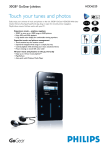
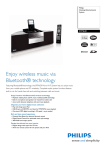
6GB* GoGear Micro Jukebox
Touch your tunes and photos
Distinctly sleek and ultra-intuitive, the 6GB* GoGear HDD1620 lets you effortlessly enjoy your
world of MP3 and WMA music and pictures with Sensory Touchpad SuperScroll. PlaysForSure
ensures your GoGear works with your PC.
Experience music – anytime, anyplace
•
•
•
•
6GB* to store up to 3000 songs or 1600 pictures
Enjoy MP3 and WMA playback
Small and wearable – goes where you go
Large backlit color display for comfortable viewing anywhere
Super-fast music and picture management
•
•
•
•
•
Touch sensitive keys for intuitive control
SuperScroll navigation finds songs in a simple, fast way
Create your playlist on the go
Picture viewing on 1.5 inch 65K color LCD
Make voice recordings
Your music and pictures on the go, every day
• Enjoy up to 18-hour music playtime**
• PlaysForSure
• Auto-synch with Windows Media Player
HDD1620
6GB* GoGear Micro Jukebox
HDD1620/ 00/ 05
Technical specifications
Product
Product highlights
highlights
Picture / Display
Accessories
•
•
•
•
•
• AC/DC Adaptor/Charger:
Multi-voltage (AY4109)
• CD-ROM: with installer, PC software, manuals
• Headphones (SHE9500BI/00)
• Pouch: Protective pouch (AY4237)
• USB cable:
combined with AC/DC adaptor in Y cable
• User Guide on CD-ROM:
Eng, Fr, Spa, NL, Ge, Port, Swe
• Warranty Card
Backlight color:White
Diagonal screen size: 1.5 inch
Lines of text: 7
Resolution: 128 x 128 pixels, 65K color
Type: CSTN,Transmissive
Sound
•
•
•
•
•
•
•
•
•
Bass enhancement: SRS WOW
Equalizer: 5-bands
Equalizer customizable
Equalizer settings:
Rock, Pop, Jazz, Classical, Dance, Electronica,
Lounge, RnB, Hip Hop, Spoken word
Frequency response: 20 - 16 000 Hz
Output Power: 2 x 5 mW (16 Ohm)
Sensitivity: < 100 dB
Signal to noise ratio: >82 dB
THD: 0.1%
Software
• Device Manager
• Windows Media Player 10
Green Specifications
• Lead-free soldered product
System Requirements
Audio Playback
• Buffer memory: 32 MB
• Compression format:
MP3,WAV,Windows MediaTM Audio
• ID3-tag support:
Album title, Genre title,Track title and
Artist name
• MP3 bit rates: 8-320 kbps and VBR
• WMA bit rates: 32-192 kbps
• Sample rates:
8, 11.025, 16, 22.050, 32, 44.1, 48 kHz
•
•
•
•
•
•
•
CD-ROM drive
Hard disk space: 100 MB
PC OS:Windows XP (SP2 or above)
Processor: Pentium II or better
RAM memory: 64 MB
Sound card
Video card
Dimensions
• Voice recording
• Audio file format:WAV
• Built-in microphone: Mono
• Master carton dimensions (WxHxD):
165 x 165 x 305 mm
• D-box dimensions (WxHxD):
153 x 153 x 95 mm
• Product dimensions (WxHxD):
53.7 x 86.0 x 16.3 mm
• Product weight: 87 g
Still Picture Playback
Power
• Picture compression format: JPEG
• Slide show:With music
•
•
•
•
Audio Capturing
Storage Media
• Built-in memory type: Hard disk
• Hard Disk Capacity: 6 GB*
• Music memory capacity: Up to 3000 songs*
Battery capacity: 610 mAh
Battery type: Li-Ion
Charging time: 1 hr fast charge (70%)
Music playtime on internal battery:
up to 18 hours**
• Rechargeable
Connectivity
•
•
•
•
Connector: Philips dock connector
DC in: 5 V
Headphone 3.5 mm
USB2.0***
Convenience
•
•
•
•
•
Battery charging indication
Battery full indication
Battery low indication
Function: Keypad lock
Language support:
Eng, Fr, Spa, NL, Ge, Port, Swe + more
• SuperScroll
Date of issue 2005-08-15
Specifications are subject to change without notice.
Trademarks are the property of Koninklijke Philips
Electronics N.V. or their respective owners.
© 2005 Koninklijke Philips Electronics N.V.
All rights reserved.
www.philips.com
Feature
SuperScroll
name
navigation
< 30
This
For fast
is the
andfeature
preciseglossary
navigation
text.toIt your
should
favorite
be easy
song.
to
understand,
Navigate through
using everyday,
hundreds conversational
of songs easily language.
and
For
smoothly
help writing
- or onefeature
at a time
glossaries
- in just
usea the
few feature
seconds.
'why
You can
do Ichoose
need it/towhat
moveisthrough
it/ how your
does playlist
it work?'one
descriptions,
song at a time
with
or emphasis
just presson
and'how
holddoes
down
it work?'.
a little
This
longer
is to
theSuperScroll
feature glossary
swiftlytext.
to your
It should
desired
betrack.
easy to
understand, using everyday, conversational language.
For help writing feature glossaries use the feature
'why do I need it/ what is it/ how does it work?'
descriptions, with emphasis on 'how does it work?'.
This
* Available
is the feature
storageglossary
capacity
text.
will
It should
be less.beCapacity
easy to
understand.
based on 5 <Mpixel
600 pictures, and 4 minutes per
song and 64 kbps WMA or 128 kbps MP3
Feature
encoding.name < 30
This
** Battery
is the feature
life varies
glossary
withtext.
use.It should be easy to
understand,
*** Actual transfer
using everyday,
speed may
conversational
vary based
language.
on your
For
operating
help writing
system
feature
and software
glossaries configuration.
use the feature
'why do I need it/ what is it/ how does it work?'
descriptions,
The PlaysForSure
with emphasis
logo, Windows
on 'how
Media
doesand
it work?'.
the
This
Windows
is thelogo
feature
are trademarks
glossary text.orItregistered
should be easy to
understand,
trademarks of
using
Microsoft
everyday,
Corporation
conversational
in thelanguage.
United
For
States
helpand/or
writingother
feature
countries.
glossaries use the feature
'why do I need it/ what is it/ how does it work?'
descriptions, with emphasis on 'how does it work?'.
This is the feature glossary text. It should be easy to
understand. < 600
Feature name < 30
This is the feature glossary text. It should be easy to
understand, using everyday, conversational language.
For help writing feature glossaries use the feature
'why do I need it/ what is it/ how does it work?'
descriptions, with emphasis on 'how does it work?'.
This is the feature glossary text. It should be easy to
understand, using everyday, conversational language.
For help writing feature glossaries use the feature
'why do I need it/ what is it/ how does it work?'
descriptions, with emphasis on 'how does it work?'.
This is the feature glossary text. It should be easy to
understand. < 600
Feature name < 30
This is the feature glossary text. It should be easy to
understand, using everyday, conversational language.
For help writing feature glossaries use the feature
'why do I need it/ what is it/ how does it work?'
descriptions, with emphasis on 'how does it work?'.
This is the feature glossary text. It should be easy to
understand, using everyday, conversational language.
For help writing feature glossaries use the feature
'why do I need it/ what is it/ how does it work?'
descriptions, with emphasis on 'how does it work?'.
This is the feature glossary text. It should be easy to
understand. < 600
Feature name < 30
This is the feature glossary text. It should be easy to
understand, using everyday, conversational language.
For help writing feature glossaries use the feature
'why do I need it/ what is it/ how does it work?'
descriptions, with emphasis on 'how does it work?'.
This is the feature glossary text. It should be easy to
understand, using everyday, conversational language.
For help writing feature glossaries use the feature
'why do I need it/ what is it/ how does it work?'
descriptions, with emphasis on 'how does it work?'.
This is the feature glossary text. It should be easy to