1
s
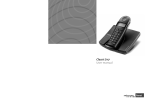
Be inspired
Operating Instructions
!
ENGLISH
and safety precaution
Gigaset 4000 Comfort, IM2 eng, A31008-G4000-B002-3-PM19 4000COU.F 15.03.02
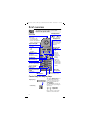
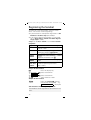
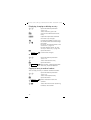
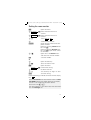
Brief overview
The display is protected by a plastic film.
Remove the plastic film.
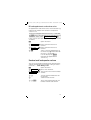
Charging status
Status LED
Lights up during a call;
flashes for:
– incoming calls
– new messages
– alarm calls, appointments, anniversaries
Signal strength
Talk key
– Accept
call
– Dial
number
Handsfree key
Switch from
handset to
handsfree talking
Control key
= flat e 1/3
U full V 2/3
Ñ
e
flashes: Caution
Display keys
The display keys
give you access
to the functions
shown in the
display.
Annabelle
19.07.01
13:13
{
¨
INT
Open directory
1
2ABC
3 DEF
Key 1
Hold down
to select answering
machine/mailbox
Ringer on/off
Hold down
4 GHI
5JKL
6 MNO
7 PQRS
8TUV
9 WXYZ
0
Keypad protection
on/off
Hold down
Microphone
End call and
On/Off key
– End
call
– Cancel
function
– Back one
menu level
(press
briefly)
– Return to
idle status
(hold down)
– On/off in idle
status (hold
down)
Caller list/
message list
Sel Services key
Open network access list
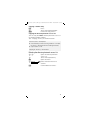
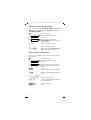
Control key and display keys
Display keys
Control key
INT
2
The right display key lets
you perform functions,
some of which can also
be controlled with the
control key.
The Control is shown as
follows in the operating instructions:
F / G (left/right)
E / D (up/down)
Press down on the side
with the arrow filled in.
Gigaset 4000 Comfort, IM2 eng, A31008-G4000-B002-3-PM19 4000COU.F 15.03.02
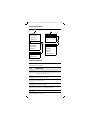
Important menus
©
D
Text Message*
New Entry
Select Services
Anne
Add. Features
Barbara
Calendar/Clock
Chris
:
Sound Settings
Call Charges
©
OKƒ
H/Set Settings
Display Number
Base Settings
Delete Entry
Voice Mail
Copy Entry
Delete List
Handset Volume
Send List
Ringer Settings
Available Memory
Advisory Tones
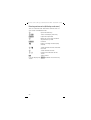
Display symbols
The following symbols appear above the display keys
depending on the situation:
Display
keys
Meaning
¨ Menu key: Activates the main menu when the
phone is idle. During a call, it activates a menu
for the particular situation.
Z Selects and confirms the menu function.
Ends and saves an entry.
W Delete key (Backspace): Deletes characters
from right to left.
{ Automatic redial key: Opens a list of the last
five numbers dialled.
I Displayed if SMS*, answering machine, mail
service box or caller list is active
Í One menu level back, cancel
* Not available in all countries
3
Gigaset 4000 Comfort, IM2 eng, A31008-G4000-B002-3-PM19 4000COU.F 15.03.02
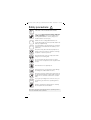
Safety precautions
$
!
Only use the power supply unit supplied as
indicated on the underside of the device.
Only insert approved rechargeable batteries
of the same type. Never use ordinary (nonrechargeable) batteries as they may pose a
health hazard or cause injury.
‹
Make sure the rechargeable batteries are
inserted the right way round (as indicated in the
battery compartment),
Œ
Use the batteries specified in these operating
instructions (as indicated in the battery compartment)
The phone may affect medical equipment so
always switch your phone off before entering
hospitals or doctors’ practices.
The handset may cause an unpleasant humming noise in hearing aids.
Do not operate the phone in places where
there is a risk of explosion (such as paint workshops).
The handset is not splash-proof.
Drivers must not use the phone while driving
(including the walkie-talkie function).
The phone must be switched off at all times in
an aircraft (including the walkie-talkie function).
Make sure it cannot be switched on accidentally.
ƒ
If you give your Gigaset to someone else you
should also give them the operating instructions.
Dispose of batteries and the phone carefully.
Do not pollute the environment.
Not all the functions described in these operating instructions are available in all countries.
4
Gigaset 4000 Comfort, IM2 eng, A31008-G4000-B002-3-PM19 4000coivz.f
15.03.02
Contents
Brief overview . . . . . . . . . . . . . . . . . . . . . . . . . . . . 2
Control key and display keys . . . . . . . . . . . . . . . . . . 2
Important menus . . . . . . . . . . . . . . . . . . . . . . . . . . . 3
Display symbols . . . . . . . . . . . . . . . . . . . . . . . . . . . . 3
Safety precautions . . . . . . . . . . . . . . . . . . . . . . . . 4
Preparing the handset . . . . . . . . . . . . . . . . . . . . . . 6
Delivery package . . . . . . . . . . . . . . . . . . . . . . . . . . . . 6
Inserting the batteries (automatic registration) . . . . . 6
Charging the batteries . . . . . . . . . . . . . . . . . . . . . . . . 6
Attaching the belt clip . . . . . . . . . . . . . . . . . . . . . . . . 7
Switching the handset on and off . . . . . . . . . . . . . . . 7
Setting the date and time . . . . . . . . . . . . . . . . . . . . . 8
Activating/deactivating the keypad lock . . . . . . . . . . 9
Changing the display language . . . . . . . . . . . . . . . . . 9
Registering the handset. . . . . . . . . . . . . . . . . . . . 10
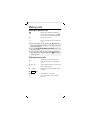
Making calls . . . . . . . . . . . . . . . . . . . . . . . . . . . . . 11
Making an external call . . . . . . . . . . . . . . . . . . . . . . 11
Making internal calls . . . . . . . . . . . . . . . . . . . . . . . . 11
Answering a call . . . . . . . . . . . . . . . . . . . . . . . . . . . 12
Open caller list/message list . . . . . . . . . . . . . . . . . . 12
Handsfree talking . . . . . . . . . . . . . . . . . . . . . . . . . . 12
Forwarding an external call, enquiry call . . . . . . . . . 13
Automatic redial . . . . . . . . . . . . . . . . . . . . . . . . . . 13
Directory and network
access list . . . . . . . . . . . . . . . . . . . . . . . . . . . . . . . 15
Speed dialling from the network access list . . . . . . 16
Dialling with speed dialling . . . . . . . . . . . . . . . . . . . 16
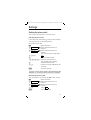
Settings . . . . . . . . . . . . . . . . . . . . . . . . . . . . . . . . . 21
Setting the alarm clock . . . . . . . . . . . . . . . . . . . . . . 21
Activating the alarm clock . . . . . . . . . . . . . . . . . . . . 21
Deactivating the alarm clock . . . . . . . . . . . . . . . . . . 21
Turning off the alarm call. . . . . . . . . . . . . . . . . . . . . 22
Setting an appointment . . . . . . . . . . . . . . . . . . . . . . 22
Handset and loudspeaker volume. . . . . . . . . . . . . . 23
Activating/deactivating warning and signal tones . . 25
Auto talk feature on/off . . . . . . . . . . . . . . . . . . . . . . 25
Resetting to the factory defaults. . . . . . . . . . . . . . . 26
Room monitoring (babyphone) . . . . . . . . . . . . . . 26
Setting the room monitor . . . . . . . . . . . . . . . . . . . . 27
Walk and Talk mode. . . . . . . . . . . . . . . . . . . . . . . 28
Appendix . . . . . . . . . . . . . . . . . . . . . . . . . . . . . . . . 29
Operating on base stations in the Gigaset family . . 29
Range . . . . . . . . . . . . . . . . . . . . . . . . . . . . . . . . . . . 30
Guarantee . . . . . . . . . . . . . . . . . . . . . . . . . . . . . . . . 31
Customer Care . . . . . . . . . . . . . . . . . . . . . . . . . . . . 32
5
Gigaset 4000 Comfort, IM2 eng, A31008-G4000-B002-3-PM19 4000CO.FM 15.03.02
Preparing the handset
Delivery package
Gigaset 4000 Comfort handset, two batteries, charging unit, belt clip, operating instructions.
Inserting the batteries (automatic registration)
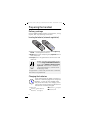
–
+
+
●
●
●
–
Make sure you insert the batteries the right way
round – see diagram on the left.
Replace the cover and push gently upwards until it
clicks into place.
To open press the grooved area on the cover and
slide back.
k
Ö
Before activating your handset, place
it in the Gigaset 4010/4015 Comfort
base station with the display facing
upwards. The handset is automatically registered; this is shown on the
display (e.g. INT1)
If registration is successful you will hear a confirmation tone (rising sequence).
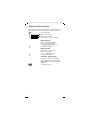
Charging the batteries
Leave the handset for approx. five hours in
5 h the base station/charging unit to charge the
batteries, as they are not charged when
they leave the factory. The charging status
icon flashes on the handset to indicate that
the batteries are being charged:
= Batt. flat
(battery symbol flashes)
e Batteries 1/3 charged
6
V Batteries 2/3 charged
U Batteries full
Gigaset 4000 Comfort, IM2 eng, A31008-G4000-B002-3-PM19 4000CO.FM 15.03.02
See the appendix for a list of recommended batteries.
●
●
●
Once the initial charging process is completed you
can replace your handset in the base station/
charging unit after each call. Charging is controlled
electronically. This ensures optimum charging and
prolongs battery life.
The batteries heat up during charging. This is normal and not dangerous.
Opening the battery compartment unnecessarily
may cause the wrong charging status to be displayed.
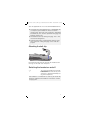
Attaching the belt clip
Push the belt clip onto the back of the handset until
the lugs at the side click into place.
Switching the handset on and off
a
To switch the handset on and off,
hold down the end call key until
you hear a confirmation beep (rising tone sequence).
The handset is switched on as soon as you insert the
batteries and place the handset in the base station/
charging unit.
7
Gigaset 4000 Comfort, IM2 eng, A31008-G4000-B002-3-PM19 4000CO.FM 15.03.02
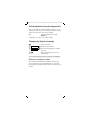
Setting the date and time
You need to set the date and time so that the time that
messages and calls are received is shown correctly.
©
D Calendar/Clock
D Date/Time
Open the menu.
[ Select and confirm.
[ Select and confirm.
The current setting is shown.
Enter the date
D
Enter the day/month/year.
In this case 20.05.2001.
e. g.ŸÞÞ¢Þ]
Go down one line.
Enter the time
D
Enter hours and minutes.
In this case 19:05
e. g. ] ¬ Þ ¢
Go down one line.
Select the display mode
Save
8
use the left side of the control
key to select the 12-hour mode
(am or pm) or the 24-hour mode
(default).
Save the settings.
Gigaset 4000 Comfort, IM2 eng, A31008-G4000-B002-3-PM19 4000CO.FM 15.03.02
Activating/deactivating the keypad lock
You can disable the handset keypad. If there is an incoming call, the key lock is automatically deactivated
and re-activated after the call has ended.
ª
To activate/deactivate, hold
down key
.
Accepting a call: Press the talk key
c
Changing the display language
©
Open the menu.
D H/Set Settings
[ Confirm the function.
D Language
[ The current language is marked
D[
with a ✓.
Select the language you want
and confirm.
You will find a table on the last page of this booklet.
Dialling an emergency number
You can dial the emergency numbers saved in the
base station even if the telephone lock is activated.
Please refer to the operating instructions for your base
station.
9
Gigaset 4000 Comfort, IM2 eng, A31008-G4000-B002-3-PM19 4000CO.FM 15.03.02
Registering the handset
To make calls with your handset, you must “introduce” it to its base station (registering)
●
if your handset has already been registered at a different base station (steps 1, 2 and 3) or
● if you want to register the handset as a new handset at a Gigaset base station of an older Gigaset
range (steps 1 and 3).
Step 1: On the base station or on the base station
telephone:
Gigaset
4010/4015
On the base station or base telephone
Hold down the key on the underside of
the base station.
3010/3015 Hold down the paging-keyy on the base
station until you hear signal tones.
3020/25
Select settings, system settings and register
3030/35
handset in the menu at the base station
4030/35
telephone and confirm with OK.
Press the LED – it will flash during regis3070/75
tration.
4070/75
Non-SieTo register at “GAP base stations”
, follow
mens base the relevant operating instructions
stations
(steps 2 and 3).
Step 2: On the handset:
©
Press the display key.
D H/Set Settings
[ Select and confirm.
D Register H/Set
[ Select and confirm.
D[
Select the base station.
Step 3: On the handset:
o[
Enter the system PIN and confirm (factory setting 0000) – e.g.
Regstr.Procedure Base 1 is displayed.
Your handset is now ready for operation!
Your handset can be registered at up to four base stations.
10
Gigaset 4000 Comfort, IM2 eng, A31008-G4000-B002-3-PM19 4000CO.FM 15.03.02
Making calls
Making an external call
o
Enter the telephone number. If
you make a mistake use the X
key to correct individual digits.
c
a
●
●
●
Press the talk key.
Press the end call key to end the
call.
You can also press the talk key c first and then
enter the telephone number - each digit will be dialled immediately.
You can cancel the dialling operation by pressing
the end call key a.
You can insert a pause: After entering the prefix,
open the menu using the display key © and select
“insert pause”
.
Making internal calls
F
Open the list of internal users.
Your own handset is identified
by “<".
DE
c
or
Ÿ
e. g.
or Call All
or «
a
Select the handset you want and
press the talk key.
c
Enter the internal number of the
handset.
All handsets are called.
Press the end call key to end
the call.
11
Gigaset 4000 Comfort, IM2 eng, A31008-G4000-B002-3-PM19 4000CO.FM 15.03.02
Answering a call
Your telephone will ring (ringing tone) and the status
LED will flash.
c/u
or ÖÄk
Press the talk key or handsfree
key.
Simply remove the handset from
the base station/charging unit
(factory setting: “Auto talk”).
Open caller list/message list*
A message appears in the display and the status LED
flashes to indicate that there are new calls/messages.
?
Press
Handsfree talking
Handsfree talking offers the following advantages:
●
●
●
Before dialling, you can hear the dial tone without
having to lift the handset to your ear.
Other people can listen in and join in the call.
You can place the handset on any convenient surface or replace it in the base station/charging unit
with the handsfree key pressed.
Handsfree talking when dialling
o
Dial the telephone number.
u
Press the handsfree key.
When handsfree talking is activated, the handsfree
key u and the status LED are lit.
* Not available in all countries
12
Gigaset 4000 Comfort, IM2 eng, A31008-G4000-B002-3-PM19 4000CO.FM 15.03.02
Handsfree talking during a call
u
Activate handsfree talking.
To set the volume:
Press the handsfree key u
once more.
Raise or lower the volume.
Save the volume level.
Change from handsfree talking to
the handset
FG
Save
c
a
End the call.
Forwarding an external call, enquiry call
You can forward an external call to another handset or
make an internal enquiry call.
F
ED
c
Open the list of internal users.
Select the internal user and call.
If the internal user answers:
● To forward the call: Press the end call key a.
● To end the enquiry call: Use End to return to the
waiting party.
Automatic redial
Manual redial
You have access to the last five telephone numbers dialled.
zD
c
Display and select the telephone
number.
Press the talk key.
13
Gigaset 4000 Comfort, IM2 eng, A31008-G4000-B002-3-PM19 4000CO.FM 15.03.02
Automatic redial
This function is not available in all countries.
The handsfree key flashes and open listening is activated. The function is deactivated after ten unsuccessful call attempts or if a call was made in the
meantime.
Press Off or any key if the person you called is not available.
Display and select the telephone
zD
number.
Open the menu.
©
Automatic Redial
c
[ Activate.
If the other person answers press
the talk key.
Deleting a number from the redialling list
zD
©
D Delete Entry
Display and select the telephone
number.
Open the menu.
[ The telephone number is
deleted.
Copying a telephone number to the directory
zD
©
Display and select the telephone
number.
Open the menu.
D Copy to Directory [ The telephone number is
entered.
If you like you can change the
number and enter a name (you
can also enter an anniversary
s. page 20).
For notes on how to enter letters
and characters s. page 17.
o
©
Open the menu.
Save Entry
14
[ Save the entry.
Gigaset 4000 Comfort, IM2 eng, A31008-G4000-B002-3-PM19 4000CO.FM 15.03.02
Directory and network
access list
With the D directory you can store up to 200 telephone numbers and then dial them at the push of a
button.
You can save the prefixes (Call-by-Call)* of telephone
companies in the network access list C. The directory and network access list are used in exactly the
same way.
Storing an entry
D/C
New Entry
Open the directory/network
access list.
[ Select the menu item and con-
firm.
Enter the telephone number
(no more than 32 digits).
o
Do
©
Save Entry
Scroll to the name field and enter
the name. You can also enter an
anniversary in the directory, see
also page 20.
Open the menu.
[ Store the entry
Dialling with the directory
D
Open the directory.
e. g. ^^
Enter the first letter of the name.
For example for “E” press
the ^ key twice or scroll
with the D key.
c
Press the talk key.
After selecting the name you can also open the menu,
select Display Number , extend/change the number
and dial with the talk key c.
* Not available in all countries
15
Gigaset 4000 Comfort, IM2 eng, A31008-G4000-B002-3-PM19 4000CO.FM 15.03.02
Dialling with the network access list
(Call-by-Call)
C
D©
Display Number
Open the network access list.
Select call-by-call number and
open the menu.
[ Select the menu item and
confirm.
o
Enter the telephone number of
the person you want to call.
or
DD [
c
Select the telephone number in
directory and confirm.
Press the talk key. The telephone
number is dialled.
Speed dialling from the network
access list
You can store 8 speed dialling numbers in the network
access list. Enter a speed dialling number (2–9) before
the name.
Example: Press speed dial key 2 and then enter the
network provider's name.
Dialling with speed dialling
e. g. Ÿ
e. g. o
Hold down the key:
The stored network provider's
name is displayed.
Enter the telephone number
or
DD [
c
16
Select an entry from the directory
and confirm.
Press.
Gigaset 4000 Comfort, IM2 eng, A31008-G4000-B002-3-PM19 4000CO.FM 15.03.02
Character map
Press the relevant key repeatedly or hold down:
]
Ÿ
^
¡
¢
£
¤
¥
¬
«
Þ
ª
1x
2x
blank
a
1
b
3x
4x
5x
6x
7x
8x
9x
10 x
c
£
2
$
ä
¥
á
¤
à
â
ã
ç
d
g
e
h
f
i
3
4
ë
ï
é
í
è
ì
ê
î
j
m
k
n
l
o
5
6
ö
ñ
ó
ò
ô
õ
p
t
q
u
r
v
s
8
7
ü
ß
ú
ù
û
w
x
y
/
z
(
9
)
ÿ
<
ý
=
æ
>
ø
%
å
?
\
!
&
0
§
+
-
:
¿
¡*
a→
→A
.
#
*
,
@
â
*
Other characters on this key:
“,‘,;,_
The first letter of the name is automatically written
in uppercase and the rest in lowercase.
To change one letter from uppercase to lowercase or
vice versa press « .
Control the cursor with F G E D. Delete characters with X .
Letters are always inserted to the left of the cursor.
Inserting a blank before a name takes that name to
the top of the directory (for example “ Karla”).
Sort sequence:
1. Blank
2. Digits (0-9)
3. Letters (alphabetical)
4. Other characters
17
Gigaset 4000 Comfort, IM2 eng, A31008-G4000-B002-3-PM19 4000CO.FM 15.03.02
Displaying, changing or deleting an entry
D/C
D
View
Change
o
Do
Open the directory/network
access list.
Select the entry you want.
View all the information for the
entry.
Open the input field and make
the necessary changes.
Change the number if necessary.
Go to the name field and change
the name.
For notes on entering letters and
characters s. page 17.
For the directory enter an anniversary if necessary s. page 20.
©
Open the menu.
Save Entry
[ Confirm the changes.
or
D/C
D
©
DDelete Entry
Open the directory/network
access list.
Select the relevant entry.
Open the menu.
[ You will hear a confirmation tone.
The entry has been deleted.
Copying an entry to another handset
You can copy an entry to another Comfort handset.
Open the directory/network
D/C
access list.
Select the required entry.
D
Open the menu.
©
DDelete Entry
D[
18
[ Select the menu item and
confirm.
Select the internal user (receiving
handset) and confirm.
Gigaset 4000 Comfort, IM2 eng, A31008-G4000-B002-3-PM19 4000CO.FM 15.03.02
Copying a further entry:
YES
Press.
Select the required number.
D
Copy
Initiate the copy process.
Copying the directory/network access list
You can copy the entire directory/network access list
to another Comfort handset.
See “Copying an entry to another handset”
.
Transmission is interrupted:
●
●
if the memory of the receiving handset is full (the
last entry is displayed on the sending handset).
if you receive a call.
Copying of an entry is terminated.
Deleting the directory/network access list
D/C
D
©
D Delete List
YES
Open the directory/network
access list.
Select the required entry.
Open the menu.
[ Select the menu item and
confirm.
Confirm delete all entries.
19
Gigaset 4000 Comfort, IM2 eng, A31008-G4000-B002-3-PM19 4000CO.FM 15.03.02
Entering anniversaries (birthdays and so on)
You can store the date and time of anniversaries so
you can be reminded of them.
D
DView
Change
D
Change
o
Do
D
FG
Open the directory.
Select and display the entry.
Open the input field.
Move the cursor into the birthday/anniversary field.
Confirm.
Enter or change the date (day/
month).
Scroll forward one line and enter
the time.
Scroll forward one line.
Choose the indicator for the
alarm.
Store entries.
[
Use the display key Delete to delete the anniversary
alarm.
20
Gigaset 4000 Comfort, IM2 eng, A31008-G4000-B002-3-PM19 4000CO.FM 15.03.02
Settings
Setting the alarm clock
You can use your handset as an alarm clock.
Activating the alarm clock
If activated, the alarm clock (¼ icon) on your handset
will ring every day at the time entered.
With the handset idle:
©
Open the menu.
D Calendar/Clock
[ Select the menu item and
D Alarm Clock
[ Select the menu item and
F GSelect
D
confirm.
confirm.
The current setting is displayed.
On .
Scroll forward one line.
Þ £Þ Þ Enter the hours/minutes.
D
The example here is 06.00.
Scroll forward one line.
FG
Choose the ringer melody for the
alarm call.
Save
Save the settings.
An alarm call will not be made if room monitoring (babyphone) is activated or during automatic redialling.
Deactivating the alarm clock
The alarm clock is set but you do not want it to ring.
©
Open the menu.
D Calendar/Clock
[ Select the menu item and
D Alarm Clock
[ Select the menu item and
confirm.
FG
confirm.
Select Off .
Save
Save the settings.
21
Gigaset 4000 Comfort, IM2 eng, A31008-G4000-B002-3-PM19 4000CO.FM 15.03.02
Turning off the alarm call
An alarm call is signalled like an incoming call. Press
any key to turn it off.
Setting an appointment
Your handset is able to remind you of one appointment. If you have set an appointment, this is indicated
by the ¼ icon in the display.
With the handset idle.
©
Open the menu.
D Calendar/Clock
Set Appoints.
[ Select the menu item and
confirm.
[ Select the menu item and
confirm.
FG
Select On to activate the
appointment alarm.
Scroll forward one line.
D
Ÿ Þ Þ ¢ Enter the day/month.
The example here is 20th May.
Scroll forward one line.
D
Þ ¬ ^ Þ Enter the hours/minutes.
The example here is: 9.30.
D
Scroll forward one line.
Choosing the ringer melody for
FG
the appointment alarm.
Save the settings.
Save
An appointment alarm will only ring when the handset
is idle. An appointment alarm is not made when room
monitoring is activated or during automatic redial.
Turning off the appointment alarm
An appointment alarm is signalled in the same way as
an incoming call; press any key to turn it off.
22
Gigaset 4000 Comfort, IM2 eng, A31008-G4000-B002-3-PM19 4000CO.FM 15.03.02
Missed appointments and anniversaries
An appointment and anniversaries that have been signalled on the handset but not been accepted are
saved in a list.
A new missed appointment/anniversary is indicated
by Appt.. Press the right display key to display the list
Events list. Then select Missed Appoint. ¼ [.
If you want to view your appointment again, proceed
as follows:
©
Open the menu.
D Calendar/Clock
[ Select the menu item and
D Missed Dates
[ Select the menu item and
D[
confirm.
confirm.
Select a missed appointment ¼
or anniversary ‚ Information on
this entry is displayed.
Use the display key Delete
to delete the appointment/
anniversary.
Handset and loudspeaker volume
You can set the handset volume to one of three levels,
and the loudspeaker for handsfree talking to one of
five levels – even during a call.
Open the menu.
©
D Sound Settings
Handset Volume
[ Select the submenu.
[ You will hear the current handset
volume.
FG
D
F G Save
Set the required handsfree talking volume.
Scroll forward one line.
Select the required level for the
handset volume and confirm.
23
Gigaset 4000 Comfort, IM2 eng, A31008-G4000-B002-3-PM19 4000CO.FM 15.03.02
Setting the ringer volume/melody
You can choose from five ringer volumes, “crescendo” ring (increasing volume), ringer off and any of
ten ringer melodies:
©
Open the menu.
D Sound Settings
[ Select the menu item and
D Ringer Settings
[ You will hear the current
confirm.
ringer volume and its level will
be displayed.
FG
Select the ringer volume.
D
Scroll forward one line.
F G Save
Select the required ringer melody (1–10) and confirm.
Time control for ringer volume
You can set a different ringer volume for a particular
time of day.
©
Open the menu.
D Sound Settings
[ Select the menu item and
D Ringer Settings
[ You will hear the current ringer
confirm.
Time C.
FG
Do
volume and its level will be displayed.
Press.
Activate/deactivate time control.
Enter the period for the different
ringer
e. g. ]]ÞÞ
]¢ÞÞ
from 11:00 to 15:00.
DF G
Scroll forward one line and select
the ringer volume
Save Entry
Save the settings.
Press.
Save or
24
a
Gigaset 4000 Comfort, IM2 eng, A31008-G4000-B002-3-PM19 4000CO.FM 15.03.02
Activating/deactivating warning and
signal tones
●
Key beeps: Every keystroke is confirmed.
Confirmation beeps: Confirmation beep (a rising
tone sequence) when you make entries/settings
and when you replace the handset in the base station.
● Battery low beep: The battery must be recharged.
Open the menu.
©
●
D Sound Settings
[ Select the menu item and
D Advisory Tones
[ Select the menu item and
confirm.
confirm.
D
Select the required function.
FG
On , Off or select In Call
(battery low beep in the call).
Save the settings.
Save
Auto talk feature on/off
When this function is activated you can remove the
handset from the charging unit without pressing the
c key to accept a call (factory setting).
©
Open the menu.
D H/Set Settings
[ Select the menu item and
xAuto Answer
[ Activate/deactivate with [
confirm.
(✓= function on).
25
Gigaset 4000 Comfort, IM2 eng, A31008-G4000-B002-3-PM19 4000CO.FM 15.03.02
Resetting to the factory defaults
The directory, the network access list and the caller
list are not deleted when you reset the handset. Registration at the base station is not affected.
©
Open the menu.
D H/Set Settings
[ Select the menu item and
D Reset Handset
[ Select the menu item and
YES
confirm.
confirm.
Confirm.
Function
Handset volume
Ringer volume (“ring tone”
,)
Ringer melody
Auto talk
Battery low beep
Handsfree volume
Room monitor level
Time control
Display language
Factory setting
1
5
1
On
On
3
high
off
local
Room monitoring (babyphone)
You can use your handset as a baby monitor.
The handset should be placed at least 1 to 2 meters
away from your baby. If a certain noise level is reached
(for example if your baby is crying) the handset will automatically dial the number you stored (internal or external). When the room monitor is active, incoming calls
are merely displayed.
26
Gigaset 4000 Comfort, IM2 eng, A31008-G4000-B002-3-PM19 4000CO.FM 15.03.02
Setting the room monitor
©
Open the menu.
D Add. Features
[ Select the menu item and
D Room Monitor.
[ Select the menu item and
confirm.
confirm.
FG
Select On or Off .
D
Scroll forward one line.
Change
Open the entry field for the telephone number.
Delete an existing external number with X.
Delete an existing internal number with YES (you will be asked
to confirm).
Open the list of internal users
and select the internal number.
Fo
[
Save the number.
or
D
Open the directory.
D[
Select an external user.
©
Save Entry
D
Open the menu.
[ Confirm the setting.
FG
Go down one line.
Set sensitivity to “high” or “low”
.
Save
Save the setting.
Room monitoring can be deactivated with the display
key Off .
You can deactivate the room monitor from an external number (from your mobile phone for example).
Answer a call made from the room monitor.
Deactivate with ».
The room monitor is now deactivated. The room monitor will no longer call.
27
Gigaset 4000 Comfort, IM2 eng, A31008-G4000-B002-3-PM19 4000CO.FM 15.03.02
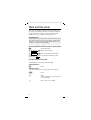
Walk and Talk mode
This function enables handsets (Gigaset 4000 Comfort only) to communicate free of charge outside the
range of the base station. In Walk and Talk mode,
handsets are not available for incoming calls.
Requirements:
The handsets must have the same base settings (e.g.
best base station) or they must not be registered at
any base station. (Walk and Talk mode reduces the
handset's talk time considerably).
Activating Walk and Talk mode on the handset
©
Open the menu.
D Add. Features
[ Select the function.
D Walk and Talk
[ Activate Walk and Talk mode.
Walk and Talk mode can be deactivated with the
display key Off .
Using Walk and Talk mode
Two handsets are in Walk and Talk mode:
Calling handset:
Call
Press.
Called handset:
The call is indicated by a message on the display.
Silent
c
a
28
Press.
Press.
The two handsets are connected
to one another.
Press. The call is ended.
Gigaset 4000 Comfort, IM2 eng, A31008-G4000-B002-3-PM19 4000CO.FM 15.03.02
Appendix
Operating on base stations in the
Gigaset family
Gigaset 1000/2000/3000
The following functions on your 4000 Comfort handset are not supported by base stations in this Gigaset
family:
●
●
●
●
Setting the time (the time is not transferred after
the handset has been switched off)
Changing the display language
Room monitoring (cannot be switched off
externally)
SMS transfer (SMS-compatible base stations only)*
Gigaset 4010/4015 Classic
The following functions on your 4000 Comfort handset are not supported by the above-mentioned base
stations:
●
●
●
Changing the display language
SMS transfer*
Setting authorisation stages
* Not available in all countries
29
Gigaset 4000 Comfort, IM2 eng, A31008-G4000-B002-3-PM19 4000CO.FM 15.03.02
Looking after your phone
Wipe the base station and handset with a damp cloth
or an antistatic wipe. Never use a dry cloth as this can
cause static discharge.
Recommended batteries:
Nickel cadmium (NiCd)
Nickel metal hydride (NiMH)
Sanyo N-3U (700 mAh)
Saft RH 6 NiMH 1300
(1300 mAh)
Mobile Power 700
(700 mAh)
Panasonic HHR-110 AA
(1100 mAh)
Panasonic 600 DT
(600 mAh)
Panasonic Pro+ 1500
(1500 mAh)
Emmerich 700 (700mAh)
Sanyo HR-3U (1600 mAh)
GP GP 130 AAHC (1300 mAh)
Varta Phone Power (1300 mAh)
Emmerich 1300 (1300 mAh)
Always replace both batteries at the same time and
only use batteries of the same type/manufacturer.
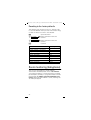
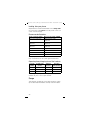
Operating times/charging time of the handset:
Capacity
(mAh)
Standby time
(hours)
Talk time
(hours)
Charging
time (hours)
700
up to 180
more than 10 about 5.5
1200
up to 300
more than 17 about 11
1600
up to 400
more than 23 about 14
The charge capacity of the battery reduces after a
number of years. This is quite normal.
Range
The handset will operate away from the base station
up to about 300 m outdoors and up to 50 m indoors.
30
Gigaset 4000 Comfort, IM2 eng, A31008-G4000-B002-3-PM19 4000CO.FM 15.03.02
Guarantee
Scope
● This equipment guarantee applies to end users (“customers”). This
guarantee does not in any way affect the customer's statutory rights.
● The guarantee applies to the supplied devices and all their components
but not to their installation or configuration or to the services provided
by the dealer. Manuals and any software supplied on a separate data
medium are excluded from the guarantee. This guarantee does not apply to decorative covers or any other personalised parts or software not
included in the scope of supply. The guarantee also does not apply to
decorative top or bottom shells for special editions.
● The guarantee provides for devices or components that, despite proper
care and use, have demonstrably developed defects due to faulty workmanship and/or faulty materials to be replaced or repaired at our discretion free of charge. The guarantee does not cover normal wear and tear.
Alternatively, we reserve the right to replace the defective device with
a successor model or reimburse the original purchase price on return of
the defective device. Our decision is final. Any legal claims are excluded.
● Claims under the guarantee cannot be made if
– the defect or damage was caused by improper care or use. Improper
care or use includes the following:
– Opening the device (this is classed as third-party intervention)
– Manipulating components on the printed circuit board
– Manipulating the software
– Defects or damage caused by dropping, breaking, lightning or ingress
of moisture. This also applies if defects or damage was caused by mechanical, chemical, radio interference or thermal factors (e.g. microwave, sauna, etc.).
– Repairs or other work done by persons not authorised by us.
– Devices fitted with accessories not authorised by Siemens.
● Any further claims due to damage are excluded, such as damage arising
outside the device, provided this was not due to gross negligence and/
or intent on our part.
● Claims under the guarantee must be made as soon as the defect is noticed.
● A till receipt showing the date of purchase must be presented as proof.
Each claim under the guarantee is accepted with the express reservation that subsequent investigations confirm the validity of the claim.
● Any devices or components that are replaced become our property.
● The costs of materials and labour will be borne by us, but not the costs
of transport, postage or freight.
● We are entitled, at our discretion, to make technical changes (such as
firmware updates) beyond repair or replacement in order to upgrade the
device to the latest state of the art. There is no additional charge to the
customer for this work. Our decision is final. Any legal claims are excluded.
● The guarantee is valid in the country of purchase. It applies only if the
device is operated in the relevant geographical area in accordance with
the information on the packaging and in the operating instructions.
● Any further claims are excluded. Siemens is not liable in any circumstances for downtime, loss of profits, loss of data or loss of any other
information. The customer alone is responsible for safeguarding such
data and information.
● Changes to this guarantee require prior approval by Siemens in writing.
31
Gigaset 4000 Comfort, IM2 eng, A31008-G4000-B002-3-PM19 4000CO.FM 15.03.02
Guarantee period
● The guarantee applies in countries in the EU from 1 January 2002 for a
period of 24 months.
● In all other countries the guarantee period shall be the relevant minimum statutory guarantee period, but no longer than 24 months.
● The guarantee period starts on the day of purchase by the customer.
● A successful claim under the guarantee does not extend the guarantee
period.
● Work under the guarantee is handled by our Customer Care Centers.
● The guarantor is Siemens Aktiengesellschaft Deutschland, Schlavenhorst 88, D-46395 Bocholt.
½
To redeem the guarantee please contact your local Customer
Care Center (see back cover)
Customer Care
You can get assistance easily when you have technical
questions or questions about how to use your device
by using our online support service on the Internet at:
www.my-siemens.com/customercare
If the device needs to be repaired, please contact one
of our Customer Care Centers.
Service telephone number see back cover.
The CE symbol indicates that the telephone complies
with the essential requirements of the R&TTE directive.
The 4000 Comfort handset is approved for use in
Switzerland and throughout the EU.
32
Issued by
Information and Communication mobile
Haidenauplatz 1
D-81667 München
© Siemens AG 2002
All rights reserved. Subject to availability.
Right of modification reserved.
Printed in Germany. (03/2002)
Siemens Aktiengesellschaft
http://www.my-siemens.com
Best.-Nr.: A31008-G4000-B002-3-PM19
BITTE HIER SCHNBEIDEN!!!!
Be inspired
Operating Instructions
Betjeningsvejledning
Bruksanvisninging
Bruksanvisninging
Käyttöohje
Návod k pouzití
Instrukcja obslugi
Kullaným Kýlavuzu
BITTE HIER SCHNBEIDEN!!!!
A3 1 0 0 8 - G4 0 0 0 - B 0 0 2 - 3 - P M1 9
s