1
SUPER
®
X6DAL-XTG
USER’S MANUAL
Revision 1.0
The information in this User’s Manual has been carefully reviewed and is believed to be
accurate. The vendor assumes no responsibility for any inaccuracies that may be
contained in this document, makes no commitment to update or to keep current the
information in this manual, or to notify any person or organization of the updates.
Please Note: For the most up-to-date version of this manual, please
see our web site at www.supermicro.com.
SUPERMICRO COMPUTER reserves the right to make changes to the product described in
this manual at any time and without notice. This product, including software, if any, and
documentation may not, in whole or in part, be copied, photocopied, reproduced, translated
or reduced to any medium or machine without prior written consent.
IN NO EVENT WILL SUPERMICRO COMPUTER BE LIABLE FOR DIRECT, INDIRECT,
SPECIAL, INCIDENTAL, OR CONSEQUENTIAL DAMAGES ARISING FROM THE USE OR
INABILITY TO USE THIS PRODUCT OR DOCUMENTATION, EVEN IF ADVISED OF THE
POSSIBILITY OF SUCH DAMAGES. IN PARTICULAR, THE VENDOR SHALL NOT HAVE
LIABILITY FOR ANY HARDWARE, SOFTWARE, OR DATA STORED OR USED WITH THE
PRODUCT, INCLUDING THE COSTS OF REPAIRING, REPLACING, INTEGRATING,
INSTALLING OR RECOVERING SUCH HARDWARE, SOFTWARE, OR DATA.
Any disputes arising between manufacturer and customer shall be governed by the laws of
Santa Clara County in the State of California, USA. The State of California, County of
Santa Clara shall be the exclusive venue for the resolution of any such disputes.
Supermicro's total liability for all claims will not exceed the price paid for the hardware
product.
Unless you request and receive written permission from SUPER MICRO COMPUTER, you
may not copy any part of this document.
Information in this document is subject to change without notice. Other products and
companies referred to herein are trademarks or registered trademarks of their respective
companies or mark holders.
Copyright © 2004 by SUPER MICRO COMPUTER INC.
All rights reserved.
Printed in the United States of America
Preface
Preface
About This Manual
This manual is written for system integrators, PC technicians and
knowledgeable PC users. It provides information for the installation and use
of the
X6DAL-XTG motherboard. The
X6DAL-XTG supports single or dual Intel ® Xeon Nocona TM processors at a 800 MHz front
side bus. Based upon Intel's NetBurst microarchitecture with EM64T support, the Nocona processor supports IA-32 and IA-64 software and includes features found in the Xeon TM processor such as Hyper Pipelined
Technology, which includes a multi-stage pipeline, allowing the processor
to operate at much higher core frequencies. Packaged in a 604-pin Flip
Chip Micro Pin Grid Array(FC-mPGA4) platform in a Zero Insertion
Force(ZIF) socket (mPGA 604), the Nocona Processor (800 MHz) supports
Hyper-Threading Technology and is ideal for high performance workstation
and server environments with up to two processors on one system bus.
Please refer to the motherboard specifications pages on our web site (http:/
/www.supermicro.com/products/motherboard/) for updates on supported
processors. This product is intended to be professionally installed.
Manual Organization
Chapter 1 begins with a checklist of what should be included in your
mainboard box, describes the features, specifications and performance of
the motherboard and provides detailed information about the chipset.
Chapter 2 begins with instructions on handling static-sensitive devices.
Read this chapter when you want to install the processor and DIMM memory
modules and when mounting the mainboard in the chassis. Also refer to
this chapter to connect the floppy and hard disk drives, SCSI drives, the IDE
interfaces, the parallel and serial ports, the keyboard and mouse, the power
supply and various control panel buttons and indicators.
If you encounter any problems, see Chapter 3, which describes troubleshooting procedures for the video, the memory and the setup configuration
stored in CMOS. For quick reference, a general FAQ [Frequently Asked
Questions] section is provided.
Chapter 4 includes an introduction to BIOS and provides detailed information on running the CMOS Setup utility.
Appendix A lists BIOS Error Beep Codes and DS LED POST Codes.
Appendix B provides BIOS POST codes.
Appendix C provides software installation instructions.
Appendix D provides installation instructions on Adaptec's SATA HostRAID
Driver based on Marvell's chip.
iii
X6DAL-XTG User's Manual
Table of Contents
Preface
About This Manual ...................................................................................................... iii
Manual Organization ................................................................................................... iii
Chapter 1: Introduction
1-1
Overview ......................................................................................................... 1-1
Checklist .................................................................................................... 1-1
Contacting Supermicro ............................................................................ 1-2
X6DAL-XTG Image ................................................................ 1-3
X6DAL-XTG Layout .............................................................. 1-4
X6DAL-XTG Quick Reference ............................................ 1-5
Motherboard Features ............................................................................. 1-6
Intel E7525 Tumwater Chipset: System Block Diagram .................... 1-8
1-2
Chipset Overview ........................................................................................... 1-9
1-3
Special Features ........................................................................................... 1-10
BIOS Recovery ....................................................................................... 1-10
Recovery from AC Power Loss ......................................................... 1-10
1-4
PC Health Monitoring .................................................................................... 1-10
1-5
ACPI Features ............................................................................................... 1-12
1-6
Power Supply ............................................................................................... 1-13
1-7
Super I/O ......................................................................................................... 1-14
Chapter 2: Installation
2-1
Static-Sensitive Devices ............................................................................... 2-1
Precautions ............................................................................................... 2-1
Unpacking .................................................................................................. 2-1
2-2
PGA Processor and Heatsink Installation .................................................. 2-2
2-3
Installing DIMMs ............................................................................................... 2-5
2-4
I/O Ports/Control Panel Connectors ............................................................. 2-6
2-5 Connecting Cables .......................................................................................... 2-8
ATX Power Connector ............................................................................ 2-8
Processor Power Connector ................................................................. 2-8
NMI Button .................................................................................................. 2-9
Power LED ................................................................................................. 2-9
HDD LED .................................................................................................. 2-10
NIC1 LED ................................................................................................. 2-10
Overheat/Fan Fail LED .......................................................................... 2-11
iv
Table of Contents
Power Fail LED ....................................................................................... 2-11
Reset Button ........................................................................................... 2-12
Power Button ......................................................................................... 2-12
Chassis Intrusion ................................................................................... 2-13
Universal Serial Bus (USB0/1) ............................................................ 2-13
Extra Universal Serial Bus Headers (USB2/3) ................................. 2-13
ATX PS/2 Keyboard and Mouse Ports ................................................ 2-14
Fan Headers ........................................................................................... 2-14
Serial Ports ............................................................................................. 2-15
Wake-On-Ring ......................................................................................... 2-15
Wake-On-LAN ......................................................................................... 2-16
GLAN (Ethernet Port) ............................................................................. 2-16
Power Fault ............................................................................................ 2-17
SATA SMB ............................................................................................... 2-17
SMB Power .............................................................................................. 2-18
CD-In ......................................................................................................... 2-18
AC'97 ........................................................................................................ 2-19
Speaker/Power LED/Keylock ................................................................ 2-19
2-6
Jumper Settings ............................................................................................ 2-20
Explanation of Jumpers ........................................................................ 2-20
LAN Enable/Disable ............................................................................... 2-20
Alarm Reset ............................................................................................. 2-21
SATA Enable ........................................................................................... 2-21
CMOS Clear ............................................................................................. 2-22
Audio Enable ........................................................................................... 2-23
Force Power-On ..................................................................................... 2-23
2-7
Onboard Indicators ...................................................................................... 2-24
SATA LED ................................................................................................ 2-24
Onboard LED Indicators ........................................................................ 2-25
System Alert LED Indicators ................................................................. 2-25
2-8
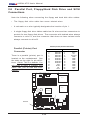
Parallel Port, Floppy/Hard Disk Drive and SCSI Connections ............... 2-26
Parallel Port Connector ......................................................................... 2-26
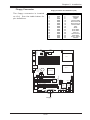
Floppy Connector ................................................................................... 2-27
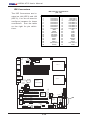
IDE Connectors ...................................................................................... 2-28
Chapter 3: Troubleshooting
3-1
Troubleshooting Procedures ........................................................................ 3-1
Before Power On .................................................................................... 3-1
No Power .................................................................................................. 3-1
v
X6DAL-XTG User's Manual
No Video ................................................................................................... 3-1
Memory Errors .......................................................................................... 3-2
Losing the System’s Setup Configuration ........................................... 3-2
3-2
Technical Support Procedures .................................................................... 3-2
3-3
Frequently Asked Questions ........................................................................ 3-3
3-4
Returning Merchandise for Service ............................................................ 3-4
Chapter 4: BIOS
4-1
Introduction ....................................................................................................... 4-1
4-2
Running Setup .................................................................................................. 4-2
4-3
Main BIOS Setup .............................................................................................. 4-3
4-4
Advanced Setup .............................................................................................. 4-3
4-5
Security Setup ............................................................................................... 4-20
4-6
Exit ................................................................................................................... 4-21
Appendices:
Appendix A: BIOS Error Beep Codes and DS7/DS8 LED POST Codes ......... A - 1
Appendix B: BIOS POST Codes ............................................................................. B-1
Appendix C: Installing Software Drivers and the Operating System .............. C-1
Appendix D: Installing Adaptec's SATA HostRAID Controller based on
Marvell's Chip ................................................................................................... D-1
vi
Chapter 1: Introduction
1-1
Introduction
Chapter 1
Introduction
Overview
Checklist
Congratulations on purchasing your computer motherboard from an acknowledged leader in the industry. Supermicro boards are designed with
the utmost attention to detail to provide you with the highest standards in
quality and performance. Check that the following items have all been included with your motherboard. If anything listed here is damaged or missing, contact your retailer. All included with Retail Box.
One (1) Supermicro Mainboard
One (1) ribbon cable for IDE devices (CBL-036)
One (1) floppy ribbon cable (CBL-022)
Four (4) SATA cables (CBL-044)
One (1) CPU mounting plate (SKT-159)
Two (2) CPU retention brackets (SKT-158: pre-installed)
One (1) I/O backpanel shield (CSE-PT2)
One (1) Supermicro CD containing drivers and utilities (CDR_INTC)
One (1) User's/BIOS Manual
1-1
X6DAL-XTG User's Manual
Contacting Supermicro
Introduction
Headquarters
Address:
Tel:
Fax:
Email:
Web Site:
SuperMicro Computer, Inc.
980 Rock Ave.
San Jose, CA 95131 U.S.A.
+1 (408) 503-8000
+1 (408) 503-8008
[email protected] (General Information)
[email protected] (Technical Support)
www.supermicro.com
Europe
Address:
Tel:
Fax:
Email:
SuperMicro Computer B.V.
Het Sterrenbeeld 28, 5215 ML
's-Hertogenbosch, The Netherlands
+31 (0) 73-6400390
+31 (0) 73-6416525
[email protected] (General Information)
[email protected] (Technical Support)
[email protected] (Customer Support)
Asia-Pacific
Address:
SuperMicro, Taiwan
D5, 4F, No. 16 Chien-Ba Road
Chung-Ho 235, Taipei Hsien, Taiwan, R.O.C.
Tel:
+886-(2) 8226-3990
Fax:
+886-(2) 8226-3991
Web Site:
www.supermicro.com.tw
Technical Support:
Email:
[email protected]
Tel:
886-2-8228-1366, ext.132 or 139
1-2
Chapter 1: Introduction
Introduction
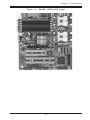
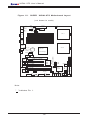
Figure 1-1. SUPER X6DAL-XTG Image
1-3
X6DAL-XTG User's Manual
Figure 1-2.
SUPER
X6DAL-XTG Motherboard Layout
Introduction
J3
COM1
FAN1
J2
JPF
PW1
ATX PWR
Force
PW-On
DS3 8-pin
AlMRset
DS1
PW2
PW J7
Fault J 2 7
SMB PW
DIMM 1B
CN1
USB KB/
0/1
Mouse
(not drawn to scale)
CPU1
DIMM 1A
DIMM 2B
J4
DIMM 2A
DIMM 3B
COM2
DIMM 3A
J5
LAN1
Dn:Line_In
Up:Line_Out Battery
Mic
Audio J 4 3
Enable J 2 6
CDin
CPU2
Tumwater
PW3
(North Bridge)
Note:
" " indicates Pin 1.
1-4
SATA I2C
(*X6DAL-XTG)
J35
JSLED
SATA
LED
USB2/3
DS2
DS5
DS9
DS8
JS0
JBT1
CL CMOS
DS7
H-SATA0
IDE #2
IDE #1
Fan4
Floppy
JPS1
Fan3
H-SATA1
JS1
Printer JWOL Spkr
JL1
Chassis
Intrusion
DS6
Fan2
Hance
Rapids
SATA0
PCI-X (66 MHz)
LAN1 Enable
PCI-X (66 MHz)
LED/KL Marvell SATA
WOR
J F 2 PW
Spkr
Enable
SATA2
SI/O
JPL1
JWD
Watch
Dog
SATA1
BIOS
Marvell
SATA
CTRL
SATA3
Aux in
J41
PCI-E (x16)
LAN
SMB data toPCIEn.
CTRL
J 1 3 J 1 5 SMBCLKtoPCI En.
(33MHz)
PCI
Fan5
Fan6
PCI (33MHz)
JF1
FP Ctlr
J6
Chapter 1: Introduction
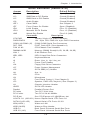
Quick Reference (X6DAL-XTG)
Description
Default Setting
CN1
J13
J15
J26
JBT1
JPF
JPL1
JPS1
JWD
Alarm Reset
Open (Disabled)
SMB Data to PCI Enable
Closed (Enabled)
SMB Clock to PCI Enable
Closed (Enabled)
Audio Enable
Closed (Enabled)
Clear CMOS
See Chapter 2
Force Power On Enable
Open (Disabled)
LAN1 Enable
Pins 1-2 (Enabled)
Marvell's SATA Enable
Pins 1-2 (Enabled)
Watch Dog Enable
Pins 2-3 (NMI)
Connector
Description
ATX PWR
Primary 24-pin ATX PWR Connector
PWR2/PWR 3
12V 8-pin CPU PWR/12V 4-pin PWR Connectors
COM1(J4)/COM2 (J5) COM1/COM2 Serial Port Connectors
DS7, DS8
POST Code LED (*See Appendix A)
FAN #1-#6
CPU/Chassis Fans Headers
DIMM#1A-#3B
Memory (DIMM) Slots#(1A,1B, 2A,2B, 3A,3B)
LAN 1
G-bit Ethernet Port
IDE1, IDE2
IDE1/2 Hard Disk Drive Connectors
J2
Keyboard/Mouse
J6
Down: Line_in, Up: Line_out
J7
Power Fault Header
J24
Floppy Disk Drive Connector
J27
Power System Management
J35
SATA SMB (I2C) Header
J41
Aux. In
J50
CD in
J61
Microphone
JF1
Front Panel Control (* See Chapter 2)
JF2
Speaker, PWR LED, Keylock (*See Chapter 2)
JL1
Chassis Intrusion Header
JSLED
SATA LED Header
Parallel
Parallel (Printer) Port
PCI slots
Two PCI 32-bit slots
PCI-X slots
Two PCI-X 64-bit 66MHz
PCI-E slot
One PCI-Express x16 @4GB/sec slot
H-SATA 0/1 (JS0/JS1) Hance Rapids-Serial ATA Ports 0/1
SATA0-3(J52-J55)
Marvel-Serial ATA Ports 0/1/2/3
WOL(JWOL)
Wake-on-LAN
WOR (JWOR)
Wake-on-Ring Header
USB 0/1
Back Panel Universal Serial Bus Ports
USB 2/3 (J42)
Front Panel Universal Serial Bus Ports
1-5
Introduction
Jumper
X6DAL-XTG User's Manual
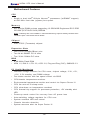
Motherboard Features
CPU
Introduction
• Single or dual Intel ® 604-pin Nocona TM processors (*w/EM64T support)
at 800 MHz front side (system) bus speed.
Memory
• Six 184-pin DIMM sockets supporting 12 GB/24GB Registered ECC DDR
333/266 (PC2700/PC2100) SDRAM
Notes: 1. Memory size is set via BIOS. 2. Interleaved memory; requires memory modules to be
installed in pairs. See Section 2-3 for details.
Chipset
• Intel E7525 (Tumwater) chipset
Expansion Slots
• One PCI-E (x16@4GB/sec) slot
• Two 64-bit 66MHz PCI-X slots
• Two 32-bit 33MHz PCI slots
BIOS
• 8 Mb AMI® Flash ROM
• APM 1.2, DMI 2.1, PCI 2.2, ACPI 2.0, Plug and Play (PnP), SMBIOS 2.3
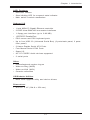
PC Health Monitoring
• Onboard voltage monitors for CPU cores, chipset voltage, 3.3V, +5V,
+12V, 3.3V standby, and DIMM voltage.
• Fan status monitor with fan speed control via BIOS
• CPU/chassis temperature monitors
• Environmental temperature monitor and control via Supero Doctor III
• CPU fan auto-off in sleep mode
• CPU slow-down on temperature overheat
• CPU thermal trip support for processor protection, +5V standby alert
LED
• Power-up mode control for recovery from AC power loss
• Auto-switching voltage regulator for CPU core
• System overheat LED and control
• Chassis intrusion detection
• System resource alert via Super Doctor III
1-6
Chapter 1: Introduction
ACPI Features
• Slow blinking LED for suspend state indicator
• Main switch override mechanism
Onboard I/O
• 1 Intel 82541PI Gigabit Ethernet controller
• 2 EIDE Ultra DMA/100 bus master interfaces
• 1 floppy port interface (up to 2.88 MB)
• 1 EPP/ECP Parallel Port
• PS/2 mouse and PS/2 keyboard ports
• Up to four USB 2.0 (Universal Serial Bus) (2 ports-back panel, 2 portsfront panel)
• 2 Hance Rapids Serial ATA Ports
• Four Marvel Serial ATA2 Ports
• Super I/O
• AC '97 CODEC Audio devices supported
• 2 serial ports
Other
• Internal/external modem ring-on
• Wake-on-Ring (WOR)
• Wake-on-LAN (WOL)
• Console redirection
CD/Diskette Utilities
• BIOS flash upgrade utility and device drivers
Dimensions
• ATX 12" x 10" (304.8 x 254 mm)
1-7
Introduction
• Microsoft OnNow
X6DAL-XTG User's Manual
Introduction
Figure 1-9.
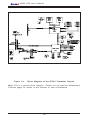
Block Diagram of the E7525 Tumwater Chipset
Note: This is a general block diagram. Please see the previous Motherboard
Features pages for details on the features of each motherboard.
1-8
Chapter 1: Introduction
Chipset Overview
Built upon the functionality and the capability of the E7525 Tumwater
chipset, the X6DAL-XTG motherboard provides the performance and feature set required for dual processor-based servers, with configuration options optimized for communications, presentation, storage, computation or
database applications. The Intel E7525 Tumwater chipset consists of the
following components: the E7525 Tumwater Memory Controller Hub (MCH),
the Hance Rapids I/O Controller Hub (Hance Rapids ICH), the Intel PCI-X
Hub, and PCI-X Hub (PXH).
The E7525 Tumwater MCH supports single or dual Nocona processors with
Front Side Bus speeds of up to 800 MHz(*Note). Its memory controller provides direct connection to two channels of registered DDR333 or DDR266
with a marched system bus address and data bandwidths of up to 2.67 GB/
s (DDR 333) per channel. The E7525 Tumwater also supports the new PCI
Express high speed serial I/O interface for superior I/O bandwidth. These
interfaces support connection of the MCH to a variety of other bridges that
are compliant with the PCI Express Interface Specification, Rev. 1.0a. The
MCH interfaces with the Hance Rapids ICH I/O Controller Hub via HI 1.5 Hub
Interface. The PXH provides connection between a PCI Express interface
and two independent PCI bus interfaces that can be configured for standard PCI 2.3 protocol, as well as the enhanced high-frequency PCI-X protocol. The PXH can be configured to support for 32- or 64-bit PCI devices
running at 33 MHz, 66 MHz, 100 MHz, or 133 MHz.
Hance Rapids ICH System Features
In addition to providing the I/O subsystem with access to the rest of the
system, the Hance Rapids ICH I/O Controller Hub integrates many I/O
functions.
The Hance Rapids ICH I/O Controller Hub integrates: 2-channel Ultra ATA/
100 Bus Master IDE Controller, two Serial ATA (SATA) Host Controllers,
SMBus 2.0 Controller, LPC/Flash BIOS Interface, PCI-X (66MHz)/PCI-Express
(x16 at 4GB/s) Interface, PCI 2.2 Interface and System Management Controller.
(*Notes: The CPU FSB speed is set at 800 MHz by the Manufacturer.
Please do not change the CPU FSB setting.)
1-9
Introduction
1-2
X6DAL-XTG User's Manual
1-3
Special Features
BIOS Recovery
Introduction
The BIOS Recovery function allows you to recover your BIOS image file if
the BIOS flashing procedure fails (see Section 3-3).
Recovery from AC Power Loss
BIOS provides a setting for you to determine how the system will respond
when AC power is lost and then restored to the system. You can choose
for the system to remain powered off (in which case you must hit the
power switch to turn it back on) or for it to automatically return to a poweron state. See the Power Lost Control setting in the Advanced BIOS Setup
section (Peripheral Device Configuration) to change this setting. The default setting is Always On.
1-4
PC Health Monitoring
This section describes the PC health monitoring features of the SUPER
X6DAL-XTG. All have an onboard System Hardware Monitor chip that supports PC health monitoring.
Onboard Voltage Monitors for the CPU Cores, Chipset
Voltage, +3.3V, +5V, +12V, -12v, +3.3V Standby, +2.5V (for
DRAM), +1.5V Standby, +1.2V
An onboard voltage monitor will scan these voltages continuously. Once a
voltage becomes unstable, a warning is given or an error message is sent
to the screen (only when SuperDoctorIII is installed). Users can adjust the
voltage thresholds in SuperDoctorIII.
Fan Status Monitor with Firmware/Software On/Off Control
The PC health monitor can check the RPM of the cooling fans. The onboard
4-pin CPU and chassis fans are controlled by the power management functions.
1-10
Chapter 1: Introduction
The thermal control sensor monitors the CPU temperature in real time and
will increase the speed of the thermal control fan whenever the CPU temperature exceeds a user-defined threshold. The overheat circuitry runs
independently from the CPU. It can continue to monitor for overheat conditions even when the CPU is in sleep mode. Once it detects that the CPU
temperature is too high, it will automatically increase the speed of the thermal control fan to prevent any overheat damage to the CPU. The onboard
chassis thermal circuitry can monitor the overall system temperature and
alert users when the chassis temperature is too high.
TM2/CPU VRM Overheat
When the CPU reaches 70 0 C and above (Overheat), the CPU will slow down
and CPU Voltage will decrease to reduce CPU power consumption and
VRM heat dissipation.
When CPU temperature reaches 78 0 C and above (*Default), the system will
go into the throttling state. The Overheat LED and Alarm Buzzer will be
turned on. The CPU performance will drop 50%. When this happens, you
can go to the Health Monitor Setting in the BIOS to reset CPU Overheat
Temperature.
CPU Overheat LED and Control
This feature is available when the user enables the CPU overheat warning
function in the BIOS. This allows the user to define an overheat temperature. When this temperature is exceeded, the warning LED is triggered and
the fans will speed up.
Auto-Switching Voltage Regulator for the CPU Core
The auto-switching voltage regulator for the CPU core can support up to
120W current and auto-sense voltage IDs ranging from .8375V to 1.6V.
This will allow the regulator to run cooler and thus make the system more
stable.
1-11
Introduction
Environmental Temperature Control via Supero DoctorIII
X6DAL-XTG User's Manual
1-5
ACPI Features
Introduction
ACPI stands for Advanced Configuration and Power Interface. The ACPI
specification defines a flexible and abstract hardware interface that provides a standard way to integrate power management features throughout
a PC system, including its hardware, operating system and application software. This enables the system to automatically turn on and off peripherals
such as CD-ROMs, network cards, hard disk drives and printers. This also
includes consumer devices connected to the PC such as VCRs, TVs, telephones and stereos.
In addition to enabling operating system-directed power management, ACPI
provides a generic system event mechanism for Plug and Play and an operating system-independent interface for configuration control. ACPI leverages the Plug and Play BIOS data structures while providing a processor
architecture-independent implementation that is compatible with Windows
2000, Windows NT 5.0, Windows XP and Windows 2003.
Microsoft OnNow
The OnNow design initiative is a comprehensive, system-wide approach to
system and device power control. OnNow is a term for a PC that is always
on but appears to be off and responds immediately to user or other requests.
Slow Blinking LED for Suspend-State Indicator
When the CPU goes into a suspend state, the chassis power LED will start
blinking to indicate that the CPU is in suspend mode. When the user presses
any key, the CPU will wake-up and the LED will automatically stop blinking
and remain on.
Main Switch Override Mechanism
When an ATX power supply is used, the power button can function as a
system suspend button to make the system enter a SoftOff state. The
monitor will be suspended and the hard drive will spin down. Depressing
the power button again will cause the whole system to wake-up. During
the SoftOff state, the ATX power supply provides power to keep the required circuitry in the system alive. In case the system malfunctions and
1-12
Chapter 1: Introduction
External Modem Ring-On (WOR)
Wake-up events can be triggered by a device such as the external modem
ringing when the system is in the SoftOff state. Note that external modem
ring-on can only be used with an ATX 2.01 (or above) compliant power
supply.
1-6
Power Supply
As with all computer products, a stable power source is necessary for
proper and reliable operation. It is even more important for processors that
have high CPU clock rates.
The SUPER X6DAL-XTG accommodates ATX power supplies. Although
most power supplies generally meet the specifications required by the CPU,
some are inadequate. You should use one that will supply at least 400W of
power. In addition, a +12V, 8-pin CPU power supply and a +12V, 4-pin
Aux. power supply are also required for high-load configurations. Also
your power supply must supply 1.5A for the Ethernet ports.
NOTE: In addition to the 24-pin main power, a 12V 8-pin power connector (PW2) is required to support Intel Xeon CPUs, and a 12V 4pin power connector (Aux. PWR) is also required for system power
consumption. Failure to provide this extra power will result in
instability of the CPU after only a few minutes of operation. See
Section 2-5 for details on connecting the power supply.
It is strongly recommended that you use a high quality power supply that
meets ATX power supply Specification 2.02 or above. It must also be SSI
compliant (info at http://www.ssiforum.org/). Additionally, in areas where
noisy power transmission is present, you may choose to install a line filter
to shield the computer from noise. It is recommended that you also install a
power surge protector to help avoid problems caused by power surges.
1-13
Introduction
you want to turn off the power, just depress and hold the power button for
4 seconds. This option can be set in the Power section of the BIOS Setup
routine.
X6DAL-XTG User's Manual
1-7
Super I/O
Introduction
The disk drive adapter functions of the Super I/O chip include a floppy disk
drive controller that is compatible with industry standard 82077/765, a data
separator, write pre-compensation circuitry, decode logic, data rate selection, a clock generator, drive interface control logic and interrupt and DMA
logic. The wide range of functions integrated onto the Super I/O greatly
reduces the number of components required for interfacing with floppy disk
drives. The Super I/O supports 360 K, 720 K, 1.2 M, 1.44 M or 2.88 M disk
drives and data transfer rates of 250 Kb/s, 500 Kb/s or 1 Mb/s. It also
provides two high-speed, 16550 compatible serial communication ports
(UARTs), one of which supports serial infrared communication. Each UART
includes a 16-byte send/receive FIFO, a programmable baud rate generator,
complete modem control capability and a processor interrupt system. Both
UARTs provide legacy speed with baud rate of up to 115.2 Kbps as well as
an advanced speed with baud rates of 250 K, 500 K, or 1 Mb/s, which
support higher speed modems.
The Super I/O supports one PC-compatible printer port (SPP), Bi-directional
Printer Port (BPP) , Enhanced Parallel Port (EPP) or Extended Capabilities
Port (ECP).
The Super I/O provides functions that comply with ACPI (Advanced Configuration and Power Interface), which includes support of legacy and ACPI
power management through an SMI or SCI function pin. It also features
auto power management to reduce power consumption.
The IRQs, DMAs and I/O space resources of the Super I/O can flexibly
adjust to meet ISA PnP requirements, which support ACPI and APM (Advanced Power Management).
1-14
Chapter 2: Installation
Chapter 2
Installation
2-1
Static-Sensitive Devices
Electric-Static-Discharge (ESD) can damage electronic components. To prevent damage to your system board, it is important to handle it very carefully.
The following measures are generally sufficient to protect your equipment
from ESD.
Precautions
• Use a grounded wrist strap designed to prevent static discharge.
• Touch a grounded metal object before removing the board from the antistatic bag.
• Handle the board by its edges only; do not touch its components, peripheral chips, memory modules or gold contacts.
• When handling chips or modules, avoid touching their pins.
• Put the motherboard and peripherals back into their antistatic bags when
not in use.
• For grounding purposes, make sure your computer chassis provides excellent conductivity between the power supply, the case, the mounting
fasteners and the motherboard.
• Use only the correct type of onboard CMOS battery as specified by the
manufacturer. Do not install the onboard battery upside down to avoid
possible explosion.
Unpacking
The motherboard is shipped in antistatic packaging to avoid static damage.
When unpacking the board, make sure the person handling it is static protected.
2-1
X6DAL-XTG User's Manual
2-2
PGA Processor and Heatsink Installation
!
When handling the processor package, avoid placing direct
pressure on the label area of the fan. Also, do not place the
motherboard on a conductive surface, which can damage the
BIOS battery and prevent the system from booting up.
IMPORTANT: Always connect the power cord last and always remove it
before adding, removing or changing any hardware components. Make
sure that you install the processor into the CPU socket before you install
the CPU heatsink. Note that for the X6DAL-XTG you need to install the Xeon
mounting plate under the board.
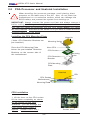
Installing the CPU Mounting Plate
Heatsink
(*Note: CPU Retention Brackets are
pre-installed.)
Mounting Holes
Xeon CPU
Place the CPU Mounting Plate
below the pre-installed Retention
Brackets on the reverse side of
the motherboard.
CPU Socket
Mounting
Holes
CPU Retention
Bracket
CPU Mounting
Plate
Heatsink
CPU
CPU Socket
Motherboard
Mounting Plate
CPU Installation
1. Lift the lever on the CPU socket:
lift the lever completely as shown
on the picture on the right;
otherwise, you will damage the
CPU socket when power is
applied. (Install CPU1 first.)
2-2
Socket lever
Chapter 2: Installation
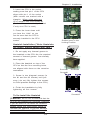
2. Insert the CPU in the socket,
making sure that pin 1 of the CPU
aligns with pin 1 of the socket
(both corners are marked with a
triangle). When using only one
CPU, install it into CPU socket #1
(Socket #2 is automatically disabled
if only one CPU is used).
3. Press the lever down until
you hear the *click* so you
can be sure that the CPU is
securely installed in the CPU
socket.
Pin1
Socket lever in the
locking Position
Heatsink Installation (*Note: Heatsinks
are heavy; please handle with care.)
1. Do not apply any thermal grease to
the heatsink or the CPU die; the required
amount of thermal grease has already
been applied.
2. Place the heatsink on top of the
CPU so that the four mounting holes
are aligned with those on the retention
mechanism.
CEK Heatsink
Screw#1
Screw#2
Screw#1
3. Screw in two diagonal screws (ie
the #1 and the #2 screws) until just
snug (-do not fully tighten the screws
to avoid possible damage to the CPU.)
4. Finish the installation by fully
tightening all four screws.
Screw#2
To Un-install the Heatsink
(Caution!
We do not recommend that the
CPU or the heatsink be removed. However,
if you do need to un-install the heatsink,
please follow the instructions below to
uninstall the heatsink to prevent damage
done to the CPU or the CPU socket. )
2-3
X6DAL-XTG User's Manual
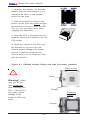
1. Unscrew and remove the heatsink
screws from the motherboard in the
sequence as show in the second
picture on the right.
2. Hold the heatsink as show in the
picture on the right and gently wriggle
the heatsink to loosen it from the CPU.
(Do not use excessive force when
wriggling the heatsink!!)
3. Once the CPU is loosened from the
heatsink, remove the heatsink from the
CPU socket.
4. Clean the surface of the CPU and
the heatsink to get rid of the old
thermal grease. Reapply the proper
amount of thermal grease on the
surface before you re-install the CPU
and the heatsink.
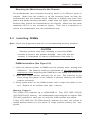
Figure 2-1. PGA604 Socket: Empty and with Processor Installed
Empty socket
!
Lever
Warning!
Make
sure you lift the
lever completely
when installing the
CPU. If the lever is
only partly raised,
damage to the
socket or CPU may
result.
Triangle
Processor
(installed)
Triangle
2-4
Chapter 2: Installation
Mounting the Motherboard in the Chassis
All motherboards have standard mounting holes to fit different types of
chassis. Make sure the location of all the mounting holes for both the
motherboard and the chassis match. Although a chassis may have both
plastic and metal mounting fasteners, metal ones are highly recommended
because they ground the motherboard to the chassis. Make sure the metal
standoffs click in or are screwed in tightly. Then use a screwdriver to
secure the motherboard onto the motherboard tray.
2-3
Installing DIMMs
Note: Check the Supermicro web site for recommended memory modules.
CAUTION
Exercise extreme care when installing or removing DIMM
modules to prevent any possible damage. Also note that the
memory is interleaved to improve performance (see step 1).
DIMM Installation (See Figure 2-2)
1. Insert the desired number of DIMMs into the memory slots, starting with
DIMM #1A. The memory scheme is interleaved so you must install two
modules at a time, beginning with DIMM #1A, then DIMM #1B, and so on.
2. Insert each DIMM module vertically into its slot. Pay attention to the
notch along the bottom of the module to prevent inserting the DIMM
module incorrectly.
3. Gently press down on the DIMM module until it snaps into place in the
slot. Repeat for all modules (see step 1 above).
Memory Support
The X6DAL-XTG supports up to 12GB/24GB of Reg. ECC DDR 333/266
(PC2700/PC2100) memory. All motherboards were designed to support 4GB
(PC2100) modules in each slot, but only the 2GB modules are tested.
If Reg. ECC DDR 333 (PC2700) memory modules are used, four pieces of
double banked memory or six pieces of single banked memory are supported.
2-5
X6DAL-XTG User's Manual
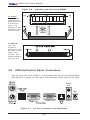
Figure 2-2.
Installing and Removing DIMMs
To Install:
Insert module
vertically and
press down until
it snaps into
place. Pay
attention to the
alignment notch
at the bottom.
To Remove:
Use your
thumbs to
gently push near
the edge of both
ends of the
module. This
should release it
from the slot.
2-4
I/OPorts/Control Panel Connectors
The I/O ports are color coded in conformance with the PC 99 specification.
See Figure 2-3 below for the colors and locations of the various I/O ports.
Audio
Out
Mic
COM2 Port
Figure 2-3.
Line-In
I/O Port Locations and Definitions
2-6
Chapter 2: Installation
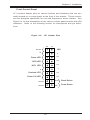
Front Control Panel
JF1 contains header pins for various buttons and indicators that are normally located on a control panel at the front of the chassis. These connectors are designed specifically for use with Supermicro server chassis. See
Figure 2-4 for the descriptions of the various control panel buttons and LED
indicators. Refer to the following section for descriptions and pin definitions.
Figure 2-4.
JF1 Header Pins
20
19
Ground
NMI
X
X
Power LED
Vcc
HDD LED
Vcc
NIC1 LED
Vcc
x
x
Overheat LED
Vcc
Power Fail LED
Vcc
Ground
Ground
2
2-7
1
Reset
Reset Button
Pwr
Power Button
X6DAL-XTG User's Manual
2-5
Connecting Cables
ATX Power Supply 24-pin Connector
Pin Definitions (PW1)
Pin Number Definition Pin Number Definition
1
+3.3V
13
+3.3V
2
+3.3V
14
-12V
3
COM
15
COM
4
+5V
16
PS_ON#
5
COM
17
COM
6
+5V
18
COM
7
COM
19
COM
8
PWR_OK
20
Res(NC)
9
5VSB
21
+5V
10
+12V
22
+5V
11
+12V
23
+5V
12
+3.3V
24
COM
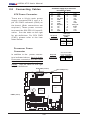
ATX Power Connector
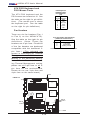
There are a 24-pin main power
supply connector(PW1) and a 4pin 12V PWR connector (PW3) on
the board. (Both connections are
required.) These power connectors meet the SSI EPS 12V specification. See the table on the right
for pin definitions. For CPU PWR
(PW2), please refer to the item
listed below.
+12V 4-pin
Connector
(PW3)
Required
Connection
Pins # Definition
1 & 2 Ground
3&4
+12 V
Processor Power
Connector
In addition to the power connectors indicated above, the 12v 8-pin
Processor connector at PW2 must
also be connected to your power
supply. See the table on the right
for pin definitions.
Connection
J3
COM1
FAN1
CPU PWR(8-Pin)
JPF
ATX PWR P W 1
Force
PW-On
DS3 8-pin
DS1AlMRset
PW2
PW J7
Fault J 2 7
SMB PW
DIMM 1B
CN1
USB KB/
0/1
Mouse
ATX PWR (24-Pin)
J2
CPU 8-Pin PWR
Connector (PW2)
Pins Definition
1 thru 4 Ground
5 thru 8
+12v
Required
CPU1
DIMM 1A
DIMM 2B
J4
DIMM 2A
DIMM 3B
COM2
DIMM 3A
J5
LAN1
Dn:Line_In
Up:Line_Out Battery
PW3
(North Bridge)
Fan3
USB2/3
JWD
2-8
DS8
JS0
DS7
H-SATA0
IDE #2
IDE #1
Fan4
JBT1
CL CMOS
SATA1
Floppy
JPS1
DS2
DS5
DS9
Hance
Rapids
SATA0
Printer JWOL Spkr
JL1
Chassis
Intrusion
Watch
Dog
H-SATA1
JS1
PCI-X (66 MHz)
LAN1 Enable
PCI-X (66 MHz)
LED/KL Marvell SATA
WOR
J F 2 PW
Spkr
Enable
SATA3
BIOS
JPL1
Marvell
SATA
CTRL
DS6
Fan2
SATA I2C
(*X6DAL-XTG)
J35
JSLED
SATA
LED
Aux in
J41
PCI-E (x16)
SMB data toPCIEn.
J 1 3 J 1 5 SMBCLKtoPCI En.
(33MHz)
PCI
Fan5
Fan6
PCI (33MHz)
LAN
CTRL
SI/O
PWR3 (4-Pin)
Audio J 4 3
Enable J 2 6
CDin
JF1
FP Ctlr
Mic
CPU2
Tumwater
SATA2
J6
Chapter 2: Installation
NMI Button
NMI Button Pin
Definitions (JF1)
Pin
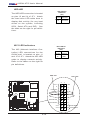
Number
Definition
19
Control
20
Ground
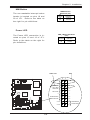
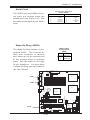
The non-maskable interrupt button
header is located on pins 19 and
20 of JF1. Refer to the table on
the right for pin definitions.
Power LED
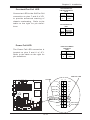
PWR_LED Pin Definitions
(JF1)
Pin
Number
Definition
15
Vcc
16
Control
The Power LED connection is located on pins 15 and 16 of JF1.
Refer to the table on the right for
pin definitions.
NMI
J3
COM1
20
FAN1
J2
JPF
ATX PWR P W 1
Force
PW-On
DS3 8-pin
DS1AlMRset
PW2
PW J7
Fault J 2 7
SMB PW
DIMM 1B
CN1
USB KB/
0/1
Mouse
PWR LED
NMI
X
CPU1
X
DIMM 1A
DIMM 2B
J4
DIMM 2A
Power LED
Vcc
HDD LED
Vcc
NIC1 LED
Vcc
DIMM 3B
COM2
DIMM 3A
J5
LAN1
Dn:Line_In
Up:Line_Out Battery
Audio J 4 3
Enable J 2 6
CDin
CPU2
Tumwater
Overheat LED
PW3
JWD
Power Fail LED
JF1
FP Ctlr
DS2
DS5
DS8
JS0
SATA1
SATA0
Vcc
Ground
DS9
H-SATA1
JS1
SI/O
USB2/3
Watch
PCI-X (66 MHz)
Hance
Dog
LAN1 Enable
Rapids
PCI-X (66 MHz)
LED/KL Marvell SATA JPS1
WOR
J F 2 PW
Spkr
JBT1
Enable
CL CMOS
JL1
Chassis
Printer JWOL Spkr Floppy
Intrusion
SATA3
BIOS
JPL1
Marvell
SATA
CTRL
Vcc
DS6
Fan2
Fan3
DS7
H-SATA0
IDE #2
IDE #1
LAN
CTRL
SATA I2C
(*X6DAL-XTG)
J35
JSLED
SATA
LED
Aux in
J41
PCI-E (x16)
SMB data toPCIEn.
J 1 3 J 1 5 SMBCLKtoPCI En.
PCI (33MHz)
Fan5
Fan6
PCI (33MHz)
x
x
(North Bridge)
Ground
2
Fan4
Mic
SATA2
J6
19
Ground
2-9
1
Reset
Reset Button
Pwr
Power Button
X6DAL-XTG User's Manual
HDD LED
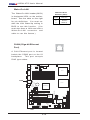
The HDD LED connection is located
on pins 13 and 14 of JF1. Attach
the hard drive LED cable here to
display disk activity (for any hard
drives on the system, including
SCSI, Serial ATA and IDE). See
the table on the right for pin definitions.
HDD LED Pin
Definitions
(JF1)
Pin
Number Definition
13
Vcc
14
HD Active
NIC1 LED Indicators
The NIC (Network Interface Controller) LED connections for the
GLAN port1 is located on pins 11
and 12 of JF1. Attach the NIC LED
cable to display network activity.
Refer to the tables on the right for
pin definitions.
NIC1 LED Pin
Definitions
(JF1)
Pin
Number Definition
11
Vcc
12
GND
J3
COM1
NIC1 LED
FAN1
J2
JPF
PW1
ATX PWR
Force
PW-On
DS3 8-pin
DS1AlMRset
PW2
PW J7
Fault J 2 7
SMB PW
DIMM 1B
CN1
USB KB/
0/1
Mouse
HDD LED
20
19
Ground
CPU1
NMI
DIMM 1A
X
DIMM 2B
J4
X
DIMM 2A
DIMM 3B
COM2
DIMM 3A
J5
LAN1
Dn:Line_In
Up:Line_Out Battery
Audio J 4 3
Enable J 2 6
CDin
(North Bridge)
PW3
Vcc
x
Overheat LED
DS2
DS5
JF1
FP Ctlr
Fan3
USB2/3
JWD
Vcc
Power Fail LED
Vcc
DS8
JS0
SATA1
SATA0
H-SATA1
JS1
DS7
H-SATA0
IDE #2
IDE #1
Fan4
DS9
Watch
PCI-X (66 MHz)
Hance
Dog
LAN1 Enable
Rapids
PCI-X (66 MHz)
LED/KL Marvell SATA JPS1
WOR
J F 2 PW
Spkr
JBT1
Enable
CL CMOS
JL1
Chassis
Printer JWOL Spkr Floppy
Intrusion
SATA3
SI/O
Marvell
SATA
CTRL
DS6
Fan2
SATA I2C
(*X6DAL-XTG)
J35
JSLED
SATA
LED
Aux in
J41
PCI-E (x16)
SMB data toPCIEn.
J 1 3 J 1 5 SMBCLKtoPCI En.
PCI (33MHz)
Fan5
Fan6
PCI (33MHz)
BIOS
Vcc
x
LAN
CTRL
JPL1
HDD LED
NIC1 LED
CPU2
Tumwater
SATA2
J6
Mic
Power LED
Vcc
Ground
Reset
Reset Button
Ground
Pwr
Power Button
2
2-10
1
Chapter 2: Installation
Overheat/Fan Fail
LED Pin Definitions
(JF1)
Overheat/Fan Fail LED
Connect an LED to the OH/Fan Fail
connection on pins 7 and 8 of JF1
to provide advanced warning of
chassis overheating. Refer to the
table on the right for pin definitions.
Pin
Number Definition
7
Vcc
8
GND
Overheat/Fan Fail
LED
State
Message
Overheat
Fan Fail
Solid
Blink
Power Fail LED
Power Fail LED Pin
Definitions
(JF1)
The Power Fail LED connection is
located on pins 5 and 6 of JF1.
Refer to the table on the right for
pin definitions.
Pin
Number Definition
5
Vcc
6
GND
COM1
OH LED
FAN1
J2
J3
CN1
USB KB/
0/1
Mouse
PWR Fail LED
JPF
ATX PWR P W 1
Force
PW-On
DS3 8-pin
DS1AlMRset
PW2
PW J7
Fault J 2 7
SMB PW
DIMM 1B
19
Ground
NMI
X
CPU1
X
DIMM 1A
DIMM 2B
J4
DIMM 2A
Power LED
Vcc
HDD LED
Vcc
NIC1 LED
Vcc
DIMM 3B
COM2
DIMM 3A
J5
LAN1
Dn:Line_In
Up:Line_Out Battery
Audio J 4 3
Enable J 2 6
CDin
CPU2
Tumwater
PW3
SATA I2C
(*X6DAL-XTG)
J35
JSLED
SATA
LED
DS6
Fan2
DS2
DS5
DS8
JS0
DS7
H-SATA0
IDE #2
IDE #1
SATA1
SATA0
Vcc
Ground
DS9
Watch
PCI-X (66 MHz)
Hance
Dog
LAN1 Enable
Rapids
PCI-X (66 MHz)
LED/KL Marvell SATA JPS1
WOR
J F 2 PW
Spkr
JBT1
Enable
CL CMOS
JL1
Chassis
Printer JWOL Spkr Floppy
Intrusion
Vcc
Power Fail LED
JF1
FP Ctlr
USB2/3
H-SATA1
JS1
SI/O
Overheat LED
Fan3
JWD
SATA3
BIOS
JPL1
Marvell
SATA
CTRL
x
x
(North Bridge)
Aux in
J41
PCI-E (x16)
LAN
SMB data toPCIEn.
CTRL
J 1 3 J 1 5 SMBCLKtoPCI En.
PCI (33MHz)
Fan5
Fan6
PCI (33MHz)
Ground
2
Fan4
Mic
SATA2
J6
20
2-11
1
Reset
Reset Button
Pwr
Power Button
X6DAL-XTG User's Manual
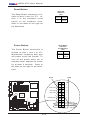
Reset Button
Reset Pin
Definitions
(JF1)
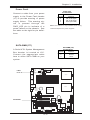
The Reset Button connection is located on pins 3 and 4 of JF1. Attach it to the hardware reset
switch on the computer case.
Refer to the table on the right for
pin definitions.
Pin
Number Definition
3
Reset
4
Ground
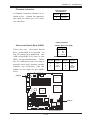
Power Button
Power Button
Connector
Pin Definitions
(JF1)
The Power Button connection is
located on pins 1 and 2 of JF1.
Momentarily contacting both pins
will power on/off the system. To
turn off the power when set to
suspend mode, depress the button
for at least 4 seconds. Refer to
the table on the right for pin definitions.
Pin
Number Definition
1
PW_ON
Ground
2
COM1
20
19
Ground
NMI
X
CPU1
X
DIMM 1A
DIMM 2B
J4
DIMM 2A
Power LED
Vcc
HDD LED
Vcc
NIC1 LED
Vcc
DIMM 3B
COM2
DIMM 3A
J5
LAN1
Dn:Line_In
Up:Line_Out Battery
Audio J 4 3
Enable J 2 6
CDin
CPU2
Tumwater
PW3
SATA I2C
(*X6DAL-XTG)
J35
JSLED
SATA
LED
DS6
Fan2
USB2/3
DS2
DS5
DS8
JS0
Vcc
Ground
DS7
H-SATA0
IDE #2
IDE #1
Fan4
SATA1
SATA0
Vcc
Power Fail LED
DS9
Watch
PCI-X (66 MHz)
Hance
Dog
LAN1 Enable
Rapids
PCI-X (66 MHz)
LED/KL Marvell SATA JPS1
WOR
J F 2 PW
Spkr
JBT1
Enable
CL CMOS
JL1
Chassis
Printer JWOL Spkr Floppy
Intrusion
H-SATA1
JS1
SI/O
Overheat LED
Fan3
JWD
SATA3
BIOS
JPL1
Marvell
SATA
CTRL
x
x
(North Bridge)
Aux in
J41
PCI-E (x16)
LAN
SMB data toPCIEn.
CTRL
J 1 3 J 1 5 SMBCLKtoPCI En.
PCI (33MHz)
Fan5
Fan6
PCI (33MHz)
JF1
FP Ctlr
Mic
SATA2
J6
PWR
FAN1
J2
J3
CN1
USB KB/
0/1
Mouse
Reset
JPF
PW1
ATX PWR
Force
PW-On
DS3 8-pin
DS1AlMRset
PW2
PW J7
Fault J 2 7
SMB PW
DIMM 1B
Ground
2
2-12
1
Reset
Reset Button
Pwr
Power Button
Chapter 2: Installation
Chassis Intrusion
Chassis Intrusion
Pin Definitions
Pin
Definition
Number
Intrusion Input
1
Ground
2
A Chassis Intrusion header is located at JL1. Attach the appropriate cable to inform you of a chassis intrusion.
USB Pin Definition
Universal Serial Bus (USB)
USB O/1 (Back Panel USB)
USB 0/1
J3
COM1
USB 2/3 (Front Panel USB)
Pin
Number
1
3
5
7
Pin
Number
2
4
6
8
10
Definition
+5V
POPO+
Ground
Definition
+5V
POPO+
Ground
Ground
FAN1
J2
Pin# Definition
1
+5V
2
P03
P0+
4 Ground
JPF
PW1
ATX PWR
Force
PW-On
DS3 8-pin
DS1AlMRset
PW2
PW J7
Fault J 2 7
SMB PW
DIMM 1B
CN1
USB KB/
0/1
Mouse
There are two Universal Serial
Bus ports(USB 0/1) located on
the I/O panel and additional two
USB ports(USB 2/3) next to the
IDE2 on the motherboard. These
two FP USB ports can be used to
provide front side chassis access
(cables not included). See the
tables on the right for pin definitions.
CPU1
DIMM 1A
DIMM 2B
J4
DIMM 2A
DIMM 3B
COM2
DIMM 3A
J5
LAN1
Dn:Line_In
Up:Line_Out Battery
Audio J 4 3
Enable J 2 6
CDin
PW3
(North Bridge)
SATA I2C
(*X6DAL-XTG)
J35
JSLED
SATA
LED
DS9
DS8
JBT1
CL CMOS
JS0
JPS1
DS2
DS5
DS7
H-SATA0
IDE #2
IDE #1
Fan4
Floppy
JL1
Chassis
Intrusion
USB2/3
Hance
Rapids
SATA1
Printer JWOL Spkr
JWD
Watch
Dog
SATA0
SI/O
PCI-X (66 MHz)
LAN1 Enable
PCI-X (66 MHz)
LED/KL Marvell SATA
WOR
J F 2 PW
Spkr
Enable
DS6
Fan2
Fan3
H-SATA1
JS1
BIOS
JPL1
Marvell
SATA
CTRL
SATA3
Aux in
J41
PCI-E (x16)
SMB data toPCIEn.
J 1 3 J 1 5 SMBCLKtoPCI En.
PCI (33MHz)
Fan5
Fan6
PCI (33MHz)
LAN
CTRL
Chassis Intrusion
2-13
JF1
FP Ctlr
Mic
CPU2
Tumwater
SATA2
J6
USB 2/3
X6DAL-XTG User's Manual
ATX PS/2 Keyboard and
PS/2 Mouse Ports
PS/2 Keyboard
and Mouse Port
Pin Definitions
(J2)
The ATX PS/2 keyboard and the
PS/2 mouse are located at J2. See
the table on the right for pin definitions. (The mouse port is above
the keyboard port. See the table
on the right for pin definitions.)
Pin
Number Definition
1
Data
2
NC
3
Ground
4
VCC
5
Clock
6
NC
Fan Headers
There are six fan headers (Fan 1
to Fan 6) on the X6DAL-XTG).
See the table on the right for pin
definitions. (*Note: These fan
headers are 4-pin fans. Pins#1-#3
of the fan headers are backward
compatible with the traditional 3pin fans.) (*The onboard fan
speed is controlled by Thermal
Management via BIOS--Hardware
Monitor in the Advanced Setting .
Note: Default: Disabled, When using Thermal Management setting,
please use all 3-pin fans or all 4pin fans on the motherboard.
Please do not use 3-pin fans and
4-pin fans on the same board.)
4-pin Fan Header Pin Definitions
(CPU and Chassis Fans )
Pin#
1
2
3
4
Definition
Ground (black)
+12V (red)
Tachometer
PWM_Control
Caution: These fan headers use DC power.
J2
J3
COM1
JPF
PW1
ATX PWR
Force
PW-On
DS3 8-pin
DS1AlMRset
PW2
PW J7
Fault J 2 7
SMB PW
DIMM 1B
CN1
USB KB/
0/1
Mouse
KB/Mouse
FAN1
Fan 1
CPU1
DIMM 1A
DIMM 2B
J4
DIMM 2A
DIMM 3B
COM2
DIMM 3A
J5
LAN1
Dn:Line_In
Up:Line_Out Battery
Audio J 4 3
Enable J 2 6
CDin
CPU2
Tumwater
PW3
(North Bridge)
SATA I2C
(*X6DAL-XTG)
J35
JSLED
SATA
LED
JPS1
DS8
JBT1
CL CMOS
2-14
Fan 2
Fan 3
DS9
JS0
JL1
Chassis
Intrusion
DS2
DS5
DS7
H-SATA0
IDE #2
IDE #1
Fan4
Floppy
USB2/3
Hance
Rapids
SATA1
Printer JWOL Spkr
JWD
Watch
Dog
SATA0
PCI-X (66 MHz)
LAN1 Enable
PCI-X (66 MHz)
LED/KL Marvell SATA
WOR
J F 2 PW
Spkr
Enable
DS6
Fan2
Fan3
H-SATA1
JS1
BIOS
JPL1
Marvell
SATA
CTRL
SATA3
Fan 6
SI/O
Fan 5
SATA2
Aux in
J41
PCI-E (x16)
SMB data toPCIEn.
J 1 3 J 1 5 SMBCLKtoPCI En.
PCI (33MHz)
Fan5
Fan6
PCI (33MHz)
LAN
CTRL
JF1
FP Ctlr
J6
Mic
Fan4
Chapter 2: Installation
Serial Ports
Serial Port Pin Definitions
(COM1, COM2)
The COM1 (J4) and COM2 (J5) serial ports are located under the
parallel port (see Figure 2-3). See
the table on the right for pin definitions.
Pin Number
1
2
3
4
5
Definition Pin Number
6
DCD
7
DSR
8
Serial In
9
RTS
10
Serial Out
Definition
CTS
DTR
RI
G round
NC
Wake-On-Ring (JWOR)
Wake-on-Ring
Pin Definitions
(WOR)
J3
COM1
COM1
FAN1
J2
Pin
Number Definition
1
Ground
2
Wake-up
JPF
ATX PWR P W 1
Force
PW-On
DS3 8-pin
AlMRset
DS1
PW2
PW J7
Fault J 2 7
SMB PW
DIMM 1B
CN1
USB KB/
0/1
Mouse
The Wake-On-Ring header is designated WOR. This function allows your computer to receive
and "wake-up" by an incoming call
to the modem when in suspend
state. See the table on the right
for pin definitions. You must have
a Wake-On-Ring card and cable to
use this feature.
CPU1
DIMM 1A
DIMM 2B
J4
DIMM 2A
COM2
DIMM 3B
COM2
DIMM 3A
J5
LAN1
Dn:Line_In
Up:Line_Out Battery
Mic
Audio J 4 3
Enable J 2 6
CDin
CPU2
Tumwater
PW3
(North Bridge)
2-15
SATA I2C
(*X6DAL-XTG)
J35
JSLED
SATA
LED
DS2
DS5
DS8
JS0
JBT1
CL CMOS
DS7
H-SATA0
IDE #2
IDE #1
Fan4
JPS1
H-SATA1
JS1
Floppy
JL1
Chassis
Intrusion
USB2/3
DS9
SATA1
Printer JWOL Spkr
DS6
Fan2
Fan3
Hance
Rapids
SATA0
SI/O
WOR
PCI-X (66 MHz)
LAN1 Enable
PCI-X (66 MHz)
LED/KL Marvell SATA
WOR
J F 2 PW
Spkr
Enable
JWD
Watch
Dog
SATA3
BIOS
JPL1
Marvell
SATA
CTRL
SATA2
Aux in
J41
PCI-E (x16)
SMB data toPCIEn.
J 1 3 J 1 5 SMBCLKtoPCI En.
(33MHz)
PCI
Fan5
Fan6
PCI (33MHz)
LAN
CTRL
JF1
FP Ctlr
J6
X6DAL-XTG User's Manual
Wake-On-LAN
Wake-On-LAN Pin
Definitions (JWOL)
The Wake-On-LAN header(JWOL)
is designated WOL on the motherboard. See the table on the right
for pin definitions. You must enable the LAN Wake-Up setting in
BIOS to use this function. (You
must also have a LAN card with a
Wake-On-LAN connector and
cable to use this feature.)
Pin
Number
1
2
3
Definition
+5V Standby
Ground
Wake-up
GLAN (Giga-bit Ethernet
Port)
J3
COM1
FAN1
J2
JPF
PW1
ATX PWR
Force
PW-On
DS3 8-pin
AlMRset
DS1
PW2
PW J7
Fault J 2 7
SMB PW
DIMM 1B
CN1
USB KB/
0/1
Mouse
A G-bit Ethernet port is located
beside the COM2 port on the IO
backplane. This port accepts
RJ45 type cables.
CPU1
DIMM 1A
DIMM 2B
J4
DIMM 2A
DIMM 3B
COM2
DIMM 3A
J5
LAN1
Dn:Line_In
Up:Line_Out Battery
Audio J 4 3
Enable J 2 6
CDin
CPU2
Tumwater
PW3
(North Bridge)
USB2/3
DS8
JS0
H-SATA1
JS1
SATA1
SATA3
2-16
DS7
H-SATA0
IDE #2
IDE #1
Fan4
DS9
Watch
PCI-X (66 MHz)
Hance
Dog
LAN1 Enable
Rapids
PCI-X (66 MHz)
PW
LED/KL
WOR
Marvell
SATA
JPS1
J F 2 Spkr
JBT1
Enable
CL CMOS
JL1
Chassis
Printer JWOL Spkr Floppy
Intrusion
WOL
DS2
DS5
JF1
FP Ctlr
Fan3
JWD
SATA0
BIOS
JPL1
Marvell
SATA
CTRL
DS6
Fan2
SATA I2C
(*X6DAL-XTG)
J35
JSLED
SATA
LED
Aux in
J41
PCI-E (x16)
SMB data toPCIEn.
J 1 3 J 1 5 SMBCLKtoPCI En.
(33MHz)
PCI
Fan5
Fan6
PCI (33MHz)
LAN
CTRL
SATA2
J6
Mic
SI/O
GLAN
Chapter 2: Installation
Power Fault
Power Fault
Pin Definitions
Connect a cable from your power
supply to the Power Fault header
(J7) to provide warning of power
supply failure. This warning signal is passed through the
PWR_LED pin to indicate of a
power failure on the chassis. See
the table on the right for pin definitions.
Pin
Number
1
2
3
4
Definition
P/S 1 Fail Signal
P/S 2 Fail Signal
P/S 3 Fail Signal
Reset (from MB)
Note: This feature is only available when using
redundant Supermicro power supplies.
SATA SMB (I2C)
SATA SMB (J35)
Pin Definitions
Pin
Definition
Number
Data
1
Ground
2
Clock
3
J3
Fault
COM1
FAN1
J2
PWR
JPF
PW1
ATX PWR
Force
PW-On
DS3 8-pin
AlMRset
DS1
PW2
PW J7
Fault J 2 7
SMB PW
DIMM 1B
CN1
USB KB/
0/1
Mouse
A Serial ATA System Management
Bus header is located at J35.
Connect the appropriate cable
here to utilize SATA SMB on your
system.
CPU1
DIMM 1A
DIMM 2B
J4
DIMM 2A
DIMM 3B
COM2
DIMM 3A
J5
LAN1
Dn:Line_In
Up:Line_Out Battery
Mic
Audio J 4 3
Enable J 2 6
CDin
CPU2
Tumwater
PW3
(North Bridge)
Fan3
USB2/3
JWD
JS0
H-SATA1
JS1
SATA1
SATA0
SATA3
DS8
DS9
Watch
PCI-X (66 MHz)
Hance
Dog
LAN1 Enable
Rapids
PCI-X (66 MHz)
PW
LED/KL
WOR
Marvell
SATA
JPS1
J F 2 Spkr
JBT1
Enable
CL CMOS
JL1
JWOL
Chassis
Floppy
Printer
Spkr
Intrusion
2-17
DS2
DS5
DS7
H-SATA0
IDE #2
IDE #1
Fan4
Marvell
SATA
CTRL
SATA2
BIOS
JPL1
SI/O
SATA SMB
DS6
Fan2
SATA I2C
(*X6DAL-XTG)
J35
JSLED
SATA
LED
Aux in
J41
PCI-E (x16)
SMB data toPCIEn.
J 1 3 J 1 5 SMBCLKtoPCI En.
(33MHz)
PCI
Fan5
Fan6
PCI (33MHz)
LAN
CTRL
JF1
FP Ctlr
J6
X6DAL-XTG User's Manual
SMB Power (I2 C)
SMB PWR
Pin Definitions (J27)
Connector
Pin #
1
2
3
4
5
I2 C Connector (J27), located between the Alarm Reset Header
and the PWR Fault Header, monitors the status of PWR Supply,
Fan and system temperature.
Definition
Clock
SMB Data
N/A
N/A
N/A
Audio CD Header Pin Definitions
(CD1)
CD-In Header
J3
SMB PWR
COM1
1
2
3
4
Left Stereo Signal
Ground
Ground
Right Stereo Signal
Audio CD Header Pin Definitions
(CD2)
Pin
Number
Definition
1
2
3
4
Right Stereo Signal
Ground
Left Stereo Signal
Ground
FAN1
J2
Definition
JPF
PW1
ATX PWR
Force
PW-On
DS3 8-pin
AlMRset
DS1
PW2
PW J7
Fault J 2 7
SMB PW
DIMM 1B
CN1
USB KB/
0/1
Mouse
There is a 4-pin CD header on the
motherboard. This allows you to
use the onboard sound for audio
CD playback. Connect the audio
cable from your CD drive to the
header. See the tables at right for
pin definitions.
Pin
Number
CPU1
DIMM 1A
DIMM 2B
J4
DIMM 2A
DIMM 3B
COM2
DIMM 3A
J5
LAN1
Dn:Line_In
Up:Line_Out Battery
Audio J 4 3
Enable J 2 6
CDin
PW3
(North Bridge)
2-18
SATA I2C
(*X6DAL-XTG)
J35
JSLED
SATA
LED
DS9
DS8
JBT1
CL CMOS
JS0
JPS1
DS2
DS5
DS7
H-SATA0
IDE #2
IDE #1
Fan4
Floppy
JL1
Chassis
Intrusion
USB2/3
Hance
Rapids
SATA1
Printer JWOL Spkr
JWD
Watch
Dog
SATA0
SI/O
PCI-X (66 MHz)
LAN1 Enable
PCI-X (66 MHz)
LED/KL Marvell SATA
WOR
J F 2 PW
Spkr
Enable
DS6
Fan2
Fan3
H-SATA1
JS1
BIOS
JPL1
Marvell
SATA
CTRL
SATA3
Aux in
J41
PCI-E (x16)
SMB data toPCIEn.
J 1 3 J 1 5 SMBCLKtoPCI En.
PCI (33MHz)
Fan5
Fan6
PCI (33MHz)
LAN
CTRL
JF1
FP Ctlr
Mic
CD In
CPU2
Tumwater
SATA2
J6
Chapter 2: Installation
AC 97/AUX In/CD In
AC'97 provides high quality onboard
audio. The X6DAL-XTG features 6channel sound for front L&R, rear
L&R, center and subwoofer speakers. This feature is activated with
the Advanced software (on the CDROM included with your motherboard). Sound is then output through
the Line In, Line Out and MIC jacks
(see at right). Activate AC 97 with
the "AC 97 Audio" setting in the Advanced Chipset Features section of
BIOS. In addition, there are also Aux
In and CD In Connectors on the motherboard.
Blue: Line In (surround L/R)
Green: Line Out (Front L/R)
Pink: MIC In (Center/
subwoofer)
Speaker/Power LED/
Keylock
On the JF2 header, pins 1/3/5/7
are for the Speaker, and Pins 2/4/
6 are for the Power LED and pins
8/9 are for Keylock. See the table
on the right for speaker pin definitions. Note: The speaker connector pins are for use with an external speaker. If you wish to use
the onboard speaker, you should
close pins 5-7 with a jumper.
Speaker Connector Pin
Definitions (JF2)
USB
0/1
J3
COM1
FAN1
J2
JPF
ATX PWR P W 1
Force
PW-On
DS3 8-pin
DS1AlMRset
PW2
PW J7
Fault J 2 7
SMB PW
DIMM 1B
CN1
KB/
Mouse
Pin
Number Function
Definition
1
+
Red wire, Speaker data
3
Key
No connection
5
Key
7
Speaker data
CPU1
DIMM 1A
DIMM 2B
J4
DIMM 2A
DIMM 3B
COM2
DIMM 3A
J5
LAN1
Dn:Line_In
Up:Line_Out Battery
Audio J 4 3
Enable J 2 6
CDin
CPU2
Tumwater
(North Bridge)
PW3
2-19
DS8
JS0
JBT1
CL CMOS
JF1
FP Ctlr
DS7
H-SATA0
IDE #2
IDE #1
Fan4
Floppy
JPS1
DS2
DS5
DS9
SATA1
Printer JWOL Spkr
JL1
Chassis
Intrusion
USB2/3
Hance
Rapids
SATA0
SI/O
PWR LED/Speaker
PCI-X (66 MHz)
LAN1 Enable
PCI-X (66 MHz)
LED/KL Marvell SATA
WOR
JF2 PW
Spkr
Enable
JWD
Watch
Dog
Fan3
H-SATA1
JS1
BIOS
JPL1
Marvell
SATA
CTRL
DS6
Fan2
SATA I2C
(*X6DAL-XTG)
J35
JSLED
SATA
LED
Aux in
J41
PCI-E (x16)
SMB data toPCIEn.
J 1 3 J 1 5 SMBCLKtoPCI En.
PCI (33MHz)
Fan5
Fan6
PCI (33MHz)
LAN
CTRL
SATA3
Mic
CD In
Aux In
J6
Mic
SATA2
Lin In/Line Out
X6DAL-XTG User's Manual
2-6
Jumper Settings
Explanation of
Jumpers
Connector
Pins
To modify the operation of the
motherboard, jumpers can be
used to choose between
optional settings.
Jumpers
create shorts between two pins
to change the function of the
connector. Pin 1 is identified
with a square solder pad on
the printed circuit board. See
the motherboard layout pages
for jumper locations.
Note: On two pin jumpers,
"Closed" means the jumper is
on and "Open" means the
3
2
1
3
2
1
Jumper
Cap
Setting
Pin 1-2 short
jumper is off the pins.
LAN Enable/Disable
GLAN
Enable/Disable
Jumper Settings
(JPL1)
JPL1 enables or disable the Gigabit LAN port on the motherboard.
See the table on the right for
jumper settings. The default setting is enabled.
Jumper
Position
Pins 1-2
Pins 2-3
J3
FAN1
JPF
PW1
ATX PWR
Force
PW-On
DS3 8-pin
DS1AlMRset
PW2
PW J7
Fault J 2 7
SMB PW
DIMM 1B
CN1
USB KB/
0/1
Mouse
J2
Definition
Enabled
Disabled
COM1
CPU1
DIMM 1A
DIMM 2B
J4
DIMM 2A
DIMM 3B
COM2
DIMM 3A
J5
LAN1
Dn:Line_In
Up:Line_Out Battery
Audio J 4 3
Enable J 2 6
CDin
CPU2
Tumwater
PW3
(North Bridge)
2-20
SATA I2C
(*X6DAL-XTG)
J35
JSLED
SATA
LED
DS8
JBT1
CL CMOS
JS0
JPS1
DS7
H-SATA0
IDE #2
IDE #1
Fan4
Floppy
JL1
Chassis
Intrusion
DS2
DS5
DS9
SATA1
Printer JWOL Spkr
USB2/3
Hance
Rapids
SATA0
PCI-X (66 MHz)
LAN1 Enable
PCI-X (66 MHz)
LED/KL Marvell SATA
WOR
J F 2 PW
Spkr
Enable
DS6
Fan2
Fan3
H-SATA1
JS1
JPL1
JWD
Watch
Dog
SATA3
BIOS
SI/O
LAN Enable
Marvell
SATA
CTRL
SATA2
Aux in
J41
PCI-E (x16)
SMB data toPCIEn.
J 1 3 J 1 5 SMBCLKtoPCI En.
PCI (33MHz)
Fan5
Fan6
PCI (33MHz)
LAN
CTRL
JF1
FP Ctlr
J6
Mic
Chapter 2: Installation
Alarm Reset
Alarm Reset Jumper
Settings
The system will notify you in the
event of a power supply failure.
This feature assumes that Supermicro redundant power supply
units are installed in the chassis.
If you only have a single power
supply installed, you should disable this (the default setting) with
(CN1) to prevent false alarms.
See the table on the right for
jumper settings.
Jumper
Position
Open
Closed
Serial ATA Enable/Disable
Definition
Enabled
Disabled
Serial AT A Enable/Disable
Jumper Settings
(JPS1) (*For Marvell's
SAT A2 Controller)
Jumpers JPS1 allows you to enable
or disable the Serial ATA headers.
The default setting is pins 1-2 to
enable all four headers. See the
table on the right for jumper settings.
Jumper
Position
Pins 1-2
Pins 2-3
Definition
Enabled
Disabled
COM1
FAN1
J2
J3
CN1
USB KB/
0/1
Mouse
Alarm Reset
JPF
PW1
ATX PWR
Force
PW-On
DS3 8-pin
DS1AlMRset
PW2
PW J7
Fault J 2 7
SMB PW
DIMM 1B
CPU1
DIMM 1A
DIMM 2B
J4
DIMM 2A
DIMM 3B
COM2
DIMM 3A
J5
LAN1
Dn:Line_In
Up:Line_Out Battery
Audio J 4 3
Enable J 2 6
CDin
PW3
(North Bridge)
DS2
DS5
DS8
JS0
JBT1
CL CMOS
DS7
H-SATA0
IDE #2
IDE #1
Fan4
DS9
SATA Enable
2-21
USB2/3
H-SATA1
JS1
Floppy
JPS1
Fan3
Hance
Rapids
SATA1
Printer JWOL Spkr
JL1
Chassis
Intrusion
JWD
Watch
Dog
SATA3
SI/O
PCI-X (66 MHz)
JPL1
LAN1 Enable
PCI-X (66 MHz)
LED/KL Marvell SATA
WOR
J F 2 PW
Spkr
Enable
SATA0
Marvell
SATA
CTRL
BIOS
DS6
Fan2
SATA I2C
(*X6DAL-XTG)
J35
JSLED
SATA
LED
Aux in
J41
PCI-E (x16)
SMB data toPCIEn.
J 1 3 J 1 5 SMBCLKtoPCI En.
(33MHz)
PCI
Fan5
Fan6
PCI (33MHz)
LAN
CTRL
JF1
FP Ctlr
Mic
CPU2
Tumwater
SATA2
J6
X6DAL-XTG User's Manual
CMOS Clear
JBT1 is used to clear CMOS. Instead of pins, this "jumper" consists of
contact pads to prevent the accidental clearing of CMOS. To clear CMOS,
use a metal object such as a small screwdriver to touch both pads at the
same time to short the connection. Always remove the AC power cord
from the system before clearing CMOS. Note: For an ATX power supply,
you must completely shut down the system, remove the AC power cord and
then short JBT1 to clear CMOS.
Watch Dog Enable/Disable
J3
COM1
Watch Dog
Jumper Settings (JWD)
Jumper
Position
Pins 1-2
Pins 2-3
Open
Definition
WD to Reset
WD to NMI
Disabled
FAN1
J2
JPF
ATX PWR P W 1
Force
PW-On
DS3 8-pin
DS1AlMRset
PW2
PW J7
Fault J 2 7
SMB PW
DIMM 1B
CN1
USB KB/
0/1
Mouse
JWD enables the Watch Dog function. Watch Dog is a system monitor that can reboot the system
when a software application is
"hung up". Pins 1-2 will cause WD
to reset the system if an application is "hung up". Pins 2-3 will
generate a non-maskable interrupt
signal for the application that is
"hung up". See the table on the
right for jumper settings. Watch
Dog can also be enabled via BIOS.
(*Note, when enabled, the user
needs to write his own application
software in order to disable the
Watch Dog Timer.)
Clear COMS
WD
CPU1
DIMM 1A
DIMM 2B
J4
DIMM 2A
DIMM 3B
COM2
DIMM 3A
JF1
FP Ctlr
ell SATA
le
1
hassis
ntrusion
2-22
JPS1
F
DS8
Hance
Rapids
JBT1
CL CMOS
JS0
SATA I2C
(*X6DAL-XTG)
J35
JSLED
SATA
LED
DS8
JS0
JL1
Chassis
Intrusion
DS7
H-SATA0
IDE #2
IDE #1
Fan4
Floppy
Hance
Rapids
JBT1
CL CMOS
SATA1
Printer JWOL Spkr
JPS1
DS2
DS5
DS9
SATA0
SI/O
PCI-X (66 MHz)
JPL1
LAN1 Enable
PCI-X (66 MHz)
LED/KL Marvell SATA
WOR
J F 2 PW
Spkr
Enable
Fan3
USB2/3
H-SATA1
JS1
BIOS
JWD
Watch
Dog
SATA3
Marvell
SATA
CTRL
DS6
Fan2
SATA0
PW3
Aux in
J41
PCI-E (x16)
SMB data toPCIEn.
J 1 3 J 1 5 SMBCLKtoPCI En.
PCI (33MHz)
Fan5
Fan6
PCI (33MHz)
LAN
CTRL
DS9
DS7
H-SATA0
IDE #2
IDE #1
Fan4
JWD
Watch
Dog
H-SATA1
JS1
CPU2
Tumwater
(North Bridge)
SATA2
Audio J 4 3
Enable J 2 6
CDin
SATA3
Dn:Line_In
Up:Line_Out Battery
SATA2
J6
Mic
SATA1
LAN1
J
S
L
S
(
J5
Chapter 2: Installation
Audio Enable/Disable
Audio
Enable/Disable
Jumper Settings
(J26)
J26 enables or disables the Audio
Connector on the motherboard.
See the table on the right for
jumper settings. The default setting is enabled.
Jumper
Position
Pins 1-2
Pins 2-3
Definition
Enabled
Disabled
Force-Power-On Enable/
Disable
Force Power On
(JPF)
Jumper
Position
Definition
Off
Normal
On
Force On
Jumper JPF, allows you to enable
or disable the function of ForcePower-On. If enabled, the power
will always stay on automatically.
If this function disabled, the user
needs to press the power button to
power on the system.
Audio Enable
J3
DIMM 2B
COM1
J4
DIMM 3B
COM2
DIMM 2A
DIMM 3B
DIMM 3A
J5
DIMM 3A
J5
CPU1
DIMM 1A
DIMM 2B
DIMM 2A
LAN1
J6
Dn:Line_In
Up:Line_Out Battery
Mic
Audio J 4 3
Enable J 2 6
CDin
PW3
LAN1
CPU2
Tumwater
(North Bridge)
2-23
JL1
Chassis
Intrusion
SATA I2C
(*X6DAL-XTG)
J35
JSLED
SATA
LED
JPS1
DS9
DS8
JBT1
CL CMOS
JS0
Floppy
DS2
DS5
DS7
H-SATA0
IDE #2
IDE #1
Printer JWOL Spkr
USB2/3
Hance
Rapids
SATA1
PCI-X (66 MHz)
LAN1 Enable
PCI-X (66 MHz)
LED/KL Marvell SATA
WOR
J F 2 PW
Spkr
Enable
JWD
Watch
Dog
SATA0
JPL1
DS6
Fan2
Fan3
H-SATA1
JS1
BIOS
SATA3
Aux in
(North Bridge)
Marvell
SATA
CTRL
SATA2
Audio J 4 3
Enable J 2 6
CDin
Aux in
J41
PCI-E (x16)
SMB data toPCIEn.
J 1 3 J 1 5 SMBCLKtoPCI En.
PCI (33MHz)
Fan5
Fan6
PCI (33MHz)
LAN
CTRL
Tumwater
SI/O
Mic
Dn:Line_In
Up:Line_O ut Battery
W3
J6
JF1
FP Ctlr
COM2
DIMM 1A
JPF
PW1
ATX PWR
Force
PW-On
DS3 8-pin
DS1AlMRset
PW2
PW J7
Fault J 2 7
SMB PW
DIMM 1B
Fan4
J4
FAN1
J2
COM1
CN1
J3
JPF
PW1
ATX PWR
Force
PW-On
DS3 8-pin
DS1AlMRset
PW2
PW J7
Fault J 2 7
SMB PW
DIMM 1B
USB KB/
0/1
Mouse
J2
CN1
USB KB/
0/1
Mouse
Force PWR On
X6DAL-XTG User's Manual
Onboard Indicators
G-bit LAN Right LED
Indicator
LED
Color
Off
Green
Orange
GLAN LEDs
The Gigabit Ethernet LAN port (located beside the COM Port2) has
two LEDs. The yellow LED indicates activity while the other LED
may be green, orange or off to indicate the speed of the connection. See the table at right for the
functions associated with the second LED.
J3
COM1
FAN1
JPF
PW1
ATX PWR
Force
PW-On
DS3 8-pin
DS1AlMRset
PW2
PW J7
Fault J 2 7
SMB PW
DIMM 1B
CN1
USB KB/
0/1
Mouse
A Serial ATA LED header is located at JSLED. See the table on
the right for speaker pin definitions.
J2
Definition
No Connection
100 MHz
1 GHz
SATA LED Pin Definitions (JSLED)
Pin#
Definition
1
Marvell SATA HD0 Active LED
2
Marvell SATA HD1 Active LED
3
Marvell SATA HD2 Active LED
4
Marvell SATA HD3 Active LED
5
All Marvell SATA Ports Active LED
6
Hance Rapid's SATA Active LED
7
Hance Rapid's SATA Active LED
SATA LED Header
CPU1
DIMM 1A
DIMM 2B
J4
DIMM 2A
DIMM 3B
COM2
DIMM 3A
J5
LAN1
Dn:Line_In
Up:Line_Out Battery
Audio J 4 3
Enable J 2 6
CDin
PW3
(North Bridge)
Floppy
JL1
Chassis
Intrusion
2-24
SATA I2C
(*X6DAL-XTG)
J35
JSLED
SATA
LED
DS8
Hance
Rapids
JBT1
CL CMOS
JS0
Printer JWOL Spkr
JPS1
USB2/3
DS2
DS5
DS7
H-SATA0
IDE #2
IDE
#1
Fan4
PCI-X (66 MHz)
LAN1 Enable
PCI-X (66 MHz)
LED/KL Marvell SATA
WOR
J F 2 PW
Spkr
Enable
DS6
Fan2
Fan3
DS9
SATA1
SI/O
JPL1
JWD
Watch
Dog
SATA0
BIOS
Marvell
SATA
CTRL
SATA3
Aux in
J41
PCI-E (x16)
SMB data toPCIEn.
J 1 3 J 1 5 SMBCLKtoPCI En.
PCI (33MHz)
Fan5
Fan6
PCI (33MHz)
LAN
CTRL
JF1
FP Ctlr
Mic
CPU2
Tumwater
SATA2
J6
H-SATA1
JS1
2-7
SATA LED
Chapter 2: Installation
Onboard LED Indicators
(DS1-DS8)
On board LED Pin Definitions
DS#
Definition
DS1 CPU PW R good or CPU +12V PW R
Cable must be connected.
CPU2 VRM Overheat
DS2
CPU1 VRM Overheat
DS3
PW R LED
DS5
CPU Overheat
DS6
POST LED
DS7-8
In addition to the LAN LED and
SATA Header, there are other LED
indicators (DS1-DS3, DS5-DS8 )
on the X6DAL-XTG. See the table
on the right for speaker pin definitions. (*Note: Please refer to Appendix A for DS7 and DS8 LED
POST Codes.)
System Alert LED
Indicators (DS9)
System Alert LED (DS9) Pin Definitions
DS9
Definition
Green
System: On & OK
Yellow System: Off, PW R Cable Connected
Red
PW R or CPU Failure
In addition to the LED indicators
listed above, there is a System
Alert LED indicator (DS9) on the
X6DAL-XTG. See the table on the
right for speaker pin definitions.
J3
COM1
FAN1
J2
DS1
JPF
PW1
ATX PWR
Force
PW-On
DS3 8-pin
AlMRset
DS1
PW2
PW J7
Fault J 2 7
SMB PW
DIMM 1B
CN1
USB KB/
0/1
Mouse
DS3
CPU1
DIMM 1A
DIMM 2B
J4
DIMM 2A
DIMM 3B
COM2
DIMM 3A
J5
LAN1
Dn:Line_In
Up:Line_Out Battery
Audio J 4 3
Enable J 2 6
CDin
PW3
(North Bridge)
2-25
DS2
DS5
DS9
DS8
JS0
JBT1
CL CMOS
DS7
H-SATA0
IDE #2
IDE #1
Fan4
JL1
Chassis
Intrusion
USB2/3
H-SATA1
JS1
Floppy
JPS1
DS6
Fan3
Hance
Rapids
SATA0
Printer JWOL Spkr
JWD
Watch
Dog
SATA2
SI/O
PCI-X (66 MHz)
LAN1 Enable
PCI-X (66 MHz)
LED/KL Marvell SATA
WOR
J F 2 PW
Spkr
Enable
SATA1
BIOS
JPL1
Marvell
SATA
CTRL
DS6
Fan2
SATA I2C
(*X6DAL-XTG)
J35
JSLED
SATA
LED
Aux in
J41
PCI-E (x16)
SMB data toPCIEn.
J 1 3 J 1 5 SMBCLKtoPCI En.
PCI (33MHz)
Fan5
Fan6
PCI (33MHz)
LAN
CTRL
JF1
FP Ctlr
Mic
CPU2
Tumwater
SATA3
J6
DS2
DS5
DS9
DS7
DS8
X6DAL-XTG User's Manual
2-8 Parallel Port, Floppy/Hard Disk Drive and SCSI
Connections
Note the following when connecting the floppy and hard disk drive cables:
• The floppy disk drive cable has seven twisted wires.
• A red mark on a wire typically designates the location of pin 1.
• A single floppy disk drive ribbon cable has 34 wires and two connectors to
provide for two floppy disk drives. The connector with twisted wires always
connects to drive A, and the connector that does not have twisted wires
always connects to drive B.
Parallel (Printer) Port Pin Definitions
Parallel (Printer) Port
Connector
Pin Number
1
3
5
7
9
11
13
15
17
19
21
23
25
There is a parallel (printer) port is
located on the motherboard. See
the table on the right for pin definitions. (*Note: This is a header. You
will need to have a Parallel Port
cable: CBL_081 to use this con-
Function Pin Number Function
Strobe2
Auto FeedData Bit 0
4
ErrorData Bit 1
6
InitData Bit 2
8
SLCT INData Bit 3
10
GND
Data Bit 4
12
GND
Data Bit 5
14
GND
Data Bit 6
16
GND
Data Bit 7
18
GND
ACK
20
GND
BUSY
22
GND
PE
24
GND
SLCT
26
NC
J3
COM1
FAN1
J2
JPF
PW1
ATX PWR
Force
PW-On
DS3 8-pin
DS1AlMRset
PW2
PW J7
Fault J 2 7
SMB PW
DIMM 1B
CN1
USB KB/
0/1
Mouse
nector.)
CPU1
DIMM 1A
DIMM 2B
J4
DIMM 2A
DIMM 3B
COM2
DIMM 3A
J5
LAN1
Dn:Line_In
Up:Line_Out Battery
Mic
Audio J 4 3
Enable J 2 6
CDin
CPU2
Tumwater
PW3
(North Bridge)
2-26
SATA I2C
(*X6DAL-XTG)
J35
JSLED
SATA
LED
DS2
DS5
DS9
DS8
JS0
JBT1
CL CMOS
DS7
H-SATA0
IDE #2
IDE #1
Fan4
JPS1
USB2/3
H-SATA1
JS1
Floppy
JL1
Chassis
Intrusion
SATA2
Printer JWOL Spkr
DS6
Fan2
Fan3
Hance
Rapids
SATA1
PCI-X (66 MHz)
LAN1 Enable
PCI-X (66 MHz)
LED/KL Marvell SATA
WOR
J F 2 PW
Spkr
Enable
JWD
Watch
Dog
SATA0
BIOS
JPL1
SI/O
Printer
Marvell
SATA
CTRL
SATA3
Aux in
J41
PCI-E (x16)
SMB data toPCIEn.
J 1 3 J 1 5 SMBCLKtoPCI En.
PCI (33MHz)
Fan5
Fan6
PCI (33MHz)
LAN
CTRL
JF1
FP Ctlr
J6
Chapter 2: Installation
Floppy Connector
Floppy Connector Pin Definitions (J24)
J2
J3
COM1
Function Pin Number
GND
2
GND
4
Key
6
GND
8
GND
10
GND
12
GND
14
GND
16
GND
18
GND
20
GND
22
GND
24
GND
26
GND
28
GND
30
GND
32
GND
34
JPF
PW1
ATX PWR
Force
PW-On
DS3 8-pin
DS1AlMRset
PW2
PW J7
Fault J 2 7
SMB PW
DIMM 1B
CN1
USB KB/
0/1
Mouse
The floppy connector is located
on J24. See the table below for
pin definitions.
Function
FDHDIN
Reserved
FDEDIN
IndexMotor Enable
Drive Select BDrive Select AMotor Enable
DIRSTEPWrite DataWrite GateTrack 00Write ProtectRead DataSide 1 SelectDiskette
FAN1
Pin Number
1
3
5
7
9
11
13
15
17
19
21
23
25
27
29
31
33
CPU1
DIMM 1A
DIMM 2B
J4
DIMM 2A
DIMM 3B
COM2
DIMM 3A
J5
LAN1
Dn:Line_In
Up:Line_Out Battery
Audio J 4 3
Enable J 2 6
CDin
PW3
(North Bridge)
Floppy
2-27
SATA I2C
(*X6DAL-XTG)
J35
JSLED
SATA
LED
DS2
DS5
DS9
DS8
Hance
Rapids
JBT1
CL CMOS
JS0
JPS1
USB2/3
DS7
H-SATA0
IDE #2
IDE #1
Fan4
Floppy
DS6
Fan2
Fan3
H-SATA1
JS1
Printer JWOL Spkr
JL1
Chassis
Intrusion
JWD
Watch
Dog
SATA1
SI/O
PCI-X (66 MHz)
LAN1 Enable
PCI-X (66 MHz)
LED/KL Marvell SATA
WOR
J F 2 PW
Spkr
Enable
SATA0
BIOS
JPL1
Marvell
SATA
CTRL
SATA3
Aux in
J41
PCI-E (x16)
SMB data toPCIEn.
J 1 3 J 1 5 SMBCLKtoPCI En.
(33MHz)
PCI
Fan5
Fan6
PCI (33MHz)
LAN
CTRL
JF1
FP Ctlr
Mic
CPU2
Tumwater
SATA2
J6
X6DAL-XTG User's Manual
IDE Connectors
IDE Connector Pin Definitions
(J44, J38)
J3
COM1
Function
Pin Number
Function
Reset IDE
2
GND
Host Data 7
4
Host Data 8
Host Data 6
6
Host Data 9
Host Data 5
8
Host Data 10
Host Data 4
10
Host Data 11
Host Data 3
12
Host Data 12
Host Data 2
14
Host Data 13
Host Data 1
16
Host Data 14
Host Data 0
18
Host Data 15
GND
20
Key
DRQ3
22
GND
I/O Write24
GND
I/O Read26
GND
IOCHRDY
28
BALE
DACK330
GND
IRQ14
32
IOCS16Addr 1
34
GND
Addr 0
36
Addr 2
Chip Select 0
38
Chip Select 1Activity
40
GND
FAN1
J2
Pin Number
1
3
5
7
9
11
13
15
17
19
21
23
25
27
29
31
33
35
37
39
JPF
PW1
ATX PWR
Force
PW-On
DS3 8-pin
AlMRset
DS1
PW2
PW J7
Fault J 2 7
SMB PW
DIMM 1B
CN1
USB KB/
0/1
Mouse
The IDE Connectors are located on J44 (IDE1) and J38
(IDE 2), You do not need to
configure jumpers for these
connectors. See the table
on the right for pin definitions.
CPU1
DIMM 1A
DIMM 2B
J4
DIMM 2A
DIMM 3B
COM2
DIMM 3A
J5
LAN1
Dn:Line_In
Up:Line_Out Battery
Audio J 4 3
Enable J 2 6
CDin
PW3
(North Bridge)
2-28
USB2/3
DS2
DS5
DS9
IDE
JBT1
CL CMOS
JS0
DS8
Hance
Rapids
DS7
H-SATA0
IDE #2
IDE #1
Fan4
Floppy
JPS1
JL1
Chassis
Intrusion
Fan3
H-SATA1
JS1
Printer JWOL Spkr
JWD
Watch
Dog
SATA0
PCI-X (66 MHz)
LAN1 Enable
PCI-X (66 MHz)
LED/KL Marvell SATA
WOR
J F 2 PW
Spkr
Enable
SATA2
SI/O
Marvell
SATA
CTRL
SATA1
BIOS
JPL1
DS6
Fan2
SATA I2C
(*X6DAL-XTG)
J35
JSLED
SATA
LED
Aux in
J41
PCI-E (x16)
LAN
SMB data toPCIEn.
CTRL
J 1 3 J 1 5 SMBCLKtoPCI En.
PCI (33MHz)
Fan5
Fan6
PCI (33MHz)
JF1
FP Ctlr
Mic
CPU2
Tumwater
SATA3
J6
Chapter 3: Troubleshooting
Chapter 3
Troubleshooting
3-1
Troubleshooting Procedures
Use the following procedures to troubleshoot your system. If you have
followed all of the procedures below and still need assistance, refer to the
‘Technical Support Procedures’ and/or ‘Returning Merchandise for Service’
section(s) in this chapter.
Note: Always disconnect the power cord before adding, changing
or installing any hardware components.
Before Power On
1. Make sure no short circuits exist between the motherboard and chassis.
2. Disconnect all ribbon/wire cables from the motherboard, including those
for the keyboard and mouse.
3. Remove all add-on cards.
4. Install one CPU in socket#1 (making sure it is fully seated) and connect
the chassis speaker and the power LED to the motherboard. (Check all
jumper settings as well.)
5. Use only the correct type of onboard CMOS battery as recommended by
the Manufacturer. Do not install the onboard battery upside down to
avoid possible explosion.
No Power
1. Make sure no short circuits exist between the motherboard and the chassis.
2. Verify that all jumpers are set to their default positions.
3. Check that the 115V/230V switch on the power supply is properly set.
4. Turn the power switch on and off to test the system.
5. The battery on your motherboard may be old. Check to verify that it still
supplies ~3VDC. If it does not, replace it with a new one.
No Video
1. If the power is on but you have no video, remove all the add-on cards
and cables.
2. Use the speaker to determine if any beep codes exist.
Appendix for details on beep codes.
3-1
Refer to the
X6DAL-XTG User's Manual
NOTE
If you are a system integrator, VAR or OEM, a POST diagnostics card is recommended. For I/O port 80h codes, refer to
App. B.
Memory Errors
1. Make sure the DIMM modules are properly and fully installed.
2. Determine if different speeds of DIMMs have been installed and verify
that the BIOS setup is configured for the fastest speed of RAM used.
It is recommended to use the same RAM speed for all DIMMs in the
system.
3. Make sure you are using the correct type of Registered, ECC DDR 333/
266 (PC2700/PC2100) SDRAM (*recommended by the manufacturer.)
4. Check for bad DIMM modules or slots by swapping a single module between two slots and noting the results.
5. Make sure all memory modules are fully seated in their slots. As an
interleaved memory scheme is used, you must install two modules at a
time, beginning with DIMM #1A, then DIMM #1B, and so on (see Section
2-3).
6. Check the position of the 115V/230V switch on the power supply.
Losing the System’s Setup Configuration
1. Ensure that you are using a high quality power supply. A poor quality
power supply may cause the system to lose the CMOS setup information. Refer to Section 1-6 for details on recommended power supplies.
2. The battery on your motherboard may be old. Check to verify that it still
supplies ~3VDC. If it does not, replace it with a new one.
3. If the above steps do not fix the Setup Configuration problem, contact
your vendor for repairs.
3-2
Technical Support Procedures
Before contacting Technical Support, please take the following steps. Also,
note that as a motherboard manufacturer, Super Micro does not sell directly
to end-users, so it is best to first check with your distributor or reseller for
troubleshooting services. They should know of any possible problem(s)
with the specific system configuration that was sold to you.
3-2
Chapter 3: Troubleshooting
1. Please go through the ‘Troubleshooting Procedures’ and 'Frequently
Asked Question' (FAQ) sections in this chapter or see the FAQs on our
web site ( http://www.supermicro.com/support/faqs/) before contacting Technical Support.
2. BIOS upgrades can be downloaded from our web site at
(http://www.supermicro.com/support/bios/).
Note: Not all BIOS can be flashed depending on the modifications
to the boot block code.
3. If you still cannot resolve the problem, include the following information
when contacting Super Micro for technical support:
•Motherboard model and PCB revision number
•BIOS release date/version (this can be seen on the initial display when
your system first boots up)
•System configuration
An example of a Technical Support form is on our web site at
(http://www.supermicro.com/support/contact.cfm).
4. Distributors: For immediate assistance, please have your account number
ready when placing a call to our technical support department. We can
be reached by e-mail at [email protected], by phone at:
(408) 503-8000, option 2, or by fax at (408)503-8019.
3-3
Frequently Asked Questions
Question: What are the various types of memory that my motherboard can support?
Answer: The X6DAL-XTG has six 184-pin DIMM slots that support registered ECC DDR 333/266 (PC2700/2100) SDRAM modules. It is strongly
recommended that you do not mix memory modules of different speeds and
sizes.
Question: How do I update my BIOS?
Answer: It is recommended that you do not upgrade your BIOS if you are
experiencing no problems with your system. Updated BIOS files are located
on our web site at http://www.supermicro.com. Please check our BIOS
warning message and the information on how to update your BIOS on our
web site. Also, check the current BIOS revision and make sure it is newer
than your BIOS before downloading.
3-3
X6DAL-XTG User's Manual
Question: What's on the CD that came with my motherboard?
Answer: The supplied compact disc has quite a few drivers and programs
that will greatly enhance your system. We recommend that you review the
CD and install the applications you need. Applications on the CD include
chipset drivers for Windows and security and audio drivers. Note: The CD
is a bootable disc and can be used to create driver diskettes.
3-4
Returning Merchandise for Service
A receipt or copy of your invoice marked with the date of purchase is
required before any warranty service will be rendered. You can obtain
service by calling your vendor for a Returned Merchandise Authorization
(RMA) number. When returning to the manufacturer, the RMA number
should be prominently displayed on the outside of the shipping carton, and
mailed prepaid or hand-carried. Shipping and handling charges will be applied for all orders that must be mailed when service is complete.
This warranty only covers normal consumer use and does not cover damages incurred in shipping or from failure due to the alternation, misuse,
abuse or improper maintenance of products.
During the warranty period, contact your distributor first for any product
problems.
3-4
Chapter 4: AMI BIOS
Chapter 4
AMIBIOS
4-1
Introduction
This chapter describes the AMIBIOS for the X6DAL-XTG. The AMI ROM
BIOS is stored in a Flash EEPROM and can be easily upgraded using a
floppy disk-based program. This chapter describes the basic navigation of
the AMI BIOS Setup Utility setup screens.
Starting the BIOS Setup Utility
To enter the AMI BIOS Setup Utility screens, hit the <Delete> key while the
system is booting-up.
(*Note: In most cases, the <Delete> key is used to invoke the AMI BIOS setup
screen. There are a few cases when other keys are used, such as <F1>,
<F2>, and so on.)
Each main BIOS menu option is described in this user’s guide. The Main
BIOS setup menu screen has two main frames. The left frame displays all
the options that can be configured. “Grayed-out” options cannot be configured. Options in blue can be configured by the user. The right frame displays the key legend. Above the key legend is an area reserved for a text
message. When an option is selected in the left frame, it is highlighted in
white. Often a text message will accompany it.
(*Note: The AMI BIOS has default text messages built in. Supermicro retains
the option to include, omit, or change any of these text messages.)
The AMI BIOS setup/utility uses a key-based navigation system called hot
keys. Most of the AMI BIOS setup utility hot keys can be used at any time
during the setup navigation process. These keys include <F1>, <F10>, <Enter>, <ESC>, <Arrow> keys, and so on.
(*Note: Options printed in Bold are default settings. )
4-1
X6DAL-XTG User’s Manual
4-2 Main Setup
When you first enter the AMI BIOS Setup Utility, you will enter the Main
setup screen. You can always return to the Main setup screen by selecting
the Main tab on the top of the screen. The Main BIOS Setup screen is
shown below.
When you select the Main Setup, the following items will be automatically
displayed:
System Overview: The following BIOS information will be displayed:
AMI BIOS
Version
Built Date
ID
Processors
When you select this option, the AMI BIOS will automatically display the
status of processors as shown in the screen below:
Type
Speed
Count
4-2
Chapter 4: AMI BIOS
System Memory
This option allows the AMI BIOS to display the status of memory installed in
the system.
Size
This option allows the AMI BIOS to display the size of memory installed in
the system.
System Time/System Date
Use this option to change the system time and date. Highlight System Time
or System Date using the <Arrow> keys. Enter new values through the
keyboard. Press the <Tab> key or the <Arrow> keys to move between
fields. The date must be entered in DAY/MM/DD/YY format. The time is
entered in HH:MM:SS format. ( *Note: The time is in 24-hour format. For example, 5:30 A.M. appears as 05:30:00, and 5:30P.M. as 17:30:00.)
4-3
Advanced Settings
The Advanced Settings screen and sub menus are listed below:
Warning
When you first enter the Advanced Setup screen, the Setup Warning will
be displayed. Please follow the instruction and set the correct value for
each item to prevent the system from malfunctioning.
4-3
X6DAL-XTG User’s Manual
! CPU Configuration Sub-Menu
Configure Advanced CPU Settings
This option allows the user to configure Advanced CPU settings for the
processor(s) installed in the system.
Ratio CMOS Setting
This option allows the user to set the ratio between the CPU Core Clock
and the FSB Frequency. (*Note: if an invalid ratio is entered, AMIBIOS will
restore the setting to the previous state.)
Max CPUID Value Limit
This feature allows the user to set the maximum CPU ID value. Enable this
function to boot legacy OS that cannot support processors with extended CPUID functions. The options are Enabled, and Disabled.
Hardware Prefetcher
This feature allows the user to enable the Hardware Prefetcher function.
If "Disabled", the CPU will prefetch data at 64-bit per cache line. If
"Enabled", it will fetch data at 128-bit per cache line.
Adjacent Cache Line Prefetch
This feature allows the user to enable the function of
Line Prefetch. The options are Enabled and Disabled.
Adjacent Cache
Hyper-Threading Function
This setting allows you to Enable or Disable the function of hyperthreading. Enabling hyper-threading results in increased CPU
performance.
Intel(R) Speed Step(tm) Tech
This setting allows you enable the function of Intel Speedstep Tech to
set the CPU speeds. The options are: Maximum Speed, Minimum speed,
Automatic (controlled by OS), and Disabled.
CPU Force PR#
If Enabled, the FORCEP# will function as an input pin. If disabled, the state
of FORCEPR# will be ignored by the CPU. The options are: Enabled and
Disabled.
Select TM2 VID
This setting allows you to set the TM2 VID value. Enter a number from
14 to 35 to select the desired voltage value (from 1.000V to 1.2625V.)
4-4
Chapter 4: AMI BIOS
! IDE Configuration Sub Menu
The screen for the Primary IDE Master is shown below:
When you select this Sub Menu, the AMI BIOS automatically displays the
status of the following items:
IDE Configuration
This feature allows the user to set the IDE mode. The options are:
Disabled, P-ATA (Parallel ATA) Only, S-ATA (Serial ATA) Only, and PATA & S-ATA. (*Please refer to Addendum D for Parallel ATA and Serial
ATA information.)
Combined Mode Operation
This feature allows the user to select the IDE Combined Mode. The
options are: Disabled, P-ATA (Parallel ATA) 1ST Channel and S-ATA
(Serial ATA 1st Channel).
S-ATA Ports Definition
This feature allows the user to configure Serial ATA Ports. The
options are: P0-Master/P1-Slave, P0-Slave/P1-Master .
4-5
X6DAL-XTG User’s Manual
Primary IDE Master/Slave, Secondary IDE Master/Slave, Third
IDE Master/Slave, Fourth IDE Master/Slave Sub Menu
From the Advanced Setup screen, press <Enter> to access this sub menu
for the primary, secondary, third and fourth IDE master and slave drives.
Use this screen to select options for the Primary and Secondary IDE drives.
Use the up and down <Arrow> keys to select an item. Use the <Plus> and
<Minus> keys to change the value of the selected option.
Type
Select the type of device connected to the system. The options are Not
Installed, Auto, CDROM and ARMD.
LBA/Large Mode
LBA (Logical Block Addressing) is a method of addressing data on a disk
drive. In the LBA mode, the maximum drive capacity is 137 GB. For drive
capacities over 137 GB, your system must be equipped with 48-bit LBA
mode addressing. If not, contact your manufacturer or install an ATA/133
IDE controller card that supports 48-bit LBA mode. The options are Disabled or Auto.
Block (Multi-Sector Transfer)
Block mode boosts IDE drive performance by increasing the amount of
data transferred. Only 512 bytes of data can be transferred per interrupt
if block mode is not used. Block mode allows transfers of up to 64 KB
per interrupt. Select "Disabled" to allow the data to be transferred from
and to the device one sector at a time. Select "Auto" to allows the data
transfer from and to the device occur multiple sectors at a time if the
device supports it. The options are Auto and Disabled.
PIO Mode
IDE PIO (Programmable I/O) mode programs timing cycles between the IDE
drive and the programmable IDE controller. As the PIO mode increases,
the cycle time decreases. The options are Auto, 0, 1, 2, 3, and 4" Select
Auto to allow the AMI BIOS to auto detect the PIO mode. Use this value if
the IDE disk drive support cannot be determined. Select 0 to allow the
AMI BIOS to use PIO mode 0. It has a data transfer rate of 3.3 MBs.
Select 1 to allow the AMI BIOS to use PIO mode 1. It has a data transfer
rate of 5.2 MBs. Select 2 to allow the AMI BIOS to use PIO mode 2. It has
a data transfer rate of 8.3 MBs. Select 3 to allow the AMI BIOS to use PIO
mode 3. It has a data transfer rate of 11.1 MBs. Select 4 to allow the AMI
BIOS to use PIO mode 4. It has a data transfer rate of 16.6 MBs. This
setting generally works with all hard disk drives manufactured after
1999. For other disk drives, such as IDE CD-ROM drives, check the specifications of the drive.
4-6
Chapter 4: AMI BIOS
S.M.A.R.T. For Hard disk drives
Self-Monitoring Analysis and Reporting Technology (SMART) can help
predict impending drive failures. Select "Auto" to allow the BIOS to auto
detect hard disk drive support. Select "Disabled" to prevent the AMI BIOS
from using the S.M.A.R.T. Select "Enabled" to allow the AMI BIOS to use
the S.M.A.R.T. to support hard drive disk. The options are Disabled,
Enabled, and Auto.
32Bit Data Transfer
Select "Enabled" to activate the function of 32-Bit data transfer. Select
"Disabled" to deactivate the function. The options are Enabled and Disabled.
Hard Disk Write Protect
Select Enabled to enable the function of Hard Disk Write Protect to prevent
data from being written to HDD. The options are Enabled or Disabled.
IDE Detect Time Out
This feature allows the user to set the time-out value for detecting ATA,
ATA PI devices installed in the system. The options are 0 (sec), 5, Mode 1.0,
15, 20, 25, 30, and 35.
ATA(PI) 80Pin Cable Detection
This feature allows the AMI BIOS to auto-detect 80Pin ATA(PI) Cable. The
options are: Host & Device, Host and Device.
! Floppy Configuration
This option allows the user to configure the settings for the Floppy Drives
installed in the system.
Floppy A
Move the cursor to these fields via up and down <arrow> keys to select
the floppy type. The options are Disabled, 360 KB 5 1/4", 1.2 MB 5 1/4",
720 KB 3½", 1.44 MB 3½”, and 2.88 MB 3½". Default setting for Floppy A
drive is 1.44 MB 3½”.
OnBoard Floppy Controller
Select "Enabled" to enable the Onboard Floppy Controller. The options are
"Disabled", and "Enabled."
4-7
X6DAL-XTG User’s Manual
! PCI/PnP Configuration
This feature allows the user to set PCI/PnP configurations for the following
items:
Plug & Play OS
Select Yes to allow the OS to configure Plug & Play devices. (*This is not
required for system boot if you system has an OS that supports Plug &
Play.) Select No to allow the AMIBIOS to configure all devices in the system.
PCI Latency Timer
This option sets the latency of all PCI devices on the PCI bus. Select "32" to
set the PCI latency to 32 PCI clock cycles. Select "64" to set the PCI latency
to 64 PCI clock cycles. Select "96" to set the PCI latency to 96 PCI clock
cycles. Select "128" to set the PCI latency to 128 PCI clock cycles. Select
"160" to set the PCI latency to 160 PCI clock cycles. Select "192" to set the
PCI latency to 192 PCI clock cycles. Select "224" to set the PCI latency to
224 PCI clock cycles. Select "248" to set the PCI latency to 248 PCI clock
cycles.
Allocate IRQ to PCI VGA
Set this value to allow or restrict the system from giving the VGA adapter
card an interrupt address. The options are Yes and No.
Palette Snooping
Select Enabled to inform the PCI devices that an ISA graphics device is
installed in the system in order for the graphics card to function properly.
The options are Enabled or Disabled.
PCI IDE BusMaster
Set this value to allow or prevent the use of PCI IDE busmastering. Select
"Enabled" to allow the AMI BIOS to use PCI busmaster for reading and
writing to IDE drives. The options are "Disabled" and "Enabled".
Offboard PCI/ISA IDE Card
This option allows the user to assign a PCI slot number to an Off-board PCI/
ISA IDE card in order for it to function properly. The options are: Auto, PCI
Slot1, PCI Slot2, PCI Slot3, PCI Slot4, PCI Slot5, and PCI Slot6.
4-8
Chapter 4: AMI BIOS
IRQ3/IRQ4/IRQ5/IRQ7/IRQ9/IRQ10/IRQ11/IRQ14
This feature specifies the availability of an IRQ to be used by a PCI, PnP
device. Select Reserved for the IRQ to be used by a Legacy ISA device.
The options are: Available, Reserved.
DMA Channel 0/DMA Channel 1/DMA Channel 3/DMA Channel 5/
DMA Channel 6/DMA Channel 7
Select Available to indicate that a specific DMA channel is available to
be used by a PCI/PnP device. Select Reserved, if the DMA channel
specified is reserved for a Legacy ISA device.
Reserved Memory Size
This feature specifies the size of memory block to be reserved for Legacy
ISA devices. The options are: Disabled, 16K, 32K, 64K.
! Super IO Configuration Sub Menu
4-9
X6DAL-XTG User’s Manual
Serial Port1 Address
This option specifies the base I/O port address and Interrupt Request address of serial port 1. Select "Disabled" to prevent the serial port from
accessing any system resources. When this option is set to Disabled, the
serial port physically becomes unavailable. Select "3F8/IRQ4" to allow the
serial port to use 3F8 as its I/O port address and IRQ 4 for the interrupt
address. The options are Disabled, 3F8/IRQ4, 3E8/IRQ4, 2E8/IRQ3.
Serial Port2 Address
This option specifies the base I/O port address and Interrupt Request address of serial port 2. Select "Disabled" to prevent the serial port from
accessing any system resources. When this option is set to "Disabled", the
serial port physically becomes unavailable. Select "2F8/IRQ3" to allow the
serial port to use 2F8 as its I/O port address and IRQ 3 for the interrupt
address. The options are Disabled, 2F8/IRQ3, 3E8/IRQ4, 2E8/IRQ3.
Parallel Port Address
This option specifies the I/O address used by the parallel port. Select
Disabled to prevent the parallel port from accessing any system resources.
When the value of this option is set to Disabled, the printer port becomes
unavailable. Select 378 to allow the parallel port to use 378 as its I/O port
address. The majority of parallel ports on computer systems use IRQ7 and
I/O Port 378H as the standard setting. Select 278 to allow the parallel port to
use 278 as its I/O port address. Select 3BC to allow the parallel port to use
3BC as its I/O port address.
Parallel Port Mode
Specify the parallel port mode.
directional, EPP and ECP.
The
options are Normal , Bi-
Parallel Port IRQ
Select the IRQ (interrupt request) for the parallel port. The options
are IRQ5 and IRQ7.
! Advanced Chipset Settings
This item allows the user to configure the Advanced Chipset settings for
the system.
4-10
Chapter 4: AMI BIOS
!NorthBridge Configuration
This feature allows the user to configure the settings for Intel Lindenhurst
NorthBridge chipset.
Memory Remap Feature
Select Enabled to allow remapping of overlapped PCI memory above the
total physical memory. The options are Enabled and Disabled.
Memory Mirroring and Sparing
Select Enabled to enable Memory RAS (-Mirroring and Sparing) to allow
the system to create a mirror copy of data written to the memory for data
security. The options are Disabled and Enabled.
!SouthBridge Configuration
This feature allows the user to configure the settings for Intel ICH SouthBridge chipset.
CPU B.I.S.T. Enable
Select Enabled to enable the function of CPU Built In Self Test. The options
are Enabled and Disabled.
ICH Delayed Transaction
Select Enabled to enable the function of ICH Delayed Transaction to provide
back-compatibility for slower components . The options are Enabled and
Disabled.
ICH DCB Enable
Select Enabled to enable ICH DMA Collection Buffer. The options are Enabled and Disabled.
Onboard AC' 97 Audio
Select Auto to enable the function of Onboard AC'97 automatically. The
options are Auto, Enabled and Disabled.
4-11
X6DAL-XTG User’s Manual
! APCI Configuration
This item allows the user to enable or disable ACPI support for the operating
system.
General ACPI Configuration
Use this feature to configure additional ACPI options. Select "Yes" if the
operating system supports ACPI. Select No if the operating system does not
support ACPI. The options are No and Yes.
Suspend Mode
This feature allows the user to select the ACPI state when the system is
on the Suspend Mode. Select S1 if you want the system to standby.
Select S3 to enable the function of Suspend to RAM, which will shorten
bootup time after poweroff. The options are S1(POS) and S1&S3 (STR).
Advanced ACPI Configuration
Use this feature to configure additional ACPI options. Select "Yes" if the
operating system supports ACPI. Select No if the operating system does not
support ACPI. The options are No and Yes.
ACPI 2.0 Features
Select Yes to allow RSDP pointers to point to the 64-bit Fixed System
Description Tables. Select No to deactivate this function. The options are
Yes and No.
ACPI APIC Support
Select Enabled to allow the ACPI APIC Table Pointer to be included in the
RSDP pointer list. The options are Enable, and Disabled.
AMI OEMB Table
Select Enabled to allow the OEMB Table Pointer to be included in the
R(x)SDT pointer lists. The options are Enabled, and Disabled.
Headless Mode
Select Enabled to activate the Headless Operation Mode through ACPI,
which will allow the system to boot up and function properly without
keyboard and monitor display. The options are Enabled, and Disabled.
4-12
Chapter 4: AMI BIOS
!Power Configuration
This feature allows the user to configure PnP settings.
Restore on AC Power Loss
This setting allows you to choose how the system will react when
power returns after an unexpected loss of power. The options are
Power Off, Power On and Last State.
Watch Dog Timer
This setting is used to enable or disabled the Watch Dog Timer function. It
must be used in conjunction with the WD jumper (see Chapter 2 for details).
The options are Enabled and Disabled.
!Event Log Configuration
Highlight this item and press <Enter> to view the contents of the event log.
View Event Log
This feature allows the user to view all unread events.
Mark All Events as Read
Highlight this item and press <Enter> to mark the DMI events as read.
Clear Event Logs
This setting will clear all event logs when set to "OK". The options are
"OK" and "Cancel".
ECC Event Logging
This setting allows you to enable or disable ECC Event logging. The options
are Enabled or Disabled.
Hub Interface Event Logging
This setting allows you to enable or disable Hub Interface Event logging.
The options are Enabled or Disabled.
System Bus Event Logging
This setting allows you to enable or disable System Bus Event logging. The
options are Enabled or Disabled.
4-13
X6DAL-XTG User’s Manual
Memory Buffer Event Logging
This setting allows you to enable or disable Memory Buffer Event logging.
The options are Enabled or Disabled.
PCI Error Logging
This setting allows you to enable or disable PCI Error logging. The options
are Enabled or Disabled.
PCI Express Error Logging
This setting allows you to enable or disable PCI Express Error logging. The
options are Enabled or Disabled.
!MPS Configuration
This section allows the user to configure the multi-processor table.
MPS Revision
This feature allows the user to select MPS Revision. The options are 1.1 or
1.4.
!PCI Express Configuration
This section allows the user to configure PCI Express slots.
Active State Power Management
Select Enabled to activate the function of power management for signal
transactions between PCI Express L0 and L1 Link. The options are Enabled
and Disabled.
I/O Expander Mode
This feature allows the user to set the IO Expand Mode for Hot Plug support. The options are PCA9555, Two PCA9554, One PCA9554 (Low), One
PCA9554 (High), Two PCA9554A, One PCA9554A (Low), and One
PCA9554 (High).
PCI Express Port 2 (Slot 1)/PCI Express Port 4
(Slot 2)
This feature allows the user to configure the PCI Express slot. The options
are Auto, Enabled, and Disabled.
PCI Express Compliance Mode
Select Enabled to enable MCH to activate PCI Express Compliance Mode.
The options are Disabled and Enabled.
Spread Spectrum
Select Enabled to enable Spread Sperctrum. The options are Disabled and
Enabled.
4-14
Chapter 4: AMI BIOS
!Remote Access Configuration
You can use this screen to select options for the Remote Access Configuration. Use the up and down <Arrow> keys to select an item. Use the
<Plus> and <Minus> keys to change the value of the selected option.
Remote Access
This feature allows the user to disable the function of Remote Access. If
Disabled is not select, then you can select a Remote Access type. The
options are Enabled or Disabled.
!USB Configuration
USB Function
This feature allows you to enable 2 USB Ports or 4 USB Ports. The
options are Disabled, 2 USB Ports, and 4 USB Ports.
Legacy USB Support
Select "Enabled" to enable the support for USB Legacy. Disable legacy
support if there are no USB devices installed in the system. The options
are Disabled, Enabled and Auto.
USB 2.0 Controller
This setting allows you to enable or disable USB 2.0 Controller. The options
are Disabled or Enabled.
USB 2.0 Controller Mode
This setting allows you to configure USB 2.0 Controller Mode. The
options are Hi-Speed (480 Mbps) or Full Speed-12Mbps.
4-15
X6DAL-XTG User’s Manual
!System Health Monitor
This feature allows AMI BIOS to automatically display the status of the
following items:
System Health Function
Select "Enabled" to enable the function of Hardware Health Monitoring
Device. The Options are "Enabled" and "Disabled".
CPU Temperature
The feature allows the user to set the CPU temperature threshold. The
options range from 65 oC to 90 oC. The default setting is "78 o C.
If System Health Function is enabled, BIOS will automatically display the
status of the following items:
CPU/System Temperature Status/Voltage Status
CPU1 VCORE/CPU2 VCORE (*for 2U systems),
3.3V Vcc(V), +5 Vin, 12V Vcc(V), -12V Vcc (V), DRAM VTT, 1.2V Vcc, DIMM Voltage,
1.5V Standby, 5V Standby, 3.3V Standby.
Fan Speed Control Modules:
This feature allows the user to decide how the system controls the speeds
of the onboard fans. If the option is set to "3-pin fan", the fan speed is
controlled based upon the CPU die temperature. When the CPU die temperature is higher, the fan speed will be higher as well. If the option is set to "4pin", the fan speed will be controlled by the Thermal Management Settings
pre-configured by the user at this feature. Select "3-pin" if your chassis
came with 3-pin fan headers. Select "4-pin" if your chassis came with 4-pin
fan headers. Select "Workstation" if your system is used as a Workstation.
Select "Server" if your system is used as a Server. Select "Disable" to
disable the fan speed control function to allow the onboard fans to run at
the full speed (12V) at all time. The Options are: 1. Disable, 2. 3-pin
(Server), 3. 3-pin (Workstation), 4. 4-pin (Server), 5. 4-pin (Workstation).
Fan1 Speed to Fan6 Speed
4-16
Chapter 4: AMI BIOS
! Boot Settings Configuration
This item allows the user to configure the boot settings for the system.
Quick Boot
Select Enabled to allow the AMI BIOS to skip certain test during POST in
order to shorten the time needed for the system to bootup. The options are
Enabled, and Disabled.
Quiet Boot
Set this value to allow the boot up screen options to be modified between
POST messages or OEM logo. The default setting is Enabled. Select Disabled to allow the computer system to display the POST messages. Select
Enabled to allow the computer system to display the OEM logo.
Add-On ROM Display Mode
Set this option to display add-on ROM (read-only memory) messages. The
default setting is Force BIOS. Select "Force BIOS" to allow the computer
system to force a third party BIOS to display during system boot. Select
"Keep Current" to allow the computer system to display the BIOS information during system boot. The options are Force BIOS and Keep Current.
4-17
X6DAL-XTG User’s Manual
Boot up Num-Lock
Set this value to allow the Number Lock setting to be modified during boot
up. The default setting is On. The options are On and Off.
PS/2 Mouse Support
Set this value to allow the PS/2 mouse support to be modified. The options
are Auto, Enabled and Disabled.
Wait for ‘F1’ If Error
Select Enable to activate the function of Wait for F1 if Error. The options
are Enabled and Disabled.
Hit ‘DEL’ Message Display
Select Enabled to display Setup Message when the user hits the DEL key.
The options are Enabled and Disabled.
Interrupt 19 Capture
Select Enabled to allow ROMs to trap Interrupt 19. The options are Enabled
and Disabled.
Quiet Boot Progress Bar
Select Enabled to display a graphic bar to show the progress of BIOS POST
if Quiet Boot is enabled. The options are Enabled and Disabled.
4-18
Chapter 4: AMI BIOS
!Boot Device Priority
This feature allows the user to specify the sequence of priority for the Boot
Device.
The settings are "1st Floppy Drive", "CD ROM", "HDD", and "Disabled." The
default settings are:
· 1st boot device –1st Floppy Drive
· 2nd boot device – CD ROM
· 3rd boot device – HDD
· 4th boot device – IBA GE Slot 02180
!Hard Disk Drives
This feature allows the user to specify the Boot sequence from available
Hard Drives.
1st Drive/2nd Drive
Specify the boot sequence for 1st Hard Drive. The options are HDD and
Disabled.
!Removable Drives
This feature allows the user to specify the Boot sequence from available
Removable Drives.
1st Drive
Specify the boot sequence for 1st Removable Drive. The options are 1st
Floppy Drive and Disabled.
!CD/DVD Drives
This feature allows the user to specify the boot sequence from available
CDROM Drives.
1st Drive
Specify the boot sequence for 1st Hard Drive. The options are CD ROM
and Disabled.
4-19
X6DAL-XTG User’s Manual
4-5
Security Settings
the AMI BIOS provides a Supervisor and a User password. If you use both
passwords, the Supervisor password must be set first.
Change Supervisor Password
Select this option and press <Enter> to access the sub menu, and then,
type in the password.
Change User Password
Select this option and press <Enter> to access the sub menu, and then,
type in the password.
Clear User Password
Select this option and press <Enter> to access the sub menu. You can use
the sub menu to clear the user password.
Boot Sector Virus Protection
This option is near the bottom of the Security Setup screen. Select "Disabled" to deactivate the Boot Sector Virus Protection. Select "Enabled" to
enable boot sector protection. When "Enabled", the AMI BIOS displays a
warning when any program (or virus) issues a Disk Format command or
attempts to write to the boot sector of the hard disk drive. The options are
"Enabled" and "Disabled".
4-20
Chapter 4: AMI BIOS
4-6
Exit Options
Select the Exit tab from the AMI BIOS Setup Utility screen to enter the Exit
the BIOS Setup screen.
Saving Changes and Exit
When you have completed the system configuration changes, select this
option to leave the BIOS Setup and reboot the computer, so the new
system configuration parameters can take effect. Select Save Changes and
Exit from the Exit menu and press <Enter>.
Discard Changes and Exit
Select this option to quit the BIOS Setup without making any permanent
changes to the system configuration and reboot the computer. Select Discard Changes and Exit from the Exit menu and press <Enter>.
Discard Changes
Select this option and press <Enter> to discard all the changes and return to
the AMI BIOS Utility Program.
4-21
X6DAL-XTG User’s Manual
Load Optimal Defaults
To set this feature, select Load Optimal Defaults from the Exit menu and
press <Enter>. Then, Select "OK" to allow the BIOS to automatically load
Optimal Defaults to the BIOS Settings. The Optimal settings are designed for
maximum system performance, but may not work best for all computer applications.
Load Fail-Safe Defaults
To set this feature, select Load Fail-Safe Defaults from the Exit menu and
press <Enter>. The Fail-Safe settings are designed for maximum system
stability, but not maximum performance.
4-22
Appendix A: AMIBIOS Error Beep Codes
Appendix A
BIOS Error Beep Codes and DS7/DS8 LED POST
Codes
During the POST (Power-On Self-Test) routines, which are performed
each time the system is powered on, errors may occur.
Non-fatal errors are those which, in most cases, allow the system to
continue the boot-up process. The error messages normally appear on
the screen.
Fatal errors are those which will not allow the system to continue the
boot-up procedure. If a fatal error occurs, you should consult with your
system manufacturer for possible repairs.
These fatal errors are usually communicated through a series of audible
beeps. The numbers on the fatal error list, on the following page,
correspond to the number of beeps for the corresponding error. All
errors listed, with the exception of Beep Code 8, are fatal errors.
POST codes may be read on the debug LEDs located beside the LAN port
on the motherboard backplane. See the description of the Debug LEDs
(LED1 and LED2) in Section 2-6.
A-1
AMIBIOS Error Beep Codes
Beep Code
Error Message
Description
1 beep
Refresh
Circuits have been reset.
(Ready to power up.)
5 short, 1 long
Memory error
No memory detected in
system
8 beeps
Display memory read/write error
Video adapter missing or
with faulty memory
A-1
X6DAL-XTG User’s Manual
A-2
DS7/DS8 LED Post Codes
LED Indicators
Description/Message
DS7
On
On
Off
Off
PWR On
SPD Read OK
Memory Size-OK
Starting Bus Initialization
DS8
On
Off
On
Off
A-2
Appendix B: BIOS POST Checkpoint Codes
Appendix B
BIOS POST Checkpoint Codes
When AMIBIOS performs the Power On Self Test, it writes checkpoint codes to I/O
port 0080h. If the computer cannot complete the boot process, diagnostic equipment
can be attached to the computer to read I/O port 0080h.
B-1
Uncompressed Initialization Codes
The uncompressed initialization checkpoint codes are listed in order of execution:
Checkpoint
D0h
D1h
D3h
D4h
D5h
D6h
Code Description
The NMI is disabled. Power on delay is starting. Next, the initialization
code checksum will be verified.
Initializing the DMA controller, performing the keyboard controller
BAT test, starting memory refresh, and entering 4 GB flat mode next.
Starting memory sizing next.
Returning to real mode. Executing any OEM patches and setting the
Stack next.
Passing control to the uncompressed code in shadow RAM at
E000:0000h. The initialization code is copied to segment 0 and control
will be transferred to segment 0.
Control is in segment 0. Next, checking if <Ctrl> <Home> was pressed
and verifying the system BIOS checksum. If either <Ctrl> <Home>
was pressed or the system BIOS checksum is bad, next will go to
checkpoint code E0h. Otherwise, going to checkpoint code D7h.
B-1
X6DAL-XTG User’s Manual
B-2
Bootblock Recovery Codes
The bootblock recovery checkpoint codes are listed in order of execution:
Checkpoint
E0h
E1h
E2h
E6h
Edh
Eeh
Efh
F0h
F1h
F2h
F3h
F4h
F5h
FBh
FCh
FDh
FFh
B-3
Code Description
The onboard floppy controller if available is initialized. Next,
beginning the base 512 KB memory test.
Initializing the interrupt vector table next.
Initializing the DMA and Interrupt controllers next.
Enabling the floppy drive controller and Timer IRQs. Enabling internal
cache memory.
Initializing the floppy drive.
Looking for a floppy diskette in drive A:. Reading the first sector of
the diskette.
A read error occurred while reading the floppy drive in drive A:.
Next, searching for the AMIBOOT.ROM file in the root directory.
The AMIBOOT.ROM file is not in the root directory.
Next, reading and analyzing the floppy diskette FAT to find the
clusters occupied by the AMIBOOT.ROM file.
Next, reading the AMIBOOT.ROM file, cluster by cluster.
The AMIBOOT.ROM file is not the correct size.
Next, disabling internal cache memory.
Next, detecting the type of flash ROM.
Next, erasing the flash ROM.
Next, programming the flash ROM.
Flash ROM programming was successful. Next, restarting the
system BIOS.
Uncompressed Initialization Codes
The following runtime checkpoint codes are listed in order of execution.
These codes are uncompressed in F0000h shadow RAM.
Checkpoint
03h
05h
06h
07h
08h
0Ah
0Bh
Code Description
The NMI is disabled. Next, checking for a soft reset or a power on
condition.
The BIOS stack has been built. Next, disabling cache memory.
Uncompressing the POST code next.
Next, initializing the CPU and the CPU data area.
The CMOS checksum calculation is done next.
The CMOS checksum calculation is done. Initializing the CMOS status
register for date and time next.
The CMOS status register is initialized. Next, performing any required
B-2
Appendix B: BIOS POST Checkpoint Codes
0Ch
0Eh
0Fh
10h
11h
12h
13h
14h
19h
1Ah
2Bh
2Ch
2Dh
23h
24h
initialization before the keyboard BAT command is issued.
The keyboard controller input buffer is free. Next, issuing the BAT
command to the keyboard controller.
The keyboard controller BAT command result has been verified.
Next, performing any necessary initialization after the keyboard
controller BAT command test.
The initialization after the keyboard controller BAT command test is
done. The keyboard command byte is written next.
The keyboard controller command byte is written. Next, issuing the
Pin 23 and 24 blocking and unblocking command.
Next, checking if <End or <Ins> keys were pressed during power on.
Initializing CMOS RAM if the Initialize CMOS RAM in every boot
AMIBIOS POST option was set in AMIBCP or the <End> key was
pressed.
Next, disabling DMA controllers 1 and 2 and interrupt controllers 1 and
2.
The video display has been disabled. Port B has been initialized. Next,
initializing the chipset.
The 8254 timer test will begin next.
The 8254 timer test is over. Starting the memory refresh test next.
The memory refresh line is toggling. Checking the 15 second on/off
time next.
Passing control to the video ROM to perform any required configuration before the video ROM test.
All necessary processing before passing control to the video ROM
is done. Looking for the video ROM next and passing control to it.
The video ROM has returned control to BIOS POST. Performing any
required processing after the video ROM had control.
Reading the 8042 input port and disabling the MEGAKEY Green
PC feature next. Making the BIOS code segment writable and
performing any necessary configuration before initializing the
interrupt vectors.
The configuration required before interrupt vector initialization
has completed. Interrupt vector initialization is about to begin.
B-3
X6DAL-XTG User’s Manual
Checkpoint
25h
27h
28h
2Ah
2Eh
2Fh
30h
31h
32h
34h
37h
38h
39h
3Ah
3Bh
40h
42h
43h
44h
45h
46h
47h
Code Description
Interrupt vector initialization is done. Clearing the password if the
POST DIAG switch is on.
Any initialization before setting video mode will be done next.
Initialization before setting the video mode is complete. Configuring
the monochrome mode and color mode settings next.
Bus initialization system, static, output devices will be done next, if
present. See the last page for additional information.
Completed post-video ROM test processing. If the EGA/VGA
controller is not found, performing the display memory read/write
test next.
The EGA/VGA controller was not found. The display memory read/
write test is about to begin.
The display memory read/write test passed. Look for retrace
checking next.
The display memory read/write test or retrace checking failed.
Performing the alternate display memory read/write test next.
The alternate display memory read/write test passed. Looking for
alternate display retrace checking next.
Video display checking is over. Setting the display mode next.
The display mode is set. Displaying the power on message next.
Initializing the bus input, IPL, general devices next, if present. See the
last page of this chapter for additional information.
Displaying bus initialization error messages. See the last page of this
chapter for additional information.
The new cursor position has been read and saved. Displaying the
Hit <DEL> message next.
The Hit <DEL> message is displayed. The protected mode memory
test is about to start.
Preparing the descriptor tables next.
The descriptor tables are prepared. Entering protected mode for the
memory test next.
Entered protected mode. Enabling interrupts for diagnostics mode
next.
Interrupts enabled if the diagnostics switch is on. Initializing data to
check memory wraparound at 0:0 next.
Data initialized. Checking for memory wraparound at 0:0 and finding
the total system memory size next.
The memory wraparound test is done. Memory size calculation has
been done. Writing patterns to test memory next.
The memory pattern has been written to extended memory. Writing
patterns to the base 640 KB memory next.
B-4
Appendix B: BIOS POST Checkpoint Codes
Checkpoint
48h
49h
4Bh
4Ch
4Dh
4Eh
4Fh
50h
51h
52h
53h
54h
57h
58h
59h
Code Description
Patterns written in base memory. Determining the amount of memory
below 1 MB next.
The amount of memory below 1 MB has been found and verified.
Determining the amount of memory above 1 MB memory next.
The amount of memory above 1 MB has been found and verified.
Checking for a soft reset and clearing the memory below 1 MB for
the soft reset next. If this is a power on situation, going to checkpoint
4Eh next.
The memory below 1 MB has been cleared via a soft reset. Clearing
the memory above 1 MB next.
The memory above 1 MB has been cleared via a soft reset. Saving
the memory size next. Going to checkpoint 52h next.
The memory test started, but not as the result of a soft reset.
Displaying the first 64 KB memory size next.
The memory size display has started. The display is updated during
the memory test. Performing the sequential and random memory test
next.
The memory below 1 MB has been tested and initialized. Adjusting
the displayed memory size for relocation and shadowing next.
The memory size display was adjusted for relocation and shadowing.
Testing the memory above 1 MB next.
The memory above 1 MB has been tested and initialized. Saving
the memory size information next.
The memory size information and the CPU registers are saved.
Entering real mode next.
Shutdown was successful. The CPU is in real mode. Disabling the
Gate A20 line, parity, and the NMI next.
The A20 address line, parity, and the NMI are disabled. Adjusting
the memory size depending on relocation and shadowing next.
The memory size was adjusted for relocation and shadowing.
Clearing the Hit <DEL> message next.
The Hit <DEL> message is cleared. The <WAIT...> message is
displayed. Starting the DMA and interrupt controller test next.
B-5
X6DAL-XTG User’s Manual
Checkpoint
60h
62h
65h
66h
67h
7Fh
80h
81h
82h
83h
84h
85h
86h
87h
88h
89h
8Bh
8Ch
8Dh
8Fh
91h
Code Description
The DMA page register test passed. Performing the DMA Controller
1 base register test next.
The DMA controller 1 base register test passed. Performing the DMA
controller 2 base register test next.
The DMA controller 2 base register test passed. Programming DMA
controllers 1 and 2 next.
Completed programming DMA controllers 1 and 2. Initializing the 8259
interrupt controller next.
Completed 8259 interrupt controller initialization.
Extended NMI source enabling is in progress.
The keyboard test has started. Clearing the output buffer and
checking for stuck keys. Issuing the keyboard reset command next.
A keyboard reset error or stuck key was found. Issuing the keyboard
controller interface test command next.
The keyboard controller interface test completed. Writing the command byte and initializing the circular buffer next.
The command byte was written and global data initialization has
completed. Checking for a locked key next.
Locked key checking is over. Checking for a memory size mismatch
with CMOS RAM data next.
The memory size check is done. Displaying a soft error and checking
for a password or bypassing WINBIOS Setup next.
The password was checked. Performing any required programming
before WINBIOS Setup next.
The programming before WINBIOS Setup has completed.
Uncompressing the WINBIOS Setup code and executing the
AMIBIOS Setup or WINBIOS Setup utility next.
Returned from WINBIOS Setup and cleared the screen. Performing
any necessary programming after WINBIOS Setup next.
The programming after WINBIOS Setup has completed. Displaying the
power on screen message next.
The first screen message has been displayed. The <WAIT...>
message is displayed. Performing the PS/2 mouse check and
extended BIOS data area allocation check next.
Programming the WINBIOS Setup options next.
The WINBIOS Setup options are programmed. Resetting the hard disk
controller next.
The hard disk controller has been reset. Configuring the floppy drive
controller next.
The floppy drive controller has been configured. Configuring the hard
disk drive controller next.
B-6
Appendix B: BIOS POST Checkpoint Codes
Checkpoint
95h
96h
97h
98h
99h
9Ah
9Bh
9Ch
9Dh
9Eh
A2h
A3h
A4h
A5h
A7h
A8h
A9h
Aah
Abh
B0h
B1h
00h
Code Description
Initializing the bus option ROMs from C800 next. See the last page of
this chapter for additional information.
Initializing before passing control to the adaptor ROM at C800.
Initialization before the C800 adaptor ROM gains control has completed. The adaptor ROM check is next.
The adaptor ROM had control and has now returned control to BIOS
POST. Performing any required processing after the option ROM
returned control.
Any initialization required after the option ROM test has completed.
Configuring the timer data area and printer base address next.
Set the timer and printer base addresses. Setting the RS-232 base
address next.
Returned after setting the RS-232 base address. Performing any
required initialization before the Coprocessor test next.
Required initialization before the Coprocessor test is over. Initializing
the Coprocessor next.
Coprocessor initialized. Performing any required initialization after
the Coprocessor test next.
Initialization after the Coprocessor test is complete. Checking the
extended keyboard, keyboard ID, and Num Lock key next. Issuing the
keyboard ID command next.
Displaying any soft errors next.
The soft error display has completed. Setting the keyboard typematic
rate next.
The keyboard typematic rate is set. Programming the memory wait
states next.
Memory wait state programming is over. Clearing the screen and
enabling parity and the NMI next.
NMI and parity enabled. Performing any initialization required before
passing control to the adaptor ROM at E000 next.
Initialization before passing control to the adaptor ROM at E000h
completed. Passing control to the adaptor ROM at E000h next.
Returned from adaptor ROM at E000h control. Performing any
initialization required after the E000 option ROM had control next.
Initialization after E000 option ROM control has completed. Displaying
the system configuration next.
Uncompressing the DMI data and executing DMI POST initialization
next.
The system configuration is displayed.
Copying any code to specific areas.
Code copying to specific areas is done. Passing control to INT 19h
boot loader next.
B-7
X6DAL-XTG User’s Manual
Notes
B-8
Appendix C: Software Installation
Appendix C
Installing Software Drivers and Windows
Operating System
After all the hardware has been installed, you must first configure the
Adaptec Embedded Serial ATA RAID Driver before you install the Windows
operating system. The necessary drivers are all included on the Supermicro
bootable CDs that came packaged with your motherboard. (For the
information on Adaptec's SATA HostRAID Utility based on Marvell's chip,
please refer to Appendix D.)
C-1 Introduction to the Adaptec Embedded Serial ATA
RAID Controller Driver
Serial ATA (SATA)
Serial ATA(SATA) is a physical storage interface. It uses a single cable with
a minimum of four wires to create a point-to-point connection between
devices. It is a serial link which supports SATA Transfer rates from
150MBps. Because the serial cables used in SATA are thinner than the
traditional cables used in Parallel ATA(PATA), SATA systems have better
airflow and can be installed in smaller chassis than Parallel ATA. In addition,
the cables used in PATA can only extend to 40cm long, while Serial ATA
cables can extend up to one meter. Overall, Serial ATA provides better
functionality than Parallel ATA.
Introduction to the Intel 6300ESB (Hance Rapids) I/O
Controller Hub
Located in the South Bridge of the Intel E7525 Tumwater Chipset, the 6300ESB
(Hance Rapids) I/O Controller Hub provides the I/O subsystem with access to
the rest of the system. It supports 2-channel Ultra ATA/100 Bus Master IDE
controller (PATA) and two Serial ATA (SATA) Host Controllers, which support
up to two Serial ATA ports and up to two RAID drives. The 6300ESB (Hance
Rapids) I/O Controller Hub supports the following Parallel ATA (PATA) and
Serial (SATA) device configurations:
C-1
X6DAL-XTG User's Manual
To configure SATA RAID for Operating Systems that support RAID
functions(--Windows, Red Hat & SuSe, Linux)
1. Select "Advanced Setting" from the AMI BIOS menu.
2. Select the IDE Configuration menu.
3. Change the IDE Configuration to "P-ATA Only."
4. Under the item-"Configure S-ATA as RAID", select "Yes".
5. Tap the <Esc> key and scroll down to "Exit". Select "Save and Exit"
from the "Exit" menu. Press the <Enter> key to save the changes and exit
the BIOS.
6. Once you've exited the BIOS Utility, the system will re-boot.
7. During the system startup, press the <Ctrl> and the <A> keys simultaneously to run the Adaptec RAID Configuration Utility when prompted by
the following message:
Press <Ctrl><A> for Adaptec RAID Configuration Utility
The Adaptec Embedded Serial ATA with HostRAID Controller Driver
Adaptec's Embedded Serial ATA RAID with HostRAID controller adds RAID
functionality to the Serial ATA I/O controller by supporting RAID 0
(Striping) or RAID 1 (Mirroring) to enhance the industry's pioneer PCI-to-e
host controller products. RAID striping (RAID 0) can greatly improve hard
disk I/O performance because of its capability in striping data across
multiple drives. RAID mirroring (RAID 1) allows the data to be simultaneously written to two drives, so critical data is always available even if
a single hard disk fails. Due to the built-in functionality, the X6DAL-XTG is
specially designed to keep pace with the increasing performance
demands of computer systems by improving disk I/O throughput and
providing data accessibility regardless of a single disk failure. By incorporating the Adaptec Embedded Serial ATA into the motherboard design,
Supermicro's X6DAL-XTG offers the user with the benefits of SATARAID
without the high costs associated with hardware RAID applications.
(*Note: For Adaptec's RAID Driver Installation Instructions, please refer to
the Adaptec RAID Controller User's Guide: "Emb_SA_RAID_UG.pdf" in the
CD that came with this motherboard. You can also download a copy of
Adaptec's User's Guide from our web site at www.supermicro.com.)
C-2
Appendix C: Software Installation
Using the Adaptec RAID Configuration Utility (ARC)
The Adaptec RAID Configuration Utility is an embedded BIOS Utility,
including:
*Array Configuration Utility: Use this utility when you want to create,
configure and manage arrays.
* Disk Utilities: Use this option to format or verify disks.
To run the Adaptec RAID Configuration Utility, you will need to enable the
RAID function in the system BIOS (refer to Chapter 4 for System BIOS
Configurations), and then, press the <Ctrl> and <A> keys simultaneously
when prompted to do so during the system startup. (Refer to the previous page for detailed instructions.)
(*Note: To select an option, use the arrow keys to highlight the item and
then press the <Enter> key to select it. To return to the previous menu,
press the <ESC> key.)
A. Using the Array Configuration Utility (ACU)
The Array Configuration Utility (ACU) enables you to create, manage, and
delete arrays from the controller’s BIOS, add and delete spare drives, and
initialize drives. During the system startup, press <Ctrl> and <A> key
simultaneously, and the main menu will appear.
C-3
X6DAL-XTG User's Manual
Managing Arrays
Select this option to view array properties, and delete arrays. The
following sections describe the operations Of "Managing Arrays".
To select this option, use the arrow keys and the <enter> key to select
"Managing Arrays" from the main menu (as shown above).
C-4
Appendix C: Software Installation
Viewing Array Properties
To view the properties of an existing array:
1. At the BIOS prompt, press Ctrl+A.
2. From the ARC menu, select Array Configuration Utility (ACU).
3. From the ACU menu, select Manage Arrays (as shown on the
previous screen.)
4. From the List of Arrays dialog box, select the array you want to view
and press Enter.
The Array Properties dialog box appears, showing detailed
information on the array. The physical disks associated with the array are
displayed here.
5. Press Esc to return to the previous menu.
Deleting Arrays
*Warning: Back up the data on an array before you delete it to prevent
the loss of data. Deleted arrays cannot be restored.
To delete an existing array:
1. Turn on your computer and press Ctrl+A when prompted to access
the ARC utility.
2. From the ARC main menu, select Array Configuration Utility
(ACU).
3. From the ACU menu, select Manage Arrays.
4. Select the array you wish to delete and press Delete.
5. In the Array Properties dialog box, select Delete and press
Enter. The following prompt is displayed:
*Warning!! Deleting the array will render array unusable. Do you
want to delete the array?(Yes/No):
RAID 1 only—the following prompt is also displayed:
Deleting the partition will result in data loss! Do you also want to
delete the partition? (Yes/No):
6. Press Yes to delete the array or partition or No to return to the
previous menu.
7. Press Esc to return to the previous menu.
C-5
X6DAL-XTG User's Manual
Creating Arrays
Before creating arrays, make sure the disks for the array are
connected and installed in your system. Note that disks with no
usable space, or disks that are un-initialized are shown in gray and
cannot be used. See Initializing Disk Drives.
To create an array:
1 Turn on your computer and press Ctrl+A when prompted to
access the ARC utility.
2 From the ARC menu, select Array Configuration Utility Main Menu
(ACU) (as shown on the first screen on page C-5).
3 From the ACU menu, select Create Array.
4 Select the disks for the new array and press Insert (as the screen
shown below).
(*Note: To deselect any disk, highlight the disk and press Delete.)
C-6
Appendix C: Software Installation
5 Press Enter when both disks for the new array are selected. The
Array Properties menu displays (as the screen shown below).
Assigning Array Properties
Once you've create a new array, you are ready to assign the properties
to the array.
*Caution: Once the array is created and its properties are assigned,
you cannot change the array properties using the ACU. You will need to
use the Adaptec Storage Manager - Browser Edition. (Refer to Adaptec's
User's Guide in the enclosed CD.)
To assign properties to the new array:
1. In the Array Properties menu (as shown in the screen below), select
an array type and press Enter.
Note that only the available array types: RAID 0, and RAID1, are displayed on the screen. (*RAID 0 or RAID 1 requires two drives.)
C-7
X6DAL-XTG User's Manual
2. Under the item "Arrays Label", type in an label and press Enter.
(*Note: The label shall not be more than 15 characters.)
3. For RAID 0, select the desired stripe size. (*Note: Available stripe sizes
are 16, 32, and 64 KB-default. It is recommended that you do not change
the default setting.)
4. The item: "Create RAID via" allows you to select between the
different creating methods for RAID 0 and RAID 1.
The following table gives examples of when each is appropriate.
Raid Level
RAID 0
RAID 0
RAID 1
Create Via
No Init
Migrate
(*Note)
Build1
RAID 1
Clear
RAID 1
Quick
RAID 1
Init
When Appropriate
Creating a RAID 0 on new drives
Creating a RAID 0 from one new drive and
one drive with data you wish to preserve
Any time you wish to create a RAID 1, but especially if
you have data on one drive that you wish to preserve
Creating a RAID 1 on new drives, or when you want to
ensure that the array contains no data after creation.
Fastest way to create a RAID 1.
Appropriate when using new drives
(*Note: If you select Migrate for RAID 0, or Build for RAID 1, you will be
asked to select the source drive. The contents of the source drive will be
preserved. However, the data on the new drive will be lost.)
C-8
Appendix C: Software Installation
5. When you are finished, press Done (as the screen shown below).
Notes:
1. Before adding a new drive to an array, back up any data contained on
the new drive. Otherwise, all data will be lost.
2. If you stop the Build or Clear process on a RAID 1 from ACU, you can
restart it by pressing Ctrl+R.
3. A RAID 1 created using the Quick Init option may return some data miscompares if you later run a consistency check. This is normal and is not
a cause for concern.
4. The ACU allows you to use drives of different sizes in a
RAID . However, during a build operation, only the smaller drive can be
selected as the source or first drive.
5. When migrating from single volume to RAID 0, migrating from a larger
drive to a smaller drive is allowed. However, the destination drive must
be at least half the capacity of the source drive.
6. Adaptec does not recommend that you migrate or build an array on
Windows dynamic disks (volumes), as it will result in data loss.
Warning: Do not interrupt the creation of a RAID 0 using the Migrate
option. If you do, you will not be able to restart, or to recover the data
that was on the source drive.
C-9
X6DAL-XTG User's Manual
Adding a Bootable Array
To make an array bootable:
1. From the Main menu, select Manage Arrays.
2. From the List of Arrays, select the array you want to make
bootable, and press Ctrl+B.
3. Enter Y to create a bootable array when the following message is
displayed: "This will make all other existing bootable array non-bootable. Do
you want to make this array bootable? (Yes/No):" Then, a bootable array
will be created. An asterisk will appear next to the bootable array (as
shown in the picture below:)
Deleting a Bootable Array
To delete a bootable array:
1. From the Main menu, select Manage Arrays.
2. From the List of Arrays, select the bootable array (*) you want to delete,
and press Ctrl+B. (* a bootable array is the array marked with an asterisk
(as shown in the picture above.)
3. Enter Y to delete a bootable array when the following message is
displayed: "The array is already marked bootable. Do you want to make this
array as not bootable? (Yes/No):" Then, the bootable array will be deleted
and the asterisk will disappear.
(*Note: do not use the delete key to delete the bootable array.)
C-10
Appendix C: Software Installation
Initializing Disk Drives
If an installed disk does not appear in the disk selection list for
creating a new array, or if it appears grayed out, you may have to
initialize it before you can use it as part of an array. Drives attached
to the controller must be initialized before they can be used in an
array.
Caution: Initializing a disk overwrites the partition table on the
disk and makes any data on the disk inaccessible. If the drive
is used in an array, you may not be able to use the array again.
Do not initialize a disk that is part of a boot array. To
determine which disks are associated with a particular array,
please refer to Viewing Array Properties.
To initialize drives:
1. Turn on your computer and press Ctrl+A when prompted to
access the ARC utility.
2. From the ARC menu, select Array Configuration Utility (ACU) (as
shown in the screen below).
3. Select Initialize Drives (as shown in the screen below).
C-11
X6DAL-XTG User's Manual
4. Use the up and down arrow keys to highlight the disk you wish
to initialize and press Insert (as shown in the screen below).
C-12
Appendix C: Software Installation
5. Repeat Step 4 so that both drives to be initialized are selected (as
shown in the screen below).
6. Press Enter.
7. Read the warning message as shown in the screen.
8. Make sure that you have selected the correct disk drives to initialize.
If correct, type Y to continue.
C-13
X6DAL-XTG User's Manual
Rebuilding Arrays
*Note 1: Rebuilding applies to Fault Tolerant array (RAID 1) only.
If an array Build process (or initialization) is interrupted or critical with
one member missing, you must perform a Rebuild to get the array to
Optimal status. For a critical array Rebuild operation, the optimal drive is
the source drive.
*Note 2: If no spare array exists and a hard disk drive fails, you need to
create a spare before you can rebuild an array.
To Rebuild an array:
1 From the Main Menu, select Manage Arrays (as shown in the screen
below). From the List of Arrays, select the array you want to Rebuild.
2 Press Ctrl+R to Rebuild.
C-14
Appendix C: Software Installation
Using the Disk Utilities
The Disk Utilities enable you to format or verify the media of your Serial
ATA hard disks.
To access the disk utilities:
1. Turn on your computer and press Ctrl+A when prompted to access
the ARC utility (as shown in the screen below.)
C-15
X6DAL-XTG User's Manual
2. From the ARC menu, select Disk Utilities as shown in the screen
below.
3 Select the desired disk and press Enter (as shown in the screen
below.)
C-16
Appendix C: Software Installation
You can choose from the following
options:
1. Format Disk—Simulates a low-level format of the hard drive by
writing zeros to the entire disk. Serial ATA drives are low-level formatted
at the factory and do not need to be low-level formatted again.
(*Caution: Formatting destroys all data on the drive. Be
sure to back up your data before performing this operation.)
2. Verify Disk Media—Scans the media of a disk drive for
defects.
To Exit Adaptec RAID Configuration Utility
1. Once you have completed RAID array configurations, press ESC to
exit. The following screen will appear.
2. Press Yes to exit the Utility.
(*For more information regarding Adaptec RAID Utility, please
refer to Adaptec's User's Guide in the CD included in your
shipping package. You can also download a copy of Adaptec
User's Guide from our web site at: www. supermicro.com.)
C-17
X6DAL-XTG User's Manual
C-2 Installing Intel's Hance Rapids Driver by
Adaptec and the Windows OS
a. Insert Supermicro's bootable CD that came with the package into the
CD Drive during the system reboot, and the screen:"Super Micro Driver
Diskette Maker" will appear.
b. From the list displayed on the screen, choose the item: "Intel Hance
Rapids Driver by 3rd Party (Adaptec)" and press <ENTER>.
c. From the next screen displayed, choose the OS driver you want to
install and press <Enter>.
d. Insert a formatted diskette into drive A: and press <Enter> as
prompted.
e. Exit the program after the process is completed. Then, reboot the
system.
f. Insert Microsoft Windows OS Setup CD in the CD Driver, and the
system will start to boot up from CD.
g. Press the <F6> key when the message-"Press F6 if you need to install
a third party SCSI or RAID driver" displays.
h. When the Windows OS Setup screen appears, press "S" to specify
additional device(s).
i. Insert the driver diskette-"Adaptec Embedded Serial ATA Raid Controller
Driver" into Drive A: and press the <Enter> key.
j. Choose Adaptec Embedded Host Serial ATA Raid Controller from the list
indicated in the Windows OS Setup Screen, and press the <Enter> key.
k. Press the <Enter> key to continue the installation process. (If you need
to specify any additional devices to be installed, do it at this time.) Once
all devices are specified, press the <Enter> key to continue with the
installation.
l. From the Windows OS Setup screen, press the <Enter> key. The OS
Setup will automatically load all device files, and, then, continue the
Windows OS installation.
m. After Windows OS Installation is completed, the system will automatically reboot.
C-18
Appendix C: Software Installation
C-3 Installing Other Software Programs and Drivers
A. Installing Drivers other than Adaptec Embedded Serial
ATA RAID Controller Driver
After you've installed Windows Operating System, a screen as shown below will appear. You are ready to install software programs and drivers
that have not yet been installed. To install these software programs and
drivers, click the icons to the right of these items.
Driver/Tool Installation Display Screen
(*Note: Click the icons showing a hand writing on paper to view the readme
files for each item. Click the computer icons to the right of these items to
install each item (from top to the bottom) one at a time. After installing
each item, you must re-boot the system before moving on to the
next item on the list. You should install everything here except for the
Supero Doctor utility, Intel LDCM and the LAN/SCSI driver diskettes, which
are optional. The bottom icon with a CD on it allows you to view the entire
contents of the CD. )
(*Please refer to the Adaptec User's Guide for the installation of
Adaptec's Serial ATA RAID Controller Driver. Adaptec's User's
Guide is included in the CD. You can also download a copy of the
user's guide from our web site.)
C-19
X6DAL-XTG User's Manual
Supero Doctor III
The Supero Doctor III program is a Web base management tool that
supports remote management capability. It includes Remote and Local
Management tools. The local management is called SD III Client. The
Supero Doctor III program included on the CDROM that came with your
motherboard allows you to monitor the environment and operations of
your system. Supero Doctor III displays crucial system information such
as CPU temperature, system voltages and fan status. See the Figure
below for a display of the Supero Doctor III interface.
Supero Doctor III Interface Display Screen-I (Health Information)
C-20
Appendix C: Software Installation
Supero Doctor III Interface Display Screen-II
(Remote Control)
(*Note: SD III Software Revision 1.0 can be downloaded from our Web
site at: ftp://ftp.supermicro.com/utility/Supero_Doctor_III/. You can also
download SDIII User's Guide at: http://www.supermicro.com/PRODUCT/
Manuals/SDIII/UserGuide.pdf. For Linux, we will still recommend Supero
Doctor II.)
C-21
X6DAL-XTG User's Manual
Notes
C-22
Appendix D: Software Installation: Adaptec's SATA HostRAID Utility
Appendix D
Software Installation: Adaptec's SATA
HostRAID Utility for Marvell's 88SX6041 Chip
After all the hardware has been installed, you must first configure Adaptec's
Serial ATA RAID Driver (*Note) before you install the Windows operating
system, and other software drivers. The necessary drivers are all
included on the Supermicro CDs that came packaged with your
motherboard.
D-1 Configuring Serial ATA RAID Functions
Serial ATA (SATA)
Serial ATA(SATA) is a physical storage interface device. It uses a single cable
with a minimum of four wires to create a point-to-point connection between
devices. It is a serial link which supports SATA Transfer rates up to 150MBps.
Because the serial cables used in SATA are thinner than the traditional cables
used in Parallel ATA(PATA), SATA systems have better airflow and can be
installed in smaller chassis than Parallel ATA. In addition, the cables used in
PATA can only extend to 40cm long, while Serial ATA cables can extend up to
one meter. Overall, Serial ATA provides better functionality than Parallel ATA.
Introduction to Adaptec's Serial ATA RAID Controller
Adaptec Embedded Serial ATA RAID with HostRAID adds RAID
functionality to the SATA I/O controller by supporting RAID levels 0, 1,
and 10. With HostRAID, you can optimize the reliability, performance and
data protection of the system.
Adaptec's Serial ATA RAID Storage Requirements
Adaptec's device drivers and storage management software require
approximately 20 MB of disk space.
D-1
X6DAL-XTG User's Manual
Operating Systems supported by the SATA RAID Host Controller:
Microsoft
*Windows® 2000, Windows Server ® 2003, and Windows XP
Linux
*Red Hat AS 2.1, EL 3.0
*SuSE 8.0, 8.2 and 9.0
Storage Management Software Overview
Adaptec Embedded Serial ATA RAID includes the following software tools to
manage your storage subsystem:
Adaptec Storage Manager – Browser Edition—Browser-based storage
management software that provides all of the creation, management, and
data logging needed to manage arrays. Arrays may be set up and managed
on systems using the following operating systems: Windows 2000, Windows
Server 2003, and Windows XP
Red Hat AS 2.1, EL 3.0 and SuSE 8.0, 8.2 & 9.0.
Adaptec RAID Configuration (ARC) Utility—Part of the controller’s built-in
BIOS code. You start ARC by pressing Ctrl+A during BIOS startup.
Array Configuration Utility (ACU)—A DOS/BIOS application used to
create, configure, and manage arrays.
D-2 Adaptec's SATA RAID Host Driver Installation
Installing the Driver in a New Windows System
To install the driver to a new system that does not have the OS installed:
1. Create a driver disk by following the instructions from the Web site or
the product CD.
2. Restart the computer.
3. If creating an array, press Ctrl-A when prompted to enter the ARC
utility. For instructions on creating an array from the BIOS, see Adaptec
RAID Configuration Utility. For a simple volume, skip to Step 4.
4. When the array is finished building or if you are continuing from Step3,
insert the Windows setup CD and restart the system.
5. Press F6 when prompted to install a third-party driver.
(*Note: When F6 is active, a prompt appears at the bottom of the screen.
Press F6 immediately—you only have 5 seconds. If you miss your chance,
restart this Windows installation to complete it correctly. Otherwise,
Windows will not recognize your controller.)
6. Insert the driver disk you created in Step 1 and wait until prompted to
install a driver.
7. Press S to specify that the driver is on the floppy disk, and press Enter.
Windows searches the disk for a suitable driver.
D-2
Appendix D: Software Installation: Adaptec's SATA HostRAID Utility
8. When the Adaptec Embedded Serial ATA HostRAID driver is found, press
Enter. Follow the remaining on-screen instructions to complete your
installation.
Installing the Driver in an Existing Windows System
Please follow the steps listed below to install a driver in a system that
already has a Windows operating system:
1. Create a driver disk by following the instructions from the Web site or the
product CD.
2. Start Windows. Windows launches the Found New Hardware Wizard,
which searches for the controller driver.
3. Insert the driver disk you created in Step 1. Select the floppy disk drive as
the source and click Next.
4. If necessary, select the appropriate driver for your operating system.
5. Click Next as needed to complete the controller installation.
6. Remove the driver disk.
7. If prompted, restart the computer.
8. Your installation is complete. If you want to create an array from the
BIOS, see the section-"Adaptec RAID Configuration Utility". If you want to
create an array from the operating system, see the section-"Using Adaptec
Storage Manager – Browser Edition".
Installing the driver in a new Linux system
To Install the Red Hat AS 2.1, EL 3.0 Driver in a New Linux System:
1. Obtain a driver disk from either the Web site or the product CD.
2. Restart the computer.
3. If creating an array, press Ctrl-A when prompted to enter the ARC utility.
For instructions on creating an array from the BIOS, see the section"Adaptec RAID Configuration Utility". For a simple volume, skip to Step 4.
4. When the array is finished building, or if you are continuing from Step 3,
insert the Red Hat CD Disk 1 in the CD-ROM drive and restart the system.
5. When the Red Hat Welcome screen appears, type expert or linux dd at
the boot prompt.
6. When prompted, insert the driver disk (see Step 1) and select OK.
7. Follow the prompts to set up your preferred environment.
8. If you intend to install other third-party devices, proceed with the
installation of those devices. Otherwise, select Done.
9. Continue with the Linux installation according to the Red Hat
documentation.
D-3
X6DAL-XTG User's Manual
Installing the SuSE 8.0, 8.2 & 9.0 Driver in a New Linux System
1. Obtain a driver disk from either the Web site or the product CD.
2. Restart the computer.
3. If creating an array, press Ctrl-A when prompted to enter the ARC utility.
For instructions on creating an array from the BIOS, see the section"Adaptec RAID Configuration Utility". For a simple volume, skip to Step 4.
4. When the array is finished building, or if you are continuing from Step3,
insert the SuSE CD Disk 1 in the CD-ROM drive and restart the system.
5. When the SuSE Installation menu appears:
* For SuSE 8.0—press the Alt key, then select installation option from the
Menu and press Enter.
* For SuSE 8.2 & 9.0—press the F3 key, then select installation option from
the Menu and press Enter.
6. When prompted, insert the driver disk you created (see Step 1) and press
any key to continue.
7. Follow the prompts to set up your preferred environment.
8. Continue with the Linux installation according to the SuSE documentation.
9. After reboot occurs the SuSE Menu appears:
* For SuSE 8.0—type noapic at the boot options, then press
Enter.
* For SuSE 8.2 & 9.0—type acpi=off at the boot options, then press Enter.
(*Note: See Step 10 to include these parameters automatically during
bootup.)
10. When the Linux installation is complete, go to the script file by typing:
* For SuSE 8.0 edit/boot/grub/menu.lst
Type noapic after vga=xxx as in this example:
Kernel(hd0,0)/vmlinux root=/dev/hdc3 vga=791 noapic
* For SuSE 8.2 & 9.0 edit/boot/grub/menu.lst
Type acpi=off after vga=xxx as in this example:
Kernel(hd0,0)/vmlinux root=/dev/hdc3 vga=791 acpi=off
Installing or Updating the Driver in an Existing Red Hat or SuSE
Linux System
* To install the driver in an existing Red Hat or SuSE Linux system, type:
rpm -Uvh xxx.yyy.rpm
*To update the driver in an existing Linux system, type:
rpm -Uvh —force xxx.yyy.rpm
where xxx is the name of the driver file and yyy is the processor
type.
D-4
Appendix D: Software Installation: Adaptec's SATA HostRAID Utility
D-3 Installing Adaptec Storage Management
A. Browser Edition
Overview
This chapter discusses the installation procedure for installing Adaptec
Storage Manager – Browser Edition to enable remote and local management
of arrays.
Browsers supported:
To run Adaptec Storage Manager – Browser Edition, your computer must
have a Web browser supporting JavaScript and cookies only. The following
versions are supported:
Windows
* Internet Explorer (IE) 5.0 or later
* Netscape 7 or later
Linux
* Adaptec-supplied and installed version of Mozilla
*Netscape 7 or later
When using Adaptec Storage Manager, you need to log on to your system
with administrator privileges.
Typical, Custom, and Compact Installations
You can select from these setup options:
* Typical (default)—Supports local and remote management; however,
Adaptec SNMP is not included.
* Custom—For expert users. Primarily used on Web servers or when you
want to make sure SNMP and Notifier are available for a managed system.
You can select from these components:
* Managed System Components—If you choose this selection only, the
installation is the same as a Compact installation.
* Adaptec Web Server—Installs components allowing managed systems to
communicate with Web browsers.
* Adaptec Storage Manager Notifier—Installs messaging, including email and
broadcaster capabilities.
* Adaptec SNMP—Installs components used by SNMP-based applications.
Requires Microsoft SNMP agents to be installed to function. Not included in a
Typical installation.
*Compact—Installs only the components required on a remotely managed
system. See Managed System Components, above.
(*Note: When you perform a Typical or Compact installation, components
needed for communication and remote management are installed
automatically.*)
D-5
X6DAL-XTG User's Manual
B. On Windows
**Note: When installing on a FAT 32 file system, the folder being installed is
automatically hidden.)
To install Adaptec Storage Manager – Browser Edition
1. Verify that a supported browser is installed. See the section-"Supported
Browsers" for details.
2. Insert the product installation CD and wait for the Autorun executable to
start the installation. If this does not occur, browse the CD and click
Autorun.
3. Click Adaptec Utilities.
4. Click Install Adaptec Storage Manager.
5. Click Next in the Install Shield window.
6. Read the license agreement. If you agree to its terms, click Yes. If not,
click No and terminate the installation.
The Select a Setup Type window appears. It provides three types of
installations: Typical, Compact, and Custom. See the sections regarding:
"Typical, Custom, and Compact Installations" for details.
7. Choose a setup type and click Next.
8. When you see the Destination Folder, click Next.
9. When you see the Setup Information, click Next.
The Setup Status window shows progress using a scroll bar. Before the
scroll bar shows the installation is completed, another window pops up
indicating that a security certificate has been generated.
10. Click OK.
The Root Certificate Store window appears.
11. Click Yes.
The security certificate generated during installation is added to the
Certificate Store. If you click No at this point, you will need to install the
certificate the first time you run Adaptec Storage Manager.
12. When prompted to restart your computer, accept the default (Yes) and
click Finish.
13. The system restarts to complete the installation.
14. Remove the product installation CD before the system restarts;
otherwise, the installation will start again.
Configuring Internet Browsers on Windows
If you are managing a local storage array and your computer uses a proxy
server, you need to configure your browser to enable Adaptec Storage
Manager to bypass the proxy server. Also, if you are managing remote
systems, you need to configure Adaptec Storage Manager to bypass the
proxy server when communicating with these systems.
D-6
Appendix D: Software Installation: Adaptec's SATA HostRAID Utility
Configuring Internet Explorer for Local Management
When using the High security setting, you must enable the following settings
manually:
* JavaScript
* Cookies (not stored)
You do not need to enable the following custom level security settings for
the local Intranet in Internet Explorer 5 and 5.5. Select Tools > Internet
Options to access these settings:
* Active Scripting
* Allow per session cookies (not stored) (*Note: In Internet Explorer 6.0 there
is no security setting for cookies. Cookie configuration was removed from
the Privacy tab. There is no setting for blocking Intranet cookies.)
If you are using a proxy server to access the Internet, you must bypass the
proxy server to access the Adaptec Storage Manager Web server. To verify
whether you are using a proxy server:
1. From the Internet Option window, click the Connections tab.
2. Click LAN Settings.
* If the Use a proxy server box isn’t checked, exit by clicking OK. You aren’t
using a proxy server, so ignore this setting.
* If the Use a proxy server box is checked, make sure the Bypass proxy
server for local addresses box is also checked. Then, click the Advanced
button. In the Exceptions window, enter localhost as an entry.You are now
ready to proceed to the section-"Using Adaptec Storage Manager – Browser
Edition".
Configuring Internet Explorer for Remote Management
If you know the IP address of the system you want to manage remotely:
1. Choose Tools > Internet Options > Connections > LAN Settings.
2. Select Use a proxy server for your LAN > Advanced.
3. In the Exceptions section, type the managed system’s IP address.
Configuring Netscape Navigator for Local Management
(*Note: These instructions apply specifically to version 7 and may differ in
later versions.)
To configure Netscape Navigator:
1. Log in to your computer with administrator access.
2. Select Edit > Preferences.
3. In the Preferences window, click the right arrow on the Privacy and
Security line. Ensure that one of the Enable cookies options is selected.
4. Select the Advanced line. Ensure that Enable Javascript for Navigator is
checked.
5. Exit Navigator, then restart it. This enables any settings you have
modified.
D-7
X6DAL-XTG User's Manual
6. You are now ready to proceed to C-4-"Using Adaptec Storage Manager –
Browser Edition".
Configuring Netscape Navigator for Remote Management
If you know the IP address of the system you want to manage remotely:
1. Choose Edit> Preferences > Advanced> Proxies > Manual proxy
configuration > No Proxy For.
2. Type the managed system’s IP address.
To install Adaptec Storage Manager on Linux
(*Note: When performing this installation, keep in mind that Linux is case
sensitive.)
To install Adaptec Storage Manager on a Linux computer and configure the
desired Internet browser:
1. Insert the product installation CD.
2. Install the software by typing: sh <mount-point>/install.sh.
The <mount-point> differs among computers, but /mnt/cdrom, /media/cdrom,
or cdrom usually works. A Welcome window appears.
3. Click Next. The License Agreement window appears.
4. Read the license agreement. If you agree to its terms, click Accept. If not,
click Cancel and terminate the installation.
The Choose Setup Type window appears. It provides three types of
installations: Typical, Compact, and Custom. See the section-"Typical,
Custom, and Compact Installations" for details.
5. Choose a setup type and click Next. The Start Copying window appears.
6. Click Next. The Running Non-Interactive Setup window displays the files
being loaded onto the system.
7. Click Next when prompted. A Setup Complete window appears.
8. Click Complete. A message window appears reminding you that any proxy
servers must be bypassed for the RAID management application to work.
9. Click OK. The Shell window you used to launch the installation indicates
that some daemons are being started.
The installation creates a shortcut to Adaptec Storage Manager in the
System tab. This shortcut launches Adaptec Storage Manager using Mozilla.
Unless the controller driver was installed as part of this installation, you do
not need to restart your computer.
10. Remove the product installation CD.
Your computer must have a Web browser supporting JavaScript and
cookies. To use Adaptec Storage Manager, you need to log on to your
computer with root privileges.
D-8
Appendix D: Software Installation: Adaptec's SATA HostRAID Utility
D-4.Using Adaptec Storage Manager(-Browser Edition)
Overview
This chapter describes how to use Adaptec Storage Manager – Browser
Edition to manage arrays.
(*Note: Your controller may not support all of the features described. In most
cases if a feature is not supported by your controller, the feature does not
appear in the interface.)
With Adaptec Storage Manager, you can:
* Locally manage a system containing a supported Adaptec RAID controller
that has Windows or Linux and a supported browser.
* Remotely manage any system containing a supported Adaptec RAID
controller that has Managed System Components (see the section regarding
Typical, Custom, and Compact Installations). You can manage a system
remotely from a system that does not contain a RAID controller.
These same Windows and Linux systems can also be managed remotely by
either of these methods:
* Installing Adaptec Storage Manager on the remote system.
* Directing the browser on the remote system to the system you want to
manage.
(*Note: To manage an array remotely from a Linux system, install Adaptec
Storage Manager on the system and use the Adaptec-supplied version of
Mozilla as the browser.)
Architecture Overview
A locally managed system requires all of these components:
* A supported Web browser, which should already be installed on the
system.
* The Adaptec Web service which supplies content displayed on the Web
browser.
* An Adaptec-supplied storage agent.
A remotely managed system requires all of these components:
* The remote system must contain a browser.
* The storage agent must always be installed on the system with the RAID
controller installed.
* Remote and managed systems must have a TCP/IP connection.
The Web service can be installed on the same remote system as the
browser, the system with the RAID controller installed, or a third system.
Communication security is ensured because Secure-HTTP
(S-HTTP) or SSL protocols are used to encrypt all transmitted data.
Connection over an Ethernet network, a corporate WAN, or VPN are
supported.
D-9
X6DAL-XTG User's Manual
Logging In
To login:
1. Start Adaptec Storage Manager – Browser Edition.
* In Windows, click Start > Programs > Adaptec Storage Manager > Adaptec
Storage Manager – Browser Edition.
* In Linux, click Start > System > Adaptec Storage Manager.
The Login screen appears.
2. Enter the host name or IP address of the system you want to manage and
the username and password you would use to log into that system.
3. Click Login.
(*Note:
When running Adaptec Storage Manager for the first time:
* You need to install a security certificate if you chose not to during the
installation process. For instructions see the section-"Installing a Security
Certificate."
* You are asked to register your software. For instructions see the section"Registering Your Software".
To log in from any system with a Web browser:
1. Start the Web browser application and type the IP address for the system
you want to access in the address bar and press Enter. For example,
https://10.6.3.14:3513/adaptec.
When connection to the remote system is established, the System Login
screen appears.
(*Note: If you are using a proxy server to access the Internet, you must
bypass the proxy server to access the Adaptec Storage Manager Web
server. See the section-"Configuring Internet Browsers on Windows" for
details.)
2. Enter the host name or IP address of the system you want to manage and
the administrative username and password that you would normally use to
log into that system.
3. Click Login.
D-10
Appendix D: Software Installation: Adaptec's SATA HostRAID Utility
Installing a Security Certificate
If you chose not to install a security certificate when you installed Adaptec
Storage Manager – Browser Edition, you must install the certificate when
you run the application for the first time.
To create the certificate:
1. When the Security Alert window appears, click View Certificate.
2. On the Certificate window, click Install Certificate.
3. On the Certificate Import wizard window, click Next. The Certificate Import
wizard window’s contents change.
4. Accept the default, Automatically select the certificate store, and click
Next.
5. On the root Certificate Store window, click Yes.
Another small Certificate Import wizard window appears.
6. Click OK. The Certificate window mentioned in Step 2 reappears.
7. Click OK. You are returned to the Security Alert window from Step 1.
8. Click Yes to finish the creation and storage of the certificate.
Registering Your Software
After installing and creating a security certificate, you are asked to register
the product. If you want click Register Now, your computer must have an
Internet connection. If you need to delay registration, click Register Later. If
you choose Register Later, you will be prompted to register the application
the next time you run it.
The Basics
An example of a typical Adaptec Storage Manager – Browser Edition screen
is shown below.
(*Note: Depending on your operating system, browser, and color scheme
you may notice some differences between this illustration and your screen.)
D-11
X6DAL-XTG User's Manual
The action buttons are:
* Logout—Selecting Logout ends your session and returns you to the Login
screen.
* Rescan—Used to rescan the configuration of the system. Typically, when
a rescan is required, it occurs automatically; for example, after an array is
created.
However, the system configuration can change without Adaptec Storage
Manager being notified. For example, drives that are inserted or removed
from a nonintelligent enclosure, or an enclosure powered on after you
logged into Adaptec Storage Manager would not be displayed unless you
manually rescan.
The remaining buttons open additional windows that provide more detailed
information, and allow you to perform actions or change settings on a
specific aspect of your storage subsystem. These are:
*
Events
*
Options
*
Help
*
Properties
*
Tasks
Immediately following the header frame is a controller information line
including the model number of the first Adaptec RAID controller found in the
system, and the amount of cache memory (if any) installed on that controller.
Beneath the controller information are Physical Devices and Logical Devices
views that show connected devices and existing arrays on this controller.
Controller information and device views are repeated for each additional
Adaptec RAID controller in the system.
Select the controller by clicking anywhere on the controller information.
When the controller is selected, the Events, Properties and Tasks buttons
change from blue to amber, indicating that clicking any of them will display
an additional window with information and options specific to this controller.
Pop-Up Tool Tips
If you position the cursor over a device or button a pop-up tool tip appears.
For buttons, the tips contain helpful information about the function of the
button, while for devices they display additional information.
D-12
Appendix D: Software Installation: Adaptec's SATA HostRAID Utility
Physical Devices
The Physical Devices view displays information about the drives and
enclosures attached to the Adaptec RAID controller. The devices are shown
organized by the channel or port that they are connected to and shown in
numerical order.
The display for each channel includes information on maximum speed
capability, the number of the channel on the controller, and the number of
devices found (excluding the SCSI controller).
Selecting a channel or device will turn the Events, Properties, and Tasks
buttons amber. This indicates that clicking any of these buttons will display
an additional window with information and options specific to that device or
channel.
At the top of the Physical Devices view, grouped to the right of View, are
three view selection buttons. These buttons select the physical devices
connected to this controller.
Changing How Drives are Displayed
By default, the Physical Devices displays a condensed view of the controller
configuration that hides detailed information about the drives. More
information is available by either positioning the mouse pointer over the
device or clicking on the arrowhead to the left of a row of devices.
The selected display mode button will appear in a lighter shade of blue than
the other two buttons. The default display is the Text Description View, but
in the condensed view used when Adaptec Storage Manager is loaded, the
display is the same in all three modes.
If you change the display mode by selecting one of the other view buttons,
a yellow arrow flashes to the left of any devices where the condensed
display prevents omits information.
An icon is always the first entry on each device line. The
icon is
used to represent a hard disk drive. If a + symbol appears with the hard
disk drive icon
, the drive is a hot spare. Different icons are used to
represent other devices.
View
is the default display mode and when expanded, will show the
following information about each device:
* Capacity of the drive
* Drive manufacturer and model number
* SCSI drive ID, or Serial ATA port number
D-13
X6DAL-XTG User's Manual
When expanded, the Full Size Capacity View button
and the Relative
Size Capacity View button
represent each drive as a bar. A drive that
is not used as part of any array is shaded blue surrounded by a dotted line.
displays a full-length bar for each drive, regardless of capacity.
displays a bar for each drive, with the largest capacity drive full-length
and the other drives proportional to the drive capacity, relative to the largest
drive.
Any part of a drive used in an array is shown as a gray segment within the
bar. Selecting any gray segment will highlight it in amber, and in the Logical
Devices view, highlight the array of which this segment is a member.
In either the Full Size Capacity View or the Relative Size Capacity View, a
small portion at each end of the drive may be shown in dark gray.
The segment at the end of the drive may vary in size from drive to drive
because, in addition to the RAID signature, the controller may also limit the
usable capacity of each drive.
This is done because hard disk drives of apparently the same capacity from
different manufacturers, or even different models from the same
manufacturer, actually vary slightly in the true capacity available. Although, in
normal operation this is not an issue, it can be when assigning hot spares or
replacing a failed drive.
If the controller used the maximum capacity of each drive and a hot spare or
replacement drive was just a few megabytes smaller, it would not be able to
replace the failed drive. By rounding drive capacities down to the nearest 2
MB, this possibility is effectively eliminated.
Logical Devices
As described earlier, when Adaptec Storage Manager loads, the Logical
Devices view is expanded and you can see the arrays present on the
controller.
At the top of this view are the following buttons: Create, Modify, and Delete.
Each button opens a wizard for the corresponding function.
Modify allows you to:
* Change an array from one RAID level to another
* Expand an array
* Change the stripe size for a RAID 0
For detailed instructions on using these buttons, refer to the online Help. The
main area of the Logical Devices view is used to display the arrays on this
controller. It defaults to a condensed view of top-level arrays. (*Note: The
Options button allows you to display second-level arrays if your controller
supports them.)
In this condensed view, the RAID level of each device, as well as whether it
is protected by a hot spare, is visible.
D-14
Appendix D: Software Installation: Adaptec's SATA HostRAID Utility
If a global hot spare exists, all arrays that the hot spare is large enough to
protect will show as protected.
In the expanded view, the icons for the arrays are arranged vertically and
alongside them are the capacity, name, and type of array.
Selecting an array by clicking on it will highlight the following in amber:
* All the drives or segments that form the array in the Physical Devices
view.
* The Events, Properties, and Tasks buttons in the header frame. Selecting
any of these three buttons displays a new window with additional
information and options specific to that array.
(*Note: For Windows Server 2003 only—to see animated icons on Adaptec
Storage Manager - logical devices, go to Internet Explorer Properties/
Advanced/Multimedia, and select the Play animations in Web Pages option.)
D-15
X6DAL-XTG User's Manual
D-5 Adaptec RAID Configuration Utility
The Array Configuration Utility (ACU) enables you to create, manage, and
delete arrays from the controller’s BIOS, and initialize drives.
A. Managing Arrays
Select the Manage Arrays option to view array properties and members, and
delete arrays. The following sections describe these operations in greater
detail.
Viewing Array Properties
To view the properties of an existing array:
1. At the BIOS prompt, press Ctrl+A.
2. From the ARC menu, select Array Configuration Utility (ACU).
3. From the ACU menu, select Manage Arrays.
4. From the List of Arrays dialog box, select the array you want to view and
press Enter.
The Array Properties dialog box appears, showing detailed information on
the array. The physical disks associated with the array are displayed here.
5. Press Esc to return to the previous menu.
Deleting Arrays
!(Caution: Back up the data on an array before you delete it. Otherwise, all
data on the array is lost. Deleted arrays cannot be restored.)
To delete an existing array:
1. Turn on your computer and press Ctrl+A when prompted to access the
ARC utility.
2. From the ARC menu, select Array Configuration Utility (ACU).
3. From the ACU menu, select Manage Arrays.
4. Select the array you wish to delete and press Delete.
5. In the Array Properties dialog box, select Delete and press Enter. The
following prompt is displayed:
Warning!! Deleting the array will render array unusable. Do you want to
delete the array?(Yes/No):
RAID 1 only—the following prompt is also displayed:
Deleting the partition will result in data loss! Do you also want to delete the
partition? (Yes/No):
6. Press Yes to delete the array or partition or No to return to the previous
menu.
7. Press Esc to return to the previous menu.
D-16
Appendix D: Software Installation: Adaptec's SATA HostRAID Utility
B. Creating Arrays
Before creating arrays, make sure the disks for the array are connected and
installed in your system. Note that disks with no usable space, or disks that
are not initialized are shown in gray and cannot be used. See Initializing Disk
Drives.
To create an array
1. Turn on your computer and press Ctrl+A when prompted to access the
ARC utility.
2. From the ARC menu, select Array Configuration Utility (ACU).
3. From the ACU menu, select Create Array.
4. Select the disks for the new array and press Insert. To deselect any disk,
highlight the disk and press Delete.
5. Press Enter when both disks for the new array are selected. The Array
Properties menu displays.
Assigning Array Properties
(*Note: Once the array is created and its properties are assigned, you
cannot change the array properties using the ACU. Instead, use Adaptec
Storage Manager - Browser Edition.)
To assign properties to the new array:
1. In the Array Properties menu, select an array type and press Enter. Note
that only the available array types, RAID 0, RAID 1, and RAID 10, are
displayed. Each of these types requires two drives.
2. Type in an optional label for the array and press Enter.
3. For RAID 0, select the desired stripe size. Available stripe sizes are 16,
32, and 64 KB (default).
(*Note: Adaptec recommends that you do not change the default.)
4. Create RAID via allows you to select between the different creation
methods for RAID 0, RAID 1, and RAID 10. The following table gives
examples of when each is appropriate.
Note 1. If you select Migrate for RAID 0, or Build for RAID 1 or RAID 10, you
will be asked to select the source drive. The contents of the source drive
will be preserved. However, the data on the new drive will be lost.
D-17
X6DAL-XTG User's Manual
(*Notes:)
* Before adding a new drive to an array, back up any data contained on the
new drive. Otherwise, all data will be lost.
* If you stop the Build or Clear process on a RAID 1 or RAID 10 from ACU
you can only restart it from Adaptec Storage Manager -Browser Edition.
(See C-4 for details.)
* A RAID 1 created using the Quick Init. Option may return some data if you
later run a consistency check. This is normal and is not a cause for
concern.
* The ACU allows you to use drives of different sizes in a RAID 1 or RAID
10. However, during a build operation , only the smaller drive can be
selected as the source or first drive.
* When migrating from single volume to RAID 0, migrating from a larger drive
to a smaller drive is allowed. However, the destination drive must be at least
half the capacity of the source drive.
* Adaptec does not recommend that you migrate or build an array on
Windows dynamic disks (volumes), as it will result in data loss.
(Caution: Do not interrupt the creation of a RAID 0 using the Migrate option.
If you do, there is no way to restart, and no way to recover the data that
was on the source drive.)
5
When you are finished, press Done.
C. Initializing Disk Drives
If an installed disk does not appear in the disk selection list for creating a
new array, or if it appears grayed out, you may have to initialize it before
you can use it as part of an array. Drives attached to the controller must be
initialized before they can be used in an array.
!(Caution: Initializing a disk overwrites the partition table on the disk and
makes any data on the disk unaccessible. If the drive is used in an array,
you may not be able to use the array again. Do not initialize a disk that is
part of a boot array. To determine which disks are associated with a
particular array, see the section-"Viewing Array Properties".)
To initialize drives:
1. Turn on your computer and press Ctrl+A when prompted to access the
ARC utility.
2. From the ARC menu, select Array Configuration Utility (ACU).
3. Select Initialize Drives.
4. Use the up and down arrow keys to highlight the disk you wish to
initialize and press Insert.
5. Repeat Step 4 so that both drives to be initialized are selected.
6. Press Enter.
7. Read the warning message and ensure that you have selected the
correct disk drives to initialize. Type Y to continue.
D-18
Appendix D: Software Installation: Adaptec's SATA HostRAID Utility
Using the Disk Utilities
The Disk Utilities enable you to format or verify the media of your Serial ATA
hard disks.
To access the disk utilities:
1. Turn on your computer and press Ctrl+A when prompted to access the
ARC utility.
2. From the ARC menu, select Disk Utilities.
3. Select the desired disk and press Enter. You are offered the following
options:
* Format Disk—Simulates a low-level format of the hard drive by writing
zeros to the entire disk. Serial ATA drives are low-level formatted at the
factory and do not need to be low-level formatted again.
!(Caution: Formatting destroys all data on the drive. Be sure to back up your
data before performing this operation.
* Verify Disk Media—Scans the media of a disk drive for defects.
D-19
X6DAL-XTG User's Manual
Notes
D-20