1
MSM1U/MTM1U/LSM1U/LTM1U
3.
Installation Instructions
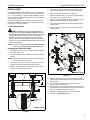
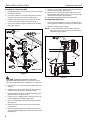
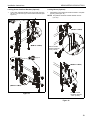
If necessary, the tilt interface bracket knobs may be
switched to allow the interface brackets (AA and BB) to be
reversed. (See Figure 8)
a. Remove display from mount.
b. Remove interface brackets from display.
c. Hold the right interface bracket horizontally, tightly
gripping it so that spacers do not move.
d. Remove the knob and screw.
e. Replace the knob and screw in the opposite order, with
the knob on the inside of the bracket.
f. Switch the right interface bracket to the left side of the
wall mount.
g. Repeat Steps 3c through 3f with the left interface
bracket.
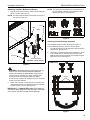
NOTE: NEVER place both interface brackets (Y and Z or AA
and BB) to one side of the wall mount center line! (See
Figure 10)
NOTE: Do NOT allow both interface brackets (Y and Z or AA
and BB) to be located on same side of wall bracket.
(See Figure 10)
Center Line (CL)
3d
3e
NEVER place both interface brackets to one
side of the wall mount center line (CL)!
Knobs to outside
of brackets
[Brackets AA and BB shown]
Figure 8
Attaching Screen to Wall Mount
1.
Attach wall covers (X) to top and bottom of both wall
brackets. (See Figure 9)
Both interface brackets must NEVER be located
to one side of the wall brackets!
[Brackets Y and Z shown]
Figure 10
(X) x 4
Figure 9
10