1
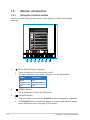
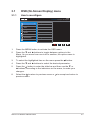
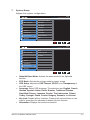
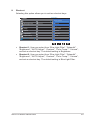
3.1 OSD (On-Screen Display) menu 3.1.1 How to reconfigure PB258 Standard Mode DisplayPort 2560x1440@60Hz Splendid Scenery mode Blue Light Filter Standard Mode Color Theater Mode Image Game Mode Sound Night View Mode Input Select sRGB Mode System Setup Reading Mode Shortcut Darkroom Mode 1. Press the MENU button to activate the OSD menu. 2. Press the and buttons to toggle between options in the Menu. As you move from one icon to another, the option name is highlighted. 3. To select the highlighted item on the menu press the 4. Press the and buttons to select the desired parameter. 5. Press the button to enter the slide bar and then use the or buttons, according to the indicators on the menu, to make your changes. 6. Select the to return to previous menu or previous menu. ASUS LCD Monitor PB258 Series button. to accept and return to 3-1