1
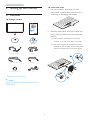
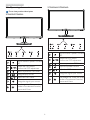
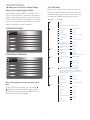
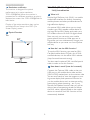
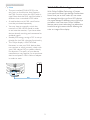
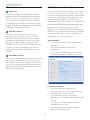
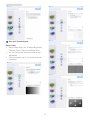
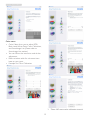
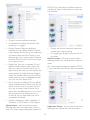
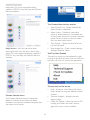
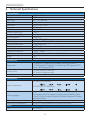
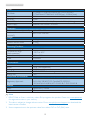
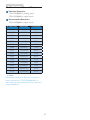
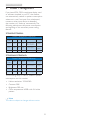
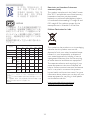
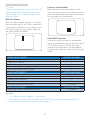
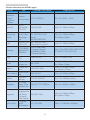
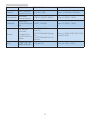
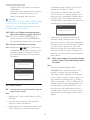
277E6 www.philips.com/welcome EN User manual 1 Customer care and warranty 30 Troubleshooting & FAQs 36 Table of Contents 1.Important.................................................1 1.1 Safety precautions and maintenance....1 1.2 Notational Descriptions..............................2 1.3 Disposal of product and packing material.................................................................3 2. Setting up the monitor..........................4 2.1Installation............................................................4 2.2 Operating the monitor................................6 2.3 MHL (Mobile High-Definition Link) introduction........................................................8 2.4 SoftBlue Technology introduction..........9 3. Image Optimization..............................10 3.1 SmartImage Lite............................................10 3.2SmartContrast...............................................11 3.3 Philips SmartControl Lite........................11 4. Technical Specifications.......................18 4.1 Resolution & Preset Modes...................20 5. Power Management.............................21 6. Regulatory Information.......................22 7. Customer care and warranty............30 7.1 Philips’ Flat Panel Monitors Pixel Defect Policy...................................................30 7.2 Customer Care & Warranty..................32 8. Troubleshooting & FAQs....................36 8.1Troubleshooting............................................36 8.2 SmartControl Lite FAQs..........................37 8.3 General FAQs................................................38 8.4 MHL FAQs.......................................................40 1. Important • Please use approved power cord provided by Philips all the time. If your power cord is missing, please contact with your local service center. (Please refer to Customer Care Consumer Information Center) 1. Important This electronic user’s guide is intended for anyone who uses the Philips monitor. Take time to read this user manual before you use your monitor. It contains important information and notes regarding operating your monitor. • Do not subject the monitor to severe vibration or high impact conditions during operation. The Philips guarantee applies provided the product is handled properly for its intended use, in accordance with its operating instructions and upon presentation of the original invoice or cash receipt, indicating the date of purchase, dealer’s name and model and production number of the product. • Do not knock or drop the monitor during operation or transportation. Maintenance • To protect your monitor from possible damage, do not put excessive pressure on the LCD panel. When moving your monitor, grasp the frame to lift; do not lift the monitor by placing your hand or fingers on the LCD panel. 1.1 Safety precautions and maintenance • Unplug the monitor if you are not going to use it for an extensive period of time. Warnings Use of controls, adjustments or procedures other than those specified in this documentation may result in exposure to shock, electrical hazards and/or mechanical hazards. • Unplug the monitor if you need to clean it with a slightly damp cloth. The screen may be wiped with a dry cloth when the power is off. However, never use organic solvent, such as, alcohol, or ammonia-based liquids to clean your monitor. Read and follow these instructions when connecting and using your computer monitor. • To avoid the risk of shock or permanent damage to the set, do not expose the monitor to dust, rain, water, or excessive moisture environment. Operation • Please Keep the monitor out of direct sunlight, very strong bright lights and away from any other heat source. Lengthy exposure to this type of environment may result in discoloration and damage to the monitor. • If your monitor gets wet, wipe it with dry cloth as soon as possible. • If foreign substance or water gets in your monitor, please turn the power off immediately and disconnect the power cord. Then, remove the foreign substance or water, and send it to the maintenance center. • Remove any object that could fall into ventilation holes or prevent proper cooling of the monitor’s electronics. • Do not block the ventilation holes on the cabinet. • Do not store or use the monitor in locations exposed to heat, direct sunlight or extreme cold. • When positioning the monitor, make sure the power plug and outlet are easily accessible. • In order to maintain the best performance of your monitor and use it for a longer lifetime, please use the monitor in a location that falls within the following temperature and humidity ranges. • If turning off the monitor by detaching the power cable or DC power cord, wait for 6 seconds before attaching the power cable or DC power cord for normal operation. 1 1. Important • Temperature: 0-40°C 32-95°F 1.2 Notational Descriptions • Humidity: 20-80% RH The following subsections describe notational conventions used in this document. • IMPORTANT: Always activate a moving screen saver program when you leave your monitor unattended. Always activate a periodic screen refresh application if your monitor will display unchanging static content. Uninterrupted display of still or static images over an extended period may cause “burn in”, also known as “after-imaging” or “ghost imaging”, on your screen. Notes, Cautions and Warnings Throughout this guide, blocks of text may be accompanied by an icon and printed in bold or italic type. These blocks contain notes, cautions or warnings. They are used as follows: Note This icon indicates important information and tips that help you make better use of your computer system. • "Burn-in", "after-imaging", or "ghost imaging" is a well-known phenomenon in LCD panel technology. In most cases, the “burned in” or “after-imaging” or “ghost imaging” will disappear gradually over a period of time after the power has been switched off. Caution This icon indicates information that tells you how to avoid either potential damage to hardware or loss of data. Warning Failure to activate a screen saver, or a periodic screen refresh application may result in severe “burn-in” or “after-image” or “ghost image” symptoms that will not disappear and cannot be repaired. The damage mentioned above is not covered under your warranty. Warning This icon indicates the potential for bodily harm and tells you how to avoid the problem. Some warnings may appear in alternate formats and may not be accompanied by an icon. In such cases, the specific presentation of the warning is mandated by the relevant regulatory authority. Service • The casing cover should be opened only by qualified service personnel. • If there is any need for any document for repair or integration, please contact with your local service center. (please refer to the chapter of "Consumer Information Center") • For transportation information, please refer to "Technical Specifications". • Do not leave your monitor in a car/trunk under direct sun light. Note Consult a service technician if the monitor does not operate normally, or you are not sure what procedure to take when the operating instructions given in this manual have been followed. 2 1. Important From the planning, design and production stages, Philips emphasizes the important of making products that can easily be recycled. At Philips, end-of-life management primarily entails participation in national take-back initiatives and recycling programs whenever possible, preferably in cooperation with competitors, which recycle all materials (products and related packaging material) in accordance with all Environmental Laws and taking back program with the contractor company. 1.3 Disposal of product and packing material Waste Electrical and Electronic EquipmentWEEE Your display is manufactured with high quality materials and components which can be recycled and reused. This marking on the product or on its packaging illustrates that, under European Directive 2012/19/EU governing used electrical and electronic appliances, this product may not be disposed of with normal household waste. You are responsible for disposal of this equipment through a designated waste electrical and electronic equipment collection. To determine the locations for dropping off such waste electrical and electronic, contact your local government office, the waste disposal organization that serves your household or the store at which you purchased the product. To learn more about our recycling program please visit http://www.philips.com/sites/philipsglobal/ about/sustainability/ourenvironment/ productrecyclingservices.page Your new monitor contains materials that can be recycled and reused. Specialized companies can recycle your product to increase the amount of reusable materials and to minimize the amount to be disposed of. All redundant packing material has been omitted. We have done our utmost to make the packaging easily separable into mono materials. Please find out about the local regulations on how to dispose of your old monitor and packing from your sales representative. Taking back/Recycling Information for Customers Philips establishes technically and economically viable objectives to optimize the environmental performance of the organization's product, service and activities. 3 2. Setting up the monitor Install base stand 2. Setting up the monitor 1. Place the monitor face down on soft and smooth surface taking care to avoid scratching or damaging the screen. 2.1 Installation Package contents 277E 277E6 277E6 使用 2. Hold the base stand with both hands and firmly insert the base stand into the base column. (1) G ently attach the base to the base column until the latch locks the base. 前请阅读使用说明 e inklijk © 2014 Kon User’s Manual Monitor drivers SmartControl software 保留备用 ips Phil Ch ina .Ve rsi on l Al .V. ,N ics on ctr Ele Philips and the Philips’ Shield Emblem are registered trademarks of rig in Koninklijke Philips N.V. and are used under license from Koninklijke ht sr ed Philips N.V. es int er pr ved and .U nau ade .M tho rized laws able duplic ation is a violation of applic AC/DC Adapter (2) U se your fingers to tighten the screw located at the bottom of the base, and secure the base to the column tightly. *VGA 2 Audio cable *HDMI Cable management *DVI * Depends on the country 1 Note Use only the AC/DC adapter model: Philips ADPCB1945 4 2. Setting up the monitor Connecting to your PC Connect to PC 1. Connect the power cord to the back of the monitor firmly. 277E6ESD/277E6ESW: 2. Turn off your computer and unplug its power cable. 3. Connect the monitor signal cable to the video connector on the back of your computer. 3 2 1 4 4. Plug the power cord of your computer and your monitor into a nearby outlet. 2 3 1 5. Turn on your computer and monitor. If the monitor displays an image, installation is complete. AC/DC power input VGA input DVI input Kensington anti-theft lock 277E6EDAW/277E6EDAD: 4 6 3 2 1 MHL 4 2 7 5 3 1 AC/DC power input VGA input DVI input HDMI or MHL input Earphone output Audio input Kensington anti-theft lock 5 2. Setting up the monitor 277E6EDAW/277E6EDAD: 2.2 Operating the monitor Front view product description 277E6ESD/277E6ESW: 277E 5 5 7 3 6 7 3 4 6 4 2 Switch monitor’s power ON and OFF. 2 Access the OSD menu. Confirm the OSD adjustment. Switch monitor’s power ON and OFF. Return to previous OSD level. Access the OSD menu. Confirm the OSD adjustment. Adjust the speaker volume. Adjust the OSD menu. Return to previous OSD level. Change the signal input source. Change display format. SmartImage Lite. There are three modes to be selected: Standard, Internet and Game. Adjust the OSD menu. Change the signal input source. SmartImage Lite. There are three modes to be selected: Standard, Internet and Game. 6 2. Setting up the monitor Description of the On Screen Display The OSD Menu Below is an overall view of the structure of the On-Screen Display. You can use this as a reference when you want to work your way around the different adjustments later on. What is On-Screen Display (OSD)? On-Screen Display (OSD) is a feature in all Philips LCD monitors. It allows an end user to adjust screen performance or select functions of the monitors directly through an on-screen instruction window. A user friendly on screen display interface is shown as below: Main menu Input Sub menu VGA DVI MHL-HDMI (available for selective models) 277E6ESD/277E6ESW: Picture Picture Format 0~100 Contrast 0~100 SmartResponse Off, Fast, Faster, Fastest SmartContrast On, Off Gamma 1.8, 2.0, 2.2, 2.4, 2.6 Audio 277E6EDAW/277E6EDAD: Color Wide Screen, 4:3 Brightness Pixel Orbiting On, Off (available for selective models) Over Scan On, Off (available for selective models) Volume 0~100 (available for selective models) Mute On, Off Stand-Alone On, Off On, Off Audio Source (available for selective models) Color Temperature 6500K, 9300K sRGB User Define Red: 0~100 Green: 0~100 Blue: 0~100 Language English, Deutsch, Español, Ελληνική, Français, Italiano, Maryar,Nederlands, Português, Português do Brazil,Polski,Русский ,Svenska, Suomi,Türkçe,Čeština,Українська, 简体中文, 繁體中文,日本語,한국어 OSD Settings Horizontal 0~100 Vertical 0~100 Transparency Off, 1, 2, 3, 4 OSD Time Out 5s, 10s, 20s, 30s, 60s Basic and simple instruction on the control keys Setup In the OSD shown above, you can press buttons at the front bezel of the monitor to move the cursor, and press OK button to confirm the choice or change. Auto H.Position 0~100 Phase 0~100 Clock 0~100 Resolution Notification On, Off Reset Yes, No Information 7 0~100 V.Position 2. Setting up the monitor Resolution notification 2.3 MHL (Mobile High-Definition Link) introduction This monitor is designed for optimal performance at its native resolution, 1920×1080@60Hz. When the monitor is powered on at a different resolution, an alert is displayed on screen: Use 1920×1080@60Hz for best results. What is it? Mobile High Definition Link (MHL) is a mobile audio/video interface for directly connecting mobile phones and other portable devices to high-definition displays. Display of the native resolution alert can be switched off from Setup in the OSD (On Screen Display) menu. An optional MHL cable allows you to simply connect your MHL capable mobile device to this large Philips MHL display, and watch your HD videos come to life with full digital sound. Now not only you can enjoy your mobile games, photos, movies, or other apps on its big screen, you can simultaneously charge your mobile device so you never run out of power half way. Physical Function Tilt 20 How do I use the MHL function? To use the MHL function, you need an MHLCertified mobile device. To find a list of MHLcertified devices, visit the official MHL website (http://www.mhlconsortium.org) You also need a optional MHL certified special cable in order to use this function. How does it work? (how do I connect?) Connect the Optional MHL cable to the mini USB port on the mobile device side, and the [MHL-HDMI] marked port on the monitor side. You are now ready to view the images on your big screen display and operate all function on you the mobile device such as internet surfing, game playing, photo browsing…etc. if your monitor has speaker function, then you will be able to hear accompanying sound too. When the MHL cable is disconnected or the mobile device is turned off, the MHL function will be automatically disabled. 8 2. Setting up the monitor Note 2.4 SoftBlue Technology introduction • The port marked [MHL-HDMI] is the only port on the monitor that supports the MHL function when the MHL cable is used. Note that the MHL certified cable is different than a standard HDMI cable. With Philips SoftBlue Technology, it Protect your eyes from Blue Light damage. Studies have shown that just as ultra-violet rays can cause eye damage, blue light rays from LED displays can cause damage to different parts of the eye and affect vision over time. Philips SoftBlue feature uses a smart technology to reduce the harmful blue light waves without affecting the color or image of the display. • A mobile device with MHL certification must be purchased separately • You may have to manually switch the monitor to MHL-HDMI mode in order to activate the monitor, if you have other devices already working and connected to available inputs • Standby/Off energy saving of ErP is not applicable for the MHL charging functionality • This Philips display is MHL certified. However, in case your MHL device does not connect or work correctly, check with your MHL device FAQ or vendor directly for direction. The policy of your device manufacturer may require you to purchase their brand specific MHL cable or adapter in order to work. MHL 9 3. Image Optimization 3. The SmartImage Lite on screen display will remain on screen for 5 seconds or you can also press OK button to make confirmation. There are three modes to be selected: Standard, Internet, Game. 3. Image Optimization 3.1 SmartImage Lite What is it? SmartImage Lite provides presets that optimize display for different types of content, dynamically adjusting brightness, contrast, color and sharpness in real time. Whether you're working with text applications, displaying images or watching a video, Philips SmartImage Lite delivers great optimized monitor performance. Why do I need it? • Standard: Enhances text and dampens brightness to increase readability and reduce eye strain. This mode significantly enhances readability and productivity when you're working with spreadsheets, PDF files, scanned articles or other general office applications. You want a monitor that delivers optimized display all your favorite types of content, SmartImage Lite software dynamically adjust brightness, contrast, color and sharpness in real time to enhance your monitor viewing experience. How does it work? • Internet: This profile combines color saturation, dynamic contrast and sharpness enhancement to display photos and other images with outstanding clarity in vibrant colors - all without artifacts and faded colors. SmartImage Lite is an exclusive, leading edge Philips technology that analyzes the content displayed on your screen. Based on a scenario you select, SmartImage Lite dynamically enhances the contrast, color saturation and sharpness of images to enhance the contents being displayed - all in real time with the press of a single button. • Game: Turn on over drive circuit for best response time, reduce jaggy edges for fast moving objects on screen, enhance contrast ratio for bright and dark scheme, this profile delivers the best gaming experience for gamers. How to enable SmartImage Lite? 277E 1. Press to launch the SmartImage Lite on screen display; 2. Keep pressing to toggle between Standard, Internet, Game. 10 3. Image Optimization 3.2 SmartContrast 3.3 Philips SmartControl Lite The new SmartControl Lite software by Philips allows you to control your monitor via an easy to use on-screen graphic interface. Complicated adjustments are a thing of the past as this user friendly software guides you through finetuning resolution, Color calibration, Clock/Phase adjustments, RGB White point adjustment, etc. What is it? Unique technology that dynamically analyzes displayed content and automatically optimizes a LCD monitor's contrast ratio for maximum visual clarity and viewing enjoyment, stepping up backlighting for clearer, crisper and brighter images or dimming backlighting for clear display of images on dark backgrounds. Equipped with latest technology in core algorithm for fast processing and response, this Windows only compliant eye catching animated Icon based software is ready to enhance your experience with Philips monitors! Why do I need it? You want the very best visual clarity and viewing comfort for every type of content. SmartContrast dynamically controls contrast and adjusts backlighting for clear, crisp, bright gaming and video images or displays clear, readable text for office work. By reducing your monitor's power consumption, you save on energy costs and extend the lifetime of your monitor. Installation • Follow the instruction and complete the installation. • You can launch after installation is completed. • If you want to launch later, you can either click the shortcut on desktop or toolbar. How does it work? When you activate SmartContrast, it will analyse the content you are displaying in real time to adjust colors and control backlight intensity. This function will dynamically enhance contrast for a great entertainment experience when viewing videos or playing games. First launch -Wizard • The first time after installation of SmartControl Lite, it will automatically go to Wizard for first time launch. • The wizard will guide you through adjustment your monitor performance step by step. • You can go to Plug-in menu to launch wizard later on as well. • You can adjust more options without wizard by Standard pane. 11 3. Image Optimization Start with Standard pane: Adjust menu: • Adjust Menu allow you to adjust Brightness, Contrast, Focus, Position and Resolution. • You can follow the instruction and do the adjustment. • Cancel prompts user if you want to cancel installation. 12 3. Image Optimization Color menu: • Color Menu allow you to adjust RGB, Black Level, White Point, Color Calibration, and SmartImage Lite (Please refer to SmartImage Lite section). • You can follow the instruction and do the adjustment. • Refer to below table for sub-menu item base on your input. • Example for Color Calibration: 1. "Show Me" starts color calibration tutorial. 13 3. Image Optimization First color Calibration Screen: 2. Start - starts the 6-step color calibration sequence. 3. Quick View loads the before/after images. 4. To return to Color home pane, click the Cancel button. 5. Enable color calibration - by default is on. If unchecked, does not allow for color calibration to happen, dimes out start and quick view buttons. 6. Must have patent info in calibration screen. • Previous button is disabled until the second color screen. • Next goes to the succeeding target (6-targets). • Final next goes File>Presets pane. • Cancel closes the UI and returns to the plug in page. SmartImage Lite Allows user to change setting for better display setting based on content. When Entertainment is set, SmartContrast and SmartResponse are enabled. Options>Preferences - Will only be active when selecting Preferences from the dropdown Options menu. On a non-supported display capable of DDC/CI, only the Help and Options tabs are available. 14 3. Image Optimization DDC/CI, only the Help and Options tabs are available. All other SmartControl Lite tabs are not available. • Displays current preference settings. • A checked box enables the feature. The check box is a toggle. • Enable Context Menu on desktop is checked (On) by default. Enable Context menu displays SmartControl Lite selections for Select Preset and Tune Display in the desktop right-click context menu. Disabled removes SmartControl Lite from the right click context menu. • Display the Source instruction pane and current input source setting. • On single input displays, this pane will not be visible. Options>Audio - Will only be active when selecting Audio from the drop-down Options menu. • Enable Task Tray icon is checked (On) by default. Enable context menu shows the task tray menu for SmartControl Lite. A right click on the task tray icon displays the menu options for Help, Technical Support, Check for Update, About, and Exit. When Enable task tray menu is disabled, the task tray icon will only display EXIT. On a non-supported display capable of DDC/ CI, only the Help and Options tabs are available. • Run at Startup is checked (On) by default. When disabled, SmartControl Lite will not launch at start or be in the task tray. The only way to launch SmartControl Lite is either from the desktop short cut or from the program file. Any preset set to run at startup will not load when this box is unchecked (Disabled). • Enable transparency mode (Windows 7, Windows 8, XP). Default is 0% Opaque. Options>Input - Will only be active when selecting Input from the drop-down Options menu. On a non-supported display capable of Help>User Manual - Will only be active when selecting User Manual from the drop-down 15 3. Image Optimization Help menu. On a non-supported display capable of DDC/CI, only the Help and Options tabs are available. The Context Menu has four entries: • SmartControl Lite - When selected the About Screen is displayed. • Select Preset - Provides a hierarchical menu of saved presets for immediate use. A check mark shows the currently selected preset. Factory Preset can also be called from the drop down menu. • Tune Display - Opens the SmartControl Lite control panel. • SmartImage Lite - Check current settings, Standard, Internet, Game. Help>Version - Will only be active when selecting Version from the drop- down Help menu. On a non-supported display capable of DDC/CI, only the Help and Options tabs are available. Task Tray Menu Enabled The task tray menu can be displayed by rightclicking on the SmartControl Lite icon from the task tray. Left Click will launch the application. The task tray has five entries: • Help - Access to User Manual file: Open User Manual file using the default browser window. Context Sensitive menu • Technical Support - displays the tech support page. The Context Sensitive menu is Enabled by default. If Enable Context Menu has been checked in the Options>Preferences pane, then the menu will be visible. • Check for Update - takes the user to PDI Landing and checks the user’s version against the most current available. 16 3. Image Optimization • About - Displays detailed reference information: product version, release information, and product name. • Exit - Close SmartControl Lite. To run SmartControl Lite again either select SmartControl Lite from Program menu, doubleclick the desktop PC icon or restart the system. Task Tray Menu Disabled When the Task Tray is disabled in the preference folder, only the EXIT selection is available. To completely remove SmartControl Lite from the task tray, disable Run at Startup in Options>Preferences. Note All the illustrations in this section are for reference only. SmartControl software version might be changed without notification. Please always check official Portrait website www.portrait.com/dtune/phl/enu/index to download the latest version of SmartControl software. 17 4. Technical Specifications 4. Technical Specifications Picture/Display Monitor Panel Type Backlight Panel Size Aspect Ratio Pixel Pitch Brightness SmartContrast Contrast Ratio (typ.) Response Time (typ.) SmartResponse Optimum Resolution Viewing Angle Picture Enhancement Display Colors Vertical Refresh Rate Horizontal Frequency MHL sRGB SoftBlue Connectivity Signal Input Audio In/Out Input Signal IPS-ADS LCD LED 27” W (68.6cm) 16:9 0.311 x 0.311 mm 300 cd/m² 20,000,000:1 1000:1 14ms 5ms(GtG) 1920x1080 @ 60Hz 178° (H) / 178° (V) @ C/R > 10 SmartImage Lite 16.7M 56Hz - 75Hz 30kHz - 83kHz 1080P @ 30Hz (277E6EDAW/277E6EDAD) YES YES 277E6ESD/277E6ESW: VGA(Analog), DVI(Digital,HDCP) 277E6EDAW/277E6EDAD: VGA(Analog), DVI(Digital,HDCP), MHL-HDMI(Digital,HDCP) 277E6EDAW/277E6EDAD: PC audio-in, Earphone out, Separate Sync, Sync on Green Convenience 277E6ESD/277E6ESW: User Convenience OSD Languages Other Convenience Plug & Play Compatibility Stand Tilt 277E6EDAW/277E6EDAD: English, German, Spanish, Greek, French, Italian, Hungarian, Dutch, Portuguese, Brazil Portuguese, Polish, Russian, Swedish, Finnish, Turkish, Czech, Ukranian, Simplified Chinese, Traditional Chinese, Japanese, Korean Kensington Lock DDC/CI, sRGB, Windows 8/7/XP, Mac OSX, Linux -5° / +20° 18 4. Technical Specifications Power On Mode Sleep (typ.) Off (typ.) Power LED indicator Power Supply Dimension Product with stand (WxHxD) Product without stand (WxHxD) Weight Product with stand Product without stand Operating Condition Temperature range (operation) Temperature range (Non-operation) Relative humidity MTBF 277E6ESD/277E6ESW:24.69 W(typ.), 25.19 W(max.) 277E6EDAW/277E6EDAD: 28.20 W(typ.), 31.48 W(max.) 0.5W 0.3W On mode: White, Standby/Sleep mode: White (blinking) External, 100-240VAC, 50-60Hz 640 x 478 x 235 mm 640 x 394 x 48 mm 5.42kg 5.17kg 0°C to 40 °C -20°C to 60°C 20% to 80% 50,000hrs Environmental ROHS EPEAT Packaging Specific Substances Energy Star Compliance and standards YES Silver (www.epeat.net) 100% recyclable 100% PVC BFR free housing YES Regulatory Approvals 277E6EDAW/277E6EDAD: CE Mark,FCC Class B,CU-EAC,SEMKO,TCO Certified,ETL,ISO9241307,SASO,KUCAS,EPA, VCCI CLASS B, C-TICK CLASS B Cabinet Color Finish BlackCherry / White Glossy Note 1. EPEAT Gold or Silver is valid only where Philips registers the product. Please visit www.epeat.net for registration status in your country. 2. This data is subject to change without notice. Go to www.philips.com/support to download the latest version of leaflet. 3. Smart response time is the optimum value from either GtG or GtG (BW) tests. 19 4. Technical Specifications 4.1 Resolution & Preset Modes Maximum Resolution 1920x1080@60Hz (analog input) 1920x1080@60Hz (digital input) Recommended Resolution 1920x1080@60Hz (digital input) H. freq (kHz) Resolution V. freq (Hz) 31.47 720x400 70.09 31.47 640x480 59.94 35.00 640x480 66.67 37.86 640x480 72.81 37.50 640x480 75.00 37.88 800x600 60.32 46.88 800x600 75.00 48.36 1024x768 60.00 60.02 1024x768 75.03 63.89 1280x1024 60.02 79.98 1280x1024 75.03 55.94 1440x900 59.89 70.64 1440x900 74.98 65.29 1680x1050 59.95 67.50 1920x1080 60.00 Note Please notice that your display works best at native resolution of 1920x1080@60Hz. For best display quality, please follow this resolution recommendation. 20 5. Power Management 5. Power Management If you have VESA DPM compliance display card or software installed in your PC, the monitor can automatically reduce its power consumption when not in use. If an input from a keyboard, mouse or other input device is detected, the monitor will 'wake up' automatically. The following table shows the power consumption and signaling of this automatic power saving feature: 277E6ESD/277E6ESW: Power Management Definition VESA Mode Video H-sync V-sync Power Used LED Color Active ON Yes Yes 24.69 W (typ.) 25.19 W(Max.) White Sleep OFF No No 0.5 W (typ.) White (blink) Switch Off OFF - - 0.3 W (typ.) OFF 277E6EDAW/277E6EDAD: Power Management Definition VESA Mode Video H-sync V-sync Power Used LED Color Active ON Yes Yes 28.20 W (typ.) 31.48 W(Max.) White Sleep OFF No No 0.5 W (typ.) White (blink) Switch Off OFF - - 0.3 W (typ.) OFF The following setup is used to measure power consumption on this monitor. • Native resolution: 1920x1080 • Contrast: 50% • Brightness: 300 nits; • Color temperature: 6500k with full white pattern Note This data is subject to change without notice. 21 6. Regulatory Infomation 6. Regulatory Information Some of the Environmental features of TCO Certified Displays: Lead-free Product • Production facilities have an Environmental Management System (EMAS or ISO 14001) Lead free display promotes environmentally sound recovery and disposal of waste from electrical and electronic equipment. Toxic substances like Lead has been eliminated and compliance with European community’s stringent RoHs directive mandating restrictions on hazardous substances in electrical and electronic equipment have been adhered to in order to make Philips monitors safe to use throughout its life cycle. • Low energy consumption to minimize climate impact • Restrictions on Chlorinated and Brominated flame retardants, plasticizers, plastics and heavy metals such as cadmium, mercury and lead (RoHS compliance) • Both product and product packaging is prepared for recycling • The brand owner offers take-back options Corporate Social Responsibility Congratulations! • The brand owner demonstrates the product is manufactured under working practices that promote good labour relations and working conditions. The Criteria Document can be downloaded from our web site. The criteria included in this label have been developed by TCO Development in co-operation with scientists, experts, users as well as manufacturers all over the world. Since the end of the 1980s TCO has been involved in influencing the development of IT equipment in a more user and environmentally friendly direction. Our ICT product labeling system began in 1992 and is now requested by users and ICT-manufacturers all over the world. This product is designed for both you and the planet! TCO Development works for sustainable IT - manufacture, use and recycling of IT products reflecting environmental, social and economic responsibility. TCO Certified is a third party verified program, where every product model is tested by an accredited impartial test laboratory. TCO Certified represents one of the toughest certifications for ICT products worldwide. Some of the Usability features of TCO Certified Displays: For displays with glossy bezels, the user should consider the placement of the display as the bezel may cause disturbing reflections from surrounding light and bright surfaces. • Visual Ergonomics for image quality is tested to ensure top performance and reduce sight and strain problems. Important parameters are Resolution, Luminance, Contrast, Reflection and Colour characteristics For more information, please visit: www.tcodevelopment.com • Products are tested according to rigorous safety standards at impartial laboratories Technology for you and the planet • Electric and magnetic fields emissions as low as normal household background levels (Only for selective models) • Workload ergonomics to ensure a good physical environment User mode is used for TCO Certified compliance. 22 6. Regulatory Infomation EPEAT CE Declaration of Conformity (www.epeat.net) This product is in conformity with the following standards The EPEAT (Electronic Product Environmental Assessment Tool) program evaluates computer desktops, laptops, and monitors based on 51 environmental criteria developed through an extensive stakeholder consensus process supported by US EPA. • EN60950-1:2006+A11:2009+A1:2010+A 12:2011+A2:2013 (Safety requirement of Information Technology Equipment). • EN55022:2010(Radio Disturbance requirement of Information Technology Equipment). • EN55024:2010 (Immunity requirement of Information Technology Equipment). EPEAT system helps purchasers in the public and private sectors evaluate, compare and select desktop computers, notebooks and monitors based on their environmental attributes. EPEAT also provides a clear and consistent set of performance criteria for the design of products, and provides an opportunity for manufacturers to secure market recognition for efforts to reduce the environmental impact of its products. • EN61000-3-2:2006+A1:2009+A2:2009 (Limits for Harmonic Current Emission). • EN61000-3-3:2008 (Limitation of Voltage Fluctuation and Flicker). • EN50581:2012 (Technical documentation for the assessment of electrical and electronic products with respect to the restriction of hazardous substances) • E N 50564:2011 (Electrical and electronic household and office equipment — Measurement of low power consumption) Benefits of EPEAT Reduce use of primary materials Reduce use of toxic materials following provisions of directives applicable • 2006/95/EC (Low Voltage Directive). Avoid the disposal of hazardous waste EPEAT’S requirement that all registered products meet ENERGY STAR’s energy efficiency specifications, means that these products will consume less energy throughout their life. • 2004/108/EC (EMC Directive). • 2 009/125/EC (ErP, Energy-related Product Directive, EC No. 1275/2008 and 642/2009 Implementing) • 2 011/65/EU (RoHS Directive) and is produced by a manufacturing organization on ISO9000 level And is produced by a manufacturing organization on ISO9000 level. • ISO9241-307:2008 (Ergonomic requirement, Analysis and compliance test methods for electronic visual displays). • TCO CERTIFIED (Requirement for Environment Labeling of Ergonomics, Energy, Ecology and Emission, TCO: Swedish Confederation of Professional Employees) for TCO versions. 23 6. Regulatory Infomation Energy Star Declaration Changes or modifications not expressly approved by the party responsible for compliance could void the user's authority to operate the equipment. (www.energystar.gov) As an ENERGY STAR® Partner, we have determined that this product meets the ENERGY STAR® guidelines for energy efficiency. Use only RF shielded cable that was supplied with the monitor when connecting this monitor to a computer device. Note We recommend you switch off the monitor when it is not in use for a long time. To prevent damage which may result in fire or shock hazard, do not expose this appliance to rain or excessive moisture. Federal Communications Commission (FCC) Notice (U.S. Only) THIS CLASS B DIGITAL APPARATUS MEETS ALL REQUIREMENTS OF THE CANADIAN INTERFERENCE-CAUSING EQUIPMENT REGULATIONS. This equipment has been tested and found to comply with the limits for a Class B digital device, pursuant to Part 15 of the FCC Rules. These limits are designed to provide reasonable protection against harmful interference in a residential installation. This equipment generates, uses and can radiate radio frequency energy and, if not installed and used in accordance with the instructions, may cause harmful interference to radio communications. FCC Declaration of Conformity Declaration of Conformity for Products Marked with FCC Logo, United States Only This device complies with Part 15 of the FCC Rules. Operation is subject to the following two conditions: (1) this device may not cause harmful interference, and (2) this device must accept any interference received, including interference that may cause undesired operation. However, there is no guarantee that interference will not occur in a particular installation. If this equipment does cause harmful interference to radio or television reception, which can be determined by turning the equipment off and on, the user is encouraged to try to correct the interference by one or more of the following measures: Commission Federale de la Communication (FCC Declaration) Cet équipement a été testé et déclaré conforme auxlimites des appareils numériques de class B,aux termes de l'article 15 Des règles de la FCC. Ces limites sont conçues de façon à fourir une protection raisonnable contre les interférences nuisibles dans le cadre d'une installation résidentielle. • Reorient or relocate the receiving antenna. • Increase the separation between the equipment and receiver. • Connect the equipment into an outlet on a circuit different from that to which the receiver is connected. • Consult the dealer or an experienced radio/TV technician for help. CET appareil produit, utilise et peut émettre des hyperfréquences qui, si l'appareil n'est pas installé et utilisé selon les consignes données, peuvent causer des interférences 24 6. Regulatory Infomation EN 55022 Compliance (Czech Republic Only) nuisibles aux communications radio. Cependant, rien ne peut garantir l'absence d'interférences dans le cadre d'une installation particulière. Si cet appareil est la cause d'interférences nuisibles pour la réception des signaux de radio ou de télévision, ce qui peut être décelé en fermant l'équipement, puis en le remettant en fonction, l'utilisateur pourrait essayer de corriger la situation en prenant les mesures suivantes: Polish Center for Testing and Certification Notice The equipment should draw power from a socket with an attached protection circuit (a three-prong socket). All equipment that works together (computer, monitor, printer, and so on) should have the same power supply source. • Réorienter ou déplacer l’antenne de réception. • Augmenter la distance entre l’équipement et le récepteur. The phasing conductor of the room's electrical installation should have a reserve short-circuit protection device in the form of a fuse with a nominal value no larger than 16 amperes (A). • Brancher l’équipement sur un autre circuit que celui utilisé par le récepteur. • Demander l’aide du marchand ou d’un technicien chevronné en radio/télévision. To completely switch off the equipment, the power supply cable must be removed from the power supply socket, which should be located near the equipment and easily accessible. Toutes modifications n'ayant pas reçu l'approbation des services compétents en matière de conformité est susceptible d'interdire à l'utilisateur l'usage du présent équipement. A protection mark "B" confirms that the equipment is in compliance with the protection usage requirements of standards PN-93/T-42107 and PN-89/E-06251. N'utiliser que des câbles RF armés pour les connections avec des ordinateurs ou périphériques. CET APPAREIL NUMERIQUE DE LA CLASSE B RESPECTE TOUTES LES EXIGENCES DU REGLEMENT SUR LE MATERIEL BROUILLEUR DU CANADA. 25 6. Regulatory Infomation North Europe (Nordic Countries) Information Ergonomie Hinweis (nur Deutschland) Placering/Ventilation VARNING: FÖRSÄKRA DIG OM ATT HUVUDBRYTARE OCH UTTAG ÄR LÄTÅTKOMLIGA, NÄR DU STÄLLER DIN UTRUSTNING PÅPLATS. Der von uns gelieferte Farbmonitor entspricht den in der "Verordnung über den Schutz vor Schäden durch Röntgenstrahlen" festgelegten Vorschriften. Auf der Rückwand des Gerätes befindet sich ein Aufkleber, der auf die Unbedenklichkeit der Inbetriebnahme hinweist, da die Vorschriften über die Bauart von Störstrahlern nach Anlage III ¤ 5 Abs. 4 der Röntgenverordnung erfüllt sind. Placering/Ventilation ADVARSEL: S Ø R G V E D P L AC E R I N G E N F O R , AT NETLEDNINGENS STIK OG STIKKONTAKT ER NEMT TILGÆNGELIGE. Damit Ihr Monitor immer den in der Zulassung geforderten Werten entspricht, ist darauf zu achten, daß Paikka/Ilmankierto VAROITUS: SIJOITA LAITE SITEN, ETTÄ VERKKOJOHTO VO I DA A N TA RV I T TA E S S A H E L P O S T I IRROTTAA PISTORASIASTA. 1. Reparaturen nur durch Fachpersonal durchgeführt werden. 2. nur original-Ersatzteile verwendet werden. 3. b ei Ersatz der Bildröhre nur eine bauartgleiche eingebaut wird. Plassering/Ventilasjon ADVARSEL: NÅR DETTE UTSTYRET PLASSERES, MÅ DU PASSE PÅ AT KONTAKTENE FOR STØMTILFØRSEL ER LETTE Å NÅ. Aus ergonomischen Gründen wird empfohlen, die Gr undfarben Blau und Rot nicht auf dunklem Untergrund zu verwenden (schlechte Lesbarkeit und erhöhte Augenbelastung bei zu geringem Zeichenkontrast wären die Folge). Der arbeitsplatzbezogene Schalldruckpegel nach DIN 45 635 beträgt 70dB (A) oder weniger. BSMI Notice (Taiwan Only) ACHTUNG: BEIM AUFSTELLEN DIESES GERÄTES DARAUF ACHTEN, DAß NETZSTECKER UND NETZKABELANSCHLUß LEICHT ZUGÄNGLICH SIND. 26 6. Regulatory Infomation China RoHS EU Energy Label The People's Republic of China released a regulation called "Management Methods for Controlling Pollution by Electronic Information Products" or commonly referred to as China RoHS. All products including CRT and Monitor which are produced and sold for China market have to meet China RoHS request. 中国大陆 RoHS 根据中国大陆《电子信息产品污染控制管理办法》(也称为中国大陆 RoHS), 以下部分列出了本产品中可能包含的有毒有害物质或元素的名称和含量 本表适用之产品 显示器(液晶及 CRT) 有毒有害物质或元素 有毒有害物质或元素 部件名称 铅 汞 镉 (Pb)(Hg)(Cd) 外壳 CRT 显示屏 液晶显示屏 / 灯管 电路板组件 * 电源适配器 电源线 / 连接线 ○ × × × × × ○ ○ ○ ○ ○ ○ 六价铬 多溴联苯 (Cr6+) (PBB) 多溴二苯醚 (PBDE) ○ ○ ○ ○ ○ ○ ○ ○ ○ ○ ○ ○ ○ ○ ○ ○ ○ ○ ○ ○ ○ ○ ○ ○ The European Energy Label informs you on the energy efficiency class of this product. The greener the energy efficiency class of this product is the lower the energy it consumes. On the label, you can find the energy efficiency class, the average power consumption of this product in use and the average energy consumption for 1 year. *: 电路板组件包括印刷电路板及其构成的零部件,如电阻、电容、集成电路、连接器等 ○:表示该有毒有害物质在该部件所有均质材料中的含量均在《电子信息产品中有毒有害物质的 限量要求标准》规定的限量要求以下 ×:表示该有毒有害物质至少在该部件的某一均质材料中的含量超出《电子信息产品中有毒有害 物质的限量要求标准》规定的限量要求;但是上表中打 “×” 的部件,符合欧盟 RoHS 法规要 求(属于豁免的部分) Note The EU Energy Label will be ONLY applied on the models bundling with HDMI and TV tuners. 环保使用期限 此标识指期限 ( 十年 ), 电子信息产品中含有的 有毒有害物质或元素在正常使用的条件下不会发 生外泄或突变 , 电子信息产品用户使用该电子 信息产品不会对环境造成严重污染或对其人身、 财产造成严重损害的期限. 中国能源效率标识 根据中国大陆《能源效率标识管理办法》本显示器符合以下要求: 能源效率 (cd/W) > 1.05 关闭状态能耗 (W) < 0.5 能效等级 1级 能效标准 GB 21520-2008 详细有关信息请查阅中国能效标识网:http://www.energylabel.gov.cn/ 《废弃电器电子产品回收处理管理条例》提示性 说明 为了更好地关爱及保护地球,当用户不再需要此产 品或产品寿命终止时,请遵守国家废弃电器电子产 品回收处理相关法律法规,将其交给当地具有国家 认可的回收处理资质的厂商进行回收处理。 27 6. Regulatory Infomation Restriction on Hazardous Substances statement (India) 이 기기는 가정용 (B 급 ) 전 자파 적합 기기로서 주로 가정에서 사용하는 것을 목 적으로 하며 , 모든 지역에 서 사용할 수 있습니다 . This product complies with the “India E-waste Rule 2011” and prohibits use of lead, mercury, hexavalent chromium, polybrominated biphenyls or polybrominated diphenyl ethers in concentrations exceeding 0.1 weight % and 0.01 weight % for cadmium, except for the exemptions set in Schedule 2 of the Rule. VCCI-B この装置は、クラス B 情報技術装置です。 この装置は、家庭環境で使用することを 目的としていますが、この装置がラジオ やテレビジョン受信機に近接して使用さ れると、受信障害を引き起こすことがあ ります。 取扱説明書に従って正しい取り扱いをし て下さい。 化学物質表 粗分類 Pb Hg Cd Cr6+ PBBs PBDEs 前面ベゼル O O O O O O 背面カバー O O O O O O スタンド O O O O O O 適用除 WLED 外の O O O O O 適用除 外の 適用除 外の O O O O PCBA 適用除 外の O O O O O ケーブル & ワイヤ 適用除 外の O O O O O リモコン 適用除 外の O O O O O LCD パネル E-Waste Declaration for India CCFL This symbol on the product or on its packaging indicates that this product must not be disposed of with your other household waste. Instead it is your responsibility to dispose of your waste equipment by handing it over to a designated collection point for the recycling of waste electrical and electronic equipment . The separate collection and recycling of your waste equipment at the time of disposal will help to conserve natural resources and ensure that it is recycled in a manner that protects human health and the environ-ment. For more information about where you can drop off your waste equipment for recycling in India please visit the below web link. *:PCBA はベア印刷回路基板、で構成され、はんだ付けおよび抵抗器、コ ンデンサ、アレー、コネクタ、チップなど、その表面実装エレメントで構 成されます。 注 1: 「O」は、計算される物質の含有率が参照含有率を超えていないこと を示します。 注 2: 「適用除外」項目は、特定の化学物質が JIS C 0950 の規格により適 用除外とされた項目に対応することを意味します。 JIS C 0950 http://www.india.philips.com/about/ sustainability/recycling/index.page 28 6. Regulatory Infomation Information for U.K. only How to connect a plug The wires in the mains lead are coloured in accordance with the following code: WARNING - THIS APPLIANCE MUST BE EARTHED. BLUE -“NEUTRAL”(“N”) Important: BROWN -“LIVE”(“L”) This apparatus is supplied with an approved moulded 13A plug. To change a fuse in this type of plug proceed as follows: GREEN&YELLOW -“EARTH”(“E”) 1. The GREEN&YELLOW wire must be connected to the terminal in the plug which is marked with the letter "E" or by the Earth symbol or coloured GREEN or GREEN&YELLOW. 1. Remove fuse cover and fuse. 2. Fit new fuse which should be a BS 1362 5A,A.S.T.A. or BSI approved type. 2. The BLUE wire must be connected to the terminal which is marked with the letter "N" or coloured BLACK. 3. Retit the fuse cover. If the fitted plug is not suitable for your socket outlets, it should be cut off and an appropriate 3-pin plug fitted in its place. 3. The BROWN wire must be connected to the terminal which is marked with the letter "L" or coloured RED. Before replacing the plug cover, make certain that the cord grip is clamped over the sheath of the lead - not simply over the three wires. If the mains plug contains a fuse, this should have a value of 5A. If a plug without a fuse is used, the fuse at the distribution board should not be greater than 5A. NOTE: The severed plug must be destroyed to avoid a possible shock hazard should it be inserted into a 13A socket elsewhere. 29 7. Customer care and warranty black pixel. Other combinations of lit and dark sub pixels appear as single pixels of other colors. 7. Customer care and warranty Types of Pixel Defects Pixel and sub pixel defects appear on the screen in different ways. There are two categories of pixel defects and several types of sub pixel defects within each category. 7.1 Philips’ Flat Panel Monitors Pixel Defect Policy Philips strives to deliver the highest quality products. We use some of the industry's most advanced manufacturing processes and practice stringent quality control. However, pixel or sub pixel defects on the TFT Monitor panels used in flat panel monitors are sometimes unavoidable. No manufacturer can guarantee that all panels will be free from pixel defects, but Philips guarantees that any monitor with an unacceptable number of defects will be repaired or replaced under warranty. This notice explains the different types of pixel defects and defines acceptable defect levels for each type. In order to qualify for repair or replacement under warranty, the number of pixel defects on a TFT Monitor panel must exceed these acceptable levels. For example, no more than 0.0004% of the sub pixels on a monitor may be defective. Furthermore, Philips sets even higher quality standards for certain types or combinations of pixel defects that are more noticeable than others. This policy is valid worldwide. Bright Dot Defects Bright dot defects appear as pixels or sub pixels that are always lit or 'on'. That is, a bright dot is a sub-pixel that stands out on the screen when the monitor displays a dark pattern. There are the types of bright dot defects. One lit red, green or blue sub pixel. subpixel Two adjacent lit sub pixels: - Red + Blue = Purple - Red + Green = Yellow - Green + Blue = Cyan (Light Blue) pixel Pixels and Sub pixels A pixel, or picture element, is composed of three sub pixels in the primary colors of red, green and blue. Many pixels together form an image. When all sub pixels of a pixel are lit, the three colored sub pixels together appear as a single white pixel. When all are dark, the three colored sub pixels together appear as a single Three adjacent lit sub pixels (one white pixel). 30 7. Customer care and warranty Proximity of Pixel Defects Note A red or blue bright dot must be more than 50 percent brighter than neighboring dots while a green bright dot is 30 percent brighter than neighboring dots. Because pixel and sub pixels defects of the same type that are near to one another may be more noticeable, Philips also specifies tolerances for the proximity of pixel defects. Black Dot Defects Black dot defects appear as pixels or sub pixels that are always dark or 'off'. That is, a dark dot is a sub-pixel that stands out on the screen when the monitor displays a light pattern. These are the types of black dot defects. Pixel Defect Tolerances In order to qualify for repair or replacement due to pixel defects during the warranty period, a TFT Monitor panel in a Philips flat panel monitor must have pixel or sub pixel defects exceeding the tolerances listed in the following tables. BRIGHT DOT DEFECTS 1 lit subpixel 2 adjacent lit subpixels 3 adjacent lit subpixels (one white pixel) Distance between two bright dot defects* Total bright dot defects of all types ACCEPTABLE LEVEL 3 1 0 >15mm 3 BLACK DOT DEFECTS 1 dark subpixel 2 adjacent dark subpixels 3 adjacent dark subpixels Distance between two black dot defects* Total black dot defects of all types ACCEPTABLE LEVEL 5 or fewer 2 or fewer 0 >15mm 5 or fewer TOTAL DOT DEFECTS Total bright or black dot defects of all types ACCEPTABLE LEVEL 5 or fewer Note 1. 1 or 2 adjacent sub pixel defects = 1 dot defect 2. This monitor is ISO9241-307 compliant (ISO9241-307: Ergonomic requirement, analysis and compliance test methods for electronic visual displays) 31 7. Customer care and warranty 7.2 Customer Care & Warranty For warranty coverage information and additional support requirement valid for your region, please visit www.philips.com/support website for details. You may also contact your local Philips Customer Care Center number listed below. Contact Information for WESTERN EUROPE region: Country CSP Hotline Number Price Opening Hours Austria RTS +43 0810 000206 € 0.07 Mon to Fri : 9am - 6pm Belgium Ecare +32 078 250851 € 0.06 Mon to Fri : 9am - 6pm Cyprus Alman 800 92 256 Free of charge Mon to Fri : 9am - 6pm Denmark Infocare +45 3525 8761 Local call tariff Mon to Fri : 9am - 6pm Finland Infocare +358 09 2290 1908 Local call tariff Mon to Fri : 9am - 6pm France Mainteq +33 082161 1658 € 0.09 Mon to Fri : 9am - 6pm Germany RTS +49 01803 386 853 € 0.09 Mon to Fri : 9am - 6pm Greece Alman +30 00800 3122 1223 Free of charge Mon to Fri : 9am - 6pm Ireland Celestica +353 01 601 1161 Local call tariff Mon to Fri : 8am - 5pm Italy Anovo Italy +39 840 320 041 € 0.08 Mon to Fri : 9am - 6pm Luxembourg Ecare +352 26 84 30 00 Local call tariff Mon to Fri : 9am - 6pm Netherlands Ecare +31 0900 0400 063 € 0.10 Mon to Fri : 9am - 6pm Norway Infocare +47 2270 8250 Local call tariff Mon to Fri : 9am - 6pm Poland MSI +48 0223491505 Local call tariff Mon to Fri : 9am - 6pm Portugal Mainteq 800 780 902 Free of charge Mon to Fri : 8am - 5pm Spain Mainteq +34 902 888 785 € 0.10 Mon to Fri : 9am - 6pm Sweden Infocare +46 08 632 0016 Local call tariff Mon to Fri : 9am - 6pm Switzerland ANOVO CH +41 02 2310 2116 Local call tariff Mon to Fri : 9am - 6pm +44 0207 949 0069 Local call tariff Mon to Fri : 8am - 5pm United Kingdom Celestica Contact Information for LATIN AMERICA region: Country Brazil Argentina Call center Consumer care number 0800-7254101 Vermont 0800 3330 856 Contact Information for China: Country Call center Consumer care number China PCCW Limited 4008 800 008 32 7. Customer care and warranty Contact Information for CENTRAL AND EASTERN EUROPE region: Country Call center CSP Consumer care number Belarus N/A IBA +375 17 217 3386 +375 17 217 3389 Bulgaria N/A LAN Service +359 2 960 2360 Croatia N/A MR Service Ltd +385 (01) 640 1111 Czech Rep. N/A Asupport 420 272 188 300 Estonia N/A FUJITSU +372 6519900(General) +372 6519972(workshop) Georgia N/A Esabi +995 322 91 34 71 Hungary N/A Profi Service +36 1 814 8080(General) +36 1814 8565(For AOC&Philips only) Kazakhstan N/A Classic Service I.I.c. +7 727 3097515 Latvia N/A ServiceNet LV +371 67460399 +371 27260399 Lithuania N/A UAB Servicenet +370 37 400160(general) +370 7400088 (for Philips) Macedonia N/A AMC +389 2 3125097 Moldova N/A Comel +37322224035 Romania N/A Skin +40 21 2101969 Russia N/A CPS +7 (495) 645 6746 Serbia&Montenegro N/A Kim Tec d.o.o. +381 11 20 70 684 Slovakia N/A Datalan Service +421 2 49207155 Slovenia N/A PC H.and +386 1 530 08 24 the republic of Belarus N/A ServiceBy +375 17 284 0203 Turkey N/A Tecpro +90 212 444 4 832 Ukraine N/A Topaz +38044 525 64 95 Ukraine N/A Comel +380 5627444225 Contact Information for NORTH AMERICA: Country Call center Consumer care number U.S.A. EPI-e-center (877) 835-1838 Canada EPI-e-center (800)479-6696 33 7. Customer care and warranty Contact Information for APMEA region: Country ASP Consumer care number Opening hours Armenia Azerbaijan Georgia Kyrgyzstan Tajikistan Firebird +97 14 8837911 service centre Sun.~Thu. 09:00 - 18:00 Australia AGOS NETWORK PTY LTD 1300 360 386 Mon.~Fri. 9:00am-5:30pm Hong Kong Macau Company: Smart Pixels Technology Ltd. Hong Kong: Tel: +852 2619 9639 Macau: Tel: (853)-0800-987 Mon.~Fri. 9:00am-6:00pm Sat. 9:00am-1:00pm India REDINGTON Tel: 1 800 425 6396 INDIA LTD SMS: PHILIPS to 56677 Mon.~Fri. 9:00am-5:30pm Indonesia +62-21-4080-9086 PT. CORMIC (Customer Hotline) SERVISINDO +62-8888-01-9086 PERKASA (Customer Hotline) Mon.~Thu. 08:30-12:00; 13:00-17:30 Fri. 08:30-11:30; 13:00-17:30 Israel Eastronics LTD 1-800-567000 Sun.~Thu. 08:00-18:00 Korea Alphascan Displays, Inc 1661-5003 Mon.~Fri. 9:00am-5:30pm Sat. 9:00am-1:00pm Malaysia R-Logic Sdn Bhd +603 5102 3336 Mon.~Fri. 8:15am-5:00pm Sat. 8:30am-12:30am New Zealand Visual Group Ltd. 0800 657447 Mon.~Fri. 8:30am-5:30pm Pakistan TVONICS Pakistan +92-213-6030100 Sun.~Thu. 10:00am-6:00pm Philippines EA Global Supply Chain (02) 655-7777; 6359456 Solutions ,Inc. Mon.~Fri. 8:30am~5:30pm Singapore Philips Singapore Pte Ltd (Philips (65) 6882 3966 Consumer Care Center) Mon.~Fri. 9:00am-6:00pm Sat. 9:00am-1:00pm South Africa Computer Repair Technologies Mon.~ Fri. 08:00am~05:00pm 011 262 3586 34 7. Customer care and warranty Taiwan FETEC.CO 0800-231-099 Mon.~Fri. 09:00 - 18:00 Thailand Axis Computer System Co., Ltd. (662) 934-5498 Mon.~Fri. 08:30am~05:30pm Turkmenistan Technostar Service Centre +(99312) 460733, 460957 Mon.~Fri. 09:00 - 18:00 Uzbekistan Soniko Plus Private Enterprise +99871 2784650 Ltd Vietnam FPT Service Informatic Company Ltd. Ho Chi Minh City Branch Japan フィリップスモニター 0120-060-530 ・サポートセンター +84 8 38248007 Ho Chi Minh City +84 5113.562666 Danang City +84 5113.562666 Can tho Province Mon.~Fri. 09:00 - 18:00 Mon.~Fri. 8:00-12:00, 13:30-17:30 Sat. 8:00-12:00 Mon.~Fri. 10:00 - 17:00 35 8. Troubleshooting & FAQs satisfactory, you can do manual adjustments via the OSD menu. 8. Troubleshooting & FAQs Note The Auto Function is not applicable in DVIDigital mode as it is not necessary. 8.1 Troubleshooting This page deals with problems that can be corrected by a user. If the problem still persists after you have tried these solutions, contact Philips customer service representative. Visible signs of smoke or sparks • Do not perform any troubleshooting steps • Disconnect the monitor from mains power source immediately for safety Common Problems • Contact with Philips customer service representative immediately. No Picture (Power LED not lit) • Make sure the power cord is plugged into the power outlet and into the back of the monitor. Imaging Problems Image is not centered • First, ensure that the power button on the front of the monitor is in the OFF position, then press it to the ON position. • Adjust the image position using the “Auto” function in OSD Main Controls. • Adjust the image position using the Phase/ Clock of Setup in OSD Main Controls. It is valid only in VGA mode. No Picture (Power LED is White) • Make sure the computer is turned on. • Make sure the signal cable is properly connected to your computer. Image vibrates on the screen • Check that the signal cable is properly securely connected to the graphics board or PC. • Make sure the monitor cable has no bent pins on the connect side. If yes, repair or replace the cable. Vertical flicker appears • The Energy Saving feature may be activated Screen says Attention • Adjust the image using the “Auto” function in OSD Main Controls. Check cable connection • Eliminate the vertical bars using the Phase/ Clock of Setup in OSD Main Controls. It is valid only in VGA mode. • Make sure the monitor cable is properly connected to your computer. (Also refer to the Quick Start Guide). Horizontal flicker appears • Check to see if the monitor cable has bent pins. • Make sure the computer is turned on. AUTO button doesn't function • Adjust the image using the “Auto” function in OSD Main Controls. • The auto function is applicable only in VGA-Analog mode. If the result is not 36 8. Troubleshooting & FAQs disturbing • Eliminate the vertical bars using the Phase/ Clock of Setup in OSD Main Controls. It is valid only in VGA mode. • Adjust the contrast and brightness on On-Screen Display. • You can adjust “power on” light using the power LED Setup in OSD main Controls. For further assistance, refer to the Consumer Information Centers list and contact Philips customer service representative. An "after-image", "burn-in" or "ghost image" remains after the power has been turned off. 8.2 SmartControl Lite FAQs Image appears blurred, indistinct or too dark • Uninterrupted display of still or static images over an extended period may cause "burn in", also known as "after-imaging " or "ghost imaging", on your screen. "Burnin", "after-imaging", or "ghost imaging" is a well-known phenomenon in LCD panel technology. In most cases, the "burned in" or "after-imaging" or "ghost imaging" will disappear gradually over a period of time after the power has been switched off. Q1.I change the monitor on a PC to a different one and the SmartControl Lite becomes un-usable, what do I do? Ans.:Restart your PC and see if SmartControl Lite can work. Otherwise, you will need to remove and re-install SmartControl Lite to ensure proper driver is installed. Q2.The SmartControl Lite functions worked well before, but it does not work anymore, what can I do? Ans.:If the following actions were executed, the monitor driver may need to be reinstalled. • Always activate a moving screen saver program when you leave your monitor unattended. • Always activate a periodic screen refresh application if your LCD monitor will display unchanging static content. • Changed video graphic adapter to another one • Failure to activate a screen saver, or a periodic screen refresh application may result in severe “burn-in” or “after-image” or “ghost image” symptoms that will not disappear and cannot be repaired. The damage mentioned above is not covered under your warranty. • Updated video driver • Activities on OS, such as service pack or patch • Run Windows Update and updated monitor and/or video driver • Windows was booted with the monitor power off or disconnected. Image appears distorted. Text is fuzzy or blurred. • To find out, please right click My Computer and click on Properties->Hardware-> Device Manager. • Set the PC’s display resolution to the same mode as monitor’s recommended screen native resolution. • If you see "Plug and Play Monitor" shows under Monitor, then you need to re-install. Simply remove SmartControl Lite and re-install it. Green, red, blue, dark, and white dots appears on the screen • The remaining dots are normal characteristic of the liquid crystal used in today’s technology, Please refer the pixel policy for more detail. Q3.After installing SmartControl Lite, when clicking on SmartControl Lite tab, nothing shows up after a while or a failure message shows, what happened? Ans.:It might be your graphic adaptor is not The "power on" light is too strong and is 37 8. Troubleshooting & FAQs compatible with the SmartControl Lite. If your graphic adaptor is one of the above mentioned brands, try to download the most updated graphic adaptor driver from corresponding companies’ web site. Install the driver. Remove SmartControl Lite, and re-install it once more. If it is still not working, we are sorry that the graphic adaptor is not supported. Please visit Philips website and check if an updated SmartControl Lite driver is available. 8.3 General FAQs Q1:When I install my monitor what should I do if the screen shows 'Cannot display this video mode'? Ans.:Recommended resolution for this monitor: 1920x1080@60Hz. • Unplug all cables, then connect your PC to the monitor that you used previously. • In the Windows Start Menu, select Settings/ Control Panel. In the Control Panel Window, select the Display icon. Inside the Display Control Panel, select the 'Settings' tab. Under the setting tab, in box labelled 'desktop area', move the sidebar to 1920x1080 pixels. Q4.When I click on Product Information, only partial information is shown, what happened? Ans.:It might be your graphic card adaptor driver is not the most updated version which fully supporting DDC/CI interface. Please try to download the most updated graphic adaptor driver from corresponding companies’ web site. Install the driver. Remove SmartControl Lite and re-install it once more. • Open 'Advanced Properties' and set the Refresh Rate to 60Hz, then click OK. • Restart your computer and repeat step 2 and 3 to verify that your PC is set at 1920x1080@60Hz. Attention • Shut down your computer, disconnect your old monitor and reconnect your Philips LCD monitor. Theft Deterrence is Enabled • Turn on your monitor and then turn on your PC. Q2:What is the recommended refresh rate for LCD monitor? Ans.:Recommended refresh rate in LCD monitors is 60Hz, In case of any disturbance on screen, you can set it up to 75Hz to see if that removes the disturbance. Q5.I forgot my PIN for Theft Deterrence Function. What can I do? Ans.:Philips Service center has a right to ask for legitimate identification and authorization, in order to establish ownership of the monitor. Please note that the anti-theft deterrence function is provided as a convenient free option. Managing PIN numbers is the sole responsibility of the individual user or the organization who sets it. In case the PIN number is forgotten, Philips service center can re-set it for you at a nominal charge after verification of ownership. Please note that this activity is not covered by standard warranty terms. Q3:What are the .inf and .icm files on the CD-ROM? How do I install the drivers (.inf and .icm)? Ans.:These are the driver files for your monitor. Follow the instructions in your user manual to install the drivers. Your computer may ask you for monitor drivers (.inf and .icm files) or a driver disk when you first install your monitor. Follow the instructions to insert the ( companion CD-ROM) included in this package. 38 8. Troubleshooting & FAQs 2. sRGB; this is a standard setting for ensuring correct exchange of colors between different device (e.g. digital cameras, monitors, printers, scanners, etc) Monitor drivers (.inf and .icm files) will be installed automatically. Q4:How do I adjust the resolution? Ans.:Your video card/graphic driver and monitor together determine the available resolutions. You can select the desired resolution under Windows® Control Panel with the "Display properties". 3. User Define; the user can choose his/ her preference color setting by adjusting red, green blue color. Q5:What if I get lost when I am making monitor adjustments via OSD? Ans.:Simply press the OK button, then select 'Reset' to recall all of the original factory settings. Note A measurement of the color of light radiated by an object while it is being heated. This measurement is expressed in terms of absolute scale, (degrees Kelvin). Lower Kevin temperatures such as 2004K are red; higher temperatures such as 9300K are blue. Neutral temperature is white, at 6504K. Q6:Is the LCD screen resistant to scratches? Ans.:In general it is recommended that the panel surface is not subjected to excessive shocks and is protected from sharp or blunt objects. When handling the monitor, make sure that there is no pressure or force applied to the panel surface side. This may affect your warranty conditions. Q9: Can I connect my LCD monitor to any PC, workstation or Mac? Ans.:Yes. All Philips LCD monitors are fully compatible with standard PCs, Macs and workstations. You may need a cable adapter to connect the monitor to your Mac system. Please contact your Philips sales representative for more information. Q7:How should I clean the LCD surface? Ans.:For normal cleaning, use a clean, soft cloth. For extensive cleaning, please use isopropyl alcohol. Do not use other solvents such as ethyl alcohol, ethanol, acetone, hexane, etc. Q10: Are Philips LCD monitors Plug-andPlay? Ans.:Yes, the monitors are Plug-and-Play compatible with Windows 8/7/XP/NT, Mac OSX, Linux Q8: Can I change the color setting of my monitor? Ans.:Yes, you can change your color setting through OSD control as the following procedures, Q11: What is Image Sticking, or Image Burn-in, or After Image, or Ghost Image in LCD panels? Ans.:Uninterrupted display of still or static images over an extended period may cause "burn in", also known as "afterimaging" or "ghost imaging", on your screen. "Burn-in", "after-imaging", or "ghost imaging" is a well-known phenomenon in LCD panel technology. In most cases, the "burned in" or "atter-imaging" or "ghost imaging" will disappear gradually over a period of time after the power has been switched off. Always activate a moving screen saver • Press "OK" to show the OSD (On Screen Display) menu • Press "Down Arrow" to select the option "Color" then press "OK" to enter color setting, there are three settings as below. 1. Color Temperature; With settings in the 6500K range the panel appears "warm, with a red-white color tone", while a 9300K temperature yields "cool, bluewhite toning". 39 8. Troubleshooting & FAQs program when you leave your monitor unattended. Always activate a periodic screen refresh application if your LCD monitor will display unchanging static content. is selected on the Monitor via the input selector (front bezel or OSD) • The product is officially MHL-certified. As this monitor is a passive display, if you encounter any unexpected troubles when using the MHL input, please refer to the mobile device’s user manual or contact the manufacturer of the mobile device. Warning Severe"burn-in" or "after-image" or "ghost image" symptoms will not disappear and cannot be repaired. The damage mentioned above is not covered under your warranty. Attention No video input(MHL-HDMI) Q12: Why is my Display not showing sharp text, and is displaying jagged characters? Ans.:Your LCD monitor works best at its native resolution of 1920x1080@60Hz. For best display, please use this resolution. • Make sure your mobile device has not entered standby (sleep) mode. If it has, then you will see a notification message on the display. Once the mobile device wakes up, the monitor’s display will wake and show the images. You may need to make sure that the correct input is selected if in between you have used or connected any other device Q13: How to unlock/lock my hot key? Ans.:Please press for 10 seconds to unlock/lock the hot key, by doing so, your monitor pops out “Attention” to show the unlock/lock status as shown below illustrators. Q2.Why is the image on the monitor display of poor quality? My mobile device looks far better. Ans.: Attention Monitor control unlocked • The MHL standard defines fixed 1080p@30hz for output, and input. This monitor complies with this standard. Attention • The image quality depends on the quality of the original contents. If the content is of high resolution (example HD or 1080p), then it will appear in HD or 1080p on this monitor display. If the original content is in low resolution (example QVGA) it may look good on the mobile device due to its small screen size, but will look to be of lower quality on the large screen monitor display. Monitor control locked 8.4 MHL FAQs Q1:I cannot see my mobile device image on the monitor screen Ans.: • Please check if your mobile device is MHL certified. • You also need to have a MHL certified cable to connect the devices. • Make sure that you have connected to the MHL-HDMI port, and that correct input 40 8. Troubleshooting & FAQs Q3.I cannot hear sound from the monitor display. Ans.: • Make sure your monitor display has builtin speakers and the volume is turned on the monitor side, and also on the mobile device side. You may also want to use optional headphones. • If your monitor display does not have in built speakers, then you can connect optional headphones to the output on the monitor. Please ensure that the volume is turned on the monitor side, and also on the mobile device side. For further information or FAQ, please visit official website of MHL org: http://www.mhlconsortium.org 41 © 2014 Koninklijke Philips N.V. All rights reserved. Philips and the Philips Shield Emblem are registered trademarks of Koninklijke Philips N.V. and are used under license from Koninklijke Philips N.V. Specifications are subject to change without notice. Version: M6277E2T