1
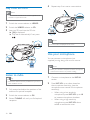
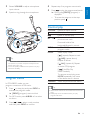
Rotate VOLUME to adjust microphone
input volume.
4
Speak or sing through the microphone.
4
5
Repeat step 3 to program more tracks.
Press
to play the programmed tracks.
»» During play, [PROG] (program) is
displayed.
• To erase the program, at the stop
position, press .
Control play
VOLUME
VOLUME
/
Hi
MIC
VOL
LO
PROG
MODE
Rotate to adjust volume.
Stop play.
Pause or resume play.
Press to select the
previous/next track.
Press and hold to fast
backward/forward in a track.
In CD/USB/SD mode,
program tracks.
Select a play mode:
[
[ ALB] (repeat album):
Repeat an album.
Tip
•• To avoid echo noise, disconnect or turn off the
microphone, or put the microphone away from the
device when not in use.
•• The sound quality of different microphones may vary
with their sensitivity.
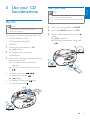
Program tracks
In CD/USB/SD mode, you can
program a maximum of 20 tracks.
1
Press to stop play, and press PROG to
activate the program mode.
»» [PROG] (program) starts to blink.
2
For MP3 tracks, press ALBUM +/- to select
an album.
3
Press
/
to select a track number,
and then press PROG to confirm.
] (repeat): Repeat a track.
[ ALL] (repeat all): Repeat
an entire CD/program.
[
] (shuffle): Play
tracks randomly.
-ALBUM+
To resume normal play, press
MODE repeatedly until none
of the above icons is shown.
Select the previous/next album.
Tip
•• When search reaches the end of the last track, the CD
stops.
•• Shuffle play cannot be selected when you play
programmed tracks.
EN
11
English
3