1
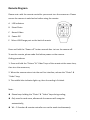
Remote Diagram Please note: with the remote controller you cannot turn the camera on. Please ensure the camera is switched on before using the remote. A LED Indicators B Shoot Photo C Record Video D Power Off E Micro USB Charge port on the back of remote Press and hold the “Power off” button around 4sec. to turn the camera off. To use the remote, please code first before power on the camera. Coding procedures: 1. Press and hold the “Picture” & “Video” keys of the remote at the same time, then turn the camera on; 2. When the camera enters into the real live interface, release the “Photo” & “Video” keys; 3. The middle blue indicator lights up, then the coding is finished. Note: z Please keep holding the “Photo” & “Video” keys during coding; z Only need to code once, afterwords the camera will recognize automatically; z Wi – Fi function & remote controller can not be used simultaneously. 5