1
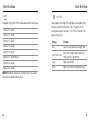
USER MANUAL
To download this user manual in a different language, visit
gopro.com/support.
Pour télécharger ce manuel de l’utilisateur dans une autre langue,
rendez-vous sur gopro.com/support. Wenn Sie dieses Benutzerhandbuch in einer anderen Sprache
herunterladen möchten, besuchen Sie gopro.com/support. / Join the GoPro Movement
facebook.com/GoPro
youtube.com/GoPro
twitter.com/GoPro
instagram.com/GoPro
Per scaricare questo manuale utente in un’altra lingua, visita gopro.com/support. Para descargar este manual de usuario en otro idioma, visite gopro.com/support. Para baixar este manual do usuário em outro idioma, acesse
gopro.com/support. このユーザーマニュアルの他言語版をダウンロードするに
は、 gopro.com/supportにアクセスしてください。 若要下載其他語言版本的使用說明書,請前往: gopro.com/support。
如需下载本用户手册的其他语言版本,请访问 gopro.com/support。
2
3
/ Table of Contents
/ Table of Contents
The Basics
6
Using the Mounts
81
Getting Started
8
Frequently Asked Questions
84
Camera Status Screen
13
Customer Support
86
Camera Icons
14
Trademarks
86
Camera Menus
16
Regulatory Information
86
Camera Modes
18
Navigating Settings Menus
19
Video Mode
20
Photo Mode
33
Multi-Shot Mode
40
Playback Mode
49
Setup Mode
53
Connecting to the GoPro App
61
Transferring Files to a Computer
62
Protune™
63
Battery
69
Important Messages
74
Camera Housing
76
4
5
/ The Basics
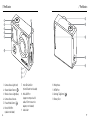
1.
2.
3.
4.
5.
6.
6
Camera Status Light (red)
Shutter/Select Button [
]
Wireless Status Light (blue)
Camera Status Screen
Power/Mode Button [
]
Micro HDMI Port
(cable not included)
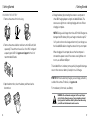
/ The Basics
7. microSD Card Slot
(microSD card not included)
8. Mini-USB Port
(supports composite A/C
cable/3.5mm stereo mic
adapter, not included)
9. Audio Alert
10.Microphone
11.HERO Port
12.Settings/Tag Button [
13.Battery Door
]
7
/ Getting Started
CHARGING THE BATTERY
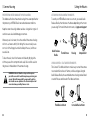
housing remove camera
1.Slim
Remove
the camera from its housing.
2.Remove the camera side door and insert a microSD card (sold
separately). The card must have a Class 10 or UHS-1 rating and
a capacity up to 64GB. Visit gopro.com/support for the list of
recommended SD cards.
/ Getting Started
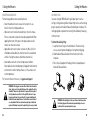
Slim housing insert camera
4.Charge the battery by connecting the camera to a computer or
other USB charging adapter using the included USB cable. The
camera status light turns on during charging and turns off when
charging is complete.
NOTICE: Using a wall charger other than a GoPro Wall Charger can
damage the GoPro battery. Only use chargers marked: output 5V
1A. If you do not know the voltage and current of your charger, use
the included USB cable to charge the camera from your computer.
When charging with a computer, be sure that the computer is
connected to a power source. If the camera status light does not
turn on, use a different USB port.
The included lithium-ion battery comes partially charged. No damage
occurs to the camera or battery if used prior to a full charge.
3.Open the bottom door, insert the battery and then close the
bottom door.
PRO TIP: With the Dual Battery Charger, you can charge your battery
outside of the camera. For details, visit gopro.com.
For more battery information, see Battery.
WARNING: Use caution when using your GoPro as part of your
active lifestyle. Always be aware of your surroundings to avoid
injury to yourself and others. Abide by all local laws when using
your GoPro and related mounts and accessories.
8
9
/ Getting Started
/ Getting Started
CAMERA SOFTWARE UPDATES
To get the latest features and best performance from your HERO4
camera, make sure you are using the most current camera software.
You can update your camera software via the GoPro App or GoPro
software. For more information, visit gopro.com/getstarted.
CAMERA DEFAULT SETTINGS
The HERO4 Black camera powers up with the following default
settings:
Video
1080p30 SuperView™
Photo
12MP, Wide Field of View (FOV)
Multi-Shot
Burst option (set to 30 photos in 1 second)
QuikCapture
Off
Wireless
Off
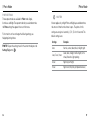
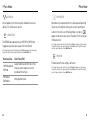
PRO TIP: To open the settings menu for the current mode, press the
Settings/Tag button [
].
10
POWERING ON + OFF
To Power On:
Press the Power/Mode button [
] once. The camera status lights
(red) flash three times and the sound indicator emits three beeps. When
the camera status screen displays information, your camera is on.
To Power Off:
Press and hold the Power/Mode button [
] for two seconds. The
camera status lights (red) flash several times and the sound indicator
emits seven beeps.
PRO TIP: When the camera is off and QuikCapture is enabled, you can
turn the camera on and immediately begin capturing video or Time
]. Press
Lapse photos just by pressing the Shutter/Select button [
once for video, press and hold for Time Lapse photos. Press again to
stop recording and power off the camera. For details, see QuikCapture
in Setup Mode.
11
/ Getting Started
/ Camera Status Screen
INSERTING + REMOVING MICROSD CARDS
The HERO4 Black camera is compatible with 4GB, 8GB, 16GB, 32GB
and 64GB capacity microSD, microSDHC and microSDXC memory
cards (sold separately). You must use a microSD card with a Class
10 or a UHS-1 rating. (For a list of the recommended SD cards,
visit gopro.com/support.) GoPro recommends using brand name
memory cards for maximum reliability in high-vibration activities.
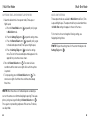
To Insert the microSD Card:
To Remove the microSD Card:
Slide the memory card into the
Place your fingernail against
card slot with the label facing the the edge of the memory card
front of the camera.
and lightly press it further into
the camera.
When fully inserted, the card
clicks into place.
The card springs out far enough
to be removed.
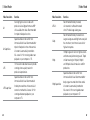
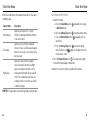
Your HERO4 Black features a status screen that displays the following
information about modes and settings:
1.Camera Modes/FOV
(field of view)
2. Camera Settings
3. Resolution/fps
(frames per second)
4. Protune™
5. Number of Files Captured
6. Time/Storage/Files
7.Wireless
8. Battery Life
Note: The icons that appear on the camera status screen vary by mode.
NOTICE: Use care when handling memory cards. Avoid liquids, dust
and debris. As a precaution, power off the camera before inserting
or removing the card. Check manufacturer guidelines regarding use
in acceptable temperature ranges.
12
13
/ Camera Icons
Auto Low Light
LEDs
Sharpness
Auto Off
Looping
Shutter
Beeps
Megapixels
Single Photo
Burst Photos
Multi-Shot Mode
Spot Meter
Color
Night Lapse
Time Lapse
Continuous Photos
Night Photo
Touch Display
Date/Time
On-Screen Display
Video
Default Mode
Orientation
Video + Photo
Delete
Photo Mode
Video Format
Exposure Value
Compensation
Playback Mode
Video Mode
Protune
Video Resolution
QuikCapture
White Balance
Rate
Wireless
Field of View
Frames Per Second
Interval
ISO Limit
14
/ Camera Icons
Setup Mode
15
/ Camera Menus
/ Camera Menus
Camera
Reset
*Playback appears only if the camera is connected to a TV or LCD Touch BacPac (sold separately).
16
17
/ Camera Modes
/ Navigating Settings Menus
The HERO4 Black features several camera modes. To cycle through
] repeatedly.
the modes, press the Power/Mode button [
These modes appear:
Video
Record video
Photo
Capture a single photo
Multi-Shot
Capture a series of photos
(Time Lapse, Burst, etc.)
Playback
Play back videos and photos
Setup
Adjust general camera settings
Each camera mode has its own settings menu.
TO NAVIGATE SETTINGS MENUS:
1. Verify that the camera is in the desired camera mode. If an icon for
that mode does not appear on the camera status screen, press the
Power/Mode button [
] repeatedly until it appears.
2.Press the Settings/Tag button [
] to open the settings menu for
that mode.
] to cycle through the settings.
3.Use the Power/Mode button [
] to cycle through the options
4.Press the Shutter/Select button [
within a setting. To select an option, leave the option highlighted
when you move to another screen.
5.To go back to the previous screen or exit the settings menu, press
].
the Settings/Tag button [
18
19
/ Video Mode
/ Video Mode
Video mode contains three capture modes: Video, Video + Photo and
Video Looping.
Capture Mode
Description
Video (default)
Captures video.
Video + Photo
Simultaneously captures both video and
photos. You can set the camera to capture a
photo at selected intervals while you record
video. For details, see Video + Photo Intervals
in this section.
Looping
Lets you continuously record and save only
the best moments, which helps to conserve
space on your microSD card. You must
select an interval. Looping is available only
if Protune™ is turned off.
Note: Looping is not available in high-performance video modes.
For details, see High-Performance Video Modes and Camera
Temperatures.
PRO TIP: Easily create epic GoPro-style videos using free
GoPro software. Learn more and download this software at
gopro.com/getstarted.
20
CAPTURING VIDEO
] repeatedly until you get to
1. Press the Power/Mode button [
Video mode.
2.If necessary, select a different video capture mode (Video, Video +
Photo, or Video Looping):
] to open the settings menu.
a.Press the Settings/Tag button [
] repeatedly until you get
b.Press the Shutter/Select button [
to the desired capture mode.
] to close the settings
c. Press the Settings/Tag button [
menu. The icon for the selected capture mode appears in the
upper left on your camera status screen.
]. The camera beeps once
3.Press the Shutter/Select button [
and the camera status lights flash while the camera is recording.
]. The camera
4.To stop capturing, press the Shutter/Select button [
status lights flash three times and the camera beeps three times.
If the memory card is full or the battery is out of power, your camera
automatically stops recording. Your video is saved before the camera
powers off.
PRO TIP: When the camera is off and QuikCapture is enabled, you
can turn the camera on and immediately begin capturing video just
]. Press again to stop
by pressing the Shutter/Select button [
recording and power off the camera. For details, see Setup Mode.
21
/ Video Mode
/ Video Mode
VIDEO SETTINGS
Three capture modes are available for Video mode: Video, Video
+ Photo and Video Looping. The capture mode that you select
determines the Video settings that appear in the rest of the menu.
For instructions on how to change the following settings, see
Navigating Settings Menus.
HILIGHT TAGGING
You can mark specific moments in your video as they happen with
HiLight Tags. HiLight Tags make it easy to find the best highlights
to share.
You can add tags with your camera, the GoPro App, or the Smart
Remote (sold separately). Tags are visible during playback in the
GoPro App or GoPro software.
PRO TIP: In the app, tap the screen during playback to display the
HiLight Tags on the progress bar.
To Add a HiLight Tag with Your Camera:
While recording video, press the Settings/Tag button [
22
PRO TIP: To open the settings menu for the current mode, press the
].
Settings/Tag button [
INTERVAL
The Interval setting applies to Video + Photo and Looping.
Interval determines the amount of time that passes between
each captured frame.
Video + Photo Intervals
Available intervals for Video + Photo range from 5-60 seconds.
The quality of the photo depends on the selected video resolution
and FOV.
].
23
/ Video Mode
Looping Intervals
Available intervals for Looping are 5, 20, 60 and 120 minutes. For
example, if you select a 5-minute interval, only the previous 5 minutes
is saved when you stop recording. If you record for 5 minutes and do
] to stop recording and save,
not press the Shutter/Select button [
the camera begins a new 5-minute interval by recording over your
previous 5 minutes of footage.
/ Video Mode
RESOLUTION, FPS AND FOV
The HERO4 Black includes the video resolutions listed below.
Video
Resolution
NTSC/
PAL
FOV
Screen Resolution
4K
30/25
24/24
Ultra Wide
3840x2160, 16:9
You can also select max video as the interval. With this option, the camera
records until the memory card is full, then overwrites the content.
4K SuperView
24/24
Ultra Wide
3840x2160, 16:9
Note: To use Looping, be sure that your microSD card has sufficient space.
2.7K
48/50
30/25
24/24
Ultra Wide,
Medium
2704x1520, 16:9
PRO TIP: Multiple chapter files are written to your memory card
so that small segments of content can be overwritten during loop
recording. When viewing this content on a computer, you see separate
files for each time segment. Use GoPro software to combine the files
into a longer video.
24
2.7K SuperView
30/25
Ultra Wide
2704x1520, 16:9
2.7K 4:3
30/25
Ultra Wide
2704x2028, 4:3
1440p
80/80
60/50
48/48
30/25
24/24
Ultra Wide
1920x1440, 4:3
1080p
120/120
90/90
Ultra Wide,
Narrow
1920x1080, 16:9
25
/ Video Mode
/ Video Mode
Video
Resolution
NTSC/
PAL
FOV
Screen Resolution
1080p
60/50
48/48
30/25
24/24
Ultra Wide,
Medium,
Narrow
1920x1080, 16:9
1080p SuperView
80/80
60/50
48/48
30/25
24/24
Ultra Wide
1920x1080, 16:9
960p
120/120
60/50
Ultra Wide
1280x960, 4:3
720p
120/120
60/50
30/25
Ultra Wide,
Medium,
Narrow
1280x720, 16:9
720p SuperView
120/120
60/50
Ultra Wide
1280x720, 16:9
WVGA
240/240
Ultra Wide
848x480, 16:9
PRO TIP: To open the settings menu for the current mode, press the
].
Settings/Tag button [
26
High-Performance Video Modes and Camera
Temperatures
The HERO4 Black features unique high-performance video modes:
4K30/24, 4K24 SuperView, 2.7K48/50, 2.7K30 SuperView, 2.7K 4:3,
1440p80, 1080p120/90, 960p120 and 720p120. When using these
video modes, it is normal for the camera to become warm and use
more power.
Using these high-performance modes in higher temperatures
decreases camera recording time. In addition, lack of airflow around
the camera, using the camera with the GoPro App, or in combination
with BacPac accessories further increases camera temperature and
power consumption, and decreases camera recording time.
If the camera gets too hot, a message appears on the screen
indicating that the camera is shutting down. The camera stops
recording, saves your video, disconnects from the GoPro App,
and powers off. If this happens, let your camera sit and cool before
attempting to use it again. For extended recording time in high-performance video modes,
capture shorter video clips when in stationary use, and/or limit your
use of features that increase power consumption, such as the GoPro
App or BacPac accessories. To control your camera remotely at higher
temperatures, use the GoPro remote instead of the GoPro App.
27
/ Video Mode
/ Video Mode
Video Resolution
Best Use
4K
Stunning high-resolution video with
professional low-light performance. 8MP
stills available from video. Recommended
for tripod or fixed position shots.
4K SuperView
SuperView delivers the world’s most
immersive field of view. Recommended for
tripod or fixed position shots. More vertical
4:3 content is automatically stretched to
full-screen 16:9 for stunning widescreen
playback on your computer or TV.
2.7K
16:9 resolution video downscales to provide
stunning, cinema-quality results for
professional productions.
2.7K SuperView
SuperView delivers the world’s most
immersive field of view. Recommended
for body-mounted shots. More vertical 4:3
content is stretched to full-screen 16:9 for
stunning widescreen playback on your
computer or TV.
28
Video Resolution
Best Use
2.7K 4:3
Recommended for body-mounted,
ski-mounted or surfboard-mounted
shots. Provides large viewing area.
1440p
Recommended for body-mounted shots.
Larger viewing area and high frame rate yield
the smoothest, most immersive results for
high-action capture.
1080p
1080p60 is great for all shots. High resolution
and frame rate yield stunning results. Tripod
or fixed mounting for 1080p48, 1080p30
and 1080p24 is ideal for television and film
productions.
1080p SuperView
SuperView delivers the world’s most
immersive field of view. Recommended for
body-or gear-mounted shots. More vertical
4:3 content is automatically stretched to
full-screen 16:9 for stunning widescreen
playback on your computer or TV.
29
/ Video Mode
/ Video Mode
Video Resolution
Best Use
FOV
Best Use
960p
Use for body-mounted shots and when
slow motion is desired. Provides large
viewing area and smooth results for high
action capture.
Ultra Wide
Largest field of view, increased image
stability. Good for action shots where
you want to capture as much as possible
within the frame.
720p
Good for handheld shots and when slow
motion is desired.
Medium
Mid-range field of view, moderate
image stability.
Narrow
720p SuperView
SuperView delivers the world’s most
immersive field of view. Good for body-or
gear-mounted shots. More vertical 4:3
content is automatically stretched to
full-screen 16:9 for stunning widescreen
playback on your computer or TV.
Smallest field of view, reduced image
stability. Reduced distortion. Good for
capturing content at a distance.
WVGA
Good when super slow motion is desired and
standard definition is acceptable.
30
31
/ Video Mode
LOW LIGHT
Auto Low Light allows you to shoot in low-light environments or
when quickly transitioning in and out of low-light conditions. The
camera automatically adjusts fps to achieve the optimal exposure
and best results.
Auto Low Light is not available for 240 fps or 30 fps and below. The
options for this setting are on (default) and off.
SPOT METER
Spot Meter lets you film from a dark space while pointing the camera
into a brighter setting, such as when recording the outdoors from
] appears on the
within a car. When Spot Meter is turned on, [
camera status screen. The options for this setting are off (default)
and on.
/ Photo Mode
Photo mode contains three capture modes: Single, Continuous
and Night.
Capture Mode
Description
Single (default)
Captures a single photo.
Continuous
Captures a series of photos continuously
while holding down the Shutter/Select
].
button [
Night
Captures a single photo with a customizable
exposure time up to 30 seconds. For available
exposure times and examples of when to use
them, see Shutter in Photo Settings.
PRO TIP: While capturing video, you can manually take a photo at
]. Press and hold
any time by pressing the Power/Mode button [
] to capture a photo every 5 seconds.
the Power/Mode button [
Note: Changes that you make to the Spot Meter setting in Video mode apply only to video capture.
To adjust this setting for photo capture, adjust the setting in Photo mode. To adjust this setting for
multi-shot capture, adjust the setting in Multi-Shot mode.
PROTUNE
For details about Protune settings, see Protune.
Note: Changes that you make to the Protune settings in Video mode apply only to video capture.
To adjust this setting for photo capture, adjust the setting in Photo mode. To adjust this setting for
multi-shot capture, adjust the setting in Multi-Shot mode.
32
33
/ Photo Mode
CAPTURING A SINGLE OR NIGHT PHOTO
1. Select the desired photo capture mode (Single or Night):
a.Press the Power/Mode button [
] repeatedly until you get
to Photo mode.
] to open the settings menu.
b.Press the Settings/Tag button [
] repeatedly until you get
c. Press the Shutter/Select button [
to the desired capture mode (Single or Night).
] to close the settings
d.Press the Settings/Tag button [
menu. The icon for the selected capture mode appears in the
upper left on your camera status screen.
]. The camera beeps two
2.Press the Shutter/Select button [
times, the camera status lights flash and the counter on the
camera status screen increases by one.
PRO TIP: For Night photo, be sure to use the right Shutter setting for
the situation. For details, see Shutter in Photo Settings.
34
/ Photo Mode
CAPTURING CONTINUOUS PHOTOS
1. Select Continuous mode:
] repeatedly until you get
a.Press the Power/Mode button [
to Photo mode.
] to open the settings menu.
b.Press the Settings/Tag button [
] repeatedly until you get
c. Press the Shutter/Select button [
to Continuous.
] to close the settings
d.Press the Settings/Tag button [
] appears in the upper left on
menu. The Continuous icon [
your camera status screen.
]. The camera
2.Press and hold the Shutter/Select button [
beeps and the camera status lights flash repeatedly.
]. The
3.To stop capturing, release the Shutter/Select button [
counter on the camera status screen increases by one for every
photo captured.
35
/ Photo Mode
PHOTO SETTINGS
Three capture modes are available for Photo mode: Single,
Continuous and Night. The capture mode that you select determines
the Photo settings that appear in the rest of the menu.
For instructions on how to change the following settings, see
Navigating Settings Menus.
PRO TIP: To open the settings menu for the current mode, press the
].
Settings/Tag button [
36
/ Photo Mode
SHUTTER
Shutter applies only to Night Photo and Night Lapse and determines
the amount of time that the shutter is open. The options for this
setting are auto (up to 2 seconds), 2, 5, 10, 15, 20 or 30 seconds. The
default setting is auto.
Settings
Examples
Auto
Sunrise, sunset, dawn, dusk, twilight, night
2 sec, 5 sec, 10 sec
Dawn, dusk, twilight, traffic at night, Ferris
wheel, fireworks, light painting
20 sec
Night sky (with light)
30 sec
Night stars, Milky Way (complete darkness)
37
/ Photo Mode
/ Photo Mode
INTERVAL
SPOT METER
Interval applies only to Continuous photo. Available intervals are 3
(default), 5 or 10 photos every second.
MEGAPIXELS
The HERO4 Black captures photos at 12MP, 7MP or 5MP. Smaller
megapixel values take up less space on the microSD card.
Note: Changes that you make to the Megapixels setting in Photo mode apply only to photo capture.
To adjust this setting for multi-shot capture, adjust the setting in Multi-Shot mode.
Photo Resolution
Field of View (FOV)
12MP Wide (default)
7MP Wide
Largest field of view. Good for action shots
where you want to capture as much as
possible within the frame.
7MP Medium
5MP Medium
Mid-range field of view.
38
Spot Meter lets you capture photos from a dark space while pointing
the camera into a brighter setting, such as when recording the
]
outdoors from within a car. When Spot Meter is turned on, [
appears on the camera status screen. The options for this setting are
off (default) and on.
Note: Changes that you make to the Spot Meter setting in Photo mode apply only to photo capture.
To adjust this setting for video capture, adjust the setting in Video mode. To adjust this setting for
multi-shot capture, adjust the setting in Multi-Shot mode.
PROTUNE
For details about Protune settings, see Protune.
Note: Changes that you make to the Protune settings in Photo mode apply only to photo capture.
To adjust this setting for video capture, adjust the setting in Video mode. To adjust this setting for
multi-shot capture, adjust the setting in Multi-Shot mode.
39
/ Multi-Shot Mode
Multi-Shot mode contains three capture modes: Burst, Time Lapse
and Night Lapse.
Capture Mode
Description
Burst (default)
Captures up to 30 photos in 1 second.
Perfect for capturing the definitive moment
in fast-action sports.
Time Lapse
Captures a series of photos at specified
intervals. You can use Time Lapse to capture
photos of any activity, so you can choose the
best ones later.
Night Lapse
Captures a series of photos at specific
intervals and exposure times. Use Night
Lapse in low light environments, such as
when capturing the night sky over a period
of time. For available exposure times and
examples of when to use them, see Shutter
in Mult-Shot Settings.
/ Multi-Shot Mode
CAPTURING BURST PHOTOS
1. Select Burst mode:
a.Press the Power/Mode button [
] repeatedly until you get
to Multi-Shot mode.
] to open the settings menu.
b.Press the Settings/Tag button [
] repeatedly until you
c. Press the Shutter/Select button [
get to Burst.
] to close the settings
d.Press the Settings/Tag button [
] appears in the upper left on your
menu. The Burst icon [
camera status screen.
]. The camera status lights
2.Press the Shutter/Select button [
flash and the camera beeps multiple times.
See Rate in this section for options available for Burst photos.
PRO TIP: For longer exposure times during the day, use Night Lapse.
40
41
/ Multi-Shot Mode
CAPTURING TIME LAPSE OR NIGHT LAPSE PHOTOS
1. Select the desired multi-shot capture mode (Time Lapse or
Night Lapse):
] repeatedly until you get
a.Press the Power/Mode button [
to Multi-Shot mode.
] to open the settings menu.
b.Press the Settings/Tag button [
] repeatedly until you get
c. Press the Shutter/Select button [
to the desired capture mode (Time Lapse or Night Lapse).
] to close the settings
d.Press the Settings/Tag button [
menu. The icon for the selected capture mode appears in the
upper left on your camera status screen.
]. The camera initiates
2.Press the Shutter/Select button [
countdown and the camera status lights flash each time a photo
is captured.
]. The
3.To stop capturing, press the Shutter/Select button [
camera status lights flash three times and the camera beeps
three times.
/ Multi-Shot Mode
MULTI-SHOT SETTINGS
Three capture modes are available for Multi-Shot mode: Burst, Time
Lapse and Night Lapse. The capture mode that you select determines
the Multi-Shot settings that appear in the rest of the menu.
For instruction on how to change the following settings, see
Navigating Settings Menus.
PRO TIP: To open the settings menu for the current mode, press the
].
Settings/Tag button [
PRO TIP: When the camera is off and QuikCapture is enabled, you
can turn the camera on and immediately begin capturing Time Lapse
].
photos just by pressing and holding the Shutter/Select button [
Press again to stop recording and power off the camera. For details,
see Setup Mode.
42
43
/ Multi-Shot Mode
/ Multi-Shot Mode
SHUTTER
Rate applies only to Burst. Photos can be captured at the following rates:
3 photos in 1 second
5 photos in 1 second
Shutter applies only to Night Photo and Night Lapse and determines
the amount of time that the shutter is open. The options for this
setting are auto (up to 2 seconds), 2, 5, 10, 15, 20 or 30 seconds. The
default setting is auto.
10 photos in 1 second
Settings
Examples
10 photos in 2 seconds
Auto
Sunrise, sunset, dawn, dusk, twilight, night
2 sec, 5 sec, 10 sec
Dawn, dusk, twilight, traffic at night, Ferris
wheel, fireworks, light painting
30 photos in 2 seconds
20 sec
Night sky (with light)
30 photos in 3 seconds
30 sec
Night stars, Milky Way (complete darkness)
10 photos in 3 seconds
30 photos in 1 second (default)
PRO TIP: Sometimes 30 photos in 1 second is too fast. Try a slower
Burst interval to better match the action.
44
45
/ Multi-Shot Mode
INTERVAL
/ Multi-Shot Mode
MEGAPIXELS
Interval applies only to Time Lapse and Night Lapse. Interval determines
the amount of time that passes between each captured frame.
The HERO4 Black captures photos at 12MP, 7MP or 5MP. Smaller
megapixel values take up less space on the microSD card.
Time Lapse Intervals
Available intervals for Time Lapse range from 0.5 seconds (default) to
60 seconds.
Note: Changes that you make to the Megapixels setting in Multi-Shot mode apply only to multi-shot
capture. To adjust this setting for photo capture, adjust the setting in Photo mode.
Interval
Examples
0.5-2 seconds
Surfing, biking or other sport
2 seconds
Busy street corner
5-10 seconds
Sunset
10-60 seconds
Lengthy activities, such as
construction projects
Settings
Description
12MP Wide (default)
7MP Wide
Largest field of view. Good for action shots
where you want to capture as much as
possible within the frame.
7MP Medium
5MP Medium
Mid-range field of view.
Night Lapse Intervals
Available intervals for Night Lapse range from 4 seconds to 60
minutes. Continuous (default) causes the Interval to match the Shutter
setting. For example, if Shutter is set to 10 seconds and Interval is set
to continuous, your camera captures a photo every 10 seconds.
46
47
/ Multi-Shot Mode
SPOT METER
Spot Meter lets you capture photos from a dark space while pointing
the camera into a brighter setting, such as when recording the
]
outdoors from within a car. When Spot Meter is turned on, [
appears on the camera status screen. The options for this setting are
off (default) and on.
Note: Changes that you make to the Spot Meter setting in Multi-Shot mode apply only to multi-shot
capture. To adjust this setting for video capture, adjust the setting in Video mode. To adjust this setting
for photo capture, adjust the setting in Photo mode.
PROTUNE
For details about Protune settings, see Protune.
Note: Changes that you make to the Protune settings in Multi-Shot mode apply only to multi-shot
capture. To adjust this setting for video capture, adjust the setting in Video mode. To adjust this setting
for photo capture, adjust the setting in Photo mode.
48
/ Playback Mode
You can play back your content on a computer, TV, smartphone/
tablet (using the GoPro App) or on your camera using an LCD Touch
BacPac (sold separately). Playback mode appears only if the camera
is connected to a TV or LCD Touch BacPac.
You can also play back content by inserting the microSD card
directly into a device, such as a computer or compatible TV. With
this method, playback resolution depends on the resolution of the
device and its ability to play back that resolution.
PLAYING BACK VIDEOS AND PHOTOS ON A COMPUTER
For best results playing back your content on a computer, visit
gopro.com/getstarted to download the latest GoPro software. Be
sure your Mac® or Windows® computer meets these minimum
system requirements:
Windows
Mac
Operating
System
Windows 7, 8.x
OS X® 10.8 or later
CPU
Intel® Core 2 Duo™ (Intel
Quad Core™ i7 or better
recommended)
Intel® Dual Core™ (Intel
Quad Core i7 or better
recommended)
Graphics Card
Card that supports
Open GL1.2 or later
Card included with
Intel Dual Core Macs
or better
49
/ Playback Mode
/ Playback Mode
Windows
Mac
Screen
Resolution
1280 x800
1280 x768
RAM
4GB
4GB
Hard Drive
5400 RPM internal
drive (7200 RPM drive
or SSD recommended)
If external, use USB 3.0
or eSATA
5400 RPM internal
drive (7200 RPM drive
or SSD recommended)
If external, use
Thunderbolt, FireWire
or USB 3.0
For minimum system requirements for 4K playback and editing, visit
gopro.com/support.
To Play Back Content on Your Computer:
1. Download the latest GoPro software from gopro.com/getstarted.
2.Connect the camera to your computer using the included USB cable.
3.Copy the files to your computer or external hard drive.
4.Play back your content with GoPro software.
50
PLAYING BACK VIDEOS AND PHOTOS ON YOUR TV
Playing back videos and photos on your TV/HDTV requires a micro
HDMI, composite or combo cable (all sold separately).
To Play Back Content on a TV:
1. Plug the camera into a TV/HDTV with a micro HDMI cable,
composite cable or combo cable.
2.Select the input on your TV that corresponds to the port into which
you plugged the cable.
3.Power on the camera.
] to cycle to Playback [
].
4.Press the Power/Mode button [
] to select it.
mode, and then press the Shutter/Select button [
5.Use the Power/Mode button [
] to navigate files.
6.Use the Shutter/Select button [
] to select files.
7. Use [
] and [
] to navigate backward and forward to see more
media files on your memory card.
Note: HDMI playback depends on the resolution of the device, and is certified up to 1080p.
51
/ Playback Mode
/ Setup Mode
PLAYING BACK CONTENT ON A SMARTPHONE/TABLET
1. Connect your camera to the GoPro App. For details, see
Connecting to the GoPro App.
2.Use the controls on the app to play back your footage on your
smartphone/tablet.
In Setup mode, you can change settings that apply to all camera
modes. For instructions on how to change the following settings,
see Navigating Settings Menus.
PLAYING BACK CONTENT USING AN LCD TOUCH BACPAC
For instructions, see the LCD Touch BacPac User Guide.
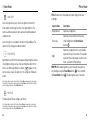
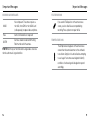
When Wireless is on, a Wireless status icon appears on the camera
status screen and the blue wireless lights blink intermittently.
WIRELESS
Setting
Description
Off (default)
GoPro App
Camera connects to the GoPro App. For
instructions on connecting to this app, see
Connecting to the GoPro App.
WiFi Remote
Camera connects to the remote (sold
separately). For instructions on pairing, see
the user manual for the remote.
PRO TIP: If you forgot your camera’s name or password, you can
reset them to the defaults. With the camera powered on, press and
]. Two seconds later, press and
hold the Settings/Tag button [
]. Release the Settings/Tag
release the Power/Mode button [
]. From the Wi-Fi reset menu, select Reset. The default
button [
password is goprohero.
52
53
/ Setup Mode
/ Setup Mode
TOUCH DISPLAY
Touch Display appears only if your camera is attached to an LCD Touch
BacPac (sold separately). These settings let you manage the BacPac
screen to conserve battery power.
Setting
Description
Sleep
Automatically dims the touch display after a
period of inactivity. The options for this setting
are 1 minute (default), 2 minutes, 3 minutes
and Never. To manually dim the screen or
to wake it, press the Touch Display Sleep/
].
Wake button [
Lock
Lets you use gestures to lock and unlock the
touch display. The options for this setting are
off and on (default). Turn this setting on to
prevent accidental input on the touch display.
When this setting is on, press the touch
display for two seconds to lock it. To unlock
the touch display, slide down and hold.
54
Setting
Description
Brightness
Determines the level of light on the touch
display. The options for this setting are high
(default), medium and low.
Touch Display
On/Off
Turns the touch display on or off when the
camera is powered on. The options for this
setting are on (default) and off.
55
/ Setup Mode
/ Setup Mode
ORIENTATION
If you mount your camera upside down, you might have to rotate the
files during editing. This setting eliminates the need to flip your video
or photos after recording.
Setting
Description
Up
Camera is always assumed to be
right-side up.
Down
Camera is always assumed to be
upside down.
DEFAULT MODE
You can select the capture mode that appears when the camera
powers on. The options are Video, Video + Photo, Video Looping,
Single, Continuous, Night, Burst, Time Lapse, and Night Lapse.
56
QUIKCAPTURE
With QuikCapture, you can quickly turn your camera on and begin
capturing video or Time Lapse photos. The options for this setting are
on and off (default).
Note: QuikCapture is disabled when the camera is connected to the remote or the GoPro App.
To Capture Video with QuikCapture:
With the camera powered off, press and release the Shutter/Select
]. Your camera automatically powers on and begins
button [
capturing video.
To Capture Time Lapse Photos with QuikCapture:
With the camera powered off, press and hold the Shutter/Select
]. Your camera automatically powers on and begins
button [
capturing Time Lapse photos.
To Stop Recording:
Press and release the Shutter/Select button [
and power off the camera.
] to stop recording
57
/ Setup Mode
/ Setup Mode
LEDS
ON-SCREEN DISPLAY
This setting determines which camera status lights (red) to activate.
The options for this setting are 4 (top, bottom, front, back), 2 (front and
back), or off (none). The default setting is 4.
Note: The Wireless status light (blue) is always activated unless you select off for this setting.
Note: When this setting is on and you are playing back content on your camera using an LCD Touch
BacPac (sold separately), you can tap the touch display to quickly show or hide the recording and
file information.
BEEPS
You can set the volume for the sound indicators to be 100% (default),
70% or off.
VIDEO FORMAT
The Video Format setting governs frame rates for recording and
playback when viewing video on a TV/HDTV.
Setting
Description
NTSC (default)
Viewing video in North America
PAL
Viewing video on a PAL TV/HDTV (most
televisions outside of North America)
58
The OSD (on-screen display) setting determines whether the
recording icons and file information on video and on the viewing
screen appear during playback. The options for this setting
are on (default) and off.
AUTO OFF
Your camera can be configured to automatically power off after a
specific period (1 minute - 5 minutes) in which no videos or photos
are captured and no buttons are pressed. You can also configure the
camera to never automatically power off (default).
DATE/TIME
Your camera’s date and time are automatically set when you connect
your camera to the GoPro App or GoPro software. This setting lets
you manually set the date and time. If the battery is removed from
the camera for an extended period of time, you must reset the date
and time (automatically or manually).
59
/ Setup Mode
/ Connecting to the GoPro App
DELETE
The GoPro App lets you control your camera remotely using a
smartphone or tablet. Features include full camera control, live preview,
playback and sharing of content, and camera software updates.
This setting lets you delete the last file, or delete all files and format
the memory card. Deleting all files is useful after you transfer your
files to your computer and want to make room on your memory card
for more content. LED lights blink until the operation is complete.
NOTICE: If you select All/Format, the memory card is reformatted,
which deletes every file on the card.
CAMERA RESET
Camera reset returns all settings to their default values. This
option does not reset the Date/Time or your camera’s username
and wireless password.
Note: If your camera is not responding but you do not want to lose your settings, press and hold the
Power/Mode button for 8 seconds.
60
TO CONNECT YOUR HERO4 BLACK TO THE GOPRO APP:
1. Download the GoPro App to your smartphone/tablet from
the Apple App Store or Google Play.
2.Open the app.
3.When the app stops searching for a camera, tap Connect
Your Camera.
4.Follow the on-screen instructions to connect your camera to
the app. The default password for your camera is goprohero.
PRO TIP: If the camera is powered on and ready to capture videos or
] for two
photos, you can press and hold the Settings/Tag button [
seconds to turn Wireless on/off. You can also do this when the camera
is powered off.
61
/ Transferring Files to a Computer
To play back your video and photos on a computer, you must first
transfer these files to a computer.
TO TRANSFER FILES TO A COMPUTER:
1. Download and install the latest GoPro software from
gopro.com/getstarted.
2. Connect the camera to your computer using the included
USB cable.
PRO TIP: You can also transfer files to a computer using a card reader
(sold separately). Connect the card reader to your computer and insert
the microSD card into the reader. You can then transfer files to your
computer or delete selected files on your card.
/ Protune
PROTUNE BENEFITS
Protune unlocks the camera’s full potential, yielding stunning
image quality and cinema-caliber video and photos optimized for
professional productions. Protune gives content creators more
flexibility and workflow efficiency than ever before.
Protune is compatible with professional color correction tools, GoPro
software and other video and photo editing software.
Protune enables manual control of White Balance, Color, ISO Limit,
Sharpness and Exposure Value Compensation for advanced control
and customization of your video footage and photos.
Note: Changes that you make to the Protune settings apply only to the mode in which they are
changed. To adjust this setting for video capture, adjust the settings in Video mode. To adjust this
setting for photo capture, adjust the settings in Photo mode. To adjust this setting for multi-shot
capture, adjust the settings in Multi-Shot mode.
PROTUNE
The options for this setting are off (default) and on. When Protune is
on, PT appears on the camera status screen. Protune is available for
all video and photo resolutions.
62
63
/ Protune
/ Protune
WHITE BALANCE
White balance adjusts the overall color tone of videos and photos.
Setting
Description
Auto (default)
Automatically adjusts the color tone based
on the environmental conditions
3000K
Warm light (incandescent or sunrise/
sunset lighting)
5500K
Slightly cool light (cool fluorescent or
average daylight)
6500K
Cool light (overcast conditions)
Native
Industry standardized optimized color
COLOR
Color allows you to adjust the color profile of your video footage
or photos.
Color Setting
Resulting Color Profile
GoPro Color
(default)
Provides GoPro color-corrected profile (same
great color as when Protune is turned off).
Flat
Provides neutral color profile that can be
color-corrected to better match footage
captured with other equipment, offering more
flexibility in post-production. Due to its long
curve, Flat captures more details in shadows
and highlights.
PRO TIP: The Native option yields a minimally processed data
file directly from the image sensor that allows for more precise
adjustments to be made in post-production. Recording with this
option takes full advantage of the image sensor’s capabilities.
64
65
/ Protune
/ Protune
Protune for Photo ISO Limit
ISO LIMIT
ISO Limit adjusts the camera’s sensitivity in low-light environments,
and creates a balance between brightness and resulting image noise.
Image noise refers to the degree of graininess in the image.
Protune for Video ISO Limit
Setting
Lighting Condition/Resulting Quality
6400 (default)
Brighter video in low light, increased
image noise
1600
Moderately bright video in low light,
moderate image noise
400
Darker video in low light, reduced
image noise
66
Setting
Lighting Condition/Resulting Quality
800 (default)
Darker photo in very low light, increased
image noise
400
Darker photo in low light, moderate image noise
200
Bright photo in indoor lighting, marginal
image noise
100
Bright photo in outdoor daylight, minimal
image noise
SHARPNESS
Sharpness controls the sharpness of your video footage or photos.
Sharpness Setting
Resulting Quality
High (default)
Ultra-sharp video or photo
Medium
Moderately sharp video or photo
Low
Softer video or photo
67
/ Protune
/ Battery
EXPOSURE VALUE COMPENSATION (EV COMP)
Exposure Value Compensation affects the brightness of your video or
photo. Adjusting this setting can improve image quality when shooting
in environments with contrasting lighting conditions.
Settings
-2.0
-1.5
-1.0
-0.5
0 (default)
+0.5
+1.0
+1.5
+2.0
PRO TIP: Exposure Value Compensation adjusts brightness
within the existing ISO Limit. If brightness has already reached the
ISO Limit in a low-light environment, increasing the Exposure Value
Compensation does not have any effect.
RESET
MAXIMIZING BATTERY LIFE
The battery icon on the camera screen blinks when the battery drops
below 10%. If the battery reaches 0% while recording, the camera
saves the file and powers off.
To maximize battery life, close the GoPro App. To maximize battery
life when shooting longer-duration activities while the camera is
connected to an LCD Touch BacPac (sold separately), turn off or remove
the BacPac. Extreme cold temperatures can decrease battery life. To
maximize battery life in cold conditions, keep the camera in a warm
place prior to use. Shooting at higher frame rates and resolutions
increases power consumption.
PRO TIP: QuikCapture helps maximize battery life. For details, see
QuikCapture in Setup Mode.
This option resets all Protune settings to their default values.
68
69
/ Battery
/ Battery
The battery charges to 80% in approximately one hour and 100% in
approximately two hours when using GoPro’s USB-compatible Wall
or Auto Charger.
REMOVING THE BATTERY FROM THE CAMERA
The HERO4 Black battery is designed to have a tight fit to maximize
reliability in high-vibration activities.
You can also charge the battery outside the camera using the Dual
Battery Charger (sold separately).
To Remove the Battery:
1. Open the battery door by placing your thumb in the indentation in
the battery door (on the bottom of the camera) and sliding it to the
left. Allow the door to open.
2.Grasp the battery pull-tab and remove the battery from the camera.
No damage occurs to the camera or battery if used prior to full charge.
Spare batteries and additional charging accessories are available at
gopro.com.
70
71
/ Battery
BATTERY STORAGE AND HANDLING
The camera contains sensitive components, including the battery.
Avoid exposing your camera and battery to very cold or very hot
temperatures. Low or high temperature conditions may temporarily
shorten the battery life or cause the camera to temporarily stop working
properly. Avoid dramatic changes in temperature or humidity when
using the camera, as condensation may form on or within the camera.
The camera housing protects the camera and battery from water
damage. For more information, see Camera Housing. Do not turn
on your camera if it is wet. If your camera is already on, turn it
off and remove the battery immediately. Allow the camera to dry
thoroughly before using it again. Do not dry the camera or battery
with an external heat source such as a microwave oven or hair dryer.
Damage to the camera or battery caused by contact with liquid is not
covered under the warranty.
Do not store your battery with metal objects, such as coins, keys
or necklaces. If the battery terminals come in contact with metal
objects, this may cause a fire.
72
/ Battery
BATTERY DISPOSAL
Most rechargeable lithium-ion batteries are classified as non-hazardous
waste and are safe for disposal in the normal municipal waste stream.
Many localities have laws in place requiring battery recycling. Check
your local laws to make sure that you can dispose of rechargeable
batteries in your regular trash. To safely dispose of lithium-ion batteries,
protect terminals from exposure to other metal with packing, masking
or electrical tape so they do not cause a fire while being transported.
Lithium-ion batteries, however, do contain recyclable materials and
are accepted for recycling by the Rechargeable Battery Recycling
Corporation’s (RBRC) Battery Recycling Program. We encourage
you to visit Call2Recycle at call2recycle.org or call 1-800-BATTERY
in North America to find a convenient recycling location.
Never dispose of a battery in a fire because it may explode.
WARNING: Do not drop, disassemble, open, crush, bend,
deform, puncture, shred, microwave, incinerate or paint the
camera. Do not insert foreign objects into the battery opening
on the camera. Do not use the camera or the battery if it has
been damaged—for example, if cracked, punctured or harmed
by water. Disassembling or puncturing the battery can cause
an explosion or fire.
73
/ Important Messages
MICROSD CARD MESSAGES
NO SD
No card present. The camera requires a
microSD, microSDHC or microSDXC card
(sold separately) to capture videos and photos.
FULL
Card is full. Delete files or swap card.
SD ERR
Camera is unable to read card formatting.
Reformat the card in the camera.
PRO TIP: Reformat your microSD card on a regular basis to ensure
that the card remains in good condition.
74
/ Important Messages
FILE REPAIR ICON
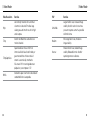
If you see the File Repair icon on the camera status
screen, your last video file was corrupted during
recording. Press any button to repair the file.
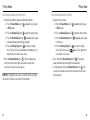
TEMPERATURE ICON
The Temperature icon appears on the camera status
screen when the camera becomes too hot and needs
to cool down. Simply let it sit and cool before attempting
to use it again. Your camera was designed to identify
conditions of overheating and is designed to respond
accordingly.
75
Slim housing closed
Swapping housing doors
/ Camera Housing
Slim housing closed
/ Camera Housing
Swapping housing doors
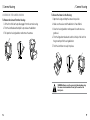
ASSEMBLING THE CAMERA HOUSING
To Remove the Camera From the Housing:
1. Lift the front of the latch up to disengage it from the camera housing.
2.Pivot the latch backward and pull it up to release the backdoor.
Slim housing
camera
3.Pull
open theremove
housing
backdoor and remove the camera.
Slim housing remove camera
To Secure the Camera in the Housing:
1. Open the housing and drop the camera into position.
2.Make sure the seal around the backdoor is free of debris.
3.Close the housing backdoor and squeeze it closed to ensure a
good
seal.
Slim housing
insert
camera
4.Pivot the hinged arm backwards and hook the lip of the latch into
the grooved top of the housing backdoor.
5.Push
the latch
down
to snap it into place.
Slim housing
insert
camera
WARNING: Always secure the camera in its housing when using
the camera in or around water. Do not get the camera or the
battery wet.
76
77
/ Camera Housing
/ Camera Housing
Your HERO4 Black camera comes with two types of backdoors:
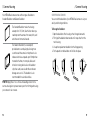
SWAPPING BACKDOORS
Standard Backdoor and Skeleton Backdoor.
You+can
the= backdoor
of your HERO4 Black camera to suit your
Quick Release Buckle + Thumb Screw
Slimswitch
housing
Complete Unit
activity and shooting conditions.
The Standard Backdoor makes the housing
To Change the Backdoor:
waterproof to 131’ (40m). Use this door when you
1. Open the backdoor of the housing so that it hangs downwards.
need to protect the camera from water, dirt, sand
2.Firmly pull the backdoor downwards until it snaps free from the
and other environmental hazards.
main housing.
The Skeleton Backdoor (non-waterproof)
3.Line up the replacement backdoor into the hinge opening.
provides better sound quality by allowing more
4.Push upwards on the backdoor until it clicks into place.
sound to reach the camera’s microphone. It also
Slim housing closed
Swapping housing doors
reduces wind noise at speeds up to 100mph when
mounted on helmets, motorcycles, bikes and
other fast-moving vehicles. Use this backdoor
only when sand, excessive dirt/dust and water
damage are not a risk. This backdoor is also
recommended for use inside vehicles.
PRO TIP: Apply Rain-X® or a similar anti-beading solution to the
housing remove camera
camera housing lens to prevent water spots from forming whenSlim
using
your camera in rain or water.
78
Slim housing insert camer
79
/ Camera Housing
PREVENTING WATER DAMAGE TO YOUR CAMERA
The rubber seal that lines the camera housing forms a waterproof barrier
that protects your HERO4 Black in wet and underwater conditions.
Keep the camera housing’s rubber seal clean. A single hair or grain of
sand can cause a leak and damage your camera.
After every use in salt water, rinse the outside of the camera housing
with non-salt water and dry. Not doing this can eventually cause
corrosion of the hinge pin and salt buildup in the seal, which can
cause failure.
To clean the seal, rinse in fresh water and shake dry (drying with a
cloth may cause lint to compromise the seal). Re-install the seal into
the grooves in the backdoor of the camera housing.
WARNING: Failure to follow these steps each time you use
your GoPro can result in leaks that may damage or destroy your
camera. Water will damage both the camera and the battery,
which could cause an explosion or fire. Your warranty does not
cover water damage resulting from user error.
/ Using the Mounts
ATTACHING YOUR CAMERA TO MOUNTS
To attach your HERO4 Black camera to a mount, you need a Quick
Release Buckle, thumb screw or hardware depending on the mount
you are
using.Buckle
For more
information
mounts,
visit=gopro.com/support.
Quick
Release
+ Thumb
Screw on
+ Slim
housing
Complete Unit
Quick Release
Buckle
Thumb Screw
Slim housing closed
Housing
Complete Unit
Swapping housing doors
USING CURVED + FLAT ADHESIVE MOUNTS
The Curved + Flat Adhesive Mounts make it easy to attach the camera
to curved and flat surfaces of helmets, vehicles and gear. Using the
Quick Release Buckle, the assembled camera housing can be clicked
on and off the secured Curved or Flat Adhesive Mounts.
Slim housing remove camera
Flat Adhesive Mount
80
Curved Adhesive Mount
81
/ Using the Mounts
MOUNTING GUIDELINES
Follow these guidelines when attaching mounts:
• Attach the adhesive mounts at least 24 hours prior to use.
Allow 72 hours for complete adhesion.
• Adhesive mounts must be mounted only on smooth surfaces.
Porous or textured surfaces do not enable a proper bond. When
applying the mount, firmly press it into place and ensure full
contact over the entire surface.
• Apply adhesive mounts to clean surfaces only. Wax, oil, dirt or
other debris reduce adhesion, which can result in a weak bond
and risk of losing the camera should the connection fail.
• Attach adhesive mounts in room temperature conditions.
Mount adhesives do not bond properly if applied in cold or damp
environments to cold or damp surfaces, or if the surface is not
room temperature.
For more information on mounts, visit gopro.com/support.
WARNING: If using your camera with a GoPro helmet mount or
strap, always select a helmet that meets the applicable safety
standard. Choose the right helmet for your particular sport or
activity and make sure that it is the right fit and size for you.
Inspect your helmet to ensure that it is in good condition and
follow the helmet manufacturer’s instructions on safe helmet
use. Any helmet that has sustained a major impact should be
replaced. No helmet can protect against injury in every accident.
82
/ Using the Mounts
LOCKING PLUG
If you are using the HERO4 Black in high-impact sports such as
surfing or skiing where significant impact might occur, use the locking
plug to securely lock the Quick Release Buckle fingers into place. The
locking plug helps to prevent the housing from accidentally releasing
from the mount.
To Attach the Locking Plug:
1. Loop the circular ring over the thumbscrew. The circular ring
acts as a leash to prevent dropping or losing the locking plug.
2.Slide the Quick Release Buckle into the mount until it clicks
into place.
3.Press the U-shaped part of the plug into the U-shaped space in
the Quick Release Buckle.
WARNING: To avoid injury in the event of an accident, do not use
the locking plug or tether when using a mounting device on a
helmet or other personal protective gear.
83
/ Frequently Asked Questions
MY GOPRO WON’T POWER ON
Make sure your GoPro is charged. To charge your camera, use the
included USB cable and a computer. You can also use the GoPro Wall
or Auto Charger.
MY GOPRO WON’T RESPOND WHEN I PRESS A BUTTON
] for 8 seconds to reset
Press and hold the Power/Mode button [
your camera. This reset saves all of your content and settings, and
powers off your camera.
MY PLAYBACK IS CHOPPY
Choppy playback is typically not a problem with the file. If your footage
skips, one of these situations is likely the cause:
• Using an incompatible video player. Not all video players support
the H.264 codec. For best results, use the latest GoPro software,
available for free at gopro.com/getstarted.
• The computer does not meet the minimum requirements for HD
playback. The higher the resolution and frame rate of your video,
the harder the computer has to work to play it back. Make sure
that your computer meets the minimum requirements listed in
Playback Mode.
• Playing a high bitrate HD video file over a low bandwidth USB
connection. Transfer the file to the computer to play back.
84
/ Frequently Asked Questions
If your computer does not meet the minimum requirements, record
at 720p30 with Protune off, and make sure that all other programs on
your computer are closed.
I FORGOT MY CAMERA’S NAME OR PASSWORD
With the camera powered on, press and hold the Settings/Tag button
]. Two seconds later, press and release the Power/Mode button
[
]. Release the Settings/Tag button [
]. From the Wi-Fi reset
[
menu, select Reset. The camera name is reset, and the password is
reset to goprohero.
I WANT TO RESET MY GOPRO SETTINGS TO THE DEFAULTS
In Setup mode, select Camera Reset. This option does not reset the
Date/Time or your camera’s username and wireless password.
I POWERED OFF MY GOPRO, BUT THE BLUE LIGHTS ARE
STILL BLINKING
The blue lights indicate that Wireless is on. With your camera powered
] for four seconds to
off, press and hold the Settings/Tag button [
turn off Wireless.
For more answers to commonly asked questions, see
gopro.com/support.
85
/ Customer Support
GoPro is dedicated to providing the best possible
service. To reach GoPro Customer Support, visit
gopro.com/support.
/ Trademarks
GoPro, HERO, the GoPro logo, the GoPro Be a Hero logo, BacPac,
Protune, SuperView, and Wear It. Mount It. Love It. are trademarks or
registered trademarks of GoPro, Inc. in the US and internationally.
Other names and marks are the property of their respective owners.
/ Regulatory Information
To see the complete list of country certifications, refer to the Important
Product + Safety Information Guide included with your camera.
86