1
Other Features and Settings
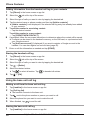
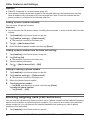
R To use your landline phone service provider’s voicemail service rather than the unit’s
answering system, turn off the answering system (page 32).
Setting the voicemail access number for the landline
1
2
Tap [Landline] in the home screen or app list.
3
4
Tap [Voicemail number].
Tap [Landline settings] ® [Voicemail].
R The handset connects to the base unit.
Enter the access number and then tap [OK] ® [OK].
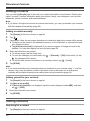
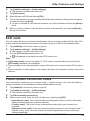
Setting the voicemail access number for the mobile line
A SIM must be inserted in order to use this procedure.
1
2
3
4
5
Tap [Phone] in the home screen or app list.
Tap
® [Settings] ® [Voice Call] ® [Voice mail] ® [Voicemail service]
Tap
next to [My carrier].
Tap [Voicemail settings] ® [Voicemail number].
Enter the access number and then tap [OK] ® [OK].
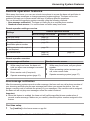
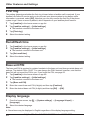
Listening to voicemail
1
2
3
4
Tap [Phone] in the home screen or app list.
Select the
tab at the top of the screen.
Tap and hold 1 and then select the desired phone line.
Operate your service provider’s voicemail service.
R Contact your service provider for details.
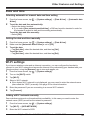
Helpline Tel. No.: U.K. 0844 844 3899 Ireland 01289 8333
47