1
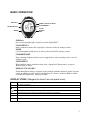
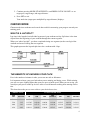
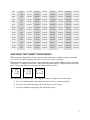
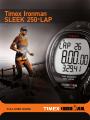
Timex Ironman SLEEK 250-LAP ® ® ™ FULL USER GUIDE Timex® Ironman® SLEEK™ 250-LAP User Manual INTRODUCING YOUR SLEEK™ 250-LAP The SLEEK™ 250-LAP is easy to use. With TapScreen™ technology, take laps/splits manually without breaking stride. Audible alerts let you know when to speed up or slow down to keep on pace. Use the easy-to-read display to acquire workout data quickly. FEATURES • TapScreen™ technology (tap watch face to start a workout or take a lap/split • no interruption of workout • quickly activate or deactivate from several modes) • Target pacer (set a goal for minutes per lap • alert sounds upon taking a lap/split • adjust your pace accordingly to reach your goal time) • Eat and drink timers (reminders to stay hydrated and watch your nutrition • alert sounds in Chrono mode • separate timers for eating and hydration) • Chronometer (tap watch face to start or take a lap/split • time up to 99:59:59 • time up to 99 laps) • Interval Timer (two independent interval workouts • set up to 8 intervals per workout • time up to 23:59:59 per interval • tap watch face to start or stop • custom interval labels indicate intensity level • manages 99 repetitions for you) • Time and date (2 time zones • 12- or 24-hour time format • four date formats) • Review (store and review up to 5 Chrono or Interval Timer workouts • oldest workout replaced with newest when memory is full • lock and unlock workouts) • Timer (tap watch face to start timing • up to 23:59:59 countdown • repeat timer or stop at end) • Alarm (set up to 3 alarms • alarm frequency can be once, daily, weekly, on weekends, or on specific days) • INDIGLO night-light with Night-Mode® (illuminate watch face for 4 seconds • NightMode® illuminates screen with any button press) 1 BASIC OPERATION INDIGLO® START/SPLIT/+ MODE DISPLAY/TAP ON-OFF/TAPSCREEN™ STOP/ RESET/ SET INDIGLO® Press to turn on night-light, or hold to activate Night-Mode®. START/SPLIT/+ Start a workout or timer, take a lap/split, or increase values in settings screens. MODE Cycle through the watch modes, or move to the next field in settings screens. STOP/RESET/SET Stop a running workout or timer, reset a stopped timer, enter a settings screen, or exit a settings screen. TAPSCREEN™ When enabled, start a workout or timer, take a lap/split in Chrono mode, or stop an Interval timer or Timer. DISPLAY/TAP ON-OFF/Scroll through data during a workout, lock or unlock workouts in Review mode, decrease values in settings screens, or enable the TapScreen™ before a workout. Hold to disable or enable the TapScreen™ during a workout. DISPLAY ICONS (Margaret to check if we can paste icons) w H d The chronometer is running. The timer is running. An alarm is active and will sound at the specified time. The TapScreen™ is enabled. l N k The workout you are viewing is locked and cannot be overwritten. The watch will beep at the top of every hour. Night-Mode™ is active. 2 GETTING STARTED SETTING THE TIME AND DATE Set the time and date, and the format in which they display. You can set two time zones. The primary time zone displays on the time of day screen. Press START/SPLIT/+ to view the alternate time zone, or hold START/SPLIT/+ to change primary time zones. 1. 2. 3. 4. Hold SET until SET TIME displays. Press START/SPLIT/+ and DISPLAY/TAP ON-OFF/- to choose the time zone to set. Press MODE. The hours digits flash. Press START/SPLIT/+ and DISPLAY/TAP ON-OFF/- to set hours, and then press MODE to select minutes. 5. Continue pressing START/SPLIT/+, DISPLAY/TAP ON-OFF/-, and MODE to set minutes, seconds, month, day, year, time format (12-hour or 24-hour), and date format (MMM-DD, DD.MMM, MM-DD-YY, or DD.MM.YY). 6. Press SET to exit. SETTING YOUR TARGET PACE Target pace is a minutes per mile or kilometer goal you set for yourself. In Chrono mode, every lap/split you take is compared to this target, and an audible alert with onscreen message indicates whether to speed up, slow down, or maintain your current pace. There are several components of target pace: SETTING FUNCTION Target pace The number of minutes in which you want to complete each mile or kilometer. (TARGET PACE) Maximum target range The time by which your pace may exceed your target and still be ON TARGET. (TARGET RANGE +) Minimum target range (TARGET RANGE -) Target distance The time by which your pace may fall short of your target and still be ON TARGET. The distance you want to cover during a workout (optional). (TARGET DIST) 1. Press MODE until SETUP displays. 2. Press START/SPLIT/+ until TARGET TIME displays. 3. Press SET. 4. Press START/SPLIT/+ and DISPLAY/TAP ON-OFF/- to select ON. 3 5. Continue pressing MODE, START/SPLIT/+, and DISPLAY/TAP ON-OFF/- to set target pace, target range, and target distance. 6. Press SET to exit. Your total time (target pace multiplied by target distance) displays. CHRONO MODE Chrono mode times workouts and records data useful for measuring your progress toward your training goals. WHAT IS A LAP/SPLIT? Lap time is the length of an individual segment of your workout activity. Split time is the time elapsed from the beginning of your workout through the current segment. When you “take a lap/split”, you have completed timing one segment (such as one lap) of the workout and are now timing the next segment. This graph represents the lap and split times for a workout with 4 laps. THE BENEFITS OF KNOWING YOUR PACE Pace is the number of minutes it takes you to run one mile or kilometer. It is important to know your pace both when you are training and during a race. While training, you can set a pace slightly higher than your race pace to build speed. When you are racing, you can adjust your pace to make up for slow miles or avoid burnout resulting from starting out too fast. This chart shows the pace to set to achieve your desired race time. TARGET PACE EVENT FINISH TIME Mile Time KM Time 5K 10K 20K Half Marathon 25K 30K Marathon 5:00 3:06 0:15:32 0:31:04 1:02:08 1:05:33 1:17:40 1:33:12 2:11:05 5:30 3:25 0:17:05 0:34:10 1:08:20 1:12:06 1:25:25 1:42:30 2:24:11 6:00 3:43 0:18:38 0:37:17 1:14:32 1:18:39 1:33:10 1:51:48 2:37:17 6:30 4:02 0:20:11 0:40:24 1:20:44 1:25:12 1:40:55 2:01:06 2:50:23 4 7:00 4:20 0:21:44 0:43:30 1:26:56 1:31:45 1:48:40 2:10:24 3:03:29 7:30 4:39 0:23:17 0:46:36 1:33:08 1:38:18 1:56:25 2:19:42 3:16:35 8:00 4:58 0:24:50 0:49:42 1:39:20 1:44:51 2:04:10 2:29:00 3:29:41 8:30 5:16 0:26:23 0:52:48 1:45:32 1:51:24 2:11:55 2:38:18 3:42:47 9:00 5:35 0:27:56 0:55:54 1:51:44 1:57:57 2:19:40 2:47:36 3:55:53 9:30 5:54 0:29:29 0:59:00 1:57:56 2:04:30 2:27:25 2:56:54 4:08:59 10:00 6:12 0:31:02 1:02:06 2:04:08 2:11:03 2:35:10 3:06:12 4:22:05 10:30 6:31 0:32:35 1:05:12 2:10:20 2:17:36 2:42:55 3:15:30 4:35:11 11:00 6:50 0:34:08 1:08:18 2:16:32 2:24:09 2:50:40 3:24:48 4:48:17 11:30 7:08 0:35:41 1:11:24 2:22:44 2:30:42 2:58:25 3:34:06 5:01:23 12:00 7:27 0:37:14 1:14:30 2:28:56 2:37:15 3:06:10 3:43:24 5:14:29 12:30 7:46 0:38:47 1:17:36 2:35:08 2:43:48 3:13:55 3:52:42 5:27:35 13:00 8:04 0:40:20 1:20:42 2:41:20 2:50:21 3:21:40 4:02:00 5:40:41 13:30 8:23 0:41:53 1:23:48 2:47:32 2:56:54 3:29:25 4:11:18 5:53:47 14:00 8:41 0:43:26 1:26:54 2:53:44 3:03:27 3:37:10 4:20:36 6:06:53 HOW DOES THE TARGET PACER WORK? When you take a lap/split, the watch compares your current pace with the target pace you have set, and lets you know whether your pace is too fast, too slow, or on target. In Chrono mode, the watch will take a lap/split based on your AUTO-SPLIT settings (or use the TapScreen™, if enabled). Your pace for the current lap/split displays, compared with your target pace. T shows the difference between your current and target pace. LAP 1 LAP 1 T 1.01 T 1.25 FAST SLOW LAP 1 T 0 ON PACE The watch emits an audible alert indicating how your pace compares with your target. If you are faster than the target, the watch emits two sets of four quick beeps. If you are slower than the target, the watch emits two slow beeps. If you are within the target range, the watch beeps once. 5 Adjust your pace according to these tones and messages so you can achieve your goal times without burning out too early. WORKOUT DATA TRACKED IN CHRONO MODE This data is captured and saved for each workout. TOTAL TIME – elapsed time of all laps in the workout LAPS STORED – total number of laps in the workout BEST LAP – The time of the fastest lap LAP <#> – time, split time, NOTE: If you set the target pacer, the target pace and whether the lap was fast, slow, or on target is also saved. If you set the target pacer, these data will also be tracked: TARGET PACE – the minutes per mile/km goal you set TARGET DIST – the distance goal you set for the workout TARGET TOTAL – your goal for the total time to complete the workout (target distance times target pace) TOTAL <FAST/SLOW/ON PACE> – indicates whether you were faster or slower than your target total, and by how much NOTE: To track and store all workout data, make sure the target pace is set. See SETTING SYSTEM PREFERENCES. . STARTING, STOPPING, AND SAVING A WORKOUT 1. Press MODE until CHRONO displays. 2. Tap the watch face or press START. The chronometer begins timing. Press DISPLAY to scroll through data for the workout currently running. 3. Tap the watch face or press SPLIT to take a lap/split. 6 If you have set a target pace, the watch displays a comparison between your current pace and the target, and beeps to let you know to speed up, slow down, or maintain your pace. 4. Press STOP to stop the workout. 5. Press RESET when workout is stopped to select SAVE or ERASE. 6. Hold RESET to reset the chronometer and save or erase the workout data. If you selected SAVE in step 5, all workout data is saved. If you already have 5 workouts in memory, the oldest unlocked workout is deleted and the current workout is saved. See VIEWING CHRONO WORKOUTS for instructions on viewing this data. If you selected ERASE in step 5, the workout is erased but not saved. NOTE: To preserve battery life, make sure to turn off the chronometer when you are finished with your workout. INTERVAL TIMER MODE Interval workouts are powerful tools that let you target specific qualities (like speed, endurance, threshold, and more) and train for that quality intensely. The structure of interval workouts can be difficult to keep track of as you devote your energy into the actual training. Interval Timer mode helps you make more effective use of interval workouts by keeping track of interval intensity and repetitions for you. BENEFITS OF INTERVAL TRAINING Intense periods of activity interspersed with recovery periods of lesser activity help you train more intensely and for longer periods. Combining aerobic and anaerobic activity in this way helps you: • • • Target workouts for improving speed, cardiovascular and muscular endurance, threshold, or other qualities Speed up your body’s processing of lactic acid Reduce the risk of injury SETTING UP INTERVAL WORKOUTS You can customize 2 separate interval workouts. In this way, you can easily target different qualities without setting up a new workout every time. For example, you could set up one interval workout to train for endurance, and the other to train for speed. Each workout can contain up to 8 intervals and can time up to 24 hours. You can choose a name for each interval, and this name helps you stay on track as your workout progresses; a quick look at the interval name on the screen reminds you of the intensity at which you should be running, so you can focus on running instead of the order of your workout. Each interval workout can be set to repeat up to 99 times. This expands the complexity of the workouts you can design, and the watch keeps track of the number of repetitions you have completed so you don’t have to count them yourself. 1. Press MODE until INT TIMER displays. 2. Press SET. 7 3. Press START/SPLIT/+ and DISPLAY/TAP ON-OFF/- to select the workout to set up, and then press MODE. 4. Press STAR/SPLIT/+ and DISPLAY/TAP ON-OFF/- to set number of times to repeat the intervals, and then press MODE to begin setting up intervals. 5. Press START/SPLIT/+ and DISPLAY/TAP ON-OFF/- to choose a name for the interval, and then press MODE. 6. Press START/SPLIT/+, DISPLAY/TAP ON-OFF/-, and MODE to set the time for the interval. 7. If you want to set up an additional interval, press MODE until the interval number at the top of the display flashes, press START/SPLIT/+ to select the next interval, and then press MODE to begin setting the time. NOTE: You can also press DISPLAY/TAP ON-OFF/- and MODE to select an interval you already configured if you need to make changes. 8. Repeat steps 5 through 7 until all intervals are set. You can set up to 8 intervals for each workout. 9. Press STOP/RESET/SET. You should set up interval workouts to train for a specific quality. To train for endurance, for example, you might set up a classic 1-mile repeat workout: 3 to 6 repetitions of one fast interval (about half-marathon pace) followed by a 1-minute recovery period. Or, to train for speed, you might run sets of 4 x 400m, using all 8 intervals in the workout: 3 repetitions consisting of four fast intervals (at slightly more than your race pace), each followed by a 2-minute recovery period. By working with the 8 intervals and up to 99 repetitions, you can design an interval workout to suit virtually any training program. WORKOUT DATA TRACKED IN INTERVAL TIMER MODE This data is captured and saved for each workout. TOTAL TIME – elapsed time of all repetitions in the workout REPS DONE – total number of repetitions performed <INTERVAL NAME> – Name of the intensity of the interval STARTING, STOPPING, AND SAVING AN INTERVAL WORKOUT 1. Press MODE until INT TIMER displays. 2. Press START. The first interval begins timing. The repetition number and interval name display at the top of the screen. 3. When one interval ends, an alert sounds prompting you to begin the next interval. The name and timer for the new interval display. 8 4. Press STOP to stop the workout. 5. Press RESET when workout is stopped to select SAVE or ERASE. 6. Hold RESET to reset the chronometer and save or erase the workout data. If you selected SAVE in step 5, all workout data is saved. If you already have 5 workouts in memory, the oldest unlocked workout is deleted and the current workout is saved. If you selected ERASE in step 5, the workout is erased but not saved. REVIEW MODE You can review workouts you have saved to see how your workouts improve over time. The SLEEK™ 250 stores up to 5 workouts. If you save a workout when there are already 5 workouts in memory, the oldest unlocked workout is replaced with your most recent one. Your workouts display from most recent to oldest, and the time and date of each workout displays in the list. An icon also displays so you know if the workout was a Chrono mode workout or an Interval Timer workout: w indicates Chrono mode, H indicates Interval Timer. VIEWING CHRONO WORKOUTS You can view all the data tracked in Chrono mode (see WORKOUT DATA TRACKED IN CHRONO MODE for a list), and data specific to each lap. 1. Press MODE until REVIEW displays. 2. Press START/SPLIT/+ to select a Chrono workout to view, and then press STOP/RESET/SET to view the data for that workout. 3. Press START/SPLIT/+ and DISPLAY/TAP ON-OFF/- to scroll through the workout data. 4. Press STOP/RESET/SET to go back to the list of saved workouts. 5. Press MODE to exit. VIEWING INTERVAL WORKOUTS You can view all the data tracked in Interval Timer mode. 1. Press MODE until REVIEW displays. 9 2. Press START/SPLIT/+ to select an Interval Timer workout to view, and then press STOP/RESET/SET to view the data for that workout. 3. Press START/SPLIT/+ and DISPLAY/TAP ON-OFF/- to scroll through the workout data. 4. Press STOP/RESET/SET to stop viewing workouts. 5. Press MODE to exit. LOCKING AND UNLOCKING WORKOUTS Lock a workout to prevent it from being overwritten by a new workout. 1. Press MODE until REVIEW displays. 2. Press START/SPLIT/+ to select an unlocked workout. 3. Hold DISPLAY for about two seconds to lock the workout. The l icon appears and the workout cannot be overwritten by a new workout. Repeat this process on a locked workout to unlock it. NOTE: If all 5 saved workouts are locked, you will not be able to save any more workouts. You can still start Chrono and Interval Timer workouts, but new workout data is erased when you reset the chronometer or interval timer. TIMER MODE Use Timer mode to countdown a fixed event time. You can set the countdown to continuously repeat (REPEAT), or stop at the end of the countdown (STOP). SETTING THE TIMER 1. Press MODE until TIMER displays. 2. Press SET. 3. Press START/SPLIT/+ and DISPLAY/TAP ON-OFF/- to set hours, and then press MODE to select minutes. 4. Continue pressing START/SPLIT/+, DISPLAY/TAP ON-OFF/-, and MODE to set minutes, seconds, and the timer end behavior. 5. Press SET to exit. STARTING, STOPPING, AND RESETTING THE TIMER 1. Press MODE until TIMER displays. 2. Press START or TAP to start the timer. The H icon is lit when the timer is running. The watch beeps when the timer has run out. 3. To stop the timer before it has run out, tap the watch face or press STOP. 4. When the timer is stopped, hold RESET to reset it. NOTE: No workout data is saved when you reset the timer. Use Chrono or Interval Timer mode to record data for review. See CHRONO MODE and INTERVAL TIMER MODE for instructions on timing Chrono or Interval Timer workouts. 10 ALARM MODE You can set up to 3 alarms to remind you of upcoming events. You can set these alarms to sound once, daily, weekly, on weekends, or only on specific days. SETTING THE ALARMS 1. 2. 3. 4. Press MODE until ALARM displays. Press DISPLAY/TAP ON-OFF/- to choose the alarm to set. Press SET. Press START/SPLIT/+ and DISPLAY/TAP ON-OFF/- and to set hours, and then press MODE. 5. Continue pressing START/SPLIT/+, DISPLAY/TAP ON-OFF/-, and MODE to set minutes, AM/PM, and frequency. 6. Press SET to exit. TURNING THE ALARM ON AND OFF 1. Press MODE until ALARM displays. 2. Press DISPLAY/TAP ON-OFF/- to choose the alarm to set. 3. Press START/SPLIT/+ to turn the alarm on or off. When the d icon displays, the alarm is armed and will sound at the specified time and frequency. SETUP MODE Setup mode is where all global settings for the watch are configured. SETTING SYSTEM PREFERENCES You can choose from several settings to determine how you interact with the SLEEK™ 250 and how the watch collects and displays data. Tap force – Determines how hard you must tap the watch face to start a timer or take a lap/split. Select from LIGHT, MEDIUM, or HARD. If you experience accidental laps/splits if the watch is bumped, increase the tap force. You can also turn the TapScreen™ OFF. Units – Choose to display measurements in IMPRL units (miles, feet, inches, pounds) or METRIC units (kilometers, centimeters, kilograms). Hourly chime – When hourly chime is ON, the N icon displays, and the watch will beep at the top of every hour. Button beep – Choose BEEP ON to enable a beep when you press a button on the watch or tap the watch face. Choose BEEP OFF to disable this feature. 1. Press MODE until SETUP displays. 2. Press START/SPLIT/+ to select SYSTEM. 11 3. Press SET. 4. Press MODE to select the system preference to set, and press START/SPLIT/+ or DISPLAY/TAP ON-OFF/- to choose the setting value. 5. Press SET to exit. SETTING YOUR TARGET PACE Set your target pace so you can compare your current pace with your goal when you take a lap/split in Chrono mode. SETTING THE HYDRATION TIMER Staying hydrated is key to a successful workout; if you get dehydrated, your performance will suffer, the length of your workout will decrease, and you are more susceptible to injury. The drink timer reminds you when it is time to hydrate. When a Chrono workout is running, a message (accompanied by audible alert) reminding you to drink displays after the specified time. 1. 2. 3. 4. Press MODE until SETUP displays. Press START/SPLIT/+ to select DRINK TIMER. Press SET. Press START/SPLIT/+ or DISPLAY/TAP ON-OFF/- to select ON, and then press MODE. 5. Continue pressing START/SPLIT/+, DISPLAY/TAP ON-OFF/-, and MODE to set the drink timer. 6. Press SET to exit. SETTING THE NUTRITION TIMER Good nutrition gives you the energy you need for extended workouts. The eat timer reminds you of when it is time to eat. When a Chrono workout is running, a message (accompanied by an audible alert) reminding you to eat displays after the specified time. 1. 2. 3. 4. Press MODE until SETUP displays. Press START/SPLIT/+ to select EAT TIMER. Press SET. Press START/SPLIT/+ or DISPLAY/TAP ON-OFF/- to select ON, and then press MODE. 5. Continue pressing START/SPLIT/+, DISPLAY/TAP ON-OFF/-, and MODE to set the EAT timer. 6. Press SET to exit. INDIGLO® NIGHT-LIGHT FEATURE WITH NIGHT-MODE® INDIGLO® technology illuminates the entire watch face in low-light conditions. 12 1. Press INDIGLO® to activate the night-light for several seconds. 2. While night-light is on, press any button to keep the light on for an additional few seconds. 3. Hold INDIGLO® for several seconds to activate Night-Mode®. While Night-Mode® is active, tapping the watch face or pressing any button turns on the night-light for several seconds. While Night-Mode® remains active for 8 hours. The k icon displays when Night-Mode® is active. To turn Night-Mode® off before 8 hours has elapsed, hold INDIGLO® again for several seconds. BATTERY REPLACEMENT If the watch display becomes difficult to read, the battery should be changed. Timex strongly recommends that a retailer or jeweler replace the battery. The battery type is stamped on the back of the watch. DO NOT DISPOSE OF BATTERY IN FIRE. DO NOT RECHARGE. KEEP LOOSE BATTERIES AWAY FROM CHILDREN. WATER RESISTANCE The SLEEK™ 250 is water resistant to 100 meters. Water-Resistance Depth 100m/328ft p.s.i.a.* Water Pressure Below Surface 160 *pound per square inch absolute WARNING: TO MAINTAIN WATER RESISTANCE, DO NOT PRESS ANY BUTTONS UNDER WATER. Watch is water-resistant only if lens, push buttons, and case remain intact. Watch is not a dive watch and should not be used for diving. Rinse watch with fresh water after exposure to salt water. 13