1
User Manual of Network Camera
Some of the camera supports CVBS, SDI, or HDMI output. Please refer to the actual
camera model for details.
Day/Night Scheduled-Switch
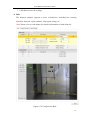
Day/Night scheduled-switch configuration interface enables you to set the separate
camera parameters for day and night to guarantee the image quality in different
illumination.
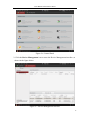
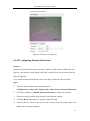
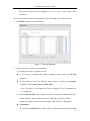
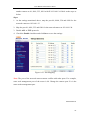
Figure 6-37 Day/Night Scheduled-Switch Configuration Interface
Steps:
1. Click the time line to select the start time and the end time of the switch.
2. Click Common tab to configure the common parameters applicable to the day
mode and night mode.
Note: The detailed information of each parameter please refers to day/night auto
switch session.
3. Click Day tab to configure the parameters applicable for day mode.
4. Click Night tab to configure the parameters applicable for night mode.
Note: The settings saved automatically if any parameter is changed.
6.5.2 Configuring OSD Settings
Purpose:
77