1
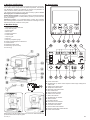
12.8.Pour ground coffee by means of a measuring cup (13) or insert
espresso instant bags into the filter handle container (6).
12.9.Remove the excess of coffee from the edge of the filter and
compress the coffee by the permanent coffee compressor (5) or the
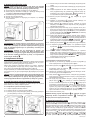
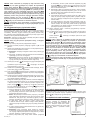
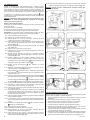
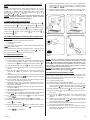
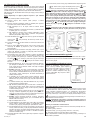
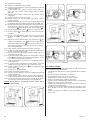
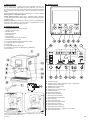
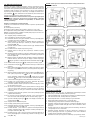
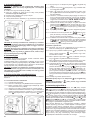
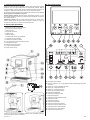
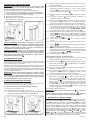
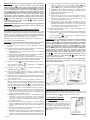
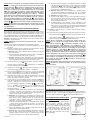
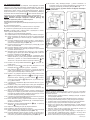
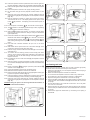
whip of the measuring cup (13) (Fig. 4).
12.10.Attach filter handle (6) to the brew head (4), by turning it with a firm
motion to the right (Fig. 3).
12.11.Place a cup or cups on the drip tray grid (7), directly under the brew
head (4).
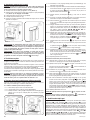
12.12.Select program P1 or P2 by pressing the coffee amount select
button
(C). After each push you will hear a sound signal.
12.13.Press and hold the single/double cup select button
(B) and
temperature select button
(D) for 2 seconds. P1 or P2 indicator
will flash on the display panel.
12.14.Select temperature setting (see paragraph 9), choose espresso
instant bags mode or ground coffee mode (see paragraph 10) and
the single cup (
indicator) or double cup (
indicator)
select button
(B).
12.15.Push the brew coffee button
(F). and espresso will come
out of the machine. The display panel will indicate
choosing a double cup) or
(after
(after choosing a single cup). After
getting the coffee release the brew coffee button
(F). You will
hear two sound signals and the display panel will indicate
or
.
12.16.After saving the settings P1 or P2 indicator will stop flashing and
you will hear a sound signal.
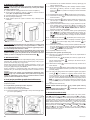
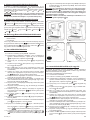
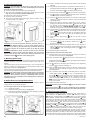
12.17.Remove the filter handle by turning it to the left (Fig. 5) and throw
out the used bag or coffee grounds (Fig. 6). Clean the filter with
water (Fig. 7).
CAUTION! While holding the brew coffee button
(F) remember
that after when a single cup is filled to the maximum (ca. 240 ml), the
machine will automatically stop the brewing process (you will hear
two sound signals) and save the settings.
CAUTION! During programming pay attention if the P1 or P2
indicator are flashing. If they stop flashing for any reason the P1
or P2 stops flashing, start programming mode again by pressing
and holding both the single/double cup select button
(B) and
temperature select button
up to paragraph 11.16.
(D) for 2 seconds and follow the steps
CAUTION! In order to delete the program
P1
and hold both the temperature select button
select button
or
P2
settings press
(D) and the steam
(E).
13. Making espresso using the memory function
13.1.Unplug the espresso machine from the power supply.
13.2.Fill the water tank (1) according to paragraph 4.
13.3.Plug the espresso machine by putting the cord into the socket.
The machine will turn on. The display panel and the power on/off
button
on
(A) will flash. The display panel will indicate power is
.
13.4.Push the power on/off button
(A), You will hear a sound signal.
13.5.The
indicator on the display panel will begin to whirl, signalizing
that the espresso machine is heating up.
13.6.When the
indicator stops whirling, you will hear a sound signal
informing you that the machine is ready for use (has reached the
right temperature).
13.7.Select program P1 or P2 by pressing the coffee amount select
button
(C) – see paragraph 8.
13.8.Depending on which coffee mode (ground or instant bags) has
been programmed for P1 or P2, pour ground coffee by means of
a measuring cup (13) or insert espresso instant bags into the filter
handle container (6).
13.9.Remove the excess of coffee from the edge of the filter and
compress the coffee by the permanent coffee compressor (5) or the
whip of the measuring cup (13) (Fig. 4).
13.10.Attach filter handle (6) to the brew head (4), by turning it with a firm
motion to the right (Fig. 3).
13.11.Place a cup or cups on the drip tray grid (7), directly under the brew
head (4).
70
(F) and espresso will come out of
13.12.Push the brew coffee button
the machine. The display panel will indicate
(after choosing
a double cup) or
(after choosing a single cup).
13.13.The brewing process will be automatically stopped at the desired
amount of coffee. You will hear two sound signals and the display
panel will indicate
or
(depending on the settings of
program P1 or P2).
13.14.Remove the filter handle by turning it to the left (Fig. 5) and throw
out the used bag or coffee grounds (Fig. 6). Clean the filter with
water (Fig. 7).
14. Making hot water
Hot water mode is perfect for making e.g. hot chocolate, filling up a piston
coffee pot or a teapot.
14.1.Unplug the espresso machine from the power supply.
14.2.Fill the water tank (1) according to paragraph 4.
14.3.Plug the espresso machine by putting the cord into the socket.
The machine will turn on. The display panel and the power on/off
button
on
(A) will flash. The display panel will indicate power is
.
(A), You will hear a sound signal.
14.4.Push the power on/off button
14.5.The
indicator on the display panel will begin to whirl, signalizing
that the espresso machine is heating up.
14.6.When the
indicator stops whirling, you will hear a sound signal
informing you that the machine is ready for use (has reached the
right temperature).
14.7.Push the steam select button
(E). You will hear a sound
signal. The display panel will indicate
informing that the
steam mode has been turned on. Push the steam select button
(E) again. You will hear a sound signal and the display panel
will indicate
.
14.8.The
indicator on the display panel will begin to whirl, signalizing
that the espresso machine is heating up.
14.9.When the
indicator stops whirling, you will hear a sound signal
informing you that the machine is ready for use (has reached the
right temperature).
14.10.Put a container under the steam nozzle (10) and turn the steam
control (12) to position
, i.e. turn it counterclockwise, so the
sign
will cover the casing of the espresso machine. Hot
water will come out of the nozzle (10).
14.11.To turn the water off turn the steam control (12) to OFF, position,
i.e. turn it clockwise, so the sign OFF will cover the marker on the
casing of the espresso machine.
14.12.To end working with the hot water mode on, press power on/off
button
(A). You will hear a sound signal. The
indicator will
go off from the display panel, informing that the espresso machine
is back to the coffee brew mode.
CAUTION! If there is not enough water in the water tank (1), the nozzle
(10) will not produce hot water. The indicator
will flash on the
display panel and you will hear a repeating sound signal informing
you about the necessity to fill in water. Make sure to turn the water
off turn the steam control (12) to OFF position, i.e. turn it clockwise,
so the sign OFF will cover the marker on the casing of the espresso
machine. Open the water tank cover (1) and pour in the water. After
replenishing water, the sound signal will stop. To continue with the
hot water mode turn the steam control (12) to position
turn it counterclockwise, so the sign
the espresso machine.
, i.e.
will cover the casing of
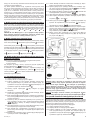
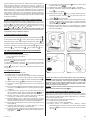
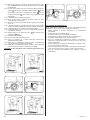
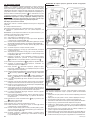
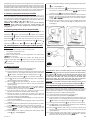
CAUTION! Moving the steam/hot water nozzle (10) is possible only by
means of a special attachment (Fig. 9). The steam/hot water nozzle
(10) is extremely hot.
GW13-024_v01