1
Turning off the cooking
zones
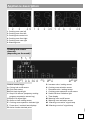
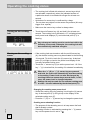
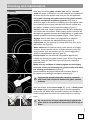
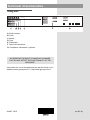
• Select the cooking zone by pressing the relevant sensor key
(H). The decimal point (F1) next to the display for the selected
cooking zone will light up.
• Press the “–” (I) sensor key to set the power level to “0”.
• Quick power off: the power level can be instantly set to “0”
by pressing the “+” (G) sensor key and “–” (I) sensor key
simultaneously.
Turning off the cooking
hob
• The cooking hob may be turned off at any time by pressing the
on/off sensor key (A).
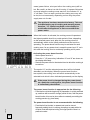
• All indicators go off, except for the remaining, or residual, heat
indicators which are lit on the displays for those cooking zones
that are still hot.
• If the cooking zone is turned off before the end of the cooking
process, the residual heat is used, which saves some power.
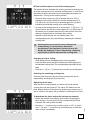
Activating the child lock
By activating the child lock, the operation and use of the cooking
zones is prevented. This way, children will not be able to activate
the cooking hob.
Activating the child lock
• Activate the child lock by holding the (B) sensor key for
approximately three seconds; the (B1) signal light will light up.
• Child lock can be activated when the cooking zone is
operating.
• Child lock prevents activation of any sensor key, except for the
main switch (A) and the child lock sensor key (B).
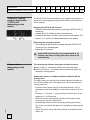
Residual heat indicators
As soon as a hot coking zone is switched off, or when the entire
cooking hob is turned off, the following is displayed on the
display of each hot cooking zone:
- “H” if the cooking zone is still hot;
- “h” if the cooking zone is cooling down and is warm to touch.
The duration of this display is calculated given the power level
and depends on how long the cooking zone has been activated.
When the “H” or “h” sign goes off, the cooking zone may in some
9
233033
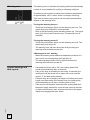
Deactivating the child lock
• Child lock can be deactivated, or disengaged, by holding the
(B) sensor key for three seconds. A beep will sound when the
lock is disengaged and the signal light above the sensor key
will go off.