1
OWNER’S MANUAL
Magic Remote
Please read this manual carefully before using your remote and
retain it for future reference.
AN-MR500G
www.lg.com
2
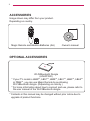
ACCESSORIES
Image shown may differ from your product.
Depending on country.
Magic Remote and Alkaline Batteries (AA)
Owner’s manual
OPTIONAL ACCESSORIES
Wi-Fi/Bluetooth Dongle
(AN-WF500)
* If your TV model is LB49**, LB57**, LB58**, LB61**, LB63**, LB65**
or PB66**, you can use Magic Remote by purchasing
Wi-Fi/Bluetooth dongle. (Depending on country.)
* For more information about how to connect and use, please refer to
the user manual of the Wi-Fi/Bluetooth dongle.
* Contents in this manual may be changed without prior notice due to
upgrade of product functions.
3
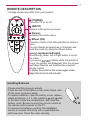
REMOTE DESCRIPTION
* Imeage shown may differ from your product.
(POWER)
Turns the TV on or off.
(BACK)
Returns to the previous screen.
(Home)
Accesses the Home menu.
Wheel (OK)
Press the center of the Wheel button to select a
menu.
You can change programmes or channels and
scroll the menu by using the Wheel button.
(up/down/left/right)
Press the up, down, left or right button to scroll
the menu.
If you press
buttons while the pointer is
in use, the pointer will disappear from the screen
and Magic Remote will operate like a general
remote control.
To display the pointer on the screen again, shake
Magic Remote to the left and right.
Installing Batteries
lease read this manual carefully.
P
Press the end of the battery cover, slide it back, and
lift the cover as shown below.
ꔛ
To replace batteries, open the battery cover, replace
alkaline batteries (1.5 V, AA) matching and ends
to the label inside the compartment, and close the
battery cover. Be sure to point the remote control at
the remote control sensor on the TV.
ꔛ
To remove the batteries, perform the installation
actions in reverse. Don’t mix old or used batteries
with new ones. Close the cover securely.
ꔛ
ꔛ
4
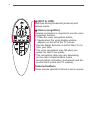
(EXIT to LIVE)
Switches among broadcast (antenna) and
various inputs.
(Voice recognition)
Network connection is required to use the voice
recognition function.
1. Press the voice recognition button.
2. Speak when the voice display window
appears on the left of the TV screen.
* Use the Magic Remote no further than 10 cm
from your face.
* The voice recognition may fail when you
speak too fast or too slowly.
* The recognition rate may vary depending
on the user’s characteristics (voice,
pronunciation, intonation, and speed) and the
environment (noise and TV volume).
Coloured buttons
These access special functions in some menus.
5
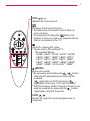
VOL/
Adjusts the volume level.
Displays the Screen Remote.
* Accesses the Universal Control Menu in
some regions.
* Pressing and holding the
button will
display a menu to select an external device
that is connected to the TV.
Used for viewing 3D video.
* Works with a 3D-enabled TV.
- 3D-enabled Model
: EA88*, EA97*, EC93*, EC97*, EC98*,
LB65*, LB67*, LB68*, LB69*, LB70*,
LB71*, LB72*, LB73*, LB75*, LB86*,
LB87*, UB83*, UB84*, UB85*, UB88*,
UB95*, UB98*, UC9, UC97*, PB69*
(MUTE)
Mutes all sounds.
* By pressing and holding the
/
button,
video/audio descriptions function will be
enabled.
(
applicable to North America /
applicable to Europe, CIS, and Thailand)
* SAP(Secondary Audio Program) Feature can
also be enabled by pressing the
button.
(Applicable to North America)
CH/P
Scrolls through the saved programmes or
channels.
6
USING
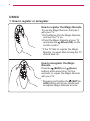
1. How to register or deregister
How to register the Magic Remote
To use the Magic Remote, first pair it
with your TV.
1 Put batteries into the Magic Remote
and turn the TV on.
2 Point the Magic Remote at your TV
and press the Wheel (OK) on the
remote control.
* If the TV fails to register the Magic
Remote, try again after turning the TV
off and back on.
How to deregister the Magic
Remote
Press the (BACK) and (Home)
buttons at the same time, for five
seconds, to unpair the Magic Remote
with your TV.
* Pressing and holding the (EXIT to
LIVE) button will let you cancel and
re-register Magic Remote at once.
7
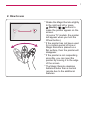
2. How to use
*S
hake the Magic Remote slightly
to the right and left or press
(Home),
,
buttons to
make the pointer appear on the
screen.
(In some TV models, the pointer
will appear when you turn the
Wheel button.)
* If the pointer has not been used
for a certain period of time or
Magic Remote is placed on a
flat surface, then the pointer will
disappear.
* If the pointer is not responding
smoothly, you can reset the
pointer by moving it to the edge
of the screen.
* The Magic Remote depletes
batteries faster than a normal
remote due to the additional
features.
8
PRECAUTIONS TO TAKE
* Use the remote control within the specified range (within 10 m).
You may experience communication failures when using the device
outside the coverage area or if there are obstacles within the
coverage area.
* You may experience communication failures depending on the
accessories.
Devices such as a microwave oven and wireless LAN operate in the
same frequency band (2.4 GHz) as the Magic Remote. This may
cause communication failures.
* The Magic Remote may not work properly if a wireless router (AP) is
within 1 meter of the TV. Your wireless router should be more than
1 m away from the TV.
* Do not disassemble or heat the battery.
* Do not drop the battery. Avoid extreme shocks to the battery.
* Inserting the battery in the wrong way may result in explosion.