1
For Mac
Installing Interactive Presentation Utility 2
System Requirements
• CPU: Pertium III or faster
• Memory: 256MB or more (512MB Recommend)
• Available hard drive space: 250MB
• OS: Mac OS X 10.6 or later
Use of the interactive function requires installation of Interactive Presentation Utility 2.
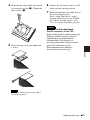
1
Close all running applications.
2
In the CD-ROM, double-click
[Interactive Presentation
Utility 2.pkg].
3
Follow the on-screen instructions to
install the software.
To uninstall Interactive Presentation
Utility 2, from the Application folder
move the [Interactive Presentation
Utility 2] folder into the Trash, then
empty it.
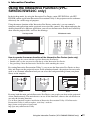
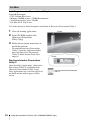
Toolbar
Dock
Starting Interactive Presentation
Utility 2
Open the folder [Application] - [Interactive
Presentation Utility 2] and double-click
[Interactive Presentation Utility 2.app].
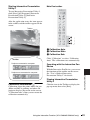
After application starts, each icon appears in
the Dock and the toolbar appears on the
screen.
44
Icon for Interactive Presentation
Utility 2
Using the Interactive Function (VPL-SW630C/SW620C only)