1
G730
User Guide
Contents
Foreword
Getting started
2
3
4
5
6
6
8
8
8
10
11
14
14
15
Your phone at a glance
Inserting the SIM cards and battery
Removing the SIM cards and battery
Inserting a microSD card
Removing a microSD card
Charging the battery
Powering on or off your phone
Dual-card management
Locking and unlocking the screen
Touchscreen gestures
Getting to know your home screen
Connecting your phone to a computer
Turning on the data service
Connecting to a Wi-Fi network
Basic operations
16
16
17
17
18
20
20
21
Motion control
Turning on one-hand UI
Turning on glove mode
Status icons
Organizing applications and widgets on the home screen
Managing home screens
Accessing applications
Texting
Personalizing your phone
23
23
23
24
24
24
25
26
26
Changing the home screen style
Changing the theme
Changing the wallpaper
Setting the home screen transition effect
Setting tones
Changing the lock screen style
Customizing switch shortcuts on the notification panel
Changing the font size
Adjusting the screen brightness
27
Making a call
Calls
i
29
30
31
31
31
32
Answering or rejecting a call
What you can do during a call
Answering a third-party call
Making a conference call
Using the call log
Call settings
Contacts
34
34
35
36
36
36
37
37
37
37
Creating a contact
Importing or exporting contacts
Copying contacts
Searching for a contact
Editing a contact
Adding a contact to your favorites
Deleting contacts
Merging contacts
Sharing contacts
Contact groups
Messaging
39
39
40
40
40
41
Sending a text message
Sending a multimedia message
Replying to a message
Searching for a message
Managing messages
Modifying message settings
Browser
42
42
43
43
43
Browsing web pages
Managing bookmarks
Setting the home page
Clearing your browsing history
Modifying browser settings
Email
44
44
45
45
46
46
46
Adding a POP3 or IMAP email account
Adding an Exchange account
Sending an email
Checking your emails
Switching between email accounts
Removing an email account
Modifying email account settings
Multimedia
47
Camera
ii
50
52
Gallery
Music
Internet connection
56
57
58
59
Mobile data connection
Wi-Fi network
Sharing your phone's mobile data connection
Controlling your data usage
Sharing data
62
63
64
65
Bluetooth
Wi-Fi Direct
DLNA
Connecting your phone to a computer
File Manager
67
67
67
68
68
68
68
69
Switching between category and list views
Creating a folder
Searching for a file
Copying, cutting, and pasting a file
Renaming a file
Deleting a file
Creating a shortcut for a file or folder
Checking the storage status
Managing applications
70
70
71
71
71
72
Downloading applications
Installing an application
Viewing applications
Sharing an application
Uninstalling an application
Clearing the application cache
Phone Manager
73
73
73
74
74
74
75
75
About Phone Manager
Phone accelerator
Storage cleaner
Harassment filter
Power saving
Permission manager
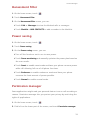
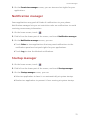
Notification manager
Startup manager
Tools
76
Clock
iii
77
79
79
Weather
Calculator
FM radio
Phone settings
81
82
82
83
83
84
84
85
85
86
86
Setting up an account
Turning on or off airplane mode
Tone settings
Display settings
Turning on or off do not disturb mode
Setting the date and time
Changing the system language
Setting the PIN of your SIM card
Restoring factory settings
Online update
Accessibility
Legal Notice
Index
iv
Foreword
Foreword
Thank you for choosing the HUAWEI Ascend G730 smartphone!
This guide introduces you to the features and functions of your new phone.
Also included are safety precautions you should be aware of, so please read
this guide first before you begin using your new phone.
Symbols and definitions
The following symbols are used in this guide.
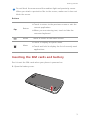
Note
Highlights important information and tips, and
provides additional information.
Indicates potential problems that may arise if the
Caution
proper care or attention is not taken, such as
device damage or data loss.
Warning
Indicates a potentially hazardous situation which,
if not avoided, could result in serious injury.
1
Getting started
Getting started
Your phone at a glance
1
2
12
3
11
10
13
14
9
8
7
4
6
5
Proximity sensor/Ambient
1
Headset jack
2
3
Status indicator
4
Buttons
5
Main microphone
6
USB port
7
Speaker
8
Power button
9
Volume button
10
Camera
11
Front camera
12
Earpiece
13
Microphone
14
Flash
light sensor
2
Getting started
Do not block the area around the ambient light and proximity sensor.
When you attach a protective film to the screen, make sure it does not
block the sensor.
Buttons
• Touch to return to the previous screen or exit the
Return
current application.
• When you are entering text, touch to hide the
onscreen keyboard.
Home
Menu
Touch to return to the home screen.
• Touch to display an option menu.
• Touch and hold to display the list of recently used
applications.
Inserting the SIM cards and battery
Don't insert the SIM cards when your phone is powered on.
1. Open the battery cover.
3
Getting started
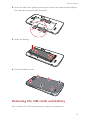
2. Insert the SIM cards. Make sure the gold contact area and beveled edge of
the card are facing the right directions.
3. Insert the battery.
b
a
4. Close the battery cover.
Removing the SIM cards and battery
Don't remove the SIM cards when your phone is powered on.
4
Getting started
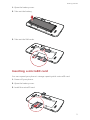
1. Open the battery cover.
2. Take out the battery.
3. Take out the SIM cards.
Inserting a microSD card
You can expand your phone's storage capacity with a microSD card.
1. Power off your phone.
2. Open the battery cover.
3. Install the microSD card.
5
Getting started
4. Insert the battery.
5. Close the battery cover.
Removing a microSD card
Uninstall the microSD card before you remove it; otherwise, the microSD
card may be damaged.
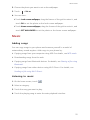
1. On the home screen, touch
.
2. Under All, touch Storage.
3. Touch Unmount SD card.
4. Carefully take out the microSD card.
Charging the battery
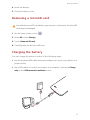
You can charge the phone in either of the following ways:
•
Use the provided USB cable and power adapter to connect your phone to a
power socket.
•
Use a USB cable to connect your phone to a computer, and touch Charge
only on the USB connection methods screen.
6
Getting started
Battery indicator
The battery indicator shows your phone's battery level.
•
Blinking red: The battery level is lower than 15%.
•
Steady red (when charging): The battery level is lower than 15%.
•
Steady yellow (when charging): The battery level is higher than 15%.
•
Steady green (when charging): The battery is almost or already full.
Important information about the battery
•
Rechargeable batteries have a limited lifecycle and may eventually need to
be replaced. If you notice significantly reduced battery life, replace the
battery.
•
If your phone has been running for long periods of time, especially in hot
environments, heat may be pushed to the surface of the phone. If your
phone is overheating, cease using it immediately and unplug it from any
power source to let it cool down. Do not hold on to the phone for too long
to avoid burn injuries.
•
Use the original battery, power adapter, and USB cable to charge your
phone. Using third-party accessories may reduce your phone performance
or pose security risks. When your phone is charging, do not operate it or
cover the phone or power adapter with any object.
•
The time required to fully charge the battery depends on the ambient
temperature and age of the battery.
•
If your phone is very low on power, it plays an alert tone and displays a
message. If the battery level is extremely low, your phone automatically
powers off.
•
If the battery power is depleted, you may not be able to power on your
phone immediately after you begin charging the battery. This is normal.
Allow the battery to charge for a few minutes before attempting to power
on your phone.
7
Getting started
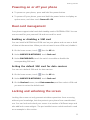
Powering on or off your phone
•
To power on your phone, press and hold the power button.
•
To power off your phone, press and hold the power button to display an
option menu, and then touch Power off > OK.
Dual-card management
Your phone supports dual card dual standby mode of WCDMA+GSM. You can
use one card for your personal life and one card for work.
Enabling or disabling a SIM card
You can install a WCDMA and GSM card on your phone and use one or both
of them at the same time. When you do not need to use a SIM card, disable it.
1. On the home screen, touch
then the All tab.
2. Under WIRELESS & NETWORKS, touch Dual card.
3. Under SIM CARD INFO, touch the switch to enable or disable the
corresponding SIM card.
Setting the default SIM card for data services
You can set a default SIM card for data services.
1. On the home screen, touch
then the All tab.
2. Under WIRELESS & NETWORKS, touch Dual card.
3. On the Dual card screen, touch Data connection, and then select a SIM card
you want to set as the default card.
Locking and unlocking the screen
Locking the screen not only prevents mistaken operations from occurring
without your knowledge, but also protects your phone from unauthorized
use. You can lock and unlock your screen in a number of different ways and
also add lock screen widgets. The pre-installed screen unlock method is used
as an example in this section.
8
Getting started
Locking the screen
•
•
Method 1: Press the power button to manually lock the screen.
Method 2: After being idle for a specified period of time, your phone
automatically locks its screen.
To set the screen lock method, touch
on the home screen. On the
displayed General tab, touch Screen lock.
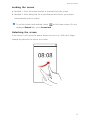
Unlocking the screen
If the screen is off, press the power button to turn it on. Slide your finger
toward any direction to unlock the screen.
9
Getting started
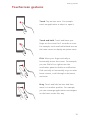
Touchscreen gestures
Touch: Tap an item once. For example
touch an application to select or open it.
Touch and hold: Touch and leave your
finger on the screen for 2 seconds or more.
For example, touch and hold a blank area on
the home screen to display an option menu.
Flick: Move your finger vertically or
horizontally across the screen. For example,
you can flick left or right across the
notification panel to dismiss a notification.
Flick vertically or horizontally to go to other
home screens, scroll through a document,
and more.
Drag: Touch and hold an item and then
move it to another position. For example,
you can rearrange applications and widgets
on the home screen this way.
10
Getting started
Spread apart and pinch together: Spread
two fingers apart to zoom in, and pinch
them together to zoom out on a map, web
page, or picture.
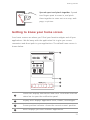
Getting to know your home screen
Your home screens are where you'll find your favorite widgets and all your
applications. We did away with the application list to give you a more
convenient and direct path to your applications. The default home screen is
shown below.
1
2
3
4
1
Status bar: displays notifications and icons. Flick down from the
status bar to open the notification panel.
2
Display area: displays application icons, folders, and widgets.
3
Screen position indicator: shows the current screen's position.
4
Dock: displays your most common applications.
11
Getting started
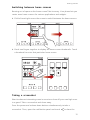
Switching between home screens
Running out of space on the home screen? Not to worry. Your phone lets you
create more home screens for various applications and widgets.
•
Flick left and right across the screen to switch between the home screens.
•
Pinch two fingers together to display the home screen thumbnails. Touch
a thumbnail to enter that particular home screen.
Taking a screenshot
Want to share an interesting scene in a movie or show off your new high score
in a game? Take a screenshot and share away.
Press the power and volume down buttons simultaneously to take a
screenshot. Then, open the notification panel and touch
to share the
12
Getting started
screenshot. By default, screenshots are saved to the Pictures folder in File
Manager.
You can also flick down from the status bar to open the notification
panel and touch
>
to take a screenshot.
Auto-rotate screen
Your phone features a tilt sensor. If you rotate your phone when browsing a
web page or viewing a photo, your screen automatically changes between
landscape and portrait view. You'll also be able to enjoy tilt sensor-based
applications, such as racing games.
To turn on or off the auto-rotate screen function, flick down from the status
bar to open the notification panel, and touch
>
.
Using the notification panel
Flick down from the status bar to open the notification panel.
1
2
3
4
5
1
2
Touch
to display the settings screen.
Touch the switch shortcuts on the notification panel to turn on
or off the functions.
13
Getting started
Touch
3
to display the switch shortcut list and touch
to
edit it.
4
Touch Clear to delete all notifications.
Touch an application to start it and flick left or right across a
5
notification to dismiss it.
Connecting your phone to a computer
Use a USB cable to connect your phone to a computer, and follow the
onscreen instructions to select a connection mode to transfer photos, videos,
songs, and other files between your phone and computer.
Device file
Read, manage, and transfer files in your phone storage
manager (MTP)
and microSD card. For details, see MTP mode.
HiSuite is a phone management software works on a
computer. You can use it to back up and restore phone
PC Suite (HiSuite)
data, install or remove applications, and synchronize
contacts, messages, photos, calendars, and other files
between your phone and computer. For details, see
HiSuite mode.
Use your phone as a USB storage device, read data from
USB flash drive
its microSD card, and transfer data to and from a
computer. For details, see Mass storage mode.
Turning on the data service
On the home screen, flick down from the status bar to open the notification
panel. Touch
to turn on your phone's data service.
When you don't need to access the Internet, turn off the data service to
save battery power and reduce data usage.
14
Getting started
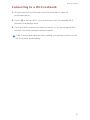
Connecting to a Wi-Fi network
1. On the home screen, flick down from the status bar to open the
notification panel.
2. Touch
to turn on Wi-Fi. Your phone then scans for available Wi-Fi
networks and displays them.
3. Touch the Wi-Fi network you want to connect to. For an encrypted Wi-Fi
network, enter the password when prompted.
If Wi-Fi and mobile data are both enabled, your phone connects to the
Wi-Fi network preferentially.
15
Basic operations
Basic operations
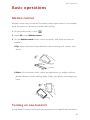
Motion control
Motion control lets you control the phone using simple motions. For example,
mute the phone or answer and make calls quickly.
1. On the home screen, touch
.
2. Under All, touch Motion control.
3. On the Motion control screen, select an option, and select a motion to
enable it.
• Flip: Mute sounds and stop vibration from incoming calls, alarms, and
timers.
• Shake: On the home screen, touch any application or widget until the
phone vibrates to enter editing mode. Shake your phone to arrange your
icons.
Turning on one-hand UI
In one-hand UI mode, routine activities are easy to accomplish with one hand.
16
Basic operations
1. On the home screen, touch
.
2. Under All, touch One-hand UI.
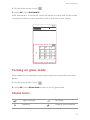
After one-hand UI is turned on, touch the arrow on either side of the screen
to move the dialer or other operation area to the side of your choice.
Turning on glove mode
Glove mode lets you perform touchscreen operations even when you wear
gloves.
1. On the home screen, touch
.
2. Under All, touch Gloves mode to turn on or off glove mode.
Status icons
R
Signal strength
No signal
Roaming
Airplane mode enabled
17
Basic operations
Bluetooth on
Receiving location data
from GPS
Vibration mode enabled
Silence mode enabled
Alarms enabled
Charging
Battery full
Battery low
Call in progress
Missed calls
New messages
New emails
New voicemails
Select input method
Wi-Fi network available
Connected to a Wi-Fi
network
Uploading data
Downloading data
Phone memory full
Upcoming events
No SIM card found
Sign-in or synchronization
problem
Synchronizing data
Synchronization failed
Portable Wi-Fi hotspot on
More notifications
Connected to a VPN
Headset plugged in
USB debugging mode
enabled
USB tethering on
Organizing applications and widgets on the
home screen
Adding a widget to the home screen
1. On the home screen, touch and hold a blank area to display the Set Home
Screen dialog box.
2. Touch Widgets.
18
Basic operations
3. Drag a widget from the screen's lower section to a screen thumbnail.
4. Touch
to return to the home screen.
If the home screen doesn't have enough space, your phone will
automatically create a new home screen to the right-hand side of the
original and place the widget on the new home screen. You can have
nine home screens at most.
Moving an application or widget
On the home screen, touch and hold an application or widget until the phone
vibrates to enter editing mode. You can then drag an application or widget to
any fitting empty space.
Deleting an application or widget
On the home screen, touch and hold the application or widget you want to
delete until
is displayed. Drag the unwanted application or widget to
to delete it.
Deleting an application icon uninstalls the application. When you delete
an application icon, your phone prompts you to confirm the action.
Touch OK to uninstall the application. Some pre-installed applications
cannot be uninstalled.
Organizing home screen icons using folders
1. On the home screen, drag an item onto another one to create a folder
containing both of them.
2. Touch the folder to open it. You can then:
• Touch the folder name to rename it.
• Touch
and add more items to the folder.
• Drag an icon out from the folder to remove the icon.
A folder must contain at least two items; otherwise, the folder will
automatically disappear.
19
Basic operations
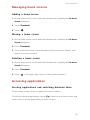
Managing home screens
Adding a home screen
1. On the home screen, touch and hold a blank area to display the Set Home
Screen dialog box.
2. Touch Thumbnails.
3. Touch
.
Moving a home screen
1. On the home screen, touch and hold a blank area to display the Set Home
Screen dialog box.
2. Touch Thumbnails.
3. Touch and hold a home screen thumbnail until your phone vibrates, and
drag it to the new location.
Deleting a home screen
1. On the home screen, touch and hold a blank area to display the Set Home
Screen dialog box.
2. Touch Thumbnails.
3. Touch
in the upper right corner of the screen to delete it.
Accessing applications
Starting applications and switching between them
On the home screen, touch an application icon to open it.
To switch to another application, touch
to return to the home screen, and
touch the icon of the application you want to open.
20
Basic operations
Viewing recently used applications
Touch and hold
to display the list of recently used applications. You can
then:
•
Touch an application to start it.
•
Flick left or right across an application or touch
on its right upper
corner to dismiss it.
•
Touch
to clear the list.
Texting
Your phone comes with multiple text input methods. You can quickly enter
text using the onscreen keyboard.
•
Touch a text box to bring up the onscreen keyboard.
•
To hide the onscreen keyboard, touch
.
Selecting an input method
1. On the text input screen, flick down from the status bar to open the
notification panel.
2. Touch
to select an input method.
To change your phone's default input method, touch
on the home
screen. Under All, touch Language & input > Default to select an input
method.
21
Basic operations
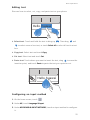
Editing text
Discover how to select, cut, copy, and paste text on your phone.
Hello, huawei
•
Select text: Touch and hold the text to bring up
. Then drag
and
to select more or less text, or touch Select all to select all text in a text
box.
•
Copy text: Select text and touch Copy.
•
Cut text: Select text and touch Cut.
• Paste text: Touch where you want to insert the text, drag
to move the
insertion point, and touch Paste to paste the text you copied or cut.
Hello, huawei
Configuring an input method
1. On the home screen, touch
.
2. Under All, touch Language & input.
3. Under KEYBOARD & INPUT METHODS, touch an input method to configure
it.
22
Personalizing your phone
Personalizing your phone
Changing the home screen style
Your phone supports the standard and simple home screen styles.
1. On the home screen, touch
.
2. Under All, touch Home screen style.
3. Choose Simple or Standard and touch APPLY.
Changing the theme
Changing the theme
1. On the home screen, touch
.
2. Select a theme and touch APPLY.
Customizing a theme
1. On the home screen, touch
.
2. Under Local, touch CUSTOMIZE.
3. From the element list, choose the element you want to modify.
Changing the wallpaper
1. On the home screen, touch and hold a blank area to display the Set Home
Screen dialog box.
2. Touch Wallpapers.
3. On the Wallpaper screen, you can:
• Touch Lock screen wallpaper to set the wallpaper displayed on the phone
lock screen.
• Touch Home screen wallpaper to set the home screen wallpaper.
23
Personalizing your phone
• Touch Random change to have the home screen wallpaper change
randomly.
Setting the home screen transition effect
1. On the home screen, touch and hold a blank area to display the Set Home
Screen dialog box.
2. Touch Transitions.
3. Select a home screen transition effect.
Setting tones
1. On the home screen, touch
.
2. Under All, touch Sound.
3. Touch Phone ringtone or Notification tone, and choose either of the
following tabs:
• Ringtone: Choose from the default selection.
• Music: Choose from the audio files you have saved to your phone.
4. Touch APPLY.
Changing the lock screen style
Unlocking the screen with a pattern
1. On the home screen, touch
.
2. Under All, touch Security.
3. Touch Screen lock > Pattern.
4. Follow the onscreen instructions to set a screen unlock pattern.
After a pattern is set, you will have to draw it every time you want to unlock
the phone screen.
24
Personalizing your phone
Unlocking the screen with a PIN
1. On the home screen, touch
.
2. Under All, touch Security.
3. Touch Screen lock > PIN.
4. Follow the onscreen instructions to set a screen unlock PIN.
After a PIN is set, you will have to enter it every time you want to unlock the
phone screen.
Unlocking the screen with a password
1. On the home screen, touch
.
2. Under All, touch Security.
3. Touch Screen lock > Password.
4. Follow the onscreen instructions to set a screen unlock password. Repeat
the password and touch OK.
After a password is set, you will have to enter it every time you want to unlock
the phone screen.
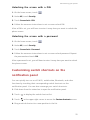
Customizing switch shortcuts on the
notification panel
You can quickly turn on or off Wi-Fi, mobile data, Bluetooth, and other
functions by touching their corresponding switch shortcuts on the
notification panel. You can also rearrange your switch shortcuts.
1. Flick down from the status bar to open the notification panel.
2. Touch
to display the switch shortcut list.
3. Touch
in the upper right corner to access the Custom shortcuts screen.
4. Drag a switch shortcut to a new position in the list.
25
Personalizing your phone
Changing the font size
1. On the home screen, touch
.
2. Under All, touch Display.
3. Touch Font size and select a font size.
Adjusting the screen brightness
1. On the home screen, touch
.
2. Under All, touch Display.
3. Touch Brightness.
4. In the displayed dialog box, perform either of the following operations:
• Select the Automatic brightness check box to have your phone
automatically adjust its screen brightness based on the ambient light.
• Clear the Automatic brightness check box, and drag the slider left to
reduce the screen brightness or drag it right to increase the screen
brightness.
You can also flick down from the status bar to open the notification
panel and adjust the screen brightness using the switch shortcuts.
26
Calls
Calls
Making a call
Smart dialing
Smart dialing lets you quickly find contacts by entering parts of their names
or numbers.
1. On the home screen, touch
.
2. Enter the initials or first few letters of a contact's name, or part of the
contact's phone number. Matching contacts in your phone and phone
numbers in your call log are then displayed in a list.
3. From the list, select the contact you want to call.
1
4. Touch
2
or
to make a call.
5. To end the call, touch
.
Making a call from Contacts
1. On the home screen, touch
.
2. From the contact list, select the contact you want to call.
3. Touch
1
or
2
.
Making a call from the call log
1. On the home screen, touch
.
2. Under Dialer, touch the contact you want to call.
3. Touch
1
or
2
.
Speed-dialing
1. On the home screen, touch
.
27
Calls
2. Touch
> Speed dial settings.
3. Touch
to choose a contact from the list and assign a number key to the
contact.
4. On the dialer, touch and hold the number key assigned to a contact, and
touch
1
or
2
to quickly call the contact.
The number key 1 is the default key for voicemail. You cannot set it as
a speed-dial number.
Making an international call
1. On the home screen, touch
.
2. On the dialer, touch and hold 0 to enter +.
3. Enter the country or region code, area code, and phone number in
sequence.
4. Touch
1
or
2
.
Making an emergency call
In the event of an emergency, you will still be able to make emergency calls
without the use of a SIM card. However, you must still be under the coverage
area.
1. On the home screen, touch
.
2. Enter your local emergency number and touch
.
Emergency calls are subject to cellular network quality, use environment,
service provider policies, and local laws and regulations. Never rely
solely on your phone for critical communications when emergencies
occur.
28
Calls
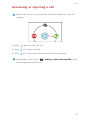
Answering or rejecting a call
When a call comes in, you can press the volume button to mute the
ringtone.
•
Drag
right to answer the call.
•
Drag
left to reject the call.
•
Drag
up to reject the call and send the caller a message.
On the dialer screen, touch
> Settings > Reject calls with SMS to edit
the message that will be sent.
29
Calls
What you can do during a call
1
7
2
3
6
4
5
1
Touch
>
to place the current call on hold, and touch
again to resume the call.
Touch
2
>
to start a three-way call. Before you use three-
way calling, make sure you have subscribed to this service. For
details, contact your service provider.
3
Touch
to display the dialer.
4
Touch
to use the speakerphone.
5
Touch
to end the call.
6
Touch
to mute or unmute the microphone.
7
Touch
>
to display the notepad.
To return to the call screen, flick down from the status bar to open the
notification panel, and touch Current call.
30
Calls
Answering a third-party call
Before you answer a third-party call, make sure that you have turned on call
waiting.
1. If a call comes in when you are already in another call, drag
right to
answer the new call and place the first call on hold.
2. To switch between the two calls, touch
.
Making a conference call
Making conference calls with your friends, family, and co-workers is easy with
your phone.
Before you make conference calls, make sure that you have subscribed
to this service. For details, contact your service provider.
1. Call the first participant.
2. When the call is connected, touch
>
to call the second participant.
The first participant will be placed on hold.
3. When the second call is connected, touch
to start a conference call.
4. To add more people to the call, repeat steps 2 and 3.
5. Touch
to end the call.
Using the call log
The call log records your called, answered, and missed calls.
Adding a contact from the call log
1. On the home screen, touch
.
2. Under Dialer, select the number you want to add as a contact, and touch
.
3. Touch Create new contact or Save to existing contact.
31
Calls
You can also touch and hold the number you want to add, and touch
Create new contact or Save to existing contact.
Clearing the call log
1. On the home screen, touch
.
2. Under Dialer, you can:
• Touch and hold a contact name or phone number, and touch Delete entry
to delete that call record.
• Touch
> Delete call log. In the displayed dialog box, touch the logs
you want to delete or touch All to select all logs, and then touch DELETE
to clear the call log.
Call settings
Enabling call forwarding
Too busy to answer all your calls with one phone? Forward them to another
number and never miss an important call again!
1. On the home screen, touch
2. Touch
.
> Settings.
3. Touch Voice call forwarding settings, and then select a SIM card.
4. Select a forwarding mode.
5. Enter the phone number to which you want to forward calls, and touch
Enable.
Enabling call waiting
The call waiting function lets you answer another incoming call when you are
already busy in a call and switch between the two calls.
1. On the home screen, touch
2. Touch
.
> Settings.
32
Calls
3. Touch Additional settings, and then select a SIM card.
4. Select the Call waiting check box.
Setting up your voicemail
Voicemail is your personal storage for missed calls, including the calls missed
when you are in another call or your phone is powered off.
Before you use voicemail, make sure you have subscribed to the
voicemail service and obtained your voicemail number. For details,
contact your service provider. You must also enable call forwarding and
set all incoming calls to be forwarded to your voicemail.
1. On the home screen, touch
2. Touch
.
> Settings.
3. Touch Voicemail, and then select a SIM card.
4. Touch Voicemail service, then select the My carrier check box.
5. Touch Setup > Voicemail number.
6. Enter your voicemail number, and touch OK.
To listen to your voicemail messages, touch and hold the 1 key on the dialer
and follow the voice instructions.
33
Contacts
Contacts
Creating a contact
1. On the home screen, touch
.
2. Touch Create a new contact (or touch
).
3. Choose the save location for the contact.
4. Enter the contact name, phone number, and other details.
5. Touch SAVE.
Importing or exporting contacts
Your phone supports contact files in .vcf format only. This is the standard
format for files storing contacts. Contact names, addresses, phone numbers,
and other information can be saved in .vcf files.
Importing contacts from a storage device
1. On the home screen, touch
.
2. Touch Import contacts > Storage (or touch
> Import/Export > Storage).
3. Select one or more .vcf files, and touch OK.
Importing contacts from the SIM card
1. On the home screen, touch
.
2. Touch Import contacts > SIM 1 orSIM 2 (or touch
> Import/Export >
Import from sim 1 or Import from sim 2).
3. Touch the contacts you want to import or touch All to select all contacts,
and then touch IMPORT.
34
Contacts
Importing contacts from a Bluetooth device
1. On the home screen, touch
.
2. Touch Import contacts > Another phone (or touch
> Import/Export >
Another phone).
3. Select Supports Bluetooth, and touch NEXT. The phone then turns on
Bluetooth and scans for Bluetooth devices.
4. Touch the Bluetooth device from which you want to import contacts.
When the two devices are paired, your phone automatically imports the .vcf
file from the other device.
Exporting contacts to a storage device
1. On the home screen, touch
2. Touch
.
> Import/Export > Export to storage.
3. Touch Export.
4. Choose from where you want to export the contacts and touch OK.
To view the .vcf file you just exported, open File Manager. By default, the file
is saved to the root directory of your phone's internal storage.
Exporting contacts to a SIM card
1. On the home screen, touch
2. Touch
.
> Import/Export > Export to sim 1 or Export to sim 2.
3. Touch the contacts you want to export or touch All to select all contacts,
and then touch EXPORT.
4. In the displayed dialog box, touch OK.
Copying contacts
You can copy contacts from a SIM card to your phone and vice versa.
1. On the home screen, touch
.
35
Contacts
2. Touch
> Settings > Copy contacts and choose from where you want to
copy the contacts.
3. Touch the contacts you want to copy or touch All to select all contacts.
4. Touch COPY and choose where you want to paste the contacts.
Searching for a contact
1. On the home screen, touch
.
2. Enter the contact name or initials. Matching results are displayed as you
type.
For example, to search for John Doe, enter John Doe or JD.
Editing a contact
1. On the home screen, touch
.
2. Touch and hold the contact you want to edit, and touch Edit.
3. Edit the contact information.
4. Touch SAVE.
Adding a contact to your favorites
1. On the home screen, touch
2. Under Favorites, touch
.
.
3. Touch the contact you want to add to favorites or touch All to select all
contacts, and then touch ADD.
You can also touch
on a contact details screen to add the contact to
your favorites.
36
Contacts
Deleting contacts
1. On the home screen, touch
2. Touch
.
> Delete.
3. Touch the contacts you want to delete or touch All to select all contacts,
and then touch DELETE.
4. In the displayed dialog box, touch Delete.
Merging contacts
1. On the home screen, touch
2. Touch
.
> Settings > Merge duplicate contacts.
3. Touch the contacts you want to merge or touch All to select all contacts
that can be merged, and then touch MERGE.
Only duplicate contacts saved in your phone storage can be merged.
Sharing contacts
1. On the home screen, touch
2. Touch
.
> Import/Export > Share contacts.
3. Touch the contacts you want to share, or touch All to select all contacts.
4. Touch SHARE, and choose a sharing method from the displayed option
menu.
Contact groups
You can create a contact group and send a message or email to all group
members simultaneously.
Creating a contact group
1. On the home screen, touch
.
37
Contacts
2. Under Favorites, touch
> Create group.
3. Name the contact group.
4. Touch Add members.
5. Select contacts you want to add to the group or touch All to select all
contacts, and then touch ADD.
6. Touch SAVE.
Editing a contact group
1. On the home screen, touch
.
2. Under Favorites, touch and hold the contact group you want to edit, and
touch Edit.
3. Rename the group or manage group members.
4. Touch SAVE.
Sending messages or emails to a contact group
On the home screen, touch
. Under Favorites, touch and hold the contact
group you want to send a message or email to, and choose Send message or
Send email from the displayed option menu.
You can also open the contact group and touch
or
@
to send a message
to send an email.
Deleting a contact group
1. On the home screen, touch
.
2. Under Favorites, touch and hold the contact group you want to delete, and
touch Delete.
3. In the displayed dialog box, touch Delete.
Deleting a contact group will not remove the contacts in the group from
your phone.
38
Messaging
Messaging
Sending a text message
1. On the home screen, touch
.
2. In the list of message threads, touch
.
3. Touch the recipient text box and enter the contact name or phone number.
Matching results are displayed as you type. Touch to select a contact.
Touch
to select more contacts.
4. Write your message.
5. Touch
1
or
2
.
Sending a multimedia message
1. On the home screen, touch
.
2. In the list of message threads, touch
.
3. Touch the recipient text box and enter the contact name or phone number.
Matching results are displayed as you type. Touch to select a contact.
Touch
4. Touch
to select more contacts.
> Add subject and enter the message subject.
5. Write your message.
6. Touch
, select the attachment type, and attach a file.
To attach more than one files to the message, touch Slideshow. You can
touch Remove slide to delete the current slideshow.
7. Touch
1
or
2
.
39
Messaging
Replying to a message
1. On the home screen, touch
.
2. In the list of message threads, touch a contact name or phone number to
view the conversation thread.
3. Write your message.
4. Touch
1
or
2
.
Searching for a message
1. On the home screen, touch
.
2. In the list of message threads, touch
> Search.
3. Enter the message or contact name, or parts of them. Your phone then
displays matching results.
Managing messages
Copying a message
1. On the home screen, touch
.
2. In the list of message threads, touch a contact name or phone number to
view the conversation thread.
3. Touch and hold the message you want to copy, and touch Copy text.
4. Touch and hold the area where you want to paste the message and choose
Paste from the displayed option menu.
Forwarding a message
1. On the home screen, touch
.
2. In the list of message threads, touch a contact name or phone number to
view the conversation thread.
40
Messaging
3. Touch and hold the message you want to forward, and touch Forward.
4. Touch the recipient text box and enter the contact name or phone number.
Touch
5. Touch
1
to select more contacts.
or
2
.
Deleting a message
1. On the home screen, touch
.
2. In the list of message threads, touch a contact name or phone number to
view the conversation thread.
3. You can then:
• Touch and hold the message you want to delete, and touch Delete.
• Touch
> Delete to delete multiple messages simultaneously.
Deleting a thread
1. On the home screen, touch
.
2. In the list of message threads, you can:
• Touch and hold the thread you want to delete, and touch Delete
conversation.
• Touch
> Delete to delete multiple threads simultaneously.
Modifying message settings
You can change the message tone and more.
1. On the home screen, touch
.
2. In the list of message threads, touch
> Settings.
41
Browser
Browser
Browsing web pages
1. On the home screen, touch
.
2. Enter a website address in the address box. Your phone displays matching
websites as you type.
3. Touch the website you want to visit.
Managing bookmarks
Bookmarks let you keep track of your favorite websites.
Adding a bookmark
1. On the home screen, touch
.
2. On the Browser screen, open the web page you want to add as a
bookmark.
3. Touch
> Save to bookmarks.
4. Name the bookmark and touch OK.
Accessing a bookmark
1. On the home screen, touch
2. Touch
.
> Bookmarks.
3. Under Local, touch a bookmark.
Editing a bookmark
1. On the home screen, touch
2. Touch
.
> Bookmarks.
3. Touch and hold the bookmark you want to edit, and touch Edit bookmark.
42
Browser
4. Rename the bookmark, change the website address, or revise the account
information. Then touch OK.
Setting the home page
1. On the home screen, touch
2. Touch
.
> Settings > General > Set homepage.
3. From the displayed option menu, choose the web page you want to set as
the home page.
Clearing your browsing history
To better protect your privacy, clear your browsing history from time to time.
1. On the home screen, touch
2. Touch
.
> Settings > Privacy & security > Clear history.
3. Touch OK.
Modifying browser settings
You can adjust the font size and set whether to display images on web pages
and configure other browser settings.
1. On the home screen, touch
2. Touch
.
> Settings.
43
Email
Email
Adding a POP3 or IMAP email account
Certain parameters must be set when you add a POP3 or IMAP email account.
For details, contact your email service provider.
1. On the home screen, touch
.
2. Select an email account type.
3. Enter your Email address and Password, and touch Next.
4. Follow the onscreen instructions to configure the email settings. The
system then automatically connects to the server and checks server
settings.
When the email account is set up, the Inbox screen is displayed.
To add more email accounts, touch
> Settings > NEW ACCOUNT on
the Inbox screen.
Adding an Exchange account
Exchange is an email system developed by Microsoft to implement
communication inside an enterprise. Some email service providers also
provide Exchange accounts for individuals and families.
Certain parameters must be set when you add an Exchange account. For
details, contact your email service provider.
1. On the home screen, touch
.
2. Touch Exchange.
3. Enter your Email address, Domain, Username, and Password. Then, touch
Next.
44
Email
4. Follow the onscreen instructions to configure the email settings. The
system then automatically connects to the server and checks server
settings.
When the email account is set up, the Inbox screen is displayed.
Sending an email
1. On the home screen, touch
.
2. Touch the email address bar at the top of the screen to select an email
account.
3. On the Inbox screen, touch
.
4. Enter one or more recipients.
To send the email to multiple recipients, touch + Cc/Bcc. Separate
different email addresses with semicolons (;).
5. Enter the subject, and write your message. Touch
to upload any
attachments.
6. When you are done, touch
to send the email.
Checking your emails
1. On the home screen, touch
.
2. Touch the email address bar at the top of the screen to select an email
account.
3. On the Inbox screen, touch the email you want to read.
4. You can then:
• Touch
to delete it.
• Touch
to reply to it.
• Touch
to reply to all.
• Touch
to forward it.
45
Email
• Touch
to go back to the previous email.
• Touch
to skip to the next email.
Mail retrieval may be slightly delayed, depending on the network
condition. Touch
to refresh the inbox.
Switching between email accounts
If you have logged into multiple email accounts on your phone, switch to the
one you want to use before you view or send emails.
1. On the home screen, touch
.
2. Touch the email address on the top to display your email account list.
3. Touch an email account you want to use.
Removing an email account
1. On the home screen, touch
.
2. On the Inbox screen, touch
> Settings.
3. Select the account you want to remove.
4. Touch Remove account then OK.
After you remove an email account, your phone will no longer send or receive
emails using that account.
Modifying email account settings
1. On the home screen, touch
.
2. On the Inbox screen, touch
> Settings to set the following items:
• Touch General to modify the font size of the email text and the screen
displayed after you delete an email.
• Touch an email account to modify your signature, set how often the inbox
is refreshed, and set the notification tone for new emails.
46
Multimedia
Multimedia
Camera
Capture screen
8
1
7
2
6
A
5
4
3
1
Touch
to switch to video mode.
2
Touch
to switch to photo mode.
3
Touch the thumbnail to view your photos and videos.
4
• Touch an object on the viewfinder to focus the camera on it.
• Spread two fingers apart to zoom in or pinch them together to
zoom out.
5
Touch
6
Touch
7
Touch
to switch between the rear and front cameras.
8
Touch
for more options.
to select a capture mode.
A
to set the flashlight mode.
47
Multimedia
Taking a photo
1. On the home screen, touch
.
2. Frame the scene you want to capture. Let your camera focus automatically
or touch the screen to focus the camera. When the camera is focused, the
frame in the center of the viewfinder turns green.
3. Touch
.
Shooting a video
1. On the home screen, touch
.
2. Frame the scene you want to record.
3. Touch
to start recording.
4. During the recording, touch an object or area to focus on it.
Touch
5. Touch
to pause recording.
to stop recording.
Continuous shooting
Continuous shooting allows you to record a series of dynamic images and pick
the best from them.
1. On the home screen, touch
2. Touch
.
> Camera > Burst to enable continuous shooting.
3. Frame the scene you want to capture.
4. Touch and hold
. The camera then takes up to 20 photos at most in
rapid succession. You can stop shooting anytime by releasing your finger.
Taking a panoramic photo
1. On the home screen, touch
2. Touch
>
.
to switch to panoramic mode.
48
Multimedia
3. Frame the scene you want to capture.
4. Touch
to start shooting.
5. Follow the screen prompts to move your phone slowly and stably, when
the two arrows are overlapping, the phone will automatically take one or
multiple photos.
6. Touch
to stop shooting. The camera automatically stitches the photos
together to create one panoramic photograph.
Taking a photo in beauty mode
Want to look flawless in great quality photos? Enable beauty mode for simply
stunning photos.
1. On the home screen, touch
2. Touch
>
.
to switch to beauty mode.
3. Frame the scene you want to capture. The camera will identify a face and
focus on it.
4. Touch
.
Taking an audio photo
You can record an audio clip while taking a photo to make the photo more
vivid.
1. On the home screen, touch
2. Touch
>
.
to switch to audio photo mode.
3. Frame the scene you want to capture.
4. Touch
to take a photo. The phone then records an audio clip for a few
seconds. Record your thoughts for the photo you've just taken.
Using HDR
High dynamic range (HDR) imaging technology improves the details in the
lightest and darkest areas of photos for true-to-life quality.
1. On the home screen, touch
.
49
Multimedia
2. Touch
>
to switch to HDR mode.
3. Frame the scene you want to capture.
4. Touch
.
The front camera does not support HDR.
Taking a photo using audio control
1. On the home screen, touch
2. Touch
.
> Camera > Voice activated shooting to switch to audio control
mode.
3. Frame the scene you want to capture. Your phone will take a photo when
the surrounding noise reaches a certain decibel level.
Setting the save location for photos
1. On the home screen, touch
2. On the viewfinder, touch
.
> Others > Preferred save location.
3. You can then:
• Touch SD card to save the photos or videos to a microSD card by default.
• Touch Internal storage to save the photos or videos to the internal storage
by default.
Gallery
Viewing photos or videos
1. On the home screen, touch
.
2. Touch an album.
3. Touch a photo or video to view it in full screen mode.
When viewing a photo, pinch two fingers together to zoom out or
spread them apart to zoom in.
50
Multimedia
Playing a slideshow
1. On the home screen, touch
.
2. Touch an album.
3. Touch
> Slideshow to play a slideshow of the photos in the album.
4. Touch the screen to stop the slideshow.
Rotating a photo
1. On the home screen, touch
.
2. Touch the photo you want to rotate.
3. Touch
> Rotate Left or Rotate Right.
Deleting a photo
1. On the home screen, touch
.
2. Select the photo you want to delete.
3. Touch
then Delete.
Sharing a photo or video
Want to share your best shots or an amusing trick your dog just did? Simply
share the photos and videos using email, Bluetooth, and more.
1. On the home screen, touch
.
2. Touch an album.
3. Touch
, and choose a sharing method from the displayed option menu.
4. Select the photo or video you want to share.
5. Touch SHARE and follow the onscreen instructions to share the photo or
video.
Setting a photo as the wallpaper
1. On the home screen, touch
.
51
Multimedia
2. Choose the photo you want to set as the wallpaper.
3. Touch
> Set as.
4. You can then:
• Touch Lock screen wallpaper, drag the frames of the grid to resize it, and
touch OK to set the photo as the lock screen wallpaper.
• Touch Home screen wallpaper, drag the frames of the grid to resize it, and
touch SET WALLPAPER to set the photo as the home screen wallpaper.
Music
Adding songs
You can copy songs to your phone and immerse yourself in a world of
extraordinary sound anytime. Add songs to your phone by:
•
•
•
Copying songs from your computer using USB. For details, see MTP mode.
Downloading songs from the web.
Copying songs from Bluetooth devices. For details, see Sharing a file using
Bluetooth.
•
Copying songs from other devices using Wi-Fi Direct. For details, see
Sending a file using Wi-Fi Direct.
Listening to music
1. On the home screen, touch
.
2. Select a category.
3. Touch the song you want to play.
4. Touch the playing song to enter the main playback interface.
52
Multimedia
1
2
6
3
5
4
1
Flick left or right to switch between the album cover and lyrics.
2
Touch
to add a song to your Favorites.
Touch
to switch between different playing modes (repeat
3
the current song, repeat the playlist, shuffle, and play in
sequence).
4
5
6
• Touch
to play and touch
• Touch
to go back to the previous song.
• Touch
to skip to the next song.
to pause.
Drag the slider to control the playback.
Touch
to display the option menu from which you can
perform additional operations.
When a song is playing, touch
to exit the playback screen without
stopping the song. To return to the music playback screen, open the
notification panel and touch the playing song.
53
Multimedia
Creating a playlist
Creating playlists lets you be creative with your songs, and organize them into
groups. You'll be able to listen to the playlist that best fits your mood.
1. On the home screen, touch
.
2. Touch Playlists > Create new playlist.
3. Touch the text box to name the playlist, and touch Save.
4. In the displayed dialog box, touch OK.
5. Select the songs you want to add.
6. Touch ADD.
Playing a playlist
1. On the home screen, touch
.
2. Touch Playlists.
3. Touch and hold the playlist you want to play, and touch Play.
Deleting a playlist
1. On the home screen, touch
.
2. Touch Playlists.
3. Touch and hold the playlist you want to delete, and touch Delete.
Sharing a song
1. On the home screen, touch
.
2. Select a category.
3. On the song list, touch
> Share.
4. Select the song you want to share.
5. Touch SHARE.
6. From the displayed option menu, choose a file type.
54
Multimedia
7. Choose a sharing method and follow the onscreen instructions to share the
song.
Setting a song as the ringtone
Want to hear your favorite song whenever you receive a call? Just make it your
ringtone.
1. On the home screen, touch
.
2. Select a category.
3. Touch and hold the song you want to set as the ringtone, and touch Set as
ringtone.
55
Internet connection
Internet connection
Mobile data connection
Turning on the data service
1. On the home screen, touch
.
2. Under All, touch Mobile networks.
3. Touch Data connection, and select the SIM which you want to turn on data
service.
When you don't need to access the Internet, turn off the data service to
save battery power and reduce data usage.
Creating an APN
The Access Point Name (APN) is a necessary parameter for a phone to connect
to a mobile network or send multimedia messages. It is usually automatically
set after you insert a SIM card into your phone. If your phone cannot connect
to a mobile network using the automatically set APN, contact your service
provider for the specific parameters and create a new APN.
1. On the home screen, touch
.
2. Under All, touch Mobile networks.
3. Touch Access Point Names.
4. Select a SIM card you want to create an APN.
5. Touch
> New APN.
6. Enter the access point name and other parameters.
7. Touch SAVE.
In the APN list, touch
> Reset to default to reset the APN
information.
56
Internet connection
Wi-Fi network
Your phone can connect to Wi-Fi networks. Some public locations, such as
airports and libraries, may have Wi-Fi networks available for use. Using Wi-Fi
networks provided by certain Internet service providers may produce fees.
Before you use a public Wi-Fi hotspot, make sure you check and are aware of
that service provider's fee policies.
Connecting to a Wi-Fi network
1. On the home screen, touch
.
2. Under All, touch the Wi-Fi switch to turn on Wi-Fi.
3. Touch Wi-Fi. Your phone then scans for available Wi-Fi networks and
displays them.
4. Touch the Wi-Fi network you want to connect to.
• If the Wi-Fi network is open, you will directly connect to it.
• If the Wi-Fi network is encrypted, enter the key when prompted, and
touch Connect.
If Wi-Fi and mobile data are both enabled, your phone connects to the
Wi-Fi network preferentially.
Connecting to a Wi-Fi network using WPS
Wi-Fi protected setup (WPS) lets you quickly connect to a Wi-Fi network.
Simply press the WPS button or enter the PIN to connect your phone to a WiFi router that supports WPS.
1. On the home screen, touch
.
2. Under All, touch the Wi-Fi switch to turn on Wi-Fi.
3. Touch Wi-Fi.
4. Touch
> WPS Push Button and press the WPS button on the Wi-Fi
router.
To connect to a Wi-Fi network through WPS PIN, touch
> Enter WPS
PIN.
57
Internet connection
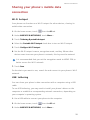
Sharing your phone's mobile data
connection
Wi-Fi hotspot
Your phone can function as a Wi-Fi hotspot for other devices, sharing its
mobile data connection.
1. On the home screen, touch
then the All tab.
2. Under WIRELESS & NETWORKS, touch More….
3. Touch Tethering & portable hotspot.
4. Select the Portable Wi-Fi hotspot check box to turn on Wi-Fi hotspot.
5. Touch Configure Wi-Fi hotspot.
6. Set the Wi-Fi hotspot's name, encryption mode, and key. When other
devices want to access your phone's network, this key must be entered.
It is recommended that you set the encryption mode to WPA2 PSK to
better secure the Wi-Fi network.
7. Touch Save.
On the device you want to use, search for and connect to your phone's Wi-Fi
network.
USB tethering
You can share your phone's data connection with a computer using a USB
cable.
To use USB tethering, you may need to install your phone's driver on the
computer or establish a corresponding network connection, depending on
your computer's operating system.
1. Use a USB cable to connect your phone to the computer.
2. On the home screen, touch
then the All tab.
3. Under WIRELESS & NETWORKS, touch More….
58
Internet connection
4. Touch Tethering & portable hotspot.
5. Select the USB tethering check box.
You cannot use your phone's USB tethering function when the phone is
in USB storage mode.
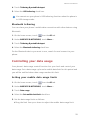
Bluetooth tethering
You can share your phone's mobile data connection with other devices using
Bluetooth.
1. On the home screen, touch
then the All tab.
2. Under WIRELESS & NETWORKS, touch More….
3. Touch Tethering & portable hotspot.
4. Select the Bluetooth tethering check box.
On the Bluetooth device you want to use, search for and connect to your
phone.
Controlling your data usage
Your phone's data usage control function lets you check and control your
data usage. Set a data usage cycle and a mobile data limit for this period and
you will be notified when data usage reaches this limit.
Setting your mobile data usage limits
1. On the home screen, touch
then the All tab.
2. Under WIRELESS & NETWORKS, touch More….
3. Touch Data usage.
4. Select the Set mobile data limit check box.
5. Set the data usage limits as follows:
• Drag the limit line up or down to adjust the mobile data usage limit.
59
Internet connection
• Drag the warning line up or down to adjust the mobile data usage
warning value. When your data usage reaches the warning line, you will
be notified.
• Drag the date lines left or right to check the data usage during a specific
period of time.
• Touch Data usage cycle to set the statistical cycle for data usage.
Viewing the data usage of an application
1. On the home screen, touch
then the All tab.
2. Under WIRELESS & NETWORKS, touch More….
3. Touch Data usage.
4. Flick down to view the data usage of all applications.
5. Touch an application for more details.
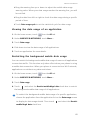
Restricting the background mobile data usage
You can restrict the background mobile data usage of some or all applications
to save data traffic. This function only takes effect when your phone is using
a mobile data connection. When your phone is connected to a Wi-Fi network,
applications run without any data restrictions.
1. On the home screen, touch
then the All tab.
2. Under WIRELESS & NETWORKS, touch More….
3. Touch Data usage.
4. Touch
, and select the Restrict mobile bkgd. data check box to restrict
the background mobile data usage of all applications.
To restrict the background mobile data usage of a specific application,
choose the application from the application list on the Data usage screen
to display its data usage details. Then touch
and select the Restrict
mobile bkgd. data check box.
60
Internet connection
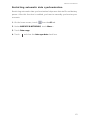
Restricting automatic data synchronization
Restricting automatic data synchronization helps save data traffic and battery
power. After this function is enabled, you have to manually synchronize your
accounts.
1. On the home screen, touch
then the All tab.
2. Under WIRELESS & NETWORKS, touch More….
3. Touch Data usage.
4. Touch
and clear the Auto-sync data check box.
61
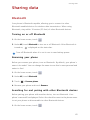
Sharing data
Sharing data
Bluetooth
Your phone is Bluetooth-capable, allowing you to connect to other
Bluetooth-enabled devices for wireless data transmission. When using
Bluetooth, stay within 10 meters (33 feet) of other Bluetooth devices.
Turning on or off Bluetooth
1. On the home screen, touch
.
2. Under All, touch Bluetooth to turn on or off Bluetooth. After Bluetooth is
turned on,
is displayed on the status bar.
Turn off Bluetooth when it is not in use to save battery power.
Renaming your phone
Before you rename your phone, turn on Bluetooth. By default, your phone's
name is its model. You can change the name to one that's more personal and
easier to find.
1. On the home screen, touch
.
2. Under All, touch Bluetooth.
3. Touch
> Rename phone.
4. Rename your phone and touch Rename.
Searching for and pairing with other Bluetooth devices
Before pairing your phone with another device, turn on Bluetooth. Your
phone's name will be displayed. Select the check box next to the phone name
to set your phone as discoverable to other Bluetooth devices.
1. On the home screen, touch
.
62
Sharing data
2. Under All, touch Bluetooth. Your phone will then scan for other Bluetooth
devices in range.
3. In the list of detected Bluetooth devices, touch a device and follow the
onscreen instructions to pair with it.
To disconnect from a paired Bluetooth device, under PAIRED DEVICES, touch
> Unpair.
If you cannot set up a Bluetooth connection to another device, the
device may not be compatible with your phone.
Sharing a file using Bluetooth
To exchange data with another Bluetooth device, enable Bluetooth on both
devices and pair them with each other.
1. On the home screen, touch
.
2. Touch and hold the file you want to send, and touch Share > Bluetooth.
3. Select a device.
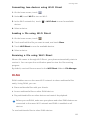
Receiving a file using Bluetooth
1. When your phone receives a file transfer request, open the notification
panel.
2. Touch Incoming file request to display a file reception dialog box.
3. Touch Accept to start receiving the file.
When the file is received, you will receive a notification of a successful
transfer. Open the notification panel to read the notification.
By default, received files are saved to the bluetooth folder in File Manager.
Wi-Fi Direct
Wi-Fi Direct allows two devices to connect to each other for data transmission
without using any access point.
63
Sharing data
Connecting two devices using Wi-Fi Direct
1. On the home screen, touch
.
2. Under All, touch Wi-Fi to turn on Wi-Fi.
3. In the Wi-Fi network list, touch
> Wi-Fi direct to scan for available
devices.
4. Select a device.
Sending a file using Wi-Fi Direct
1. On the home screen, touch
.
2. Touch and hold the file you want to send, and touch Share.
3. Touch Wi-Fi Direct to scan for available devices.
4. Select a device.
Receiving a file using Wi-Fi Direct
When a file comes in through Wi-Fi Direct, your phone automatically starts to
receive it. You can open the notification panel to view the file receiving
progress.
By default, received files are saved to the Wi-Fi Direct folder in File Manager.
DLNA
DLNA enables users on the same Wi-Fi network to share multimedia files
easily. Using DLNA, you can:
•
Share multimedia files with your friends.
•
Access multimedia files on other DLNA devices.
•
Play multimedia files on other devices and control the playback.
Before you use DLNA, make sure your phone and other DLNA devices are
connected to the same Wi-Fi network and DLNA is enabled on all
devices.
To send multimedia files to other DLNA devices:
64
Sharing data
1. On the home screen, touch Tools >
2. Touch My shared files >
.
.
3. Touch a file, or touch and hold a folder.
4. Touch
.
Other DLNA devices on the same Wi-Fi network as your phone can view the
file or folder you shared.
Connecting your phone to a computer
MTP mode
MTP mode lets you transfer media files, such as photos, songs, and videos,
between your phone and a computer. Windows Media Player 11 or later is
required.
1. Use a USB cable to connect your phone to the computer.
2. On the USB connection methods screen, choose Device file manager (MTP).
The phone driver is then automatically installed on the computer.
3. After the driver is installed, open the new drive and begin transferring
media files between your phone and computer. Multimedia content on
your phone can only be viewed through Windows Media Player.
HiSuite mode
HiSuite is a file transfer application developed by Huawei that lets you back
up, synchronize, and transfer data between your phone and computer.
1. Use a USB cable to connect your phone to the computer.
2. On the USB connection methods screen, choose PC Suite (HiSuite).
3. On the computer, open the new drive, double-click
HiSuiteDownLoader.exe, and follow the onscreen instructions to
download and install HiSuite.
4. When install completed, the HiSuite window will pop up. You can then
manage your phone's data with HiSuite.
65
Sharing data
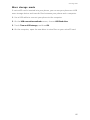
Mass storage mode
If a microSD card is inserted into your phone, you can use your phone as a USB
mass storage device and transfer files between your phone and a computer.
1. Use a USB cable to connect your phone to the computer.
2. On the USB connection methods screen, choose USB flash drive.
3. Touch Turn on USB storage, and then OK.
4. On the computer, open the new drive to view files on your microSD card.
66
File Manager
File Manager
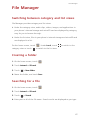
Switching between category and list views
File Manager provides category and list views.
•
Under the category view, audio clips, videos, images, and applications in
your phone's internal storage and microSD card are displayed by category,
easy for you to browse through.
•
Under the list view, files in your phone's internal storage and microSD card
are displayed in a list.
On the home screen, touch
category view or touch
. Under Local, touch
to switch to the
to switch to the list view.
Creating a folder
1. On the home screen, touch
.
2. Touch Internal or SD card.
3. Touch
> New folder.
4. Name the folder, and touch Save.
Searching for a file
1. On the home screen, touch
.
2. Touch Internal or SD card.
3. Touch
> Search.
4. Enter part or all of the file name. Search results are displayed as you type.
67
File Manager
Copying, cutting, and pasting a file
1. On the home screen, touch
.
2. Touch Internal or SD card.
3. Touch
or
.
4. Touch the file you want to copy or cut, and touch COPY or CUT.
5. Select where you want to paste the file, and touch PASTE.
Renaming a file
1. On the home screen, touch
.
2. Touch Internal or SD card.
3. Touch and hold the file you want to rename, and touch Rename.
4. Rename the file and touch OK.
Deleting a file
1. On the home screen, touch
.
2. Touch Internal or SD card.
3. Touch
.
4. Select the file you want to delete, and touch DELETE.
5. Touch OK.
Creating a shortcut for a file or folder
1. On the home screen, touch
.
2. Touch Internal or SD card.
3. Touch and hold the file or folder you want to create a shortcut for, and
choose Desktop shortcuts from the displayed option menu.
68
File Manager
Checking the storage status
Before you save large files to your phone's internal storage or microSD card,
make sure there is enough space first.
1. On the home screen, touch
2. Touch
.
> Storage.
3. On the Storage screen, view the total and available space in your phone's
internal storage or microSD card.
69
Managing applications
Managing applications
Downloading applications
A rich selection of applications are available from a variety of sources. You
can:
•
Download applications from Google's Play Store.
•
Download applications from web pages using the browser on your phone.
•
Download applications using a computer, and copy the applications to the
phone.
•
Connect the phone to a computer, and download applications using
HiSuite or other third-party applications.
Installing an application
Play Store should be your primary download source. Some applications
downloaded from some other sources may be malicious or incompatible
with your phone.
1. On the home screen, touch Top apps >
.
2. Select the application you want to install.
3. Touch
> Install then Done.
During the installation, an Install blocked message may be displayed.
Read the message carefully. If you want to continue with the installation,
touch Settings, and select the Unknown sources check box to allow
installation of third-party applications. Then touch
to proceed.
70
Managing applications
Viewing applications
You can view the sizes and access permissions of applications installed on
your phone. You can also view the running applications to check the system
running status.
1. On the home screen, touch
.
2. Under All, touch Manage apps.
3. Select an application type: downloaded, running, or all.
4. Touch an application to view its details, and flick up or down for more
information.
Sharing an application
1. On the home screen, touch and hold the application you want to share
until
is displayed at the top of the screen.
2. Drag the application to
.
3. On the displayed screen, select a sharing method and follow the onscreen
instructions to share the application.
System applications cannot be shared.
Uninstalling an application
1. On the home screen, touch
.
2. Under All, touch Manage apps.
3. Flick to All, and select the application you want to uninstall.
4. Touch Uninstall > OK.
Some pre-installed applications cannot be uninstalled.
71
Managing applications
Clearing the application cache
You can clear the application cache to free up the phone storage.
1. On the home screen, touch
.
2. Under All, touch Manage apps.
3. Flick to All, and touch Clear cache.
72
Phone Manager
Phone Manager
About Phone Manager
Phone Manger is a system application that lets you better protect and manage
your phone. Phone manger enables you to optimize the system performance
by diagnosing your phone, cleaning out trash files, and more. You can also
manage the access permissions of your applications to keep your personal
and private data safe.
Phone accelerator
If you are experiencing slowdown issues with your phone, you may have too
many applications using up too much memory. Optimize your system by using
phone accelerator.
1. On the home screen, touch
.
2. Touch Phone accelerator.
3. Select the unwanted applications, and touch CLOSE.
Storage cleaner
1. On the home screen, touch
.
2. Touch Storage cleaner.
3. Touch Smart scan, and clean your phone storage based on the scan results.
On the Storage cleaner screen, touch
to have your phone
periodically (you set the time interval) clean the cache, thumbnails,
storage, and more.
73
Phone Manager
Harassment filter
1. On the home screen, touch
.
2. Touch Harassment filter.
3. On the Harassment filter screen, you can:
• Touch Calls or Messages to view the blocked calls or messages.
• Touch Blacklist > ADD CONTACTS to add a number to the blacklist.
Power saving
1. On the home screen, touch
.
2. Touch Power saving.
3. On the Power saving screen, you can:
• Turn off the functions not in use to save power.
• Touch Power monitoring and manually optimize the power plan based on
the scan results.
• Touch Smart to enable smart mode and have your phone conserve power
while still allowing full use of all phone functions.
• Touch Endurance to enable endurance mode and have your phone
consume the least amount of power possible.
• Touch Normal to enable normal mode.
Permission manager
Some applications might read your personal data or turn on call recording or
camera. Permission manager lets you protect your privacy by restricting the
rights of applications.
1. On the home screen, touch
.
2. Flick left on the lower part of the screen, and touch Permission manager.
74
Phone Manager
3. On the Permission manager screen, you can view and set rights for your
applications.
Notification manager
Some applications may push all kinds of notifications to your phone.
Notification manager lets you set restriction rules on notifications to avoid
receiving unnecessary information.
1. On the home screen, touch
.
2. Flick left on the lower part of the screen, and touch Notification manager.
3. On the Notification manager screen, you can:
• Touch Rules to view applications that may send notifications to the
notification panel and set push rights for your applications.
• Touch Log to view the blocked notifications.
Startup manager
1. On the home screen, touch
.
2. Flick left on the lower part of the screen, and touch Startup manager.
3. On the Startup manager screen, you can:
• Select an application to have it run automatically at system startup.
• Deselect an application to prevent it from running at system startup.
75
Tools
Tools
Clock
Clock lets you view the time around the world, use stopwatch or timer to keep
track of time, or set alarms to wake you up in the morning.
Alarm
1. On the home screen, touch
.
2. Under Alarm, you can:
• Add an alarm: Touch
, and set the alarm time, ringtone, how often it
repeats, and more. Then touch DONE.
• Turn on or off an alarm: Touch the switch button to the right of an alarm
to turn it on or off.
• Configure alarm settings: Touch
, and set whether the alarm rings in
silent mode, the snooze duration, and what the volume buttons do when
pressed.
• Delete an alarm: Touch
, select the alarm you want to delete, and
touch DELETE.
When an alarm rings, touch 5 Min Nap to snooze or flick Close right to stop
the alarm.
Using the world clock
1. On the home screen, touch
.
2. Under World clock, you can:
• Add a city: Touch
, enter a city name or choose a city from the city
list, and touch the city you want to add.
• Set the home city: Touch
to set your home time zone and system date
and time.
76
Tools
• Delete a city: Touch
, select the city you want to delete, and touch
DELETE.
Timer
1. On the home screen, touch
.
2. On the Timer tab, rotate the dial to set the timer duration, or touch 1 min,
3 min, or 5 min to quickly set a time duration.
3. When you are done, touch Start to start the timer.
4. When the timer ends, the phone plays a tone and starts overtime timing.
Touch Close to stop the tone and reset the timer.
When the timer is running, touch Reset to reset it.
Weather
Weather provides you with the latest weather information for any city around
the world. You can share weather information with your family and friends.
Before you use Weather, turn on your phone's GPS and data service.
Adding a city
Add cities of your concern to check their real-time weather information.
1. On the home screen, touch Tools >
2. Touch
>
.
.
3. Enter a city name. Matching cities are then displayed.
4. Select the city you want to add.
In addition to your current city, you can add up to nine cities.
Setting the default city
1. On the home screen, touch Tools >
2. Touch
.
.
77
Tools
3. Touch the
icon to the right of the city you want to set as the default
city.
Deleting cities
1. On the home screen, touch Tools >
2. Touch
>
.
.
3. Select the cities you want to delete, and touch DELETE.
Updating the weather
1. On the home screen, touch Tools >
.
2. Flick left or right to find the city whose weather you want to update.
3. Touch
to update the weather.
You can also set Weather to automatic update mode. Touch
>
> Settings, select Auto update, and set Update interval. Your phone will
then update the weather at the interval you set.
Sharing weather information
Your phone lets you send weather information as a text message to remind
your family and friends of weather changes.
1. On the home screen, touch Tools >
.
2. Flick left or right to find the city whose weather you want to share.
3. Touch
to display the messaging screen.
4. You can then:
• Enter a phone number.
• Touch
5. Touch
to select a contact.
1
or
2
to send the weather information.
78
Tools
Calculator
1. On the home screen, touch Tools >
.
2. Rotate your phone to portrait or landscape view to switch between the
basic and scientific calculators.
Make sure the screen auto-rotate function is turned on.
FM radio
Connect a headset to the phone. FM Radio utilizes the headset as an
antenna.
Searching for stations
1. On the home screen, touch Tools >
2. Touch
>
.
to search for and save available stations.
Your phone will automatically search for and save stations the first time
you open the FM radio.
79
Tools
Listening to FM radio
6
5
4
1
2
3
1
Touch
to return to the previous station.
2
Touch
to turn on or off the FM radio.
3
Touch
to add the current station to your favorites.
4
Touch
to go to the next station.
5
Touch
to enable or disable the speaker.
6
Touch
to view the station list.
80
Phone settings
Phone settings
Setting up an account
Adding an account
1. On the home screen, touch
.
2. Under All, touch Add account.
3. Select an account type.
4. Follow the onscreen instructions and enter your account information.
Deleting an account
1. On the home screen, touch
.
2. Touch the All tab.
3. Under ACCOUNTS, select an account type.
4. Select the account you want to delete.
5. Touch
> Remove account.
6. In the displayed dialog box, touch Remove account.
Turning on data synchronization
1. On the home screen, touch
.
2. Touch the All tab.
3. Under ACCOUNTS, select an account type.
4. Select the account you want to synchronize from.
5. Touch the data you want to synchronize.
You can touch
> Sync now to synchronize data in the background.
81
Phone settings
Turning on or off airplane mode
Your phone's signal reception or transmission may interfere with an airplane's
flight system. Power off your phone or switch to airplane mode as required
when you are on a flight. In airplane mode, your phone's wireless features are
disabled, but you can still listen to music or play games using your phone.
Use either of the following methods to turn on or off Airplane mode:
•
Press and hold the power button, and touch Airplane mode.
•
On the home screen, touch
When airplane mode is on,
. Under All, touch Airplane mode.
appears in the status bar.
Tone settings
1. On the home screen, touch
.
2. Under All, touch Sound.
3. On the Sound screen, you can:
• Touch Volumes and drag the sliders to set the volume of music, ringtones,
notification tones, alarms, calls, and more.
• Touch Silent mode to turn on or off silent mode.
• Select or clear the Vibrate in silent mode check box to set whether your
phone vibrates when it is in silent mode.
• Select or clear the Vibrate when ringing check box to set whether your
phone vibrates when you have an incoming call.
• Touch Phone ringtone to select a ringtone.
• Touch Notification tone to set a notification tone.
• Touch or clear the check box under SYSTEM to turn on or off the
notification tone or vibration when you touch or lock the screen, take a
screenshot, dial a number, and more.
82
Phone settings
Display settings
1. On the home screen, touch
.
2. Under All, touch Display.
3. On the Display screen, you can:
• Touch Brightness to adjust the screen brightness. To manually adjust the
brightness, clear the Automatic brightness check box.
• Touch Wallpaper to set the lock screen and home screen wallpapers.
• Select or clear the Auto-rotate screen check box to turn on or off the
screen auto-rotate function. If this function is turned on, your screen's
orientation will automatically change with the way you hold your phone
when you perform certain operations, such as browsing a web page,
viewing a picture, or writing a message.
• Touch Sleep to set a screen timeout period. If idle for the specified period,
your phone automatically locks its screen to save battery power.
• Touch Screen Candy to turn on or off the screen saver. If this function is
enabled, the screen saver will automatically run while your phone is being
charged.
• Touch Font size to change the display font size.
• Touch Font style to change the display font style.
Turning on or off do not disturb mode
To avoid being disturbed when you need to focus on important business, turn
on do not disturb mode. In do not disturb mode, your phone will ring only
when you receive calls from allowed contacts. Other calls will be rejected, and
message and other notification tones will be muted.
1. On the home screen, touch
.
2. Under All, touch Do not disturb.
3. On the Do not disturb screen, you can:
83
Phone settings
• Touch Enable to turn on or off do not disturb mode. In do not disturb
mode,
is displayed on the status bar.
• Touch Scheduled to schedule the effective time period for do not disturb
mode.
• Touch Allowed contacts to add contacts whose calls you can still receive
in do not disturb mode.
• Touch Repeat calls to turn on or off the repeat calls function. After the
repeat calls function is enabled, the second call from the same number
made within 3 minutes will not be muted.
Setting the date and time
1. On the home screen, touch
.
2. Under All, touch Date & time.
3. On the Date & time screen, you can:
• Select the Automatic date & time and Automatic time zone check boxes
to use the network date and time.
• Clear the Automatic date & time and Automatic time zone check boxes to
manually set the date, time, and time zone.
• Select or clear the Use 24-hour format check box to switch between the
12-hour and 24-hour formats.
• Touch Choose date format to select how you want the date to be
displayed.
Changing the system language
1. On the home screen, touch
.
2. Under All, touch Language & input.
3. Touch Language.
4. Select a language.
84
Phone settings
Setting the PIN of your SIM card
A personal identification number (PIN) is delivered with your SIM card to
better protect your phone data. If you enable the SIM card lock, you must
enter the PIN each time you turn your phone on.
Before you perform the following operations, make sure you have obtained
your SIM card's PIN from your service provider.
1. On the home screen, touch
.
2. Under All, touch Security.
3. Touch Set Card 1/Card 2 lock and choose Card 1 or Card 2.
4. Select the Lock SIM card check box.
5. Enter your PIN, and touch OK.
6. Touch Change SIM PIN to change the PIN.
The SIM card allows only a limited number of consecutive retries if an
incorrect PIN is entered. If this limit is exceeded, you must enter a PIN
unblocking key (PUK), which you can obtain from your service provider.
The number of consecutive attempts to enter the PUK incorrectly is also
limited. If this limit is exceeded, your SIM card will be permanently
disabled. For details about these limits, contact your service provider.
Restoring factory settings
Restoring your phone to the factory settings erases all your personal
data from the phone storage, including information about your
accounts, your system and application settings, and downloaded
applications. Back up important data on your phone before you restore
factory settings.
1. On the home screen, touch
.
2. Under All, touch Backup & reset.
85
Phone settings
3. Touch Factory data reset > Reset phone > Reset phone. The phone will
restore its factory settings and restart.
Online update
Once in a while, new updates for your phone will be available online. You will
receive a notification when updates are available. Before updating, make sure
your phone has enough storage space for the update package.
All your personal data may be erased during a system update. It is
recommended that you back up important data before updating your
phone.
To update your phone manually, go to the home screen, touch
> Updates
> System updates > Online update to check for updates, and follow the
onscreen instructions to update your phone online.
Accessibility
You can turn on or off accessibility features, such as magnification gestures
and large text.
1. On the home screen, touch
.
2. Under All, touch Accessibility.
86
Legal Notice
Legal Notice
Copyright © Huawei Technologies Co., Ltd. 2014. All rights reserved.
No part of this manual may be reproduced or transmitted in any form or by
any means without prior written consent of Huawei Technologies Co., Ltd.
and its affiliates ("Huawei").
The product described in this manual may include copyrighted software of
Huawei and possible licensors. Customers shall not in any manner reproduce,
distribute, modify, decompile, disassemble, decrypt, extract, reverse
engineer, lease, assign, or sublicense the said software, unless such
restrictions are prohibited by applicable laws or such actions are approved by
respective copyright holders.
Trademarks and Permissions
,
, and
are trademarks or registered trademarks
of Huawei Technologies Co., Ltd.
Android™ is a trademark of Google Inc.
The Bluetooth ® word mark and logos are registered trademarks owned by
Bluetooth SIG, Inc. and any use of such marks by Huawei Technologies Co.,
Ltd. is under license.
Other trademarks, product, service and company names mentioned may be
the property of their respective owners.
Notice
Some features of the product and its accessories described herein rely on the
software installed, capacities and settings of local network, and therefore
may not be activated or may be limited by local network operators or network
service providers.
Thus, the descriptions herein may not exactly match the product or its
accessories which you purchase.
87
Legal Notice
Huawei reserves the right to change or modify any information or
specifications contained in this manual without prior notice and without any
liability.
Third-Party Software Statement
Huawei does not own the intellectual property of the third-party software and
applications that are delivered with this product. Therefore, Huawei will not
provide any warranty of any kind for third party software and applications.
Neither will Huawei provide support to customers who use third-party
software and applications, nor be responsible or liable for the functions or
performance of third-party software and applications.
Third-party software and applications services may be interrupted or
terminated at any time, and Huawei does not guarantee the availability of any
content or service. Third-party service providers provide content and services
through network or transmission tools outside of the control of Huawei. To
the greatest extent permitted by applicable law, it is explicitly stated that
Huawei shall not compensate or be liable for services provided by third-party
service providers, or the interruption or termination of third-party contents or
services.
Huawei shall not be responsible for the legality, quality, or any other aspects
of any software installed on this product, or for any uploaded or downloaded
third-party works in any form, including but not limited to texts, images,
videos, or software etc. Customers shall bear the risk for any and all effects,
including incompatibility between the software and this product, which result
from installing software or uploading or downloading the third-party works.
This product is based on the open-source Android™ platform. Huawei has
made necessary changes to the platform. Therefore, this product may not
support all the functions that are supported by the standard Android platform
or may be incompatible with third-party software. Huawei does not provide
any warranty or representation in connect with any such compatibility and
expressly excludes all liability in connection with such matters.
88
Legal Notice
DISCLAIMER
ALL CONTENTS OF THIS MANUAL ARE PROVIDED "AS IS". EXCEPT AS
REQUIRED BY APPLICABLE LAWS, NO WARRANTIES OF ANY KIND, EITHER
EXPRESS OR IMPLIED, INCLUDING BUT NOT LIMITED TO, THE IMPLIED
WARRANTIES OF MERCHANTABILITY AND FITNESS FOR A PARTICULAR
PURPOSE, ARE MADE IN RELATION TO THE ACCURACY, RELIABILITY OR
CONTENTS OF THIS MANUAL.
TO THE MAXIMUM EXTENT PERMITTED BY APPLICABLE LAW, IN NO EVENT
SHALL HUAWEI BE LIABLE FOR ANY SPECIAL, INCIDENTAL, INDIRECT, OR
CONSEQUENTIAL DAMAGES, OR LOSS OF PROFITS, BUSINESS, REVENUE,
DATA, GOODWILL SAVINGS OR ANTICIPATED SAVINGS REGARDLESS OF
WHETHER SUCH LOSSES ARE FORSEEABLE OR NOT.
THE MAXIMUM LIABILITY (THIS LIMITATION SHALL NOT APPLY TO LIABILITY
FOR PERSONAL INJURY TO THE EXTENT APPLICABLE LAW PROHIBITS SUCH A
LIMITATION) OF HUAWEI ARISING FROM THE USE OF THE PRODUCT
DESCRIBED IN THIS MANUAL SHALL BE LIMITED TO THE AMOUNT PAID BY
CUSTOMERS FOR THE PURCHASE OF THIS PRODUCT.
Import and Export Regulations
Customers shall comply with all applicable export or import laws and
regulations and be responsible to obtain all necessary governmental permits
and licenses in order to export, re-export or import the product mentioned in
this manual including the software and technical data therein.
Privacy Policy
To better understand how we protect your personal information, please see
the privacy policy at http://consumer.huawei.com/privacy-policy.
89
Index
Index
A
About Phone Manager
Accessibility
Accessing a bookmark
Adding a bookmark
Adding a city
Adding a contact to your favorites
Adding a home screen
Adding a POP3 or IMAP email account
Adding a widget to the home screen
Adding an account
Adding an alarm
Adding an Exchange account
Adding songs
Adjusting the screen brightness
Answering a call
Answering a third-party call
Auto-rotate screen
73
86
42
42
77
36
20
44
18
81
76
44
52
26
29
31
13
Battery indicator
Bluetooth
Bluetooth tethering
Browsing web pages
Buttons
7
62
59
42
3
B
C
Calculator
79
Changing the font size
26
Changing the system language
84
Changing the theme
23
Changing the wallpaper
23
Charging the battery
6
Charging the battery using a computer 6
Charging the battery using the provided power adapter 6
Checking the storage status
69
Checking your emails
45
Clearing the application cache
72
Clearing your browsing history
43
Configuring alarm settings
76
Connecting to a Wi-Fi network
15, 57
a
Index
Connecting to a Wi-Fi network using WPS 57
Connecting two devices using Wi-Fi Direct 64
Continuous shooting
48
Copying a file
68
Copying a message
40
35
Copying contacts
Copying text
22
copyright
87
Creating a contact
34
Creating a contact group
37
Creating a folder
67
Creating a playlist
54
Creating a shortcut for a file or folder 68
Customizing a theme
23
Customizing switch shortcuts on the notification panel 25
Cutting a file
68
Cutting text
22
D
Deleting a city
Deleting a contact group
Deleting a file
Deleting a home screen
Deleting a message
Deleting a photo
Deleting a playlist
Deleting a thread
Deleting an account
Deleting an alarm
Deleting an application or widget
Deleting cities
Deleting contacts
disclaimer of warranties
Display settings
DLNA
Downloading applications
77
38
68
20
41
51
54
41
81
76
19
78
37
89
83
64
70
Editing a bookmark
Editing a contact
Editing a contact group
Editing text
Enabling call forwarding
Enabling call waiting
Enabling or disabling a SIM card
export regulations
42
36
38
22
32
32
8
89
E
b
Index
Exporting contacts to a SIM card
35
Exporting contacts to a storage device 35
F
Filtering harassment calls
Filtering harassment messages
FM radio
Forwarding a message
Freeing up phone memory
74
74
79
40
73
Getting to know your home screen
11
HiSuite mode
65
G
H
J
import regulations
89
Important information about the battery 7
Importing contacts from a Bluetooth device 35
Importing contacts from a storage device 34
Importing contacts from the SIM card 34
Inserting a microSD card
5
Inserting the SIM cards
3
Installing an application
70
L
Listening to music
Locking the screen
52
9
Making a conference call
Making an emergency call
Making an international call
Managing notifications
Mass storage mode
Merging contacts
Modifying browser settings
Modifying email account settings
Modifying message settings
Motion control
Moving a home screen
Moving an application or widget
MTP mode
31
28
28
75
66
37
43
46
41
16
20
19
65
M
c
Index
N
notice
Notification manager
87
75
O
Online update
86
Organizing home screen icons using folders 19
P
Pairing with another Bluetooth device
Pasting text
Permission manager
permissions
Phone accelerator
Playing a playlist
Playing a slideshow
Power saving
Powering off
Powering on
privacy policy
62
22
74
87
73
54
51
74
8
8
89
R
Receiving a file using Bluetooth
63
Receiving a file using Wi-Fi Direct
64
Rejecting a call
29
Rejecting a call and sending the caller a message 29
6
Removing a microSD card
Removing an email account
46
Removing the SIM cards
4
Renaming a file
68
Renaming your phone
62
Replying to a message
40
Restoring factory settings
85
Rotating a photo
51
S
Searching for a contact
Searching for a file
Searching for a message
Searching for stations
Selecting an input method
Selecting text
Sending a file using Wi-Fi Direct
Sending a multimedia message
Sending a text message
36
67
40
79
21
22
64
39
39
d
Index
Sending an email
45
Sending emails to a contact group
38
Sending messages to a contact group 38
Set the screen lock method
9
Setting a photo as the wallpaper
51
55
Setting a song as the ringtone
Setting the date and time
84
Setting the default city
77
Setting the default SIM card for data services 8
Setting the home page
43
Setting the home screen transition effect 24
Setting the PIN of your SIM card
85
Setting the ringtone and notification tones 24
Setting up your voicemail
33
Setting your home time zone
76
Sharing a file using Bluetooth
63
Sharing a photo or video
51
Sharing an application
71
Sharing contacts
37
Sharing weather information
78
Shooting a video
48
Smart dialing
27
Starting applications and switching between them 20
Startup manager
75
Status icons
17
Storage cleaner
73
Switching between category and list views 67
Switching between email accounts
46
Switching between home screens
12
Synchronizing your accounts
81
T
Taking a photo
Taking a photo in beauty mode
Taking a screenshot
Taking an audio photo
third-party software statement
Timer
Tone settings
Touchscreen gestures
trademarks
Turning off airplane mode
Turning off Bluetooth
Turning off do not disturb mode
Turning on airplane mode
Turning on Bluetooth
48
49
12
49
88
77
82
10
87
82
62
83
82
62
e
Index
Turning on do not disturb mode
Turning on glove mode
Turning on one-hand UI
Turning on or off an alarm
Turning on the data service
83
17
17
76
14
Uninstalling a microSD Card
Uninstalling an application
Unlocking the screen
Unlocking the screen with a password
Unlocking the screen with a pattern
Updating the weather
USB tethering
Using HDR
Using the notification panel
6
71
9
25
24
78
58
49
13
Viewing applications
Viewing photos or videos
Viewing recently used applications
71
50
21
Weather
What you can do during a call
Wi-Fi Direct
Wi-Fi hotspot
77
30
63
58
Your phone at a glance
2
U
V
W
Y
f
This guide is for reference only. The actual product, including but not limited to
the color, size, and screen layout, may vary. All statements, information, and
recommendations in this guide do not constitute a warranty of any kind, express
or implied.
Please visit http://consumer.huawei.com/en/support/hotline for recently updated
hotline and email address in your country or region.
Model: HUAWEI G730-U10
V100R001_01