1
C 516BEE
SVENSKA
РУССКИЙ
Owner’s Manual
Manuel d’Installation
Manual del Usuario
Manuale delle Istruzioni
Bedienungsanleitung
Gebruikershandleiding
Bruksanvisning
Инструкция по эксплуатации
NEDERLANDS
DEUTSCH
ITALIANO
ESPAÑOL
FRANÇAIS
Compact Disc Player
ENGLISH
®
IMPORTANT SAFETY INSTRUCTIONS
ENGLISH
SAVE THESE INSTRUCTIONS FOR LATER USE.
NOTE TO CATV SYSTEM INSTALLER
FOLLOW ALL WARNINGS AND INSTRUCTIONS MARKED ON THE AUDIO
EQUIPMENT.
This reminder is provided to call the CATV system installer’s attention to Section 820-40 of
the NEC which provides guidelines for proper grounding and, in particular, specifies that
the cable ground shall be connected to the grounding system of the building, as close to
the point of cable entry as practical.
FRANÇAIS
ESPAÑOL
ITALIANO
DEUTSCH
NEDERLANDS
SVENSKA
1 Read instructions - All the safety and operating instructions should be read
before the product is operated.
2 Retain instructions - The safety and operating instructions should be retained
for future reference.
3 Heed Warnings - All warnings on the product and in the operating instructions
should be adhered to.
4 Follow Instructions - All operating and use instructions should be followed.
5Cleaning - Unplug this product from the wall outlet before cleaning. Do not use
liquid cleaners or aerosol cleaners. Use a damp cloth for cleaning.
6Attachments - Do not use attachments not recommended by the product
manufacturer as they may cause hazards.
7 Water and Moisture - Do not use this product near water-for example, near a
bath tub, wash bowl, kitchen sink, or laundry tub; in a wet basement; or near a
swimming pool; and the like.
8Accessories - Do not place this product on an unstable cart, stand, tripod,
bracket, or table. The product may fall, causing serious injury to a child or adult,
and serious damage to the product. Use only with a cart, stand, tripod, bracket, or
table recommended by the manufacturer, or sold with the product. Any mounting
of the product should follow the manufacturer’s instructions, and should use a
mounting accessory recommended by the manufacturer.
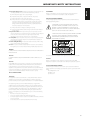
9
A product and cart combination should be moved with care. Quick
stops, excessive force, and uneven surfaces may cause the product
and cart combination to overturn.
10Ventilation - Slots and openings in the cabinet are provided for ventilation and
to ensure reliable operation of the product and to protect it from overheating, and
these openings must not be blocked or covered. The openings should never be
blocked by placing the product on a bed, sofa, rug, or other similar surface. This
product should not be placed in a built-in installation such as a bookcase or rack
unless proper ventilation is provided or the manufacturer’s instructions have been
adhered to.
11 Power Sources - This product should be operated only from the type of power
source indicated on the marking label. If you are not sure of the type of power
supply to your home, consult your product dealer or local power company.
The primary method of isolating the amplifier from the mains supply is to
disconnect the mains plug. Ensure that the mains plug remains accessible at all
times. Unplug the AC power cord from the AC outlet if the unit will not be used
for several months or more.
12 Grounding or Polarization - This product may be equipped with a polarized
alternating-current line plug (a plug having one blade wider than the other). This
plug will fit into the power outlet only one way. This is a safety feature. If you are
unable to insert the plug fully into the outlet, try reversing the plug. If the plug
should still fail to fit, contact your electrician to replace your obsolete outlet. Do
not defeat the safety purpose of the polarized plug.
13Power - Cord Protection - Power-supply cords should be routed so that they are
not likely to be walked on or pinched by items placed upon or against them,
paying particular attention to cords at plugs, convenience receptacles, and the
point where they exit from the product.
14 Outdoor Antenna Grounding - If an outside antenna or cable system is
connected to the product, be sure the antenna or cable system is grounded so
as to provide some protection against voltage surges and built-up static charges.
Article 810 of the National Electrical Code, ANSI/NFPA 70, provides information
with regard to proper grounding of the mast and supporting structure, grounding
of the lead-in wire to an antenna discharge unit, size of grounding conductors,
location of antenna discharge unit, connection to grounding electrodes, and
requirements for the grounding electrode.
РУССКИЙ
2
15Lightning - For added protection for this product during a lightning storm, or
when it is left unattended and unused for long periods of time, unplug it from the
wall outlet and disconnect the antenna or cable system. This will prevent damage
to the product due to lightning and power-line surges.
16 Power Lines - An outside antenna system should not be located in the vicinity
of overhead power lines or other electric light or power circuits, or where it can
fall into such power lines or circuits. When installing an outside antenna system,
extreme care should be taken to keep from touching such power lines or circuits
as contact with them might be fatal.
17Overloading - Do not overload wall outlets, extension cords, or integral
convenience receptacles as this can result in a risk of fire or electric shock.
18 Object and Liquid Entry - Never push objects of any kind into this product
through openings as they may touch dangerous voltage points or short-out parts
that could result in a fire or electric shock. Never spill liquid of any kind on the
product.
WARNING: THE APPARATUS SHOULD NOT BE EXPOSED TO DRIPPING
OR SPLASHING, AND OBJECTS FILLED WITH LIQUIDS, SUCH AS VASES,
SHOULD NOT BE PLACED ON THE APPARATUS. AS WITH ANY ELECTRONIC
PRODUCTS, USE CARE NOT TO SPILL LIQUIDS INTO ANY PART OF THE
SYSTEM. LIQUIDS CAN CAUSE A FAILURE AND/OR A FIRE HAZARD.
a) When the power-supply cord or plug is damaged.
FCC WARNING
Changes or modifications not expressly approved by the party responsible for
compliance could void the user’s authority to operate the equipment.
c) If the product has been exposed to rain or water.
INDUSTRY CANADA REQUIREMENT
d) If the product does not operate normally by following the operating
instructions. Adjust only those controls that are covered by the operating
instructions as an improper adjustment of other controls may result in
damage and will often require extensive work by a qualified technician to
restore the product to its normal operation.
This Class B digital apparatus meets all requirements of the Canadian InterferenceCausing Equipment Regulations.
FRANÇAIS
b) If liquid has been spilled, or objects have fallen into the product.
THE LIGHTNING FLASH WITH ARROWHEAD SYMBOL, WITHIN AN
EQUILATERAL TRIANGLE, IS INTENDED TO ALERT THE USER TO THE
PRESENCE OF UNINSULATED “DANGEROUS VOLTAGE” WITHIN THE
PRODUCT’S ENCLOSURE THAT MAYBE OF SUFFICIENT MAGNITUDE TO
CONSTITUTE A RISK OF ELECTRIC SHOCK TO PERSONS.
e) If the product has been dropped or damaged in any way.
f) when the product exhibits a distinct change in performance-this indicates a
need for service.
20 Replacement Parts - When replacement parts are required, be sure the
service technician has used replacement parts specified by the manufacturer
or have the same characteristics as the original part. Unauthorized
substitutions may result in fire, electric shock, or other hazards.
21 Safety Check - Upon completion of any service or repairs to this product, ask the
service technician to perform safety checks to determine that the product is in
proper operating condition.
22 Wall or Ceiling Mounting - The product should be mounted to a wall or ceiling
only as recommended by the manufacturer.
23Heat - The product should be situated away from heat sources such as radiators,
heat registers, stoves or other products (including amplifiers) that produce heat.
THE EXCLAMATION POINT WITHIN AN EQUILATERAL TRIANGLE IS INTENDED
TO ALERT THE USER TO THE PRESENCE OF IMPORTANT OPERATING
AND MAINTENANCE (SERVICING) INSTRUCTIONS IN THE LITERATURE
ACCOMPANYING THE APPLIANCE.
ITALIANO
WARNING
TO REDUCE THE RISK OF FIRE OR ELECTRIC SHOCK, DO NOT EXPOSE THIS PRODUCT TO
RAIN OR MOISTURE.
CAUTION
CAUTION
Changes or modifications to this equipment not expressly approved by NAD
Electronics for compliance could void the user’s authority to operate this equipment.
The C 516BEE employs a Laser System. To ensure proper use of this product, please
read this owner’s manual carefully and retain for future reference. Should the unit
require maintenance, contact an authorized service location. Use of controls,
adjustments or the performance of procedures other than those specified may result
in exposure to laser radiation. To prevent direct exposure to laser beam, do not try to
open the enclosure. Visible laser radiation when the enclosure is opened.
DO NOT STARE INTO BEAM.
DEUTSCH
The socket-outlet shall be installed near the apparatus and shall be easily accessible.
CAUTION REGARDING PLACEMENT
To maintain proper ventilation, be sure to leave a space around the unit (from the
largest outer dimensions including projections) that is equal to or greater than shown
below.
Left and Right Panels: 10 cm
Rear Panel: 10 cm
Top Panel: 50 cm
NEDERLANDS
CAUTION
TO PREVENT ELECTRIC SHOCK, MATCH WIDE BLADE OF PLUG TO WIDE SLOT, FULLY
INSERT.
ESPAÑOL
19 Damage Requiring Service - Unplug this product from the wall outlet and refer
servicing to qualified service personnel under the following conditions:
ENGLISH
IMPORTANT SAFETY INSTRUCTIONS
FCC NOTICE
This equipment has been tested and found to comply with the limits for a Class B
digital device, pursuant to part 15 of the FCC Rules. These limits are designed to
provide reasonable protection against harmful interference in a residential installation.
РУССКИЙ
SVENSKA
This equipment generates, uses and can radiate radio frequency energy and if not
installed and used in accordance with the instructions, may cause harmful interference
to radio communications. However, there is no guarantee that interference will not occur
in a particular installation. If this equipment does cause harmful interference to radio or
television reception, which can be determined by turning the equipment off and on,
the user is encouraged to try to correct the interference by one or more of the following
measures
• Reorient or relocate the receiving antenna.
• Increase the separation between the equipment and receiver.
• Connect the equipment into an outlet on a circuit different from that to which the
receiver is connected
• Consult the dealer or an experienced radio/TV technician for help.
3
IMPORTANT SAFETY INSTRUCTIONS
ENGLISH
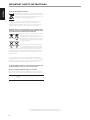
NOTES ON ENVIRONMENTAL PROTECTION
At the end of its useful life, this product must not be disposed of with
regular household waste but must be returned to a collection point for
the recycling of electrical and electronic equipment. The symbol on the
product, user’s manual and packaging, point this out.
FRANÇAIS
The materials can be reused in accordance with their markings. Through re-use,
recycling of raw materials or other forms of recycling of old products, you are
making an important contribution to the protection of our environment. Your local
administrative office can advise you of the responsible waste disposal point.
INFORMATION ABOUT COLLECTION AND DISPOSAL OF WASTE BATTERIES
(DIRECTIVE 2006/66/EC OF THE EUROPEAN PARLIAMENT AND THE COUNCIL
OF EUROPEAN UNION) (FOR EUROPEAN CUSTOMERS ONLY)
ESPAÑOL
Batteries bearing any of these symbols indicate that they
should be treated as “separate collection” and not as
municipal waste. It is encouraged that necessary measures
are implemented to maximize the separate collection of
waste batteries and to minimize the disposal of batteries
as mixed municipal waste.
ITALIANO
End-users are exhorted not to dispose waste batteries
as unsorted municipal waste. In order to achieve a high
level of recycling waste batteries, discard waste batteries
separately and properly through an accessible collection point in your vicinity. For
more information about collection and recycling of waste batteries, please contact
your local municipality, your waste disposal service or the point of sale where you
purchased the items.
By ensuring compliance and conformance to proper disposal of waste batteries,
potential hazardous effects on human health is prevented and the negative impact of
batteries and waste batteries on the environment is minimized, thus contributing to
the protection, preservation and quality improvement of the environment.
DEUTSCH
NOTE: THE C 516BEE IS NOT AN AUTO VOLTAGE CD PLAYER. CONNECT ONLY
TO THE PRESCRIBED AC OUTLET, I.E., 120V 60HZ OR 230V 50HZ.
RECORD YOUR MODEL NUMBER (NOW, WHILE YOU CAN SEE IT)
The model and serial number of your new C 516BEE are located on the back of the
cabinet. For your future convenience, we suggest that you record these numbers here:
NEDERLANDS
Model no. : . . . . . . . . . . . . . . . . . . . . . . . . . . . . . . . . . . . . . .
Serial no. : . . . . . . . . . . . . . . . . . . . . . . . . . . . . . . . . . . . . . .
SVENSKA
РУССКИЙ
NAD is a trademark of NAD Electronics International, a division of Lenbrook Industries Limited
Copyright 2012, NAD Electronics International, a division of Lenbrook Industries Limited
4
INTRODUCTION
IDENTIFICATION OF CONTROLS
FRONT PANEL. . . . . . . . . . . . . . . . . . . . . . . . . . . . . . . . . . . . . . . . . . . . . . . . . . . . . 7
REAR PANEL . . . . . . . . . . . . . . . . . . . . . . . . . . . . . . . . . . . . . . . . . . . . . . . . . . . . . . 8
CD 7 REMOTE CONTROL. . . . . . . . . . . . . . . . . . . . . . . . . . . . . . . . . . . . . . . . . . . 9
OPERATION
USING THE C 516BEE - FEATURES. . . . . . . . . . . . . . . . . . . . . . . . . . . . . . . . 10
CD-R AND CD-RW AUDIO DISCS. . . . . . . . . . . . . . . . . . . . . . . . . . . . . . . . . . . . 10
PLAYING MP3/WMA FILES. . . . . . . . . . . . . . . . . . . . . . . . . . . . . . . . . . . . . . . . . . . 10
PROGRAMMING. . . . . . . . . . . . . . . . . . . . . . . . . . . . . . . . . . . . . . . . . . . . . . . . . . . . . 10
USING THE C 516BEE – CD 7 REMOTE CONTROL. . . . . . . . . . . . . . . . . . 11
NUMERIC KEY PAD . . . . . . . . . . . . . . . . . . . . . . . . . . . . . . . . . . . . . . . . . . . . . . . . . . 11
REPEAT. . . . . . . . . . . . . . . . . . . . . . . . . . . . . . . . . . . . . . . . . . . . . . . . . . . . . . . . . . . . . . 11
REPEAT A-B. . . . . . . . . . . . . . . . . . . . . . . . . . . . . . . . . . . . . . . . . . . . . . . . . . . . . . . . . . 11
RANDOM . . . . . . . . . . . . . . . . . . . . . . . . . . . . . . . . . . . . . . . . . . . . . . . . . . . . . . . . . . . 11
DIMMER. . . . . . . . . . . . . . . . . . . . . . . . . . . . . . . . . . . . . . . . . . . . . . . . . . . . . . . . . . . . . 11
TIME. . . . . . . . . . . . . . . . . . . . . . . . . . . . . . . . . . . . . . . . . . . . . . . . . . . . . . . . . . . . . . . . . 11
INDEX. . . . . . . . . . . . . . . . . . . . . . . . . . . . . . . . . . . . . . . . . . . . . . . . . . . . . . . . . . . . . . . 11
We encourage you to take a few minutes now to read right through this
manual. Investing a little time here at the outset might save you a good
deal of time later, and is by far the best way to ensure that you make the
most of your investment in the C 516BEE.
One more thing: We urge you to register your C 516BEE ownership on the
NAD Worldwide Web site:
FRANÇAIS
INTRODUCTION
GETTING STARTED. . . . . . . . . . . . . . . . . . . . . . . . . . . . . . . . . . . . . . . . . . . . . . . . 6
UNPACKING AND SETUP . . . . . . . . . . . . . . . . . . . . . . . . . . . . . . . . . . . . . . . . . . . . . 6
QUICK START. . . . . . . . . . . . . . . . . . . . . . . . . . . . . . . . . . . . . . . . . . . . . . . . . . . . . . . . . 6
THANK YOU FOR CHOOSING NAD.
The C 516BEE CD Player is a technologically advanced and highly capable
product – yet we have invested great effort in making it simple and easy
to use. We have been careful to ensure that the C 516BEE is as musically
transparent and spatially accurate as possible, incorporating much of what
we’ve learned from over three decades of experience designing audio
and home-theater components. As with all our products, NAD’s “Music
First” design philosophy guided the C 516BEE’s design, such that it can
confidently promise you both state-of-the-art and audiophile-quality music
listening for years to come.
ESPAÑOL
IMPORTANT SAFETY INSTRUCTIONS . . . . . . . . . . . . . . . . . . . . . . . . . . . 2
ENGLISH
TABLE OF CONTENTS
http://NADelectronics.com/salon
For warranty information contact your local distributor.
REFERENCE
РУССКИЙ
SVENSKA
NEDERLANDS
DEUTSCH
ITALIANO
TROUBLESHOOTING . . . . . . . . . . . . . . . . . . . . . . . . . . . . . . . . . . . . . . . . . . . . 12
NOTES ON DISCS. . . . . . . . . . . . . . . . . . . . . . . . . . . . . . . . . . . . . . . . . . . . . . . . 12
SPECIFICATIONS. . . . . . . . . . . . . . . . . . . . . . . . . . . . . . . . . . . . . . . . . . . . . . . . 13
5
INTRODUCTION
GETTING STARTED
ENGLISH
UNPACKING AND SETUP
QUICK START
WHAT’S IN THE BOX
In case you simply cannot wait to experience the performance of your new
NAD C 516BEE, we provide the following “Quick Start” instructions to get
you underway.
Packed with your C 516BEE you will find:
• An audio cable connector
• The CD 7 remote control with 2 (two) AAA batteries
• This owner’s manual
FRANÇAIS
SAVE THE PACKAGING
Please save the box and all of the packaging in which your C 516BEE
arrived. Should you move or otherwise need to transport your C 516BEE,
this is by far the safest container in which to do so. We’ve seen too many
otherwise perfect components damaged in transit for lack of a proper
shipping carton, so please: Save that box!
ESPAÑOL
CHOOSING A LOCATION
Choose a location that is well ventilated (with at least several inches to
both sides and behind), and that will provide a clear line of sight, within
25 feet/8 meters, between the C 516BEE’s front panel and your primary
listening/viewing position. This will ensure reliable infrared remote control
communications. The C 516BEE generates a modest amount of heat, but
nothing that should trouble adjacent components. It is perfectly possible to
stack the C 516BEE on top of other components.
ITALIANO
DEUTSCH
NOTE ON INSTALLATION
IMPORTANT! Install the C 516BEE Compact Disc player on a level, vibrationfree surface. Severe vibration or operation in a tilted position may cause
the player to mis-track. The player may be stacked with other stereo
components, as long as there is adequate ventilation around it. If the
C 516BEE is placed in close proximity to a radio tuner (AM or FM), a VCR or
a television set, the operation of its digital circuits may produce static that
would interfere with reception of weak broadcast signals. If this occurs,
move the C 516BEE away from other devices or switch it off when viewing
or listening to broadcasts.
NEDERLANDS
SVENSKA
РУССКИЙ
6
Please make all the connections to your C 516BEE with the unit unplugged.
It is also advisable to power-down or unplug all associated components
while making or breaking any signal or AC power connections.
PLAY A CD
1 Connect a twin RCA-to-RCA lead from the L (left) and R (right) Line
Output jacks to the corresponding CD inputs on your amplifier.
2 Plug in the AC power cord.
3 Press the POWER button to turn ON the player.
4 Press [OPEN/CLOSE] to open the disc drawer.
5 Place a CD, label side up, in the tray’s circular recess. Be certain that the
disc is centered within the recess.
6 Press [PLAY]. The drawer closes automatically, and the disc begins to
play.
7 At any time you may press [SKIP
or
] to select different tracks on
the disc.
8 Press [PAUSE] if you want to stop play temporarily while keeping the
pickup at its current position on the disc. Press [PAUSE] again or [PLAY]
when you want to resume playback. Press STOP if you want to end play
and reset the pickup to the beginning of the disc.
IDENTIFICATION OF CONTROLS
2
5
6
7
8
FRANÇAIS
1
ENGLISH
FRONT PANEL
©NAD C 516BEE
The C 516BEE can also be switched ON from standby mode by pressing
[OPEN/CLOSE] or [PLAY] button on the front panel as well as on the
remote control.
If the disc tray is open and the C 516BEE is powered OFF, the disc tray
will draw close and the unit powered OFF.
2INDICATOR: This indicator will light up amber when the C 516BEE is
in standby state. When the C 516BEE is at ON state, this indicator will
illuminate blue.
9
10
ESPAÑOL
1POWER: Press this button to switch ON the C 516BEE. The Standby
LED indicator will turn from amber to blue and illuminate the Vacuum
Fluorescent Display (VFD). Pressing the power button again turns the
unit back to standby mode.
4
6PLAY: Press to start play or to resume play after Pause. If the disc tray
is open, press this button to automatically close the tray and start
playback if a disc is loaded.
7PAUSE: During playback, press this button to stop playback
temporarily, keeping the optical pickup at its current position on the
disc. To resume playback at the exact point where it stopped, press
[PLAY] or [PAUSE] again.
ITALIANO
3
8STOP: Press the [STOP] button once to stop playback and re-set the
pickup to the beginning of the disc. The display reverts to showing the
number of tracks and total playing time on the disc. If the C 516BEE
was programmed to play a selection of tracks, the program will be
retained in the player’s memory.
4 REMOTE SENSOR: Point the CD 7 at the remote sensor and press the
buttons. Do not expose the remote sensor of the CD 7 to a strong light
source such as direct sunlight or illumination. If you do so, you may not
be able to operate the C 516BEE with the remote control.
Distance: About 23ft (7m) from the front of the remote sensor.
Angle: About 30o in each direction of the front of the remote sensor.
9OPEN/CLOSE: Press this button to open and close the disc tray. When
in standby, this button will also power ON the C 516BEE and at the
same time open the disc tray.
10SKIP/SCAN: Press
or file.
to skip forward or
to skip backward a track
NEDERLANDS
“No Disc” appears on the C 516BEE’s VFD if the disc is placed upside
down.
DEUTSCH
Pressing [STOP] twice at program mode will delete the program.
3 DISC TRAY: With the DISC TRAY open, insert a CD or other compatible
media disc face down onto the tray.
Press and hold
or
for more than 2 seconds to search up or
down a track. The SCAN
button causes the optical pickup to scan
backwards through the recording at high speed. The SCAN
button
causes the optical pickup to scan rapidly forward through the music.
РУССКИЙ
SVENSKA
5VFD: The Vacuum Fluorescent Display (VFD) provides playback
information, settings and other indicators.
7
IDENTIFICATION OF CONTROLS
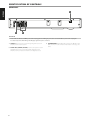
REAR PANEL
ENGLISH
3
FRANÇAIS
©NAD C 516BEE
1
2
ESPAÑOL
ATTENTION!
Please make sure that the C 516BEE is powered off or unplugged before making any connections. It is also advisable to power-down or unplug all
associated components while making or breaking any signal or AC power connections.
1 LINE OUT: Connect to the corresponding analog audio input of an
amplifier, receiver or stereo system.
ITALIANO
2 DIGITAL OUT (COAXIAL, OPTICAL): Connect the optical or coaxial
digital OUT ports to the corresponding S/PDIF digital input of an
amplifier, receiver, computer soundcard or other digital processors.
DEUTSCH
NEDERLANDS
SVENSKA
РУССКИЙ
8
3 AC POWER CORD: Plug the AC power cord into a live AC wall socket.
Make sure all connections have been made before connecting to the
mains.
IDENTIFICATION OF CONTROLS
ENGLISH
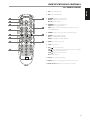
CD 7 REMOTE CONTROL
1 ON : Switches CD Player ON.
2 OFF : Switches CD player OFF.
2
3
4
5
6
3 RANDOM : Play tracks in random mode.
REPEAT : Repeat track, file or whole disc.
RPT A-B : Repeat sequence.
FRANÇAIS
1
4 PROGRAM : Enter or exit program mode.
DELETE : Clears programmed track.
TIME : Toggle to show timer and information details of the current
track or MP3/WMA file.
5 DIMMER : Toggle to reduce, turn off or restore VFD brightness.
8
9
10
11
6 FOLDER : Toggle between folder lists.
FILE : Scroll through WMA or MP3 files.
ENTER : Starts playback of MP3 or WMA file.
ESPAÑOL
7
7 OPEN :Opens and closes disc tray.
9SKIP
: Go to next track or file.
SKIP
: Go to beginning of current track/file or to previous track/file.
SCAN
: Press for fast forward search.
SCAN
: Press for fast reverse search.
PLAY : Starts playback.
10 PAUSE : Pauses playback temporarily.
11 INDEX : Playback can be started from any desired index number
SVENSKA
NEDERLANDS
DEUTSCH
12 Number buttons 0 - 9 : Direct-entry of track or file number.
РУССКИЙ
12
ITALIANO
8 STOP : Stops playback.
9
OPERATION
USING THE C 516BEE - FEATURES
ENGLISH
CD-R AND CD-RW AUDIO DISCS
FRANÇAIS
The C 516BEE can play back CD-R or CDRW audio discs that have been
recorded on a computer or CD recorder. The quality of CD-R, CD-RW audio
discs varies widely which may affect playability. Some factors that affect
playability:
• The quality of the disc itself. Generally speaking, CD-R, CD-RW blanks
from well-renowned companies give better results than unbranded
ones.
• The quality of CD-recorder or computer CD re/writer. Some recorders
and writers produce better results than others.
• The CD-R and CD-RW were created with high-speed writing. In general,
the quality of a CD-R or CD-RW is better when produced at a lower
speed against a higher speed on the same recorder or re/writer.
PLAYING MP3/WMA FILES
ESPAÑOL
ITALIANO
The C 516BEE can play MP3/WMA formatted recordings on CD-R or CD-RW
discs. You may mix any of the file types on the disc. Using the CD 7 remote
control, one can select through the MP3/WMA folders and files as well as
start playback through the following steps
1 Load the applicable disc.
2 Press [FOLDER
] to select desired folder. Press [ENTER].
3 Press [FILE
] to select desired file number. You must be at STOP or
playback mode to access both folders.
4 Press [ENTER] to start playback. For each file type being played, the
C 516BEE will display the file type at the VFD and a corresponding icon
at the VFD. Information about the Song Title, Album and Artist name, if
available, will scroll through the VFD during playback.
NOTES
• The file number is recognized per disc, not per folder – that is, the
number assigned to each file corresponds to their sequence in the disc.
• If you want to select file number “9” in a disc where there are 100 or more
MP3/WMA files, press “0” twice and then “9.”
DEUTSCH
PROGRAMMING
NEDERLANDS
SVENSKA
The program function enables you to store your favorite tracks from any
disc in the player memory. When programming a sequence of tracks, the
C 516BEE must be in STOP mode. Using the CD 7 remote control, enter your
desired program sequence through the following steps
1 Press [PROGRAM]. The display indicates “P01 T00”. The “00” in the “T00”
keeps on blinking, meaning that the player is awaiting the first Program
entry.
2 Use the Direct-Entry numeric keypad buttons to enter the first track
in your planned sequence. Upon entering the track number, the VFD
will briefly show the total number and total time of the currently
programmed tracks like “TTL 01 3:25”.
3 The display will revert to show “P02 T00,” indicating that the player is
ready for your second program entry. Upon entering the second track,
the VFD will again briefly show the total number and total time of the
currently programmed tracks like “TTL 02 6:45” – “TTL 02” indicates that
there are now a total of two programmed tracks and “6:45” is the total
playback time of both programmed tracks.
4 Repeat steps 2 and 3 to select and store other track numbers in
memory, up to a maximum of 40 entries. If you attempt to program
more than 40 tracks or files, “P-FULL” will be displayed in the VFD.
5 Press [PROGRAM] to end or finalize the program – the VFD will show the
last programmed number and track.
6 Press to start program playback.
РУССКИЙ
10
NOTES
• The procedure for programming MP3/WMA files is the same as above
with an exception at step 2 and 3 – the total number of programmed
files and total playback time will not be displayed during programming.
• If you want to select file number “9” in a disc where there are 100 or more
MP3/WMA files, press “0” twice and then “9.”
• Pressing STOP key at any time during the programming procedure will
put to a STOP the sequence and clear all the currently programmed
tracks or files. VFD will revert back to displaying the total number of
tracks and total playback time for audio CD and total number of files for
MP3/WMA.
• Pressing STOP key twice during program playback will result to having
the whole program list deleted.
REVIEW / EDIT PROGRAM LIST
1 Initiate review or edit of your program entries through either of the
following initial steps
• If you are still in programming mode, press [PROGRAM].
• If during program playback, press [STOP] once then [PROGRAM].
2 The VFD will show the first Program Number and the corresponding
“blinking” programmed track.
3 To change the programmed track of a particular sequence, use the
Direct-Entry numeric keypad buttons. Press [SKIP
or
] to move
forward or backward the programmed tracks as well as review the list
and change if so desired.
4 If you want to delete a particular program sequence during program
review, press [DELETE] key.
5 After finalizing your program changes or completing your review, press
[PROGRAM] again.
PROGRAM PLAYBACK
1 To play the stored program, press [PLAY] while you are in “PROGRAM”
mode. “PROG” icon will appear in the display, indicating that a stored
program is being played. During Program Play, the SKIP buttons will
access only the tracks in the program list.
2 If you want to play only a portion of a stored program, initiate play and
press SKIP to jump over the programmed tracks that you don’t want to
hear.
STOP OR DELETE PROGRAM
1 To terminate Program play, press [STOP] once. The stored track list
remains in memory. If you want to play the program again, simply press
[PLAY].
2 To clear the program memory, perform any of the following steps
• Press [STOP] twice during program playback.
• Press [OPEN] to open the disc tray.
• Switch OFF the power.
OPERATION
TIME
MP3/WMA
✔
-
Remaining time of the current track
✔
-
Most of the buttons on the remote control handset have the same effect as
the corresponding buttons on the front panel of the player. In addition, the
handset is equipped with some extra buttons like the following function
keys.
Total playback time of the disc
✔
-
Remaining time of the disc
✔
-
Artist name
-
✔
Song title
-
✔
NUMERIC KEY PAD
Elapsed time of the
current file
-
✔
Remaining time of the current file
-
✔
File name
-
✔
Album name
-
✔
Year
-
✔
Comment
-
✔
To repeat a sequence, implement the following procedures:
1 Press [RPT A-B] at your chosen starting point.
2 Press [RPT A-B] again at your chosen end point. The repeat sequence
begins.
3 Press [RPT A-B] again to cancel the sequence.
RANDOM
Press [RANDOM] key during playback or stop mode. Playback of the first
randomly selected track or file automatically begins. A corresponding
“RANDOM” icon is illuminated at the VFD. Press [RANDOM] again to return
to normal playback.
DIMMER
Toggle to reduce, turn off and restore VFD brightness.
NOTES
• Some information may not be displayed on some discs. Display is
dependent on the disc’s information content.
• Information about the Song Title, Album and Artist name, if available,
will scroll through the VFD during playback.
If the file has no available information about the artist or album, the
display will show “No artist” or “No album”.
• For audio CD, the default information display is the elapsed time of the
current track.
INDEX
The index system is a method of subdividing tracks into smaller divisions for
easier location of those parts. If a disc includes index numbers, playback can
be started from any desired index number through the following steps
1 Press [INDEX] during playback.
2 Using the numeric buttons, press the desired index number - for
example “0” and “3”. The VFD will show “INDEX 03 TR10” with “03” the
entered index number.
3 To revert to normal display information, press [INDEX] again.
DEUTSCH
REPEAT A-B
NEDERLANDS
REPEAT
To repeat the playback of a particular track or file, press the CD 7’s [REPEAT]
key once. Toggle the [REPEAT] key to repeat all the tracks, files, folder
(blinking) or until repeat mode is turned OFF.
SVENSKA
Using the direct-entry numeric keypad (0 to 9) causes the C 516BEE to jump
directly to the beginning of a numbered track and commence play. Thus, to
play Track 5, simply press “5”. To play Track 20, press “2” and “0”.
ESPAÑOL
AUDIO CD
Elapsed time of the
current track
ITALIANO
INFORMATION
FRANÇAIS
Toggle to display the following disc information during playback.
РУССКИЙ
A wireless remote control is provided with your compact disc player,
enabling you to operate playback functions from the comfort of your chair
or from virtually anywhere in the room. For reliable operation there should
be a clear line-of-sight path from the remote control to the front of the CD
player. If the player does not respond to remote commands, it may be that
this line-of-sight path is obstructed by clothing, paper, or furnishings.
ENGLISH
USING THE CD 7 REMOTE CONTROL
11
REFERENCE
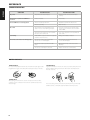
TROUBLESHOOTING
ENGLISH
CONDITION
POSSIBLE CAUSES
POSSIBLE SOLUTIONS
FRANÇAIS
No power.
• The power cord is disconnected.
• Plug the power cord into the wall outlet
securely.
The power is on, but the C 516BEE does
not work.
• No disc is inserted.
• Insert a disc.
The C 516BEE does not start playback.
• The disc is loaded upside down.
• Reload the disc with the label side UP.
• The disc is too dirty.
• Clean the disc.
• The equipment connected with the audio
cable is not set to receive CD signal output.
• Select the correct input mode of the audio
receiver so you can listen to the sound from
the C 516BEE.
• The power of the equipment connected with
the audio cable is turned off.
• Turn on the equipment connected with the
audio cable.
Sound skips.
• The C 516BEE is subject to vibration or physical
shock from external sources.
• Change the installation location.
The remote control does not work properly.
• The remote control is not pointed at the
remote sensor on the CD player.
• Point the remote control at the remote
sensor of the CD player.
• The remote control is too far from the CD
player.
• Operate the remote control closer to the
CD player.
• The remote control batteries are dead.
• Replace the remote control batteries.
No sound.
ESPAÑOL
ITALIANO
NOTES ON DISCS
DEUTSCH
HANDLING DISCS
Do not touch the playback side of the disc. Hold the disc by the edges so that
fingerprints do not get on the surface. Never stick paper or tape on the disc.
NEDERLANDS
STORING DISCS
After playing, store the disc in its case. Do not expose the disc to direct
sunlight or sources of heat and never leave it in a parked car exposed to
direct sunlight.
SVENSKA
РУССКИЙ
12
CLEANING DISCS
Fingerprints and dust on the disc can cause poor picture quality and sound
distortion. Before playing, clean the disc with a clean cloth. Wipe the disc
from the center out.
Do not use strong solvents such as alcohol, benzine, thinner, commercially
available cleaners, or anti-static spray intended for older vinyl records.
REFERENCE
ENGLISH
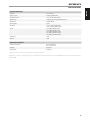
SPECIFICATIONS
±0.5 dB (ref. 0 dB 20Hz-20kHz)
Total harmonic distortion
≤ 0.01% (ref. 20Hz-20kHz, LPF 20kHz)
Signal/Noise ratio
≥ 118 dB (ref. 1kHz, A-weighted LPF 20kHz Stop, Pause)
Channel balance
0.5 dB (ref. 0dB 1kHz)
Channel separation
≥ 90 dB
De-emphasis
-3.73 to -5.33 dB (ref. 0dB 1kHz, 5 kHz)
-8.04 to -10.04 dB (ref. 0dB 1kHz, 16kHz)
Linearity
-3 ±0.01 dB (ref. 0dB 1 kHz at -3 dB)
-6 ±0.02 dB (ref. 0dB 1 kHz at -6 dB)
-10 ±0.02 dB (ref. 0dB 1 kHz at -10 dB)
-20 ±0.05 dB (ref. 0dB 1 kHz at -20 dB)
-60 ±0.15 dB (ref. 0dB 1 kHz at -60 dB)
Standby power
≤ 0.5 W
Idle power
≤ 8.0 W
ESPAÑOL
Frequency response
DIMENSION AND WEIGHT
Unit Dimensions (W x H x D)
435 x 70 x 249 mm (Gross)*
17 1/8 x 2 3/4 X 9 13/16 inches
Net weight
3.5 kg (7.7 lbs)
Shipping weight
4.5 kg (9.9 lbs)
* - Gross dimensions include feet, extended buttons and rear panel terminals.
РУССКИЙ
SVENSKA
NEDERLANDS
DEUTSCH
Specifications are subject to change without notice. For updated documentation and features, check out www.NADelectronics.com for the latest information
about C 516BEE.
ITALIANO
2.2 ±0.1 V (Analog)
FRANÇAIS
GENERAL PARAMETERS
Output level
13
www.NADelectronics.com
©2012 NAD ELECTRONICS INTERNATIONAL
A DIVISION OF LENBROOK INDUSTRIES LIMITED
All rights reserved. NAD and the NAD logo are trademarks of NAD Electronics International, a division of Lenbrook Industries Limited.
No part of this publication may be reproduced, stored or transmitted in any form without the written permission of NAD Electronics International.
While every effort has been made to ensure the contents are accurate at the time of publication, features and specifications may be subject to change without prior notice.
C516BEE_eng_OM_v05 - Nov 2012