1
Register your product and get support at
DVP3800
EN
User manual
EN
Please refer to the safety information before using the product.
Register your product and get support at
www.philips.com/welcome
EN
User manual
DVP3800
7
1
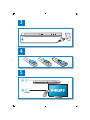
TV OUT
Y Pb Pr
AUDIO
COAXIAL AUD
DIO OUT
3
2
Pr Pb Y + AUDIO OUT
L
R
L
R
TV OUT + AUDIO OUT
L
4
R
TV OU
UT
OUT
L
R
VIDEO
3
4
5
2
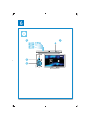
SOURCE
TV
5
6
2
1
DVD
VCD
CD
3
4
6
Disc
Setup
English
Contents
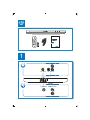
Connect and play ....................................................................................................................................3
Safety ..........................................................................................................................................................8
Control and play......................................................................................................................................9
Photo and music slideshow ............................................................................................................... 11
Options .................................................................................................................................................. 12
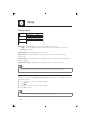
Setup
13
General setup ........................................................................................................................................................................................14
Video setup .............................................................................................................................................................................................15
Audio setup ............................................................................................................................................................................................15
Preference ................................................................................................................................................................................................16
Software update ................................................................................................................................... 18
Troubleshooting.................................................................................................................................... 19
Specifications ......................................................................................................................................... 20
Notice ..................................................................................................................................................... 22
EN
7
Safety
Read and understand all instructions before you use this DVD player. If damage is caused by failure to
follow the instructions, the warranty does not apply.
Risk of electric shock or fire!
• Never expose the product and accessories to rain or water. Never place liquid containers, such
as vases, near the product. If liquids are spilt on or into the product, disconnect it from the power
outlet immediately. Contact Philips Consumer Care to have the product checked before use.
• Never place the product and accessories near naked flames or other heat sources, including
direct sunlight.
• Never insert objects into the ventilation slots or other openings on the product.
• Where the mains plug or an appliance coupler is used as the disconnect device, the disconnect
device shall remain readily operable.
• Disconnect the product from the power outlet before lightning storms.
• When you disconnect the power cord, always pull the plug, never the cable.
Risk of short circuit or fire!
• Before you connect the product to the power outlet, ensure that the power voltage matches
the value printed on the back of the product. Never connect the product to the power outlet if
the voltage is different.
• Never expose the remote control or batteries to rain, water or excessive heat.
• Avoid force coming onto power plugs. Loose power plugs can cause arcing or fire.
Risk of injury or damage to the product!
• Visible and invisible laser radiation when open. Avoid exposure to beam.
• Do not touch the disc optical lens inside the disc compartment.
• Never place the product or any objects on power cords or on other electrical equipment.
• If the product is transported in temperatures below 5°C, unpack the product and wait until its
temperature matches room temperature before connecting it to the power outlet.
Risk of overheating!
• Never install this product in a confined space. Always leave a space of at least four inches
around the product for ventilation. Make sure that curtains or other objects never cover the
ventilation slots on the product.
Risk of contamination!
• Remove the battery if it is exhausted or if the remote control is not to be used for an extended
period of time.
• Batteries contain chemical substances, they should be disposed of properly.
Risk of swallowing batteries!
• The product/remote control may contain a coin type battery, which can be swallowed. Keep
the battery out of reach of children at all times!
8
EN
English
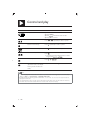
Control and play
Note
• When “X” appears, it means that this operation is unavailable for the current media or at the current time.
Media
Function
Buttons / Actions
Stop the play
Pause or resume the play
Skip to the previous/next title,
chapter, track, or file
/
Select an audio language or
audio channel
AUDIO
Select a subtitle language
SUBTITLE
Return to the home page
Return to the root menu
BACK
Return to the disc menu
DISC MENU
Enable or disable the PBC
(playback control) feature
DISC MENU
Select a repeat mode
1) Press REPEAT/REPEAT A-B .
2) Press
/
.
Repeat a specific section within 1) Press REPEAT/REPEAT A-B twice to select
a track
the start point.
2) Press REPEAT/REPEAT A-B again to select the
end point.
To resume the normal play, press REPEAT/
REPEAT A-B.
Skip to a title or chapter
1) Press GOTO.
2) Press / to enter the title/chapter number.
3) Press OK to confirm.
EN
9
Control and play
Media
Function
Buttons / Actions
Skip to a track
1) Disable PBC.
2) Press GOTO.
3) Press / to enter the track number.
4) Press OK to confirm.
Search backward/forward fast Press
/
repeatedly to select a speed.
Search forward slowly
Press
repeatedly to select a speed.
Search backward slowly
Press
repeatedly to select a speed.
Zoom in or out
Press .
To pan through an enlarged photo or video
image, press / /
/
.
Rotate a photo
Press
Switch between Fun Mode
(pictures in color) and Simple
Mode (pictures in black and
white)
Press DISC MENU during photo slideshow.
/ /
/
.
Note
• You can only play DivX videos that were rented or purchased with DivX® registration code of this player.
(Refer to “Setup” > “General Setup” > [DivX(R) VOD Code])
• Subtitle files with the following filename extensions (.srt, .smi, .sub, .ssa, .ass, .txt) are supported but not
displayed in the file list.
• The subtitle filename has to be the same as the filename of the DivX video (the file extension excluded).
• The DivX video file and the subtitle file must be saved under the same directory.
10
EN
English
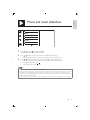
Photo and music slideshow
MP3
WMA
Picture
000001
000002
000001
1
Press / to select , and then press OK.
» All supported folders and files are listed.
2
Press / to select a music file, and then press OK to start playing.
• If the music file is saved in a folder or sub-folder, access its directory first.
3
Press / to select a picture file, and then press OK to start the slideshow.
• If the picture file is saved in a folder or sub-folder, access its directory first.
• To stop the slideshow, press .
• To stop the music, press again.
Note
• Music and picture files must be stored on the same disc.
• If a large number of files are complied onto one disc, it requires longer time to read and display the content.
• This player can only display digital camera pictures with JPEG-EXIF format, which is widely used in digital
cameras. It cannot display Motion JPEG, nor pictures in formats other than JPEG. Sound clips associated with
pictures cannot be displayed either.
• If a JPEG picture is not recorded as an “exif ” type file, its thumbnail picture is displayed as “blue mountain”.
EN
11
Options
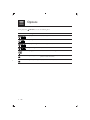
During play, press
Media
12
EN
OPTIONS to access the following items.
Setting item
Function
[Info]
Display the play information.
[PBC]
Enable or disable PBC.
[Aspect ratio]
Select a display ratio of picture on TV.
[Volume]
Adjust the volume level.
[Angle]
Select an available camera angle.
[Colour]
Select Fun Mode (photos in color) or Simple Mode
(photos in black and white).
[Photo preview]
Display the thumbnail of photos.
English
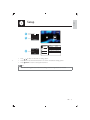
Setup
1
2
Disc
General
Video
3
Audio
Setup
Disc Lock
OSD Language
Sleep Timer
Auto Standby
DivX(R) VOD Code
Unlock
English
Off
On
Registration
Preference
•
•
•
Press / to select a menu item or setting option.
Press OK to access the lower-level menu or confirm the selected setting option.
Press
BACK to return to the upper-level menu.
Note
• When a menu item is grayed out, it means that its setting cannot be changed at the current state.
EN
13
Setup
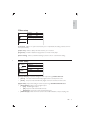
General setup
Disc Lock
OSD Language
Sleep Timer
Auto Standby
DivX(R) VOD Code
General
Video
Audio
Unlock
English
Off
On
Registration
Preference
[Disc Lock] - Restrict the play of a disc (maximum 20 discs can be locked).
• [Lock] - Lock the current disc. To play or unlock this disc, you must enter the password.
• [Unlock] - Play all discs.
[OSD Language] - Select a language for on-screen menu.
[Sleep Timer] - Set a period of time for the player to switch to Eco-power standby mode
automatically.
[Auto Standby] - Enable this feature to automatically switch to Eco-power standby mode after 15
minutes of inactivity.
[DivX(R) VOD Code] - Display the DivX® registration code and deregistration code.
Note
• Go to www.divx.com/vod for how to register your player and rent or purchase DivX videos.
• DivX videos rented or purchased by this registration code can be played only on this player.
Play a locked disc
When you load a locked disc, [Please enter password] is displayed, and “0” is displayed as the first
digit of the password.
1
2
3
4
Press
Press
/
to set a value (0 to 9) to the first digit.
.
Repeat steps 1 and 2 to enter the 6-digit password.
Press OK to confirm.
Tip
• Refer to “Setup” > “Preference” > [Password] for how to change the password.
14
EN
English
Video setup
General
Video
TV System
Aspect ratio
Progressive
Picture Setting
PAL
4:3 Pan Scan
Off
Standard
Audio
Preference
[TV System] - Select a TV system that matches your TV. By default, this setting matches common
TVs in your country.
[Aspect ratio] - Select a display ratio that matches your TV screen.
[Progressive] - Enable or disable the progressive scan mode on this player.
[Picture Setting] - Select a predefined setting for picture color, or customize the setting.
Audio setup
General
Video
Audio
Analogue Output
Digital Audio
Volume
Sound Mode
Night Mode
Stereo
Off
Preference
[Analogue Output] - Adjust this setting for audio output through AUDIO OUT L/R .
• [Stereo] - Compress multi-channel Dolby digital sound to stereophonic sound.
• [LT/RT] - Compress multi-channel Dolby digital sound to 2-channel surround sound.
[Digital Audio] - Adjust this setting for audio output through COAXIAL/DIGITAL OUT.
• [Digital Output] - Select a type of digital output.
• [Off] - Disable digital output.
• [All] - Support multi-channel audio formats.
• [PCM Only] - Downmix to two-channel audio signal.
• [LPCM Output] - Select the LPCM (Linear Pulse Code Modulation) output sampling rate.
EN
15
Setup
Note
• [LPCM Output] setting is changeable only when [Digital Output] is set as [PCM Only].
• The higher the sampling rate, the better the sound quality.
[Volume] - Set the default volume level.
[Sound Mode] - Select a preset sound effect.
[Night Mode] - Equalize loud sound and soft sound. Enable this feature to watch DVD movies at a
low volume at night.
Note
• Applicable to Dolby Digital encoded DVD discs only.
Preference
General
Video
Audio
Preference
Audio
Subtitle
Disc Menu
Parental Control
PBC
Password
DivX Subtitle
Version Info
English
Off
English
8 Adult
On
Change
Standard
[Audio] - Select an audio language.
[Subtitle] - Select a language for subtitle.
[Disc Menu] - Select a language for disc menu.
Note
• For some DVDs, the subtitle or audio language can only be changed from the disc menu.
• For a language that is not listed, select [Others]. Check the list of language codes (see “Language Code”),
and then enter the respective language code. (Refer to “Setup” > “General setup” > “Play a locked disc”
for how to enter the 4-digit code)
[Parental Control] - Select a rating level to restrict the play of discs to children. These discs must be
recorded with rating levels.
16
EN
English
Note
• To play a DVD disc that has a rating level higher than your setting, enter the password first. (Refer to
“Setup” > “General setup” > “Play a locked disc” for details)
• The rating levels are country-dependent. To allow all discs to be played, select [8 Adult].
• Some discs have ratings printed on but are not recorded with ratings. This function has no effect on such
discs.
[PBC] - Enable or disable the PBC (playback control) feature.
[Password] - Change the password for playing discs that are locked or restricted with rating levels.
Note
• If you forget the password, enter “136900” before you set a new password.
Change the password
1
Select [Preference] > [Password] > [Change], and then press OK.
» The interface for changing password is displayed.
2
Press OK again.
» “0” is displayed behind [Old Password] as the first digit of old password.
3
4
5
6
7
Press
Press
/
to set a value (0-9) to the first digit.
.
Repeat steps 3 and 4 to enter the 6-digit old password.
Repeat steps 3 and 4 to enter the new password behind [New Password].
Repeat steps 3 and 4 to enter the new password behind [Confirm PWD].
[DivX Subtitle] - Select a character set that supports the subtitle of your DivX video.
[Version Info] - Display the information about software version of this player.
[Default] - Reset all settings to factory default, except for the settings for [Disc Lock], [Parental
Control], and [Password].
EN
17
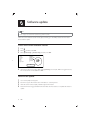
Software update
Note
• Power supply must not be interrupted during software update.
Check the current software version of this player, and then go to the Philips website for information
about software update.
Check the current software version
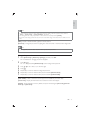
1
2
3
Press
.
Select , and then press OK.
Select [Preference] > [Version Info], and then press OK.
Model
File Name
Version
RISC
Servo
Region Code
DVP3800-79
DVP3800_79.BIN
79.11.36.09
0E.00.01.04
57.18.00.C7
4
09
OK
4
Write down the last two digits “XX” behind [Version] (for example, “09” in the graphic above).
» The version of current software is VXX.
Perform the update
1
2
3
4
Go to www.philips.com/support.
18
EN
Search for support information with “DVP3800/79” as the keywords.
Click the search result to display available support information.
Read the Firmware Upgrade Readme File and follow the instructions to complete the software
update.
English
Troubleshooting
Warning
• Risk of electric shock. Never remove the casing of the player.
To keep the warranty valid, never try to repair the player yourself.
If you have problems using this player, check the following points before you request service. If you still
have a problem, register your player and get support at www.philips.com/welcome.
If you contact Philips, you will be asked for the model and serial number of this player. The model
number and serial number are on the back of this player. Write the numbers here:
Model No. __________________________
Serial No. ___________________________
No picture.
• Refer to the TV user manual for how to select the correct video input channel.
• Switch to the default mode if the progressive scan setting or the TV system setting is changed.
No sound output from the TV.
• Make sure that the audio cables are connected to the audio input sockets that are grouped with
the selected video input sockets.
No sound during DivX video playback.
• The audio codes are not supported.
Disc cannot be read.
• Make sure that this player supports the disc. (Refer to “ Specifications” > “Playable media”)
• For a recorded disc, make sure that the disc is finalized.
Recorded files (JPEG, MP3, WMA) cannot be played or read.
• Make sure that the file was recorded in the format of UDF, ISO9660, or JOLIET.
• Make sure that the number of files does not exceed the limitation (648 files maximum).
• Make sure that this player supports these files. (Refer to “ Specifications” > “Playable media”)
DivX video files cannot be played.
•
Make sure that the DivX video file is complete.
•
Make sure that the file extension is correct.
DivX subtitles are not displayed correctly.
• Make sure that the subtitle filename is the same as the video filename.
• Make sure that the DivX video file and the subtitle file are saved under the same directory.
• Select the character set that supports the subtitle. (Refer to [Preference] > [DivX Subtitle])
EN
19
Specifications
Note
• Specifications are subject to change without notice.
DVD region code
Countries
Australia, New Zealand
Playable media
• Disc
• DVD, DVD-Video, VCD, SVCD, Audio CD
• DVD+R/+RW, DVD-R/-RW, DVD+R/-R DL (Dual Layer),
CD-R/-RW (Maximum number of files: 648)
• File
• Video: .avi, .divx, .mp4 (MPEG-4 Part 2), .xvid
• Audio: .mp3, .wma
• Picture: .jpg, .jpeg
Video
• Signal system: PAL, NTSC
• Composite video output: 1 Vp-p (75 Ohm)
• Component video output: 0.7 Vp-p (75 Ohm)
Audio
• 2-channel analog output
• AUDIO OUT L&R : 2 Vrms (47k Ohm)
• Digital output: 0.5 Vp-p (75 Ohm)
• Coaxial
• Sampling frequency:
• MP3: 8 kHz, 11 kHz, 12 kHz, 16 kHz, 22 kHz, 24 kHz, 32 kHz, 44.1 kHz, 48 kHz
• WMA: 44.1 kHz, 48 kHz
• Constant bit rate:
• MP3: 8 kbps - 320 kbps
• WMA: 64 kbps - 192 kbps
Main unit
• Dimensions (W x H x D): 360 x 42 x 209 (mm)
• Net Weight: 1.35 kg
20
EN
English
Power
• Power supply rating: 230–240 V~, 50 Hz
• Power consumption: < 8 W
• Power consumption in standby mode: < 0.3 W
Accessories supplied
• Remote control and one battery
• Audio/Video cables
• User Manual
Laser specification
• Type: Semiconductor laser InGaAIP (DVD), AIGaAs (CD)
• Wave length: 658 nm (DVD), 790 nm (CD)
• Output Power: 7.0 mW (DVD), 10.0 mW (VCD/CD)
• Beam divergence: 60 degrees
EN
21
Notice
Care for your product
•
•
•
•
Do not insert any objects other than discs into the disc compartment.
Do not insert warped or cracked discs into the disc compartment.
Remove the discs from the disc compartment if you are not using the product for an extended
period of time.
Only use microfiber cloth to clean the product.
Care of the environment
Your product is designed and manufactured with high quality materials and components,
which can be recycled and reused.
When this crossed-out wheeled bin symbol is attached to a product it means that the
product is covered by the European Directive 2002/96/EC.
Please inform yourself about the local separate collection system for electrical and electronic
products.
Please act according to your local rules and do not dispose of your old products with your normal
household waste. Correct disposal of your old product helps to prevent potential negative
consequences for the environment and human health.
Your product contains batteries covered by the European Directive 2006/66/EC, which
cannot be disposed with normal household waste.Please inform yourself about the local
rules on separate collection of batteries because correct disposal helps to prevent negative
consequences for the environmental and human health.
Compliance
This apparatus includes this label:
22
EN
English
Copyright
This item incorporates copy protection technology that is protected
by U.S. patents and other intellectual property rights of Rovi
Corporation. Reverse engineering and disassembly are prohibited.
2011 © Koninklijke Philips Electronics N.V.
Specifications are subject to change without notice. Trademarks are the property of Koninklijke Philips
Electronics N.V or their respective owners. Philips reserves the right to change products at any time
without being obliged to adjust earlier supplies accordingly.
Warranty
•
•
•
•
Risk of injury, damage to the player or void of warranty! Never attempt to repair the player yourself.
Use the player and accessories only as intended by the manufacturer. The caution sign printed
on the back of the player indicates risk of electric shock.
Never remove the player cover. Always contact Philips Customer Support for service or repairs.
Any operation expressly prohibited in this manual, or any adjustments and assembly procedures
not recommended or authorized in this manual shall void the warranty.
Trademark
ABOUT DIVX VIDEO: DivX® is a digital video format created by DivX, LLC, a
subsidiary of Rovi Corporation. This is an official DivX Certified® device that plays
DivX video. Visit divx.com for more information and software tools to convert your
files into DivX videos.
ABOUT DIVX VIDEO-ON-DEMAND: This DivX Certified® device must be registered in order to
play purchased DivX Video-on-Demand (VOD) movies. To obtain your registration code, locate the
DivX VOD section in your device setup menu. Go to vod.divx.com for more information on how to
complete your registration.
DivX®, DivX Ultra®, DivX Certified® and associated logos are trademarks of Rovi Corporation or its
subsidiaries and are used under license.
DivX Ultra® Certified to play DivX® video with advanced features and premium content.
Manufactured under license from Dolby Laboratories. Dolby and the double-D
symbol are trademarks of Dolby Laboratories.
‘DVD Video’ is a trademark of DVD Format/Logo Licensing Corporation.
EN
23
Philips Electronics Australia Limited and Philips New Zealand Limited
Warranty against Defects
In this warranty:
We or us means Philips Electronics Australia Limited ACN 008 445 743 or Philips New Zealand Limited (Company
Number 1723), and our contact details are set out at the end of this warranty;
You means the purchaser or the original end-user of the Goods;
Supplier means the authorised distributor or retailer of the Goods that sold you the Goods in Australia or New
Zealand; and
Goods means the product or equipment which was accompanied by this warranty and purchased in Australia or New
Zealand.
If you require assistance with the operation of the product, its features or specifications please call the Philips
Consumer Care Centre on 1300 363 391 in Australia or 0800 658 224 in New Zealand.
Australia: Our Goods come with guarantees that cannot be excluded under the Australian Consumer Law. You are
entitled to a replacement or refund for a major failure and for compensation for any other reasonably foreseeable loss
or damage. You are also entitled to have the Goods repaired or replaced if the goods fail to be of acceptable quality
and the failure does not amount to a major failure. This is not a complete statement of your legal rights as a consumer.
New Zealand: Our Goods come with guarantees that cannot be excluded under the Consumer Guarantees Act 1993.
This guarantee applies in addition to the conditions and guarantees implied by that legislation.
Additional Warranty:
In addition to the rights and remedies that you have under the Australian Consumer Law, Consumer Guarantees Act
of New Zealand or any other applicable law, we provide the following warranty against defects:
1. If, during the first 12 months from their date of purchase from the Supplier (Warranty Period), the Goods prove
defective by reason of improper workmanship or materials and none of your statutory rights or remedies apply, we
will repair or replace the Goods without charge.
2. We do not have to repair or replace the Goods under this Additional Warranty if the Goods have been used for a
commercial purpose; misused, improperly or inappropriately installed, operated or repaired; abused; damaged; or
not maintained in accordance with the manufacturer’s instructions.
3. Even when we do not have to repair or replace the Goods, we may decide to do so anyway. In some cases, we
may decide to substitute the Goods with a similar alternative product of our choosing. All such decisions are at
our absolute discretion.
4. All such repaired, replaced or substituted Goods continue to receive the benefit of this Additional Warranty for the
time remaining on the original Warranty Period.
5. This Additional Warranty is limited to repair, replacement or substitution only. As far as the law permits, we will not
be liable for any loss or damage caused to property or persons arising from any cause whatsoever.
6. In order to claim under this Additional Warranty you must telephone us on 1300 363 391 in Australia or 0800 658
224 in New Zealand within the Warranty Period. You will be asked for details of the Goods, a description of the
defect and your personal details. Upon accepting your claim, we shall assist you with either returning the Goods to
the Supplier for replacement or to the most convenient Philips Authorised Service Centre for your Goods to be
repaired. In some case we may require that you return to the Goods to us (at the address below) for repair,
replacement or substitution.
All returned Goods must be accompanied by satisfactory proof of purchase which clearly indicates the name and
address of the Supplier, the date and place of purchase and identifies product. It is best to provide a legible and
unmodified receipt or sales invoice.
You must bear any expense for return of the Goods or otherwise associated with making your claim under this
Additional Warranty.
7. This warranty is only valid and enforceable in Australia and New Zealand.
Contact us or the place of purchase for further details.
Philips Electronics Australia Limited
Level 1, 65 Epping Rd,
North Ryde, SYDNEY NSW 2113
Consumer Care: 1300 363 391
E-mail: [email protected]
Website: www.philips.com/support
Philips New Zealand Limited
Level 2, 1 Nugent St,
Grafton, AUCKLAND, 1023
Consumer Care: 0800 658 224
Email: [email protected]
Website: www.philips.com/support
August 2011
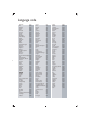
Language code
Abkhazian
6566
Afar
6565
Afrikaans
6570
Amharic
6577
Arabic
6582
Armenian
7289
Assamese
6583
Avestan
6569
Aymara
6589
Azerhaijani
6590
Bahasa Melayu
7783
Bashkir
6665
Belarusian
6669
Bengali
6678
Bihari
6672
Bislama
6673
Bokmål, Norwegian
7866
Bosanski
6683
Brezhoneg
6682
Bulgarian
6671
Burmese
7789
Castellano, Español
6983
Catalán
6765
Chamorro
6772
Chechen
6769
Chewa; Chichewa; Nyanja 7889
9072
Ё᭛
Chuang; Zhuang
9065
Church Slavic; Slavonic 6785
Chuvash
6786
Corsican
6779
Česky
6783
Dansk
6865
Deutsch
6869
Dzongkha
6890
English
6978
Esperanto
6979
Estonian
6984
Euskara
6985
6976
Faroese
7079
Français
7082
Frysk
7089
Fijian
7074
Gaelic; Scottish Gaelic 7168
Gallegan
7176
Georgian
7565
Gikuyu; Kikuyu
7573
Guarani
7178
Gujarati
7185
Hausa
7265
Herero
7290
Hindi
7273
Hiri Motu
7279
Hrwatski
6779
Ido
7379
Interlingua (International)7365
Interlingue
7365
Inuktitut
7385
Inupiaq
Irish
Íslenska
Italiano
Ivrit
Japanese
Javanese
Kalaallisut
Kannada
Kashmiri
Kazakh
Kernewek
Khmer
Kinyarwanda
Kirghiz
Komi
Korean
Kuanyama; Kwanyama
Kurdish
Lao
Latina
Latvian
Letzeburgesch;
Limburgan; Limburger
Lingala
Lithuanian
Luxembourgish;
Macedonian
Malagasy
Magyar
Malayalam
Maltese
Manx
Maori
Marathi
Marshallese
Moldavian
Mongolian
Nauru
Navaho; Navajo
Ndebele, North
Ndebele, South
Ndonga
Nederlands
Nepali
Norsk
Northern Sami
North Ndebele
Norwegian Nynorsk;
Occitan; Provencal
Old Bulgarian; Old Slavonic
Oriya
Oromo
Ossetian; Ossetic
Pali
Panjabi
Persian
Polski
Português
7375
7165
7383
7384
7269
7465
7486
7576
7578
7583
7575
7587
7577
8287
7589
7586
7579
7574
7585
7679
7665
7686
7666
7673
7678
7684
7666
7775
7771
7285
7776
7784
7186
7773
7782
7772
7779
7778
7865
7886
7868
7882
7871
7876
7869
7879
8369
7868
7878
7967
6785
7982
7977
7983
8073
8065
7065
8076
8084
Pushto
Russian
Quechua
Raeto-Romance
Romanian
Rundi
Samoan
Sango
Sanskrit
Sardinian
Serbian
Shona
Shqip
Sindhi
Sinhalese
Slovensky
Slovenian
Somali
Sotho; Southern
South Ndebele
Sundanese
Suomi
Swahili
Swati
Svenska
Tagalog
Tahitian
Tajik
Tamil
Tatar
Telugu
Thai
Tibetan
Tigrinya
Tonga (Tonga Islands)
Tsonga
Tswana
Türkçe
Turkmen
Twi
Uighur
Ukrainian
Urdu
Uzbek
Vietnamese
Volapuk
Walloon
Welsh
Wolof
Xhosa
Yiddish
Yoruba
Zulu
8083
8285
8185
8277
8279
8278
8377
8371
8365
8367
8382
8378
8381
8368
8373
8373
8376
8379
8384
7882
8385
7073
8387
8383
8386
8476
8489
8471
8465
8484
8469
8472
6679
8473
8479
8483
8478
8482
8475
8487
8571
8575
8582
8590
8673
8679
8765
6789
8779
8872
8973
8979
9085
© 2011 Koninklijke Philips Electronics N.V.
All rights reserved.
DVP3800_79_UM_V2.0