1
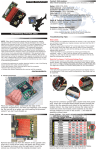
4. Install the lower hard drive (HDD2), as shown below. Slide the SATA connector on the hard
drive into the black SATA connector circled in red. Make sure the drive is firmly seated in
the black SATA connector before proceeding.
5. Install the upper hard drive (HDD1), as shown below. Insert the SATA power and SATA data
cables from the Mercury Elite Pro Dual into the SATA connector on the hard drive, then
slide the hard drive to line up the screw holes in the hard drive with those on the inner
chassis. Make sure the SATA connectors are seated firmly before continuing.
OWC MERCURY ELITE PRO DUAL
6
SYSTEM SETUP