1
AC750 WiFi Range Extender
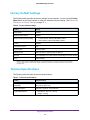
Factory Default Settings
The following table includes the factory settings for the extender. You can use the Factory
Reset button or the Erase feature to return the extender to these settings. (See Return the
Extender to Its Factory Settings on page 37.)
Table 2. Factory default settings
Feature
Setting
Setup Wizard
Enabled
Wireless communication
Enabled
Wireless network names (SSID)s
•
•
Security
Disabled
Transmission speed
Auto1
Country/region
Varies by region
Operating mode
802.11ac, 802.11n, 802.11g, 802.11b, 802.11a
Data rate
Up to 300 Mbps for 2.4 GHz network and 433 Mbps for 5 GHz network
DHCP
Client enabled
2.4 GHz network: EX6100_NETGEAR_2GEXT
5 GHz network: EX6100_NETGEAR_5GEXT
1. Maximum wireless signal rate (IEEE Standard 802.11). Actual throughput will vary. Network conditions and environmental
factors, including volume of network traffic, building materials and construction, and network overhead, lower actual data
throughput rate.
Technical Specifications
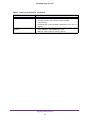
The following table includes the product specifications.
Table 3. Technical specifications
Feature
Default behavior
Network protocol and standards
compatibility
Data and routing protocols: TCP/IP, DHCP server and client, DNS
relay, NAT (many-to-one)
Power consumption
100–240V~ 50/60 Hz, 0.21A maximum
Physical specifications
•
•
Dimensions: 122 x 74 x 38 mm
Weight: 0.213 kg
Supplemental Information
46