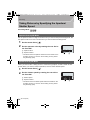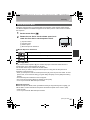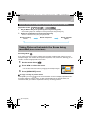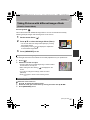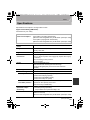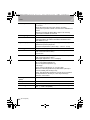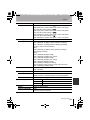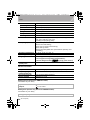
1
DMC-GH3PPC-VQT4S33_eng.book 1 ページ 2012年10月22日 月曜日 午後3時2分 Basic Owner’s Manual Digital Camera/Body Model No. DMC-GH3 Please read these instructions carefully before using this product, and save this manual for future use. More detailed instructions on the operation of this camera are contained in “Owner’s Manual for advanced features (PDF format)” in the supplied CD-ROM. Install it on your PC to read it. Register online at www.panasonic.com/register (U.S. customers only) For USA and Puerto Rico assistance, please call: 1-800-211-PANA(7262) or, contact us via the web at: http://www.panasonic.com/contactinfo For Canadian assistance, please call: 1-800-99-LUMIX (1-800-995-8649) or send e-mail to: [email protected] VQT4S33 P PC F1012SM0 until 2013/1/28 DMC-GH3PPC-VQT4S33_eng.book 2 ページ 2012年10月22日 月曜日 午後3時2分 Dear Customer, Thank you for choosing Panasonic! You have purchased one of the most sophisticated and reliable products on the market today. Used properly, we’re sure it will bring you and your family years of enjoyment. Please take time to fill in the information below. The serial number is on the tag located on the underside of your camera. Be sure to retain this manual as your convenient camera information source. Date of Purchase Dealer Phone No. Dealer Purchased From Model No. Dealer Address Serial No. Please note that the actual controls and components, menu items, etc. of your Digital Camera may look somewhat different from those shown in the illustrations in this Owner’s Manual. Carefully observe copyright laws. • Recording of pre-recorded tapes or discs or other published or broadcast material for purposes other than your own private use may infringe copyright laws. Even for the purpose of private use, recording of certain material may be restricted. A lithium ion battery that is recyclable powers the product you have purchased. Please call 1-800-8-BATTERY for information on how to recycle this battery. Information for Your Safety WARNING: To reduce the risk of fire, electric shock or product damage, • Do not expose this unit to rain, moisture, dripping or splashing. • Use only the recommended accessories. • Do not remove covers. • Do not repair this unit by yourself. Refer servicing to qualified service personnel. The socket outlet shall be installed near the equipment and shall be easily accessible. 2 VQT4S33 (ENG) DMC-GH3PPC-VQT4S33_eng.book 3 ページ 2012年10月22日 月曜日 午後3時2分 ∫ Product identification marking Product Location Digital Camera Bottom Battery charger Bottom THE FOLLOWING APPLIES ONLY IN THE U.S.A. FCC Note: This equipment has been tested and found to comply with the limits for a Class B digital device, pursuant to Part 15 of the FCC Rules. These limits are designed to provide reasonable protection against harmful interference in a residential installation. This equipment generates, uses, and can radiate radio frequency energy and, if not installed and used in accordance with the instructions, may cause harmful interference to radio communications. However, there is no guarantee that interference will not occur in a particular installation. If this equipment does cause harmful interference to radio or television reception, which can be determined by turning the equipment off and on, the user is encouraged to try to correct the interference by one or more of the following measures: • Reorient or relocate the receiving antenna. • Increase the separation between the equipment and receiver. • Connect the equipment into an outlet on a circuit different from that to which the receiver is connected. • Consult the dealer or an experienced radio/TV technician for help. FCC Caution: To assure continued compliance, follow the attached installation instructions and use only shielded interface cables with ferrite core when connecting to computer or peripheral devices. Any changes or modifications not expressly approved by the party responsible for compliance could void the user’s authority to operate this equipment. Declaration of Conformity Trade Name: Panasonic Model No.: DMC-GH3 Responsible Party: Panasonic Corporation of North America One Panasonic Way, Secaucus, NJ 07094 Support Contact: Panasonic Consumer Marketing Company of North America 1-800-211-PANA (7262) This device complies with Part 15 of the FCC Rules. Operation is subject to the following two conditions: (1) This device may not cause harmful interference, and (2) this device must accept any interference received, including interference that may cause undesired operation. DMC-GH3 (ENG) VQT4S33 3 DMC-GH3PPC-VQT4S33_eng.book 4 ページ 2012年10月22日 月曜日 午後3時2分 THE FOLLOWING APPLIES ONLY IN THE U.S.A. Certification and Compliance See Camera for the certification and compliance mark specific to that device. 1 2 3 Select [Wi-Fi] in the [Setup] menu. Select [Wi-Fi Setup] in the [Wi-Fi] menu. Press 3/4 to select [Approved Regulations], and press [MENU/SET]. Contains FCC ID: VPYLBWL This transmitter must not be co-located or operated in conjunction with any other antenna or transmitter. This equipment complies with FCC radiation exposure limits set forth for an uncontrolled environment and meets the FCC radio frequency (RF) Exposure Guidelines in Supplement C to OET65. This equipment has very low levels of RF energy that are deemed to comply without testing of specific absorption ratio (SAR). THE FOLLOWING APPLIES ONLY IN CANADA. This Class B digital apparatus complies with Canadian ICES-003. This device complies with RSS-210 of the IC Rules. Operation is subject to the following two conditions: (1)This device may not cause harmful interference, (2)This device must accept any interference received, including interference that may cause undesired operation of the device. This equipment complies with IC radiation exposure limits set forth for an uncontrolled environment and meets RSS-102 of the IC radio frequency (RF) Exposure rules. This equipment has very low levels of RF energy that are deemed to comply without testing of specific absorption ratio (SAR). 4 VQT4S33 (ENG) DMC-GH3PPC-VQT4S33_eng.book 5 ページ 2012年10月22日 月曜日 午後3時2分 ∫ About the battery pack CAUTION Battery pack (Lithium ion battery pack) • Use the specified unit to recharge the battery pack. • Do not use the battery pack with equipment other than the specified unit. • Do not get dirt, sand, liquids, or other foreign matter on the terminals. • Do not touch the plug terminals (i and j) with metal objects. • Do not disassemble, remodel, heat or throw into fire. If any electrolyte should come into contact with your hands or clothes, wash it off thoroughly with water. If any electrolyte should come into contact with your eyes, never rub the eyes. Rinse eyes thoroughly with water, and then consult a doctor. CAUTION • Danger of explosion if battery is incorrectly replaced. Replace only with the type recommended by the manufacturer. • When disposing the batteries, please contact your local authorities or dealer and ask for the correct method of disposal. • Do not heat or expose to flame. • Do not leave the battery(ies) in a car exposed to direct sunlight for a long period of time with doors and windows closed. Warning Risk of fire, explosion and burns. Do not disassemble, heat above 60 xC (140 oF) or incinerate. (ENG) VQT4S33 5 DMC-GH3PPC-VQT4S33_eng.book 6 ページ 2012年10月22日 月曜日 午後3時2分 ∫ About the battery charger CAUTION! To reduce the risk of fire, electric shock or product damage, • Do not install or place this unit in a bookcase, built-in cabinet or in another confined space. Ensure this unit is well ventilated. Battery charger This battery charger operates on AC between 110 V and 240 V. But • In the U.S.A. and Canada, the battery charger must be connected to a 120 V AC power supply only. • When connecting to an AC supply outside of the U.S.A. or Canada, use a plug adaptor to suit the AC outlet configuration. • When connecting to a supply of greater than AC 125 V, ensure the cord you use is suited to the voltage of the AC supply and the rated current of the battery charger. • Contact an electrical parts distributor for assistance in selecting a suitable AC plug adaptor or AC cord set. ∫ Cautions for Use • Always use a genuine Panasonic remote shutter (DMW-RSL1: optional). • Do not use the synchro cables with the length of 3 m (9.8 feet) or more. -If you see this symbolInformation on Disposal in other Countries outside the European Union This symbol is only valid in the European Union. If you wish to discard this product, please contact your local authorities or dealer and ask for the correct method of disposal. 6 VQT4S33 (ENG) DMC-GH3PPC-VQT4S33_eng.book 7 ページ 2012年10月22日 月曜日 午後3時2分 Contents Information for Your Safety................. 2 Preparation Reading the Owner’s Manual (PDF format) ......................................... 9 Care of the camera............................. 10 Standard Accessories ........................11 Names and Functions of Components ....................................... 12 Preparation ......................................... 16 • Changing the Lens ........................ 16 • Attaching the Shoulder Strap ........ 16 • Charging the Battery ..................... 17 • Inserting/Removing the Battery ..... 18 • Inserting/Removing the Card (Optional) ...................................... 18 • Formatting the card (initialisation) ................................. 19 • Setting Date/Time (Clock Set)....... 19 • Using the Viewfinder ..................... 20 Setting the Menu ................................ 21 • Setting menu items ....................... 21 Calling frequently-used menus instantly (Quick Menu) ...................... 22 Assigning frequently used functions to the buttons (function buttons) ..... 23 Basic Taking a Still picture .......................... 24 Recording Motion Picture ................. 25 Switching the Information Displayed on the recording screen .................... 26 Playing Back Pictures/Motion Pictures............................................... 27 • Playing Back Pictures ................... 27 • Playing Back Motion Pictures........ 29 • Changing the information displayed on the playback screen ................. 30 Deleting Pictures................................ 31 Recording Selecting the Recording Mode.......... 32 Taking Pictures with Your Favorite Settings (Program AE Mode)............. 33 Taking Pictures by Specifying the Aperture/Shutter Speed ..................... 34 • Aperture-Priority AE Mode............. 34 • Shutter-Priority AE Mode ............... 34 • Manual Exposure Mode................. 35 • Confirm the Effects of Aperture and Shutter Speed (Preview Mode) ..... 36 Taking Pictures that match the Scene being recorded (Scene Guide Mode)........................... 36 Taking Pictures with different image effects (Creative Control Mode) ........ 37 • [One Point Color] ........................... 37 Taking Pictures using the Automatic Function (Intelligent Auto Mode) ...... 38 • Taking a picture with a blurred background (Defocus Control) ...... 38 • Recording images by changing the brightness or color tone (Intelligent Auto Plus Mode) .......... 39 Registering your preferred settings (Custom Mode) ................................... 40 • Registering Personal Menu Settings (Registering custom settings)........ 40 • Recording using registered custom set.................................................. 40 Taking Pictures with the Zoom ......... 41 Taking pictures by using the flash ..................................................... 41 • Changing Flash Mode ................... 42 Compensating the Exposure............. 42 Setting the Light Sensitivity .............. 43 Adjusting the White Balance............. 44 Taking Pictures with Auto Focus...... 46 • About the focus mode (AFS/AFF/AFC) ............................. 47 • Type of the Auto Focus Mode........ 47 Taking Pictures with Manual Focus................................................... 49 Fixing the Focus and the Exposure (AF/AE Lock)....................................... 50 Taking Pictures using Burst Mode ... 51 Taking Pictures using Auto Bracket ................................................ 52 Taking Pictures with the Self-timer... 53 (ENG) VQT4S33 7 DMC-GH3PPC-VQT4S33_eng.book 8 ページ 2012年10月22日 月曜日 午後3時2分 Recording Motion Picture ................. 53 • Recording while monitoring camera images .......................................... 53 • Checking the sound while recording motion pictures ............................. 53 Recording still pictures while recording motion pictures ................ 54 Recording motion pictures with manually set aperture value/ shutter speed (Creative Video Mode) .................................................. 54 • Motion pictures in slow and fast motion ........................................... 55 • Minimizing operational sounds during motion picture recording .... 55 Setting the recording method of time code ............................................ 56 Wi-Fi What you can do with the Wi-FiR function............................................... 57 [Remote Shooting]............................. 58 • Installing the smartphone/ tablet app “LUMIX LINK”............... 58 • Connecting to a smartphone/ tablet ............................................. 58 • Taking pictures via a smartphone/ tablet (remote recording) .............. 59 • Playing back pictures in the camera.......................................... 60 • Sending location information to the camera from a smartphone/ tablet ............................................. 60 • [Select a destination from History].......................................... 60 • [Select a destination from Favorite]........................................ 60 Selecting the connection method .... 61 • Connecting via a wireless access point .............................................. 61 • Connecting directly........................ 63 [Playback on TV]................................ 64 • Displaying the picture on TV right after taking it/Displaying the picture on TV by playing it back on the camera.......................................... 64 [Send Images While Recording]....... 65 • When sending images to smartphone/tablet ......................... 65 8 VQT4S33 (ENG) • When sending images to PC ......... 66 • When sending images to [Cloud Sync. Service].................... 67 • When sending images to WEB Service .......................................... 67 • When sending images to AV device............................................ 68 [Send Images Stored in the Camera]............................................... 69 • When sending images to smartphone/tablet ......................... 69 • When sending images to PC ......... 70 • When sending images to [Cloud Sync. Service].................... 70 • When sending images to WEB Service .......................................... 71 • When sending images to AV device............................................ 72 • When sending images to Printer ... 73 Connecting to other equipment Playing Back Pictures on a TV Screen ................................................. 74 Saving still pictures and motion pictures on your PC ........................... 75 • About the supplied software .......... 75 Printing the Pictures .......................... 78 Others Monitor Display/Viewfinder Display ................................................ 79 Menu list.............................................. 81 • [Rec] .............................................. 81 • [Motion Picture].............................. 83 • [Custom] ........................................ 84 • [Setup] ........................................... 86 • [Playback] ...................................... 88 Cautions for Use ................................ 89 Specifications ..................................... 91 Digital Camera Accessory System ... 95 Digital Camera Accessory Order Form (For USA and Puerto Rico Customers) ......................................... 97 Limited Warranty (ONLY FOR U.S.A. AND PUERTO RICO) .......................... 98 Limited Warranty (ONLY FOR CANADA) .......................................... 101 DMC-GH3PPC-VQT4S33_eng.book 9 ページ 2012年10月22日 月曜日 午後3時2分 Preparation Reading the Owner’s Manual (PDF format) More detailed instructions on the operation of this camera are contained in “Owner’s Manual for advanced features (PDF format)” in the supplied CD-ROM. Install it on your PC to read it. ∫ For Windows 1 Turn the PC on and insert the CD-ROM containing the Owner’s Manual (supplied). 2 Select the desired language and then click [Owner’s Manual] to install. 3 Double click the “Owner’s Manual” shortcut icon on the desktop. ∫ When the Owner’s Manual (PDF format) will not open You will need Adobe Acrobat Reader 5.0 or later or Adobe Reader 7.0 or later to browse or print the Owner’s Manual (PDF format). Insert the CD-ROM containing the Owner’s Manual (supplied), click A and then follow the messages on the screen to install. (Compatible OS: Windows XP SP3/Windows Vista SP2/Windows 7) • You can download and install a version of Adobe Reader that you can use with your OS from the following Web Site. http://get.adobe.com/reader/otherversions ∫ To uninstall the Owner’s Manual (PDF format) Delete the PDF file from the “Program Files\Panasonic\Lumix\” folder. ∫ For Mac 1 Turn the PC on and insert the CD-ROM containing the Owner’s Manual (supplied). 2 Open the “Manual” folder in the CD-ROM and then copy the PDF file with the desired language inside the folder. 3 Double click the PDF file to open it. (ENG) VQT4S33 9 DMC-GH3PPC-VQT4S33_eng.book 10 ページ 2012年10月22日 月曜日 午後3時2分 Preparation Care of the camera Do not subject to strong vibration, shock, or pressure. • The lens, monitor, or external case may be damaged if used in the following conditions. It may also malfunction or image may not be record if you: – Drop or hit the camera. – Press hard on the lens or the monitor. The dust- and splash-proofing of this unit is not a guarantee of a full protection against the intrusion of dust and water. Please note the following to optimize the dust-proof and splash-proof performance: – Use a Panasonic interchangeable lens that supports the dust- and splash-proof design. When you are using an interchangeable lens that does not support the dust-splash proofing or are using the mount adaptor (DMW-MA1: optional), the dust-splash proofing of this unit is disabled. – Use with the built-in flash closed. – Securely close each door part, socket cap and terminal cover of this unit. – When you attach/detach the lens or cap, or open/close the door, make sure to prevent sand, dust, and water droplets from entering the interior of this unit. – If this unit is exposed to water or other liquids, wipe off the liquid with soft dry cloths after use. Do not place your hands inside the mount of the digital camera body. Since the sensor unit is a precision apparatus, it may cause a malfunction or damage. ∫ About Condensation (When the lens, the viewfinder or monitor is fogged up) • Condensation occurs when the ambient temperature or humidity changes. Be careful of condensation since it causes lens, viewfinder and monitor stains, fungus and camera malfunction. • If condensation occurs, turn the camera off and leave it for about 2 hours. The fog will disappear naturally when the temperature of the camera becomes close to the ambient temperature. 10 VQT4S33 (ENG) DMC-GH3PPC-VQT4S33_eng.book 11 ページ 2012年10月22日 月曜日 午後3時2分 Preparation Standard Accessories Check that all the accessories are supplied before using the camera. Product numbers correct as of October 2012. These may be subject to change. Digital Camera Body (This is referred to as camera body in this Owner’s Manual.) 1 2 3 4 5 Battery Pack (Indicated as battery pack or battery in the text) Charge the battery before use. Battery Charger (Indicated as battery charger or charger in the text) AC Cable USB Connection Cable CD-ROM • Software: Use it to install the software to your PC. 6 CD-ROM • Owner’s Manual for advanced features: 1 6 VFF1066 DMW-BLF19PP 2 7 VFC4908 DMW-BTC10PP 3 8 Use it to install to your PC. 7 8 9 Shoulder Strap Body Cap¢1 Hot shoe cover¢1 ¢1 This is attached to the camera body at the time of purchase. K2CA2CA00025 4 VKF4971 9 • SD Memory Card, SDHC Memory Card and SDXC Memory Card are indicated as card in the text. • The card is optional. • Description in this Owner’s Manual is based on the K1HY08YY0025 VYF3522 5 interchangeable lens (H-HS12035: optional). [The lens kit that includes the interchangeable lens (H-HS12035: optional) is not commercially available in some regions.] • If any accessories are lost, customers in the USA and Puerto Rico should contact Panasonic’s parts department at 1-800-833-9626 and customers in Canada should contact 1-800-99-LUMIX (1-800-995-8649) for further information about obtaining replacement parts. (ENG) VQT4S33 11 DMC-GH3PPC-VQT4S33_eng.book 12 ページ 2012年10月22日 月曜日 午後3時2分 Preparation Names and Functions of Components ∫ Camera body 1 2 3 4 5 6 7 8 9 Shutter button (P24) Self-timer indicator (P53)/ AF Assist Lamp Sensor Flash (P41) Flash synchro socket¢ Lens fitting mark Mount Lens lock pin Lens release button (P16) 1 2 3 4 6 10 11 12 13 14 15 16 17 18 19 20 [(] (Playback) button (P27) [LVF] button (P20)/[Fn5] button (P23) Viewfinder (P20) Eye Cup¢ (P90) Eye sensor (P20) Diopter adjustment dial (P20) [AF/AE LOCK] button (P50) Focus mode lever (P46) Rear dial Motion picture button (P25) Speaker • Be careful not to cover the speaker with your 7 5 8 9 10 11 12 13 14 15 16 17 18 19 20 21 22 23 24 25 26 27 finger. Doing so may make sound difficult to hear. 21 Touch screen/monitor (P15) 22 [Q.MENU] button (P22)/[Fn2] button (P23) 23 [ ] (Auto Focus Mode) button (P46)/ [Fn3] button (P23) 24 [ ] (Delete/Cancel) button (P31)/ [Fn4] button (P23) 25 [MENU/SET] button (P15, 21) 26 Control dial (P15)/Cursor buttons (P15) 27 [DISP.] button (P26, 30) ¢ If you lost the flash synchro socket cap (VKF5108) or eye cup (VYK6B43), please contact the dealer where you purchased the camera or Panasonic. 12 VQT4S33 (ENG) DMC-GH3PPC-VQT4S33_eng.book 13 ページ 2012年10月22日 月曜日 午後3時2分 Preparation 28 Drive mode dial Single (P24): Burst (P51): Auto Bracket (P52): Self-timer (P53): 29 Hot shoe (Hot shoe cover) • Keep the Hot Shoe Cover out of reach of children 28 29 30 31 32 33 34 35 to prevent swallowing. 30 31 32 33 Mode dial (P32) [Wi-Fi] button (P58)/[Fn1] button (P23) Front dial [ ](White Balance) button (P44) 34 [ ](ISO sensitivity) button (P43) 35 [ ](Exposure Compensation) button (P42) 36 37 38 39 40 41 36 Flash open button (P41) 37 Stereo microphone • Be careful not to cover the microphone with your finger. Doing so may make sound difficult to record. 38 39 40 41 Status indicator (P19) Camera ON/OFF switch (P19) Wi-Fi connection lamp Focus distance reference mark 42 43 44 45 [MIC] socket Headphone socket [HDMI] socket (P74) [AV OUT/DIGITAL] socket (P74, 77, 78) 42 43 44 45 46 [REMOTE] socket 47 Shoulder strap eyelet (P16) • Be sure to attach the shoulder strap when using the camera to ensure that you will not drop it. 46 47 48 Card door (P18) 48 (ENG) VQT4S33 13 DMC-GH3PPC-VQT4S33_eng.book 14 ページ 2012年10月22日 月曜日 午後3時2分 Preparation 49 Tripod mount • A tripod with a screw length of 5.5 mm (0.22 inch) or more may damage this unit if attached. 50 Terminal cover¢ • Keep the terminal cover out of reach of children to ロヰヤレ ヰヱユワ prevent swallowing. 51 Battery door (P18) 52 Release lever (P18) 53 DC coupler cover • When using an AC adaptor, ensure that the • • • • 49 50 53 51 52 Panasonic DC coupler (DMW-DCC12: optional) and AC adaptor (DMW-AC8PP: optional) are used. Always use a genuine Panasonic AC adaptor (DMW-AC8PP: optional). When using an AC adaptor, use the AC cable supplied with the AC adaptor. It is recommended to use a fully charged battery or AC adaptor when recording motion pictures. If while recording motion pictures using the AC adaptor and the power supply is cut off due to a power outage or if the AC adaptor is disconnected etc., the motion picture will not be recorded. ¢ If you lost the terminal cover (VKF5104), please contact the dealer where you purchased the camera or Panasonic. 14 VQT4S33 (ENG) DMC-GH3PPC-VQT4S33_eng.book 15 ページ 2012年10月22日 月曜日 午後3時2分 Preparation Touch screen Touch panel of this unit is capacitive. Touch the panel directly with your bare finger. ∫ Touch To touch and release the touch screen. Use for selecting items or icons. • When selecting features using the touch screen, be sure to touch the center of the desired icon. ∫ Drag A movement without releasing the touch screen. This is used to move the AF area, operate the slide bar, etc. This can also be used to move to the next image during playback, etc. ∫ Pinch (enlarge/reduce) Pinch the touch panel apart (enlarge) or together (reduce) with two fingers. Use to enlarge/reduce the played back images or AF area. Cursor buttons/[MENU/SET] button Pressing the cursor button: Selection of items or setting of values etc., is performed. Pressing [MENU/SET]: Confirmation of setting contents, etc., is performed. • This document expresses the up, down, left, and right of the cursor button as 3/4/2/1. Control Dial Rotating the control dial: Selection of items or setting of values etc., is performed. (ENG) VQT4S33 15 DMC-GH3PPC-VQT4S33_eng.book 16 ページ 2012年10月22日 月曜日 午後3時2分 Preparation Preparation • Check that the camera is turned off. Changing the Lens • Change lenses where there is not a lot of dirt or dust. Refer to P90, when dirt or dust gets on the lens. Attaching the lens • Do not press the lens release button A when you attach a lens. ∫ Detaching the lens 1 2 Attach the lens cap. While pressing on the lens release button B, rotate the lens toward the arrow until it stops and then remove. Attaching the Shoulder Strap • We recommend attaching the shoulder strap when using the camera to prevent it from dropping. 1 2 3 • Perform steps 1 to 4 and then attach the other side of the shoulder strap. • Use the shoulder strap around your shoulder. – Do not wrap the strap around your neck. – It may result in injury or accident. • Do not leave the shoulder strap where an infant can reach it. – It may result in an accident by mistakenly wrapping around the neck. 16 VQT4S33 (ENG) 4 DMC-GH3PPC-VQT4S33_eng.book 17 ページ 2012年10月22日 月曜日 午後3時2分 Preparation Charging the Battery The battery that can be used with this unit is DMW-BLF19PP. 1 Connect the AC cable. 2 Attach the battery paying attention to the direction of the battery until it clicks. • The [CHARGE] indicator A lights up and charging begins. ∫ About the [CHARGE] indicator The [CHARGE] indicator turns on: The [CHARGE] indicator is turned on during charging. The [CHARGE] indicator turns off: The [CHARGE] indicator will turn off once the charging has completed without any problem. (Disconnect the charger from the electrical socket and detach the battery after charging is completed.) ∫ Charging time Charging time Approx. 220 min • The indicated charging time is for when the battery has been discharged completely. The charging time may vary depending on how the battery has been used. The charging time for the battery in hot/cold environments or a battery that has not been used for a long time may be longer than normal. (ENG) VQT4S33 17 DMC-GH3PPC-VQT4S33_eng.book 18 ページ 2012年10月22日 月曜日 午後3時2分 Preparation Inserting/Removing the Battery • Always use genuine Panasonic batteries (DMW-BLF19PP). • If you use other batteries, we cannot guarantee the quality of this product. ヰヱユワ ロヰヤレ ヰヱユワ ロヰヤレ • Being careful about the battery orientation, insert all the way until you hear a locking sound and then check that it is locked by lever A. Pull the lever A in the direction of the arrow to remove the battery. Inserting/Removing the Card (Optional) • Push it securely all the way until you hear a “click” while being careful about the direction in which you insert it. To remove the card, push the card until it clicks, then pull the card out upright. ∫ About cards that can be used with this unit SD Memory Card (8 MB to 2 GB) SDHC Memory Card (4 GB to 32 GB) SDXC Memory Card (48 GB, 64 GB) ∫ About the motion picture recording and SD speed class Confirm the SD Speed Class (the speed standard regarding continuous writing) on a card label etc. when you record a motion picture. Use a card with SD Speed Class with “Class 4” or more for [AVCHD]/[MP4] motion picture recording, and use “Class 10” for [MOV]. e.g.: • Please confirm the latest information on the following website. http://panasonic.jp/support/global/cs/dsc/ (This Site is English only.) • Keep the Memory Card out of reach of children to prevent swallowing. 18 VQT4S33 (ENG) DMC-GH3PPC-VQT4S33_eng.book 19 ページ 2012年10月22日 月曜日 午後3時2分 Preparation Formatting the card (initialisation) Format the card before recording a picture with this unit. Since data cannot be recovered after formatting, make sure to back up necessary data in advance. Select [Format] in the [Setup] menu. (P21) • Confirmation screen is displayed. It is executed when [Yes] is selected. Setting Date/Time (Clock Set) • The clock is not set when the camera is shipped. 1 Turn the camera on. • The status indicator 1 lights when you turn this unit on. ON OFF 2 Press [MENU/SET]. 3 Press 2/1 to select the items (year, month, day, hour, minute), and press 3/4 to set. Press [MENU/SET] to set. Press [MENU/SET]. 4 5 (ENG) VQT4S33 19 DMC-GH3PPC-VQT4S33_eng.book 20 ページ 2012年10月22日 月曜日 午後3時2分 Preparation Using the Viewfinder ∫ About the eye sensor automatic switching When [LVF/Monitor Auto] of [Eye Sensor] in the [Custom] menu is set to [ON] and your eye or an object is brought close to the viewfinder, the display automatically switches to the viewfinder display. A [LVF]/[Fn5] button B Eye sensor ∫ Switching the Monitor/Viewfinder manually Press [LVF]. [LVF]/[Fn5] button can be used in two ways, as [LVF] or as [Fn5] (function 5). At the time of purchase, it is initially set to [LVF/Monitor Switch]. • Refer to P23 for details about the function button. ∫ Diopter adjustment Adjust the diopter to suit your vision so that you can see the characters displayed in the viewfinder clearly. C Diopter adjustment dial 20 VQT4S33 (ENG) DMC-GH3PPC-VQT4S33_eng.book 21 ページ 2012年10月22日 月曜日 午後3時2分 Preparation Setting the Menu Setting menu items 1 Press [MENU/SET]. Menu Description of settings [Rec] (P81) This menu lets you set the aspect ratio, number of pixels and other aspects of the pictures you are recording. [Motion Picture] (P83) This menu lets you set the [Rec Mode], [Rec Quality], and other aspects for motion picture recording. [Custom] (P84) Operation of the unit, such as displaying of the screen and button operations, can be set up according to your preferences. [Setup] (P86) This menu lets you perform the clock settings, select the operating beep tone settings and set other settings which make it easier for you to operate the camera. You can also configure the settings of Wi-Fi related functions. [Playback] (P88) This menu lets you set the Protection, Cropping or Print Settings, etc. of recorded pictures. 2 Press 3/4 of the cursor button to select the menu item and press 1. 3 Press 3/4 of the cursor button to select the setting and press [MENU/SET]. • Depending on the menu item, its setting may not appear or it may be displayed in a different ways. (ENG) VQT4S33 21 DMC-GH3PPC-VQT4S33_eng.book 22 ページ 2012年10月22日 月曜日 午後3時2分 Preparation ∫ Close the menu Press [ ] or press the shutter button halfway. ∫ Switching to other menus e.g.: Switching to the [Setup] menu from [Rec] menu. 1 2 Press 2. Press 3/4 to select [ ] or another of the menu toggle icons A. Press 1. • Select a menu item next and set it. 3 A Calling frequently-used menus instantly (Quick Menu) By using the Quick Menu, some of the menu settings can be easily found. • The features that can be adjusted using Quick Menu are determined by the mode or a display style the camera is in. [Q.MENU]/[Fn2] button can be used in two ways, as [Q.MENU] or as [Fn2] (function 2). At the time of purchase, it is initially set to [Q.MENU]. • Refer to P23 for details about the function button. 1 Press [Q.MENU] to display the Quick Menu. ョㄏビ ヲハヮユワヶ 2 Rotate the front dial to select the menu item. A AFS A Item 3 4 Rotate the rear dial to select the setting. Press [Q.MENU] to exit the menu once the setting is complete. • You can close the menu by pressing the shutter button halfway. 22 VQT4S33 (ENG) 2.8 60 0 AUTO AWB DMC-GH3PPC-VQT4S33_eng.book 23 ページ 2012年10月22日 月曜日 午後3時2分 Preparation Assigning frequently used functions to the buttons (function buttons) You can assign recording functions, etc. to specific buttons and icons. To use those functions, press [Fn1], [Fn2], [Fn3], [Fn4] or [Fn5] or touch [Fn6] or [Fn7]. ョㄏヒ ヸㄊノョㄊ ョㄏブ ョㄏビ ロヷョ ヲハヮユワヶ Fn6 Fn6 ョㄏピ ョㄏフ Fn7 Fn7 1 Select the function buttons you want to assign the function from the [Fn Button Set] in the [Custom] menu. (P21) 2 Press 3/4 to select the function you want to assign and then press [MENU/SET]. • Assign your favorite functions to each of the function buttons. • Exit the menu after it is set. (ENG) VQT4S33 23 DMC-GH3PPC-VQT4S33_eng.book 24 ページ 2012年10月22日 月曜日 午後3時2分 Basic Taking a Still picture • Set the drive mode dial to [ 1 2 ] (single). Select the Recording Mode. (P32) Press the shutter button halfway to focus. A Aperture value B Shutter speed • Aperture value and shutter speed are displayed. (It will flash in red if the correct exposure is not achieved, except when set to flash.) • When the image is correctly focused, the picture will be taken, since the [Focus/Release Priority] is set initially to [FOCUS]. 3 Press the shutter button fully (push it in further), and take the picture. 24 VQT4S33 (ENG) 2.8 60 AB DMC-GH3PPC-VQT4S33_eng.book 25 ページ 2012年10月22日 月曜日 午後3時2分 Basic Recording Motion Picture This can record full high definition motion pictures compatible with the AVCHD format or motion pictures recorded in MP4, MOV. Audio will be recorded in stereo. Item Format [AVCHD] Select this format to record HD (high definition) video for playback on your HDTV using an HDMI connection. [MP4] Select this format to record standard definition video for playback on your PC. [MOV] Data format for image editing. 1 Start recording by pressing the motion picture button. A Elapsed recording time B Available recording time • The recording state indicator (red) C will flash while recording motion pictures. • If approximately 10 seconds elapses without an operation being performed, part of the display will disappear. Press [DISP.] or touch the monitor to make the display reappear. • Release the motion picture button right after you press it. 2 A C 3s R1m37s B Stop the recording by pressing the motion picture button again. • Maximum time to record motion pictures continuously with [MP4] is 29 minutes 59 seconds or up to 4 GB. • Though a [MOV] motion picture can be recorded continuously without a pause even when its file size exceeds 4 GB, the recorded content is played back with multiple files. (ENG) VQT4S33 25 DMC-GH3PPC-VQT4S33_eng.book 26 ページ 2012年10月22日 月曜日 午後3時2分 Basic Switching the Information Displayed on the recording screen Press [DISP.] to change. • Screen will switch as follows: (Example of monitor display) AFS AFS 0 98 0 98 ISO AUTO A B C D E F 0 0 0 AFS Wi-Fi Fn AWB 98 With information Without information With information (tilt sensor display) Without information (tilt sensor display) On-monitor recording information¢1 Turned off ¢1 It is displayed when the [Monitor Info. Disp.] of the [Custom] menu is set to [ON]. Settings can be adjusted directly by touching each of the items displayed on the screen. • If approximately 10 seconds elapses without an operation being performed, part of the display will disappear. Press [DISP.] or touch the monitor to make the display reappear. 26 VQT4S33 (ENG) DMC-GH3PPC-VQT4S33_eng.book 27 ページ 2012年10月22日 月曜日 午後3時2分 Basic Playing Back Pictures/Motion Pictures Playing Back Pictures 1 Press [(]. 2 Press 2 or 1. 2: Play back the previous picture 1: Play back the next picture 1/98 Using the Playback Zoom Rotate the rear dial right. 2.0X 1k 2k 4k 8k 16k • You can move the enlarged part by pressing 3/4/2/1 of the cursor button or dragging the screen. (P15) • You can also enlarge (2k) the image by double-touching the part you want to enlarge. If you double-touch the enlarged image, the magnification is reset to 1k. • You can also enlarge/reduce the image by pinching out/pinching in (P15) on the part you want to enlarge/reduce. 2.0X (ENG) VQT4S33 27 DMC-GH3PPC-VQT4S33_eng.book 28 ページ 2012年10月22日 月曜日 午後3時2分 Basic Displaying multiple screens (Multi Playback) Rotate the rear dial left. B 1/96 1 screen 12 screens 30 screens Calendar screen display • It is possible to switch the playback screen by touching the following icons. –[ ]: 1 screen –[ ]: 12 screens –[ ]: 30 screens A – [ CAL ]: Calendar screen display • Screen can be switched by dragging the slide bar up or down. A Slide bar B Number of the selected picture and the total number of recorded pictures Displaying Pictures by Recording Date (Calendar Playback) 1 2 Rotate the rear dial left to display the Calendar screen. Press 3/4/2/1 to select the date to be played back. • If there were no pictures recorded during a month, that month is not displayed. 3 Press [MENU/SET] to display the images that are recorded in selected date. • Rotate the rear dial left to return to the Calendar screen display. 4 Press 3/4/2/1 to select a picture and then press [MENU/SET]. 28 VQT4S33 (ENG) SUN MON TUE WED THU FRI SAT 2012 12 1 2 3 4 5 6 7 8 9 10 11 12 13 14 15 16 17 18 19 20 21 22 23 24 25 26 27 28 29 30 31 DMC-GH3PPC-VQT4S33_eng.book 29 ページ 2012年10月22日 月曜日 午後3時2分 Basic Playing Back Motion Pictures This unit was designed to play motion pictures using the AVCHD, MP4, MOV and QuickTime Motion JPEG formats. A In Playback Mode, select a picture with the motion picture icon ([ ]), and then press 3 to play back. B 12s A Motion picture icon B The motion picture recording time • After playback starts, the elapsed playback time is displayed on the screen. • Touching [ ] in the middle of the screen allows you to play back motion pictures. ∫ Operations performed during Motion Picture Playback 3 Play/Pause 4 Fast rewind 2 Control dial (left) Frame-by-frame rewind (while pausing) Reduce volume level Stop Fast forward 1 Control dial (right) Frame-by-frame forward (while pausing) Increase volume level (ENG) VQT4S33 29 DMC-GH3PPC-VQT4S33_eng.book 30 ページ 2012年10月22日 月曜日 午後3時2分 Basic Changing the information displayed on the playback screen Press [DISP.] to switch the monitor screen. • Screen will switch as follows: 1/98 98 0 WB ISO F2.8 60 0 200 AWB 60 F2.8 AWB 200 AFS P STD. '(& s 100-0001 RGB F2.8 60 0 ISO200 1/98 100-0001 A With information¢1 B Detailed information display C Histogram display D Without information (Highlight display)¢1, 2 E Without information ¢1 If approximately 10 seconds elapses without an operation being performed, part of the display will disappear. Press [DISP.] or touch the monitor to make the display reappear. ¢2 This is displayed if [Highlight] in the [Custom] menu is set to [ON]. 30 VQT4S33 (ENG) DMC-GH3PPC-VQT4S33_eng.book 31 ページ 2012年10月22日 月曜日 午後3時2分 Basic Deleting Pictures Once deleted, pictures cannot be recovered. To delete a single picture 1 In Playback Mode, select the picture to delete and then press [ ]. ョㄏフ • The same operation can be performed by touching [ 2 ]. Press 3 to select [Delete Single] and then press [MENU/SET]. 'HOHWH6LQJOH 'HOHWH0XOWL 'HOHWH$OO • Confirmation screen is displayed. Pictures are deleted by selecting [Yes]. To delete multiple pictures (up to 100¢) or all the pictures ¢ Picture groups are treated as a single picture. (All the pictures in the selected picture group will be deleted.) 1 2 In Playback Mode, press [ ]. Press 3/4 to select [Delete Multi] or [Delete All] and then press [MENU/SET]. • [Delete All] Confirmation screen is displayed. Pictures are deleted by selecting [Yes]. • It is possible to delete all pictures except the ones set as favorite when [All Delete Except Favorite] is selected with the [Delete All] set. 3 (When [Delete Multi] is selected) Press 3/4/2/1 to select the picture, and then press [MENU/SET] to set. (Repeat this step.) 2. • [‚] appears on the selected pictures. If [MENU/SET] is pressed again, the setting is canceled. 4 (When [Delete Multi] is selected) Press 2 to select [OK], and then press [MENU/SET] to execute. • Confirmation screen is displayed. Pictures are deleted by selecting [Yes]. (ENG) VQT4S33 31 DMC-GH3PPC-VQT4S33_eng.book 32 ページ 2012年10月22日 月曜日 午後3時2分 Recording Selecting the Recording Mode • Rotate the mode dial slowly to select the 3 Select the mode by rotating the mode dial. desired mode A. Program AE Mode (P33) Records at the aperture value and shutter speed set by the camera. Aperture-Priority AE Mode (P34) The shutter speed is automatically determined by the aperture value you set. Shutter-Priority AE Mode (P34) The aperture value is automatically determined by the shutter speed you set. Manual Exposure Mode (P35) The exposure is adjusted by the aperture value and the shutter speed which are manually adjusted. Creative Video Mode (P54) Allows you to set the aperture value and shutter speed and record motion pictures with slow and quick effects. ¢ You cannot take still pictures. Custom Mode (P40) Use this mode to take pictures with previously registered settings. Scene Guide Mode (P36) This allows you to take pictures that match the scene being recorded. Creative Control Mode (P37) Record while checking the image effect. Intelligent Auto Mode (P38) The subjects are recorded using settings automatically selected by the camera. Intelligent Auto Plus Mode (P39) Allows you to adjust the brightness and color hue when in Intelligent Auto Mode. 32 VQT4S33 (ENG) DMC-GH3PPC-VQT4S33_eng.book 33 ページ 2012年10月22日 月曜日 午後3時2分 Recording Taking Pictures with Your Favorite Settings (Program AE Mode) Recording Mode: The camera automatically sets the shutter speed and the aperture value according to the brightness of the subject. You can take pictures with greater freedom by changing various settings in the [Rec] menu. 1 2 3 Set the mode dial to [ ]. Press the shutter button halfway and display the aperture value and shutter speed value on the screen. SS F 250 125 60 30 15 2.8 4.0 5.6 8.0 4.0 60 A 0 200 B While the values are displayed (about 10 seconds), perform Program Shift by rotating the rear dial or front dial. • Rotate the front/rear dial to display [Expo.Meter] B. • The Program Shift indication A appears on the screen. • To cancel Program Shift, turn off this unit or rotate the front/rear dial until the Program Shift indication disappears. Program Shift In Program AE Mode, you can change the preset aperture value and shutter speed without changing the exposure. This is called Program Shift. You can make the background more blurred by decreasing the aperture value or record a moving subject more dynamically by slowing the shutter speed when taking a picture in Program AE Mode. (ENG) VQT4S33 33 DMC-GH3PPC-VQT4S33_eng.book 34 ページ 2012年10月22日 月曜日 午後3時2分 Recording Taking Pictures by Specifying the Aperture/ Shutter Speed Recording Mode: Aperture-Priority AE Mode Set the aperture value to a higher number when you want a sharp focus background. Set the aperture value to a lower number when you want a soft focus background. 1 Set the mode dial to [ 2 Set the aperture value by rotating the rear dial or the front dial. ]. SS F A Aperture value B Exposure meter 60 4.0 30 5.6 15 8.0 8 11 4 16 8.0 A • The effects of the set aperture value will not be visible on the B recording screen. To check on the recording screen, please use [Preview]. (P36) Shutter-Priority AE Mode When you want to take a sharp picture of a fast moving subject, set with a faster shutter speed. When you want to create a trail effect, set to a slower shutter speed. 1 Set the mode dial to [ 2 Set the shutter speed by rotating the rear dial or the front dial. ]. A Shutter speed B Exposure meter • The effects of the set shutter speed will not be visible on the recording screen. To check on the recording screen, please use [Preview]. (P36) 34 VQT4S33 (ENG) SS F 60 125 250 500 1000 11 8.0 5.6 4.0 2.8 250 A B DMC-GH3PPC-VQT4S33_eng.book 35 ページ 2012年10月22日 月曜日 午後3時2分 Recording Manual Exposure Mode Determine the exposure by manually setting the aperture value and the shutter speed. The Manual Exposure Assistance appears on the lower portion of the screen to indicate the exposure. 1 2 Set the mode dial to [ ]. A Rotate the rear dial to set the shutter speed, and rotate the front dial to set the aperture value. A B C D Exposure meter Aperture value Shutter speed Manual Exposure Assistance SS F 8 15 30 2.8 4.0 5.6 5.6 30 -3 60 125 8.0 11 0 BC D ∫ Manual Exposure Assistance 0 0 −3 +3 0 The exposure is adequate. Set to faster shutter speed or larger aperture value. Set to slower shutter speed or smaller aperture value. ∫ About [B] (Bulb) If you set the shutter speed to [B], the shutter stays open while the shutter button is pressed fully (up to approximately 60 minutes). The shutter closes if you release the shutter button. Use this when you want to keep the shutter open for a long time to take pictures of fireworks, a night scene etc. • When you take pictures with the shutter speed set to [B], noise may become visible. To avoid picture noise, we recommend setting [Long Shtr NR] in the [Rec] menu to [ON] before taking pictures. • The Manual Exposure Assistance does not appear. • This cannot be used when [Electronic Shutter] is set to [ON]. • It can only be used with Manual Exposure Mode. ∫ Constant preview In Manual Exposure Mode, when [Constant Preview] in the [Custom] menu is [ON], you will be able to confirm the effects of aperture and shutter speed on the screen. (P36) • Close the flash. • It can only be used with Manual Exposure Mode. (ENG) VQT4S33 35 DMC-GH3PPC-VQT4S33_eng.book 36 ページ 2012年10月22日 月曜日 午後3時2分 Recording Confirm the Effects of Aperture and Shutter Speed (Preview Mode) Applicable modes: 1 Set [Fn Button Set] in the [Custom] menu to [Preview]. (P23) • The following step is an example in which [Preview] is assigned to [Fn4]. Switch to confirmation screen by pressing [Fn4]. • Screen is switched every time [Fn4] is pressed. 2 Normal recording screen Effects of Aperture Effects of Shutter Speed Taking Pictures that match the Scene being recorded (Scene Guide Mode) Recording Mode: If you select a scene to suit the subject and recording conditions with reference to the example images, the camera will set optimal exposure, color, and focus, allowing you to record in a manner appropriate to the scene. 1 2 Set the mode dial to [ ]. Press 2/1 to select the scene. • You can also select the scene by dragging the example images. 3 Press [MENU/SET] to set. DISP. ∫ To enjoy a variety of picture effects Press [DISP.] or touch [ DISP. ] on the scene selection screen to display explanations etc. for picture effects to suit the scene. To take full advantage of the picture effects, we recommend that you read the explanations and try recording pictures. 36 VQT4S33 (ENG) DMC-GH3PPC-VQT4S33_eng.book 37 ページ 2012年10月22日 月曜日 午後3時2分 Recording Taking Pictures with different image effects (Creative Control Mode) Recording Mode: This mode records with additional image effects. You can set the effects to add by selecting example images and checking them on the screen. 1 2 Set the mode dial to [ ]. Press 3/4 to select the image effects (filters). • You can also select the image effects (filters) by touching the example images. • Press [DISP.] or touch [ DISP. ] to display the explanation DISP. for the selected image effect. 3 Press [MENU/SET] to set. Adjust the effect to fit your preferences The strength and colors of the effects can be easily adjusted to fit your preferences. 1 2 Press [ ]. Rotate the rear dial to adjust. • The items that can be set differ depending on which Creative Control Mode is currently set. • When making the effect setting, [ ] is displayed on the screen. • If you cannot change the settings, select the center (standard). • Press [ ] again to return to the recording screen. [One Point Color] ∫ Select the color to leave in 1 Press 3 to display the setting screen. 2 Select the color you want to leave by moving the frame with 3/4/2/1. 3 Press [MENU/SET] to set. (ENG) VQT4S33 37 DMC-GH3PPC-VQT4S33_eng.book 38 ページ 2012年10月22日 月曜日 午後3時2分 Recording Taking Pictures using the Automatic Function (Intelligent Auto Mode) Recording Mode: In this mode, the camera makes the optimal settings for the subject and scene, so we recommend it when you wish to leave the settings to the camera and record without thinking about them. 1 Set the mode dial to [¦]. • The camera will switch to either the most recently used of Intelligent Auto Mode or Intelligent Auto Plus Mode. (P39) At the time of purchase, the mode is set to Intelligent Auto Plus Mode. 2 Align the screen with the subject. • When the camera identifies the optimum scene, the icon of the scene concerned is displayed in blue for 2 seconds, after which its color changes to the usual red. • When the subject is touched, AF Tracking function works. It is also possible by pressing [ ], and then pressing the shutter button halfway. Taking a picture with a blurred background (Defocus Control) You can easily set the blurriness of the background while checking the screen. 1 2 Press [Fn4]. Set the blurriness by rotating the rear dial. • If you press [MENU/SET], you can return to the recording screen. (To end the Defocus Control function, press [Fn4].) 38 VQT4S33 (ENG) DMC-GH3PPC-VQT4S33_eng.book 39 ページ 2012年10月22日 月曜日 午後3時2分 Recording Recording images by changing the brightness or color tone (Intelligent Auto Plus Mode) Recording Mode: This mode enables you to change the brightness and color tone to your preferred settings from the ones set by the camera in Intelligent Auto Mode. 1 Press [MENU/SET] when in Intelligent Auto Mode. 2 Press 1 to select [ [MENU/SET]. ] and then press • Press [DISP.] or touch [ DISP. ] to display the description of the selected mode. • When the menu does not appear, select the [¦] tab on the menu screen. Setting brightness 1 2 Press [ ]. Rotate the rear dial to adjust brightness. ] again to return to the recording screen. • Press [ Setting color 1 2 Press [ ]. Rotate the rear dial to adjust color. • This will adjust the color of the image from a reddish color to a bluish color. • Press [ ] again to return to the recording screen. (ENG) VQT4S33 39 DMC-GH3PPC-VQT4S33_eng.book 40 ページ 2012年10月22日 月曜日 午後3時2分 Recording Registering your preferred settings (Custom Mode) Recording Mode: You can register the current camera settings as custom settings. If you then record in Custom Mode, you can use the registered settings. • Initial setting of the Program AE Mode is registered as the custom settings initially. Registering Personal Menu Settings (Registering custom settings) To allow recording using the same settings, up to 5 sets of current camera settings can be registered using [Cust.Set Mem.]. ( , , , , ) Preparations: 1 2 Set in advance the Recording Mode you wish to save and select the desired menu settings on the camera. Select [Cust.Set Mem.] in the [Custom] menu. (P21) Press 3/4 to select the custom set to register and then press [MENU/SET]. • Confirmation screen is displayed. It is executed when [Yes] is selected. Exit the menu after it is executed. Recording using registered custom set You can easily call up the settings you have registered using [Cust.Set Mem.]. 1 Set the mode dial to [ ], [ ] or [ ]. • If you set the mode dial to [ ], the camera calls a custom setting registered to [ ], [ ] or [ ]. The last custom setting you used is called. To change the custom setting > step 2, 3 2 3 Press [MENU/SET] to display the menu. Press 2/1 to select the custom setting you want to use, and then press [MENU/SET]. ∫ Changing the settings Registered contents do not change when the menu setting is changed temporarily with the mode dial set to , or . To change the registered settings, overwrite the registered content using [Cust.Set Mem.] on the [Custom] menu. 40 VQT4S33 (ENG) DMC-GH3PPC-VQT4S33_eng.book 41 ページ 2012年10月22日 月曜日 午後3時2分 Recording Taking Pictures with the Zoom Applicable modes: ∫ Types of zooms and recording magnification Feature Recording magnification Optical Zoom Different depending on the lens used. Picture quality No deterioration Extended Tele Digital Zoom (P82) Conversion (EX) (P82, 83) When taking still pictures: Max. 2k¢1 When selecting [2k] When recording motion When selecting [4k] pictures: 2.4k¢2 The higher the No deterioration magnification level, the greater the deterioration. ¢1 When a picture size of [S] (4 M), aspect ratio of [X] is selected. The magnification level differs depending on [Picture Size] and [Aspect Ratio] setting. ¢2 When recording quality setting [FHD/30p], [FHD/24p], [FHD/30p/ ] or [FHD/24p/ ] is selected: Taking pictures by using the flash Applicable modes: ∫ Open/Close the built-in flash Taking a picture using the flash becomes possible by opening the built-in flash. A To open the built-in flash Turn the camera on, and press the flash open button. B To close the built-in flash Press the built-in flash until it clicks. • Forcibly closing the flash can damage the camera. • Be sure to close the built-in flash when not in use. (ENG) VQT4S33 41 DMC-GH3PPC-VQT4S33_eng.book 42 ページ 2012年10月22日 月曜日 午後3時2分 Recording Changing Flash Mode Applicable modes: Set the built-in flash to match the recording. • Open the flash. 1 2 3 Select [Flash] in the [Rec] menu. (P21) Press 3/4 to select [Flash Mode] and then press [MENU/SET]. Press 3/4 to select the item and then press [MENU/SET]. Compensating the Exposure Applicable modes: Use this function when you cannot achieve appropriate exposure due to the difference in brightness between the subject and the background. 1 2 Press [ ]. Rotate the rear dial to compensate the exposure. A Exposure Compensation value B Flash Adjust • You can switch the functions between the rear dial and the front dial by pressing [DISP.]. • Select [n0] to return to the original exposure. 3 +1 0 -5 -4 -3 -2 -1 0 +1 +2 +3 +4 +5 A B Rotate the front dial to adjust the flash output. • Only available when [Auto Exposure Comp.] in [Flash] in the [Rec] menu is set to [ON], and [Firing Mode] in [Flash] is set to [TTL] or [WIRELESS]. 4 Press [ ] to set. • You can also press the shutter button halfway to set. 42 VQT4S33 (ENG) DMC-GH3PPC-VQT4S33_eng.book 43 ページ 2012年10月22日 月曜日 午後3時2分 Recording Setting the Light Sensitivity Applicable modes: This allows the sensitivity to light (ISO sensitivity) to be set. Setting to a higher figure enables pictures to be taken even in dark places without the resulting pictures coming out dark. 1 Press [ 2 Rotate the rear dial to select the ISO sensitivity. ]. A ISO sensitivity B ISO Limit Set • You can switch the functions between the rear dial and the front dial by pressing [DISP.]. 3 Rotate the front dial to set the upper limit of ISO sensitivity. • It will work when the [Sensitivity] is set to [AUTO] or [ 4 Press [ B AUTO ISO ISO AUTO ISO LIMIT OFF 200 40 A ]. ] to set. • You can also set by pressing the shutter button halfway. ISO sensitivity AUTO Settings The ISO sensitivity is automatically adjusted according to the brightness. • Maximum [ISO3200] (With the flash on [ISO1600])¢1 The ISO sensitivity is adjusted according to the movement of the subject and the brightness. (Intelligent) L.125¢2/200/400/800/1600/ 3200/6400/12800/H.25600¢2 • Maximum [ISO3200] (With the flash on [ISO1600])¢1 • The shutter speed is not fixed when the shutter button is pressed halfway. It is continuously changing to match the movement of the subject until the shutter button is pressed fully. The ISO sensitivity is fixed to various settings. • When the [ISO Increments] in [Rec] menu is set to [1/3 EV], items of ISO sensitivity that can be set will increase. ¢1 When [ISO Limit Set] is set to [OFF]. When [ISO Limit Set] is set to [400], [800], [1600], [3200], [6400] or [12800], the camera optimizes the ISO sensitivity according to the brightness of the subject within the range not exceeding the selected upper limit. ¢2 Only available when [Extended ISO] is set. (ENG) VQT4S33 43 DMC-GH3PPC-VQT4S33_eng.book 44 ページ 2012年10月22日 月曜日 午後3時2分 Recording Adjusting the White Balance Applicable modes: In sunlight, under incandescent lights or in other such conditions where the color of white takes on a reddish or bluish tinge, this item adjusts to the color of white which is closest to what is seen by the eye in accordance with the light source. 1 2 Press [ ]. Rotate the rear dial or front dial to select the White Balance. • Setting can also be performed by rotating the control dial. 3 WB AWB Press 4, and then press 2/1 or 3/4 to make fine adjustments to the White Balance. 2 1 3 4 : : : : A (AMBER: ORANGE) B (BLUE: BLUISH) G (GREEN: GREENISH) M (MAGENTA: REDDISH) • You can also make fine adjustments by touching the White Balance graph. • To reset, press [DISP.]. 4 Press [ ] to set. • You can also press the shutter button halfway to set. Item Recording conditions [AWB] Automatic adjustment [V] When taking pictures outdoors under a clear sky [Ð] When taking pictures outdoors under a cloudy sky [î] When taking pictures outdoors in the shade [Ñ] [ [ [ ] 1 When taking pictures under incandescent lights ¢ ]/[ When taking pictures with the flash only 2 ]/[ ] 3 ]/[ 4 ] The manually set value is used When using the preset color temperature setting ¢It will operate as [AWB] during motion picture recording. 44 VQT4S33 (ENG) DMC-GH3PPC-VQT4S33_eng.book 45 ページ 2012年10月22日 月曜日 午後3時2分 Recording White Balance Bracket Bracket setting is performed based on the adjustment values for the White Balance fine adjustment, and 3 pictures with different colors are automatically recorded when the shutter button is pressed once. 1 2 Press [ ]. 3 Rotate the rear dial or front dial to select the White Balance, and then press 4. Rotate the control dial to set the bracket. 4 Rotating the control dial to the right: Horizontal ([A] to [B]) Rotating the control dial to the left: Vertical ([G] to [M]) • You can also set the bracket by touching [ ]/[ ]. • To reset, press [DISP.]. Press [MENU/SET]. G A B M Setting the White Balance manually Set the White Balance value. Use to match the condition when taking photographs. 1 2 Press [ 3 Aim the camera at a sheet of white paper etc. so that the frame in the center is filled by the white object only and then press [MENU/SET]. ]. Rotate the rear dial or front dial to select [ press 3. 1 ], [ 2 ], [ 3 ], or [ 4 ], and then Setting the color temperature You can set the color temperature manually for taking natural pictures in different lighting conditions. The color of light is measured as a number in degrees Kelvin. As the color temperature increases, the picture becomes more bluish. As the color temperature decreases, the picture becomes more reddish. 1 2 3 Press [ ]. Rotate the rear or front dial to select [ ], and then press 3. 6500K Press 3/4 to select the color temperature and then press [MENU/SET]. • You can set a color temperature from [2500K] to [10000K]. (ENG) VQT4S33 45 DMC-GH3PPC-VQT4S33_eng.book 46 ページ 2012年10月22日 月曜日 午後3時2分 Recording Taking Pictures with Auto Focus Applicable modes: This allows the focusing method that suits the positions and number of the subjects to be selected. Also, it is possible to set the focus to the subject specified on the touch screen. (Set the [Touch AF] of the [Touch Settings] in the [Custom] menu to [ON].) [ ]/[Fn3] button can be used in two ways, as [ ] (AF Mode) or as [Fn3] (function 3). At the time of purchase, it is initially set to [AF Mode]. • Refer to P23 for details about the function button. 1 Set the focus mode lever to [AFS/AFF] or [AFC] (P47). 2 3 Press [ AFS/ MF AFF AFC ]. Press 2/1 to select AF Mode and then press [MENU/SET]. • AF area selection screen is displayed when 4 is pressed while [š], [ ], [Ø], or [ 46 VQT4S33 (ENG) ] is selected. DMC-GH3PPC-VQT4S33_eng.book 47 ページ 2012年10月22日 月曜日 午後3時2分 Recording About the focus mode (AFS/AFF/AFC) Item ¢ AFS AFF¢ AFC MF The movement of the subject and the scene (recommended) Description of settings Subject is still (Scenery, anniversary photograph, etc.) “AFS” is an abbreviation of “Auto Focus Single”. Focus is set automatically when the shutter button is pressed halfway. Focus will be fixed while it is pressed halfway. Movement cannot be predicted (Children, pets, etc.) “AFF” is an abbreviation of “Auto Focus Flexible”. In this mode, focusing is performed automatically when the shutter button is pressed halfway. If the subject moves while the shutter button is pressed halfway, the focus is corrected to match the movement automatically. Subject is moving (Sport, trains, etc.) “AFC” is an abbreviation of “Auto Focus Continuous”. In this mode, while the shutter button is pressed halfway, focusing is constantly performed to match the movement of the subject. When the subject is moving, the focusing is performed by predicting the subject position at the time of recording. (Movement prediction) Set the focus manually. (P49) ¢ In [AFS/AFF] of the [Custom] menu, you can assign [AFS] or [AFF] to the [AFS/AFF] of the focus mode lever. Type of the Auto Focus Mode About [ ] ([Face Detection]) The camera automatically detects the person’s face. The focus and exposure can then be adjusted to fit that face no matter what portion of the picture it is in. (max. 15 areas) When the camera detects a person’s face, the AF area is displayed. Yellow: When the shutter button is pressed halfway, the frame turns green when the camera is focused. White: Displayed when more than one face is detected. Other faces that are the same distance away as faces within the yellow AF areas are also focused. (ENG) VQT4S33 47 DMC-GH3PPC-VQT4S33_eng.book 48 ページ 2012年10月22日 月曜日 午後3時2分 Recording Setting up [ ] ([AF Tracking]) Focus and exposure can be adjusted to a specified subject. Focus and exposure will keep on following the subject even if it moves. (Dynamic tracking) ∫ When operating buttons Place the subject in the AF tracking frame, and press the shutter button halfway to lock the subject. A AF tracking frame • AF area will turn green when the camera detects the subject. • The AF area turns yellow when the shutter button is released. • Lock is canceled when [MENU/SET] is pressed. About [ A ] ([23-Area]) Up to 23 points for each AF area can be focused. This is effective when the subject is not in the center of the screen. (AF area frame will be same as image aspect ratio setting) About [ ] ([1-Area]) The camera focuses on the subject in the AF area on the center of the screen. About [ ] ([Pinpoint]) You can achieve a more precise focus on a point that is smaller than [Ø]. ∫ Setting up position of the AF area • Perform the operation after canceling the touch shutter function. 1 2 Select [ ] and press 4. Press 3/4/2/1 to set the focus position and then press [MENU/SET]. • The assist screen is enlarged to approximately 5 times original size. 3 • The assist screen can also be displayed by touching the subject. Press 3/4/2/1 to align the subject on the cross point of the crosshair in the center of the screen. • The focus position can also be set by dragging the screen. • Press [DISP.] to return the focus position to the center of the screen. • On the assist screen, it is also possible to record a picture by touching [ 48 VQT4S33 (ENG) ]. DMC-GH3PPC-VQT4S33_eng.book 49 ページ 2012年10月22日 月曜日 午後3時2分 Recording Taking Pictures with Manual Focus Applicable modes: Use this function when you want to fix the focus or when the distance between the lens and the subject is determined and you do not want to activate Auto Focus. 1 2 Set the focus mode lever to [MF]. Rotate the focus ring on the lens to focus on the subject. A Approximate indicator of ¶ (infinity) • When the focus ring is rotated, display is switched to the assist screen and the image is enlarged (MF Assist B). You can change the display method of the MF Assist at [MF Assist] in the [Custom] menu. • MF guide C is displayed on the screen when the focus ring is rotated if the [MF Guide] in the [Custom] menu is set to [ON]. You can check the direction of rotation of the focus ring is toward the near side or the far side. B A C MF ASSIST ∫ Displaying the MF Assist • It is displayed by rotating the focus ring or touching the screen. (In the Creative Control Mode [Miniature Effect], MF Assistance cannot be displayed by touching the screen) ] to display the setup screen for the enlarged area, deciding the area to enlarge using the cursor button, and then pressing [MENU/SET]. • It will switch to the setting screen for the enlarged area by pressing the cursor button when the [Direct Focus Area] in the [Custom] menu is set to [ON]. • It can also be displayed by pressing [ ∫ Changing the display of the MF Assist You can switch the magnification factor between approx. 4 times, 5 times and 10 times. In the case of 4 times magnification, the central region is magnified. In the case of 5 and 10 times magnification, the whole screen is magnified. • To change the magnification, rotate the rear dial or touch [ ]/[ ]. ∫ Moving the enlarged area • The enlarged area can be moved by dragging the screen (P15), or pressing the cursor button. • The following will return the MF assistance to the original position. – When the [Focus Mode] is set to other than [MF] – Changing [Aspect Ratio] or [Picture Size] – Turning the camera off – Pressing [DISP.] when the setting screen for determining the area to be enlarged is displayed. ∫ Closing the MF Assist • It will close when the shutter button is pressed halfway. • You can also close MF Assist by pressing [MENU/SET] or touching [Exit]. • When displayed by rotating the focus ring, it is closed approximately 10 seconds after the operation is stopped. (ENG) VQT4S33 49 DMC-GH3PPC-VQT4S33_eng.book 50 ページ 2012年10月22日 月曜日 午後3時2分 Recording Fixing the Focus and the Exposure (AF/AE Lock) Applicable modes: This is useful when you want to take a picture of a subject outside the AF area or the contrast is too strong and you cannot achieve appropriate exposure. 1 2 Align the screen with the subject. Press and hold [AF/AE LOCK] to fix the focus or exposure. • If you release [AF/AE LOCK], AF/AE Lock is canceled. • Only the exposure is locked in the default setting. 3 While pressing [AF/AE LOCK], move the camera as you compose the picture and then press shutter button fully. AEL 2.8 60 A A AE Lock indication • When [AE LOCK] is set, after pressing the shutter button halfway to focus, press the shutter button fully. ∫ AF/AE Lock Locking of the focus and exposure can be set in [AF/AE Lock] in the [Custom] menu. Item [AE LOCK] [AF LOCK] Settings Only the exposure is locked. • [AEL], aperture value, the shutter speed light when the exposure is set. Only the focus is locked. • [AFL], the focus indication, aperture value, the shutter speed light when the subject is focused. Both focus and exposure are locked. [AF/AE LOCK] • [AFL], [AEL], the focus indication, aperture value and the shutter speed light when the subject is focused and the exposure is set. [AF-ON] Auto Focus Mode is activated. 50 VQT4S33 (ENG) DMC-GH3PPC-VQT4S33_eng.book 51 ページ 2012年10月22日 月曜日 午後3時2分 Recording Taking Pictures using Burst Mode Applicable modes: Pictures are taken continuously while the shutter button is pressed. Pictures taken with a burst speed of [SH] will be recorded as a single burst group. 1 2 Set the drive mode dial to [ ]. A Focus on the subject and take a picture. AFS A When Burst Mode is set to high speed [H]. H • Hold down the shutter button fully to activate the Burst Mode. ∫ Changing the burst speed 1 Select [Burst Rate] in the [Rec] menu. (P21) 2 Press 3/4 to select the burst speed and then press [MENU/SET]. [SH] (Super high speed) [H] (High speed) [M] (Middle speed) [L] (Low speed) Burst speed (pictures/second) 20 6 4 2 Live View during Burst Mode None None Available Available ¢1 With RAW files — 18¢2, 3 Without RAW files Max. 80 Depends on the capacity of the card¢3 ¢1 Number of recordable pictures ¢2 Depending on the recording conditions, the number of frames in a burst may be reduced. (For example, when [i.Resolution] of the recording menu is set to [EXTENDED], the number of frames in a burst may be reduced) ¢3 Pictures can be taken until the capacity of the card becomes full. However the burst speed will become slower halfway. The exact timing of this depends on the aspect ratio, the picture size, the setting for the quality and the type of card used. (ENG) VQT4S33 51 DMC-GH3PPC-VQT4S33_eng.book 52 ページ 2012年10月22日 月曜日 午後3時2分 Recording ∫ Focusing in Burst Mode Focus Mode AFS AFF/AFC¢1 Focus/Release Priority Focus [FOCUS] At the first picture [RELEASE] [FOCUS] Normal focusing¢2 [RELEASE] Predicted focusing¢3 — Focus set with Manual Focus MF ¢1 When the subject is dark or the burst speed is set to [SH], the focus is fixed on the first picture. ¢2 The burst speed may become slower because the camera is continuously focusing on the subject. ¢3 Burst speed takes priority, and focus is estimated within possible range. Taking Pictures using Auto Bracket Applicable modes: Maximum of 7 pictures will be recorded with different exposure settings following the Exposure Compensation range every time the shutter button is pressed. 1 2 Set the drive mode dial to [ ]. A Focus on the subject and take a picture. A Auto Bracket indication AFS • If you press and hold the shutter button, the number of pictures that you set is taken. • The Auto Bracket indication blinks until the number of pictures that you set is taken. • The picture count is reset to [0] if you change the Auto Bracket setting or turn the camera off before all the pictures that you set are taken. ∫ Changing the settings for [Single/Burst Settings], [Step] and [Sequence] in Auto Bracket 1 2 3 Select [Auto Bracket] in the [Rec] menu. (P21) Press 3/4 to select [Single/Burst Settings], [Step] or [Sequence] and then press 1. Press 3/4 to select the setting and then press [MENU/SET]. • Exit the menu after it is set. 52 VQT4S33 (ENG) DMC-GH3PPC-VQT4S33_eng.book 53 ページ 2012年10月22日 月曜日 午後3時2分 Recording Taking Pictures with the Self-timer Applicable modes: 1 2 Set the drive mode dial to [ ]. A Press the shutter button halfway to focus and then press it fully to take the picture. A When self-timer is set to [ ]. ∫ Changing the time setting for the self-timer 1 Select [Self Timer] in the [Rec] menu. (P21) 2 Press 3/4 to select the mode and then press [MENU/SET]. Item Settings Picture is taken 10 seconds after shutter is pressed. After 10 seconds the camera takes 3 pictures at about 2 seconds intervals. Picture is taken 2 seconds after shutter is pressed. • Exit the menu after it is set. Recording Motion Picture Recording while monitoring camera images During HDMI output, you can record while monitoring motion pictures on the TV, etc. Refer to P74 on how to connect with TV by using HDMI mini cable (optional). Checking the sound while recording motion pictures You can record motion pictures while hearing the sounds that are being recorded by connecting a commercially available headphones to this unit. • Do not use the headphone cables with the length of 3 m (9.8 feet) or more. (ENG) VQT4S33 53 DMC-GH3PPC-VQT4S33_eng.book 54 ページ 2012年10月22日 月曜日 午後3時2分 Recording Recording still pictures while recording motion pictures Applicable modes: Still pictures can be recorded even while recording a motion picture. (Simultaneous recording) During motion picture recording, press the shutter button fully to record a still picture. • Simultaneous recording indicator A is displayed while recording still pictures. 28 • Recording with the Touch Shutter function is also available. A Recording motion pictures with manually set aperture value/shutter speed (Creative Video Mode) Recording Mode: It is possible to manually change the aperture and shutter speed and record motion pictures. 1 2 3 Set the mode dial to [ ]. Select [Exposure Mode] in the [Motion Picture] menu. (P21) Press 3/4 to select [P], [A], [S] or [M], and then press [MENU/SET]. • The operation for changing the aperture value or shutter speed is the same as the operation for setting the mode dial to 4 , , or . Start recording. • Press the motion picture button or the shutter button to start recording a motion picture. (Still pictures cannot be taken.) 5 Stop recording. • Press the motion picture button or the shutter button to stop recording a motion picture. 54 VQT4S33 (ENG) DMC-GH3PPC-VQT4S33_eng.book 55 ページ 2012年10月22日 月曜日 午後3時2分 Recording Motion pictures in slow and fast motion Change the number of frames recorded and record motion pictures in slow and fast motion. 1 Select [Frame Rate] in the [Motion Picture] menu. (P21) 2 Press 3/4/2/1 to select the item and then press [MENU/SET]. Item Settings [OFF] — 40% / 48% / 80% Records 0.4 times, 0.48 times, and 0.8 times slower 160%/200%/300% Records 1.6 times, 2.0 times, and 3.0 times faster • For example, when a motion picture is recorded for 10 seconds with [200%], the length of the recorded motion picture will be 5 seconds. • Exit the menu after it is set. Minimizing operational sounds during motion picture recording The operational sound of the zoom or button operation may be recorded when it is operated during the recording of a motion picture. Using touch icons allows silent operation while recording motion pictures. • Set [Silent Operation] in the [Motion Picture] menu to [ON]. 1 2 3 Start recording. Touch [ ]. Touch icon to display the setting screen. Zoom (When an interchangeable lens compatible with power zoom is used) F Aperture value SS Shutter speed Exposure Compensation ISO ISO sensitivity Mic level adjustment 4 Drag the slide bar to set. • The speed of the zoom operation varies depending on P the position you touch. 5 [ ]/[ ] changes the setting slowly [ ]/[ ] changes the setting quickly Stop recording. (ENG) VQT4S33 55 DMC-GH3PPC-VQT4S33_eng.book 56 ページ 2012年10月22日 月曜日 午後3時2分 Recording Setting the recording method of time code Applicable modes: Time code represents the recording time by the units of hour, minute, second and frame, and can be used as a time scale for editing motion pictures. This unit automatically records time code during motion picture recording. • Time codes are not recorded on motion pictures recorded when the TC 00:01:30:00 [Rec Mode] is set to [MP4]. 1 2 Select [Time Code] in the [Motion Picture] menu. (P21) Press 3/4 to select the item and then press [MENU/SET]. Settings [Time Code Display] Description of settings [ON]/[OFF] [REC RUN]: Counts the time code only when recording motion pictures. [Count Up] [FREE RUN]: Counts the time code even when not recording (including when this unit is turned off). [Reset]: Sets to 00:00:00:00 (hour: minute: second: frame) [Manual Input]: [Time Code Value] Manually input hour, minute, second and frame. [Current Time]: Sets hour, minute and second to current time and sets frame to 00. [DF] (Drop frame): The camera modifies the difference between recorded time and time code. This method is used for producing TV programs and other situations where an exact time period needs to be recorded. [Time Code Mode] [NDF] (Non-drop frame): Records the time code without drop frame. Used in image production, etc. • When [FHD/24p] or [FHD/24p/ ] is set, [Time Code Mode] is fixed to [NDF]. 56 VQT4S33 (ENG) 98 DMC-GH3PPC-VQT4S33_eng.book 57 ページ 2012年10月22日 月曜日 午後3時2分 Wi-Fi What you can do with the Wi-FiR function Linking with the Wi-Fi compatible equipment allows you to remotely operate the camera, or share pictures with people in distant places even during recording or playing back. [Remote Shooting] (P58) [Playback on TV] (P64) Linking with a smartphone/tablet enables the following: • Remote recording (P59) • Playing back the pictures in the camera (P60) • Saving the pictures in the camera to the smartphone/tablet, or sending them to WEB services. (P60) • Sending the acquired location information to the camera. (P60) By linking with the DLNA compatible TV, you can display pictures on TV right after taking them or display them on TV later by playing them back on the camera. [Send Images While Recording] (P65) [Send Images Stored in the Camera] (P69) Every time you take a picture, the picture can be automatically sent to a specified location. You can play back the picture on the smartphone/tablet, or save and edit it on PC. • Send to: – [Smartphone]/[PC]/[Cloud Sync. Service]/ [Web service]/[AV device] You can select and send recorded images. • Send to: – [Smartphone]/[PC]/[Cloud Sync. Service]/ [Web service]/[AV device]/[Printer] (ENG) VQT4S33 57 DMC-GH3PPC-VQT4S33_eng.book 58 ページ 2012年10月22日 月曜日 午後3時2分 Wi-Fi [Remote Shooting] You can remotely operate the camera using a smartphone/tablet. You need to install “LUMIX LINK” on your smartphone/tablet. Installing the smartphone/tablet app “LUMIX LINK” The “LUMIX LINK” is an application provided by Panasonic that allows your smartphone/ tablet to perform the following operations of a Wi-Fi-compatible LUMIX. For AndroidTM apps For iOS apps Version 2.1 (As of October 2012) OS Android 2.2~Android 4.0¢ iOS 4.3~iOS 6.0 1 1 Installation procedure 2 3 4 Connect your Android device to a network. Select “Google PlayTM Store”. Enter “LUMIX LINK” into the search box. Select “LUMIX LINK” and install it. • The icon will be added to the menu. 2 3 4 Connect the iOS device to the network. Select “App StoreSM”. Enter “LUMIX LINK” into the search box. Select “LUMIX LINK” and install it. • The icon will be added to the menu. • The service may not be able to be used properly depending on the type of smartphone/tablet being used. For compatible devices, see the following support site. http://panasonic.jp/support/global/cs/dsc/ (This Site is English only.) • When downloading the app on a mobile network, high packet communication fees may be incurred depending on the details of your contract. ¢ To connect to this unit with [Wi-Fi Direct], Android OS 4.0 or above is required. Connecting to a smartphone/tablet Preparations: • Install the “LUMIX LINK” in advance. (P58) 1 Press [Wi-Fi]. [Wi-Fi]/[Fn1] button can be used in two ways, as [Wi-Fi] or as [Fn1] (function 1). At the time of purchase, it is initially set to [Wi-Fi]. • Refer to P23 for details about the function button. 58 VQT4S33 (ENG) ョㄏヒ ヸㄊノョㄊ DMC-GH3PPC-VQT4S33_eng.book 59 ページ 2012年10月22日 月曜日 午後3時2分 Wi-Fi 2 Press 3/4 to select [New Connection], and then press [MENU/SET]. • When connecting with the setting you used before, you can select the connection destination from [Select a destination from History] (P60) or [Select a destination from Favorite] (P60). 3 Press 3/4 to select [Remote Shooting], and then press [MENU/SET]. • The information (SSID and password) required for directly connecting your smartphone/tablet to this unit is displayed. On your smartphone/tablet (The default connection method is set to [Manual Connection].) 4 On the setting menu of your smartphone/tablet, turn on the Wi-Fi function. 5 Select the SSID that matches the one displayed on the sceen of this unit, and then enter the password. 6 Start “LUMIX LINK” on your smartphone/tablet. (P58) • When the connection is complete, live images being captured by the camera are displayed on the smartphone/tablet. Taking pictures via a smartphone/tablet (remote recording) Select [ ] on the smartphone/tablet. • Motion pictures are recorded by timer recording. Set the recording time in advance. • You cannot stop motion picture recording halfway from a smartphone/tablet. To stop the recording, operate the camera. • A motion picture is not displayed on the screen of the smartphone/tablet during while its recording is taking place. • The recorded images are saved in the camera. • Some settings are not available. • The screen differs depending on the operating system. (ENG) VQT4S33 59 DMC-GH3PPC-VQT4S33_eng.book 60 ページ 2012年10月22日 月曜日 午後3時2分 Wi-Fi Playing back pictures in the camera Select [ ] on a smartphone/tablet. • You can save pictures on the smartphone/tablet. • You can send pictures to a WEB service, etc. • The screen differs depending on the operating system. Sending location information to the camera from a smartphone/tablet Select [ ] on a smartphone/tablet. • The screen differs depending on the operating system. [Select a destination from History] If you want to make a Wi-Fi connection with the setting you used before, you can select it from the history, and connect. • The number of settings that can be saved in the history is limited. It is recommended that you save frequently used Wi-Fi connection settings in [Select a destination from Favorite]. • Performing [Reset Wi-Fi Settings] clears the history and the contents saved in [Select a destination from Favorite]. 1 2 3 Press [Wi-Fi]. Press 3/4 to select [Select a destination from History], and then press [MENU/ SET]. Select the desired connection setting with 3/4, and then press [MENU/SET]. • To display the connection detail, press [DISP.]. [Select a destination from Favorite] 1 2 3 Press [Wi-Fi]. Press 3/4 to select [Select a destination from Favorite], and then press [MENU/SET]. Select the desired connection setting with 3/4, and then press [MENU/SET]. • To display the connection detail, press [DISP.]. 60 VQT4S33 (ENG) DMC-GH3PPC-VQT4S33_eng.book 61 ページ 2012年10月22日 月曜日 午後3時2分 Wi-Fi Selecting the connection method • You can select whether to connect via a wireless access point or connect directly. Connecting via a wireless access point Press 3/4 to select connection method, and then press [MENU/SET]. Connection method Description of settings [WPS (Push-Button)]¢ Save push button type wireless access point that is compatible with Wi-Fi Protected SetupTM with a WPS mark. P61 [WPS (PIN code)] Save PIN code type wireless access point that is compatible with Wi-Fi Protected Setup with a WPS mark. P61 [Manual Connection] Select this option when you are not sure about the WPS compatibility, or when you want to search for and connect to a wireless access point. P62 ¢ WPS refers to a function that allows you to easily configure the settings related to the connection and security of wireless LAN devices. To check if the wireless access point you are using is compatible with WPS, refer to the manual of the wireless access point. When connecting with [WPS (Push-Button)] Press the wireless access point WPS button until it switches to WPS Mode. • Refer to the wireless access point instruction manual for details. e.g.: When connecting with [WPS (PIN code)] 1 2 3 Press 3/4 to select the wireless access point you are connecting to, and press [MENU/SET]. Enter the PIN code displayed on the camera screen into the wireless access point. Press [MENU/SET]. • Refer to the wireless access point instruction manual for details. (ENG) VQT4S33 61 DMC-GH3PPC-VQT4S33_eng.book 62 ページ 2012年10月22日 月曜日 午後3時2分 Wi-Fi If you are not sure about the WPS compatibility (connecting by [Manual Connection]) Search for available wireless access points. • Confirm encryption key of the selected wireless access point if the network authentication is encrypted. • When connecting by [Manual Input], confirm SSID, encryption type, encryption key of the wireless access point you are using. 1 Press 3/4 to select the wireless access point you are connecting to, and press [MENU/SET]. • Touching [DISP.] will search for a wireless access point again. • If no wireless access point is found, refer to “When connecting with [Manual Input]” on P62. 2 (If network authentication is encrypted) Enter the encryption key. ∫ When connecting with [Manual Input] 1 On the screen displayed in step 1 of “If you are not sure about the WPS compatibility (connecting by [Manual Connection])”, select [Manual Input] by pressing 3/4, then press [MENU/SET]. 2 Enter the SSID of the wireless access point you are connecting to, then select [Set]. 3 Press 3/4 to select the network authentication type, and press [MENU/SET]. • For information on network authentication, see the manual of the wireless access point. 4 Press 3/4 to select the encryption type, and press [MENU/SET]. • The type of settings that can be changed may vary depending on the details of network authentication settings. Network authentication type 5 Encryption types that can be set [WPA2-PSK]/[WPA-PSK] [TKIP]/[AES] [Common Key] [WEP] [Open] [No Encryption]/[WEP] (When an option other than [No Encryption] is selected) Enter the encryption key and select [Set]. 62 VQT4S33 (ENG) DMC-GH3PPC-VQT4S33_eng.book 63 ページ 2012年10月22日 月曜日 午後3時2分 Wi-Fi Connecting directly • Directly connect this unit to the device you are using as a wireless access point. You can connect this unit and your device in a method supported by your device. Press 3/4 to select connection method, and then press [MENU/SET]. Connection method Description of settings 1 2 [Wi-Fi Direct]TM 3 Set the device to Wi-Fi Direct mode. Press 3/4 to select [Wi-Fi Direct] and then press [MENU/SET]. Press 3/4 to select the device to connect to, and then press [MENU/SET]. • Read the operating instructions of your device for details. [WPS (Push-Button)] 1 Press 3/4 to select [WPS (Push-Button)] and then press [MENU/SET]. 2 Set the device to WPS mode. • You can wait longer for a connection by pressing the [DISP.] [WPS Connection] button on this unit. [WPS (PIN code)] 1 Press 3/4 to select [WPS (PIN code)] and then press [MENU/SET]. 2 Enter the PIN code of the device into this unit. [Manual Connection] Enter the SSID and password into the device. The SSID and password are displayed on the connection waiting screen of this unit. (ENG) VQT4S33 63 DMC-GH3PPC-VQT4S33_eng.book 64 ページ 2012年10月22日 月曜日 午後3時2分 Wi-Fi [Playback on TV] Displaying the picture on TV right after taking it/Displaying the picture on TV by playing it back on the camera Preparations: Set the TV to DLNA waiting Mode. • Read the operating instructions for your TV. 1 2 Press [Wi-Fi]. Press 3/4 to select [New Connection], and then press [MENU/SET]. • When connecting with the setting you used before, you can select the connection destination from [Select a destination from History] (P60) or [Select a destination from Favorite] (P60). 3 Press 3/4 to select [Playback on TV], and then press [MENU/SET]. 4 Press 3/4 to select connection method, and then press [MENU/SET]. 5 6 [Via Network] When you want to connect to your TV via an wireless access point. (P61) [Direct] When you want to directly connect your TV to this unit with [Wi-Fi Direct], [WPS Connection], or [Manual Connection]. (P63) Press 3/4 to select a device you want to connect, and then press [MENU/SET]. • When the connection is established, the screen is displayed. Take or play back pictures on this unit. • To change the setting or disconnect, press [Wi-Fi]. 64 VQT4S33 (ENG) DMC-GH3PPC-VQT4S33_eng.book 65 ページ 2012年10月22日 月曜日 午後3時2分 Wi-Fi [Send Images While Recording] A picture can be automatically sent to a specified device every time you take it. Since the camera gives priority to recording, sending may take longer during the recording of Burst pictures or motion pictures. • Motion pictures cannot be sent. • If you turn off this unit or the Wi-Fi connection before sending is complete, unsent pictures will not be resent. • You may not be able to delete files or use the playback menu while sending. • When sending images on a mobile network, high packet communication fees may be incurred depending on the details of your contract. When sending images to smartphone/tablet Preparations: • Install the “LUMIX LINK” in advance. (P58) 1 2 Press [Wi-Fi]. Press 3/4 to select [New Connection], and then press [MENU/SET]. • When connecting with the setting you used before, you can select the connection destination from [Select a destination from History] (P60) or [Select a destination from Favorite] (P60). 3 4 5 6 Press 3/4 to select [Send Images While Recording], and then press [MENU/ SET]. Press 3/4 to select [Smartphone], and then press [MENU/SET]. Select the connection method. Press 3/4 to select a device you want to connect, and then press [MENU/SET]. • When the connection is complete, the screen is displayed. To change the send setting, press [DISP.]. 7 Take pictures. • The pictures are sent automatically after taking them. • To change the setting or disconnect, press [Wi-Fi]. You cannot change the settings while sending pictures. Wait until sending is complete. (ENG) VQT4S33 65 DMC-GH3PPC-VQT4S33_eng.book 66 ページ 2012年10月22日 月曜日 午後3時2分 Wi-Fi When sending images to PC Preparations: • Turn the computer on. • Prepare folders for receiving images on the PC before sending a picture to the PC. 1 2 Press [Wi-Fi]. Press 3/4 to select [New Connection], and then press [MENU/SET]. • When connecting with the setting you used before, you can select the connection destination from [Select a destination from History] (P60) or [Select a destination from Favorite] (P60). 3 4 5 Press 3/4 to select [Send Images While Recording], and then press [MENU/SET]. Press 3/4 to select [PC], and then press [MENU/SET]. Press 3/4 to select connection method, and then press [MENU/SET]. [Via Network] When you want to connect to your PC via a wireless access point. (P61) [Direct] When you want to directly connect your PC to this unit with [Wi-Fi Direct], [WPS Connection], or [Manual Connection]. (P63) 6 7 Press 3/4 to select the PC you want to connect to, and then press [MENU/SET]. Press 3/4 to select the folder you want to send, and then press [MENU/SET]. • When the connection is complete, the screen is displayed. To change the send setting, 8 Take pictures. • To change the setting or disconnect, press [Wi-Fi]. press [DISP.]. You cannot change the settings while sending pictures. Wait until sending is complete. 66 VQT4S33 (ENG) DMC-GH3PPC-VQT4S33_eng.book 67 ページ 2012年10月22日 月曜日 午後3時2分 Wi-Fi When sending images to [Cloud Sync. Service] Preparations: You need to register to “LUMIX CLUB” and configure the Cloud Sync. setting to send a picture to a Cloud Folder. 1 2 Press [Wi-Fi]. Press 3/4 to select [New Connection], and then press [MENU/SET]. • When connecting with the setting you used before, you can select the connection destination from [Select a destination from History] (P60) or [Select a destination from Favorite] (P60). 3 4 5 6 Press 3/4 to select [Send Images While Recording], and then press [MENU/SET]. Press 3/4 to select [Cloud Sync. Service], and then press [MENU/SET]. Press 3/4 to select connection method, and then press [MENU/SET]. (P61) Check the send setting. • When the connection is complete, the screen is displayed. To change the send setting, 7 Take pictures. • To change the setting or disconnect, press [Wi-Fi]. press [DISP.]. You cannot change the settings while sending pictures. Wait until sending is complete. When sending images to WEB Service Preparations: You need to register to “LUMIX CLUB” to send a picture to a WEB service. When sending images to WEB services, such as Facebook or YouTube, the WEB service being used must be registered with the “LUMIX CLUB”. Registering multiple WEB services will send images to all services simultaneously. 1 2 Press [Wi-Fi]. Press 3/4 to select [New Connection], and then press [MENU/SET]. • When connecting with the setting you used before, you can select the connection destination from [Select a destination from History] (P60) or [Select a destination from Favorite] (P60). 3 4 5 6 Press 3/4 to select [Send Images While Recording], and then press [MENU/SET]. Press 3/4 to select [Web service], and then press [MENU/SET]. Press 3/4 to select connection method, and then press [MENU/SET]. (P61) Press 3/4/2/1 to select a WEB service you want to connect, and then press [MENU/SET]. • When the connection is complete, the screen is displayed. To change the send setting, 7 Take pictures. • To change the setting or disconnect, press [Wi-Fi]. press [DISP.]. You cannot change the settings while sending pictures. Wait until sending is complete. (ENG) VQT4S33 67 DMC-GH3PPC-VQT4S33_eng.book 68 ページ 2012年10月22日 月曜日 午後3時2分 Wi-Fi When sending images to AV device Preparations: When sending a picture to [Home], set your device to DLNA waiting mode. • Read the operating instructions of your device for details. When sending images to [External], the following are required: • Registration to “LUMIX CLUB”. • Address number and access number acquired by the destination External AV device. 1 2 Press [Wi-Fi]. Press 3/4 to select [New Connection], and then press [MENU/SET]. • When connecting with the setting you used before, you can select the connection destination from [Select a destination from History] (P60) or [Select a destination from Favorite] (P60). 3 4 5 6 Press 3/4 to select [Send Images While Recording], and then press [MENU/ SET]. Press 3/4 to select [AV device], and then press [MENU/SET]. Press 3/4 to select [Home] or [External], and then press [MENU/SET]. Press 3/4 to select connection method, and then press [MENU/SET]. • When [External] is selected, the screen for setting a wireless access point is displayed. (P61) [Via Network] When you want to connect to an AV device via a wireless access point. (P61) [Direct] When you want to directly connect an AV device to this unit with [Wi-Fi Direct], [WPS Connection], or [Manual Connection]. (P63) 7 Press 3/4 to select a device you want to connect, and then press [MENU/SET]. • When the connection is complete, the screen is displayed. To change the send setting, 8 Take pictures. • To change the setting or disconnect, press [Wi-Fi]. press [DISP.]. You cannot change the settings while sending pictures. Wait until sending is complete. 68 VQT4S33 (ENG) DMC-GH3PPC-VQT4S33_eng.book 69 ページ 2012年10月22日 月曜日 午後3時2分 Wi-Fi [Send Images Stored in the Camera] • When sending images on a mobile network, high packet communication fees may be incurred depending on the details of your contract. • Details of the playback menu [Favorite] or [Print Set] settings will not be sent. • Some images taken with a different camera may not be able to be sent. • Images that have been modified or edited with a computer may not be able to be sent. When sending images to smartphone/tablet Preparations: • Install the “LUMIX LINK” in advance. (P58) 1 2 Press [Wi-Fi]. Press 3/4 to select [New Connection], and then press [MENU/SET]. • When connecting with the setting you used before, you can select the connection destination from [Select a destination from History] (P60) or [Select a destination from Favorite] (P60). 3 4 5 6 Press 3/4 to select [Send Images Stored in the Camera], and then press [MENU/SET]. Press 3/4 to select [Smartphone], and then press [MENU/SET]. Select the connection method. Press 3/4 to select a device you want to connect, and then press [MENU/SET]. • When the connection is complete, the screen is displayed. To change the send setting, press [DISP.]. 7 8 Press 3/4 to select [Single Select] or [Multi Select] and then press [MENU/SET]. • To change the setting or disconnect, press [Wi-Fi]. Select and send the images. (ENG) VQT4S33 69 DMC-GH3PPC-VQT4S33_eng.book 70 ページ 2012年10月22日 月曜日 午後3時2分 Wi-Fi When sending images to PC Preparations: • Turn the computer on. • Prepare folders for receiving images on the PC before sending a picture to the PC. 1 2 Press [Wi-Fi]. Press 3/4 to select [New Connection], and then press [MENU/SET]. • When connecting with the setting you used before, you can select the connection destination 3 4 5 Press 3/4 to select [Send Images Stored in the Camera], and then press [MENU/SET]. Press 3/4 to select [PC], and then press [MENU/SET]. Press 3/4 to select connection method, and then press [MENU/SET]. from [Select a destination from History] (P60) or [Select a destination from Favorite]. (P60) [Via Network] When you want to connect to your PC via a wireless access point. (P61) [Direct] When you want to directly connect your PC to this unit with [Wi-Fi Direct], [WPS Connection], or [Manual Connection]. (P63) 6 7 Press 3/4 to select a PC you want to connect, and then press [MENU/SET]. Press 3/4 to select the folder you want to send, and then press [MENU/SET]. • When the connection is complete, the screen is displayed. To change the send setting, 8 Press 3/4 to select [Single Select] or [Multi Select] and then press [MENU/SET]. • To change the setting or disconnect, press [Wi-Fi]. Select and send the images. press [DISP.]. 9 When sending images to [Cloud Sync. Service] Preparations: You need to register to “LUMIX CLUB” and configure the Cloud Sync. setting to send a picture to a Cloud Folder. 1 2 Press [Wi-Fi]. Press 3/4 to select [New Connection], and then press [MENU/SET]. • When connecting with the setting you used before, you can select the connection destination 3 4 5 6 Press 3/4 to select [Send Images Stored in the Camera], and then press [MENU/SET]. Press 3/4 to select [Cloud Sync. Service], and then press [MENU/SET]. Press 3/4 to select connection method, and then press [MENU/SET]. (P61) Check the send setting. • When the connection is complete, the screen is displayed. To change the send setting, 7 Press 3/4 to select [Single Select] or [Multi Select] and then press [MENU/SET]. • To change the setting or disconnect, press [Wi-Fi]. Select and send the images. from [Select a destination from History] (P60) or [Select a destination from Favorite]. (P60) press [DISP.]. 8 70 VQT4S33 (ENG) DMC-GH3PPC-VQT4S33_eng.book 71 ページ 2012年10月22日 月曜日 午後3時2分 Wi-Fi When sending images to WEB Service Preparations: You need to register to “LUMIX CLUB” to send a picture to a WEB service. When sending images to WEB services, such as Facebook or YouTube, the WEB service being used must be registered with the “LUMIX CLUB”. Registering multiple WEB services will send images to all services simultaneously. 1 2 Press [Wi-Fi]. Press 3/4 to select [New Connection], and then press [MENU/SET]. • When connecting with the setting you used before, you can select the connection destination from [Select a destination from History] (P60) or [Select a destination from Favorite]. (P60) 3 4 5 6 Press 3/4 to select [Send Images Stored in the Camera], and then press [MENU/SET]. Press 3/4 to select [Web service], and then press [MENU/SET]. Press 3/4 to select connection method, and then press [MENU/SET]. (P61) Press 3/4/2/1 to select a WEB service you want to connect, and then press [MENU/SET]. • When the connection is complete, the screen is displayed. To change the send setting, press [DISP.]. 7 8 Press 3/4 to select [Single Select] or [Multi Select] and then press [MENU/ SET]. • To change the setting or disconnect, press [Wi-Fi]. Select and send the images. (ENG) VQT4S33 71 DMC-GH3PPC-VQT4S33_eng.book 72 ページ 2012年10月22日 月曜日 午後3時2分 Wi-Fi When sending images to AV device Preparations: When sending a picture to [Home], set your device to DLNA waiting mode. • Read the operating instructions of your device for details. When sending images to [External], the following are required: • Registration to “LUMIX CLUB”. • Address number and access number acquired by the destination External AV device. 1 2 Press [Wi-Fi]. Press 3/4 to select [New Connection], and then press [MENU/SET]. • When connecting with the setting you used before, you can select the connection destination from [Select a destination from History] (P60) or [Select a destination from Favorite]. (P60) 3 4 5 6 Press 3/4 to select [Send Images Stored in the Camera], and then press [MENU/SET]. Press 3/4 to select [AV device], and then press [MENU/SET]. Press 3/4 to select [Home] or [External], and then press [MENU/SET]. Press 3/4 to select connection method, and then press [MENU/SET]. • When [External] is selected, the screen for setting a wireless access point is displayed. (P61) [Via Network] When you want to connect to an AV device via a wireless access point. (P61) [Direct] When you want to directly connect an AV device to this unit with [Wi-Fi Direct], [WPS Connection], or [Manual Connection]. (P63) 7 Press 3/4 to select a device you want to connect, and then press [MENU/SET]. • When the connection is complete, the screen is displayed. To change the send setting, 8 Press 3/4 to select [Single Select] or [Multi Select] and then press [MENU/ SET]. • To change the setting or disconnect, press [Wi-Fi]. Select and send the images. press [DISP.]. 9 72 VQT4S33 (ENG) DMC-GH3PPC-VQT4S33_eng.book 73 ページ 2012年10月22日 月曜日 午後3時2分 Wi-Fi When sending images to Printer Preparations: • You can print out recorded pictures wirelessly from a PictBridge (wireless LAN-compatible)¢ printer. ¢ Compliant with the DPS over IP standards. See the following website for information on the PictBridge (wireless LAN-compatible) printer. http://panasonic.jp/support/global/cs/dsc/ (This Site is English only.) 1 2 Press [Wi-Fi]. Press 3/4 to select [New Connection], and then press [MENU/SET]. • When connecting with the setting you used before, you can select the connection destination from [Select a destination from History] (P60) or [Select a destination from Favorite] (P60). 3 4 5 6 7 Press 3/4 to select [Send Images Stored in the Camera], and then press [MENU/SET]. Press 3/4 to select [Printer], and then press [MENU/SET]. Press 3/4 to select connection method, and then press [MENU/SET]. [Via Network] When you want to connect to your Printer via a wireless access point. (P61) [Direct] When you want to directly connect your printer to this unit with [Wi-Fi Direct], [WPS Connection], or [Manual Connection]. (P63) Press 3/4 to select a printer you want to connect, and then press [MENU/SET]. Select pictures, and then print. (P78) • To change the setting or disconnect, press [Wi-Fi]. (ENG) VQT4S33 73 DMC-GH3PPC-VQT4S33_eng.book 74 ページ 2012年10月22日 月曜日 午後3時2分 Connecting to other equipment Playing Back Pictures on a TV Screen Preparations: Turn this unit and the TV off. 1 Connect the camera and a TV. • Check the direction of the terminals and plug in/out straight holding onto the plug. (It may result in malfunction by the deforming of the terminal if it is plugged in obliquely or in wrong direction.) To connect with an HDMI mini cable (optional) • Always use a genuine Panasonic HDMI mini cable (RP-CDHM15, RP-CDHM30: optional). Part numbers: RP-CDHM15 (1.5 m) (5 feet), RP-CDHM30 (3.0 m) (10 feet) To connect with an AV cable (optional) • Always use a genuine Panasonic AV cable (DMW-AVC1: optional). A HDMI mini cable (optional) B HDMI socket C AV cable (optional) 2 3 D Yellow: to the video input socket E White: to the audio input socket F Align the marks, and insert. Turn on the TV and select the input to match the connector in use. Turn the camera on and then press [(]. • Input of the TV will switch automatically and playback screen is displayed when connected to a VIERA Link compatible TV using an HDMI mini cable with the [VIERA Link] set to [ON]. 74 VQT4S33 (ENG) DMC-GH3PPC-VQT4S33_eng.book 75 ページ 2012年10月22日 月曜日 午後3時2分 Connecting to other equipment Saving still pictures and motion pictures on your PC ∫ PC that can be used The unit can be connected to any PC capable of recognising a mass storage device. • Windows support: Windows 7/Windows Vista/Windows XP • Mac support: OS X v10.1 ~ v10.8 AVCHD motion pictures may not be imported correctly when copied as files or folder. • With Windows, always import AVCHD motion pictures using “PHOTOfunSTUDIO”, one of the programs on the CD-ROM (supplied). • With a Mac, AVCHD motion pictures can be imported using “iMovie’11”. Note that motion pictures (AVCHD Progressive) recorded in [FHD/60p] of [AVCHD] cannot be imported. (For details about iMovie’11, please contact Apple Inc.) About the supplied software • PHOTOfunSTUDIO 8.5 PE (Windows XP/Vista/7) This software allows you to acquire pictures to the PC, and also categorize these acquired pictures by their recording date or the model name of the camera used. • SILKYPIX Developer Studio (Windows XP/Vista/7, Mac OS X v10.4/v10.5/v10.6/v10.7/v10.8) This is software to edit RAW format images. For details on how to use the SILKYPIX Developer Studio, refer to the “Help” or the Ichikawa Soft Laboratory’s support website: http://www.isl.co.jp/SILKYPIX/english/p/support/ • LoiLoScope 30 day full trial version (Windows XP/Vista/7) LoiLoScope is a video editing software where that draws out the full power of your PC. – This will only install a shortcut to the trial version download site. For more information on how to use LoiLoScope, read the LoiLoScope manual available for download at the link below. Manual URL: http://loilo.tv/product/20 (ENG) VQT4S33 75 DMC-GH3PPC-VQT4S33_eng.book 76 ページ 2012年10月22日 月曜日 午後3時2分 Connecting to other equipment ∫ Installing supplied software • Before inserting the CD-ROM, close all running applications. 1 Check the environment of your PC. • Operating environment of “PHOTOfunSTUDIO 8.5 PE” – OS: WindowsR XP (32bit) SP3, Windows VistaR (32bit) SP2, WindowsR 7 (32bit/64bit) or SP1 – CPU: PentiumR III 500 MHz or higher (WindowsR XP), PentiumR III 800 MHz or higher (Windows VistaR), PentiumR III 1 GHz or higher (WindowsR 7) – Display: 1024k768 pixels or more (1920k1080 pixels or more recommended) – RAM: 512 MB or more (WindowsR XP/Windows VistaR), 1 GB or more (WindowsR 7 32bit), 2 GB or more (WindowsR 7 64bit) – Free hard disk space: 450 MB or more for installing software • Refer to the operating instructions of “PHOTOfunSTUDIO” (PDF) for further operating environment. • For details on SILKYPIX Developer Studio 3.1 SE, please read the support site given on P75. 2 Insert the CD-ROM with the supplied software. • When you insert the supplied CD-ROM, the install menu will start. 3 Click on the [Recommended Installation]. • Proceed with installation according to messages appearing on the screen. • The software compatible with your PC will be installed. • “PHOTOfunSTUDIO” is not compatible with Mac. • On the Mac, SILKYPIX can be installed manually. 1 Insert the CD-ROM with the supplied software. 2 Double-click on the automatically displayed folder. 3 Double-click the icon in the application folder. 76 VQT4S33 (ENG) DMC-GH3PPC-VQT4S33_eng.book 77 ページ 2012年10月22日 月曜日 午後3時2分 Connecting to other equipment ∫ Transferring pictures to a PC Preparations: 1 Install “PHOTOfunSTUDIO” to the PC. Connect the computer and camera with the USB connection cable (supplied). • Please turn this unit on and your PC before connecting. • Turn the monitor toward you. • Check the directions of the connectors, and plug them straight in or unplug them straight out. (Otherwise, the connectors may bend out of shape, which will cause a malfunction.) • Do not use any other USB connection cables except the supplied one or a genuine Panasonic USB connection cable (DMW-USBC1: optional). A USB connection cable (supplied) B Align the marks, and insert. 2 Press 3/4 to select [PC], and then press [MENU/SET]. • If [USB Mode] is set to [PC] in the [Setup] menu in advance, the camera will be automatically connected to the PC without displaying the [USB Mode] selection screen. • When the camera is connected to a PC while [USB Mode] is set to [PictBridge(PTP)], a message may appear on the PC screen. In that case, close the message, and remove the USB connection cable safely, and then set the [USB Mode] to [PC]. 3 Copy the images to a PC using “PHOTOfunSTUDIO”. • Do not delete or move copied files or folders in Windows Explorer. When viewing in “PHOTOfunSTUDIO”, you will not be able to play back or edit. (ENG) VQT4S33 77 DMC-GH3PPC-VQT4S33_eng.book 78 ページ 2012年10月22日 月曜日 午後3時2分 Connecting to other equipment Printing the Pictures If you connect the camera to a printer supporting PictBridge, you can select the pictures to be printed out and instruct that printing be started on the camera’s monitor. • Grouped pictures are displayed individually. • Some printers can print directly from the card removed from the camera. For details, refer to the operating instructions of your printer. Preparations: Turn on the camera and the printer. Perform the print quality and other settings at the printer before printing the pictures. 1 Connect the printer and camera with the USB connection cable (supplied). • Turn the monitor toward you. • Check the directions of the connectors, and plug them straight in or unplug them straight out. (Otherwise, the connectors may bend out of shape, which will cause a malfunction.) • Do not use any other USB connection cables except the supplied one or a genuine Panasonic USB connection cable (DMW-USBC1: optional). A USB connection cable (supplied) B Align the marks, and insert. 2 Press 3/4 to select [PictBridge(PTP)], and then press [MENU/SET]. Selecting a single picture and printing it 1 2 Press 2/1 to select the picture and then press [MENU/SET]. Press 3 to select [Print start] and then press [MENU/SET]. • Disconnect the USB connection cable after printing. Selecting multiple pictures and printing them 1 2 Press 3. Press 3/4 to select an item and then press [MENU/SET]. 3 Press 3 to select [Print start] and then press [MENU/SET]. • If the print check screen has appeared, select [Yes], and print the pictures. • Disconnect the USB connection cable after printing. 78 VQT4S33 (ENG) DMC-GH3PPC-VQT4S33_eng.book 79 ページ 2012年10月22日 月曜日 午後3時2分 Others Monitor Display/Viewfinder Display • The following images are examples of when the display screen is set to [ ] (monitor style) in the monitor. ∫ In recording Recording in Program AE Mode [ 1 2 3 ] 4 5 6 7 8 9 10 11 AFS × 26 2.8 60 0 24 23 22 21 5 6 7 8 9 10 11 12 13 14 15 16 17 18 19 15 13 25 1 2 3 4 14 12 27 Recording Mode Photo Style Flash Mode REC MODE (when recording motion pictures)/Recording quality Picture size Quality Focus Mode AF Mode : Single¢1 : Burst : Auto Bracket : Self-timer Battery indication : Optical Image Stabilizer¢2/ : Jitter alert Recording state (Flashes red.)/ Focus (Lights green.) Touch tab¢3 Touch zoom¢3 Touch Shutter¢3 Fn6 (Function button)¢3 Fn7 (Function button)¢3 Number of recordable pictures¢4 Extended Tele Conversion (when taking still pictures) 200 20 19 98 Fn6 16 Fn7 17 18 20 ISO sensitivity 21 Exposure compensation value/ Brightness/Manual Exposure Assistance 22 Shutter speed 23 Aperture value 24 Metering Mode 25 Exposure meter Focal distance display Step zoom 26 AF area 27 Card (displayed only during recording)/ ¢5 Elapsed recording time: ¢1 Displayed only on the on-monitor recording information screen. ¢2 Only available when a lens that supports the Stabilizer function is attached. ¢3 Only displayed in the monitor. ¢4 It is possible to switch the display between the number of recordable pictures and available recording time with the [Remaining Disp.] setting in the [Custom] menu. ¢5 “h” is an abbreviation for hour, “m” for minute and “s” for second. (ENG) VQT4S33 79 DMC-GH3PPC-VQT4S33_eng.book 80 ページ 2012年10月22日 月曜日 午後3時2分 Others ∫ In playback Detailed information display 1 2 3 4 5 6 7 13 1/98 8 9 pic. 67'$< 14 9 10 11 12 PRQWK GD\V F2.8 60 60 F2.8 1 20 3s 19 18 17 16 15 0 200 Histogram display 0 WB ISO AWB 200 AFS P F2.8 60 STD. '(& s RGB 5 6 22 100-0001 21 23 0 ISO200 1/98 8 100-0001 24 21 13 AWB 13 1 2 Playback Mode : Motion picture playback/ : Continuously Burst Picture Group Playback : Continuously [Time Lapse Shot] Picture Group Playback 3 Protected picture 4 Number of prints 5 Picture size Recording mode (when recording motion pictures) AVCHD FHD 60i : Recording quality 6 Quality 7 Battery indication 8 Picture number/Total pictures 9 Number of pictures in burst/ ¢1 Motion picture recording time: 10 Playback (Motion Picture, Group pictures) 11 Multi Playback 12 Delete 14 Age 15 Burst Picture Group Display : [Time Lapse Shot] Picture Group Display 16 Name¢3/Location¢3/Title¢3 17 Number of days that have passed since the departure date 18 Currently retrieving information icon 19 Date/Text stamped display 20 21 22 23 24 ¢1 Elapsed playback time: Favorites Cable disconnection warning icon Folder/File number¢2 Color space¢4 Recorded date and time/World Time Histogram ¢1 “h” is an abbreviation for hour, “m” for minute and “s” for second. ¢2 This is not displayed for motion pictures recorded in [AVCHD]. ¢3 It is displayed in order of [Title], [Location], ¢2 13 Recording information [Name] ([Baby1]/[Baby2], [Pet]), [Name] : Intelligent Dynamic Range Control ([Face Recog.]). : HDR ¢4 This is not displayed for motion pictures : Intelligent Resolution recorded in [AVCHD]/[MP4]/[MOV]. : [Shading Comp.] 80 VQT4S33 (ENG) DMC-GH3PPC-VQT4S33_eng.book 81 ページ 2012年10月22日 月曜日 午後3時2分 Others Menu list [Rec] This menu lets you set the aspect ratio, number of pixels and other aspects of the pictures you are recording. [Photo Style] You can select effects to match the type of image you wish to record. You can adjust the color and image quality of the effects. [Aspect Ratio] Sets the aspect ratio of the image. [Picture Size] Set the number of pixels. [Quality] Set the compression rate at which the pictures are to be stored. [Metering Mode] Sets the light metering method for measuring brightness. [Burst Rate] Sets the burst speed for burst recording. (P51) [Auto Bracket] Sets single/burst recording, compensation range and recording sequence for Auto Bracket recording. (P52) [Self Timer] Set the time delay for the self-timer recording. (P53) [i.Dynamic] (Intelligent dynamic range control) Automatically corrects contrast and exposure. [i.Resolution] Records pictures with more defined outlines and sense of clarity. [HDR] You can combine 3 pictures with different levels of exposure into a single picture with rich gradation. [Multi Exp.] Gives an effect like multi exposure. (up to 4 times equivalent per a single image) [Time Lapse Shot] You can set the recording start time, the recording interval and the number of pictures, and automatically record subjects such as animals and plants as time elapses. [Electronic Shutter] The electronic shutter can reduce the picture blur. [Shutter Delay] To reduce the influence of hand shake, shutter is released after the specified time has passed. [Flash] Sets the manner in which the flash works. (P42) [Red-Eye Removal] Automatically detects red-eye caused by the flash and corrects the image data accordingly. (ENG) VQT4S33 81 DMC-GH3PPC-VQT4S33_eng.book 82 ページ 2012年10月22日 月曜日 午後3時2分 Others [ISO Increments] The ISO sensitivity settings values changes in steps of 1/3 EV or 1 EV. [Extended ISO] Allows you to adjust the ISO from the minimum [ISO125] to the maximum [ISO25600]. [Long Shtr NR] You can eliminate the noise caused by recording with a slower shutter speed. [Shading Comp.] If the screen periphery darkens as a result of lens characteristics, the brightness in this region will be corrected. [Ex. Tele Conv.] When the number of pixels is set to anything other than [L], the Tele effect is increased without degradation in image quality. (P41) [Digital Zoom] Increases the Tele effect. The higher the level of magnification, the greater the degradation in image quality. (P41) [Color Space] Set this when you want to correct the color reproduction of the recorded pictures on a PC, printer etc. [Stabilizer] When camera shake is sensed during recording, the camera corrects it automatically. [Face Recog.] Sets the focus and exposure automatically prioritising registered faces. [Profile Setup] If you set the name and birthday of your baby or pet in advance, you can record their name and age in months and years in the images. 82 VQT4S33 (ENG) DMC-GH3PPC-VQT4S33_eng.book 83 ページ 2012年10月22日 月曜日 午後3時2分 Others [Motion Picture] This menu lets you set the [Rec Mode], [Rec Quality], and other aspects for motion picture recording. • [Photo Style], [Metering Mode], [i.Dynamic], [i.Resolution] and [Digital Zoom] are common to both the [Rec] menu and [Motion Picture] menu. Changing these settings in one of these menus is reflected in other menu. – For details, refer to the explanation for the corresponding setting in the [Rec] menu. [Rec Mode] Sets the file format for the motion pictures you record. [Rec Quality] This sets up the picture quality of motion pictures. [Exposure Mode] Select the method for setting the aperture value and shutter speed in Creative Video Mode. (P54) [Frame Rate] Adds the slow/quick effect to motion pictures in Creative Video Mode. (P55) [Picture Mode] Sets the recording method for still pictures during motion picture recording. [Continuous AF] Continues to focus on the subject for which focus has been achieved. [Time Code] Sets the time code. (P56) [Rec Highlight] White saturated areas appear blinking in black and white. [Ex. Tele Conv.] Increases the Tele effect. (P41) [Flkr Decrease] The shutter speed can be fixed to reduce the flicker or striping in the motion picture. [Silent Operation] Enables touch operations to allow silent use while recording motion pictures. [Mic Level Disp.] Set whether or not the mic levels are displayed on the screen. [Mic Level Adj.] Adjust the sound input level to 19 different levels. [Special Mic.] Sets the sound recording method when a stereo shotgun microphone (optional) is connected. [Headphone Sound] Sets the sound output method when headphones (optional) are connected. [Wind Cut] Reduces the wind noise effectively if there is wind noise when recording sound. (ENG) VQT4S33 83 DMC-GH3PPC-VQT4S33_eng.book 84 ページ 2012年10月22日 月曜日 午後3時2分 Others [Custom] Operation of the unit, such as displaying of the screen and button operations, can be set up according to your preferences. Also, it is possible to register the modified settings. [Cust.Set Mem.] Registers the current camera settings as custom set. (P40) [AF/AE Lock] Sets the fixed content for focusing and exposure when the AF/ AE lock is on. (P50) [AF/AE Lock Hold] This will set the operation of [AF/AE LOCK] button when taking a picture with fixed focus or exposure. [Shutter AF] Set whether or not the focus is adjusted automatically when the shutter button is pressed halfway. [Half Press Release] The shutter will immediately fire when the shutter button is pressed halfway. [AFS/AFF] Assigns [AFS] or [AFF] to [AFS/AFF] of the focus mode lever. [Quick AF] Speeds up the focusing that takes place when you press the shutter button. [Eye Sensor AF] The camera automatically adjusts the focus when the eye sensor is active. [Pinpoint AF Time] Sets the time for which the screen is enlarged when the shutter button is pressed halfway with Auto Focus Mode set to [ ]. [AF Assist Lamp] AF assist lamp will illuminate the subject when the shutter button is pressed half-way making it easier for the camera to focus when recording in low light conditions. [Direct Focus Area] Moves the AF area or MF assist using the cursor button when recording. [Focus/Release Priority] It will set so no picture can be taken when it is out of focus. [AF+MF] You can set the focus manually after the automatic focus has finished. [MF Assist] Sets the display method of MF Assist (enlarged screen). [MF Guide] When you set the focus manually, an MF guide that allows you to check the direction to achieve focus is displayed. (P49) [Histogram] This allows you to set either to display or not display the histogram. [Guide Line] This will set the pattern of guide lines displayed when taking a picture. 84 VQT4S33 (ENG) DMC-GH3PPC-VQT4S33_eng.book 85 ページ 2012年10月22日 月曜日 午後3時2分 Others [Highlight] When the Auto Review function is activated or when playing back, white saturated areas appear blinking in black and white. [Constant Preview] You can check the effects of the chosen aperture and shutter speed on the recording screen in Manual Exposure Mode. [Expo.Meter] Set whether or not to display the exposure meter. [LVF Disp.Style] This will set the display style of the Live Viewfinder. [Monitor Disp. Style] This will set the display style of the monitor. [Monitor Info. Disp.] Display the recording information screen. (P26) [Rec Area] This changes the angle of view during motion picture recording and still picture recording. [Remaining Disp.] This will switch display between the number of recordable pictures and available recording time. [Auto Review] Set the length of time that the picture is displayed after taking the still picture. [Fn Button Set] You can assign various recording and other functions to the function button. (P23) [Q.MENU] Switch the setting method of Quick Menu. [Dial Set.] Changes the operation methods of the front dial and rear dial. [Video Button] Enables/disables the motion picture button. [Power Zoom Lens] Sets the screen display and lens operations when using an interchangeable lens that is compatible with power zoom (electrically operated zoom). [Eye Sensor] Enable or disable the eye sensor. You can also set the sensitivity of the eye sensor. (P20) [Touch Settings] Enables/disables the Touch operation. [Touch Scroll] This allows you to set the speed of continuously forwarding or rewinding pictures using touch operation. [Menu Guide] Set the screen that is displayed when the mode dial is set to and . [Shoot w/o Lens] Sets whether or not the shutter can be released when no lens is attached to the main body. (ENG) VQT4S33 85 DMC-GH3PPC-VQT4S33_eng.book 86 ページ 2012年10月22日 月曜日 午後3時2分 Others [Setup] This menu lets you perform the clock settings, select the operating beep tone settings and set other settings which make it easier for you to operate the camera. You can also configure the settings of Wi-Fi related functions. [Clock Set] Setting Date/Time. (P19) [World Time] Sets the times for the region where you live and your holiday destination. [Travel Date] Departure date and return date of the trip as well as the name of the travel destination can be set. [Wi-Fi] Configure the each setting for Wi-Fi functions. [Beep] Set the volume for electronic noises and the electronic shutter noise. [Speaker Volume] Adjust the volume of the speaker to any of 7 levels. [Headphone Volume] Adjust the volume of when connected headphone (optional) from 16 levels. [Monitor Display]/ [Viewfinder] Brightness, color, or red or blue tint of the Monitor/Live Viewfinder is adjusted. [Monitor Luminance] Set the monitor brightness to suit the amount of surrounding light. [Economy] Suppresses the unit’s power consumption to prevent the battery from being run down. [Battery Use Priority] When batteries are inserted to both this unit and the battery grip, you can set that which battery should be used first. [USB Mode] Sets the communication method when connecting using the USB connection cable (supplied). [Output] This sets how the unit connects to a television etc. [VIERA Link] Equipment that supports the VIERA Link will connect automatically. [3D Playback] Set the output method for 3D pictures. [Menu Resume] Stores the location of the last-used menu item for each menu. [Menu Background] Set the background color for the menu screen. [Menu Information] Descriptions of menu items or their settings are displayed on the menu screen. [Language] Set the language displayed on the screen. 86 VQT4S33 (ENG) DMC-GH3PPC-VQT4S33_eng.book 87 ページ 2012年10月22日 月曜日 午後3時2分 Others [Version Disp.] This enables the firmware versions of the camera and lens to be checked. [No.Reset] Returns the image file number to 0001. [Reset] The [Rec] or [Setup]/[Custom] menu settings are reset to the initial settings. [Reset Wi-Fi Settings] Reset all settings in the [Wi-Fi] menu to factory default settings. (excluding [LUMIX CLUB]) [Pixel Refresh] It will perform optimisation of imaging device and image processing. [Sensor Cleaning] Dust reduction to blow off the debris and dust that have affixed to the front of the imaging device is performed. [Format] The card is formatted. (ENG) VQT4S33 87 DMC-GH3PPC-VQT4S33_eng.book 88 ページ 2012年10月22日 月曜日 午後3時2分 Others [Playback] This menu lets you set the Protection, Cropping or Print Settings, etc. of recorded pictures. [2D/3D Settings] Switches the playback method for 3D images. [Slide Show] Selects the type etc. of the images and plays back in order. [Playback Mode] Selects the type etc. of the images and plays back only particular images. [Location Logging] The location information (longitude/latitude) acquired by the smartphone/tablet can be sent to the camera and written in images. [Title Edit] Input texts (comments) on the recorded pictures. [Text Stamp] Stamps the recorded pictures with recording date and time, names, travel destination, travel date, etc. [Video Divide] Splits the recorded motion picture in two. [Resize] Reduces the image size (number of pixels). [Cropping] Crops the recorded image. [Rotate] Rotate pictures manually in 90o steps. [Rotate Disp.] This mode allows you to display pictures vertically if they were recorded holding the camera vertically. [Favorite] Marks can be added to images, and images can be set as favorites. [Print Set] Sets the images for printing and the number of prints. [Protect] Protects images to prevent deletion by mistake. [Face Rec Edit] Removes or changes information relating to personal identity. 88 VQT4S33 (ENG) DMC-GH3PPC-VQT4S33_eng.book 89 ページ 2012年10月22日 月曜日 午後3時2分 Others Cautions for Use Optimal use of the camera Keep this unit as far away as possible from electromagnetic equipment (such as microwave ovens, TVs, video games etc.). • If you use this unit on top of or near a TV, the pictures and/or sound on this unit may be disrupted by electromagnetic wave radiation. • Do not use this unit near cell phones because doing so may result in noise adversely affecting the pictures and/or sound. • Recorded data may be damaged, or pictures may be distorted, by strong magnetic fields created by speakers or large motors. • Electromagnetic wave radiation generated by microprocessors may adversely affect this unit, disturbing the pictures and/or sound. • If this unit is adversely affected by electromagnetic equipment and stops functioning properly, turn this unit off and remove the battery or disconnect AC adaptor (DMW-AC8PP: optional). Then reinsert the battery or reconnect AC adaptor and turn this unit on. Do not use this unit near radio transmitters or high-voltage lines. • If you record near radio transmitters or high-voltage lines, the recorded pictures and/or sound may be adversely affected. Always use the supplied cords and cables. If you use optional accessories, use the cords and the cables supplied with them. Do not extend the cords or the cables. Do not spray the camera with insecticides or volatile chemicals. • If the camera is sprayed with such chemicals, the body of the camera may be damaged and the surface finish may peel off. • Do not keep rubber or plastic products in contact with the camera for a long period of time. Cleaning Before cleaning the camera, remove the battery or the DC coupler (DMW-DCC12: optional), or disconnect the power plug from the outlet. Then wipe the camera with a dry, soft cloth. • When the camera is soiled badly, it can be cleaned by wiping the dirt off with a wrung wet cloth, and then with a dry cloth. • Wipe off any dirt or dust on the zoom ring and the focus ring with a dry, dustless cloth. • Do not use solvents such as benzine, thinner, alcohol, kitchen detergents, etc., to clean the camera, since it may deteriorate the external case or the coating may peel off. • When using a chemical cloth, be sure to follow the accompanying instructions. (ENG) VQT4S33 89 DMC-GH3PPC-VQT4S33_eng.book 90 ページ 2012年10月22日 月曜日 午後3時2分 Others ∫ About dirt on the image sensor This camera features an interchangeable lens system so dirt may get inside the camera body when changing lenses. Depending on the recording conditions, dirt on the image sensor may appear on the recorded picture. To prevent debris or dust adhering to internal parts of the body, avoid changing the lens in a dusty environment and always fit the body cap or a lens when storing the camera. Remove any dirt on the body cap before attaching it. Dust reduction function This unit has a dust reduction function that will blow off the debris and dust that have affixed to the front of the imaging device. This function will function automatically when the camera is turned on, but if you see dust, perform the [Sensor Cleaning] in the [Setup] menu. Removing dirt on the image sensor The image sensor is very precise and delicate, so be sure to observe the following when you do have to clean it yourself. • Blow off the dust on the surface of the image sensor with a commercially available blower brush. Be careful not to blow too strongly. • Do not put the blower brush further inside than the lens mount. • Do not let the blower brush touch the image sensor as the image sensor may get scratched. • Do not use any objects except a blower brush to clean the image sensor. • If you cannot remove the dirt or dust with the blower, consult the dealer or Panasonic. ∫ For care of the eye cup on the viewfinder • If the eye cup becomes dirty, detach it from the camera body, gently wipe off the dirt with a soft, dry cloth, and then reattach it to the camera body. • Be careful not to lose the eye cup. • Keep the eye cup out of reach of children to prevent swallowing. Battery Always remove the battery after use. • Place the removed battery in a plastic bag, and store or keep away from metallic objects (clips, etc.). Bring charged spare batteries when going out. 90 VQT4S33 (ENG) DMC-GH3PPC-VQT4S33_eng.book 91 ページ 2012年10月22日 月曜日 午後3時2分 Others Specifications Specifications are subject to change without notice. Digital Camera Body (DMC-GH3): Information for your safety Power Source: DC 8.4 V Power Consumption: 2.9 W (When recording with Monitor) [When the Interchangeable lens (H-HS12035: optional) is used] 2.0 W (When playing back with Monitor) [When the Interchangeable lens (H-HS12035: optional) is used] Camera effective pixels 16,050,000 pixels Image sensor 4/3q Live MOS sensor, total pixel number 17,200,000 pixels, Primary color filter Digital Zoom Max. 4k Extended Tele Conversion When taking still pictures: Max. 2k (When a picture size of [S] (4 M), aspect ratio of [4:3] is selected.) When recording motion pictures: 2.4k/3.6k/4.8k Focus Auto Focus/Manual Focus, Face Detection/AF Tracking/23-area-focusing/ 1-area-focusing/Pinpoint (Touch focus area selection possible) Shutter system Focal-plane shutter Burst recording Burst speed 20 pictures/second (Super high speed), 6 pictures/second (High speed), 4 pictures/second (Middle speed), 2 pictures/second (Low speed) Number of recordable pictures Max. 18 pictures (when there are RAW files) Depends on the capacity of the card (when there are no RAW files) ISO sensitivity (Standard Output Sensitivity) AUTO/ /125¢/200/400/800/1600/3200/6400/12800/25600¢ (1/3 EV step change possible) Minimum Illumination Approx. 6 lx (when i-Low light is used, the shutter speed is 1/30th of a second) [When the Interchangeable lens (H-HS12035: optional) is used] ¢ Only available when [Extended ISO] is set. (ENG) VQT4S33 91 DMC-GH3PPC-VQT4S33_eng.book 92 ページ 2012年10月22日 月曜日 午後3時2分 Others Shutter speed B (Bulb) (Max. approx. 60 minutes), 60 seconds to 1/4000th of a second Taking still pictures during motion picture recording Motion picture priorities: 1/30th of a second to 1/16000th of a second Still picture priorities: B (Bulb) (Max. approx. 60 minutes), 60 seconds to 1/4000th of a second Metering range EV 0 to EV 18 White Balance Auto White Balance/Daylight/Cloudy/Shade/Incandescent lights/Flash/White set1/White set2/White set3/White set4/ White Balance K set Exposure (AE) Program AE (P)/Aperture-priority AE (A)/Shutter-priority AE (S)/Manual exposure (M)/AUTO Exposure Compensation (1/3 EV Step, j5 EV to i5 EV) Metering Mode Multiple/Center weighted/Spot Monitor 3.0q OLED Monitor (3:2) (Approx. 610,000 dots) (field of view ratio about 100%) Touch screen Viewfinder OLED Live Viewfinder (16:9) (Approx. 1,740,000 dots) (field of view ratio about 100%) (with diopter adjustment j4 to i4 diopter) Flash Built-in pop up flash GN 17.0 equivalent (ISO200· m) [GN 12.0 equivalent (ISO100 · m)] Flash range: Approx. 30 cm (0.98 feet) to 17.1 m (56.0 feet) [When the Interchangeable lens (H-HS12035: optional) is mounted, WIDE, [ISO AUTO] is set] AUTO, AUTO/Red-Eye Reduction, Forced ON, Forced ON/ Red-Eye Reduction, Slow Sync., Slow Sync./Red-Eye Reduction, Forced OFF Flash synchronisation speed Equal to or smaller than 1/160th of a second Microphone Stereo Speaker Monaural Recording media SD Memory Card/SDHC Memory Card¢/SDXC Memory Card¢ (¢ UHS-I-compatible) 92 VQT4S33 (ENG) DMC-GH3PPC-VQT4S33_eng.book 93 ページ 2012年10月22日 月曜日 午後3時2分 Others Picture size Still picture When the aspect ratio setting is [X] 4608k3456 pixels, 3264k2448 pixels, 2336k1752 pixels When the aspect ratio setting is [Y] 4608k3072 pixels, 3264k2176 pixels, 2336k1560 pixels When the aspect ratio setting is [W] 4608k2592 pixels, 3264k1840 pixels, 1920k1080 pixels When the aspect ratio setting is [ ] 3456k3456 pixels, 2448k2448 pixels, 1744k1744 pixels Recording quality Motion pictures Quality [AVCHD] 1920k1080/60p (28 Mbps)/1920k1080/60i (17 Mbps)/ 1920k1080/60i¢ (24 Mbps)/1920k1080/24p (24 Mbps) (¢Sensor output is 30 frames/sec.) [MP4] 1920k1080/30p (20 Mbps)/1280k720/30p (10 Mbps)/ 640k480/30p (4 Mbps) [MOV] 1920k1080/60p [50 Mbps (IPB)]/ 1920k1080/30p [72 Mbps (ALL-Intra)]/ 1920k1080/30p [50 Mbps (IPB)]/ 1920k1080/24p [72 Mbps (ALL-Intra)]/ 1920k1080/24p [50 Mbps (IPB)]/ 1280k720/60p [72 Mbps (ALL-Intra)] When recording motion pictures in slow and fast motion: 1920k1080/24p [24 Mbps (IPB)] RAW/RAWiFine/RAWiStandard/Fine/Standard/MPOiFine/ MPOiStandard Recording file format Still Picture RAW/JPEG (based on “Design rule for Camera File system”, based on “Exif 2.3” standard, DPOF corresponding)/MPO Motion pictures AVCHD Progressive/AVCHD/MP4/MOV Audio compression AVCHD DolbyR Digital (2 ch) MP4 AAC (2 ch) MOV LPCM (non-compression) Interface Digital “USB 2.0” (High Speed) Analog video/audio NTSC Audio line output (monaural) (ENG) VQT4S33 93 DMC-GH3PPC-VQT4S33_eng.book 94 ページ 2012年10月22日 月曜日 午後3時2分 Others Terminal [REMOTE] φ 2.5 mm jack [AV OUT/DIGITAL] Dedicated jack (8 pin) [HDMI] MiniHDMI TypeC [MIC] φ 3.5 mm jack Headphone φ 3.5 mm jack Flash synchro Available Dimensions Approx. 132.9 mm (W)k93.4 mm (H)k82.0 mm (D) [5.23q (W)k3.68q(H)k3.23q (D)] (excluding the projecting parts) Mass (weight) Approx. 550 g/1.21 lb [with the card and battery] Approx. 470 g/1.04 lb (camera body) Approx. 855 g/1.88 lb [with the Interchangeable lens (H-HS12035: optional), card and battery] Operating temperature 0 oC to 40 oC (32 oF to 104 oF) Operating humidity 10%RH to 80%RH Language select [ENGLISH]/[ESPAÑOL] (DMC-GH3P) [ENGLISH]/[DEUTSCH]/[FRANÇAIS]/[ESPAÑOL]/ [PORTUGUÊS]/[ITALIANO]/[繁體中文]/[¢] (DMC-GH3PC) Dust-proof and splash-proof Yes Wireless transmitter Compliance standard IEEE 802.11b/g/n (standard wireless LAN protocol) Frequency range used (central frequency) 2412 MHz to 2462 MHz (11ch) Encryption method Wi-Fi compliant WPATM/WPA2TM Access method Infrastructure mode Battery Charger (Panasonic DMW-BTC10PP): Information for your safety Input: 110 V to 240 V, 50/60 Hz, 0.2 A Output: 8.4 V, 0.65 A Battery Pack (lithium-ion) (Panasonic DMW-BLF19PP): Information for your safety Voltage/capacity: 94 VQT4S33 (ENG) 7.2 V/1860 mAh DMC-GH3PPC-VQT4S33_eng.book 95 ページ 2012年10月22日 月曜日 午後3時2分 Others Digital Camera Accessory System Description Accessory# Lithum Ion Battery DMW-BLF19 Battery Charger DMW-BTC10 AC Adaptor¢1 DMW-AC8 DC Coupler¢1 DMW-DCC12 Battery Grip DMW-BGGH3 Flash DMW-FL360L, DMW-FL220, DMW-FL360, DMW-FL500 Stereo Shotgun Microphone DMW-MS2 Remote Shutter DMW-RSL1 Body Cap DMW-BDC1 Tripod Adaptor¢2 DMW-TA1 USB connection Cable DMW-USBC1 AV Cable DMW-AVC1 HDMI mini Cable RP-CDHM15, RP-CDHM30 Interchangeable Lens H-PS45175, H-PS14042, H-VS014140, H-HS35100, H-HS12035, H-FS45150, H-FS100300, H-FS045200, H-FS014042, H-FS014045, H-F007014, H-F008, H-ES045, H-X025, H-H020, H-H014 H-FT012 Mount Adaptor DMW-MA1, DMW-MA2M, DMW-MA3R ¢1 The AC Adaptor (optional) can only be used with the designated Panasonic DC Coupler (optional). The AC adaptor (optional) cannot be used by itself. ¢2 Use if the attached lens is in contact with the tripod pedestal. (ENG) VQT4S33 95 DMC-GH3PPC-VQT4S33_eng.book 96 ページ 2012年10月22日 月曜日 午後3時2分 Others Description Class 10 64 GB SDXC Memory Card Class 10 32 GB SDHC Memory Card Class 10 16 GB SDHC Memory Card Class 10 8 GB SDHC Memory Card Class 6 32 GB SDHC Memory Card Class 6 16 GB SDHC Memory Card Class 6 8 GB SDHC Memory Card Class 6 4 GB SDHC Memory Card Class 4 32 GB SDHC Memory Card Class 4 16 GB SDHC Memory Card Class 4 8 GB SDHC Memory Card Class 4 4 GB SDHC Memory Card Class 4 2 GB SD Memory Card Accessory# RP-SDUB64GAK RP-SDUB32GAK RP-SDUB16GAK RP-SDUB08GAK RP-SDRB32GAK RP-SDRB16GAK RP-SDRB08GAK RP-SDRB04GAK RP-SDLB32GAK RP-SDLB16GAK RP-SDLB08GAK RP-SDLB04GAK RP-SDLB02GAK • This unit is compatible with UHS-I standard SDHC/SDXC memory cards. Product numbers correct as of October 2012. These may be subject to change. • Refer to P17 for information about the battery charging time. • NOTE: Accessories and/or model numbers may vary between countries. Consult your local dealer. • Refer to catalogs/Web pages for most current information regarding optional accessories. http://panasonic.jp/support/global/cs/dsc/ (This Site is English only.) 96 VQT4S33 (ENG) DMC-GH3PPC-VQT4S33_eng.book 97 ページ 2012年10月22日 月曜日 午後3時2分 Others Digital Camera Accessory Order Form (For USA and Puerto Rico Customers) Please photocopy this form when placing an order. 1. Digital Camera Model # 2. Items Ordered Accessory # Description Price Each Quantity Total Price $6.95 Shipping & Handling Subtotal Your State & Local Sales Tax Total 3. Method of payment (check one) American Express VISA Credit Card # MasterCard Expiration Date Discover Customer Signature (Please do not send cash) 4. Shipping information (UPS delivery requires complete street address) Ship To: Mr. Mrs. Ms. First Phone#: Last Day ( ) Night ( ) Street Address City State Zip TO OBTAIN ANY OF OUR DIGITAL CAMERA ACCESSORIES YOU CAN DO ANY OF THE FOLLOWING: VISIT YOUR LOCAL PANASONIC DEALER OR CALL PANASONIC’S ACCESSORY ORDER LINE AT 1-800-332-5368 [6 AM-6 PM M-F, PACIFIC TIME] OR MAIL THIS ORDER TO: PANASONIC NATIONAL PARTS CENTER 20421 84th Ave S., Kent, WA 98032 (ENG) VQT4S33 97 DMC-GH3PPC-VQT4S33_eng.book 98 ページ 2012年10月22日 月曜日 午後3時2分 Others Limited Warranty (ONLY FOR U.S.A. AND PUERTO RICO) Panasonic Consumer Marketing Company of North America, Division of Panasonic Corporation of North America One Panasonic Way, Secaucus, New Jersey 07094 Panasonic Products Limited Warranty Limited Warranty Coverage (For USA and Puerto Rico Only) If your product does not work properly because of a defect in materials or workmanship, Panasonic Consumer Marketing Company of North America (referred to as “the warrantor”) will, for the length of the period indicated on the chart below, which starts with the date of original purchase (“warranty period”), at its option either (a) repair your product with new or refurbished parts, (b) replace it with a new or a refurbished equivalent value product, or (c) refund your purchase price. The decision to repair, replace or refund will be made by the warrantor. Product or Part Name Parts Labor 1 Year 1 Year All included Accessories (Except Non-Rechargeable Batteries) 90 Days Not Applicable Only Non-Rechargeable Batteries 10 Days Not Applicable Digital Camera (DMC-GH3) During the “Labor” warranty period there will be no charge for labor. During the “Parts” warranty period, there will be no charge for parts. This Limited Warranty excludes both parts and labor for non-rechargeable batteries, antennas, and cosmetic parts (cabinet). This warranty only applies to products purchased and serviced in the United States or Puerto Rico. This warranty is extended only to the original purchaser of a new product which was not sold “as is”. 98 VQT4S33 (ENG) DMC-GH3PPC-VQT4S33_eng.book 99 ページ 2012年10月22日 月曜日 午後3時2分 Others Mail-In Service For assistance in the U.S.A. and Puerto Rico in obtaining repairs, please ship the product prepaid to: Panasonic Exchange Center 4900 George McVay Drive Suite B McAllen, TX 78503 [email protected] Online Repair Request To submit a new repair request and for quick repair status visit our web site at: www.panasonic.com/repair. When shipping the unit, carefully pack, include all supplied accessories listed in the Owner’s Manual, and send it prepaid, adequately insured and packed well in a carton box. When shipping Lithium Ion batteries please visit our Web Site at www.panasonic.com/BatteryHandling as Panasonic is committed to providing the most up to date information. Include a letter detailing the complaint, a return address and provide a daytime phone number where you can be reached. A valid registered receipt is required under the Limited Warranty. IF REPAIR IS NEEDED DURING THE WARRANTY PERIOD, THE PURCHASER WILL BE REQUIRED TO FURNISH A SALES RECEIPT/PROOF OF PURCHASE INDICATING DATE OF PURCHASE, AMOUNT PAID AND PLACE OF PURCHASE. CUSTOMER WILL BE CHARGED FOR THE REPAIR OF ANY UNIT RECEIVED WITHOUT SUCH PROOF OF PURCHASE. Limited Warranty Limits And Exclusions This warranty ONLY COVERS failures due to defects in materials or workmanship, and DOES NOT COVER normal wear and tear or cosmetic damage. The warranty ALSO DOES NOT COVER damages which occurred in shipment, or failures which are caused by products not supplied by the warrantor, or failures which result from accidents, misuse, abuse, neglect, mishandling, misapplication, alteration, faulty installation, set-up adjustments, misadjustment of consumer controls, improper maintenance, power line surge, lightning damage, modification, firmware modification, introduction of sand, humidity or liquids, or service by anyone other than a Factory Service Center or other Authorized Servicer, or damage that is attributable to acts of God. (ENG) VQT4S33 99 DMC-GH3PPC-VQT4S33_eng.book 100 ページ 2012年10月22日 月曜日 午後3時2分 Others ALL EXPRESS AND IMPLIED WARRANTIES, INCLUDING THE WARRANTY OF MERCHANTABILITY, ARE LIMITED TO THE PERIOD OF THE LIMITED WARRANTY. WARRANTOR’S LIABILITY UNDER THIS LIMITED WARRANTY SHALL BE LIMITED SOLELY TO THE COST OF ANY NECESSARY REPAIRS OR REPLACEMENTS OF THIS PRODUCT. PANASONIC ASSUMES NO RISK, AND SHALL NOT IN ANY CASE BE LIABLE FOR ANY SPECIAL, INCIDENTAL OR CONSEQUENTIAL DAMAGES, OR ANY OTHER INDIRECT DAMAGES, ARISING FROM BREACH OF WARRANTY OR CONTRACT, NEGLIGENCE, OR ANY OTHER LEGAL THEORY, INCLUDING, WITHOUT LIMITATION, LOSS OF GOOD WILL PROFITS OR REVENUE, COST OF CAPITOL, COST OF ANY SUBSTITUTE EQUIPMENT, FACILITIES OR SERVICES OR DOWNTIME COSTS, OR CLAIMS OF ANY PART DEALING WITH PURCHASER FOR SUCH DAMAGES. Some states do not allow the exclusion or limitation of incidental or consequential damages, or limitations on how long an implied warranty lasts, so the exclusions may not apply to you. This warranty gives you specific legal rights and you may also have other rights which vary from state to state. If a problem with this product develops during or after the warranty period, you may contact your dealer or Service Center. If the problem is not handled to your satisfaction, then write to the warrantor’s Consumer Affairs Department at the addresses listed for the warrantor. PARTS AND SERVICE, WHICH ARE NOT COVERED BY THIS LIMITED WARRANTY, ARE YOUR RESPONSIBILITY. Customer Services Directory (United States and Puerto Rico) Obtain Product Information and Operating Assistance; locate your nearest Dealer or Service Center; purchase Parts and Accessories; or make Customer Service and Literature requests by visiting our Web Site at: http://www.panasonic.com/help or, contact us via the web at: http://www.panasonic.com/contactinfo You may also contact us directly at: 1-800-211-PANA (7262) Monday-Friday 9am-9pm, Saturday-Sunday 10am-7pm EST For hearing or speech impaired TTY users, TTY: 1-877-833-8855 Accessory Purchases (United States and Puerto Rico) Purchase Parts, Accessories and Instruction Books online for all Panasonic Products by visiting our Web Site at: http://www.pstc.panasonic.com Or, send your request by E-mail to: [email protected] You may also contact us directly at: 1-800-332-5368 (Phone) 1-800-237-9080 (Fax Only) (Monday-Friday 9am-9pm EST) Panasonic National Parts Center 20421 84th Ave S., Kent, WA 98032 (We accept Visa, MasterCard, Discover Card, American Express) For hearing or speech impaired TTY users, TTY: 1-866-605-1277 As of October 2012 100 VQT4S33 (ENG) DMC-GH3PPC-VQT4S33_eng.book 101 ページ 2012年10月22日 月曜日 午後3時2分 Others Limited Warranty (ONLY FOR CANADA) Panasonic Canada Inc. 5770 Ambler Drive, Mississauga, Ontario L4W 2T3 PANASONIC PRODUCT – LIMITED WARRANTY Panasonic Canada Inc. warrants this product to be free from defects in material and workmanship under normal use and for a period as stated below from the date of original purchase agrees to, at its option either (a) repair your product with new or refurbished parts, (b) replace it with a new or a refurbished equivalent value product, or (c) refund your purchase price. The decision to repair, replace or refund will be made by Panasonic Canada Inc. Digital Camera One (1) year, parts and labour Digital Camera Peripherals One (1) year, parts and labour Digital Camera Accessories Ninety (90) days, parts and labour This warranty is given only to the original purchaser, or the person for whom it was purchased as a gift, of a Panasonic brand product mentioned above sold by an authorized Panasonic dealer in Canada and purchased and used in Canada, which product was not sold “as is”, and which product was delivered to you in new condition in the original packaging. IN ORDER TO BE ELIGIBLE TO RECEIVE WARRANTY SERVICE HEREUNDER, A PURCHASE RECEIPT OR OTHER PROOF OF DATE OF ORIGINAL PURCHASE, SHOWING AMOUNT PAID AND PLACE OF PURCHASE IS REQUIRED (ENG) VQT4S33 101 DMC-GH3PPC-VQT4S33_eng.book 102 ページ 2012年10月22日 月曜日 午後3時2分 Others LIMITATIONS AND EXCLUSIONS This warranty ONLY COVERS failures due to defects in materials or workmanship, and DOES NOT COVER normal wear and tear or cosmetic damage. The warranty ALSO DOES NOT COVER damages which occurred in shipment, or failures which are caused by products not supplied by Panasonic Canada Inc., or failures which result from accidents, misuse, abuse, neglect, mishandling, misapplication, alteration, faulty installation, set-up adjustments, misadjustment of consumer controls, improper maintenance, improper batteries, power line surge, lightning damage, modification, introduction of sand, humidity or liquids, commercial use such as hotel, office, restaurant, or other business or rental use of the product, or service by anyone other than a Authorized Servicer, or damage that is attributable to acts of God. Dry cell batteries, printer ink cartridge and paper are also excluded from coverage under this warranty. Rechargeable batteries are warranted for ninety (90) days from date of original purchase. THIS EXPRESS, LIMITED WARRANTY IS IN LIEU OF ALL OTHER WARRANTIES, EXPRESS OR IMPLIED, INCLUDING ANY IMPLIED WARRANTIES OF MERCHANTABILITY AND FITNESS FOR A PARTICULAR PURPOSE. IN NO EVENT WILL PANASONIC CANADA INC. BE LIABLE FOR ANY SPECIAL, INDIRECT OR CONSEQUENTIAL DAMAGES RESULTING FROM THE USE OF THIS PRODUCT OR ARISING OUT OF ANY BREACH OF ANY EXPRESS OR IMPLIED WARRANTY. (As examples, this warranty excludes damages for lost time, travel to and from the Authorized Servicer, loss of or damage to media or images, data or other memory or recorded content. This list of items is not exhaustive, but for illustration only.) In certain instances, some jurisdictions do not allow the exclusion or limitation of incidental or consequential damages, or the exclusion of implied warranties, so the above limitations and exclusions may not be applicable. This warranty gives you specific legal rights and you may have other rights which vary depending on your province or territory. WARRANTY SERVICE For product operation and information assistance, please contact: Our Customer Care Centre: Telephone: 1-800-99-LUMIX (1-800-995-8649) Fax # : (905) 238-2360 Email link: [email protected] For defective product exchange within the warranty period, please contact the original Dealer or our Customer Care Centre. 102 VQT4S33 (ENG) DMC-GH3PPC-VQT4S33_eng.book 103 ページ 2012年10月22日 月曜日 午後3時2分 This product incorporates the following software: (1) the software developed independently by or for Panasonic Corporation, (2) the software owned by third party and licensed to Panasonic Corporation and/or, (3) open sourced software including the software developed by the OpenSSL Project for use in the OpenSSL Toolkit (http://www.openssl.org/), and the software written by Eric Young ([email protected]). For the software categorized as (1) and (2), please view the information by pressing [MENU/SET], displaying [Setup] > [Version Disp.], and then pressing [MENU/SET]. For the software categorized as (3), please refer to the applicable license terms in the following “Owner’s Manual for advanced features (PDF format)”. • G MICRO SYSTEM is a lens exchange type digital camera system of LUMIX based on a Micro Four Thirds System standard. • Micro Four Thirds™ and Micro Four Thirds Logo marks are trademarks or registered trademarks of Olympus Imaging Corporation, in Japan, the United States, the European Union and other countries. • Four Thirds™ and Four Thirds Logo marks are trademarks or registered trademarks of Olympus Imaging Corporation, in Japan, the United States, the European Union and other countries. • SDXC Logo is a trademark of SD-3C, LLC. • “AVCHD”, “AVCHD Progressive” and the “AVCHD Progressive” logo are trademarks of Panasonic Corporation and Sony Corporation. • Manufactured under license from Dolby Laboratories. Dolby and the double-D symbol are trademarks of Dolby Laboratories. • HDMI, the HDMI Logo, and High-Definition Multimedia Interface are trademarks or registered trademarks of HDMI Licensing LLC in the United States and other countries. • VIERA Link™ is a trademark of Panasonic Corporation. • EZ Sync™ is a trademark of Panasonic Corporation. • HDAVI Control™ is a trademark of Panasonic Corporation. • Adobe is a trademark or registered trademark of Adobe Systems Incorporated in the United States and/or other countries. • iMovie, Mac and Mac OS are trademarks of Apple Inc., registered in the U.S. and other countries. • App Store is a service mark of Apple Inc. (ENG) VQT4S33 103 DMC-GH3PPC-VQT4S33_eng.book 104 ページ 2012年10月22日 月曜日 午後3時2分 • QuickTime and the QuickTime logo are trademarks or registered trademarks of Apple Inc., used under license therefrom. • Windows and Windows Vista are either registered trademarks or trademarks of Microsoft Corporation in the United States and/or other countries. • Android and Google Play are trademarks or registered trademarks of Google Inc. • YouTube is a trademark of Google Inc. • Facebook® is a trademark of Facebook, Inc. • The Wi-Fi CERTIFIED Logo is a certification mark of the Wi-Fi Alliance. • The Wi-Fi Protected Setup Mark is a mark of the Wi-Fi Alliance. • “Wi-Fi”, “Wi-Fi Protected Setup”, “Wi-Fi Direct”, “WPA” and “WPA2” are marks or registered marks of the Wi-Fi Alliance. • DLNA, the DLNA Logo and DLNA CERTIFIED are trademarks, service marks, or certification marks of the Digital Living Network Alliance. • This product uses “DynaFont” from DynaComware Corporation. DynaFont is a registered trademark of DynaComware Taiwan Inc. • Other names of systems and products mentioned in these instructions are usually the registered trademarks or trademarks of the manufacturers who developed the system or product concerned. This product is licensed under the AVC patent portfolio license for the personal and noncommercial use of a consumer to (i) encode video in compliance with the AVC Standard (“AVC Video”) and/or (ii) decode AVC Video that was encoded by a consumer engaged in a personal and non-commercial activity and/or was obtained from a video provider licensed to provide AVC Video. No license is granted or shall be implied for any other use. Additional information may be obtained from MPEG LA, LLC. See http://www.mpegla.com. Panasonic Consumer Marketing Company of North America, Division of Panasonic Corporation of North America One Panasonic Way, Secaucus, NJ 07094 Panasonic Canada Inc. 5770 Ambler Drive, Mississauga, Ontario L4W 2T3 Panasonic Corporation 2012 Printed in China