1
SLP-D42**
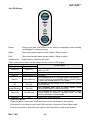
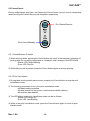
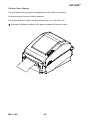
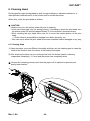
3-4 LED Display
Pause
: During print jobs, this button can be used to temporarily cease printing
and/or again to resume printing.
Status
: The current printer status can be viewed. (Refer to table)
Error
: The current printer status can be viewed. (Refer to table)
Feed/Cancel
: Paper feed or cancel the print job.
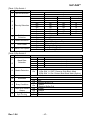
[The current printer status can be viewed via the printer’s LED display.]
LED Type
Printer Status
Status
Error
Normal status, on standby to receive date from the
Green On
Green On
host (e.g. PC)
Red On
Red Blinking
Paper cover opened
Red On
Orange Blinking No paper
Print stoppage due to TPH (print head) overheating
Red On
Green Blinking (Printing resumes automatically after a certain period
of time if the temperature of TPH drops)
On standby for user button input for automatic sensor
Off
Red On
level correction
Print stoppage after input of Pause button, Press
Green Blinking
Red On
Pause button again to resume printing
Print cancellation after input of Cancel button, Press
Green On
Red Blinking
Cancel button to return to standby mode, all data
received deleted in Cancel mode
Green On
Off
Power Save mode activated
* Power Save Mode*
When the printer is not used, the Power Save mode is activated to save power.
If the printer is not used for more than 180 seconds, it enters the Power Save mode.
If a print command or external input is given, the Power Save mode is deactivated.
Rev. 1.04
- 13 -