1
Operating Instructions
User Guide
For safe and correct use, be sure to read "Safety Information" before using the machine.
TABLE OF CONTENTS
How to Read This Manual.................................................................................................................................4
Introduction.....................................................................................................................................................4
Legal Prohibition.............................................................................................................................................4
Disclaimer........................................................................................................................................................4
About IP Address............................................................................................................................................5
Model-Specific Information...............................................................................................................................6
Important Safety Instructions
.........................................................................................................7
User Information on Electrical & Electronic Equipment...............................................................................7
Environmental Advice for Users....................................................................................................................7
Note for the Battery and/or Accumulator Symbol (For EU countries only)..............................................8
Important Safety Instructions
.........................................................................................................9
Notes on Lamp(s) Inside This Machine.........................................................................................................9
Notes to Users in the State of California......................................................................................................9
ENERGY STAR Program..................................................................................................................................10
1. Guide to the Machine
Guide to Components......................................................................................................................................13
Exterior..........................................................................................................................................................13
Interior...........................................................................................................................................................14
What is Smart Organizing Monitor?..............................................................................................................15
Configuring Network Settings.........................................................................................................................16
Configuring the IP Address Settings Using the Web Image Monitor.......................................................16
2. Loading Paper
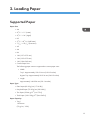
Supported Paper..............................................................................................................................................19
Non-Recommended Paper Types...................................................................................................................21
Print Area..........................................................................................................................................................22
Loading Paper..................................................................................................................................................23
Loading Paper into Tray 1...........................................................................................................................23
Loading Paper into Bypass Tray.................................................................................................................26
Specifying Paper Type and Paper Size Using Smart Organizing Monitor.............................................27
3. Printing Documents
Basic Operation...............................................................................................................................................29
Printing on Both Sides of Sheets..................................................................................................................30
Canceling a Print Job...................................................................................................................................31
1
If a Paper Mismatch Occurs............................................................................................................................32
Continuing Printing Using Mismatched Paper...........................................................................................32
Resetting the Print Job..................................................................................................................................32
4. Configuring the Machine Using Utilities
Using Web Image Monitor.............................................................................................................................33
Displaying Top Page...................................................................................................................................33
Changing the Interface Language..............................................................................................................34
Menu.............................................................................................................................................................34
Changing the Machine Settings.................................................................................................................36
Settings List....................................................................................................................................................36
Using Smart Organizing Monitor...................................................................................................................45
Checking the Status Information.................................................................................................................45
Configuring the Machine Settings..............................................................................................................46
Printing the Configuration Page..................................................................................................................47
Updating the Firmware................................................................................................................................47
5. Maintaining the Machine
Replacing the Print Cartridge..........................................................................................................................49
Cautions When Cleaning................................................................................................................................51
Cleaning the Inside of the Machine................................................................................................................52
6. Troubleshooting
Common Problems...........................................................................................................................................53
Paper Feed Problems.......................................................................................................................................54
Removing Printing Jams...............................................................................................................................55
Print Quality Problems......................................................................................................................................61
Checking the Condition of the Machine....................................................................................................61
Printer Problems................................................................................................................................................62
Print Positions Do Not Match Display Positions.........................................................................................63
Error and Status Messages Appear on the Smart Organizing Monitor......................................................64
7. Appendix
Notes About the Toner.....................................................................................................................................67
Moving and Transporting the Machine..........................................................................................................68
Disposal........................................................................................................................................................68
Where to Inquire..........................................................................................................................................68
2
Consumables....................................................................................................................................................69
Print Cartridge..............................................................................................................................................69
Specifications of the Machine.........................................................................................................................70
General Function Specifications.................................................................................................................70
Printer Function Specifications....................................................................................................................71
Trademarks.......................................................................................................................................................73
INDEX.............................................................................................................................................................75
3
How to Read This Manual
Introduction
This manual contains detailed instructions and notes on the operation and use of this machine. For your
safety and benefit, read this manual carefully before using the machine. Keep this manual in a handy
place for quick reference.
Legal Prohibition
Do not copy or print any item for which reproduction is prohibited by law.
Copying or printing the following items is generally prohibited by local law:
bank notes, revenue stamps, bonds, stock certificates, bank drafts, checks, passports, driver's licenses.
The preceding list is meant as a guide only and is not inclusive. We assume no responsibility for its
completeness or accuracy. If you have any questions concerning the legality of copying or printing
certain items, consult with your legal advisor.
Disclaimer
Contents of this manual are subject to change without prior notice.
To the maximum extent permitted by applicable laws, in no event will the manufacturer be liable for any
damages whatsoever arising out of failures of this machine, losses of the registered data, or the use or
non-use of this product and operation manuals provided with it.
Make sure that you always copy or have backups of the data registered in this machine. Documents or
data might be erased due to your operational errors or malfunctions of the machine.
In no event will the manufacturer be responsible for any documents created by you using this machine or
any results from the data executed by you.
For good output quality, the manufacturer recommends that you use genuine toner from the
manufacturer.
The manufacturer shall not be responsible for any damage or expense that might result from the use of
parts other than genuine parts from the manufacturer with your office products.
Two kinds of size notation are employed in this manual.
Some illustrations or explanations in this guide may differ from your product due to improvement or
change in the product.
4
About IP Address
In this manual, "IP address" covers both IPv4 and IPv6 environments. Read the instructions that are
relevant to the environment you are using.
5
Model-Specific Information
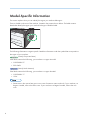
This section explains how you can identify the region your machine belongs to.
There is a label on the rear of the machine, located in the position shown below. The label contains
details that identify the region your machine belongs to. Read the label.
CTT110
The following information is region-specific. Read the information under the symbol that corresponds to
the region of your machine.
(mainly Europe and Asia)
If the label contains the following, your machine is a region A model:
• CODE XXXX -27
• 220-240V
(mainly North America)
If the label contains the following, your machine is a region B model:
• CODE XXXX -17
• 120V
• Dimensions in this manual are given in two units of measure: metric and inch. If your machine is a
Region A model, refer to the metric units. If your machine is a Region B model, refer to the inch
units.
6
Important Safety Instructions
User Information on Electrical & Electronic Equipment
Users in the countries where this symbol shown in this section has been specified in
national law on collection and treatment of E-waste
Our Products contain high quality components and are designed to facilitate recycling.
Our products or product packaging are marked with the symbol below.
The symbol indicates that the product must not be treated as municipal waste. It must be disposed of
separately via the appropriate return and collection systems available. By following these instructions
you ensure that this product is treated correctly and help to reduce potential impacts on the environment
and human health, which could otherwise result from inappropriate handling. Recycling of products
helps to conserve natural resources and protect the environment.
For more detailed information on collection and recycling systems for this product, please contact the
shop where you purchased it, your local dealer or sales/service representatives.
All Other Users
If you wish to discard this product, please contact your local authorities, the shop where you bought this
product, your local dealer or sales/service representatives.
Environmental Advice for Users
Users in the EU, Switzerland and Norway
Consumables yield
Please refer to either the User’s Manual for this information or the packaging of the consumable.
Recycled paper
The machine can use recycled paper which is produced in accordance with European standard
EN 12281:2002 or DIN 19309. For products using EP printing technology, the machine can print
7
on 64g/m2 paper, which contains less raw materials and represents a significant resource
reduction.
Duplex printing (if applicable)
Duplex printing enables both sides of a sheet of paper to be used. This saves paper and reduces
the size of printed documents so that fewer sheets are used. We recommend that this feature is
enabled whenever you print.
Toner and ink cartridge return program
Toner and ink cartridge for recycling will be accepted free of charge from users in accordance with
local regulations.
For details about the return program, please refer to the Web page below or consult your service
person.
https://www.ricoh-return.com/
Energy efficiency
The amount of electricity a machine consumes depends as much on its specifications as it does on
the way you use it. The machine is designed to allow you to reduce electricity costs by switching to
Ready mode after it prints the last page. If required, it can immediately print again from this mode.
If no additional prints are required and a specified period of time passes, the device switches to an
energy saving mode.
In these modes, the machine consumes less power (watts). If the machine is to print again, it needs
a little longer to return from an energy saving mode than from Ready mode.
For maximum energy savings, we recommend that the default setting for power management is
used.
Products that comply with the Energy Star requirement are always energy efficient.
Note for the Battery and/or Accumulator Symbol (For EU countries only)
In accordance with the Battery Directive 2006/66/EC Article 20 Information for end-users Annex II,
the above symbol is printed on batteries and accumulators.
This symbol means that in the European Union, used batteries and accumulators should be disposed of
separately from your household waste.
In the EU, there are separate collection systems for not only used electrical and electronic products but
also batteries and accumulators.
Please dispose of them correctly at your local community waste collection/recycling centre.
8
Important Safety Instructions
Notes on Lamp(s) Inside This Machine
Notes to Users in the State of California
Perchlorate Material - special handling may apply. See: www.dtsc.ca.gov/hazardouswaste/
perchlorate
9
ENERGY STAR Program
ENERGY STAR® Program Requirements for Imaging Equipment
The ENERGY STAR® Program Requirements for Imaging Equipment encourage energy conservation
by promoting energy efficient computers and other office equipment.
The program backs the development and dissemination of products that feature energy saving
functions.
It is an open program in which manufacturers participate voluntarily.
Targeted products are computers, monitors, printers, facsimiles, copiers, scanners, and multifunction
devices. Energy Star standards and logos are internationally uniform.
This machine is equipped with the following Energy Saver modes: Energy Saver mode 1 and Energy
Saver mode 2. The machine recovers from Energy Saver mode when it receives a print job, prints a
received fax, or when any key is pressed.
Energy Saver mode 1
This machine automatically enters Energy Saver mode 1 about 30 seconds after the last operation
is completed.
Energy Saver mode 2
This machine automatically enters Energy Saver mode 2 1 minute after the last operation is
completed.
Specifications
Energy Saver mode 1
10
Power Consumption*1
36.6 W or less
Default Interval
30 seconds
Recovery Time*1
10 seconds or less
Energy Saver mode 2
Power Consumption*1
3.1 W or less
Default Interval
1 minute
Recovery Time*1
17 seconds or less
*1 Recovery time and power consumption may differ depending on the conditions and environment of the
machine.
Recycled Paper
We recommend you to use environmentally friendly recycled paper.
Please contact your sales representative for recommended paper.
11
12
1. Guide to the Machine
Guide to Components
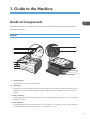
This section introduces the names of the various parts on the front and rear side of the machine and
outlines their functions.
Exterior
9
1
2
3
4
10
5
6
7
8
11
12
13
14
CTT108
1. [Job Reset] key
Press this key to cancel an ongoing print job.
2. [Start] key
Press this key to print a test page. (By holding down the key for two seconds, the network setting list can be
printed.) You can also use this key to print on the back of paper in duplex printing and to execute forced
printing.
3. Power Indicator
This indicator lights up blue when the machine is turned on. It flashes when a print job is received and while
printing is in progress.
4. Alert Indicator
This indicator lights up red when the machine runs out of paper or consumables, when the paper settings do
not match the settings specified by the driver, or when other errors occur.
13
1. Guide to the Machine
5. Stop Fences
Raise this fence to prevent paper from falling off.
6. Front Cover
Open this cover to replace consumables or clear a paper jam.
7. Bypass Tray
This tray can hold one sheet of plain paper.
8. Tray 1
This tray can hold up to 150 sheets of plain paper.
9. Power Switch
Use this switch to turn the power on or off.
10. Power Connector
Connect the power cord to the machine here. Insert the other end of the cable into a nearby wall outlet.
11. Rear Cover
Open this cover to deliver sheets face up or remove jammed paper.
12. USB Port
Use this port to connect the machine to a computer using a USB cable.
13. Ethernet Port
Use this port to connect the machine to network using an Ethernet cable.
14. Tray Cover
Attach this cover when you extend the tray.
Interior
1
CTT065
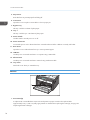
1. Print Cartridge
A replacement consumable that is required to make prints on paper. It needs to be replaced after
approximately every 1,500 or 2,600 pages printed. For details about replacing the cartridge, see page 49
"Replacing the Print Cartridge".
14
What is Smart Organizing Monitor?
What is Smart Organizing Monitor?
Install this utility on your computer from the included CD-ROM before using it.
Smart Organizing Monitor provides the following functions:
• Displays the status of the machine
Displays paper jam messages and other error messages.
• Paper size and type settings
Displays the settings for paper sizes or types available on this machine.
• Print test and configuration pages
Prints List/Report to check the list of settings for this machine and other information.
• Modify the IPv4 Address
Use to specify the IPv4 address.
• Modify the system settings
Use to change custom paper size settings and other settings on this machine.
• Modify the printer settings
Use to change this machine's print settings such as [Error Skip:] and [I/O Time Out:].
For details about basic instructions on how to use Smart Organizing Monitor, see page 33
"Configuring the Machine Using Utilities".
15
1. Guide to the Machine
Configuring Network Settings
This section explains how to configure network settings.
• You can configure the IP address easily by installing the driver using Quick Install for networks in
the CD-ROM menu. For details about installing the driver, see the Software Installation Guide.
Configuring the IP Address Settings Using the Web Image Monitor
Setting the machine to receive an IPv6 address automatically
• A DHCP server is required on the network for the machine to receive an IPv6 address
automatically.
Check that [IPv6] and [DHCPv6] are set to [Enable] in [IPv6] in Web Image Monitor. If [DHCPv6] is set
to [Enable], the machine can automatically obtain the IP address.
Assigning the machine's IPv6 address manually
• The IPv6 address assigned to the machine must not be used by any other device on the same
network.
1. Launch the Web browser.
2. In the address bar, enter "http://(machine's IP address)/".
3. Click [Log in].
4. Enter the administrator password, and then click [Log in].
If you are logging in for the first time, enter "admin133" as the password.
5. Click [IPv6].
6. Set [IPv6] to [Enable].
7. Set [DHCPv6] to [Disable].
8. Specify the IP address in [Manual Configuration Address].
9. Specify other settings if necessary.
10. Click [OK].
16
Configuring Network Settings
• For details about configuring the IPv4 address, see the Software Installation Guide.
17
1. Guide to the Machine
18
2. Loading Paper
Supported Paper
Paper Size
• A4
• 81/2 " × 11 " (Letter)
• 81/2 " × 14 " (Legal)
• B5
• 51/2 " × 81/2 " (Half Letter)
• 71/4 " × 101/2 " (Executive)
• A5
• A6
• B6
• 16K (197 × 273 mm)
• 16K (195 × 270 mm)
• 16K (184 × 260 mm)
• Custom Paper Size
The following paper sizes are supported as custom paper sizes:
• Width
Tray1: Approximately 100-216 mm (3.9-8.5 inches)
Bypass Tray: Approximately 90-216 mm (3.6-8.5 inches)
• Length
Approximately 148-356 mm (5.8-14 inches)
Paper Type
• Plain Paper (65-99 g/m2 (17-26 lb.))
• Recycled Paper (75-90 g/m2 (20-24 lb.))
• Thin Paper (52-64 g/m2 (14-17 lb.))
• Thick Paper (100-130 g/m2 (26.6-34 lb.))
Paper Capacity
• Tray1
150 sheets
(70 g/m2, 19 lb.)
19
2. Loading Paper
• Bypass Tray
1 sheets
(70 g/m2, 19 lb.)
20
Non-Recommended Paper Types
Non-Recommended Paper Types
Do not use the following types of paper:
• Ink-jet printer paper
• GelJet special paper
• Bent, folded, or creased paper
• Curled or twisted paper
• Wrinkled paper
• Damp paper
• Dirty or damaged paper
• Paper that is dry enough to emit static electricity
• Paper that has already been printed onto, except a preprinted letterhead paper.
Malfunctions are especially likely when using paper printed on by other than a laser printer
(e.g.monochrome and color copiers, ink-jet printers, etc.)
• Special paper, such as thermal paper and carbon paper
• Paper weighing heavier or lighter than the limit
• Paper with windows, holes, perforations, cutouts, or embossing
• Adhesive label paper on which glue or base paper is exposed
• Paper with clips or staples
• When loading paper, take care not to touch the surface of the paper.
• Even if paper is adequate for the machine, poorly stored paper can cause paper misfeeds, print
quality degradation, or malfunctions.
21
2. Loading Paper
Print Area
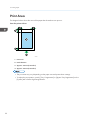
The diagram below shows the area of the paper that the machine can print on.
From the printer driver
4
4
3
1
3
2
CHZ904
1. Print area
2. Feed direction
3. Approx. 4.2 mm (0.2 inches)
4. Approx. 4.2 mm (0.2 inches)
• The print area may vary depending on the paper size and printer driver settings.
• To adjust the print position, specify [Tray1: Registration] or [Bypass Tray: Registration] on the
[System] tab in Smart Organizing Monitor.
22
Loading Paper
Loading Paper
Load a stack of paper for printing in the input tray.
• When loading paper, be sure to configure the paper size and paper type for the bypass tray and
Tray 1. When printing a document, specify the paper size and paper type and select the paper
tray in the printer driver so that the settings configured when paper is loaded can be used for
printing.
• If you print test pages when the bypass tray is loaded, the paper in the bypass tray is fed first.
• Do not load paper in the bypass tray when the machine is warming up.
• Do not load paper in the bypass tray when Energy Saver mode is enabled.
Loading Paper into Tray 1
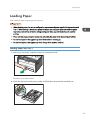
1. Pull Tray 1 out slowly, and then remove it using both hands.
CTT062
Place the tray on a flat surface.
2. Pinch the clips on the side paper guides and slide them to match the standard size.
CTT073
23
2. Loading Paper
3. Pinch the end paper guide and slide it inward to match the standard size.
CTT074
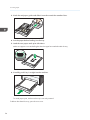
4. Fan the paper before loading it in the tray.
5. Load the new paper stack print side down.
Make sure paper is not stacked higher than the upper limit marked inside the tray.
CTT075
6. Carefully push Tray 1 straight into the machine.
CTT029
To avoid paper jams, make sure the tray is securely inserted.
To deliver the sheets face up, open the rear cover.
24
Loading Paper
CTT094
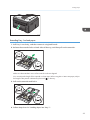
Extending Tray 1 to load paper
1. Pull Tray 1 out slowly, and then remove it using both hands.
2. Release the extender locks on both sides of the tray, and then pull out the extender.
CTT077
Make sure the extender's inner surface and the scale are aligned.
You can adjust the length of the extender in three steps. When using A4 or Letter size paper, adjust
the length to the position indicated by the mark " " in the tray.
3. Pull out the extender and lock it.
CTT076
4. Follow Steps 2 to 6 in "Loading Paper into Tray 1".
25
2. Loading Paper
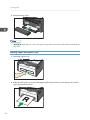
5. Attach the tray cover.
CTT095
•
Legal paper or custom-size paper longer than A4 must be loaded without attaching the
tray cover.
Loading Paper into Bypass Tray
1. Open the bypass tray.
CTT063
2. Slide the side guides outward, load paper with the print side up, and then push in until it
stops against the machine.
CTT032
26
Loading Paper
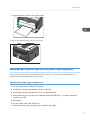
3. Adjust the side guides to the paper width.
CTT033
To deliver the sheets face up, open the rear cover.
CTT094
Specifying Paper Type and Paper Size Using Smart Organizing Monitor
The procedure in this section is an example based on Windows 7. The actual procedure may vary
depending on the operating system you are using.
Specifying the paper type and paper size
1. On the [Start] menu, click [All Programs].
2. Click [Smart Organizing Monitor for SP xxx Series].
3. Click [Smart Organizing Monitor for SP xxx Series Status].
4. If the machine you are using is not selected, click [Select Device...], and then select the
machine's model.
5. Click [OK].
6. On the [Status] tab, click [Change...].
7. Select the paper type and paper size, and then click [OK].
27
2. Loading Paper
8. Click [Close].
Changing the custom paper size
1. On the [Start] menu, click [All Programs].
2. Click [Smart Organizing Monitor for SP xxx Series].
3. Click [Smart Organizing Monitor for SP xxx Series Status].
4. If the machine you are using is not selected, click [Select Device...], and then select the
machine's model.
5. Click [OK].
6. On the [User Tool] tab, click [Printer Configuration].
7. On the [System] tab, select [mm] or [inch] in the [Measurement Unit:] list.
8. In the [Horizontal: (100 to 216 mm)] box, enter the width.
9. In the [Vertical: (148 to 356 mm)] box, enter the length.
10. Click [OK].
11. Click [Close].
• You cannot specify the settings of the paper in the bypass tray via Smart Organizing Monitor.
28
3. Printing Documents
Basic Operation
Use the printer driver to print a document from your computer.
1. After creating a document, open the [Printing Preferences] dialog box in the document's
native application.
2. Change any print settings if necessary.
The following print settings can be specified using the printer driver:
• Printing multiple pages on a sheet
• Splitting a single page across multiple sheets
• Printing on both sides of sheets
• Not having blank pages printed
• Having prints sorted
• Saving printer driver settings as a file
• Recalling and deleting saved printer properties settings
• Printing on a custom size paper
• Printing a large paper size document on smaller size paper
• Reducing and enlarging a document size
• Changing the print resolution
• Saving on toner when printing
• Changing the dithering pattern
• Having text stamped on prints
For details about each setting items, click [Help].
29
3. Printing Documents
3. When setting changes are completed, click [OK].
4. Print the document using the print function in the document's native application.
• If a paper jam occurs, printing stops halfway. Open the front cover, remove the print cartridge, and
then remove the jammed paper. If the paper cannot be removed in this way, remove it by opening
the fusing cover. Printing will resume automatically once the cover is closed.
Printing on Both Sides of Sheets
• This function cannot be available with the bypass tray.
1. After creating a document, open the [Printing Preferences] dialog box in the document's
native application.
2. On the [Setup] tab, in the [Duplex:] list box, select how you want to open the bound
output.
3. After making any additional settings, click [OK].
4. Start printing.
The machine prints only the one sides of pages first, and then displays on Smart Organizing
Monitor screen a message to reload the outputs turned over.
5. Take out all of the prints from the output tray and place them in Tray 1.
To print on the reverse side of the prints, turn them over so that the blank side faces down and
place them in Tray 1.
Portrait
CTT009
30
Basic Operation
Landscape
CTT010
6. Press the [Start] key.
• If the rear cover is open, the paper is delivered face up from the rear. Rearrange the printed sheets
in the correct order.
Canceling a Print Job
You can cancel print jobs using either the machine's control panel or your computer, depending on the
status of the job.
Canceling a print job before printing has started
1. Double-click the printer icon on the task tray of your computer.
2. Select the print job you want to cancel, click the [Document] menu, and then click
[Cancel].
• If you cancel a print job that has already been processed, printing may continue for a few pages
before being canceled.
• It may take a while to cancel a large print job.
Canceling a print job while printing
1. Press the [Job Reset] key.
31
3. Printing Documents
If a Paper Mismatch Occurs
If the paper size or type does not match the print job's settings, the machine reports an error. There are
two ways to resolve this error:
Continue printing using mismatched paper
Use the form-feed function to ignore the error and print using mismatched paper.
Reset the print job
Cancel printing.
Continuing Printing Using Mismatched Paper
If the paper is too small for the print job, the printed image will be cropped.
1. If the error message is displayed on Smart Organizing Monitor, press the [Start] key.
Resetting the Print Job
1. If the error message is displayed on Smart Organizing Monitor, press the [Job Reset] key.
32
4. Configuring the Machine Using
Utilities
Using Web Image Monitor
Available operations
The following operations can be performed remotely using Web Image Monitor on a computer:
• Displaying the machine’s status
• Configuring the network settings
• Setting the administrator password
• Resetting the machine's configuration to the factory default
Supported Web browsers
• Internet Explorer 6 or later
• Firefox 3.0 or later
Displaying Top Page
When you access the machine using Web Image Monitor, the top page appears in your browser's
window.
1. Launch the Web browser.
2. In the Web browser’s address bar, enter "http://(machine’s IP address)/" to access the
machine.
If a DNS server is used and the machine’s host name has been specified, you can enter the host
name instead of the IP address.
The top page of Web Image Monitor appears.
Top page
Every Web Image Monitor page is divided into the following areas:
33
4. Configuring the Machine Using Utilities
2
1
3
CTT184
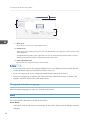
1. Menu area
If you select a menu item, its content will be shown.
2. Header area
The dialog box for switching to the user mode and administrator mode appears, and each mode's menu
will be displayed.
Click [Refresh] button at the upper right in the work area to update the machine information. Click the
Web browser's [Refresh] button to refresh the entire browser screen.
3. Basic Information area
Displays the basic information about of the machine.
• If you use an older version of a supported Web browser or the Web browser has JavaScript and
cookies disabled, display and operation problems may occur.
• If you are using a proxy server, configure the Web browser settings as necessary.
• The previous page may not appear even if the back button of the Web browser is clicked. If this
happens, click the refresh button of the Web browser.
Changing the Interface Language
Select the display language you want use, and then click [Switch].
Menu
This section explains the items in the Web browser menu.
Guest Mode
In the guest mode, machine status, and settings can be viewed, but the machine settings cannot be
changed.
34
Using Web Image Monitor
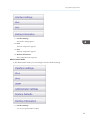
1. Interface Settings
The interface setting appears.
2. IPv4
The IPv4 configuration appears.
3. IPv6
The IPv6 configuration appears.
4. Machine Information
The machine information appears.
Administrator Mode
In the administrator mode, you can configure various machine settings.
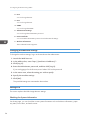
1. Interface Settings
You can change the interface setting.
35
4. Configuring the Machine Using Utilities
2. IPv4
You can change the IPv4.
3. IPv6
You can change the IPv6.
4. SNMP
You can change the SNMP.
5. Administrator Settings
You can change the administrator password.
6. Restore Defaults
You can reset the administrator password and other network settings.
7. Machine Information
The machine information appears.
Changing the Machine Settings
To change the machine settings, log in to the machine as the administrator.
1. Launch the Web browser.
2. In the address bar, enter "http://(machine's IP address)/".
3. Click [Log in].
4. Enter the administrator password, and then click [Log in].
If you are logging in for the first time, enter "admin133" as the password.
5. In the menu area, select the setting you wish to specify.
6. Specify the machine settings.
7. Click [OK].
The specified settings are transmitted to the machine.
Settings List
This section explains the Web Image Monitor settings.
Checking the System Information
On the top page, you can check the current system information such as the device information, paper
tray status, toner status, and total counter.
36
Using Web Image Monitor
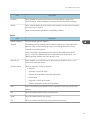
Item
Description
Status
Displays the icon indicating the device status.
Toner
Displays the remaining toner level.
Total Counter
Displays the total counter.
Paper
Displays the size and type of paper loaded in Tray 1 and the bypass tray.
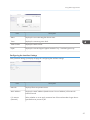
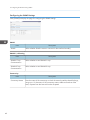
Configuring the Interface Settings
Click [Interface Settings] to display the page for configuring the interface settings.
Item
Description
Network
Displays Ethernet operation status.
MAC Address
Displays the MAC address (Media Access Control Address) of the network
interface board.
I/O timeout
(Network)
Select whether or not to apply a timeout limit if the machine takes longer than a
specified time to process a job.
37
4. Configuring the Machine Using Utilities
Item
Ethernet Speed
Description
Ethernet communication speed. For normal use, select Auto Select. This allows
the device to select the optimum speed.
If communication with the device fails, select 10Mbps Full Duplex, 10Mbps
Half Duplex, 100Mbps Full Duplex, or 100Mbps Half Duplex.
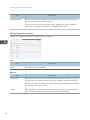
Configuring the IPv4 settings
Click [IPv4] to display the page for configuring the IPv4 settings.
IPv4
Item
IPv4
Description
Indicates that IPv4 is enabled.
Ethernet
Item
38
Description
Host Name
Enter the host name you want to set for the network interface board, using up to
63 characters. The default is RNP, followed by the MAC address of the active
interface board. If you change the name to other than the default, the new name
cannot begin with "RNP" or "rnp".
DHCP
Select [Enable] to automatically configure the network settings using the DHCP
server. Select [Disable] to manually configure the network settings.
Using Web Image Monitor
Item
Domain Name
Description
Specify whether to use the domain name obtained from the DHCP server, or the
domain name set for the device.
• "Auto-Obtain (DHCP)" selected
When using DHCP, the domain name obtained from the DHCP server is
used. If the domain name cannot be obtained from the DHCP server, the
domain name set for the device is used.
• "Specify" selected
The domain name set for the device is used. Enter the domain name, using
up to 63 characters. Spaces cannot be used.
IPv4 Address
Enter the IPv4 address of the network interface board.
At DHCP operation, the address obtained from the DHCP server is used.
Subnet Mask
Enter the sub-net mask of the network interface board. The sub-net mask is a
part of the IP address used as a network address.
When using DHCP, the sub-net mask obtained from the DHCP server is used.
DDNS
Select whether DDNS (Dynamic DNS) name resolution for the network interface
board is active or inactive.
When active, the DNS database is immediately updated.
Details
Item
Default Gateway
Address
Description
Enter the default gateway address.
The default gateway address is the IP address of the host or router used as the
gateway when communicating (printing or exchanging information) with a
computer on another network.
When using DHCP, the default gateway address obtained from the DHCP
server is used. If the address cannot be obtained from the DHCP server, the
default gateway address set for the device is used.
DNS Server
Select whether to use the DNS server obtained from the DHCP server, or the
DNS server set for the device.
LPR
Select to enable network printing using LPR/LPD.
RAW
Select to enable network raw printing.
IPP
Select to enable network printing using Internet Print Protocol.
39
4. Configuring the Machine Using Utilities
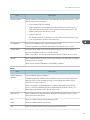
Configuring the IPv6 settings
Click [IPv6] to display the page for configuring the IPv6 settings.
IPv6
Item
IPv6
Description
Select whether IPv6 is active or inactive.
Ethernet
Item
Description
Host Name
Enter the host name you want to set for the network interface board, using up to
63 characters. The default is RNP, followed by the MAC address of the active
interface board. If you change the name to other than the default, the new name
cannot begin with "RNP" or "rnp".
Domain Name
Enter the name of the domain to which the device belongs, using up to 63
alphanumeric characters.
Link-local Address
Displays the link-local address of the network interface board.
The link-local address applies only within the local network (local segment) and
begins with "fe80::", followed by an identifier generated from the MAC address
of the active interface board.
Stateless Address
Displays the stateless address for router.
Manual
Configuration
Address
In the left box, enter the IPv6 address assigned for the network interface board.
In the right box, enter the prefix length of the IPv6 address, using a value
between 0 and 128. The default is 64.
• The following addresses cannot be set:
Link-local addresses, multicast addresses, loopback addresses, IPv4compatible addresses, and IPv4-mapped addresses
40
Using Web Image Monitor
Item
Description
DHCPv6
Select [Enable] to use the DHCPv6 server to automatically configure the
network settings. Select [Disable] to manually configure the network settings.
DDNS
Select whether DDNS (Dynamic DNS) name resolution for the network interface
board is active or inactive.
When active, the DNS database is immediately updated.
Details
Item
Default Gateway
Address
Description
Enter the default gateway address.
The default gateway address is the IP address of the host or router used as the
gateway when communicating (printing or exchanging information) with a
computer on another network.
When using DHCP, the default gateway address obtained from the DHCP
server is used. If the address cannot be obtained from the DHCP server, the
default gateway address set for the device is used.
DNS Server
Select whether to use the DNS server obtained from the DHCP server, or the
DNS server set for the device.
DHCPv6 Mode
Select an operation mode for DHCPv6.
• DHCPv6
Operates in DHCPv6 mode.
Obtains the IPv6 address and other parameters.
• DHCPv6-lite
Operates in DHCPv6-lite mode.
Obtains parameters except the IPv6 address.
IAID
IAID is ID to identity IPv6 address and it is needed for acquiring reserved IPv6
address.
LPR
Select to enable network printing using LPR/LPD.
RAW
Select to enable network raw printing.
IPP
Select to enable network printing using Internet Print Protocol.
41
4. Configuring the Machine Using Utilities
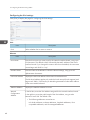
Configuring the SNMP Settings
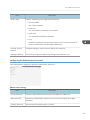
Click [SNMP] to display the page for configuring the SNMP settings.
SNMP
Item
SNMP
Description
Select whether SNMP is active or inactive for the interface board(s).
SNMPv1,v2 Setting
Item
Description
SNMPv1 Trap
Communication
Select whether to send SNMPv1 trap.
SNMPv2 Trap
Communication
Select whether to send SNMPv2 trap.
Community
42
Item
Description
Community Name
Enter the name of the community to which the network interface board belongs,
using up to 15 characters. If the community name is different from that of the
hosts, requests from the hosts will not be accepted.
Using Web Image Monitor
Item
Access Type
Description
In the list, select the access rights to the community.
• Not Accessible
No access permitted.
• read-only
You can read the information, but not edit it.
• read-write
You can read and edit the information.
• trap
Notifies the manager with information about errors. Enter the recipient of
the error notification in the Manager Address box.
Protocol, Active/
Inactive
Configure settings for each protocol used by the community.
Manager Address
Enter the host computer's address according to the protocol in use.
Configuring the Administrator Password
Click [Administrator Settings] to specify the administrator password.
Administrator Settings
Item
Description
Current Password
Enter the current administrator password. The default is "admin133".
New Password
Enter the new administrator password. You can enter it using three to eight
characters.
Confirm Password
Enter the same password again, to confirm.
43
4. Configuring the Machine Using Utilities
Resetting the Machine’s Settings
Click [Restore Defaults] to reset the network settings and administrator password.
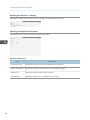
Checking the Machine Information
Click [Machine Information] to display machine information.
Machine Information
Item
44
Description
Firmware Version
Displays the version of firmware installed on the machine.
Engine FW Version
Displays the version of the firmware for the machine engine.
Machine ID
Displays the serial number of the machine.
Total Memory
Displays the total memory installed in the machine.
Using Smart Organizing Monitor
Using Smart Organizing Monitor
• To use Smart Organizing Monitor, install the printer driver.
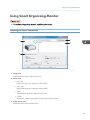
Checking the Status Information
1
3
4
2
CTT114
1. Image area
Displays the status of this machine with an icon.
2. Status area
• Paper Size
Displays the paper size configured on the machine.
• Paper Type
Displays the paper type configured on the machine.
• Toner
The remaining toner level is displayed in ten levels.
• Counter
Displays the number of pages that have been printed by the machine.
3. Select Device area
Displays the name of the selected model.
45
4. Configuring the Machine Using Utilities
4. Message area
Displays the status of this machine with a message.
For details about error messages, see page 64 "Error and Status Messages Appear on the Smart
Organizing Monitor".
Configuring the Machine Settings
Smart Organizing Monitor is used to modify the machine’s settings.
1. On the [Start] menu, click [All Programs].
2. Click [Smart Organizing Monitor for SP xxx Series].
3. Click [Smart Organizing Monitor for SP xxx Series Status].
4. If the machine you are using is not selected, click [Select Device...], and then select the
machine's model.
5. Click [OK].
6. On the [User Tool] tab, click [Printer Configuration].
7. Change the settings if necessary.
8. Click [OK].
9. Click [Close].
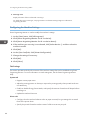
Tab Settings
This section provides a tab-by-tab overview of the machine settings that can be modified using Smart
Organizing Monitor. For more information on each setting item, see the Smart Organizing Monitor
Help.
System tab
• Register custom paper sizes.
• Adjust the printing position or density to improve the printing quality when printed results are
not satisfactory.
• Enable or disable Energy Saver Mode, and specify the amount of time that will elapse before
switching to it.
• Update the machine firmware.
Printer tab
• Configure how the machine behaves when its paper size and/or type settings do not match
those of the printer driver.
• Specify the period of time the machine waits if it fails to receive a print job.
46
Using Smart Organizing Monitor
Printing the Configuration Page
• When printing the test page, set the paper size to A4 or Letter. When printing other reports, set the
paper size to A4, Letter, or Legal.
1. On the [Start] menu, click [All Programs].
2. Click [Smart Organizing Monitor for SP xxx Series].
3. Click [Smart Organizing Monitor for SP xxx Series Status].
4. If the machine you are using is not selected, click [Select Device...], and then select the
machine's model.
5. Click [OK].
6. On the [User Tool] tab, select [Test Page] or [Configuration Page] in the [List / Test:] list.
7. Click [Print].
Updating the Firmware
• In no event shall the company be held liable to customers for damages of any kind resulting from
use or loss of use of this software.
• The company shall also not be held liable for any disputes between the customer and third parties
resulting from any use or loss of use of this software.
• To make sure that a firmware update has successfully completed, print the configuration page
before and after the update.
• Make sure to never disconnect the USB cable or Ethernet cable during a firmware update.
• Disconnect any unnecessary cables from the machine when running a firmware update.
• If necessary, modify power management settings on your computer in advance so that the
computer will not enter standby or sleep mode during a firmware update.
• Download the firmware from the manufacturer's Web site.
To update the firmware, use the Smart Organizing Monitor from Windows.
1. On the [Start] menu, click [All Programs].
2. Click [Smart Organizing Monitor for SP xxx Series].
3. Click [Smart Organizing Monitor for SP xxx Series Status].
4. If the machine you are using is not selected, click [Select Device...], and then select the
machine's model.
5. Click [OK].
47
4. Configuring the Machine Using Utilities
6. On the [User Tool] tab, click [Printer Configuration].
7. On the [System] tab, click [Printer Firmware Update...].
8. Click [OK].
9. Specify the location of the DWN file, and then click [Open].
10. After a message is displayed on the Smart Organizing Monitor to indicate that the
firmware update has completed, turn the machine's power Off and then On again.
48
5. Maintaining the Machine
Replacing the Print Cartridge
• Store print cartridges in a cool dark place.
• Actual printable numbers vary depending on image volume and density, number of pages printed
at a time, paper type and size, and environmental conditions such as temperature and humidity.
Toner quality degrades over time.
• For good print quality, the manufacturer recommends that you use genuine toner from the
manufacturer.
• The manufacturer shall not be responsible for any damage or expense that might result from the use
of parts other than genuine parts from the manufacturer with your office products.
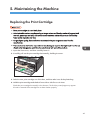
1. Open the front cover, and then carefully lower it.
2. Carefully pull out the print cartridge horizontally, holding its center.
CTT045
3. Take the new print cartridge out of the box, and then take it out of the plastic bag.
4. Hold the print cartridge and shake it from side to side five or six times.
Shake the print cartridge horizontally in the direction. The first few printed pages may appear
blurred or smeared if the cartridge has not been shaken properly.
49
5. Maintaining the Machine
5. Slide the print cartridge in horizontally, and then slowly push it in all the way. Finally,
push the cartridge down until it clicks into place.
CTT048
6. Carefully push up the front cover until it closes.
50
Cautions When Cleaning
Cautions When Cleaning
Clean the machine periodically to maintain high print quality.
Dry wipe the exterior with a soft cloth. If dry wiping is not sufficient, wipe with a soft, damp cloth that has
been wrung out thoroughly. If you still cannot remove the stain or grime, use a neutral detergent, wipe
over the area with a thoroughly-wrung damp cloth, and then dry wipe the area and allow it to dry.
• To avoid deformation, discoloration, or cracking, do not use volatile chemicals, such as benzine
and thinner, or spray insecticide on the machine.
• If there is dust or grime inside the machine, wipe with a clean, dry cloth.
• You must disconnect the plug from the wall outlet at least once a year. Clean away any dust and
grime from the plug and outlet before reconnecting. Accumulated dust and grime pose a fire
hazard.
• Do not allow paper clips, staples, or other small objects to fall inside the machine.
51
5. Maintaining the Machine
Cleaning the Inside of the Machine
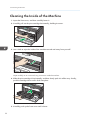
1. Open the front cover, and then carefully lower it.
2. Carefully pull out the print cartridge horizontally, holding its center.
CTT045
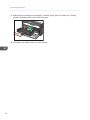
3. Use a cloth to wipe the inside of the machine toward and away from yourself.
CTT176
Wipe carefully so as not to touch any protrusions inside the machine.
4. Slide the print cartridge in horizontally, and then slowly push it in all the way. Finally,
push the cartridge down until it clicks into place.
CTT048
5. Carefully push up the front cover until it closes.
52
6. Troubleshooting
Common Problems
This section describes how to troubleshoot common problems that may occur while operating the
machine.
Problem
Possible cause
Solution
• Make sure that the power
plug is firmly inserted into
the wall outlet.
The machine does not turn on.
The power cord is not
connected properly.
Pages are not printed.
The USB cable or Ethernet
Reconnect the USB cable or
cable is not connected correctly. Ethernet cable.
Strange noise is heard.
The consumable is not properly
installed.
• Make sure that the wall
outlet is not defective by
connecting another
working device.
Check that the consumable is
properly installed.
• If any of these problems persist, turn off the power, pull out the power cord, and contact your sales
or service representative.
53
6. Troubleshooting
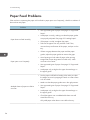
Paper Feed Problems
If the machine is operating but paper will not feed or paper jams occur frequently, check the condition of
the machine and paper.
Problem
Solution
• Use supported types of paper. See page 19 "Supported
Paper".
Paper does not feed smoothly.
• Load paper correctly, making sure that the paper guides
are properly adjusted. See page 23 "Loading Paper".
• If the paper is curled, straighten the paper.
• Take out the paper from tray and fan it well. Then,
reverse the top and bottom of the paper, and put it in the
tray.
• If there are gaps between the paper and the paper
guides, adjust the paper guides to remove the gaps.
Paper jams occur frequently.
• Avoid printing on both sides of paper when printing
images that contain large areas of solid color, which
consume a lot of toner.
• Use supported types of paper. See page 19 "Supported
Paper".
• Load paper only as high as the upper limit markings on
the paper guide.
• Fan the paper well before loading. Also make sure that
the edges are even by tapping the stack on a flat surface
such as a desk.
• Make sure that the paper guides are in the right position.
Multiple sheets of paper are fed at
one time.
• Use supported types of paper. See page 19 "Supported
Paper".
• Load paper only as high as the upper limit markings on
the paper guide.
• Check that paper was not added while there was still
some left in the tray.
Only add paper when there is none left in the tray.
54
Paper Feed Problems
Problem
Solution
• Paper is damp. Use paper that has been stored properly.
Paper gets wrinkles.
The printed paper is curled.
• Paper is too thin. See page 19 "Supported Paper".
• If there are gaps between the paper and the paper
guides, adjust the paper guides to remove the gaps.
• Load the paper upside down in the input tray.
• Paper is damp. Use paper that has been stored properly.
Images are printed diagonally to the
pages.
If there are gaps between the paper and the paper guides,
adjust the paper guides to remove the gaps.
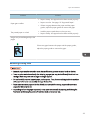
CER091
Removing Printing Jams
• Jammed paper may be covered in toner. Be careful not to get toner on your hands or clothes.
• Toner on prints made immediately after clearing a paper jam may be insufficiently fused and can
smudge. Make test prints until smudges no longer appear.
• Do not forcefully remove jammed paper, as it may tear. Torn pieces remaining inside the machine
will cause further jams and possibly damage the machine.
• Paper jams can cause pages to be lost. Check your print job for missing pages and reprint any
pages that did not print out.
• Depending on how the paper is jammed, it may eject automatically by opening and closing the
front cover and turning the power off and then back on twice in a row.
55
6. Troubleshooting
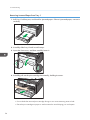
Removing Jammed Paper from Tray 1
1. Pull Tray 1 halfway out, and check for jammed paper. If there is jammed paper, remove it
carefully.
CTT030
2. Carefully slide Tray 1 back in until it stops.
3. Open the front cover, and then carefully lower it.
CTT054
4. Carefully pull out the print cartridge horizontally, holding its center.
CTT045
• Do not shake the removed print cartridge. Doing so can cause remaining toner to leak.
• Place the print cartridge on paper or similar material to avoid dirtying your workspace.
56
Paper Feed Problems
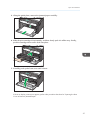
5. Lifting the guide plate, remove the jammed paper carefully.
CTT046
6. Slide the print cartridge in horizontally, and then slowly push it in all the way. Finally,
push the cartridge down until it clicks into place.
CTT048
7. Carefully push up the front cover until it closes.
CTT055
If the error display continues to appear, perform the procedure described in "Opening the Rear
Cover to Remove Jammed Paper".
57
6. Troubleshooting
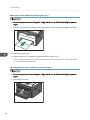
Removing Jammed Paper from the Bypass Tray
• Since the temperature around the guide is high, wait for it to cool before checking for jammed
paper.
1. If paper is jammed in the bypass tray input area, remove the jammed paper carefully.
CTT034
2. Close the bypass tray.
3. Follow Steps 3 to 7 in "Removing Jammed Paper from Tray 1".
If the error display continues to appear, perform the procedure described in "Opening the Rear
Cover to Remove Jammed Paper".
Opening the Rear Cover to Remove Jammed Paper
• Since the temperature around the guide is high, wait for it to cool before checking for jammed
paper.
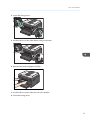
1. Open the rear cover.
CTT041
58
Paper Feed Problems
2. Open the fusing cover.
CTT079
3. Push the levers on the sides down with your thumbs.
CTT080
4. Remove the jammed paper carefully.
CTT066
5. Push the levers on the sides up with your thumbs.
6. Close the fusing cover.
59
6. Troubleshooting
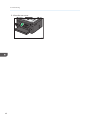
7. Close the rear cover.
CTT044
60
Print Quality Problems
Print Quality Problems
Checking the Condition of the Machine
If there is a problem with the quality of printing, first check the condition of the machine.
Possible Cause
Solution
There is a problem with the
machine's location.
Make sure that the machine is on a level surface. Place the
machine where it will not be subject to vibration or shock.
Unsupported types of paper is used.
Make sure that the paper being used is supported by the
machine. See page 19 "Supported Paper".
The paper type setting is incorrect.
Make sure that the paper type setting of the printer driver
matches the type of paper loaded. See page 19 "Supported
Paper".
A non-genuine print cartridges is
being used.
Non-genuine print cartridges reduce print quality and can
cause malfunctions. Use genuine print cartridges only. See
page 69 "Consumables".
An old print cartridges is being used.
Print cartridges should be opened before their expiration date
and used within six months of being opened.
The machine is dirty.
See page 49 "Maintaining the Machine", and clean the
machine as required.
61
6. Troubleshooting
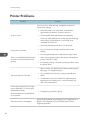
Printer Problems
Problem
Solution
If an error occurs when printing, change the computer or
printer driver settings.
• Check the printer icon name does not exceed 32
alphanumeric characters. If it does, shorten it.
An error occurs.
• Check whether other applications are operating.
Close any other applications, as they may be interfering
with printing. If the problem is not resolved, close
unneeded processes too.
• Check that the latest printer driver is being used.
A print job is canceled.
There is considerable delay between
the print start command and actual
printing.
• Set I/O Timeout to a larger value than the current
settings.
• Processing time depends on data volume. High volume
data, such as graphics-heavy documents, take longer to
process. Wait for a while.
• To speed up printing, reduce the printing resolution using
the printer driver.
• Paper is damp. Use paper that has been stored properly.
See page 19 "Supported Paper".
The whole printout is blurred.
• If you enable [Toner Save:], printing is generally less
dense.
• Condensation may have collected. If rapid change in
temperature or humidity occurs, use this machine only
after it has acclimatized.
Cannot print properly when using a
certain application, or cannot print
image data properly.
• Change the print quality settings.
Some characters are printed faintly
or not printed.
The print position is misaligned.
62
Adjust the print position by specifying [Tray1: Registration] or
[Bypass Tray: Registration] on the [System] tab in Smart
Organizing Monitor.
Printer Problems
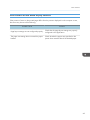
Print Positions Do Not Match Display Positions
If the position of items on the printed page differs from the position displayed on the computer screen,
the cause may be one of the following.
Possible Cause
Solution
Page layout settings are not configured properly.
Check that the page layout settings are properly
configured in the application.
The paper size setting does not match the paper
loaded.
Check whether the paper size specified on the
printer driver matches that of the loaded paper.
63
6. Troubleshooting
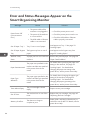
Error and Status Messages Appear on the
Smart Organizing Monitor
Message
Printer Power Off
(Communication
Error)
64
Causes
• The power cable of the
machine is not plugged in.
• The power of the machine
is not turned ON.
• The USB cable or Ethernet
cable is not connected.
Solutions
• Check the printer power cord.
• Check the printer power switch is on.
• Check the USB cable or Ethernet
cable is properly connected.
Out of Paper: Tray 1
Tray 1 has run out of paper.
Load paper into Tray 1. See page 23
"Loading Paper".
Out of Paper: Bypass
Tray
The bypass tray has run out of
paper.
Load paper into the bypass tray. See
page 23 "Loading Paper".
Misfeed: Inner/
Outer
A paper jam has occurred in the
machine.
Remove the jammed paper. See page 54
"Paper Feed Problems".
Paper Size Mismatch
The paper size specified on the
machine and the size specified
in the printer driver do not
match.
For details about specifying the paper size
setting on the machine, see page 23
"Loading Paper". For details about
changing the paper size setting in the
printer driver, see the printer driver Help.
Paper Type
Mismatch
The paper type specified on the
machine and the type specified
in the printer driver do not
match.
For details about changing the paper type
setting of the machine, see page 23
"Loading Paper". For details about
changing the paper type setting in the
printer driver, see the printer driver Help.
Toner Almost Empty
The print cartridge is almost
empty.
Prepare a new print cartridge.
Out of Toner
The machine has run out of the
toner.
Replace the print cartridge. See page 49
"Replacing the Print Cartridge".
Memory Overflow
The data is too large or
complex to print.
Select [600 x 600 dpi] in [Resolution:] to
reduce the size of data. For details, see the
printer driver Help.
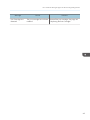
Error and Status Messages Appear on the Smart Organizing Monitor
Message
Print Cartridge Not
Detected
Causes
The print cartridge has not been
installed.
Solutions
Reinstall the print cartridge. See page 49
"Replacing the Print Cartridge".
65
6. Troubleshooting
66
7. Appendix
Notes About the Toner
• Proper operation cannot be guaranteed if any third-party toner is used.
• Depending on printing conditions, there are cases where the printer cannot print the number of
sheets indicated in the specifications.
67
7. Appendix
Moving and Transporting the Machine
This section provides cautions that you must follow when moving the machine both short and long
distances.
Repack the machine in its original packing materials when moving it over a long distance.
• Be sure to disconnect all cables from the machine before transporting it.
• The machine is a precision piece of machinery. Be sure to handle it carefully when moving it.
• Make sure to move the machine horizontally. Take extra caution when carrying the machine up or
down stairs.
• Do not remove the print cartridge when moving the machine.
• Be sure to hold the machine level while carrying it. To prevent toner from spilling, move the
machine carefully.
1. Be sure to check the following points:
• The power switch is turned off.
• The power cord is unplugged from the wall outlet.
• All other cables are unplugged from the machine.
2. Lift the machine using the inset grips on both sides of the machine, and then move it
horizontally to the place where you want to use it.
• To move the machine over a long distance, pack it well. Take care not to tip or tilt the machine
during transit.
• Toner might spill inside the machine if the machine is not kept level during transit.
• For more information about moving the machine, contact your sales or service representative.
Disposal
Ask your sales or service representative for information about correct disposal of this machine.
Where to Inquire
Contact your sales or service representative for further information about the topics included in this
manual or to inquire about other topics not included in this manual.
68
Consumables
Consumables
Print Cartridge
Print cartridge
Black
Average printable number of pages per cartridge *1
1,500 pages, 2,600 pages
*1 The printable number of pages is based on pages that are compliant with ISO/IEC 19752 with the image
density set as the factory default. ISO/IEC 19752 is an international standard for measurement of printable
pages, set by the International Organization for Standardization.
• Unless a print cartridges is replaced before toner runs out, printing will become impossible. To
facilitate cartridge replacement, we recommend you purchase and store extra print cartridges.
• The actual number of printable pages varies depending on the image volume and density, number
of pages printed at a time, paper type and paper size used, and environmental conditions such as
temperature and humidity.
• Print cartridges may need to be changed sooner than indicated above due to deterioration over
the period of use.
• Print cartridges are not covered by warranty. However, if there is a problem, contact the store
where you purchased them.
• The supplied print cartridge can print approximately 700 pages.
• This machine periodically performs cleaning. During cleaning, toner will be used to maintain print
quality.
69
7. Appendix
Specifications of the Machine
This section lists the machine's specifications.
General Function Specifications
Configuration
Desktop
Print process
Laser electrostatic transfer
Maximum paper size for printing
216 mm × 356 mm (8.5 × 14 inches)
Warm-up time
Less than 25 seconds (23 °C, 71.6 °F)
Paper sizes
A4, 81/2 " × 11 " (Letter), 81/2 " × 14 " (Legal), B5, 51/2 " × 81/2 " (Half Letter), 71/4 " × 101/2
" (Executive), A5, A6, B6, 16K (197 × 273 mm), 16K (195 × 270 mm), 16K (184 × 260 mm),
Custom Paper Size
• The following paper sizes are supported as custom paper sizes:
• Width
Tray1: Approximately 100-216 mm (3.9-8.5 inches)
Bypass Tray: Approximately 90-216 mm (3.6-8.5 inches)
• Length
Approximately 148-356 mm (5.8-14 inches)
Paper type
Plain Paper (65- 99 g/m2 (17-26 lb.)), Recycled Paper (75-90 g/m2 (20-24 lb.)), Thin Paper
(52-64 g/m2 (14-17 lb.)), Thick Paper (100-130 g/m2 (26.6-34 lb.))
Paper input capacity
• Tray 1
150 sheets (70 g/m2, 19 lb.)
• Bypass Tray
1 sheet (70 g/m2, 19 lb.)
70
Specifications of the Machine
Maximum loading height
15.5 mm (0.6 inches)
Paper output capacity
• Output Tray
50 sheets (70 g/m2, 19 lb.)
• Rear
1 sheet (70 g/m2, 19 lb.)
Memory
32 MB
Power requirements
(mainly Europe and Asia)
220-240 V, 5 A, 50/60 Hz
(mainly North America)
120 V, 8 A, 50/60 Hz
Power consumption
• Maximum power consumption
900 W
• Energy Saver mode 1
36.6 W or less
• Energy Saver mode 2
3.1 W or less
Machine dimensions (Width × Depth × Height)
402 × 360 × 165 mm (15.8 × 14.2 × 6.5 inches)
Weight (machine body with consumables)
Approximately 6.8 kg (15 lb.) or less
Printer Function Specifications
Printing speed
(mainly Europe and Asia)
22 pages per minute (A4)
(mainly North America)
23 pages per minute (Letter)
71
7. Appendix
Resolution
600 × 600 dpi (maximum: 1200 × 600 dpi)
First print speed
10 seconds (From the completion of data processing to the completion of paper delivery)
Interface
• Ethernet (10BASE-T, 100BASE-TX)
• USB 2.0
Printer language
DDST
72
Trademarks
Trademarks
Firefox® is a registered trademark of the Mozilla Foundation.
Microsoft®, Windows®, Windows Server®, Windows Vista®, and Internet Explorer® are either
registered trademarks or trademarks of Microsoft Corporation in the United States and/or other
countries.
Other product names used herein are for identification purposes only and might be trademarks of their
respective companies. We disclaim any and all rights to those marks.
The proper name of Internet Explorer 6 is Microsoft® Internet Explorer® 6.
The proper names of the Windows operating systems are as follows:
• The product names of Windows XP are as follows:
Microsoft® Windows® XP Professional
Microsoft® Windows® XP Home Edition
Microsoft® Windows® XP Professional x64 Edition
• The product names of Windows Vista are as follows:
Microsoft® Windows Vista® Ultimate
Microsoft® Windows Vista® Business
Microsoft® Windows Vista® Home Premium
Microsoft® Windows Vista® Home Basic
Microsoft® Windows Vista® Enterprise
• The product names of Windows 7 are as follows:
Microsoft® Windows® 7 Starter
Microsoft® Windows® 7 Home Premium
Microsoft® Windows® 7 Professional
Microsoft® Windows® 7 Ultimate
Microsoft® Windows® 7 Enterprise
• The product names of Windows 8 are as follows:
Microsoft® Windows® 8
Microsoft® Windows® 8 Pro
Microsoft® Windows® 8 Enterprise
• The product names of Windows Server 2003 are as follows:
Microsoft® Windows Server® 2003 Standard Edition
Microsoft® Windows Server® 2003 Enterprise Edition
Microsoft® Windows Server® 2003 Web Edition
73
7. Appendix
Microsoft® Windows Server® 2003 Datacenter Edition
• The product names of Windows Server 2003 R2 are as follows:
Microsoft® Windows Server® 2003 R2 Standard Edition
Microsoft® Windows Server® 2003 R2 Enterprise Edition
Microsoft® Windows Server® 2003 R2 Datacenter Edition
• The product names of Windows Server 2008 are as follows:
Microsoft® Windows Server® 2008 Foundation
Microsoft® Windows Server® 2008 Standard
Microsoft® Windows Server® 2008 Enterprise
Microsoft® Windows Server® 2008 Datacenter
Microsoft® Windows Server® 2008 for Itanium-based Systems
Microsoft® Windows® Web Server 2008
Microsoft® Windows® HPC Server 2008
• The product names of Windows Server 2008 R2 are as follows:
Microsoft® Windows Server® 2008 R2 Foundation
Microsoft® Windows Server® 2008 R2 Standard
Microsoft® Windows Server® 2008 R2 Enterprise
Microsoft® Windows Server® 2008 R2 Datacenter
Microsoft® Windows Server® 2008 R2 for Itanium-based Systems
Microsoft® Windows® Web Server R2 2008
Microsoft® Windows® HPC Server R2 2008
• The product names of Windows Server 2012 are as follows:
Microsoft® Windows Server® 2012 Foundation
Microsoft® Windows Server® 2012 Essentials
Microsoft® Windows Server® 2012 Standard
Microsoft® Windows Server® 2012 Datacenter
Microsoft product screen shots reprinted with permission from Microsoft Corporation.
74
INDEX
B
P
Basic operation......................................................29
Paper feed problems.............................................54
Paper jam........................................................55, 58
Paper mismatch.....................................................32
Print area................................................................22
Print cartridge..................................................49, 69
Print quality problems............................................61
Printer function.......................................................71
Printer problems.....................................................62
C
Changing the custom paper size.........................28
Cleaning..........................................................51, 52
Common problems................................................53
Condition of the machine......................................61
Configuration page...............................................47
Consumables.........................................................69
D
Disclaimer.................................................................4
Duplex....................................................................30
E
ENERGY STAR program.......................................10
Error messages......................................................64
Exterior...................................................................13
F
Firmware................................................................47
I
Important Safety Instructions...............................7, 9
Interior....................................................................14
Introduction..............................................................4
IP address...............................................................16
J
R
Replace..................................................................49
S
Smart Organizing Monitor...................................15
Specifications..................................................70, 71
Specifying the paper type and paper size..........27
Status information..................................................45
Status messages..................................................... 64
Supported paper...................................................19
System information................................................45
T
Toner.......................................................................67
Trademarks............................................................73
Troubleshooting...........................53, 54, 61, 62, 63
W
Web Image Monitor.............................................33
Job cancel..............................................................31
L
Legal prohibition......................................................4
Loading paper.......................................................23
M
Machine settings.................................................... 46
Models.....................................................................6
Moving...................................................................68
N
Network settings....................................................16
Non-recommended paper...................................21
75
MEMO
76
EN GB
EN US
EN AU
M133-8629
EN
GB
EN
US
EN
AU
M133-8629
© 2013