1
1
2
Set-up
3
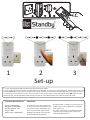
1. Insert your Bye Bye Standby socket into an electrical mains socket.
2. Each socket must be set-up with a remote before it can be used. To set-up your socket with your remote control press and
hold the OFF button on the socket. The LED on the socket will flash once every second indicating that it is ready to be set-up.
3. Choose one pair of buttons on your remote control to control your socket. Press and hold the green ON button on your
remote control, the LED will flash rapidly and then remain on, this indicates that your socket is ready to be used.
Technical Specifications
Important
Voltage: 240VAC/50Hz
Rating: Max 13A/3000W
On/Off Indication: LED
Range: <30M
Battery Type: 12VDC/MN21
For indoor use only. Keep away from
all sources of water and moisture. Do
not overload. Adult Installation only.
Use only as directed. Always check
wattage load and do not exceed the
electrical devices specification
Bye Bye Standby is a trading name of Enistic Ltd
10 Wornal Park, Worminghall Bucks, HP18 9PH
www.enistic.com
For further information on the Bye Bye Standby
range of energy saving products, please visit
www.ByeByeStandby.co.uk
4
5
To Use
Before you can use your socket, you must set it up. See overleaf for details.
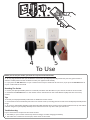
4. To use, plug the device that you would like to control into your Bye Bye Standby socket and press the green button to
activate standby mode and the red button to take your appliance off standby.
5. If you press the ALL ON button on your remote control all your sockets will be turned on, if you press the All Off Button all
of your sockets will be turned off.
Resetting The Socket
1. Ensure your Bye Bye Standby socket is turned off, hold down the off button on your remote control for three seconds.
2. Hold down the ALL OFF button on the remote control until the LED on the socket flashes rapidly and then once every
second.
Tips
To control your Bye Bye Standby socket with an additional remote control:
1. Each socket can be controlled by more than one remote control, including remote controls from the Bye Bye Stadnby classic
range.
2. To use your new Bye Bye Standby socket with a Bye Bye Standby classic remote control simply follow the set-up instructions
overleaf using A1 on your Bye Bye Standby classic remote control or any other code you wish to set.
Troubleshooting
If your socket doesn’t respond to the remote control:
1. The battery in your remote control may have lost charge, consider changing the battery.
2. The socket and remote are too far apart, move closer to the socket.