1
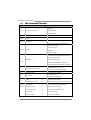
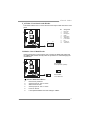
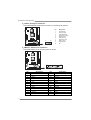
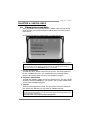
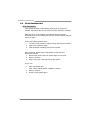
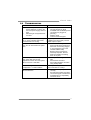
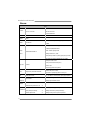
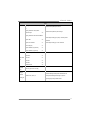
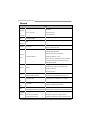
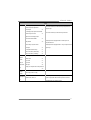
Viotech 3200+ Setup Manual FCC Information and Copyright This equipment has been tested and found to comply with the limits of a Class B digital device, pursuant to Part 15 of the FCC Rules. These limits are designed to provide reasonable protection against harmful interference in a residential installation. This equipment generates, uses, and can radiate radio frequency energy and, if not installed and used in accordance with the instructions, may cause harmful interference to radio communications. There is no guarantee that interference will not occur in a particular installation. The vendor makes no representations or warranties with respect to the contents here and specially disclaims any implied warranties of merchantability or fitness for any purpose. Further the vendor reserves the right to revise this publication and to make changes to the contents here without obligation to notify any party beforehand. Duplication of this publication, in part or in whole, is not allowed without first obtaining the vendor’s approval in writing. The content of this user’s manual is subject to be changed without notice and we will not be responsible for any mistakes found in this user’s manual. All the brand and product names are trademarks of their respective companies. Table of Contents Chapter 1: Introduction ........................................ 1 1.1 1.2 1.3 1.4 1.5 Before You Start ................................................................................ 1 Package Checklist ............................................................................. 1 Motherboard Features...................................................................... 2 Rear Panel Connectors ..................................................................... 3 Motherboard Layout......................................................................... 4 Chapter 2: Hardware Installation .......................... 5 2.1 2.2 2.3 2.4 Installing Central Processing Unit (CPU)....................................... 5 FAN Headers...................................................................................... 5 Installing System Memory ................................................................ 6 Connectors and Slots ......................................................................... 8 Chapter 3: Headers & Jumpers Setup .................. 11 3.1 3.2 How to Setup Jumpers .................................................................... 11 Detail Settings.................................................................................. 11 Chapter 4: Useful Help ........................................ 15 4.1 5.2 5.3 Driver Installation Note.................................................................. 15 Extra Information............................................................................ 16 Troubleshooting............................................................................... 17 Appendix: SPEC In Other Languages ................... 18 German.................................................................................................................. 18 French .................................................................................................................... 20 Italian..................................................................................................................... 22 Spanish ................................................................................................................... 24 Portuguese ............................................................................................................ 26 Polish...................................................................................................................... 28 Russian ................................................................................................................... 30 Arabic..................................................................................................................... 32 Japanese ................................................................................................................ 34 Viotech 3200+ CHAPTER 1: INTRODUCTION 1.1 BEFORE YOU START Thank you for choosing our product. Before you start installing the motherboard, please make sure you follow the instructions below: 1.2 Prepare a dry and stable working environment with sufficient lighting. Always disconnect the computer from power outlet before operation. Before you take the motherboard out from anti-static bag, ground yourself properly by touching any safely grounded appliance, or use grounded wrist strap to remove the static charge. Avoid touching the components on motherboard or the rear side of the board unless necessary. Hold the board on the edge, do not try to bend or flex the board. Do not leave any unfastened small parts inside the case after installation. Loose parts will cause short circuits which may damage the equipment. Keep the computer from dangerous area, such as heat source, humid air and water. Do not squeeze or touch CPU Cooler (Fan/Heatsink) The operating temperatures of the computer should be 0 to 45 degrees Celsius. PACKAGE CHECKLIST Rear I/O Panel Shield X 1 Fully Setup Driver CD X 1 (full version manual files inside) Serial ATA Cable X 2 Quick Installation Guide X 1 1 Motherboard Manual 1.3 MOTHERBOARD FEATURES SPEC NanoBGA2 CPU VIA C7-D 1.8G Processor VIA CPU On-board Execute Disable Bit FSB VIA V4 BUS 800MHz Chipset VX900 Graphics Chrome9 HD Max Shared Video Memory is 512MB Support DirectX 9.0 and Pixel Shader (SM2.0) Low Pin Count Interface Super I/O Environment Control ITE 8728 H/W Monitor Fan Speed Controller Each DIMM supports 512MB/1GB/2GB/4GB DDR3 Max Memory Capacity 8GB Main Memory DDR3 Slots x 2 Supports DDR3 800 / 1066 Single Channel Mode DDR3 memory module Registered DIMM and ECC DIMM is not supported SATA Data transfer rates up to 3.0 Gb/s. Integrated Serial ATA Controller SATA Version 2.0 specification compliant. LAN Sound Realtek RTL8103EL 10 / 100 Mb/s auto negotiation 5.1 channels audio out VIA VT1708S Codec PCI slot x1 Supports PCI expansion card PCI Express Gen2 x 16 slot x1 Supports PCI-E x16 expansion card (x8-Lane only) On Board SATA Connector x2 Each connector supports 1 SATA devices Connector Front Panel Connector x1 Supports front panel facilities Front Audio Connector x1 Supports front panel audio function CPU Fan Header x1 CPU Fan power supply System Fan Header x1 System Fan Power supply Slot 2 High-Definition Audio support Viotech 3200+ SPEC Clear CMOS Header x1 Restore CMOS data to factory default USB Connector x2 Each connector supports 2 front panel USB ports Printer Port Connector x1 Each connector supports 1 Printer port Serial Port Connector x1 Connects to RS-232 Port Power Connector (24pin) x1 Connects to Power supply Power Connector (4pin) x1 Connects to Power supply PS/2 Keyboard x1 Connects to PS/2 Keyboard PS/2 Mouse x1 Connects to PS/2 Mouse Real Panel VGA Port x1 Connects to monitor I/O LAN Port x1 Connects to RJ-45 ethernet cable USB Port x4 Connects to USB devices Audio Jack x3 Provide Audio-In/Out and microphone connection Board Size 170 (W) x 220 (L) mm OS Support Windows XP / Vista / 7 Biostar reserves the right to add or remove support for any OS with or without notice. 1.4 REAR PANEL CONNECTORS PS/2 Mouse LAN Line In/ Surround Line Out Mic In 1/ Bass/ Center PS/2 Keyboard VGA USBX2 USBX2 Since the audio chip supports High Definition Audio Specification, the function of each audio jack can be defined by software. The input / output function of each audio jack listed above represents the default setting. However, when connecting external microphone to the audio port, please use the Mic In (Pink) audio jack. 3 Motherboard Manual 1.5 MOTHERBOARD LAYOUT ATXPWR2 KBMS1 VGA1 VIA C7-D 1.8G CPU_FAN1 DIMMA2 DIMMA1 CPU1 VIA VX900 USB3 JUSBV2 ATXPWR1 RJ45USB1 SATA2 F_USB2 AUDIO1 JUSBV1 SATA1 LAN F_USB1 PEX16_1 BAT1 Codec Super I/O JCMOS1 PCI1 F_AUDIO1 J_COM1 J_PRINT1 Note: ■ represents the 1st pin. 4 BIOS SYS_FAN1 PANEL1 Viotech 3200+ CHAPTER 2: HARDWARE INSTALLATION 2.1 INSTALLING CENTRAL PROCESSING UNIT (CPU) The motherboard includes an embedded VIA C7-D or Nano processor, and a heatsink has been installed to provide sufficient cooling. 2.2 FAN HEADERS These fan headers support cooling-fans built in the computer. The fan cable and connector may be different according to the fan manufacturer. Connect the fan cable to the connector while matching the black wire to pin#1. CPU_FAN1: CPU Fan Header 4 1 Pin 1 2 3 4 Assignment Ground Power FAN RPM rate sense Smart Fan Control SYS_FAN1: System Fan Header Pin 1 2 3 1 Assignment Ground +12V FAN RPM rate sense 3 Note: CPU_FAN1 supports 4-pin head connector; SYS_FAN1, 3-pin head one. When connecting with wires onto connectors, please note that the red wire is the positive and should be connected to pin#2, and the black wire is Ground and should be connected to GND. 5 Motherboard Manual 2.3 INSTALLING SYSTEM MEMORY 6 DIM MA 2 DIM MA 1 A. DDR3 Module 1. Unlock a DIMM slot by pressing the retaining clips outward. Align a DIMM on the slot such that the notch on the DIMM matches the break on the Slot. 2. Insert the DIMM vertically and firmly into the slot until the retaining chip snap back in place and the DIMM is properly seated. Viotech 3200+ B. Memory Capacity DIMM Socket Location DDR3 Module DIMMA1 512MB/1GB/2GB/4GB DIMMA2 512MB/1GB/2GB/4GB Total Memory Size Max is 8GB. 7 Motherboard Manual 2.4 CONNECTORS AND SLOTS SATA1/SATA2: Serial ATA Connectors The motherboard has a PCI to SATA Controller with 2 channels SATA interface, it satisfies the SATA 2.0 spec and with transfer rate of 3Gb/s. SATA2 SATA1 Pin 7 4 1 Assignment 1 Ground 2 TX+ 3 TX- 4 Ground 5 RX- 6 RX+ 7 Ground ATXPWR2: ATX Power Source Connector This connector provides +12V to CPU power circuit. Please make sure this connector has been plugged in perfectly. 8 3 2 4 1 Pin 1 2 3 4 Assignment +12V +12V Ground Ground Viotech 3200+ ATXPWR1: ATX Power Source Connector This connector allows user to connect 24-pin power connector on the ATX power supply. 12 24 1 13 Pin Assignment Pin Assignment 13 14 15 16 17 18 19 20 21 22 23 24 +3.3V -12V Ground PS_ON Ground Ground Ground NC +5V +5V +5V Ground 1 2 3 4 5 6 7 8 9 10 11 12 +3.3V +3.3V Ground +5V Ground +5V Ground PW_OK Standby Voltage+5V +12V +12V +3.3V PCI1: Peripheral Component Interconnect Slot The motherboard is equipped with 1 standard PCI slot. PCI stands for Peripheral Component Interconnect, and it is a bus standard for expansion cards. This PCI slot is designated as 32 bits. PCI1 9 Motherboard Manual PEX16_1: PCI-Express x16 Slot - PCI-Express 2.0 compliant (x8-Lane only). Maximum theoretical realized bandwidth of 4GB/s simultaneously per direction, for an aggregate of 8GB/s totally. PEX16_1 10 Viotech 3200+ CHAPTER 3: HEADERS & JUMPERS SETUP 3.1 HOW TO SETUP JUMPERS The illustration shows how to set up jumpers. When the jumper cap is placed on pins, the jumper is “close”, if not, that means the jumper is “open”. Pin opened 3.2 Pin closed Pin1-2 closed DETAIL SETTINGS PANEL1: Front Panel Header This 16-pin connector includes Power-on, Reset, HDD LED, Power LED, and speaker connections. It allows user to connect the PC case’s front panel switch functions. PWR_LED ON/OFF 9 1 + + + - + SPK Pin 1 2 3 4 5 6 7 8 Assignment +5V N/A N/A Speaker HDD LED (+) HDD LED (-) Ground Reset control Function Speaker Connector Hard drive LED Reset button Pin 9 10 11 12 13 14 15 16 16 8 RST HLED Assignment N/A N/A N/A Power LED (+) Power LED (+) Power LED (-) Power button Ground Function N/A N/A Power LED Power-on button 11 Motherboard Manual F_USB1/F_USB2: Headers for USB 2.0 Ports at Front Panel This motherboard provides 2 USB 2.0 headers, providing user to connect additional USB cable on the PC front panel, and also can be connected with internal USB devices, like USB card reader. F_USB2 F_USB1 10 9 2 1 Pin 1 2 3 4 5 6 7 8 9 10 Assignment +5V (fused) +5V (fused) USBUSBUSB+ USB+ Ground Ground Key NC JUSBV1/JUSBV2: Power Source Headers for USB Ports Pin 1-2 Close: JUSBV1: +5V for USB ports at front panel (F_USB1/F_USB2). JUSBV2: +5V for USB ports at USB3/RJ45USB1. Pin 2-3 Close: JUSBV1: +5V STB for USB ports at front panel (F_USB1/F_USB2). JUSBV2: +5V STB for USB ports at USB3/RJ45USB1. 1 3 JUS B V 2 Pin 1-2 close 1 3 JUS B V 1 1 3 Pin 2-3 close Note: In order to support this function “Power-On system via USB device,” user should place “JUSBV1/ JUSBV2” jumper cap on Pin 2-3 individually. 12 Viotech 3200+ F_AUDIO1: Front Panel Audio Header This header allows user to connect the front audio output cable with the PC front panel. 2 10 1 9 Pin 1 2 3 4 5 6 7 8 9 10 Assignment Mic Left in Ground Mic Right in GPIO Right line in Jack Sense Front Sense Key Left line in Jack Sense JCMOS1: Clear CMOS Header Placing the jumper on pin2-3 allows user to restore the BIOS safe setting and the CMOS data. Please carefully follow the procedures to avoid damaging the motherboard. 1 3 Pin 1-2 Close: Normal Operation (Default). 1 1 3 3 Pin 2-3 Close: Clear CMOS data. ※ Clear CMOS Procedures: 1. 2. 3. 4. 5. 6. Remove AC power line. Set the jumper to “Pin 2-3 close”. Wait for five seconds. Set the jumper to “Pin 1-2 close”. Power on the AC. Load Optimal Defaults and save settings in CMOS. 13 Motherboard Manual J_COM1: Serial port Connector The motherboard has a Serial Port Connector for connecting RS-232 Port. 2 10 1 9 Pin Assignment 1 2 3 4 5 6 7 8 9 10 Carrier detect Received data Transmitted data Data terminal ready Signal ground Data set ready Request to send Clear to send Ring indicator NC J_PRINT1: Printer Port Connector This header allows you to connector printer on the PC. Pin 1 2 3 4 5 6 7 8 9 10 11 12 13 14 Assignment -Strobe -ALF Data 0 -Error Data 1 -Init Data 2 -Scltin Data 3 Ground Data 4 Ground Data 5 2 26 1 25 Pin 14 15 16 17 18 19 20 21 22 23 24 25 26 Assignment Ground Data 6 Ground Data 7 Ground -ACK Ground Busy Ground PE Ground SCLT Key Viotech 3200+ CHAPTER 4: USEFUL HELP 4.1 DRIVER INSTALLATION NOTE After you installed your operating system, please insert the Fully Setup Driver CD into your optical drive and install the driver for better system performance. You will see the following window after you insert the CD The setup guide will auto detect your motherboard and operating system. Note: If this window didn’t show up after you insert the Driver CD, please use file browser to locate and execute the file SETUP.EXE under your optical drive. A. Driver Installation To install the driver, please click on the Driver icon. The setup guide will list the compatible driver for your motherboard and operating system. Click on each device driver to launch the installation program. B. Software Installation To install the software, please click on the Software icon. The setup guide will list the software available for your system, click on each software title to launch the installation program. C. Manual Aside from the paperback manual, we also provide manual in the Driver CD. Click on the Manual icon to browse for available manual. Note: You will need Acrobat Reader to open the manual file. Please download the latest version of Acrobat Reader software from http://www.adobe.com/products/acrobat/readstep2.html 15 Motherboard Manual 5.2 EXTRA INFORMATION CPU Overheated If the system shutdown automatically after power on system for minutes, that means the CPU protection function has been activated. When the CPU is over heated, the motherboard will shutdown automatically to avoid a damage of the CPU, and the system may not power on again. In this case, please double check: 1. The CPU cooler surface is placed evenly with the CPU surface. 2. CPU fan is rotated normally. 3. CPU fan speed is fulfilling with the CPU speed. After confirmed, please follow steps below to relief the CPU 0protection function. 1. Remove the power cord from power supply for seconds. 2. Wait for seconds. 3. Plug in the power cord and boot up the system. Or you can: 1. Clear the CMOS data. (See “Close CMOS Header: JCMOS1” section) 2. Wait for seconds. 3. Power on the system again. 16 Viotech 3200+ 5.3 TROUBLESHOOTING Probable Solution 1. There is no power in the system. 1. Make sure power cable is Power LED does not shine; the securely plugged in. (Both ATXPWR1 and ATXPWR2 power fan of the power supply does not connecters are plugged in, work perfectly.) 2. Indicator light on keyboard does not shine. 2. Replace cable. 3. Contact technical support. System is inoperative. Keyboard lights Using even pressure on both ends of are on, power indicator lights are lit, the DIMM, press down firmly until the and hard drives are running. module snaps into place. System does not boot from a hard disk 1. Check cable running from disk to drive, but can be booted from optical disk controller board. Make sure drive. both ends are securely plugged in; check the drive type in the standard CMOS setup. 2. Backing up the hard drive is extremely important. All hard disks are capable of breaking down at any time. System only boots from an optical drive. Hard disks can be read, applications can be used, but system fails to boot from a hard disk. 1. Screen message shows “Invalid Configuration” or “CMOS Failure.” Review system’s equipment. Make sure correct information is in setup. 2. System cannot boot after user installs a 1. second hard drive. 2. Back up data and applications files. Reformat the hard drive. Re-install applications and data using backup disks. Set master/slave jumpers correctly. Run SETUP program and select correct drive types. Call the drive manufacturers for compatibility with other drives. 17 Motherboard Manual APPENDIX: SPEC IN OTHER LANGUAGES GERMAN Spezifikationen NanoBGA2 CPU VIA C7-D 1.8G CPU VIA CPU On-board Execute Disable Bit FSB VIA V4 BUS 800MHz Chipsatz VX900 Grafik Chrome9 HD Max. 512MB gemeinsam benutzter Videospeicher Low Pin Count-Schnittstelle Super E/A Umgebungskontrolle ITE 8728 Hardware-Überwachung Lüfterdrehzahl-Controller Jeder DIMM unterstützt 512MB/ 1GB/2GB/4GB DDR3 Max. 8GB Arbeitsspeicher Arbeitsspeich er Unterstützt DDR3 800 / 1066 DDR3 DIMM-Steckplätze x 2 Ein-Kanal DDR3 Speichermodul registrierte DIMMs. ECC DIMMs werden nicht unterstützt. SATA Datentransferrate bis zu 3Gb/s Integrierter Serial ATA-Controller Konform mit der SATA-Spezifikation Version 2.0 LAN Realtek RTL8103EL 10 / 100 Mb/s Auto-Negotiation 5.1-Kanal-Audioausgabe Audio-Codec VIA VT1708S Unterstützt High-Definition Audio Steckplätze PCI-Steckplatz x1 PCI Express Gen2 x16 Steckplatz x1 Onboard-Ans SATA-Anschluss x2 Jeder Anschluss unterstützt 1 SATA-Laufwerk chluss Fronttafelanschluss x1 Unterstützt die Fronttafelfunktionen Front-Audioanschluss x1 Unterstützt die Fronttafel-Audioanschlussfunktion CPU-Lüfter-Sockel x1 CPU-Lüfterstromversorgungsanschluss 18 Viotech 3200+ Spezifikationen System-Lüfter-Sockel x1 "CMOS löschen"-Sockel x1 USB-Anschluss x2 System-Lüfter-Stromversorgungsanschluss Jeder Anschluss unterstützt 2 Fronttafel-USB-Anschlüsse Druckeranschluss Anschluss x1 Serieller Anschluss x1 Stromanschluss (24-polig) x1 Stromanschluss (4-polig) x1 PS/2-Tastatur x1 PS/2-Maus x1 Rückseiten-E VGA-Anschluss x1 /A LAN-Anschluss x1 USB-Anschluss x4 Audioanschluss x3 Jeder Anschluss unterstützt 1 Druckeranschluss Platinengröße 170 mm (B) X 220 mm (L) Biostar behält sich das Recht vor, ohne Ankündigung die OS-Unterstüt zung Windows XP / Vista / 7 Unterstützung für ein Betriebssystem hinzuzufügen oder zu entfernen. 19 Motherboard Manual FRENCH SPEC NanoBGA2 UC VIA C7-D 1.8G CPU VIA CPU On-board d'exécution de bit de désactivation Bus frontal VIA V4 BUS 800MHz Chipset VX900 Graphiques Chrome9 HD Mémoire vidéo partagée maximale de 512 Mo Interface à faible compte de broches Super E/S Initiatives de contrôle environnementales ITE 8728 Moniteur de matériel Contrôleur de vitesse de ventilateur Chaque DIMM prend en charge des DDR3 de 512Mo/1Go/2Go/4Go Capacité mémoire maximale de 8 Go Mémoire principale Fentes DDR3 DIMM x 2 Prend en charge la DDR3 800 / 1066 Module de mémoire DDR3 à mode à simple voie Les DIMM à registres et DIMM avec code correcteurs d'erreurs ne sont pas prises en charge SATA Taux de transfert jusqu'à 3 Go/s. Contrôleur Serial ATA intégré : Conforme à la spécification SATA Version 2.0 LAN Realtek RTL8103EL 10 / 100 Mb/s négociation automatique Sortie audio à 5.1 voies Codec audio VIA VT1708S Prise en charge de l'audio haute définition Fentes Fente PCI x1 Fente PCI Express Gen2 x16 x1 Connecteur SATA x2 Connecteur embarqué Chaque connecteur prend en charge 1 périphérique SATA Connecteur du panneau avant 20 x1 Prend en charge les équipements du panneau avant Viotech 3200+ SPEC Connecteur Audio du panneau avant Prend en charge la fonction audio du panneau avant x1 Embase de ventilateur UC x1 Alimentation électrique du ventilateur UC Embase de ventilateur système x1 Alimentation électrique du ventilateur système Embase d'effacement CMOS x1 Connecteur USB x2 Chaque connecteur prend en charge 2 ports USB de panneau avant Connecteur de Port d'imprimante x1 Port série Chaque connector prend en charge 1 Port d'imprimante x1 Connecteur d'alimentation (24 broches) x1 Connecteur d'alimentation (4 broches) x1 E/S du panneau arrière Clavier PS/2 x1 Souris PS/2 x1 Port VGA x1 Port LAN x1 Port USB x4 Fiche audio x3 Dimensions de la carte 170mm (l) X 220 mm (H) Support SE Windows XP / Vista / 7 Biostar se réserve le droit d'ajouter ou de supprimer le support de SE avec ou sans préavis. 21 Motherboard Manual ITALIAN SPECIFICA NanoBGA2 CPU VIA C7-D 1.8G CPU VIA CPU On-board Execute Disable Bit FSB VIA V4 BUS 800MHz Chipset VX900 Grafica Chrome9 HD La memoria video condivisa massima è di 512MB Interfaccia LPC (Low Pin Count) Funzioni di controllo dell’ambiente: Super I/O ITE 8728 Monitoraggio hardware Controller velocità ventolina Ciascun DIMM supporta DDR3 512MB/1GB/2GB/4GB Memoria principale Capacità massima della memoria 8GB Alloggi DIMM DDR3 x 2 Supporto di DDR3 800 / 1066 Modulo di memoria DDR3 a canale s ingolo DIMM registrati e DIMM ECC non sono supportati SATA Velocità di trasferimento dei dati fino a 3 Gb/s. Controller Serial ATA integrato Compatibile specifiche SATA Versione 2.0. LAN Realtek RTL8103EL Negoziazione automatica 10 / 100 Mb/s Codec audio Alloggi Uscita audio 5.1 canali VIA VT1708S Supporto audio High-Definit ion (HD) Alloggio PCI x1 Alloggio PCI Express Gen2 x16 x1 Connettori Connettore SATA x2 Ciascun connettore supporta 1 unità SATA su scheda Connettore pannello frontale x1 Supporta i servizi del pannello frontale Connettore audio frontale x1 Supporta la funzione audio pannello frontale Collettore ventolina CPU x1 Alimentazione ventolina CPU Collettore ventolina sistema x1 Alimentazione ventolina di sistema 22 Viotech 3200+ SPECIFICA Collettore cancellaz ione CMOS x1 Connettore USB x2 Ciascun connettore supporta 2 porte USB pannello frontale Connettore Porta stampante x1 Porta seriale x1 Ciascun connettore supporta 1 Porta stampante Connettore alimentazione (24 pin) x1 Connettore alimentazione (4 pin) x1 I/O pannello posteriore Tastiera PS/2 x1 Mouse PS/2 x1 Porta VGA x1 Porta LAN x1 Porta USB x4 Connettore audio x3 Dimension 170 mm (larghezza) x 220 mm i scheda (altezza) Biostar si riserva il diritto di aggiungere o Sistemi operativi supportati Windows XP / Vista / 7 rimuovere il supporto di qualsiasi sistema operativo senza preavviso. 23 Motherboard Manual SPANISH Especificación NanoBGA2 CPU VIA C7-D 1.8G CPU VIA CPU On-board Bit de deshabilitación de ejecución FSB VIA V4 BUS 800MHz Conjunto de VX900 chips Gráficos Chrome9 HD Memoria máxima de vídeo compartida de 512MB Interfaz de cuenta Low Pin Súper E/S Iniciativas de control de entorno ITE 8728 Monitor hardware Controlador de velocidad de ventilador Cada DIMM admite DDR de 512MB/1GB/2GB/4GB Capacidad máxima de memoria de 8GB Memoria principal Ranuras DIMM DDR3 x 2 Admite DDR3 de 800 / 1066 Módulo de memoria DDR3 de canal Sencillo No admite DIMM registrados o DIMM compatibles con ECC SATA Tasas de transferencia de hasta 3 Gb/s. Controlador ATA Serie Integrado Compatible con la versión SATA 2.0. Red Local Realtek RTL8103EL Negociación de 10 / 100 Mb/s Códecs de sonido Ranuras Salida de sonido de 5.1 canales VIA VT1708S Soporte de sonido Alta Definición Ranura PCI X1 Ranura PCI Express Gen2 x16 X1 Conectores Conector SATA X2 Cada conector soporta 1 dispositivos SATA en placa Conector de panel frontal X1 Soporta instalaciones en el panel frontal Conector de sonido frontal X1 Soporta funciones de sonido en el panel frontal Cabecera de ventilador de CPU X1 Fuente de alimentación de ventilador de CPU Cabecera de ventilador de sistema X1 24 Fuente de alimentación de ventilador de sistema Viotech 3200+ Especificación Cabecera de borrado de CMOS X1 Conector USB X2 Cada conector soporta 2 puertos USB frontales Conector Puerto de impresora X1 Cada conector soporta 1 Puerto de impresora Puerto serie X1 Conector de alimentación X1 (24 patillas) Conector de alimentación X1 (4 patillas) Panel trasero de E/S Teclado PS/2 X1 Ratón PS/2 X1 Puerto VGA X1 Puerto de red local X1 Puerto USB X4 Conector de sonido X3 Tamaño de la placa 170 mm. (A) X 220 mm. (H) Soporte de sistema operativo Biostar se reserva el derecho de añadir o retirar el soporte Windows XP / Vista / 7 de cualquier SO con o sin aviso previo. 25 Motherboard Manual PORTUGUESE ESPECIFICAÇÕES NanoBGA2 CPU VIA C7-D 1.8G CPU VIA CPU On-board Execute Disable Bit FSB VIA V4 BUS 800MHz Chipset VX900 Placa Chrome9 HD Memória de vídeo máxima partilhada: 512 MB gráfica Interface LPC (Low Pin Count) Especificaçã o Super I/O Iniciativas para controlo do ambiente ITE 8728 Monitorização do hardware Controlador da velocidade da ventoinha Cada módulo DIMM suporta uma memória DDR3 de 512MB/1GB/2GB/4GB Capacidade máxima de memória: 8GB Memória principal Ranhuras DIMM DDR3 x2 Suporta módulos DDR3 800 / 1066 Módulo de memória DDR3 de canal simples Os módulos DIMM registados e os DIMM ECC não são suportados SATA Velocidades de transmissão de dados até 3 Gb/s. Controlador Serial ATA integrado Compatibilidade com a especificação SATA versão 2.0. LAN Realtek RTL8103EL Auto negociação de 10 / 100 Mb/s Codec de som Ranhuras Saída de áudio de 5.1 canais VIA VT1708S Suporta a especificação High-Definition Audio Ranhura PCI x1 Ranhura PCI Express Gen2 x16 x1 Conectores Conector SATA x2 Cada conector suporta 1 dispositivo SATA na placa Conector do painel frontal x1 Para suporte de várias funções no painel frontal Conector de áudio frontal x1 Suporta a função de áudio no painel frontal 26 Viotech 3200+ ESPECIFICAÇÕES Conector da ventoinha da CPU x1 Conector da ventoinha do sistema x1 Alimentação da ventoinha da CPU Alimentação da ventoinha do sistema Conector para limpeza do CMOS x1 Conector USB x2 Cada conector suporta 2 portas USB no painel frontal Conector da para impressora x1 Cada conector suporta 1 Porta para impressora Porta série x1 Conector de alimentação (24 pinos) x1 Conector de alimentação (4 pinos) x1 Teclado PS/2 x1 Entradas/S Rato PS/2 x1 aídas no Porta VGA x1 painel Porta LAN x1 traseiro Porta USB x4 Tomada de audio x3 Tamanho da placa 170 mm (L) X 220 mm (A) Sistemas operativos suportados A Biostar reserva-se o direito de adicionar ou remover Windows XP / Vista / 7 suporte para qualquer sistema operativo com ou sem aviso prévio. 27 Motherboard Manual POLISH SPEC NanoBGA2 Procesor VIA C7-D 1.8G CPU VIA CPU On-board Execute Disable Bit FSB VIA V4 BUS 800MHz Chipset VX900 Grafika Chrome9 HD Maks. wielkość współdzielonej pamięci video wynosi 512MB Każde gniazdo DIMM obsługuje moduły 512MB/1GB/2GB/4GB DDR3 Pamięć główna Maks. wielkość pamięci 8GB Gniazda DDR3 DIMM x 2 Obsługa DDR3 800 / 1066 Moduł pamięci DDR3 z trybem pojedynczego kanału Brak obsługi Registered DIMM oraz ECC DIMM Interfejs Low Pin Count Super I/O Funkcje kontroli warunków pracy ITE 8728 Monitor H/W Kontroler prędkości wentylatora SATA Transfer danych do 3 Gb/s. Zintegrowany kontroler Serial ATA Zgodność ze specyfikacją SATA w wersji 2.0. LAN Realtek RTL8103EL 10 / 100 Mb/s z automatyczną negocjacją szybkości Kodek dźwiękowy 5.1 kanałowe wyjście audio VIA VT1708S Obsługa High-Definition Audio Gniazdo PCI x1 Gniazdo PCI Express Gen2 x16 x1 Złącze SATA x2 Każde złącze obsługuje 1 urządzenie SATA wbudowane Złącze panela przedniego x1 Obsługa elementów panela przedniego x1 Obsługa funkcji audio na panelu przednim Gniazda Złącza Przednie złącze audio 28 Viotech 3200+ SPEC Złącze główkowe wentylatora procesora Zasilanie wentylatora procesora x1 Złącze główkowe wentylatora Zasilanie wentylatora systemowego systemowego x2 Złącze główkowe kasowania CMOS x1 Każde złącze obsługuje 2 porty USB na panelu Złącze USB x2 przednim Złącze Port drukarki x1 Port szeregowy x1 Złącze zasilania (24 pinowe) x1 Złącze zasilania (4 pinowe) x1 Klawiatura PS/2 x1 Mysz PS/2 x1 Back Panel Port VGA x1 I/O Port LAN x1 Port USB x4 Gniazdo audio x3 Każde złącze obsługuje 1 Port drukarki Wymiary płyty 170 mm (S) X 220 mm (W) Obsluga Biostar zastrzega sobie prawo dodawania lub systemu operacyjne go Windows XP / Vista / 7 odwoływania obsługi dowolnego systemu operacyjnego bez powiadomienia. 29 Motherboard Manual RUSSIAN СПЕЦ CPU (центральн NanoBGA2 VIA C7-D 1.8G CPU VIA CPU On-board ый Execute Disable Bit процессор) FSB Набор VIA V4 BUS 800МГц VX900 микросхем Графика Максимальная совместно используемая видео Chrome9 HD память составляет 512 МБ Каждый модуль DIMM поддерживает 512МБ/1ГБ/2ГБ/4ГБ DDR3 Основная Максимальная ёмкость памяти 8 ГБ Слоты DDR3 DIMM x 2 Поддержка DDR3 800 / 1066 память Модуль памяти с одноканальным режимом DDR3 Не поддерживает зарегистрированные модули DIMM and ECC DIMM Интерфейс с низким количеством выводов Super I/O Инициативы по охране окружающей среды, ITE 8728 Аппаратный монитор Регулятор скорости SATA Локальная Встроенное последовательное скорость передачи данных до 3 гигабит/с. устройство управления ATA Соответствие спецификации SATA версия 2.0. Realtek RTL8103EL Автоматическое согласование 10 / 100 Мб/с сеть Звуковой 5.1канальный звуковой выход VIA VT1708S Звуковая поддержка High-Definition кодек Слоты Слот PCI x1 Слот PCI Express Gen2 x16 x1 Встроенны Разъём SATA й разъём 30 x2 Каждый разъём поддерживает 1 устройство SATA Разъём на лицевой панели x1 Поддержка устройств на лицевой панели Входной звуковой разъём x1 Поддержка звуковых функций на лицевой панели Viotech 3200+ СПЕЦ Контактирующее приспособление вентилятора центрального процессора x1 Контактирующее приспособление вентилятора системы x1 Источник питания для вентилятора центрального процессора Источник питания для вентилятора системы Открытое контактирующее приспособление CMOS x1 USB-разъём x2 Разъём Порт подключения принтера лицевой панели Каждый разъём поддерживает 1 Порт подключения x1 Последовательный порт x1 Разъем питания (24 вывод) x1 Разъем питания (4 вывод) x1 Клавиатура PS/2 x1 Задняя Мышь PS/2 x1 панель Порт VGA x1 средств Порт LAN x1 ввода-выв USB-порт x4 ода Каждый разъём поддерживает 2 USB-порта на принтера Гнездо для подключения наушников x3 Размер 170 мм (Ш) X 220 мм (В) панели Поддержка OS Biostar сохраняет за собой право добавлять или Windows XP / Vista / 7 удалять средства обеспечения для OS с или без предварительного уведомления. 31 Motherboard Manual ARABIC اﻟﻤﻮاﺻﻔﺎت NanoBGA2 وﺣﺪة اﻟﻤﻌﺎﻟﺠﺔ VIA C7-D 1.8G CPU VIA CPU On-board اﻟﻤﺮآﺰﻳﺔ Execute Disable Bit اﻟﻨﺎﻗﻞ اﻷﻡﺎﻡﻲ اﻟﺠﺎﻥﺒﻲ ﻡﻴﺠﺎ هﺮﺗﺰ VIA V4 BUS 800ﺗﺮدد ﻡﺠﻤﻮﻋﺔ اﻟﺸﺮاﺋﺢ VX900 ﺏﻄﺎﻗﺔ اﻟﺮﺳﻮﻡﺎت Chrome9 HD ﻡﻴﺠﺎ ﺏﺎﻳﺖ512أﻗﺼﻰ ﺳﻌﺔ ﻟﺬاآﺮة اﻟﻔﻴﺪﻳﻮ اﻟﻤﺸﺘﺮآﺔ ﻡﻴﺠﺎ ﺏﺎﻳﺖ و /512 /1ﺳﻌﺔ DDR3ﺗﺪﻋﻢ ذاآﺮة ﻡﻦ ﻥﻮع DIMMﺗﺪﻋﻢ آﻞ ﻓﺘﺤﺔ و /2و 4ﺝﻴﺠﺎ ﺏﺎﻳﺖ ﺳﻌﺔ ذاآﺮة ﻗﺼﻮى 8ﺝﻴﺠﺎ ﺏﺎﻳﺖ اﻟﺬاآﺮة اﻟﺮﺋﻴﺴﻴﺔ 2ﻋﺪدDDR3 DIMMﻓﺘﺤﺔ ﻡﻴﺠﺎ ﺏﺎﻳﺖ 800 / 1066ﺳﻌﺎت DDR3ﺗﺪﻋﻢ اﻟﺬاآﺮة ﻡﻦ ﻥﻮع أﺣﺎدﻳﺔ اﻟﻘﻨﺎةDDR3وﺣﺪة ذاآﺮة ECCوﺗﻠﻚ اﻟﺘﻲ ﻻ ﺗﺘﻮاﻓﻖ ﻡﻊ DIMMﻻ ﺗﺪﻋﻢ رﻗﺎﺋﻖ اﻟﺬاآﺮة Low Pin Count Interfaceﺗﺪﻋﻢ ﺗﻘﻨﻴﺔ وﺳﺎﺋﻞ اﻟﺘﺤﻜﻢ ﻓﻲ اﻟﺒﻴﺌﺔ: ITE 8728 Super I/O ﻡﺮاﻗﺐ ﻟﻤﻌﺮﻓﺔ ﺣﺎﻟﺔ اﻷﺝﻬﺰة ﻡﺮاﻗﺐ ﻓﻲ ﺳﺮﻋﺔ اﻟﻤﺮوﺣﺔ ﻥﻘﻞ اﻟﺒﻴﺎﻥﺎت ﺏﺴﺮﻋﺎت ﺗﺼﻞ إﻟﻰ 3ﺝﻴﺠﺎﺏﺖ/ﺛﺎﻥﻴﺔ. SATAﻡﺘﻜﺎﻡﻞSerial ATAﻡﺘﺤﻜﻢ 2.0.اﻹﺹﺪار SATAﻡﻄﺎﺏﻘﺔ ﻟﻤﻮاﺹﻔﺎت ﺵﺒﻜﺔ داﺧﻠﻴﺔ ﺗﻔﺎوض ﺗﻠﻘﺎﺋﻲ 100/10ﻡﻴﺠﺎ ﺏﺎﻳﺖ /ﺛﺎﻥﻴﺔ Realtek RTL8103EL 100/10 ﻗﻨﻮات ﻟﺨﺮج اﻟﺼﻮت5.1 آﻮدﻳﻚ اﻟﺼﻮت VIA VT1708S ﺗﺪﻋﻢ ﺗﻘﻨﻴﺔ اﻟﺼﻮت ﻋﺎﻟﻲ اﻟﺘﻌﺮﻳﻒ ﻡﻦ ﻓﺘﺤﺔ PCI ﻋﺪد 1 ﻓﺘﺤﺔ PCI Express Gen2 x16 ﻋﺪد 1 اﻟﻔﺘﺤﺎت اﻟﻤﻨﺎﻓﺬ ﻋﻠﻰ ﺳﻄﺢ ﻡﻨﻔﺬ SATA اﻟﻠﻮﺣﺔ ﻡﻨﻔﺬ اﻟﻠﻮﺣﺔ اﻷﻡﺎﻡﻴﺔ ﻡﻨﻔﺬ اﻟﺼﻮت اﻷﻡﺎﻡﻲ ﻋﺪد SATA 2ﻳﺪﻋﻢ آﻞ ﻡﻨﻔﺬ واﺣﺪ ﻡﻦ أﺝﻬﺰة ﻋﺪد 1ﻳﺪﻋﻢ ﺗﺠﻬﻴﺰات اﻟﻠﻮﺣﺔ اﻷﻡﺎﻡﻴﺔ ﻋﺪد 1ﻳﺪﻋﻢ وﻇﻴﻔﺔ اﻟﺼﻮت ﺏﺎﻟﻠﻮﺣﺔ اﻷﻡﺎﻡﻴﺔ 32 Viotech 3200+ اﻟﻤﻮاﺻﻔﺎت وﺹﻠﺔ ﻡﺮوﺣﺔ وﺣﺪة اﻟﻤﻌﺎﻟﺠﺔ اﻟﻤﺮآﺰﻳﺔ ﻋﺪد 1ﻟﺘﻮﺹﻴﻞ اﻟﻄﺎﻗﺔ ﻟﻤﺮوﺣﺔ وﺣﺪة اﻟﻤﻌﺎﻟﺠﺔ ﻡﻊ وﻇﻴﻔﺔ وﺹﻠﺔ ﻡﺮوﺣﺔ اﻟﻨﻈﺎم ﻋﺪد 1ﻟﺘﻮﺹﻴﻞ اﻟﻄﺎﻗﺔ ﻟﻤﺮوﺣﺔ اﻟﻨﻈﺎم وﺹﻠﺔ ﻡﺴﺢ CMOS ﻋﺪد 1 ﻡﻨﻔﺬ USB ﻋﺪد 2ﺏﺎﻟﻠﻮﺣﺔ اﻷﻡﺎﻡﻴﺔUSBﻳﺪﻋﻢ آﻞ ﻡﻨﻔﺬ ﻓﺘﺤﺘﻲ ﻡﻨﻔﺬ ﻃﺎﺏﻌﺔ ﻋﺪد 1 ﻡﻨﻔﺬ ﺗﺴﻠﺴﻠﻲ ﻋﺪد1 ﻡﻨﻔﺬ ﺗﻮﺹﻴﻞ اﻟﻄﺎﻗﺔ )24دﺏﻮس( ﻋﺪد 1 ﻡﻨﻔﺬ ﺗﻮﺹﻴﻞ اﻟﻄﺎﻗﺔ )4دﺏﻮس( ﻋﺪد 1 ﻟﻮﺣﺔ ﻡﻔﺎﺗﻴﺢ PS/2 ﻋﺪد 1 ﻡﺎوس PS/2 ﻋﺪد 1 ﻋﺪد 1 ﻡﻨﺎﻓﺬ دﺧﻞ/ﺧﺮج ﻡﻨﻔﺬ VGA اﻟﻠﻮﺣﺔ اﻟﺨﻠﻔﻴﺔ ﻡﻨﻔﺬ ﺵﺒﻜﺔ اﺗﺼﺎل ﻡﺤﻠﻴﺔ ﻋﺪد 1 ﻡﻨﺎﻓﺬ USB ﻋﺪد 4 ﻡﻘﺒﺲ ﺹﻮت ﻋﺪد 3 ﺣﺠﻢ اﻟﻠﻮﺣﺔ 170ﻡﻢ )ﻋﺮض( 220 Xﻡﻢ )ارﺗﻔﺎع( دﻋﻢ أﻥﻈﻤﺔ اﻟﺘﺸﻐﻴﻞ Windows XP / Vista / 7 ﺏﺤﻘﻬﺎ ﻓﻲ إﺿﺎﻓﺔ أو إزاﻟﺔ اﻟﺪﻋﻢ ﻷي ﻥﻈﺎم ﺗﺸﻐﻴﻞ ﺏﺈﺧﻄﺎر أو ﺏﺪون Biostarﺗﺤﺘﻔﻆ إﺧﻄﺎر. 33 Motherboard Manual JAPANESE 仕様 NanoBGA2 CPU VIA C7-D 1.8G CPU VIA CPU On-board Execute Disable Bit FSB VIA V4 BUS 800MHz チップセット VX900 グラフィック Chrome9 HD 最大の共有ビデオメモリは512MBです ス 各DIMMは 512MB/1GB/2GB/4GB DDR3をサポート 最大メモリ容量8GB DDR3 800 / 1066 をサポート メインメモリ DDR3 DIMMスロット x 2 シングル チャンネルモードDDR3メモリモジュール 登録済みDIMMとECC DIMMはサポートされません 低ピンカウントインターフェイス 環境コントロールイニシアチブ、 Super I/O ITE 8728 H/Wモニター ファン速度コントローラ/ モニター 最高3 Gb/秒のデータ転送速度 SATA 統合シリアルATAコントローラ SATAバージョン2.0仕様に準拠。 LAN Realtek RTL8103EL 10 / 100 Mb/秒のオートネゴシエーション 5.1チャンネルオーディオアウト サウンド Codec VIA VT1708S ハイデフィニションオーディオのサポート PCIスロット x1 PCI Express Gen2 x16スロット x1 スロット オンボードコ SATAコネクタ x2 各コネクタは1つのSATAデバイスをサポートします ネクタ フロントパネルコネクタ x1 フロントパネル機能をサポートします フロントオーディオコネクタ x1 フロントパネルオーディオ機能をサポートします CPUファンヘッダ x1 CPUファン電源装置 34 Viotech 3200+ 仕様 システムファンヘッダ x1 CMOSクリアヘッダ x1 USBコネクタ x2 システムファン電源装置 各コネクタは2つのフロントパネルUSBポートをサポートし ます プリンタポートコネクタ x1 シリアルポート x1 電源コネクタ(24ピン) x1 電源コネクタ(4ピン) x1 PS/2キーボード x1 PS/2マウス x1 背面パネル VGAポート x1 I/O LANポート x1 USBポート x4 オーディオジャック x3 各コネクタは1つのプリンタポートをサポートします ボードサイズ 170 mm (幅) X 220 mm (高さ) Biostarは事前のサポートなしにOSサポートを追加または削 OSサポート Windows XP / Vista / 7 除する権利を留保します。 2011/05/03 35