1
BD-F8500/F8900
BD-F8500M/F8900M
BD-F8500N/F8900N
BD-F8500A/F8900A
BD-F8509S/F8909S
BD-F6900/F6909S
E-MANUAL
E-MANUAL
imagine the possibilities
Thank you for purchasing this Samsung product.
To receive more complete service,
please register your product at
www.samsung.com/register
Contents
Connections
Connecting to a TV
Connecting to an Audio System
8
8
Method 1: Connecting to an HDMI supported AV
receiver
Method 2: Connecting to an AV receiver with
Optical input
Connecting to a Network Router
9
Wired Network
10 Wireless Network
Settings
Display
11 3D Settings
11 3D Blu-ray Playback Mode
12 Screen Size
13 TV Aspect Ratio
13 BD Wise (Samsung Products only)
14 Resolution
15 Resolution according to the output mode
16 DTV Smart Resolution
16 Movie Frame (24fps)
17 Smart Hub Screen Size
17 HDMI Colour Format
18 HDMI Deep Colour
18 Progressive Mode
Audio
18 Digital Output
20 Digital Output Selection
22 PCM Downsampling
22 Dynamic Range Control
23 Downmixing Mode
23 DTS Neo:6 Mode
23 Audio Sync
24 Connected Device
Broadcasting
25 Auto Tuning
25 Auto Tuning
25 Cable Search
25 Aerial
25 Channel List
26 Guide
26 Schedule Manager
26 Edit Channel
26 Edit Favourites
26 Channel Settings
26 Country (Area)
27 Manual Tuning
27 Transfer Channel list
27 Delete CAM operator profile
27 Satellite System
28 Subtitle
28 Primary Subtitle Language
28 Secondary Subtitle Language
28 Audio Language
28 Primary Audio Language
28 Secondary Audio Language
28 Edit Channel Number
29 Programme Rating Lock
29 Digital Text
29 Data Service
30 Teletext Language
30 Primary Teletext Language
30 Secondary Teletext Language
30 RF Bypass Gain
30 Aerial Connection Type
31 Common Interface
Network
32 Network Status
32 Network Settings
33 Wired Network
34 Wireless Network
37 Wi-Fi Direct
39 AllShare Settings
39 Content Sharing
39 Share Hard Drive
39 Set Remote Access
39 Remote Scheduler
39 Register to AllShare Play
40 Device Name
40 BD-Live Settings
40 BD-Live Internet Connection
40 Delete BD Data
40 BD Data Management
Smart Features
41 Apps Settings
41 Auto Ticker
41 Push Notification Settings
41 Channel-Bound Apps
41 Properties
41 VOD Rating Lock
42 Terms & Conditions, Privacy Policy
Support
47 Remote Management
47 e-Manual(Troubleshooting)
47 Software Update
48 Update Now
48 Auto Update
50 Manage Satellite
50 Contact Samsung
50 Reset
Media Play
The AllShare Play Screen
51 Accessing the AllShare Play Screen
51 Playing Commercial Discs
Playing Files on a USB Device
52 Method 1
52 Method 2
42 Reset Smart Hub
Using the AllShare Network Function
42 Setup
54 Playing Content Located on Your PC or AllShare
Device (DMS) through this product (DMP).
System
42 Language
42 Device Manager
43 Keyboard Settings
43 Mouse Settings
44 Clock
44 Storage Device Manager
44 Format Device
44 Check Device
44 Device Performance Test
45 Default Recording Device
45 Auto Power Off
45 Security
45 BD Parental Rating
45 DVD Parental Rating
45 Change PIN
46 General
46 Advanced Music Copy
46 Menu Transparency
46 Anynet+ (HDMI-CEC)
46 DivX® Video On Demand
54 To Download the AllShare Software
55 Playing Content located on internal HDD of
this device(DMS) through the the PC or your
SmartPone(DMP)
Controlling Video Playback
55 Buttons on the Remote Control used for Video
Playback
57 Using the Tools Menu
59 Using the View & Options Menus
59 Using the View Menu
60 Using the Options Menu
Controlling Music Playback
60 Buttons on the Remote Control used for Music
Playback
61 Using the View & Options Menus
61 Using the View Menu
61 Using the Options Menu
62 Repeating Tracks on an Audio CD
62 Shuffling Tracks on an Audio CD
63 Creating a Playlist from an Audio CD
64 Ripping
Playing Photo Contents
65 Using the Tools Menu
66 Using the View & Options Menus
66 Using the View Menu
66 Using the Options Menu
DTV Functions
Watching TV Channels
67 Using the channel option
67 Using the remote control buttons
68 Using the Tools Button
Editing Channels
69 Channel List
69 Edit Channel
70 Using the remote control buttons
Viewing the Guide Screen
78 Timeshift function
78 Start Timeshift with PLAY button
78 Start Timeshift with PAUSE button
78 Timeshift information
79 Playback control button during Timeshift function is
enabled
79 To stop Timeshift
Playing the Recorded Title
80 Using the View, Filter and Options Menus
80 Using the View Menu
80 Using the Filter Menu
81 Using the Options Menu
Editing the Recorded Title
82 Splitting a Section of a Title (Divide into two)
82 Splitting a Section of a Title (Partial Delete)
Copy
83 Copying Videos, Music or Photos
71 Using the Guide Screen option
3D Functions
71 Setting the Schedule Manager
Logging In to Your Samsung Account
71 Using the remote control buttons
Using the Teletext Service
73 Typical Teletext page
84 Viewing DTV with the 3D effect
Before Using Movies & TV Shows or Apps
Using Movies & TV Shows
Advanced Function
Using Apps
74 Checking Available Storage Size
90 Starting an Application
Recording
74 Notes on HDD capacity
75 Recording the current TV channel you are
watching
75 To pause recording
75 To stop recording
75 Playback control during recording
76 Watching other channels during Recording a TV
channel
76 Simultaneous Recording
76 Simultaneous Recording of Two TV Channels
77 Watching different TV channels that is not under
recording
77 To stop recording
77 Simultaneous Operation
88 The Apps Screen at a Glance
89 Downloading Applications
91 Using the More Apps Screen
91 Sorting the Apps
92 Using the Options Menu
92 Lock/Unlock
93 Edit My Apps
94 Create Folder
95 Move to Folder
95 Rename Folder
96 Delete
97 Update Apps
Screen Mirroring
Using the Web Browser
99 Link Browsing and Pointer Browsing
100 The Control Panel at a Glance
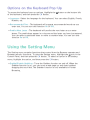
101Using the Keyboard Pop-up
102Options on the Keyboard Pop-Up
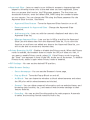
102 Using the Setting Menu
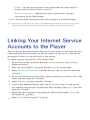
Linking Your Internet Service Accounts to
the Player
BD-Live Settings
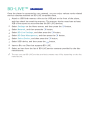
105 BD-LIVE™
106 BD-LIVE™
Appendix
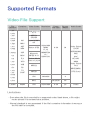
Supported Formats
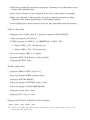
107 Video File Support
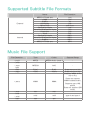
109 Supported Subtitle File Formats
109 Music File Support
110 Picture File Support
110 AVCHD (Advanced Video Codec High Definition)
Troubleshooting
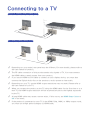
Connecting to a TV
Except for F8909S,F6909S,F8509S model
For F8909S,F6909S,F8509S model
"" Depending on your model, rear panel may be different. For more details, please refer to
the user manual of product.
"" The RF cable connection of this product sends only signals of TV. You must connect
the HDMI cable to watch output from your product.
"" If you use an HDMI-to-DVI cable to connect to your display device, you must also
connect the Digital Audio Out on the product to audio system to hear audio.
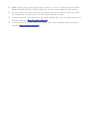
"" Depending on your TV, certain HDMI output resolutions may not work. Please refer to
the user manual of your TV.
"" When you connect the product to the TV using the HDMI cable for the first time or to a
new TV, the HDMI output resolution will be automatically set to the highest supported
by the TV.
"" A long HDMI cable may cause a screen noise. If this occurs, set HDMI Deep Colour to
Off in the menu.
"" If the product is connected to your TV in the HDMI 720p, 1080i, or 1080p output mode,
you must use a High speed (category 2) HDMI cable.
"" HDMI outputs only a pure digital signal to the TV. If your TV does not support HDCP
(High-bandwidth Digital Content Protection), random noise appears on the screen.
"" Do not connect the power cord until you have made all the other connections. When
you change the connections, turn off all devices before you start.
"" If connecting with 2 RF cables from the same satellite dish, you can watch and record
different channels. For F8909S, F8509S model
"" If connecting with one RF cable, you cannot view second channel while recording a
channel. For F8909S, F8509S model
Connecting to an Audio System
Method 1: Connecting to an HDMI
supported AV receiver
Method 2: Connecting to an AV
receiver with Optical input
"" After finishing the connections, press the input selector of the connected audio system
and TV until the video signal from the product appears on your TV and you hear the
audio signal through your audio system.
"" Do not connect the power cord until you have made all the other connections. When
you change the connections, turn off all devices before you start.
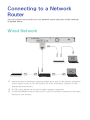
Connecting to a Network
Router
You can connect your product to your network router using one of the methods
illustrated below.
Wired Network
"" Internet access to Samsung’s software update server may not be allowed, depending
on the router you use or your ISP’s policy. For more information, contact your ISP
(Internet Service Provider).
"" For DSL users, please use a router to make a network connection.
"" To use the AllShare function with your PC, your PC should be connected to the same
network as your product.
Wireless Network
For BD-F8 series
"" If the wireless router supports DHCP, your product can use a DHCP or static IP address
to connect to the wireless network.
"" Set your wireless router to Infrastructure mode. Ad-hoc mode is not supported.
"" The product supports only the following wireless security key protocols: WEP (OPEN/
SHARED), WPA-PSK (TKIP/AES), WPA2-PSK (TKIP/AES)
"" Select a channel on the wireless router that is not currently being used. If the channel
set for the wireless router is currently being used by another device nearby, it will result
in interference and communication failure.
"" If you select the Pure High-throughput (Greenfield) 802.11n mode and set the
Encryption type on your router or router to WEP, TKIP or TKIP-AES (WPS2Mixed),
the product will not support a connection in compliance with new Wi-Fi certification
specifications.
"" If your router supports WPS (Wi-Fi Protected Setup), you can connect to the network
via PBC (Push Button Configuration) or PIN (Personal Identification Number). WPS will
automatically configure the SSID and WPA key in either mode.
"" Wireless LAN, by its nature, may cause interference, depending on the operating
conditions (router performance, distance, obstacles, interference by other radio
devices, etc).
"" To use the AllShare function with your PC, your PC should be connected to the same
network as your product.
Display
You can configure various display options such as the TV Aspect Ratio, Resolution,
etc.
3D Settings
Select whether to play a Blu-ray Disc with 3D contents in 3D Mode.
●●If you move to the Home or Apps screen while in 3D mode, the product will
switch to 2D automatically.
3D Blu-ray Playback Mode
Try Now
Set whether to play 3D Blu-ray disc in 3D or 2D image.
●●Auto : Automatically detect if a connected TV has 3D capability and play a Blu-
ray 3D disc in 3D or 2D accordingly or a 3D only disc in 3D if the TV supports
3D. 3D only discs will not be played if your TV does not support 3D.
●●3D → 3D : Play 3D only and Blu-ray 3D discs in 3D mode at all times.
●●3D → 2D : Play Blu-ray 3D discs in 2D mode at all times. 3D only discs will not
be played.
"" For some 3D discs, to stop a movie during 3D playback, press the ' button once. The
movie stops and the 3D mode option is de-activated. To change a 3D option selection
when you are playing a 3D movie, press the ' button once. The Blu-ray menu appears.
Press the ' button again, then select 3D Settings in the Blu-ray menu.
"" Depending on the content and the position of the picture on your TV screen, you may
see vertical black bars on the left side, right side, or both sides.
Screen Size
Try Now
Lets you enter the actual screen size of your TV so that the product can adjust
the image according to the screen size and display an optimal 3D image. (For 3D
displays bigger than 116 inches, simply setting it as 116 is a safe choice.)
"" As the video resolution in 3D play mode is fixed according to the resolution of the
original 3D video, you can not change the resolution to your preference.
"" Some functions such as BD Wise, screen size adjustment, and resolution adjustment
may not operate properly in 3D play mode.
"" You must use a high-speed HDMI cable for proper output of the 3D signal.
"" Stay at least three times the width of the screen from the TV when watching 3D
images. For example, if you have a 46 inch screen, stay 138 inches (11.5 feet) from the
screen. Place the 3D video screen at eye level for the best 3D picture.
"" When the product is connected to some 3D devices, the 3D effect may not function
properly.
"" “Blu-ray 3D” and “Blu-ray 3D” logo are trademarks of the Blu-ray Disc Association.
TV Aspect Ratio
Try Now
Lets you adjust the output of the product to the screen size of your TV.
●●16:9 Original : Select when you connect the product to a 16:9 TV screen. The
product will display all content in its original aspect ratio. Content formatted
in 4:3 will be displayed with black bars on the left and right.
●●16:9 Full : Select when you connect the product to a 16:9 TV screen. All content
will fill the full screen. Content formatted in 4:3 will be stretched.
●●4:3 Letter Box : Select when you connect the product to a 4:3 TV screen. The
product will display all content in its original aspect ratio. Content formatted
in 16:9 will be displayed with black bars on the top and bottom.
●●4:3 Pan-Scan : Select when you connect the product to a 4:3 TV screen. 16:9
content will have the extreme left and right portions cut off.
"" Depending on the disc type, some aspect ratios may not be available.
"" If you select an aspect ratio and option which is different than the aspect ratio of your
TV screen, then the picture might appear to be distorted.
"" If you select the 16:9 Original, your TV may display 4:3 Pillarbox (black bars on sides
of picture).
BD Wise (Samsung Products
only) Try Now
When you connect a Samsung product and a Samsung TV with BD Wise to each
other via HDMI, and BD Wise is on in both the product and TV, the product outputs
video at the video resolution and frame rate of the Blu-ray Disc/DVDs.
●●Off : The output resolution stays fixed at the resolution you set previously in
the Resolution menu, regardless of the resolution of the disc. See Resolution
below.
●●On : The product outputs video at the original resolution and frame rate of the
Blu-ray Disc/DVDs.
"" When BD Wise is on, the Resolution setting automatically defaults to BD Wise and BD
Wise appears in the Resolution menu.
"" If the product is connected to a device that does not support BD Wise, you can not use
the BD Wise function.
"" For proper operation of BD Wise, set the BD Wise menu of both the product and the TV
to On.
Resolution
Try Now
Set the output resolution of the HDMI video signal.
The number indicates the number of lines of video per frame. The i and p indicate
interlaced and progressive scan, respectively. The more lines, the higher quality.
●●BD Wise : Automatically sets the resolution to the resolution of the Blu-ray
Disc/DVDs if you have connected the product via HDMI to a TV with the BD
Wise feature. (The BD Wise menu item appears only if BD Wise is set to On.
See BD Wise above.)
●●Auto : Automatically sets the output resolution to the connected TV’s maximum
resolution.
●●1080p : Outputs 1080 lines of progressive video.
●●1080i : Outputs 1080 lines of interlaced video.
●●720p : Outputs 720 lines of progressive video.
●●576p/480p : Outputs 576/480 lines of progressive video.
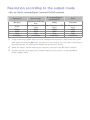
Resolution according to the output mode
●●Blu-ray Disc/E-contents/Digital Contents/DTV/DVD playback
Resolution
BD Wise
Auto
1080p
1080i
720p
576p/480p
Blu-ray Disc
E-contents/Digital
contents/DTV
DVD
Resolution of Blu-ray
1080p
576i/480i
Disc
Max. Resolution of TV Max. Resolution of TV Max. Resolution of TV
input
input
input
1080p
1080p
1080p
1080i
1080i
1080i
720p
720p
720p
576p/480p
576p/480p
576p/480p
"" If the screen stays blank after you have changed the resolution, remove all discs, and
then press and hold the ' button on the top of the product for more than 5 seconds on
the home screen. All settings are restored to the factory default.
"" When the factory default settings are restored, all stored user BD data is deleted.
"" The Blu-ray Disc must have the 24 frame feature for the product to use the Movie
Frame (24fps) mode.
DTV Smart Resolution
Try Now
Use this function to automatically optimised screen resolution for digital
broadcasts.
●●Auto : Screen resolution is automatically optimised for digital broadcast.
●●Off : Turn off DTV Smart Resolution.
"" When you change your TV channel with this function set to Auto, according your TV,
the display time of next channels may take longer than the function set to Off.
"" DTV smart resolution is activated only when resolution option is set to Auto.
Movie Frame (24fps)
Try Now
Setting the Movie Frame (24fps) feature to Auto lets the play adjust its HDMI
output to 24 frames per second for improved picture quality. You can enjoy the
Movie Frame (24fps) feature only on a TV supporting this frame rate. Movie Frame
is only available when the product is in the 1080p output resolution modes.
●●Auto : Movie Frame (24fps) functions work.
●●Off : Movie Frame (24fps) functions are off.
Smart Hub Screen Size
Try Now
Set the Smart Hub Screen to the optimal size.
"" If displayed E-manual page on your TV screen is incomplete and partially hidden, set
the Smart Hub Screen Size to Size 1.
HDMI Colour Format
Try Now
Set the colour space format for HDMI output, depending on the connected device.
●●Auto : Automatically set the optimum format supported by the connected
display device.
●●YCbCr (4:4:4) : Recommended when connected to a display that supported
YCbCr (4:4:4) because most films are in this format.
●●RGB (Standard) : Recommended when connected to a display that does not
support the YCbCr format. Select this for output of the normal range of RGB
colours.
●●RGB (Enhanced) : Select this for output of an enhanced range of RGB colours.
Not recommended for general use because it will increase the contrast
between black and white.
HDMI Deep Colour
Try Now
Lets you output video from the HDMI OUT jack with Deep colour. Deep colour
provides more accurate colour reproduction with greater colour depth.
●●Auto : The product outputs video with Deep Colour to a connected TV which
supports HDMI Deep Colour.
●●Off : The picture is output without Deep Colour.
Progressive Mode
Try Now
Lets you improve picture quality when viewing DVDs.
●●Auto : Select to have the product automatically select the best picture quality
for the DVD you’re watching.
●●Video : Select for the best picture quality from concert or TV show DVDs.
Audio
Digital Output
Try Now
You set the Digital Output to match the capabilities of the AV receiver you’ve
connected to the product :
●●PCM : Choose if you have connected an HDMI supported AV receiver.
●●Bitstream (Unprocessed) : Select if you have connected an HDMI supported AV
receiver with Dolby TrueHD and DTS-HD Master Audio decoding capabilities.
●●Bitstream (Re-encoded DTS) : Choose if you have connected an AV receiver
using a Digital Optical input that can decode DTS.
●●Bitstream (Re-encoded Dolby D) : Select if you don’t have an HDMI supported
AV receiver, but have an AV receiver with Dolby Digital decoding capabilities.
"" Be sure to select the correct Digital Output or you will hear no sound or a loud noise.
"" If the HDMI device (AV receiver, TV) is not compatible with compressed formats (Dolby
digital, DTS), the audio signal outputs as PCM.
"" Regular DVDs do not have BONUSVIEW audio and Navigation Sound Effects.
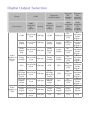
Digital Output Selection
Setup
PCM
Connection
Audio
Stream on
Blu-ray
Disc
HDMI
supported
AV
receiver
Optical
HDMI
supported
AV
receiver
Bitstream
(Reencoded
Dolby D)
Optical
HDMI
supported
AV
receiver
or Optical
HDMI
supported
AV
receiver
or Optical
PCM
Up to PCM
PCM 2ch
7.1ch
PCM
PCM 2ch
Reencoded
DTS
Dolby
Digital
Up to PCM
PCM 2ch
7.1ch
Dolby
Digital
Dolby
Digital
Reencoded
DTS
Dolby
Digital
Plus
Up to PCM
PCM 2ch
7.1ch
Dolby
Digital
Plus
Dolby
Digital
Reencoded
DTS
Dolby
TrueHD
Up to PCM
PCM 2ch
7.1ch
Dolby
TrueHD
Dolby
Digital
Reencoded
DTS
DTS
Up to PCM
PCM 2ch
6.1ch
DTS
DTS
Reencoded
DTS
DTS
Reencoded
DTS
DTS-HD
Master
Audio
DTS
Reencoded
DTS
PCM 2ch
PCM 2ch
PCM 2ch
Reencoded
Dolby
Digital *
Reencoded
Dolby
Digital *
Reencoded
Dolby
Digital *
Reencoded
Dolby
Digital *
Reencoded
Dolby
Digital *
Reencoded
Dolby
Digital *
Reencoded
Dolby
Digital *
PCM 2ch
DTSDTSHD High Up to PCM
HD High
PCM 2ch
Resolution
7.1ch
Resolution
Audio
Audio
DTS-HD
Up to PCM
Master
PCM 2ch
7.1ch
Audio
PCM
Audio
Stream on
DVD
Bitstream
(Reencoded
DTS)
Bitstream
(Unprocessed)
PCM 2ch
PCM 2ch
Dolby
Digital
Up to PCM
PCM 2ch
5.1ch
Dolby
Digital
Dolby
Digital
Dolby
Digital
Dolby
Digital
DTS
Up to PCM
PCM 2ch
6.1ch
DTS
DTS
DTS
DTS
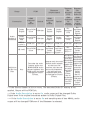
Setup
PCM
Connection
Audio
Stream of
Broadcast
HDMI
supported
AV
receiver
Optical
Bitstream
(Reencoded
DTS)
Bitstream
(Reencoded
Dolby D)
HDMI
supported
AV
receiver
or Optical
HDMI
supported
AV
receiver
Optical
HDMI
supported
AV
receiver
or Optical
Dolby
Digital
Up to PCM
PCM 2ch
5.1ch
Dolby
Digital
Dolby
Digital
Reencoded
DTS
Dolby
Digital
Plus
Up to PCM
PCM 2ch
5.1ch
Dolby
Digital
Plus**
Dolby
Digital
Reencoded
DTS
PCM 2ch
PCM 2ch
PCM 2ch
MPEG1
Layer 2
PCM 2ch
PCM 2ch
Up to PCM
HE-AAC
PCM 2ch
5.1ch
Definition
for Blu-ray
Disc
Bitstream
(Unprocessed)
Any
Decodes the main
feature audio and
BONUSVIEW audio
stream together into
PCM audio and adds
Navigation Sound
Effects.
ReReencoded
encoded
Dolby
Dolby
Digital*** Digital***
Reencoded
DTS***
Outputs only the main
feature audio stream
so that your AV
receiver can decode
the audio bitstream.
You will not hear
BONUSVIEW audio
or Navigation Sound
Effects.
Decodes the
main feature
audio and
BONUSVIEW
audio stream
together into
PCM audio
and adds
Navigation
Sound
Effects,
then reencodes the
PCM audio
into DTS
bitstream.
Reencoded
Dolby
Digital
Reencoded
Dolby
Digital
PCM 2ch
Reencoded
Dolby
Digital***
Decodes the
main feature
audio and
BONUSVIEW
audio stream
together into
PCM audio
and adds
Navigation
Sound
Effects,
then reencodes the
PCM audio
into Dolby
Digital
bitstream.
* If the Source Stream is 2ch or mono, "Re-encoded Dolby D" setting is not
applied. Output will be PCM 2ch.
** If the Audio Description is set to On, audio output will be changed Dolby
Digital even if the original broadcast stream is Dolby Digital Plus.
*** If the Audio Description is set to On and sampling rate of less 48kHz, audio
output will be changed PCM even if the Bitstream is selected.
PCM Downsampling
Try Now
Set whether to use downsampling processing or not.
●●Off : Select when the AV receiver connected to the product is 96kHz compatible.
●●On : Select when the AV receiver connected to the product is not 96kHz
compatible. 96kHz signals will be down converted to 48kHz.
"" Even when PCM Downsampling is set to Off, some discs will only output
downsampled audio through the optical digital outputs.
"" If your TV is not compatible with compressed multi-channel formats (Dolby Digital,
DTS), the product may output PCM 2ch downmixed audio even though you set the
digital output as Bitstream (unprocessed/Re-encoded DTS/Re-encoded Dolby D) on
your setup menu.
"" If your TV is not compatible with PCM sampling rates over 48kHz, the product may
output 48kHz downsampled PCM audio even though you set PCM Downsampling to
Off.
Dynamic Range Control
Try Now
Set Dynamic Range control option for Dolby Digital, Dolby Digital Plus and Dolby
TrueHD.
●●Auto : The Dynamic Range will be controlled automatically based on the
information provided by the Dolby TrueHD Soundtrack. This setting is same
with "On" for Dolby Digital and Dolby Digital Plus.
●●Off : You can enjoy original sound without compressing Dynamic Range of the
sound.
●●On : The Dynamic Range is compressed appropriately by boosting low level
sound and reducing extremely loud sound.
Downmixing Mode
Try Now
Select Downmix method for stereo output.
●●Normal Stereo : Downmixes the multi-channel audio into two channel stereo.
Choose when connected to equipment that does not support virtual surround
functions such as Dolby Pro Logic.
●●Surround Compatible : Downmixes multi-channel audio into surround
compatible stereo. Choose when connected to equipment that supports virtual
surround functions such as Dolby Pro Logic.
DTS Neo:6 Mode
Try Now
You can enjoy multichannel sound via HDMI output even for 2 channels audio
source.
●●Off : Outputs a 2-channel audio signal through the front speakers only.
●●Cinema : Select to play 2-channel movie sound over multi-channels.
●●Music : Select to play 2-channel music over multi-channels.
"" If you are using an HDMI supported AV receiver, this option is available when you set
Digital Output setup as PCM.
Audio Sync
Try Now
In some cases when the product is connected to a digital TV, the audio signal may
not synchronize with the video signal. If this occurs, adjust the audio delay time to
match the video signal.
●●You can set the audio delay time between 0 msec and 250 msec. Adjust it to
the optimal setting.
"" The audio delay time you specify may not be exact depending on the played content.
Connected Device
Try Now
Choose an equipment that you have connected to this product to hear the sound
in addition to your TV. Loudness of DTV Programme will be adjusted according to
your equipment.
●●AV Receiver : Select this If you use a general AV Receiver / Home Theatre
Equipment or a Television to hear sound.
●●AV Receiver (Offset Mode) : Select this if your case is one of two shown below.
–– If you use THX Certified AV Receiver / Home Theatre Equipment.
–– In case "Digital Output" is set to "Bitstream", and If you feel the Dolby
Audio much louder than MPEG1 Layer2 Audio while watching DTV
Programme, select this even if your AV Receiver is not THX Certified one.
●●Stereo Device : Select this if you use a Stereo Amplifier or Recording Device
that support Optical Digital Audio Input as PCM format.
"" For users whose TV is the only sound-producing device: 1) If the TV does not support
Dolby Digital bitstream input via HDMI, no specific setting is required. 2) If the TV
supports Dolby Digital bitstream input via HDMI, set "Connected Device" to "Stereo".
"" If the DTV Programme you are watching is produced according to EBU R128, The
Average Loudness between MPEG1 Layer2 Audio, Dolby Digital Audio, Dolby Digital
Plus Audio, HE-AAC Audio can be reduced. If the DTV Programme do not meet the
EBU R128, there may be still some amount of difference of average Loudness between
a TV Programmes.
"" Substantial number of AV Receiver / Home Theatre Device decode Dolby Digital /
Dolby Digital Plus with +4dB OFFSET when compared to same encoding level of PCM
input. This kind of product include both THX Certified one and also none THX Certified
one. If user select "AV Receiver(Offset mode)", the average loudness between Dolby
Digtial / Dolby Digital Plus audio decoded by such a product and MPEG1 Layer2 Audio
decoded by this product will be similar.
Broadcasting
You can configure your TV channels with features such as country and auto tune.
Auto Tuning
Try Now
Scans all channels and stores them in the product’s memory.
Auto Tuning
Configure auto-tuning settings to scan and store channels.
Cable Search
Option Except for F8900A, F8500A, F8909S, F8509S, F6909S model
Configure search settings, such as frequency and symbol rate, for cable network.
Aerial
Try Now
Except for F8900A, F8500A model
Selects an appropriate type of aerial for digital broadcasts.
Before your product can begin memorizing the available channels, you must specify
the type of signal source that is connected to the this product.
Channel List
Try Now
Select this to check the stored channels.
You can see TV channels in several ways.
Guide
Try Now
Provide programme information for each channels.
Schedule Manager
Try Now
It can manager lists for schedule viewing or recording.
Edit Channel
It is provided to edit functions for channel.
Edit Favourites
It is provided to make and edit favourite lists for channel.
Channel Settings
Country (Area)
Try Now
Select your country so that the TV can correctly auto-tune the broadcasting
channels.
"" Password : Enter the desired 4-digit password using the number buttons. 1) France,
Italy : You can not set the password to "0000". Please choose other numbers. 2) Others
: Default password is set to 0000.
"" Channel Ordering menu can be displayed when the country set to Italy.
Manual Tuning
Try Now
Scans for a channel manually and stores in the product.
When scanning has finished, channels are updated in the channel list.
Transfer Channel list
Try Now
This function can import or export the channel map.
You should connect a USB storage to use this function.
●●Import from USB : Import channel list from USB.
●●Export to USB : Export channel list to USB.
"" If you set the country to Netherlands and Antenna source set to cable, this menu will
not appear.
Delete CAM operator profile
Except for F8900A, F8500A model
Select this menu to delete the CAM operator profile.
Satellite System
For F8909S, F8509S, F6909S model
Configure settings for your satellite equipment.
●●Satellite Selection : Choose one or more satelites for your product.
●●LNB Power : Enable or disable LNB Power supply from receiver.
●●LNB Settings : Configure parameters for your satelite equipment.
●●SatCR/Unicable Settings :Configure single cable installation.
"" Depending on your country, this menu function may not be supported.
●●Positioner Settings : Configure the settings for your aerial positioner.
●●Reset All Settings : Restrore all settings to defaults.
Subtitle
Try Now
Configures the subtitle options.
Primary Subtitle Language
Try Now
Select the Primary Subtitle language.
Secondary Subtitle Language
Try Now
Select the Secondary Subtitle language.
Audio Language
Select the type of Audio Language.
Primary Audio Language
Select the Primary Audio language.
Secondary Audio Language
Select the Secondary Audio language.
Edit Channel Number
Use this to change channel number.
"" Depending on your country, this menu function may not be supported.
Programme Rating Lock
Try Now
Block some programmes.
"" Password : Enter the desired 4-digit password using the number buttons. 1) France,
Italy : You can not set the password to "0000". Please choose other numbers. 2) Others
: Default password is set to 0000.
Digital Text
For BD-F8900M, F8500M model
If the programme broadcasts with digital text, this feature is enabled.
Data Service
Enable or disable the data service autorun feature, which activates data service
automatically.
"" Data Service allows you to use information (text, still images, graphics, documents,
software, etc.) transmitted via broadcast media if the channel you are currently
watching provides data service.
"" In some countries, the Data Service item will not be listed in the menu.
"" Some data services are available only when the product is connected to the network.
"" During recording, data service is not available.
Teletext Language
Try Now
Set teletext language.
Primary Teletext Language
Try Now
Select the primary teletext language.
Secondary Teletext Language
Try Now
Select the secondary teletext language.
RF Bypass Gain
For BD-F8900N, F8500N model
Select this function to watch TV channels even though product's power is turned
off.
"" Power consumption will be increased when you use this function.
Aerial Connection Type
For F8909S, F8509S model
Choose Single or Dual depending on the number of aerial cables connected.
Common Interface
Except for BD-F8900A, F8500A model
Show common interface menu and application information.
●●CI Menu : This enables the user to select from the CAM provided menu. Select
the CI Menu based on the menu PC Card.
●●CAM video transcoding : You can configure the setting to transcode the video
codec from the CAM automatically. Turn it Off if you do not want to use it.
"" You must use a CAM that supports transcoding the video codec.
●●Application Info : View information on the CAM(Conditional Access Module)
inserted into the CI. Slot and on the "CI CAM with CI or CI+ CARD" which is
inserted into the CAM. You can install the CAM anytime whether the product
is on or off.
●●CICAM PIN Manager : Save or clear CI CAM PIN numbers.
1. Purchase a CI CAM at your nearest dealer or by phone.
2. Firmly insert the "CI CAM with CI or CI+ CARD".
3. Insert the CAM with the "CI CAM with CI or CI+ CARD" into the common
interface slot, in the direction of the arrow so that it aligns parallel with the
slot.
4. Check if you can see a picture on a scrambled signal channel.
"" This product works with CI and CI+ CAM. But in case of some local broadcasting
operators, this product may not have perfect compatibility with all kinds of CAM.
"" If the inserted CAM does not operate properly, pull the CAM CARD out of the product
and insert it into the slot again.
"" If a popup message appears, please take a step referring the follows.(This is not a
product malfunction. Please contact your service provider for more information.)
1. "Wrong smart card inserted." : Smart card is inserted incorrectly.
2. " Inserted smart card not supported." : Wrong smart card is inserted.
3. "The credit of your smart card has expired. Your smart card is not authorised
for this service." : The credit of your smart card has expired.
4. "No smart card is inserted." : Smart card is not inserted correctly.
"" Some CAM in the market with older firmware versions are not fully interoperable with
this device that is compliant to v1.3 specification.
"" It is a problem of legacy CAM, not this CI Plus compliant device. In this case , this
problem can be resolved by applying a firmware upgrade to the CAM.
"" Please contact your network operator or CAM operator for it.
"" Check whether the firmware of CAM is upgraded for compatibility with CI+ 1.3 Version.
Network
When you connect this product to a network, you can use network based
applications and functions, and upgrade the product's software through the
network connection. To use network services, you must connect the product to the
network.
Network Status
Lets you check the current network and Internet status.
Network Settings
Except for BD-F6 series
Before you begin, contact your ISP to find out if your IP address is static or
dynamic. If it is dynamic, and you have a wired or wireless network, we recommend
using the Automatic configuration procedures described below.
If you are connecting to a wired network, connect the product to your router using
a LAN cable before you start the configuration procedure. If you are connecting to
a wireless network, disconnect any wired network connection before you begin.
Wired Network
Wired - Automatic
1.
2.
3.
4.
5.
In the Home screen, select Settings, and then press the E button.
Select Network, and then press the E button.
Select Network Settings, and then press the E button.
Select Wired in the Network Settings screen, and then press the E button.
Select Connect, and then press the E button. The product detects the wired
connection, verifies the network connection and then connects to the network.
Wired - Manual
If you have a static IP address or the Automatic procedure does not work, you'll
need to set the Network Settings values manually.
Follow Steps 1 and 2 in Wired Network, and then follow these steps:
1. Select Network Status. The player searches for a network, and then displays
the connection failed message.
2. On the bottom of the screen, select IP Settings, and then press the E button.
The IP Settings screen appears.
3. Select the IP Setting field, and then press the E button.
4. Select Enter manually in the IP Setting field, and then press the E button.
5. Select a value to enter (IP Address, for example), and then press the E
button. Use the number keypad on your remote control to enter the numbers
for the value. You can also enter numbers using the ▲▼ buttons. Use the ◀▶
buttons on the remote control to move from entry field to entry field within a
value. When done with one value, press the E button.
6. Press the ▲ or ▼ button to move to another value, and then enter the numbers
for that value following the instructions in Step 5.
7. Repeat Steps 5 and 6 until you have filled in all values.
"" You can get the Network values from your Internet provider.
8. When finished entering all the values, select OK, and then press the E button.
The player verifies the network connection and then connects to the network.
Wireless Network
You can setup a wireless network connection in four ways:
–– Wireless Automatic
–– Wireless Manual
–– WPS(PBC)
–– WPS(PIN)
When you configure the wireless network connection, any wireless network devices
currently connected through the player or, if applicable, the player's current wired
connection, will be disconnected.
Wireless - Automatic
1.
2.
3.
4.
In the Home screen, select Settings, and then press the E button.
Select Network, and then press the E button.
Select Network Settings, and then press the E button.
Select Wireless in the Network Settings screen, and then press the E button.
The player searches for and then displays a list of the available networks.
5. Select the desired network, and then press the E button.
6. On the Security screen, enter your network's Security Code or Pass Phrase.
Enter numbers directly using the number buttons on your remote control. Enter
letters by selecting a letter with an arrow button, and then pressing E button.
"" To view the password as you enter it, use the arrow buttons to select Show Password
7.
on the right side, and then press E button.
When done, select Done and then press the E button. The player verifies the
network connection and then connects to the network.
8. When verification is complete, select OK, and then press the E button.
"" You should be able to find the Security Code or Pass Phrase on one of the set up
screens you used to set up your router or modem.
Wireless - Manual
If you have a static IP address or the Automatic procedure does not work, you'll
need to set the Network Settings values manually.
1. Follow the directions in Wireless - Automatic through Step 5.
2. The player searches for a network, and then displays the connection failed
message.
3. On the bottom of the screen, select IP Settings, and then press the E button.
The IP Settings screen appears.
4. Select the IP Setting field, and then press the E button.
5. Select Enter manually in the IP Setting field, and then press the E button.
6. Select a value to enter (IP Address, for example), and then press E button.
Use the number keypad on your remote control to enter the numbers for the
value. You can also enter numbers using the ▲▼ buttons. Use the ◀▶ buttons
on the remote control to move from entry field to entry field within a value.
When done with one value, press the E button.
7. Press the ▲ or ▼ button to move to another value, and then enter the numbers
for that value following the instructions in Step 6.
8. Repeat Steps 6 and 7 until you have filled in all values.
"" You can get the Network values from your Internet provider.
9. When finished, select OK, and then press the E button. The Security Screen
appears.
10. On the Security screen, enter your network's Security Code or Pass Phrase.
Enter numbers directly using the number buttons on your remote control. Enter
letters by selecting a letter with the ▲▼◀▶ buttons, and then pressing the E
button.
11. When finished, select Done at the right of the screen, and then press the E
button. The player verifies the network connection and then connects to the
network.
12. After the player verifies the network, select OK, and then press the E button.
WPS(PBC)
1.
2.
3.
4.
5.
In the Home screen, select Settings, and then press the E button.
Select Network, and then press the E button.
Select Network Settings, and then press the E button.
Select Wireless in the Network Settings screen, and then press the E button.
Press the ▲ button on your remote, and then press the ▶ button to select the
WPS(PBC).
6. Press the E button on your remote. The "Press the PBC button" message
appears.
7. Press the WPS(PBC) button on your router within two minutes. Your player
automatically acquires all the network settings values it needs and connects to
your network. The Network Status screen appears. The player connects to the
network after the network connection is verified.
WPS(PIN)
Before you begin, open the router's setup menu on your PC and access the screen
with the WPS PIN entry field.
1.
2.
3.
4.
In the Home screen, select Settings, and then press the E button.
Select Network, and then press the E button.
Select Network Settings, and then press the E button.
Select Wireless in the Network Settings screen, and then press the E button.
The player searches for and then displays a list of the available networks.
5. Select the desired network, and then press the E button.
6. Select the WPS(PIN), and then press the E button. The PIN pop-up appears.
7. Enter the PIN into the WPS PIN entry field in the router's Set Up screen and
then save the the screen.
"" Contact the manufacturer of the router for instructions explaining how to access the
route's Set Up screens or refer to the router's user's manual.
"" For WPS connection, set your wireless router’s security encryption to AES. Setting to
WEP security encryption does not support WPS connection.
Wi-Fi Direct
Except for BD-F6 series
The Wi-Fi Direct function allows you to connect Wi-Fi Direct devices to the product
and each other using a peer-to-peer network, without a wireless router.
"" Some Wi-Fi Direct devices may not support the AllShare function if connected via WiFi Direct. If this is the case, it is advisable to change the network connection method
between devices.
"" Bluetooth transmissions can interfere with the Wi-Fi Direct signal. Before you use the
Wi-Fi Direct function, we strongly recommend that you turn off the Bluetooth function
of any active mobile device.
1.
2.
3.
4.
Turn on the Wi-Fi Direct device and activate its Wi-Fi Direct function.
In the Home screen, select Settings, and then press the E button.
Select Network, and then press the E button.
Select Wi-Fi Direct, and then press the E button. The Wi-Fi Direct devices
that you can connect appear.
5. You have three ways to complete the Wi-Fi connection:
●● Through the Wi-Fi device.
●● Through the product using PBC.
●● Through the product using a PIN.
Each is covered below.
Through the Wi-Fi Device
1. On the Wi-Fi device, follow the procedure on the device for connecting to
another Wi-Fi Direct device. See the device's user manual for instructions.
2. When you have completed the procedure, you should see a pop-up on your
TV screen saying that a device that supports Wi-Fi Direct has requested to
connect. Select OK, and then press the E button to accept.
3. The Connecting pop-up appears, followed by the Connected pop-up. When
it closes, you should see the device listed on the Wi-Fi Direct screen as
connected.
Through the Product Using PBC
1. Select the Wi-Fi Direct device you want to connect to this product, and then
press the E button. The PBC/PIN pop up appears.
2. Select PBC, and then press the E button. The PBC pop-up appears.
3. Press the PBC button on the Wi-Fi Direct device within 2 minutes.
4. The Connecting pop-up appears, followed by the Connected pop-up. When
it closes, you should see the device listed on the Wi-Fi Direct screen as
connected.
Through the Product Using a PIN
1. Select the Wi-Fi Direct device you want to connect to this product, and then
press the E button. The PBC/PIN pop up appears.
2. Select PIN, and then press the E button. The PIN pop-up appears.
3. Note the PIN code in the pop-up, and then enter it into the appropriate field in
the Wi-Fi Direct device you want to connect.
4. The Connecting pop-up appears, followed by the Connected pop-up. When
it closes, you should see the device listed on the Wi-Fi Direct screen as
connected.
"" The wired or wireless network connection will be disconnected when you use the Wi-Fi
Direct function.
"" Some Wi-Fi Direct devices may not support the AllShare function if connected via WiFi Direct. If this is the case, it is advisable to change the network connection method
between devices.
AllShare Settings
Try now
Manage your network connected devices and set this product's hard drive sharing
options.
Content Sharing
Allow other devices on your network, like smart phones and tablets, to share
content with your product.
Share Hard Drive
For BD-F8 series
Set whether to share content from this product with other network connected
devices, such as smart phone.
"" If this menu is set to On, "Auto Power Off" function is not available.
Set Remote Access
Try Now
Remote access allows you to access and control your product from other devices.
You have to log in Samsung account ID to use Remote Access functions with
Samsung Smartphone devices.
Remote Scheduler
You can remotely schedule recording. Only available with Samsung phones
supporting remote schedule functionality.
Register to AllShare Play
Register this device to AllShare Play to share content. Only available with Samsung
phones supporting AllShare Play functionality.
Device Name
Try Now
Lets you input a name for the product that will identify it on your networks.
BD-Live Settings
Try Now
Set various BD-Live function. BD-Live allows you to access extra features available
on some Blu-ray discs if you are connected to the Internet.
BD-Live Internet Connection
Try Now
Lets you fully allow, partly allow, or prohibit a BD-Live Internet connection.
Delete BD Data
Try Now
For BD-F8 series
Delete all BD data in the storage.
BD Data Management
For BD-F6 series
Manage BD data downloaded from a BD-Live service or Blu-ray Disc.
Select Device
Change location of desired memory to store BD data.
Delete BD Data
Delete all BD data in the storage.
Smart Features
Set your preferences for using Apps.
Apps Settings
Lets you configure App notification settings and view basic info about your Apps.
Auto Ticker
This automatically turns on the selected ticker service.
Push Notification Settings
Receive notifications from selected services.
Channel-Bound Apps
Enable or disable Channel-Bound Apps.
There are available on certain channels that provide additional information or
services.
Properties
See basic info about Apps.
VOD Rating Lock
You can lock access to Video on Demand (VOD) content based on its rating.
"" Depending on your country, this menu function may not be supported.
Terms & Conditions, Privacy Policy
You must review and agree to both the Terms & conditions and the privacy policy
in order to enjoy App services.
Reset Smart Hub
Reset your App services and Samsung account settings stored on your device.
System
Setup
Try Now
Sets the channels and the time when setting up this product for the first time or
when resetting it.
Language
Try Now
You can select the language you prefer for the On-screen menu, disc menu, etc.
●●The selected language will only appear if it is supported.
Device Manager
Try Now
Setup input devices to use with this product. You can check your device list and
adjust the settings in this menu.
Keyboard Settings
Try Now
Lets you configure a wireless USB keyboard connected to the product.
"" You can use the Keyboard only when a QWERTY keyboard screen or window appears
in the Web Browser and Apps screen.
Mouse Settings
Try Now
Lets you configure a wireless USB mouse connected to the product. You can use
the mouse in the product's menu in the same way you use a mouse on your PC.
"" You can use the mouse only when a screen or window appears in the Web Browser and
Apps screen.
To use a mouse with the product's menu:
1. Connect the USB mouse to the product.
2. Click the primary button you selected in Mouse Settings. The Simple Menu
appears.
3. Click the menu options you want.
"" Depending on the model of the USB HID keyboard and mouse may not be compatible
with your product.
"" Some HID keyboard keys may not work.
"" Wired USB keyboards are not supported.
"" Some applications may not be supported.
"" If a wireless HID Keyboard does not operate because of interference, move the
keyboard closer to the product.
Clock
Try Now
Sets the current date and time.
"" If Schedule Viewing and Schedule Recording is set using GUIDE, Channel List, or Info
menu, It will work based on the time information of the TV programme. If you set the
Clock Mode to Manual and change time manually, Schedule Viewing and Schedule
Recording function can be limited or work abnormally.
Storage Device Manager
Format Device
Try Now
Try Now
Format selected device. All contents will be deleted from that device.
Check Device
Try Now
Check to see if there is an error with the selected device.
Device Performance Test
Try Now
Test the recording performance of the device.
"" Since the product's Timeshift and other implemented functions require a certain
amount of HDD space allocated internally, the total size shown in the "Storage Device
Manager" of Settings menu may differ from the HDD's capacity shown in the manual.
Default Recording Device
Try now
Change the location of where you store recorded files.
Auto Power Off
Try now
Saves power by turning off your product automatically when no user operation is
received for 4 hours.
"" This function isn't available when "Share Hard Drive" is set to On. For BD-F8 series
Security
Try Now
This function works in conjunction with Blu-ray Disc/DVDs that have been assigned
an age rating or numeric rating that indicates the maturity level of the content.
These numbers help you control the types of Blu-ray Disc/DVDs that your family
can watch. When you access this function, the security screen appears.
Enter the your Security PIN.
"" Password : Enter the desired 4-digit password using the number buttons. 1) France,
Italy : You can not set the password to "0000". Please choose other numbers. 2) Others
: Default password is set to 0000.
BD Parental Rating
Prevent playback of Blu-ray Discs with specific age ratings unless a PIN is entered.
DVD Parental Rating
Prevent playback of DVDs with specific numerical ratings unless a PIN is entered.
A larger number indicates that the programme is intended for adult use only.
Change PIN
Change the 4-digit PIN used to access security functions.
General
Try Now
You can change the options listed below to match your preferences.
Advanced Music Copy
For BD-F8 series
When you copy music files, information can be updated automatically.
The copying time may be increased.
"" This feature is available only when the product is connected to the network.
Menu Transparency
Try Now
Adjust the transparency of the menu box.
Anynet+ (HDMI-CEC)
Try Now
Anynet+ is a convenient function that offers linked operations with other Samsung
products that have the Anynet+ feature. To operate this function, connect this
product to an Anynet+ Samsung TV using an HDMI cable.
DivX® Video On Demand
Try Now
View DivX® VOD Registration Codes to purchase and play DivX® VOD contents.
Support
Remote Management
Try Now
Remote management lets our Call Centre access your Samsung product remotely
to troubleshoot a problem. To use this programme, please accept the Terms of
Service Agreement.
e-Manual(Troubleshooting)
Check the E-manual stored in the device to get troubleshooting tips.
Software Update
Try Now
The Software Update menu allows you to upgrade the player's software for
performance improvements or additional services.
1.
2.
3.
4.
In the Home screen, select the Settings, and then press the E button.
Select Support, and then press the E button.
Select Software Update, and then press the E button.
To download update software and update now, select Update Now, and then
press the E button. See Update Now on this page for details.
5. To let the product download update software automatically when available,
select Auto Update, and then press the E button.
"" The upgrade is complete when the player turns off, and then turns on again by itself.
"" Samsung Electronics shall takes no legal responsibility for player malfunction caused
by an unstable Internet connection or consumer negligence during a software Update.
"" When a system upgrade is in progress, "UPDATE" is displayed on the front panel.
Update Now
You can use Update Now to update the software through your network connection
or by using a USB flash drive. The network instructions are below. The USB flash
drive instructions are on the next page.
1. Select Update Now, and then press the E button. The Update now pop-up
appears.
2. The product searches on line for the latest software version.
3. If it does not find an update, the "No new updates" pop-up appears. Press the
E button to exit.
4. If it finds a new version, the Update Request pop-up appears.
5. Select OK. The product upgrades the software, turns off, and then turns on
automatically.
6. If you do not select OK or Cancel in one minute, the product stores the new
upgrade software. You can upgrade the software later using Auto Update.
7. If you select Cancel, the product cancels the upgrade.
"" When the system upgrade is done, check the software details in the Product
Information section of the Contact Samsung screen.
"" Do not turn off the player during the Software Update. It may cause the player to
malfunction.
Auto Update
You can set the Auto Update function so that the player downloads new upgrade
software when it is in Auto Update mode. In Auto Update mode, the player is off,
but its Internet connection is active. This allows the player to download upgrade
software automatically, when you are not using it.
1. Press the ▲▼ buttons to select Auto Update, and then press the E button.
2. Select the desired time. The product will be updated automatically at the time
you have set or after power off. If it downloads new upgrade software, the
player will ask you if you want to install it when you turn the player on.
"" To use the Auto Update Mode Upgrade function, your player must be connected to the
Internet.
By USB
1. Visit www.samsung.com.
2. Click SUPPORT on the top right of the page.
3. Enter the product's model number into the search field. As you enter the model
number, a drop down will display products that match the model number.
4. Left click your product's model number in the drop down list.
5. On the page that appears, scroll down to and then click Firmware Manuals &
Downloads.
6. Click Firmware in the centre of the page.
7. Click the ZIP button in the File column on the right side of the page.
8. Click Send in the first pop-up that appears. Click OK in the second pop-up to
download and save the firmware file to your PC.
9. Unzip the zip archive to your computer. You should have a single folder with
the same name as the zip file.
10. Copy the folder to a USB flash drive.
11. Make sure no disc is inserted in the product, and then insert the USB flash
drive into the USB port of the product.
12. In the product’s menu, go to Settings > Support >Software Update.
13. Select Update Now.
14. The product searches for the software on the USB drive. When it finds the
software,the Update Request pop-up appears.
15. Select OK. The product upgrades the software, turns off, and then turns on
automatically.
"" There should be no disc in the player when you upgrade the software using the USB
jack.
"" When the system upgrade is done, check the software details in the Product
Information section of the Contact Samsung screen.
"" Do not turn off the player during the Software Update. It may cause the player to
malfunction.
"" Software Updates using the USB jack must be performed with a USB flash memory
stick only.
Manage Satellite Channels
For BD-F8909S, F8509S, F6909S model
Manage software downloads via a satellite channel.
Contact Samsung
Try Now
Provides contact information for assistance with your product.
Reset
Try Now
Resets all settings to their default settings except for the network and App service
settings. The default PIN is 0000.
"" Password : Enter the desired 4-digit password using the number buttons. 1) France,
Italy : You can not set the password to "0000". Please choose other numbers. 2) Others
: Default password is set to 0000.
Your product can play content located on Blu-ray/DVD/CD discs, USB devices,
and PCs. To play content located on your PC, you must connect your PC and the
product to your network and download and install the AllShare network software
on your PC.
The AllShare Play Screen
For all media, the AllShare Play Main screen or one of its sub screens are your
primary means of accessing and playing contents saved on a variety of devices,
either connected directly or using your network.
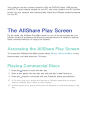
Accessing the AllShare Play Screen
To access the AllShare Play Main screen, select Photos, Videos & Music on the
Home screen, and then press the E button.
Playing Commercial Discs
1. Press the button to open the disc tray.
2. Place a disc gently into the disc tray with the disc’s label facing up.
3. Press the button to close the disc tray. Playback starts automatically.
"" In TV view mode, the ∂ button will function as Timeshift rather than its original
function, playback even if there is a disc inserted.
"" In Home screen, the ∂ button will function as playback of multimedia content in the
disc.
Playing Files on a USB Device
There are two methods you can use to play or view multimedia files located on a
USB device through your product.
Method 1
1. Turn the product on.
2. Connect the USB device to the USB port on the front panel of the player. The
New Device Connected pop-up appears.
"" If the pop-up does not appear, go to Method 2.
3. Use the ▲▼ buttons to select Photos, Videos, Music or All Content, and then
press the E button. The AllShare Play screen appears listing the content of
the device. Depending on how the contents is arranged, you will see either
folders, individual files, or both.
4. If necessary, use the the ▲▼◀▶ buttons to select a folder, and then press the
E button.
5. Select a file to view or play, and then press the E button.
6. Press the RETURN button to exit a folder or the EXIT button to return to the
TV view mode.
Method 2
1.
2.
3.
4.
Turn the product on.
Connect the USB device to the USB port on the front panel of the product.
Press the MENU button to go to home screen.
Select Photos, Videos & Music on the Home screen, and then press the E
button.
5. Select the desired Photos, Videos, Music or All Content, and then press the
E button.
6. Use the ▲▼◀▶ buttons to select the desired device and then press the E
button. Depending on how the contents are arranged, you will see either
folders, individual files, or both.
7. If necessary, use the the ▲▼◀▶ buttons to select a folder, and then press the
E button.
8. Use the ▲▼◀▶ buttons to select a file to view or play, and then press the E
button.
9. Press the RETURN button to exit a folder or the EXIT button to return to Home
screen.
"" If you insert a disc when playing a USB device or phone, the device mode changes to
"Disc" automatically.
Using the AllShare Network
Function
AllShare lets you play Videos, Photos, or Music located on your PC or your
AllShare compatible device through the product using a wireless or wired network
connection. Note that Recorded TV contents stored in the built-in HDD will not be
shared with other devices.
"" Only within the same network, a Samsung smartphone device installed with the
AllShare app can be connected.
"" A Samsung smartphone or a PC installed with the AllShare Play app can be connected
to the Blu-ray product through a remote network.
"" To connect devices through a remote network, the same Samsung Account should be
used to log in for both this Blue-ray product and the device running the AllShare Play
app.
"" For further details on sharing contents with AllShare in remote access network, refer to
the “Register to AllShare Play” guide to enable the function.
To Download the AllShare Software
AllShare Play makes it easy to retrieve and enjoy media files from computers and
DLNA-enabled devices. However, computers need to be installed with AllShare PC
and mobile devices need to support AllShare Play. For more information, visit the
AllShare website (http://www.allshareplay.com). You may experience compatibility
issues when attempting to play media files via a third-party DLNA server.
Playing Content Located on Your PC
or AllShare Device (DMS) through
this product (DMP).
1. Connect the product, your PC, and/or your Allshare compatible device to the
same wireless or wired network.
2. Follow the directions in the Allshare software Installation/Instruction manual
to set up devices and files for playing or viewing.
3. Select Photos, Videos & Music on the player's Home screen, and then press
the E button. The AllShare Play screen appears.
4. Select the type of content you want to play - Photos, Videos, Music, or All
Content - and then press the E button.
5. In the list of Allshare connected devices that appears, select your PC or other
Allshare compatible device, and then press the E button. A screen listing the
available files appears.
6. Select the file you want to play or view, and then press the E button.
Playing Content located on
internal HDD of this device(DMS)
through the the PC or your
SmartPone(DMP) For BD-F8 Series
(Only available with Samsung phones supporting AllShare functionality.)
1. Connect the product, your PC, and/or your AllShare compatible Samsung
mobile phone to the same wireless network.
2.
3.
4.
5.
In the product’s menu, go to Settings > Network > Allshare Settings.
Set Share Hard Drive to On.
Excute Allshare Play application on the phone or on your computer.
Select the product as the playback device and then select the file you want to
view or play.
Controlling Video Playback
You can control the playback of video content located on a Disc, USB, mobile
device or PC. Depending on the disc or contents, some of the functions described
in this manual may not be available.
Buttons on the Remote Control used
for Video Playback
Playback related buttons
The product does not play sound in Search, Slow or Step mode.
●●To return to normal speed playback, press the ∂ button.
●●∂ button : Starts playback.
●●' button : Stops playback.
●●∑ button : Pauses playback.
●●Fast Motion Play : During playback, press the † or … button. Each time you
press the † or … button, the playback speed will change.
●●Slow Motion Play : In pause mode, press the … button. Each time you press the
… button, the playback speed will change.
●●Step Motion Play : In pause mode, press the ∑ button. Each time you press the ∑
button, a new frame appears.
●●Skip Motion Play : During playback, press the € or ‚ button. Each time you
press € or ‚ button, the disc moves to the previous or next chapter or file.
Using the disc menu, title menu, popup menu, and title list
●●DISC MENU button : During playback, press this button to display the Disc
menu.
●●TITLE MENU button : During playback, press this button to display the Title
menu.
–– If your disc has a playlist, press the View button to go to the playlist.
●●POPUP MENU button : During playback, press this button to display the Popup
menu.
Using the Tools Menu
During playback or in pause mode, press the TOOLS button.
●●Play from the Beginning : Select to return to the beginning of the movie, and
then press the E button.
●●Movie Note : Movie Note provides information such as director, cast, synopsis,
etc.
"" Movie Note is available if the disc includes Movie Note information and connected to a
network.
●●Search Scene : You can use the Search Scene function during playback to view
or start a movie from the scene of your choice.
"" If the index information in the file is damaged or the file does not support indexing,
you will not be able to use the Search Scene function.
"" If you play the AllShare Play after connect to a computer with the network, the Search
Scene may not be supported.
●●Search Titles : If there is more than one movie on the disc or device, select to
start a different title.
1. Select Search Titles, and then press the E button.
2. Use the ▲▼ buttons to select a title, and then press the E button.
●●Chapter Search : Select to play the chapter of your choice.
1. Select Chapter Search, and then press the E button.
2. Use the ▲▼ buttons to select a chapter, and then press the E button.
●●Search Time Bar : Select to play the movie from a selected time point.
1. Select Search Time Bar, and then press the E button.
2. Using the number buttons, enter the time point you want to go to, and then
press the E button.
"" You can also use the ◀▶ buttons to advance or rewind the movie. The movie advances
or rewinds one minute each tme you press the ◀▶ buttons.
●●Repeat Mode : Select to repeat a title, chapter, or specific section.
–– Off : Select to return to normal playback.
–– Title : Choose to repeat a selected title.
–– Chapter : Choose to repeat a specific chapter.
–– Repeat A-B : Choose to repeat a specific section.
1. Press the ▲▼ buttons to select Repeat A-B, and then press the E button.
2. Press the E button at the point where you want repeat play to start (A). Let
the movie play.
3. Press the E button at the point where you want repeat play to stop (B).
"" You must set point (B) at least 5 seconds of playing time after point (A).
●●Full Screen : Select to set the size of the video image.
●●Audio Sync : Select to set the audio sync.
●●Rotate : Select to rotate the picture.
●●Picture Mode : Select to set the picture mode.
–– Dynamic : Increases sharpness and brightness.
–– Standard : Choose this setting for most viewing applications.
–– Movie : The best setting for watching movies.
–– User : Lets you adjust the sharpness and noise reduction function respectively.
"" When you use the BD wise function, this menu will not appear.
●●Audio : Select to set the desired audio language.
●●Subtitle : Select to set the desired subtitle language.
●●Subtitle Settings : Select to set the desired subtitle options.
●●Angle : Select to view a scene from another angle. The Angle option displays
the number of angles available to view. When a Blu-ray Disc/DVD contains
multiple angles of a particular scene, you can change angle.
●●BONUSVIEW Video, BONUSVIEW Audio : Select to set the desired bonusview
option.
●●Information : Select to view video file information.
"" Depending on the disc or storage device, the Tools menu may differ.
"" Video files with high bitrates of 20Mbps or more strain the product's capabilities and
may stop playing during playback.
Using the View & Options Menus
Using the View Menu
On a file screen containing video files, select the View and press the E button.
●●Date : Appears on the View function screen. Sort to Date.
●●Title : Appears on the View function screen. Sort to Title.
●●Folder : Appears on the View function screen. Sort to Folder.
●●Playlist : Appears on the View function screen. Sort to Playlist.
●●Title List : Appears on the View function screen. Sort to Title List.
"" Depending on the disc or storage device, the View menu may differ or not be shown.
Using the Options Menu
On a file screen containing video files, select the Options and press the E button.
●●Play Selected : Play Selected lets you select specific file to play. It works
essentially the same for all media.
●●Send : Select Send to upload selected files to app (Picasa, Facebook etc) or
device. To use Send, you need to establish an account with the on-line site,
and then log in using the Log In function.
●●Delete : Select to delete a file from the device.
Controlling Music Playback
You can control the playback of music content located on a Disc, USB, mobile
device or PC.
Depending on the disc or contents, some of the functions described in this manual
may not be available.
Buttons on the Remote Control used
for Music Playback
●●NUMBER buttons : Press the number of a track. The selected track is played.
●●€ ‚ button : Move to the next/forward track.
●●' button : Stops a track.
●●Fast Play (Audio CD (CD-DA) only) : During playback, press the † or … button.
Each time you press the † … button, the playback speed will change.
●●∑ button : Pauses a track.
●●∂ button : Plays the currently selected track.
Using the View & Options Menus
Using the View Menu
On playback screen, select the View and press the E button.
●●Track : Appears on the View function screen. Sort to Track.
●●Album : Appears on the View function screen. Sort to Album.
●●Artist : Appears on the View function screen. Sort to Artist.
●●Genre : Appears on the View function screen. Sort to Genre.
●●Folder : Appears in the View function screen. Sort to Folder.
"" Depending on the disc or storage device, the View menu may differ or not be shown.
Using the Options Menu
On playback screen or a file screen containing music files, select the Options and
press the E button.
●●Play Selected : Play Selected lets you select specific tract to play. It works
essentially the same for all media. See the Repeating tracks on an Audio CD.
●●Send : Select to send the selected file to other devices.
●●Ripping : The Ripping function converts CD audio to the mp3 format and saves
the converted files on a USB device or the mobile device connected to the
product.
●●Information : Select to see the (Contents) information.
●●Encoding : Select to manage the text encoding options.
●●Delete : Select to delete the file from the device.
"" Depending on the disc or storage device, the Options menu may differ or not be
shown.
Repeating Tracks on an Audio CD
You can set the product to repeat tracks on an audio CD (CD-DA/MP3).
1. On the Playback screen, use the ▲▼◀▶ buttons to select
in the lower left
corner of the screen, and then press the E button.
2. Use the ▲▼ to select the repeat mode you want - Off, One Song, or All - and
then press the E button.
Shuffling Tracks on an Audio CD
You can set the product to play tracks on an audio CD (CD-DA/MP3) at random.
1. On the Playback screen, use the ▲▼◀▶ buttons to select
in the lower left
corner of the screen, and then press the E button.
2. Use the ▲▼ to set the Shuffle mode On or Off, and then press the E button.
Creating a Playlist from an Audio CD
1. With the Playback screen displayed, select the Options button and then press
the E button. The Options menu appears.
2. Use the ▲▼ buttons to select Play Selected, and then press the E button.
The Selection Play screen appears.
3. Use the ▲▼ buttons to select a track, and then press the E button. A check
appears to the left of the track.
4. Repeat Step 3 to select and check additional tracks.
5. To remove a track from the list, move to the track, and then press the E
button again. The check on the track is removed.
6. When done, press the ▲▼ button to select Play, and then press the E button.
The Music Playback screen reappears listing only the tracks you checked. The
selected tracks play automatically.
"" You can create a playlist with up to 99 tracks on Audio CDs (CD-DA).
"" If you have created a playlist, Play Selected is replaced by Edit Playlist on the Options
menu.
"" On the Selection Play screen, you can also choose Select All, Clear All, and Cancel.
1) Use Select All to select all tracks. This cancels your individual track selections.
When you press the RETURN button on your remote control or select Play button, and
then press the E button, all tracks will appear on the Music Playback screen, and the
product will begin to play all tracks from Track 001. 2) Use Clear All to deselect all
selected tracks at once. Then, select individual tracks or use Select All to select all the
tracks, and then press the RETURN button on your remote control. If you do not use
Select All or select individual tracks, the Playlist will not change. 3) Cancel cancels any
changes you made on the Play Select screen. When you return to the Playback screen,
the Playlist will be unchanged.
Ripping
1. Insert a USB device into the USB jack on the front of the product.
2. With the Playback screen displayed, select the Options button and then press
the E button. The Options menu appears.
3. Use the ▲▼ buttons to select Ripping, and then press the E button. The
Ripping screen appears.
4. Use the ▲▼ buttons to select a track, and then press the E button. A check
appears to the left of the track.
5. Repeat Step 3 to select and check additional tracks.
6. To remove a track from the list, move to the track, and then press the E
button again. The check on the track is removed.
7. When done, select the Rip button using the ▲▼ button, and then press the E
button. The Rip pop-up appears.
8. Use the ▲▼ buttons to select the device to store the ripping file and then
press the E button.
"" Do not disconnect the device while rip is in progress.
9. If you want to cancel ripping the track, press the E button and then select
Yes. Select No to continue ripping.
10. When ripping is complete, the "Successfully ripped." message appears. Press
the E button.
11. Press the RETURN or select the Cancel button and then press the E button to
go back to the Playback screen.
"" This function is not available with DTS Audio CD.
"" This function may not be supported by some discs.
"" This function will be encoded to the .mp3 format at 192kbps.
"" On the Ripping screen, you can also choose Select All and Deselect All.
"" Use Select All to select all tracks and press the E button. This cancels your individual
track selections.
"" Use Deselect All to deselect all selected tracks at once.
Playing Photo Contents
You can play photo contents located on a DVD, USB, mobile device or PC.
Using the Tools Menu
During playback, press the TOOLS button.
●●Previous : Select to move the previous picture.
●●Next : Select to move the next picture.
●●Start Slide Show / Stop Slide Show : Select to play/pause the slide show.
●●Slideshow Settings : Select the Slide Show settings.
–– Speed : Select to set the slide speed.
–– Effect : Select to set the slide effect.
●●Zoom : Select to enlarge the current picture. (Enlarge up to 4 times)
●●Rotate : Select to rotate the picture. (This will rotate the picture either clockwise
or counter clockwise.)
●●Background Music : Select to listen to music while viewing a slide show.
●●Settings : Select the picture mode and information.
"" Depending on the disc or storage device, the Tools menu may differ. All options may
not be displayed.
"" To enable the background music function, the photo file must be in the same storage
media as the music file. However, the sound quality can be affected by the bitrate of
the MP3 file, the size of the photo, and the encoding method.
"" You can't enlarge the subtitle and PG graphic in the full screen mode.
Using the View & Options Menus
Using the View Menu
On a file screen containing photo files, select the View and press the E button.
●●Date : Appears on the View function screen. Sort to Date.
●●Title : Appears on the View function screen. Sort to Title.
●●Folder : Appears on the View function screen. Sort to Folder.
"" Depending on the disc or storage device, the View menu may differ or not be shown.
Using the Options Menu
On a file screen containing photo files, select the Options and press the E button.
●●Slide show : Lets the slide show containing the all files in the current folder
without selections.
●●Play Selected : Play Selected lets you select specific photo to see. It works
essentially the same for all media.
●●Send : Select Send to upload selected files to app (Picasa, Facebook etc) or
device. To use Send, you need to establish an account with the on-line site,
and then log in using the Log In function.
●●Delete : Select to delete the file from the device.
Watching TV Channels
After Tuning is completed, you can watch TV channel.
Using the channel option
Using the remote control buttons
Press the below buttons while you are viewing a channel.
●●NUMBER buttons : To move TV channel directly, press the channel numbers of
desired TV channel.
●●PROG button : Press this button to change TV channels.
●●INFO button : Press this button to display detailed information of selected
channel.
●●Channel List button : Press this button to display the Channel List.
Using the Tools Button
Press the TOOLS button while you are viewing a channel.
●●Picture Mode : Select this to set the picture mode.
–– Dynamic : Choose this setting to increase Sharpness.
–– Standard : Choose this setting for most viewing applications.
–– Movie : This is the best setting for watching movies.
–– User : Lets you adjust the sharpness and noise reduction function
respectively.
"" This menu can not be displayed when you use the BD Wise function.
●●Audio Language : Select to set the desired audio language.
●●Dual I II : Select to set the desired audio.
●●Lock Current Channel : You can lock a TV channel by setting PIN.
"" This menu can be displayed when the country set to Netherlands and brodcast signal is
cable.
●●Aerial : Select to change a signal.
●●Edit Favourites : Select to edit Favourites.
●●Signal Information : Select to check the signal information.
●●Audio Description : Select to add a verbal description to the main audio to help
the visually impaired.
●●Subtitle : Select to set the desired subtitle.
Editing Channels
Channel List
1. Press the CH LIST button on the remote control to see all channels searched.
The Channel List will be displayed.
2. Press the ◀ button to sort channels. You can Change the list ordered by name
or number.
3. Press the ▶ button to display the channel list according to channel mode. (Edit
Favourites, All, TV, Radio, Date/Other)
4. Select desired channel, then press the E button. The selected channel will be
displayed.
Edit Channel
You can manage the stored channels.
1. In the Home screen, select Settings, and then press the E button.
2. Select Broadcasting, and then press the E button.
3. Select Edit Channel, and then press the E button. The Edit Channel Screen
will be displayed.
Using the remote control buttons
When the Edit Channel Screen is displayed, you can manage the stored channels.
●●a : Select this to change the channel number.
●●b : Select this to lock or unlock channels.
●●{ : Select this to deletes selected channel.
●●} : Select this to check all channels.
●●Go to : Select this to move to a TV channel directly.
●●k : Moves to next or previous page.
●●E : Selects desired channel.
●●T button : Displays the Tools menu.
Viewing the Guide Screen
The EPG (Electronic Programme Guide) information is provided by broadcasters.
Using channel schedules provided by broadcasters, you can specify channels
you want to watch in advance so that the channel automatically changes to the
selected channel at the specified time. Channel entries may appear blank or out of
date depending on a channel status.
Using the Guide Screen option
Press the GUIDE button on the remote control.
Using the remote control buttons
When the Guide Screen is displayed, you can manage the stored channels.
●●a : Select this to search the desired channel and time quickly.
●●b : Select this to change category. (Show All, TV, Radio)
●●{ : Select this to reserve the desired TV programmes. (Schedule Recording,
Schedule Viewing)
Setting the Schedule Manager
You can reserve the desired TV programmes using this menu. Make sure that clock
must be set before operating this function.
1. Select Schedule Manager on the Home screen, and then press the E button.
2. Press the E button.
3. Select Schedule Viewing or Schedule Recording, and then press the E
button.
4. Fill the input items, and then press the E button.
"" In the guide view, Schedule Viewing and Schedule Recording schedules are not
displayed.
Using the Teletext Service
If DTV programme supports teletext signal, you can use teletext service. For
Teletext information is displayed correctly, channel reception must be stable.
Otherwise, information may be missing or some pages may not be displayed.
1. Press TTX/MIX button while you are viewing a TV channel.
2. By pressing the TTX/MIX button repeatedly, you can change or exit the
teletext mode.
●●8 : Stores the Teletext pages.
●●4 : Displays the teletext on the upper half of the screen in double-size. To
move the text to the lower half of the screen, press it again. For normal
display, press it once again.
●●9 : Holds the display at the current page, in the case that there are several
secondary pages that follow automaticially. To undo, press it again.
●●Colour buttons (red, green, yellow, blue) : If the FASTEXT system is used by
the broadcasting company, the different topics on a Teletext page are colourcoded and can be selected by pressing the coloured buttons. Press the colour
corresponding to the topic of your choice. A new colour-coded page is
displayed. Items can be selected in the same way. To display the previous or
next page, press the corresponding coloured button.
●●1 : Displays the available sub-page.
●●2 : Displays the next Teletext page.
●●3 : Displays the previous Teletext page.
●●6 : Displays the index (contents) page at any time while you are viewing
Teletext.
●●0 : Selects the Teletext mode (LIST/ FLOF). If pressed during LIST mode,
switches the mode to List savemode. In List save mode, you can save a
Teletext page into a list using the 8(store) button.
●●5 : Displays the hidden text (answers to quiz games, for example). To display
the normal screen, press it again.
●●7 : Shrinks the Teletext display to overlap with the current broadcast.
Typical Teletext page
Part
Contents
A
B
C
D
E
F
Selected page number.
Broadcasting channel identity.
Current page number or search indications.
Date and time.
Text.
Status information. FASTEXT information.
"" Teletext TTX/MIX control is available only when the DTV programme support teletext
signal.
Recording
Checking Available Storage Size
Please check the default recording device and available storage size in storage
device for recording. (please refer to “Storage Device Manager".)
"" At least 100 MB of free space is required for recording.
"" Recording will stop if the storage's free space becomes less than 50 MB.
Notes on HDD capacity
For BD-F8 series model
This product reserves HDD capacity internally as described below, for function
implementations and this reserved portion is not used for recording. (Timeshift : 22
GB, Functional Purpose : 5 GB)
The displayed capacity on OSD which shows approximated available capacity for
recording is shown below, calculated based on shipped status.
Model Name
BD-F8900, F8900M, F8900N,
8900A, 8909S
BD-F8500, F8500M, F8500N,
8500A, 8509S
HDD Vendor Specification
Available Size
1 TB
889 GB
500 GB
431 GB
"" Display of HDD Capacity : The Capacity of the HDD manufacturer is calculated
assuming that 1 KB = 1,000 Bytes. However, the operating system of the product
calculates the capacity of HDD capacity assuming that 1 KB=1,024 Bytes, and therefore
detected capacity by this product is about 93% of HDD Manufacturer representation.
E.g. for a 1 TB(1000 GB) HDD, this product detect as 931.3 GB.
"" It is recommended to use recorded or edited files with the product for private
purposes only.
Recording the current TV channel
you are watching
1.
2.
3.
4.
Press the PROG or number buttons to select a TV Channel you want to record.
Press the REC button.
If you want to adjust length of the recording, press the E button.
Select the desired length of the recording, then press the E button.
To pause recording
1. Press the REC PAUSE button to pause a recording in progress.
2. Press the REC button to resume recording.
To stop recording
Press the ' button to stop a recording in progress.
Playback control during recording
During recording a TV channel, you can search scene or move to the beginning
point of recording without influence on the recording through Timeshift function.
1. † … buttons : Search the desired scene. Each time this button is pressed,
playback speed will change.
…1→…2→…3→…4→…5
†1→†2→†3→†4→†5
2.
3.
4.
5.
€ button : Return to the beginning point of recording.
‚ button : Jump to the same scene with Live TV.
l button : Jump to - 10 sec from current position.
r button : Jump to + 10 sec from current position.
6. ∑ button : Pause the scene while keeping recording progress.
7. ' button : If you are watching the past scene, the playback point will jump
to the same scene with Live TV. If you are watching same scene with Live TV,
recording will be stopped.
Watching other channels during Recording a
TV channel For BD-F8 series
While a TV programme is being recorded, you can also watch TV channels. During
the recording, press the PROG or number buttons to change the channel you want
to watch.
"" You can watch a free or scrambled channel while recording a free TV channel. If you
are recording a scrambled channel, only a free channel can be watched.
"" Recorded files of less than 10 seconds are not saved.
Simultaneous Recording
Simultaneous Recording of Two TV
Channels For BD-F8 series
1. While a TV channel is being recorded, move to other TV channel that you want
to record.
2. Press the REC Button. The recording will be started.
"" Recording two different paid channels at the same time is not supported.
"" If you want to enjoy simultaneous Recording of two TV channels, you need to connect
satellite RF cables to ANT1 IN and ANT2 IN. For F8909S, F8509S model
"" Even if you connect two CI(+) CAM to CAM slot, you can not view or recording two
paid channels. For F8909S, F8509S model
Watching different TV channels that is not
under recording For BD-F8 series
You can watch yet another channel while recording two TV channels at the same
time.
1. Press the CH LIST button to check which TV channel is possible to watch. Blue
coloured TV Channel in Channel List is what you can move without stopping
the recordings already started.
2. Press the E button to watch the possible TV Channel. To watch a channel that
is not displayed in Blue, you need to stop at least one of currently recording.
To stop recording
For BD-F8 series
If you are watching a TV channel which is under recording
Press the ' button.
If you are watching a TV channel which is not under recording
Press the ' button.
Simultaneous Operation
You can play a disc or enjoy other function during recording. Press the HOME
button, and then select the Apps or AllShare function. But, you can not select the
settings menu unless stop the recording.
Timeshift function
You can pause a live TV or start watching the TV programme from the beginning
point you started Timeshift function.
Start Timeshift with PLAY button
1. When you are watching a TV channel, press the ∂ button.
2. The Timeshift function starts and the Timeshift bar will appear. Live TV is
displayed on the left side of Timeshift bar.
Start Timeshift with PAUSE button
1. When you are watching a TV channel, press the ∑ button.
2. The image of TV programme will be paused, and then Timeshift bar will
appear. ∑ (Pause) is displayed on the left side of Timeshift bar.
Timeshift information
You can see current information about Timeshift function.
1. Press the E button on your remote control while Timeshift function is
enabled.
2. Timeshift bar appears as below.
"" The Timeshift settings are sustained even when you switch to another channel in
Timeshift operation. In this case, Timeshift of former channel is supported as history
function. (The Timeshift of former channel is still available)
"" If Timeshift is started with Play or Pause key, the Timeshift is sustained until the Stop
button is pressed. In case when the Timeshift operation becomes not available (such
as switching to another application, an analogue channel or changing the input source),
Timeshift stops without a notification and will resume automatically as soon as the
source is switched to Digital TV. 1) The history function supports only for records of
switching within channels of Digital TV source. 2) If switched to an analogue channel,
history and Timeshift will stop functioning automatically. 3) Timeshift automatically
stops when selected another menu in the Home menu. (Stops Timeshift and history
functions that were operating.) 4) Returning to a Digital TV channel will automatically
resumes Timeshift, if not accessed any other menu item of the Home menu.
"" For Timeshift function, 22 GB of the internal HDD is reserved.
Playback control button during Timeshift
function is enabled
1. † … buttons : Search the desired scene. Each time this button is pressed,
playback speed will change.
…1→…2→…3→…4→…5
†1→†2→†3→†4→†5
2.
3.
4.
5.
6.
7.
€ button : Return to the beginning of Timeshift.
‚ button : Shows same scene with Live TV.
l button : Jump to - 10 sec from current position.
r button : Jump to + 10 sec from current position.
∑ button : Pause the scene while keeping Timeshift operation.
' button : If you are watching the past scene, playback point will jump to the
same scene with Live TV. If you are watching the same scene with Live TV, the
Timeshift function will be stopped.
To stop Timeshift
1. If Timeshift bar is not in pause or past mode, press ' button. The message
"Do you want to stop Timeshift?" will appear.
2. Select OK button and press E button to stop Timeshift.
3. If the Timeshift bar is in pause or past mode, Timeshift mode will be changed
into Live TV when you press ' button first time.
4. Press ' button again, then same message with above image appears.
5. Select Yes, and then press the E button.
Playing the Recorded Title
1. Select Photos, Videos & Music on the Home screen, then press the E button.
2. Select the Recorded TV, then press the E button. The Recorded TV List will
be displayed.
3. Select the desired device, then press the E button.
4. Select the title you want to play, then press the E button. The selected title
will be played back.
Using the View, Filter and Options
Menus
Using the View Menu
On playback screen, select the View and press the E button.
●●Title : Appears on the View function screen. Sort to Title.
●●Date : Appears on the View function screen. Sort to Date.
●●Channel : Appears on the View function screen. Sort to Channel.
"" Depending on the disc or storage device, the View menu may differ or not be shown.
Using the Filter Menu
On playback screen, select the Filter and press the E button.
●●All : Appears all the recorded TV list.
●●Unwatched : Appears unwatched TV list.
Using the Options Menu
On playback screen or a file screen containing Recorded TV files, select the
Options and press the E button.
●●Play Selected : Play Selected lets you select specific tract to play. It works
essentially the same for all media. See the Repeating tracks on an Audio CD.
●●Lock : You can lock the list.
●●Unlock : You can unlock the list.
●●Delete : You can delete the file from the list.
●●Partial Delete : You can delete a title partially.
●●Split : You can split a title.
●●Rename : You can rename a title.
●● Manage Devices : Select this menu to manage device.
"" Depending on the disc or storage device, the Options menu may differ or not be
shown.
Editing the Recorded Title
Splitting a Section of a Title (Divide
into two)
1.
2.
3.
4.
In the Recorded TV screen, select the Options, then press the E button.
Select the Split, then press the E button.
Select the title you want to edit.
Using the playback-related buttons, move to a point for splitting and then
press the E button.
5. Press the E button to select Split.
6. Press the E button. The split title is divided into two, and the following titles
will be shifted down by one.
Splitting a Section of a Title (Partial
Delete)
1.
2.
3.
4.
In the Recorded TV screen, select the Options, then press the E button.
Select the Partial Delete, then press the E button.
Select the title you want to edit.
Press the E button at the starting point. The image and starting point time is
displayed in the section deletion starting point window.
●● Select the start and end points of the section you want to delete using the
playback related buttons.
5. Press the E button at the end point. The image and end point time is
displayed in the Section deletion ending point window.
6. Press the E button to select Delete.
7. Press the E button.
"" The minimum length of delete section should be longer than 5 seconds.
Copy
Copying Videos, Music or Photos
●●Only models of F8 series support copying files from the HDD to another storage
device and vice versa.
Contents
HDD/DISC/AllShare
→ USB
DISC/USB/AllShare
→ HDD
HDD/DISC/USB →
AllShare
Music
Photos
Videos
Supported
Supported
Supported
Supported
Supported
Supported
Supported
Supported
Supported
●●Disc (CD-DA/CD-R/CD-RW, DVD±R(Finalise)/ DVD+RW/DVD-RW(Finalise)) →
HDD or USB
●●PTP USB is not available when you copy to USB.
●●The broadcast signal can be recorded on external or internal HDD but copy
feature is not supported.
1. Press the HOME button. The home screen will be displayed.
2. In Stop mode, connect the USB storage device to the USB port on the front
panel of the product.
3.
4.
5.
6.
Select the desired contents type, then press the E button.
Select the desired contents.
Select the Options, then press the E button.
Select the Send, then press the E button. To cancel the copying in progress,
press the E button.
3D Functions
Viewing DTV with the 3D effect
You can experience 3D effect with live TV and recorded TV programme with 3D
contents.
1. During watching the TV programme or playing recorded TV programme, press
the 3D button on your remote control. The 3D menu will appear.
●●Side by Side : Displays two images next to each other.
●●Top and Bottom : Displays one image above another.
2. Press the ◀▶ buttons to select the desired 3D mode, then press the E
button.
3. If you press the 3D button once more during 3D viewing, displayed image will
be changed into 2D mode.
"" If you change TV channel during watching DTV in 3D mode of Side by Side mode,
displayed image will be changed into 2D mode automatically.
"" When 3D effect of Side by Side mode is enabled, you can not adjust 3D mode.
"" If TV programme is not support Side by Side, Top and Bottom mode or Auto Detection
function, 3D menu selection OSD is not appear.
Logging In to Your Samsung
Account
Before you access Movies & TV Shows or Apps, we suggest you log in to your
Samsung account.
To log in to your Samsung account, follow these steps:
1. With the Home screen displayed, press the a button. The Log In screen
appears.
2. Select the Email field, and then press the E button. The keyboard pop-up
appears.
3. Using the keyboard, enter your e-mail address. When finished, select the Done
button, and then press the E button. The Log In screen re-appears.
4. Select the Password field, and then press the E button. The keyboard pop-up
appears.
5. Using the keyboard, enter your password. When finished, select the Done
button, and then press the E button. The Log In screen re-appears.
6. To make the log in process easier next time, select Sign me in automatically,
and then press the E button.
7. Select Log In, and then press the E button. The player logs you in to your
account. Your account e-mail is displayed on the bottom left of the screen.
"" If you selected Sign me in automatically, the next time you log in, the player will
automatically enter your e-mail and password. All you need to do is select Log In.
"" If your e-mail address and password are not displayed when the Log In screen
appears, select the button with the down pointing arrow head next to the Email field,
and then press the E button. A drop down list of all your registered accounts will
appear. Select your account, and then press the E button. The player will fill in the
e-mail and password fields.
"" If you press the a button after you have logged in, the My Account pop-up appears.
On the pop-up, you can select Logout, Change Account Information, Link Service
Accounts, Remove Accounts from the Device, and Deactivate Account.
"" To rent Films and purchase for-pay apps, you must have a credit card registered in
your account. If you haven’t registered a card, select Change Account Information. On
the Change Account information page, select Register Card, press the E button, and
then follow the directions on the screen.
Before Using Movies & TV
Shows or Apps
If you haven’t set up Smart Hub, when you use Movies & TV Shows or Apps for
the first time, the player will ask you to perform the Smart Hub set up procedure.
1. On the Home screen, select either Movies & TV Shows or Apps, and then
press the E button. If you have selected Apps, go to Step 4.
2. If you selected Movies & TV Shows, the Smart Hub pop-up appears asking if
you want to set up Smart Hub. Select Yes, and then press the E button. The
Welcome screen appears.
3. Select Start, and then press the E button. The Smart Hub Terms &
Conditions, Privacy Policy screen appears.
4. On the Smart Hub Terms & Conditions, Privacy Policy screen, you must review
and agree to both the Smart Hub Terms and Conditions and the Privacy Policy
to use Smart Hub.
5. Scroll down, and then click the View Details buttons to review the full
documents.
6. When done reading, scroll up to the first entry field, and press the E button
to agree to the Terms and Conditions and consent to the Privacy Policy.
7. Press the ▶ button to go to the Supplemental Privacy Notices screen.
8. Click the View Details button to view the entire notice.
9. When done reading, scroll up to the top entry field, and then press the E
button.
"" You do not need to consent to the Supplemental Privacy Notice, but one or more Smart
TV features or functionalities may not be available if you do not.
10. Press the ▶ button twice. The Setup Complete screen appears. Press the E
button.
Using Movies & TV Shows
You can download or stream for pay and free-of-charge Films and TV shows and
view them on your TV.
1. On the Home screen, select Movies & TV Shows, and then press the E
button.
2. Select one of the Featured or Recommended Films, and then press the E
button. The page for that movie appears. Use the ▼ button to go to the
bottom of the screen. Select Favourites, Featured, Movies, TV Shows or
Purchased, and then press the E button. On the page that appears, use the
▲▼◀▶ buttons to select a show or movie, and then press the E button.
On the Movies and TV Show screen, you can also select What’s New, Most
Popular, or Genres to see more available shows or Films. On the Genre screen,
use the ▲▼◀▶ buttons to select a Genre, and then press the E button. To
make a selection on a page displaying Movies and TV Show, use the ▲▼◀▶
buttons to make a selection, and then press the E button.
3. To watch a selection, select Watch now, and then press the E button. A
selection screen appears listing various locations from which you can rent the
film along with prices.
4. Select a location, and then press the E button. Follow the directions on the
screen to start the movie.
"" If you haven't logged into your Samsung account, the Log In screen will appear after
Step 3 and you will need to log in.
"" If you don't have a credit card associated with your Samsung account, after you log
in, the Register Card screen will appear. Follow the directions on the screen. You must
have a credit card registered to your account to rent Films and to purchase for-pay
apps.
Using Apps
You can download applications from the Internet, and access various for pay or
free-of-charge application and view them on your TV. To access some applications,
you need to have a Samsung account.
The Apps Screen at a Glance
●●Recommended : Displays recommended contents managed by Samsung.
●●My Apps : Displays your personal gallery of applications modifiable on the
More Apps screen.
●●More Apps : Select to access the More Apps screen where you can add,modify,
and delete applications and see all downloaded applications.
●●Featured Applications : Use the ▲▼◀▶ buttons to highlight the displayed
Feature Application, and then press the E button. Information about the
featured application appears.
Downloading Applications
You can download for pay or free-of-charge applications through Samsung Apps.
1. On the Apps screen, select Samsung Apps, and then press the E button. The
Samsung Apps screen appears.
2. Across the top of the screen, under What’s New, you'll see a series of new
apps. Use the ◀▶ buttons to scroll the list right or left, and then select an
app. Press the E button to see more information about the app. If the app
is free, select Download, and then press the E button to download the app.
If it is a for pay app, select Buy, press the E button, and then follow the
instructions on the screen.
"" To buy an app, you must be logged into your Samsung account and have a credit card
registered to the account. Press the a button on your remote to log in.
"" If you haven’t registered a card, after you log in, press the a button again, and then
select Change Account Information in the pop-up that appears. On the Change
Account information page, select Register Card, press the E button, and then follow
the directions on the screen.
"" You can also access and download apps from the categories listed on the left of the
screen. For instructions, see Step 4.
3. After the app has downloaded, select Run, and then press the E button to run
the app now. To run the app later, press the RETURN button. In either case, the
icon for the app will appear on the Apps screen.
4. To see additional apps, use the ▲▼◀▶ buttons to move to the category list
on the left side of the screen.
5. Use the ▲▼ buttons to select a category. Each time you move the highlight to
another category, a different set of applications appears on the right.
6. Use the ▶ button to move to the applications and the ▲▼◀▶ buttons to
move from app to app.
7. To see more information about an app, select it, and then press the E button.
8. To download the app, follow the directions in Steps 2 and 3.
Starting an Application
1. Select Apps on the Home screen, and then press the E button.
2. On the Apps screen, use the ▲▼◀▶ buttons to select an app, and then press
the E button. The app starts.
Using the More Apps Screen
The More Apps Screen lists all the apps you have downloaded and lets you:
●●Sort the apps on the More Apps screen by Date downloaded, Recently opened,
and Title.
●●Apply a number of Options Menu functions to the apps listed in the My Apps
section of the Apps screen including updating apps, moving apps into a folder,
deleting the apps from My Apps, and locking the apps.
●●Start apps.
Sorting the Apps
To sort the apps on the More Apps screen, follow these steps:
1. On the Home screen, select Apps, and then press the E button.
2. On the Apps screen, use the ▼ button to move to the More Apps hotspot at
the bottom of the page, and then press the E button.
3. On the More Apps screen, use the ▲▶ buttons to move to View at the top of
the screen, and then press the E button.
4. In the drop down that appears, select Date Downloaded, Recently Opened,
or Title, and then press the E button. The apps on the More Apps screen are
sorted by the criteria you have chosen.
Using the Options Menu
Lock/Unlock
Using the Lock/Unlock function and the Security PIN, you can lock applications so
they cannot be started on either the Apps screen or the More Apps screen. The
default PIN is 0000.
1. On the More Apps screen, use the ▲▶ buttons to go to Options at the top of
the screen, and then press the E button.
2. Select Lock/Unlock, and then press the E button.
3. When the Lock Service appears, enter the PIN using the number buttons on
your remote control.
4. To lock an application, select the application, and then press the E button. A
lock appears on the app. Repeat to lock other, individual apps.
5. To unlock a locked app, select the application, and then press the E button.
6. To lock all the apps at once, use the ▲▶ buttons to select the Lock All button,
and then press the E button.
7. To unlock all the locked apps at once, use the ▲▶ buttons to select the
Unlock All button and then press the E button.
8. Press the RETURN button twice to return to the Apps screen. Locked apps will
display a lock on the upper right side.
Edit My Apps
Edit My Apps lets you add apps to and delete apps from My Apps. It also lets you
change the position of an app in My Apps.
Add an App to My Apps
1. On the More Apps screen, use the ▲▶ buttons to go to Options at the top of
the screen, and then press the E button.
2. Select Edit My Apps, and then press the E button. The Edit My Apps screen
appears.
3. Select a full colour app from the top row of apps, and then press the E
button. The full colour app icon appears in the My Apps area below and the
app icon in the top row is grayed out.
"" Grayed out apps are already in My Apps.
4. When you return to the Apps screen, the app will appear in the My Apps area.
Delete an App from My Apps
1. On the More Apps screen, use the ▲▶ buttons to go to Options at the top of
the screen, and then press the E button.
2. Select Edit My Apps, and then press the E button. The Edit My Apps screen
appears.
3. Select the app you want to delete from My Apps, press the E button, and
then press the ▲▼◀▶ button in the direction of the X. The Remove from My
Apps pop-up appears.
4. Select Yes, and then press the E button.
5. When you return to the Apps screen, the app will have been removed from the
My Apps area.
Move an App in My Apps
1. On the More Apps screen, use the ▲▶ buttons to go to Options at the top of
the screen, and then press the E button.
2. Select Edit My Apps, and then press the E button. The Edit My Apps screen
appears.
3. Select the app you want to move in My Apps, press the E button, and then
press the ▲▼◀▶ button to move the app icon in the direction of one of the
arrows (<, >, ^, etc.) that appears around the app icon. The app icon moves in
the direction you have chosen.
4. After you have placed the app icon where you want, press the E button.
5. When you return to the Apps screen, the app will be positioned in the location
you had selected.
Create Folder
Create Folder lets you create a folder on the More Apps screen into which you can
put apps.
1. On the More Apps screen, use the ▲▶ buttons to go to Options at the top of
the screen, and then press the E button.
2. Select Create Folder, and then press the E button. The Set Folder Name popup appears.
3. Press the E button. The keyboard appears.
4. Select the Clear button on the right side, and then press the E button to
remove Folder 1 from the entry field. Then, using the keyboard, enter the name
you want to apply to the folder.
5. When finished, select the Done button on the right side, and then press the E
button. The pop-up reappears.
6. Select OK, and then press the E button. The new folder appears in the list of
apps on the left side of the screen.
Move to Folder
Move to Folder lets you move apps to the folder of your choice.
1. On the More Apps screen, use the ▲▶ buttons to go to Options at the top of
the screen, and then press the E button.
2. Select Move to Folder, and then press the E button. The Move to Folder
screen appears.
3. Use the ▲▼◀▶ buttons to move to an app, and then press the E button to
select the app. A check appears in the upper left corner of the app.
4. To deselect an app, press the E button. The check disappears.
5. Repeat Step 3 to select additional apps.
"" To select all the downloaded apps, select Select All at the top right of the screen, and
then press the E button. To deselect all the apps, select Deselect All at the top right
of the screen, and then press the E button.
6. When done, select Select folder at the top of the screen, and then press the
E button. The Select folder pop-up appears.
7. In the Select folder pop-up, use the ▲▼ buttons to select the folder you want
to move the apps you selected to and then press the E button.
8. The Apps Moved pop up appears. Press the E button.
9. To open a folder, use the ▲▼◀▶ buttons to highlight the folder, and then
press the E button.
Rename Folder
Rename Folder lets you rename an existing folder.
1. On the More Apps screen, use the ▲▶ buttons to go to Options at the top of
the screen, and then press the E button.
2. Select Rename Folder, and then press the E button. The Rename Folder
screen appears, and a folder is highlighted.
3. User the ▲▼◀▶ buttons to highlight a folder of your choice, and then press
the E button. The Rename pop-up appears.
4. Press the E button. The keyboard appears.
5. Enter the new name for the folder. When finished, select Done on the right
side, and then press the E button. The Rename pop-up reappears displaying
the new name.
6. Select OK, and then press the E button. The folder is renamed.
7. Select Close on the right side of the screen, and then press the E button.
Delete
Delete lets you delete apps and folders from the My Apps screen. If there are apps
in a folder, both the folder and the apps are deleted together. Delete removes apps
permanently. If you decide you want to use an app you deleted, you will need to
download it again.
1. On the More Apps screen, use the ▲▶ buttons to go to Options at the top of
the screen, and then press the E button.
2. Select Delete, and then press the E button. The Delete screen appears.
3. Use the ▲▼◀▶ buttons to move to an app, or folder and then press the E
button to select. A check appears in the upper left corner of the app or folder
you selected.
4. To deselect an app, press the E button. The check disappears.
5. Repeat Step 3 to select additional apps or folders.
"" To select all the downloaded apps, select Select All at the top right of the screen, and
then press the E button. To deselect all the apps, select Deselect All at the top right
of the screen, and then press the E button.
6. After you have made all your selections, select Delete at the top of the screen,
and then press the E button. The Delete pop-up appears.
7. Select Yes, and then press the E button. All the apps you selected are
deleted.
"" You cannot immediately delete a locked app or folder. If you select a locked app or
folder to delete, when you perform Step 7, the Lock Service pop-up appears. Enter the
Security PIN into the pop-up, and then press the E button. The lock will be released
and the app or folder will be deleted.
Update Apps
When the application require to update to the latest version, select Apps and then
select More Apps. On the More Apps screen, select Apps to update, and then
select application from the list. The application starts updating to the latest version.
However, Apps to update appears on the screen only when the update is required.
Screen Mirroring
For BD-F8 series
The Screen Mirroring function lets you view the screen of your smart phone or
android tablet on the TV you have connected to the product.
1. With the Blu-ray's Home screen displayed, press the } button on the remote.
The Screen Mirroring pop-up appears.
2. Launch AllShare Cast on your device.
3. On your device, find the name of the product in the list of available devices
and then select it.
4. The TV will display a PIN. Enter the PIN into your device.
5. The TV displays a connecting message (for example, Connecting to
Android_92gb...) and then displays the connected message.
6. In a few moments, the screen of your device appears on the TV screen.
7. To stop Screen Mirroring, press the EXIT or RETURN button on the remote
control, or disable Screen Mirroring function of your smart phone.
"" You can connect to a device that supports AllShare Cast. Note that connecting to
such a device may not be fully supported depending on the manufacturer. For further
information on mobile connection support, refer to the manufacturer’s web site.
"" When you are using the Screen Mirroring function, video stuttering or audio dropouts
may occur, depending on your environment.
"" Bluetooth transmissions can interfere with the Screen Mirroring signal. Before using
the Screen Mirroring function, we strongly recommend that you turn off the Bluetooth
function on your smart phone or smart device (tablet, etc.).
"" Screen Mirroring is only available with mobile devices that support AllShare Cast
or Wireless Mirroring. For more information, visit the mobile device manufacturer's
website.
Using the Web Browser
You can access the Internet using the Web Browser application.
Select Web Browser on the Home screen, and then press the E button.
"" When you run the Web Browser with the player connected by HDMI to a BD Wise
compatible TV - and BD Wise is on - the browser is maximized to fill the screen and
the TV's resolution is set to the optimal resolution automatically.
"" The Web Browser is not compatible with Java applications.
"" If you attempt to download a file, and the file cannot be saved, an error message will
appear.
"" E-commerce (purchasing products online) is not supported.
"" ActiveX is not supported.
"" Access may be blocked to some websites or to web browsers operated by certain
businesses.
Link Browsing and Pointer Browsing
The Web Browser provides two types of browsing, Pointer Browsing and Link
Browsing. When you launch the browser for the first time, Pointer Browsing is
active. If you are using a mouse to navigate in the Web Browser, we recommend
leaving Pointer Browsing active. If you are using your remote to navigate in
the Web Browser, we recommend that you replace Pointer Browsing with Link
Browsing. Link Browsing moves a highlight from one link to the next in the Web
Browser and is much faster than Pointer Browsing if you are using your remote.
To activate Link Browsing, follow these steps:
1. Use the ▲▼◀▶ buttons on your remote to move the pointer to the Link
Browser icon on the top right of the screen. The Link Browser icon is the third
icon from the right. The pointer will be in the correct position if the icon turns
blue and the words “Link Browsing” appear on the screen.
2. Press the E button. Link Browsing is activated and will remain active
whenever you bring up the Web Browser.
The Control Panel at a Glance
The Control Panel, which runs across the top of the screen, has a series of icons
which start a number of useful functions. The icons are described below, starting
with the icon on the far left of the screen.
●●
: Moves to the previous page.
●●
: Moves to the next web page.
●●
●●
: Displays the Bookmarks and History screen. You can bookmark the current
page, select an existing bookmark, and edit and delete bookmarks. You can
also view your browsing history and select a page to revisit.
: Moves to the Home screen of the Web Browser.
●●
: Lets you enter a page address manually using the keyboard
pop-up.
●●
: Reloads the current page so that it is refreshed on the screen.
●●
: Adds the current page to your bookmarks.
●●
●●
: Lets you search for information by entering words or characters using
the keyboard pop-up. See Using the Keyboard Pop-up.
: Lets you enlarge or shrink the screen by various percentages.
●●
: Turn on the PIP function.
●●
: Lets you switch between Pointer Browsing and Link Browsing.
●●
: Lets you configure the Browser’s settings. See Using the Settings Menu.
●●
: Closes the Web Browser.
Using the Keyboard Pop-up
When you click the
, the
or access a data or text entry field,
and then press the E button, the keyboard pop-up appears.
To use the keyboard pop-up with your remote, follow these steps:
1. Use the ▲▼◀▶ buttons on your remote to move the highlight to a letter or
number of your choice.
2. Press the E button to enter the letter or number into the entry field.
3. To access capital letters, move the highlight to the Caps key on the top left,
and then press the E button. Press the E button again with the Caps key
highlighted to access small letters again.
4. To access symbols and additional punctuation marks, highlight the 123#&
button on the left, and then press the E button.
5. To delete a character you entered, move the highlight to the ← button, and
then press the E button.
6. To delete all the characters you entered, move the highlight to the Clear
button, and then press the E button.
7. When finished entering, move the highlight to the Done button, and then press
the E button.
"" If you have a wireless keyboard connected to your player, you can use the wireless
keyboard to enter letters, numbers, symbols, and punctuation. Note that the wireless
keyboard will work only when the keyboard popup appears and can only be used to
enter letters, numbers, symbols, and punctuation.
Options on the Keyboard Pop-Up
To access the keyboard pop-up options, highlight the
of the keyboard, and then press the E button.
button on the bottom left
●●Language : Select the language for the keyboard. You can select English, French,
Russian, etc.
●●Recommended Text : The keyboard will suggest recommended words as you
enter text. You can turn this function On or Off.
●●Predict Next Letter : The keyboard will predict the next letter as you enter
letters. The predictions appear in a ring around the letter you have just entered.
You can select a predicted letter or move to another letter. You can turn this
function On or Off.
Using the Setting Menu
The Setting menu contains functions that control how the Browser operates and
Browser security functions. To open the Setting menu, highlight the
icon in the
Control Panel, and then press the E button. To select an option in the setting
menu, highlight the option, and then press the E button.
●●Enable/Disable Grabbing : Turns the Grabber function on and off. When the
Grabber function is on, you can move a web page up and down without
dragging the scroll bar. The Grabber function is only available in Pointer
Browsing.
●●Approved Sites : Lets you restrict your children’s access to inappropriate web
pages by allowing access only to the web sites you have registered. Every
time you access this function, the PIN screen appears. The first time you
access this function, enter the default PIN, 0000 using the number buttons
on your remote. You can change the PIN using the Reset password for the
Approved Sites function. See below.
–– Approved Sites Feature : Turns the Approved Sites function on or off.
–– Reset password for Approved Sites : Change the Approved Sites
password.
–– Add current site : Lets you add the currently displayed web site to the
Approved Sites list.
–– Manage Approved Sites : Lets you key in URLs to add to the Approved
Sites List and delete sites from the Approved Sites list. If you turn this
function on and have not added any sites to the Approved Sites list, you
will not be able to access any Internet sites.
●●Private Browsing On/Off : Enable or disable the Privacy mode. When the Privacy
mode is enabled, the browser does not retain the URLs of sites you visit. If
you want to enable Privacy mode, select OK. If the Privacy mode is running,
the “Stop” icon appears in front of the URL at the top of the screen. To disable
Privacy mode, select it again when Privacy mode is enabled.
●●PIP Settings : You can set the desired PIP position.
●●Web Browser Setting
–– Set as homepage : You can set the Browser's home page.
–– Pop-up Block : Turns the Popup Block on and off.
–– Ad Block : You can determine whether to block advertisements and select
the URLs for which advertisements are blocked.
–– General : You can delete personal information such as website history and
browsing data (cookies, etc.), and reset all web browser settings to their
factory defaults.
–– Encoding : You can set the Encoding setting for web pages to Automatic
or select the encoding format manually from a list.
–– Pointer : You can set the speed of the cursor when the cursor is set to
Pointer and turn Smart Cursor On and Off.
–– Browser Information : Displays the version number and copyright
information for the Web Browser.
●●Help : Provides basic information about the operation of the Web Browser.
"" Depending on the web site, some of the Web Browser Setting functions may not be
activated. Functions that are not activated are greyed out and cannot be used.
Linking Your Internet Service
Accounts to the Player
The Link Service Accounts function lets you link your player to your accounts with
Internet services such as Pandora so that the player can log you in to the service
automatically when you start the app for that service.
To create a service account link, follow these steps:
1. On the Home screen, press the a button on your remote to log in to your
Samsung Account.
2. After you have logged in, press the a button on your remote again.
3. Select Link Service Accounts in the My Account pop-up, and then press the
E button.
4. On the Link Service Accounts screen, select the service you want to link to the
player, and then press the E button.
5. Select Register, and then press the E button.
6. In the ID and Password screen, enter the ID you use to log in to the service
you selected using the pop-up keyboard. When finished, select Done, and then
press the E button.
7. Repeat the same process for the password. When finished select Done, and
then press the E button.
8. Select OK, and then press the E button.
BD-Live Settings
BD-LIVE™
For BD-F8 series
Once the product is connected to your network, you can enjoy various movierelated service contents available on BD-LIVE compliant discs.
By default, the memory is configured and requires no separate settings. If there
is not enough free space and disturbs BD-Live operation, delete BD Data to free
memory space.
1.
2.
3.
4.
5.
6.
Select Settings on the Home screen, and then press the E button.
Select Network, and then press the E button.
Select BD-Live Settings, and then press the E button.
Select Delete BD Data, and then press the E button.
Insert a Blu-ray Disc that supports BD-LIVE.
Select an item from the list of BD-LIVE service contents provided by the disc
manufacturer.
BD-LIVE™
For BD-F6 series
Once the player is connected to your network, you can enjoy various movie-related
service contents available on BD-LIVE compliant discs.
1. Attach a USB flash memory drive to the USB jack on the front of the player,
and then check its remaining memory. The memory device must have at least
1GB of free space to accommodate the BD-LIVE services.
2.
3.
4.
5.
6.
7.
8.
9.
Select Settings on the Home screen, and then press the E button.
Select Network, and then press the E button.
Select BD-Live Settings, and then press the E button.
Select BD Data Management, and then press the E button.
Select Select Device, and then press the E button.
Select USB device, and then press the E button.
Insert a Blu-ray Disc that supports BD-LIVE.
Select an item from the list of BD-LIVE service contents provided by the disc
manufacturer.
"" The way you use BD-LIVE and the provided contents may differ, depending on the disc
manufacturer.
Supported Formats
Video File Support
File
Extention
Container
*.avi
Resolution
Frame
rate (fps)
Bit rate
(Mbps)
6~30
30
Audio Codec
DivX 3.11 / 4 /
5/6
*.mkv
*.asf
MPEG4
SP/ASP
*.wmv
*.mp4
AVI
*.3gp
MKV
*.vro
ASF
*.mpg
MP4
*.mpeg
3GP
*.ts
MOV
*.tp
FLV
*.trp
VRO
*.mov
VOB
*.flv
PS
*.vob
TS
*.svi
*.m2ts
SVAF
H.264 BP/MP/
HP
1920x1080
Motion JPEG
Microsoft
MPEG-4 v3
*.divx
(WMV
v7,v8,
LPCM
AAC
HE-AAC
WMA
Dolby Digital
Plus
MPEG2
MPEG(MP3)
MPEG1
DTS (Core)
640x480
MVC
WebM
Dolby Digital
ADPCM(IMA,
MS)
MSMPEG4
v3 :
1280x720)
Window Media
Video v7,v8,v9
VP6
*.mts
*.webm
Video Codec
VP8
1920x1080
4
24/25/30
60
6~30
20
Vorbis
Limitations
–– Even when the file is encoded by a supported codec listed above, a file might
not be played if its content has a problem.
–– Normal playback is not guaranteed if the file’s container information is wrong or
the file itself is corrupted.
–– Files having higher Bit rate/frame rate than indicated in the table above may
stutter when played back.
–– Seek (Jump) function is not available if the file’s index table is damaged.
–– When you playback a file remotely through a network connection, video
playback may stutter depending on the network speed.
–– Some USB/Digital camera devices may not be compatible with the product.
Video decoder
–– Supports up to H.264 Level 4.1. (Does not support FMO/ASO/RS)
–– Does not support VC1/AP/L4.
–– CODECs except for WMVv7, v8, MSMPEG4 v3, MVC, VP6
●● Below 1280 x 720 : 60 frames max.
●● Above 1280 x 720 : 30 frames max.
–– Does not support GMC 2 or higher.
–– Supports SVAF (Top/Bottom, Side by Side).
–– Supports BD MVC Spec.
Audio decoder
–– Supports WMA 10 PRO (Up to 5.1).
–– Does not support WMA lossless audio.
–– Supports ADPCM IMA,MS.
–– Does not support ADPCM(A-Law, μ-Law).
–– Does not support QCELP/AMR NB/WB.
–– Supports vorbis (Up to 2ch).
–– Supports DD+ (Up to 7.1ch)
Supported DivX subtitle file formats
*.ttxt, *.smi, *.srt, *.sub, *.txt
"" Some DivX, MKV and MP4 format discs may not play, depending on their video
resolution and frame rate.
Supported Subtitle File Formats
External
Internal
Name
File Extension
MPEG-4 Timed text
SAMI
SubRip
SubViewer
Micro DVD
SubStation Alpha
Advanced SubStation Alpha
Powerdivx
Xsub
SubStation Alpha
Advanced SubStation Alpha
SubRip
MPEG-4 Timed text
.ttxt
.smi
.srt
.sub
.sub or.txt
.ssa
.ass
.psb
AVI
MKV
MKV
MKV
MP4
Music File Support
File Extension
Type
Codec
Support Range
*.mp3
*.m4a
MPEG
MPEG1 Audio Layer 3
-
*.mpa
MPEG4
AAC
-
*.aac
*.flac
*.ogg
FLAC
OGG
FLAC
Vorbis
Supports up to 2ch
Supports up to 2ch
Supports WMA 10 Pro
(Up to 5.1).
*.wma
*.wav
*.mid
*.midi
*.ape
WMA
WMA
Does not support
WMA lossless audio.
Supports up to M2
profile.
wav
wav
Does not support LBR
mode.
-
midi
midi
type 0 and type 1
ape
ape
-
Picture File Support
File Extension
*.jpg
*.jpeg
*.png
*.bmp
*.mpo
Type
Resolution
JPEG
15360x8640
PNG
BMP
MPO
4096x4096
4096x4096
15360x8640
AVCHD (Advanced Video Codec High
Definition)
●●This product can play back AVCHD format discs. These discs are normally
recorded and used in camcorders.
●●The AVCHD format is a high definition digital video camera format.
●●The MPEG-4 AVC/H.264 format compresses images with greater efficiency than
the conventional image compressing format.
●●Some AVCHD discs use the "x.v.Color" format. This product can play back
AVCHD discs that use "x.v.Color" format.
●●"x.v.Color" is a trademark of Sony Corporation.
●●"AVCHD" and the AVCHD logo are trademarks of Matsushita Electronic Industrial
Co., Ltd. and Sony Corporation.
"" Some AVCHD format discs may not play, depending on the recording condition.
AVCHD format discs need to be finalized.
"" "x.v.Color" offers a wider colour range than normal DVD camcorder discs.
Troubleshooting
Before requesting service, please try the following solutions.
PROBLEM
SOLUTION
Check the batteries in the remote control. They may need
replacing.
Operate the remote control at a distance of no more than
No operation can be performed 6.1m.
with the remote control.
Remove the batteries and hold down one or more buttons
for several minutes to drain the microprocessor inside the
remote control to reset it. Reinstall the batteries and try to
operate the remote control again.
Ensure that the disc is installed with the label side facing
Disc does not play.
up.
Check the region number of the Blu-ray/DVD disc.
Disc Menu does not appear.
Ensure that the disc has disc menus.
This message appears when an invalid button is pressed.
The Blu-ray Disc/DVD’s software doesn’t support the feaThe prohibition message apture (e.g., angles).
pears on the screen.
You’ve requested a title or chapter number or search time
that is out of range.
Some of the functions selected in the Setup Menu may not
Play mode differs from the
work properly if the disc is not encoded with the correSetup Menu selection.
sponding function.
The screen ratio cannot be
The Screen Ratio is fixed on your Blu-ray/DVD disc.
changed.
This is not a problem with the product.
Make sure you have selected the correct Digital Output in
No audio.
the Audio Options Menu.
If the HDMI output is set to a resolution your TV cannot
support (for example, 1080p), you may not see a picture on
your TV.
Press the ' button (on top panel) for more than 5 seconds
The screen is blocked
with no disc inside on the home screen. All settings will
revert to the factory settings.
When the factory default settings are restored, all stored
user BD data is deleted.
Press the ' button (on top panel) for more than 5 seconds
with no disc inside on the home screen. All settings including the PIN will revert to the factory settings. Don’t use this
Forgot PIN
unless absolutely necessary.
When the factory default settings are restored, all stored
user BD data is deleted.
PROBLEM
SOLUTION
Go to the contents and find the section of the user manual
that contains the explanations regarding the current probIf you experience other problem, and follow the procedure once again.
lems.
If the problem still cannot be solved, please contact your
nearest Samsung authorised service centre.
The picture is noisy or distort- Make sure that the disc is not dirty or scratched.
ed
Clean the disc.
Check the connection between the TV and the HDMI jack of
the product.
No HDMI output.
Check if your TV supports 576p, 720p, 1080i, 1080p HDMI
input resolution.
If random noise appears on the screen, it means that TV
Abnormal HDMI output screen. does not support HDCP (High-bandwidth Digital Content
Protection).
AllShare function
I can see folders shared
AllShare shows only files corresponding to the Videos,
through AllShare, but I cannot Photos, and Music categories. Files that do not correspond
see the files.
to these categories may not be displayed.
Check if the network is stable.
Check if the network cable is properly connected and if the
Video is played intermittently. network is not overloaded.
The wireless connection between the DLNA compatible
device and the product is unstable. Check the connection.
The IP address under the same subnetwork should be
unique. If they are not, IP interference can cause this pheAllShare connection between
nomenon.
product and PC is unstable.
Check if you have a firewall enabled. If so, disable the firewall function.
PROBLEM
SOLUTION
BD-Live
Check whether the network connection is successful or not
by using the Network Status menu.
Check whether the USB memory device is connected to the
product.
The memory device must have at least 1 GB of free space
I cannot connect to the BDto accommodate the BD-Live service. You can check the
Live server.
available size in Delete BD Data.
Check whether the BD-Live Internet Connection menu is set
to Allow(All).
If all above fails, contact the contents provider or update
the product to the latest firmware.
The memory device must have at least 1 GB of free space
When using the BD-Live serto accommodate the BD-Live service. You can check the
vice, an error occurs.
available size in Delete BD Data.
Recording
Using lower quality USB storage device not supporting Re"Performance test failed."
cording function can cause this kind of problem. It is recmessage appears, and also
Schedule Recording / record- ommended to use USB HDD storage device.
Recommended specification of USB HDD is at least 5400
ing and Timeshift function
rpm. USB HDD of RAID type is not supported.
does not work.
Pay channel
Check whether the firmware of CAM is upgraded for compatiblity with CI+ 1.3Version.
Some CAM's in the market with older firmware versions
are not fully interoperable with this device that is compliant
to v1.3 specification.
Can not view Pay channel with
It is a problem of legacy CAMs, not this CI Plus compliant
connection CI(+) CAM
device.
In this case , this problme can be resolved by applying a
firmware upgrade to the CAMs.
So, please contact your network operator or CAM operator
for it.
"" When the factory default settings are restored, all stored user BD data is deleted.