1
E-MANUAL
Thank you for purchasing this Samsung product.
To receive more complete service, please register
your product at
www.samsung.com/register
Model______________ Serial No.______________
Contents
e-Manual Guide
17
Viewing the e-Manual
Channel Management
1
Scrolling a Page
22 Remove Channels
1
Using the Top Icons
22 Number Change
Satellite System
19
Scanning for Satellite Channels
1
Returning to the Home Page
1
Searching the Index
2
Searching Pages
22 Channel Unlock
2
Closing the e-Manual
22 Rename Analogue Channels
2
Jumping to a Menu Item
2
Updating the e-Manual
22 Channel Lock
Common Interface
Audio Options
Connections
Aerial Connection
Favourites Channels
25 Add Channels
25 Remove Channels
26 Rearrange the Favourites Channels List
Video Device Connections
5
HDMI Connection
6
Component Connection
6
AV Connection
7
SCART Connection
26 Rename a Favourites Channel List
26 Copy a Favourites Channels List
Network Settings
Audio Device Connections
8
Digital Audio (Optical) Connection
9
ARC (Audio Return Channel)
Network Configuration
27 Wired Network
28 Wireless Network
Headphone Connection
Computer Connection
10
HDMI Connection
11
HDMI-to-DVI Connection
28
LED 5300 series
29
Wireless Network Precautions
29
LED 5300 series
29
Network Security Protocols
Wired Network Setup
30 Automatic Wired Network Setup
31
Getting Started
Switching Between Video Sources
Manual Wired Network Setup
33 Failed Wired Connection
Wireless Network Setup
34 Automatic Wireless Network Setup
Programming
35 Manual Wireless Network Setup
13
37 WPS Button
Auto Tuning
Channel Settings
37 Failed Wireless Connection
14
Country (Area)
38 Dynamic versus Static IP Addresses
15
Manual Tuning
Checking the Network Status
15
When Aerial Source is set to Air or Cable
16
Transfer Channel List
16
Delete CAM Operator Profile
40 Wi-Fi Direct
40 AllShare Settings
40 Rename the TV
SMART Interaction
Controlling TV
SMART Interaction
55Precautions
Smart Touch Control
41
Inserting the Batteries (AAA X 2)
41
Connecting to the TV
42
Reconnecting the Smart Touch Control
55
Face Recognition
55
TV Camera Use
56
Motion Control
56
Voice Recognition
Voice Recognition
42 Battery Low Alarm
58 Operating Environment
43 Buttons and Descriptions
58 Voice Recognition Tutorial
45
Special Functions
58Enabling Voice Recognition
Touchpad
59Basic Voice Recognition Use
46Dragging
59 Voice Recognition Settings
60Interactive Voice Recognition Commands
46Press
60Deactivating Voice Recognition
47Flicking
Motion Control
47 Pressing and Holding
61
Operating Environment
47 Pressing and Dragging
62 Motion Control Environment Test
48 Scrolling Up/Down
62 Motion Control Tutorial
48 Scrolling Left/Right
62 Motion Control Activation
49 Changing Channels by Entering Numbers
49
Numerical Input Guide
63 Using the Basic Motion Controls
49 Adjusting the Touchpad
63 Motion Control Options
50 Show Status and Notification Banner
64 Motion Control Screen
64
50Recommendations
50 History
The Screen Composition while Viewing TV
65The Smart Hub Screen Composition
Face Recognition
50 Deleting History Data
67 Operating Environment
50Searching
67
Note the following when using Face Recognition.
Using the Virtual Remote Control
68 Face Registration
51
Changing the Virtual Remote Control Panel
68 Face Recognition Login
51
Change a position of the Virtual Remote Panel
Using Peripheral Devices
51
Using the Number Panel
69 Keyboard Connection
51
Using the Playback Control Panel
51
Using the Quick Access Panel
51
Adjusting the virtual remote control
Universal Remote Setup
52 Connecting the IR EXTENDER CABLE
69
Keyboard Use
70 Mouse Connection
70
Mouse Use
TV Viewing
52 Add the External Device
53 Using the Universal Remote Control
TV Viewing
53 Registered External Device Management
71
Programme Info
71
Change the Broadcast Signal
71
Guide
Entering Text using the Onscreen Keypad
54 Entering Text using the QWERTY Keypad
54
Additional Features
71
Change Channels
72
Recording the Current Programme
72
Change Category
72
Quick Navigation
72
Schedule Viewing
72
Schedule Recording
72
Checking the Programme Info
73 Channel List
Analogue Screen Calibration
89 Fine Tune
Subtitles
73
Change Channels
73
Sorting
90 Show Subtitles
74
Genre
90 Subtitle Options
74
Change the Broadcast Signal
74
Change the Channel List
90 Changing the Teletext Language
Schedule Viewing
75 Digital Channel Schedule Viewing
75
Guide
75
Programme Info
TV Settings
76 Analogue Channel Schedule Viewing
Basic Picture Settings
76 Cancel a Schedule Viewing
91
76 Edit Schedule List
92 Picture Quality
Schedule Recording
77Precautions
78 Dedicated Recording Device Setup
78
Plug & Play
79
Dedicated Recording Device Management
79 Programme Recording
79
Instant Recording
79
Guide
80
Programme Info
80
Specified Time and Date
80
Cancel the Schedule Recording function
80 Edit Timer List
Changing the Picture Mode
92 Applying the Current Picture Quality Setting to Another
Input
93 Picture Size
94 Screen Position
94 4:3 Screen Size
94 Picture Off
94 Picture Reset
Advanced Settings
Picture Options
99 Calibrating the Screen Display
Recorded Programme Playback
99
Auto Adjustment
99
PC Screen Adjustment
81
Changing the Viewing Mode
81
Filtered View
Basic Sound Settings
81
Playlist Creation
101 Changing the Sound Mode
81
Recording Lock/Unlock
102 Adjusting the Sound Settings
82 Deleting Saved Programmes
102 Auto Volume
82 Rename
102 TV Installation Type
82 Device Management
102 3D Audio
82 Playing a Different Programme
102 Sound Reset
82 Programme Scan
Speaker Settings
83 Additional Recorded Programme Playback Settings
103 Speaker Select
Timeshift
103 Additional Settings
84Precautions
103 DTV Audio Level
85 Activating the Timeshift function
104 Digital Audio Out
3D TV
86Precautions
104 Dolby Digital Comp
104 Samsung Audio Device Connection
86Tips
Clock and Timer
87 Activating 3D Mode
105 Setting the Time
87 Setting 3D Effects
PIP
105 Auto
105 Time Offset
106 Manual
106 Sleep Timer
106 On Timer
107 Off Timer
120 Application Check
120 Connecting a Service to a Samsung Account
121 Watching Videos
121 Friend Profile
Screen Protection and Maintenance
121 Video Calling a Friend
108 Eco Solution
121Filters
109 Screen Burn Protection
109 Pixel Shift
109 Auto Protection Time
110 Scrolling
110 Side Grey
110 Auto Protection Time
Apps
122Precautions
123 Installing Standard Applications
123 Launching an Application
123 Samsung Apps
Password
111 Password Change
111 Programme Rating Lock
123 Searching for Apps
123 Installing Applications
124 Apps Management
124 Edit My Apps
Additional Features
112 Changing the Menu Language
112 Game Mode
112 Precautions and Restrictions
113 BD Wise
113 Menu Transparency
113 Sound Feedback
113 Panel Locking
114 Booting Logo
114 Anti Flicker
124 Change Order
124 Removing Applications
124 Adding Applications
125 Deleting Applications
125 Managing Application Folders
125 Application Lock/Unlock
125 Application Update
126 Fitness
126 Creating a Profile
126 Kids
127 Web Browser
127 Social Networks
127 Linking Service Accounts
114 DivX® Video On Demand
127 3D Explorer
128 Apps Settings
SMART TV Features
128 Auto Ticker
128 Push Notifications Settings
128 Channel-Bound Apps
128 Properties
Smart Hub
115 Agreements Required to Use Smart Hub
116 Samsung Account
116 Creating a Samsung Account
116 Terms & Conditions and Privacy Policy
117 Logging In
117 Linking a Samsung Account to Other Accounts
On TV
130 On TV Settings
130 On TV Setup
130 Recommendation Notice
130 Recommendation Method
130 Adult Content Block
117 Managing Accounts
131 Auto Start
118 Resetting Smart Hub
131 Watching an On-Aerial Recommended Programme
118Searching
131 Scheduled Recommended Programme Info
118 Keyword Search
118 Setting Search Scope
131 Activating the Guide
118 Sports Mode
131 Programme Recommendations by Time
119 Status and Notification
131 Watching Recorded Programmes
119 Motion Control Configuration
119 Samsung Account Configuration
Films and TV Shows
119 Network Configuration
132 Sub Menus on the bottom of the main screen
119 Notifications
133 Custom Recommendations List
Social
120 Social Settings
133 Watching Content
133 VOD Rating Lock
147 Mobile Device Connection
133Miscellaneous
Photos, Videos & Music
Other Information
134Restrictions
135 Supported File Formats
Support
135 USB Device Connection
148 Remote Management
135 USB Device Removal
135 Playing all the Content on a Storage Device
148 What is Remote Support?
149 How Does it Work?
135 Clearing the Recent Playlist
150 e-Manual
136 Using Networked External Storage Devices
150 Self Diagnosis
137 Allowing DLNA Device Connections
150 Picture Test
137AllShare
151 Sound Test
137 Exporting Contents
Video Playback
151 Motion Control Environment Check
151 Signal Information
151 Reset
152 Updating the Software
138 Changing the view mode
152 Update now
138 Playlist Creation
152 Manual Update
153 Auto update
138 Opening a Different File
139 Video Scanning
153 Manage Satellite Channels (when the aerial was set to
Satellite)
139 Show Subtitles
153 Usage Mode
140 Additional Video Playback Settings
153 Support Info
Music Playback
Data Service
141 Changing the view mode
154 Auto Run Data Service
141 Playlist Creation
154 Using Data Service
141 Music Scanning
141 Opening a Different File
141 Additional Music Playback Settings
Photo Playback
142 Changing the view mode
142Slideshow
142 Slideshow Settings
142 Playlist Creation
142 Opening a Different File
155 Main Data Service buttons and their functions
HbbTV
Connecting to a TV Viewing Card slot
157 To connect the CI CARD, follow these steps:
157 Using the “CI or CI+ CARD”
158 To connect the CI CARD Adapter, follow these steps:
159 Using the “CI or CI+ CARD”
Teletext Feature
Anti-theft Kensington Lock
142 Background Music
143 Mini Player
Display Resolution
143 Additional Photo Playback Settings
162IBM
Anynet+ (HDMI-CEC)
162MAC
144Precautions
163 VESA DMT
145 Anynet+ (HDMI-CEC) Setup
164 Picture Size and Input Signal
145 Anynet+ (HDMI-CEC) Use
164 Supported 3D Resolutions
145 Switching between Anynet+ Devices
146 Anynet+ (HDMI-CEC) Device Menu
146ARC
164HDMI
Subtitle and Media Contents file formats, and Codec
166 Subtitle
Mirroring Mobile Device Screens on the TV
147 Screen Mirroring
166External
166Internal
167 Supported image resolutions
167 Supported music file formats
168 Video Codec
169 Video Codecs
169 Other Restrictions
169 Video Decoders
169 Audio Decoders
170 3D Precautions
170CAUTION
171 SAFETY PRECAUTIONS
172WARRANTY
Licence
Troubleshooting
Screen
Sound
3D TV
Connection
179 Aerial (Air / Cable / Satellite) Connection
180 Computer Connection
Networking
Miscellaneous
Data Service
Schedule Recording / Timeshift
Anynet+ (HDMI-CEC)
Photos, Videos & Music
Apps
Reset the Personal Info and TV settings
Web Browser
Viewing the e-Manual
The embedded e-Manual contains information about your TV's key features.
This TV has a built-in user guide. To read it, use one of the following methods:
●● Open the Support menu and choose e-Manual (Troubleshooting).
●● Press the E-MANUAL button on the standard remote control.
●● Press the MORE button on the Smart Touch Control to display control buttons on the screen.
Flick the Touch Pad until e-Manual appears and select it.
"" Words in blue refer to screen menu options and words in light blue refer to remote control buttons.
"" A printable version of this guide is also available at www.samsung.com/support.
Scrolling a Page
To scroll a page, use of one of the following methods:
●● Press the
or
button on the scroll bar at the right edge of the screen.
●● Drag or flick up or down the line on either the left or right edge of the touchpad. This method is
not available for LED 4500 - 6300 Series.
●● Place the focus on the
or
button at the right edge of the screen, drag or flick up or down
on the touchpad.
For LED 4500 - 6300 Series
●● Place the focus on the
or
arrow button on the remote.
button at the right edge of the screen, press the up or down
Using the Top Icons
Use the icons on the top left of the screen to navigate through pages. These icons are available when
two or more pages are passed.
Returning to the Home Page
To return to the home page, press the a button or select
on the top right of the screen.
Searching the Index
Press the b button or select
on the top right of the screen to display the index. Select a term to
display the page containing the term.
Searching Pages
Press the { button or select
on the top of the screen to access the search screen. Enter a search
phrase and select Done. Select an item from the search results list to navigate to the relevant page.
Closing the e-Manual
To close the e-Manual, press and hold the RETURN button or select
the screen or press EXIT button.
at the upper-right corner of
Jumping to a Menu Item
To directly jump to the menu item that is described in the current section, select Try Now. It is possible
to jump from a menu item directly to the related section in the e-Manual. If you want to read an
e-Manual entry on a specific screen menu feature, press the Virtual Remote panel's or the regular
remote's E-MANUAL button to load the corresponding e-Manual page.
For LED 4500 - 6300 Series
On the screen menu, press the E-MANUAL button that appears on the screen.
"" This feature may not be available, depending on the menu.
Updating the e-Manual
Open the Smart Hub and select Apps, and then select More Apps. The e-manual can be updated in
the same way with an application update.
On the More Apps screen, select Apps to update. Select e-Manual from the list. The e-Manual starts
updating to the latest version. However, Apps to update appears on the screen only when the update
is required.
Aerial Connection
Refer to the diagram and connect the aerial cable to the aerial input connector. Make sure that you do
not bend the cable. The number of connectors and their names and locations may vary depending on
the model.
Connect the correct aerial cable for your viewing environment (over-the-air or cable broadcasting).
However, an aerial connection is not necessary if you are using a cable box or satellite receiver.
Video Device Connections
This TV has a wide range of connectors for video input from video devices such as Blu-ray players,
DVD players, camcorders and gaming consoles. Below is a list of featured connectors shown in
descending order of picture quality.
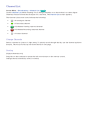
●● HDMI
●● Component
●● AV
Connect the video device to the TV via an HDMI connector for the best picture quality. If the device
does not have an HDMI connector, try a component connector to get the next best possible picture
quality.
The number of connectors and their names and locations may vary depending on the model.
When connecting an external device, refer to the device's operating manual. The number of external
device connectors and their names and locations may vary depending on the manufacturer.
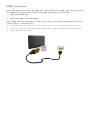
HDMI Connection
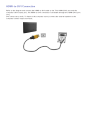
Refer to the diagram and connect the HDMI cable to the video device's HDMI output connector and the
TV's HDMI input connector. One of the following HDMI cable types is recommended:
●● High-Speed HDMI Cable
●● High-Speed HDMI Cable with Ethernet
Use an HDMI cable with a thickness of 14 mm or less. Using a non-certified HDMI cable may result in
a blank screen or a connection error.
"" Some HDMI cables and devices may not be compatible with the TV due to different HDMI specifications.
"" This TV does not support HDMI Ethernet Channel. Ethernet is a LAN (Local Area Network) built on coaxial
cables standardized by the IEEE.
Component Connection
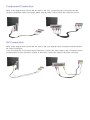
Refer to the diagram and connect the AV cable to the TV's component input connectors and the
device's component output connectors. Make sure the cable colours match the connector colours.
AV Connection
Refer to the diagram and connect the AV cable to the TV's external input connectors and the device's
AV output connectors.
If you are using the TV's external input connectors, connect the video cable to the Y connector. Some
models feature a video connector as well. In this case, connect the cable to the video connector.
SCART Connection
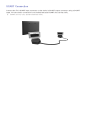
Connect the TV’s SCART input connector to the device’s SCART output connector using a SCART
cable. An extra audio connection is not needed because SCART also carries audio.
"" SCART can only carry standard-definition video.
Audio Device Connections
This SMART TV has a wide range of connectors for audio input from devices such as amplifiers, Bluray players and DVD players. For better audio quality, it is a good idea to use an AV receiver.
●● Digital Audio (Optical)
●● ARC (Audio Return Channel)
The number of connectors and their names and locations may vary depending on the model.
When connecting an external device, refer to the device's operating manual. The number of external
device connectors and their names and locations may vary depending on the manufacturer.
Digital Audio (Optical) Connection
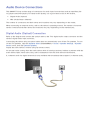
Refer to the diagram and connect the optical cable to the TV's digital audio output connector and the
device's digital audio input connector.
Connecting the device using an optical cable does not automatically turn off the TV speakers. To turn
off the TV speakers, open the Speaker Select (Screen Menu > Sound > Speaker Settings > Speaker
Select) menu, then set External Speaker.
Adjust the audio device's volume using its remote control.
An unusual noise coming from the audio device while it is being used may indicate a problem with the
audio device itself. If this is the case, ask for assistance from the audio device manufacturer.
5.1-channel audio for digital channels is only available with broadcasts that support 5.1-channel audio.
ARC (Audio Return Channel)
This TV supports 3D and ARC (Audio Return Channel) functions via an HDMI cable. ARC enables
digital sound to be output using just an HDMI cable. However, ARC is only available through the HDMI
(ARC) port and only when the TV is connected to an ARC-enabled AV receiver. Connect the HDMI
cable to the TV's HDMI (ARC) connector and the device's HDMI output connector.
Headphone Connection
Refer to the diagram and connect the headphones to the headphone output connector. Only use
headphones with a 3-conductor TRS type jack. The headphone volume and the TV volume are
adjusted independently of each other. While the headphones are connected, the TV speakers are muted
and certain Sound options are deactivated.
"" This option is only available for LED TVs.
Computer Connection
This TV has the following computer connection ports:
●● HDMI
●● HDMI-to-DVI
For the highest picture quality, connect the computer to the HDMI/DVI port. Not all computers are
HDMI-enabled. In this case, use an HDMI-to-DVI cable to connect the computer to the TV. Refer to the
"Display Resolution" for information on the resolution settings supported by the TV.
HDMI Connection
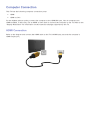
Refer to the diagram and connect the HDMI cable to the TV's HDMI input port and the computer's
HDMI output port.
HDMI-to-DVI Connection
Refer to the diagram and connect the HDMI-to-DVI cable to the TV's HDMI (DVI) port and the
computer's DVI output port. The HDMI-to-DVI connection is available through the HDMI (DVI) port
only.
DVI cannot carry audio. To listen to the computer sound, connect the external speaker to the
computer’s audio output connector.
Switching Between Video Sources
Press SOURCE button to switch between devices connected to the TV.
For example, to switch to a game console connected to the second HDMI connector, press SOURCE
button. From the Source list, select HDMI2. The connector names may vary depending on the product.
Select TOOLS at the upper-right corner of the Source screen to access the following functions.
●● Information
View detailed information about the connected devices.
●● Edit Name
You can edit name of devices connected to the TV to more easily identify external sources.
With a computer connected to the TV's HDMI (DVI) port via an HDMI cable, for example, you can
change Edit Name to PC.
With a computer connected to the TV's HDMI (DVI) port via an HDMI-to-DVI cable, for example,
you can change Edit Name to DVI PC.
With an AV device connected to the TV's HDMI (DVI) port via an HDMI-to-DVI cable, for
example, you can change Edit Name to DVI Devices.
●● Refresh
Select this if a connected device does not appear in the list. If the list does not show the device
after selecting Refresh, check the status of the TV-to-device connection.
●● Disconnect USB Device
Remove the USB device from the list safely. This function is only available when the USB device
selected.
●● Universal remote setup
To add a new external device to control it with the Touch Remote Control, press the SOURCE
button and select Universal remote setup on the top right of the screen. Using the universal
remote control, users can control external devices connected to the TV, such as a settop box,
Blu-ray player, and AV receiver.
Programming
Scan and index available channels.
You can also remove channels from the index, and designate favourites channels for a more convenient
TV viewing experience. Programming is not necessary if you are connected to a cable or satellite
receiver.
Auto Tuning
Screen Menu > Broadcasting > Auto Tuning Try Now
Broadcasting
Auto Tuning
Aerial
Air
Channel List
Guide
Schedule Manager
Edit Channel
Edit Favourites
"" The displayed image may differ depending on the model.
Automatically scans and indexes all channels received through the TV's aerial input connector.
111
To start, navigate to Broadcasting and select Auto Tuning.
222
Select Start when prompted with a message. This initiates the Auto Tuning function. The process
can take up to 30 minutes to complete. If starting the Auto Tuning function when there is an
existing index of channels overwrites the previous index.
●● Auto Tuning
Scans for channels automatically and stores them in the TV’s memory. Try Now
●● Cable Search Option (when the aerial was set to Cable)
(Depending on the country)
Sets additional search options such as the frequency and symbol rate for a cable network search.
Try Now
Channel Settings
Screen Menu > Broadcasting > Channel Settings Try Now
Broadcasting
Channel Settings
Subtitle
Off
Audio Options
Programme Rating Lock
Allow All
Teletext Language---Common Interface
Channel Lock
On
Country (Area)
Screen Menu > Broadcasting > Channel Settings > Country (Area) Try Now
Select your country so that the TV can correctly auto-tune the broadcasting channels.
"" The PIN input screen appears. Enter your 4 digit PIN number.
"" Depending on the country or region.
●● Digital Channel
Change the country for digital channels.
●● Analogue Channel
Change the country for analogue channels.
Manual Tuning
Screen Menu > Broadcasting > Channel Settings > Manual Tuning Try Now
Scans for a channel manually and stores in the TV.
"" If a channel is locked using the Channel Lock function, the PIN input window appears.
"" This function may not be supported depending on the country.
When Aerial Source is set to Air or Cable
●● Digital Channel Tuning
Scans for a digital channel.
111
Select the New.
"" When selecting Aerial → Air: Channel, Frequency, Bandwidth
"" When selecting Aerial → Cable: Frequency, Modulation, Symbol Rate
222
Select the Search. When scanning has finished, a channel is updated in the channel list.
●● Analogue Channel Tuning
Scans for an analogue channel.
111
Select the New.
222
Set the Programme, Colour System, Sound System, Channel and Search.
333
Select the Store. When scanning has finished, a channel is updated in the channel list.
Channel mode
●● P (programme mode)
When tuning is complete, the broadcasting stations in your area have been assigned to position
numbers from P0 to P99. You can select a channel by entering the position number in this mode.
●● C (aerial channel mode) / S (cable channel mode)
These two modes allow you to select a channel by entering the assigned number for each aerial
broadcasting station or cable channel.
Transfer Channel List
Screen Menu > Broadcasting > Channel Settings > Transfer Channel List Try Now
Imports or exports the channel map.
"" You should connect USB storage to use this function.
"" The PIN input screen appears. Enter the PIN using your remote.
●● Import from USB: Import channel list from USB. Try Now
●● Export to USB: Export channel list to USB. This function is available when USB is connected. Try
Now
Delete CAM Operator Profile
Screen Menu > Broadcasting > Channel Settings > Delete CAM Operator Profile Try Now
Select the CAM operator to delete.
Satellite System
Screen Menu > Broadcasting > Channel Settings > Satellite System Try Now
A set of satellite dish settings must be configured for each wanted satellite before performing a
channel scan.
Satellite System is available when Aerial is set to Satellite.
"" The PIN input screen appears. Enter your 4 digit PIN number.
●● Satellite Selection: You can choose the satellites for this TV. Try Now
●● LNB Power: Enables or disables the power supply for the LNB. Try Now
●● LNB Settings: Configures the outdoor equipment. Try Now
Satellite: Selects the satellite for receiving digital broadcasts.
Transponder: Selects a transponder from the list or adds a new transponder.
DiSEqC Mode: Selects DiSEqC mode for the selected LNB.
Lower LNB Oscillators: Sets the LNB oscillators to a lower frequency.
Upper LNB Oscillators: Sets the LNB oscillators to a higher frequency.
Tone 22 kHz: Selects the Tone 22 kHz depending on the LNB type. For a universal LNB it should
be Auto.
●● SatCR/Unicable Settings: Configure single cable installation. Try Now
"" SatCR is short for satellite channel router.
"" This function may not support depending on the country.
SatCR/Unicable: Enables or disable single cable installation support.
Slot Number: Select the SatCR user slot number for this receiver.
Slot Frequency: Enter the appropriate frequency to receive the signal from SatCR.
Detect Slot Frequency: Auto-detect the signal frequency for the selected slot number.
Verify Slot Frequency: Verify that the frequency entered corresponds to the selected slot.
●● Positioner Settings: Configures the aerial positioner. Try Now
Positioner: Enables or disables the positioned control.
Positioner Type: Sets the positioned type between DiSEqC 1.2 and USALS (Universal Satellite
Automatic Location System).
–– My Longitude: Sets the longitude for my location.
–– My Latitude: Sets the latitude for my location.
–– Satellite Longitude Settings: Sets the longitude of user defined satellites.
User Mode: Sets the position of satellite aerial according to each satellite.
If you store the current position of satellite aerial according to a certain satellite, when the signal
of that satellite is needed, the satellite aerial can be moved to pre-populated position.
–– Satellite: Selects the satellite to set the position for.
–– Transponder: Selects a transponder from the list for signal reception.
–– Moving Mode: Selects the movement mode between discrete and continuous movement.
–– Step Size: Adjusts the step size degrees for the aerial rotation. Step Size is available when
Moving Mode is set to Step.
–– Go To Stored Position: Rotates the aerial to the stored satellite position.
–– Aerial Position: Adjusts and stores the aerial position for the selected satellite.
–– Store Current Position: Stores current position as the selected positioner limit.
Installer Mode: Sets limits to the scope of movement of satellite aerial or reset the position.
Generally, installation guide uses this function.
–– Limit Position: Selects the direction of the positioner Limit.
–– Aerial Position: Adjusts and stores the aerial position for the selected satellite.
–– Store Current Position: Stores the current position as the selected positioner Limit.
–– Go to zero: Moves the aerial to the reference position.
–– Reset positioner limit: Allows the aerial to rotate over the full arc.
●● Reset All Settings: All satellite settings will be reset to the initial values. Try Now
Scanning for Satellite Channels
Screen Menu > Broadcasting > Channel Settings > Manual Tuning
Press Scan after setting the items below.
●● Transponder
Selects the transponder.
●● Scan Mode
Selects either free or all channels to store.
●● Network Search
Enable / Disable network search.
●● Signal Quality
Display the current status of broadcasting signal.
●● Network Name
This displays the name of the network that is found.
"" Information on a satellite and its transponder is subject to change depending on the broadcasting
conditions.
"" When setting is completed, move to Search. Channel scan is started.
Channel Management
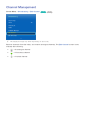
Screen Menu > Broadcasting > Edit Channel Try Now Try Now
Broadcasting
Auto Tuning
Aerial
Air
Channel List
Guide
Schedule Manager
Edit Channel
Edit Favourites
"" The displayed image may differ depending on the model.
Remove channels from the index, and rename analogue channels. The Edit Channel screen icons
indicate the following:
●●
: An analogue channel
●●
: A favourites channel
●●
: A locked channel
In the Edit Channel screen, select the Virtual Remote panel's or the regular remote's TOOLS button to
access the following options:
●● Sorting
(Digital channels only)
Change the list ordered by name or number.
●● Aerial
Choose between Air, Cable or Satellite.
●● Category
The TV's channel index is divided into different categories such as All, TV, Radio, Data/Other,
Analogue, Recently Viewed and Most Viewed. Choose a category.
●● Edit Favourites
Organize favorites lists to find favourite channels and switch between channels more easily.
●● Channel Info
Check the information of the channel.
●● Information
Check the information of the broadcast.
Remove Channels
Screen Menu > Broadcasting > Edit Channel
Remove registered channels from the index. Removing channels appearing in the Recently Viewed or
Most Viewed list clears the channels from the list only and does not remove them from the index.
111
From the screen, select the channels you wish to remove. Unselect channels by choosing them
again.
222
Press { button. The selected channel(s) will be deleted.
Number Change
Change the number of the channels in edit channels List.
111
Press a button to bring up the edit channels list and select the channel you wish to change the
number of the channels.
222
Select the number you wish change. Select Done E or press touchpad to finish.
Channel Lock
Screen Menu > Broadcasting > Channel Lock Try Now
You can lock channels you don't want your children to view.
Lock is only available with Channel Lock set to On.
Navigate to the Edit Channel screen, select the channels you wish to lock, press b button, and then
enter the password. This locks the selected channels.
Channel Unlock
Unlock locked channels. Navigate to the Edit Channel screen, select the locked channels you wish to
unlock, press b button and then enter the password. This unlocks the selected channels.
Rename Analogue Channels
From the screen, select an analogue channel, and then select the virtual remote panel's or the regular
remote's TOOLS button. The list screen appears. Select Rename channel from the list.
You can now rename the selected channel. The new name can be up to 5 characters long.
Common Interface
Screen Menu > Broadcasting > Common Interface Try Now
●● CI Menu
This enables the user to select from the CAM-provided menu. Select the CI Menu based on the
menu PC Card.
●● CAM video transcoding
You can configure the setting to transcode the video codec from the CAM automatically. Turn it
Off if you do not want to use it.
"" You must use a CAM that supports transcoding the video codec.
●● Application Info
View information on the CAM inserted into the CI slot and on the “CI or CI+ CARD” which is
inserted into the CAM. You can install the CAM anytime whether the TV is on or off.
111
Purchase a CI CAM module at your nearest dealer or by phone.
222
Firmly insert the “CI or CI+ CARD” into the CAM in the direction of the arrow.
333
Insert the CAM with the “CI or CI+ CARD” into the common interface slot, in the direction of the
arrow so that it aligns parallel with the slot.
444
Check if you can see a picture on a scrambled signal channel.
●● CICAM PIN Manager
Manage of CICAM (Common Interface Common Access Module) PIN. You can save PIN or change
stored PIN, and set other options about PIN.
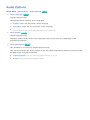
Audio Options
Screen Menu > Broadcasting > Audio Options Try Now
●● Audio Language Try Now
(Digital channels only)
Change the default value for audio languages.
●● Primary audio: Set the primary audio language.
●● Secondary audio: Set the secondary audio language.
"" The available language may differ depending on the broadcast.
●● Audio Format Try Now
(Digital channels only)
Change a desired audio format. The supported audio format may vary depending on the
broadcast programme.
●● Audio Description Try Now
(Not available in all locations) (Digital channels only)
This function handles the Audio Stream for the AD (Audio Description) which is sent along with
the Main audio from the broadcaster.
"" Audio Description: Turn the audio description function on or off.
"" Volume: Adjust the audio description volume.
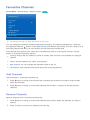
Favourites Channels
Screen Menu > Broadcasting > Edit Favourites Try Now
Broadcasting
Auto Tuning
Aerial
Air
Channel List
Guide
Schedule Manager
Edit Channel
Edit Favourites
"" The displayed image may differ depending on the model.
You can designate frequently watched channels as favourites. The channels assigned as a favourite
are displayed with the
symbol on the Edit Channel and channel list screens. You can create up to 5
favourites channel lists. You can also rename and edit favourites channel lists.
From the Edit Favourites screen, select the Virtual Remote panel's or the regular remote's TOOLS
button to access the following options:
●● Sorting: Change the list ordered by name or number. This function is not available on analogue
channel.
●● Aerial: Choose between Air, Cable, and Satellite.
●● Edit Channel: You can manage the channels saved on the TV.
●● Information: View detailed information about the current programme.
Add Channels
Add a channel to a favourites channels list.
111
Press a button to bring up the channel list containing the channels you wish to add and then
select the channels.
222
Press b button to bring up a favourites channels list and then { button to add the selected
channels.
Remove Channels
Remove channels from a favourites channels list.
111
Press b button to bring up a favourites channels list and then select the channels you wish to
remove.
222
Press { button to remove the channels from the list.
Rearrange the Favourites Channels List
Rearrange the order of the channels in a Favourites Channels List.
111
Press b button to bring up the favourites channels list and select the channel you wish to move.
222
Press a button to rearrange the order of the selected channel. Select Done E or press the
touchpad to finish.
Rename a Favourites Channel List
Rename an existing favourites channels list.
111
Select the Virtual Remote panel's or the regular remote's TOOLS button to display the list. Select
222
Rename the list in the popup window. The new name can be up to 20 characters long.
Rename Favourites from the list.
Copy a Favourites Channels List
Copy channels from one favourites channels list to another.
111
Press b button to bring up a Favourites Channels List and select the channels you wish to copy.
222
Select the Virtual Remote panel's or the regular remote's TOOLS button to display the list. Select
Copy to Favourites from the list, and then select the Favourites Channels List(s) you wish to copy
to. This copies over the channels to the selected Favourites Channels List(s).
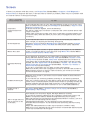
Network Configuration
Connecting the TV to a network gives you access to online services such as the Smart Hub and
AllShare Play, as well as software updates.
Wired Network
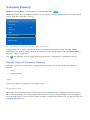
There are three ways to connect the TV to a Local Area Network (LAN).
●● External Modem
●● ① IP Router + ② External Modem
●● Wall-mounted LAN Outlet
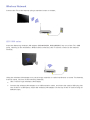
Wireless Network
Connect the TV to the Internet using a standard router or modem.
LED 5300 series
Insert the Samsung wireless LAN adapter (WIS09ABGNX, WIS12ABGNX) into one of the TV’s USB
ports, referring to the illustration. Without this connection, the TV cannot connect to the Internet
wireless.
Using the wireless LAN adapter may cause image retention or radio interference on some TV channels.
In those cases, use one of the following methods.
●● Use a vertical-type wireless LAN adapter.
●● Connect the wireless LAN adapter to a USB extension cable, and insert the cable’s USB plug into
one of the TV’s USB ports. Install the wireless LAN adapter on the top of the TV’s back using an
adhesive tape.
Wireless Network Precautions
●● This TV supports the IEEE 802.11a/b/g/n communication protocols. Samsung recommends using
IEEE 802.11n. Otherwise when you play video over a network connection, the video may not play
smoothly.
●● To use a wireless network, the TV must be connected to a wireless router or modem. If the
wireless router supports DHCP, the TV can use a DHCP or static IP address to connect to the
wireless network.
●● Select a channel that is not currently in use for the wireless router. If the channel set for the
wireless router is currently being used by another device, the result is usually interference and/or
a communications failure.
●● Most wireless networks have an optional security system. To enable a wireless network's security
system, you need to create a security key using characters and numbers. This security key is then
needed to connect to the wireless network.
LED 5300 series
●● Samsung’s Wireless LAN adapter supports the IEEE 802.11a/b/g and n communication protocols.
Samsung recommends using IEEE 802.11n. When you play video over a network connection, the
video may not play smoothly.
●● To use a wireless network, the TV must be connected to a wireless router or modem. If the
wireless router supports DHCP, the TV can use a DHCP or static IP address to connect to the
wireless network.
●● Select a channel that is not currently in use for the wireless router. If the channel set for the
wireless router is currently being used by another device, the result is usually interference and/or
a communications failure.
●● Most wireless networks have an optional security system. To enable a wireless network's security
system, you need to create a security key using characters and numbers. This security key is then
needed to connect to the wireless network.
Network Security Protocols
The TV only supports the following wireless network security protocols and is unable to connect to
non-certified wireless routers:
●● Authentication Modes: WEP, WPAPSK, WPA2PSK
●● Encryption Types: WEP, TKIP, AES
If the wireless router has been set to Pure High-throughput (Greenfield) 802.11n mode and the
Encryption Type to WEP or TKIP, Samsung SMART TVs will not support the connection in compliance
with the new Wi-Fi certification specifications.
If the wireless router supports WPS (Wi-Fi Protected Setup), it is possible to connect to the network
using PBC (Push Button Configuration) or a PIN (Personal Identification Number). WPS automatically
configures the SSID and WPA key settings.
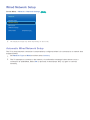
Wired Network Setup
Screen Menu > Network > Network Settings Try Now
Network
Network Status
Network Settings
Wi-Fi Direct
AllShare Settings
Device Name
[TV]Samsung LE...
"" The displayed image may differ depending on the model.
Automatic Wired Network Setup
The TV's wired network connection is automatically configured when it is connected to a network that
supports DHCP.
111
Set Network Type to Wired and then select Connect.
222
The TV attempts to connect to the network. A confirmation message is then shown once a
connection is established. Select OK to proceed. If the attempt fails, try again or connect
manually.
Manual Wired Network Setup
If the network requires a static IP address, enter the IP address, subnet mask, gateway and DNS values
to connect to the network manually. To get the IP address, subnet mask, gateway and DNS values,
contact your Internet Service Provider (ISP). Refer to the "Dynamic versus Static IP Addresses" for
more information.
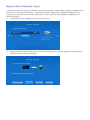
111
Set Network Type to Wired and then select Connect.
Network Settings
Select your network type.
Network Type
Wired
Connect
Plug a network cable into
the back of your TV.
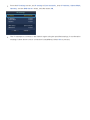
222
Select Stop when the TV attempts to connect to the network. Once the network connection has
been interrupted, select IP Settings.
Network Settings
Connection verification cancelled.
Wired network connection test stopped.
Change Network
IP Settings
Retry
Close
333
From the IP Settings screen, set IP setting to Enter manually, enter IP Address, Subnet Mask,
Gateway, and the DNS Server values, and then select OK.
IP Settings
IP setting
Enter manually
IP Address
0.0.0.0
Subnet Mask
0.0.0.0
Gateway
0.0.0.0
DNS setting
Enter manually
DNS Server0.0.0.0
OK
444
Cancel
The TV attempts to connect to the network again using the specified settings. A confirmation
message is then shown once a connection is established. Select OK to proceed.
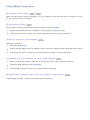
Failed Wired Connection
No network cable found
Try Now Try Now
Make sure the network cable is plugged in. If it is connected, make sure the router is turned on. If it is
on, try turning if off and on again.
IP auto setting failed
Try Now
Perform the following or set the IP address manually from IP Settings.
111
Ensure that the DHCP server is enabled on the router and reset the router.
222
If this does not work, contact your Internet Service Provider for more information.
Unable to connect to the network
Try Now
Check the following:
111
Check the IP Settings.
222
Ensure that the DHCP server is enabled on the router and unplug and then plug the router back in.
333
If this does not work, contact your Internet Service Provider for more information.
Connected to a local network, but not to the Internet
Try Now
111
Make sure that the Internet LAN cable is connected to the router's external LAN port.
222
Check the DNS settings under IP Settings.
333
If the problem persists, contact your Internet Service Provider.
Network setup complete, but unable to connect to the Internet
If the problem persists, contact your Internet Service Provider.
Try Now
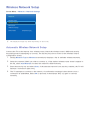
Wireless Network Setup
Screen Menu > Network > Network Settings
Network
Network Status
Network Settings
Wi-Fi Direct
AllShare Settings
Device Name
[TV]Samsung LE...
"" The displayed image may differ depending on the model.
Automatic Wireless Network Setup
Connect the TV to the Internet via a wireless router. Check the wireless router's SSID and security
key settings before attempting to connect. The security key can be found on the wireless router's
configuration screen.
111
Setting Network Type to Wireless automatically displays a list of available wireless networks.
222
Select the network (SSID) you wish to connect to. If the desired wireless router doesn't appear in
333
Enter the security key and select Done. If the selected network is not security-enabled, the TV will
the list, select Add Network and enter the network's SSID manually.
attempt a connection right away.
444
The TV attempts to connect to the network. A confirmation message is then shown once a
connection is established. Select OK to proceed. If the attempt fails, try again or connect
manually.
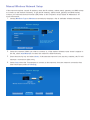
Manual Wireless Network Setup
If the network requires a static IP address, enter the IP address, subnet mask, gateway and DNS values
to connect to the network manually. To get the IP address, subnet mask, gateway and DNS values,
contact your Internet Service Provider (ISP). Refer to the "Dynamic versus Static IP Addresses" for
more information.
111
Setting Network Type to Wireless automatically displays a list of available wireless networks.
Network Settings
Select your network type.
Network Type
Wireless
Wireless network
AP0000
AP0001
Add Network
Refresh
You can connect your TV to the
internet. Please select which
wireless network to use.
WPS(PBC)
222
Select the network (SSID) you wish to connect to. If the desired wireless router doesn't appear in
333
Enter the security key and select Done. If the selected network is not security-enabled, the TV will
the list, select Add Network and enter the network's SSID manually.
attempt a connection right away.
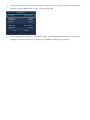
444
Select Stop when the TV attempts to connect to the network. Once the network connection has
been interrupted, select IP Settings.
Network Settings
Connection verification cancelled.
Wireless network connection test stopped.
Change Network
IP Settings
Retry
Close
555
From the IP Settings screen, set IP setting to Enter manually, enter IP Address, Subnet Mask,
Gateway, and the DNS Server values, and then select OK.
IP Settings
IP setting
Enter manually
IP Address
0.0.0.0
Subnet Mask
0.0.0.0
Gateway
0.0.0.0
DNS setting
Enter manually
DNS Server0.0.0.0
OK
666
Cancel
The TV attempts to connect to the network again using the specified settings. A confirmation
message is then shown once a connection is established. Select OK to proceed.
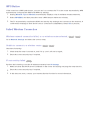
WPS Button
If the router has a WPS push button, you can use it to connect the TV to the router automatically. WPS
automatically configures the SSID and WPA key settings.
111
Setting Network Type to Wireless automatically displays a list of available wireless networks.
222
Select WPS(PBC) and then press the router's WPS button within two minutes.
333
The TV automatically acquires the SSID and security key settings and connects to the network. A
confirmation message is then shown once a connection is established. Select OK to proceed.
Failed Wireless Connection
Wireless network connection failed, or no wireless router selected.
Try Now Try Now
Go to Network Settings and select the correct router.
Unable to connect to a wireless router
Try Now Try Now
Check the following:
111
Check that the router is turned on, and if it is, turn it off and on again.
222
Enter the correct security key if required.
IP auto setting failed
Try Now
Perform the following or set the IP address manually from IP Settings.
111
Make sure that the DHCP server is enabled on the router and unplug and plug the router back in.
222
Enter the correct security key if required.
333
If this does not work, contact your Internet Service Provider for more information.
Unable to connect to the network
Try Now
Check the following:
111
Check the IP Settings.
222
Enter the correct security key if required.
333
If this does not work, contact your Internet Service Provider for more information.
Connected to a local network, but not to the Internet
Try Now
111
Make sure that the Internet LAN cable is connected to the router's external LAN port.
222
Check the DNS settings under IP Settings.
333
If the problem persists, contact your Internet Service Provider.
Network setup complete, but unable to connect to the Internet
Try Now
If the problem persists, contact your Internet Service Provider.
Dynamic versus Static IP Addresses
If the network requires a dynamic IP address, use an ADSL modem or router that supports the
Dynamic Host Configuration Protocol (DHCP). Modems and routers that support DHCP automatically
provide the IP address, subnet mask, gateway and DNS values the TV needs to access the Internet, so
they do not have to be entered manually. Most home networks use a dynamic IP address.
If the network requires a static IP address, enter the IP address, subnet mask, gateway, and DNS values
manually when setting up the network connection. To get the IP address, subnet mask, gateway and
DNS values, contact your Internet Service Provider (ISP).
If the network requires a static IP address, use an ADSL modem that supports DHCP. ADSL modems
that support DHCP also allow static IP addresses.
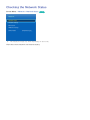
Checking the Network Status
Screen Menu > Network > Network Status Try Now
Network
Network Status
Network Settings
Wi-Fi Direct
AllShare Settings
Device Name
[TV]Samsung LE...
"" The displayed image may differ depending on the model.
View the current network and Internet status.
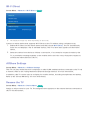
Wi-Fi Direct
Screen Menu > Network > Wi-Fi Direct Try Now
Network
Network Status
Network Settings
Wi-Fi Direct
AllShare Settings
Device Name
[TV]Samsung LE...
"" The displayed image may differ depending on the model.
Connect a mobile device that supports Wi-Fi Direct to the TV without using a wireless router.
111
Enable Wi-Fi Direct on the mobile device and then launch Wi-Fi Direct. The TV automatically
scans for and displays a list of available devices. The TV's name also appears on the mobile
device.
222
Select the device from the list to initiate a connection. If a connection request is made by the
TV, a permission message appears on the mobile device and vice versa. Accept the request to
connect the mobile device to the TV.
AllShare Settings
Screen Menu > Network > AllShare Settings
This TV can play media files from computers or other DLNA-enabled devices connected to the TV via
a network. Refer to the "Using Networked External Storage Devices" for more information.
In addition, this TV can be used as a display for mobile devices, including smartphones and tablets.
Refer to the "Screen Mirroring" for more information.
Rename the TV
Screen Menu > Network > Device Name Try Now
Assign a unique name for your TV. The assigned name appears on the external devices connected to
the TV via the network.
Smart Touch Control
The Smart Touch Control makes it easier and more convenient to use the TV. For example, you can
use the remote control's built-in touchpad to move the focus and make selections as you would on a
computer using a mouse. In addition, you can use the virtual remote panel displayed on the screen to
change channels, play media files, and access favourites.
"" Depending on the models.
"" This Smart Touch Control is supported for LED 6400 Series and above, PDP 5500 Series.
Inserting the Batteries (AAA X 2)
111
Slightly lift the battery cover by pulling the strap or using a plastic card. Next, pull on the cover’s
notch with a fingernail to remove the cover completely.
222
Insert 2 AAA batteries, making sure to align the positive and negative ends correctly.
333
Align the battery cover with the back of the remote control and press down along the edges until
it is cleanly attached to the remote control.
Connecting to the TV
In order to operate the TV using a Smart Touch Control, you must first pair it to the TV via Bluetooth.
However, the Smart Touch Control is only available for the paired Samsung TV.
111
When the TV is off, point the Smart Touch Control at the remote control receiver of the TV and
222
A Bluetooth icon will appear at the bottom left of the screen as shown below. The TV will then
press the TV button for the first pairing. Only this buttons sends an IR signal. The remote control
receiver's location may vary depending on the model.
attempt to connect to the Smart Touch Control automatically.
<Attempting to connect and completion icons>
Reconnecting the Smart Touch Control
If you need to reestablish the connection between the TV and the Smart Touch Control, press the
pairing button at the back of the Smart Touch Control toward the Remote receiver of the TV.
<The Smart Touch Control pairing button>
The pairing button can be accessed by removing the Smart Touch Control's battery cover. Pressing the
pairing button automatically reestablishes the connection between the control and the TV.
Battery Low Alarm
If the battery becomes and blanks low while using the Smart Touch Control, the following alarm
window blinks and appears at the bottom left of the screen. If the alarm window pops up, replace the
batteries of the Smart Touch Control. Use alkaline batteries for longer usage.
<Low battery alarm window>
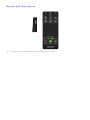
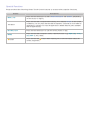
Buttons and Descriptions
"" The product colour and shape may vary depending on the model.
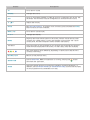
Buttons
Descriptions
TV
Turns the TV on/off.
SOURCE
Changes the source.
STB
Turns on and off the satellite or cable set-top box connected to the TV. For this,
the Smart Touch Control must be configured as a universal remote control.
w=v
Adjusts the volume.
VOICE
Run Voice Recognition. To speak a voice command, press and hold the VOICE
button and say a voice command.
MUTE / AD
Turns the TV sound on/off.
<P>
Changes the channel.
MORE
Displays the virtual remote panel on the screen. The the virtual remote panel
consists of a number panel, a colour and playback control panel, and a quick
access panel. Use the touchpad to select numbers and buttons.
Touchpad
Drag your finger on the touchpad as you would on the touchpad of a laptop to
move the focus displayed on the screen. To select item, press the touchpad.
a, b, {, }
The colour buttons work differently, depending on the function that the TV is
currently performing.
RETURN / EXIT
Returns to the previous menu.
SMART HUB
GUIDE
Launch Smart Hub. While an application is running, pressing the
button
terminates the application.
View each digital channel's programming schedule, including showtimes. In
addition, sets a Schedule Viewing or Schedule Recording to press the touchpad
on the programme entry scheduled to air later.
Special Functions
Press and hold the following Smart Touch Control buttons to access various special functions.
Buttons
Descriptions
MUTE / AD
Press and hold this button to select Audio Description and Subtitle. (Depending
on the country or region.)
Touchpad
Press and hold the touchpad while watching TV to display CH List on the screen.
In addition, you can press and hold the touchpad for 2 seconds or more while an
application is running to access the application's hidden features. (Not available
with all applications.)
RETURN / EXIT
Press and hold this button to quit the current process or app.
MORE
Press and hold the touchpad to select a desired function (e.g. MENU (m), TOOLS
(T), INFO (`), etc.) easily.
{ button
Press and hold the { button while watching TV to view information about the
current programme.
Touchpad
Use the touchpad to perform various commands. Navigate to Tutorial (Screen Menu > System >
Device Manager > Smart Touch Control Settings > Tutorial) to view an on-screen guide to using the
Smart Touch Control. Try Now
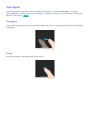
Dragging
Drag on the touchpad in the desired direction. Move the focus or the pointer in the direction the finger
is dragging.
Press
Press the touchpad. This selects the focused item.
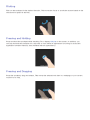
Flicking
Flick on the touchpad in the desired direction. This moves the focus or scrolls the screen based on the
direction and speed of the flick.
Pressing and Holding
Press and hold the touchpad while watching TV to display CH List on the screen. In addition, you
can tap and hold the touchpad for 2 seconds or more while an application is running to access the
application's hidden features. (Not available with all applications.)
Pressing and Dragging
Press the touchpad, drag and release. This moves the selected web item in a webpage or your current
location on a map.
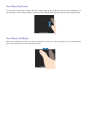
Scrolling Up/Down
Scroll up/down the line on either the left or right edge of the touchpad. This scrolls a webpage or a
list up/down. This scrolling feature easily accommodates both right-handed and left-handed users.
Scrolling Left/Right
Move your finger horizontally on the projected line at the top of the touchpad. You can horizontally
scroll a horizontal list or the Smart Hub panel.
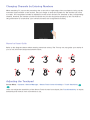
Changing Channels by Entering Numbers
While watching TV, tap on the protruding line on the left or right edge of the touchpad to bring up the
numerical input window on the screen. Use your finger to enter the number for the channel you want
to watch. The recognised number is displayed on the screen and the TV switches to the corresponding
channel. However, the number you have entered may not be recognised properly by the TV. Refer to
the guide below to ensure that your numerical entries are recognised accurately.
Numerical Input Guide
Refer to the diagrams below when entering numerical values. The TV may not recognise your entries if
you do not follow the sequences shown below.
Adjusting the Touchpad
Screen Menu > System > Device Manager > Smart Touch Control Settings > Touch Sensitivity Try
Now
Users can adjust the sensitivity of the Smart Touch Control’s touchpad. Set Touch Sensitivity to adjust
sensitivity and make it more convenient to use.
Show Status and Notification Banner
Press the MORE button on the Smart Touch Control and then select STATUS on the virtual control
panel to display the status and notification banner at the top of the screen. Refer to "Status and
Notification" banner for more information.
Recommendations
Press the RECOMM. / SEARCH button and then select Recommended from the list displayed at the
bottom of the screen.
This shows the current / scheduled programme and application recommendations.
Select a programme that is currently airing to jump to the corresponding channel or a programme
that is scheduled to air to set up a Schedule Viewing or Schedule Recording setting. Refer to the
"Scheduled Recommended Programme Info" for more information.
Select an application to launch. Samsung Apps will launch if the selected application is not installed
on the TV. Refer to the "Samsung Apps" for more information.
History
Press the RECOMM. / SEARCH (or HISTORY/SEARCH) button and then select History from the list
displayed at the bottom of the screen. This displays an interactive list of recently accessed channels,
media content and applications.
Deleting History Data
Screen Menu > Smart Features > Clear viewing history > History
You can delete the history information about recently viewed channels, content and applications.
Searching
Press the RECOMM. / SEARCH (or HISTORY/SEARCH) button twice. Enter search criteria to search
not only many apps and their contents on the TV but also the Web. This button toggles between
Recommended and Search.
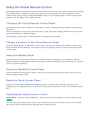
Using the Virtual Remote Control
Press MORE button to display the virtual remote panel on the screen. The virtual remote panel consists
of a number panel, a playback control panel, and a quick access panel. Use the touchpad to select
numbers and buttons. Press and hold the MORE button. A quick access panel of virtual remote panel
appears. You can select screen buttons easily.
Changing the Virtual Remote Control Panel
Choose the number panel, playback control panel, or quick access panel as the panel to be shown on
the screen.
Use the touchpad to keep moving the focus left or right. The panel changes when the focus is moved
beyond the leftmost or rightmost edge.
Use left/right scroll function on the touchpad to change the panel easily.
Change a position of the Virtual Remote Panel
Press the MORE button on the Smart Touch Control. The virtual remote panel appears on the screen.
Press and hold the touchpad for one second. Users can change a position of the virtual remote panel
of the screen.
Using the Number Panel
Use the number panel to enter numbers on a keypad screen or webpage or to change the channel
while watching TV. Changing the channel using the number pad leaves a record, allowing you to easily
return to previous channels.
Using the Playback Control Panel
Use the playback control panel to pause, rewind, fast forward, skip to the next file, and much more
while enjoying media content.
Using the Quick Access Panel
Quickly access the INFO, MENU and e-Manual buttons. However, the availability of buttons vary
depending on the operating mode of the Smart Touch Control (with the TV only, as a universal remote,
etc.).
Adjusting the virtual remote control
Screen Menu > System > Device Manager > Smart Touch Control Settings > Onscreen Remote Size
Try Now
You can resize the virtual remote control. If the virtual remote control buttons are too small, enlarge
the remote control window before using the virtual remote control.
Universal Remote Setup
Screen Menu > System > Device Manager > Universal Remote Setup Try Now
This TV has a universal remote control feature that lets you control cable boxes, Blu-ray players, home
theatres, and other third-party external devices connected to the TV using the TV's remote control.
You can also use the Anynet+ (HDMI-CEC) function to operate Samsung external devices with your
TV's remote control without any additional setup. For more information, Refer to the "Anynet+ (HDMICEC)" for more information.
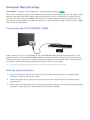
Connecting the IR EXTENDER CABLE
Keep a distance of 5 cm at least between the IR EXTENDER CABLE and the external device, as the
illustration shows. Face the IR EXTENDER CABLE toward the external device’s remote control signal
receiver. Note that it should be no obstacle between IR Extender and external device. The presence of
an obstacle will interfere with the transmission of the remote control signal.
"" The colour and design of the IR extension cable may vary depending on the model.
Add the External Device
111
Turn on the external device you wish to set up universal remote function for and then press
222
Select Universal remote setup from the top of the screen. This initiates the universal remote
SOURCE to bring up the Source screen.
setup process.
333
Follow the on-screen instructions for the Universal Remote Setup. If it does not respond properly,
set up the remote control by entering the model number manually.
Using the Universal Remote Control
By configuring the universal remote control feature for a connector to which an external device is
already connected, you can use the Smart Touch Control as a universal remote control simply by
sending the input signals to the corresponding connector.
Registered External Device Management
From the Universal remote setup screen, select a registered external device. The following options are
available:
●● Source Setup
Change the TV's input connector that the external device is connected to.
●● Synced Power Off
Configure the external device to turn off when the TV is turned off.
●● Rename
Rename the registered external device (up to 15 characters long).
●● Delete
Remove the registered external device.
Entering Text using the Onscreen Keypad
An onscreen keypad appears when you need to enter text (entering the network password, logging
into your Samsung account, etc.), allowing you to enter text using your remote control.
Entering Text using the QWERTY Keypad
Use the QWERTY keypad as you would a normal keyboard. Simply select the letters you want to enter
them.
Additional Features
Select the
icon from the keypad to access the following features:
●● Language
Select a language from the list.
●● Recommend text
Enable/disable the Recommend Text feature. Enabling the Recommend Text feature displays word
recommendations based on the entered characters. To enter the word "Internet", for example, all
you have to do is enter "In" and select the word "Internet" from the list of recommend words.
●● Predict Next Letter
Enable/disable the Text Prediction feature. Enabling the Text Prediction feature eliminates the
need to find and select individual character keys. However, this feature is limited to words that
have previously been added to the dictionary. To enter the word "Internet", for example, select
"I". A predicted word will then appear next to the I key. Simply select the predicted word to enter
"Internet".
SMART Interaction
This TV features SMART Interaction, which recognises a user's voice, actions, and face to enable TV
operations without the use of a remote control. The motion control and facial recognition features
require a separately-sold TV camera installed on the TV. Make sure that the TV is connected to the
Internet when installing the TV camera so that it can download the software required for motion
control. SMART Interaction makes it possible to configure settings and access features with ease. It
takes approximately 15 seconds for voice and motion recognition to come online after turning on the
TV.
–– Motion Control and Facial Recognition may not be available in all regions and territories.
–– Certain Samsung Smart Hub features may not be available without express consent to the
collection and use of personal information.
[[ When connecting the TV camera to 2013 Samsung TV models, make sure to connect it to the
specified USB port of the TV. Other USB ports are not supported for this purpose.
Precautions
Face Recognition
This product saves thumbnail images of users' faces for use during the Face Login. Logging into the
Smart Hub via face recognition may be less secure than logging in using an ID and password.
TV Camera Use
Under some circumstances and under certain legal conditions, the use/misuse of the TV camera may
result in legal liability. There may be obligations under local privacy laws regarding the protection of
individuals concerning personal data and on the free movement of such data, and possibly other laws
including criminal laws, regulating camera surveillance both in the workplace and elsewhere.
By using the TV camera, users agree that it will not be used (i) in locations where cameras are
generally prohibited (such as bathrooms, locker rooms or changing rooms), (ii) in any manner that will
result in an invasion of a person’s privacy or (iii) in violation of any applicable laws, regulations or
statutes.
If you are using a camera, first check the back for a sticker.
Remove the sticker cover before adjusting the TV camera angle.
When you are no longer using the camera, rotate the lens downward and secure it in place. This
prevents any inadvertent or unintentional camera operation.
Motion Control
Motion Control works by using the camera, so the user must be within the camera's recognition range.
The camera's recognition range varies depending on the ambient light level and other factors. Run
Motion Control Environment Test before using Motion Control to determine the camera's recognition
range. User may experience physical fatigue when using Motion Control for extended periods.
Voice Recognition
Voice Recognition is not available in all languages, dialects or regions. The performance varies
depending on the language chosen, voice volume and ambient noise levels in the surrounding area.
Voice Text Input requires the user's agreement with any third-party app’s voice privacy policy and to
provide Samsung with the user's MAC address and other private information.
Voice Text Input lets users enter text using voice commands instead of a mouse, keyboard or remote
control. This feature is particularly useful for searching, browsing the web, and using applications that
require text input.
Voice Recognition
Screen Menu > Smart Features > Voice Recognition Try Now
Voice Recognition
Voice Recognition
Languages
On
UK English
Use TV Voice
Voice Recognition Tutorial
"" The displayed image may differ depending on the model.
Voice Recognition lets you access and control specific functions of the TV using voice commands.
For the accurate recognition of voice commands, pronounce words and phrases clearly in the language
selected in Languages. The TV's clock has to be set before you use Voice Recognition. Set the Clock
(Screen Menu > System > Time > Clock).
Press the VOICE button and then say the command word/phrase 10cm to 15cm away from the
microphone on the Smart Touch Control. Commands may not be recognized if you speak too softly or
loudly. The optimal volume is approximately 60dB (ex: 60 dB: general conversation, 70 dB: telephone
ring).
"" This feature is only available on LED 6330 series and higher.
Operating Environment
The voice recognition rate varies depending on the volume/tone, pronunciation, and ambient
environment (TV sound and ambient noise).
Voice Recognition Tutorial
Screen Menu > Smart Features > Voice Recognition > Voice Recognition Tutorial Try Now
This lets you familiarize yourself with the basics of using Voice Recognition. Run Voice Recognition
Tutorial or activate Voice Recognition and then say "Guide me".
"" Depending on the country or region.
Enabling Voice Recognition
Press VOICE button to run Voice Recognition. Say a command. You can use Voice Recognition to
operate the TV. Try Now
If Voice Recognition is not working, check see if Voice Recognition (Screen Menu > Smart Features
> Voice Recognition > Voice Recognition) has been enabled. To use Voice Recognition, Voice
Recognition must be set to On.
"" While Voice Recognition is activated, the TV can turn on automatically due to an environmental input.
"" Depending on the country or region.
Basic Voice Recognition Use
You can use the following commands anytime while Voice Recognition is active:
●● All Voice Commands: Say "Guide me" and then "Show all commands" to display a complete list
of voice commands by category. Say the name of a category.
●● Available Voice Commands: Say "Guide me". A list of basic voice commands available in the
current state is shown.
●● TV Basics
–– Adjust Volume: Say "Volume Up" or "Volume Down".
–– Change Channels: Say "Channel Up" or "Channel Down".
–– Power off: Say "TV Power Off".
–– Moving the Focus: Say "Focus left", "Focus right", "Focus up", or "Focus down" to move
the focus. However, these commands can only be used in situations when the focus can be
moved.
–– Select Item: Say "Select".
●● Smart Commands
A list of the words associated with the Smart Hub available in the current state is shown as
"Smart Hub", "Apps Home", "Social".
●● Apps and Services
A list of the words associated with the Apps and Services available in the current state is shown
as "Explore 3D", "Web Browser", "Samsung Apps".
Only preset voice commands are recognized. Available voice commands may vary, depending on the
software version.
Voice Recognition Settings
Screen Menu > Smart Features > Voice Recognition
●● Language: Select a language for Voice Recognition. Try Now
●● Use TV Voice: Enable / disable the TV's voice responses to your Voice Recognition commands
and choose between a male and female voice.
"" Depending on the country or region.
Interactive Voice Recognition Commands
Interactive Voice Recognition allows you to set up a Timer Recording / Timer Viewing, access VODs,
search and launch applications, and execute various other commands without having to remember
specific commands or keywords. Saying "Turn off the TV in 30 minutes," for example, instructs the TV
to turn off after 30 minutes (Sleep Timer).
Activate Interactive Voice Recognition and say a command. See the examples below:
●● When you don't know which channel a specific programme is on:
"Play <programme title>."
●● When you need information about a specific genre:
"Which ***(genre name) shows are on today?"
●● When you want to watch a programme featuring a specific actor or directed by a specific director:
"Please look up programmes featuring ***(cast member). / Find me works directed by ***(director
name)."
●● When you want to find out more information about the programme you are watching:
"Who are the cast members in this programme? / “What's the title of this programme?"
●● When you want programme recommendations:
"Please recommend something to watch this evening. " / "Are there any shows worth watching
today?"
●● When you want to operate the TV:
"Adjust the volume to ten." / "Change to channel **."
Deactivating Voice Recognition
To deactivate Voice Recognition, say "Close Voice Recognition".
Motion Control
Screen Menu > Smart Features > Motion Control Try Now
Motion Control
Motion Control
On
Animated Motion Guide
Off
Pointer Speed
Medium
Motion Control Environment Test
Motion Control Tutorial
"" The displayed image may differ depending on the model.
Use Motion Control to change the channel, adjust the volume, move the pointer, and control other TV
functions.
Some applications may not support Motion Control.
Operating Environment
Users should be located between 1.5m and 4m from the camera. The actual recognition range may
vary depending on the camera angle and other factors.
Motion Control relies on the TV camera and therefore will not function if the camera is pointed up or
down. Adjust the camera to the correct angle. Do not point the camera directly at the sun or any other
light source or obstruct its view.
In order for the camera to recognise movement, the user has to stand out from the background.
The appropriate ambient brightness is between 50 to 500 lux. (ex: 100 Lux: bathroom, 400 Lux: living
room)
Avoid direct sunlight when using Motion Control.
Run Motion Control Environment Test to assess the camera's recognition range before using Motion
Control.
Motion Control Environment Test
Screen Menu > Smart Features > Motion Control > Motion Control Environment Test
Run this test before using Motion Control to ensure proper functionality.
111
Run Motion Control Environment Test and select Start within 1.5m and 4m of the TV. If light
222
Adjust the camera angle so that you appear inside the square displayed on the screen. Once
reflects on the TV screen, user can be difficult to use Motion Control.
you have finished adjusting the camera angle, wave one hand slowly from left to right. Spread
your hand out with the palm facing the TV. An arrow cursor appears on the screen when the TV
recognises the action. If recognition fails, try again.
Motion Control Tutorial
Screen Menu > Smart Features > Motion Control > Motion Control Tutorial
A fun and easy way to learn about Motion Control. Launch Motion Control and follow the guide's
instructions.
Motion Control Activation
Screen Menu > Smart Features > Motion Control > Motion Control Try Now
Raise your hand with the palm facing the TV. Hold it for a moment and slowly wave your hand from
side to side three or four times. When your hand is successfully recognised, the Motion Control is
activated and a pointer is displayed on the screen.
"" Dropping your hand out of the range of the TV camera deactivates Motion Control. Raise your hand within 3
seconds to reactivate it.
Using the Basic Motion Controls
Available motion commands may vary, depending on what the TV is currently doing.
●● Pointing Navigation: This action moves the cursor to the desired position.
●● Run / Select: Make a fist to select an option or execute a command. Keeping your fist clenched is
like holding down a remote control button.
●● Return: Make a circle with your hand in the counterclockwise direction to return to the previous
menu.
●● Turning over screens: Hold one palm vertical, and swing to the left or right to change the Smart
Hub screens.
●● Scrolling a web page: While viewing a web page, make a fist and then move it up / down to
scroll the page up / down.
Motion Control Options
Screen Menu > Smart Features > Motion Control
●● Animated Motion Guide
Displays an Animated Motion Guide when user motion is detected.
●● Pointer Speed
Set the speed of the pointer used in Motion Control.
Motion Control Screen
The Screen Composition while Viewing TV
Launching Motion Control while watching TV displays the following icons on the screen.
Icon
/
Description
Adjust the volume.
Turns the TV sound on/off.
/
Changes the channel.
Check the recommended programme information and aerial times. Select a
programme from the list to view detailed information about that programme.
Launch Smart Hub.
Enter a channel number using the number panel to jump to the channel. Use the
playback control panel with the on-screen colour buttons to control a media file
that is currently playing.
Change the source.
Turn off the TV.
The Smart Hub Screen Composition
Launching Motion Control while using Smart Hub displays the following icons on the screen.
Icon
/
Description
Adjust the volume. However, this can only be used from On TV.
Turns the TV sound on / off. However, this can only be used from On TV.
/
Changes the channel. However, this can only be used from On TV.
Return to the previous menu.
Check the recommended programme information and aerial times. Select a
programme from the list to view detailed information about that programme.
Enter a channel number using the number panel to jump to the channel. Use the
playback control panel with the on-screen colour buttons to control a media file
that is currently playing.
Change the source.
Turn off the TV.
Retrieving Icons on the Screen
When using Motion Control with Smart Hub, the icons will disappear automatically after two seconds
of inactivity. To retrieve the icons, move the pointer to one of the three edges shown below (marked in
blue) and then hold it there for 1 second. The icons will reappear on the screen.
Icon
Description
①
/
/
②
/
/
③
/
/
/
Face Recognition
Users can register their faces and log into their Smart Hub accounts through Face Recognition. One
face may be registered per account. Depending on the ambient brightness level and the user's skin
tone, the TV may have difficulty recognizing the user's face. Refer to the "Samsung Account" for more
information.
[[ When connecting the TV camera to 2013 Samsung TV models, make sure to connect it to the
specified USB port of the TV. Other USB ports are not supported for this purpose.
Operating Environment
●● The user should be located between 1.5m and 4m from the camera. The actual recognition range
may vary depending on the camera angle and other factors.
●● The appropriate ambient brightness is 50 to 500 lux. (100 Lux: Bathroom, 400 Lux: Living Room)
●● Face Recognition can recognize up to 5 different users at a time.
●● The TV may have difficulty recognising twins and people with similar faces as two different
individuals.
Note the following when using Face Recognition.
●● Do not cover your face with a hat, a pair of sunglasses, or your hair.
●● The user's entire face must be visible to the camera. Avoid shadows over your face. Shadows
prevent the camera from recognising your face accurately.
●● Keep your expression as neutral as possible. In addition, keep your mouth closed but at the same
time as neutral as possible.
●● Your facial expression when logging into your Samsung account must be the same as the facial
expression during the registration process.
Face Registration
A Smart Hub login is required to register a face. Log into the Smart Hub. Create a new account if you
do not already have one.
111
Open the Smart Features > Samsung Account > Edit profile menu, and select Register face.
222
Read the instruction, select OK, and then enter the password for the Samsung account.
333
Select Take picture, and the user’s face appears on the screen. Keep the face to be completely
in the red dotted frame. The face is successfully registered when the frame turns green. If it fails,
select Retry.
"" The user's entire face must be visible to the camera. Avoid shadows over your face. Shadows prevent
the camera from recognising your face accurately.
"" Keep your expression as neutral as possible. In addition, keep your mouth closed but at the same time
as neutral as possible.
"" It is better to select the checkbox beside I want to enter a password as well for increased security.
With the checkbox selected, the user must enter the password when logging in using face recognition.
444
Select Save to finish.
Face Recognition Login
Select Face Recognition, and then select Start from the login window. The TV automatically recognises
a user's face. If recognition fails, try again. If the password entry option has been enabled under Edit
profile, you need to enter your password as well in order to log into the Smart Hub.
"" The user's entire face must be visible to the camera. Avoid shadows over your face. Shadows prevent the
camera from recognising your face accurately.
"" Keep your expression as neutral as possible. In addition, keep your mouth closed but at the same time as
neutral as possible.
"" Once recognition succeeds, the TV logs into the Smart Hub automatically. If the TV recognises two or more
registered faces, a list of corresponding accounts appears. Select the appropriate account. Recognition of an
unregistered face prompts a warning.
Using Peripheral Devices
Device Manager
Keyboard Settings
Mouse Settings
Smart Touch Control Settings
Universal Remote Setup
"" The displayed image may differ depending on the model.
This TV can be controlled with a keyboard and a mouse instead of a remote control.
These peripheral devices make it easier and more convenient to use the TV.
Certain models do not support USB HID class keyboards and mice.
"" Some Keyboard may not support this function.
Keyboard Connection
Screen Menu > System > Device Manager > Keyboard Settings Try Now
Connect a keyboard to the TV for easier text entry. To use a USB keyboard, plug the keyboard cable
into the TV's USB port. With a Bluetooth keyboard, pair it using the TV's Bluetooth function.
●● Select Keyboard
Designate which keyboard to use. Only one keyboard can be used at a time. Try Now
●● Add Bluetooth Keyboard
View a list of Bluetooth keyboards within range. Select the keyboard you wish to use.
"" This feature is only available on LED 6330 series and higher.
●● Keyboard Options
Configure the language, type and other basic keyboard settings. Try Now
Keyboard Use
Use the following keyboard keys to control the TV.
●● Arrows key (Moves the focus), Windows (m), Menu (TOOLS), Enter (Selects and activates), ESC
(RETURN), Numbers (Numbers)
), F6 (SOURCE button), F7 (CH LIST button), F8 (MUTE
button), F9/F10 (Y), F11/F12 (< P >)
●● F1 (a), F2 (b), F3 ({), F4 (}), F5 (
●● Page Up / Page Down: Scroll a webpage up or down.
Mouse Connection
Screen Menu > System > Device Manager > Mouse Settings Try Now
Connect a mouse to the TV and right-click on the mouse to bring up the Go To screen. You can
then use the screen menu, Smart Hub, and other TV functions using the mouse as you would on a
computer.
To use a USB mouse, plug the mouse cord into the TV's USB port. To use a Bluetooth mouse, pair it
using the TV's Bluetooth function.
●● Select Mouse
Designate which mouse to use. Only one mouse may be used at a time. Try Now
●● Add Bluetooth Mouse
View a list of Bluetooth Mouse within range. Select the mouse you wish to use.
"" This feature is only available on LED 6330 series and higher.
●● Mouse Options
Configure button assignments, pointer speed and other basic mouse settings. Try Now
Mouse Use
●● Left Button: Selects and activates
●● Right Button: Brings up the Go To screen, which includes options such as Power Off, Screen
Menu, Smart Hub, and Tools.
●● Mouse wheel: Scroll a webpage up or down.
TV Viewing
Broadcasting
Auto Tuning
Aerial
Air
Channel List
Guide
Schedule Manager
Edit Channel
Edit Favourites
"" The displayed image may differ depending on the model.
Use this feature to view the programme guide and programme information more easily. However, these
features are not available when viewing TV using a cable box or satellite receiver.
Programme Info
Select the Virtual Remote panel's or press the regular remote's INFO button while watching TV to view
information about the current programme.
However, Programme Info is only available with digital channels. In order to use the Programme Info,
you must first set the TV's clock. To set the clock, navigate to Time (Screen Menu > System > Time
> Clock). The Programme Info may vary depending on the type of incoming signal and may not be
available at all for certain programmes.
Tap on the touchpad while the programme information screen is shown to start recording the current
programme. In addition, drag left/right on the touchpad to check out other programmes or tap on the
touchpad to set up a Timer Viewing or Timer Recording setting for the selected programme.
"" Press and hold the { button while watching TV to view information about the current programme.
Change the Broadcast Signal
Screen Menu > Broadcasting > Aerial Try Now
Choose an aerial to receive digital broadcast signals from.
Guide
Screen Menu > Broadcasting > Guide Try Now
View each digital channel's programming schedule, including showtimes. Check the programming
schedules and even setup a Schedule Viewing or Schedule Recording. Press GUIDE to launch the
guide.
Change Channels
Select a channel from Guide to jump to that channel right away.
Recording the Current Programme
Highlight a programme currently being aired, and select the virtual remote panel's or the regular
remote's INFO button. The information screen appears. Select Record. Record is only available for the
programme currently being aired.
Change Category
Press b button to change the channel list.
Quick Navigation
Press a button. A popup window will open. Dragging left or right on the touchpad moves the focus
24 hours back or forward, enabling faster browsing of the programming schedule. However, the focus
cannot be on a time prior to the current time.
For LED 4500 - 6300 Series
Press a button. A popup window will open. Each press of the left or right arrow button moves the
focus 24 hours back or forward, enabling faster browsing of the programming schedule. However, the
focus cannot be on a time prior to the current time.
Schedule Viewing
Select a programme that you wish to view, and then the Virtual Remote panel's or the regular remote's
INFO button to display the detailed information screen. Select Schedule Viewing from the detailed
information screen to set up a Schedule Viewing. Schedule Viewing is only available for programmes
that haven't aired yet. Press { button and navigate to the Schedule Manager screen to view a list of
reserved programmes.
Schedule Recording
Select a programme that you wish to record, and then the Virtual Remote panel's or the regular
remote's INFO button to display the detailed information screen. Schedule Recording is only available
for programmes that haven't aired yet. Press { button and navigate to the Schedule Manager screen
to view a list of reserved programmes.
Checking the Programme Info
Highlight a programme and press INFO button. This displays detailed information about the highlighted
programme. The Programme Info may vary depending on the type of incoming signal and may not be
available at all for certain programmes.
Channel List
Screen Menu > Broadcasting > Channel List Try Now
Launch Channel List while watching TV to change channels or to check what's on other digital
channels. Press and hold the touchpad for 2 seconds. The Channel List screen appears.
The Channel List screen icons indicate the following:
●●
: An analogue channel
●●
: A favourites channel
●●
: A Schedule Viewing reserved channel
●●
: A Schedule Recording reserved channel
●●
: A locked channel
Change Channels
Select a channel to jump to it right away. To quickly scroll through the list, use the channel up/down
buttons. The focus moves up and down the list in one page.
Sorting
(Digital channels only)
Drag left on the touchpad or press the left arrow button on the remote control.
Change the list ordered by name or number.
Genre
Drag left on the touchpad or press the left arrow button on the remote control and then selects Genre.
Select a desired TV channel genre.
Genre can only be used when the Channel List's Channel Mode is set to Added Channels. However, the
Added Channels must contain genre information.
For LED 4500 - 6300 Series
Press the left arrow button on the remote and select Genre.
Change the Broadcast Signal
Drag right on the touchpad or press the right arrow button on the remote control and then select a
broadcasting signal. This will change the signal source immediately.
For LED 4500 - 6300 Series
Press the right arrow button on the remote and select a broadcasting signal. This will change the
signal source immediately.
Change the Channel List
Drag right on the touchpad or press the right arrow button on the remote control and then switch to
the Added Channels or Favourites list. However, the Favourites list can only be selected if it contains at
least one favourites channel. If no favourites channel was previously added, select Edit Favourites and
add channels from the Edit Favourites screen.
For LED 4500 - 6300 Series
Press the right arrow button on the remote and switch to the Added Channels or Favorites list.
However, the Favorites list can only be selected if it contains at least one favorite channel. If no favorite
channel was previously added, select Edit Favourites and add channels from the Edit Favourites
screen.
Schedule Viewing
Method 1: Screen Menu > Broadcasting > Schedule Manager Try Now
Method 2: Select the Virtual Remote panel's or the regular remote's GUIDE button to activate Guide
screen, and then press the { button.
Broadcasting
Auto Tuning
Aerial
Air
Channel List
Guide
Schedule Manager
Edit Channel
Edit Favourites
"" The displayed image may differ depending on the model.
Configure the TV to show a specific channel or programme at a specific time and date. Before
scheduling TV watching, make sure that the date and time is set properly under the Screen Menu >
System > Time > Clock menu.
The
icon appears next to programmes that have been configured for a Schedule Viewing.
Digital Channel Schedule Viewing
Schedule Viewing for programmes on digital channels can be set up through the following two
options:
●● Guide
●● Programme Info
Guide
From Guide, select a programme you wish to view.
Programme Info
Select the Virtual Remote panel's or the regular remote's INFO button to display information about
the current programme. From the programme information screen, drag left/right on the touchpad or
press left/right button on the remote control to select a programme that has not yet aired and set up a
Schedule Viewing for it.
Analogue Channel Schedule Viewing
The Schedule Viewing function for programmes on analogue channels can be set up by specifying the
time and date.
111
Run Schedule Manager and then select Schedule. A popup menu will appear. Select Schedule
222
Specify that programme's Aerial, Channel, Repeat, and Start Time and then select, OK to finish.
Viewing to process.
Cancel a Schedule Viewing
To cancel a Schedule Viewing for a specific programme, select the programme from the Schedule
Manager screen. A popup menu will appear. Select Delete to cancel.
Edit Schedule List
Select an entry from the Schedule Manager screen and then select Edit from the popup menu. Edit the
settings of the selected entry.
Schedule Recording
Method 1: Screen Menu > Broadcasting > Schedule Manager
Method 2: Select the Virtual Remote panel's or the regular remote's GUIDE button to activate Guide
screen, and then press the { button to activate Schedule Manager screen. and then select Schedule.
A popup menu will appear. Select Schedule Recording to proceed.
Broadcasting
Auto Tuning
Aerial
Air
Channel List
Guide
Schedule Manager
Edit Channel
Edit Favourites
"" The displayed image may differ depending on the model.
This TV is capable of recording current and future programmes onto a USB storage device for later
viewing without the use of an external recording device.
Schedule Recording is available for digital channels only. The
icon appears next to channels and
programmes that have been configured for a Schedule Recording.
You can view recordings by selecting Recorded TV of the On TV or Photos, Videos & Music.
Precautions
●● To set up a Schedule Recording, you must first set the TV's clock. Set the Clock from Screen
Menu > System > Time > Clock.
●● Recordings are DRM-protected and therefore cannot be played back on a computer or on a
different TV. In addition, these files cannot be played back on your TV if its video circuit is
replaced.
●● A USB hard drive with a speed of 5,400rpm or above is recommended. However, RAID-type USB
hard drives are not supported.
●● The total recording capacity may vary depending on the amount of available hard drive space
and the recording quality level.
●● Schedule Recording requires at least 100MB of free space on the USB storage device. Recording
will stop if the available storage space falls below 50MB while recording is in progress.
●● If the available storage space falls below 500MB while the Schedule Recording and Timeshift
functions are in progress, only the recording will stop.
●● The maximum recording time is 360 minutes.
●● The TV's settings apply when playing back recordings and using the Timeshift function.
●● If the input signal is changed while recording is in progress, the screen will go blank until the
switch is made. Recording will resume, but
will not be available.
●● Device Performance Test must be performed on the USB storage device connected to the TV
before a recording can be made. A Device Performance Test can be performed from Smart Guide
or Photos, Videos & Music. If recording is selected from Guide or the Programme Info and the
USB storage device has failed the Device Performance Test, the TV will initiate Format Device
and conduct Device Performance Test again.
●● When using the recording function, the actual recording may start a second or two later than the
specified time.
●● If the Schedule Recording function is running at the same time as a recording is being made on
an HDMI-CEC-compliant external device, the priority is given to the Schedule Recording function.
●● Connecting a TV-recording USB device automatically deletes abnormally saved Timeshift and
recording files.
●● If Off Timer or Auto Power Off has been configured, the TV will override the setting if recording
is in progress at the specified time and turn off after the recording has ended.
Dedicated Recording Device Setup
After connecting an external storage device, it must be configured as a dedicated Recorded TV device
before the Schedule Recording and Timeshift features can be used.
Plug & Play
111
Press
and launch Smart Hub. Select Recorded TV from the bottom of the On TV or Photos,
Videos & Music screen to display a list of connected devices. Select the device you wish to use.
A popup window appears.
222
Select Yes. From the Device Format screen, you can format the device to a system compatible for
video recording. Note that formatting the device erases all existing data.
333
Once formatting is complete, test the device to see if it supports the recording and Timeshift
functions. Once testing is complete, the device is ready for use with the Schedule Recording
and Timeshift functions. A test failure indicates that the selected device cannot be used as a
dedicated recording device. Select a different device.
Dedicated Recording Device Management
Manage the external storage device that has been configured as the dedicated recording device.
111
Press
and launch Smart Hub. Select Recorded TV from the bottom of the On TV or Photos,
Videos & Music screen to display a list of connected devices. Select the dedicated recording
device to display the list of files stored on the device.
222
Select Options from the top of the screen and then Manage Devices.
The following options are available from the Manage Devices screen:
●● Format Device: Format the external storage device to a system compatible for video recording.
●● Check Device: Check if the external storage device uses a system compatible for video recording.
●● Device Performance Test: Test the external storage device to see if it supports the recording and
Timeshift functions.
●● Default Recording Device: If there are multiple external storage devices connected to the TV, you
can designate a default device to use with the recording and Timeshift functions.
Programme Recording
The following options are available for programme recording:
●● Instant Recording
●● Guide
●● Programme Info
●● Specified Time and Date
Instant Recording
To record the programme currently being aired, select the virtual remote panel's or the regular remote's
button, and then set a desired recording duration.
Guide
From Guide, select a programme currently being aired, select the virtual remote panel's or the regular
remote's INFO button. You can record the selected programme. Alternatively, when you select a
programme scheduled to air later, you can reserve the recording. This function is only available with
digital channels.
Programme Info
Select the virtual remote panel's or the regular remote's INFO button. The information screen for
the programme currently watching appears. From the information screen, press the touchpad, and
then you can record the programme. Alternatively, drag left or right on the touchpad and select a
programme scheduled to air later, you can reserve the recording. This function is only available with
digital channels.
For LED4500 ~ 6300 Series
Press the INFO button on a programme that falls within the current time to record it. Press the l or
r button on the remote control and select a programme scheduled to air later to schedule it to be
recorded. Digital channels are only available for scheduling.
Specified Time and Date
111
Run Schedule Manager and then select Schedule. A popup menu will appear. Select Schedule
222
Specify the programme's Aerial, Channel, Repeat, Start Time, and End Time and then select OK
Recording to proceed.
to finish.
Cancel the Schedule Recording function
To cancel a Schedule Recording for a specific programme, select the programme from the Schedule
Manager screen. A popup menu will appear. Select Delete to cancel.
Edit Timer List
Select an entry from the Schedule Manager screen and then select Edit from the popup menu. Edit the
settings of the selected entry.
Recorded Programme Playback
Press
and launch Smart Hub. Select Recorded TV from the bottom of the Smart Guide or Photos,
Videos & Music screen. Select the external storage device containing the recorded programmes to
display a list of available recordings. Try Now
Select a programme from the list or press ∂ to play the selected programme. Use the remote control
or onscreen control buttons while playing the files. Press touchpad or TOOLS to show the on-screen
control buttons. Press RETURN to hide them.
To exit, select the virtual remote panel's or the regular remote's ∫ button or press the RETURN button.
Changing the Viewing Mode
Select View at the top of the list and then select a viewing mode. The list will be sorted in the order
corresponding to the selected viewing mode.
Filtered View
Select Filter at the top of the list and then select a filter. Only the recorded programmes corresponding
to the selected filter will be listed.
Playlist Creation
From the Options list at the top of the screen, select Play Selected. Select the programmes you wish
to play and then select Play. You can create a playlist. However, if the list is in Folder view mode, you
can only select recordings from within the same folder. To add programmes from other folders to the
playlist, change the viewing mode.
Recording Lock/Unlock
From the Options list at the top of the screen, select Lock. Select the programmes you wish to lock
and then select Lock. This locks all the selected programmes.
To unlock a programme, go to the Options list at the top of the screen and select Unlock. Select the
programmes you wish to unlock and select Unlock. This unlocks all selected programmes.
Deleting Saved Programmes
From the Options list at the top of the screen, select Delete. Select all the programmes you wish to
delete and select Delete. This deletes all selected programmes.
Rename
From the Options list at the top of the screen, select Rename. Select the programme you wish to
rename. Enter the new name using the keypad and then select Done to finish renaming the programme.
The new name can be up to 29 characters long.
Device Management
Designate a device connected to the TV as a dedicated recording device.
Playing a Different Programme
●● Select the € / ‚ on-screen button.
●● Select the Search on-screen button and then Search Titles.
Programme Scan
●● Drag left/right on the touchpad. Scan 10 seconds backward or forward.
●● Press † / …. You can change the playback speed by a factor of up to 7. To restore normal
playback speed, press ∂. Alternatively, press … while paused to reduce the playback speed (1/8,
1/4, 1/2). Slow playback doesn't support audio and is available in the forward direction only.
●● Press ∑ to pause the screen and then ∑ to scan through the paused video in 1-frame increments.
Audio is not supported while the video is paused.
●● Select Search from the on-screen control buttons and then select Search Scene. You can play
the file from a particular scene. However, this function is not available with the following.
–– Scene thumbnails are not created.
–– Only sound is recorded.
–– The recording time is under 60 seconds.
●● Select the Search on-screen button and then Search Time Bar. You can play the file from a
particular scene. However, this function is not available with the following.
●● Select the € on-screen button. This plays the video from the beginning.
Additional Recorded Programme Playback Settings
●● Repeat
Select the Repeat on-screen button. This changes the repeat mode. Repeat One repeats the
current programme only. Repeat All repeats all programmes contained in the folder.
●● Picture Size
Select the Picture Size on-screen button and then select the picture size.
●● Receiver
Select the Receiver on-screen button and then power on the receiver.
●● Picture Mode
Select the Settings on-screen button and then select Picture Mode. Select the Picture Mode
setting.
●● Sound Mode
Select the Settings on-screen button and then select Sound Mode. Select the Sound Mode
setting.
●● Audio Language
Select the Settings on-screen button and then select Audio Language. Select an Audio Language.
However, this option is only available with streaming videos that support multiple audio formats.
●● Subtitle Settings
Select the Settings on-screen button and then select Subtitle Settings. Select the Subtitle
Settings.
●● Information
In the Screen Control button, select Settings and Information. You can view more detailed
information about the current programme.
Timeshift
Timeshift temporarily records the current programme. Using this feature, users can pause and resume
a live programme and even scan through it backward or forward. However, Timeshift is only available
for digital channels. In addition, activating the Timeshift function, only certain function disable in
Broadcasting Menu.
Precautions
●● Recordings are DRM-protected and therefore cannot be played back on a computer or on a
different TV. In addition, these files cannot be played back on your TV if its video circuit is
replaced.
●● The maximum amount of time available for the Timeshift function is 90 minutes.
●● The Timeshift function is not available for locked channels.
●● A USB hard drive with a speed of 5,400rpm or above is recommended. However, RAID-type USB
hard drives are not supported.
●● Device Performance Test must be performed on the USB storage device connected to the TV
before the Timeshift function can be used. Device Performance Test can be initiated from Screen
Menu > Smart Hub > On TV or Photos, Videos & Music > Recorded TV.
●● The total recording capacity may vary depending on the amount of available hard drive space
and the recording quality level.
●● The TV's settings apply when playing back recordings and using the Timeshift function.
●● Connecting a TV-recording USB device automatically deletes abnormally saved Timeshift and
recording files.
●● The Timeshift function may terminate automatically once it reaches its maximum capacity.
●● The Timeshift function requires at least 1.5GB of free space available on the USB storage device.
●● Launching an application, switching to an analogue channel, and otherwise changing the TV
to a state that does not support the Timeshift function automatically terminates the Timeshift
function. The Timeshift operation will resume if the TV is changed back to a digital channel
again.
Activating the Timeshift function
Press ∂ while watching TV to activate the Timeshift function. The Timeshift Progress Bar appears on
the screen.
The Timeshift control buttons and functions are as follows:
●● † / …: You can change the playback speed by a factor of up to 7. To restore normal playback
speed, press ∂ button.
●● Drag left/right on the touchpad. Scan 10 seconds backward or forward.
●● ∫: Press while viewing a Time Shifted segment to return to real time. Press while in real-time
viewing mode to deactivate the Time Shift function.
●● ∑: Pause the screen. Press ∑ button while in the paused state to scan one paused frame at a time.
Audio is not available when the TV is paused in Time Shift mode, and frame-by-frame scanning
is only available in the forward direction. Press † / … button while in the paused state to resume
playback at 1/4th the normal speed.
3D TV
Screen Menu > Picture > 3D Try Now
3D
3D Mode
3D Perspective0
Depth5
L/R Change
3D → 2D
L/R Image
Off
"" The displayed image may differ depending on the model.
This TV is 3D-enabled. For the best 3D viewing experience, users must wear Samsung's 3D Active
Glasses.
The ideal viewing distance is three times or more the height of the screen. We also recommend sitting
with your eyes level with the screen.
"" This feature is only available on LED 6330 series and higher.
Precautions
Carefully read the health and safety information concerning 3D viewing before viewing the TV in 3D.
Refer to the "3D Precautions", for more information.
Tips
●● The left and right 3D images may initially overlap when the TV is turned on. It takes a moment
for the display to optimize and the overlapping to go away.
●● The 3D Active Glasses may not work properly if there is another 3D product or electronic device
turned on near the glasses or TV. If there is a problem, keep other electronic devices as far away
as possible from the 3D Active Glasses.
●● Whether or not 3D video is displayed in true HD is usually determined by the quality of the
content.
Activating 3D Mode
Screen Menu > Picture > 3D > 3D Mode Try Now
Choose a 3D mode according to the input signal. Available 3D modes may vary depending on the
input signal. Some 3D contents may differ preferred 3D mode. In this case, change the desired 3D
mode for watching. Select a 3D mode from the available 3D modes depending on the input signal.
Available 3D modes may vary depending on the input signal.
●●
Off: Deactivates 3D viewing.
●●
Normal: Converts normal images to 3D images. Some formats do not support this mode.
●●
L/R: Splits a single image into left and right overlapping images to create the 3D effect.
●●
T/B: Splits a single image into top and bottom overlapping images to create the 3D effect.
Resolutions supported by the TV may vary, depending on the 3D mode. Refer to the "Supported 3D
Resolutions" for more information.
Setting 3D Effects
There are several adjustments that can be made to make 3D content more enjoyable.
●● 3D Perspective
Adjusts the 3D perspective. Try Now
●● Depth
Adjusts the 3D depth. This option cannot be used if 3D mode is set to "image" (L/R) or "image"
(T/B). Try Now
●● L/R Change
Swaps the left and right pictures. Try Now
●● 3D → 2D
Converts 3D images to normal images. This function is not available if 3D mode is set to
(Normal) or
(Off). Try Now
PIP
Screen Menu > Picture > PIP
Picture
Picture Size
3D
PIP
Off
Advanced Settings
Picture Options
Picture Off
Apply Picture Mode
All Sources
"" The displayed image may differ depending on the model.
When watching a 2D video from an external device connected to the TV, users can still watch TV in an
inset window. Open the Picture menu and choose PIP. Turn on PIP to activate it, and set any necessary
options. PIP is not available while the Smart Hub or 3D TV is active. Turning off the TV while PIP is
active automatically deactivates PIP.
●● PIP: Activates/deactivates PIP.
●● Aerial: Selects the PIP sub-picture broadcast signal.
●● Channel: Selects the PIP sub-picture channel.
●● Size: Selects the PIP sub-picture size.
●● Position: Selects the PIP sub-picture position.
●● Sound Select: Selects the audio source.
"" Playing a game or using the karaoke feature on the main screen can result in a lower PIP picture quality.
"" To watch TV as a picture-in-picture, the main screen's source must be set to Component or HDMI. The
PIP window supports TV signals only.
Analogue Screen Calibration
Channel Settings
Country (Area)
English
Manual Tuning
Fine Tune
Transfer Channel List
Delete CAM Operator Profile
Satellite System
"" The displayed image may differ depending on the model.
Analogue pictures can become shaky and full of noise. If this happens, you can fine tune the signal
and/or reduce noise to clear up the picture.
Fine Tune
Screen Menu > Broadcasting > Channel Settings > Fine Tune Try Now
Clear up shaky pictures. Fine tune the pictures until they are clear and then select Save or Close.
Select Reset to reset the Fine Tune operation. This option is only available for analogue broadcasts.
Subtitles
Screen Menu > Broadcasting > Subtitle Try Now
Broadcasting
Channel Settings
Subtitle
Off
Audio Options
Programme Rating Lock
Allow All
Teletext Language---Common Interface
Channel Lock
On
"" The displayed image may differ depending on the model.
View subtitles along with subtitle-enabled digital and analogue broadcasts.
Show Subtitles
Screen Menu > Broadcasting > Subtitle Try Now
Show subtitles. Subtitles will be displayed when you choose a broadcast that supports subtitles.
Switches subtitles On or Off.
●● Subtitle Mode Try Now
Sets the subtitle mode.
●● Subtitle Language Try Now
Sets the subtitle language.
"" DVD Subtitles are only available when connected to an external input connector.
Subtitle Options
Screen Menu > Broadcasting > Subtitle
Select a subtitle mode. The list of modes may vary depending on the broadcast.
●● Primary Subtitle Try Now
Set the primary subtitle language.
●● Secondary Subtitle Try Now
Set the secondary subtitle language.
Changing the Teletext Language
Screen Menu > Broadcasting > Teletext Language Try Now
Use this to set the teletext language.
Basic Picture Settings
Screen Menu > Picture
The basic image settings alter the look and feel of the image displayed on the TV screen.
Changing the Picture Mode
Screen Menu > Picture > Picture Mode Try Now
Picture
Picture Mode
Standard
•• Backlight
14
•• Contrast
100
•• Brightness
45
•• Sharpness
50
•• Colour
50
•• Tint (G/R)
G50 R50
"" The displayed image may differ depending on the model.
Choose the optimal picture mode for your TV viewing conditions. When connected to a PC via an
HDMI-to-DVI cable, only the Standard and Entertain modes can be chosen.
●● Dynamic
This increases the brightness of the screen. It is most suitable for bright environments.
●● Standard
This is the default mode.
●● Natural
This is useful for reducing eye strain. This mode is available for LED TVs only.
●● Movie
Darkens the screen and reduces glare. Appropriate for darkened rooms, for watching movies, and
when experiencing eye fatigue.
●● Entertain
Sharpens images for a more dynamic viewing experience. This mode is only available when
connected to a computer via an HDMI-to-DVI cable.
Picture Quality
Screen Menu > Picture
Choose a Picture Mode and then select the following options to display a slide bar that allows the
corresponding setting to be adjusted. Adjust the value by dragging left/right on the touchpad and
change the setting by dragging up/down on the touchpad. Adjusted values are applied to the current
source and will remain in effect the next time the source is selected. When connected to a computer
via an HDMI-to-DVI cable, only the Colour and Tint (G/R) adjustment options can be chosen.
For LED 4500 - 6300 Series
Choose a Picture Mode and then select the following options to display a slide bar that allows the
corresponding setting to be adjusted. Adjust the value by pressing the left/right arrow button on the
remote and change the setting by pressing up/down arrow button on the remote. Adjusted values
are applied to the current source and will remain in effect the next time the source is selected. When
connected to a computer via an HDMI-to-DVI cable, only the Colour and Tint (G/R) adjustment options
can be chosen.
●● Backlight
Adjusts the brightness of individual pixels. Decreasing the brightness reduces power
consumption. This option is only available for LED TVs.
●● Cell Light
Adjusts the brightness of the panel. Decreasing the brightness reduces power consumption. This
option is only available for PDP TVs.
●● Contrast
Adjusts the screen contrast. Try Now
●● Brightness
Adjusts the overall brightness. Try Now
●● Sharpness
Sharpens or dulls the edges of objects. Try Now
●● Colour
Adjusts the overall colour saturation. Try Now
●● Tint (G/R)
Adjusts the ratio of green to red. Increase the green value to saturate the greens and the red
value to saturate the reds. Try Now
Applying the Current Picture Quality Setting to Another Input
Screen Menu > Picture > Apply Picture Mode
You can apply the picture quality setting that you configured for the TV to all external devices
connected to the TV.
To apply the setting to all external devices connected to the TV, select All Sources. To only apply the
setting to the current input, select Current Source.
"" This feature can apply the Backlight / Cell Light, Contrast, Brightness, Sharpness, Colour and Tint (G/R)
values only.
Picture Size
Screen Menu > Picture > Picture Size > Picture Size Try Now
Most TV programmes and videos are displayed in full screen, but some programmes and videos
don’t fit the screen. Users can change the picture size for such programmes and videos. However, the
available size options may differ, depending on the video source. Refer to the "Picture Size and Input
Signal" for more information.
●● Auto Wide
Automatically adjusts the picture size to the 16:9 aspect ratios.
●● 16:9
Set the picture to the 16:9 wide-screen format.
●● Wide Zoom
Magnifies the picture size more than 4:3. A magnified picture can be moved up and down.
●● Zoom
Magnifies the 16:9 wide pictures vertically to fit the screen size. A magnified picture can be
moved up and down.
●● 4:3
Sets the picture to basic 4:3 mode.
[[ Do not leave the TV in 4:3 mode for an extended period. The dark borders displayed on the
left and right / top and bottom of the screen may cause image retention. This phenomenon can
appear on LED and PDP TVs. (Screen burn - this phenomenon can appear on PDP TVs.) This is
not covered by the warranty.
●● Screen Fit
Displays the full image without any cutoff.
●● Smart View 1
Reduces a 16:9 picture by 50%. This mode is only available for LED TVs and in HDMI mode.
●● Smart View 2
Reduces a 16:9 picture by 25%. This mode is only available for LED TVs and in HDMI or DTV
mode.
Screen Position
Screen Menu > Picture > Picture Size > Zoom/Position Try Now
The screen position can be adjusted if Picture Size is set to Wide Zoom, Zoom.
Zoom is not available when Picture Size set to Wide Zoom.
111
To adjust the screen position, select Zoom/Position and then Zoom/Position from the popup
window.
222
Use the arrow buttons to adjust the screen position and select Position and then Close. Select
Reset to reset the screen position.
For LED 4500 - 6300 Series
111
To adjust the screen position, select Position and then Position from the popup window.
222
Press the arrow buttons on the remote to move the screen. Once done, select Position and then
Close. Select Reset to reset the screen position.
4:3 Screen Size
Screen Menu > Picture > Picture Size > 4:3 Screen Size Try Now
Available only when picture size is set to Auto Wide. You can determine the desired picture size at
the 4:3 WSS (Wide Screen Service) size or the original size. Each European country requires different
picture size.
"" Not available in Component or HDMI mode.
Picture Off
Screen Menu > Picture > Picture Off
Turns off the screen and plays audio only. To turn the screen back on, press any button. (except the
volume button)
Picture Reset
Screen Menu > Picture > Reset Picture Try Now
Reset all image settings for the current Picture Mode to the default settings. This does not affect other
Picture Modes.
Advanced Settings
Screen Menu > Picture > Advanced Settings Try Now
Advanced Settings
Dynamic Contrast
Black Tone
Medium
Off
Flesh Tone0
RGB Only Mode
Colour Space
Off
Native
White Balance
10p White Balance
Off
"" The displayed image may differ depending on the model.
Use Advanced Settings to fine-tune how images are displayed on the TV screen. The Advanced
Settings option is only available when Picture Mode is set to Standard or Movie. When the TV is
connected to a computer via an HDMI-DVI cable, only White Balance and Gamma can be adjusted.
●● Dynamic Contrast
Automatically adjusts the screen contrast. Use this option to achieve the optimal contrast setting.
Try Now
●● Black Tone
Adjusts the black colour depth. Try Now
●● Flesh Tone
Adjusts the amount of red in skin-colour tones. Try Now
●● RGB Only Mode
Adjusts the red, green, and blue levels individually. Try Now
●● Colour Space
Adjusts the range of colours that can be expressed on screen. Auto automatically adjusts the
colour space depending on the input signal, and Native applies a range that is wider than the
input signal. Custom allow the user to manually adjust a range of the desired colour in the
colours of the input signal. Try Now
●● White Balance
Adjusts the colour temperature of the picture to make white objects look white and the overall
picture appear natural. Adjust each colour's luminosity with the offset menu and the brightness
with the gain menu. To restore the default values, select Reset. Try Now
●● 10p White Balance
Adjusts the white balance by adjusting the brightness of the red, green, and blue elements in
10-point intervals. This option is only available when Picture Mode is set to Movie and may not
be supported by some external devices. This feature is only available for LED TVs. Try Now
●● Gamma
Adjusts the primary colour intensity. Try Now
●● Expert Pattern
Displays picture calibration patterns on the screen without using a separate pattern generator or
filter. Pattern1 is used to calibrate the contrast, and Pattern2 is used for calibrating the colour and
colour saturation. If the screen menu disappears or a different menu is activated while the screen
is being calibrated, this option will save the changes up to that point and automatically deactivate
that menu. This feature is enabled in Component and HDMI modes only. Try Now
●● Motion Lighting
Adjusts the picture brightness depending on the on-screen movements for reduced power
consumption. This feature is only available when Picture Mode is set to Standard and is not
available in 3D mode. In addition, adjusting Contrast or Brightness automatically deactivates this
feature. Try Now
Picture Options
Screen Menu > Picture > Picture Options Try Now
Picture Options
Colour Tone
Standard
Digital Clean View
Auto
MPEG Noise Filter
Auto
HDMI Black Level
Low
Film Mode
Motion Plus
Black Optimiser
Off
Standard
Off
"" The displayed image may differ depending on the model.
Use Picture Options to further improve the picture quality. When connected to a computer via an
HDMI-to-DVI cable, users can only change Colour Tone.
●● Colour Tone
Adjusts the colour tone. The setting is applied on an individual Picture Mode basis. When Picture
Mode is changed, the corresponding setting will apply automatically. If Picture Mode is set to
Dynamic, users can only choose between Cool and Standard. Try Now
●● Digital Clean View
Reduces static and ghosting caused by weak signals. Blue indicates the best possible signal.
Selecting Auto Visualisation displays the signal strength on the screen. This feature is only
available for ATV channels. Try Now
●● MPEG Noise Filter
Reduces MPEG noise and improves the video quality. Try Now
●● HDMI Black Level
This is available only for video input via an HDMI cable. Use this to reduce image retention that
may occur when watching video from an external device. Choose one of the black levels. Try Now
●● Film Mode
Optimizes the picture quality for movies. Select the mode for watching movies. This feature is
only available when watching TV or when the input signal is AV, Component (480i, 1080i), or
HDMI (1080i). Try Now
●● Motion Plus
(Depending on the Models)
Removes blurring and shudders from scenes with rapid movement. If you select Custom, you can
configure the after image and screen trembling removal ratio and you can view a sharper image
through the LED Clear Motion function.
"" The Info screen on your TV displays the resolution and frequency of the incoming signal (60Hz), but
not the frequency the TV is generating for the image it is displaying by using Motion Plus function.
"" If noise occurs on the screen, please set up the Motion Plus to Off. If Motion Plus is Custom, you can
set up the Blur Reduction, Judder Reduction, LED Clear Motion and Reset manually.
–– Blur Reduction: Adjusts the blur reduction level from video sources.
–– Judder Reduction: Adjusts the judder reduction level from video sources when playing films.
–– LED Clear Motion: Removes drag from fast scenes with a lot of movement to provide a clear
picture.
–– Reset: Reset the custom settings to the factory defaults.
"" While Motion Plus is running, select the Virtual Remote panel's or the regular remote's INFO button to
display the resolution and frequency of the incoming video signal (60Hz). The displayed frequency is
not the same as the frequency of the picture the TV is displaying when Motion Plus is activated.
●● Black Optimiser
(Depending on the Models)
In Movie mode, this feature dims the top and bottom areas of the video image to provide a more
immersive viewing experience.
Calibrating the Screen Display
Auto Adjustment
Screen Menu > Picture > Auto Adjustment
Automatically adjusts the picture's frequency, position, and fine tune settings in the PC mode.
"" Available in PC mode only.
"" This option is only available on the LED 5400 model.
PC Screen Adjustment
Screen Menu > Picture > PC Screen Adjustment
"" Available in PC mode only.
"" This option is only available on the LED 5400 model.
●● Coarse / Fine: Removes or reduces picture noise. If the noise is not removed by Fine-tuning
alone, use the Coarse function to adjust the frequency as best as possible (Coarse) and Fine-tune
again. After the noise has been reduced, re-adjust the picture so that it is aligned with the centre
of screen.
●● Position: Adjusts the PC screen position with direction button (u / d / l / r).
●● Image Reset: Resets the image to the default settings.
Using Your Product as a Computer (PC) Display
Entering the Video Settings (Based on Windows 7)
For your product to work properly as a computer display, you must enter the correct video settings.
"" Depending on your version of Windows and your video card, the procedure on your PC will probably differ
slightly from the procedure presented here.
"" However, the same basic information will apply in most cases. (If not, contact your computer manufacturer
or Samsung Dealer.)
"" This option is only available on the LED 5400 model.
111
Click “Control Panel” on the Windows start menu.
222
Click “Appearance and Themes” in the “Control Panel” window. A display dialog box appears.
333
Click “Display”. Another display dialog box appears.
444
Click the “Settings” tab on the display dialog box.
–– On the Settings tab, set the correct resolution (screen size). The optimal resolution for this
product is 1920 x 1080.
–– If a vertical-frequency option exists on your display settings dialog box, select “60” or “60
Hz”. Otherwise, just click “OK” and exit the dialog box.
Basic Sound Settings
Screen Menu > Sound
Sound
Sound Mode
Standard
Sound Effect
3D Audio
Low
Speaker Settings
Additional Settings
Reset Sound
"" The displayed image may differ depending on the model.
Use the Sound Settings to change the sound mode, enable/disable surround sound, adjust the
equalizer, and optimize the TV's sound.
Changing the Sound Mode
Screen Menu > Sound > Sound Mode Try Now
Sound modes make adjustments to the sound output. However, Sound Modes are not available when
using external speakers only.
●● Standard
This is the normal sound mode.
●● Music
This mode emphasizes normal music instead of voices.
●● Movie
This mode is calibrated to provide the best sound for movies.
●● Clear Voice
This mode emphasizes voices.
●● Amplify
This increases the overall intensity of high-frequency sounds for a better listening experience. It
is designed for hearing-impaired listeners.
●● Stadium
This is chosen automatically when Sports mode is turned on under the Smart Features menu.
Adjusting the Sound Settings
Screen Menu > Sound > Sound Effect Try Now
Use sound effects to alter how the TV projects sound. These options are available only when Speaker
Select is set to TV Speaker and Sound Mode is set to Standard.
●● DTS TruSurround
Produces sound that will make you feel like you are sitting in a movie theatre or concert hall. Try
Now
●● DTS TruDialog
Increases the voice intensity to make dialog clearer. Try Now
●● Equaliser
Adjusts the speaker balance and makes bandwidth adjustments. Select Reset to reset the
settings. Try Now
Auto Volume
Screen Menu > Sound > Speaker Settings > Auto Volume Try Now
Because each station has its own set of broadcasting conditions, the volume may fluctuate as the
channel changes. The Auto Volume function automatically adjusts the volume of a channel by lowering
or raising the sound output. Normal applies a normal level of volume adjustment, whereas Night
applies a slightly lower volume level than Normal and is ideal for nighttime TV viewing. To use the
volume control of a connected source device, deactivate the Auto Volume function. When using the
Auto Volume function with a source device, the device’s volume control may not function properly.
TV Installation Type
Screen Menu > Sound > Speaker Settings > TV Installation Type Try Now
This TV can produce slightly different sound according to how the TV is installed. Choose either Stand
or Wall Mount.
3D Audio
Screen Menu > Sound > 3D Audio Try Now
This TV can make the sound more immersive to match it with 3D video. When watching 3D video,
open the Sound menu, choose 3D Audio, and then choose a 3D sound level.
Sound Reset
Screen Menu > Sound > Reset Sound Try Now
This resets all sound settings to the factory defaults.
Speaker Settings
If the TV's audio is sent to an external device such as a home theatre system, you can designate
which speakers to use and make adjustments to eliminate decoding speed echoes.
Speaker Select
Screen Menu > Sound > Speaker Settings > Speaker Select Try Now
Sound
Sound Mode
Standard
Sound Effect
3D Audio
Low
Speaker Settings
Additional Settings
Reset Sound
"" The displayed image may differ depending on the model.
You can choose which speakers to use from among available several speakers. Choose one from the
list of speakers. To use both the TV speakers and the AV receiver speakers simultaneously, set this
option to TV Speaker. If there is a delay between the two sounds, choose any other than TV Speaker
to mute the TV speakers.
"" Using the external speakers only disables the volume button and the mute function. In addition, certain
Sound options will be disabled.
Additional Settings
Screen Menu > Sound > Additional Settings Try Now
Configure additional settings for optimum audio output.
DTV Audio Level
Screen Menu > Sound > Additional Settings > DTV Audio Level Try Now
(Digital channels only)
The TV cannot freely control the volume of the digital audio that it sends to the AV receiver. Use this
to set the digital audio volume at a comfortable level.
"" According to the type of broadcast signal, MPEG / HE-AAC can be adjusted between -10dB and 0dB.
"" To increase or decrease the volume, adjust between the range 0 and -10 respectively.
Digital Audio Out
Screen Menu > Sound > Additional Settings > Digital Audio Out Try Now
This SMART TV is SPDIF-enabled. The Sony Philips Digital Interface (SPDIF) provides digital audio
output to speakers and various digital devices, including A/V Receivers and home theatres. This feature
reduces interference and distortion.
●● Audio Format
Selects the Digital Audio output (SPDIF) format. The available Digital Audio output (SPDIF)
formats may vary depending on the input source.
●● Audio Delay
This setting helps correct timing mismatches between the audio and video tracks when watching
TV and listening to audio through a digital audio device. Enabling the feature displays a slide bar
that you can use to adjust the delay by up to 250ms.
Dolby Digital Comp
Screen Menu > Sound > Additional Settings > Dolby Digital Comp Try Now
Some digital TV programmes provide 5.1-channel Dolby audio. This TV converts Dolby audio to stereo
audio so that it can play the sound through the TV’s speakers. There are two methods to choose from.
RF is for better sound at lower volumes, and Line is for higher volumes.
Samsung Audio Device Connection
Screen Menu > Sound > Speaker Settings > SoundShare Settings
Connect the TV to a Samsung audio device for a richer, clearer sound. This function is available for
Samsung Audio Device supported the SoundShare function.
Pair the Samsung audio device using the TV's Bluetooth function. Refer to the Samsung audio device's
operating manual for more information on pairing.
"" This feature is only available on LED 6330 series and higher.
●● Add New Device
Enables/disables SoundShare. Connection signals from New devices are ignored if they are set to
Off.
●● Samsung Audio Device List
Displays a list of paired Samsung audio devices. Select a device to display its menu options.
Activate/deactivate the audio device or remove it from the list.
Clock and Timer
System
Setup
Menu Language
English
Time
Device Manager
Eco Solution
Auto Protection Time
2 hours
Data Service
Disable
"" The displayed image may differ depending on the model.
Use the clock and timer to make scheduled use of the TV easier and more efficient. Once the clock
has been set, you can select the Virtual Remote panel's or the regular remote's INFO button to check
the current time. The clock must be reset every time the power is disconnected.
Setting the Time
Screen Menu > System > Time > Clock Try Now
Set the clock manually or automatically.
Auto
Automatically download the correct time from a digital channel. To enable this option, an aerial cable
has to be connected to the TV. The accuracy of the time information received may vary depending on
the channel and signal. Set Clock Mode to Auto.
Time Offset
Screen Menu > System > Time > Clock > Time Offset Try Now
If the set time is not accurate, users can set the Time Offset to adjust the time difference hourly from
-12 to +12 hour. Changing Time Offset is only available, when the Time is set to Auto, and is set
through a network.
The current time will be set through a network, if the TV fails to receive the time information including
the broadcast signal from TV stations. (ex: Watching TV via set-top box, Satellite receiver, or etc)
Manual
Manually enter the time. Set Clock Mode to Manual and then select Clock Set to enter the current
time and date.
Clock Set: Set the current Date and Time. Try Now
Time Zone: Select your time zone.
"" This function is only available when the Clock Mode is set to Auto.
DST: Switches the DST (Daylight Saving Time) function on or off.
"" This function is only available when the Clock Mode is set to Auto.
GMT: Selects your time zone.
"" When Country is set to Others, you can use this function.
Sleep Timer
Screen Menu > System > Time > Sleep Timer Try Now
This function automatically shuts off the TV after a preconfigured period of time. You can set the timer
up to 180 minutes in 30 minute increments.
On Timer
Screen Menu > System > Time > On Timer Try Now
Set the On Timer so that the TV turns on automatically at a chosen time. Only three On Timer settings
can run concurrently. The clock must be set for the On Timer to work.
●● Setup
Use the left and right arrow buttons to specify the time period. Use Manual to specify the days
of the week.
●● Time
Specifies the on time.
●● Volume
Specifies the volume when the TV turns on.
●● Source
Selects a signal source from the list. Specify a channel or source to be displayed when the TV
turns on. To specify a USB device, a USB device must first be connected to the TV. To playback
media from an HDMI or Component source such as a DVD player or Blu-ray player, the device
must already be turned on and playing the media when the TV is turned on.
●● Aerial
Set Source to TV to select a broadcast signal.
●● Channel
Set Source to TV to select a channel.
●● Music / Photo
Set Source to USB to specify a USB device folder containing music and image files. Selecting
both music and image files plays the music files and displays the images at the same time.
"" This feature will not function properly if the selected USB device does not contain media files or a
folder has not been specified.
"" The slideshow will not start if there is only one image file on the USB device.
"" Folders with long names cannot be selected.
"" Always use different folder names for multiple USB devices.
"" Use a USB memory stick or multi-card reader. On Timer may not work with certain battery-powered
USB devices, MP3 players, or PMPs because the TV may take too long to recognise the device.
Off Timer
Screen Menu > System > Time > Off Timer Try Now
Set the Off Timer to turn the TV off automatically at a specific time. Only three Off Timer settings can
be entered concurrently. The clock must be set for the Off Timer to work.
●● Setup
Use the left and right arrow buttons to specify the time period. Use Manual to specify the days
of the week.
●● Time
Sets the time for the TV to automatically turn off.
Screen Protection and Maintenance
System
Setup
Menu Language
English
Time
Device Manager
Eco Solution
Auto Protection Time
2 hours
Data Service
Disable
"" The displayed image may differ depending on the model.
Several onboard functions exist that help maintain the TV beyond its useful lifespan and decrease
power consumption.
Eco Solution
Screen Menu > System > Eco Solution Try Now
Eco Solution adjusts the TV's brightness level and prevents overheating to reduce overall power
consumption.
●● 0.00W Control
With this enabled, the indicator light on the bottom of the TV's front turns off in standby mode.
This option is only available on the LED 6200/ LED 6270 model.
●● Energy Saving
Select a brightness setting from the list to reduce the TV's power consumption. Try Now
●● Eco Sensor
Automatically adjusts the TV's brightness level based on the ambient light level to reduce the
TV's power consumption. If the Eco Sensor has adjusted the screen's brightness level, you can
manually adjust the screen's minimum brightness level by adjusting Min. Backlight or Min Cell
Light (applicable models). If Eco Sensor is enabled and the Picture menu's Backlight or Cell Light
(applicable models) value is changed, Eco Sensor is automatically disabled. Try Now
●● No Signal Power Off
Select a time from the list. If no signal is received for the specified duration, the TV will
automatically cut off the power to reduce power consumption. Try Now
●● Auto Power Off
If the TV remains turned on for four hours without any user input, the TV will automatically turn
off to prevent overheating. Try Now
Screen Burn Protection
Screen Menu > System > Screen Burn Protection
This feature is only available for PDP TVs.
To reduce the possibility of screen burn, the TV uses Pixel Shift screen burn prevention technology.
Pixel Shift moves the picture slightly on the screen to avoid over-using some elements and under
using others. The Pixel Shift Time setting allows users to programme the time between picture
movements, in minutes.
The TV also has the following additional screen burn protection functions:
●● Pixel Shift
●● Auto Protection Time
●● Scrolling
●● Side Grey
Pixel Shift
Screen Menu > System > Screen Burn Protection > Pixel Shift
Set the TV to very slightly shift pixels on the PDP screen in a horizontal or vertical direction to
minimize burned-in after-images.
The Pixel Shift value may differ depending on the monitor size and mode. It is not available in Screen
Fit mode.
Settings:
●● Horizontal: Available Settings: 0 – 4 (pixels), Optimum settings for TV/AV/Component/HDMI: 4
●● Vertical: Available Settings: 0 – 4 (pixels), Optimum settings for TV/AV/Component/HDMI: 4
●● Time (minutes): 1 – 4 min, Optimum settings for TV/AV/Component/HDMI: 4 min
Auto Protection Time
Screen Menu > System > Screen Burn Protection > Auto Protection Time
If the screen displays a still image for a certain period of, the TV activates the screen saver to prevent
the formation of burnt-in ghost images.
Scrolling
Screen Menu > System > Screen Burn Protection > Scrolling
This removes after-images on the screen by illuminating all the pixels on the PDP according to a set
pattern. Use this when there are after-images or symbols on the screen, especially when a still image
was displayed on the screen for a long time.
The after-image removal function has to be executed for approximately 1 hour to effectively remove
after-images. If the after-image is not removed the first time, repeat the process.
Press any button to cancel this process.
Side Grey
Screen Menu > System > Screen Burn Protection > Side Grey
This allows selection of colours for the sidebars the TV displays when the screen size is set to 4:3.
The default Colour is gray.
Auto Protection Time
Screen Menu > System > Auto Protection Time Try Now
Select a time from the list. If a still image is shown on the screen for the specified duration of time,
the TV will automatically activate the Screen Burn Protection function to prevent burnt-in ghost
images. This feature is only available for LED TVs.
Password
System
Eco Solution
Auto Protection Time
2 hours
Data Service
Disable
General
Change PIN
Anynet+ (HDMI-CEC)
On
DivX® Video On Demand
"" The displayed image may differ depending on the model.
This TV requires a password to lock out channels and to reset its settings to the factory default.
Password Change
Screen Menu > System > Change PIN Try Now
Change the TV's password.
111
Run Change PIN and then enter the current password in the password field. The default password
is 0000. (For France, Italy: “1-1-1-1”)
222
Enter a new password and then enter it again to confirm it. The password change is complete.
●● If you forget the PIN code, press the buttons in the following sequence which resets the PIN
to “0-0-0-0”: (For France, Italy: “1-1-1-1”)
For Standard Remote Control: In Standby mode: MUTE → 8 → 2 → 4 → POWER (on).
For Smart Touch Control: When the TV turns on: MUTE → Volume up → RETURN → Volume
down → RETURN → Volume up → RETURN.
Programme Rating Lock
Screen Menu > Broadcasting > Programme Rating Lock Try Now
(Depending on the country)
The Programme Rating Lock blocks programmes with ratings higher than those desired. This is useful
for controlling what children watch on TV. This will not function for programmes originating from
external sources, such as DVD players or USB files.
This PIN is required to watch a blocked programme.
The Programme Rating Lock is not available in HDMI or Component mode.
Additional Features
System
Setup
Menu Language
English
Time
Device Manager
Eco Solution
Auto Protection Time
2 hours
Data Service
Disable
"" The displayed image may differ depending on the model.
There are many elements available for customizing the TV for individual user preferences.
Changing the Menu Language
Screen Menu > System > Menu Language Try Now
Select a menu language from the list.
Game Mode
Screen Menu > System > General > Game Mode Try Now
Game Mode optimizes the TV's settings for playing video games on a gaming console such as
PlayStation™ or Xbox™. Read the following information before using Game Mode.
Precautions and Restrictions
●● Game Mode cannot be used for normal TV viewing.
●● Connect the gaming console before enabling Game Mode. Otherwise, the picture quality may
suffer.
●● Game Mode can result in some images shaking.
●● Enabling Game Mode automatically sets Picture Mode to Standard and Sound Mode to Movie.
●● Once finished, disconnect the gaming console and disable Game Mode before plugging in a
different external device.
BD Wise
Screen Menu > System > General > BD Wise
Connecting a Samsung DVD player, Blu-ray player, or home theatre system that supports BD Wise
enables you to enjoy the richest colours and picture quality possible. Enabling BD Wise automatically
optimizes the TV's resolution. This feature is only available when the external device is connected via
an HDMI cable.
"" This function is only available on the LED 6200 series and higher.
Menu Transparency
Screen Menu > System > General > Menu Transparency Try Now
Adjust the menu screen's transparency.
Sound Feedback
Screen Menu > System > General > Sound Feedback Try Now
Adjust the sound feedback volume or disable it entirely. Sound feedback is an audio cue that plays
when you move the focus or make a selection.
Panel Locking
Screen Menu > System > General > Panel Lock Try Now
Lock or unlock all the keys. The panel keys are located at the back of the TV and can be used to select
options, to change the channel, and to adjust the volume.
Booting Logo
Screen Menu > System > General > Boot Logo Try Now
Enable/disable displaying the logo while the TV starts up.
Anti Flicker
Screen Menu > System > General > Anti Flicker Try Now
Change the power frequency for the cable to stop the camera from flickering.
"" This function is available when the TV camera is connected to TV.
DivX® Video On Demand
Screen Menu > System > DivX® Video On Demand Try Now
Product registration is required to play back videos protected with DivX® DRM. Visit the DivX website
and register the code displayed on the screen.
Smart Hub
Screen Menu > Smart Features > Open Smart Hub Try Now
Smart Hub is the core of Samsung Smart TV. It turns the TV into a multi-purpose entertainment centre.
With Smart Hub, viewers can surf the web, download applications, and stay in touch with family and
friends through social networking services. In addition, you can enjoy Photos, Videos & Music files
stored on external storage devices.
Press
screen.
to launch Smart Hub. Choose a service using the icons displayed in the top part of the
●● Social
Watch the latest YouTube videos and you and your friends' video posts on Facebook and Twitter.
You can also make video calls to friends by the TV camera (sold separately).
●● Apps
Samsung Apps offers an extensive collection of free and paid news, sports, weather, and gaming
content you can directly download to and enjoy on your TV.
●● On TV
(Depending on the Country)
Check a listing of programmes that are currently airing and are scheduled to aerial and watch
recorded TV programmes.
●● Films and TV Shows
(Depending on the Country)
Purchase and watch movies and TV shows without the need for a separate external device.
●● Photos, Videos & Music
Play back Photos, Videos & Music files from an external storage device or watch recorded
videos.
Use † or … to change the Smart Hub screens.
Agreements Required to Use Smart Hub
Screen Menu > Smart Features > Terms & Policy
Carefully read the terms and conditions to use Smart Hub, and determine whether or not to agree to
them. Users cannot use Smart Hub fully unless they agree to them.
Samsung Account
Screen Menu > Smart Features > Samsung Account
Create a Samsung account so you can take advantage of all Smart Hub has to offer. Set up accounts
for each household member so each member can access their own accounts on Facebook, Twitter, etc.
You also need a Samsung account with a registered credit card if you want to download for-pay apps
and rent or buy movies.
Samsung Account
Log In
Edit profile
Link Service Accounts
Remove Accounts from TV
Create Account
Terms & Conditions
Privacy policy
"" The displayed image may differ depending on the model.
Creating a Samsung Account
Screen Menu > Smart Features > Samsung Account > Create Account > Create a Samsung account
From the login screen, select Create Account and then follow the on-screen instructions.
"" Once a Samsung account has been created, a confirmation email will be sent to the email address you
entered as your ID. Open the confirmation email and click on the confirmation button to finalize the
Samsung account setup process.
Creating a Samsung Account Using a Facebook Account
Screen Menu > Smart Features > Samsung Account > Create Account > Create a Samsung account
using Facebook
A Facebook account makes it easier to create a Samsung account. When a Samsung account is created
using a Facebook account, the Facebook account is also registered on the TV.
Terms & Conditions and Privacy Policy
Screen Menu > Smart Features > Samsung Account > Terms & Conditions / Privacy policy
Carefully read the terms and conditions to use Samsung Account, and determine whether or not to
agree to them. Users cannot use Samsung Account fully unless they agree to them. However, you can
only view the entire terms and conditions after signing in with your Samsung account and you can use
your Samsung account after agreeing to the terms and conditions.
Logging In
Screen Menu > Smart Features > Samsung Account > Log In
Use your Samsung account to log into the Smart Hub. Enter your ID and password and then select Log
In.
The Remember my password option lets you login without having to enter your password each time.
Check this option to enable it. Check the Sign me in automatically option if you want to log into
Smart Hub automatically.
If you forgot your password, select Reset password to receive the password resetting instructions via
email.
Linking a Samsung Account to Other Accounts
Screen Menu > Smart Features > Samsung Account > Link Service Accounts
Linking your Samsung account to other accounts lets you automatically log into your linked service
accounts when you log into your Samsung account. For example, you can download the Facebook
application and link your Facebook account to your Samsung account. Logging into your Samsung
account then automatically logs you into your Facebook account as well.
Log into your Samsung account and select Link Service Account to view a list of applications that
require login information.
●● Register Service Account: Select an application, select Register, and then provide the ID and
password.
●● Edit: It is possible to change a registered account. Select an application, select Edit, and enter the
ID and password for the new account.
●● Remove: Select an application to which an account has been registered and then select
Deregister.
Managing Accounts
Screen Menu > Smart Features > Samsung Account
Using the Samsung Account menu, you can manage your Samsung account. You can only use this
function after signing in with your Samsung account.
●● Edit profile: You can change the basic user information and register your photo and credit card
information.
●● Remove Accounts from TV: The Samsung account used to sign into the Smart Hub is
automatically saved on the TV. You can delete your account information from among the saved
accounts on the TV.
Resetting Smart Hub
Screen Menu > Smart Features > Reset Smart Hub
It is possible to remove Samsung accounts and everything linked to them, including apps, from the TV.
Enter the password when accessing this menu.
To use Smart Hub fully again after resetting it, users are required to agree to the terms of conditions.
Open the System menu, choose Setup, and then follow the initial setup process.
After resetting Smart Hub, you will need to read and agree to the service agreement again before
using Smart Hub. Run Setup (Screen Menu > System > Setup) again.
Searching
Users can search many apps and their contents on the TV as well as the Web.
Keyword Search
Press the RECOMM. / SEARCH (or HISTORY/SEARCH) button. The list appears at the bottom of the
screen. Press the RECOMM. / SEARCH (or HISTORY/SEARCH) button again. Enter search criteria using
the on-screen keyboard that appears, and then select Done. A list of search results appears. Select a
desired item from a list of search results. The selected item's page appears.
Setting Search Scope
Press the
list.
icon on the search result screen. User can set up the desired search range in the scope
With Keyword recommendation selected, suggested words appear above the on-screen keyboard
when entering search criteria.
Sports Mode
Screen Menu > Smart Features > Sports Mode Try Now
Enable Sports Mode for the optimal sports viewing experience. However, enabling Sports Mode
disables the Picture, Sound and Broadcasting menu options. Disabling Sports Mode restores the
previous Picture and Sound settings.
Status and Notification
A notification message window appears at the top of the screen when important messages concerning
application updates and Samsung account logins are available. This message window notifies the user
of the TV's operating status.
Motion Control Configuration
Enable/disable the status and notification banner Motion Control functions. It's also possible to
perform the Motion Control Environment Test.
Samsung Account Configuration
Select My Account from the status and notification banner to manage your Samsung account.
Network Configuration
Select Network Settings from the status and notification banner to configure the network.
Notifications
Screen Menu > Smart Features > Notifications
If you missed any alarm messages displayed on the TV, you can view the alarm messages through
the Notifications menu. You can also check notifications from Notifications (Screen Menu > Smart
Features > Notifications). However, the Notifications item is only available when you have unread
notifications. Try Now
Selecting a notification from the list allows you to perform corresponding actions with ease. To delete
all notifications, select Delete All.
Selecting Service Notice launches Web Browser to display the notification webpage of the Samsung
website.
Social
Social
Friends' Picks
What's Hot
Friends
Video Call
"" The displayed image may differ depending on the model.
Watch the latest YouTube videos and you and your friends' video posts on Facebook and Twitter. You
can also make video calls to friends by the TV Camera (sold separately).
This service may be not available depending on the country or region.
Social Settings
Screen Menu > Smart Features > Social Settings Try Now
Application Check
Certain applications need to be installed on the TV in order to use the Social feature. If a selected
application has not been installed on your TV, you will need to install it first.
Connecting a Service to a Samsung Account
Social service accounts need to be linked to a user's Samsung account first. If you do not have a
social service account, create one by visiting the website of that service.
Watching Videos
Select Friends’ Pick or What's Hot at the bottom of the Social screen to display a list of videos. Select
a video from the list to view its information and then select Play.
Friend Profile
Select Friends at the bottom of the Social screen to display a list of Facebook and Twitter friends.
Select a friend from the list. The selected friend's profile containing his/her basic information and
posts is displayed.
Video Calling a Friend
Select Video Call at the bottom of the Social screen. This launches Skype and displays a list of
friends. Select a friend to call.
Filters
Log in to a Samsung account to use this function. Select either Friends' Picks or Friends and Video
Call on the Social screen. Use the filter option at the top of the screen to rearrange the list. Select a
filter. However, this option cannot be used in the What's Hot list.
Apps
Apps
More Apps
"" The displayed image may differ depending on the model.
Samsung Apps offers an extensive collection of free and paid news, sports, weather, and gaming
content you can directly download to and enjoy on your TV. First, check the network and make sure
the TV is connected to the Internet. Your TV needs to be connected to the Internet in order to use
Apps.
This service may be not available depending on the country or region.
Precautions
●● Due to the product characteristics featured on the Samsung Smart Hub, as well as limitations in
available content, certain features, applications, and services may not be available on all devices
or in all territories. Some Smart Hub features may also require additional peripheral devices
or membership fees. Visit http://www.samsung.com for more information on specific device
information and content availability. Services and content availability are subject to change
without prior notice.
●● Samsung Electronics takes no legal responsibility for any interruption of the Smart Hub service
caused by the service provider for any reason.
●● Application services may be provided in English only and available content may vary, depending
on the area.
●● For more information about applications, visit the applicable service provider's website.
●● An unstable Internet connection may cause delays or interruptions. In addition, applications may
terminate automatically depending on the network environment. If this occurs, check your Internet
connection and try again.
●● Application services and updates may become unavailable.
●● Application content is subject to change by the service provider without prior notice.
●● The service details may vary depending on the user's firmware version.
●● The application usage method may vary with future versions of the application. If this is the case,
run the application's tutorial or visit the service provider's website.
Installing Standard Applications
Launching Smart Hub for the first time and loading the Apps screen, the TV is automatically
downloads and installs the basic applications that correspond to the network your TV is connected to.
The types of basic applications may vary depending on your location.
Launching an Application
Navigate to the Smart Hub's Apps screen and then select More Apps screen apps located at the
bottom of the screen. The list of applications currently installed on your TV is displayed. From this list,
select the application you want to launch. Select View (right top of the screen) to rearrange the list of
downloaded applications by the Date Downloaded, Recently Opened, or Title.
Samsung Apps
Samsung Apps offers various free and paid news, sports, weather, and gaming applications. Samsung
Apps lets you search for applications and install them directly on your TV. Read and agree to the
terms and conditions of use and then browse through the categories or directly search for applications.
Try Now
Searching for Apps
Search for applications by name. On the Samsung Apps screen, select the Search Samsung Apps to
bring up the keypad. Enter the application's name and then select Done.
Installing Applications
Select the application you wish to install to bring up a screen with detailed information about
that application. Select Download to install the selected application. Paid applications, however,
must be purchased before you can install them. Visit the Samsung Apps TV website at http://
tv.samsungapps.com and recharge your account with App Cash before purchasing paid applications.
Apps Management
You can customise the My Apps screen. You can also manage installed applications and configure
application update settings.
Edit My Apps
Move applications to My Apps. Navigate to More Apps screen, select Options, and then select Edit My
Apps. You can customise the My Apps screen.
Change Order
From the Edit My Apps screen, select the applications you wish to rearrange, change the order, and
then tap on the touchpad or E button.
Removing Applications
Remove unused applications from the My Apps' application list. Removed applications are moved to
the downloaded app list.
From the Edit My Apps screen, select the applications you wish to remove and then move them to
the first or last row of the My Apps list. An 'X' will appear at the top or bottom of the icons of the
selected applications. Move the applications in the direction of the 'X'. A popup window will appear.
Select Yes from the popup window to remove the selected applications from the My Apps list.
From the Edit My Apps screen, select Remove All to remove all applications from the My Apps list.
Adding Applications
Applications that have been installed on the TV but do not show up in the My Apps list can be added
to the list.
Select the applications you wish to add from the downloaded apps list at the top of the Edit My Apps
screen. Selected apps are added to the My Apps list.
Deleting Applications
Delete applications installed on your TV. Deleting an application deletes all data associated with that
application. Navigate to More Apps screen, select Options, and then select Delete. Select all the
applications you wish to delete. Select all the applications you wish to uninstall, select Delete, and
then select YES from the popup window. Applications in gray cannot be deleted.
"" You can reinstall deleted applications for free from Samsung Apps.
Managing Application Folders
Create folders and manage applications by group. Navigate to More Apps screen, select Options, and
then Create Folder. Enter a name for the new folder.
Select Options to rename the folder or move applications to that folder.
Application Lock/Unlock
Lock/unlock applications. Navigate to More Apps screen, select Options, and then select Lock/Unlock.
Enter the password and then select the applications you wish to lock. A lock symbol appears on the
selected applications. To unlock, simply select the application again.
Application Update
When the application require to update to the latest version, select Apps and then select More Apps.
On the More Apps screen, select Apps to update, and then select application from the list. The
application starts updating to the latest version. However, Apps to update appears on the screen only
when the update is required.
Setting up the Application Auto Update
To update the applications automatically, select Options in the More Apps screen, and then select
Apps to update. Applications will then be updated automatically when an update becomes available.
Fitness
Fitness is an application that helps you stay fit. Create a profile, set up an exercise plan, and start
exercising according to a structured regimen. Read and agree to the terms and conditions before using
Fitness. Try Now
[[ Do a warm-up or some stretches before exercising. Users must stop exercising immediately if
they experience pain, or become dizzy, exhausted or short of breath.
Creating a Profile
Follow the on-screen instructions and enter your information to create a profile.
Kids
This is a quick launcher and recommended list for applications and content that is suitable for
children and even provides services not currently installed on your TV. Using Kids, you can download
applications and content for your children to your TV. Certain services, however, are fee-based. Try
Now
On the Kids screen, select the virtual remote panel's or the regular remote's TOOLS button. The list
screen appears. Select Tutorial Video from the list, user can view the introductory video for more
information about Kids anytime.
Web Browser
Web Browser is a web-browsing application. Using Web Browser, you can browse the Internet on
your TV as you would on your computer and even watch TV while you surf the web. The browsing
experience, however, may not be the same as it is on your computer. Use a keyboard and mouse for a
more convenient web browsing experience. Try Now
Social Networks
Share your thoughts and comments about a programme on the aerial through social networking
services. Social networks displays social network services such as Twitter, Facebook, Google Talk,
and NateOn on a single screen. You can even post messages and comments in the same manner as
you would use a computer. You must first link your Samsung account to the respective SNS accounts
before you can access them using Social Networks.
For more information about using the service, visit the application's website.
Linking Service Accounts
Link your SNS (Twitter, Facebook, Google Talk, NateOn, etc.) to your Samsung account. Launch Social
Networks, select an SNS, and then register the account you have with that SNS.
Once linked, you can use the buttons at the bottom of the screen to access the registered SNS. You
can update your feed, post comments, and even change the viewing mode.
3D Explorer
3D Explorer is a 3D VoD service that lets you enjoy DreamWorks movie trailers, concerts and music
videos by renowned Korean artists, children's stories, educational contents, HD IMAX documentaries,
and a lot more additional 3D content.
Apps Settings
Screen Menu > Smart Features > Apps Settings Try Now
Configure the apps installed on your TV.
Auto Ticker
Screen Menu > Smart Features > Apps Settings > Auto Ticker
Configure selected tickers to display automatically when the TV is turned on. A ticker is a service
that displays stock values, news, and weather updates on the screen in real-time. Enabling the Ticker
service brings you up-to-the-minute information while you watch TV. From the Auto Ticker list, select
the applications to run. If a selected application has not been installed on your TV, you will need to
install it first.
Push Notifications Settings
Screen Menu > Smart Features > Apps Settings > Push Notification Settings
Enable/disable push notifications from applications. Push Notification Settings are displayed on the
screen as you watch TV. You can then select these notifications to get more information.
Channel-Bound Apps
Screen Menu > Smart Features > Apps Settings > Channel-Bound Apps
Channel-Bound Apps can be used when watching a channel that supports applications for the current
programme's data services.
Properties
Screen Menu > Smart Features > Apps Settings > Properties
Users can view the Apps version, the TV's serial number. In addition, you can check the TV's total and
available memory capacity.
On TV
On TV
Guide
Time Line View
Recorded TV
"" The displayed image may differ depending on the model.
While you watch TV, a list of recommended programmes on other channels appears on the screen.
You can use this list to change the channel and find out more information about the recommended
programmes including how much time is left until they air. You can also launch the Recorded TV
function and watch recorded programmes.
Certain features within Smart Hub require internet access and may not be available based on service
provider, language, dialect and region.
When connected to the Internet this Smart TV has a feature called “On TV” which recommends
TV programmes based on their popularity or your personal preferences. To select your preferred
programme provider, enter your postcode code and select from the displayed list.
"" On TV's programme and channel information recommendations may differ from actual programmes
depending on service providers and broadcasts.
On TV Settings
Screen Menu > Smart Features > On TV Settings
Customize the On TV screen.
On TV Setup
Set a broadcast media type and TV stations for the On TV screen, following the on-screen
instructions.
Recommendation Notice
With this enabled, when one of popular TV programmes that the user has often watched is currently on
the air, the TV notifies the user.
Recommendation Method
Determine whether to display upcoming TV programmes by user preference or general popularity.
Adult Content Block
With this enabled, adult TV programmes are not listed on the On TV screen.
Auto Start
Screen Menu > Smart Features > On TV Settings > Auto Start
You can configure On TV to automatically launch when the TV is turned on.
Watching an On-Aerial Recommended Programme
Select a programme from the right side of the screen. This changes the channel to the selected
programme.
Scheduled Recommended Programme Info
The following list displays the information and viewing times of recommended programmes that have
not yet aired. Select a programme from the list to see more information about the programme and to
access the following options:
●● Jump to Channel: Jump to the selected programme's channel.
●● Timer: Set up a Schedule Viewing.
●● Related Contents: Displays the related contents list of the selected programme. Select a desired
contents in the list. User can view the information screen of the selected contents.
●● Share: Like/dislike the selected programme or share information about the selected programme
via an SNS.
Activating the Guide
Select Guide at the bottom of the screen to launch the Guide.
Programme Recommendations by Time
Select Timeline View at the bottom of the screen to display programme recommendations for different
times of the day.
Watching Recorded Programmes
Select Recorded TV at the bottom of the screen to launch Recorded TV.
Films and TV Shows
Films and TV Shows
Favourites
Featured
Movies
TV Shows
Purchased
"" The displayed image may differ depending on the model.
Use the Films and TV Shows feature to purchase and watch movies and TV shows without a DVD/Bluray player. Films and TV Shows is a content aggregator that lets users enjoy movies and TV shows
offered by various applications. However, not all the Films and TV Shows options may be available
depending on the content you are trying to access or your region.
Open Smart Hub and move to Films and TV Shows.
The following options are available at the bottom of the Films and TV Shows screen.
This service or some of functions of it may be not available in some countries or region.
Sub Menus on the bottom of the main screen
●● Favourites: Set and edit your own favourite list of movies and TV shows.
●● Featured: Differentiated suggestions with seasonality or certain events.
●● Movies: Movies are well-categorized into What's New, Most Popular, and Genre.
●● TV Shows: TV Shows are well-categorized into What's New, Most Popular, and Genre.
●● Purchased: Separated list only for already purchased VODs.
Custom Recommendations List
If you are using Films and TV Shows for the first time or you have not logged into your Samsung
account, new and popular movies and TV shows will be shown in the Recommendation list. Try the
custom recommendations list, which makes custom recommendations based on the contents accessed
through Films and TV Shows.
Watching Content
111
Select a movie or TV show. Detailed information about your selection appears on the screen.
222
Select Watch Now. A list of applications offering the selected content is shown.
333
Compare the price, picture quality, provider, rental/purchase option, and other viewing options and
select the application that suits you best. Detailed information about the selected application is
shown. If the selected application has not been installed on the TV, you can install it by launching
Samsung Apps.
444
Purchase the content from the detailed application info screen and then launch it. The actual
purchasing process may vary depending on the application. Some applications may require a
login and/or ask you to enter your payment information.
VOD Rating Lock
Screen Menu > Smart Features > VOD Rating Lock
By launching VOD Rating Lock and entering your PIN, you will be able to limit access to purchased
contents based on their ratings. Use this feature to prevent children and others from watching certain
types of content.
Miscellaneous
From the detailed content information screen, you can register the item as a favourite, Like or Dislike
the item, and even share information about the item via social networking services.
Photos, Videos & Music
Photos, Videos & Music
Photos
Videos
Music
Recorded TV
All Content
"" The displayed image may differ depending on the model.
Open Smart Hub and select Photos, Videos & Music.
Enjoy photo, video and music files from an external storage device directly on your TV. Back up
important files before connecting an external storage device to the TV. Samsung will not be held
responsible for damaged or lost files.
"" This service may be not available depending on the country or region.
"" When you are using the mouse to move to the previous screen, click the left top of the screen.
Restrictions
●● Supports MSC (Mass Storage Class) USB devices only. MSC is a class designation for mass
storage devices. Types of MSC devices include external hard drives, flash card readers, and
digital cameras. (USB hubs are not supported.) These kinds of devices must be connected directly
to the TV's USB port. The TV may not be able to recognise the USB device or read the files on
the device if it is connected to the TV via a USB extension cable. Do not disconnect the USB
device while transferring files.
●● When connecting an external hard drive, use the USB (HDD) port. We recommend that you use an
external hard drive with its own power adapter.
●● Certain digital cameras and audio devices may not be compatible with the TV.
●● If there are multiple USB devices connected to the TV, the TV might not be able to recognise
some or all the devices. USB devices that use high-power input (500mA or 5V) may not be
supported.
●● Supported file systems are FAT, exFAT, and NTFS.
●● Sorting the files in Folder view mode can display up to 1,000 files per folder. If the USB device
contains more than 8,000 files and folders, however, some files and folders might not be
accessible.
●● PTP connection mode is fully available only with digital cameras. When connecting a Smartphone
or tablet to the TV using PTP mode, it may not be recognised.
Supported File Formats
This TV is capable of playing back the following types of files. For more information, refer to the
"Subtitle and Media Contents file formats, and Codec" section.
●● Photos: bmp, jpg, mpo, png
●● Music: aac, flac, m4a, mpa, mp3, ogg, wma
●● Video: 3gp, avi, asf, flv, m2ts, mkv, mov, mp4, mpg, mts, svi, ts, tp, trp, vob, vro, webm, wmv
●● Subtitles: ass, psb, smi, srt, ssa, sub, ttxt, txt
With .avi, .mkv, and .mp4 files, the TV supports embedded subtitles.
"" Certain files, depending on how they were encoded, may not play on the TV.
USB Device Connection
Plug the USB device into the TV's USB port. Play back stored media files as follows:
●● Connecting a USB device while the TV is turned on displays a popup window. Select the type of
media you want to play.
●● Move to Photos, Videos & Music at the top of the Smart Hub screen. Select the type of media
you want to play and then the USB device that contains the files.
●● Select the USB device from the Source screen. A popup window appears. Select the type of
media you want to play.
USB Device Removal
Press SOURCE to access the Source screen. Select the USB device you want to remove and then
select Tools at the top of the screen. Select Disconnect USB Device from the list to safely remove the
selected USB device.
Playing all the Content on a Storage Device
You can play All Content saved on a storage device regardless of the type of content (Photos, Videos
& Music). Try Now
Select the All Content on the Photos, Videos & Music screen. You can play all the content saved on a
storage device regardless of the type of content (Photos, Videos & Music).
Clearing the Recent Playlist
Screen Menu > Smart Features > Clear viewing history > Photos, Videos & Music
The Photos, Videos & Music screen displays thumbnails of recently-played media files. Selecting a
thumbnail plays the media file.
Using Networked External Storage Devices
This TV can directly display media files from web storage devices and computers and DLNA-enabled
devices connected to the TV over a network. To display the media files on an external storage device,
the device must support DLNA and be connected to the same network as the TV.
For example, you can display the media files on your Smartphone or web storage in the following
ways:
●● Send a media playback request to the TV from a Smartphone or computer.
●● Establish a link between the TV and a computer/Smartphone/web storage and play the media
files.
●● Use a Smartphone to send a request to the TV to play the media files stored on a computer or
use a computer to request playing the media files stored on a Smartphone.
●● Log into your Samsung account and play the media files stored on your web storage.
"" Certain media files stored on a networked external storage device may not play on the TV, depending
on their resolution and format. In addition, certain functions may not be available.
"" Certain files may not play smoothly. If this is the case, use a USB storage device.
Move to Photos, Videos & Music at the top of the Smart Hub screen. Select the media type and then
the device where the media file is located. The folder and file list of the selected external storage
device are shown.
Allowing DLNA Device Connections
Screen Menu > Network > AllShare Settings
Selecting Content Sharing from AllShare Settings screen displays a list of external storage devices
connected to the same network as the TV. Select a device to allow it to connect to the TV. You can
only play media files from devices that have been allowed to connect to the TV. This function is
available for all DLNA DMC devices. Alternatively, you can send a media playback request from an
external device that has not yet been allowed to connect to the TV and then accept the connection
when prompted.
AllShare
AllShare makes it easy to retrieve and enjoy media files from computers and DLNA-enabled
devices. However, computers need to be installed with AllShare PC and mobile devices need
to support AllShare. For more information, visit the Samsung Content & Service portal (http://
content.samsung.com).
"" You may experience compatibility issues when attempting to play media files via a third-party DLNA server.
Exporting Contents
From the Options list located at the top of the screen, select Send. Select all the contents files you
wish to export and then select Send. This exports the selected files to a different storage device.
Possible file export pairings are as follows:
Source Device
Target Device
USB Device
DLNA Device, SugarSync, Dropbox, SkyDrive, Ndrive,
Mobile Device
Camera
DLNA Device
DLNA Device
USB Device
SugarSync, Dropbox, SkyDrive, Ndrive
USB Device
Mobile Device
USB Device
Video Playback
Select the video file from the list or press ∂ to play video. Use the remote control or the on-screen
buttons to control the video playback. Tap the touchpad or press the regular remote's E button to
display the screen control buttons. Press RETURN to hide them. To stop playing the file, press ∫ or
RETURN. Try Now
Changing the view mode
On the file list screen, select View on the top right of the screen and choose a category. The file list is
sorted by the chosen category.
Playlist Creation
From the Options list located at the top of the screen, select Play Selected, specify all the video files
you wish to play, and then select Play. This creates a playlist. If the list is displayed in Folder view
mode, only the files contained in the current folder can be selected. To select files from other folders,
change the view mode.
Opening a Different File
●● Select the €/‚ on-screen button.
●● Select the
on-screen button and then select Search Titles.
Video Scanning
Drag left/right on the touchpad. Scan 10 seconds backward or forward.
●● Press † / …. This changes the playback speed by up to 300%. To restore normal playback
speed, press ∂. Alternatively, pause the video and then press … to reduce the playback speed
(1/8 normal, 1/4 normal, 1/2 normal). Slow playback doesn't support audio and is available in the
forward direction only.
●● Press ∑ to pause the screen and then ∑ to scan through the paused video in 1-frame increments.
Audio is not supported while the video is paused.
●● Select the Search on-screen button and then select Search Scene. This will take you to a scene
in the video. If the index information is damaged or unsupported, user will not be able to use the
Search Scene function.
●● Select the Search on-screen button and then select Search Time Bar. This will take you to a time
frame in the video.
●● Select the € on-screen button. This plays the video from the beginning.
Show Subtitles
If the external storage device contains a subtitle file with the same name as the video file being
played, you can choose to display subtitles on the screen. Select the Settings on-screen button and
then select Subtitle Settings to show subtitles.
If the subtitles appear corrupted, try changing the encoding setting. If the subtitles do not match the
video, adjust the sync. If the subtitles are too small, increase the font size.
Additional Video Playback Settings
●● Repeat
Select the Repeat Mode on-screen button. This changes the repeat mode. Repeat One repeats
the current file only, whereas Repeat All repeats all files contained in the folder.
●● Picture Size
Select the Picture Size button and then select the picture size.
●● Rotate
Select the Rotate button to rotate the current video 90 degrees clockwise.
●● Receiver
Select the Receiver button and then power on the AV receiver.
●● Picture Mode
Select the Settings on-screen button and then select Picture Mode. Select a picture mode.
●● Sound Mode
Select the Settings on-screen button and then select Sound Mode. Select a sound mode.
●● Audio Language
Select the Settings on-screen button and then select Audio Language. Select an audio language.
However, this option is only available with streaming videos that support multiple audio formats.
●● Information
Select the Settings on-screen button and then select Information to view detailed information
about the current video.
Music Playback
Select the music file from the list or press ∂ to play music. To stop playing the file, press ∫ or
RETURN. Try Now
Changing the view mode
On the file list screen, select View on the top right of the screen and choose a category. The file list is
sorted by the chosen category.
Playlist Creation
From the Options list located at the top of the screen, select Play Selected, specify all the music files
you want to play, and then select Play. This creates a playlist. If the list is displayed in Folder view
mode, only the files contained in the current folder can be selected. To select files from other folders,
change the view mode.
Music Scanning
●● Press † / …. This scans through the file in 10-second increments.
●● Press ∑. This pauses the currently playing music file.
Opening a Different File
●● Select the €/‚ on-screen button.
●● Select a file from the playlist.
Additional Music Playback Settings
●● Repeat
Select the Repeat on-screen button. This changes the repeat mode. One Song repeats the current
file only, whereas All repeats all files contained in the playlist.
●● Shuffle
Select the Shuffle on-screen button. Choose between normal and random play.
●● Receiver
Select the Receiver button and then power on the AV receiver.
●● Sound Mode
Select the Sound Mode on-screen button. Select a sound mode.
●● Information
Select the Virtual Remote panel's INFO button from the playlist to view detailed information about
the selected file.
Photo Playback
Select a photo from the list to display it on the screen. Use the remote control or the on-screen
buttons to control the photo playback. Tap the touchpad or press the regular remote's E button to
display the screen control buttons. Press RETURN to hide them. To stop playing the file, press ∫ or
RETURN. Try Now
Changing the view mode
On the file list screen, select View on the top right of the screen and choose a category. The file list is
sorted by the chosen category.
Slideshow
●● From the Options list located at the top of the screen, select Slide Show. You can view all photos
in the list as a slideshow.
●● Press ∂ from the list.
●● Press ∂ or select the Start Slide Show on-screen button to begin the slideshow.
Slideshow Settings
●● Slide Show Speed: Press † / … or select the Slideshow Settings on-screen button and then
select Speed.
●● Slide Show Effect: Select the Slideshow Settings on-screen button and then select Effects.
Playlist Creation
From the Options list located at the top of the screen, select Play Selected, specify all the photos you
want to play, and then select Play. This creates a playlist. If the list is displayed in Folder view mode,
only the files contained in the current folder can be selected. To select files from other folders, change
the view mode.
Opening a Different File
●● Press l / r.
●● Select the Previous/Next on-screen button.
Background Music
Enable music to play in the background during a slideshow. However, all music files must be located
on the same storage device.
Select the Background Music on-screen button while a photo is displayed on the screen or a
slideshow is in progress. Select the music files you want to listen to and then Play. To play the files in
a random order, select Shuffle.
Mini Player
When viewing photos with background music, you can control the music. Select Background Music
from among the on-screen control buttons and select Mini Player. You can pause playback or skip to
the previous or next song.
Additional Photo Playback Settings
●● Zoom: Select the Zoom on-screen button. Zoom in by up to a factor of 4.
●● Rotate: Select the Rotate on-screen button. This rotates the current photo 90 degrees clockwise.
●● Receiver: Select the Receiver button and then power on the AV receiver.
●● Picture Mode: Select the Settings on-screen button and then select Picture Mode. Select a
picture mode.
●● Sound Mode: Select the Settings on-screen button and then select Sound Mode. Select a sound
mode. However, this option is not available while background music is playing.
●● Information: Select the Settings on-screen button and then select Information to view detailed
information about the current video.
Anynet+ (HDMI-CEC)
This SMART TV is enabled with Anynet+ (HDMI-CEC), a feature that makes it possible to control
Samsung external devices connected to the TV with ease. With Anynet+ (HDMI-CEC), you can use the
TV remote control to operate all compatible Samsung devices that are connected to the TV. However,
Anynet+ (HDMI-CEC) only works with the remote control and not with the panel keys.
Precautions
●● This feature does not support other manufacturer's products.
●● Anynet+ devices must be connected to the TV using an HDMI cable. Some HDMI cables may not
support Anynet+ (HDMI-CEC). In this case, you will need to replace the HDMI cable.
●● The TV remote control may not function under certain circumstances. In this case, select the
Anynet+ device again.
●● Anynet+ (HDMI-CEC) only works with external devices that support Anynet+ (HDMI-CEC) and
only when those devices are either in standby mode or turned on.
●● Anynet+ (HDMI-CEC) can control up to 12 compatible external devices (up to 3 of the same type).
With home theatre systems, however, the number of systems that can be controlled is limited to
one.
●● A home theatre system that has been connected to the TV using an HDMI cable and an optical
cable supports 2-channel audio only. However, the home theatre is capable of supporting
5.1-channel audio from digital broadcasts.
●● To listen to 5.1-channel audio from an external device, connect the device to the TV via an HDMI
cable and the device's digital audio output connector directly to the home theatre system.
Anynet+ (HDMI-CEC) Setup
Screen Menu > System > Anynet+ (HDMI-CEC) Try Now
Enable/disable Anynet+ (HDMI-CEC).
●● Anynet+ (HDMI-CEC)
Enables/disables Anynet+ (HDMI-CEC). Disabling this turns off all Anynet+ related features. Try
Now
●● Auto Turn Off
Turns off external devices when the TV is turned off. Some devices do not support this option.
Try Now
Anynet+ (HDMI-CEC) Use
You can operate external devices using just the TV remote control.
Switching between Anynet+ Devices
111
Select the Virtual Remote panel's or the regular remote's TOOLS button to display the list. Select
222
Select a device and wait for the switch to take place. This process may take up to 2 minutes to
Anynet+ (HDMI-CEC) from the list. A device selection screen will appear.
complete and cannot be cancelled when started.
"" Alternatively, switch to a different Anynet+ (HDMI-CEC) device by selecting its name from the Source
list. However, Anynet+ (HDMI-CEC) cannot be used if a connected input connector is selected.
Anynet+ (HDMI-CEC) Device Menu
Once the TV has switched over to the selected device, you can access the device's menu using the
TV's remote control. Select the Virtual Remote panel's or the regular remote's TOOLS button to
display the list. Select Anynet+ (HDMI-CEC) from the list. The following Anynet+ device options will
appear. The displayed Anynet+ device options may vary depending on the external device.
●● View TV
Select this to switch the remote control mode to the TV.
●● Device List
Displays a list of Anynet+ (HDMI-CEC) devices connected to the TV. To change a device, select a
desired device in the list.
●● (Connected Device) Menu
Display the menu of the connected device. If the target device is a DVD player, the DVD menu is
shown.
●● (Connected Device) Tools
Display a list of frequently-used functions that are available for the device. If the target device
is a DVD player, the DVD playback menu is shown. Some external devices may not support this
option.
●● (Connected Device) Title Menu
Display the connected device's title menu. If the target device is a DVD player, the DVD title menu
is shown. Some external devices may not support this option.
●● Receiver
Listen to audio from the connected external device through an AV receiver, such as a home
theatre system, instead of the TV speakers. This option is only available when there is an AV
receiver connected to the TV. The menu may not be shown with receivers that support audio only.
ARC
ARC enables digital sound to be output using just an HDMI cable. However, ARC is only available with
AV receivers that support ARC.
To use ARC, enable it from the Anynet+ (HDMI-CEC) device menu Receiver.
Mirroring Mobile Device Screens on the TV
This TV is capable of displaying mobile device screens. You can use the following features to enjoy
video, photo, and music files from mobile devices directly on your TV.
●● Use the Screen Mirroring menu to display a mobile device's screen on the TV.
Screen Mirroring
Screen Menu > Network > AllShare Settings > Screen Mirroring
Displays mobile device screens on your TV wirelessly. However, Screen Mirroring is only available
with mobile devices that support AllShare Cast. For more information, visit the mobile device
manufacturer's website.
Depending on the network condition, screen or sound dropouts may occur when the Screen Mirroring
function is running.
"" This feature is not available on LED 5300 series.
Mobile Device Connection
Run Screen Mirroring (Screen Menu > Network > AllShare Settings > Screen Mirroring) function.
Alternatively, press the SOURCE button and select Screen Mirroring from the source list. After running
the Screen Mirroring, run Mirroring function on the mobile device. The TV will connect with the mobile
device, and user can view the connected mobile device's screen on the TV.
Support
The TV has several built-in systems designed for user and TV system support.
Remote Management
Screen Menu > Support > Remote Management Try Now
Support
Remote Management
e-Manual (Troubleshooting)
Self Diagnosis
Software Update
Use Mode
Home Use
Contact Samsung
"" The displayed image may differ depending on the model.
If you need assistance with your TV, you can use this feature to let Samsung Electronics diagnose
your TV remotely. You will need to read and agree to the service agreement before using this feature.
A Samsung Electronics technician will then diagnose, repair, and update your TV remotely. However,
these features are only available when your TV is connected to the Internet.
What is Remote Support?
Samsung Remote Support service offers you one-on-one support with a Samsung Technician who can
remotely.
●● Diagnose your TV
●● Adjust the TV settings for you
●● Perform a factory reset your TV
●● Install recommended firmware updates
How Does it Work?
Having a Samsung Tech remotely service your TV is really pretty simple
Call Samsung Contact Centre and
ask for remote support.
Open the menu on your TV and go
to the Support section.
Select Remote Management and
Provide the Pin# to the agent.
The agent will then access your TV.
That's it!
e-Manual
Screen Menu > Support > e-Manual (Troubleshooting)
This TV features a built-in electronic user manual. It is a comprehensive guide for using your Samsung
SMART TV. Refer to the "Viewing the e-Manual" for more information.
Self Diagnosis
Screen Menu > Support > Self Diagnosis Try Now
Your TV is capable of diagnosing itself for picture-, sound-, and signal-related issues. The selfdiagnosis function consists of the following options:
●● Picture Test
●● Sound Test
●● Motion Control Environment Check
●● Signal Information
●● Reset
Picture Test
Screen Menu > Support > Self Diagnosis > Picture Test Try Now
The Picture Test displays a high definition picture to examine it for flaws or faults.
If the test picture does not appear or there is noise or distortion, the TV may have a problem. Contact
Samsung’s Call Centre for assistance. If the test picture is displayed properly, there may be a problem
with the external device. Please check the connections. If the problem persists, check the signal
strength or refer to the external device’s user manual.
Sound Test
Screen Menu > Support > Self Diagnosis > Sound Test Try Now
Use the built-in melody to check for sound problems.
If no melody is played by the TV’s speakers, make sure Speaker Select is set to TV Speaker and then
try again. If the problem persists, there may be a problem with the TV. Contact Samsung’s Call Centre
for assistance. If the melody is played, there may be a problem with the external device. Please check
the connections. If the problem persists, refer to the external device’s user manual.
Motion Control Environment Check
Screen Menu > Support > Self Diagnosis > Motion Control Environment Check Try Now
Test the ambient noise and brightness levels to see if they are suitable for SMART Interaction use.
Signal Information
Screen Menu > Support > Self Diagnosis > Signal Information Try Now
The signal Information displays the digital channel signal information and strength. Users can then
adjust the aerial to increase the signal strength and receive HD channels. This option is only available
for digital channels.
Reset
Screen Menu > Support > Self Diagnosis > Reset Try Now
This resets all settings to the factory default settings except for the network settings. Select Reset,
enter the PIN code when requested, and then select Yes. All settings are then reset. The TV turns off
and on again automatically and then displays the Setup screen. For more information on resetting the
TV, refer to the user manual that came with the TV.
Updating the Software
Screen Menu > Support > Software Update Try Now
Check your TV's software version and upgrade it if necessary.
[[ DO NOT turn off the TV’s power until the upgrade is complete. The TV will turn off and on
automatically after completing the software upgrade. All video and audio settings return to the
default settings after a software upgrade.
The software can be upgraded in the following ways:
●● Update now
●● Auto update
●● Manage Satellite Channels (when the aerial was set to Satellite)
Update now
Screen Menu > Support > Software Update > Update now Try Now
An online upgrade downloads and installs the upgrade software directly from the Internet. Configure
the TV to connect to a network and make sure it can access the Internet.
Manual Update
Download the latest update file from the Samsung website. Decompress the file and copy it into the
root directory of a flash drive. Insert the flash drive one of the TV’s USB ports to install the update.
Auto update
Screen Menu > Support > Software Update > Auto update Try Now
This option upgrades the TV while it is in Standby Mode. In Standby Mode, the TV appears to be
turned off but still has access to the Internet. This allows the TV to upgrade itself automatically
while it is not in use. Because the TV’s internal processes are operating, the screen may emit a faint
glow, and this may continue for more than 1 hour until the software download is complete. Check the
network configuration and internet connectivity and then enable this option.
Standby Mode Upgrade Settings
Specify when you want the upgrade to take place. This TV can be set to periodically check and install
updates. Choose one of the preset time slots.
Manage Satellite Channels (when the aerial was set to Satellite)
Manage software downloads via a satellite channel.
Usage Mode
Screen Menu > Support > Use Mode Try Now
Select the TV's usage mode. If your TV has been unintentionally set to Store Demo, you can change
the mode with this option. Store Demo should be used in retail environments only. With Store Demo,
certain functions are disabled and the TV automatically resets itself after a certain amount of time.
Support Info
Screen Menu > Support > Contact Samsung Try Now
Check the information below if your TV is not working properly or you need information on upgrading
the software. The section below contains useful information about the product and instruction on
obtaining the latest software.
Data Service
This functions is only available on Italy.
Allows the user to use information (text, still images, graphics, documents, software, etc.) transmitted
via broadcast media.
Auto Run Data Service
Screen Menu > System > Auto Run Data Service
Sets whether or not to automatically run data service. Auto Run Data Service automatically runs data
service without user intervention.
"" If any other secondary function is under way, Auto Run Data Service may not work.
Using Data Service
If the channel you are currently watching provides data service, you can enjoy a variety of data
services by select a using your remote.
"" Provided Data Service information may vary depending on broadcast.
"" While using data service, changing the channel using the numeric functions may not be possible depending
on the service.
111
Select a using your remote. Select a desired service.
"" If Auto Run Data Service is On, the data service will automatically run with loading banner. In this
case, the
a function does not work.
222
Select a using your remote. The data service screen will be displayed.
333
Move to a desired option by your remote control on the data service screen and then select OK.
The selected service will be started.
"" If a Colour function of a certain function appears on the screen, you can use the offered function by
select corresponded function.
444
If you select EXIT, data service will be closed.
Main Data Service buttons and their functions
●●
a (Data Service)
Displays the Data Service list and immediately starts Data Service.
●● BACK
Returns to the previous screen.
●● Colour Button
Perform functions corresponding to each Colour button image displayed on the screen during
Data Service.
"" Operations may differ depending on the service provider.
●● Symbol
Text can be inputted using the numbers and letters printed on and above the numeric keys on the
remote control. If you input the numeric keys on the remote control one by one into the blank
where the cursor is located on the text input screen, the corresponding lettering, numbers or
special characters will be displayed. e.g., if you press the number 3 key in rapid succession, then
the assigned letters (D, E, and F) and the number 3 will alternately appear in order of input.
●● TEXT
Switches to teletext mode or Returns to the previous screen.
"" Operations may differ depending on the service provider.
●● u / d / l / r
Moves the Data Service menu up, down, left and right.
●● OK
Runs a selected item.
●● EXIT
Stops a running Data Service.
HbbTV
This function may not be available, depending on the country.
You will be able to access services from entertainment providers, online providers and CE manufactures
through the HbbTV.
"" In some countries, HbbTV is a data service.
"" This service may be supported in other countries.
"" Some broadcasting may not support the HbbTV.
111
HbbTV is turned off by default. To use HbbTV, go to Screen Menu > System > Data Service and
set it Enable. (Depending on the country)
222
HbbTV is not available when Timeshift is running or when a recorded video is being played back.
333
An application on HbbTV may malfunction temporarily depending on the circumstances of the
broadcast station or application provider.
444
An application is only available for use on HbbTV when the TV network is connected to an
external network. The application may malfunction depending on the network conditions.
555
If the current channel is compatible with both the HbbTV and non-HbbTV text input modes,
activate TTX by select TTX key twice.
●● When the screen indicates (with the
a, etc.) that HbbTV is being accessed.
●● Select TTX using your remote, once to enter the HbbTV text-input mode.
●● Select TTX using your remote, twice to enter the non-HbbTV text-input mode.
Connecting to a TV Viewing Card slot
To connect the CI CARD, follow these steps:
Using the “CI or CI+ CARD”
To watch paid channels, the “CI or CI+ CARD” must be inserted.
"" Turn the TV off to connect or disconnect a CI card.
●● If you don’t insert the “CI or CI+ CARD”, some channels will display the message “Scrambled
Signal”.
●● The pairing information containing a telephone number, the “CI or CI+ CARD” ID the Host ID and
other information will be displayed in about 2~3 minutes. If an error message is displayed, please
contact your service provider.
●● When the configuration of channel information has finished, the message “Updating Completed”
is displayed, indicating the channel list is updated.
"" You must obtain a “CI or CI+ CARD” from a local cable service provider.
"" When removing the “CI or CI+ CARD”, carefully pull it out with your hands since dropping the “CI or
CI+ CARD” may cause damage to it.
"" Insert the “CI or CI+ CARD” in the direction marked on the card.
"" The location of the COMMON INTERFACE slot may be different depending on the model.
"" “CI or CI+ CARD” is not supported in some countries and regions; check with your authorized dealer.
"" If you have any problems, please contact a service provider.
"" Insert the “CI or CI+ CARD” that supports the current aerial settings. The screen will be distorted or
will not be seen.
To connect the CI CARD Adapter, follow these steps:
"" We recommend attaching the adapter before installing the wall mount, or inserting the “CI or CI+ CARD”.
"" Turn the TV off to connect or disconnect a CI card adapter.
<TV Rear>
111
Insert the CI CARD Adapter into the two holes on the product 1.
"" Please find two holes on the rear of the TV. Two holes are beside the COMMON INTERFACE port.
222
Connect the CI CARD Adapter into the COMMON INTERFACE port on the product 2.
333
Insert the “CI or CI+ CARD”
[[ We recommend that you insert the CI card before you mount the TV on a wall. It may be
difficult to insert after the mounting. Insert the card after attaching the CI-Module on TV. It is
difficult to attach the module if you insert the card before attaching.
Using the “CI or CI+ CARD”
To watch paid channels, the “CI or CI+ CARD” must be inserted.
●● If you don’t insert the “CI or CI+ CARD”, some channels will display the message “Scrambled
Signal”.
●● The pairing information containing a telephone number, the “CI or CI+ CARD” ID the Host ID and
other information will be displayed in about 2~3 minutes. If an error message is displayed, please
contact your service provider.
●● When the configuration of channel information has finished, the message “Updating Completed”
is displayed, indicating the channel list is updated.
"" You must obtain a “CI or CI+ CARD” from a local cable service provider.
"" When removing the “CI or CI+ CARD”, carefully pull it out with your hands since dropping the “CI or
CI+ CARD” may cause damage to it.
"" Insert the “CI or CI+ CARD” in the direction marked on the card.
"" The location of the COMMON INTERFACE slot may be different depending on the model.
Teletext Feature
(Depending on the country)
The index page of the Teletext service gives you information on how to use the Service. For Teletext
information to be displayed correctly, channel reception must be stable. Otherwise, information may
be missing or some pages may not be displayed.
"" You can change Teletext pages by select numeric using your remote control.
/ Teletext on / mix / off: Activates the Teletext mode for the current channel. Press the button
twice to overlap the Teletext mode with the current broadcasting screen. Press it one more time to exit
teletext.
8 Store: Stores the Teletext pages.
4 Size: Displays the teletext on the upper half of the screen in double-size. To move the text to the
lower half of the screen, press it again. For normal display, press it once again.
9 Hold: Holds the display at the current page, in the case that there are several secondary pages that
follow automatically. To undo, press it again.
Colour buttons (red, green, yellow, blue): If the FASTEXT system is used by the broadcasting
company, the different topics on a Teletext page are colour-coded and can be selected by coloured
buttons. Press the colour corresponding to the topic of your choice. A new colour coded page
is displayed. Items can be selected in the same way. To display the previous or next page, select
corresponding coloured button.
0 Mode: Selects the Teletext mode (LIST / FLOF). If pressed during LIST mode, switches the mode to
List save mode. In List save mode, you can save a Teletext page into a list using the 8 (store) button.
1 Sub-page: Displays the available sub-page.
2 Page up: Displays the next Teletext page.
3 Page down: Displays the previous Teletext page.
6 Index: Displays the index (contents) page at any time while you are viewing Teletext.
5 Reveal: Displays the hidden text (answers to quiz games, for example). To display the normal
screen, press it again.
7 Cancel: Shrinks the Teletext display to overlap with the current broadcast.
Typical Teletext page
Part
Contents
A
Selected page number.
B
Broadcasting channel identity.
C
Current page number or search indications.
D
Date and time.
E
Text.
F
Status information. FASTEXT information.
Anti-theft Kensington Lock
A Kensington Lock is a physical device that can be used to protect the TV against theft. Look for the
Kensington slot on the back of the TV. The slot has a K icon next to it. Wrap the lock around an object
that is too heavy to carry and then thread it through the TV's Kensington slot. The lock, however, has
to be purchased separately.
The method of using a Kensington Lock may differ for each TV model. Refer to the Kensington Lock
manual for more information.
Display Resolution
You can also select one of the standard resolutions listed in the Resolution column. The TV will
automatically adjust to the resolution you choose.
After connecting a computer to the TV, set the screen resolution for the TV on the computer. The
optimal resolution is 1920 x 1080 @ 60 Hz. If it is set to any other than in the table below, the TV may
display nothing. Set the resolution properly, referring to the user guide of the computer or its graphic
card.
IBM
Resolution
720x400
Standard
frequency
70Hz
Horizontal
Frequency
Vertical
Frequenzcy
Pixel Clock
Frequency
(KHz)
(Hz)
(MHz)
31.469
70.087
28.322
Sync Polarity
(H / V)
-/+
MAC
Resolution
Standard
frequency
Horizontal
Frequency
Vertical
Frequenzcy
Pixel Clock
Frequency
(KHz)
(Hz)
(MHz)
Sync Polarity
(H / V)
640x480
67Hz
35.000
66.667
30.240
-/-
832x624
75Hz
49.726
74.551
57.284
-/-
1152x870
75Hz
68.681
75.062
100.000
-/-
VESA DMT
Resolution
Standard
frequency
Horizontal
Frequency
Vertical
Frequenzcy
Pixel Clock
Frequency
(KHz)
(Hz)
(MHz)
Sync Polarity
(H / V)
640x480
60Hz
31.469
59.940
25.175
-/-
640x480
72Hz
37.861
72.809
31.500
-/-
640x480
75Hz
37.500
75.000
31.500
-/-
800x600
60Hz
37.879
60.317
40.000
+/+
800x600
72Hz
48.077
72.188
50.000
+/+
800x600
75Hz
46.875
75.000
49.500
+/+
1024x768
60Hz
48.363
60.004
65.000
-/-
1024x768
70Hz
56.476
70.069
75.000
-/-
1024x768
75Hz
60.023
75.029
78.750
+/+
1152x864
75Hz
67.500
75.000
108.000
+/+
1280x720
60Hz
45.000
60.000
74.250
+/+
1280x800
60Hz
49.702
59.810
83.500
-/+
1280x1024
60Hz
63.981
60.020
108.000
+/+
1280x1024
75Hz
79.976
75.025
135.000
+/+
1366x768
60Hz
47.712
59.790
85.500
+/+
1440x900
60Hz
55.935
59.887
106.500
-/+
1600x900RB
60Hz
60.000
60.000
108.000
+/+
1680x1050
60Hz
65.290
59.954
146.250
-/+
1920x1080
60Hz
67.500
60.000
148.500
+/+
Picture Size and Input Signal
Picture Size
Input Signal
Auto Wide
ATV, EXT, AV, DTV (576i/p, 720p), DTV (1080i, 1080p)
16:9
ATV, EXT, AV, DTV (576i/p, 720p, 1080i, 1080p), Component (480i/p, 576i/p, 720p, 1080i,
1080p), HDMI (480i/p, 576i/p, 720p, 1080i, 1080p)
Wide Zoom,
Zoom
ATV, EXT, AV, DTV (576i/p, 720p, 1080i, 1080p), Component (480i/p, 576i/p, 720p, 1080i,
1080p), HDMI (480i/p, 576i/p, 720p, 1080i, 1080p)
4:3
ATV, EXT, AV, DTV (576i/p, 720p, 1080i, 1080p), Component (480i/p, 576i/p, 720p, 1080i,
1080p), HDMI (480i/p, 576i/p, 720p, 1080i, 1080p)
Smart View 1
HDMI (480i/p, 576i/p, 720p, 1080i, 1080p)
Smart View 2
DTV (576i/p, 720p, 1080i, 1080p), HDMI (480i/p, 576i/p, 720p, 1080i, 1080p)
Screen Fit
DTV (1080i, 1080p), Component (1080i, 1080p), HDMI (720p, 1080i, 1080p)
The Picture Size setting is applied to the current source and the applied Picture Size will remain in
effect the next time the source is selected.
Supported 3D Resolutions
These specifications apply to a display ratio of 16:9 only.
HDMI
3D Format: L/R, T/B
Resolution
Frequency (Hz)
1280 x 720p
50 / 59.94 / 60
1920 x 1080i
50 / 59.94 / 60
1920 x 1080p
23.98 / 24 / 25 / 29.97 / 30 / 50 / 59.94 / 60
3D Format: Frame Packing
Resolution
Frequency (Hz)
1280 x 720p
50 / 59.94 / 60
1920 x 1080i
50 / 59.94 / 60
1920 x 1080p
23.98 / 24 / 25 / 29.97 / 30
Component
Resolution
Frequency (Hz)
1280 x 720p
50 / 59.94 / 60
1920 x 1080i
50 / 59.94 / 60
1920 x 1080p
23.98 / 24 / 25 / 29.97 / 30 / 50 / 59.94 / 60
Digital Channel
Resolution
Frequency (Hz)
1280 x 720p
50 / 59.94 / 60
1920 x 1080i
50 / 59.94 / 60
1920 x 1080p
25
Videos/Photos
Refer to the "Subtitle and Media Contents file formats, and Codec" for more information.
Computer via HDMI
The optimal resolution for using the computer display is 1920 x 1080. Only LED TVs can convert a 2D
computer display into 3D. If the resolution is not set properly, 3D display and full-screen display may
not be available.
Subtitle and Media Contents file formats, and Codec
Subtitle
External
Name
File Extension
MPEG-4 Timed text
.ttxt
SAMI
.smi
SubRip
.srt
SubViewer
.sub
Micro DVD
.sub or .txt
SubStation Alpha
.ssa
Advanced SubStation Alpha
.ass
Powerdivx
.psb
Internal
Name
Container
Xsub
AVI
SubStation Alpha
MKV
Advanced SubStation Alpha
MKV
SubRip
MKV
MPEG-4 Timed text
MP4
Supported image resolutions
File Extension
Type
Resolution
*.jpg
*.jpeg
JPEG
15360x8640
*.png
PNG
4096x4096
*.bmp
BMP
4096x4096
*.mpo
MPO
15360x8640
Supported music file formats
File Extension
Type
Codec
Comments
*.mp3
MPEG
MPEG1 Audio Layer 3
*.m4a
*.mpa
*.aac
MPEG4
AAC
*.flac
FLAC
FLAC
Supports up to 2 channel
*.ogg
OGG
Vorbis
Supports up to 2 channel
*.wma
WMA
WMA
WMA 10 Pro supports up to 5.1 channel. WMA
lossless audio is not supported. Supports up to
M2 profile
*.wav
wav
wav
*.mid
*.midi
midi
midi
*.ape
ape
ape
type 0, type 1 are supported.
Video Codec
File
Extension
Container
*.avi
Video Codec
Resolution
Bit rate
(Mbps)
Audio Codec
Divx 3.11 / 4 / 5 / 6
*.mkv
MPEG4 SP/ASP
*.asf
*.wmv
AVI
*.mp4
MKV
*.3gp
ASF
*.vro
MP4
*.mpg
3GP
*.mpeg
MOV
*.ts
FLV
*.tp
VRO
*.trp
TS
*.mov
SVAF
*.flv
AC3
H.264 BP/MP/HP
Motion JPEG
Microsoft MPEG-4 v3
LPCM
1920x1080
ADPCM(IMA, MS)
(WMV v7,v8,
MSMPEG4
v3:
1280x720)
AAC
6~30
30
HE-AAC
WMA
DD+
Window Media Video
v7,v8,v9
MPEG(MP3)
MPEG2
MPEG1
*.vob
*.svi
VP6
*.m2ts
640x480
MVC
*.webm
Frame
rate (fps)
WebM
VP8
1920x1080
4
24/25/30
60
6~30
20
Vorbis
Video Codecs
Other Restrictions
Codecs may not function properly if there is a problem with the content data.
Video content does not play or does not play correctly if there is an error in the content or container.
Sound or video may not work if they have standard bit rates/frame rates above the TV’s compatibility
ratings.
If the Index Table is wrong, the Seek (Jump) function does not work.
When playing video over a network connection, the video may not play smoothly because of data
transmission speeds.
Some USB/digital camera devices may not be compatible with the player.
Video Decoders
●● Supports up to H.264, Level 4.1 (does not support FMO/ASO/RS)
●● VC1 AP L4 is not supported.
●● All video codecs excluding WMV v7, v8, MSMPEG4 v3, MVC, and VP6:
Below 1280x720: 60 frame max
Above 1280x720: 30 frame max
●● GMC is not supported.
●● Supports SVAF top/bottom and left/right only.
●● Supports Blu-ray/DVD MVC specs only.
Audio Decoders
●● WMA 10 Pro supports up to 5.1 channels. Supports up to M2 profile. (Excluding M0 LBR mode)
●● WMA lossless audio is not supported.
●● Vorbis is supported for up to 2 channels.
●● DD+ is supported for up to 5.1 channels.
3D Precautions
CAUTION
IMPORTANT HEALTH AND SAFETY INFORMATION FOR 3D IMAGES. READ THE FOLLOWING
CAUTIONS BEFORE YOU OR YOUR CHILD USE THE 3D FUNCTION.
●● Adults should frequently check on children who are using the 3D function. If there are any
complaints of tired eyes, headaches, dizziness or nausea, stop the child from viewing the 3D TV
and ensure that they rest.
●● Do not use the 3D glasses for other purposes such as general wear, sunglasses, protective
goggles, etc.
●● Some viewers may experience discomfort such as dizziness, nausea and headaches while viewing
3D TV. If you experience any of these symptoms, stop viewing the 3D TV, remove the 3D glasses
and rest for awhile.
●● Watching 3D pictures for an extended period of time may cause eye strain. If you experience any
eye strain, stop viewing the 3D TV, remove the 3D glasses and rest for awhile.
●● Do not use the 3D function or 3D glasses while walking or moving around. Using the 3D function
or 3D Active Glasses while moving around may result in injury from running into objects, tripping,
and/or falling.
SAFETY PRECAUTIONS
The following safety instructions are to ensure your personal safety and prevent property damage.
Please read them to ensure the proper use of the product.
●● Do not place the product in a location exposed to direct sunlight, heat, fire or water. This may
result in a product malfunction or fire.
●● Do not apply force to the lenses of the 3D glasses. Do not drop or bend the product. This may
result in a product malfunction.
●● Use only the specified standard batteries. When replacing the battery, insert the battery so that
its polarity (+, –) is correct. Failing to do so may damage the battery or result in fire, personal
injury or environmental damage caused by liquid leaking from the battery.
●● Keep the used battery out of the reach of children so that they do not accidently swallow the
battery. If your child has swallowed the battery, consult your doctor immediately.
●● When cleaning the product, do not spray water or cleaner directly onto the surface of the product.
Spraying water or cleaner directly onto the glasses may result in fire or electric shock, damage to
the product's surface, or cause the indicator labels on the product's surface to come loose.
●● Do not use chemicals containing alcohol, solvents, or surfactants, or chemicals such as wax,
benzene, thinner, mosquito repellant, lubricant or cleaners. These may cause a discoloration of
or cracks in the product surface and cause the indicator labels on the product's surface to come
loose.
●● Since the product surface and lens are easily scratched, make sure to use a clean soft cloth when
cleaning to avoid scratching either the surface or the lens. As the product may become scratched
if there are any foreign items on the cloth, make sure to shake off any dust before using it.
●● Never disassemble, repair, or modify the 3D glasses yourself. Do not use the glasses when they
are out of order or broken.
●● Take care that you do not injure your eyes with the edges of the frame of the 3D glasses when
wearing them.
WARRANTY
This Samsung product is warranted for the period of the listed period at the table (Refer to the
warranty period table by the country) from the original date of purchase, against defective materials
and workmanship. In the event that warranty service is required, you should first return the product
to the retailer from whom it was purchased. However, Samsung Authorised Service Centres will
comply with this warranty during the Warranty Period. To obtain details, please contact your nearest
Authorised Service Centre.
PROCEDURE FOR MAKING A WARRANTY CLAIM
To make a claim under the warranty, you must contact the Samsung Centre during the Warranty Period
to discuss the problems you are having with the product. If a repair or replacement is required, you
will be provided with a Warranty Claim Number and address of an Authorised Service Centre.
If you are provided with a Warranty Claim Number, to obtain a repair or replacement of the product,
you must send the product to the Authorised Service Centre advised together with:
●● a copy of your completed warranty card or, if you have already provided this to Samsung, your
name, address and contact telephone number;
●● your original receipt, invoice or sales slip for the purchase of the product as new;
●● your Warranty Claim Number.
Samsung will then repair or replace the product and return it to you using the contact details
provided.
WARRANTY CONDITIONS
111
The warranty is only valid if the above procedure for making a warranty claim is followed.
222
Samsung’s obligations are limited to the repair or, at its discretion, replacement of the product or
the defective part.
333
Warranty repairs must be carried out by Samsung Authorised Service Centres. No re-imbursement
will be made for repairs carried out by service centres or dealers that are not authorised by
Samsung and any such repair work and damage to the products caused by such repair work will
not be covered by this warranty.
444
This product is not considered to be defective in materials nor workmanship by reason that
it requires adaptation in order to conform to national or local technical or safety standards
in force in any country other than the one for which the product was originally designed
and manufactured. This warranty will not cover, and no reimbursement will be made for such
adaptation, nor any damage which may result.
555
The warranty does not apply to any product that has been damaged or rendered defective as a
result of any of the following excluded reasons, namely:
●● as a result of accident, misuse, or abuse;
●● through the failure to use this product for its normal purposes;
●● by the use of parts not manufactured or sold by Samsung;
●● by modification without the written permission of Samsung;
●● by damage resulting from transit, neglect, power surge or failure;
●● by damage resulting from lightning, water, fire, or acts of God;
●● as a result of normal wear and tear; or
●● differences in broadcasting methods or product standards between countries.
666
This warranty is valid for any person who legally acquired possession of the product during the
warranty period.
777
NOTHING IN THESE WARRANTY CONDITIONS SHALL EXCLUDE OR LIMIT SAMSUNG’S
LIABILITY FOR DEATH OR PERSONAL INJURY CAUSED BY THE PROVEN NEGLIGENCE OF
SAMSUNG, UNLESS SUCH LIMITATION OR EXCLUSION IS PERMITTED BY APPLICABLE LAW.
888
WITH THE EXCEPTION OF SAMSUNG’S LIABILITY WHICH CANNOT BE EXCLUDED OR LIMITED
BY LAW, SAMSUNG SHALL NOT BE LIABLE FOR: ANY INDIRECT, INCIDENTAL, SPECIAL OR
CONSEQUENTIAL DAMAGES LOSSES OR EXPENSES; OR LOST PROFITS; OR LOSS OF USE
OR LOSS OF DATA; OR DAMAGE TO GOODWILL, REPUTATION OR LOST BUSINESS, ARISING
DIRECTLY OR INDIRECTLY, FROM THE PURCHASE, USE OR SALE OF THE PRODUCT, WHETHER
OR NOT SAMSUNG WAS ADVISED OR AWARE OF THE POSSIBILITY OF SUCH DAMAGES,
LOSSES OR EXPENSES.
999
WITH THE EXCEPTION OF SAMSUNG’S LIABILITY WHICH CANNOT BE EXCLUDED OR LIMITED
BY LAW, SAMSUNG’S LIABILITY UNDER OR IN CONNECTION WITH THIS WARRANTY OR THE
PURCHASE, USE OR SALE OF THE PRODUCT SHALL NOT EXCEED THE PRICE PAID FOR THE
PRODUCT AS NEW.
1111
UNLESS PROVIDED FOR IN THIS WARRANTY, ALL CONDITIONS, WARRANTIES AND TERMS
IMPLIED BY STATUTE OR OTHERWISE ARE HEREBY EXCLUDED TO THE MAXIMUM EXTENT
PERMISSIBLE BY LAW.
1111
The above warranty conditions do not affect your statutory rights as a consumer or otherwise.
Licence
DivX Certified® to play DivX® video up to HD 1080p, including premium content.
DivX®, DivX Certified® and associated logos are trademarks of Rovi Corporation or its subsidiaries and are used
under licence.
ABOUT DIVX VIDEO: DivX® is a digital video format created by DivX, LLC, a subsidiary of Rovi Corporation. This
is an official DivX Certified® device that plays DivX video. Visit divx.com for more information and software
tools to convert your files into DivX videos.
ABOUT DIVX VIDEO-ON-DEMAND: This DivX Certified® device must be registered in order to play purchased
DivX Video-on-Demand (VOD) movies. To obtain your registration code, locate the DivX VOD section in your
device setup menu. Go to vod.divx.com for more information on how to complete your registration.
Covered by one or more of the following U.S. patents: 7,295,673; 7,460,668; 7,515,710; 7,519,274
Manufactured under a licence from U.S. Patent No’s: 5,956,674, 5,974,380, 5,978,762, 6,487,535, 6,226,616,
7,212,872, 7,003,467, 7,272,567, 7,668,723, 7,392,195, 7,930,184, 7,333,929 and 7,548,853. DTS, the Symbol,
and DTS and the Symbol together are registered trademarks & DTS Premium Sound | 5.1 is a trademark of DTS,
Inc. ©2012 DTS, Inc. All Rights Reserved.
Manufactured under a licence from U.S. Patent No’s: 6,285,767, 8,027,477, 5,319,713, 5,333,201, 5,638,452,
5,771,295, 5,970,152, 5,912,976, 7,200,236, 7,492,907, 8,050,434, 7,720,240, 7,031,474, 7,907,736 and
7,764,802. DTS, the Symbol, and DTS and the Symbol together are registered trademarks & DTS Studio Sound is
a trademark of DTS, Inc. ©2012 DTS, Inc. All Rights Reserved.
Manufactured under licence from Dolby Laboratories.
Dolby and the double-D symbol are trademarks of Dolby Laboratories.
The terms HDMI and HDMI High-Definition Multimedia Interface, and the HDMI Logo are trademarks or registered
trademarks of HDMI Licensing LLC in the United States and other countries.
Trademark: Rovi and Rovi Guide are trademarks of Rovi Corporation and/or its subsidiaries.
Licence: The Rovi Guide system is manufactured under licence from Rovi Corporation and/or its subsidiaries.
Patent: The Rovi Guide system is protected by patents and patent applications filed in the US, Europe, and other
countries including one or more of the United States patents 6,396,546; 5,940,073; 6,239,794 issued to Rovi
Corporation and/or its subsidiaries.
Disclaimer: Rovi Corporation and/or its subsidiaries and related affiliates are not in any way liable for the
accuracy or availability of the programme schedule information or other data in the Rovi Guide system and cannot
guarantee service availability in your area. In no event shall Rovi Corporation and/or its related affiliates be liable
for any damages in connection with the accuracy or availability of the programme schedule information or other
data in the Rovi Guide system.
Open Source Licence Notice
In the case of using open source software, Open Source Licences are available on the product menu.
Screen
If there is a problem with the screen, run Picture Test (Screen Menu > Support > Self Diagnosis >
Picture Test) to diagnose the issue. If the test fails to identify a problem, there may be a problem with
an external device or the signal strength.
There is something
wrong with the TV.
Try this!
Component
Connections/Screen
Colour
If you find that the colour on your Samsung television screen is not correct or the
black and white colours are off, run Self Diagnosis (Screen Menu > Support > Self
Diagnosis > Picture Test).
If the test results are negative, check the following:
Are the TV's video input connectors connected to the correct external device video
output connectors?
Check other connections as well. If the TV is connected to an external device via a
component cable, check that the Pb, Pr, and Y jacks are plugged into their proper
connectors.
Screen Brightness
If you find that the colours on your Samsung TV are correct but just a little too
dark or bright, try adjusting the following settings first.
Navigate to Picture and adjust Backlight/Cell Light(applicable models), Contrast,
Brightness, Sharpness, Colour, Tint (G/R) and other picture quality adjustment
settings.
Motion Plus / Blur
If you find that there is a blur or “ghost” shadow to the images on your television
screen, you might be able to correct the issue using Motion Plus (Screen Menu >
Picture > Picture Options > Motion Plus).
Unwanted Powering
Off
If your Samsung TV appears to turn off by itself, try disabling some of the TV's
energy efficiency features. Check if Sleep Timer (Screen Menu > System > Time
> Sleep Timer) has been enabled. Sleep Timer automatically turns off the TV to
save energy after a specified period of inactivity. If the Sleep Timer has not been
enabled, see if No Signal Power Off (Screen Menu > System > Eco Solution > No
Signal Power Off) or Auto Power Off (Screen Menu > System > Eco Solution >
Auto Power Off) has been enabled.
If your PC is connected to the TV, check your PC power settings.
Make sure the AC power cord is plugged in securely to the wall outlet and the TV.
When watching TV from an aerial or cable connection, the TV will turn off after
10~15 minutes if there is no signal.
Problems Powering On
When the TV is turned on, the remote control receiver flashes 5 times before the
screen turns on.
If you find that you are having problems powering on your Samsung television,
there are a number of things to check before calling the service department. If the
power cord is connected properly and the remote control is operating normally, the
problem might be with the aerial cable connection or the cable/satellite box not
being turned on. Check the aerial connection or turn on the cable/satellite box.
Unable to find a
Channel
Run Setup (Screen Menu > System > Setup) or Auto Tuning (Screen Menu >
Broadcasting > Auto Tuning).
The TV image does not
look as good as it did
in the store.
Store displays are all tuned to digital, HD (high definition) channels.
If you have an analogue cable/set top box, upgrade to a digital set top box. Use
HDMI or Component cables to deliver HD (high definition) picture quality.
Many HD channels are upscaled from SD (Standard Definition) content. Look for a
channel that is broadcasting true HD content.
Cable/Satellite Subscribers: Try HD channels from the channel lineup.
Air/Cable Aerial Connection: Try HD channels after performing the Auto Tuning
operation.
Adjust the cable/satellite box's video output resolution to 1080i or 720p.
Make sure you are watching the TV at the minimum recommended distance based
on the size and definition of the signal.
There is something
wrong with the TV.
Try this!
The picture is distorted.
The compression of video content may cause picture distortions, especially in fast
moving pictures such as sports and action movies.
A weak or bad quality signal can cause picture distortions. This is not an issue
with the TV.
Mobile phones used close to the TV (within 1m) may cause noise in analogue and
digital channels.
The colour is wrong or
missing.
If you’re using a Component connection, make sure that the component cables are
connected to the correct jacks. Incorrect or loose connections may cause colour
problems or a blank screen.
The colour is poor or
the picture is not bright
enough.
Navigate to Picture and adjust Picture Mode, Brightness, Sharpness, Colour, and
other picture adjustment settings.
See if Energy Saving (Screen Menu > System > Eco Solution > Energy Saving)
has been enabled.
Try resetting the picture. (Screen Menu > Picture > Reset Picture)
There is a dotted line
on the edge of the
screen.
If Picture Size is set to Screen Fit, change it to 16:9.
Change the cable/satellite box resolution.
The picture is black
and white.
If you are using AV composite input, connect the video cable (yellow) to the TV's
green component jack.
The colour is wrong or
missing.
If you are using a Component connection, make sure that the component cables
are connected to the correct jacks. Incorrect or loose connections may cause
colour problems or a blank screen.
When changing
channels, the picture
freezes or is distorted
or delayed.
If the TV is connected to a cable box, try to reset the box. (Disconnect and then
reconnect the AC cord and wait until the cable box reboots. It may take up to 20
minutes.)
Set the output resolution of the cable box to 1080i or 720p.
Sound
If you find that there is a problem with the TV's speakers, run Sound Test (Screen Menu > Support
> Self Diagnosis > Sound Test) to diagnose the issue. If the audio is OK, the sound problem may be
caused by the source or signal.
There is something wrong
with the TV.
Try this!
There is no sound or
the sound is too low at
maximum volume.
Please check the volume of the device (cable/satellite box, DVD, Blu-ray, etc.)
connected to your TV.
The picture is good but
there is no sound.
Navigate to Sound and set Speaker Select to TV Speaker.
If you are using an external device, check the device’s audio output option. (For
example, you may need to change your cable box’s audio option to HDMI if the
box connected to your TV is using an HDMI cable.)
If you are using a DVI to HDMI cable, a separate audio cable is required.
If your TV has a headphone jack, make sure there is nothing plugged into it.
Reboot the connected device by disconnecting and then reconnecting the device’
s power cable.
If you are using an external device, make sure the audio cables are connected to
the correct audio input jacks on the TV.
The speakers are making
an odd sound.
Make sure that the audio cable is connected to the correct audio output
connector on the external device.
For aerial or cable connections, check the signal information. A low signal level
may cause sound distortions.
Run Self Diagnosis (Screen Menu > Support > Self Diagnosis > Sound Test).
3D TV
There is something wrong
with the TV.
Try this!
The 3D Active Glasses
are not working correctly.
Make sure the glasses are turned on.
The 3D Active Glasses may not work properly if there is another 3D product or
electronic device turned on near the glasses or TV.
If there is a problem, keep other electronic devices as far away as possible from
the 3D Active Glasses.
The 3D images don’t
look quite right.
The ideal viewing distance is three times or more the height of the screen.
We also recommend sitting with your eyes level with the screen.
The batteries in the 3D
glasses don’t last.
Turn off the 3D glasses when you are not using them. If you leave the 3D glasses
on, the battery lifespan is shortened.
Connection
Aerial (Air / Cable / Satellite) Connection
There is something wrong
with the TV.
Try this!
The TV is not receiving
all channels.
Make sure the coaxial cable is connected securely.
Run Auto Tuning (Screen Menu > Broadcasting > Auto Tuning) to add all
available channels to the channel list.
Verify that the aerial is positioned correctly.
There is no Subtitle on
digital channels.
Navigate to Subtitle (Screen Menu > Broadcasting > Subtitle) and change the
Subtitle Mode setting.
Some channels may not have Subtitle data.
The picture is distorted.
The compression of video content may cause picture distortions. This is
especially true with fast moving pictures such as sports and action movies.
A weak signal can cause picture distortions. This is not a problem with the TV.
Computer Connection
There is something wrong
with the TV.
Try this!
The "Mode Not
Supported" message
appears.
Set your PC’s output resolution so it matches a resolution supported by the TV.
The video is OK but
there is no audio.
If you are using an HDMI connection, check the audio output setting on your PC.
If you are using a DVI to HDMI cable, a separate audio cable is required.
Networking
There is something wrong
with the TV.
Try this!
The wireless network
connection failed.
Make sure the TV is connected to a wireless IP router.
The Software Update
over the network has
failed.
Check the network connection status.
If the TV is not connected to a network, connect to a network.
The upgrade will not proceed if you already have the latest software version.
Miscellaneous
There is something wrong
with the TV.
Try this!
The TV is hot.
Watching TV for an extended period of time causes the panel to generate heat.
The heat from the panel is dissipated through internal vents running along the
top part of the TV. The bottom portion, however, may feel hot to the touch after
extended use. Children watching TV need constant adult supervision to prevent
them from touching the TV. This heat, however, is not a defect and does not
affect the TV's functionality.
The picture won’t
display in full screen.
HD channels will have black bars on either side of the screen when displaying
upscaled SD (4:3) content.
Black bars will appear at the top and bottom of the screen when you watch
movies that have aspect ratios different from your TV.
Adjust the picture size options on your external device or set the TV to full
screen.
The "Mode Not
Supported" message
appears.
Check the supported resolutions of the TV and adjust the external device’s
output resolution accordingly.
The Subtitle item in the
TV menu is grayed out.
You cannot select the Subtitle menu if you have selected a source connected
to the TV via HDMI or Component. The external device’s Subtitle function must
also be activated.
The TV smells of plastic.
This smell is normal and will dissipate over time.
The TV's Signal
Information option is
not activated in the Self
Diagnosis.
Verify that the current channel is a digital channel.
Signal Information is only available with digital channels.
The TV is tilted to the
side.
Remove the base stand from the TV and reassemble it.
Broadcasting is grayed
out.
The Broadcasting menu is only available when Source is set to TV.
The Broadcasting menu cannot be accessed while watching TV using a cable
box or satellite receiver.
The settings are lost
after 30 minutes or every
time the TV is turned off.
If Use Mode is set to Store Demo, the TV's audio and video settings are
automatically reset every 30 minutes.
Change Use Mode (Screen Menu > Support > Use Mode) to Home Use.
There is an intermittent
loss of audio or video.
Check the cable connections and reconnect them.
Loss of audio or video can be caused by using overly rigid or thick cables.
Make sure the cables are flexible enough for long term use. If you are mounting
the TV to a wall, we recommend using cables with 90-degree connectors.
There are small particles
on the TV's bezel.
This is part of the product’s design and is not a defect.
The PIP menu is not
available.
PIP functionality is only available when you are using an HDMI or Component
source.
A POP (TV’s internal
banner ad) appears on
the screen.
Change Use Mode (Screen Menu > Support > Use Mode) to Home Use.
The TV is making a
popping noise.
The expansion and contraction of the TV's outer casing may cause a popping
noise. This does not indicate a product malfunction. The TV is safe to use.
There is something wrong
with the TV.
Try this!
The TV is making a
humming noise.
Your TV utilizes high-speed switching circuits and high levels of electrical
current, and depending on the brightness level being used may seem slightly
noisier than a conventional TV.
Your TV has undergone strict quality control procedures that meet our
demanding performance and reliability requirements.
Some noise coming from the TV is considered normal and is not an acceptable
cause for an exchange or refund.
Image Retention (Burn
In) Issue
This issue affects PDP TVs only. Watching TV for an extended period of time or
using the 4:3 screen ratio only may result in burn-ins.
PDP TVs are equipped with Pixel Shift screen burn reduction technology. Pixel
Shift technology reduces screen burn-ins in PDP TVs.
It does this by moving the picture slightly vertically or horizontally.
Use Screen Burn Protection (Screen Menu > System > Screen Burn Protection)
to prevent screen burn-ins.
Data Service
There is something
wrong with the TV.
Try this!
Why am I getting onscreen messages when
I haven't selected the
Data Service option?
If Auto Run Data Service is set to On, messages will automatically appear on
the screen when you watch a broadcast that supports the Data Service. If the
broadcast doesn't support the Data Service, no messages will appear on the
screen.
If you do not wish to receive Data Service messages, disable Auto Run Data
Service.
How do I hide Data
Service messages?
Press EXIT button to hide the messages. If you do not wish to receive Data Service
messages, disable Auto Run Data Service.
How do I use the Data
Service?
Enabling the Auto Run Data Service option automatically displays messages on the
screen whenever you watch a broadcast that supports the Data Service. You can
press the corresponding buttons shown on the screen to access additional features
and functions offered by that broadcast.
What is an interactive
service and how does
it work?
Interactive services include viewer surveys, quizzes, ticket requests, product
purchases, and other interactions between the viewer and the TV station. Generally,
you will need to set up an account with the broadcaster and log in to the account
in order to enjoy the interactive services they offer. Note that interactive services are
only available when your TV is connected to the Internet. In addition, T-Commerce
requires that you have a certificate.
Copy your certificate from the computer to a USB device and connect that device
to the TV. (Interactive services are not being offered yet. The actual service launch
date varies depending on the broadcaster.)
A message displays
"Receiving" but no
change happens.
This indicates an error has occurred while receiving data. An execution error
message will also appear on the screen. If this happens, try again.
Nothing is displayed
on the screen after
the Data Service is
launched.
The Data Service may be initializing or the signal may have been severed by the
broadcaster.
Schedule Recording / Timeshift
There is something
wrong with the TV.
Try this!
The TV cannot
recognise the USB
device or the Format
Device, Check
Device and Device
Performance Test
functions fail.
Refer to the USB device's manual and see if data can be stored on it.
Check if the USB device is in a locked state.
Check if the USB device was formatted when it was connected to a computer.
Formatting a USB device after connecting it to the TV may result in a formatting
failure. If Device Performance Test or Format Device has failed, there may be a
problem with the USB device or its specifications. Try using a different USB device.
There is a message
saying I need to
format the USB
storage device.
Check if the USB device is in a locked state.
Use the USB recovery function to recover the USB device.
Schedule Recording
cannot be used.
Check if there is a USB device connected to the TV.
Check if the channel is a digital channel that can be recorded. Recording will
automatically stop if the signal becomes too weak. The Timeshift function will not
work if there isn't enough storage space on the USB device.
I get a performance
test failure message
and then Schedule
Recording and the
Timeshift operation
stops working.
This problem can occur when using a low-performance USB storage device that
does not support recording. A USB hard drive with a speed of 5,400rpm or above
is recommended. However, RAID-type USB hard drives are not supported.
Anynet+ (HDMI-CEC)
There is something
wrong with the TV.
Try this!
Anynet+ does not
work.
Check if the device is an Anynet+ device. The Anynet+ system supports Anynet+
devices only.
Only one external device may be connected to Receiver.
Check if the power cord of the Anynet+ device is properly connected.
Check the cable connections of the Anynet+ device.
Navigate to the System menu and verify that Anynet+ (HDMI-CEC) is set to On.
Check whether the TV remote control is in TV mode.
Check whether the remote control is Anynet+ compatible.
Anynet+ may not function under certain circumstances. (Searching channels,
operating Smart Hub or Setup, etc.)
If you have disconnected and then reconnected the HDMI cable, scan for devices
again or turn your TV off and on.
I want to start
Anynet+.
Check if the Anynet+ device is properly connected to the TV and then navigate to
the System menu to see if Anynet+ (HDMI-CEC) is set to On.
After checking, select the Virtual Remote panel's or the regular remote's TOOLS
buttonn to display the list. Select Anynet+ (HDMI-CEC) from the list.
I want to exit Anynet+.
Select View TV from the Anynet+ menu.
Select a non-Anynet+ device from Source.
The message
"Connecting to
Anynet+ device..."
or "Disconnecting
from Anynet+ device"
appears on the screen.
You cannot use the remote control when you are configuring Anynet+ or switching
to a viewing mode. Use the remote control after the TV has completed the Anynet+
configuration or has switched to a viewing mode.
The Anynet+ device
won't play.
You cannot use the play function when Setup is progress.
The connected device
is not displayed.
Check whether the device supports Anynet+.
Check whether the HDMI cable is properly connected.
Navigate to the System menu and verify that Anynet+ (HDMI-CEC) is set to On.
Scan for Anynet+ devices again.
Anynet+ devices must be connected to the TV using an HDMI cable. Make sure the
device is connected to your TV with an HDMI cable. Some HDMI cables may not
support Anynet+.
If the connection is terminated because there has been a power failure or the HDMI
cable has been disconnected, please scan for the device again.
The TV audio is not
being played through
the receiver.
Connect an optical cable to the TV and the receiver.
ARC enables digital sound to be output via the HDMI (ARC) port.
However, ARC is only available when the TV is connected to an audio receiver that
supports ARC.
Photos, Videos & Music
There is something
wrong with the TV.
Some files can't be
played back.
Try this!
This problem may occur with high-bitrate files. Most files can be played back, but
you might experience problems with high-bitrate files.
Apps
There is something
wrong with the TV.
Try this!
Some application
content only appears
in English. How can I
change the language?
The application content language may be different from the user interface
language. The ability to change the language depends on the service provider.
Some application
services do not work.
Check with the service provider.
Refer to the help section on the application service provider's website.
Reset the Personal Info and TV settings
Reset Type
Navigation
Description
TV settings Reset
Screen Menu > Support
> Self Diagnosis > Reset
Reset all the settings (Picture, Sound, Broadcasting and
Open Smart Hub, etc), excluding the network settings, to
factory defaults.
Smart Hub Reset
Screen Menu > Smart
Features > Reset Smart
Hub
Reset all saved information relating to Samsung accounts
and linked service accounts, as well as Smart Hub service
agreements and applications.
Web Browser
111
Select Web Browser. The browsing screen may differ from the one on your computer.
222
The web browser is not compatible with Java applications.
333
You cannot download files. If you attempt to download a file, you will receive an error message
instead.
444
The web browser may not be able to access certain websites.
555
Playing Flash videos may be restricted.
666
E-commerce for online purchases is not supported.
777
With websites that have scrollable windows, scrolling through such a window can result in
corrupted characters.
888
ActiveX is not supported.
999
Certain options are not accessible in Link Browsing mode. (Switch to Pointer Browsing to activate
this.)
1111
Only a limited number of fonts are supported. Certain symbols and characters may not be
displayed properly.
1111
The response to remote commands and the resulting on-screen display may be delayed while a
webpage is loading.
1111
Loading a webpage may be delayed or suspended completely with certain operating systems.
1111
The copy and paste operations are not supported.
1111
When composing an email or a simple message, certain functions such as the font size and
colour selection may not be available.
1111
There is a limit to the number of bookmarks and the size of the log file that can be saved.
1111
The number of windows that can be opened concurrently varies depending on the search
conditions and the TV model.
1111
The web browsing speed will vary depending on the network environment.
1111
Playing embedded video automatically disables PIP. Video playback may not commence after PIP
is disabled. In this case, you will have to reload the page.
1111
The web browser supports .mp3 audio files only.
2222
The web browser supports a specific file format for importing and exporting bookmarks.
(Compatible Format: Netscape-bookmark file- 1)
2222
The folder tree information is not included when importing and exporting bookmarks.
2222
Exporting bookmarks to a USB device connected to the TV saves the bookmarks under a folder
named "Samsung Smart TV Bookmark".
2222
If Clock (Screen Menu > System > Time > Clock) has not been enabled, the browsing history will
not be saved.
2222
The browsing history is saved in the order of latest to oldest, with the oldest entries being
overwritten first.
2222
Depending on the types of video/audio codecs supported, it might not be possible to play back
certain video and audio files during Flash playback.
2222
A sudden change in the picture brightness inside a video window may affect the brightness of
the screen. This problem applies to PDP TVs only.
2222
Video sources from PC-optimized streaming service providers may not play properly on our
proprietary web browser.
2222
Using the on-screen QWERTY keyboard automatically disables PIP. (Except when entering a URL.)