1
Dialogue
Bartering
When the Speaking icon is displayed,
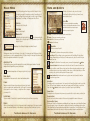
Menu has several important areas.
activate the person to initiate dialogue. The Dialogue
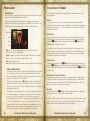
Choosing Barter will display both your inventory and the person’s inventory. In the Barter menu,
use the Q button to show a list of items you can sell to the merchant. Use the E button
to show a list of items the merchant has for sale.
Topics
Dialogue Options
Character Name
Character Name
The name of the person to whom you are speaking.
Topics
This is a list of everything you can ask this person about. You may need to scroll down to reveal
additional topics. Asking about certain topics may add new topics to the list. A topic displayed
in gold has information you do not have yet. If it is grey, you already know the information the
character will say. If you ask a topic and it stays gold, that means the character does not like you
enough to tell you everything they know.
Dialogue Options
Various dialogue options may be displayed beneath the list of topics. Selecting these icons will
bring up other dialogue menus.
Sell From Your Inventory
Buy From Shopkeeper’s Inventory
Select any item(s) you want to obtain from the person and they will be placed in your inventory.
You can also attempt to sell him any of your items by selecting them from your inventory. The
person you are bartering with will choose to accept or reject any offer you’ve modified based
on your Mercantile skill and how much you are haggling. Note that if the offer is rejected, their
Disposition will drop by a point.
Haggling
The prices a merchant offers are determined by your Mercantile skill, the merchant’s Mercantile
skill, and the merchant’s Disposition towards you. A merchant may actually be willing to sell at a
lower price, or may be willing to pay more for your goods, but you can only find out how much
more by haggling.
Persuasion: Allows you to attempt to raise the character’s Disposition through
Persuasion gameplay.
Barter: Buy and sell goods.
Repair: This character can repair normal and magical weapons and armor of all kinds
for a price.
Spells for Sale: Displays the spells he has available, with the cost in Magicka to cast
and the cost in gold to purchase.
Recharge: Those offering this service are able to recharge your magical items for a fee.
Training: There are a limited number of characters capable of teaching skills, and even
fewer can teach the skills at higher levels. You can only raise any combination of your
skills by a total of five points until you level up again.
Exit Dialogue
10
The Elder Scrolls IV: Oblivion
Press the D button to haggle. The Haggle display indicates the merchant’s Mercantile skill
mastery level and Disposition, and lets you adjust how easy or hard you want to bargain. The
greater your Mercantile skill, the lower the merchant’s Mercantile skill, and the more the merchant
likes you, the farther you can push your haggling to the ‘Hard’ setting and still have your offer
accepted. Once you find a point on the slider where the merchant will accept an offer, however,
he consistently accepts offers at that point (unless his Disposition towards you drops). And as your
Mercantile skill increases, in time you’ll be able to push your haggling even harder.
The Elder Scrolls IV: Oblivion
11