1
R
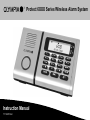
Protect 6XXX Series Wireless Alarm System
Instruction Manual
17.12.2012 en
Olympia Business Systems Vertriebs GmbH
Zum Kraftwerk 1
45527 Hattingen
Contents
Introduction . . . . . . . . . . . . . . . . . . . . . . . . . . . . . . . . . . . .
5
Configuration . . . . . . . . . . . . . . . . . . . . . . . . . . . . . . . . . . 15
Warranty . . . . . . . . . . . . . . . . . . . . . . . . . . . . . . . . . . . . . . . . . . . . . . . . . .
5
General Information . . . . . . . . . . . . . . . . . . . . . . . . . . . . . . . . . . . . . . . . . 15
User Information . . . . . . . . . . . . . . . . . . . . . . . . . . . . . . . . . . . . . . . . . . .
5
Selecting the Language . . . . . . . . . . . . . . . . . . . . . . . . . . . . . . . . . . . . . . 15
Disclaimer of Liability . . . . . . . . . . . . . . . . . . . . . . . . . . . . . . . . . . . . . . . .
5
Entry Code . . . . . . . . . . . . . . . . . . . . . . . . . . . . . . . . . . . . . . . . . . . . . . . . 15
Intended Use . . . . . . . . . . . . . . . . . . . . . . . . . . . . . . . . . . . . . . . . . . . . . .
5
Setting the Date/Time . . . . . . . . . . . . . . . . . . . . . . . . . . . . . . . . . . . . . . . 16
Product Features . . . . . . . . . . . . . . . . . . . . . . . . . . . . . . .
6
Individual Outgoing Messages . . . . . . . . . . . . . . . . . . . . . . . . . . . . . . . . 16
Scope of Delivery . . . . . . . . . . . . . . . . . . . . . . . . . . . . . . .
6
Activating the Internal Telephone Dialling Unit with OGM Function . . 17
Safety Information . . . . . . . . . . . . . . . . . . . . . . . . . . . . . .
7
Significance of the Symbols . . . . . . . . . . . . . . . . . . . . . . . . . . . . . . . . . .
7
Important Safety Information . . . . . . . . . . . . . . . . . . . . . . . . . . . . . . . . . .
7
Installation, Base Unit . . . . . . . . . . . . . . . . . . . . . . . . . .
8
Information on Selecting the Installation Location . . . . . . . . . . . . . . . .
8
Preparing and Connecting the Base Unit . . . . . . . . . . . . . . . . . . . . . . .
8
Positioning the Base Unit . . . . . . . . . . . . . . . . . . . . . . . . . . . . . . . . . . . .
9
Wall Installation . . . . . . . . . . . . . . . . . . . . . . . . . . . . . . . . . . . . . . . . . . . .
9
Operating Elements and Indicators . . . . . . . . . . . . . . 10
Function Assignment to Buttons, Base Unit . . . . . . . . . . . . . . . . . . . . . 10
Display Icons . . . . . . . . . . . . . . . . . . . . . . . . . . . . . . . . . . . . . . . . . . . . . . 11
Overview of LEDs . . . . . . . . . . . . . . . . . . . . . . . . . . . . . . . . . . . . . . . . . . 12
Function Assignment to Buttons, Remote Control . . . . . . . . . . . . . . . . 12
Menu Structure . . . . . . . . . . . . . . . . . . . . . . . . . . . . . . . . . 13
OPERATING
INSTRUCTIONS
Saving an SOS (Emergency Call) Number . . . . . . . . . . . . . . . . . . . . . . 18
Trigger Delay . . . . . . . . . . . . . . . . . . . . . . . . . . . . . . . . . . . . . . . . . . . . . . 19
Arming Delay . . . . . . . . . . . . . . . . . . . . . . . . . . . . . . . . . . . . . . . . . . . . . . 19
Alarm Period . . . . . . . . . . . . . . . . . . . . . . . . . . . . . . . . . . . . . . . . . . . . . . . 20
Key Tone On/Off . . . . . . . . . . . . . . . . . . . . . . . . . . . . . . . . . . . . . . . . . . . 20
Setting the Display Contrast . . . . . . . . . . . . . . . . . . . . . . . . . . . . . . . . . . 20
Remote Control . . . . . . . . . . . . . . . . . . . . . . . . . . . . . . . . . . . . . . . . . . . . 21
Flood and Smoke Detectors . . . . . . . . . . . . . . . . . . . . . . . . . . . . . . . . . . 21
Overview of Monitoring Functions . . . . . . . . . . . . . . . 22
Switching the Monitoring Functions On/Off . . . . . . 22
Alarm Mode . . . . . . . . . . . . . . . . . . . . . . . . . . . . . . . . . . . . . . . . . . . . . . . 23
At Home Mode . . . . . . . . . . . . . . . . . . . . . . . . . . . . . . . . . . . . . . . . . . . . . 23
Silent Mode . . . . . . . . . . . . . . . . . . . . . . . . . . . . . . . . . . . . . . . . . . . . . . . . 23
Disarmed Mode . . . . . . . . . . . . . . . . . . . . . . . . . . . . . . . . . . . . . . . . . . . . 24
Giu
Page 3
Contents
Panic Alarm . . . . . . . . . . . . . . . . . . . . . . . . . . . . . . . . . . . . 24
Emergency Call (SOS) . . . . . . . . . . . . . . . . . . . . . . . . . . 24
Remote Access Via Telephone . . . . . . . . . . . . . . . . . . 25
Resetting the Factory Settings (RESET) . . . . . . . . . . 26
Registering Sensors . . . . . . . . . . . . . . . . . . . . . . . . . . . . 27
Deregistering Sensors . . . . . . . . . . . . . . . . . . . . . . . . . . 27
System Extension . . . . . . . . . . . . . . . . . . . . . . . . . . . . . . 27
Changing the Batteries . . . . . . . . . . . . . . . . . . . . . . . . . . 28
Remote Control . . . . . . . . . . . . . . . . . . . . . . . . . . . . . . . . . . . . . . . . . . . . 28
Base Unit . . . . . . . . . . . . . . . . . . . . . . . . . . . . . . . . . . . . . . . . . . . . . . . . . 28
Regular Maintenance and Servicing . . . . . . . . . . . . . . 29
Base Unit . . . . . . . . . . . . . . . . . . . . . . . . . . . . . . . . . . . . . . . . . . . . . . . . . 29
Information on Disposal . . . . . . . . . . . . . . . . . . . . . . . . 30
Technical Data . . . . . . . . . . . . . . . . . . . . . . . . . . . . . . . . . 31
Base Unit . . . . . . . . . . . . . . . . . . . . . . . . . . . . . . . . . . . . . . . . . . . . . . . . . 31
Remote Control . . . . . . . . . . . . . . . . . . . . . . . . . . . . . . . . . . . . . . . . . . . . 31
Technical Modifications . . . . . . . . . . . . . . . . . . . . . . . . . . . . . . . . . . . . . . 31
CE Mark . . . . . . . . . . . . . . . . . . . . . . . . . . . . . . . . . . . . . . . 32
Page 4
Giu
OPERATING
INSTRUCTIONS
Introduction
Introduction
User Information
Warranty
The alarm system is a passive security product and has been conceived
as a deterrent. Additional measures are necessary to prevent and hinder
burglary and theft. You can obtain all the necessary information on this
from your local police station.
Dear Customer,
we are pleased that you have chosen this equipment.
In the case of a defect, please return the device together with the receipt
and original packing material to the point-of-sale.
Read the operating instruction manual thoroughly before connecting and
starting the system for the first time. The operating instruction manual will
help prevent application errors and, at the same time, ensure you can ex
ploit all the technical options provided by the wireless alarm system to the
full.
Disclaimer of Liability
We cannot guarantee that the information which relates to the technical
properties of the product or to the product itself contained in this document
is correct. The product and its accessories described in this document are
subject to constant improvement and further development. For this reason,
we reserve the right to modify components, accessories, technical specific
ations and related documentation of the product described herein at any
time without notice.
Intended Use
The wireless alarm systems from the Protect 6XXX-Series enable you to
monitor rooms and buildings as long as the local conditions are such that
they enable a reliable transmission link to the sensors (e.g. door/window
contact, smoke detector). In addition, all doors and windows must be
equipped with door/window contacts. A condition for complying with the
intended use is that the equipment is installed correctly and the information
in this operating instruction manual is observed and maintained.
Any other use is considered unintended use. Unauthorised modifications or
reconstructions not described in this operating instruction manual are not
permitted and could cause the product to be damaged. Furthermore, risks
through short-circuits, fire, electric shock etc. cannot be ruled out.
OPERATING
INSTRUCTIONS
Giu
Page 5
Product Features / Scope of Delivery
Product Features
S
S
S
S
S
S
S
S
S
S
S
S
S
S
S
Scope of Delivery
Wireless alarm system with emergency call, panic, room screening
and handsfree functions.
Transmit function to activate outdoor sirens etc.
Integrated telephone dialling unit with outgoing message.
Up to 10 alarm call numbers and 1 emergency call number (SOS)
can be stored.
Base unit
1
Power adapter plug
1
Telephone connection cable
1
Remote control
Messages for alarm calls can be set up individually for each re
spective sensor, up to max. 10 seconds long.
Batteries
Automatic dialling of the next number when the number called is
"engaged".
Assembly material
Operating instructions
Handsfree function on the base unit in the case of an SOS.
Telephone (silent) alarm/siren alarm can be set individually or com
bined.
Large LC display, 1 numeric line in 7 segments for 24 characters,
1 alphanumeric line in 5x7 dot matrix for 13 characters, 9 icons as
status indicators.
1
3x alkaline AAA
1x lithium CR2430 3 V
Screws, dowels, adhesive tape
1
Please check the contents of the package carefully. If anything is missing
or has been damaged during transport, DO NOT put the wireless alarm
system into operation! In such cases, contact your sales outlet, with your
purchase receipt to hand, or the OLYMPIA service centre.
NOTE:
Keep the packaging in a safe place to protect
the equipment from damage should it need to
be dispatched in future.
NOTE:
This operating instruction manual relates to
the base unit of the alarm system. The sensors
are described in separate manuals.
Display lighting in yellow and blue.
Warning in the event of a low battery charge status (base unit and
all registered sensors).
Power failure backup in the base unit.
Base unit has a remote control facility.
Upgradable for operation with max. 32 sensors.
Simple integration of new sensors/smoke detectors, Plug-and-Play.
Page 6
Giu
OPERATING
INSTRUCTIONS
Safety Information
Safety Information
Important Safety Information
Significance of the Symbols
Please observe the following safety information to ensure the wireless
alarm system can be used safely and reliably:
WARNING:
CAUTION:
NOTE:
Indicates potentially dangerous situations
which could lead to fatal or severe personal
injury if the information is ignored.
Indicates potentially dangerous situations
which could lead to minor personal injury if the
information is ignored.
Indicates potentially dangerous situations
which could lead to property or environmental
damage if the information is ignored.
S
S
S
S
S
S
If you are uncertain or have any doubts about the functioning meth
od of the equipment during assembly and installation, contact a
specialist. In case of doubt, do not complete assembly and installa
tion work yourself.
Never open the equipment! Never use the device when it is wet or
in the vicinity of a bathtub, shower or such!
Repairs to defective equipment must always be completed by au
thorised service technicians.
Never touch the power adapter plug on the base unit with wet or
damp hands.
If the power adapter plug shows signs of damage, disconnect the
fuse in the fuse box prior disconnecting the relevant plug from the
power socket.
The wireless alarm system and packaging materials must not be
used as toys by children.
NOTE:
OPERATING
INSTRUCTIONS
Giu
This operating instruction manual contains
important information on setting up and hand
ling the equipment. The manual must be en
closed with the equipment if handed over to
others.
Page 7
Installation
Preparing and Connecting the Base Unit
Installation, Base Unit
NOTE:
Information on Selecting the Installation Location
S
S
S
S
The base unit should be installed or positioned in a central location
(e.g. in the hallway of an apartment/house) in relation to the area to
be monitored in order to keep all transmission paths as short as
possible.
The alarm system can also be operated without
a telephone connection. In the event the alarm
is triggered, however, the internal telephone
dialling unit is not activated!
Power socket
Place the base unit in a location where a power socket
(230 V / 50 Hz) and telephone connection socket (for the integrated
telephone dialling unit) are available.
Choose a location within the area being monitored to ensure that no
intruders can approach the base unit and manipulate it.
The base unit and power adapter plug must not be used in damp
rooms (cellar, bathroom, etc.) or in the direct vicinity of sources of
heat.
S
The base unit should not be installed/setup on or in the direct vicin
ity of large metallic objects or sources of electrical interference be
cause this reduces the transmission range.
Examples of sources of interference
Metallic objects
Source of electrical interference
Radiators
Loudspeaker systems
Mirrors
Motors
Concrete steel
walls
Unshielded electrical apparatus
Metal doors
Page 8
N
TAE
connector
Telephone
connection
socket
RESET
Power
adapter
plug
RJ11
connector
1. Use a screwdriver to loosen the screw in the battery and connection
socket compartment on the underside of the base unit.
2. Remove the lid from the battery and connection socket compartment.
3. Plug the RJ11 connector in the base unit socket.
4. Insert three AAA alkaline batteries in the battery compartment (pay
attention to correct polarity).
5. Connect the power adapter plug to the base unit.
6. Replace the lid on the battery and connection socket compartment.
7. Replace and tighten the screw.
Giu
OPERATING
INSTRUCTIONS
Installation
Positioning the Base Unit
Wall Installation
It is possible to setup the device in a user-friendly, inclined position on a
table or desk. To do this, insert the two legs (1) supplied in the recesses for
the wall installation bracket (2) on the rear of the base unit.
After having found a suitable location for the base unit, you can begin with
the installation.
1
WARNING:
2
NOTE:
Risk of fatal injury through electric shock or
gas explosion. Pay attention that you do not
damage electric cables or gas pipes.
Also pay attention to water pipes.
1. At the installation location, insert two screws in the wall, 100 mm
apart and aligned horizontally. (It may be necessary to drill the holes
first and then insert dowels in which to tighten the screws, depending
on the properties of the wall.)
2. Screw the screws in the wall using a screwdriver until there is approx.
3 mm clearance from the bottom edge of the screw head to the wall.
3. Hook the base unit over the screws.
4. Plug the TAE connector in the socket labelled N on the telephone
connection socket of your telephone connection.
5. Connect the power adapter plug to a properly installed 230 V / 50 Hz
power socket. The base unit is then ready to use.
OPERATING
INSTRUCTIONS
Giu
Page 9
Operating Elements and Indicators
Function Assignment to Buttons, Base Unit
Operating Elements and Indicators
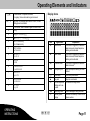
The base unit is equipped with an SOS (emergency call) button for emer
gency situations and a Panic button in the event of a direct threat. The
wireless remote control unit is provided with a button which can be con
figured either as an Emergency Call or Panic button (refer to "Configuring
the Wireless Remote Control Unit").
Pressing the Panic button triggers an immediate acoustic signal,
intended as a deterrent, regardless of whether the alarm system is active
or inactive. The acoustic alarm can be switched off via the base unit or the
wireless remote control (refer to "Disarmed Mode" in Chapter "Monitoring
Functions").
Pressing the SOS (emergency call) button activates the internal
telephone dialling unit, as long as phone numbers have been entered and
stored beforehand (refer to "Configuring the Internal Telephone Dialling
Unit with OGM Function"). The unit is activated regardless of whether the
alarm system is armed or disarmed. The emergency call number is dialled
first, then up to 10 stored phone numbers in succession. A voice message
requests the subscriber answering to press the [1] button on their phone.
The handsfree function is automatically activated on the base unit and
enables communication between the caller and subscriber called.
Page 10
Button
Function
Emergency Call button: Activates the internal telephone
dialling unit
Confirmation
Panic button: Triggers an acoustic alarm signal
Open the menu; scroll up in the menu;
increase the loudspeaker volume in Handsfree mode
Open the Location Key function for phone numbers;
scroll down in the menu;
reduce the loudspeaker volume in Handsfree mode
Disarmed mode: The system is deactivated; close the
menu; stop the countdown
Silent mode: The system is armed;
when the alarm is tripped, the internal telephone dialling
unit is activated; delete digits and letters
Alarm mode: The system is armed;
on burglary, the acoustic alarm signal and internal tele
phone dialling unit are activated
Giu
OPERATING
INSTRUCTIONS
Operating Elements and Indicators
At Home mode: The system is armed;
on burglary, the acoustic alarm signal is issued
0-9, *, #
Digit keys: On pressing the # button >3 sec., a 2 sec.
dialling pause is activated
*
In Text mode: Switch between upper and lower case
#
àáâÇ
0
+&@0/%*#$£O§¿¡
1
“Tap” ? ! 1 , . : ; “ ' < = > ( ) { }_
2
ABC2ÄÆàáâÇ
abc2äæåàáâç
3
DEF3èÉêë
def3èéêë
4
GHI4ìíîÏ
ghi4ìíîï
5
JKL5€
jkl5€
6
MNO6ñöòóô
mno6ñöòóô
7
PQRS7ß
pqrs7ß
8
TUV8ùúûÜ
tuv8ùúûü
9
WXYZ9
wxyz9
Display Icons
Icon
Explanation
Silent mode
If an alarm is triggered, no acoustic
alarm is issued; internal telephone
dialling unit is activated.
Alarm mode
If an alarm is triggered, an acoustic
alarm is issued; internal telephone
dialling unit is activated.
At Home Mode
If an alarm is triggered, an acoustic
alarm is issued.
SOS
Emergency call
Internal telephone dialling unit is ac
tivated.
a
Time delay
Time delay is activated.
Key lock
Key lock is activated.
Internal telephone
dialling unit is ac
tivated.
Connection is being made.
Recording mode
Voice message is being recorded.
Memory space
display
Indicates the memory location of the
phone number.
OPERATING
INSTRUCTIONS
Significance
Giu
Page 11
Operating Elements and Indicators
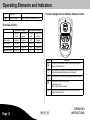
Function Assignment to Buttons, Remote Control
h
Save icon
Battery indicator
Battery capacity of base unit is low.
Overview of LEDs
With power supply
Top LED
(red)
Bottom LED
(yellow)
Silent mode
Lights up
Alarm mode
Flashes
At Home mode
Disarmed mode
Without power supply
Top LED
(red)
Bottom LED
(yellow)
Flashes
Off
Flashes
Off
Flashes
Off
Lights up
Lights up
Off
Lights up
Lights up
Off
Off
Off
Button
Alarm mode: On burglary, acoustic alarm is signal issued
and internal telephone dialling unit is activated
At Home mode: On burglary, an acoustic alarm is issued
Page 12
Function
Emergency call or panic function (can be optionally con
figured on the base unit)
Giu
Deactivate key lock on base unit;
Stop alarm signal;
Switch alarm system inactive.
Silent mode on pressing the Alarm and At Home mode
buttons simultaneously.
OPERATING
INSTRUCTIONS
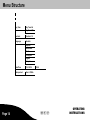
Menu Structure
Menu Structure
Review
Register
Trigger Delay
Open Sensor01
Voice Record
Remote:1
Voice Record
Search…
Open Sensor01
Voice Record
Remote:1
Voice Record
Duration
Delay: 0-240S
Trigger Tone
On
Off
Arming Delay
Delay: 0-240S
Flood & Smoke
Standard
Activate
Remote Key
Remote: SOS
Remote: PANIC
Entry Code
OPERATING
INSTRUCTIONS
1234
Giu
Page 13
Menu Structure
Key Tone
Key Tone-On
Key Tone-Off
Contrast
Contrast-1-5
Language
Deutsch
Español
Nederlands
Dansk
Português
English
Français
Page 14
Date/Time
01-01-2010
Alarm period
Time:1-10Min
00:00
Giu
OPERATING
INSTRUCTIONS
Configuration
Selecting the Language
Configuration
There is a range of languages available for selection:
General Information
NOTE:
Before beginning to operate the base unit, de
activate the key lock function. You need the
4-digit Entry Code to do this. The default,
device-specific Entry Code is provided in the
battery compartment of the base unit.
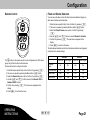
The key lock is reactivated automatically when no buttons are pressed for
a period of 10 seconds. You can also activate the key lock function manu
ally by pressing the button.
The SOS and Panic buttons are excluded from the key lock function and
are always functional!
Operation:
S
S
The menu is opened by pressing the Menu button briefly.
S
Confirm selections and entries by pressing the button. If
values are set in certain menus, they are accepted and saved.
S
S
S
Navigate through the menu using the arrow buttons and
.
Text or numbers which have been entered can be corrected by
pressing the button.
Enter the device-specific Entry Code. Confirm it by pressing .
The menu is opened by pressing the Menu button briefly.
Select the Language menu option. Confirm it by pressing .
Select the language required by pressing the and buttons.
5. Confirm it by pressing . The main menu reappears in the
display.
6. Press to exit from the menu.
1.
2.
3.
4.
Entry Code
Proceed as follows to change the Entry Code:
1. Enter the device-specific Entry Code. Confirm it by pressing .
2. The menu is opened by pressing the Menu button briefly.
3. Select the Entry Code menu option. Confirm it by pressing .
The default Entry Code appears in the display. The first digit flashes.
Enter the 4-digit Entry Code.
4. Confirm it by pressing . The main menu reappears in the
display.
5. Note your individual Entry Code down and keep it in a safe place.
6. Press to exit from the menu.
Press the button briefly to move one menu level back.
If no button is pressed for a period of 10 seconds, the menu is auto
matically closed and the key lock activated.
OPERATING
INSTRUCTIONS
Giu
Page 15
Configuration
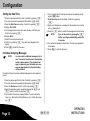
Setting the Date/Time
1.
2.
3.
4.
5.
6.
7.
8.
9.
Enter the device-specific Entry Code. Confirm it by pressing .
The menu is opened by pressing the Menu button briefly.
Select the Date/Time menu option. Confirm it by pressing .
Display: 01-01-2010.
Use the keypad on the base unit to enter the day, month and year.
Confirm it by pressing .
Display: 00:00.
Enter the time as hour and minute.
Confirm it by pressing . The main menu reappears in the
display.
Press to exit from the menu.
6. Text or numbers which have been entered can be deleted by press
ing the button.
7. Voice Record appears in the display. Confirm it by pressing
.
8. Speak your individual voice message for the selected sensor into the
unit (e.g. BalconyDoor).
9. Press the button to confirm the message and end recording.
NOTE:
If you do not confirm by pressing the button, recording is automatically ended after
10 seconds.
10. Your individual message is played back. The main menu reappears
in the display.
11. Press to exit from the menu.
Individual Outgoing Messages
NOTE:
You can record an individual message of up to
max. 10 seconds for each sensor (door/window
contact, smoke detector). The standard mes
sage is replaced by your individual voice mes
sage and played when the telephone dialling
unit is activated!
Proceed as follows to record an individual messages for each respective
sensor:
Enter the device-specific Entry Code. Confirm it by pressing .
The menu is opened by pressing the Menu button briefly.
Select the Review menu option. Confirm it by pressing .
Select the respective sensor required by pressing the and
buttons. Confirm it by pressing .
5. The first letter of the sensor selected flashes. You can rename the
sensor (e.g. BalconyDoor, KitchenWindow,, etc.). Confirm it by press
ing .
1.
2.
3.
4.
Page 16
Giu
OPERATING
INSTRUCTIONS
Configuration
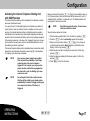
Activating the Internal Telephone Dialling Unit
with OGM Function
The internal telephone dialling unit is deactivated if no telephone numbers
have been entered and saved.
You can enter up to 10 individual telephone or mobile phone numbers of
contact persons, such as relatives, friends or neighbours. In the event of
an alarm, the internal telephone dialling unit dials these phone numbers
automatically in the sequence they were entered (beginning with memory
location 0) and communicates the status via the voice messages assigned
to the respective sensors. In the case of an "engaged" signal or no connec
tion is possible, the next phone number is automatically dialled. A total of
three dialling cycles are completed!
The internal telephone dialling unit is deactivated when a subscriber called
answers the call made and presses the numeric key [1] on his telephone
or 3 dialling cycles have been completed.
NOTE:
Save as many phone numbers as possible.
This increases the probability of reaching a
contact person in the event an alarm is
triggered. If, for example, you only save two
phone numbers and both are engaged when
the alarm call is sent, the dialling cycle soon
comes to an end!
NOTE:
Do not forget to inform the contact persons
that they will be called by your alarm system
automatically if an alarm is triggered and agree
on a sequence of actions if the alarm is
triggered.
OPERATING
INSTRUCTIONS
Memory locations 0-9 (buttons to ) are available to enter up
to 10 phone numbers. Each phone number can be composed of up to 24
characters/digits. In addition, a name with up to 13 characters/letters can
be assigned to each phone number.
NOTE:
Unjustified requests for police, fire and rescue
services are liable for costs!
Save the phone numbers as follows:
1. Enter the device-specific Entry Code. Confirm it by pressing .
2. Press the button. Location Key appears in the display.
3. Select a memory location (button -). If you have not
yet stored a phone number, Empty appears as information in the
display. Confirm it by pressing .
4. Enter the phone number including the access code. Confirm it by
pressing .
5. Enter the name associated with the phone number. Confirm it by
pressing .
6. Press to exit from the menu.
Giu
Page 17
Configuration
After having entered phone numbers, ensure that they are correct in re
spect of the alarm calls. You can do this by triggering a silent alarm. The
telephone numbers you have entered are dialled in succession in the pro
grammed sequence.
1. Enter the device-specific Entry Code. Confirm it by pressing .
2. On pressing the key, Silent mode is activated. Silent mode is
indicated in the display by the icon after the selected arming delay
has expired.
3. Now trip the silent alarm on any of the door/window contacts (e.g.
open door/window).
NOTE:
When Silent mode is active, there is no acous
tic alarm signal. The display lights up yellow
and indicates which sensor has been triggered.
The internal telephone dialling unit is activated
after the trigger delay has expired.
S The subscriber called takes the call and the individual message
recorded for the sensor triggered is played.
S The subscriber called is also requested to press digit key [1] on
their telephone. The screening function is activated. This function
enables the subscriber to screen the room in which the base unit is
located.
S If the subscriber called does not initiate a function within 24
seconds, the next phone number is automatically dialled.
S Silent mode is deactivated by pressing the button on the re
mote control, entering your Entry Code on the base unit and con
firming by pressing the button or when the subscriber
called ends the call.
Page 18
Saving an SOS (Emergency Call) Number
You can save an SOS (emergency call) number which is subsequently
called first by pressing the button on the base unit or, depending
on the configuration, the button on the remote control. Following this
number, the other phone numbers stored, maximally 10, are called in suc
cession (refer to "Activating the Internal Telephone Dialling Unit with OGM
Function").
Save the SOS number as follows:
NOTE:
Unjustified requests for police, fire and rescue
services are liable for costs!
1. Enter the device-specific Entry Code. Confirm it by pressing .
2. Press the button. Location Key appears in the display.
3. Press the button as the selected memory location. If you
have not yet stored a phone number, Empty appears as information
in the display. Confirm it by pressing .
4. Enter the phone number including the access code. Confirm it by
pressing .
5. Enter the name associated with the phone number. Confirm it by
pressing .
6. Press to exit from the menu.
Giu
OPERATING
INSTRUCTIONS
Configuration
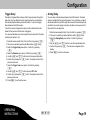
Trigger Delay
Arming Delay
The alarm is triggered after a delay so that if someone enters through the
main door, they can disarm the alarm system before the acoustic alarm
and internal telephone dialling unit are activated. You can set a trigger
delay between 0 and 240 seconds.
You can set an activation delay between 0 and 240 seconds. The alarm
system is armed after this period has expired. You must leave your apart
ment/house within this period through the door which will subsequently be
monitored. An acoustic signal is issued by the base unit every second for
the period of the set delay time.
If one of the sensors is tripped, the system must be switched to be dis
armed for this period so that no alarm is triggered.
You can select whether an acoustic signal should be issued from the base
unit during this period or not.
1. Enter the device-specific Entry Code. Confirm it by pressing .
2. The menu is opened by pressing the Menu button briefly.
3. Select the Trigger Delay menu option. Confirm it by pressing
.
4. Select the Duration menu option. Confirm it by pressing .
5. Use the and buttons to set the required delay time.
6. Confirm it by pressing the button. The system returns to the
previous menu level.
7. Select the Trigger Tone menu option. Confirm it by pressing
.
8. Use the and buttons to select Off or On.
9. Confirm it by pressing the button. The system returns to the
previous menu level.
10. Press to exit from the menu.
OPERATING
INSTRUCTIONS
1. Enter the device-specific Entry Code. Confirm it by pressing .
2. The menu is opened by pressing the Menu button briefly.
3. Select the Arming Delay menu option. Confirm it by pressing
.
4. Use the and buttons to set the required delay time.
5. Confirm it by pressing . The main menu reappears in the
display.
6. Press to exit from the menu.
Giu
Page 19
Configuration
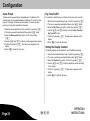
Alarm Period
Key Tone On/Off
The base unit is equipped with an integrated siren. The duration of the
acoustic alarm can be selected between a minimum of 1 minute to a max
imum of 10 minutes. The alarm period is preset to 3 minutes (an alarm
period up to 3 minutes is permitted in Germany!).
It is possible to switch the key tone feature for the base unit on and off:
1. Enter the device-specific Entry Code. Confirm it by pressing .
2. The menu is opened by pressing the Menu button briefly.
3. Select the Alarm period menu option. Confirm it by pressing
.
4. Use the and buttons to set the required alarm period.
5. Confirm it by pressing . The main menu reappears in the
display.
6. Press to exit from the menu.
Enter the device-specific Entry Code. Confirm it by pressing .
The menu is opened by pressing the Menu button briefly.
Select the Key Tone menu option. Confirm it by pressing .
Use the and buttons to select the Key Tone-On or
Key Tone-Off function.
5. Confirm it by pressing . The main menu reappears in the
display.
6. Press to exit from the menu.
1.
2.
3.
4.
Setting the Display Contrast
The display contrast can be adjusted to one of five different settings:
Enter the device-specific Entry Code. Confirm it by pressing .
The menu is opened by pressing the Menu button briefly.
Select the Contrast menu option. Confirm it by pressing .
Use the and buttons to adjust the contrast according
to your needs.
5. Confirm it by pressing . The main menu reappears in the
display.
6. Press to exit from the menu.
1.
2.
3.
4.
Page 20
Giu
OPERATING
INSTRUCTIONS
Configuration
Remote Control
Flood and Smoke Detectors
You can set-up the base unit so that flood and smoke detectors trigger an
alarm when the base unit is disarmed.
1. Enter the device-specific Entry Code. Confirm it by pressing .
2. The menu is opened by pressing the Menu button briefly.
3. Select the Flood & Smoke menu option. Confirm it by pressing
.
4. Use the and buttons to select Standard or Activate.
5. Confirm it by pressing . The main menu reappears in the
display.
6. Press to exit from the menu.
The table below indicates how the flood and smoke detectors are triggered
according to the various settings.
The button on the remote control can be configured as an SOS (emer
gency call) or Panic button via the base unit.
Proceed as follows to configure the button:
Enter the device-specific Entry Code. Confirm it by pressing .
The menu is opened by pressing the Menu button briefly.
Select the Remote Key menu option. Confirm it by pressing .
Use the and buttons to select the Remote: SOS or
Remote: PANIC function.
5. Confirm it by pressing . The main menu reappears in the
display.
6. Press to exit from the menu.
1.
2.
3.
4.
OPERATING
INSTRUCTIONS
Standard
Activate
Phone call
Alarm signal
Phone call
Alarm signal
No
No
Yes
Yes
At Home mode
No
Yes
No
Yes
Silent mode
Yes
No
Yes
Yes
Alarm mode
Yes
Yes
Yes
Yes
Disarmed
mode
Giu
Page 21
Monitoring Functions
Overview of Monitoring Functions
Monitoring
function
Acoustic
alarm signal
Switching the Monitoring Functions On/Off
Internal telephone dialling
unit activated
Silent mode
No
Yes with screening function
Alarm mode
Yes
Yes
At Home mode
Yes
No
Disarmed mode
No
No
Emergency call
(SOS)
No
Yes with handsfree function
Panic alarm
Yes
No
NOTE:
Before switching any functions on, inform all
the other people living in the residence regard
ing the location and method of operation of the
wireless alarm system.
NOTE:
The alarm period of the acoustic alarm is re
stricted from a minimum of 1 minute to a max
imum of 10 minutes depending on the config
uration.
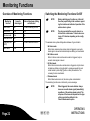
The wireless alarm system distinguishes between 4 types of alarm:
1. Alarm mode
When Alarm mode is active and an alarm is triggered, an acoustic
alarm signal is issued and internal telephone dialling unit is activated.
2. At Home mode
When At Home mode is active and an alarm is triggered, only an
acoustic alarm signal is issued.
3. Silent mode
When Silent mode is active and an alarm is triggered, only the intern
al telephone dialling unit is activated. A message requests the sub
scriber called to press the [1] button on their phone/mobile. The
screening function is activated.
4. Disarmed mode
When Disarmed mode is set, the alarm system is deactivated.
The monitoring functions are confirmed by a voice message.
NOTE:
Page 22
Giu
When triggered, the smoke detector always
issues an acoustic alarm signal (immediately)
regardless of the wireless alarm system! The
response of the base unit depends on the type
of alarm and setting defined in the
Flood & Smoke menu option.
OPERATING
INSTRUCTIONS
Monitoring Functions
You can define the required type of alarm as follows using either the base
unit or the remote control unit supplied:
NOTE:
At Home Mode
NOTE:
If an outdoor siren is registered on the base
unit, the alarm can only be stopped by the re
mote control unit after 15 seconds at the earli
est.
During the night, when you are asleep, you
should activate At Home mode. Before doing
so, check that all the doors and windows are
closed.
Base unit
Alarm Mode
NOTE:
You should activate Alarm mode when you
leave your apartment or house. Before doing
so, check that all the doors and windows
provided with a door/window contact are
closed.
1. Enter the device-specific Entry Code. Confirm it by pressing .
2. Press the button.
Remote control
1. Press the button.
Silent Mode
Base unit
NOTE:
1. Enter the device-specific Entry Code. Confirm it by pressing .
2. Press the button.
Remote control
1. Press the button.
When you leave your apartment or house, you
can activate Silent mode instead of Alarm
mode. Before doing so, check that all the doors
and windows are closed.
Base unit
1. Enter the device-specific Entry Code. Confirm it by pressing .
2. Press the button.
Remote control
1. Press the and buttons simultaneously.
OPERATING
INSTRUCTIONS
Giu
Page 23
Monitoring Functions
Disarmed Mode
NOTE:
Emergency Call (SOS)
When the system is disarmed, you can move
freely within the living quarters without trigger
ing any alarms.
Base unit
1. Enter the device-specific Entry Code. Confirm it by pressing .
Remote control
1. Press the button.
You can trigger the SOS (emergency call) function by pressing the button on the base unit or the button on the remote control unit, de
pending on the configuration. The internal telephone dialling unit is auto
matically activated when phone numbers have been stored. The emer
gency call number is dialled first, then up to 10 stored phone numbers in
succession . A voice message requests the subscriber called to press the
[1] button on their phone/mobile. The handsfree function is automatically
activated and enables communication between the caller and subscriber
called.
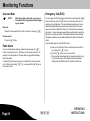
There are three ways to end the SOS function:
Panic Alarm
You can activate a panic alarm as a deterrent by pressing the button on the base unit or the button on the remote control unit, de
pending on the configuration. The panic alarm is triggered immediately
without any delay.
To switch off the panic alarm, enter your 4-digit Entry Code on the base
unit. Confirm it by pressing .Or, you can press the button on
the remote control.
Page 24
Giu
a) Enter your 4-digit Entry Code on the base unit and confirm it
by pressing the button.
b) Press the button on the remote control.
c) The subscriber called takes the call, executes a function with
in 24 seconds (refer to "Activating the Internal Telephone
Dialling Unit with OGM Function") and then ends the call.
OPERATING
INSTRUCTIONS
Remote Access Via Telephone
Remote Access Via Telephone
Key
The wireless alarm system can be operated by remote access using a
telephone. You can use a telephone to activate or deactivate the alarm
system and switch the handsfree and screening functions on.
NOTE:
The base unit takes your call after 8 rings. An
swering machines operate according to the
same principles of taking a call after a specific
number of rings. For this reason, you must not
connect an answering machine to the same
telephone connection to which the alarm sys
tem is connected.
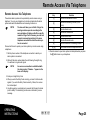
Proceed as follows to operate your alarm system by remote access using
a telephone:
1. Dial the phone number of the telephone connection to which your
alarm system is connected.
Function
[1]
Activate the handsfree function
[2]
Activate the screening function (in the
room)
[3]
Activate Alarm mode
[4]
Activate At Home mode
[5]
Activate Silent mode
[6]
Activate Disarmed mode
[#]
End the handsfree or screening function
[#], [#]
End remote access via telephone facility
6. Remote access to your alarm system is interrupted when you press
the [#] button twice on your telephone.
2. Wait until the alarm system takes the call following the eighth ring.
You will hear a long acoustic signal.
NOTE:
As soon as a connection is established with
the alarm system, "Remote…" appears in the
base unit's display.
3. Enter your 4-digit Entry Code.
4. When you enter the Entry Code correctly, you hear 2 short acoustic
signals. If you enter the Entry Code incorrectly 3 times, the connec
tion is interrupted.
5. Use the keypad on your telephone to execute the following functions
(refer to table). The monitoring functions are confirmed by a voice
message.
OPERATING
INSTRUCTIONS
Giu
Page 25
Resetting the Factory Settings (RESET)
Resetting the Factory Settings (RESET)
NOTE:
Please note that when carrying out a RESET,
all the user settings are deleted. The registra
tion of the sensors is retained! After a RESET
has been executed, the 4-digit Entry Code is
1-2-3-4!
Proceed as follows to reset the factory settings on the wireless alarm sys
tem:
1. Use a screwdriver to loosen the screw in the battery and connection
socket compartment on the underside of the base unit.
2. Press the RESET button. The alarm system acknowledges a RESET
by means of an acoustic signal.
3. Close the battery and connection socket compartment and tighten
the screw.
Page 26
Giu
OPERATING
INSTRUCTIONS
Registering and Deregistering Sensors / System Extention
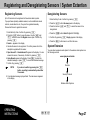
Registering Sensors
Deregistering Sensors
Up to 32 sensors can be registered on the wireless alarm system.
1. Enter the Entry Code. Confirm it by pressing .
If you purchase optionally available sensors, such as additional remote
controls, smoke detectors etc., they must be registered manually.
2. Press the button. Review appears in the display.
Proceed as follows to register the sensors:
1. Enter the Entry Code. Confirm it by pressing .
2. Press the button to open the menu. Use the and
buttons to select the Register menu option. Confirm it by
pressing .
3. Search… appears in the display
4. Activate the sensor to be registered. To do this, please refer to the
description supplied with the sensor.
5. Open Sensor01 or SmokeSensor01 appears in the display. You can
rename the sensor, if necessary. Confirm it by pressing .
6. Voice Record appears in the display. Press to retain the
standard message or press to record an individual message.
7. Confirm it by pressing .
NOTE:
3. Press the buttons and to select the sensor to be
deregistered.
4. Press the button. Delete? appears in the display.
5. Confirm it by pressing . Empty appears in the display.
6. Press the button twice to exit from the menu.
System Extension
You can order accessories and options for the wireless alarm system via
the following web site
If you do not confirm by pressing the button, recording is automatically ended after
10 seconds.
8. Your individual message is played back. The main menu reappears
in the display.
www.olympia-vertrieb.de
Products
Security Products
Wireless Alarm Systems
OPERATING
INSTRUCTIONS
Giu
Page 27
Changing the Batteries
Remote Control
Changing the Batteries
If the battery charge of the sensors is low or practically empty, the following
status messages appear in the display:
Battery capacity low
1. bAtt Lo appears in the display. The sensor affected, e.g. Open Sen
sor01, is displayed.
2. If you activate the alarm system, 5 successive, short acoustic signals
are issued.
NOTE:
Change the batteries!
Base Unit
The icon in the display indicates a low battery capacity in the base unit.
Change the batteries!
Battery charge empty
1. bAtt off appears in the display. The sensor affected, e.g. Open Sen
sor01, is displayed.
2. If you activate the alarm system, 5 successive, short acoustic signals
are issued.
NOTE:
Page 28
1. Use a precision screwdriver to loosen the screw in the battery com
partment on the underside of the wireless remote control.
2. Remove the cover of the battery compartment.
3. Remove the battery contained.
4. Insert a new CR2430 3 V lithium battery in the battery compartment
(ensure correct polarity).
5. Replace the cover on the battery compartment.
6. Replace and tighten the screw.
Change the batteries! A connection between
the sensor and base unit is no longer guaran
teed!
1. Use a screwdriver to loosen the screw in the battery and connection
socket compartment on the underside of the base unit.
2. Remove the lid from the battery and connection socket compartment.
3. Remove the batteries contained.
4. Insert three new AAA alkaline batteries in the battery compartment
(pay attention to correct polarity).
5. Replace the lid on the battery and connection socket compartment.
6. Replace and tighten the screw.
Giu
OPERATING
INSTRUCTIONS
Regular Maintenance and Servicing
Regular Maintenance and Servicing
Base Unit
1. Disconnect the base unit from the power outlet before cleaning it!
2. Clean the surface of the housing with a soft, lint-free cloth. Never use
any chemicals or scouring agents.
NOTE:
Never immerse the equipment in water!
OPERATING
INSTRUCTIONS
Giu
Page 29
Information on Disposal
Information on Disposal
The implementation of European law in national laws and direct
ives obliges you to dispose of consumable goods appropriately.
This serves to protect both persons and the environment. The
adjacent symbol indicates that electrical and electronic apparat
us and batteries no longer required must be disposed of separ
ate from normal household waste.
Old or unwanted devices must be disposed of at collection
points provided by public waste authorities.
Batteries and power packs must be disposed of at shops
which sell batteries or collection points which provide the corres
ponding containers.
Packaging materials must be disposed of according to local
regulations.
Page 30
Giu
OPERATING
INSTRUCTIONS
Technical Data
Technical Data
Remote Control
The wireless alarm systems in the Protect 6XXX-Series operate within the
frequency band specially reserved for security technology in the 868 MHz
frequency range. This ensures that interference to the wireless alarm sys
tem by other consumer products, such as baby monitors, is ruled out.
However, it cannot be ruled out that the radio transmission suffers intermit
tent or continuous interference due to defective components of other elec
trical or electronic products, such as ventilators and antenna amplifiers. In
addition, radio transmission can be subject to interference from external
sources with wilful intent.
Weight: . . . . . . . . . . . . . . . . . . 24 g
Base Unit
Weight: . . . . . . . . . . . . . . . . . . 228 g (without batteries)
Dimensions (WxHxD): . . . . . (40 x 60 x 14.5) mm
Frequency: . . . . . . . . . . . . . . . 868 MHz
Battery: . . . . . . . . . . . . . . . . . . Lithium CR2430 3 V
Technical Modifications
This operating instruction manual serves purely for information purposes.
Its content is not part of any contract for sale.
All the data relates to nominal values. The equipment and options de
scribed may differ from country to country according to national require
ments.
Dimensions (WxHxD): . . . . . (172 x 105 x 31) mm
Frequency: . . . . . . . . . . . . . . . 868 MHz
Battery: . . . . . . . . . . . . . . . . . . 3 AAA alkaline
Power adapter plug: . . . . . . . 6 VAC, 500 mA
Number of sensors: . . . . . . . . 32
OPERATING
INSTRUCTIONS
Giu
Page 31
CE-Mark
CE Mark
The device fulfils the requirements stipulated in the EU Directive:
S
1999/5/EC (R&TTE)
The CE Mark on the device confirms conformity.
Page 32
Giu
OPERATING
INSTRUCTIONS
Empty Page
Empty Page
6HLWH
Empty Page
PIN Code
This is your individual, preset PIN code!
If you want to change this predefined PIN code, please refer to Chapter "Configuration" in this operating instruction manual.
Keep this operating manual in a safe place away from the wireless alarm system!
Please note that the Copyright of this operating instruction manual is by Olympia and, therefore, must not be further copied, published or sold in any form. The
information contained in the operating instruction manual is only intended for personal use.
All rights reserved.
6HLWH