1
14
Getting to know your phone
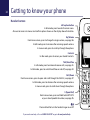
Handset buttons
Left option button
In idle mode, press to enter the main menu.
Also use to access sub menus and confirm options shown on the display above the button.
Up/Volume
From home screen, press to change the ringer volume, see page 56.
In talk mode, press to increase the incoming speech volume.
In menu mode, press to scroll up through the options.
Contacts
In idle mode, press to access your stored Contacts.
Talk/Handsfree
In idle mode, press to make and receive calls, see page 21.
In talk mode, press to switch handsfree on and off, see page 23.
Calls/Down
From home screen, press to open and scroll through the Calls list, see page 37.
In talk mode, press to decrease the incoming speech volume.
In menu mode, press to scroll down through the options.
1 (Speed dial)
From home screen, press and hold to dial BT 1571
or your stored speed dial number, see page 35.
Press and hold to turn the handset ringer on or off.
If you need some help, call us on 0800 145 6789* or go to bt.com/producthelp
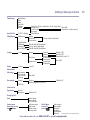
Menu