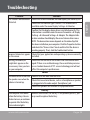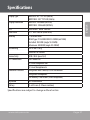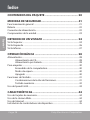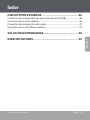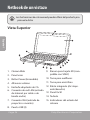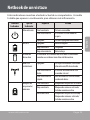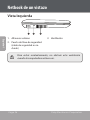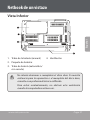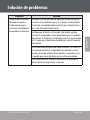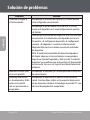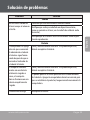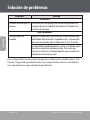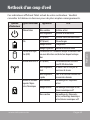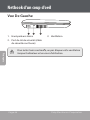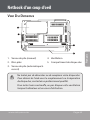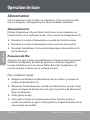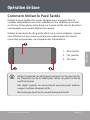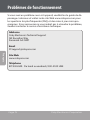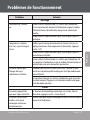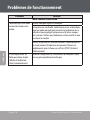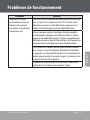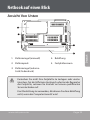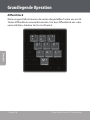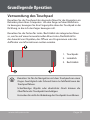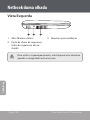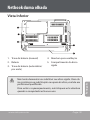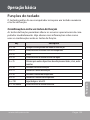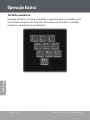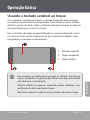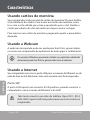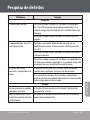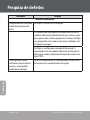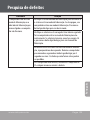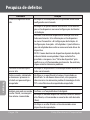
1
NBPC893 | NBPC1023 EN Ultra-Portable NETBOOK PC ES Ultra-Portátil PC NETBOOK FR Ultra-Portable PC NETBOOK DE Ultra-Tragbar NETBOOK PC PT Ultra-Portátil PC NETBOOK Instruction Manual........................................................................ Page 2 Manual de instrucciones................................................................Page 28 Manuel d’instruction....................................................................Page 56 Gebrauchsanweisung....................................................................Page 84 Manual de Instruções.................................................................. Page 112 Please read carefully before use • Léa el manual antes de usar • Veuillez lire ce livret avant utilisation • Bitte sorgfältig vor Gebrauch gelesen • Lido por favor com cuidado antes de usar Table of Contents Package Contents......................................................... 4 Safety Precautions...................................................... 5 English General Operation . ................................................................................................. 5 Battery ......................................................................................................................... 6 Power Connection.................................................................................................... 6 Unit Components..................................................................................................... 7 Netbook at a Glance.................................................... 8 Top View...................................................................................................................... 8 Left View.................................................................................................................... 10 Bottom View............................................................................................................. 11 Basic Operation............................................................12 Power.......................................................................................................................... 12 AC Power.................................................................................................... 12 Battery Power............................................................................................ 12 Getting Started........................................................................................................ 14 Turning On Your Computer.................................................................. 14 Sleep Mode................................................................................................ 14 Shut Down . ............................................................................................... 14 Keyboard Functions............................................................................................... 15 Function Key Combinations................................................................. 15 Numeric Keypad....................................................................................... 16 Using the Touchpad............................................................................................... 17 Page 2 Coby Electronics Corporation Table of Contents Using Memory Cards............................................................................................. 18 Using the Web Camera......................................................................................... 18 Using the Internet................................................................................................... 18 LAN Port...................................................................................................... 18 Wireless ...................................................................................................... 19 Installing Device Drivers....................................................................................... 19 External Devices......................................................... 20 Connecting a Universal Serial Bus (USB) Device...........................................20 Connecting an External Display.........................................................................20 Connecting an Audio Device.............................................................................. 21 Connecting an External Microphone............................................................... 21 Troubleshooting........................................................ 22 Specifications............................................................... 27 www.cobyusa.com Page 3 English Features..........................................................................18 Package Contents English Congratulations on your purchase of a Coby netbook computer. This instruction manual guides you in setting up and using your new computer. Please read the manual carefully before operation, and keep it for future reference. This package contains: Coby computer unit 100–240V AC adapter 3-cell lithium-ion battery This package may contain plastic bags or other materials that pose a hazard to children. Be sure to safely dispose of all packing materials after opening. Product names used herein are for identification purposes only and may be the trademarks of their respective companies. Microsoft®, Windows® XP, Windows® 7, and Windows Sound System are trademarks of Microsoft Corporation. Intel®, Intel® Core™, Intel® HD Audio (Azalia) are registered trademark of Intel Corporation. All other brands or product names mentioned in this manual are trademarks or registered trademarks of their respective companies. Page 4 Coby Electronics Corporation Safety Precautions Follow the guidelines below to ensure the safe operation of your computer. General Operation Set up and store the computer on a firm, flat surface. Make sure that your workspace allows for proper ventilation. To avoid overheating, do not operate the computer on a soft surface, such as a bed, for long periods of time. Keep the computer away from water. Exposure to moisture may cause malfunction or risk of electric shock. Do not expose the computer to excessive heat, including direct sunlight and heat-producing appliances. To avoid potential damage to the hard drive, do not expose the computer to electromagnetic fields from stereos, microwaves, or other household appliances. If liquid is spilled on or into the computer, unplug it immediately and contact customer service. Clean with a damp cloth or mild detergent; do not use harsh chemicals. Handle your computer gently to avoid hard drive damage. Do not drop the computer. Back up your hard drive regularly to avoid loss of data in the event of damage. www.cobyusa.com Page 5 English Safety Precautions Battery Use only the recommended battery pack. English Keep metallic objects, such as keys and clips, away from the battery pack. To avoid risk of fire, keep electrical appliances away from the battery pack. Do not expose the battery pack to heat or moisture. Do not short-circuit the battery terminals. To avoid damage to the battery, make sure that the battery catch locks firmly in place upon installation. Power Connection Connect to a properly grounded outlet of the recommended voltage, only. Do not use the power cord if it is damaged or frayed. Do not connect the power cord to a loose or damaged socket. To unplug the power cord, hold the body of the plug and pull gently. Do not yank or stress the cord. Disconnect the cord before cleaning the computer. Disconnect the cord during electrical storms. Page 6 Coby Electronics Corporation Safety Precautions Unit Components Connect only appropriate devices and drives to the SD, USB and modem ports on the unit. Do not insert other objects into these ports. Do not stress, bend, or scratch the LCD. Doing so may cause it to break. Do not touch or ingest the liquid that spills from a broken LCD. Do not operate the wireless internet within 5 meters of a microwave oven or plasma lamp. www.cobyusa.com Page 7 English Do not connect the LAN port to a telephone line. Netbook at a Glance Illustrations in this manual may differ from the actual product. English Top View 1 2 15 3 13 4 14 6 12 1. Web camera 2. Display panel 3. Power button 4. Stereo speakers 5. AC adapter jack 6. LAN connection (broadband or cable internet input) 7. VGA connection (monitor or projector input) 5 7 11 10 9 8 9. SD card slot (SDHC compatible) 10. Headphone jack 11. Microphone jack 12. Integrated mouse (left/right click) 13. Touchpad 14. Keyboard 15. System status indicators 8. USB port (x3) Page 8 Coby Electronics Corporation Netbook at a Glance These indicators display your computer’s current status. Please refer to the table below for more information. Indicator Type Power Battery HDD Wireless LAN Caps/Number Lock www.cobyusa.com Appearance Status Solid blue System on Flashing blue System in standby mode Off System off/hibernating Off Battery charged Solid red Charging Flashing red Low battery The HDD indicator will light when data is being written to/read from the hard disk. Off No power to wireless card/ RF deactivated Flashing blue, slow Wireless client is not associated with the network Flashing blue, rapid Wireless transmitting/receiving data Solid blue Caps lock on Solid red Number lock on/numeric keypad active Solid pink Caps lock on, Number lock on/ numeric keypad active Page 9 English Indicator Symbol 3 Netbook at a Glance 1 Left View 2 English 1 2 3 1. Stereo speakers 2. Security key port (security cable not included) 3. Vent To avoid overheating, do not block the vents when the computer is in use. Page 10 Coby Electronics Corporation Netbook at a Glance English Bottom View 5 4 3 1 2 1. Battery latch (manual) 4. Vent 2. Battery pack 5. Hard drive compartment 3. Battery latch (automatic/ spring-loaded) 1 2 3 Do not attempt to disassemble or replace your hard drive. For assistance with hard drive replacement and repair, contact a qualified service professional. To avoid overheating, do not block the vents when the computer is in use. www.cobyusa.com Page 11 Basic Operation Power Your computer includes both an AC adapter and built-in, rechargeable lithium-ion battery for maximum portability. English AC Power Use the AC adapter to run your computer on AC power and charge the battery. To connect the AC adapter: Connect the power cord to the transformer pack. Plug the power cord into an electrical outlet. Connect the AC adapter to the AC power adapter jack of the computer. Battery Power Make sure the battery is fully charged before first use. The battery power status indicator will flash when the battery is low. Connect the AC adapter as instructed above to charge the battery. To replace the battery: Shut down the computer and disconnect all cables, including the AC power cord. Turn the computer over to access the battery release. Slide the battery release latch to the unlock position and hold. Slide the battery out. Slide the replacement battery into the bay until it clicks into place. Slide the release latch to the locked position. Page 12 Coby Electronics Corporation English Basic Operation The components and programs on your computer consume power at different rates. Using power-intensive components/ programs will cause the battery to drain faster. Your computer’s operating system may run more slowly when operating on battery power. Use only approved battery packs to power your computer. Using an incompatible battery may increase the risk of fire or explosion. Do not attempt to disassemble or modify the battery pack. A battery pack other than the one specified by us, or a disassembled or modified battery pack, is not covered by the warranty. When disposing of the battery, comply with local ordinances and regulations. Do not attempt to dispose of the battery in your household trash. www.cobyusa.com Page 13 Basic Operation Getting Started Open the computer and adjust the display panel for comfortable viewing. English Turning On Your Computer Press the power button to turn on the computer. Sleep Mode When you finish working with your computer, you can put it to sleep or shut it down. Use sleep mode if you will be away from your computer for only a short time. To enter sleep mode: Click the Start menu and select Sleep, or Press Fn + Esc. To wake the computer, press the Power button. Wait until the power indicator light starts blinking (indicating that the computer is in sleep) before you move your computer. Moving your computer while the hard disk is spinning may cause damage or loss of data. Shut Down Your computer should be shut down when not in use for 24 hours or more. Enter the Start menu and select Shut Down to turn off the computer. Page 14 Coby Electronics Corporation Basic Operation Keyboard Functions Function Key Combinations The function keys allow you to change your computer’s operating features instantly. See below for more information on using function key combinations. Key Fn + Esc Fn + F1 Fn + F3 Fn + F4 Fn + F5 Fn + F6 Fn + F7 Fn + F8 Fn + F9 Fn + F10 Fn + Ins/NumLk Description Put your computer in sleep mode. Enable/disable the built-in wireless internet. Mute. Enable/disable the touch pad. Shift to other connected display devices, i.e. another monitor. Decrease display brightness. Increase display brightness. Decrease computer volume. Increase computer volume. Turn on/off the LCD screen. Enable/disable the Numeric keypad. www.cobyusa.com Page 15 English Your computer’s standard keyboard incorporates a numeric keypad and function keys. Basic Operation Numeric Keypad English When enabled, the keys indicated below can be used as a 10-key numeric keypad. To enable or disable the numeric keypad, press Fn+Ins/ NumLk. Page 16 Coby Electronics Corporation Basic Operation Use the touchpad and integrated mouse to navigate your computer’s operating system. To move the cursor on the screen, slide your fingertip over the touchpad in the direction in which you want the cursor to move. Use the left/right click buttons on the integrated mouse just as you would the left/right click on a conventional mouse to select objects, open programs, or retrieve information. 1. Touchpad 2. Left click 3. Right click Use one finger only to navigate the touchpad. Moisture or dirt may cause the touchpad to function incorrectly. Sharp objects or excessive pressure may damage the touchpad’s surface. Do not attempt to remove the cover of the touchpad. www.cobyusa.com Page 17 English Using the Touchpad Features Using Memory Cards English Your computer includes an SD memory card slot for easy transfer of data. To insert a memory card, orient the memory card with the label upward. Gently slide the card into the slot. To remove a memory card, grasp it by the end and pull gently. When a memory card is fully inserted, the rear half of the card will remain outside of the card slot. Using the Web Camera The built-in web camera can be used for capturing photos, recording video, or as a component of chat and conferencing applications. Windows users will need to install a third-party dedicated application in order to take pictures and video using the webcam. Using the Internet Your computer comes with LAN port for Ethernet connection or local area network (LAN), as well as a built-in wireless connection. LAN Port The LAN port supports a standard RJ-45 connector, and allows you to connect the computer to an Ethernet connection and local area network (LAN). Do not attempt to connect a telephone cable (types RJ11, RJ14, RJ25, RJ61) to the LAN port. Doing so may short-circuit your computer. Page 18 Coby Electronics Corporation Features An antenna system is built into the display for optimal reception, enabling wireless communication wherever you are. To connect to the internet wirelessly, press Fn + F1. Installing Device Drivers A compatible device driver is required to ensure correct operation and performance of each component in your computer. Most installations require a reboot to update the driver. Be sure to perform this step when prompted. Failing to reboot may compromise the system’s stability and require reinstallation of the operating system. www.cobyusa.com Page 19 English Wireless External Devices Your computer includes multiple connection ports for maximum performance and productivity. English Do not connect or disconnect any external device cables other than USB cables while the computer power is on. To avoid possible damage to attached devices, wait at least five seconds after the computer is shut down to disconnect external devices. Connecting a Universal Serial Bus (USB) Device Your computer comes with three Universal Serial Bus Ports compatible with USB 2.0 or USB 1.1 devices such as a keyboard, mouse, camera, hard disk drive, printer, and scanner. USB devices may be connected and disconnected without rebooting the computer (hot swapping), and allow specific classes of hardware to be used without requiring individual device drivers to be installed. When using a high power consumption USB device such as USB HDD, use an external device power adapter to avoid system damage. Connecting an External Display You can connect a VGA monitor via the computer’s built-in VGA port. To connect a VGA monitor, plug the 15-pin display cable into the corresponding VGA port on your computer. To shift to other connected display devices, press Fn + F5. You may also select a device using the Control Panel Display menu. Page 20 Coby Electronics Corporation External Devices Your computer includes one headphone jack for use in connecting headphones, speakers, or other audio output devices. To connect, insert the audio device plug into the jack. Connecting an External Microphone Your computer includes one external jack for connecting a microphone. To connect, insert the microphone plug into the jack. www.cobyusa.com Page 21 English Connecting an Audio Device Troubleshooting English If you have a problem with this device, please read the troubleshooting guide below and check our website at www.cobyusa.com for Frequently Asked Questions (FAQ) and firmware updates. If these resources do not resolve the problem, please contact Technical Support. Address Coby Electronics Technical Support 150 Knowlton Way Savannah GA 31407 Email [email protected] Web www.cobyusa.com Phone 877-302-2629: Monday–Friday, 9:00AM–9:00PM EST Page 22 Coby Electronics Corporation Troubleshooting Solution Display Computer does not turn on. If using AC power, check that the AC adapter is securely connected to the computer and the power cord is plugged into a working electrical outlet. If using battery power, check that the battery is charged. Computer turns on, but Confirm that the screen brightness level is not at its minimum there is no screen image. setting. (To increase brightness, press Fn +F7.) If using battery power, check that the battery is installed correctly. If using AC power, check that the AC adapter is connected to the computer and the power cord is plugged into a working electrical outlet. Screen goes blank while Screen saver may be enabled; touch the touchpad or any key to the computer is on. exit screen saver mode. If power management is enabled, the computer may have entered sleep mode. Press the power button to exit sleep mode. Keyboard A number appears when The numeric lock function is enabled. To disable it, press Fn + you enter a letter. Insert. All or some of the keys Make sure that the external numeric keypad is securely conon the external numeric nected to the computer. keypad do not work. Sleep/Hibernation Mode The computer enters sleep Check that the battery is charged. mode unexpectedly. www.cobyusa.com Page 23 English Problem Troubleshooting Problem English Solution If the processor overheats, the computer will automatically enter sleep mode to allow the computer to cool and to protect the processor and other internal components. Check that the computer is properly ventilated and not hot to the touch. Check the sleep mode settings. The computer enters sleep mode (the sleep indicator turns on) immediately after Poweron self-test (POST). The critical low-battery er- Connect the AC adapter to the computer, or replace the battery ror message appears, and with a fully charged one. the computer immediately turns off. Check the sleep indicator light to confirm that your system is The computer does not in sleep mode. If it has turned off, your computer has gone into return from sleep mode, or the sleep indicator stays hibernation mode. Press the power button to exit hibernation on and the computer does mode. not work. Check that the battery is charged. A depleted battery will cause the computer to automatically enter hibernation mode. If the battery is depleted, connect to AC power and press the power button to exit hibernation mode. If the system still does not return from sleep mode, your system has stopped responding. Reset the computer by pressing and holding the Power button for 4 seconds or more. Unsaved data may be lost. If the computer fails to reset, unplug the AC adapter and remove, then reinsert, the battery. Page 24 Coby Electronics Corporation Problem Solution The screen is unreadable or Check that screen resolution and color quality are correctly set. distorted. Check that the monitor type is correct. This information is available under the menu Display Settings Monitor. Confirm that the display device driver is installed correctly. This information is available under the menu Personalize Display Settings Advanced Settings Adapter. The Adapter Information window should display the correct device driver name. NOTE: The device driver name depends on the video chip that has been installed on your computer. Click the Properties button and check the “Device status” box to confirm that the device is working properly. If not, click the Troubleshoot button. Incorrect characters appear Check that your application and operating system are correctly on the screen. installed. Check that the surface of the screen is not scratched or damMissing, discolored, or bright dots appear on the aged. If there is no visible damage, these small idiosyncrasies screen every time you turn are a standard element of TFT screen technology and will not affect the computer’s performance. on your computer. Sound No sound can be heard from Confirm that the Mute function is off. the speaker even when the Check that no external device, such as a headphone or speaker, volume is turned up. is plugged into the audio output (headphone) jack. Check that speakers are selected as a playback device. Battery Your computer shuts down Remove and reinsert the battery. If the problem persists, you before the battery status in- may need to replace the battery. dicator turns on, or continues to operate after the battery status indicator lights. www.cobyusa.com Page 25 English Troubleshooting Troubleshooting English Problem The operating time for a fully charged battery is short, or the computer does not operate with a fully charged battery. The battery does not charge. The hard disk drive does not work. The computer does not respond. Solution Remove and reinsert the battery. If the problem persists, you may need to replace the battery. The surge protector in the battery might be active. Turn off the computer for one minute to reset the protector; then turn on the computer again. Replace the battery. Hard Drive In the Boot menu in AMI Setup Utility, make sure that the hard disk drive is included in the Boot Sequence. Other Problems Turn off the computer by pressing and holding the power button for 4 seconds or more. If the computer still does not respond, remove the AC adapter and the battery. Your computer may lock if it enters sleep mode during a communication operation. To prevent this from happening, disable the sleep timer when you are working on the internet or network. For your safety, never attempt to repair the device yourself. Attempting to do so will invalidate the warranty. Internal components of the device carry a risk of electric shock. Page 26 Coby Electronics Corporation Specifications Display Resolution CPU Hard Drive Memory Networking Connectivity A/V Connections Additional Features Keyboard Battery NBPC893: 8.9” TFT LCD (Matte) NBPC1023: 10.1” TFT LCD (Matte) NBPC893: 1024x600 (WSVGA) NBPC1023: 1024x600 (WSVGA) Intel Atom™ N450 1.66 GHz 2.5” SATA 160 GB (5400 RPM) 1 GB DDRII RAM RAM Type: PC2-5300 DDR2 SO-DIMM (667 MHz) Installed: 1024 MB (single SO-DIMM) Maximum: 2048 MB (single SO-DIMM) Wi-Fi 802.11 b/g Ethernet 10/100 Mb USB 2.0 Hi-Speed (x3) VGA Video Out 3.5 mm Headphone Out 3.5 mm Microphone In Integrated Web Camera, 0.3 MP Resolution Integrated Microphone SD Memory Card Reader (SDHC compatible) US-International 3-cell Li-ion (2-3 hours runtime) English Display Type Specifications are subject to change without notice. www.cobyusa.com Page 27 Índice Contenidos del paquete........................................... 30 Medidas de seguridad.................................................31 Funcionamiento general . ................................................................................... 31 Batería . ...................................................................................................................... 32 Conexión de alimentación.................................................................................. 32 Componentes de la unidad................................................................................. 33 Español Netbook de un vistazo.............................................. 34 Vista Superior...........................................................................................................34 Vista Izquierda.........................................................................................................36 Vista Inferior.............................................................................................................. 37 Operación básica........................................................ 38 Alimentación............................................................................................................38 Alimentación de CA.................................................................................38 Alimentación por batería.......................................................................38 Para empezar...........................................................................................................40 Encendido de la computadora............................................................40 Modo de espera........................................................................................40 Apagado . ...................................................................................................40 Funciones del teclado........................................................................................... 41 Combinaciones de teclas de funciones............................................ 41 Teclado numérico..................................................................................... 42 Uso del panel táctil................................................................................................. 43 Características........................................................... 44 Uso de tarjetas de memoria................................................................................44 Uso de la cámara Web...........................................................................................44 Uso de Internet........................................................................................................44 Instalación de controladores de dispositivo..................................................45 Page 28 Coby Electronics Corporation Índice Dispositivos externos............................................... 46 Conexión de un dispositivo de bus serie universal (USB).........................46 Conexión de un visor externo............................................................................46 Conexión de un dispositivo de audio.............................................................. 47 Conexión de un micrófono externo................................................................. 47 Especificaciones.......................................................... 55 www.cobyusa.com Page 29 Español Solución de problemas............................................. 48 Contenidos del paquete Felicitaciones por su compra de una computadora subportátil Coby. Este manual de instrucciones lo guiará para configurar y utilizar su nueva computadora. Lea cuidadosamente el manual antes de usar el producto y guárdelo para consultarlo en el futuro. Este paquete contiene: Unidad de computadora de Coby Adaptador de 100 a 240 VCA Español Batería de ión-litio de 3 celdas Este paquete puede contener bolsas plásticas u otros materiales que son riesgosos para los niños. Asegúrese de eliminar todo el material de empaque de forma segura luego de abrirlo. Los nombres de productos utilizados en el presente documento son exclusivamente para fines de identificación y pueden ser marcas registradas de sus empresas respectivas. Microsoft®, Windows® XP, Windows® CE, Windows® 7 y Windows Sound System son marcas comerciales de Microsoft Corporation. Intel®, Intel® Core™, Intel® HD Audio (Azalia) son marcas comerciales registradas de Intel Corporation. Todas las otras marcas u otros nombres de productos mencionados en este manual son marcas comerciales o marcas comerciales registradas de sus respectivas empresas. Page 30 Coby Electronics Corporation Medidas de seguridad Siga las pautas a continuación para asegurarse un funcionamiento correcto de su computadora. Coloque y guarde la computadora en una superficie plana y firme. Asegúrese de que su espacio de trabajo permita una ventilación adecuada. Para evitar el recalentamiento, no utilice la computadora en una superficie blanda, como una cama, por periodos prolongados. Mantenga la computadora lejos del agua. La exposición a la humedad puede producir un mal funcionamiento o riesgo de descarga eléctrica. No exponga la computadora a calor excesivo, incluida la luz directa del sol y dispositivos que produzcan calor. Para evitar posibles daños al disco duro, no exponga la computadora a campos electromagnéticos de estéreos, microondas u otros electrodomésticos. Si se derrama líquido sobre la computadora o dentro de ella, desenchúfela inmediatamente y comuníquese con servicio al cliente. Limpie con un paño húmedo o detergente neutro; no utilice químicos agresivos. Maneje su computadora con cuidado para evitar daños en el disco duro. No deje caer la computadora. Haga copias de seguridad de su disco duro con regularidad para evitar la pérdida de datos en caso de daño. www.cobyusa.com Page 31 Español Funcionamiento general Medidas de seguridad Batería Use sólo el paquete de baterías recomendado. Mantenga los objetos metálicos, tales como llaves y clips, alejados del paquete de baterías. Para evitar el riesgo de incendio, mantenga los dispositivos eléctricos alejados del paquete de la batería. No exponga el paquete de la batería a calor ni a humedad. Español No haga cortocircuito entre los terminales de la batería. Para evitar daños a la batería, asegúrese de que la traba de la batería calce firmemente en su lugar cuando se la instale. Conexión de alimentación Conecte únicamente a un tomacorriente con descarga a tierra de la tensión recomendada. No utilice el cable de alimentación si está dañado o pelado. No conecte el cable de alimentación a un enchufe flojo o dañado. Para desenchufar el cable de alimentación, tome el cuerpo del enchufe y tire suavemente. No tironee ni fuerce el cable. Desconecte el cable antes de limpiar la computadora. Desconecte el cable durante tormentas eléctricas. Page 32 Coby Electronics Corporation Medidas de seguridad Componentes de la unidad No conecte el puerto de red LAN a una línea telefónica. Conecte sólo dispositivos y unidades de memoria adecuados a los puertos SD, USB y de módem de la unidad. No inserte otros objetos en estos puertos. No toque o ingiera el líquido que se derrame de una pantalla LCD rota. No opere la Internet inalámbrica en un radio de 5 metros de un horno a microondas o una lámpara de plasma. www.cobyusa.com Page 33 Español No fuerce, tuerza ni raye la pantalla LCD. De hacerlo, podría quebrarla. Netbook de un vistazo Las ilustraciones de este manual pueden diferir del producto propiamente dicho Vista Superior 1 Español 2 15 3 13 4 14 6 12 7 11 1. Cámara Web 2. Panel visor 3. Botón Power (Encendido) 4. Altavoces estéreo 5. Enchufe adaptador de CA 6. Conexión de red LAN (entrada de Internet por cable o de banda ancha) 7. Conexión VGA (entrada de proyector o monitor) 5 10 9 8 9. Ranura para tarjeta SD (compatible con SDHC) 10. Toma para audífonos 11. Toma para micrófono 12. Ratón integrado (clic izquierdo/derecho) 13. Panel táctil 14. Teclado 15. Indicadores del estado del sistema 8. Puerto USB (3) Page 34 Coby Electronics Corporation Netbook de un vistazo Estos indicadores muestran el estado actual de su computadora. Consulte la tabla que aparece a continuación para obtener más información. Tipo de Indicador Alimentación Batería Unidad de disco duro Red LAN inalámbrica Bloqueo de mayúsculas/ números Aspecto Azul constante Azul intermitente Sistema encendido El sistema está en modo de espera Apagado Sistema apagado/hibernando Apagado Batería cargada Rojo constante Cargando Rojo intermitente Batería baja El indicador de la unidad del disco duro se encenderá cuando se escriban o lean datos del disco duro. Apagado Azul intermitente lento Azul intermitente rápido Azul constante Rojo constante Rosa constante www.cobyusa.com Estado La tarjeta inalámbrica no recibe alimentación/RF desactivada El cliente inalámbrico no está asociado a la red Red inalámbrica transmitiendo/ recibiendo datos Bloqueo de mayúsculas activado Bloqueo de números activado/ teclado numérico activo Bloqueo de mayúscula activado, bloqueo de números activado/ teclado numérico activo Page 35 Español Símbolo Indicador 3 Netbook de un vistazo 1 Vista Izquierda 2 1 2 3 Español 1. Altavoces estéreo 3. Ventilación 2. Puerto de llave de seguridad (cable de seguridad no incluido) Para evitar recalentamiento, no obstruir esta ventilación cuando la computadora esté en uso. Page 36 Coby Electronics Corporation Netbook de un vistazo Vista Inferior 5 3 1 2 1. Traba de la batería (manual) 4. Ventilación 2. Paquete de baterías 3. Traba de batería (automática/ con resorte) 1 2 3 No intente desarmar o reemplazar el disco duro. Si necesita asistencia para la reparación o el reemplazo del disco duro, consulte a un profesional técnico calificado. Para evitar recalentamiento, no obstruir esta ventilación cuando la computadora esté en uso. www.cobyusa.com Page 37 Español 4 Operación básica Alimentación Su computadora incluye un adaptador de CA y una batería de ión-litio recargable e integrada para una mayor autonomía. Alimentación de CA Use el adaptador de CA para que la computadora funcione con alimentación de CA y cargar la batería. Para conectar el adaptador de CA: Español Conecte el cable de alimentación al paquete transformador. Enchufe el cable en un tomacorriente. Conecte el adaptador de CA al enchufe adaptador de alimentación de CA de la computadora. Alimentación por batería Asegúrese de que la batería esté completamente cargada antes del primer uso. El indicador de estado de la alimentación por batería estará intermitente cuando la batería esté baja. Conecte el adaptador de CA como se indicó anteriormente para cargar la batería. Para reemplazar la batería: Apague la computadora y desconecte todos los cables, incluso el de alimentación de CA. Dé vuelta la computadora para acceder a la traba de la batería. Deslice la traba de la batería hacia la posición de desbloqueo y manténgala así. Quite la batería deslizándola. Deslice la batería de reemplazo en el puerto hasta que encaje en su lugar. Deslice la traba hacia la posición de bloqueo. Page 38 Coby Electronics Corporation Español Operación básica Los componentes y los programas de su computadora consumen energía a diferentes velocidades. El uso de componentes o programas de alto consumo de energía hará que la batería se agote más rápidamente. El sistema operativo de su computadora puede funcionar más lentamente cuando se alimenta con baterías. Use solamente paquetes de baterías aprobados para dar alimentación a su computadora. El uso de una batería incompatible puede incrementar el riesgo de incendio o explosión. No intente desarmar o modificar el paquete de baterías. La garantía no cubre una batería que no sea la especificada por nosotros, ni un paquete de baterías desarmado o modificado. Cuando descarte la batería, cumpla con las regulaciones y ordenanzas locales. No descarte la batería con sus residuos domésticos. www.cobyusa.com Page 39 Operación básica Para empezar Abra la computadora y ajústelo el panel visor para una visualización cómoda. Encendido de la computadora Presione el botón Power (encendido) para encender la computadora. Español Modo de espera Cuando termine de trabajar con su computadora, puede ponerla en espera o apagarla. Use el modo en espera si se alejará de la computadora solo un periodo breve. Para entrar en modo de espera: Haga clic en el menú de inicio y seleccione Sleep (espera) o Presione Fn + Esc. Para reactivar la computadora, presione el botón Power. Espere hasta que la luz indicadora de alimentación comience a titilar (lo que indica que la computadora está en espera) antes de mover la computadora. Si se mueve la computadora mientras el disco duro está girando, pueden producirse daños o pérdida de datos. Apagado Se debe apagar la computadora cuando no se la use durante 24 horas o más. Ingrese al menú Inicio y seleccione Apagar para apagar la computadora. Page 40 Coby Electronics Corporation Operación básica Funciones del teclado El teclado estándar de su computadora incorpora un teclado numérico y teclas de funciones. Las teclas de funciones le permiten cambiar al instante las funciones operativas de su computadora. Vea a continuación para obtener más información sobre el uso de las combinaciones de teclas de funciones. Key Fn + Esc Fn + F1 Fn + F3 Fn + F4 Fn + F5 Fn + F6 Fn + F7 Fn + F8 Fn + F9 Fn + F10 Fn + Ins/NumLk Description Pone la computadora en modo de espera. Activa/desactiva la Internet inalámbrica integrada. Silencio. Activa/desactiva el panel táctil. Cambia a otros dispositivos de visualización conectados, es decir, otro monitor. Disminuye el brillo del visor. Aumenta el brillo del visor. Disminuye el volumen de la computadora. Aumenta el volumen de la computadora. Enciende/apaga la pantalla de LCD. Activa/desactiva el teclado numérico. www.cobyusa.com Page 41 Español Combinaciones de teclas de funciones Operación básica Teclado numérico Cuando está activado, las teclas que se indican más abajo se pueden usar como teclado numérico de 10 teclas. Para activar o desactivar el teclado numérico, presione Fn+Ins/NumLk. Español Page 42 Coby Electronics Corporation Operación básica Uso del panel táctil Use los botones para hacer clic izquierdo/derecho en el ratón integrado como lo haría en un ratón convencional para seleccionar objetos, abrir programas o recuperar información. 1. Panel táctil 2. Clic izquierdo 3. Clic derecho Use sólo un dedo para navegar en el panel táctil. La humedad o el polvo pueden hacer que el panel táctil funcione de forma incorrecta. Los objetos punzantes o la presión excesiva pueden dañar la superficie del panel táctil. No trate de quitar la cubierta del panel táctil. www.cobyusa.com Page 43 Español Use el panel táctil y el ratón integrado para navegar por el sistema operativo de la computadora. Para mover el cursor en la pantalla, deslice la yema del dedo sobre el panel táctil en la dirección en la que desea se mueva el cursor. Características Uso de tarjetas de memoria Su computadora incluye una ranura para tarjetas de memoria SD para facilitar la transferencia de datos. Para insertar una tarjeta de memoria, oriente la tarjeta con la flecha hacia arriba y apuntando hacia la ranura. Deslice la tarjeta en la ranura hasta que encaje en su lugar. Para quitar una tarjeta de memoria, tómela por el extremo y tire de ella suavemente. Español Uso de la cámara Web La cámara Web integrada puede utilizarse para tomar fotografías, grabar videos o como un componente de aplicaciones de conversación y conferencias. Los usuarios de Windows deberán instalar una aplicación dedicada de otra marca para poder tomar fotografías y captar video con la cámara Web. Uso de Internet Su computadora viene con un puerto LAN para conexión por Ethernet o red de área local (LAN) y con una conexión inalámbrica integrada. Puerto LAN El puerto de red LAN tiene un conector RJ-45 estándar y le permite conectar la computadora a una conexión por Ethernet y a la red de área local (LAN). Page 44 Coby Electronics Corporation Características No intente conectar un cable telefónico (tipos RJ11, RJ14, RJ25, RJ61) al puerto LAN. De hacerlo, podría producir un cortocircuito en su computad En el visor, se encuentra integrado un sistema de antena, lo que permite una comunicación inalámbrica donde quiera que se encuentre. Para conectarse a Internet de forma inalámbrica, presione Fn + F1. Instalación de controladores de dispositivo Es necesario contar con un controlador de dispositivo compatible para asegurar el funcionamiento y el desempeño correctos de cada componente de la computadora. La mayoría de las instalaciones requieren que se reinicie el equipo para actualizar el controlador. Asegúrese de realizar este paso cuando se le solicite. Si no se reinicia el equipo, se puede comprometer la estabilidad del sistema y es posible que sea necesario reinstalar el sistema operativo. www.cobyusa.com Page 45 Español Inalámbrica Dispositivos externos Su computadora incluye varios puertos de conexión para un desempeño y una productividad máximos. No conecte ni desconecte cables de dispositivos externos que no sean USB mientras la computadora tenga energía. Para evitar posibles daños a los dispositivos conectados, espere cinco segundos después de apagar la computadora para desconectar dispositivos externos. Español Conexión de un dispositivo de bus serie universal (USB) Su computadora viene con tres puertos de bus serie universal compatibles con dispositivos USB 2.0 o USB 1.1 tales como un teclado, un ratón, una cámara, una unidad de disco duro, una impresora o un escáner. Los dispositivos USB se pueden conectar y desconectar sin reiniciar la computadora (intercambio en caliente) y permite usar clases específicas de hardware sin que sea necesario instalar controladores de dispositivo individuales. Cuando se use un dispositivo USB de alto nivel de consumo como un disco óptico USB, utilice un adaptador de alimentación para dispositivo externo y así evitar daños al sistema. Conexión de un visor externo Se puede conectar un monitor VGA a través del puerto VGA integrado de la computadora. Para conectar un monitor VGA, enchufe el cable del visor de 15 pines en el puerto VGA correspondiente de la computadora. Para cambiar a otros dispositivos visores conectados, presione Fn + F5. También puede seleccionar un dispositivo con el menú Pantalla del Panel de control. Page 46 Coby Electronics Corporation Dispositivos externos Conexión de un dispositivo de audio Su computadora incluye un enchufe para auriculares para conectar auriculares, altavoces u otros dispositivos de salida de audio. Para conectarlos, inserte el conector del dispositivo de audio en el enchufe correspondiente. Su computadora incluye un enchufe externo para conectar un micrófono. Para conectarlo, inserte el conector del micrófono en el enchufe correspondiente. www.cobyusa.com Page 47 Español Conexión de un micrófono externo Solución de problemas Si tiene un problema con este dispositivo, lea la guía de solución de problemas a continuación y visite nuestro sitio Web en www.cobyusa. com para obtener respuestas a preguntas frecuentes (FAQs) y las actualizaciones de firmware. Si estos recursos no resuelven el problema, comuníquese con el Soporte técnico. Español Dirección Coby Electronics Technical Support 150 Knowlton Way Savannah GA 31407 Correo Electrónico [email protected] Sitio Web www.cobyusa.com Teléfono 877-302-2629: De Lunes a Viernes, 9:00–21:00 EST Page 48 Coby Electronics Corporation Solución de problemas La computadora no se enciende. Solución Pantalla Si se está usando alimentación de CA, verifique que el adaptador de CA esté firmemente conectado a la computadora y que el cable de alimentación esté enchufado en un tomacorriente que funcione. Si se usa alimentación a batería, verifique que la batería esté cargada. La computadora se enConfirme que el nivel de brillo de la pantalla no esté en su conciende pero no hay imagen figuración mínima. (Para aumentar el brillo, presione Fn + F7.) en la pantalla. Si se usa alimentación a batería, verifique que la batería esté instalada correctamente. Si se está usando alimentación de CA, verifique que el adaptador de CA esté conectado a la computadora y que el cable de alimentación esté enchufado en un tomacorriente que funcione. La pantalla se pone en Es posible que esté activado el protector de pantalla; toque el blanco cuando la computa- panel táctil o cualquier tecla para salir del modo de protector dora está encendida. de pantalla. Si está activada la gestión de energía, la computadora puede haber entrado en modo de espera. Presione el botón Power para salir del modo de espera. Teclado Aparece un número Esta activada la función de bloqueo numérico. Para desacticuando escribe una letra. varla, presione Fn + Insert. Todas las teclas del teclado Asegúrese de que el teclado numérico externo esté firmenumérico externo o algu- mente conectado a la computadora. nas de ellas no funcionan. www.cobyusa.com Page 49 Español Problema Solución de problemas Problema La computadora entra inesperadamente en modo de espera. Solución Modo de espera/hibernación Verifique que la batería esté cargada. Español Si el procesador se recalienta, la computadora entrará automáticamente en modo de espera para permitir a la computadora enfriarse y para proteger el procesador y otros componentes internos. Verifique que la computadora esté bien ventilada y no esté caliente al tacto. Verifique las configuraciones del modo de espera. La computadora entra en el modo de espera (se enciende el indicador de espera) inmediatamente después de la prueba de encendido (POST). Conecte el adaptador de CA a la computadora o reemplace la Aparece el mensaje de error crítico de batería baja batería con una completamente cargada. y la computadora se apaga inmediatamente. Page 50 Coby Electronics Corporation Problema La computadora no vuelve del modo de espera o el indicador de espera permanece encendido y la computadora no funciona. www.cobyusa.com Solución Verifique la luz del indicador de espera para confirmar que su sistema esté en modo de espera. Si se apagó, su computadora ha entrado en modo de hibernación. Presione el botón Power para salir del modo de hibernación. Verifique que la batería esté cargada. Una batería agotada hará que la computadora entre automáticamente en modo de hibernación. Si la batería está agotada, conecte la alimentación de CA y presione el botón de encendido para salir del modo de hibernación. Si el sistema aún no regresa del modo de espera, su sistema ya no responde. Reinicie la computadora presionando y manteniendo presionado el botón Power durante 4 segundos o más. Es posible que se pierdan datos que no se hayan guardado. Si la computadora no se reinicia, desenchufe el adaptador y quite la batería y luego vuelva a colocarla. Page 51 Español Solución de problemas Solución de problemas Problema La pantalla es ilegible o está distorsionada. Solución Verifique que la resolución de la pantalla y la calidad de color estén configuradas correctamente. Verifique que el tipo de monitor sea el correcto. Esta información está disponible en el menú Configuración de pantalla Monitor. Español Confirme que el controlador del dispositivo visor esté instalado correctamente. Esta información está disponible en el menú Personalizar Configuración de pantalla Configuración avanzada Adaptador. La ventana de información del Adaptador debe mostrar el nombre correcto del controlador del dispositivo. NOTA: El nombre del controlador del dispositivo dependerá del chip de video que se haya instalado en su computadora. Haga clic en el botón Propiedades y tilde la casilla “Estado del dispositivo” para confirmar que el dispositivo está funcionando correctamente. De no ser así, haga clic en el botón Solución de problemas. Aparecen caracteres incor- Verifique que su aplicación y el sistema operativo estén instalarectos en la pantalla. dos correctamente. Aparecen puntos brillanVerifique que la superficie de la pantalla no esté dañada o tes, descoloreados o faltan rayada. Si no hay daños visibles, estas pequeñas idiosincrasias son un elemento estándar de la tecnología de pantalla TFT y no puntos en la pantalla cada vez que enciende su afectan el desempeño de la computadora. computadora. Page 52 Coby Electronics Corporation Solución de problemas Solución Sonido No se escucha sonido del Confirme que esté desactivada la función Silencio. altavoz aunque el volumen Verifique que no haya enchufado un dispositivo externo, está alto. como un auricular o altavoz, en el enchufe de salida de audio (auricular). Verifique que los altavoces estén seleccionados como dispositivo de reproducción. Batería La computadora se apaga Quite y vuelva a colocar la batería. Si el problema persiste, antes de que se encienda deberá reemplazar la batería. el indicador de estado de la batería o sigue funcionando después de que se enciende el indicador de estado de la batería. Quite y vuelva a colocar la batería. Si el problema persiste, El tiempo de funcionadeberá reemplazar la batería. miento con una batería totalmente cargada es Es posible que esté activo el protector contra sobretensiones breve, o la computade la batería. Apague la computadora durante un minuto para dora no funciona con una que se restablezca el protector; luego encienda nuevamente la batería completamente computadora. cargada. La batería no se carga. www.cobyusa.com Reemplace la batería. Page 53 Español Problema Solución de problemas Problema Solución Español Disco duro La unidad de disco duro no En el menú de Arranque del Utilitario de configuración AMI, funciona. asegúrese de que la unidad de disco duro esté incluida en la secuencia de arranque. Otros problemas La computadora no Apague la computadora presionando y manteniendo presionresponde. ado el botón Power durante 4 segundos o más. Si la computadora aún no responde, quite el adaptador de CA y la batería. Su computadora puede bloquearse si entra en modo de espera durante una operación de comunicación. Para evitar que esto ocurra, desactive el temporizador de espera cuando esté trabajando en Internet o en red. Por su seguridad, nunca trate de reparar el dispositivo usted mismo. Si lo hiciera, la garantía quedará nula. Los componentes internos del dispositivo representan riesgo de descarga eléctrica. Page 54 Coby Electronics Corporation Especificaciones Resolución de pantalla CPU Disco duro Memoria Conexión de redes Conectividad Conexiones de audio y video Características adicionales Teclado Batería NBPC893: TFT LCD de 8.9” (Mate) NBPC1023: TFT LCD de 10.1” (Mate) NBPC893: 1024x600 (WSVGA) NBPC1023: 1024x600 (WSVGA) Intel Atom™ N450 1.66 GHz SATA 2.5” de 160 GB (5400 RPM) RAM DDRII de 1 GB Tipo de memoria RAM: SO-DIMM DDR2 (667 MHz) Instalada: 1024 MB (SO-DIMM simple) Máxima: 2048 MB (SO-DIMM simple) Wi-Fi 802.11 b/g Ethernet 10/100 Mb USB 2.0 de alta velocidad (3) Salida de video VGA Salida de auricular de 3,5 mm Entrada de micrófono de 3,5 mm Cámara Web integrada, resolución 0.3 MP Micrófono integrado Lector de tarjeta SD (compatible con SDHC) Internacional-EE.UU. Ión litio de 3 celdas (2 a 3 horas de funcionamiento) Español Tipo de pantalla Las especificaciones están sujetas a cambios sin notificación. www.cobyusa.com Page 55 Table des matières Contenu de l’emballage............................................ 58 Mesures de sécurité................................................... 59 Fonctionnement Général..................................................................................... 59 Pile...............................................................................................................................60 Connexion d’Alimentation...................................................................................60 Composants d’Appareil........................................................................................ 61 Netbook d’un coup d’oeil......................................... 62 Vue Du Dessus.........................................................................................................62 Vue De Gauche........................................................................................................64 Vue Du Dessous.......................................................................................................65 Français Opération de base....................................................... 66 Alimentation.............................................................................................................66 Alimentation CA.......................................................................................66 Puissance de Pile......................................................................................66 Comment Démarrer...............................................................................................68 Comment Allumer Votre Ordinateur.................................................68 Mode Sommeil..........................................................................................68 Eteindre l’Ordinateur...............................................................................68 Fonctions de Clavier..............................................................................................69 Combinaisons de Touche de Fonction.............................................69 Pavé numérique........................................................................................ 70 Comment Utiliser le Pavé Tactile....................................................................... 71 Dispositifs..................................................................... 72 Comment Utiliser des Cartes de Mémoire.....................................................72 Comment Utiliser la Webcaméra.......................................................................72 Comment Utiliser l’Internet.................................................................................72 Installation de Pilotes............................................................................................73 Page 56 Coby Electronics Corporation Table des matières Périphériques externes..............................................74 Connexion d’un Dispositif USB........................................................................... 74 Connexion d’un Ecran Externe........................................................................... 75 Connexion d’un Périphérique Audio............................................................... 75 Connexion d’un Micro Externe.......................................................................... 75 Problèmes de fonctionnement.............................. 76 Français Caractéristiques........................................................ 83 www.cobyusa.com Page 57 Contenu de l’emballage Félicitations pour votre achat d’un ordinateur miniportatif Coby. Ce manuel d’instructions vous guide dans la mise en place et l’utilisation de votre nouvel ordinateur. Veuillez lire ce manuel attentivement avant le fonctionnement et conservez-le pour pouvoir vous y référer ultérieurement. Ce paquet contient : L’ordinateur de Coby L’adaptateur de CA 100-240V Pile au lithium-ion à 3 cellules Français Ce paquet peut contenir des sacs en plastique ou d’autres matériaux qui posent un danger pour les enfants. Assurez-vous d’éliminer, en toute sécurité, tous les matériaux d’emba Les noms de produits utilisés ici sont à des fins d’identification seulement et peuvent être les marques déposées de leurs sociétés respectives. Microsoft®, Windows® XP, Windows® CE, Windows® 7 et Windows Sound System sont des marques déposées de Microsoft Corporation. Intel®, Intel® Core™, Intel® HD Audio (Azalia) sont des marques déposées d’Intel Corporation. Toutes les autres marques ou noms de produits mentionnés dans ce manuel sont des marques de commerce ou des marques déposées de leurs sociétés respectives. Page 58 Coby Electronics Corporation Mesures de sécurité Suivez les directives ci-dessous pour assurer le fonctionnement sûr de votre ordinateur. Fonctionnement Général Mettre en place et stocker l’ordinateur sur une surface plate, stable. Assurez-vous que votre espace de travail fourni une bonne ventilation. Gardez votre ordinateur loin de l’eau. L’exposition à l’humidité peut provoquer un dysfonctionnement ou un risque de choc électrique. Ne pas exposer l’ordinateur à une chaleur excessive, y compris à la lumière directe du soleil et à des appareils produisant de la chaleur. Pour éviter des dommages potentiels sur le disque dur, ne pas exposer l’ordinateur à des champs électromagnétiques d’appareils stéréo, micro-ondes, ou d’autres appareils ménagers. Si du liquide est renversé sur ou dans l’ordinateur, débranchez-le immédiatement et contactez le service à la clientèle. Nettoyez avec un chiffon humide ou un détergent doux ; ne pas utiliser de produits chimiques durs. Manipulez votre ordinateur doucement pour éviter des dommages au disque dur. Ne faites pas tomber l’ordinateur. Sauvegardez votre disque dur régulièrement pour éviter toute perte de données en cas de dommages. www.cobyusa.com Page 59 Français Pour éviter toute surchauffe, ne pas faire fonctionner l’ordinateur sur une surface molle, comme un lit, pendant de longues périodes de temps. Mesures de sécurité Pile Utilisez uniquement le bloc-piles recommandé. Gardez les objets métalliques, tels que des clés et des agrafes, loin du bloc-piles. Pour éviter les risques d’incendie, gardez les appareils électriques loin du bloc-piles. Ne pas exposer le bloc-piles à la chaleur ou à l’humidité. Ne court-circuitez pas les bornes de pile. Pour éviter d’endommager la pile, assurez-vous que le loquet de la pile se verrouille bien en place lors de l’installation. Français Connexion d’Alimentation Connecter seulement à une prise de courant correctement mise à la terre avec la tension recommandée. Ne pas utiliser le cordon d’alimentation s’il est endommagé ou effiloché. Ne pas brancher le cordon d’alimentation à une prise de courant mal fixée ou endommagée. Pour débrancher le cordon d’alimentation, tenir le corps de la fiche et tirer doucement. Ne pas arracher ou tirer sur le cordon. Débrancher le cordon d’alimentation avant de nettoyer l’ordinateur. Débrancher le cordon d’alimentation en cas d’orage. Page 60 Coby Electronics Corporation Mesures de sécurité Composants d’Appareil Ne pas connecter le port LAN à une ligne téléphonique. Connecter seulement des dispositifs et lecteurs appropriés au ports SD, USB et modem sur l’appareil. Ne pas insérer d’autres objets dans ces ports. Ne pas stresser, courber, ou rayer l’écran ACL. Cela pourrait le casser. Ne pas toucher ou ingérer du liquide qui se renverse de l’ACL cassé. Français Ne pas faire fonctionner l’internet sans fil dans les 5 mètres d’un four à micro-ondes ou d’une lampe à plasma. www.cobyusa.com Page 61 Netbook d’un coup d’oeil Les illustrations dans ce manuel peuvent différer du produit réel. Vue Du Dessus 1 2 15 Français 3 13 4 14 6 12 5 7 11 10 8 9 1. Webcaméra 8. Port USB (x3) 2. Ecran d’affichage 9. Fente pour carte SD (Compatible SDHC) 3. Bouton de mise en marche/ Arrêt 10. Connecteur jack pour casque 4. Haut-parleurs stéréo 11. Connecteur pour micro 5. Prise d’adaptateur CA 12. Souris intégrée (clic gauche/ droit) 6. Connexion RL (entrée internet à large bande ou câble) 7. Connexion VGA (entrée de moniteur ou de projecteur) Page 62 13. Touchpad 14. Clavier 15. Indicateurs d’états système Coby Electronics Corporation Netbook d’un coup d’oeil Ces indicateurs affichent l’état actuel de votre ordinateur. Veuillez consulter le tableau ci-dessous pour de plus amples renseignements. Symbole Type d’Indicateur d’Indicateur Apparence Etat Bleu continu Système activé Bleu clignotant Système en mode veille Off (éteint) Système éteint/en hibernation Pile Off (éteint) Pile rechargée Rouge continu Chargement Rouge clignotant Niveau de batterie faible Lecteur de Disque L’indicateur LDD s’allumera lorsque les données sont Dur (LDD) en cours d’écriture sur/de lecture depuis le disque dur. Réseau local sans fil Off (éteint) Pas d’alimentation à la carte sans fil/ RF désactivée Bleu clignotant, Le client sans fil n’est pas aslent socié avec le réseau Bleu clignotant, Sans fil en train de transmettre/ rapide recevoir des données Touche de Verrouil- Bleu continu Verrouillage des Majuscules lage des Majusactivé cules/Numérique Rouge continu Verrouillage numérique activé/ clavier numérique actif Rose continu Verrouillage des Majuscules activé, verrouillage numérique activé/clavier numérique actif www.cobyusa.com Page 63 Français Alimentation 3 Netbook d’un coup d’oeil 1 Vue De Gauche 2 1 2 3 1. Haut-parleurs stéréo 3. Ventilation 2. Port de clé de sécurité (câble de sécurité non fourni) Français Pour éviter toute surchauffe, ne pas bloquer cette ventilation lorsque l’ordinateur est en cours d’utilisation. Page 64 Coby Electronics Corporation Netbook d’un coup d’oeil Vue Du Dessous 5 4 3 1 1. Verrou de pile (manuel) 4. Ventilation 2. Bloc-piles 5. Compartiment de disque dur 3. Verrou de pile (automatique/à ressort) 1 2 3 Ne tentez pas de démonter ou de remplacer votre disque dur. Pour obtenir de l’aide avec le remplacement ou la réparation de disque dur, contactez un professionnel qualifié. Pour éviter toute surchauffe, ne pas bloquer cette ventilation lorsque l’ordinateur est en cours d’utilisation. www.cobyusa.com Page 65 Français 2 Opération de base Alimentation Votre ordinateur inclut à la fois un adaptateur CA et une pile au lithium-ion intégrée, rechargeable pour une portabilité maximale. Alimentation CA Utilisez l’adaptateur CA pour faire fonctionner votre ordinateur sur l’alimentation CA et recharger la pile. Pour connecter l’adaptateur CA : Branchez le cordon d’alimentation au pack de transformateur. Branchez le cordon d’alimentation dans une prise de courant. Branchez l’adaptateur CA au jack d’adaptateur d’alimentation CA de l’ordinateur. Français Puissance de Pile Assurez-vous que la pile est complètement chargée avant la première utilisation. L’indicateur de l’état de puissance de la pile clignotera lorsque la batterie est à un niveau faible. Branchez l’adaptateur CA comme indiqué ci-dessus pour recharger la pile. Pour remplacer la pile : Éteignez l’ordinateur et débranchez tous les câbles, y compris le cordon d’alimentation CA. Retournez l’ordinateur pour accéder au déclencheur de pile. Faites glisser le loquet de déclencheur de pile à la position de déverrouillage et maintenez. Faites glisser la pile. Faites glisser la pile de remplacement dans la baie jusqu’à ce qu’elle s’enclenche en place. Faites glisser le loquet de déclencheur à la position verrouillée. Page 66 Coby Electronics Corporation Les composants et programmes sur votre ordinateur consomment de la puissance à des débits différents. L’utilisation de composants/programmes consommant beaucoup de puissance causera à la pile de se vider plus rapidement. Le système d’exploitation de votre ordinateur peut fonctionner plus lentement lors d’un fonctionnement à partir de la pile. Utilisez uniquement des bloc-piles approuvés pour alimenter votre ordinateur. L’utilisation d’une pile incompatible peut augmenter le risque d’incendie ou d’explosion. Ne tentez pas de démonter ou de modifier le bloc-piles. Un blocpiles autre que celui spécifié par nous-même, ou un bloc-piles démonté ou modifié, n’est pas couvert par la garantie. Lors de l’élimination de la pile, se conformer aux ordonnances et règlements locaux. Ne tentez pas de jeter la pile dans votre poubelle de maison. www.cobyusa.com Page 67 Français Opération de base Opération de base Comment Démarrer Ouvrez le ordinateur et réglez le panneau d’affichage pour une vision confortable. Comment Allumer Votre Ordinateur Appuyez sur le bouton marche/arrêt pour allumer l’ordinateur. Mode Sommeil Lorsque vous avez fini de travailler sur votre ordinateur, vous pouvez le mettre en mode sommeil ou l’éteindre. Français Utilisez le mode sommeil si vous allez être loin de votre ordinateur pendant peu de temps. Pour entrer en mode sommeil : Cliquez sur le menu Démarrer et sélectionnez Sommeil, ou Appuyez sur Fn + Esc (Ech). Pour réveiller l’ordinateur, appuyez sur le bouton Marche/Arrêt. Attendez que le voyant d’indicateur de puissance commence à clignoter (indiquant que l’ordinateur est en mode sommeil) avant de déplacer votre ordinateur. Le déplacement de votre ordinateur pendant que le disque dur tourne peut causer des dommages ou une perte de données. Eteindre l’Ordinateur Votre ordinateur devrait être éteint lorsqu’il n’est pas utilisé pendant 24 heures ou plus. Entrez dans le menu Démarrer et sélectionnez Eteindre pour éteindre l’ordinateur. Page 68 Coby Electronics Corporation Opération de base Fonctions de Clavier Le clavier standard de votre ordinateur intègre un pavé numérique et des touches de fonction. Combinaisons de Touche de Fonction Key Fn + Esc (Ech) Fn + F1 Fn + F3 Fn + F4 Fn + F5 Fn + F6 Fn + F7 Fn + F8 Fn + F9 Fn + F10 Fn + Ins/NumLk (Verrouillage Numérique) Description Met votre ordinateur en mode sommeil. Activation / désactivation de l’Internet sans fil intégré. Mute (Silence). Activation / désactivation du pavé tactile. Bascule à d’autres dispositifs d’affichage connectés, par exemple à un autre moniteur. Diminution de la luminosité de l’affichage. Augmentation de la luminosité de l’affichage. Diminution du volume de l’ordinateur. Augmentation du volume de l’ordinateur. Allume/Eteint l’écran ACL. Activation / désactivation du pavé numérique. www.cobyusa.com Page 69 Français Les touches de fonction vous permettent de changer instantanément les caractéristiques d’exploitation de votre ordinateur. Voir ci-dessous pour plus d’informations sur l’utilisation de combinaisons de touche de fonction. Opération de base Pavé numérique Lorsque cette option est activée, les touches indiquées ci-dessous peuvent être utilisées comme un pavé numérique de 10 touches. Pour activer ou désactiver le pavé numérique, appuyez sur Fn+Ins/NumLk (Verrouillage Numérique). Français Page 70 Coby Electronics Corporation Opération de base Comment Utiliser le Pavé Tactile Utilisez le pavé tactile et la souris intégrée pour naviguer dans le système d’exploitation de votre ordinateur. Pour déplacer le curseur sur l’écran, faites glisser votre doigt sur le pavé tactile dans la direction vers laquelle vous voulez déplacer le curseur. Utilisez les boutons de clic gauche/droit sur la souris intégrée, comme vous le feriez sur une souris normale pour sélectionner des objets, ouvrir des programmes, ou récupérer des informations. 2. Clic gauche 3. Clic droit Utilisez seulement un doigt pour naviguer sur le pavé tactile. De l’humidité ou de la saleté peut causer au pavé tactile de mal fonctionner. Des objets pointus ou une pression excessive peut endommager la surface du pavé tactile. Ne tentez pas de retirer le couvercle du pavé tactile. www.cobyusa.com Page 71 Français 1. Pavé tactile Dispositifs Comment Utiliser des Cartes de Mémoire Votre ordinateur comprend une fente de carte mémoire SD pour faciliter le transfert de données. Pour insérer une carte mémoire, orientez la carte mémoire avec la flèche vers le haut et pointant vers la fente de carte. Faites glisser la carte dans la fente jusqu’à ce qu’elle s’enclenche en place. Pour retirer une carte mémoire, saisissez-la par son extrémité et tirez doucement. Comment Utiliser la Webcaméra Français La webcaméra intégrée peut être utilisée pour capturer des photos, enregistrer des vidéos, ou comme un composant de clavardage et d’applications de téléconférence. Les utilisateurs de Windows auront besoin d’installer une application spécialisée tiers afin de prendre des photos et enregistrer des vidéos à l’aide de la webcaméra. Comment Utiliser l’Internet Votre ordinateur est fourni avec un port RL pour une connexion Ethernet ou de réseau local (RL), ainsi qu’avec une connexion sans fil intégrée. Port RL (LAN) Le port RL supporte un connecteur RJ-45 standard, et vous permet de connecter l’ordinateur à une connexion Ethernet et de réseau local (RL). Page 72 Coby Electronics Corporation Dispositifs Ne pas essayer de connecter un câble téléphonique (types RJ11, RJ14, RJ25, RJ61) au port RL (LAN). Cela peut courtcircuiter votre ordinateur. Sans Fil Un système d’antenne est intégré dans l’écran pour une réception optimale, ce qui permet la communication sans fil où que vous soyez. Pour vous connecter à l’internet sans fil, appuyez sur Fn + F1. Un pilote de périphérique compatible est nécessaire pour assurer le bon fonctionnement et la performance de chaque composant de votre ordinateur. La plupart des installations nécessitent un redémarrage pour mettre à jour le pilote. Assurez-vous d’effectuer cette étape à l’invite. Si vous ne redémarrez pas, cela peut compromettre la stabilité du système et nécessiter la réinstallation du système d’exploitation. www.cobyusa.com Page 73 Français Installation de Pilotes Périphériques externes Votre ordinateur comprend de multiples ports de connexion pour une performance et une productivité maximum. Ne pas brancher ou débrancher n’importe quels câbles de périphérique externe autres que des câbles USB pendant que l’ordinateur est sous tension. Pour éviter d’endommager les périphériques attachés, attendez au moins cinq secondes après l’arrêt de l’ordinateur pour déconnecter les périphériques externes. Connexion d’un Dispositif USB Français Votre ordinateur est livré avec trois ports USB compatibles avec des dispositifs USB 2.0 ou USB 1.1 comme un clavier, une souris, un appareil photo, un lecteur de disque dur, une imprimante, et un scanner. Les périphériques USB peuvent être connectés et déconnectés sans redémarrer l’ordinateur (remplacement à chaud), et permettent à des classes spécifiques de matériel d’être utilisées sans nécessiter l’installation de pilotes de périphérique individuels. Lors de l’utilisation d’un périphérique USB à grande consommation d’énergie tels que le USB HDD, utilisez un adaptateur de puissance de périphérique externe pour éviter l’endommagement du système. Page 74 Coby Electronics Corporation Périphériques externes Connexion d’un Ecran Externe Vous pouvez connecter un moniteur VGA via le port VGA intégré de l’ordinateur. Pour connecter un moniteur VGA, branchez le câble d’écran à 15 broches dans le port VGA correspondant sur votre ordinateur. Pour passer à d’autres périphériques d’affichage connectés, appuyez sur Fn + F5. Vous pouvez également sélectionner un périphérique à l’aide du menu Affichage de Panneau de Configuration. Votre ordinateur comprend une prise casque pour utilisation dans la connexion d’écouteurs, de haut-parleurs, ou d’autres périphériques de sortie audio. Pour connecter, insérez la prise de périphérique audio dans le jack. Connexion d’un Micro Externe Votre ordinateur comprend un jack externe pour le branchement d’un microphone. Pour connecter, insérez la prise de microphone dans le jack. www.cobyusa.com Page 75 Français Connexion d’un Périphérique Audio Problèmes de fonctionnement Si vous avez un problème avec cet appareil, veuillez lire le guide de dépannage ci-dessous et visitez notre site Web www.cobyusa.com pour les questions les plus fréquentes (FAQ) et des mises à jour microprogrammes. Si ces ressources ne vous aident pas à résoudre le problème, veuillez contacter le service d’assistance technique. Addresse Coby Electronics Technical Support 150 Knowlton Way Savannah GA 31407 Email [email protected] Français Site Web www.cobyusa.com Téléphone 877-302-2629: Du lundi au vendredi, 9:00–21:00 HNE Page 76 Coby Electronics Corporation Problèmes de fonctionnement L’ordinateur ne s’allume pas. L’ordinateur est allumé, mais il n’y a pas d’image à l’écran. L’écran ne montre plus d’image alors que l’ordinateur est allumé. Un numéro apparaît lorsque vous tapez une lettre. La totalité, ou certaines touches, sur le pavé numérique externe ne fonctionnent pas. www.cobyusa.com Solution Affichage Si vous utilisez l’alimentation CA, vérifiez que l’adaptateur CA est correctement connecté à l’ordinateur et que le cordon d’alimentation est branché dans une prise de courant qui marche. Si vous utilisez la puissance de la pile, vérifiez que la pile est rechargée. Vérifiez que le niveau de luminosité de l’écran n’est pas au réglage minimum. (Pour augmenter la luminosité, appuyez sur Fn + F7.) Si vous utilisez la puissance de la pile, vérifiez que la pile est correctement installée. Si vous utilisez l’alimentation CA, vérifiez que l’adaptateur CA est connecté à l’ordinateur et que le cordon d’alimentation est branché dans une prise de courant qui marche. L’économiseur d’écran est peut être activé ; touchez le pavé tactile ou n’importe quelle touche pour sortir du mode économiseur d’écran. Si la gestion d’énergie est activée, l’ordinateur peut être entré en mode sommeil. Appuyez sur le bouton marche/arrêt pour sortir du mode sommeil. Clavier La fonction de verrouillage numérique est activée. Pour la désactiver, appuyez sur Fn + Inser (Insert). Assurez-vous que le pavé numérique externe est correctement connecté à l’ordinateur. Page 77 Français Problème Problèmes de fonctionnement Problème Français Solution Mode Sommeil/Hibernation L’ordinateur passe en mode Assurez-vous que la pile est rechargée. sommeil de manière inat- Si le processeur surchauffe, l’ordinateur passera automatiquetendue. ment en mode sommeil pour permettre à l’ordinateur de se refroidir et pour protéger le processeur et d’autres composants internes. Vérifiez que l’ordinateur est bien ventilé et non pas chaud au toucher. Vérifiez les paramètres du mode sommeil. L’ordinateur passe en mode sommeil (l’indicateur de sommeil s’allume) immédiatement après le Power-on self-test (POST) (Autotest d’Alimentation). Le message d’erreur de Branchez l’adaptateur CA à l’ordinateur, ou remplacer la pile décharge critique de pile par une pile complètement rechargée. s’affiche et l’ordinateur s’éteint immédiatement. Page 78 Coby Electronics Corporation Problème L’ordinateur ne revient pas du mode sommeil, ou l’indicateur de sommeil reste allumé et l’ordinateur ne fonctionne pas. www.cobyusa.com Solution Vérifiez le voyant d’indicateur de sommeil pour confirmer que votre système est en mode sommeil. S’il s’est éteint, votre ordinateur est passé en mode Hibernation. Appuyez sur le bouton marche/arrêt pour sortir du mode Hibernation. Assurez-vous que la pile est rechargée. Une pile complètement déchargée provoquera à l’ordinateur d’entrer automatiquement en mode Hibernation. Si la pile est complètement déchargée, connectez-vous à l’alimentation CA et appuyez sur le bouton marche/arrêt pour sortir du mode Hibernation. Si le système n’est toujours pas de retour du mode sommeil, votre système a cessé de répondre. Réinitialisez l’ordinateur en appuyant sur le bouton Marche/Arrêt et en maintenant ce bouton appuyé pendant 4 secondes ou plus. Les données non enregistrées peuvent être perdues. Si l’ordinateur ne parvient pas à se réinitialiser, débranchez l’adaptateur CA et enlevez, puis réinsérez, la pile. Page 79 Français Problèmes de fonctionnement Problèmes de fonctionnement Problème L’image sur l’écran est déformée ou parasitée. Français Des caractères incorrects s’affichent à l’écran. Des points manquants, décolorés, ou lumineux apparaissent sur l’écran à chaque fois que vous allumez votre ordinateur. Page 80 Solution Vérifiez que la résolution de l’écran et la qualité des couleurs sont correctement définies. Vérifiez que le type de moniteur est correct. Cette information est disponible sous le menu Paramètres d’Affichage Moniteur. Confirmez que le pilote d’affichage est correctement installé. Cette information est disponible sous le menu Personnaliser Paramètres d’Affichage Paramètres Avancés Adaptateur. La fenêtre d’Informations Concernant l’Adaptateur devrait afficher le nom du pilote de périphérique. REMARQUE : Le nom du pilote de périphérique dépend de la puce vidéo qui a été installée sur votre ordinateur. Cliquez sur le bouton Propriétés et cochez la case “Etat du Périphérique” (Device status) pour confirmer que le périphérique fonctionne correctement. Sinon, cliquez sur le bouton Dépannage (Troubleshoot). Vérifiez que votre application et système d’exploitation sont installés correctement. Vérifiez que la surface de l’écran n’est pas rayée ou endommagée. S’il n’y a pas de dommages visibles, ces petites bizarreries sont un élément standard de la technologie d’écran TFT et n’affecteront pas les performances de l’ordinateur. Coby Electronics Corporation Problèmes de fonctionnement Aucun son ne peut être entendu à partir des hautparleurs, même lorsque le volume est augmenté. Votre ordinateur s’éteint avant que l’indicateur d’état de pile s’allume, ou continue à fonctionner après que l’indicateur d’état de pile s’allume. La durée de fonctionnement pour une pile complètement rechargée est courte, ou l’ordinateur ne fonctionne pas avec une pile complètement rechargée. La pile ne se recharge pas. Le lecteur de disque dur ne fonctionne pas. www.cobyusa.com Solution Son Confirmez que la fonction Mute (Silence) est désactivée. Vérifiez qu’aucun périphérique externe, comme un casque ou des haut-parleurs, n’est branché dans la prise (casque) de sortie audio. Vérifiez que les haut-parleurs sont sélectionnés en tant que périphérique de lecture. Pile Retirez et réinsérez la pile. Si le problème persiste, vous pouvez avoir besoin de remplacer la pile. Français Problème Retirez et réinsérez la pile. Si le problème persiste, vous pouvez avoir besoin de remplacer la pile. Le parasurtenseur dans la pile est peut-être actif. Éteignez l’ordinateur pendant une minute afin de réinitialiser le parasurtenseur, puis rallumez l’ordinateur. Remplacez la pile. Disque Dur Dans le menu de Démarrage (Boot) dans l’Utilitaire de Configuration AMI, assurez-vous que le lecteur de disque dur est inclus dans la Séquence de Démarrage. Page 81 Problèmes de fonctionnement Problème L’ordinateur ne répond pas. Solution Autres Problèmes Eteignez l’ordinateur en appuyant sur le bouton Marche/Arrêt et en maintenant ce bouton appuyé pendant 4 secondes ou plus. Si l’ordinateur ne répond toujours pas, enlevez l’adaptateur CA et la pile. Votre ordinateur peut se verrouiller s’il passe en mode sommeil au cours d’une opération de communication. Pour éviter cela, désactivez la minuterie lorsque vous travaillez sur l’Internet ou sur le réseau. Français Pour votre sécurité, ne tentez jamais de réparer le périphérique vousmêmes. Tenter de le faire pourrait invalider la garantie. Les composants internes du périphérique constituent un risque de choc électrique. Page 82 Coby Electronics Corporation Type d’affichage Résolution de l’afficheur Unité Centrale Disque Dur Mémoire Réseautage Connectivité Connexions A/V Caractéristiques supplémentaires Clavier Pile NBPC893: TFT LCD 8,9 po (21 cm) (Cache) NBPC1023: TFT LCD 10,1 po (21 cm) (Cache) NBPC893: 1024x600 (WSVGA) NBPC1023: 1024x600 (WSVGA) Intel Atom™ N450 1.66 GHz 2,5” SATA 160 GB (5400 RPM (tr/m) 1 GB DDRII RAM Type RAM : DDR2 SO-DIMM (667 MHz) Installé : 1024 MB (SO-DIMM unique) Maximum : 2048 MB (SO-DIMM unique) Wi-Fi 802.11 b/g Ethernet 10/100 Mb USB 2.0 Hi-Speed (Haute Vitesse) (x3) Sortie Vidéo VGA Sortie Casque 3,5 mm Entrée Microphone 3,5 mm Webcaméra intégrée, Résolution de 0,3 MP Micro intégré Lecteur de Carte de Mémoire SD (Compatible SDHC) US-International Li-ion 3 cellules (2-3 heures de fonctionnement) Les caractéristiques sont sujettes à modifications sans préavis. www.cobyusa.com Page 83 Français Caractéristiques Inhaltsverzeichnis Paket-Inhalt.................................................................. 86 Sicherheitsanweisungen.......................................... 87 Allgemeiner Betrieb . ............................................................................................ 87 Batterie . ....................................................................................................................88 Netzanschluss .........................................................................................................88 Komponenten..........................................................................................................88 Netbook auf einen Blick............................................ 90 Übersicht...................................................................................................................90 Ansicht Von Links.................................................................................................... 92 Ansicht Von Unten..................................................................................................93 Deutsch Grundlegende Operation......................................... 94 Versorgung...............................................................................................................94 Netzstrom...................................................................................................94 Batterieversorgung..................................................................................94 Beginn........................................................................................................................96 Schalten Sie Ihren Computer an..........................................................96 Schlaf Modus.............................................................................................96 Ausschalten................................................................................................96 Tastaturfunktionen ............................................................................................... 97 Tastenkombinationen . .......................................................................... 97 Ziffernblock ...............................................................................................98 Verwendung des Touchpad................................................................................99 Merkmale..................................................................... 100 Benutzung von Speicherkarten . ....................................................................100 Benutzung der Web Kamera.............................................................................100 Benutzung des Internets....................................................................................100 Installation von Gerätetreibern . .....................................................................101 Page 84 Coby Electronics Corporation Inhaltsverzeichnis Externe Einheiten...................................................... 102 Anschluss eines Universal Serial Bus (USB) Gerätes...................................102 Anschluss eines externen Displays.................................................................102 Anschluss eines Audio Gerätes........................................................................103 Anschluss eines externen Mikrofons..............................................................103 Fehlersuche................................................................ 104 Deutsch Eigenschaften.............................................................110 www.cobyusa.com Page 85 Paket-Inhalt Herzlichen Glückwunsch zum Kauf Ihres Coby Netbook Computer. Diese Bedienungsanleitung hilft Ihnen bei der Einstellung und dem Gebrauch Ihres neuen Computers. Bitte lesen Sie diese Bedienungsanleitung vor dem Betrieb sorgfältig, und bewahren sie diese für zukünftiges Nachschlagen auf. Diese Verpackung enthält: Coby Computer 100–240V AC Adapter 3-Zellen Lithium-Ionen Batterie Deutsch Diese Verpackung kann Plastiktüten oder andere Materialien enthalten, die für Kinder eine Gefahr darstellen. Stellen Sie sicher, dass nach dem Öffnen all dieses Verpackungsmaterial sicher entsorgt wird. Produktnamen, die hier verwendet werden, dienen ausschließlich zur Identifikation und können Handelsmarken ihrer entsprechenden Unternehmen sein. Microsoft®, Windows® XP, Windows® CE, Windows® 7, und Windows Sound System sind Handelsmarken der Microsoft Corporation. Intel®, Intel® Core™, Intel® HD Audio (Azalia) sind registrierte Handelsmarken der Intel Corporation. Alle anderen in dieser Bedienungsanleitung genannten Marken oder Produktnamen sind Handelsmarken oder registrierte Handelsmarken ihrer entsprechenden Unternehmen. Page 86 Coby Electronics Corporation Sicherheitsanweisungen Folgen Sie den untenstehenden Richtlinien um einen sicheren Betrieb Ihres Computers zu gewährleisten. Allgemeiner Betrieb Öffnen Sie den Computer und stellen Sie ihn auf einer festen ebenen Oberfläche auf. Stellen Sie sicher, dass Ihr Arbeitsplatz einer ausreichenden Belüftung erlaubt. Bringen Sie den Computer nicht in die Nähe von Wasser. Der Kontakt mit Feuchtigkeit kann zu Fehlfunktionen oder der Gefahr elektrischer Schläge führen. Setzen Sie den Computer keiner erhöhten Temperatur aus, incl. direkter Sonneneinstrahlung und wärmeproduzierenden Geräten. Um mögliche Schäden an der Festplatte zu vermeiden, setzten Sie den Computer keinen elektromagnetischen Feldern, von z.B. Musikanlagen, Mikrowellen oder anderen Haushaltsgeräten aus. Wenn Flüssigkeit auf oder in den Computer geschüttet wird, trennen Sie ihn sofort vom Netz und verständigen Sie den Kundendienst. Reinigen Sie mit einem feuchten Tuch oder einem mildem Reinigungsmittel; verwenden Sie keinen starken Chemikalien. Handhaben Sie Ihren Computer vorsichtig, um Schäden an der Festplatte zu vermeiden. Lassen Sie den Computer nicht fallen. Um im Fall eines Schadens einen Datenverlust zu vermeiden sichern Sie regelmäßig Ihre Festplatte. www.cobyusa.com Page 87 Deutsch Um Überhitzung zu vermeiden, betreiben Sie den Computer nicht für längere Zeit auf weichen Oberflächen, wie auf einem Bett. Sicherheitsanweisungen Batterie Verwenden Sie die empfohlene Batterie. Halten Sie metallische Objekte, wie Schlüssel oder Büroklammern, fern von der Batterie. Um eine Brandgefahr zu vermeiden, halten Sie elektrische Geräte fern von der Batterie. Setzen Sie die Batterie keiner Hitze oder Feuchtigkeit aus. Schließen Sie die Batterieklemmen nicht kurz. Um Schäden an der Batterie zu vermeiden, stellen Sie sicher, dass die Rastnasen der Batterie beim Einbau sicher einrasten. Deutsch Netzanschluss Schließen Sie nur an einem gut geerdeten Anschluss der empfohlenen Spannung an. Benutzen Sie das Netzkabel nicht, wenn es beschädigt oder verschlissen ist. Schließen Sie das Netzkabel nicht an einer losen oder beschädigten Steckdose an. Um das Netzkabel vom Anschluss zu trennen, halten Sie den Stecker und ziehen Sie vorsichtig. Reißen Sie nicht am Kabel. Trennen Sie das Netzkabel, bevor Sie den Computer reinigen. Bei Gewitter trennen Sie das Netzkabel. Komponenten Schließen Sie das LAN anschluss nicht an einer Telefonleitung an. Page 88 Coby Electronics Corporation Sicherheitsanweisungen Schließen Sie an den Anschlüssen SD, USB und Modem nur geeignete Geräte und Laufwerke an. Stecken Sie keine anderen Objekte in diese Anschlüsse. Überlasten, biegen oder zerkratzen Sie nicht das LCD. In diesem Fall kann dies beschädigt werden. Berühren oder verschlucken Sie nicht die Flüssigkeit aus einem beschädigten LCD. Deutsch Betreiben Sie das drahtlose Internet nicht in einer Entfernung von weniger als 5 Metern von einer Mikrowelle oder Plasmaleuchte. www.cobyusa.com Page 89 Netbook auf einen Blick Die in diesem Handbuch dargestellten Bilder können von dem wirklichen Produkt abweichen. Übersicht 1 2 15 Deutsch 3 13 4 14 6 12 1. Webcam 2. Bildschirm 3. Einschaltknopf 4. Stereo Lautsprecher 5. AC Netzanschluss 6. LAN Verbindung (Breitband oder Kabelanschluss) 7. VGA Verbindung (Eingang für Monitor oder Projektor) 5 7 11 10 9 8 9. SD Kartenleser (SDHC kompatibel) 10. Kopfhörerbuchse 11. Mikrofonbuchse 12. Integrierte Maus (links-/rechtsklick) 13. Touchpad 14. Tatstatur 15. Anzeige des Systemstatus 8. USB Anschluss (x3) Page 90 Coby Electronics Corporation Netbook auf einen Blick Diese Anzeigen geben den aktuellen Stand ihres Computers an. Weitere Informationen finden Sie in der Tabelle unten. Art der Anzeige Power Batterie HDD Wireless LAN Großschreibung Ziffernblock an www.cobyusa.com Anzeige Status Leuchtet blau System an Blinkt blau System in Standby Modus Aus System aus/Ruhezustand Aus Batterie geladen Leuchtet rot Ladevorgang Blinkt rot Batterie schwach Die Anzeige HDD leuchtet, wenn Daten von der Festplatte gelesen werden oder auf die Festplatte geschrieben werden. Aus Kein Strom an die Wireless Karte / RF desaktiviert Blinkt langsam Wireless Client ist dem Netzblau werk nicht zugeordnet Blinkt schnell Wireless sendet / empfängt blau Daten Leuchtet blau Caps lock on Leuchtet rot Ziffernblock an /die numerischen Tasten sind aktiv Leuchtet pink Großschreibung an, Ziffernblock an /die numerischen Tasten sind aktiv Page 91 Deutsch Anzeigesymbol 3 Netbook auf einen Blick 1 Ansicht Von Links 2 1 2 3 1. Stereo Lautsprecher 3. Belüftung 2. Sicherheitsschloss (Sicherheitskabel nicht eingeschlossen) Deutsch Um Überhitzung zu vermeiden, blockieren Sie diese Belüftung nicht, wenn der Computer benutzt wird. Page 92 Coby Electronics Corporation Netbook auf einen Blick Ansicht Von Unten 5 4 3 1 1. Batterieriegel (manuell) 4. Belüftung 2. Batteriepack 5. Festplattenraum Deutsch 2 3. Batterieriegel (automa1 2 3 tisch/Federdruck) Versuchen Sie nicht Ihre Festplatte zu zerlegen oder auszutauschen. Für die Hilfe beim Austausch oder bei der Reparatur der Festplatte, nehmen Sie Kontakt mit einem qualifizierten Servicetechniker auf. Um Überhitzung zu vermeiden, blockieren Sie diese Belüftung nicht, wenn der Computer benutzt wird. www.cobyusa.com Page 93 Grundlegende Operation Versorgung Ihr Computer verfügt für die maximale Mobilität sowohl über einen Netzstromadapter, als auch eine eingebaute aufladbare Lithium-Ionen Batterie. Netzstrom Benutzen Sie den Netzstromadapter um Ihren Computer am Netzstrom zu betreiben, und die Batterie aufzuladen. Um den Netzstromadapter anzuschließen: Schließen Sie das Netzkabel am Transformator an. Schließen Sie das Netzkabel an einer Steckdose. Deutsch Schließen Sie den Netzstromadapter an die Versorgungsbuchse des Computers an. Batterieversorgung Stellen Sie sicher, dass die Batterie vor der ersten Nutzung vollständig geladen ist. Die Anzeige für den Status der Batterieversorgung blinkt, wenn der Ladezustand niedrig ist. Schließen Sie, wie oben beschreiben, den Netzstromadapter an, um die Batterie aufzuladen. Austausch der Batterie: Schalten Sie den Computer aus und entfernen Sie alle Kabel, incl. dem Netzkabel. Für den Zugang zur Batterieentriegelung drehen Sie den Computer herum. Schieben Sie die Batterieentriegelung in die Entriegelungsposition und halten Sie diese dort. Schieben Sie die Batterie heraus. Schieben Sie die Ersatzbatterie in die Halterung, bis sie einrastet. Schieben Sie die Batterieentriegelung in die Verriegelungsposition. Page 94 Coby Electronics Corporation Die Komponenten und Programme auf Ihrem Computer verbrauchen unterschiedlich viel Strom. Die Benutzung Leistungsintensiver Komponenten/Programme wird die Batterie schneller entladen. Das Betriebssystem Ihres Computers kann im Batteriebetrieb langsamer laufen. Benutzen Sie für die Versorgung Ihres Computers nur zugelassene Batterien. Die Benutzung einer nicht kompatiblen Batterie kann das Risiko von Brand oder Explosion erhöhen. Versuchen Sie nicht die Batterie zu zerlegen oder zu verändern. Eine Batterie, die nicht von uns spezifiziert wurde, oder eine zerlegte oder veränderte Batterie wird nicht von der Garantie abgedeckt. Halten Sie sich bei der Entsorgung der Batterie an die örtlichen Verordnungen und Regelungen. Versuchen Sie nicht die Batterie in Ihrem Hausmüll zu entsorgen. www.cobyusa.com Page 95 Deutsch Grundlegende Operation Grundlegende Operation Beginn Öffnen Sie das computer und stellen Sie das Display für eine bequeme Ansicht ein. Schalten Sie Ihren Computer an Drücken Sie den Einschaltknopf um den Computer einzuschalten. Schlaf Modus Wenn Sie die Arbeit mit Ihrem Computer beenden, können Sie ihn in den Schlaf Modus schalten oder ausschalten. Deutsch Benutzen Sie den Schlaf Modus, wenn Sie sich nur für einen kurzen Moment von Ihrem Computer entfernen. Um in den Schlaf Modus zu schalten: Klicken Sie auf das Start Menu und wählen Sie Schlaf, oder Drücken Sie Fn + Esc. Um dem Computer „aufzuwecken“, drücken Sie den Einschaltknopf. Warten Sie, bis die Power Anzeige zu blinken beginnt (Anzeige, dass der Computer sich im Schlaf Modus befindet) bevor Sie Ihren Computer bewegen. Das Bewegen des Computers während sich die Festplatte dreht, kann zur Beschädigung oder zum Verlust von Daten führen. Ausschalten Der Computer sollte ausgeschaltet werden, wenn er für mehr als 24 Stunden nicht benutzt wird. Wählen Sie um Start Menu Ausschalten um den Computer herunterzufahren. Page 96 Coby Electronics Corporation Grundlegende Operation Tastaturfunktionen Die Standardtastatur Ihres Computers enthält einen Ziffernblock und Funktionstasten. Tastenkombinationen Key Fn + Esc Fn + F1 Fn + F3 Fn + F4 Fn + F5 Fn + F6 Fn + F7 Fn + F8 Fn + F9 Fn + F10 Fn + Ins/NumLk Description Schaltett den Computer in den Schlaf Modus. Schaltet das eingebaute drahtlose Netzwerk ein oder aus. Stummschaltung. Schaltet das Touchpad ein oder aus. Schaltet zu anderen angeschlossenen Anzeigen, z. B. einem weiteren Monitor. Vermindert die Helligkeit der Anzeige. Erhöht die Helligkeit der Anzeige. Verringert die Lautstärke des Computers. Erhöht die Lautstärke des Computers. Schaltet den LCD Bildschirm ein oder aus. Schaltet den Ziffernblock ein oder aus. www.cobyusa.com Page 97 Deutsch Die Funktionstasten ermöglichen ein sofortiges Ändern der Betriebsart des Computers. Sehen Sie unten weitere Informationen über die Verwendung der Tastaturkombinationen. Grundlegende Operation Ziffernblock Wenn eingeschaltet, können die unten dargestellten Tasten wie ein 10Tasten Ziffernblock verwendet werden. Um den Ziffernblock ein- oder auszuschalten, drücken Sie Fn+Ins/NumLk. Deutsch Page 98 Coby Electronics Corporation Grundlegende Operation Verwendung des Touchpad Benutzen Sie das Touchpad als integrierte Maus für die Navigation im Betriebssystem Ihres Computers. Um den Zeige auf dem Bildschirm zu bewegen, bewegen Sie ihre Fingerspitze über das Touchpad in der Richtung, in die sich der Zeiger bewegen soll. 1. Touchpads 2. Linksklick 3. Rechtsklick Benutzen Sie für die Navigation mit dem Touchpad nur einen Finger. Feuchtigkeit oder Schmutz kann zu Fehlfunktionen des Touchpad führen. Scharfkantige Objekte oder überhöhter Druck können die Oberfläche des Touchpads beschädigen. Versuchen Sie nicht die Abdeckung des Touchpads zu entfernen. www.cobyusa.com Page 99 Deutsch Benutzen Sie die Tasten für Links-/Rechtsklick der integrierten Maus so, wie Sie auf einen konventionellen Maus Links-/Rechtsklick für die Auswahl von Objekten, das Öffnen von Programmen oder das Auffinden von Informationen nutzen würden. Merkmale Benutzung von Speicherkarten Für eine einfache Datenübertragung verfügt Ihr Computer über einen SD Memory Card Schacht. Um eine Speicherkarte einzuführen, halten Sie die Speicherkarte mit dem Pfeil nach oben und in Richtung des Kartenschachts. Schieben Sie die Karte in den Schacht Slide bis sie dort einrastet. Um eine Speicherkarte zu entnehmen, greifen Sie diese am Ende und ziehen Sie vorsichtig. Benutzung der Web Kamera Deutsch Die eingebaute Web Kamera kann zur Aufnahme von Fotos, dem Aufzeichnen von Videos oder als Komponente von Chat und Konferenzanwendungen benutzt werden. Für Aufnahme von Fotos und dem Aufzeichnen von Videos mit der Web Kamera werden Windows Benutzer eine Anwendung eines Drittanbieters installieren müssen. Benutzung des Internets Ihr Computer verfügt über eine LAN Schnittstelle für Ethernet Verbindung oder lokales Netzwerk (LAN), sowie eine eingebaute Drahtlosverbindung. LAN Schnittstelle Die LAN Schnittstelle unterstützt Standard RJ-45 Anschlüsse, und ermöglicht es Ihnen, Ihren Computer an eine Ethernet Verbindung und ein lokales Netzwerk (LAN) anzuschließen. Page 100 Coby Electronics Corporation Merkmale Versuchen Sie nicht, eine Telefonleitung (Typen RJ11, RJ14, RJ25, RJ61) an dem LAN Anschluss anzuschließen. Dies kann zu einem Kurzschluss Ihres Computers führen. Drahtlos Im Display ist ein Antennensystem für optimalen Empfang eingebaut, welches Ihnen Verbindungen an jedem Ort ermöglicht. Für die drahtlose Verbindung zum Internet, drücken Sie Fn + F1. Für die einwandfreie Funktion und Leistung der Komponenten in Ihrem Computer werden kompatible Gerätetreiber benötigt. Die meisten Installationen erfordern einen Neustart für die Aktualisierung des Treibers. Stellen Sie sicher, dass dieser Schritt nach der Aufforderung ausgeführt wird. Das Unterlassen des Neustarts kann die Stabilität des Systems beeinflussen und eine Neuinstallation des Betriebssystems erforderlich machen. www.cobyusa.com Page 101 Deutsch Installation von Gerätetreibern Externe Einheiten Ihr Computer verfügt über zahlreiche Anschlüsse für höchste Leistung und Produktivität. Schließen sie, außer USB Kabeln, keine Geräte an, oder entfernen Sie diese, solange der Computer eingeschaltet ist. Um mögliche Schäden an angeschlossenen Geräten zu vermeiden, warten Sie mindestens fünf Sekunden nachdem der Computer ausgeschaltet wurde, um diese zu entfernen. Anschluss eines Universal Serial Bus (USB) Gerätes Deutsch Ihr Computer verfügt über drei Universal Serial Bus Anschlüsse, kompatibel zu USB 2.0 oder USB 1.1 Geräten, wie Tastatur, Maus, Kamera, Festplatte, Drucker und Scanner. USB Geräte können angeschlossen und entfernt werden, ohne den Computer neu zu starten (hot swapping), und ermöglichen die Verwendung spezifischer Hardware ohne die Notwendigkeit der Installation individueller Gerätetreiber. Wenn Sie ein USB Gerät mit hoher Leistungsaufnahme verwenden, wie USB ODD, benutzen Sie eine externe Stromversorgung für das Gerät um Schäden am System zu vermeiden. Anschluss eines externen Displays Sie können einen VGA Monitor über den eingebauten VGA Anschluss des Computers anschließen. Um einen VGA Monitor anzuschließen, stecken Sie das 15-polige Displaykabel in die entsprechende VGA Buchse an Ihrem Computer. Page 102 Coby Electronics Corporation Externe Einheiten Um zu anderen angeschlossenen Anzeigegeräten zu wechseln, drücken Sie Fn + F5. Sie können ein Gerät auch über Systemsteuerung Anzeige auswählen. Anschluss eines Audio Gerätes Ihr Computer verfügt über eine Kopfhörerbuchse für den Anschluss von Kopfhörern, Lautsprechern oder anderen Tonausgabegeräten. Zum Anschließen stecken Sie den Stecker des Audiogerätes in die Buchse. Ihr Computer verfügt über eine externe Buchse für den Anschluss eines Mikrofons. Zum Anschließen stecken Sie den Stecker des Mikrofons in die Buchse. www.cobyusa.com Page 103 Deutsch Anschluss eines externen Mikrofons Fehlersuche Wenn mit diesem Gerät Probleme auftreten, lesen Sie bitte den Leitfaden unten zur Fehlersuche und prüfen Sie auf unserer Internetseite www.cobyusa.com bzgl. häufig gestellter Fragen (FAQs) und Aktualisierungen der Firmware. Wenn die nicht zur Lösung des Problems führt, nehmen Sie bitte Kontakt zu unserem technischen Kundendienst auf. Addresse Coby Electronics Technical Support 150 Knowlton Way Savannah GA 31407 Deutsch E-mail [email protected] Website www.cobyusa.com Telefon 877-302-2629: Montag bis Freitag von 9:00–21:00 EST Page 104 Coby Electronics Corporation Fehlersuche Lösung Display Der Computer schaltet Bei Verwendung von Netzstrom, prüfen Sie, ob der Netzadapter nicht ein. fest am Computer angeschlossen ist und ob das Netzkabel an einer funktionierenden Steckdose angeschlossen ist. Bei Verwendung der Batterie, prüfen Sie, ob diese geladen ist. Prüfen Sie, ob die Helligkeit des Bildschirms sich nicht in der Der Computer schaltet ein, bleibt aber ohne minimalen Einstellung befindet. (Um die Helligkeit zu erhöhen, drücken Sie Fn +F7.) Anzeige. Bei Verwendung der Batterie, prüfen Sie, ob die Batterie richtig eingebaut ist. Bei Verwendung von Netzstrom, prüfen Sie, ob der Netzadapter am Computer angeschlossen ist und ob das Netzkabel an einer funktionierenden Steckdose angeschlossen ist. Der Bildschirm schaltet Der Bildschirmschoner kann aktiviert sein; berühren Sie das Touchauf weiß, wenn der Com- pad oder eine Taste um den Bildschirmschoner zu deaktivieren. puter eingeschaltet ist. Wenn das Power Management eingeschaltet ist, kann der Computer in den Schlaf Modus gewechselt haben. Drücken Sie den Einschaltknopf, um den Schlaf Modus zu verlassen. Tastatur Wenn Sie einen Buchsta- Die Funktion Ziffernblock ist aktiviert. Zum Verlassen drücken Sie ben drücken, erscheint Fn + Insert. eine Zahl. Alle oder einige der Stellen Sie sicher, dass der externe Ziffernblock fest am CompuTasten des externen ter angeschlossen ist. Ziffernblocks funktionieren nicht. www.cobyusa.com Page 105 Deutsch Problem Fehlersuche Problem Der Computer geht unerklärlich in den Schlaf Modus. Deutsch Die Nachricht über kritischen Batterie Ladezustand erscheint, und der Computer schaltet sofort ab. Page 106 Lösung Schlaf-/Ruhezustand Prüfen Sie, ob die Batterie geladen ist. Wenn der Prozessor überhitzt, geht der Computer automatisch in den Schlaf Modus, um dem Computer zu ermöglichen abzukühlen und den Prozessor und andere innere Komponenten zu schützen. Prüfen Sie, ob der Computer gut belüftet ist und bei Berührung nicht heiß erscheint. Prüfen Sie die Einstellungen des Schlaf Modus. Der Computer geht sofort nach dem Power-on self-test (POST) in den Schlaf Modus (die Schlaf-Anzeige schaltet ein). Schließen Sie den Netzadapter am Computer an, oder ersetzen Sie die Batterie durch eine vollständig geladene. Coby Electronics Corporation Problem Der Computer kommt nicht aus dem Schlaf Modus zurück, oder die Schlaf-Anzeige bleibt angeschaltet und der Computer arbeitet nicht. Die Anzeige ist nicht lesbar oder verzerrt. www.cobyusa.com Lösung Prüfen Sie die Leuchte der Schlaf-Anzeige zur Bestätigung, dass Ihr System sich im Schlaf Modus befindet. Wenn diese abgeschaltet ist, ging Ihr Computer in den Ruhezustand. Prüfen Sie, ob die Batterie geladen ist. Eine entladene Batterie bringt den Computer automatisch in den Ruhezustand. Wenn die Batterie entleert ist, schließen Sie den Computer am Netzstrom an und drücken Sie die Einschalttaste um dem Ruhezustand zu verlassen. Wenn das System noch immer nicht aus dem Ruhezustand zurückkehrt antwortet Ihr System nicht mehr. Führen Sie einen Neustart durch Drücken und Halten der Einschalttaste für 4 Sekunden oder länger durch. Nicht gespeicherte Daten können verloren gehen. Falls der Computer nicht startet, entfernen Sie den Netzadapter und legen Sie die Batterie neu ein. Prüfen Sie, ob die Auflösung der Anzeige und die Farbqualität richtig eingestellt sind. Prüfen Sie ob der Monitor korrekt ist. Diese Information finden Sie unter dem Menu Anzeigeeinstellungen Monitor. Prüfen Sie, ob der entsprechende Treiber richtig installiert ist. Diese Information finden Sie unter dem Menu Anpassen Display Einstellungen Erweiterte Einstellungen Adapter. Das Fenster der Adapter Information sollte den richtigen Namen des Gerätetreibers anzeigen. BEMERKUNG: Der Name des Gerätetreibers hängt von dem in Ihrem Computer installierten Grafikchip ab. Klicken Sie auf die Schaltfläche Eigenschaften und prüfen Sie den “Geräte Status” zur Bestätigung, dass dies richtig funktioniert. Andernfalls klicken Sie auf die Taste Fehlersuche. Page 107 Deutsch Fehlersuche Fehlersuche Problem Auf dem Bildschirm erscheinen falsche Zeichen. Bei jedem Einschalten erscheinen fehlende, entfärbte oder helle Punkte auf dem Bildschirm. Lösung Prüfen Sie, ob Ihre Anwendung und Ihr Betriebssystem richtig installiert sind. Deutsch Prüfen Sie, ob die Oberfläche des Bildschirms nicht verkratzt oder beschädigt ist. Wenn keine Schäden sichtbar sind, sind diese kleinen Fehler als normal bei TFT Bildschirmen anzusehen und beeinträchtigen nicht die Leistung des Computers. Ton Aus den Lautsprechern Prüfen Sie, ob die Stummschaltung aktiviert ist. ist kein Ton hörbar, auch Prüfen Sie, ob keine externen Geräte, wie Kopfhörer oder Lautwenn die Lautstärke sprecher am Audioausgang (Kopfhörerbuchse) angeschlossen hochgedreht wird. sind. Prüfen Sie, ob die Lautsprecher als Wiedergabegerät eingestellt sind. Batterie Ihr Computer schaltet ab, Bauen Sie die Batterie aus und wieder ein. Wenn das Problem weiterhin besteht, müssen Sie möglicherweise die Batterie bevor die Anzeige des Batteriestands einschal- ersetzten. tet, oder arbeitet nach dem Aufleuchten der Anzeige des Batteriestands weiter. Die Betriebszeit mit einer Bauen Sie die Batterie aus und wieder ein. Wenn das Problem vollgeladenen Batterie ist weiterhin besteht, müssen Sie möglicherweise die Batterie kurz, oder der Computer ersetzten. arbeitet mit einer vollge- Der Überspannungsschutz in der Batterie kann aktiviert sein. ladenen Batterie nicht. Schalten Sie den Computer für eine Minute aus, um den Schutz zurückzusetzen; danach schalten Sie den Computer wieder ein. Page 108 Coby Electronics Corporation Fehlersuche Die Festplatte arbeitet nicht. Der Computer reagiert nicht. Lösung Ersetzen Sie die Batterie. Festplatte Prüfen Sie im Boot Menu in AMI Setup Utility, ob die Festplatte in der Boot Sequenz eingeschlossen ist. Andere Probleme Schalten Sie den Computer durch Drücken und Halten des Einschaltknopfs für 4 Sekunden oder länger aus. Wenn der Computer noch immer nicht reagiert, entfernen Sie den Netzadapter und die Batterie. Ihr Computer kann blockieren, wenn er während eines Kommunikationsbetriebs in den Schlaf Modus wechselt. Um dies zu vermeiden, desaktivieren Sie die Schlaf Funktion wenn Sie im Internet oder Netzwerk arbeiten. Zu Ihrer Sicherheit sollten Sie niemals versuchen, den Computer selbst zu reparieren. Bei einem solchen Versuch wird die Garantie ungültig. Innere Komponenten des Geräts können elektrische Schläge verursachen. www.cobyusa.com Page 109 Deutsch Problem Die Batterie wird nicht geladen. Eigenschaften Display Typ Display Auflösung CPU Festplatte Speicher Netzwerk Deutsch Anschlüsse A/V Anschlüsse Zusätzliche Ausstattung Tastatur Batterie NBPC893: 8.9” TFT LCD (Matte) NBPC1023: 10.1” TFT LCD (Matte) NBPC893: 1024x600 (WSVGA) NBPC1023: 1024x600 (WSVGA) Intel Atom™ N450 1.66 GHz 2.5” SATA 160 GB (5400 RPM) 1 GB DDRII RAM RAM Typ: DDR2 SO-DIMM (667 MHz) Eingebaut: 1024 MB (Single SO-DIMM) Maximum: 2048 MB (Single SO-DIMM) Wi-Fi 802.11 b/g Ethernet 10/100 Mb USB 2.0 Hi-Speed (x3) VGA Video Ausgang 3.5 mm Kopfhörer Ausgang 3.5 mm Mikrofon Eingang Integrierte Web Kamera, 0.3 MP Auflösung Eingebautes Mikrofon SD Speicherkartenleser (SDHC kompatibel) US-International 3-Zellen Li-ion (2-3 Stunden Betriebszeit) Eigenschaften können ohne Vorankündigung geändert werden. Page 110 Coby Electronics Corporation Deutsch www.cobyusa.com Page 111 Índice Índices do pacote.......................................................112 Precauções de segurança.......................................113 Funcionamento geral ......................................................................................... 113 Bateria . .................................................................................................................... 114 Conexão da energia............................................................................................. 114 Componentes da unidade................................................................................. 115 Netbook duma olhada.............................................116 Vista Superior......................................................................................................... 116 Vista Esquerda....................................................................................................... 118 Vista Inferior............................................................................................................ 119 Operação básica........................................................ 120 Português Energia......................................................................................................................120 Energia CA................................................................................................120 Energia da bateria..................................................................................120 Primeiros passos....................................................................................................122 Ligando o seu computador................................................................122 Modo de hibernação.............................................................................122 Desligar . ...................................................................................................122 Funções do teclado..............................................................................................123 Combinações entre as teclas de função.........................................123 Teclado numérico...................................................................................124 Usando o teclado sensível ao toque..............................................................125 Características......................................................... 126 Usando cartões de memória ...........................................................................126 Usando a Webcam...............................................................................................126 Usando a Internet.................................................................................................126 Instalando drivers de dispositivo.....................................................................127 Page 112 Coby Electronics Corporation Índice Dispositivos externos............................................. 128 Conectando a um dispositivo USB (Universal Serial Bus, ou barramento serial universal)......................................................................................................128 Conectando um monitor externo...................................................................128 Conectando um dispositivo de áudio...........................................................129 Conectando um microfone externo..............................................................129 Pesquisa de defeitos................................................ 130 Português Especificações............................................................ 136 www.cobyusa.com Page 113 Índices do pacote Parabéns pela aquisição de um computador Coby netbook. Este manual de instrução o orienta para instalar e usar seu novo computador. Leia o manual com atenção antes de operá-lo e guarde para futura referência. Esta embalagem contém: Unidade de computador Coby Adaptador de CA 100–240V Bateria de íons de lítio de 3 células Esta embalagem pode conter sacos plásticos ou outros materiais que apresentam perigo para as crianças. Descarte com segurança todos os materiais de embalagem depois de abrir. Os nomes de produtos usados neste manual servem somente para objetivos de identificação e podem ser marcas registradas das respectivas empresas. Microsoft®, Windows® XP, Windows® CE, Windows® 7 e Windows Sound System são marcas registradas da Microsoft Corporation. Intel®, Intel® Core™, Intel® HD Audio (Azalia) são marcas registradas da Intel Corporation. Todas as demais marcas ou nomes de produtos mencionados neste manual são marcas comerciais ou registradas das respectivas empresas. Português Page 114 Coby Electronics Corporation Precauções de segurança Siga as diretrizes abaixo para garantir o funcionamento seguro do seu computador. Funcionamento geral Monte e mantenha o computador em uma superfície firme e plana. Seu espaço de trabalho deve permitir uma ventilação adequada. Para evitar o superaquecimento, não opere o computador em uma superfície macia, como uma cama, por períodos longos. Mantenha o computador longe da água. A exposição à umidade pode causar mau funcionamento ou risco de choque elétrico. Não exponha o computador ao calor excessivo, incluindo luz solar direta e aparelhos que produzam calor. Para evitar danos em potencial ao disco rígido, não exponha o computador a campos eletromagnéticos de aparelhos de som, microondas ou outros eletrodomésticos. Limpe com um pano úmido ou detergente neutro; não use substâncias químicas fortes. Manuseie seu computador com cuidado para evitar danos ao disco rígido. Não o derrube. Faça um backup do disco rígido regularmente, para evitar a perda de dados em caso de danos. www.cobyusa.com Page 115 Português Se derramar líquido sobre ou dentro do computador, desconecte-o imediatamente e contate o atendimento ao cliente. Precauções de segurança Bateria Use somente a bateria recomendada. Mantenha objetos metálicos, como chaves e clipes, longe da bateria. Para evitar risco de fogo, mantenha os aparelhos elétricos longe da bateria. Não exponha a bateria ao calor ou umidade. Não provoque o curto circuito dos terminais da bateria. Para evitar danos à bateria, certifique-se de que suas travas encaixaram firmemente no lugar durante a instalação. Conexão da energia Conecte somente a uma tomada corretamente aterrada e com a tensão recomendada. Não use o cabo de energia se estiver danificado ou desfiado. Não conecte o cabo de energia a um soquete solto ou danificado. Para desconectar o cabo, segure pelo corpo da tomada e puxe delicadamente. Não arranque ou estique o cabo. Desconecte o cabo antes de limpar o computador. Português Desconecte o cabo durante tempestades elétricas. Page 116 Coby Electronics Corporation Precauções de segurança Componentes da unidade Não conecte o porta LAN a uma linha telefônica. Conecte somente dispositivos e unidades apropriados às portas SD, USB e de modem da unidade. Não insira outros objetos nestas portas. Não estique, dobre ou arranhe o LCD. Isto pode quebrá-lo. Não toque ou ingira o líquido que sai de um LCD quebrado. Português Não opere a internet sem fio dentro de 5 metros de um forno de microondas ou lâmpada de plasma. www.cobyusa.com Page 117 Netbook duma olhada As ilustrações neste manual podem diferir do produto real. Vista Superior 1 2 15 3 13 4 14 6 12 7 11 1. Webcam 2. Painel de exibição Português 3. Botão ligar/desligar 4. Alto-falantes estéreo 5. Jack do adaptador de CA 6. Conexão LAN (entrada do cabo de internet ou banda larga) 7. Conexão VGA (entrada do monitor ou projetor) 8. Porta USB (x3) Page 118 5 10 9 8 9. Slot da placa SD (compatível com SDHC) 10. Jack do fone de ouvido 11. Jack do microfone 12. Mouse integrado (clique esquerdo/direito) 13. Painel de toque 14. Teclado 15. Indicadores do status do sistema Coby Electronics Corporation Netbook duma olhada Estes indicadores exibem o status atual de seu computador. Consulte a tabela abaixo para obter mais informações. Tipo de indicador Energia Bateria HDD LAN sem fio Aparência Azul estático Sistema ligado Azul piscando Sistema em modo standby Desligado Sistema desligado/hibernando Desligado Bateria carregada Vermelho Carregando estático Vermelho Bateria baixa piscando O indicador do HDD acende quando os dados estão sendo gravados/lidos no disco rígido. Desligado Azul piscando, lento Azul piscando, rápido Caps/Number Lock Azul estático Vermelho estático Rosa estático www.cobyusa.com Status Placa sem fio desligada/RF desativado Cliente sem fio não está associado à rede Sem fio transmitindo/recebendo dados Caps lock ativado Number lock ativado/teclado numérico ativo Caps lock e Number lock ativados/teclado numérico ativo Page 119 Português Símbolo do indicador 3 Netbook duma olhada 1 Vista Esquerda 2 1 2 3 1. Alto-falantes estéreo 3. Abertura para ventilação 2. Porta da chave de segurança (cabo de segurança não incluído) Para evitar o superaquecimento, não bloqueie esta abertura quando o computador estiver em uso. Português Page 120 Coby Electronics Corporation Netbook duma olhada Vista Inferior 5 4 3 1 1. Trava da bateria (manual) 4. Abertura para ventilação 2. Bateria 5. Compartimento do disco rígido 3. Trava da bateria (automática/ por mola) 1 2 3 Não tente desmontar ou substituir seu disco rígido. Para obter assistência na substituição ou reparo do disco, contate um profissional qualificado. Para evitar o superaquecimento, não bloqueie esta abertura quando o computador estiver em uso. www.cobyusa.com Page 121 Português 2 Operação básica Energia Seu computador inclui um adaptador de CA e uma bateria incorporada de íons de lítio recarregável, para o máximo de portabilidade. Energia CA Use o adaptador de CA para executar seu computador na energia CA e carregar a bateria. Para conectar o adaptador de CA: Conecte o cabo de energia ao transformador. Encaixe o cabo em uma tomada elétrica. Conecte o adaptador de CA ao respectivo jack no computador. Energia da bateria Certifique-se de que a bateria está completamente carregada antes de usar. O indicador de status da energia da bateria piscará quando a bateria estiver terminando. Conecte o adaptador de CA conforme instruído acima, para carregar a bateria. Para substituir a bateria: Desligue o computador e desconecte todos os cabos, incluindo o de energia de CA. Português Vire o computador para acessar a liberação da bateria. Deslize a trava da liberação da bateria até a posição destravada e segure. Deslize a bateria para fora. Deslize a bateria sobressalente para dentro da base até emitir um clique e entrar no lugar. Deslize a trava da liberação até a posição travada. Page 122 Coby Electronics Corporation Operação básica Os componentes e programas em seu computador consomem a energia em índices diferentes.. O uso de componentes/programas que utilizam muita energia esgota a bateria mais rapidamente. O sistema operacional de seu computador pode se tornar mais lento quando alimentado por bateria. Use somente baterias aprovadas para ligar seu computador. Usar uma bateria incompatível pode aumentar o risco de incêndio ou explosão. Não tente desmontar ou modificar a bateria. Uma bateria diferente da especificada por nós, ou desmontada ou modificada, não é coberta pela garantia. Ao descartar a bateria, siga as ordenanças e regulamentos locais. Não tente descartar a bateria em seu lixo doméstico. www.cobyusa.com Page 123 Português Operação básica Primeiros passos Abra o seu computador de exibição e ajuste o painel da maneira mais confortável. Ligando o seu computador Pressione o botão ligar/desligar para ligar o computador. Modo de hibernação Quando terminar de trabalhar com o computador, você pode colocálo para hibernar ou desligá-lo. Use o modo de hibernação se for ficar longe do computador por um período curto. Para entrar no modo de hibernação: Clique no menu Iniciar e selecione Hibernação, ou Pressione Fn + Esc. Para despertar o computador, pressione o botão Ligar/desligar. Espere até que a luz indicadora de energia comece a piscar (indicando que o computador está em hibernação) antes de movê-lo. Mover o computador enquanto o disco rígido está girando pode causar dano ou perda de dados. Português Desligar Seu computador deve ser desligado quando não for ficar em uso por 24 horas ou mais. Entre no menu Iniciar e selecione Desligar para desativar o computador. Page 124 Coby Electronics Corporation Operação básica Funções do teclado O teclado padrão do seu computador incorpora um teclado numérico e teclas de função. Combinações entre as teclas de função Key Fn + Esc Fn + F1 Fn + F3 Fn + F4 Fn + F5 Fn + F6 Fn + F7 Fn + F8 Fn + F9 Fn + F10 Fn + Ins/NumLk Description Coloque seu computador no modo de hibernação. Ativar/desativar a internet sem fio incorporada. Mudo. Ativar/desativar o teclado sensível ao toque. Alternar para outros dispositivos de exibição conectados, isto é, outro monitor. Diminuir o brilho da exibição. Aumentar o brilho da exibição. Diminuir o volume do computador. Aumentar o volume do computador. Ligar/desligar a tela LCD. Ativar/desativar o teclado numérico. www.cobyusa.com Page 125 Português As teclas de função permitem alterar os recursos operacionais do computador imediatamente. Veja abaixo mais informações sobre como usar as combinações entre as teclas de função. Operação básica Teclado numérico Quando ativadas, as teclas indicadas a seguir podem ser usadas como um teclado numérico de 10 teclas. Para ativar ou desativar o teclado numérico, pressione Fn+Ins/NumLk. Português Page 126 Coby Electronics Corporation Operação básica Usando o teclado sensível ao toque Use o teclado sensível ao toque e o mouse integrado para navegar no sistema operacional do computador. Para mover o cursor na tela, deslize a ponta do dedo sobre o teclado sensível ao toque, na direção em que deseja que o cursor se mova. Use os botões de clique esquerdo/direito no mouse integrado, como os usaria em um mouse convencional para selecionar objetos, abrir programas ou recuperar informações. 1. Teclado sensível 2. Clique esquerdo 3. Clique direito Objetos afiados ou pressão excessiva podem danificar a superfície do teclado sensível ao toque. Não tente remover a cobertura do teclado sensível ao toque. www.cobyusa.com Page 127 Português Use somente um dedo para navegar no teclado sensível ao toque. Umidade ou sujeira podem fazer com que este teclado não funcione corretamente. Características Usando cartões de memória Seu computador inclui um slot de cartão de memória SD, para facilitar a transferência dos dados. Para inserir um cartão de memória, oriente-o com a seta voltada para cima e apontando para o slot. Deslize o cartão para dentro do slot até emitir um clique e entrar no lugar. Para remover um cartão de memória, pegue pela ponta e puxe delicadamente. Usando a Webcam A webcam incorporada pode ser usada para tirar fotos, gravar vídeos ou como um componente de aplicativos de bate-papo e conferências. Os usuários Windows precisarão instalar um aplicativo dedicado de terceiros para tirar fotos e gravar vídeo com a webcam. Usando a Internet Seu computador vem com a porta LAN para a conexão da Ethernet ou da rede de área local (LAN), bem como uma conexão sem fio incorporada. Português Porta LAN A porta LAN suporta um conector RJ-45 padrão e permite conectar o computador a uma conexão de Ethernet e da LAN. Não tente conectar um cabo de telefone (tipos RJ11, RJ14, RJ25, RJ61) à porta LAN. Isso pode causar um curto circuito no computador. Page 128 Coby Electronics Corporation Características Sem fio Um sistema de antena está incorporado à exibição para uma ótima recepção, permitindo a comunicação sem fio onde quer que você esteja. Para fazer a conexão sem fio à internet, pressione Fn + F1. Instalando drivers de dispositivo Um driver de dispositivo compatível é exigido para garantir a operação e o desempenho corretos de cada componente do computador. A maioria das instalações exige a reinicialização para atualizar o driver. Execute esta etapa quando instruído. A ação de não reiniciar pode comprometer a estabilidade do sistema e exigir a reinstalação do sistema operacional. Português www.cobyusa.com Page 129 Dispositivos externos Seu computador inclui múltiplas portas de conexão para o máximo em desempenho e produtividade. Não conecte ou desconecte qualquer cabo de dispositivo externo afora os cabos USB, enquanto o computador estiver ligado. Para evitar um possível dano aos dispositivos conectados, espere pelo menos 5 segundos depois de desligar o computador para desconectá-los. Conectando a um dispositivo USB (Universal Serial Bus, ou barramento serial universal) Seu computador vem com três portas USB compatíveis com dispositivos USB 2.0 ou USB 1.1 como teclado, mouse, câmara, disco rígido externo, impressora e scanner. Os dispositivos USB podem ser conectados e desconectados sem reiniciar o computador (hot-swap), e permitem usar classes específicas de hardware sem exigir que drivers dos dispositivos individuais sejam instalados. Ao usar um dispositivo USB de alto consumo de energia como USB HDD/ODD, use um adaptador de energia de dispositivo externo para evitar danos ao sistema. Português Conectando um monitor externo Você pode conectar um monitor VGA à respectiva porta incorporada do computador. Para conectar um monitor VGA, encaixe o cabo de exibição de 15 pinos na porta VGA correspondente em seu computador. Para alternar para outros dispositivos de exibição conectados, pressione Fn + F5. Você também pode selecionar um dispositivo usando o menu Painel de controle Exibição. Page 130 Coby Electronics Corporation Dispositivos externos Conectando um dispositivo de áudio Seu computador inclui um conector para fone de ouvido para conectar fones, alto-falantes ou outros dispositivos de saída de áudio. Para conectar, insira a tomada do dispositivo de áudio no conector. Conectando um microfone externo Português Seu computador inclui um conector externo para conectar um microfone. Para conectar, insira a tomada do microfone no conector. www.cobyusa.com Page 131 Pesquisa de defeitos Se você tiver um problema com este dispositivo, leia o guia de solução de problemas abaixo e visite nosso site www.cobyusa.com para ver as Perguntas mais frequentes (FAQ) e as atualizações de firmware. Se estes recursos não resolverem o problema, contate o Suporte Técnico. Endereço Coby Electronics Technical Support 150 Knowlton Way Savannah GA 31407 Email [email protected] Site Web www.cobyusa.com Telefone 877-302-2629: Segunda a Sexta, 9:00–21:00 EST Português Page 132 Coby Electronics Corporation Pesquisa de defeitos O computador não liga. O computador liga, mas não há imagem na tela. A tela fica em branco enquanto o computador está ligado. Um número aparece quando você digita uma letra. Todas ou algumas das teclas do teclado numérico externo não funcionam. www.cobyusa.com Solução Exibição Se estiver usando a energia CA, verifique se o adaptador de CA está firmemente conectado ao computador e se o cabo de energia foi encaixado em uma tomada elétrica que funcione. Se estiver usando bateria, verifique se a mesma está carregada. Confirme se o nível de brilho da tela não está em sua configuração mínima. (Para aumentar o brilho, pressione Fn +F7.) Se estiver usando bateria, verifique se a mesma está instalada corretamente. Se estiver usando a energia CA, verifique se o adaptador de CA está conectado ao computador e se o cabo de energia foi encaixado em uma tomada elétrica que funcione. O protetor de tela pode estar ativado; toque no teclado sensível ou em qualquer tecla para sair deste modo. Se o controle da energia estiver ativado, o computador pode ter entrado no modo de hibernação. Pressione o botão ligar/desligar para sair deste modo. Teclado A função da trava numérica está ativada. Para desativar, pressione Fn + Insert. Verifique se o teclado numérico externo está firmemente conectado ao computador. Page 133 Português Problema Pesquisa de defeitos Problema O computador entra no modo de hibernação inesperadamente. A mensagem de erro de nível baixo crítico da bateria aparece, e o computador imediatamente desliga. Solução Modo de hibernação Verifique se a bateria está carregada. Se o processador superaquecer, o computador entrará no modo de hibernação automaticamente para esfriar e proteger o processador e outros componentes internos. Verifique se o computador está sendo corretamente ventilado e não está quente ao toque. Verifique as configurações do modo de hibernação. O computador entra no modo de hibernação (o indicador de hibernação acende) imediatamente depois do autoteste ao ligar (POST). Conecte o adaptador de CA ao computador, ou substitua a bateria por outra completamente carregada. Português Page 134 Coby Electronics Corporation Pesquisa de defeitos Solução Verifique a luz do indicador de hibernação para confirmar se o sistema está no modo de hibernação. Se ela apagou, seu computador entrou no modo de hibernação. Pressione o botão ligar/desligar para sair deste modo. Verifique se a bateria está carregada. Uma bateria esgotada fará o computador entrar no modo de hibernação automaticamente. Se a bateria terminar, conecte a energia CA e pressione o botão ligar/desligar para sair do modo de hibernação. Se mesmo assim o sistema não volta do modo de hibernação, é porque deixou de responder. Reinicie o computador pressionando e segurando o botão Ligar/desligar por 4 segundos ou mais. Os dados que não foram salvos podem ser perdidos. Se o computador não reiniciar, desconecte o adaptador de CA e depois remova e reinsira a bateria. Português Problema O computador não volta do modo de hibernação, ou o indicador de hibernação permanece ligado e o computador não funciona. www.cobyusa.com Page 135 Pesquisa de defeitos Problema A tela está ilegível ou distorcida. Português Caracteres incorretos aparecem na tela. Pontos ausentes, desbotados ou luminosos aparecem na tela toda vez que você liga o computador. Solução Verifique se a resolução da tela e a qualidade da cor estão configuradas corretamente. Verifique se o tipo de monitor está correto. Estas informações estão disponíveis no menu Configurações do Monitor Exibição. Confirme se o driver do dispositivo de exibição está instalado corretamente. Estas informações estão disponíveis no menu Personalizar Configurações da Exibição Configurações Avançadas Adaptador. A janela Informações do adaptador deve exibir o nome correto do driver do dispositivo. NOTA: O nome do driver do dispositivo depende do chip de vídeo instalado no computador. Clique no botão Propriedades e marque a caixa “Status do dispositivo” para confirmar se está funcionando corretamente. Do contrário, clique no botão Solucionar problema. Verifique se o aplicativo e o sistema operacional estão instalados corretamente. Verifique se a superfície da tela não está arranhada ou danificada. Se não houver dano visível, estas pequenas idiossincrasias são elementos padrão da tecnologia da tela TFT e não afetarão o desempenho do computador. Som Nenhum som pode ser ouvido Confirme se a função Mudo está desligada. no alto-falante, mesmo quan- Verifique se nenhum dispositivo externo, como um fone ou do o volume é aumentado. alto-falante, está encaixado no conector da saída de áudio (fone). Verifique se os alto-falantes estão selecionados como dispositivos de reprodução. Page 136 Coby Electronics Corporation Pesquisa de defeitos Problema Solução A bateria não carrega. A unidade de disco rígido não funciona. O computador não responde. Substitua a bateria. Disco rígido No menu Inicializar do Utilitário de configuração do AMI, veja se o disco está incluído na Sequência de inicialização. Outros problemas Desligue o computador pressionando e segurando o botão Ligar/desligar por 4 segundos ou mais. Se o computador não responder, remova o adaptador de CA e a bateria. Seu computador pode travar se entrar no modo de hibernação durante uma operação de comunicação. Para impedir isto, desative o cronômetro de hibernação quando estiver trabalhando na internet ou na rede. Para sua segurança, nunca tente consertar o dispositivo sozinho. Isto anula a garantia. Os componentes internos do dispositivo apresentam risco de choque elétrico. www.cobyusa.com Page 137 Português Bateria Seu computador desliga antes Remova e reinsira a bateria. Se o problema persistir, pode do indicador de status da ser necessário substituir a bateria. bateria acender, ou continua funcionando depois que ele acende. O tempo de funcionamento de Remova e reinsira a bateria. Se o problema persistir, pode uma bateria completamente ser necessário substituir a bateria. carregada é curto, ou o com- O protetor de surto de tensão na bateria pode estar ativo. putador não funciona com Desligue o computador durante 1 minuto para redefinir o uma bateria completamente protetor; em seguida, ligue-o novamente. carregada. Especificações Tipo de exibição Resolução da exibição CPU Disco rígido Memória Rede Conectividade Conexões de A/V Recursos adicionais Português Teclado Bateria NBPC893: LCD TFT de 8,9” (fosco) NBPC1023: LCD TFT de 10,1” (fosco) NBPC893: 1024 x 600 (WSVGA) NBPC1023: 1024 x 600 (WSVGA) Intel Atom™ N450 de 1.66 GHz SATA 2.5” de 160 GB (5400 RPM) DDRII RAM de 1 GB Tipo de RAM: DDR2 SO-DIMM (667 MHz) Instalado: 1024 MB (SO-DIMM simples) Máximo: 2048 MB (SO-DIMM simples) Wi-Fi de 802.11 b/g Ethernet 10/100 Mb USB 2.0 Hi-Speed (x3) Saída de vídeo VGA Saída de fone de 3,5 mm Entrada de microfone de 3,5 mm Webcam integrada, resolução de 0.3 MP Microfone integrado Leitor do cartão de memória SD (compatível com SDHC) EUA-Internacional Íons de lítio de 3 células (tempo de execução de 2 a 3 horas) Especificações sujeitas a alterações sem aviso prévio. Page 138 Coby Electronics Corporation Português www.cobyusa.com Page 139 Coby Electronics Corporation 1991 Marcus Ave, Suite 301 Lake Success, NY 11042 www.cobyusa.com www.ecoby.com Coby is a registered trademark of Coby Electronics Corporation. Printed in China. Coby es una marca registrada de Coby Electronics Corporation. Impreso en China. Coby est une marque déposée de Coby Electronics Corporation. Imprimé en Chine. Coby ist ein eingetragenes Warenzeichen von Coby Electronics Corporation. Das war in China gedruckt. Coby é uma marca registrada da Coby Electronics Corporation. Impresso na China. IB v1.0