1
With Thunderbolt™
Maintenance for Your Drive
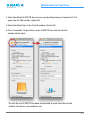
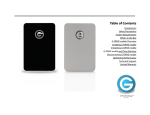
4. Select the default G-RAID TB drive icon on your desktop and press Command+I. This
opens the Get Info window. (below left)
5. Select the default icon in the Get Info window. (below left)
6. Press Command+V to paste the custom G-RAID TB icon into the Get Info
window. (below right)
The icon for your G-RAID TB has been restored and you can close the Get Info
window. Your drive is now ready for use!
p.15