1
Use
Always place the plug into a grounded socket.
G
F
A
E
J
I
B
A
B
C
D
E
D
C
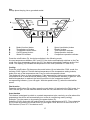
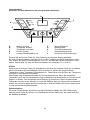
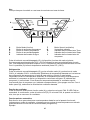
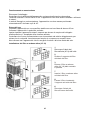
Mode (function) button
Temperature up button
Temperature down button
On/Off (power) button
Water full indicator
F
G
H
I
J
Speed (ventilation) button
Display window
Timer operation indicator
Sleep operation indicator
Compressor operation indicator
Press the on/off button (D), the device switches in the following mode:
At room temperatures between 20°C and 23°C the device automatically switches on the Fan
mode. At a room temperature above the 23°C the device automatically switches on the Cool
mode. The display (G) indicates the temperature of the room (between 0°C and 50°C).
Cooling
Press the on/off button (D) then press the mode button (A) and select the COOL mode, the
indicator COOL lights on, Set the desired temperature to the temperature setting buttons,
button B to set up the temperature and C key to set the temperature down.
The display will return to room temperature. If the temperature is below room temperature, the
compressor turns on and the device starts cooling. The compressor indicator (J) goes on. If the
desired temperature is reached, the fan still works but is the compressor and the
corresponding indicator (J) turn off again. With the speed button (F) select the desired fan
speed.
Fan function
Press the on/off button (D) and then press the mode button (A) and select the FAN mode, the
LED FAN will light. In FAN mode the device does not cool, the device is now used as a fan.
Auto function
This feature is designed to switch to a certain temperature to be used only as a fan above this
temperature the device will automatically turn to the air conditioning mode (cooling).
Example: Turn the power on by pressing the power button (D),
Select the COOL mode with the mode button(A), set the temperature to 25°C. Then select the
AUTO mode by pressing the mode button (A), the lights COOL and AUTO come on to 25°C
FAN function is, from 25 °C the device cools.
17