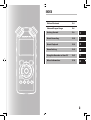
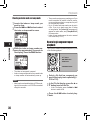
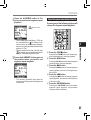
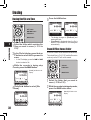
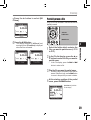
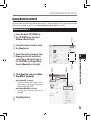
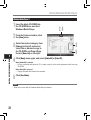
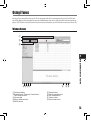
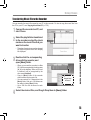
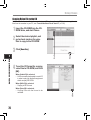
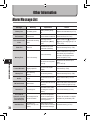
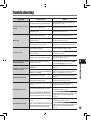
1
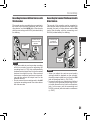
LINEAR PCM RECORDER
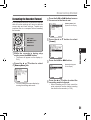
LS-5
Linear PCM Recorder
INSTRUCTIONS
EN
Thank you for purchasing an Olympus Digital Voice Recorder. Please read these instructions for information
about using the product correctly and safely. Keep the instructions handy for future reference.
To ensure successful recordings, we recommend that you test the record function and volume
before use.
Introduction
• The contents of this document may be changed in the future without advanced notice. Contact our
Customer Support Center for the latest information relating to product names and model numbers.
• The utmost care has been taken to ensure the integrity of the contents of this document. In the unlikely
event that a questionable item, error, or omission is found, please contact our Customer Support
Center.
• Any liability for passive damages or damage of any kind occurred due to data loss incurred by a defect
of the product, repair performed by the third party other than Olympus or an Olympus authorized service
station, or any other reason is excluded.
Trademarks and registered trademarks
• IBM and PC/AT are the trademarks or registered trademarks of International Business Machines
Corporation.
• Microsoft, Windows and Windows Media are registered trademarks of Microsoft Corporation.
• Macintosh and iTunes are the trademarks of Apple Inc.
• The SD logo is a trademark.
• The SDHC logo is a trademark.
• MPEG Layer-3 audio coding technology licensed from Fraunhofer IIS and Thomson.
• EUPHONY MOBILETM is a trademark of DiMAGIC Corporation.
• DVMTM is a trademark of DiMAGIC Corporation.
Other product and brand names mentioned herein may be the trademarks or registered trademarks of
their respective owners.
INDEX
Table of Contents
P.4
Safe and Proper Usage
P.6
Getting Started
P.8
1
About Recording
P.22
2
About Playback
P.32
3
Menu Setting
P.41
4
Using the Recorder on Your PC
P.61
5
Other Information
P.78
6
Table of Contents
Introduction
Table of Contents......................................................4
Safe and Proper Usage............................................6
1 Getting Started
Main Features . .........................................................8
Identification of Parts..............................................9
Display (LCD Panel).......................................... 10
Inserting Batteries..................................................11
Using the AC Adapter........................................ 12
Power Supply..........................................................13
HOLD........................................................................13
Setting Time and Date [Time & Date]...................15
Changing the Time and Date............................. 16
Inserting and Ejecting a Card...............................17
Inserting a Card................................................. 17
Ejecting a Card.................................................. 18
Notes on the Folders..............................................19
About the Folders for Voice Recordings........... 19
About the Folder for Music Playback................20
Selecting the Folders and Files............................21
2 About Recording
Before Recording....................................................22
Turn the Microphone Toward the Original Sound
Source........................................................22
Recording................................................................23
Listening While Audio is Recorded .................. 27
Set the Low Cut Filter........................................27
Microphone Sensitivity......................................27
Adjusting the voice sync level for recording . ... 28
Recording from External Microphone or Other
Devices......................................................30
3 About Playback
Playback...................................................................32
Playback Through Earphone . ..........................35
Setting an index mark or a temp mark ............35
How to begin segment repeat playback............36
Erasing.....................................................................38
Erasing One File at a Time................................38
Erase All Files from a Folder ............................38
Partially erase a file ..........................................39
4 Menu Setting
Menu Setting Method.............................................41
Formatting the Recorder [Format]..................... 51
Rearranging files [Replace] . ............................54
Moving Files [File Move] . .................................56
Splitting Files [File Divide] ................................59
5 Using the Recorder on Your PC
Operating Environment.........................................61
Connecting to Your PC...........................................62
Connecting to Your PC......................................62
Disconnecting from Your PC.............................63
Transfer the Voice Files to Your PC......................64
Using Windows Media Player................................65
Window Names..................................................65
Copying Music from CD.....................................66
Transferring Music File to the Recorder............68
Copying Voice File to the CD............................ 71
Using iTunes............................................................73
Window Names..................................................73
Copying Music from CD..................................... 74
Transferring Music File to the Recorder............ 75
Copying Voice File to the CD............................ 76
Using as External Memory of the PC...................77
Table of Contents
6 Other Information
Alarm Message List................................................78
Troubleshooting......................................................79
Technical Assistance and Support .....................81
Accessories (optional) . ........................................82
Specifications.........................................................83
Safe and Proper Usage
Before using your new recorder, read
this manual carefully to ensure that
you know how to operate it safely
and correctly. Keep this manual in an
easily accessible location for future
reference.
• The warning symbols indicate impor tant
safety related information. To protect yourself
and others from personal injury or damage to
property, it is essential that you always read
the warnings and information provided.
General Precautions
• Do not leave the recorder in hot,
humid locations such as inside a
closed automobile under direct
sunlight or on the beach in the
summer.
• Do not store the recorder in
places exposed to excessive
moisture or dust.
• Do not use organic solvents such
as alcohol and lacquer thinner to
clean the unit.
• Do not place the recorder on top
of or near electric appliances
such as TVs or refrigerators.
• Avoid recording or playing back
near cellular phones or other
wireless equipment, as they may
cause interference and noise.
If you experience noise, move
to another place, or move the
recorder further away from such
equipment.
• Avoid sand or dirt. These can
cause irreparable damage.
• A v o i d s t r o n g v i b r a t i o n s o r
shocks.
• Do not disassemble, repair or
modify the unit yourself.
• Do not operate the unit while
operating a vehicle (such as a
bicycle, motorcycle, or go-cart).
• Keep the unit out of the reach of
children.
• When mounting the recorder to
a tripod, turn the screws on the
tripod side without turning the
recorder itself.
<Warning regarding data loss>
Recorded content in memory may be destroyed or
erased by operating mistakes, unit malfunction,
or during repair work.
It is recommended to back up and save important
content to other media such as a computer hard
disk.
Any liability for passive damages or damage of
any kind occurred due to data loss incurred by a
defect of the product, repair performed by the
third party other than Olympus or an Olympus
authorized service station, or any other reasons
is excluded from the Olympus’s liability.
Safe and Proper Usage
Batteries
AC Adapter
fWarning
fWarning
• Batteries should never be exposed to flame, heated, shortcircuited or disassembled.
• D o n ot at t e m p t t o r e c h a r g e
alkaline, lithium or any other
non-rechargeable batteries.
• Never use any battery with a torn
or cracked outer cover.
• Keep batteries out of the reach
of children.
• If you notice anything unusual
when using this product such as
abnormal noise, heat, smoke, or
a burning odor:
• Do not attempt to disassemble,
repair or modify the AC adapter
in any way.
• Keep foreign objects including
water, metal, or flammable substances from getting inside the
product.
• Do not moisten the AC adapter or
touch it with a wet hand.
• Do not use the AC adapter in the
vicinity of flammable gas (including gasoline, benzine and lacquer
thinner).
In case
• ... the internal parts of the AC
adapter are exposed because it
has been dropped or otherwise
damaged:
• ... the AC adapter is dropped in
water, or if water, metal flammable substances or other foreign
objects get inside it:
• ... you notice anything unusual
when using the AC adapter such
as abnormal noise, heat, smoke,
or a burning odour:
1 remove the batteries immediately while
being careful not to burn yourself, and;
2 call your dealer or local Olympus representative for service.
1 do not touch any of the exposed parts;
2 immediately disconnect the power supply
plug from the power outlet, and;
3 call your dealer or local Olympus representative for servicing. Continued use of the AC
adapter under these circumstances could
result in electric shock, fire or injury.
Getting Started
Main Features
1
Getting Started
● Utilizes a high sensitivity, low noise stereo
microphone capable of faithfully capturing
the original sound..
Machined metal components are utilized in
the housing for the built-in stereo microphone,
resulting in a design built with special features
in mind while also achieving a construction
which is resistant to vibration. Furthermore,
by turning the microphone itself 90° outwards
you can produce recordings with a natural and
expansive stereo feel to them.
● Equipped with a high sound quality amplifier
circuit.
Utilizes a low noise amplifier circuit, allowing
you to produce high sound quality recordings
with low noise.
● Supports the linear PCM format, which is
capable of recording sound quality equivalent
to or surpassing CD-level..
Capable of realistically recording various
different sound sources. High resolution
recording at a high sampling frequency and bit
count equivalent or superior to that of a music
CD (Sampling frequency 44.1 kHz, Bit count
16bit) is possible (☞ P.41, P.43).
● Supports a wide range of recording formats.
Can handle the MP3 format (MPEG-1/ MPEG-2
Audio Layer 3), and the Windows Media Audio
(WMA) format.
In supporting the MP3 and WMA formats, this
device can save files in a highly compressed
manner, thereby allowing for ex tended
recording times (☞ P.41, P.43). In addition,
when connected to an external device, the
recorder can encode incoming analog audio
signals without a PC (☞ P.30).
● Supports high capacity recording media.
Starting with its 2 GB built-in flash memory,
can also record onto an SD Card (commercially
available) (☞ P.17)..
Check the Olympus website regarding SD
cards which are confirmed operation with this
recorder (☞ P.81).
● Equipped with a variety of features that
support audio recording.
With this recorder you can customize a variety
of recording functions such as the recording
level and microphone sensitivity to suit the
recording conditions and personal preferences
(☞ P.41, P.44).
● A l l o w s f o r s y s t e m u p g r a d e s t h r o u g h
enhanced options and equipment. Further
enhances the pleasure of recording
(☞ P. 82)..
● Can playback WAV, WMA, and MP3 format
files sent from a computer in addition to
files recorded by the device itself. Can
be enjoyed as a music player at any time.
Can hold approximately 2000 music files (WMA
128 kbps/ 4 minutes per song conversion) (☞
P.32, P.33, P.65, P.73).
● Supports USB 2.0. Hi-Speed, which enables
high-speed data transmission as an external
memory device for your computer.
By connecting the computer with the USB,
pictures, text data, etc. can be saved, and
utilized to carry data (☞ P.64, P.77).
● You can move or copy files between the built-in
memory and SD card, and within the folders in
the memory (☞ P. 56).
● You can split files (☞ P. 59), or delete a part of
a file (☞ P. 39) recorded in PCM format in this
recorder.
Identification of Parts
1
2
!
#
5
p
i
[
w
]
1
o
6
7
$
q
=
)
(
*
9
%
t
8
u
y
r
e
Getting Started
@
3
4
0
^
&
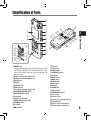
1REMOTE jack
Connect the receiver for the exclusive remote control
set RS30W (optional). This enables operation of the
main unit’s record and stop functions through the
remote control.
2Built-in stereo microphone (R)
3Built-in stereo microphone (L)
4LINE IN jack
5MIC jack
6REC LEVEL dial
7REC s button
Recording indicator light (LED)
8MIC SENSE HIGH/LOW switch
9LOW CUT ON/OFF switch
0Strap hole
!Display (LCD panel)
@PEAK indicator light (LED)
#STOP 4 button
$2 button
%9 button
^3 button
&LIST button
*MENU button
(A-B REPEAT button
)Fn button
-ERASE button
=0 button
q`/OK button
wCard cover
eEAR jack
rVOLUME dial
tUSB terminal
yPOWER/HOLD switch
uPower jack
iBattery cover
oBattery cover release button
pTripod socket
[Built-in stereo speaker (R)
]Built-in stereo speaker (L)
Identification of Parts
Display (LCD Panel)
Folder List Display
File Display
1
2
3
1
1
Getting Started
2
4
5
3
6
1Root folder indicator
Folder indicator
Recording media indicator or folder indicator/
Root folder name/ Current file number/ Total
number of recorded files in the folder
2Folder name
3Guide indicator
File List Display
1
2
3
1Folder/ File indicator
Folder name/ Current file number/ Total number
of recorded files in the folder
2File name
3Guide indicator
10
7
8
9
0
!
@
#
1Folder/ File indicator
Folder name/ File name/ File format/ Current
file number/ Total number of recorded files in
the folder
2Battery indicator
Recording media indicator
] Built-in flash memory
[
] SD card
[
Erase lock indicator
3Record/ Playback status indicator
4Level meter
5Playback Mode indicator
6Recording mode indicator
7During recording mode:
Remaining recording time
During playback or stop mode:
File length
8During recording mode:
Elapsed recording time
During playback mode:
Elapsed playback time
9[EUPHONY] indicator
0[Reverb] indicator
![V-Sync. Rec] indicator
@[LowCutFilter] indicator
#[Limiter] indicator
[Zoom Mic] indicator
Inserting Batteries
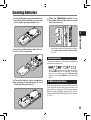
the battery cover release button,
1 Press
and then slide the battery cover open
while lightly pressing down on it.
the POWER/HOLD switch in the
4Slide
direction indicated by the arrow, and
turn the power on.
1
• If the “hour” indicator flashes in the display,
see “Setting Time and Date [Time & Date]”
(☞ P.15).
Getting Started
two AA batteries with the cor2Insert
rect = and - polarities.
Replacing batteries
The battery indicator on the display changes as
the batteries lose power.
• When [
] appears on the display, replace
the batteries as soon as possible. When the
battery is too weak, [
] and [Battery Low]
appears on the display and the recorder shuts
down.
the battery cover completely
3Close
by pressing to the direction A, then
sliding to the direction B.
Ni-MH Rechargeable Battery
Ni-MH rechargeable batteries B-01 4PE (optional)
from Olympus can be used in the recorder. Use
them with the Olympus Ni-MH Rechargeable
Battery Charger B-90SU (optional) (For U.S.A.
and Canada) or BU-90SE (optional) (For Europe)
(☞ P.81).
11
Inserting Batteries
Notes
1
Getting Started
12
• This recorder cannot charge rechargeable
batteries.
• Manganese battery may not be used in this
recorder.
• When changing batteries, AA alkaline batteries
or Olympus Ni-MH Rechargeable Batteries are
recommended.
• Be sure to turn off power of the recorder before
replacing the batteries (☞ P.13). Unloading the
batteries while the recorder is in use may cause
a malfunction such as corrupting the file, etc. If
you are recording into a file and the batteries
run out, you will loose your currently recorded
file because the file header will not be able to
close. It is crucial to change the batteries once
you see only one Hash mark in the battery
indicator.
• If it takes longer than 15 minutes to replace the
dead battery or if you take the battery in and
out repeatedly at short intervals, you may have
to reset the time when you have loaded a fresh
battery (☞ P.15).
• Remove the batteries if you are not going to use
the recorder for an extended period of time.
• When playing a voice/music file, the recorder
may be reset due to the reduction of the voltage
output of the battery depending on the volume
level even if [
] is displayed in the battery
indicator. In this case, lower the volume of the
recorder.
Using the AC Adapter
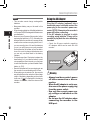
Plug the AC adapter (optional) into a
household power outlet and connect the
power plug to the recorder’s power connector (DC 5V). Always turn the recorder’s
power off before connecting.
If the AC adapter is plugged in while
recording using batteries, it may not be
possible to play back the voice data being
recorded.
• Chec k the O lympus website regarding
AC adapters which can be used with this
recorder.
To the power jack
fWarning
• Always turn the recorder’s power
off before connection or disconnection.
• When the AC adapter is not in use,
disconnect the power supply plug
from the power outlet.
• Use only the correct power supply voltage as indicated on the
adapter.
• Do not use the AC adapter when
connecting the recorder to the
USB port.
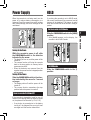
Power Supply
HOLD
When the recorder is not being used, turn the
power off to reduce battery consumption to a
minimum. Even if the power is turned off, existing
data, mode settings, and clock settings will be
maintained.
If you bring the recorder is set to HOLD mode,
the current conditions will be preserved, and all
buttons will be disabled. This feature is useful
when the recorder has to be carried in a bag or
pocket.
Set the recorder to HOLD mode
• After [Hold] appears on the display, the
recorder is set to HOLD mode.
Turning On the Power:
While the recorder’s power is off, slide
the POWER/HOLD switch in the direction
indicated by the arrow.
•The display will turn on, and the power will be
turned on.
•The resume function will bring the recorder
back to the stop position in memory before
power was turned off.
• When the batteries are removed from the
recorder the resume function’s stopped position
will be erased.
1
Getting Started
Slide the POWER/HOLD switch to the [HOLD]
position.
Exit HOLD mode
Slide the POWER/HOLD switch to the A
position.
Turning Off the Power:
Slide the POWER/HOLD switch in the direction indicated by the arrow for 1 second
or longer.
• The display shuts off and the power will be
turned off.
• The resume function remembers the stop
position before the power is turned off.
Power save mode [AutoPowerOff]
If the recorder is stopped/not used for over 10
minutes (initial setting) while the power is turned
on, the power will be turned off (☞ P.41, P.47).
• If any button is pressed prior to the battery
turning off, the elapsed time count will start
over again until this function takes effect.
13
HOLD
Notes
1
Getting Started
14
• If you press any button in HOLD mode, the
clock display flashes for 2 seconds, but it will
not operate the recorder.
• If HOLD is applied during playback (recording), operation is disabled with the playback
(recording) state unchanged (When playback
has ended and the recording has ended due
to the remaining memory being used up, it will
stop).
• The recorder can be effectively operated via
its switch and dial, as well as the connected
exclusive remote control set RS30W (optional),
even when it is in HOLD mode.
Setting Time and Date [Time & Date]
If you set the time and date beforehand, the information when the file is recorded is automatically stored
for each file. Setting the time and date beforehand enables easier file management.
When you use the recorder for the first time
after purchasing it, or when the batteries
have been inserted without the device having been used in a long time, the [Set Time &
Date] will appear. When the “hour” is flashing, conduct the setup from Step 1.
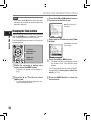
the 2 or 3 button to set.
2Press
• Follow the same steps by pressing the 9
or 0 button to select the next item, and
press the 2 or 3 button to set.
10:38 PM
22:38
(Initial setting)
• You can select the order of the “ year ”,
“month”, “day ” by pressing the LIST button
while setting them.
Example: January 1, 2010
1
Getting Started
• You can select between 12 and 24 hour
display by pressing the LIST button while
setting the hour and minute.
Example: 10:38 P.M
1M 1D 2010Y (Initial setting)
1D 1M 2010Y
2 3 button
9 0 button
`/OK button
2010Y 1M 1D
LIST button
the `/OK button to complete the
3Press
setting.
the 9 or 0 button to select
1 Press
the item to set.
Select the item from the
“hour”, “minute”, “year
“month” and “day” with a
flashing point
• The clock will start from the set date and
time. Press the `/OK button according to
the time signal.
15
Setting Time and Date [Time & Date]
Note
• If you press the `/OK button during the setup
operation, the recorder will save the items that
were set to that point.
1
[Others] will appear on
the display
Changing the Time and Date
Getting Started
While the recorder is during stop mode, press and
hold the STOP 4 button to display the Time and
Date, Remaining Memory and File Format.
If the Time and Date is not correct, set it using the
procedure below.
the 2 or 3 button to select [Time
4Press
& Date].
[Time & Date] will appear
on the display
2 3 button
9 0 button
`/OK button
MENU button
LIST button
the recorder is during stop
1 While
mode, press the MENU button.
the `/OK or 9 button.
5Press
• The “hour” will flash on the display, indicating the start of the Time and Date setup
process.
• The menu will appear on the display (☞
P.41).
The following steps are the same as Step 1
through Step 3 of “Setting Time and Date [Time
& Date]” (☞ P.15).
the 2 or 3 button to select
2Press
[Others] tab.
the MENU button to close the
6Press
menu screen.
• You can change the menu display by moving the settings tab cursor.
16
the `/OK or 9 button to move
3Press
the cursor to the item to set.
Inserting and Ejecting a Card
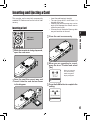
This recorder can be used with commercially
available SD Cards as well as the built-in flash
memory.
• Insert the card keeping it straight.
• The card stops with a click when it is
inserted all the way.
• Inserting the card the wrong way or at an
angle could damage the contact area or
cause the card to jam.
• If the card is not inserted all the way, data
may not be written to the card.
Inserting a Card
3
the recorder is during stop mode,
1 While
open the card cover.
1
Getting Started
2 3 button
`/OK button
Close the card cover securely.
you are recording to a card,
4When
press the 2 or 3 button and select
[Yes].
When you insert the
card, the recording
media changeover
display will appear.
the card the correct way and
2Face
insert it into the card slot as shown
in the diagram.
the `/OK button to complete the
5Press
setting.
17
Inserting and Ejecting a Card
Notes
1
Getting Started
• It is possible to switch the recording media over
to the built-in flash memory (☞ P.41, P.46).
• In some cases cards which have been formatted (initialized) by another device, such as a
computer, cannot be recognized. Be sure to
format them with this recorder before using (☞
P.51).
• When attempting to perform operations such as
rewriting the contents of an SD Card in cases
where the card has been write protected, [SD
Card Locked] will appear. The playback operation can be performed, but the write protection
must first be turned off when overwriting the
contents on the card.
• Cards that are not to SD standards, such as
multimedia cards, may not be used.
Ejecting a Card
• The card is visibly out of the slot and can
be removed safely.
When [MemorySelect] is
set to [SD Card], [Built-in
Memory selected] will
appear
3Close the card cover securely.
Note
• Releasing your finger quickly after pushing the
card inward may cause it to eject forcefully out
of the slot.
About the SD Card
2 3 button
`/OK button
the recorder is during stop mode,
1 While
open the card cover.
the card inward to unlock it, and
2Push
let it eject partially.
When the SD Card is write protected, there will
be a display reading [SD Card Locked]. Before
inserting the card, turn off the write protection
function. Check the Olympus website regarding SD cards which are confirmed operation
with this recorder (☞ P.81).
If the write protection
switch is facing the
[LOCK] direction,
recording and other
functions cannot be
carried out
LOCK
Notes
18
• The recorder may not recognize correctly
on some SD cards. In this case, remove
the card then put it again to see if the
recorder recognizes the card.
• The processing performance reduces in
a SD card when you repeat writing and
delete. In this case, format the SD card
(☞ P.51).
Notes on the Folders
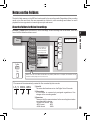
The built-in flash memory or the SD Card can be used for the recording media. Regardless of the recording
media, voice files and music files are separated into folders for voice recordings and folders for music
playback that are organized in a branching tree-style and saved.
About the Folders for Voice Recordings
[Folder A] - [Folder E] are the folders for voice recordings. When recording with the recorder, select any
one of the five folders and then record.
001
Folder A
002
Folder B
Folder C
Save up to 200 files
Folder list display for
when the [SD Card]
has been selected as
the recording media
001
Getting Started
Root
1
003
Folder D
Folder E
Folder
200
Music
File
When music files have been transferred to the [Music] folder from a computer, the recorder can be
used as a music player (� P.32, P.65, P.73)
File names will be automatically created for files recorded by this recorder.
LS_5 0001 .WAV
1User ID:
The name that has been set on the Digital Voice Recorder.
2File number:
A file number is consecutively assigned regardless of the
changes in the recording media.
3Extension:
These are the file name extensions for the recording format when
recording with this device.
• Linear PCM format .WAV
• MP3 format
.MP3
• WMA format
.WMA
19
Notes on the Folders
About the Folder for Music Playback
When transferring music files to the device using Windows Media Player, a folder is automatically created
within the music playback folder which has a layered structure as shown in the diagram below. Music files
that are in the same folder can be rearranged in preferential order and replayed (☞ P.54).
1
Up to 128 folders can be created under the
[Music] folder, including [Music]
Root
Getting Started
Save up to 200 files
Folder E
Music
First layer
Second layer
Artist 01
Album 01
Artist 02
Album 02
001
002
Folder
003
File
Artist 03
Album 03
004
005
Precautions for transferring music files:
When using Windows Media Player, click
[Start Sync] instead of setting the
synchronization options. All the files will be
transferred to the part A above.
20
200
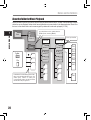
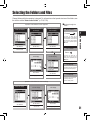
Selecting the Folders and Files
Change folders while the operation is stopped. For information on the layered structure of the folders, see
the section entitled “Notes on the Folders” (☞ P.19, P.20).
4Moving through the
Operation of the folders for music playback
Folder list display
Folder list display
(First layer)
levels
Folder list display
(Second layer)
`/OK button
Proceed
2 or 3 button
2 or 3 button
2 or 3 button
Select the folder
Select the artist folder
Select the album folder
LIST button
1
Getting Started
Each time you press this it
opens the folder or file selected
in the list display and proceeds
down one level. The list display
screen can be operated by the
9 button
Return
File display
File list display
Each time you press this it
returns up one level. The list
display can be operated by the
0 button
List display
The folders and files recorded
in this recorder are displayed
`/OK button
2 or 3 button
Begin playback
Select the file
File display
Information of the selected file
is displayed. Enters in
playback standby mode
Operation of the folders for voice recordings
Folder list display
File list display
2 or 3 button
2 or 3 button
`/OK button
Select the folder
Select the file
Begin playback
File display
21
About Recording
Before Recording
Getting Ready
2
About Recording
Affix the windscreen:
Select the media for recording:
Start recording after attach the
windscreen (included within) to
the microphone. The noise may
occur even if a windscreen is attached when forcing wind blows
against a microphone.
The built-in flash memory as well as an SD
Card can be used (☞ P.17, P.41, P.46).
Select the recording format:
Recording can be performed through the
linear PCM format, as well as the WAV, MP3
and WMA formats (☞ P.41, P.43).
Turn the Microphone Toward the Original Sound Source
Turn the built-in stereo microphone in the direction that you would like to record. Placing the built-in stereo
microphone over the display is the proper position for performing stereo recording. If it is below the display
when recording then proper stereo recording cannot be performed because the position of the original
sound will be recorded in reverse phase.
About the built-in stereo microphone:
The direction of capturing sound by the microphone
can be changed with the MIC SENSE HIGH/LOW switch
(☞ P.27).
Original
sound
source
MIC SENSE HIGH
MIC SENSE
LOW
L
When recording with the
built-in microphone:
Turn the microphone in the direction
of the source to be recorded.
22
R
Key map
On mounting:
Accurate adjustments of the microphone’s angle and
the like can be made when the device is affixed to a
commercially available tripod used for cameras.
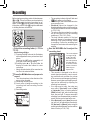
Recording
Before starting recording, select a folder between
[A] to [E]. These five folders can be selectively
used to distinguish the kind of recording; for example, Folder [A] might be used to store private
information, while Folder [B] might be dedicated
to holding business information.
REC s button
STOP 4 button
`/OK button
How to change folders:
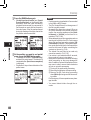
1Pressing the LIST button at the file display
while stopped will return you back one layer
above.
Pressing the LIST button repeatedly will
bring you to the folder list display.
2Pressing button 2 or 3 at the folder list
display will select the folders for voice
recordings.
• Newly recorded audio will be saved as the
last file in the selected folder.
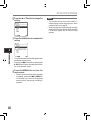
the REC s button and prepare to
2Press
record.
• Turn the microphone in the direction of the
source to be recorded.
aRemaining recording time
bLevel meter (change according to the
recording level and recording function
settings)
cRecording mode
a
b
c
the REC LEVEL dial to adjust the
3Use
recording level.
This can be adjusted
in a range from [0]
to [10]. The larger
the number on the
dial is the higher the
recording level will
be, and the indicator
position of the level
meter will grow
larger as well
• This recorder is designed to be able to
record cleanly and evenly, even in recording conditions such as when the volume
of the source sound changes significantly.
However, even higher sound quality recordings can be achieved by adjusting the
recording level manually.
• If too big sound is input, the noise may
occur even if [Rec Level] is set to [Auto]
or [Limiter On]. Also, in certain cases the
[PEAK] indicator light, which notifies large
input, may not light. To ensure successful
recordings, we recommend that you test the
record function and volume before use.
• When [Rec Level] is set to [Auto] the recording level will be adjusted automatically.
Set [Rec Level] to [Manual] when using the
recording level adjustment function and the
limiter function (☞ P.41, P.43).
2
About Recording
the recording folder (☞ P.19 to
1 Select
P.21).
• The recording indicator light will flash and
[
] will appear on the display.
• The voice sync level can be set when voice
sync recording is on.
• [Rec Mode] cannot be changed in the
recording standby mode or while recording.
Configure this while the recorder is stopped
(☞ P.41, P.43).
• The various functions related to recording
can be configured to suit the recording
conditions (☞ P.41, P.43, P.44).
• The level indicator position of the level
meter will change in accordance with the
switching of the various settings related
to recording. Confirm the recording level
through the level meter after switching the
settings.
23
Recording
Actually producing the sound you
would like to record:
• When a loud sound is produced the level
meter will swing all the way over to the right
while recording and the [PEAK] indicator
light will turn on. When this happens the
sound will be recorded in a distorted manner since the recording level is too high.
• [
] will go out on the display.
eFile length
e
When the level meter is
maxed out (the recorded
sounds will be distorted)
2
About Recording
• When a loud noise is produced, adjust
the recording level so that the level meter
remains in the vicinity of [–6].
Example of conditions
where the recording level
has been lowered and the
excess input has been
adjusted
Press the REC s button again will
4 begin
recording.
• [
] will appear on the display.
dElapsed recording time
d
24
the STOP 4 button to stop re5Press
cording.
Notes
• The recording will continue even if the volume
of a single file exceeds 2 GB in the linear PCM
format recording (☞ P.43).
1 The file is saved every 2 GB in separate
files. It will be treated as multiple files when
playing back.
2 W hen the recording exceeds 2 GB, the
number of files in the folder may exceed
200 files. The 201st file and later will not
be recognized by the recorder, so check by
connecting the recorder to a PC.
• When an SD Card is inserted in the recorder,
be sure to confirm the recording media as either
[Built-in Memory] or [SD Card] so that there is
no mistake (☞ P.41, P.46).
• When attempting to perform operations such as
rewriting the contents of an SD Card in cases
where the card has been write protected, [SD
Card Locked] will appear. The playback operation can be performed, but the write protection
must first be turned off when overwriting the
contents on the card (☞ P.18).
• If you select a folder other than [A] through [E]
and press the REC s button, an [Can't record
in this folder] message will flash. Select a
folder from [A] through [E] and start recording
again.
Recording
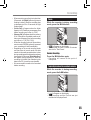
Pause
While the recorder is during recording
mode, press the REC s button.
2
• [
] will appear on the display.
• The recorder will time out after 60 minutes
when left in "Rec Pause".
Resume Recording:
Press the REC s button again.
About Recording
• When remaining recording time is less than
60 seconds, the [PEAK] indicator light starts
flashing in amber. When the recording time
is decreasing to 30 or 10 seconds, the light
flashes faster.
• [Folder Full] will appear when the folder
capacity is full. Delete any unnecessary files
before recording any further (☞ P.38).
• [Memory Full] will appear when the memory
is full. Change the recordable media or delete any unnecessary files before recording
any further (☞ P.38, P.41, P.46).
• When the recording button of the exclusive
remote control RS30W (optional) is pressed
once, recording will start immediately.
• Depending on the sound recording mode
and the status of record media, the data
transfer to the media cannot be done in time
during recording and the skipped sound may
be recorded. In this case, [Data Write Error]
will appear during recording or when the
recording is finished. After transferring the
data to the PC, format the record media.
• We recommend the media to be formatted
before recording.
• Rec ording will resume at the point of
interruption.
To quickly check on the recorded contents
While the recorder is during recording
mode, press the `/OK button.
• [
] will appear on the display.
• Stop recording and the file that was just
recorded will be played back.
25
Recording
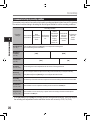
Recommended settings by recording condition
The recorder is set up so that it can perform high quality recording equivalent to that of a music CD right away.
The various functions relating to recording can be configured in detail to suit the recording conditions.
Recording condition
Recording
settings
2
About Recording
Recording level*
(☞ P.23)
Microphone
sensitivity
(☞ P.27)
Low Cut Filter
(☞ P.27)
[Rec Mode]
(☞ P.41, P.43)
[Rec Level]
(☞ P.41, P.43)
Indoor musical
performance
Band
performance
in a practice
studio
Performance
in a vast hall,
etc.
Outdoor
environment
sounds like
wild birds
singing,
railroad
noises, etc.
Conferences
with large
crowds in
vast meeting
venues
Conferences
with a few
people
indoors
When the [Rec Level] is set to [Manual] you can adjust the recording level.
Adjust while looking at the level meter
[LOW]
[HIGH]
[OFF]
[ON]
The recording level can be adjusted to suit the volume of the original sound
You can configure whether to adjust the recording level automatically or to adjust it manually.
When [Rec Level] is set to [Manual] you can configure the limiter function
[Zoom Mic]
(☞ P.41, P.43)
The directivity of the built-in stereo microphone can be set according to the source to be recorded
[Rec Monitor]
(☞ P.41, P.44)
Select whether or not to output the recording monitor sound from the EAR jack
[Plug-inPower]
(☞ P.41, P.44)
Select whether or not to use the plug-in power function according to the external microphone
connected to the MIC jack
* When [Rec Level] is set to [Auto] the recording level will be adjusted automatically. When this happens,
the recording level adjustment function and limiter function will not work (☞ P.23, P.41, P.43).
26
Recording
Listening While Audio is Recorded
Set the Low Cut Filter
If you start recording after inserting the earphone
into the EAR jack on the recorder, you can hear
the sound being recorded. The recording monitor
volume can be adjusted by using the VOLUME
dial.
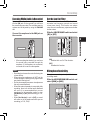
The recorder has a Low Cut Filter function to
minimize low-frequency sounds and record
voices more clearly. This function can reduce
noise from air conditioners, projectors and other
similar noises.
Connect the earphone to the EAR jack on
the recorder.
Slide the LOW CUT ON/OFF switch and select
[ON] or [OFF].
2
About Recording
To EAR jack
• After recording has started, you can hear
the sound being recorded through the
earphone. If the earphone is connected,
no sound will come from the speaker.
Notes
• Recording level cannot be controlled using the
volume button.
• When using the earphones, do NOT set the
volume too high. Listening at very high volume
may lead to hearing loss.
• Do not place earphones near a microphone as
this may cause feedback.
• When the external speaker is connected while
recording, there is a risk that audio feedback
will occur. It is recommended that you use
earphones for the recording monitor, or turn
[Rec Monitor] to [Off] while recording (☞ P.41,
P.44).
• When [Rec Monitor] is set to [Off] no sound
will come out of the earphones while you are
recording (☞ P.41, P.44).
[ON]:
Enables the Low Cut Filter function.
[OFF]:
Disables this function.
Microphone Sensitivity
Microphone sensitivity is adjustable to meet
recording needs.
Slide the MIC SENSE HIGH/LOW switch and
select [HIGH] or [LOW].
27
Recording
[HIGH]:
This is a highly sensitive mode which can
record surrounding noises.
[LOW]:
This is the standard level of microphone
sensitivity. Select this mode for cases
where the volume of the source sound is
high, such as a band performance.
Note
2
About Recording
• When you would like to clearly record a
speaker’s voice, set the recorder to [LOW] and
hold its built-in stereo microphone close to the
speaker’s mouth (5-10 cm) before recording.
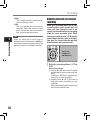
Adjusting the voice sync level for
recording
Voice sync recording allows you to start
recording when voice louder than the
voice sync level (detection level) is detected, and automatically stop recording
when the voice becomes quiet. When
voice sync recording is on (☞P.44) and the
voice is below the voice sync level (detection level) for longer than the specified
detection time, the recorder stops.
REC s button
STOP 4 button
9 0 button
the recording folder (☞ P.19 to
1 Select
P.21).
How to change folders:
1Pressing the LIST button at the file display
while stopped will return you back one layer
above.
Pressing the LIST button repeatedly will
bring you to the folder list display.
2Pressing button 2 or 3 at the folder list
display will select the folders for voice
recordings.
• Newly recorded audio will be saved as the
last file in the selected folder.
28
Recording
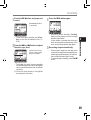
Press the REC s button and prepare to
2record.
4Press the REC s button again.
[Level Fixed?] will flash
on the display.
Press the 9 or 0 button to adjust
3the
voice sync level.
a
Appears the voice sync
level in 23 steps ([01] to
[38]) on the display.
• Recording enters standby. [Standby]
flashes on the display and the recording
indicator light flashes.
If input meets or exceeds the voice sync
level, recording starts automatically. At this
time, the recording indicator light glows.
stops automatically.
5Recording
• If the volume is equal to or less than voice
sync level for longer than the specified time,
recording stops automatically. At this time,
the recording indicator light turns off.
• To manually stop recording, press STOP 4
button.
2
About Recording
• To use voice sync recording, set [V-Sync.
Rec] on and set the detection time (☞
P.44).
• The higher the value, the more sensitive
the recorders gets to sounds. At the highest
value, even the faintest sound will activate
recording.
aVoice sync level (moves to the right/left
according to the set level)
29
Recording
Recording from External
Microphone or Other Devices
The external microphone and other devices can
be connected and the sound can be recorded.
Connect as follows by the device to be used.
• Do not plug and unplug devices into the
recorder’s jack while it is recording.
2
Recording with External Microphone:
About Recording
Connect an external microphone to the
MIC jack of the recorder.
• When recording while an external monaural
microphone is connected, sound will only be
recorded by the L-channel.
Applicable External Microphones
(optional) (☞ P.81)
Stereo microphone: ME51S
The built-in large-diameter microphone enables
sensitive stereo recording.
2 channel microphone (omni-directional): ME30W
These are highly sensitive omni - direc tional
microphones supported by plug-in power which are
well-suited to recording musical performances.
Highly sensitive noise-cancellation monaural microphone (unidirectional): ME52W
This microphone is used to record sound at a
distance while minimizing surrounding noise.
Compact Gun Microphone (unidirectional): ME31
The directional microphones is useful for recordings
such as outdoor recording of wild birds singing. The
metal-cut body provides a sturdiness to the high
rigidity.
Tie clip microphone (omni-directional): ME15
Small concealing microphone with a tie-clip.
To MIC jack
Telephone pickup: TP7
Earphone type microphone can be plugged into your
ear while phoning. The voice or conversation over
the phone can be clearly recorded.
Notes
• The built-in microphone will become inoperable
when an external microphone is plugged into
the recorder’s MIC jack.
• Microphones supported by plug-in power can
also be used. When the plug-in power function
is set to [On] power will be supplied by the
device to the microphone (☞ P.41, P.44).
• Turn the plug-in power function to [Off] when
an external microphone not supported by
plug-in power is connected, as there is the risk
that noise may be generated while recording
(☞ P.41, P.44).
• Do not connect the connecting cord to the
LINE IN jack when recording from external
microphone with this recorder.
30
Recording
Recording the Sound of Other Devices with
This Recorder:
Recording the Sound of This Recorder with
Other Devices:
The sound can be recorded when connecting to
the audio output terminal (earphone jack) of the
other device, and the LINE IN jack of the recorder
with the connecting cord KA334 (included within)
for dubbing.
The sound of this recorder can be recorded to
other devices when connected to the audio input
terminal (line jack) of other devices and the EAR
jack of this recorder, with the connecting cord
KA334 (included within) for dubbing.
2
To audio input
terminal of
other devices
About Recording
To LINE IN
jack
To audio output
terminal of other
devices
To EAR
jack
Notes
• If you are unable to produce a clear recording
with this recorder even after adjusting the
recording level (☞ P.23), this could potentially
be because the output level for the connected
devices is too high or too low. When external
devices are connected, perform a test recording and then adjust the output level for the
external devices.
• Do not connect the connecting cord to the MIC
jack when recording sound from other device
with this recorder.
Notes
• When you adjust the various sound quality
settings related to playback on the recorder,
the audio output signal sent out from the EAR
jack will change as well (☞ P.41, P.45).
• In case of recording on other devices without
a line input, the input may be too large to control when the audio is input to the microphone
jack. In this case, use the connecting cord
KA333 (optional) with attenuation resistance
(☞ P.82).
31
About Playback
Playback
a
b
c
The recorder can playback WAV, MP3 and WMA
format files. To playback a file recorded with
other machines, you need to transfer (copy) it
from a computer.
STOP 4 button
2 3 button
9 0 button
`/OK button
3
About Playback
the folder which contains the
1 Select
files to be played back (☞ P.19 to
P.21).
How to change folders:
1Pressing the LIST button at the file display
while stopped will return you back one layer
above.
Pressing the LIST button repeatedly will
bring you to the folder list display.
2Pressing button 2 or 3 at the folder list
display will select the folders for voice
recordings and press the 9 button.
the File list display, press the 2 or 3
2Inbutton
to select the file that you want
to playback.
• In the File display, press the 9 or 0
button to select a file.
the `/OK button to start play3Press
back.
32
• [
] will appear on the display.
aFolder name/ File name/ File format/
Current file number/ Total number of
recorded files in the folder
bFile length
cElapsed playback time
dLevel meter
d
the VOLUME dial to adjust to a
4Use
comfortable listening volume.
The volume can be
adjusted within a range
from [0] to [10]. The
larger the number on
the dial is the higher the
volume will be
the STOP 4 or `/OK button at any
5Press
point you want to stop the playback.
• [
] will go out on the display.
• This will stop the file being played back
midway. When the resume function is
activated the stopped location will be
registered, even if the power is turned
off. The next time the power is turned
on, playback may be resumed from the
registered stopped location.
• When the batteries are removed from the
recorder the resume function’s stopped
position will be erased.
Playback
Settings relating to playback
About music file
In cases where the recorder is unable to playback
music files that have been transferred to it, check
to make sure that the sampling rate and bit rate
are in the range where playback is possible.
Combinations of sampling rates and bit rates for
music files which the recorder can playback are
given below.
This allows you to repeatedly playback part of a file
during playback.
[Play Mode]
(☞ P.41, 45)
[File] [File Repeat] [Folder]
[Folder Repeat] [All]
[All Repeat]
[Reverb]
(☞ P.41, 45)
[Normal] [Studio] [Club]
[Hall] [Dome]
File
format Sampling frequency Bit rate
[EUPHONY]
(☞ P.41, 45)
[Normal] [Natural] [Wide]
[Power]
WAV
format
44.1 kHz, 48 kHz,
88.2 kHz, 96 kHz
16 bit or 24 bit
[Replace]
(☞ P.54)
This changes the order
of the files in the selected
folder. It is useful for playing
back files in a preferred order while in normal playback
mode etc.
MP3
format
MPEG1 Layer3:
32 kHz, 44.1 kHz,
48 kHz
MPEG2 Layer3:
16 kHz, 22.05 kHz,
24 kHz
From 8 kbps
up to 320 kbps
[File Move]
(☞ P.56)
Selected files can be moved
or copied within or between
memory storages.
WMA
format
16 kHz, 22 kHz,
32 kHz, 44.1 kHz,
48 kHz
From 16 kbps
up to 256 kbps
[File Divide]
(☞ P.59)
PCM files recorded by this
recorder can be divided.
3
About Playback
Segment
repeat
(☞ P.36)
• Variable bitrate MP3 files (in which conversion
bitrates can vary) may not play properly.
• For WAV files, this recorder can only play back
those in the linear PCM format. WAV files other
than these cannot be played back.
• This recorder is compatible with Microsoft
Corporation DRM9, but not with DRM10.
• It is possible to playback the WMA files which
are created by the Olympus Digital Voice
Recorder.
33
Playback
Forwarding
While the recorder is during stop mode
in the file display, press and hold the
9 button.
• [
] will appear on the display.
• If you release the 0 button, it will stop. Press
the `/OK button to start playback from where
it was stopped.
While the recorder is during playback
mode, press and hold the 0 button.
• When you release the 0 button the recorder
will resume normal playback.
• If there is an index mark or temp mark in the middle
of the file, the recorder will stop at that location (☞
P. 35).
• The recorder stops when it reaches the
beginning of the file. Continue pressing the 0
button to proceed with the review from the end
of the previous file.
3
About Playback
• [
] will appear on the display.
• If you release the 9 button, it will stop. Press
the `/OK button to start playback from where it
was stopped.
Locating the Beginning of the File
While the recorder is during playback
mode, press and hold the 9 button.
• When you release the 9 button the recorder
will resume normal playback.
• If there is an index mark or temp mark in the middle
of the file, the recorder will stop at that location (☞
P. 35).
• The recorder stops when it reaches the end of the
file. Continue pressing the 9 button to proceed
with the cue from the beginning of the next file.
Rewinding
While the recorder is during stop mode
in the file display, press and hold the
0 button.
While the recorder is during stop mode or
playback mode, press the 9 button.
• The recorder skips to the beginning of the next
file.
While the recorder is during playback
mode, press the 0 button.
• The recorder skips to the beginning of the
current file.
While the recorder is during stop mode,
press the 0 button.
• The recorder skips to the beginning of the
previous file. If the recorder stop the midway
of the file, return to the beginning of the file.
While the recorder is during playback
mode, press the 0 button twice.
34
• The recorder skips to the beginning of the
previous file.
Playback
Playback Through Earphone
An earphone can be connected to the EAR jack of
the recorder for listening.
• When the earphone is used, the recorder
speaker will be switched-off.
To EAR
jack
Setting an index mark or a temp
mark
Notes
• When you skip to the beginning of the file during
playback, the recorder will stop at the position
of the index mark and temp mark. The index
mark and temp mark will be skipped when you
perform the operation in stop mode (☞ P. 35).
• To avoid irritation to the ear, insert the earphone
after turning down the volume level.
• When you listen with the earphone during
playback, do not raise the volume too much. It
may cause hearing impairment and decrease in
hearing ability.
9 0 button
`/OK button
3
About Playback
If index marks and temp marks are placed, you can
quickly find a location you want to listen to in fast
forward and fast rewind and when cuing a file.
Index and temp marks can be added only during
PCM recording with this recorder or to PCM files
recorded using this recorder. Index marks cannot
be added to WMA files, MP3 files or files made
by recorders other than Olympus IC recorders.
However, temp marks can be added to temporarily
mark locations to which you wish to listen.
To add index marks, the index function must be
registered to the Fn button (☞ P.48).
Fn button
ERASE button
Press the Fn button during file re1 cording,
recording pause, playing, or
playback pause.
• A number appears on the display and an
index mark or temp mark will be placed.
• Even after an index or temp mark is placed,
recording or playback will continue so you
can place index or temp marks in other
locations in a similar manner.
35
Playback
Clearing an index mark or a temp mark:
the index or temp mark you
1 Locate
want to clear.
the 9 or 0 button to select
2Press
the index or temp mark to erase.
3
About Playback
the index or temp number ap3While
pears for approximately 2 seconds on
• Temp marks are temporary markings, so if you
move to another file, switch to the list screen,
or connect the recorder to a computer, they will
be automatically erased.
• Up to 16 index and temp marks can be set in
a file. If you try to place more than 16 index
or temp marks, the [Index Full] message will
appear for index marks, and [Temp Mark Full]
for temp marks.
• Index or temp marks cannot be set or erased
in a locked file (☞ P.47).
How to begin segment repeat
playback
This function enables repeated playback of part
of the file being played.
the display, Press the ERASE button.
2 3 button
9 0 button
`/OK button
A-B REPEAT button
• The index or temp mark is erased.
• Index or temp numbers after the erased index
or temp number will automatically move up.
Notes
• Index marks can be added during PCM recording with this recorder or to PCM files recorded
using this recorder.
a file that has a segment you
1 Select
would like to play back repeatedly (☞
P.19 to P.21).
the File list display, press the 2 or
2In3 button
to select the file.
• In the File display, press the 9 or 0
button to select a file.
the `/OK button to start play3Press
back.
36
Playback
the A-B REPEAT button at the
4Press
point you want to start segment repeat
playback.
[ ] will flash on the
display
5
Press the A-B REPEAT button again at
the position where you want to end
segment repeat playback.
Pressing any of the following buttons will
release the segment repeat playback.
3
aPress the STOP 4 button
Pressing the STOP 4 button will release segment repeat playback, and stop playback.
bPress the `/OK button
About Playback
• Fast forwarding and rewinding (☞ P.29) can
be conducted when [ ] is flashing in the
same manner as during normal playback,
and you can quickly proceed as far as the end
position (☞ P.34).
• When it reaches to the end of the file while
[ ] is flashing, the point will become the end
position, and repeat playback will start.
Cancel the segment repeat playback function
Pressing the `/OK button will release segment
repeat playback, and stop playback.
cPress the 9 button
Pressing the 9 button will release segment
repeat playback, and cue to the beginning of
the next file.
dPress the 0 button
• The recorder repeatedly plays back the
segment until the segment repeat playback
is cancelled.
Pressing the 0 button will release segment
repeat playback, and reverse to the beginning
of the current file.
ePress the A-B REPEAT button
Pressing the A-B REPEAT button will release
segment repeat playback, and playback
continues without repeating.
37
Erasing
Erasing One File at a Time
A selected file can be erased from a folder.
5Press the `/OK button.
2 3 button
9 0 button
`/OK button
ERASE button
3
About Playback
the folder which contains the
1 Select
files you want to erase (☞ P.19 to
P.21).
the File list display, press the 2 or
2In3 button
to select the file you want to
erase.
•
• The display changes to [File Erase!] and
erasing will start.
• [Erase Done] is displayed when the file is
erased. File numbers will be reassigned
automatically.
Erase All Files from a Folder
All files in a folder can be erased simultaneously.
The locked files (☞ P.41, P.47) and the files set to
read-only on the PC will not be erased.
In the File display, press the 9 or 0
button to select a file.
the recorder is during stop
3While
mode, press the ERASE button.
[Cancel] will flash on the
display
2 button
`/OK button
ERASE button
the folder that you want to
1 Select
erase (☞ P.19 to P.21).
the 2 button to select [File
4Press
Erase].
the recorder is during stop mode,
2While
press the ERASE button twice.
[Cancel] will flash on the
display
38
Erasing
the 2
3Press
Erase].
button to select [All
Partially erase a file
Only a PCM file recorded in the recorder can be
partially erased.
2 button
`/OK button
4 •
ERASE button
Press the `/OK button.
3
1
Select the folder which contains the
files you want to partial erase (☞ P.19
to P.21).
the File list display, press the 2 or
2In3 button
to select the file you want to
partial erase.
•
About Playback
The display changes to [All Erase!] and
erasing will start. [Erase Done] is displayed
when the files are erased.
In the File display, press the 9 or 0
button to select a file.
the file you want to partial erase.
3Play
• Forward a file to the position that shall be
erased. If the file is long, use the 9 button
to move to the position you want to delete.
the starting position of the partial
4At
erase, press the ERASE button.
[Partial Erase] will flash
on the display.
39
Erasing
the ERASE button again.
5Press
• [Partial Erase Start Position] and [Partial
Erase End Position] on the display flash
alternately. When the lights are flashing,
playback continues and you can rewind or
fast-forward as usual and fast-forward to
the end of erase. If the file reaches the end
during the flashing of the lights, that will be
the position where erase ends.
3
About Playback
40
the position you want to end partial
6At
erase, press the ERASE button again.
• The display will switch to [Partial Erasing !]
and start the partial erase. The deletion is
completed when [Partial erase completed]
is displayed.
• Playback will stop at the end location of the
partial erase.
Notes
• Partial erase is not applicable to files recorded
in the WMA or MP3 formats.
• The File Created Date will not change even if
the file is partially erased.
• An erased file cannot be restored. When an
SD Card is inserted in the recorder, be sure to
confirm the recording media as either [Builtin Memory] or [SD Card] so that there is no
mistake (☞ P.41, P.46).
• When attempting to perform operations such as
rewriting the contents of an SD Card in cases
where the card has been write protected, [SD
Card Locked] will appear. The playback operation can be performed, but the write protection
must first be turned off when overwriting the
contents on the card (☞ P.18).
• The locked files and files set as read-only
cannot be erased (☞ P.41, P.47).
• If an action is not selected within 8 seconds,
the recorder will return to stop status.
• Never perform operations such as the following
while processing, as they may damage the
data. In addition, replace the batteries with two
new ones in order to ensure that the batteries
will not run out while processing.
1Turning off the power while processing.
2Removing the batteries while processing.
3Remove the SD Card during processing
when [SD Card] is being used as the recording media.
Performing any of these operations may damage the data.
• You cannot delete folders through the recorder.
Menu Setting
Menu Setting Method
Items in menus are categorized by tabs, so select
a tab first and move to a desired item to quickly set
it. You can set each menu item as follows.
the `/OK or 9 button to move
3Press
the cursor to the item to set.
2 3 button
9 0 button
`/OK button
MENU button
the 2 or 3 button
4Press
the item you want to set.
to move to
1
4
Menu Setting
While the recorder is during stop
mode, press the MENU button.
The menu will appear on
the display
5Press the `/OK or 9 button.
• Menu items can be set during a recording
or playback (☞ P.50).
the 2 or 3 button to move to the
2Press
tab that contains the item you want to
set.
• Moves to the setting of the selected item
• You can change the menu display by
moving the settings tab cursor.
41
Menu Setting Method
the 2 or 3 button to change the
6Press
setting.
the `/OK button to complete the
7 Press
setting.
4
Menu Setting
• You will be informed that the settings have been
established via the screen.
• Pressing the 0 button without pressing the
`/OK button will cancel the settings and return
you to the previous screen.
the MENU button to close the
8Press
menu screen.
• When in the menu screen during recording
or playback, pressing the 0 or MENU button will allow you to return to the playback
screen without interrupting recording or
playback.
42
Notes
• The recorder will stop if you leave it idle for 3
minutes during a menu setup operation, when
a selected item is not applied.
• When entering menu settings during recording
or playback, the menu settings will be cancelled
if 8 seconds elapse with no buttons being
pressed.
Menu Setting Method
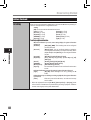
4 Rec Menu
Rec Mode
Zoom Mic
You can configure whether to adjust the recording level automatically or to adjust it manually.
1. Select the Recording level setting.
Setting:
[Manual]: Recording is performed by manually adjusting the recording level. When
[Rec Level] is set to [Manual] you can configure the limiter function.
[Auto]: Recording is performed by automatically adjusting the recording level. This is
useful for when you will be recording right away.
2. Select the Limiter setting.
This recorder is equipped with a limiter function that corrects the recording level
down to an appropriate range in cases where a loud noise is suddenly picked up.
This prevents distortion caused by an excessive recording level.
Setting:
[Limiter On]: Enables the limiter function, thus preventing distortion when recording.
[Limiter Off]: Disables this function.
• When [Rec Level] is set to [Auto] the recording level will be adjusted automatically. Set [Rec Level]
to [Manual] when using the recording level adjustment function and the limiter function.
The directional microphone function utilizes DiMAGIC’s (DiMAGIC Co., Ltd.) DiMAGIC
Virtual Microphone (DVM) technology. DVM is an audio pickup system which allows you
to record by focusing on sound from any direction. From expansive stereo recording
to high directivity recording, DVM represents the latest in directional control methods
that allow you to switch to a single exclusive microphone.
Setting:
[Off]: Record in natural stereo sound.
[Wide]: Record in expansive stereo sound.
[Standard]: Record in slight directivity stereo sound in the front direction.
[Narrow]: Record in directivity stereo sound.
[Zoom]: Record in high directivity sound. (Monaural recording)
• The directional microphone function has been designed so that this capability will be
elicited only with the built-in stereo microphone. Please note that the recorder will become
unable to record normally when using other commercially available microphones.
• You can use directional microphone only when [PCM] setting in [Rec Mode] is set to
[44.1kHz/16 bit].
4
Menu Setting
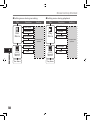
Rec Level
The recorder can record in the linear PCM format. High resolution recording at a high
sampling rate and high bit rate equivalent or superior to that of a music CD is possible.
Moreover, it also supports the MP3 and WMA formats.
1. Select the recording format.
Setting:
[PCM]: This is an uncompressed audio format which is used for music CDs and the like.
[MP3]: MPEG is the international standard established by a working group of the
ISO (International Organization for Standardization).
[WMA]: This is an audio compression encoding method that was developed by
the Microsoft Corporation in the US.
2. Select the recording rate.
Setting:
[PCM]: [96kHz/24bit] to [44.1kHz/mono]
[MP3]: [320kbps] to [mono]
[WMA]: [160kbps] to [mono]
• When the recording format is set to the MP3 or WMA formats, the sampling rate will
be encoded and processed at 44.1 kHz.
• When a high recording rate setting is used the file capacity will increase. Make sure
that the amount of memory remaining is sufficient before recording (☞ P.46).
• If the directional microphone function is used, you cannot change [PCM] setting in [Rec Mode]
other than [44.1kHz/16 bit]. You use the all modes in [MP3] or [WMA] of [Rec Mode].
• When [mono] of [MP3] is selected, the recording rate will be set to 64kbps.
• When [mono] of [WMA] is selected, the recording rate will be set to 32kbps.
43
Menu Setting Method
4 Rec Menu (Continued)
Rec Monitor
Select whether or not to output audio while recording from the earphone jack.
Setting:
[On]: Enables the recording monitor function. Sound will be output from the
EAR jack.
[Off]: Disables this function. Sound will not be output from the EAR jack.
• When the external speaker is connected while recording, there is a risk that audio
feedback will occur. It is recommended that you use earphones for the recording
monitor, or turn [Rec Monitor] to [Off] while recording (☞ P.27).
• When [Rec Monitor] is set to [Off] no sound will come out of the earphones while you are
recording (☞ P.27).
4
Plug-inPower
Menu Setting
External microphones which are supported by plug in power can also be used. Whether
or not to supply power to external microphones can be configured.
Setting:
[On]: When the plug-in power function is activated, power will be supplied to
the connected external microphone. Select this when external microphones
supported by plug-in power are connected (☞ P.30).
[Off]: Disables this function. Select this when external microphones not supported
by plug-in power are connected.
• Turn the plug-in power function to [Off] when an external microphone not supported
by plug-in power is connected, as there is the risk that noise may be generated while
recording.
• Phantom power cannot be supplied, even when the plug in power function is set to [On].
V-Sync. Rec
Voice sync recording starts when a voice louder than the voice sync level (detection
level) is detected. When the voice becomes quiet, recording is automatically stopped.
When voice sync recording is on and the voice is below the voice sync level (detection
level) for longer than the specified detection time, the recorder stops.
Setting:
[On]:[1 second] [2 seconds] [3 seconds] [4 seconds] [5 seconds] [10 seconds]:
Sets the detection time. If the input (recording level) is equal to or below
the specified level for longer than the specified detection time, the recorder
stops.
[Off]: Disables this function.
44
Menu Setting Method
4 Play Menu
Play Mode
There are six play modes. You can select whether to play by file or folder, or all files
stored in the recorder.
Setting:
[File]: Stop after playing back the current file.
[File Repeat]: Play the current file repeatedly.
[Folder]: Play files continuously in the current folder until the last file and stop.
[Folder Repeat]: Play all files in the current folder continuously.
[All]: Play all files in the selected memory continuously and stop.
[All Repeat]: Play all files in the selected memory continuously and repeatedly.
• In [File] mode, when the recorder comes to the end of the last file in the folder, [End] flashes
for two seconds on the display and the recorder stops at the start of the last file.
• In [Folder] mode, when the recorder comes to the end of the last file in the folder, [End]
flashes for two seconds on the display and the recorder stops at the start of the first file
in the folder.
• In [All] mode, after playing the last file in the folder, the recorder will start playing from the
first file in the next folder. When it comes to the end of the last file in the recorder, [End]
flashes for two seconds on the display and the recorder stops at the start of the first file
in the recorder.
You can enjoy the reverberant sound of various space sizes such as from
the recording studio to the dome.
Setting:
[Normal]: Disables the reverb function. Select this when playing back original
sounds as they are.
[Studio] [Club] [Hall] [Dome]: Select the preferred acoustical environment.
• When playing back WAV format files using these playback results, the sampling rate
and bit rate will be converted downward from 96 kHz to 48 kHz and 24 bit to 16 bit,
respectively.
• This function is only available during playback. This recorder cannot perform
recording by using the playback results.
• When you adjust the various sound quality settings related to playback on the
recorder, the audio output signal sent out from the EAR jack will change as well.
EUPHONY
This recorder is equipped with “EUPHONY MOBILE”, the latest in surround sound systems
which combines bandwidth correction, expansion technology, and virtual acoustical
source processing technology. In addition to its natural, expansive feel, the recorder is
equipped with the exceptional feature wherein listeners are less prone to developing
an compressed or closed-in feel, or to growing tired over extended listening. On top of
this, listeners are less prone to developing an oppressed or closed-in feel, or to growing
tired over extended listening. Level adjustments of the [EUPHONY] setting can be set
to four stages according to preference.
Setting:
[Normal]: Disables this function. Select this when playing back original sounds
as they are.
[Natural]: This mode achieves natural bandwidth correction and acoustical
field expansion.
[Wide]: This mode has an even more expansive feel.
[Power]: This mode focuses more on lower sound registers.
• When playing back WAV format files using these playback results, the sampling rate and
bit rate will be converted downward from 96 kHz to 48 kHz, 88.2kHz to 44.1kHz and 24 bit
to 16 bit, respectively.
• This function is only available during playback. This recorder cannot perform
recording by using the playback results.
• When you adjust the various sound quality settings related to playback on the
recorder, the audio output signal sent out from the EAR jack will change as well.
Menu Setting
Reverb
4
45
Menu Setting Method
4 LCD/Sound Menu
Backlight
Contrast
4
The display will remain lit for about 10 (Initial setting) seconds when a button on the
recorder is pressed.
Setting:
[5 seconds] [10 seconds] [30 seconds] [60 seconds] [Always on]:
Set the length of time that the backlight will remain lit.
[Off]: Disables this function. The backlight will not light up.
Display contrast can be adjusted in 12 levels.
Setting:
You can adjust the LCD display contrast level from [01] to [12].
LED
You can set it so the LED indicator light does not turn on.
Language
You can select the display language for this recorder.
Setting:
[On]: LED light will be set.
[Off]: Disables this function. LED light will be cancelled.
Menu Setting
Setting
[English] [Français] [Deutsch] [Italiano] [Español] [Русский]
• The selectable language differs depending on the region.
4 Memory Menu
MemorySelect
When an SD Card is inserted you can select to record to either the built-in flash memory
or to the SD Card (☞ P.14).
Setting:
[Built-in Memory]: Built-in flash memory.
[SD Card]: SD Card.
• When attempting to perform operations such as rewriting the contents of an SD Card
in cases where the card has been write protected, [SD Card Locked] will appear. The
playback operation can be performed, but the write protection must first be turned
off when overwriting the contents on the card (☞ P.18).
Memory Info.
The recordable capacity remaining and overall capacity of the recording media can
seen from the menu screen.
• When no SD Card is inserted only information for the built-in flash memory will
seen.
• The domain area which uses the administrative files which the recorder uses is
included in the remaining capacity for the recording media. For SD cards in particular,
in addition to this administrative domain the administrative domain area for the SD
card is added in as well. Owing to this, the remaining capacity will be displayed as
less than the card’s specified capacity, yet this is not abnormal.
Format
46
(☞ P.51)
Menu Setting Method
4 Others
Lock
Locking a file keeps important data from being accidentally erased. Locked files are
not erased when you select to erase all files from a folder (☞ P.38).
Setting:
[On]: Locks the file and prevents it from being erased.
[Off]: Disables this function. Unlocks the file and allows it to be erased.
• Select the files to be locked in advance before operating the menu.
• When attempting to perform operations such as rewriting the contents of an SD Card
in cases where the card has been write protected, [SD Card Locked] will appear. The
playback operation can be performed, but the write protection must first be turned
off when overwriting the contents on the card (☞ P.18).
(☞ P.54)
File Move
(☞ P.56)
File Divide
(☞ P.59)
AutoPowerOff
Forgetting to turn the power off can be prevented. If the recorder remains in stop
mode for over 10 minutes (Initial setting) while the power is turned on, the power will
be turned off.
Setting:
[5 minutes] [10 minutes] [30 minutes] [60 minutes]: Set the length of time before
the power will be turned off.
[Off]: Disables this function.
4
Menu Setting
Replace
• If any button is pressed, the elapsed time count before the power turns off will start
over again.
USB Settings
There are two USB settings when connecting the recorder to a computer using the supplied USB cable. [Storage Class] is used when using the recorder as an external storage
device. [Audio Class] is used when using the recorder as a USB microphone.
Setting:
[Storage Class]: The recorder is recognized as an external storage
device by the computer.
[Audio Class]: Use this setting when connecting the recorder to a
computer as a USB microphone.
Time & Date
(☞ P.15)
47
Menu Setting Method
4 Others (Continued)
Fn Setting
When functions are registered in the Fn button, each time the Fn button is pressed, you
can set or change the menu of registered function.
Setting:
[Off]: No functions will be allocated to the button.
[Index] (☞ P.35)
[Rec Mode] (☞ P.43)
[Rec Level]: (☞ P.43)
[Zoom Mic] (☞ P.43)
[Play Mode] (☞ P.45)
[Reverb] (☞ P.45)
[EUPHONY] (☞ P.45)
[MemorySelect] (☞ P.46)
[Property] (☞ P.49)
[Light] (☞ P.46)
To call up a registered function:
4
Menu Setting
When the Fn button is pressed, menu setting display of registered function
will appear:
[Rec Mode]:[PCM] [MP3] [WMA]: The recording rate can be configured
for each file format.
[Rec Level]:[Manual] [Auto]: You can configure whether to adjust the
recording level automatically or to adjust it manually. When
the [Rec Level] is set to [Manual] you can configure the limiter
function.
[Off] [Wide] [Standard] [Narrow] [Zoom]
[Zoom Mic]:
[ File] [ File Re peat] [ Folde r] [ Folde r Re peat] [ All]
[Play Mode]:
[All Repeat]
[Normal] [Studio] [Club] [Hall] [Dome]
[Reverb]:
[Normal] [Natural] [Wide] [Power]
[EUPHONY]:
[Built-in Memory] [SD card]
[MemorySelect]:
[Property]:File and folder information can be confirmed from the menu
screen.
Each time the Fn button is pressed, the setting of registered function is changed:
[Light]:[On] [Off]: Select backlight on or off by pressing the Fn
button.
If the Fn button is pressed during recording or playback, the registered function
is performed:
With each press of the Fn button, an index mark or temp
[Index]:
mark is added.
• When the registered function is [Rec Mode], [MemorySelect], or [Property], these
will not function if the Fn button is pressed during recording or playback. While the
recorder is during stop mode, press the Fn button.
48
Menu Setting Method
4 Others (Continued)
Menu Reset
This returns the functions back to their initial settings (factory default).
Setting:
[Start]: Returns the settings to their initial values.
[Cancel]: Takes you back to the [Others].
• After resetting the settings, the time settings and file numbers will be preserved from
before the reset and will not return to their initial settings.
Menu settings after setting reset (initial settings):
[Manual]
[Limiter On]
[Off]
[On]
[On]
[Off]
4 Play Menuu
[Play Mode]
[Reverb]
[EUPHONY]
[File]
[Normal]
[Normal]
[PCM]
[44.1kHz/16bit]
4 LCD/Sound Menuu
[10 seconds]
[Backlight]
[06]
[Contrast]
[On]
[LED]
4 Memory Menuu
[MemorySelect]
[Built-in Memory]
4 Others
[AutoPowerOff]
[USB Settings]
[Fn Setting]
[10 minutes]
[Storage]
[Off]
System Info.
You can check the recorder’s information on the menu screen. [Model Name], [Version]
and [Serial Number] appears on the display.
Property
File and folder information can be confirmed from the menu screen.
4
Menu Setting
4 Rec Menu
[Rec Mode]
Recording format
Recording rate
[Rec Level]
Recording level
Limiter function
[Zoom Mic]
[Rec Monitor]
[Plug-inPower]
[V-Sync. Rec]
When the file is selected: [Name] [Date] [Size] [Length] and [File Format] will
appear on the display.
When the folder is selected: [Name] and [Date] will appear on the display.
• Select the files for which you would like to confirm information in advance before
operating the menu.
49
Menu Setting Method
hSetting menu during recording
Tab
Function
Setting
hSetting menu during playback
Tab
Reverb
Zoom Mic
Play
Menu
Rec Monitor
Plug-inPower
Menu Setting
50
LCD/
Sound
Menu
Rec Menu
LED
EUPHONY
To menu item
options
To menu item
options
Backlight
Backlight
4
Setting
Play Mode
Rec Level
Rec
Menu
Function
LCD/
Sound
Menu
Play Menu
LED
Menu Setting Method
Formatting the Recorder [Format]
If you format the recorder, all files will be removed
and all function settings will return to defaults
except date and time settings. Transfer any
important files to a computer before formatting
the recorder.
2 3 button
9 0 button
`/OK button
the `/OK or 9 button to move
3Press
the cursor to the item to set.
[Memory Menu] will
appear on the display
the 2 or 3 button to select
4Press
[Format].
MENU button
4
• The menu will appear on the display (☞
P.41).
2
Press the 2 or 3 button to select
[Memory Menu] tab.
• You can change the menu display by moving the settings tab cursor.
5Press the `/OK or 9 button.
Menu Setting
1
While the recorder is during stop
mode, press the MENU button.
[Format] will appear
on the display
the 2 or 3 button to select the
6Press
recording media to format.
• When formatting an SD Card, cancel the
write protection function before inserting
the card into the recorder (☞ P.18).
51
Menu Setting Method
7 Press the `/OK button.
[Cancel] will appear on
the display
8Press the 2 button to select [Start].
9Press the `/OK button.
11Press the `/OK button.
• Formatting begins and [Format !] flashes
on the display.
• [Format Done] appears when formatting
ends.
Notes
4
Menu Setting
• After the [Data will be cleared] message is
on for two seconds, [Cancel] will turn on.
ress the 2 button again to select
10P[Start].
• When an SD Card is inserted in the recorder,
be sure to confirm the recording media as either
[Built-in Memory] or [SD Card] so that there is
no mistake (☞ P.41, P.46).
• When attempting to perform operations such as
rewriting the contents of an SD Card in cases
where the card has been write protected, [SD
Card Locked] will appear. The playback operation can be performed, but the write protection
must first be turned off when overwriting the
contents on the card (☞ P.18).
• Never perform operations such as the following
while processing, as they may damage the
data. In addition, replace the batteries with two
new ones in order to ensure that the batteries
will not run out while processing.
1Turning off the power while processing.
2Removing the batteries while processing.
3Remove the SD Card during processing
when [SD Card] is being used as the recording media.
Performing any of these operations may damage the data.
• Never format the recorder from a PC.
• Once the recorder is formatted, the music files
with DRM may not be transferred to the recorder
again.
52
Menu Setting Method
• When the recorder is formatted, all the saved
data, including locked files and read-only files,
are erased.
• After formatting, recorded audio file names may
start from [0001].
• When returning the settings for the functions
to their initial settings, use [Menu Reset]
(☞ P.41, P.49).
• Formatting on the recorder will be Quick
Format. If you format the SD card, information
of file management is refreshed and the data
inside the SD card is not deleted completely.
When handing over and disposing the SD card,
be careful about the data leakage from the
SD card. We recommend the SD card to be
destroyed when you dispose the SD card.
4
Menu Setting
53
Menu Setting Method
Rearranging files [Replace]
You can move a file in a folder to change the order
of playback. First select the folder (file) for which
you want to change the playback order.
the `/OK or 9 button to move
4Press
the cursor to the item to set.
[Others] will appear on
the display.
2 3 button
9 0 button
`/OK button
MENU button
4
the folder for which you would
1 Select
like to rearrange the song order (☞
Menu Setting
2
P.17 to P.21).
W hile the recorder is during stop
mode, press the MENU button.
• The menu will appear on the display (☞
P.41).
the 2 or 3 button to select
3Press
[Others] tab.
• You can change the menu display by moving the settings tab cursor.
54
Press the 2 or 3 button to select
5 [Replace].
6Press the `/OK or 9 button.
the 2 or 3 button to select the
7 Press
file you want to move.
Menu Setting Method
the `/OK or 9 button.
8Press
• The cursor will flash to confirm that the file
can be moved.
Note
• When attempting to perform operations such as
rewriting the contents of an SD Card in cases
where the card has been write protected, [SD
Card Locked] will appear. The playback operation can be performed, but the write protection
must first be turned off when overwriting the
contents on the card (☞ P.18).
the 2 or 3 button to select the
9Press
location to move it to.
4
Menu Setting
the `/OK button to complete the
10Press
setting.
• If there are more files to move, repeat Steps
7 through 10.
• Pressing the 0 button without pressing
the `/OK button will cancel the settings and
return you to the previous screen.
the MENU button to close the
11Press
menu screen.
55
Menu Setting Method]
Moving Files [File Move]
Files saved in the built-in memory or the SD card
can be moved or copied within the memory. Files
can also be moved or copied between memory.
the 2 or 3 button to select
4Press
[Others] tab.
2 3 button
9 0 button
`/OK button
MENU button
4
the folder where the file you
1 Select
want to move or copy is saved.
Menu Setting
the File list display, press the 2 or
2In3 button
to select the file you want to
the `/OK or 9 button to move
5Press
the cursor to the item to set.
[Others] will appear on
the display
move or copy.
Press the 2 or 3 button to select
6 [File
Move].
•
In the File display, press the 9 or 0
button to select a file.
the recorder is during stop
3While
mode, press the MENU button.
• The menu will appear on the display (☞
P.41).
56
• You can change the menu display by moving the settings tab cursor.
Menu Setting Method
7 Press the `/OK or 9 button.
[File Move] will appear
on the display
the 2 or 3 button to choose the
8Press
position to move or copy the file to.
9Press the `/OK or 9 button.
A Move or Copy folder
selection screen is
displayed.
file to.
the `/OK button to complete the
11Press
setting.
4
• [Moving!] or [Copying!] will appear on the
display and moving or copying will start.
During the process, the progress status
will be shown in percentage. The process
is completed when [File move completed]
or [File copy completed] is displayed.
Menu Setting
[Move to Built-in]:
Move a file in the built-in memory or SD card to
another folder within the built-in memory.
[Copy to Built-in]:
Copy a file in the built-in memory or SD
card to another folder within the built-in
memory.
[Move to SD Card]:
Move a file in the built-in memory or SD card
to another folder in the SD card.
[Copy to SD Card]:
Copy a file in the built-in memory or SD card
to another folder in the SD card.
the 2 or 3 button to select the
10Press
folder you want to move or copy the
the MENU button to close the
12Press
menu screen.
57
Menu Setting Method
Notes
4
Menu Setting
58
• The recorder cannot copy when the memory
capacity is not sufficient.
• The recorder cannot move or copy when the
number of file exceeds 199.
• Do not remove the batteries during moving or
copying. This may damage the datas.
• A file cannot be moved or copied to the same
folder.
• If there is a file with the same name in the
move/copy destination folder, [Cannot move.
Same name file exists] or [Cannot copy. Same
name file exists] is displayed. The file will not
be overwritten.
• When the operation is cancelled during moving
or copying, the move or copy is cancelled.
• Files which are locked will remain so even after
they are moved or copied.
• If you attempt to rewrite the contents in the SD
card when the SD card is write protected, [SD
Card Locked] will appear. The playback operation can be performed, but the write protection
must first be turned off when overwriting the
contents on the card (☞ P.18).
• DRM files cannot be moved or copied.
• Files cannot be moved or copied directly under
the [Root] folder.
Menu Setting Method
Splitting Files [File Divide]
PCM files recorded in this recorder can be split.
Files with large capacities and long recording
times can be split so that they are easier to
manage and edit.
the 2 or 3 button to select
3Press
[Others] tab.
2 3 button
9 0 button
`/OK button
MENU button
the PCM file you want to split,
1 Select
play or fast-forward the file and stop
• You can change the menu display by moving the settings tab cursor.
the `/OK or 9 button to move
4Press
the cursor to the item to set.
[Others] will appear on
the display
the 2 or 3 button to select [File
5Press
Divide].
a
4
Menu Setting
at where you want to split the file.
• Files with the recording mode of [96kHz],
[88.2kHz], [48kHz] or [44.1kHz] are files recorded
in the PCM format.
aRecording mode
the recorder is during stop
2While
mode, press the MENU button.
• The menu will appear on the display (☞
P.41).
59
Menu Setting Method
6Press the `/OK or 9 button.
[File Divide] will
appear on the display.
the 2 or 3 button to select [File
7 Press
Divide].
4
Menu Setting
8Press the `/OK or 9 button.
• [Dividing!] will be displayed and file splitting
will start. Splitting is completed when [File
divide completed] is displayed.
the MENU button to close the
9Press
menu screen.
60
Notes
• The file split cannot be done when the file list
is displayed.
• The recorder cannot split files when the number
of files in the folder exceeds 199.
• Locked files (☞ P.41, P.47) cannot be split.
• After a file has been split, the original file will
be renamed [File name_1.WAV] and the new
file will be named [File name_2.WAV].
• After a file has been split, the resulting files
retain the same creation date and modification
date as the original file.
• If a file has an extremely short recording time,
it may not be split even if it is a PCM file.
• Do not remove the batteries during splitting file.
This may damage the data.
Using the Recorder on Your PC
By being connected to a PC, the recorder enables
you to do the following:
• You can transfer files recorded with this
recorder to a computer, play them back, and
manage them by using Windows Media Player
or iTunes (☞ P.65, P.73).
• In addition to its uses as an IC recorder and a
music player, this recorder can also be used
as external memory for a computer by storing
data from a computer and reading it back out
(☞ P.64, P.77).
Notes
• This is an operational environment for saving
the files recorded by this recorder to your PC
with USB connection.
• To check the operational environment of
[Olympus Sonority] software, see a supplied
separate sheet.
• Even if operational environment is satisfied, we
do not support such as 64-bits OS, the multiboot environment and self-modified PC’s.
• Even if operational environment is satisfied, we
do not support such as upgraded OS, the multiboot environment and self-modified PC’s.
Precautions on using the recorder
connected to a PC
Windows
Operating System:
Microsoft Windows XP/ Vista/7 (Standard
Installation)
Compatible PC’s:
Windows PC’s equipped with more than one
free USB port
Macintosh
Operating System:
Mac OS X 10.4.11 ~ 10.6 (Standard Installation)
Compatible PC’s:
Apple Macintosh series equipped with more
than one free USB port
5
Using the Recorder on Your PC
Operating Environment
• When you are downloading a file from the
recorder or uploading a file to the recorder, do
not remove the USB cable even if the screen is
indicating you can. Data is still being transferred
while the [PEAK] indicator light is blinking. When
removing the USB cable, be sure to follow
the description in ☞ P.63. If the USB cable is
removed before the drive is stopped, data may
not be successfully transferred.
• On a PC, do not format the drive of the recorder.
Initialization is not successfully achieved on
a PC. For initialization, follow the instructions in the [Format] screen of the recorder
(☞ P.51).
• Folder (directory) names appeared by file
management tools such as Explorer attached
to Microsoft Windows is different from the folder
names that can be set with the recorder.
• If folders or files stored on the recorder are
moved or renamed by using a file management
tool such as Explorer, the order of files may be
changed or files may become unrecognizable
• Data can be written or uploaded to the recorder even
though the attribute of the recorder drive is shown
as Read-only by the operating system of the PC.
• As the noise may cause adverse effects on
electronics devices nearby the recorder, unplug
the earphone when you connect the recorder to
a PC.
61
Operating Environment
Copyright and Copyright Protection
Feature (DRM)
5
Using the Recorder on Your PC
62
By the Copyright Act, any voice/music files and
music CDs downloaded from the Internet without
the copyright holder’s permission may not be
reproduced, distributed, publicized/re-publicized
on the Internet, or converted into WMA or MP3
files for the purpose of commercial business
or sale.
A WMA file may be provided with DRM (Digital
Right Management) for copyright protection.
DRM limits the file to copy or distribute music
files that are converted (ripped) from a music CD
or downloaded from music distribution services.
To transfer a WMA file with DRM to the recorder,
you need to use appropriate methods such as
Windows Media Player. Copying the music files
with DRM purchased from online music distribution service to a portable device such as this
recorder may be restricted.
Connecting to Your PC
Connecting to Your PC
1 Boot the PC.
the USB connecting cable to
2Connect
the USB port of the PC.
that the recorder has stopped
3Confirm
and connect a USB connection cable
to the connection port on the side of
recorder.
Note
• This recorder is compatible with Microsoft
Corporation DRM9, but not with DRM10.
Windows:
When you open [My Computer], it will be recognized by the drive name [LS_5] (Built-in flash
memory) and [Removable Disk] (SD card).
Macintosh:
When you connect the recorder to a Mac OS, it
will be recognized by the drive name [LS_5] on
the desktop. When an SD card is inserted it will
be recognized by the drive name [Untitled].
Connecting to Your PC
[Connect (Storage)]
is appeared on
recorder if the USB
cable is connected
Macintosh
the drive icon for this recorder that
1 Move
is appear on the desktop to the garbage
bin by Drag & Drop it.
Note
• Be sure to use the attached dedicated cable
for the USB connection cable. If any other
company’s cable is used, it cause problems.
Also, please do not connect this dedicated
cable to any other company’s product.
Disconnecting from Your PC
[
] on the task bar located at
1 Click
the lower-right corner of the screen.
2Disconnect the USB cable.
Click [Safely remove USB Mass Storage
Device].
Notes
• The drive letter will differ depending on the
PC being used.
the safe to remove hardware
2When
window appears, click [OK].
3Disconnect
cable.
the USB connection
• NEVER disconnect the USB while the [PEAK]
indicator light is flashing. If you do, the data will
be destroyed.
• When the recorder is connected to a PC, the
power will be supplied from the USB cable.
• Refer to the user’s manual for your PC regarding the USB port on your PC.
• Be sure that you connect the USB cable either
directly to the USB port on your PC.
• Be sure to push the cable connector all the way
in. Otherwise, the recorder may not operate
properly.
• When connecting the recorder through an USB
hub the operation may become unstable. In
such cases, refrain from using a USB hub.
5
Using the Recorder on Your PC
Windows
• When you connect the recorder to a Mac
OS, it will be recognized by the drive name
[LS_5] on the desktop. When an SD card
is inserted it will be recognized by the drive
name [Untitled].
63
Transfer the Voice Files to Your PC
The 5 voice folders of this recorder are appeared
as [ DSS_ FLDA], [ DSS_ FLDB], [ DSS_ FLDC ],
[DSS_FLDD] and [DSS_FLDE], and the recorded
voice files are saved in these folders.
Windows
4 Drive name and folder name when a
personal computer is connected:
Built-in flash memory
Drive name
LS_5
1
Connecting the recorder to your PC
(☞ P.62).
2
the [LS_5] folder.
3Open
• When you open [My Computer], it will be
Open the Explorer window.
recognized by the drive name [LS_5] (Builtin flash memory) and [Removable Disk] (SD
card) (The drive letter will differ depending
on the PC being used).
5
Using the Recorder on Your PC
4
the recorder to your PC
5Disconnecting
(☞ P.63).
Copy the data.
Macintosh
DSS_FLDA
Folder A
DSS_FLDB
Folder B
DSS_FLDC
Folder C
DSS_FLDD
Folder D
DSS_FLDE
Folder E
Music
SD card
Drive name
Folder name
Removable
Disk
DSS_FLDA
Folder A
DSS_FLDB
Folder B
DSS_FLDC
Folder C
DSS_FLDD
Folder D
DSS_FLDE
Folder E
Windows
Untitled
1
Connecting the recorder to your PC
(☞ P.62).
• When you connect the recorder to a Mac
OS, it will be recognized by the drive name
[LS_5] on the desktop. When an SD card
is inserted it will be recognized by the drive
name [Untitled].
2
Double-click on [LS_5] icon on the
desktop.
3Copy the data.
the recorder to your PC
4Disconnecting
(☞ P.63).
64
Folder name
Macintosh
Music
Notes
• While transmitting data, [Busy] is appeared,
and the [PEAK] indicator light flashes. NEVER
disconnect the USB while the [PEAK] indicator
light is flashing. If you do, the data will be
destroyed.
•In the Windows operational environment 24 bit
WAV format files cannot be played back.
• When a sound board of your PC does not
support to 24 bit, the recorder cannot play the
software supporting to 24 bit correctly.
•In the Mac OS operational environment, WMA
format files cannot be played back.
Using Windows Media Player
By using Windows Media Player, music files from music CDs or language study CDs can be imported
to your PC (☞P.66) and music files that you have bought from any music distribution sites can be easily
transferred to the recorder to play (☞P.68).The files recorded on the recorder can be transferred to your
PC and can be copied to CD (☞P.71). It supports WAV, MP3, and WMA format music files.
Window Names
Windows Media Player 12
Windows Media Player 11
1
1
1
5
3
4 6 8 0
5 7 9
1Features taskbar
2Seek slider
3Shuffle button
4Repeat button
5Stop button
6Previous button
7Play button
8Next button
9Mute button
0Volume slider
2
3
4 6 8 0
5 7 9
1Features taskbar
2Seek slider
3Shuffle button
4Repeat button
5Stop button
6Previous button
7Play button
8Next button
9Mute button
0Volume slider
Using the Recorder on Your PC
2
65
2
Using Windows Media Player
Copying Music from CD
Windows Media Player 12
CD into the CD-ROM drive, and
1 Insert
start Windows Media Player.
2
From the Features taskbar, click [Rip
CD] menu.
2
3
• If Internet connectivity is available, CD
information is searched.
a check mark on the music file that
3Put
you want to copy.
5
Using the Recorder on Your PC
66
[Start Rip].
4Click
• Files copied to a PC are stored in WMA
format. Music files copied are categorized
by artist, album, genre, etc. and added to
the play list.
4
Using Windows Media Player
Windows Media Player 11
CD into the CD-ROM drive, and
1 Insert
start Windows Media Player.
the Features taskbar, click [Rip]
2From
menu.
• After clicking [Rip] menu, click [View Album
Info] for Windows Media Player 10 as
necessary.
• If Internet connectivity is available, CD
information is searched.
2
3
a check mark on the music file that
3Put
you want to copy.
[Start Rip].
4Click
• For Windows Media Player 10 Click [Rip
4
5
Using the Recorder on Your PC
Music].
• Files copied to a PC are stored in WMA
format. Music files copied are categorized
by artist, album, genre, etc. and added to
the play list.
67
Using Windows Media Player
Transferring Music File to the Recorder
You can transfer the music files saved in your PC to this recorder. For how to copy the music files from
the CD to your PC, see “Copying Music from CD” (☞ P.66).
Windows Media Player 12
the recorder to a PC, and
1 Connect
start Windows Media Player.
2
From the [Organize] menu, click
[Options]. At the Options dialog box,
click the [Devices] tab.
5
Using the Recorder on Your PC
68
the Devices list, select [LS_5].
3From
Next, click [Properties].
• Click on the [Create folder hierarchy on
device] to check. *1 *2
• The folder with artist name or album name
is automatically created. This will make
you find the file you want to listen to more
easily.
*1 If [Create folder hierarchy on device] is
checked by default, click to uncheck the
box once, and click it again to check.
*2 After the synchronous transfer to the
recorder, a file named “WMPInfo.xml” is
created. If you delete this file, the *1 may
need to be set again.
2
2
3
Using Windows Media Player
the desired category from
4Select
[Library] on the left, and select music
files or albums to transfer to the
recorder, and Drag & Drop them in
[Sync List] on the right.
[Start Sync].
5Click
• The file is transferred to the recorder.
5 4
Windows Media Player 11
2
From the Features taskbar, click
[Sync].
[Sync] menu again to select [DVR]
3Click
{ [Advanced Options] { [Set Up Sync],
and set as follows.
• Click on the [Create folder hierarchy on
device] to check. *1 *2
• The folder with artist name or album name
is automatically created. This will make
you find the file you want to listen to more
easily.
2, 3
5
Using the Recorder on Your PC
1
Connect the recorder to a PC, and
start Windows Media Player.
69
Using Windows Media Player
*1 If [Create folder hierarchy on device] is
checked by default, click to uncheck the
box once, and click it again to check.
*2 After the synchronous transfer to the
recorder, a file named “WMPInfo.xml” is
created. If you delete this file, the *1 may
need to be set again.
5
3
Using the Recorder on Your PC
the desired category from
4Select
[Library] on the left, and select music
files or albums to transfer to the
recorder, and Drag & Drop them in
[Sync List] on the right.
[Start Sync].
5Click
• The file is transferred to the recorder.
4
5
Notes
• Refer to the online help of Windows Media Player for details.
• Copying the music files with DRM purchased online music distribution service to a portable device such
as this recorder may be restricted.
• To transfer the files by using Windows Media Player 9 or 10, check the Olympus website.
• If the music files are transferred to the recorder until it reaches to the maximum memory, the message
[Cannot make the system file. Connect to PC and delete unnecessary file] may appear on this recorder’s
display. In such a case, erase the files to make free space (hundreds of KB to dozens of MB depending
on the music file sizes) for the management file (The more capacity for the management file will be
necessary as the number of the music files increases).
70
Using Windows Media Player
Copying Voice File to the CD
You can transfer the voice files in the recorder to your PC and copy them to CD. For how to copy the voice
files from the recorder to your PC, see “Transfer the Voice Files to Your PC” (☞ P.64).
Windows Media Player 12
1
Insert the blank CD-R/RW into
the CD-R/RW drive, and start
Windows Media Player.
2
From the Features taskbar, click
the [Burn] menu.
2
Select the desired category from
[Library] on the left, and select
3 voice
files or albums to copy to
5
4
Click [Burn] tab, and select [Data
CD or DVD] or [Audio CD].
When [Audio CD] is selected:
• A file is converted and copied in CD in
order to play it by the audio equipment
which can play CD-R/RW.
5
4
3
Using the Recorder on Your PC
the CD-R/RW, and Drag & Drop
them in [Burn List] on the right.
When [Data CD or DVD] is selected:
• Copying files with the format to be
recorded.
5 Click [Start Burn].
71
Using Windows Media Player
Windows Media Player 11
1
Insert the blank CD-R/RW into
the CD-R/RW drive, and start
Windows Media Player.
2
From the Features taskbar, click
the [Burn] menu.
2, 4
Select the desired category from
[Library] on the left, and select
3 voice
files or albums to copy to
the CD-R/RW, and Drag & Drop
them in [Burn List] on the right.
5
Using the Recorder on Your PC
4
Click [Burn] menu again, and select [Audio CD] or [Data CD].
When [Audio CD] is selected:
• A file is converted and copied in CD in order to play it by the audio equipment which can play
CD-R/RW.
When [Data CD] is selected:
• Copying files with the format to be recorded.
5 Click [Start Burn].
Note
• Refer to the online help of Windows Media Player for details.
72
3
5
Using iTunes
By using iTunes, music files from music CDs or language study CDs can be imported to your PC (☞P.74) and
music files that you have bought from any music distribution sites can be easily transferred to the recorder to
play (☞P.75).The files recorded on the recorder can be transferred to your PC and can be copied to CD (☞P.76).
Window Names
1
2
3
5
Using the Recorder on Your PC
4 5 67
1Features taskbar
2Rewind button/ Playback, Pause button/
Fast Forward button
3Volume slide
4Playlist addition button
5Shuffle button
8 90
6Repeat button
7Display change button
8Disc create button
9Genius button
0Genius side button
73
Using iTunes
Copying Music from CD
the CD into the CD-ROM
drive, and start iTunes.
1 Insert
1
3
2 Click [iTunes] { [Preferences].
3 Click [Advanced] tag.
[Importing] to set the file
format and bit rate for copying
4 Click
music files to your PC, and click
5
4
4
[OK].
Using the Recorder on Your PC
• This recorder is compatible with music files in the MP3 and WAV formats (☞ P.33).
[Import Using]:
Set the file format for copying music file from a CD. Please select [MP3] or [WAV].
[Setting]:
Set the bit rate for copying music file from
a CD. You can select a bit rate between
[128], [160] and [192].
ut a check mark on the music
that you want to copy.
5 Pfiles
6 Click [Import CD].
5
6
74
Using iTunes
Transferring Music File to the Recorder
You can transfer the music files saved in your PC to this recorder. For how to copy the music files from
the CD to your PC, see “Copying Music from CD” (☞ P.74).
the recorder to a PC, and
start iTunes.
1 Connect
the play list to be transferred
to the recorder, and put the check
2 Select
marks on the music files that you
2
want to transfer.
• The order of music pieces can be changed
by Drag & Drop of the music file in the play
list displayed.
• When you connect the recorder to a Mac
OS, it will be recognized by the drive name
[LS_5] on the desktop. When an SD card
is inserted it will be recognized by the
drive name [Untitled].
• Copy to [Music] folder of the recorder
when transferring the music file.
• You can create up to 2 hierarchies in the
[Music] folder. And up to 128 folders can
be made including [Music] folder.
• Up to 200 files can be stored in each
folder.
Drag & Drop
files here
Using the Recorder on Your PC
3
5
Double-click the corresponding
drive with the recorder, and
open [Music] folder.
4 Select the desired files, and Drag & Drop them to [Music] folder.
75
Using iTunes
Copying Voice File to the CD
You can transfer the voice files in the recorder to your PC and copy them to CD. For how to copy the voice
files from the recorder to your PC, see “Transfer the Voice Files to Your PC” (☞ P.64).
the CD-R/RW into the CDR/RW drive, and start iTunes.
1 Insert
the desired playlist, and
put a check mark on the voice
2 Select
files to copy to the CD-R/RW.
3 Click [Burn Disc].
5
Using the Recorder on Your PC
3
set the CD format for copying
files to CD-R/RW, and click
4 Tovoice
[OK].
When [Audio CD] is selected:
• A file is converted and copied in music CD
in order to play it by the audio equipment
which can play CD-R/RW.
When [MP3 CD] is selected:
• Copying in MP3 format.
When [Data CD] is selected:
• Copying files with the format to be
recorded.
76
2
4
Using as External Memory of the PC
In addition to its uses as an IC recorder and a
music player, this recorder can also be used as
external memory for a computer by storing data
from a computer and reading it back out.
With the recorder connected to your PC, you can
download data from the memory to your PC and
upload data stored on your PC to the memory.
Note
• While transmitting data, [Busy] is displayed,
and the [PEAK] indicator light flashes. NEVER
disconnect the USB while the [PEAK] indicator
light is flashing. If you do, the data will be
destroyed.
Windows
the recorder to your PC
1 Connecting
(☞ P.62).
2Open the Explorer window.
the [LS_5] folder.
3Open
• When you open [My Computer], it will be
4Copy the data.
the USB connection cable
5Disconnect
(☞ P.63).
Macintosh
the recorder to your PC
1 Connecting
(☞ P.62).
• When you connect the recorder to a Mac
OS, it will be recognized by the drive name
[LS_5] on the desktop. When an SD card is
inserted it will be recognized by the drive
name [Untitled].
5
Using the Recorder on Your PC
recognized by the drive name [LS_5] (Builtin flash memory) and [Removable Disk] (SD
card) (The drive letter will differ depending
on the PC being used).
on [LS_5] icon on the
2Double-click
desktop.
3Copy the data.
the USB connection cable
4Disconnect
(☞ P.63).
77
Other Information
Alarm Message List
Message
Meaning
Action
Low battery power.
Replace with new batteries (☞ P.11).
Erase-locked.
Tried to delete a locked file.
Unlock the file (☞ P.41, P.47).
Not an audio-recording
folder.
Recording has been
attempted with a [Music]
folder.
Select a folder from [A] through to
[E] and try recording again (☞ P.19
to P.21, P.23).
Folder full.
The folder is full of files
(maximum of 200 files).
Erase unnecessary files (☞ P.38).
Error in the memory.
This is a malfunction, so go to the
store where you purchased the
recorder or an Olympus service
station for repair (☞ P.81).
SD card is not recognized
correctly.
Remove the SD card then put it
again
(☞ P.17 to P.18).
Illegally copied file.
The music files copied
illegally.
Erase the file (☞ P.38).
Zero remaining
memory.
No remaining memory.
Erase unnecessary files (☞ P.38).
No file.
No files were found in the
folder.
Select another folder (☞ P.19 to
P.21).
Card Locked.
The SD Card is set to write
protection.
Undo the SD Card’s write protection
setting and then try again (☞ P.18).
Formatting error.
There was an error while
formatting the recorder’s
memory.
Reformat the memory (☞ P.51).
Can’t make the
system file. Connect
to PC and delete
unnecessary file
The management file
cannot be created.
The file for management
cannot be created due to
a shortage of capacity for
remaining memory.
Connect the recorder to a computer
and delete any unnecessary files.
Data Write Error
The data is not
written correctly in the
memory.
Data writing to memory
cannot be done in time and
the recorded sound skips.
Format the memory (☞ P.51).
Battery Low
File Protected
Can't record in this
folder
Folder Full
Memory Error
Error in the memory.
6
Other Information
Licence Mismatch
Memory Full
No File
SD Card Locked
Format Error
78
Explanation
Battery power is getting
low.
Troubleshooting
Symptom
Probable cause
The batteries are not loaded properly.
Nothing appears on the
Battery power is getting low.
display
Won’t start
Unable to record
Replace with new batteries (☞ P.11).
The power is off.
Turn the power on (☞ P.13).
Battery power is getting low.
Replace with new batteries (☞ P.11).
The power is off.
Turn the power on (☞ P.13).
The recorder is in HOLD mode.
Release the recorder from HOLD (☞ P.13).
Low remaining memory.
Erase unnecessary files (☞ P.38).
The ma ximum number of f iles has Change to the another folder
been reached.
(☞ P.19 to P.21, P.23).
The SD Card is set to write protection.
No sound picked up by the An external microphone or external
built-in microphone
device is connected.
Undo the SD Card’s write protection setting
and then try again (☞ P.18).
Detach all external microphones and
external devices connected to the LINE IN
jack and the MIC jack (☞ P.30, P.31).
An external device is connected to the
LINE IN jack.
Detach the connecting cord from the
recorder.
An external microphone supported by
plug-in power is connected but [Plug-in
Power] is set to [Off].
Set [Plug-inPower] to [On] when an
external microphone supported by plug-in
power is connected (☞ P.41, P.44).
The earphone is connected.
Unplug the earphones to use the internal
speaker.
The volume level is set to [0].
Adjust the volume level (☞ P.32).
No playback tone heard
6
Other Information
Unable to record through an
external microphone
Action
Verify that the batteries’ polarities = and
- are correct (☞ P.11).
The recording level has not been ad- Adjust the recording level and then try
justed.
recording once more (☞ P.26).
Recording level too low
The microphone sensitivity is too low.
Set the microphone sensitivity to [HIGH]
mode and try again (☞ P.27).
This could potentially be because the
recording level and output level for the
connected external devices are too low.
If you cannot record clearly even after
adjusting the recording level, then adjust the
output level for the connected devices
(☞ P.23).
The recording level has not been ad- Adjust the recording level and then try
justed.
recording once more (☞ P.23).
Recording level too high
This could potentially be because the
recording level and output level for connected external devices are too high.
If you cannot record clearly even after
adjusting the recording level, then adjust the
output level for the connected devices
(☞ P.23).
79
Troubleshooting
Symptom
Probable cause
Action
Voice files are not recorded The connected external microphone is
in stereo
monaural.
When recording while an external monaural
microphone is connected, sound will only be
recorded by the L-channel.
Cannot find the recorded
Wrong recording media or folder.
Voice File
Switch to the correct recording media or
folder (☞ P.19 to P.20, P.23, P.41, P.46).
The recorder was shaken during recording.
--------
The recorder was placed near a cell
phone or fluorescent lamp while recording Move the recorder.
Noise heard during playback or during playback.
The settings of the connected external
microphone do not correspond to those
of the recorder.
When a microphone not supported by the
plug-in power function is connected, turn
the [Plug-inPower] setting to [Off] (☞ P.41,
P.44).
The file is locked.
Unlock the file (☞ P.41, P.47).
The file is read-only.
Cancel the read-only setting of the file on
the PC.
Unable to erase
6
Other Information
80
Unable to hear any sound
from the earphone through The [Rec Monitor] is set to [Off].
the recording monitor
Noise is audible through the
Acoustic feedback is occurring.
recording monitor
Turn the [Rec Monitor] setting to [On]
(☞ P.41, P.44).
When the built-in speaker amps and the
like are connected there is a risk that audio
feedback will occur while recording. It is
recommended that you use earphones for the
recording monitor, or turn the [Rec Monitor] to
[Off] while recording (☞ P.41, P.44).
Conduct adjustments like separating the
earphones from the microphone farther, do
not point the microphone at the earphones,
lower the volume on the recording monitor,
and so on.
Technical Assistance and Support
The following are contact information for technical support for Olympus recorders and software only.
s Technical Hotline Number in the U.S. and Canada
1-888-553-4448
s User Support E-mail address in the U.S. and Canada
[email protected]
s Technical Hotline Number in Europe
Toll free number: 00800 67 10 83 00
available for Austria, Belgium, Denmark, Finland,
France, Germany, Italy, Luxemburg, Netherlands,
Norway, Portugal, Spain, Sweden, Switzerland,
United Kingdom
Charged numbers for the Rest of Europe
+ 49 180 567 1083
+ 49 40 23773 4899
s User Support E-mail address in Europe
[email protected]
6
Other Information
81
Accessories (optional)
Accessories exclusive to the Olympus IC recorder can be purchased directly from Online Shop on our company’s website.
Sales of accessories are different according to the country.
Stereo microphone: ME51S
The ME51S stereo microphone comes in a set
with an extension cord and a clip.The built-in
large-diameter microphone enables sensitive
stereo recording.
2 channel microphone (omni-directional):
ME30W
Two ME30 monaural microphones come in a
set with a miniature tripod and a connection
adapter. These are highly sensitive omnidirectional microphones supported by plug-in
power which are well-suited to recording
musical performances.
Compact Gun Microphone (unidirectional): ME31
The directional microphones is useful for
recordings such as outdoor recording of wild
birds singing. The metal-cut body provides a
sturdiness to the high rigidity.
6
Other Information
82
Highly sensitive noise-cancellation
monaural microphone (unidirectional):
ME52W
This microphone is used to record sound at a
distance while minimizing surrounding noise.
Tie clip microphone (omni-directional):
ME15
Small concealing microphone with a tie-clip.
Telephone pickup: TP7
Earphone type microphone can be plugged into
your ear while phoning. The voice or conversation
over the phone can be clearly recorded.
Ni-MH rechargeable battery and charger set:
B-90SU (For U.S.A. and Canada)
BU-90SE (For Europe)
B-90SU or BU-90SE comes with an Ni-MH
rechargeable battery charger and 4 Ni-MH
rechargeable batteries B-01 4PE as a pack.
This charger can quick charge Olympus AA or
AAA Ni-MH rechargeable batteries.
Ni-MH rechargeable battery:
B-01 4PE (Europe only)
4 Ni-MH rechargeable batteries B-01 4PE
as a pack. High-efficiency rechargeable long
life batteries.
Connecting cord: KA333
Connecting cord which has stereo mini-plugs
(ø3.5) with resistance at both ends. Use to
connect from the earphone jack output of
the recorder to the microphone input jack
when recording. Converting plug adapters
(PA331/PA231) which convert to the monaural
mini plug (ø3.5) or monaural mini plug (ø2.5)
are also enclosed.
Exclusive remote control set: RS30W
When the receiver is plugged into the REMOTE
jack the recorder’s recording and stop functions can be operated through the remote
control. The receiving position can be adjusted,
thereby allowing you to operate the recorder
from various different angles.
AC adapter: A515
Specifications
General points
4 LINE IN Jack (During recording or playback
mode):
Linear PCM format
Recording mode
Overall frequency response
96 kHz
20 Hz to 44 kHz
88.2 kHz
20 Hz to 42 kHz
48 kHz
20 Hz to 23 kHz
44.1 kHz
20 Hz to 21 kHz
44.1 kHz/mono
20 Hz to 21 kHz
MP3 format
Recording mode
Overall frequency response
320 kbps
50 Hz to 20 kHz
256 kbps
50 Hz to 20 kHz
128 kbps
50 Hz to 17 kHz
mono
50 Hz to 13 kHz
WMA format
Recording mode
Overall frequency response
160 kbps
50 Hz to 19 kHz
128 kbps
50 Hz to 19 kHz
64 kbps
50 Hz to 15 kHz
mono
50 Hz to 13 kHz
6
Other Information
4 Recording format:
Linear PCM (Pulse Code Modulation)
MP3 (MPEG-1/MPEG-2 Audio Layer3)
WMA (Windows Media Audio)
4 Input level:
MIC SENSE HIGH/LOW switch is set to [HIGH]:
- 59 dBv
MIC SENSE HIGH/LOW switch is set to [LOW]:
- 39 dBv
LINE IN jack input:
- 6 dBv
4 Maximum headphone output:
6.7 mW + 6.7 mW (at load of 16 Ω)
≤
_ 150 mV (According to EN 50332-2)
4 Recording medium:
Built-in NAND FLASH memory (2 GB)
SD card (512 MB to 32 GB)
4 Speaker:
Built-in ø 16 mm round dynamic speaker
4 MIC jack:
ø 3.5 mm mini-jack, impedance 2 kΩ
4 LINE IN jack:
ø 3.5 mm mini-jack, impedance 78 kΩ
(approx.)
4 EAR jack:
ø 3.5 mm mini-jack, impedance 8 Ω or more
4 Maximum working output:
200 mW + 200 mW (8 Ω speaker)
4 Input power requirement:
Batteries: Two AA batteries (LR6) or Two
Ni-MH rechargeable batteries
External power supply: AC adapter 5 V
4 External dimensions:
131.5 mm × 48 mm × 22.4 mm
(without protrusions)
4 Weight:
165 g (including alkaline batteries)
Overall frequency response:
4 Built-in stereo microphone (During
recording mode):
60 Hz to 20 kHz
• However, when recording by the MP3
format or the WMA format, the upper
limit value of the frequency response
depends on each recording mode (see
above diagram).
83
Specifications
Guide to recording times
4Linear PCM format:
SD card
Recording
mode
Built-in flash
memory (2 GB)
512 MB
1 GB
2 GB
96 kHz 24 bit
55 min.
10 min.
25 min.
55 min.
4 GB
8 GB
16 GB
32 GB
1 h. 50 min. 3 h. 45 min. 7 h. 30 min. 15 h. 25 min.
96 kHz 16 bit
1 h. 25 min.
20 min.
40 min.
88.2 kHz 24 bit
1 h.
15 min.
30 min.
1 h. 20 min. 2 h. 50 min. 5 h. 45 min. 11 h. 30 min. 23 h. 10 min.
1 h.
2 h.
4 h. 10 min. 8 h. 15 min. 16 h. 45 min.
88.2 kHz 16 bit
1 h. 35 min.
20 min.
45 min.
1 h. 30 min.
3 h. 5 min.
6 h. 15 min. 12 h. 30 min. 25 h. 15 min.
48 kHz 24 bit
1 h. 55 min.
25 min.
55 min.
1 h. 50 min. 3 h. 50 min. 7 h. 40 min.
15 h.
31 h.
48 kHz 16 bit
2 h. 55 min.
40 min.
1 h. 25 min. 2 h. 50 min. 5 h. 45 min. 11 h. 30 min.
23 h.
46 h. 30 min.
44.1 kHz 24 bit
2 h. 5 min.
30 min.
1 h.
2 h.
44.1 kHz 16 bit
3 h. 10 min.
45 min.
1 h. 30 min.
3 h. 5 min.
44.1 kHz mono
6 h. 20 min.
1 h. 25 min.
3 h.
Recording
mode
Built-in flash
memory (2 GB)
512 MB
1 GB
2 GB
4 GB
8 GB
16 GB
32 GB
320 kbps
14 h. 10 min.
3 h. 30 min.
7 h.
13 h. 50 min.
28 h.
55 h. 40 min.
110 h.
224 h.
35 h.
69 h. 40 min.
137 h.
280 h.
139 h.
275 h.
560 h.
276 h.
562 h.
1120 h.
4 h. 10 min. 8 h. 20 min. 16 h. 30 min. 33 h. 45 min.
6 h. 15 min. 12 h. 35 min.
25 h.
4 h. 50 min. 12 h. 10 min. 24h. 55 min. 50h. 50 min.
50 h. 40 min.
101 h.
4 MP3 format:
6
Other Information
256 kbps
17 h. 45 min.
4 h. 20 min. 8 h. 50 min. 17 h. 20 min.
128 kbps
35 h. 35 min.
8 h. 50 min. 17 h. 40 min. 34 h. 50 min. 70 h. 10 min.
mono
71 h. 10 min.
17 h.
Recording
mode
Built-in flash
memory (2 GB)
512 MB
8 GB
16 GB
32 GB
160 kbps
27 h. 50 min.
6 h. 50 min. 13 h. 50 min. 27 h. 10 min. 54 h. 50 min.
109 h.
215 h.
438 h.
128 kbps
34 h. 45 min.
8 h. 30 min. 17 h. 20 min.
68 h. 40 min.
136 h.
269 h.
547 h.
64 kbps
69 h. 35 min. 17 h. 20 min. 34 h. 50 min. 68 h. 10 min.
137 h.
272 h.
538 h.
1095 h.
139 h. 10 min. 33 h. 20 min. 66 h. 55 min.
266 h.
539 h.
1098 h.
2189 h.
34 h. 10 min. 54 h. 50 min.
136 h.
4WMA format:
mono
84
SD card
SD card
1 GB
2 GB
34 h.
107 h.
4 GB
Specifications
Notes
• The above values are strictly rough guides.
• Variations in the available recording time will arise as there may be differences in the available memory
depending on the card.
• Caution is required, since the differences in the available recording time will increase when the bit count
and bit rate are low.
• Available recording time may be shorter if many short recordings are made (The displayed available
recording time and recorded time are approximate indications).
• The maximum capacity for a single file is limited to approx. 4 GB for WMA and MP3, and approx. 2 GB
for Linear PCM format (WAV).
• For WMA format files, the file length for a single file is limited to a maximum length of approx. 26 hours
and 40 minutes. For this reason, it will differ from the continuous recording time for a single file.
Guide to battery life
4Alkaline batteries:
Built-in stereo speakers
(During playback mode)
Linear PCM format
96 kHz 24 bit
13 h. 30 min.
29 h.
44.1 kH 16 bit
23 h.
52 h.
Built-in stereo microphone
(During recording mode)
Built-in stereo speakers
(During playback mode)
96 kHz 24 bit
13 h.
24 h.
44.1 kHz 16 bit
22 h. 30 min.
42 h.
4 Ni-MH Rechargeable batteries:
Recording mode
Linear PCM format
6
Other Information
Built-in stereo microphone
(During recording mode)
Recording mode
Notes
• The above values are strictly rough guides.
• Battery life is measured by Olympus. It varies greatly according to the type of batteries used and the
conditions of use.
Specifications and design are subject to
change without notice.
85
MEMO
Declaration of Conformity
Model Number
:LS-5
Trade Name
:DIGITAL VOICE RECORDER
Responsible Party
:OLYMPUS IMAGING AMERICA INC.
Address
:3 500 Corporate Parkway, P.O. Box 610, Center Valley, PA 18034-0610, U.S.A.
Telephone Number :1-888-553-4448
This device Complies with Part 15 of the FCC Rules. Operation is subject to the following two conditions: (1) This
device may not cause harmful interference, and (2) this device must accept any interference received, including
interference that may cause undesired operation.
Canadian RFI
Tested To Comply
With FCC Standards
FOR HOME OR OFFICE USE
This digital apparatus does not exceed the Class B limits for radio noise emissions from digital apparatus as set out in the Radio
Interference Regulations of the Canadian Department of Communications.
Cet appareil numérique ne dépasse pas les limites de la Catégorie B pour les émissions de bruit radio émanant d’appareils numériques,
tel que prévu dans les Règlements sur l’Interférence Radio du Département Canadien des Communications.
For customers in Europe
“CE” mark indicates that this product complies with the
European requirements for safety, health,environment
and customer protection.
This symbol [crossed-out wheeled bin WEEE
Annex IV] indicates separate collection of waste
electrical and electronic equipment in the EU
countries. Please do not throw the equipment into
the domestic refuse. Please use the return and
collection systems available in your country for the
disposal of this product.
Applicable Product : LS-5
Das „CE“ Zeichen bestatigt die Ubereinstimmung mit
den Europaischen Bestimmungen fur Betriebssicherheit
und Umweltschutz.
Dieses Symbol [durchgestrichene Mülltonne
nach WEEE Anhang IV] weist auf die getrennte
Rücknahme elektrischer und elektronischer Geräte
in EU-Ländern hin. Bitte werfen Sie das Gerät nicht
in den Hausmüll. Informieren Sie sich über das in
Ihrem Land gültige Rücknahmesystem und nutzen
dieses zur Entsorgung.
Anwendbare Produkte : LS-5
L’indication “CE” signifie que ce produit est conforme
aux exigences concernant la sécurité, la santé,
l’environnement et la protection du consommateur.
Le symbole [poubelle sur roue barrée d’une croix WEEE
annexe IV] indique une collecte séparée des déchets
d’équipements électriques et électroniques dans
les pays de L’UE. Veuillez ne pas jeter l’équipement
dans les ordures domestiques. A utiliser pour la mise
en rebut de ces types d’équipements conformément
aux systèmes de traitement et de collecte disponibles
dans votre pays.
Produit applicable: LS-5
З н а к " C E " о б о з н а ч а е т, ч т о э т о т п p о д у к т
с оответствует евpопейским тpебованиям по
безопасности, охpане здоpовья, экологической
безопасности и безопасности пользователя.
Этот символ [пеpечеpкнутая мусоpная уpна
WEEE на колесах, пpиложение IV] обозначает
pаздельный сбоp электpических и электpонных
отходов в Pоссии. Пожалуйста, не выбpасывайте
изделия в бытовой мусоpопpовод. Используйте
системы возвpата и сбоpа (если таковые имеются)
для утилизации отходов вышеуказанных типов.
Пpименимое изделие: LS-5
La marca “CE” indica que este producto cumple con
los requisitos europeos en materia de seguridad, salud,
medio ambiente y protección al consumidor.
Este símbolo [un contenedor de basura tachado
con una X en el Anexo IV de WEEE] indica que
la recogida de basura de equipos eléctricos y
electrónicos deberá tratarse por separado en los
países de la Unión Europea. No tire este equipo
a la basura doméstica. Para el desecho de este
tipo de equipos utilice los sistemas de devolución
al vendedor y de recogida que se encuentren
disponibles.
Producto aplicable: LS-5
Il marchio “CE” indica che questo prodotto è conforme
alle norme della comunità europea per quanto riguarda
la sicurezza, la salute, l’ambiente e la protezione del
consumatore.
Questo simbolo [contenitore di spazzatura barrato
come illustrato nell’allegato IV della direttiva
WEEE] indica una raccolta separata dei rifiuti di
apparecchiature elettriche ed elettroniche nei paesi
dell’Unione Europea. Si prega di non gettare questo
dispositivo tra i rifiuti domestici. Si prega di utilizzare
i sistemi di raccolta e di recupero disponibili per lo
smaltimento di questo tipo di dispositivi.
Prodotto applicabile : LS-5
OLYMPUS IMAGING CORP.
Shinjuku Monolith, 3-1 Nishi-Shinjuku 2-chome, Shinjyuku-ku, Tokyo 163-0914, Japan. Tel. +81 (0)3-3340-2111
http://www.olympus.com
OLYMPUS IMAGING AMERICA INC.
3500 Corporate Parkway, P.O. Box 610, Center Valley, PA 18034-0610, U.S.A. Tel. 1-888-553-4448
http://www.olympusamerica.com
OLYMPUS EUROPA HOLDING GMBH
(Premises/Goods delivery) Wendenstrasse 14-18, 20097 Hamburg, Germany. Tel. +49 (0)40-237730
(Letters) Postfach 10 49 08. 20034 Hamburg, Germany.
http://www.olympus-europa.com
E1-BS0495-02
AP1003